


RACI Chart in Project Management—Definition, Examples, and Templates

Ryan Tanner
Product Marketing Specialist
Aug 5, 2026
Ryan Tanner
Aug 5, 2026

22 min read


In every successful project, clarity around who does what is non-negotiable. Misunderstandings over responsibility or authority can cause missed deadlines, duplicated work, and frustrated teams. This is where the RACI chart project management framework proves essential. By defining who is Responsible, Accountable, Consulted, and Informed, a RACI chart ensures that every task has a clear owner and transparent workflow.
It brings structure to collaboration, especially in cross-functional or remote environments. With tools like Lark, teams can easily visualize and update these role assignments in real time, maintaining accountability without adding complexity. This guide explores what a RACI chart is, how it works, key variations, and practical templates to get started.

What is a RACI chart in project management?
A RACI chart in project management is a structured tool used to define and document team roles and responsibilities for each project task or deliverable. The acronym stands for Responsible, Accountable, Consulted, and Informed—four key levels of involvement that ensure clarity and accountability throughout a project's lifecycle. By creating a RACI chart for project management, teams can eliminate confusion, prevent overlapping duties, and improve communication across departments. Each task is mapped against team members or stakeholders to identify who performs the work, who approves it, who provides input, and who stays informed. This RACI chart project management definition helps streamline decision-making, track ownership, and maintain visibility on progress.
Whether using spreadsheets or modern collaboration tools like Lark, a RACI chart template project management approach provides structure and transparency, especially in complex or cross-functional environments.
RACI vs other responsibility assignment models
While the RACI chart in project management is the most widely used responsibility framework, several alternative models exist to suit different organizational needs. These variations adjust the level of detail and decision-making roles, offering flexibility based on team size, structure, and workflow. Understanding these differences helps project managers select the right tool for clear accountability. Comparing RACI with RASCI, DACI, and RAPID highlights how each model enhances or modifies the traditional RACI chart project management structure.
- RACI vs RASCI (adds "Support"): The RASCI model extends the standard RACI chart definition in project management by adding the "Support" role. This category identifies individuals who assist those responsible for completing tasks. It's particularly effective in larger projects where extra help or shared execution is needed without shifting accountability.
- RACI vs DACI (Driver–Approver–Contributor–Informed): DACI focuses on decision-making rather than task execution. The "Driver" ensures progress, the "Approver" gives final authorization, and "Contributors" provide input, while others remain informed. This approach fits product development or strategic projects, where the emphasis is on guiding and approving key decisions rather than performing operational work.
- RACI vs RAPID: RAPID, developed by Bain & Company, is another decision-making framework that stands for Recommend, Agree, Perform, Input, and Decide. Unlike the RACI chart for project management, RAPID clearly separates who suggests actions, who approves, and who executes. It's often used in executive or governance contexts where clarity in decision ownership is critical.
- When to choose each model: Use the RACI chart in project management for most general workflows that require structured accountability and clear communication. Choose RASCI for projects involving large support teams, DACI for innovation or design-focused work, and RAPID for strategic or high-level decision-making. Selecting the right framework ensures smoother execution and balanced participation.
RACI chart components and structure
A RACI chart in project management is built on a simple yet structured format that connects tasks with the people responsible for them. Its effectiveness lies in breaking down complex workflows into clear, actionable roles and relationships. By mapping out who is responsible, accountable, consulted, and informed, the chart turns project management planning into a transparent, collaborative process. Understanding each component ensures your RACI chart is complete, functional, and easy to maintain throughout the project lifecycle.
- Tasks/Deliverables: The foundation of every RACI chart project management framework is a detailed list of tasks or deliverables. Each item represents a key output that contributes to project goals. Defining these clearly helps establish measurable accountability and prevents gaps in execution.
- Roles/Stakeholders: Next, the RACI chart identifies all project participants—team members, leaders, and stakeholders. Each role is listed along the top or side of the matrix. This structure ensures that everyone involved understands their place in the workflow and their specific contributions.
- Assignment values (R, A, C, I): The core of the RACI chart for project management lies in assigning the right level of responsibility to each role. "R" stands for Responsible, "A" for Accountable, "C" for Consulted, and "I" for Informed. Applying these correctly ensures balanced workloads and transparent communication channels.
- Approval logic: Approval logic defines how decisions flow within the project. It determines who must review, sign off, or validate each deliverable before progress continues. This layer of the RACI chart definition in project management reinforces accountability and prevents unauthorized or premature actions.
- Visual layout (grid-based responsibility matrix): A RACI chart template project management layout is typically grid-based, aligning tasks on one axis and roles on the other. Each cell marks a specific responsibility assignment, creating a clear visual map of ownership. The format makes it easy to read, update, and share across teams using digital tools like Lark.
RACI chart examples for different project types
A RACI chart in project management can be adapted for nearly any industry or workflow. Whether managing software releases, marketing initiatives, or large-scale infrastructure, the framework ensures clarity and coordination. Each example below demonstrates how responsibilities are divided across team members to match the project's complexity and communication needs. Using a RACI chart template for project management allows teams to customize roles and streamline collaboration effortlessly.
Software development project RACI example
In software projects, the RACI chart helps align developers, testers, product owners, and stakeholders. The development team is responsible, the product owner is accountable, QA teams are consulted, and end users are informed. This structure minimizes confusion in agile sprints and ensures accountability for every release cycle.
Marketing campaign RACI example
A marketing RACI chart project management setup typically includes roles like marketing managers, content creators, designers, and analysts. Managers are accountable for overall execution, while creative and analytics teams are responsible for delivery. Consulted stakeholders may include brand heads, ensuring consistent messaging and performance tracking.
Construction/Engineering RACI example
In construction plans or engineering projects, clarity of roles is vital for compliance and safety. The project manager is accountable, the site engineers and contractors are responsible, and the architects or consultants are consulted. A well-defined RACI chart for project management ensures coordination between design, execution, and quality control teams.
IT project RACI example
An IT RACI chart is used to manage system upgrades, infrastructure setup, or data migrations. The IT manager is Accountable, system administrators are responsible, and security experts or vendors are Consulted. This setup supports risk management, technical validation, and efficient implementation across technical teams.
Product launch RACI example
For product launches, a RACI chart project management model connects teams across marketing, design, operations, and support. The launch manager is Accountable, while marketing and logistics teams are responsible for execution. Consulted roles may include finance or legal teams to ensure compliance and successful go-to-market alignment.
How to create a RACI chart
Creating a RACI chart in project management is a systematic process that ensures every role and task is defined with precision. A well-structured chart promotes efficiency, accountability, and seamless collaboration across teams. By following a clear step-by-step approach, project managers can prevent confusion and maintain balanced workloads. Whether using spreadsheets or collaboration platforms like Lark, building a RACI chart template for project management is simple and highly effective.
Step 1: Identify the project tasks and milestones
Start by listing all major tasks, activities, and milestones that make up the project plan. This forms the foundation of your RACI chart project management layout. The more specific your task list, the easier it becomes to assign roles and track progress.
Step 2: List all roles and stakeholders
Next, identify everyone involved in the project, from team members to decision-makers. Include internal and external stakeholders who influence or support the process. This ensures that no key contributor or approver is overlooked in the RACI chart for project management.
Step 3: Assign R, A, C, I for each task
Now, allocate responsibility levels—Responsible, Accountable, Consulted, and Informed—to each role for every task. This assignment creates clarity about who performs, approves, advises, and is kept updated. A structured RACI chart definition in project management eliminates overlap and ambiguity in execution.
Step 4: Validate workload and clarify accountability
Review the chart to ensure that no team member is overloaded with "R" or "A" designations. Each task should have one clear Accountable person, while responsibilities can be shared. This validation step keeps your RACI chart balanced and practical for real-world implementation.
Step 5: Share and review with all project participants
Once drafted, circulate the RACI chart to all team members and stakeholders for feedback. Discuss any unclear roles or overlaps before finalizing. A collaborative review helps ensure everyone agrees on their level of involvement, promoting transparency and alignment.
Step 6: Keep the RACI chart updated throughout the project
Projects evolve, and so should your RACI chart. Revisit and revise it when scope, timelines, or responsibilities change. Keeping the RACI chart template project management document current helps maintain clarity and ensures accountability stays consistent from start to finish.
Ready-to-use RACI templates for smarter project coordination
We here offer ready-to-use RACI chart templates that simplify how teams assign roles, manage accountability, and monitor progress. These templates eliminate manual setup by providing a structured framework for defining Responsible, Accountable, Consulted, and Informed roles across tasks:
Raci chart
The RACI chart template helps teams clearly map out responsibilities across projects using a simple, grid-based format. It defines who is Responsible, Accountable, Consulted, and Informed for each task, reducing confusion and overlap. This template is ideal for managing complex, multi-department initiatives where coordination is key. By visualizing ownership, it ensures every deliverable has clear accountability from start to finish.
Raci matrix
The RACI matrix template provides a structured view of project roles and responsibilities in a tabular format. It helps teams assign R, A, C, and I values for every task, making accountability easy to track. This matrix ensures balanced workloads and prevents gaps or overlaps in responsibilities. Perfect for project managers, it promotes transparency and smooth coordination across departments.
Project tracking
The project tracking template helps teams monitor progress, deadlines, and task ownership in one organized workspace. It centralizes updates, ensuring visibility into who is doing what and when. With clear accountability and real-time tracking, teams can identify delays early and stay aligned. Ideal for managing both short-term and long-term projects, it keeps execution structured and efficient.
Short-term project plan
The short-term project plan template is designed to help teams manage fast-moving initiatives with clear milestones and priorities. It outlines key tasks, owners, and deadlines to keep execution on schedule. By breaking projects into focused, time-bound phases, it supports quick decision-making and accountability. Ideal for campaigns, product updates, or internal improvements, it ensures clarity and momentum from start to finish.
OKR mind map development
The OKR mind map development template helps teams visualize objectives and key results in an interactive, structured layout. It connects high-level goals with measurable outcomes, making it easier to track progress and alignment. By mapping dependencies and ownership, teams can see how each task contributes to broader objectives. This template is ideal for planning, reviewing, and refining OKRs across departments.
R&D personnel gantt chart
The R&D personnel gantt chart template helps research and development teams plan projects, allocate resources, and track progress over time. It visualizes tasks, timelines, and team responsibilities in an intuitive timeline format. By mapping dependencies, teams can identify bottlenecks and adjust schedules efficiently. Ideal for managing complex R&D workflows, it ensures transparency, coordination, and on-time delivery.
Modern tool that supports RACI-based project management
The importance of RACI is undeniable, and today's advanced tools make it far easier for business teams to apply RACI charts effectively. Platforms like Lark provide a unified workspace that makes implementing RACI chart project management easier and more efficient. Its flexible data structure, automation, and collaboration tools help teams clearly define responsibilities while keeping communication transparent.
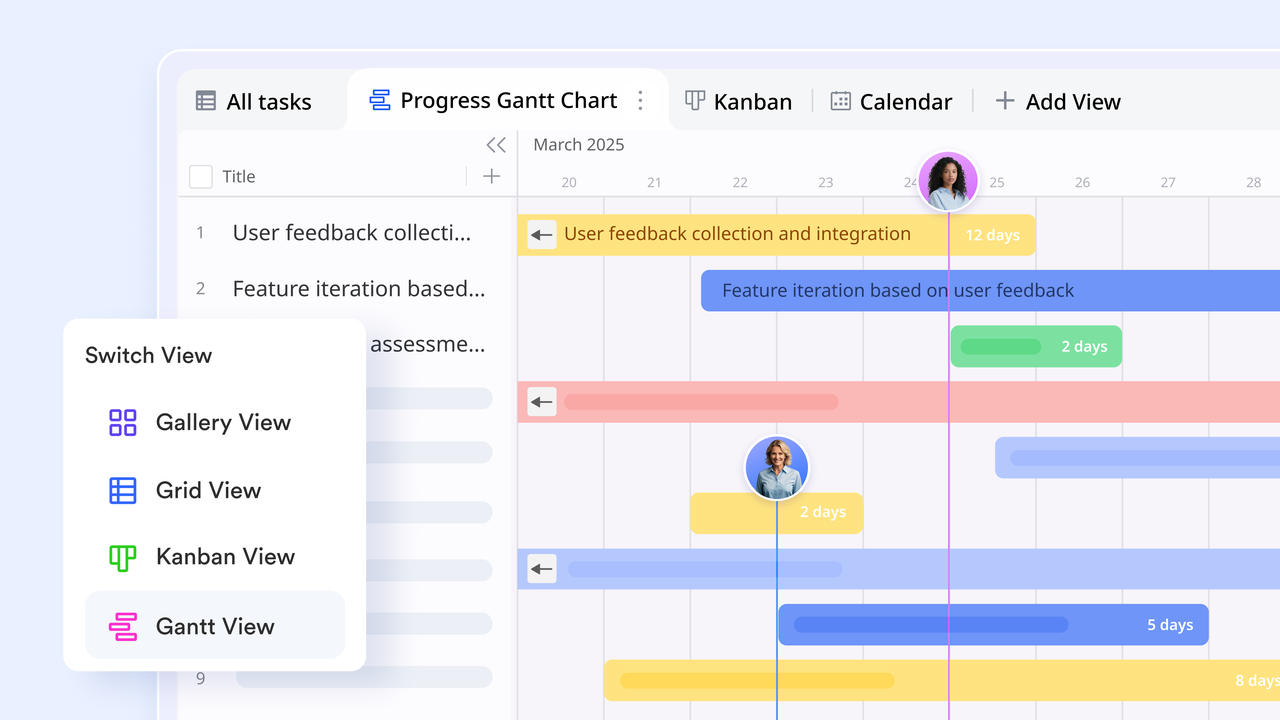
Instead of relying on static spreadsheets, teams can model roles, tasks, and deliverables dynamically across linked tables. Features like Person fields, filters, and automated notifications ensure accountability stays visible and actionable. With multiple views—such as Grid, Gantt, and Kanban—Lark allows every role to see information in the format most relevant to them.
Multiple views: Monitor RACI responsibilities from the perspective you need
Lark Base renders the same underlying data in Kanban, Gantt, Calendar, and Grid views. Each view is useful for a different RACI audience:
- Kanban grouped by Responsible shows day-to-day flow for doers.
- Gantt with Accountable columns helps managers inspect timelines and sign-off points.
- Calendar surfaces milestone dates for Informed stakeholders.
- Grid is ideal for coordinators running bulk updates or exporting status.
Switching views doesn't duplicate work—it simply reframes the same dataset so each RACI role sees what matters most.
Use example: share a read-only Gantt view with executives showing Accountable owners and milestone dates, while the team uses a Kanban board for execution.
Tables: Model roles, tasks, and deliverables as real data
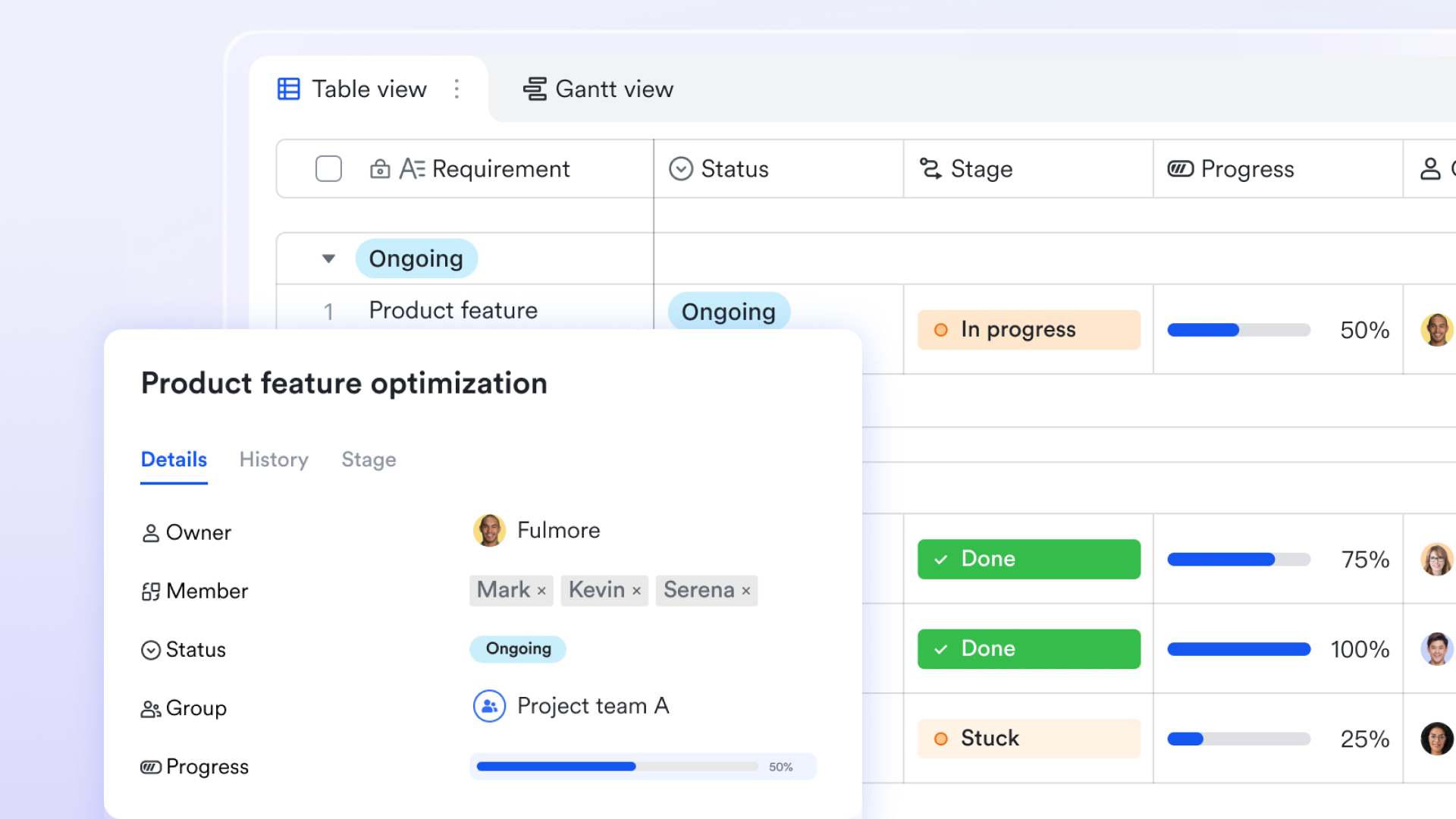
Instead of squeezing everything into one sheet, create separate, purpose-built tables in Lark Base for Projects, Tasks, Roles, and Deliverables. That lets you store the exact fields each object needs (e.g., a Task row holds due date, estimate, and linked deliverable; a Role row holds person, department, and contact). For RACI, this matters because you can explicitly assign an R/A/C/I value at the task level while keeping role definitions centralized.
Use example: create a Roles table with rows like "Product Lead," "QA Lead," and "Marketing Manager," then link those rows into your Tasks table so ownership and position are always clear.
Person field: Attach a human owner to every responsibility
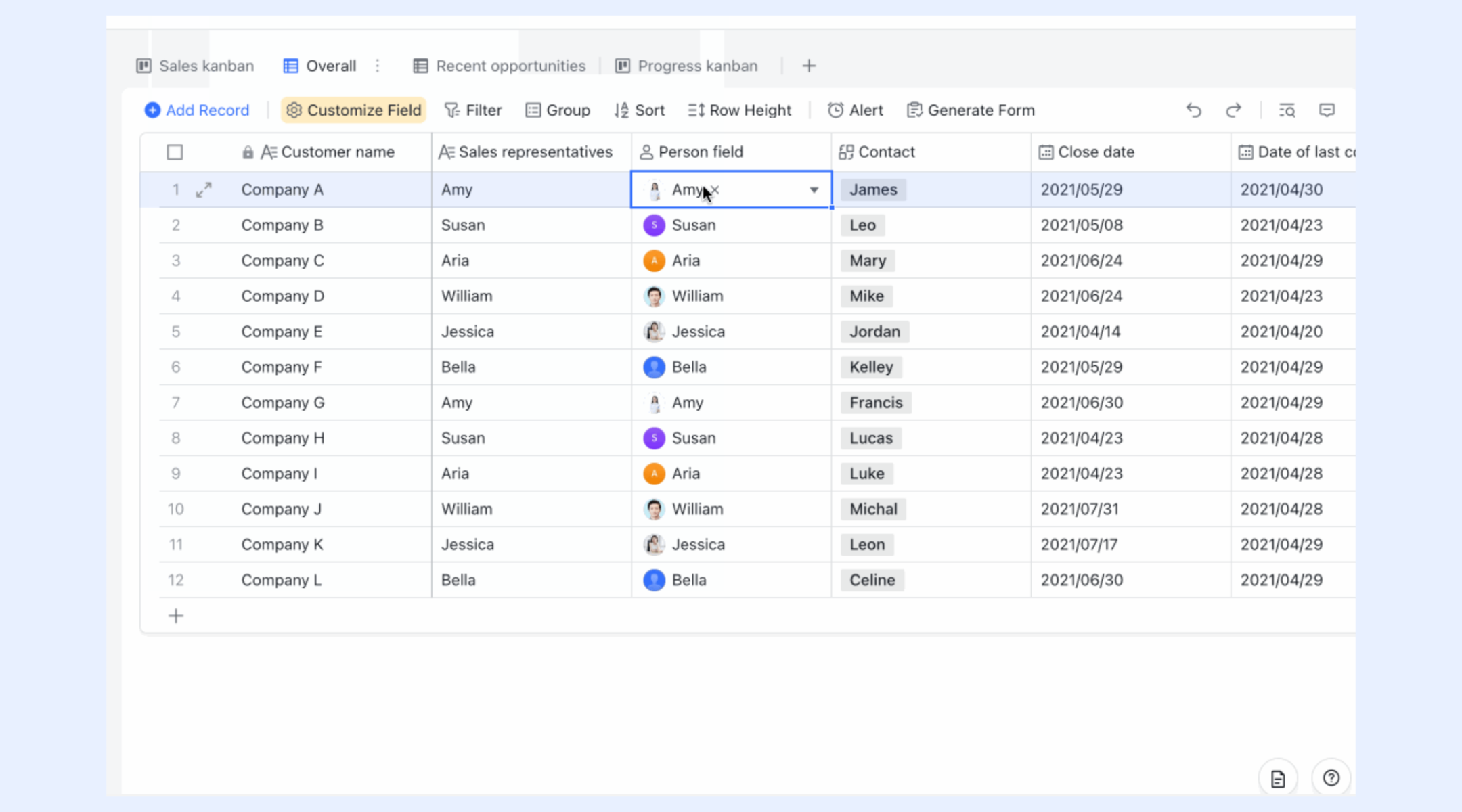
The person field in Lark Base lets you point a specific team member to a task or role. For RACI, you can use one or more person fields (or a small set of custom fields) to capture who is Responsible and who is Accountable for each item. Because the person field references actual user accounts, notifications, mentions, and permission checks can reference the real assignee—not just a name string. This eliminates ambiguity (who actually does the work?) and makes it trivial to route reminders and approvals to the right person.
Use example: add two Person fields on the Task table—Responsible and Accountable—so every task row explicitly shows who will do the work and who signs it off.
Groups and filters: Give each role a focused workspace
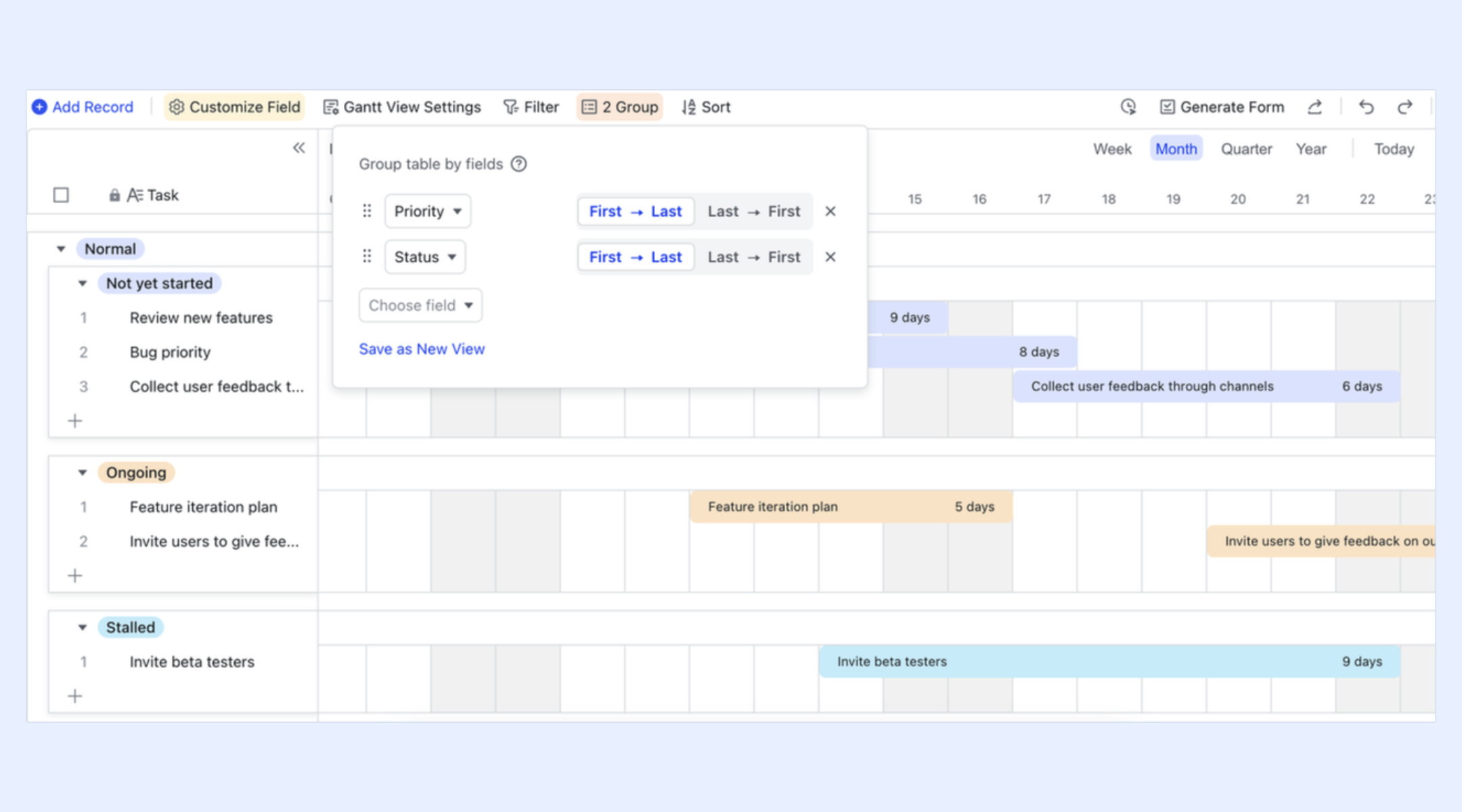
Groups and filters let anyone build ad-hoc views such as "All items where Accountable = Maria" or "Consulted = Legal and status = At Risk." For RACI, this provides role-specific dashboards: managers can group by "Accountable" to see everything they must approve, while individual contributors filter by "Responsible" to see only their active work. Because groups and filters are live, these views reflect the current truth—not an exported report—turning status meetings into action sessions.
Use example: save a filter view called "My Accountabilities" that shows every Task where the Accountable Person equals the current user and status ≠ Done.
Automations: Enforce RACI follow-ups without micromanagement
Automation rules let you build simple if/then flows: when a task's status changes, notify the "Responsible" person; if a task marked for approval reaches a given state, notify the "Accountable" person and create an approval request; if a "Consulted" stakeholder hasn't replied in X days, ping the project coordinator. For RACI, this removes the manual chore of chasing acknowledgements and ensures the correct role is acted at the right time. Because automations run inside the workspace, they use the live person assignments you already set—no extra mappings required.
Use example: rule: When a task's status changes from "In Draft" to "Ready for Review", send a message to "Accountable" and create an approval record.
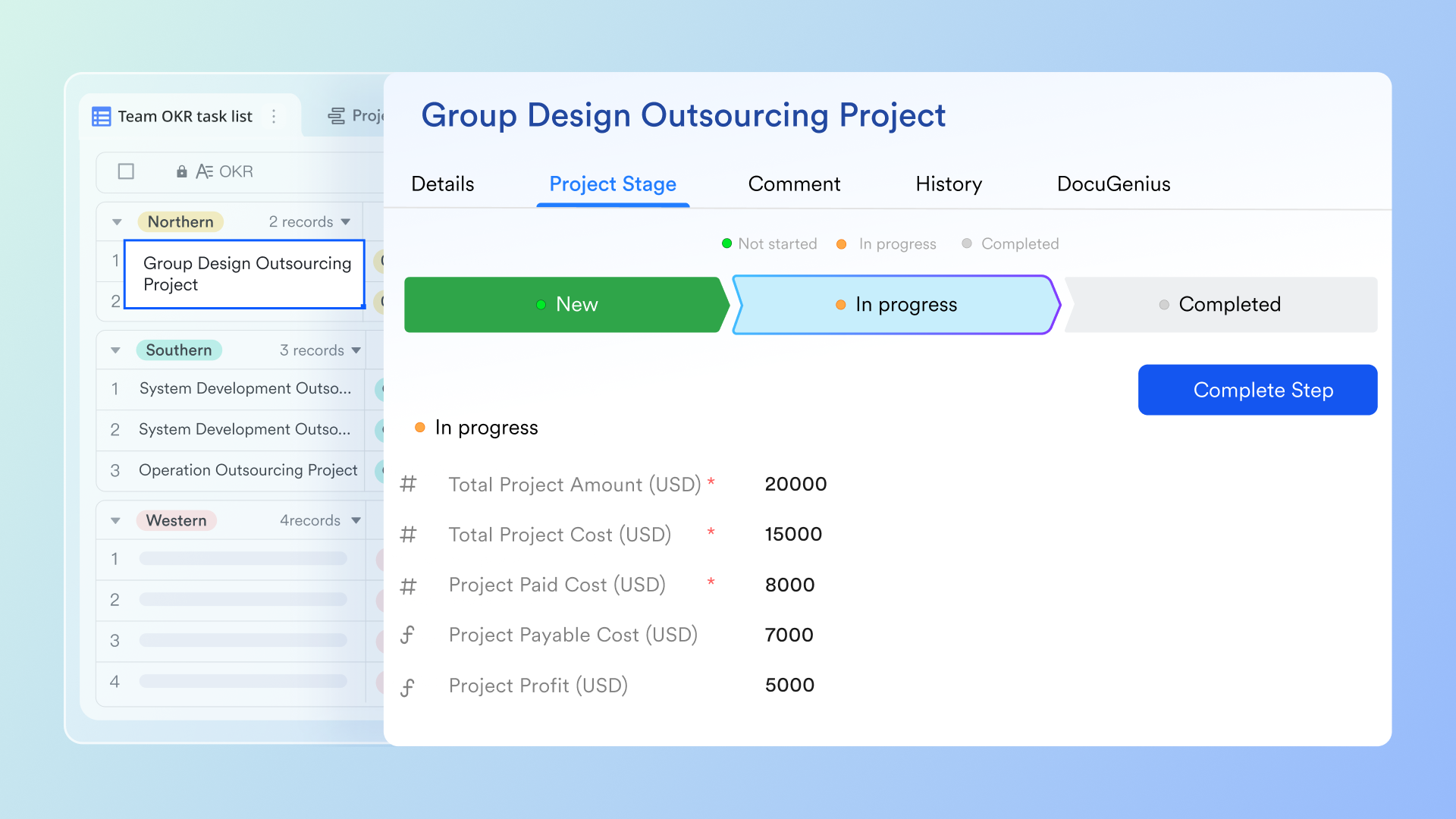
- Starter plan: Free forever plan that includes 11 powerful tools for up to 20 users. It also comes with 100GB of storage, 1000 automation runs, AI translations, and more.
- Pro plan: $12/user/month (billed annually) for up to 500 users. It includes everything in Starter plus group calling for up to 500 attendees, 15TB of storage, 50,000 automation runs, and more.
- Enterprise plan: Contact sales for custom pricing. Supports unlimited users and includes even more automation runs and advanced security, compliance, and management features.
Why RACI charts matter in modern project management
In modern workflows, where projects often span multiple teams and geographies, clear accountability is crucial. A RACI chart in project management helps create structure by defining who is responsible, accountable, consulted, and informed for every task. It ensures that decision-making and execution align, even when roles overlap. Using a RACI chart for project management not only improves efficiency but also strengthens collaboration and visibility across the organization.
- Clarifies ownership and eliminates guesswork: A RACI chart definition in project management establishes explicit ownership of each task. Team members know their exact responsibilities, reducing uncertainty about who should act or approve. This clarity helps keep projects on schedule and prevents miscommunication about deliverables.
- Improves cross-team communication: When multiple departments are involved, communication gaps can derail progress. A project management RACI chart outlines consultation and information pathways, ensuring updates reach the right people. It builds transparency and fosters stronger collaboration between teams.
- Reduces bottlenecks and handoff delays: By identifying accountable and responsible roles early, RACI charts prevent approval or handoff delays. Each stage of the project has a defined decision-maker and executor, helping workflows move smoothly. This is especially valuable in large or distributed teams.
- Helps avoid duplication of effort: Without a structured approach, teams often duplicate work or revisit completed tasks. A RACI chart for project management ensures responsibilities don't overlap unnecessarily. It clarifies boundaries, allowing resources to be used efficiently and productively.
- Ensures stakeholder visibility: A RACI chart project management framework keeps stakeholders informed about progress without overinvolving them in daily execution. It provides a clear map of accountability and reporting, improving oversight while maintaining operational focus. This visibility builds trust and supports better governance.
When to use a RACI chart
A RACI chart in project management is most effective when there's a need for structured coordination among multiple contributors. It clarifies ownership, strengthens communication, and ensures accountability across departments or external partners. However, it's not a one-size-fits-all tool—certain project types benefit more from flexibility than formal structure. Knowing when to apply or skip a RACI chart project management framework helps maintain efficiency and relevance.
- Good for complex, cross-functional tasks: The RACI chart template project management approach works best for initiatives involving multiple teams or business units. It ensures that responsibilities are well-defined and dependencies are managed effectively. This clarity helps prevent confusion when projects span disciplines such as operations, design, and compliance.
- Not ideal for agile teams with fluid responsibilities: Agile environments thrive on adaptability and collective ownership, which may conflict with rigid RACI assignments. When teams collaborate organically and shift roles frequently, a RACI chart for project management can slow momentum. Instead, lightweight task boards or sprint planning tools may serve better.
- Use for stakeholder-heavy initiatives: Projects that involve numerous stakeholders—like mergers, regulatory changes, or enterprise rollouts—benefit from a formal RACI structure. It helps track who must be informed, consulted, or approved at each stage. This structured accountability ensures alignment and reduces miscommunication across departments or external partners.
- Avoid for routine or personal task lists: For simple, repetitive, or individual tasks, a RACI chart definition in project management may add unnecessary complexity. Personal productivity or small team checklists rarely need multiple responsibility layers. In such cases, straightforward to-do lists or Kanban boards are more practical and efficient.
RACI chart best practices for success
Creating a RACI chart in project management is only effective when implemented with consistency and clarity. Following best practices ensures the chart remains a reliable tool rather than a static document. By keeping the framework simple, updating it regularly, and aligning it with the team's workflow, project managers can maintain accountability and transparency throughout execution. These practices help transform a RACI chart from a planning tool into a living part of project coordination.
- Use a single RACI chart per project: Maintaining one centralized RACI chart project management document prevents duplication and confusion. When teams refer to a single source of truth, decision-making becomes faster and alignment improves. This approach ensures that all stakeholders track the same responsibilities and updates in real time.
- Review at every major milestone: A RACI chart template project management setup should evolve with the project's progress. Reviewing it at milestones helps identify shifting responsibilities, new stakeholders, or emerging dependencies. Regular updates keep the chart relevant and prevent miscommunication as the project scales.
- Simplify roles to avoid ambiguity: Complex charts with overlapping roles can cause confusion and slow execution. Keeping assignments straightforward—one responsible and one accountable per task—makes ownership clear. This simplicity ensures each deliverable has a defined leader and prevents duplicated efforts or authority gaps.
- Match RACI to your team's workflow: The best RACI chart for project management complements how your team already operates. Whether the workflow is linear or agile, aligning RACI roles with actual processes maintains efficiency. Customizing chart formats and update frequency helps the framework integrate naturally into daily operations.
- Use automation for reminders and updates: Automation enhances RACI chart project management by ensuring accountability without constant supervision. Setting automated notifications or approval requests keeps team members informed and tasks on track. This approach helps enforce responsibilities seamlessly, reducing manual follow-ups and missed deadlines.
Conclusion
A RACI chart in project management brings structure, clarity, and accountability to every stage of a project. By defining who is Responsible, Accountable, Consulted, and Informed, teams can eliminate confusion, streamline communication, and ensure that every task has a clear owner. From planning to execution, a well-built RACI chart helps prevent overlap, reduce delays, and promote transparency across departments. Whether you're managing a software rollout, marketing campaign, or product launch, incorporating RACI principles ensures alignment and efficiency.
With Lark, teams can take RACI implementation to the next level using linked tables, automation, and customizable templates designed for real-time collaboration. These project management tools make managing responsibilities easier, keeping everyone on the same page while reducing manual effort.
FAQs
Can agile teams use RACI charts effectively?
Lark helps agile teams adapt RACI chart project management principles without compromising flexibility. While agile emphasizes shared ownership, a lightweight RACI framework can clarify accountability for cross-functional tasks like releases, reviews, or approvals. It ensures transparency in decision-making while maintaining agility. When balanced correctly, RACI supports coordination without restricting team autonomy.
What tools are best for creating a RACI chart?
RACI charts can be created using tools like Lark, Excel, or project management platforms such as Asana or Smartsheet. Lark stands out for its dynamic tables, real-time collaboration, and automation features that make updating and sharing effortless. Teams can link roles, tasks, and approvals seamlessly. This ensures every stakeholder has access to the latest version and can collaborate efficiently.
How often should you update a RACI chart?
A RACI chart in project management should be reviewed regularly—especially after major milestones or scope changes. Frequent updates ensure it reflects current realities, shifting priorities, or evolving team structures. Keeping it current helps avoid confusion about ownership. It also ensures accountability remains aligned with ongoing project needs.
Is a RACI chart the same as a responsibility assignment matrix?
A RACI chart and a responsibility assignment matrix (RAM) serve the same purpose—clarifying who does what—but differ in presentation and usage. The RACI model adds structure through its four role types: Responsible, Accountable, Consulted, and Informed. A RAM can take various forms beyond RACI, such as RASCI or DACI. In practice, RACI is one of the most common RAM frameworks used in project management.
Related reading
Table of contents
Start using Lark today

Manage all your work in one place
Boost team efficiency by 10x
Save up to 70% on software costs
Table of contents
Start using Lark today
Manage all your work in one place
Boost team efficiency by 10x
Save up to 70% on software costs
Keep reading







2026 Lark Technologies Pte. Ltd.
Headquartered in Singapore with offices worldwide.






Explore: