














Agile Software Project Management: 11 Tools and Reviews

Emma Zong
Product Marketing Manager
Nov 3, 2026
Emma Zong
Nov 3, 2026

16 min read
Add to preferred sources


Agile project management software has transformed how modern teams plan, execute, and deliver work. By emphasizing flexibility, collaboration, and continuous improvement, agile methodology enables organizations to adapt swiftly to change and deliver value more efficiently. As the adoption of agile practices grows, choosing the right tool becomes essential for maintaining productivity and transparency. In this guide, we'll explore the best agile project management software options—such as Lark, Jira, Trello, and Asana highlighting their features, benefits, and reviews to help you find the ideal platform for streamlined, high-performing agile workflows. Here are the top 11 agile project management software tools in 2025.
- Lark: best for all-in-one agile collaboration and project execution
- Trello: best for simple, visual task boards and team organization
- Jira: best for powerful agile tracking and sprint management
- Asana: best streamlined teamwork and project planning
- Monday.com: best for flexible, customizable workflow management
- ClickUp: best for productivity and sprint tracking in one place
- Wrike: best for scalable collaboration and enterprise reporting
- Smartsheet: best for spreadsheet-style agile project planning
- Zoho: best for affordable agile and issue tracking
- Microsoft Azure DevOps: best for enterprise-grade agile development
- Notion: best for lightweight agile documentation and task management
Explore the best agile project management software to improve collaboration, visibility, and productivity across your team.

What is agile project management software?
Agile project management software is a digital tool designed to help teams implement agile practices such as Scrum, Kanban, and Sprint cycles. It supports flexible planning, real-time collaboration, and continuous delivery—core principles of the agile methodology. Using features like visual task boards, sprint planning tools, and built-in reporting dashboards, teams can track progress, identify bottlenecks, and adapt quickly to changing priorities.
Unlike traditional project management, which follows a fixed, sequential (Waterfall) approach, agile software project management promotes iterative development, transparency, and collaboration. This allows teams to continuously refine processes and deliver incremental value instead of waiting until the project's end. In short, agile project management software bridges strategy and execution, empowering teams to stay aligned, productive, and responsive in dynamic work environments.
Benefits of using agile project management software
Adopting agile project management software helps teams work smarter, communicate better, and respond faster to change. These tools streamline workflows, encourage collaboration, and provide real-time visibility leading to improved outcomes and higher team efficiency. Below are the key benefits of using agile project management tools:
- Improved collaboration & transparency: Agile project management software centralizes tasks, discussions, and updates, making information accessible to everyone. Team members can track progress, share feedback, and collaborate in real time, reducing silos and misunderstandings. This transparency builds accountability and alignment across departments.
- Faster adaptability to change: With features like Kanban boards and sprint planning, teams can quickly adjust priorities and reassign tasks as project needs evolve. Agile tools make it easier to pivot mid-sprint strategies without disrupting the entire workflow—helping teams stay agile and resilient.
- Enhanced productivity & efficiency: Automations, templates, and collaborative communication tools minimize repetitive work and save valuable time. Teams can focus on execution rather than manual updates or follow-ups, leading to faster project delivery and higher efficiency across workflows.
- Data-driven insights for better decision-making: Most agile project management software includes analytics and reporting dashboards that track team performance, sprint velocity, and task completion rates. These data-driven insights empower leaders to identify trends, optimize workloads, and make informed strategic decisions.
As agile tools evolve, all-in-one platforms like Lark are taking these benefits even further—combining task tracking, communication, and data reporting into a single workspace for true real-time agility.
Key features to look for in agile project management software tools
Selecting the right agile project management software requires understanding which features truly enhance collaboration, adaptability, and performance. The best tools go beyond basic task tracking; they empower teams to plan efficiently, communicate seamlessly, and make data-driven decisions. Here are the key features to look for:
- Task and sprint management: Effective task and sprint management are the foundation of agile workflows. Look for tools that offer customizable Kanban and Scrum boards, backlog organization, and sprint planning modules. These help teams break down large goals into manageable tasks, visualize progress, and maintain focus on deliverables throughout each sprint cycle.
- Team communication and collaboration features: Agile thrives on transparency and collaboration. The ideal software should include collaborative chat, file sharing, and real-time commenting so that team members can discuss updates, share feedback, and make quick decisions. Built-in collaboration tools reduce reliance on external apps, helping teams stay aligned and connected.
- Connection with existing tools: Integration capabilities are crucial for productivity. Your agile project management software should seamlessly connect with tools like Slack, GitHub, Google Workspace, or CRM systems. This ensures smooth data flow across platforms, reduces manual effort, and keeps all project-related activities centralized in one ecosystem.
- Reporting, analytics, and feedback loops: To continuously improve, teams need insights, not just data. Look for agile software with customizable dashboards, burndown charts, and performance analytics that track sprint velocity, workload balance, and completion rates. These insights support retrospective analysis and drive smarter, evidence-based decisions.
- Scalability for small and large teams: As your organization grows, your project management needs will evolve. Choose agile tools that scale effortlessly from small teams managing a single project to enterprises running multiple workflows. Scalable software supports role-based access, automation, and customization to adapt to changing team structures and project complexities.
Comparison of the best agile project management software
Best agile project management software
1. Lark: The unified workspace for agile excellence
Lark is more than just a project management tool—it's a fully collaborative, agile workspace built to unify team communication, project tracking, and collaboration. Designed for modern agile teams, it eliminates inefficiencies caused by juggling multiple disconnected tools. Within a single platform, Lark combines chat, video meetings, document collaboration, task management, and workflow automation—creating a complete ecosystem where teams can plan, discuss, and execute seamlessly. This all-in-one approach transforms how agile teams manage sprints, track progress, and share knowledge, helping them move faster, stay aligned, and deliver greater value without friction.
Key features:
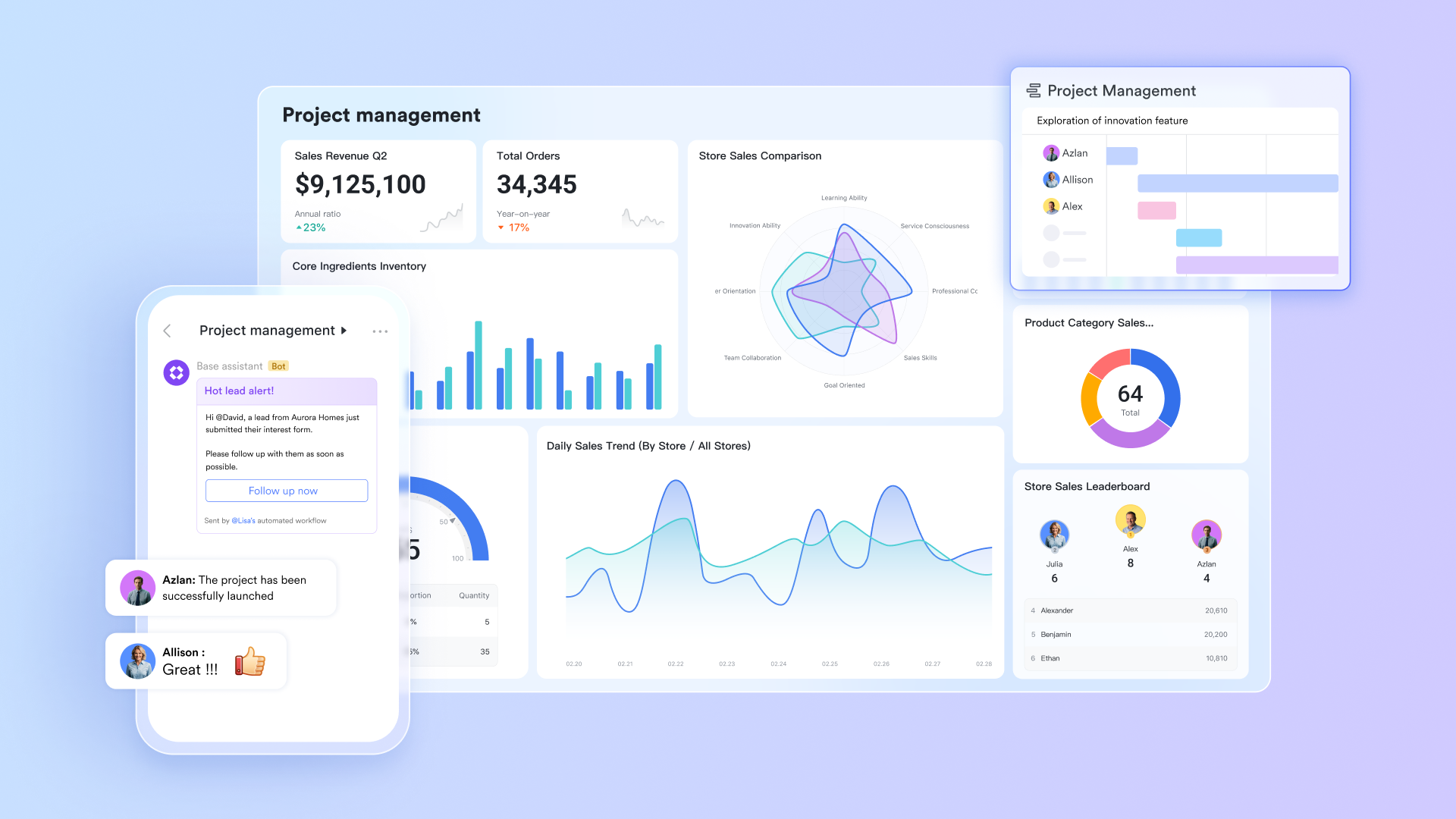
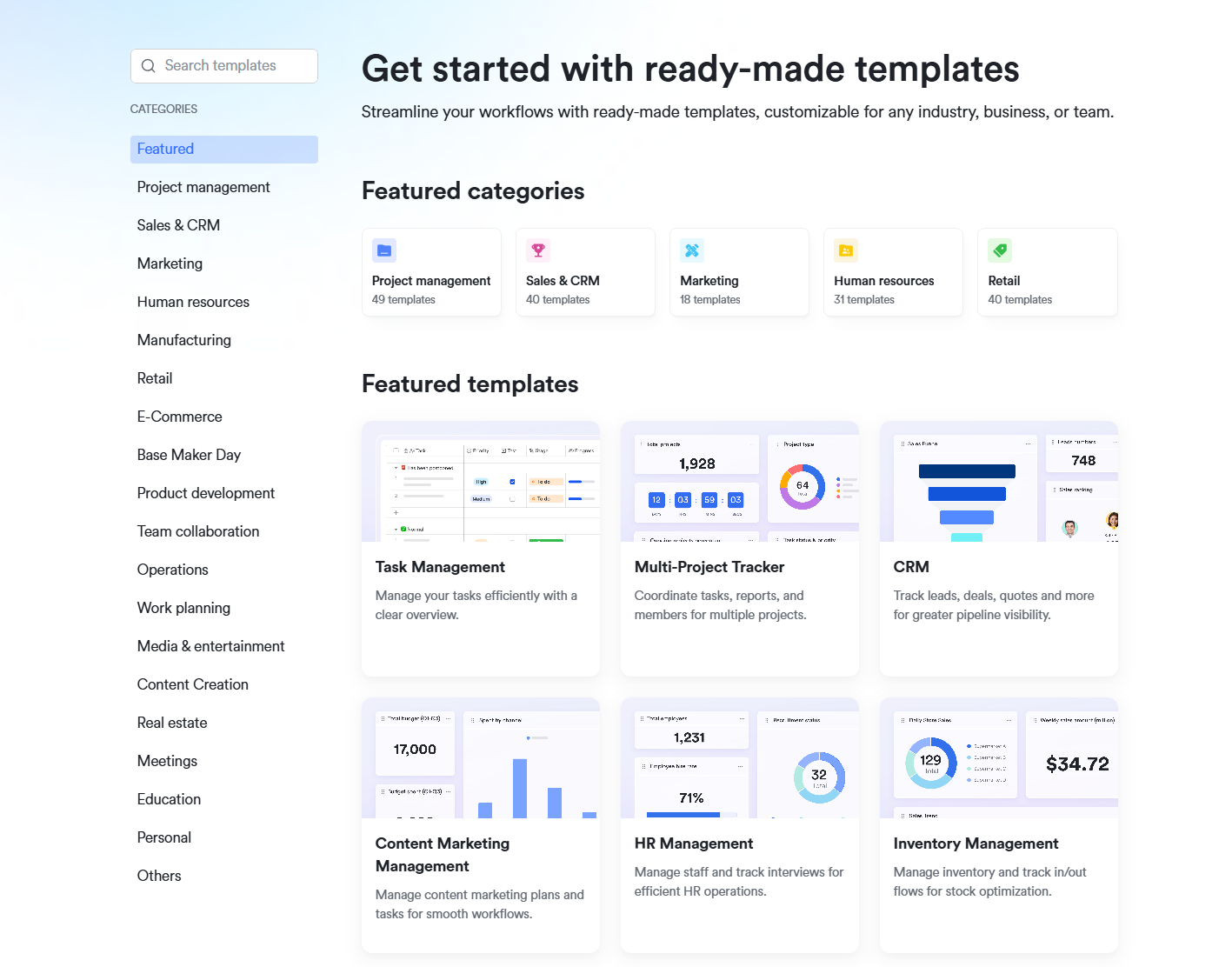
- Agile boards and timelines: At the core of Lark's agile functionality is Lark Base, a flexible, no-code project management database that supports multiple viewing formats, including Kanban boards, Gantt charts, calendars, and tables. Teams can organize user stories, manage sprint backlogs, and monitor task flow from planning to delivery. Agile managers can customize views for developers, product owners, or stakeholders—ensuring everyone sees the most relevant data in real time. Built-in templates such as the Scrum sprint planner, bug tracking board, and project Gantt chart allow teams to get started quickly while maintaining structure and clarity. This visual and interactive setup enables better workload distribution and faster sprint tracking, both essential for agile success.
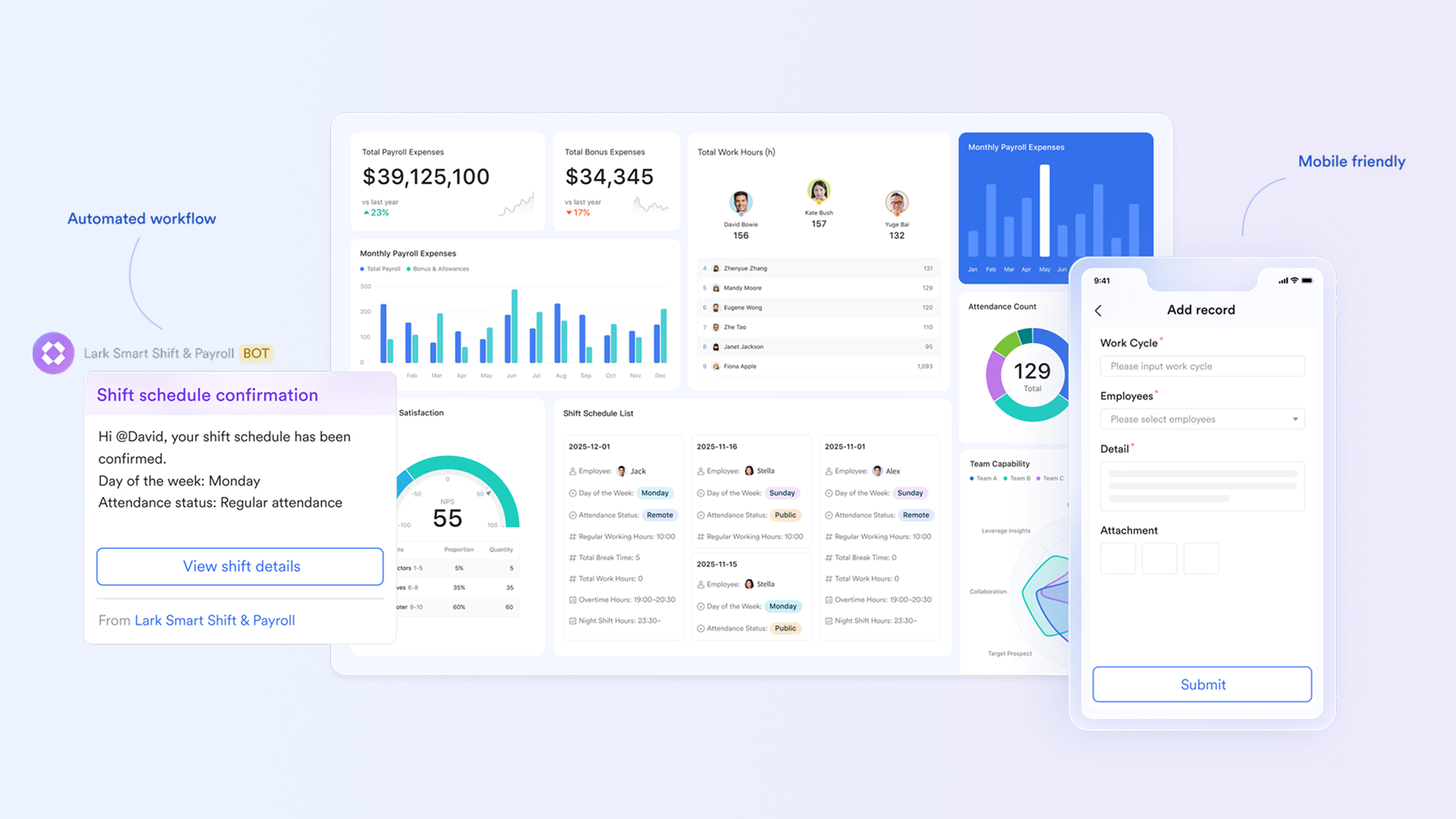
- Seamless communication: Agile thrives on speed and transparency, and Lark Messenger ensures both. Conversations easily turn into action messages can be converted into tasks in Lark Base, shared as documents, or escalated into video meetings in a single click. Updates from Lark Base automatically appear in chat channels, keeping everyone informed on sprint progress, task completions, and blockers. Teams no longer need to switch between tools like Slack, Zoom, and Trello; everything happens in one cohesive environment. This tight integration reduces delays, promotes alignment, and ensures the entire team remains on the same page.
- Collaborative documents: Lark Docs turns documentation into a living, collaborative space within your agile workflow. Teams can co-author project plans, technical specifications, sprint retrospectives, and meeting notes simultaneously, with full support for real-time editing, inline commenting, and version tracking. A standout feature is its deep integration with Lark Base you can embed live Kanban boards, charts, or task tables directly into your documents. This provides up-to-date project context without switching screens, bridging the gap between planning and execution. Every document becomes a shared source of truth for agile teams.
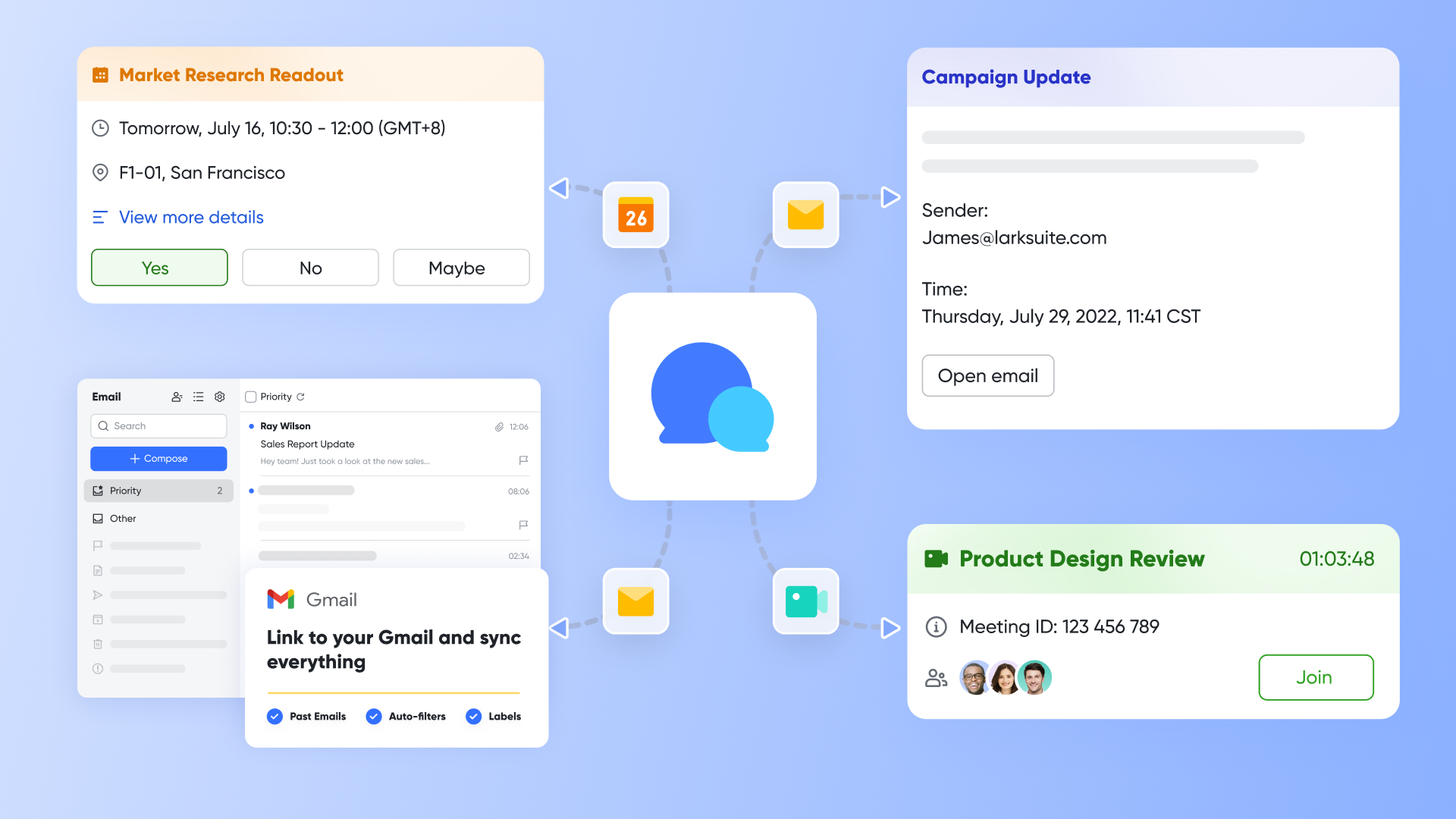
- AI-powered efficiency: Lark embeds artificial intelligence across its platform to boost productivity and reduce repetitive work. During agile ceremonies like sprint reviews and retrospectives, Lark Minutes can automatically transcribe discussions, identify speakers, and generate structured summaries complete with action items. AI can also summarize lengthy chat threads, provide quick project insights from Lark Base, and recommend next steps based on ongoing work. By turning unstructured communication into actionable information, Lark ensures nothing gets overlooked and teams stay focused on what truly matters—delivery and improvement.
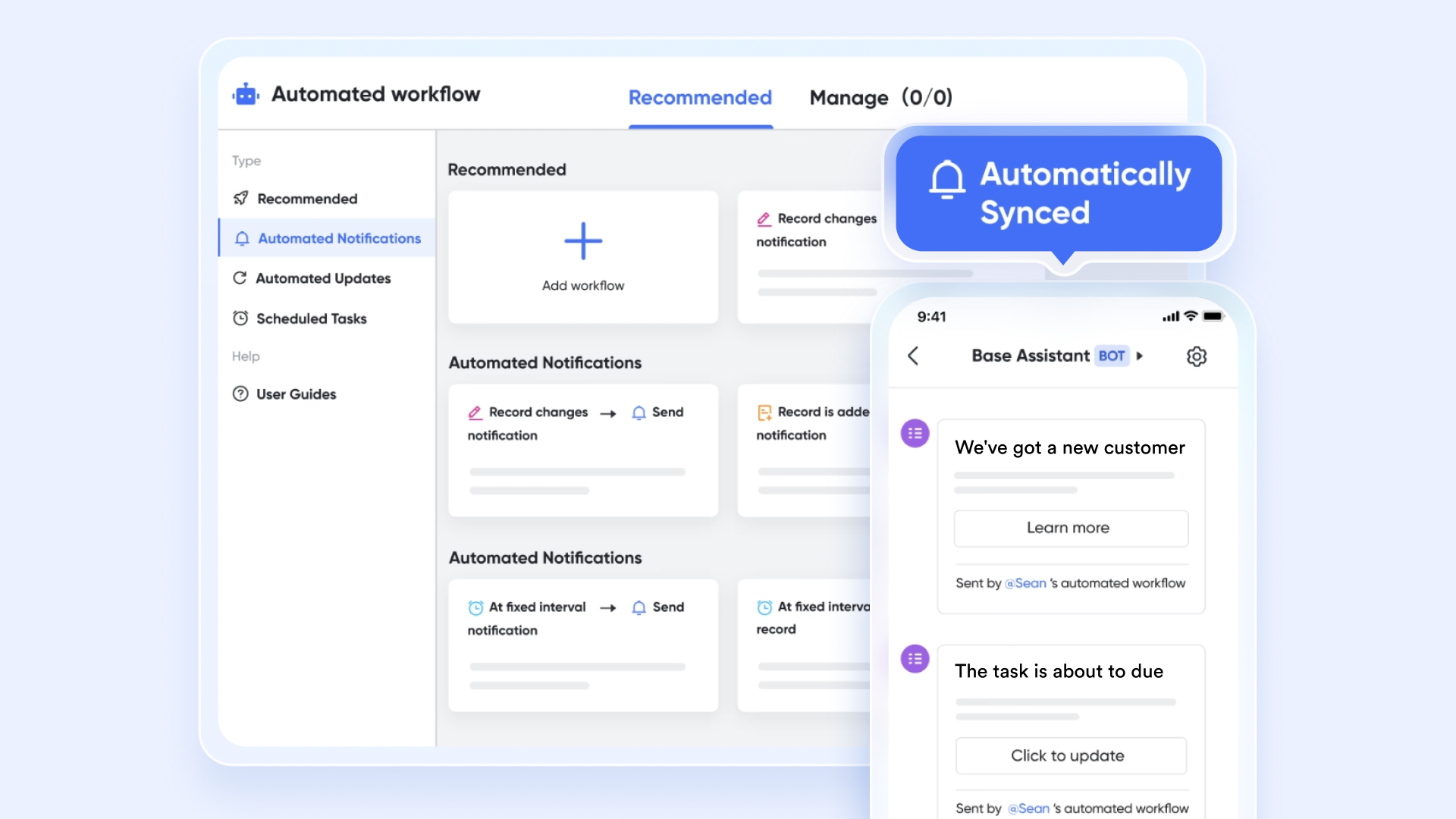
- Workflow automation: Consistency is key in agile project management, and Lark Base supports that through intuitive, no-code automation. Teams can set triggers to automatically update task statuses, send notifications, or create recurring tasks for sprint ceremonies like stand-ups or reviews. For example, when a developer marks a task as "Done," Lark can automatically notify QA testers and update progress reports. These automations eliminate manual follow-ups, maintain process consistency, and help teams scale without losing efficiency.
- Powerful, flexible database: Lark Base acts as the operational core of agile project management within Lark. Unlike traditional task trackers, it's a customizable relational database where teams can define fields, relationships, and workflows suited to their unique agile processes. Whether managing sprint planning, tracking bugs, or mapping dependencies, everything lives in one organized system. Because Lark Base combines natively with Docs, Chat, and Calendar, every update is instantly reflected across the platform. This ensures that all data remains accurate, consistent, and accessible, making Lark ideal for both startups and enterprise-scale agile operations.
- Ready-to-use templates: Lark offers a rich library of pre-built agile templates designed to help teams start fast and standardize best practices. Templates include Scrum sprint management, retrospective logs, requirements tracking, and bug management setups. Each template can be customized to match your workflow, helping teams reduce setup time and maintain process consistency. For new members, these templates simplify onboarding, ensuring everyone follows the same agile principles from day one.
Pros:
- Unified workspace combining chat, meetings, tasks, and documentation
- Deep AI integration for meeting summaries, task insights, and workflow automation
- Real-time collaboration eliminates communication gaps and version conflicts
- Highly customizable and scalable, suitable for teams of all sizes
- Reduces tool fatigue by replacing multiple standalone apps
Cons:
- Initial customization setup may require some time for advanced workflows.
- Starter plan: Free forever plan that includes 11 powerful tools for up to 20 users. It also comes with 100GB of storage, 1000 automation runs, AI translations, and more.
- Pro plan: $12/user/month (billed annually) for up to 500 users. It includes everything in Starter plus group calling for up to 500 attendees, 15TB of storage, 50,000 automation runs, and more.
- Enterprise plan: Contact sales for custom pricing. Supports unlimited users and includes even more automation runs and advanced security, compliance, and management features.
2. Trello: Simple visual task boards
Trello is a widely used agile project management software known for its simplicity and visual Kanban-style task boards. With its intuitive drag-and-drop interface, teams can easily organize tasks, track progress, and collaborate in real time. It's ideal for small to mid-sized teams looking for a lightweight, flexible way to manage projects without complex setups. Trello's clean design and powerful integrations make it a popular choice for agile beginners and creative teams alike.
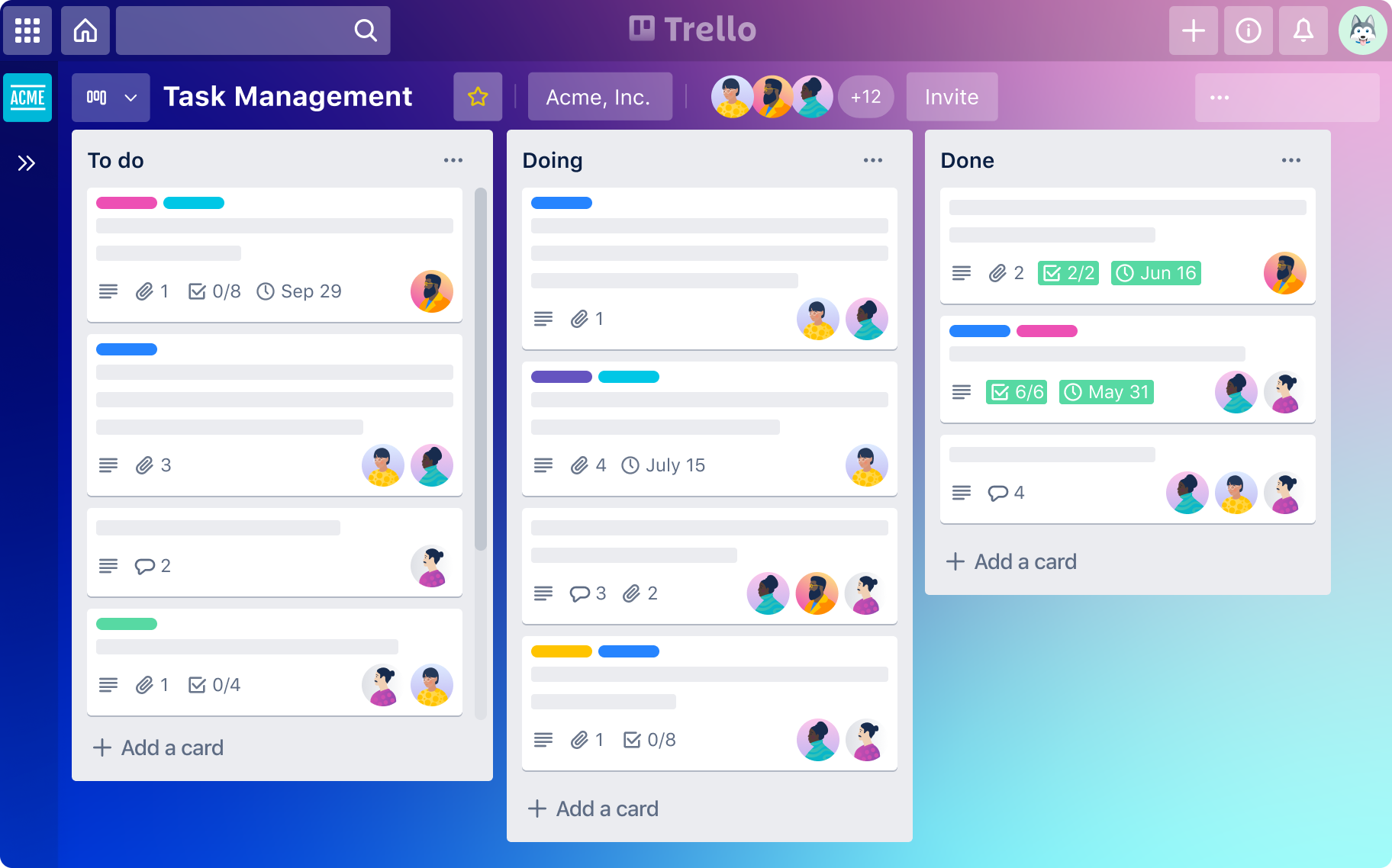
Image source: trello.com
Key features:
- Kanban boards: Visualize workflows and move tasks seamlessly between stages.
- Butler automation: Automate task updates, reminders, and routine workflows.
- Power-Ups and integrations: Extend functionality with tools like Slack, Google Drive, and Jira.
- Custom task management: Add due dates, labels, checklists, and attachments for detailed tracking.
- Collaboration tools: Enable comments, mentions, and file sharing for transparent teamwork.
Pros:
- Simple and easy to learn for all users.
- Visually appealing and ideal for agile task tracking.
- Highly customizable with Power-Ups and templates.
- Great for small teams and personal productivity.
Cons:
- Limited analytics and reporting features.
- Not suited for complex, large-scale agile projects.
Pricing:
- Free plan: Core features with unlimited cards and up to 10 boards per workspace.
- Standard plan: $5 per user/month, adds unlimited boards and advanced checklists.
- Premium plan: $10 per user/month, includes timeline, calendar, and dashboard views.
- Enterprise plan: Custom pricing for large teams requiring advanced security and admin controls.
3. Jira: Powerful agile tracking tool
Jira by Atlassian is a leading agile project management software designed for software development and technical teams. It excels in sprint planning, issue tracking, and backlog management, offering deep customization and advanced reporting. With support for Scrum and Kanban boards, Jira helps teams plan, track, and release high-quality software efficiently. Its vast integration ecosystem and scalability make it suitable for both small agile teams and large enterprises managing complex projects.
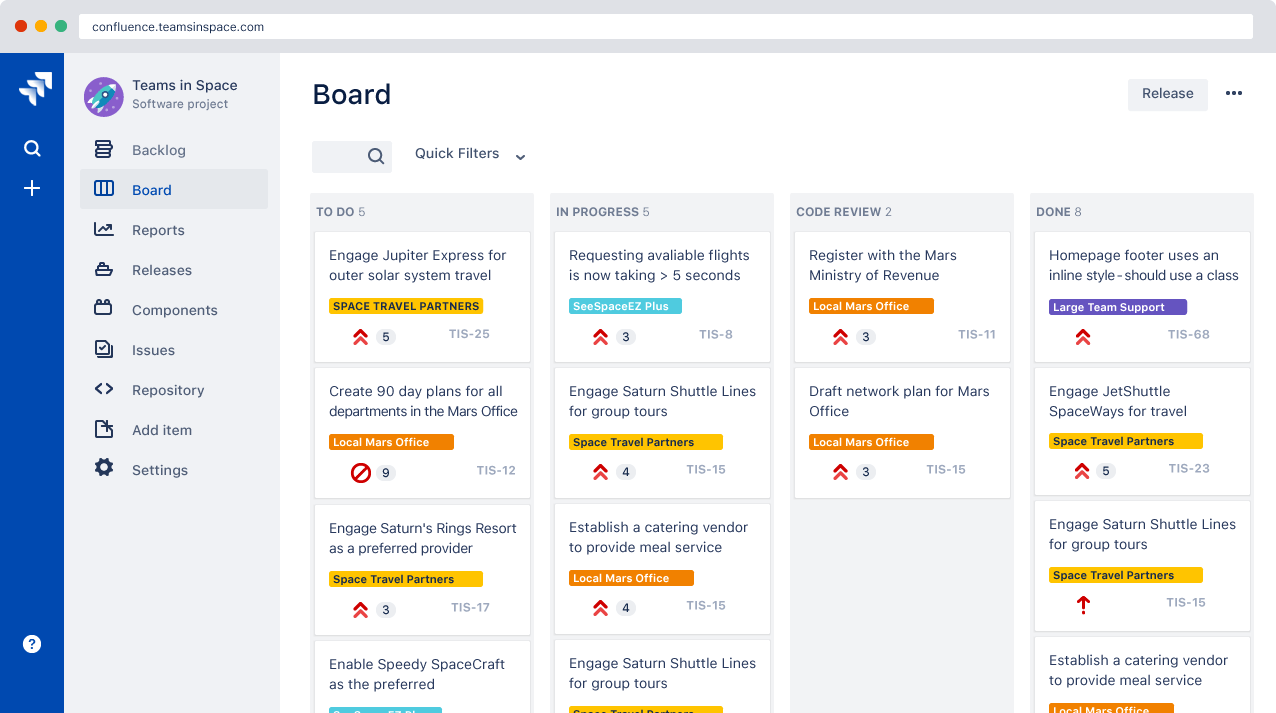
Image source: atlassian.com
Key features:
- Sprint and backlog management: Plan, prioritize, and monitor progress with detailed sprint and backlog views.
- Customizable workflows: Create tailored workflows, issue types, and statuses to match team processes.
- Advanced reporting: Access burndown charts, velocity reports, and dashboards for performance tracking.
- Agile board support: Visualize work using Scrum or Kanban boards to improve team focus and flow.
- Integrations: Seamlessly connect with tools like Confluence, Bitbucket, Slack, and over 3,000 third-party apps.
Pros:
- Robust, enterprise-grade agile project management capabilities.
- Highly customizable for any development workflow.
- Strong analytics and reporting features.
- Excellent integration with Atlassian and developer tools.
Cons:
- Steeper learning curve for new or non-technical users.
- Can feel complex for smaller, non-development teams.
Pricing:
- Free plan: For up to 10 users with basic agile features.
- Standard plan: $8.15 per user/month with user management and reports.
- Premium plan: $16 per user/month with advanced automation and capacity tracking.
- Enterprise plan: Custom pricing for large organizations with enhanced security and compliance.
4. Asana: Teamwork and project planning
Asana is a versatile agile project management software that helps teams organize tasks, set priorities, and collaborate effectively. Its clean interface and flexible structure make it suitable for agile, hybrid, and traditional project workflows. With customizable boards, timelines, and automation features, Asana empowers teams to plan sprints, track progress, and ensure accountability. It's a popular choice among marketing, product, and operations teams looking to enhance productivity and streamline communication.
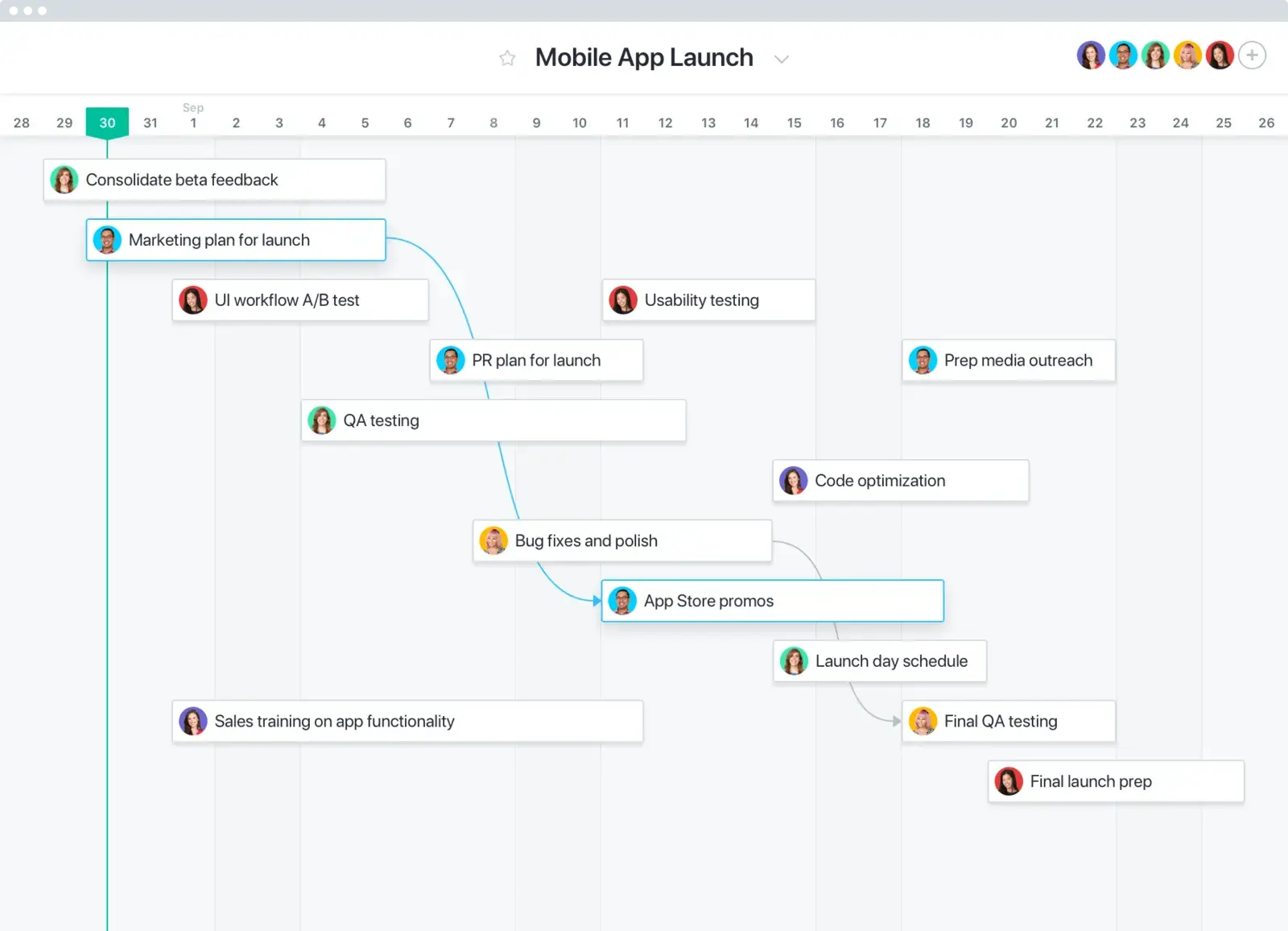
Image source: asana.com
Key features:
- Task and project organization: Create, assign, and manage tasks with clear ownership and due dates.
- Timeline and calendar views: Visualize project schedules, dependencies, and milestones easily.
- Workload management: Balance team capacity and prevent burnout with workload tracking tools.
- Automation and rules: Automate routine tasks like status updates and recurring work.
- Integrations: Connect with over 200 tools including Slack, Google Workspace, and Zoom.
Pros:
- Simple, intuitive interface for easy onboarding.
- Excellent visibility into project timelines and responsibilities.
- Highly flexible for different project types and team sizes.
- Strong automation and integration capabilities.
Cons:
- Limited advanced reporting in lower-tier plans.
- It can become cluttered with too many tasks or users.
Pricing:
- Basic plan: Free with core task management features for individuals and small teams.
- Premium plan: $10.99 per user/month, adds timelines, automation, and reporting.
- Business plan: $24.99 per user/month, includes workload management and advanced integrations.
- Enterprise plan: Custom pricing with enhanced admin, security, and compliance features.
5. Monday.com: Flexible workflow management
Monday.com is a highly customizable agile project management software that helps teams plan, track, and manage projects visually. Its colorful, drag-and-drop boards and automation tools make it perfect for agile, marketing, and product teams. With flexible workflows and multiple view options, it adapts easily to Scrum, Kanban, or hybrid methodologies. Monday.com stands out for its balance of simplicity, automation, and scalability—ideal for teams of any size.
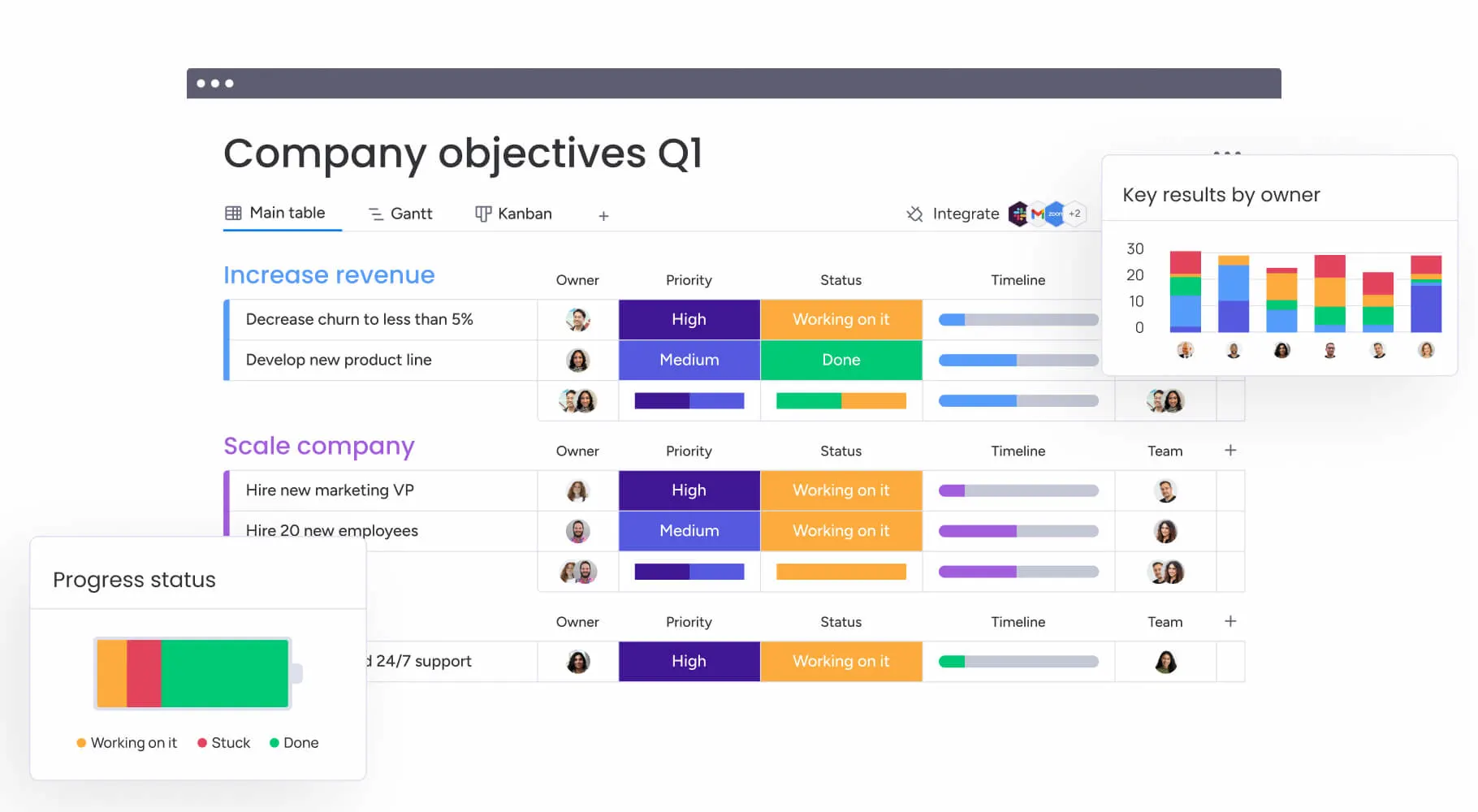
Image source: monday.com
Key features:
- Custom boards: Create agile workflows using Kanban, timeline, or Gantt views.
- Automation: Set triggers for recurring tasks, updates, and reminders.
- Collaboration tools: Comment, share files, and track progress in real time.
- Integrations: Connect with Slack, Jira, Google Drive, and other tools.
- Reporting dashboards: Visualize performance with real-time data and analytics.
Pros:
- Visually appealing and intuitive interface.
- Extremely flexible and adaptable workflows.
- Robust automation and integration support.
- Scales well from small teams to large organizations.
Cons:
- It can be overwhelming for beginners.
- Advanced features are locked behind higher-tier plans.
Pricing:
- Free plan: For up to 2 users with basic features.
- Basic plan: $9 per user/month with unlimited boards.
- Standard plan: $12 per user/month adds timelines and automation.
- Pro plan: $19 per user/month with advanced features.
- Enterprise plan: Custom pricing for large organizations.
6. ClickUp: Customizable project productivity
ClickUp is a feature-rich agile project management software that combines sprint planning, documentation, and time tracking in a single platform. Designed for flexibility, it allows teams to customize nearly every aspect of their workflow—from task views and automations to reporting dashboards. Whether managing agile sprints, product roadmaps, or team workloads, ClickUp provides a centralized space to plan, collaborate, and execute efficiently. Its versatility makes it suitable for software development, marketing, and operations teams seeking both power and simplicity in one tool.
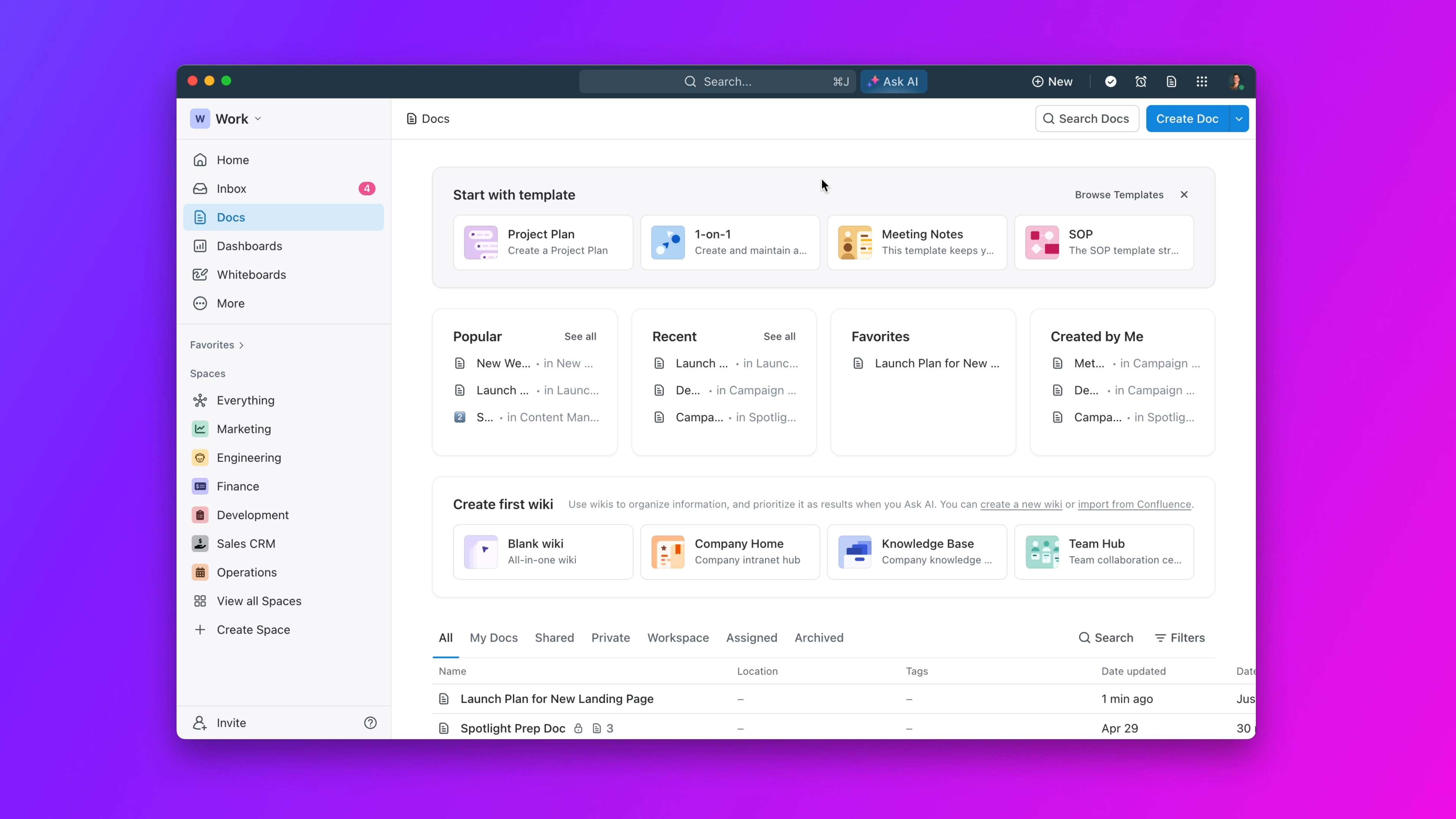
Image source: clickup.com
Key features:
- Agile sprint management: Plan, track, and review sprints using Scrum boards, backlogs, and sprint reports.
- Custom views: Choose from Kanban, Gantt, list, or calendar views to match your team's workflow preferences.
- Docs and knowledge base: Create and share project documents, meeting notes, and team wikis directly within ClickUp.
- Dashboards and reporting: Monitor workload, sprint velocity, and task completion rates with real-time analytics.
- Time tracking and automation: Log time spent on tasks, automate updates, and streamline repetitive actions.
Pros:
- Extremely customizable for any project type or team structure.
- Combines project management, documentation, and reporting in one app.
- Strong automation and time tracking features.
- Generous free plan with access to most core tools.
Cons:
- Can feel overwhelming due to the number of features.
- The interface may slow down with very large workspaces.
Pricing:
- Free plan: Includes unlimited users and core task management features.
- Unlimited plan: $7 per user/month with dashboards, integrations, and automation.
- Business plan: $12 per user/month adds advanced time tracking, goals, and workload management.
- Enterprise plan: Custom pricing with enhanced security, permissions, and onboarding support.
7. Wrike: Scalable project collaboration
Wrike is a powerful and scalable agile project management software designed for large teams and enterprises managing complex workflows. It offers advanced collaboration, real-time reporting, and customizable agile templates that support Scrum, Kanban, and hybrid methodologies. With robust automation and visibility features, Wrike enables organizations to coordinate across departments, track progress, and make data-driven decisions efficiently. It's particularly suited for teams that need enterprise-level security, detailed analytics, and seamless cross-functional collaboration.
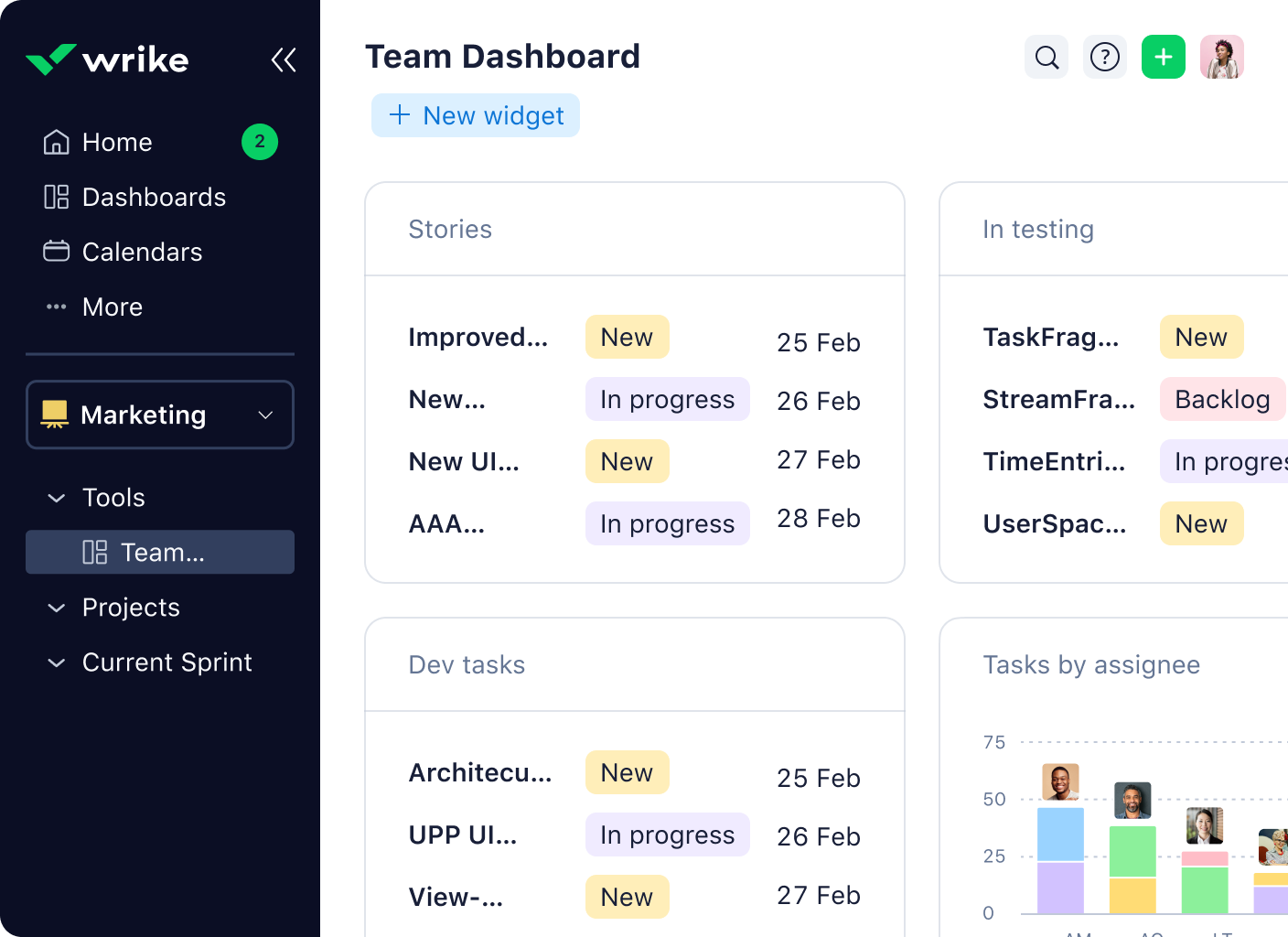
Image source: wrike.com
Key features:
- Customizable agile templates: Use pre-built templates for sprint planning, backlog management, and retrospectives.
- Advanced dashboards and reporting: Track team performance, workload, and project health with real-time data visualization.
- Cross-department collaboration: Centralize communication with task comments, shared dashboards, and live editing.
- Automation and workflows: Streamline recurring processes with automation rules for task updates and approvals.
- Integrations and scalability: Connect with over 400 tools like Slack, Salesforce, Jira, and Google Workspace, scaling effortlessly as teams grow.
Pros:
- Ideal for large teams and enterprise-scale agile operations.
- Strong reporting and analytics for real-time visibility.
- Excellent collaboration tools for distributed and hybrid teams.
- Flexible templates adaptable to various agile frameworks.
Cons:
- Steeper learning curve for new users due to extensive features.
- Premium pricing for full functionality may not suit smaller teams.
Pricing:
- Free plan: Basic task management and file sharing for small teams.
- Team plan: $9.80 per user/month, includes dashboards, Gantt charts, and shared calendars.
- Business plan: $24.80 per user/month, adds custom workflows, automation, and advanced reporting.
- Enterprise plan: Custom pricing with SSO, advanced security, and enterprise integrations.
- Pinnacle plan: For large-scale enterprises needing advanced budgeting, resource management, and analytics.
8. Smartsheet: Spreadsheet-style agile planning
Smartsheet is a unique agile project management software that blends the familiarity of spreadsheets with the flexibility of agile planning tools. It's ideal for teams that prefer structured data management but need visual task tracking through Kanban boards, Gantt charts, and dashboards. Smartsheet allows users to manage projects, track dependencies, and collaborate seamlessly in real time. Its intuitive interface bridges the gap between traditional spreadsheet users and agile project teams, making it a great fit for both technical and non-technical professionals.
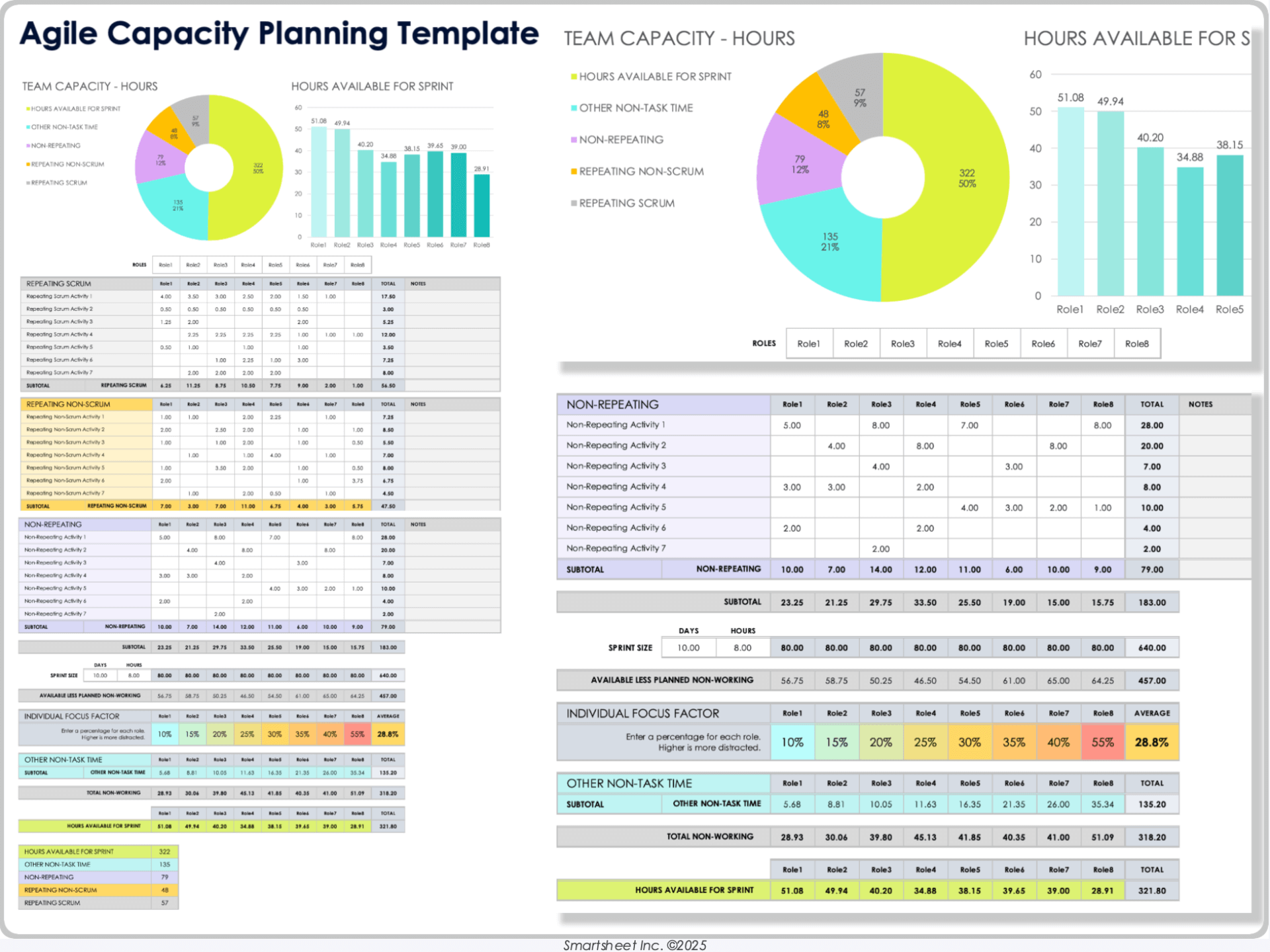
Image source: smartsheet.com
Key features:
- Spreadsheet-style interface: Manage projects using familiar spreadsheet layouts enhanced with formulas, filters, and data validation.
- Agile board and Gantt views: Switch easily between Kanban boards, grid views, and timelines to track progress visually.
- Automation and workflows: Automate task assignments, reminders, and approvals to streamline project processes.
- Collaboration tools: Comment directly on tasks, attach files, and share updates with internal and external collaborators.
- Reporting and dashboards: Gain visibility into performance metrics and team activity with customizable real-time dashboards.
Pros:
- Easy transition for users familiar with Excel or Google Sheets.
- Combines traditional project tracking with agile flexibility.
- Excellent for managing complex data-driven projects.
- Strong automation and reporting capabilities.
Cons:
- Can feel less intuitive for teams used to purely visual agile tools.
- Advanced features require higher-tier plans.
Pricing:
- Free plan: Limited to individual use with basic sheets and task tracking.
- Pro plan: $7 per user/month, includes unlimited sheets, dashboards, and basic collaboration.
- Business plan: $25 per user/month, adds automation, proofing, and advanced reporting.
- Enterprise plan: Custom pricing for large teams needing enhanced governance, security, and integrations.
9. Zoho Projects: Affordable agile management
Zoho Projects is a cost-effective agile project management software designed for small and medium-sized teams that want robust functionality without a high price tag. It offers essential features like Gantt charts, task automation, time tracking, and issue management, making it a complete yet budget-friendly solution. With its clean interface, customizable workflows, and deep integration with the Zoho ecosystem, teams can plan, execute, and track projects efficiently while maintaining transparency and collaboration.
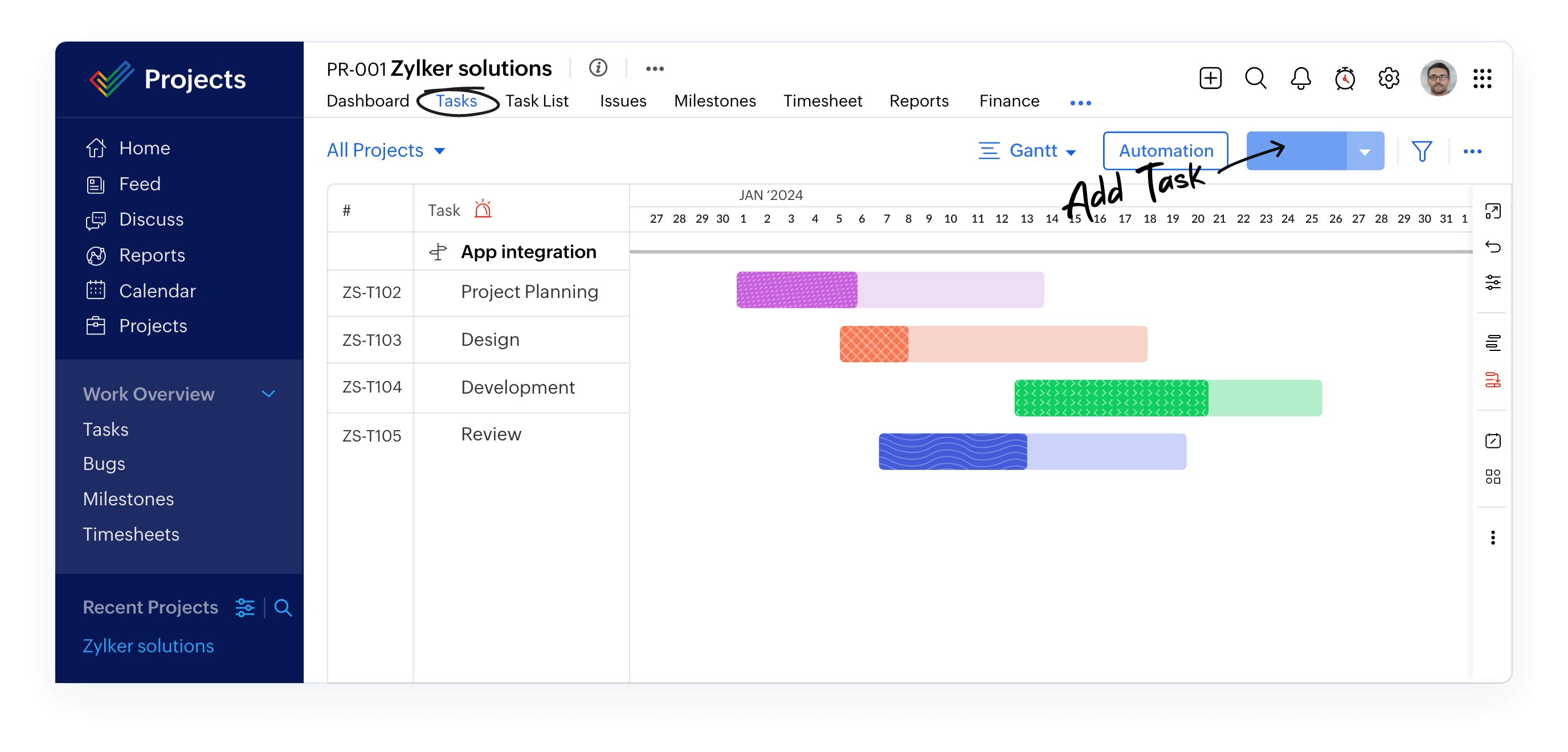
Image source: zoho.com
Key features:
- Task and project tracking: Create, assign, and manage tasks with dependencies, milestones, and priorities for smooth execution.
- Agile planning tools: Use Kanban boards and Gantt charts to visualize project progress and manage sprints effectively.
- Issue and bug tracking: Log, categorize, and resolve issues quickly with detailed reports and task links.
- Time tracking and timesheets: Record time spent on each task and generate billing or productivity reports.
- Integrations and automation: Seamlessly connect with Zoho CRM, Slack, Google Drive, and Zapier to enhance productivity.
Pros:
- Affordable compared to most agile project management tools.
- Offers a wide range of features including Gantt charts and issue tracking.
- Intuitive interface that's easy for teams to adopt quickly.
- Strong integration with other Zoho and third-party applications.
Cons:
- Limited customization compared to enterprise-grade tools.
- Reporting features could be more advanced.
Pricing:
- Free plan: For up to 3 users with basic task tracking and project views.
- Premium plan: $5 per user/month, includes Gantt charts, automation, and time tracking.
- Enterprise plan: $10 per user/month, adds advanced customization, resource utilization reports, and enhanced admin controls.
10. Microsoft Azure DevOps: Enterprise agile platform
Microsoft Azure DevOps is an enterprise-grade agile project management software built specifically for software development and engineering teams. It combines project planning, source code management, continuous integration, and delivery pipelines in one powerful ecosystem. Designed for developers, it helps teams plan agile sprints, manage backlogs, track issues, and automate deployments. With seamless integration into Microsoft's ecosystem and strong support for DevOps practices, Azure DevOps empowers teams to deliver high-quality software faster and more efficiently.
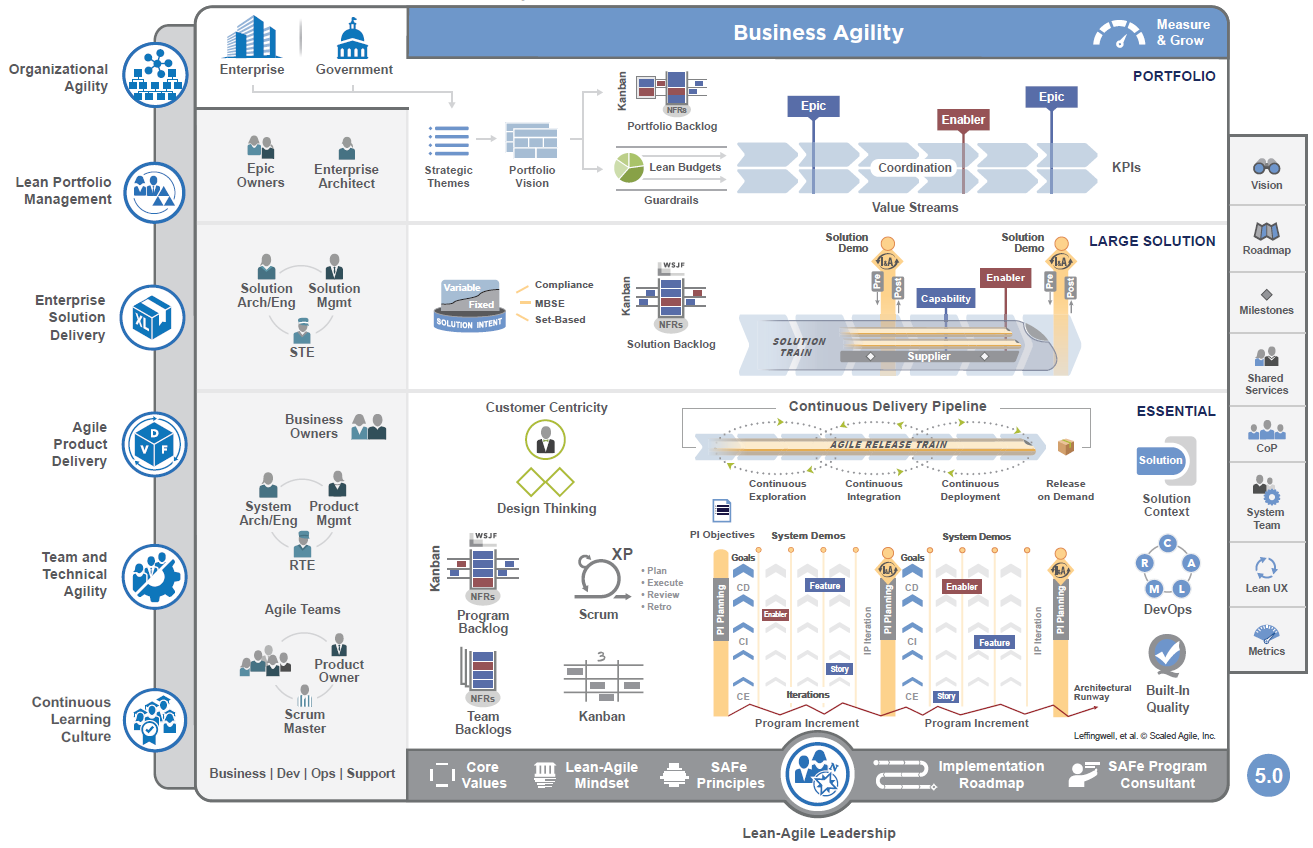
Image source: microsoft.com
Key features:
- Agile boards and sprint planning: Create Scrum or Kanban boards for backlog management, sprint tracking, and workflow visualization.
- Code repositories (Azure Repos): Host Git repositories with branching, pull requests, and code reviews for collaborative development.
- CI/CD pipelines (Azure Pipelines): Automate build, testing, and deployment processes across multiple environments and platforms.
- Testing and issue tracking: Manage test plans, bug reports, and issue resolution all within the same platform.
- Integration and scalability: Integrates seamlessly with Visual Studio, GitHub, and third-party tools, scaling easily from small teams to large enterprises.
Pros:
- Comprehensive solution combining agile project management and DevOps.
- Excellent for managing software lifecycles from coding to deployment.
- Deep integration with Microsoft products and developer tools.
- Scalable and secure for enterprise-level use.
Cons:
- Primarily suited for technical or development teams.
- Requires setup and configuration to fully leverage its capabilities.
Pricing:
- Free plan: Includes core agile features, 5 free users, and unlimited public repositories.
- Basic plan: $6 per user/month, includes private repos, boards, and pipelines.
- Basic + Test Plans: $52 per user/month, adds advanced testing and reporting tools.
- Enterprise plan: Custom pricing with enhanced scalability, advanced security, and Azure integration for large organizations.
11. Notion: Lightweight agile knowledge hub
Notion is a modern and flexible agile project management software that combines task tracking, documentation, and collaboration into one lightweight workspace. Designed for startups, small teams, and creative professionals, Notion helps teams organize projects, manage sprints, and maintain shared knowledge—all within an intuitive, minimal interface. Its modular structure lets teams build customized agile workflows, while its note-taking and database capabilities make it ideal for managing everything from backlogs to retrospectives.
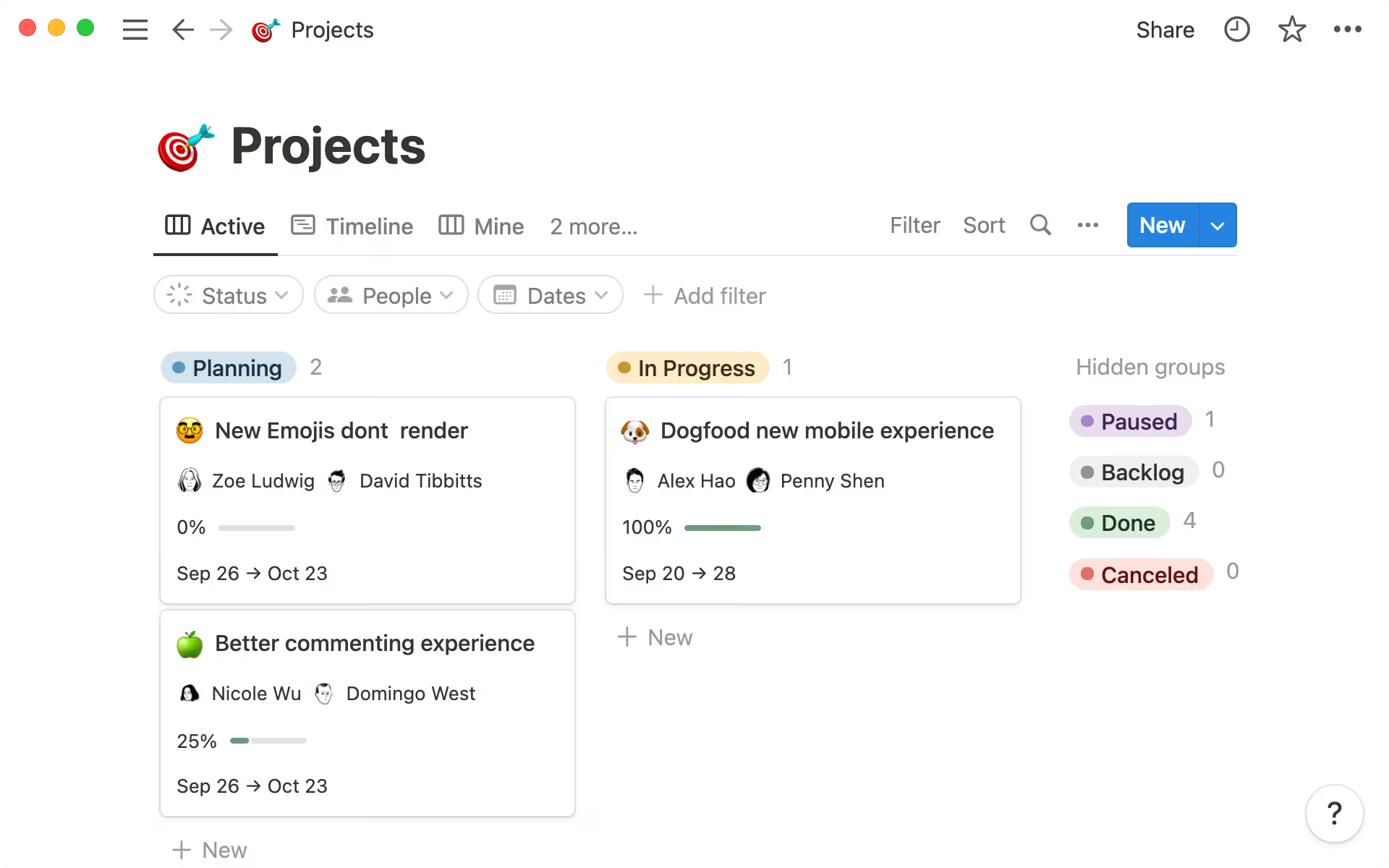
Image source: notion.com
Key features:
- Customizable boards and databases: Create Kanban-style task boards, sprint trackers, or product roadmaps using Notion's versatile database system.
- Integrated documentation: Build and share wikis, meeting notes, and technical docs in real time—keeping project context and updates in one place.
- Templates and flexibility: Use pre-built templates for sprint planning, bug tracking, and team retrospectives, or design your own workflows from scratch.
- Collaboration tools: Tag teammates, leave comments, and share pages or dashboards for transparent communication.
- Integrations and embeds: Connect with tools like Slack, GitHub, and Google Drive or embed media, dashboards, and code snippets directly into pages.
Pros:
- Combines documentation and agile task management in a single, simple workspace.
- Highly flexible and easy to customize for any workflow.
- Clean, distraction-free interface ideal for small teams.
- Excellent for organizing shared knowledge and resources.
Cons:
- Limited automation and reporting features for larger agile teams.
- Can become disorganized without clear structure in large projects.
Pricing:
- Free plan: Includes core features for individuals and small teams with basic collaboration.
- Plus plan: $8 per user/month, adds unlimited file uploads, version history, and advanced sharing options.
- Business plan: $15 per user/month, includes SSO, advanced permissions, and enhanced collaboration tools.
- Enterprise plan: Custom pricing with advanced admin controls, audit logs, and priority support for large organizations.
How to choose the right agile project management software
Selecting the right agile project management software is crucial to ensure your team's productivity, adaptability, and collaboration. The best tool should align with your team's size, workflow, and long-term goals while integrating seamlessly with your existing tech stack. Here's how to evaluate and choose the platform that best fits your agile needs:
- Assess team size and workflow needs: Start by identifying your team's size, project type, and preferred agile methodology—whether Scrum, Kanban, or a hybrid approach. Small teams may prefer lightweight, visual tools like Trello or Notion, while larger teams benefit from robust solutions like Jira or Wrike. The right software should support your current processes while allowing flexibility for future growth.
- Consider connections with other tools and scalability: A good agile platform should grow with your team and connect key functions seamlessly. Look for software that enables fluid transitions between planning, communication, and execution—without adding unnecessary complexity.
Lark stands out here by bringing together messaging, task boards, docs, and meetings in one workspace. Instead of switching tools, teams can move from a task in Lark Base to a sprint review in Lark Meetings or document updates in Lark Docs—all within the same environment. This structure scales naturally as teams expand across projects or departments.
- Balance cost vs. Value: While cost is an important factor, focus on the overall value the tool provides. Look for software that offers the right balance between essential features like automation, reporting, and collaboration and affordability. Sometimes a slightly higher investment delivers better productivity gains, especially when scaling your agile processes. With Lark's workflow automation, agile teams can automate repetitive updates—like sending sprint reminders or assigning backlog items—without coding. This reduces manual coordination costs and delivers more value per dollar spent, especially for scaling teams.
- Importance of user experience and onboarding: Even the most advanced agile software loses its impact if teams struggle to adopt it. Choose a platform that's intuitive, quick to set up, and easy for both technical and non-technical users to learn. Lark's clean interface and built-in AI assistant help new users navigate features, summarize project updates, and generate reports automatically. This shortens the onboarding curve, allowing agile teams to focus on iteration and improvement rather than training.
Conclusion
Agile project management software has become essential for teams striving to stay adaptable, collaborative, and efficient in work environment. These tools enable organizations to plan smarter, track progress transparently, and respond quickly to change—all while improving communication and accountability. However, there's no one-size-fits-all solution; each team's needs, size, and workflow are different. It's important to test and compare different agile tools to find the one that aligns best with your goals and working style.
Among the many options available, Lark stands out as a powerful all-in-one agile platform that unifies communication, task management, documentation, and automation within a single workspace. For agile teams seeking a seamless and scalable solution, Lark offers the flexibility and collaboration features needed to plan, execute, and deliver projects effectively, making it one of the most comprehensive agile project management software tools available today.
FAQs
Can agile project management software be used outside of software development?
Yes, absolutely. While agile originated in software development, agile project management software is now widely used across industries like marketing, HR, product design, and operations. Its flexible, iterative approach helps any team improve collaboration, adaptability, and delivery speed.
What challenges do teams face when adopting agile project management tools?
Common challenges include resistance to change, lack of proper training, and difficulty aligning the tool with existing workflows. Successful adoption requires clear processes, management support, and time for teams to adapt to the new system.
Is agile project management software suitable for remote and hybrid teams?
Yes, it's ideal for distributed teams. Agile tools enable real-time communication, progress tracking, and task visibility, ensuring remote or hybrid members collaborate effectively and stay aligned, no matter where they work from.
How much does agile project management software typically cost?
Pricing varies by tool and feature set. Most platforms offer free plans for small teams, while paid plans range from $5 to $20 per user/month, with enterprise-level solutions offering custom pricing for advanced capabilities.
Can small startups benefit from agile project management software as much as large enterprises?
Yes, startups often benefit even more. Agile tools help small teams stay organized, focused, and adaptable as they scale. Many offer affordable or free tiers, making them accessible for startups with limited budgets.
Related reading
Table of contents
Start using Lark today

Manage all your work in one place
Boost team efficiency by 10x
Save up to 70% on software costs
Table of contents
Start using Lark today
Manage all your work in one place
Boost team efficiency by 10x
Save up to 70% on software costs
Keep reading








2026 Lark Technologies Pte. Ltd.
Headquartered in Singapore with offices worldwide.






Explore: