Managing time effectively has become more critical than ever as businesses and professionals increasingly look for smarter ways to track productivity, optimize workflows, and reduce manual administrative effort. The best automated time tracking software can help monitor work hours, manage project timelines, generate accurate billing reports, and provide real-time insights into how time is being spent across teams and individuals.
This guide offers an in-depth comparison of 15 automated time-tracking software solutions shaping the future of time management, helping businesses and professionals choose the right tool to boost productivity, improve accountability, and maintain greater control over how every working hour is spent.
Key takeaways: Top 5 solutions for automated time tracking
Choosing the right can significantly improve how effectively businesses monitor productivity, manage project timelines, and maintain accurate billing records. The following tools stand out for their ability to automate time logging, streamline workforce management, and provide clear insights into how time is being spent across teams and individuals.
1. Lark: Lark offers an integrated collaboration workspace to manage attendance, track work hours, and coordinate team schedules within one connected platform.
2. Toggl Track: Toggl Track provides simple and intuitive time tracking, detailed reporting, and project-based time management tools.
3. Clockify: Clockify delivers a free and feature-rich time tracking solution with timesheets, project tracking, and team reporting capabilities.
4. Time Doctor: Time Doctor offers advanced employee monitoring, automated time tracking, and detailed productivity analytics.
5. Timely: Timely uses AI-powered automatic time capture to log work activity across apps and projects.
Overview: Top 5 tools used in automated time tracking
Choosing the best automated time tracking software depends on team size, project complexity, and the level of productivity insights required. Below is a quick side-by-side comparison of five leading time-tracking solutions that help businesses automate time logging, streamline workforce management, and gain clearer visibility into how time is spent across teams and projects.
Information source: Official vendor sites
Update time: 2026-03-15
Note: Pricing and plan details reflect publicly available data as of the update date and may vary based on region, billing cycle, and number of agents.
Simplify your time tracking workflows with the No.1 tool
What is time tracking software, and how does it work
Time tracking software is a digital tool that helps businesses and individuals monitor, record, and analyze how working hours are spent across tasks, projects, and teams on a single centralized platform. It works by logging time either manually through start and stop timers or automatically by detecting active work across applications, browsers, and project workflows.
These platforms typically generate detailed timesheets, productivity reports, and billing summaries that give managers and team members clear visibility into where time is going each day. For industries like construction, helps monitor on-site labor hours, track project milestones, and manage workforce productivity across multiple job sites simultaneously. Sales-focused organizations also rely on to align time spent on client activities with revenue outcomes, ensuring teams remain focused on high-impact tasks that drive consistent, measurable business growth.
Key reasons to use time tracking software
Time tracking software gives businesses and professionals a smarter, more structured way to manage working hours, improve accountability, and make better decisions about how time and resources are used. Here are five key reasons organizations are increasingly adopting automated time-tracking solutions.
- Improves productivity and focus across teams: Time-tracking software gives employees and managers clear visibility into how their time is spent throughout the day. By identifying time-consuming tasks and unproductive patterns, teams can restructure workflows, eliminate inefficiencies, and stay consistently focused on high-priority work that delivers real business value.
- Enables accurate project billing and invoicing: Businesses that bill clients by the hour need precise and reliable time records to generate accurate invoices. Automated time tracking eliminates guesswork in billing, ensures every billable minute is captured accurately, and reduces client disputes over project hours and costs.
- Supports better resource and workforce planning: Understanding how time is distributed across projects and team members helps managers make smarter staffing and resource allocation decisions. Time-tracking data reveal which employees are overloaded and which have capacity, enabling more balanced and efficient workforce planning across the organization.
- Strengthens lead management and client follow-up: For sales and client-facing teams, tracking time spent on activities helps organizations understand where sales efforts are most effective. Knowing exactly how much time is invested in prospecting, follow-ups, and client meetings allows teams to prioritize leads more strategically and close deals more efficiently.
- Provides actionable insights through sales tracking: Organizations that integrate time tracking with for small businesses gain a powerful view of how team time directly connects to revenue generation. These insights help small businesses identify their most productive sales activities, optimize team schedules, and build more consistent and results-driven sales workflows over time.
Turn every work hour into valuable insight with Lark
Top 15 automated time tracking software tools compared
Automated time tracking software helps teams record work hours, monitor productivity, and manage projects more efficiently. These tools provide real-time insights into how time is spent, enabling better resource planning and accurate billing. Below are 15 popular automated time tracking tools that support smarter time management and workflow optimization.
1. Lark: Best for all-in-one collaboration and automated time tracking
Lark is an all-in-one collaboration and workforce management platform designed to help businesses automate time tracking, manage attendance, and streamline team workflows in a single, fully connected workspace. It combines messaging, video conferencing, document management, and automated time tracking into a single platform, eliminating the need for multiple disconnected tools. With smart automation capabilities, real-time attendance monitoring, and seamless project management integrations, helps businesses reduce administrative workload, improve team accountability, and maintain accurate time records across the entire organization.
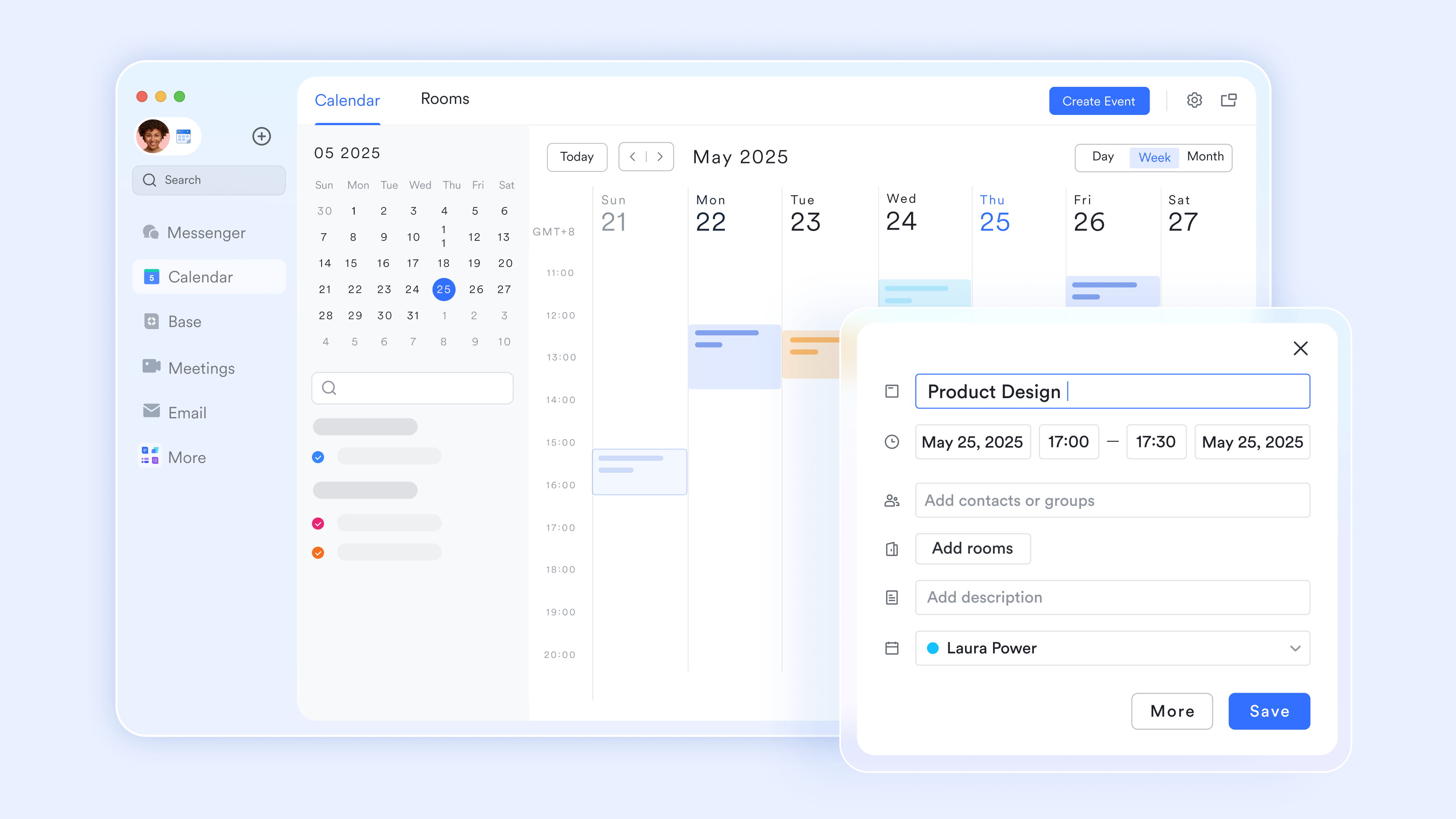
Event-triggered logging in Lark Calendar
acts as a passive time tracker for meetings and scheduled blocks. When a team member joins a meeting or completes a calendar event, the system can automatically log the actual duration into a Lark Base timesheet. This removes the administrative burden of manual entry, as the platform "remembers" exactly how much time was spent on specific client calls or internal syncs based on your digital footprint.
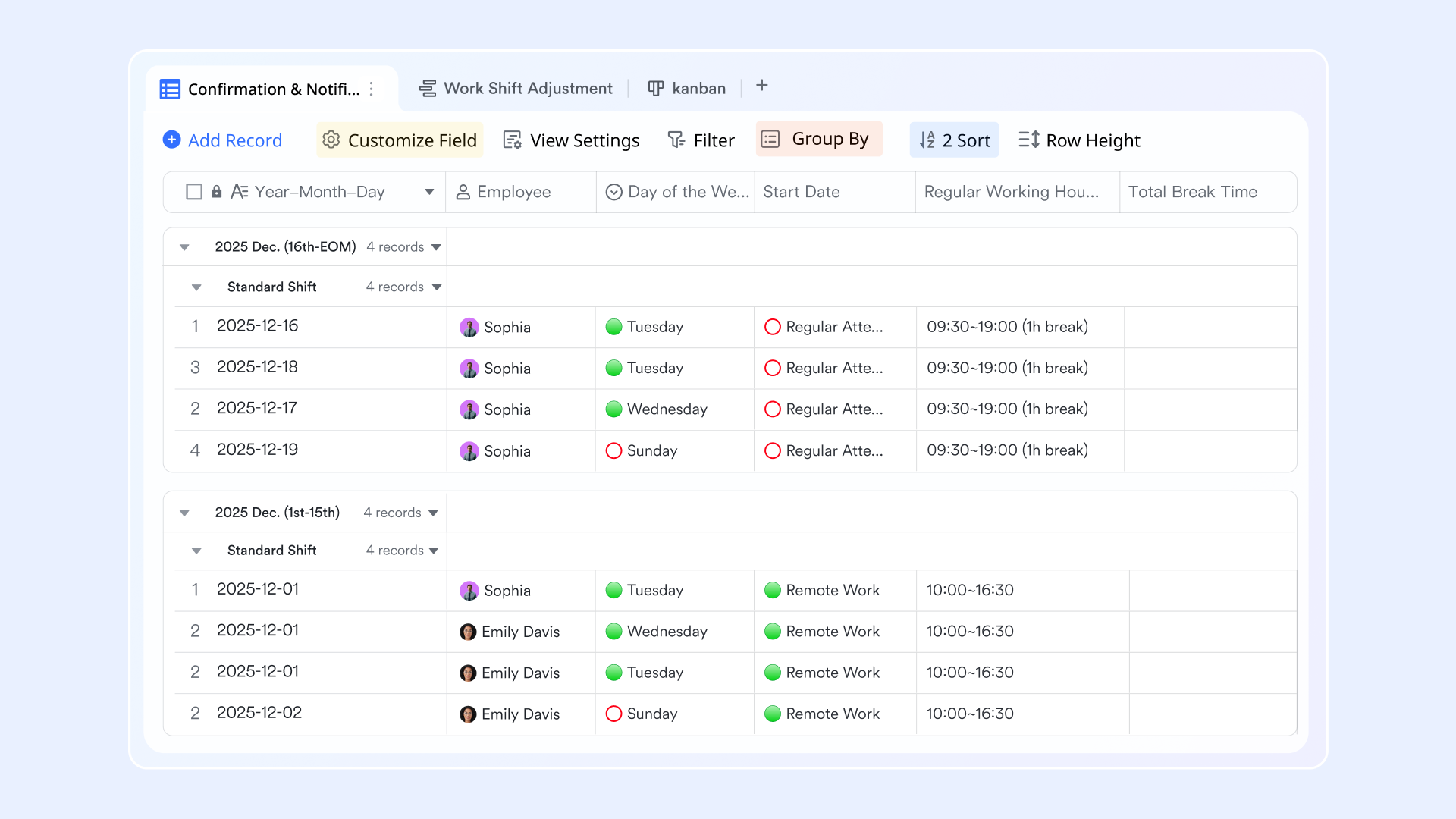
Automated "Status-to-time" stamps in Lark Base
Using "Flow fields" and automations within, you can track task duration without a stopwatch. When a team member moves a task from "In Progress" to "Done" on a Kanban board, Lark Base automatically records the precise timestamp. By using a formula to calculate the difference between these automated stamps, you get a 100% accurate, human-error-free record of the time taken to complete any specific deliverable.
Smart tasks-timer built-in
Lark allows teams to log time directly within their project workspace. On any Lark Tasks, users can start a "Live Timer" to track work in real time. Once stopped, the data isn't just a static note—it is instantly synced to your master Lark Base dashboard. This ensures that project managers can see live "Burn Rates" and resource allocation as it happens, rather than waiting for end-of-week timesheet submissions. 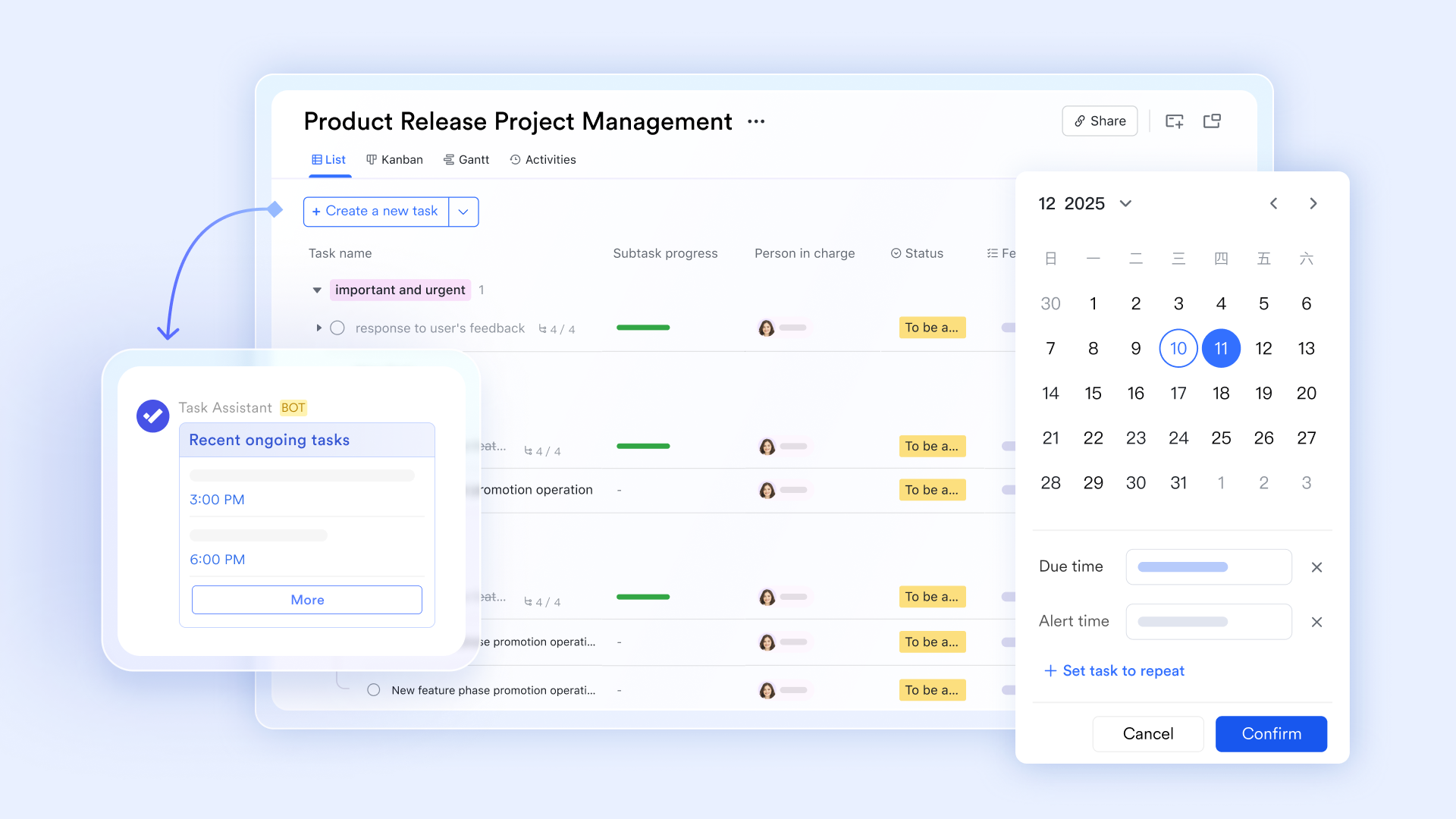
Geofenced clock-ins via form submission
For teams in the field, Lark Base forms can be configured to capture location-verified time entries. When an employee starts their workday, they submit a simple form that automatically logs their GPS coordinates and the exact time on the server. This "smart check-in" prevents manual time rounding and provides an auditable, automated log of when and where work actually occurred, feeding directly into your payroll or billing tables. 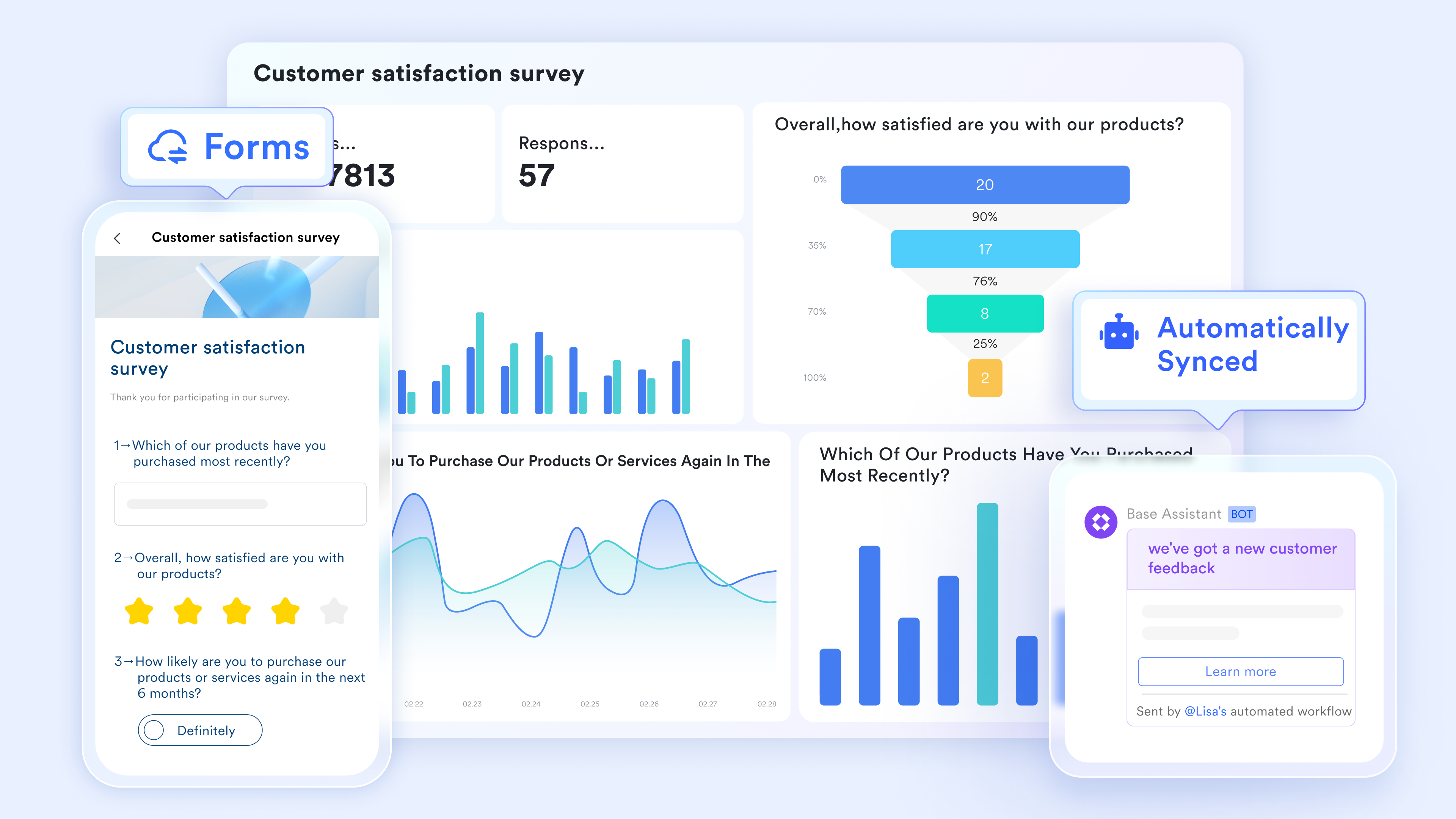
gates for timesheets
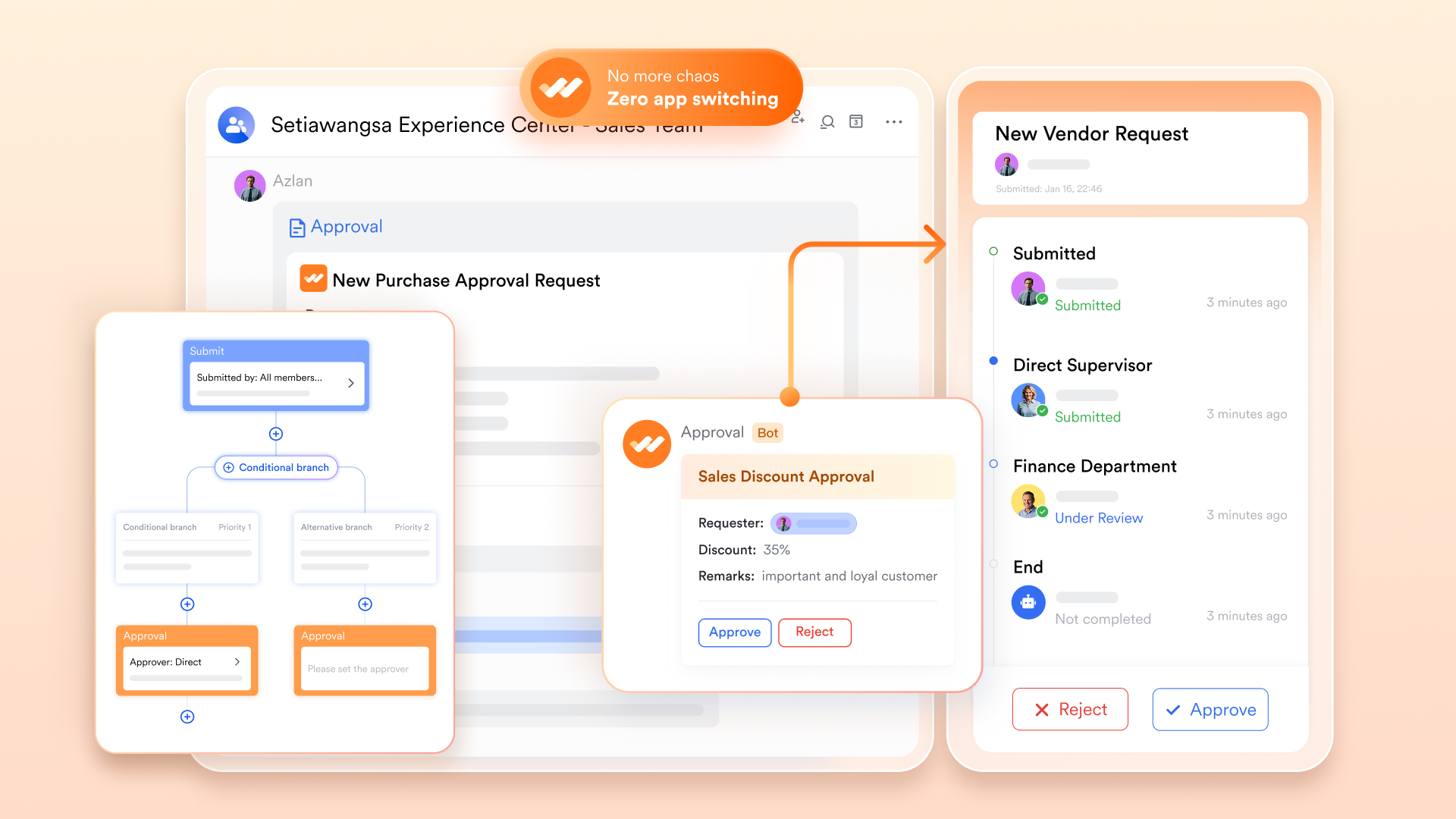
To close the loop, automates the verification of all tracked hours. Once a weekly time threshold is reached in Lark Base, the system can automatically trigger a request in Lark Approval. This sends a summary of the tracked hours to the manager via Lark Messenger for one-click sign-off. If the hours match the Lark Calendar or task logs, the approval is instant, ensuring that your billing and payroll data is always validated and ready for export.
Pros:
- Unified attendance and automated time tracking tools
- Built-in shift scheduling and workforce management
- Real-time team collaboration across departments
- Unified platform combining time tracking, chat, and workflows
Cons:
- Advanced time tracking automation and scheduling configuration may require initial onboarding, though detailed guidance and setup resources are available through the Lark Help Center.
:
- Starter plan: Free forever plan that includes 11 powerful tools for up to 20 users. It also comes with 100GB of storage, 1000 automation runs, AI translations, and more.
- Basic plan: $6/user/month (billed annually) for up to 500 users. It includes everything in Starter plus group calling for up to 500 attendees, 5TB of storage, 1000 automation runs, and more. For more details, please .
- Pro plan: $12/user/month (billed annually) for up to 500 users. It includes everything in Basic plus group calling for up to 500 attendees, 15TB of storage, 50,000 automation runs, and more.
- Enterprise plan: for custom pricing. Supports unlimited users and includes even more automation runs and advanced security, compliance, and management features.
For small teams with simple communication needs

18 months message history
1000 Base automation runs/month
2000 rows per table in Base
Most POPULAR
For companies with comprehensive collaboration and management needs
Unlimited message history
500-participant video meetings
50k Base automation runs/month
20k rows per table in Base
For large companies with advanced security and organizational management needs
Get a personalized demo and pricing
Unlimited message history
500-participant video meetings
15 TB storage + 30 GB storage/user
500k Base automation runs/month
50k Base automation runs/month
Most POPULAR
For companies with comprehensive collaboration and management needs
Unlimited message history
500-participant video meetings
50k Base automation runs/month
20k rows per table in Base
2. Toggl Track: Best for simple automated time tracking for freelancers and teams
Toggl Track is a straightforward and intuitive time tracking platform that helps freelancers and teams monitor billable hours, manage project timelines, and generate accurate billing reports with minimal effort. With one-click timers, automated tracking, and detailed reporting dashboards, Toggl Track gives individuals and businesses a simple yet powerful way to stay on top of time management without unnecessary complexity.
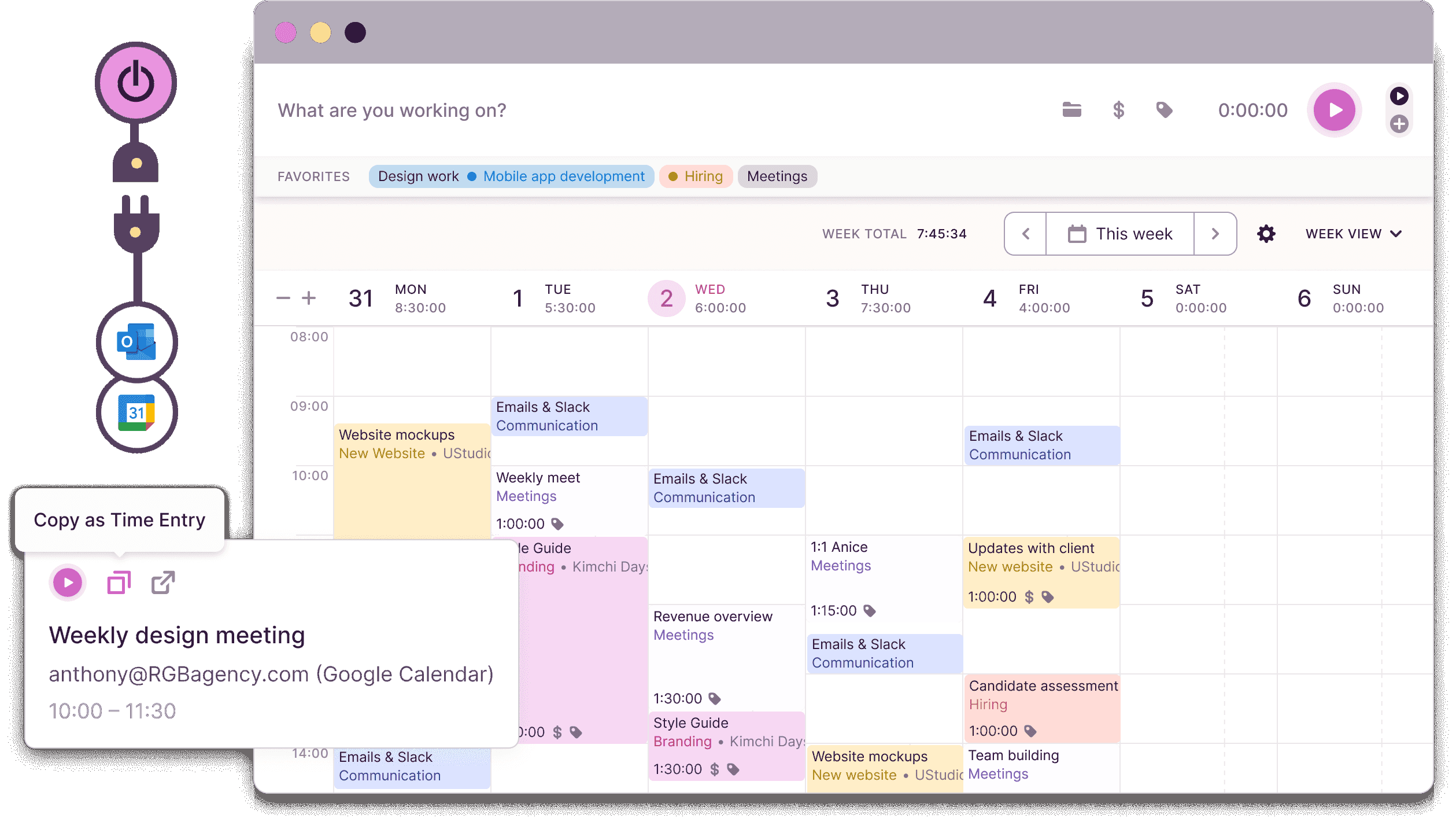
Image source: toggletrack.com
Key features:
- One-click timer and automated time capture
- Project and client-based time tracking
- Detailed billing and productivity reports
- Calendar and app integrations
Pros:
- Extremely simple and easy to use
- Strong project-based tracking capabilities
- Generous free plan for small teams
- Wide range of app integrations
Cons:
- Limited advanced workforce management features
- Basic reporting on lower-tier plans
- Less suited for large enterprise teams
Pricing:
- Enterprise: Custom pricing
3. Clockify: Best for free automated time tracking with unlimited users
Clockify is a popular free time tracking platform that helps businesses and freelancers monitor work hours, manage project timelines, and generate detailed timesheet reports without any user limitations. With browser extensions, mobile apps, and automated tracking capabilities, Clockify gives teams of all sizes an accessible and cost-effective way to stay organized and accountable across projects and tasks.
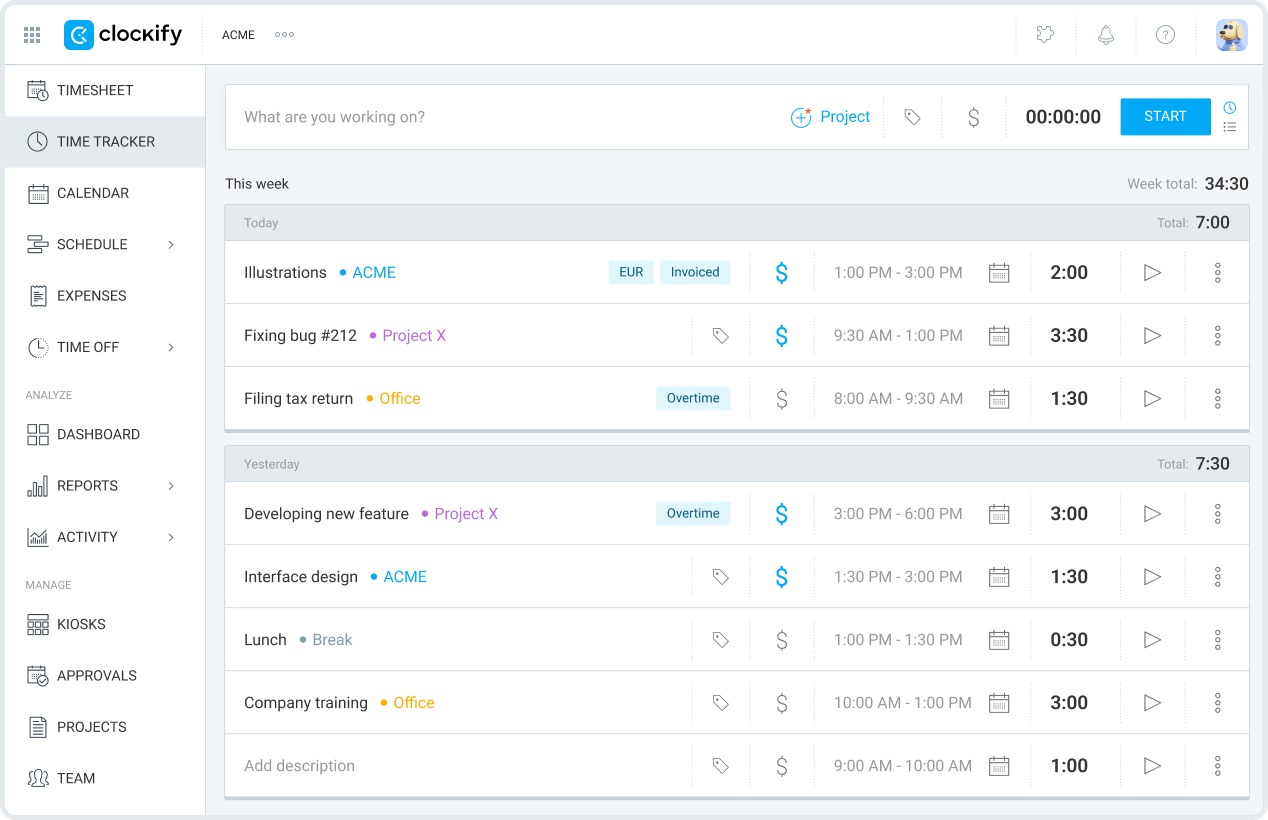
Image source: clockify.com
Key features:
- Unlimited user time tracking for free
- Automated and manual timesheet management
- Project and task-based time monitoring
- Browser extension and mobile app support
Pros:
- Completely free for unlimited users
- Simple and easy-to-navigate interface
- Strong project and task tracking tools
- Available across all major devices
Cons:
- Limited advanced features on the free plan
- Basic reporting and analytics capabilities
- Fewer integrations than premium platforms
Pricing:
- Basic: $3.99/month (billed annually)
- Standard: $5.49/month (billed annually)
- Pro: $7.99/month (billed annually)
- Enterprise: $11.99/month (billed annually)
4. Time Doctor: Best for workforce productivity monitoring and analytics
Time Doctor is an advanced employee time tracking and productivity monitoring platform that helps businesses track work hours, measure team performance, and gain detailed insights into how time is being spent across remote and in-office teams. With automated time capture, distraction alerts, and comprehensive productivity analytics, Time Doctor gives managers a clear and data-driven view of workforce efficiency and accountability.
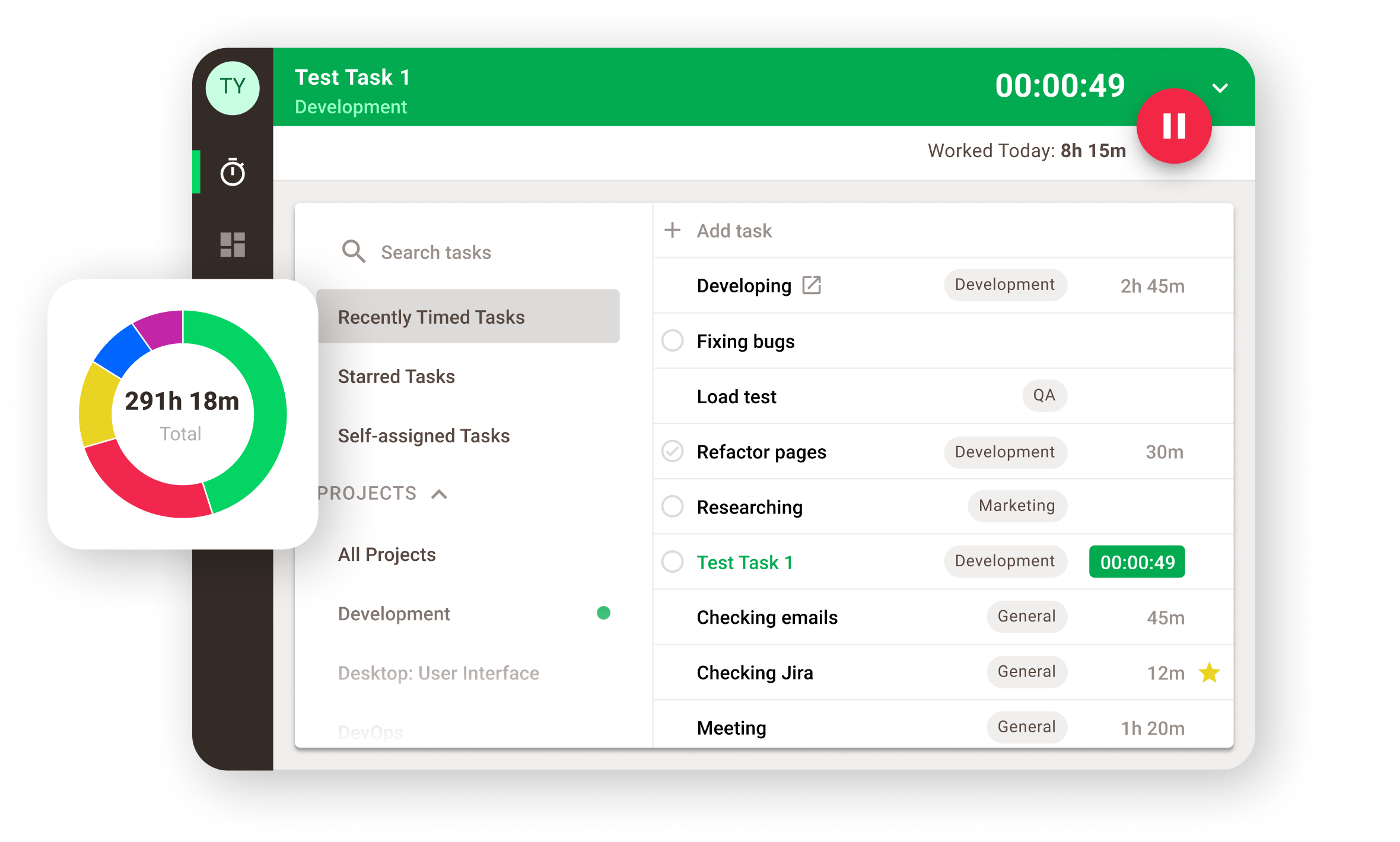
Image source: timedoctor.com
Key features:
- Automated time tracking and activity monitoring
- Distraction alerts and productivity nudges
- Detailed workforce analytics and reporting
- Payroll and project management integrations
Pros:
- Strong employee productivity monitoring tools
- Excellent remote workforce management capabilities
- Detailed and actionable analytics dashboards
- Good payroll and HR integrations
Cons:
- Can feel intrusive for some employees
- Higher pricing for advanced monitoring features
- Steeper learning curve for new users
Pricing:
- Basic: $6.67 per user/month (billed annually)
- Standard: $11.67 per user/month (billed annually)
- Premium: $16.70 per user/month (billed annually)
- Enterprise: Custom pricing
5. Timely: Best for AI-powered automatic time tracking
Timely is an AI-powered time tracking platform that automatically captures work activity across apps, documents, and meetings without requiring any manual input from users. With intelligent time suggestions, project-based tracking, and detailed productivity reports, Timely gives professionals and teams a completely hands-free and highly accurate way to maintain reliable time records throughout the workday.
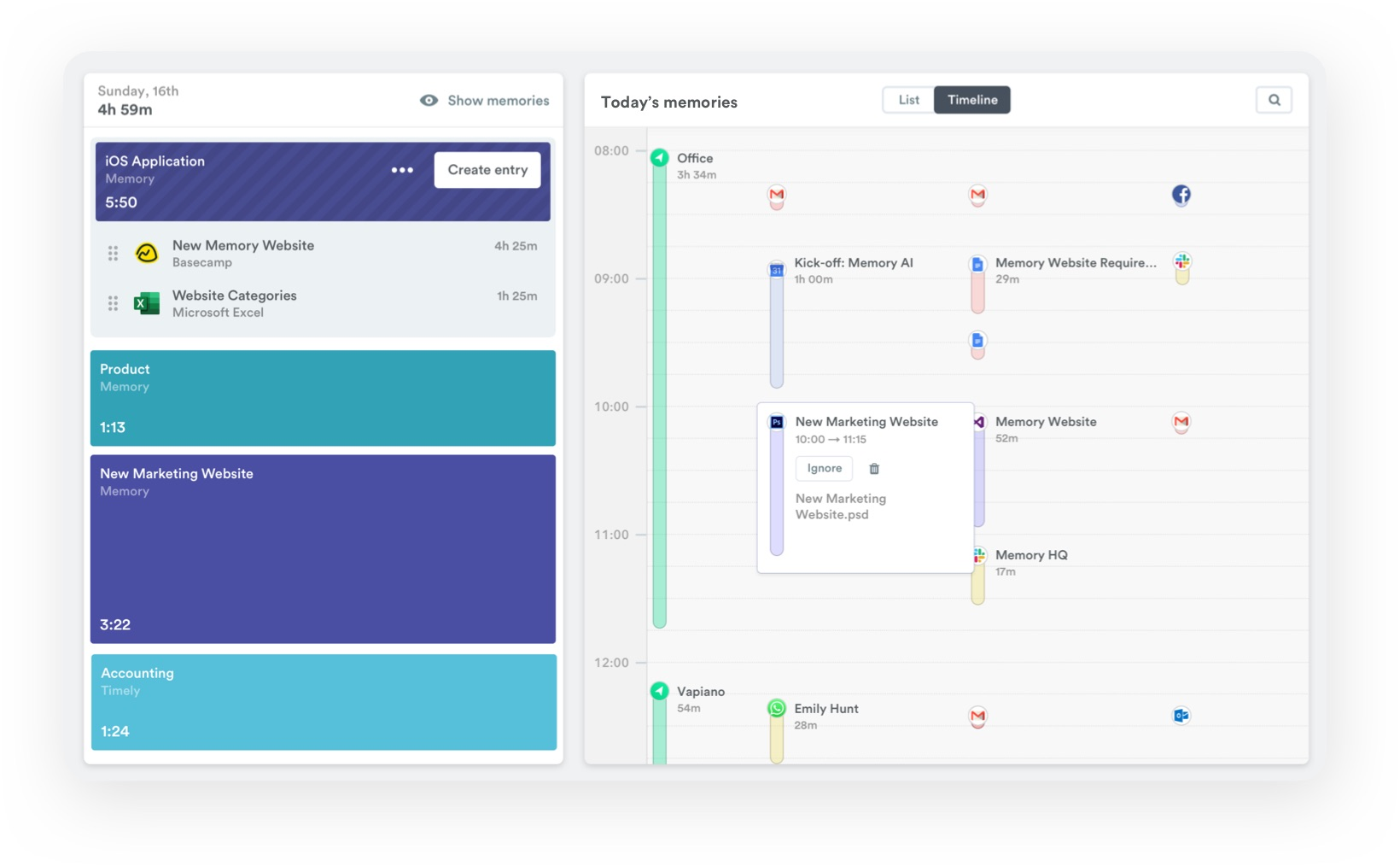
Image source: timely.com
Key features:
- AI-powered automatic time capture across apps
- Smart time suggestions and activity logging
- Project and team-based time management
- Detailed productivity and billing reports
Pros:
- Fully automated time tracking with no manual entry
- Highly accurate AI-powered activity capture
- Clean and intuitive user interface
- Strong project and team tracking tools
Cons:
- Higher pricing compared to basic trackers
- Can take time to train AI accurately
- Limited integrations on lower-tier plans
Pricing:
6. Harvest: Best for time tracking with invoicing and billing
Harvest is a time tracking and invoicing platform that helps freelancers and businesses monitor billable hours, generate professional invoices, and manage project budgets in one connected workflow. With seamless accounting integrations and detailed financial reporting, Harvest gives professionals a reliable and efficient way to track time and get paid accurately without juggling multiple tools.
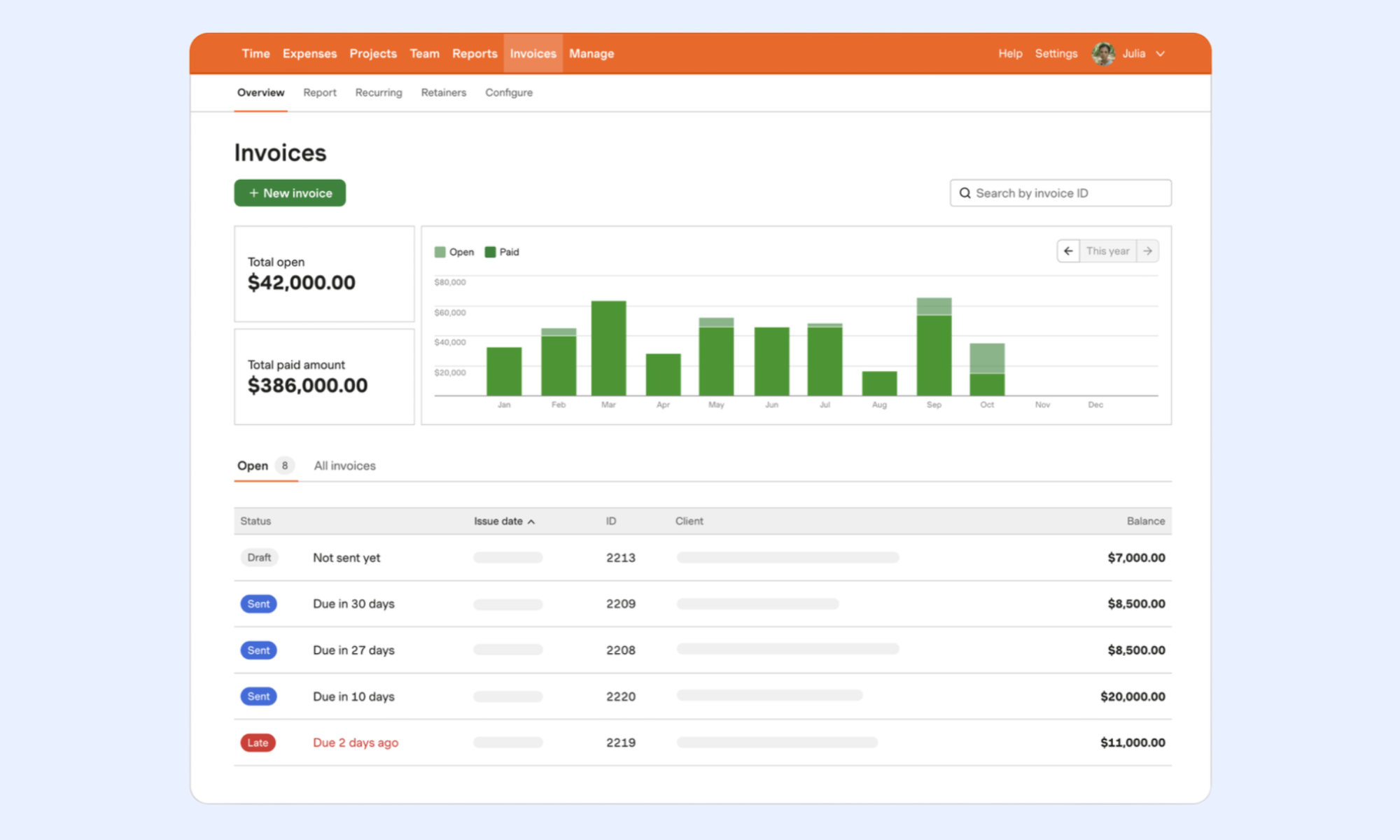
Image source: harvest.com
Key features:
- Time tracking with integrated invoicing tools
- Project budget monitoring and alerts
- Detailed billing and financial reporting
- Accounting and project management integrations
Pros:
- Excellent time tracking and invoicing combination
- Strong project budget monitoring tools
- Easy to set up and use quickly
- Good range of third-party integrations
Cons:
- Limited features beyond billing and invoicing
- Basic reporting on lower-tier plans
- Less suited for large enterprise teams
Pricing:
7. RescueTime: Best for automatic productivity and activity tracking
RescueTime is an automatic productivity tracking platform that runs silently in the background, monitoring how time is spent across apps, websites, and tasks to help individuals and teams understand and improve their daily work habits. With detailed activity reports, focus session tools, and productivity scoring, RescueTime gives professionals a clear and honest picture of where their time actually goes throughout the workday.
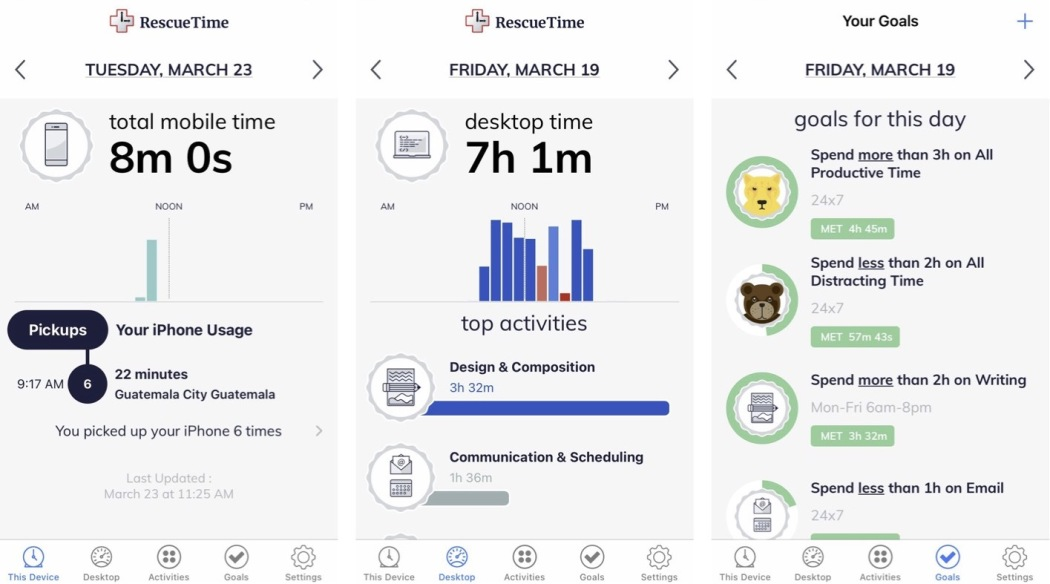
Image source: rescuetime.com
Key features:
- Automatic background activity and app tracking
- Productivity scoring and daily insights
- Focus session tools and distraction blocking
- Detailed activity and productivity reporting
Pros:
- Fully automatic with zero manual input
- Honest and detailed productivity insights
- Useful focus and distraction blocking tools
- Easy to set up and run passively
Cons:
- Limited project and billing capabilities
- Less suited for team-wide time management
- Basic integrations with third-party platforms
Pricing:
8. TimeCamp: Best for automated time tracking with productivity insights
TimeCamp is an automated time tracking platform that helps businesses and freelancers monitor work hours, track project progress, and gain detailed productivity insights through intelligent activity logging. With keyword-based automatic time tracking, billing tools, and seamless integrations, TimeCamp gives teams a hands-free and accurate way to manage time across projects and clients without constant manual input.
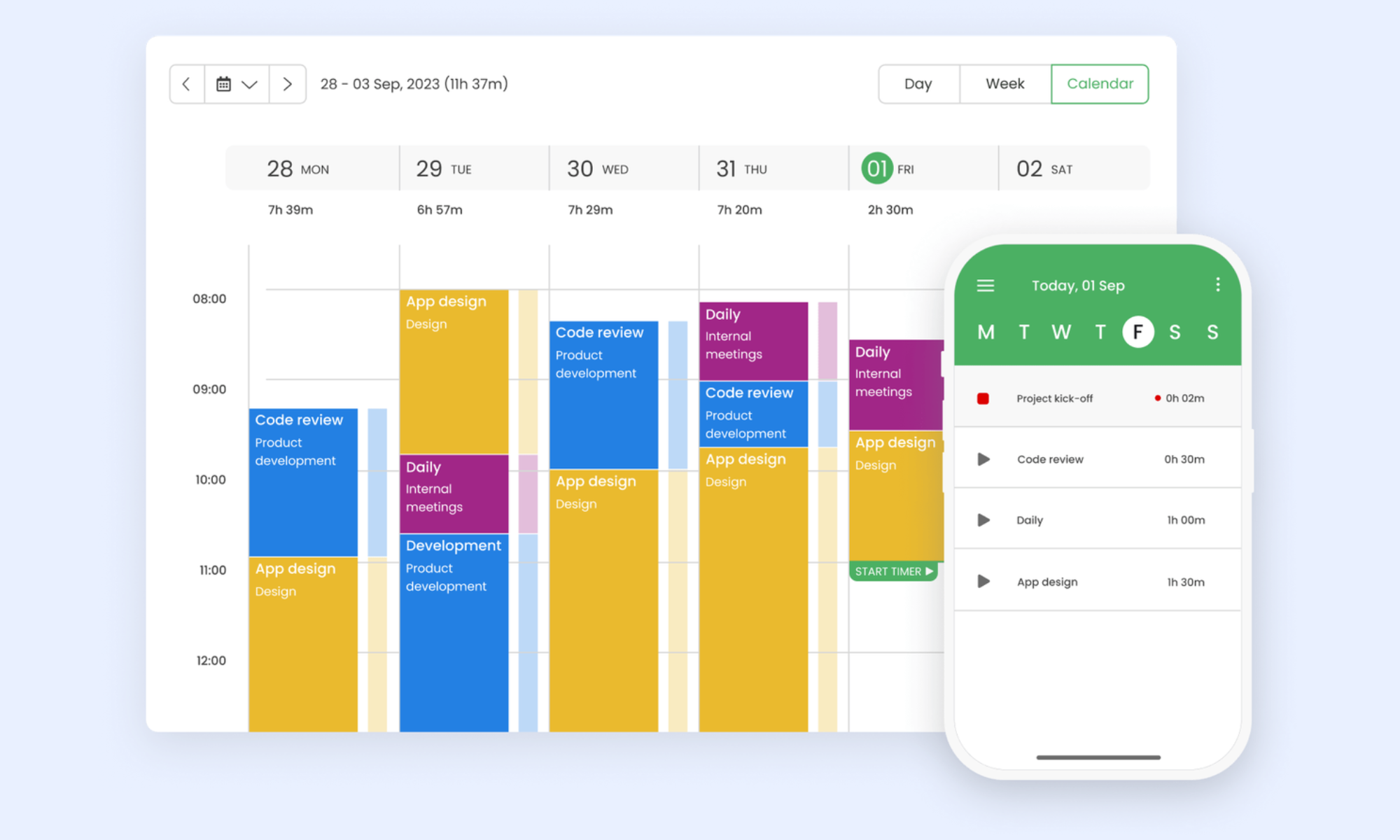
Image source: timecamp.com
Key features:
- Keyword-based automatic time tracking
- Project and task-based time management
- Billing, invoicing, and budget tracking tools
- Wide range of third-party integrations
Pros:
- Smart keyword-based automatic tracking
- Strong billing and invoicing capabilities
- Generous free plan for small teams
- Wide range of integration options
Cons:
- The interface can feel outdated for some users
- Limited advanced workforce analytics
- Reporting customization can be restrictive
Pricing:
- Starter: $3.99 per user/month (billed annually)
- Premium: $6.99 per user/month (billed annually)
- Ultimate: $9.99 per user/month (billed annually)
- Enterprise: Custom pricing
9. Everhour: Best for project management integrations and time tracking
Everhour is a time tracking platform built specifically to integrate deeply with popular project management tools, helping teams monitor work hours, track project budgets, and manage billing directly within their existing workflows. With real-time budget alerts, detailed reporting, and seamless native integrations, Everhour gives project-focused teams a connected and efficient way to stay on top of time and costs without switching between platforms.
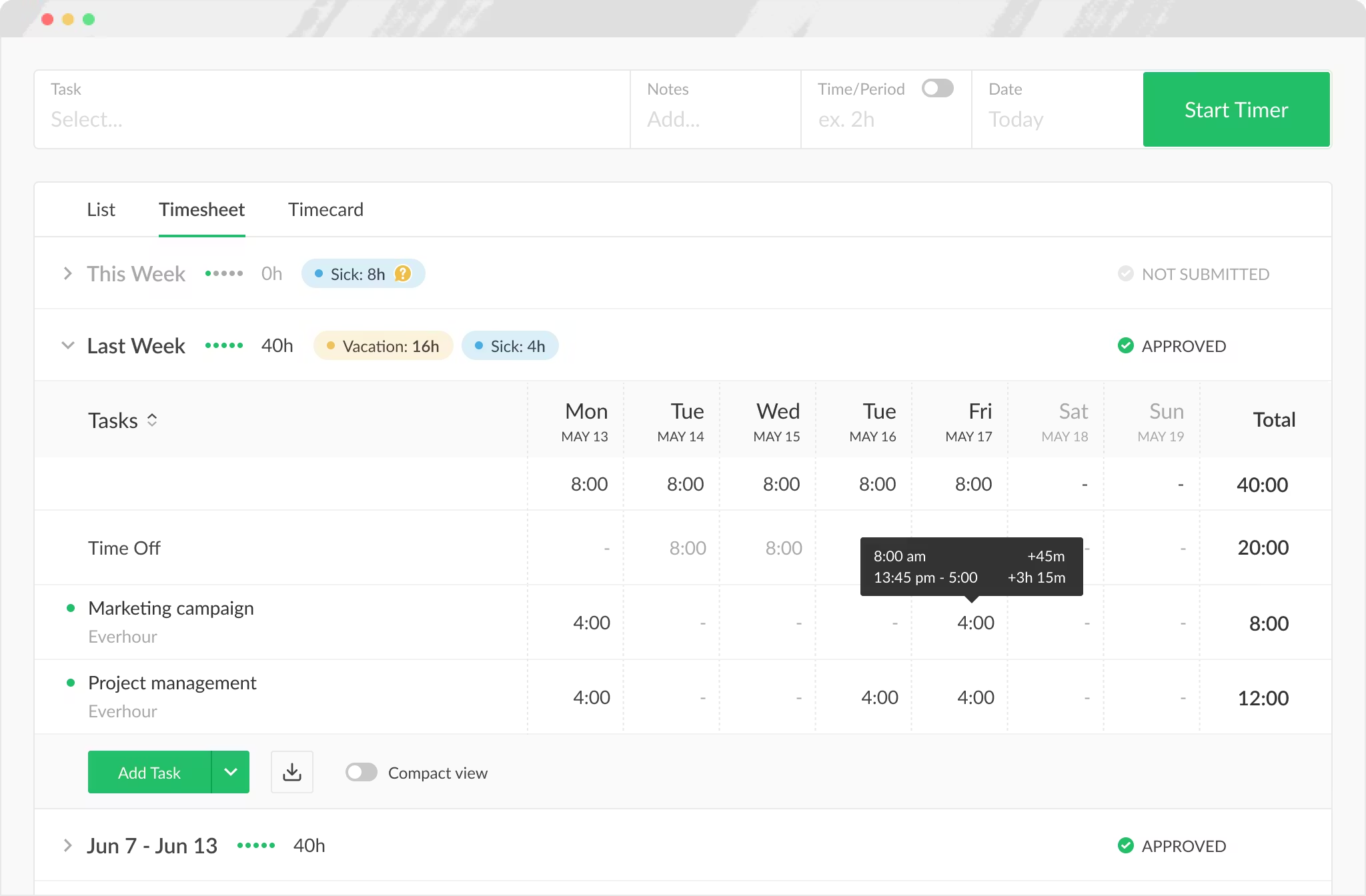
Image source: everhour.com
Key features:
- Deep native project management integrations
- Real-time project budget tracking and alerts
- Team time tracking and timesheet management
- Detailed billing and productivity reporting
Pros:
- Excellent project management tool integrations
- Strong real-time budget monitoring capabilities
- Clean and easy-to-navigate interface
- Good team collaboration and tracking features
Cons:
- Limited functionality without integrated tools
- Less suited for standalone time tracking needs
- Fewer advanced workforce analytics features
Pricing:
- Team: $8.50 per user/month (billed annually)
- Enterprise: Custom pricing
10. Hubstaff: Best for remote employee monitoring and GPS tracking
Hubstaff is a comprehensive remote workforce management platform that helps businesses track employee time, monitor productivity, and manage field teams through built-in GPS tracking and activity monitoring tools. With automated timesheets, location tracking, and payroll integrations, Hubstaff gives managers a complete and reliable view of remote and field workforce activity across multiple locations and time zones.
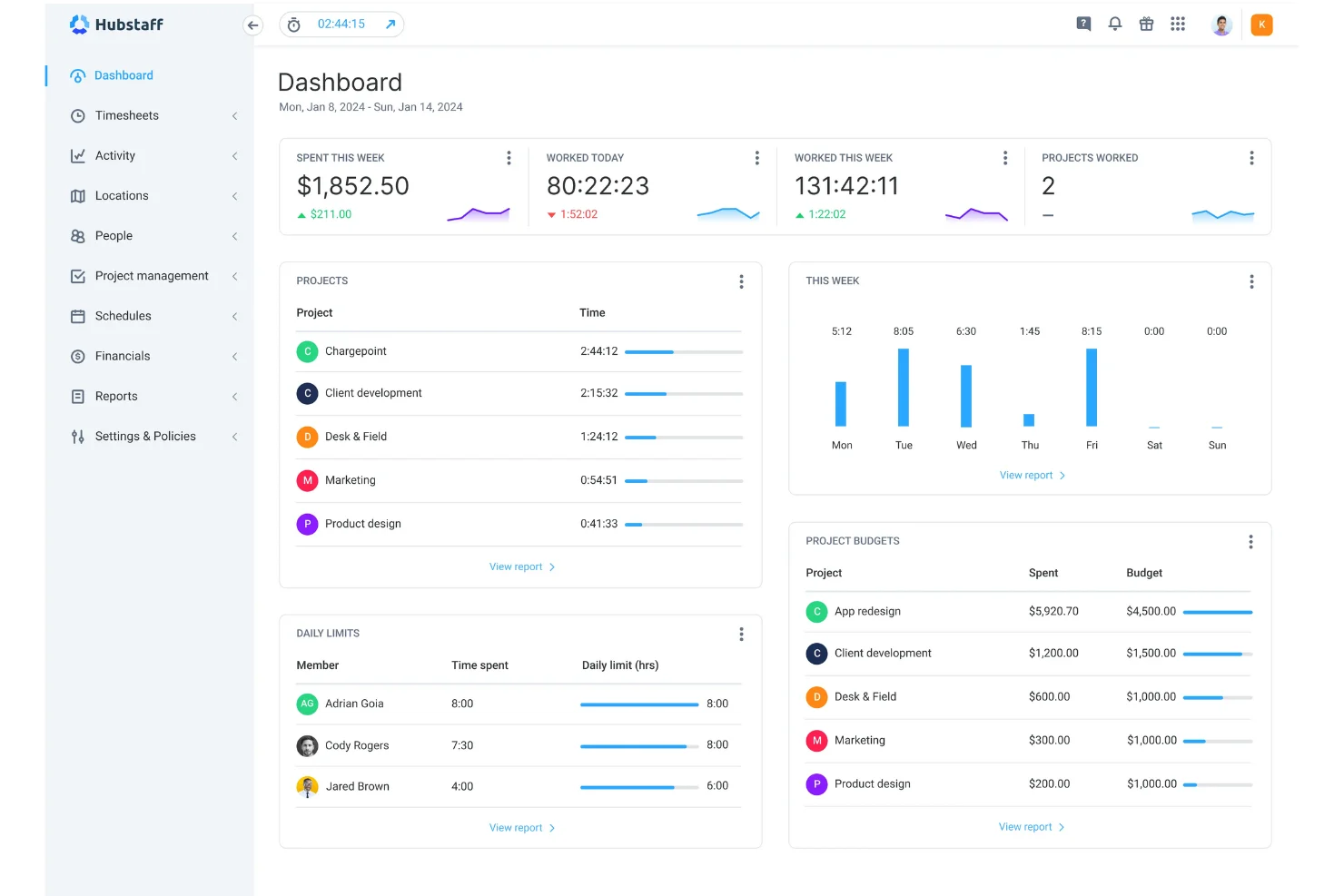
Image source: hubstaff.com
Key features:
- Automated time tracking and activity monitoring
- GPS location tracking for field teams
- Automated timesheet and payroll management
- Project budgeting and productivity reporting
Pros:
- Strong GPS and field team tracking tools
- Excellent remote workforce monitoring capabilities
- Automated payroll and timesheet management
- Scales well for distributed teams
Cons:
- Can feel overly intrusive for some employees
- Higher pricing for advanced GPS features
- Limited project management capabilities
Pricing:
- Starter: $4 per user/month
- Team: $10 per user/month
- Enterprise: Custom pricing
11. Paymo: Best for project management and automated time tracking
Paymo is an integrated project management and time tracking platform that helps freelancers and small businesses monitor work hours, manage project tasks, and handle client invoicing within one connected workflow. With automatic time tracking, Kanban boards, and detailed billing tools, Paymo gives professionals a complete and efficient way to manage projects and time without juggling multiple separate tools.
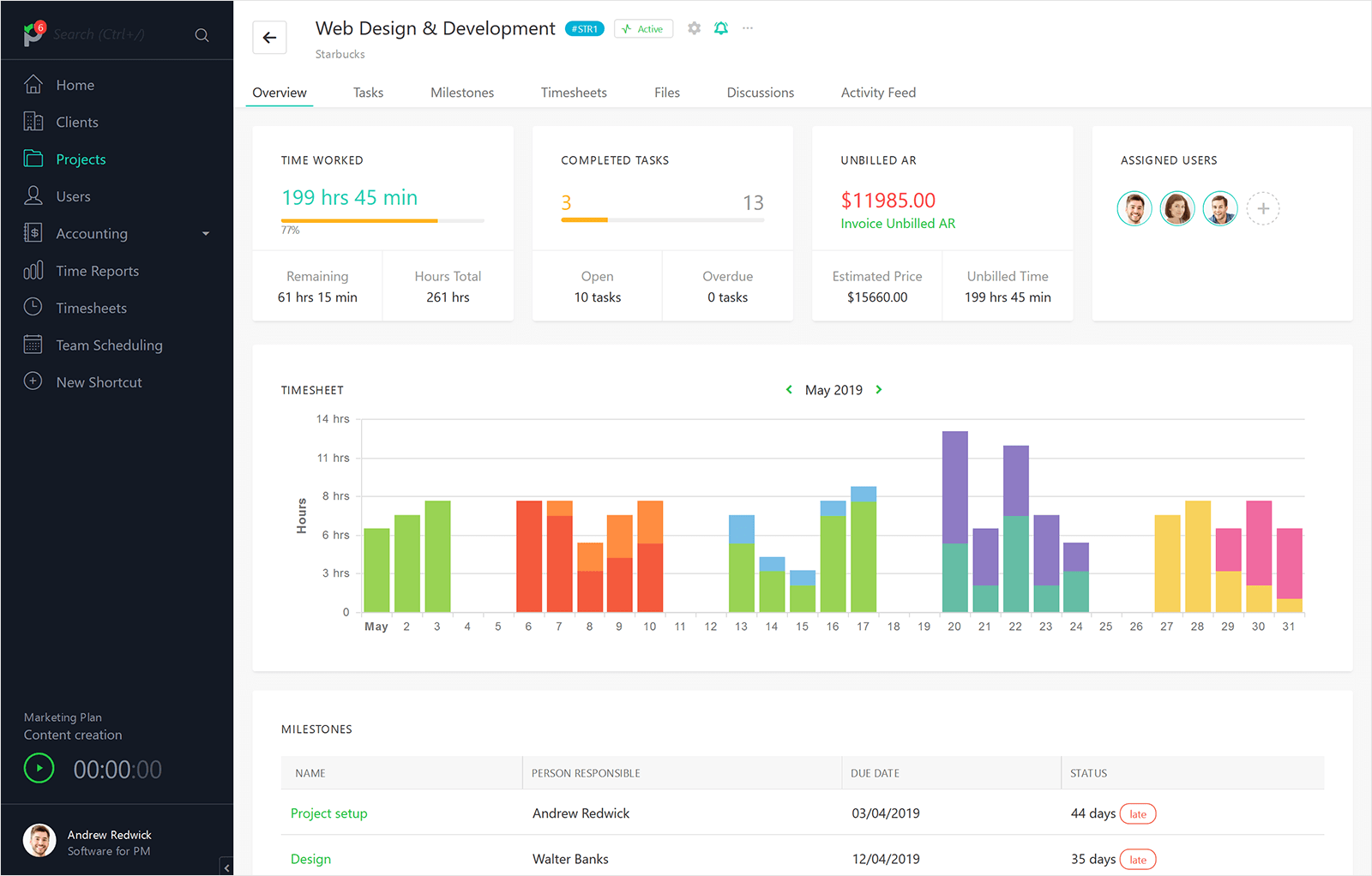
Image source: paymo.com
Key features:
- Automated and manual time tracking tools
- Project management with Kanban and Gantt views
- Client invoicing and billing management
- Team scheduling and workload planning
Pros:
- Strong combination of project and time management
- Good client invoicing and billing capabilities
- Intuitive and visually clean interface
- Affordable pricing for freelancers and small teams
Cons:
- Limited advanced reporting on lower plans
- Less suited for large enterprise teams
- Fewer third-party integrations than larger platforms
Pricing:
- Solo: $5.90 per user/month (billed annually)
- Plus: $10.90 per user/month (billed annually)
- Pro: $16.90 per user/month (billed annually)
12. Early: Best for intuitive automatic time tracking and time analytics
Early is an intuitive, automatic time tracking platform that helps professionals and teams capture work activity effortlessly and gain meaningful insights into how time is distributed across projects, clients, and tasks. With smart time suggestions, detailed analytics dashboards, and a clean user experience, Early gives individuals a simple yet powerful way to understand and optimize their daily time habits without manual logging.
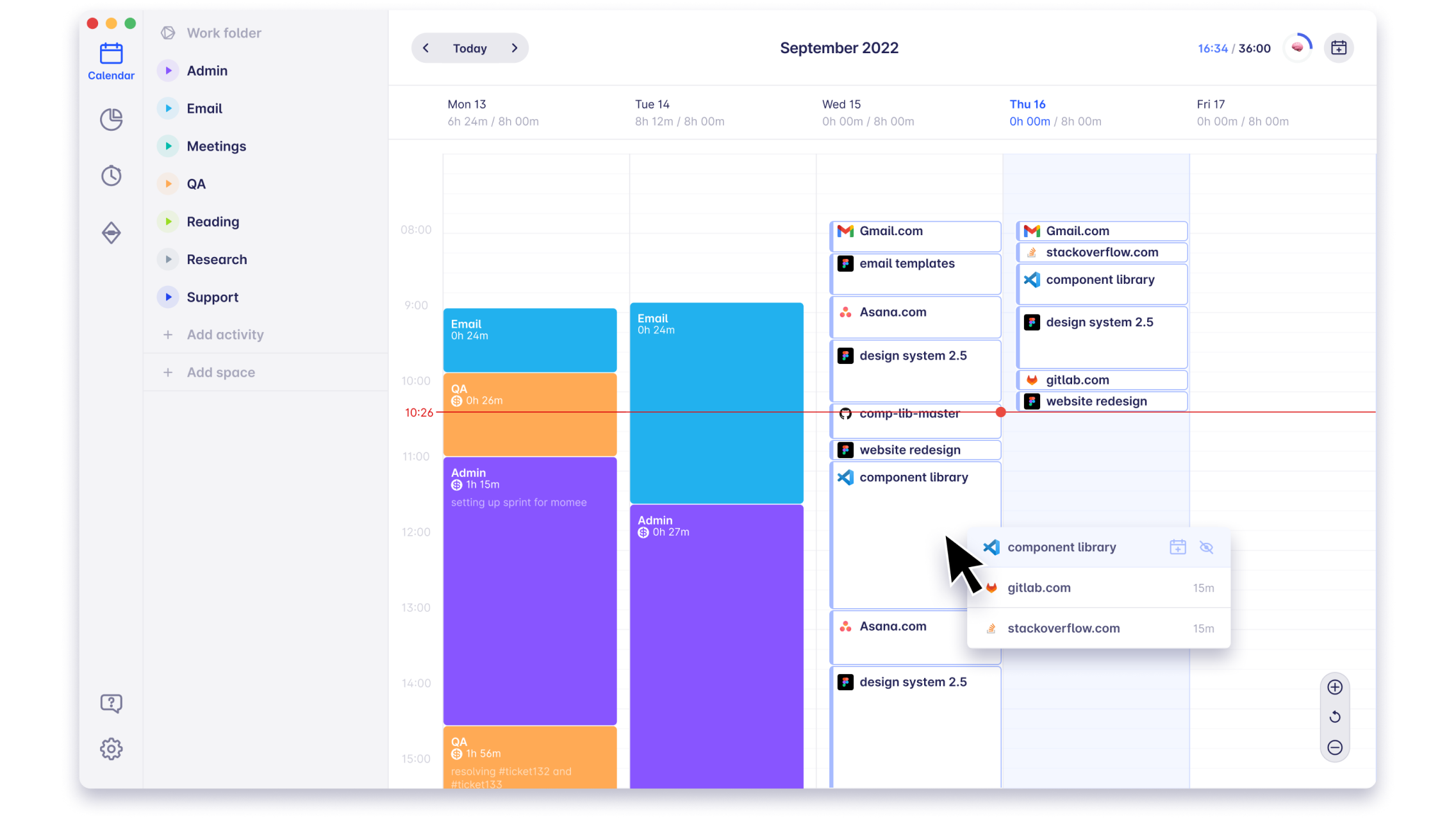
Image source: early.com
Key features:
- Automatic time capture and smart suggestions
- Detailed time analytics and productivity insights
- Project and client-based time categorization
- Clean and intuitive user dashboard
Pros:
- Effortless automatic time capture
- Strong and actionable time analytics
- Clean and highly intuitive interface
- Good project and client categorization tools
Cons:
- Limited team and workforce management features
- Less suited for large enterprise deployments
- Fewer third-party integrations available
Pricing:
- Personal: $9 per user/month
- Personal Pro: $14 per user/month
- Team: $19 per user/month
- Enterprise: Custom pricing
13. ClickUp: Best for task management with built-in time tracking
ClickUp is a powerful all-in-one productivity platform that helps teams manage tasks, track project progress, and monitor work hours through built-in time tracking tools within a single connected workspace. With highly customizable workflows, detailed reporting, and a wide range of integrations, ClickUp gives businesses and individuals a flexible and scalable way to manage work and time without relying on separate dedicated tools.
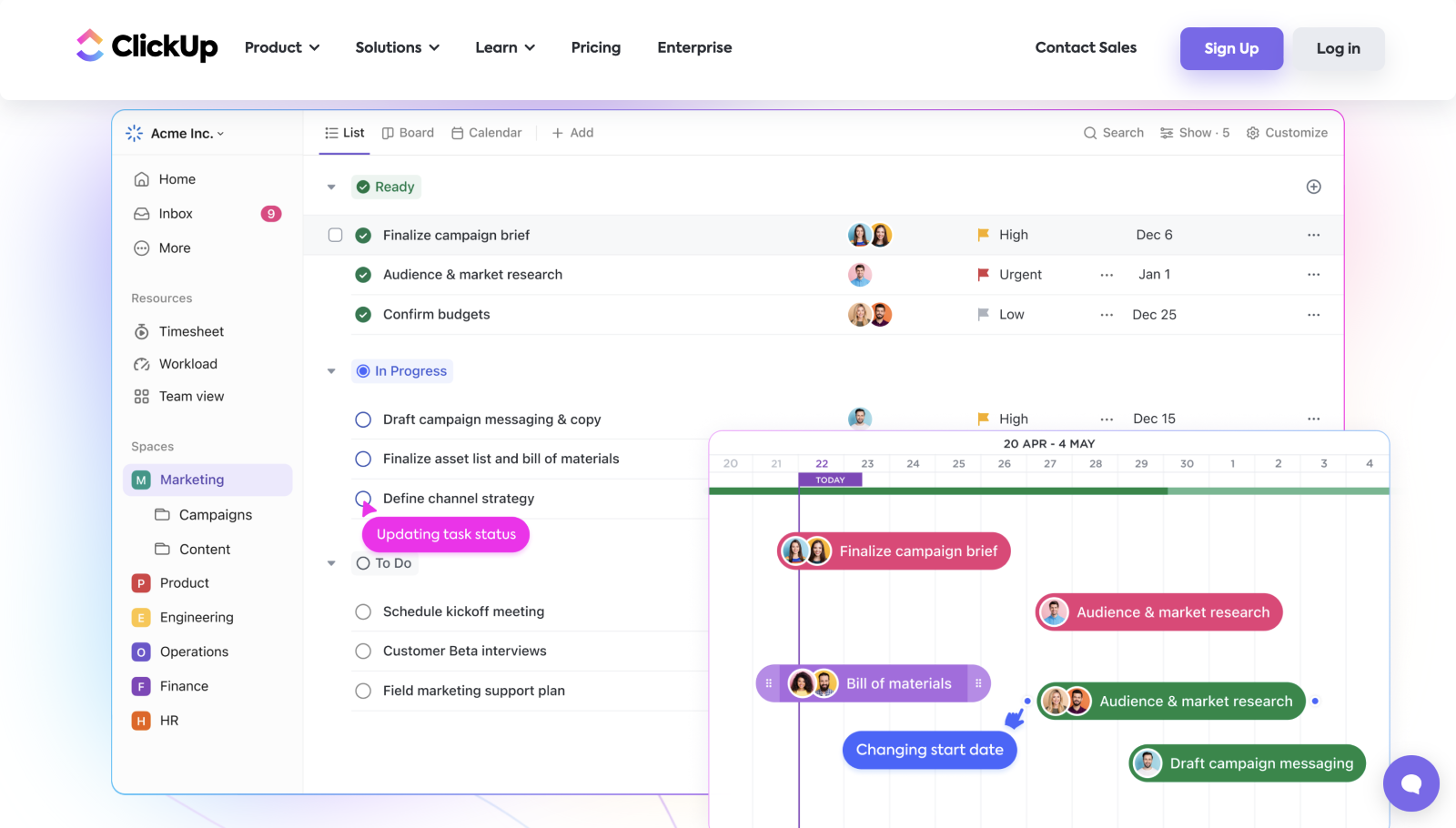
Image source: clickup.com
Key features:
- Built-in time tracking and timesheet management
- Highly customizable task and project workflows
- Detailed productivity and project reporting
- Wide range of third-party app integrations
Pros:
- Comprehensive all-in-one productivity platform
- Highly flexible and customizable workflows
- Strong built-in time tracking capabilities
- Generous free plan with wide feature access
Cons:
- Can feel overwhelming for new users
- Steeper learning curve for advanced features
- Occasional performance issues with large workspaces
Pricing:
- Unlimited: $7 per user/month (billed annually)
- Business: $12 per user/month (billed annually)
- Enterprise: Custom pricing
14. MyHours: Best for project and client time tracking
MyHours is a straightforward project and client time tracking platform that helps freelancers and small teams log work hours, manage project budgets, and generate accurate billing reports with minimal effort. With simple timers, detailed project dashboards, and client-friendly reporting tools, MyHours gives professionals an easy and reliable way to stay on top of billable hours and project costs without unnecessary complexity.
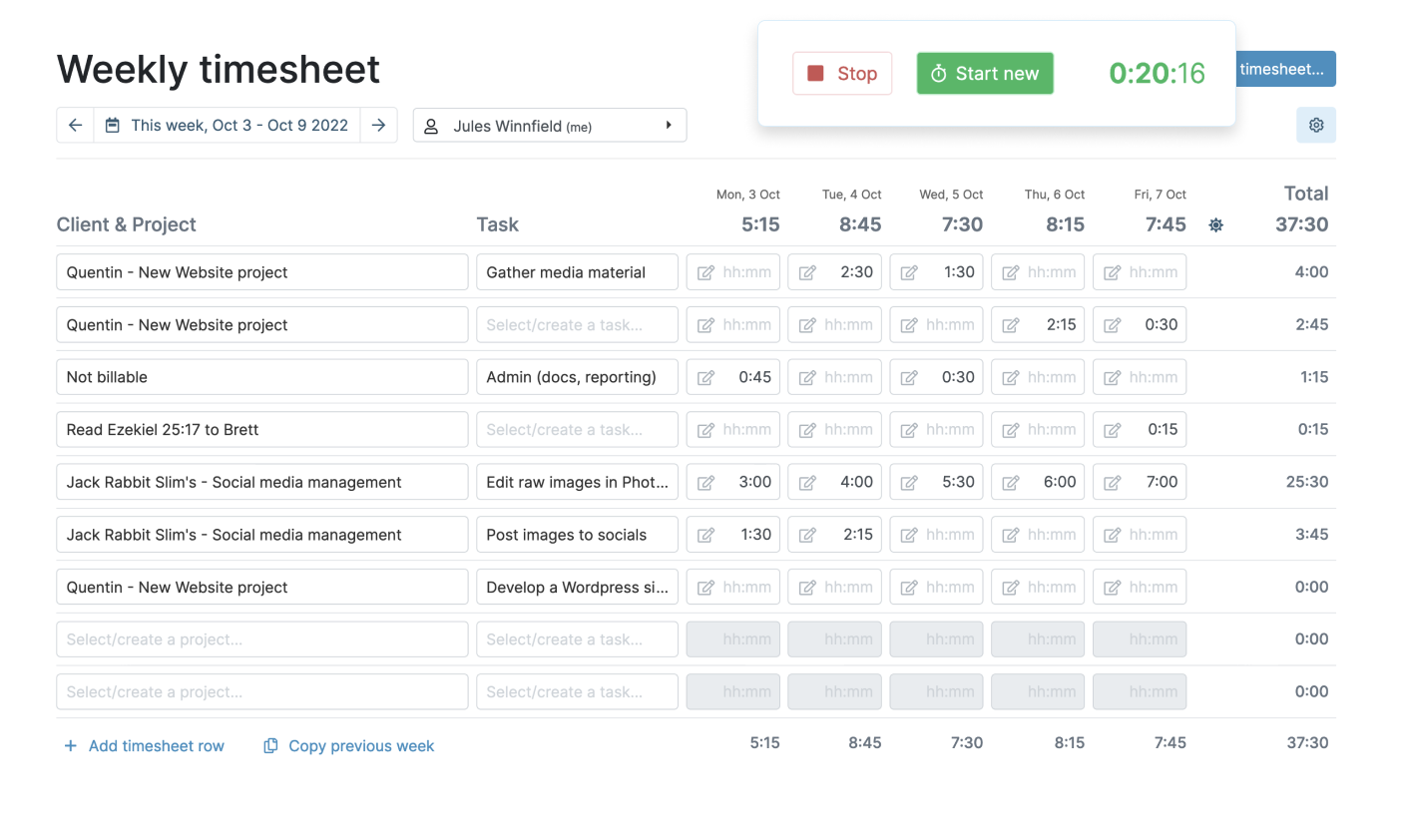
Image source: myhours.com
Key features:
- Project and client-based time tracking
- Budget monitoring and cost management tools
- Detailed billing and invoicing reports
- Team timesheet and activity management
Pros:
- Simple and easy to get started quickly
- Strong project and client tracking tools
- Good budget monitoring capabilities
- Affordable pricing for small teams
Cons:
- Limited advanced automation features
- Basic interface compared to larger platforms
- Less suited for large enterprise teams
Pricing:
- Free: $0 (for up to 5 users)
- Basic: $4 per user/month
- Pro: $8 per user/month (billed annually)
- Enterprise: Custom pricing
15. Jibble: Best for employee attendance and automated time tracking
Jibble is a cloud-based attendance and time tracking platform that helps businesses automate employee clock-ins, monitor attendance patterns, and manage workforce schedules with minimal manual effort. With facial recognition, GPS verification, and automated timesheet generation, Jibble gives organizations a reliable and modern way to track employee attendance and work hours accurately across office, remote, and field-based teams.
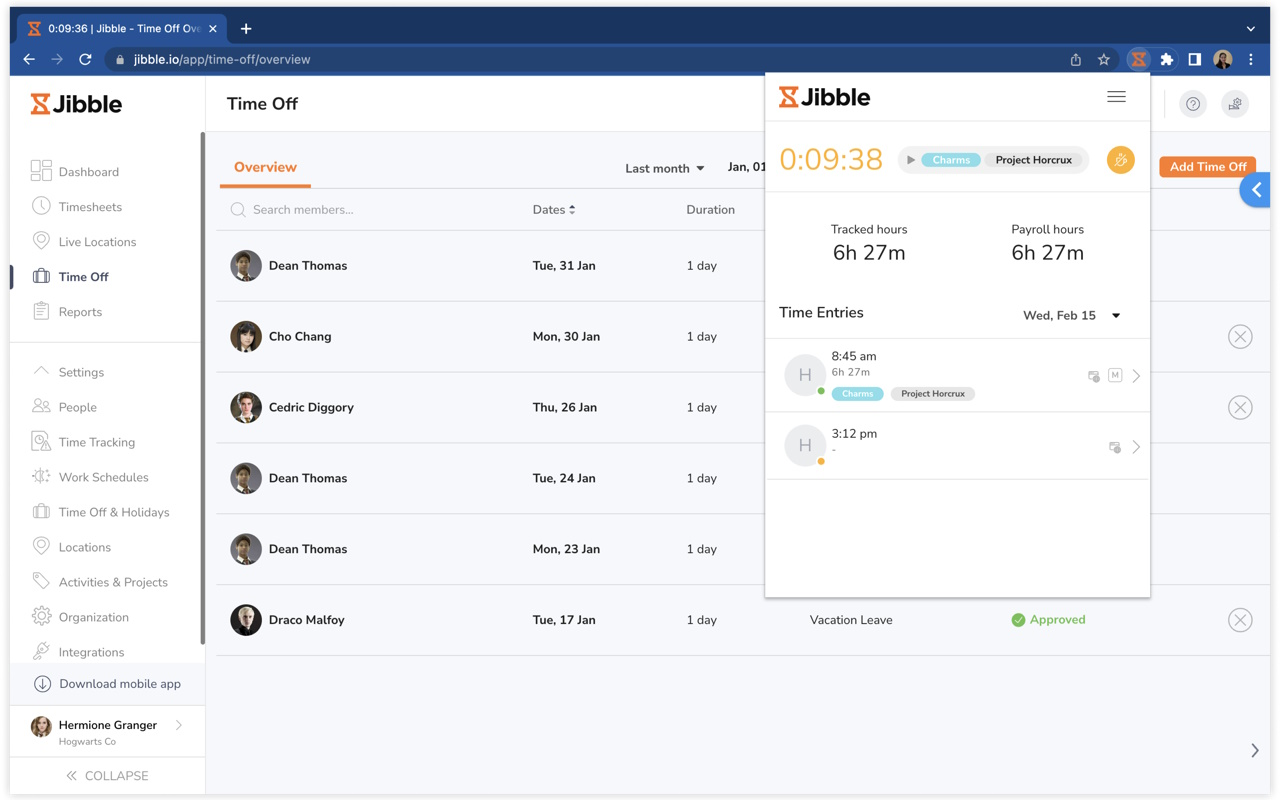
Image source: jibble.com
Key features:
- Automated attendance and clock-in management
- Facial recognition and GPS verification tools
- Automated timesheet generation and reporting
- Shift scheduling and workforce management
Pros:
- Strong automated attendance tracking tools
- Reliable facial recognition and GPS verification
- Generous free plan for unlimited users
- Easy to deploy across multiple locations
Cons:
- Limited advanced project time tracking features
- Basic reporting on lower-tier plans
- Less suited for complex billing workflows
Pricing:
- Premium: $37.99 per user/month (billed annually)
- Ultimate: $57.99 per user/month (billed monthly)
- Enterprise: Custom pricing
Pitfalls to avoid with automated time tracking tools
Automated time tracking software can dramatically improve productivity and workforce accountability, but only when implemented thoughtfully. Many businesses rush into adoption without considering the operational and cultural challenges that can quietly undermine the effectiveness of even the best platforms. Here are five common pitfalls to avoid when deploying automated time tracking tools across your organization.
- Choosing features over simplicity: Many businesses get drawn in by feature-rich platforms without considering whether their teams will actually use them. An overly complex tool leads to poor adoption, inconsistent tracking, and unreliable data. The best automated time tracking solution is one that fits naturally into existing workflows without requiring constant manual intervention or extensive training.
- Neglecting employee trust and transparency: Automated monitoring can quickly create a culture of distrust if employees feel surveilled rather than supported. Organizations that fail to communicate the purpose and boundaries of time tracking often face resistance, disengagement, and reduced morale. Being transparent about how data is collected and used goes a long way in building team buy-in and cooperation.
- Ignoring integration with existing workflows: Many businesses deploy time tracking tools in isolation without connecting them to broader systems and client management workflows. This creates data silos where time records and client activity remain disconnected, making it harder for teams to understand how time investment translates into business outcomes and revenue growth.
- Overlooking mobile and remote accessibility: Organizations that select desktop-only time tracking tools often struggle to capture accurate data from remote, hybrid, or field-based employees. For industries that require on-the-go tracking, platforms that function as reliable on mobile devices ensure that every hour worked is captured, regardless of location or working environment.
Track time and workflows efficiently across your team
How automation is shaping the future of time tracking
Automation is fundamentally transforming how businesses and professionals approach time management, moving the industry far beyond manual timers and spreadsheet-based logging into intelligent, self-operating systems that capture and analyze work activity in real time. Modern automated time-tracking platforms now use AI and machine learning to detect patterns, suggest time entries, and generate accurate reports without human input, saving teams countless hours of administrative effort each week.
For sales-focused organizations, integrating time tracking with software for small businesses helps align team effort directly with revenue-generating activities, giving managers clearer visibility into where time is truly being invested. As workplaces continue to evolve toward remote and hybrid models, platforms that serve as reliable goal-tracking will become essential tools for keeping distributed teams accountable, productive, and consistently aligned with broader organizational objectives and performance targets.
Conclusion
Automated time tracking software has become an essential part of running a productive, accountable, and efficiently managed business in today's fast-evolving work environment. These platforms help organizations monitor work hours, streamline project billing, improve workforce accountability, and gain meaningful insights into how time is being spent across teams and individuals every day.
Tools like also demonstrate how integrated collaboration platforms can go beyond basic scheduling to support attendance tracking, workflow automation, and team coordination within one unified workspace. As the landscape of continues to evolve rapidly, businesses that invest in the right automated solution today will be better positioned to boost productivity, improve project profitability, and build a more organized and time-conscious work culture for the long term.
Manage time tracking and workflows in one workspace
FAQs
How to automate time tracking?
Automating time tracking starts with choosing a platform that offers background activity detection, smart time suggestions, and automatic timer triggers based on app usage and project activity. Tools like Timely and RescueTime run silently in the background, capturing work activity without any manual input. For teams, setting up project-based tracking rules, integrating the platform with existing project management tools, and enabling automatic timesheet generation can eliminate most manual logging efforts. The key is selecting a tool that fits naturally into existing workflows, so automation runs consistently without requiring constant employee intervention.
What is the best time tracking software?
The best time tracking software depends on individual needs, team size, and the level of automation required. Toggl Track and Clockify are widely popular for their simplicity and generous free plans. Time Doctor and Hubstaff suit businesses needing advanced workforce monitoring and GPS tracking. Timely stands out for fully automatic AI-powered time capture with zero manual input. For organizations that need an all-in-one platform combining time tracking, collaboration, scheduling, and workflow management, Lark offers a unified workspace that keeps teams organized and productive without switching between multiple tools.
What is an automated time tracker?
An automated time tracker is a software tool that records work activity, app usage, and project time without requiring users to manually start and stop timers. Instead of relying on human input, these tools run in the background and detect active work patterns across applications, browsers, and tasks, automatically assigning logged time to relevant projects and clients. Platforms like Timely, RescueTime, and TimeCamp use intelligent automation to capture accurate time entries throughout the workday, generating detailed reports and productivity insights that help individuals and businesses make smarter decisions about how they manage their time.
Is Clockify really free to use?
Yes, Clockify offers a genuinely free plan that includes unlimited users, unlimited time tracking, and basic project and reporting features at no cost. This makes it one of the most accessible time-tracking solutions for freelancers, small businesses, and growing teams on a budget. However, more advanced features such as detailed reporting customization, budget alerts, invoicing tools, and priority support are only available on paid plans. For teams that need basic time tracking without a financial commitment, Clockify's free plan remains one of the most generous offerings in the time-tracking software market.
Related reading

















