














Free Time Tracking Apps for Companies, Freelancers & Contractors

Ryan Tanner
Product Marketing Specialist
Sep 18, 2026
Ryan Tanner
Sep 18, 2026


Key takeaways: Top 5 free time tracking app

Free time tracking apps at a glance
What is a free time tracking app?
Why teams need free time tracking tools today
- Accuracy for distributed teams: Remote and hybrid setups make it harder to know how long tasks actually take. A free employee time tracking app gives everyone a simple place to log hours, so managers can rely on accurate data instead of guesswork.
- Support for part-time or shift teams: When schedules vary from week to week, a flexible tool keeps everything organised. A free tracker helps part-time and shift teams record hours without using complicated spreadsheets or manual logs.
- Contractor accountability: Businesses want to ensure contractors are billing fairly for the time they spend on projects. A free time tracking app for freelancers helps create transparent logs, making reviews and payments smoother for both sides.
- Real-time task-level clarity: Teams work faster when they know where time is going. Real-time tracking shows which tasks need attention, which ones are slowing down and where workload management should be adjusted.
- Avoiding spreadsheet-based mistakes: Manual entries often lead to errors in totals, dates or project codes. Using a digital tracker reduces mistakes and keeps all records in one place, so reviews and reports are more reliable.
11 best free time tracking apps for employees and teams
1. Lark: Best free time tracking app for unified team workflows
- Starter plan: Free forever plan that includes 11 powerful tools for up to 20 users. It also comes with 100GB of storage, 1000 automation runs, AI translations, and more.
- Basic plan: $6/user/month (billed annually) for up to 500 users. It includes everything in Starter plus group calling for up to 500 attendees, 5TB of storage, 1000 automation runs, and more. For more details, please contact sales.
- Pro plan: $12/user/month (billed annually) for up to 500 users. It includes everything in Basic plus group calling for up to 500 attendees, 15TB of storage, 50,000 automation runs, and more.
- Enterprise plan: Contact sales for custom pricing. Supports unlimited users and includes even more automation runs and advanced security, compliance, and management features.
Starter
For small teams with simple communication needs
$0
/ user / month

Pro
For companies with comprehensive collaboration and management needs
$12
/ user / month
Enterprise
For large companies with advanced security and organizational management needs
Get a personalized demo and pricing
Pro
For companies with comprehensive collaboration and management needs
$12
/ user / month
2. Clockify: Best free team time tracker with unlimited logging
- Core time tracker with timers and manual time entry
- Timesheets view for weekly or daily approvals
- Projects, tasks, tags, and billable rate settings
- Summary, detailed, and weekly reports
- Team management and limited scheduling on paid plans
- Very generous free plan with unlimited users and projects
- Simple interface that works for many different team types
- Affordable paid plans for additional features like approvals and advanced reporting
- Strong browser extension and app coverage
- Advanced features (like approvals, budgets, and more automation) sit on paid tiers
- Interface is functional but less "modern workspace" compared to all-in-one suites
- Free plan: $0/month — unlimited users & time‑tracking
- Basic: $3.99 per user/month (annual billing)
- Standard: $5.49 per user/month (annual billing)
- Pro: $7.99 per user/month (annual billing)
- Enterprise: $11.99 per user/month (annual billing)
3. Toggl Track: Best free time tracking app for freelancers and creatives
- One-click timer and manual time entry options
- Project and client tagging for clear categorisation
- Detailed reports and visual summaries of tracked hours
- Integrations with project management tools like Asana, Trello, and Google Calendar
- Idle detection to prevent inaccurate tracking
- Extremely easy to use with no learning curve
- Generous free plan for individuals and small teams
- Works across web, desktop, and mobile devices
- Strong reporting and export capabilities for clients and teams
- Limited advanced features in the free version
- Lacks built-in invoicing and expense tracking
- Free plan: Core tracking features for up to 5 users
- Starter plan: $9/user/month – billable rates, time rounding, and project templates
- Premium plan: $18/user/month – advanced reporting, team dashboards, and time audits
- Enterprise plan: Custom pricing – tailored support and dedicated success manager
4. Harvest: Best free time tracker for client billing and small projects
- Time tracking across projects and tasks
- Invoicing for billable time and expenses
- Basic expense tracking for client work
- Reports on project budgets, utilization, and costs
- Connections to accounting tools (QuickBooks Online, Xero, etc.)
- Excellent for agencies and consultants billing clients by the hour
- Clean UI, easy to train teams on
- Strong project and budget reporting for small/medium firms
- Simple pipeline from logged time → invoice → payment
- Less suitable as a full HR timesheet/attendance solution
- Per-user pricing can add up for very large teams
- Free: 1 seat; 2 projects
- Pro: $11 per seat/month (unlimited seats & projects)
- Premium: Custom pricing with advanced reporting, approvals & SSO
5. TMetric: Best free agency time tracking app with one-click invoicing
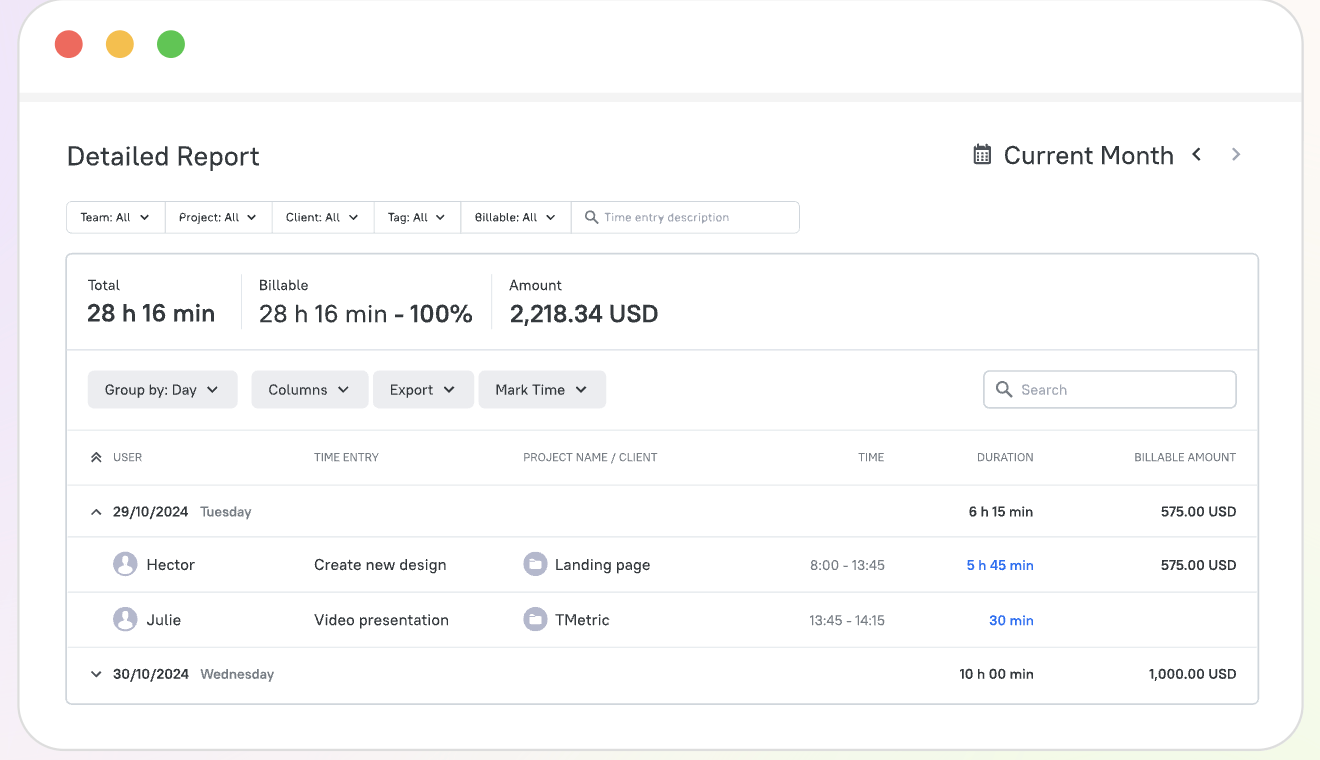
- Real-time time tracking via web, desktop, browser extension, and mobile apps, plus offline tracking.
- Automatic invoice generation from tracked hours with billable rates applied automatically.
- Project budget tracking, profitability reports, and cost-vs-revenue analysis.
- Team timesheets with approval workflows and payroll-ready reports.
- Integrates with 50+ apps, including Jira, Asana, QuickBooks, Notion, Trello, and GitHub.
- Strong focus on billable-hour accuracy and project profitability, not just clock-in/clock-out tracking
- One-click invoicing straight from tracked time
- Wide integration library (50+ apps)
- Available across web, desktop, browser, and mobile
- More advanced features (billing, budgets, time off, screenshots) are locked behind paid tiers
- Free plan is capped at 2 seats
- Free: unlimited time tracking, clients, and projects for up to 2 seats.
- Professional: adds billable rates, project budgets, invoicing, and calendar sync (per-seat monthly pricing, 14-day free trial).
- Business: adds time off tracking, team timesheets, screenshot capturing, and advanced integrations like QuickBooks, Jira, and ClickUp (per-seat monthly pricing).
- Enterprise: custom pricing for large teams, with priority support and volume discounts.
6. Hubstaff: Best free mobile time tracking app with GPS for field teams
- Time tracking with desktop, web, and mobile apps
- GPS tracking and geofencing for field workers
- Activity levels with optional screenshots and app/URL usage
- Scheduling, timesheets, and payments (on higher plans)
- Budgeting, reports, and optional add-ons (locations, more screenshots, etc.)
- Ideal for mobile and field teams needing location-aware tracking
- Flexible tiers from simple tracking to advanced monitoring
- Scheduling and payroll-style features on mid/high plans
- Add-ons let teams choose how much detail they want
- Monitoring (screenshots, activity) may feel invasive for some teams
- Add-ons and per-seat pricing can become costly at scale
- Free trial: 14-day trial
- Starter: $4.99/seat/month (annual), 2-seat minimum
- Grow: $7/seat/month (annual), 2-seat minimum
- Team: $10/seat/month (annual), 2-seat minimum
- Enterprise: $25/seat/month (annual), includes custom setup & dedicated support
7. Jibble: Best free employee time tracker with face ID and attendance
- Employees can log time from smartphones or desktops with GPS verification for remote or field workers.
- Track hours per project or client to monitor work progress and billing.
- Automated timesheets with manager approvals for payroll and compliance.
- Optional biometric or facial scan clock-ins for secure attendance tracking.
- Generate insights on employee attendance, project hours, and team productivity.
- The free plan covers small teams and basic time tracking needs
- Supports mobile, web, and biometric clock-ins
- Project and client tracking suitable for billing and reporting
- Simple, user-friendly interface
- Limited advanced HR or payroll features on the free plan
- Some integrations are only available in paid plans
- Free plan: Basic tracking features for up to 5 users
- Premium: $3.49 per user/month
- Ultimate: $6.99 per user/month
- Enterprise: $8.99 per user/month
8. TimeCamp: Best free automatic time tracking app for productivity insights
- Time tracking per task or project
- Start/stop timers or manual entries
- Reporting dashboards and time estimates
- Billable time tracking with budget alerts
- Integrations with calendars and third-party tools
- Fully integrated with task and project management
- Highly customisable and flexible
- Great for agile and sprint-based teams
- Affordable pricing for feature depth
- Can feel overwhelming for new users
- Mobile apps are less polished than desktop
- Free: $0/month: basic time tracking
- Starter: $1.49/month (annual)
- Premium: $2.99/month (annual) , includes billable hours & budgeting
- Ultimate: $3.99/month (annual) , adds approvals, expenses, advanced reporting
- Enterprise: $11.99/month (annual) , for large teams with custom integrations and priority support
9. My Hours: Best free project-based time tracking app for solo users
- Tracks time per project with structured logs for accuracy.
- Budget settings prevent overspending on clients or internal work.
- Flexible billing options adapt to hourly or fixed-fee arrangements.
- Team roles organize responsibilities and monitor workload distribution.
- Reports summarize hours, costs, and performance across projects.
- Great for freelancers managing multiple clients simultaneously.
- Clean layout makes tracking effortless and intuitive.
- Strong reporting helps teams understand productivity and cost patterns.
- Works well for small agencies with client-based billing.
- The free plan lacks many essential features for growing teams.
- Limited connections compared to larger time tracking tools.
- Free: $0/user/month (up to 5 users)
- Pro: $8/user/month
- Enterprise: Custom pricing
10. Kimai: Best free open-source time tracking system for unlimited users
- Field crews clock in/out with GPS-based location verification
- Track machine hours and link equipment time to jobs
- Assign time entries to specific jobs, cost codes, phases or equipment types, enabling detailed insights.
- Crews working in low-connectivity environments can still clock in/out offline and sync later.
- Supervisors can schedule crews, prompt shift start notifications.
- Very strong mobile-user interface and field adoption, making it easy for crews to actually use the system.
- Equipment tracking gives a rare dual focus: both labour hours and machine/equipment hours in one tool.
- Accurate job costing via cost codes and equipment + labour correlation helps improve project profitability.
- Free-forever plan available, good entry point for small crews or trial purposes.
- Some advanced features may require higher-tier plans or add-ons, costs can escalate.
- For large enterprise-level integration, the feature set may feel less extensive than heavy-duty platforms.
- Free plan: $0 per user/month.
- Standard: $3.47/month (annual), basic time tracking for small teams
- Professional: $4.63/month (annual), adds advanced features like reporting and project management
11. ClockShark: Best free contractor time tracking app with job-site GPS
- Quickly create, adjust, and share schedules with crews via the web or mobile app.
- Automatically records location-based time entries for accurate attendance and accountability.
- Tag hours to specific projects or tasks for detailed labor costs.
- Send shift updates, notes, and reminders directly within the app.
- Syncs with QuickBooks, ADP, and other payroll systems to streamline pay runs.
- Intuitive scheduling interface ideal for construction supervisors
- Combines time tracking, job costing, and scheduling in one tool
- Reliable GPS verification for field accountability
- Easy integration with payroll and accounting platforms
- Reporting tools are less advanced than enterprise-level options
- Occasional sync delays between mobile and web apps
- Standard: $40/month base + $9/user/month — for time & attendance, GPS tracking, scheduling, job/task tracking, and basic job‑costing.
- Pro: $60/month base + $11/user/month — adds PTO/time‑off tracking, multi‑department support, advanced job‑costing, clock‑out questions, etc.
How to pick the right free time tracking app
- Agencies: Agencies often juggle several clients at once, so they need a tracker that handles billable hours, clean reports and quick invoicing. Tools like Lark, Clockify and Toggl Track work well here, especially if your team wants smooth reporting across devices.
- Construction: Construction teams need a time tracker software that works well on mobile, supports field staff and logs shift-based hours. GPS tagging and job-site notes help supervisors see where time is spent without manual chasing.
- Remote teams: Distributed teams rely on real-time visibility. Lark is useful here since it combines tracking with communication and tasks, while tools like Harvest or Toggl Track help teams sync work across devices and stay aligned through the cloud.
- HR and payroll teams: For payroll-heavy teams, accuracy is key. Lark, Jibble and TimeCamp offer dependable timesheets, approval workflows and clean exports that reduce manual errors during salary calculation processing.
- Freelancers: Freelancers need simple timers, quick reporting and an easy way to track billable vs non-billable hours. Lark works well for freelancers who want tasks and time in one place, while Clockify and Harvest offer lightweight, flexible tracking.
- Early-stage founders: Founders need a tool that helps them understand where time actually goes across product, marketing and operations. Lark, Harvest and Toggle Track are solid options for spotting bottlenecks, planning workloads and staying organised without adding extra cost.
Conclusion
FAQs
Can free time tracking apps support unlimited users?
Do free plans include project-level reports?
How accurate are mobile time trackers for field workers?
Are free time tracking apps suitable for payroll processing?
What's the difference between time tracking and attendance tracking?
Related reading

Start using Lark today

Manage all your work in one place
Boost team efficiency by 10x
Save up to 70% on software costs
Start using Lark today
Manage all your work in one place
Boost team efficiency by 10x
Save up to 70% on software costs
Keep reading








2026 Lark Technologies Pte. Ltd.
Headquartered in Singapore with offices worldwide.





