In the dynamic landscape of project management, selecting the right tool can fundamentally impact your team's efficiency and collaboration. Two leading solutions in this space are Basecamp and ClickUp, and there has been heated discussion on the topic, such as Basecamp vs ClickUp Reddit. Each platform offers unique features tailored to various project needs, making them popular choices among businesses of all sizes.
Basecamp stands out for its simplicity and user-friendly interface, designed primarily for teams looking to streamline communication and manage projects without unnecessary complexity. ClickUp, on the other hand, is recognized for its extensive functionality and customization options, making it ideal for teams that require deeper project management capabilities.
This article will provide a comprehensive Basecamp vs ClickUp features comparison, helping you understand which tool might be best for your needs. Additionally, I will introduce the best alternative option for teams seeking diverse functionalities and pricing plans beyond ClickUp vs Basecamp.
Key takeaways: Clickup vs Basecamp features comparison overview
Overview of Basecamp
What is Basecamp?
Basecamp is a project management software that has gained immense popularity for its straightforward approach to managing projects and communications. Launched in 2004, it has become a go-to solution for teams looking for a reliable and calm way to manage work without the chaos that often accompanies complex project workflows.
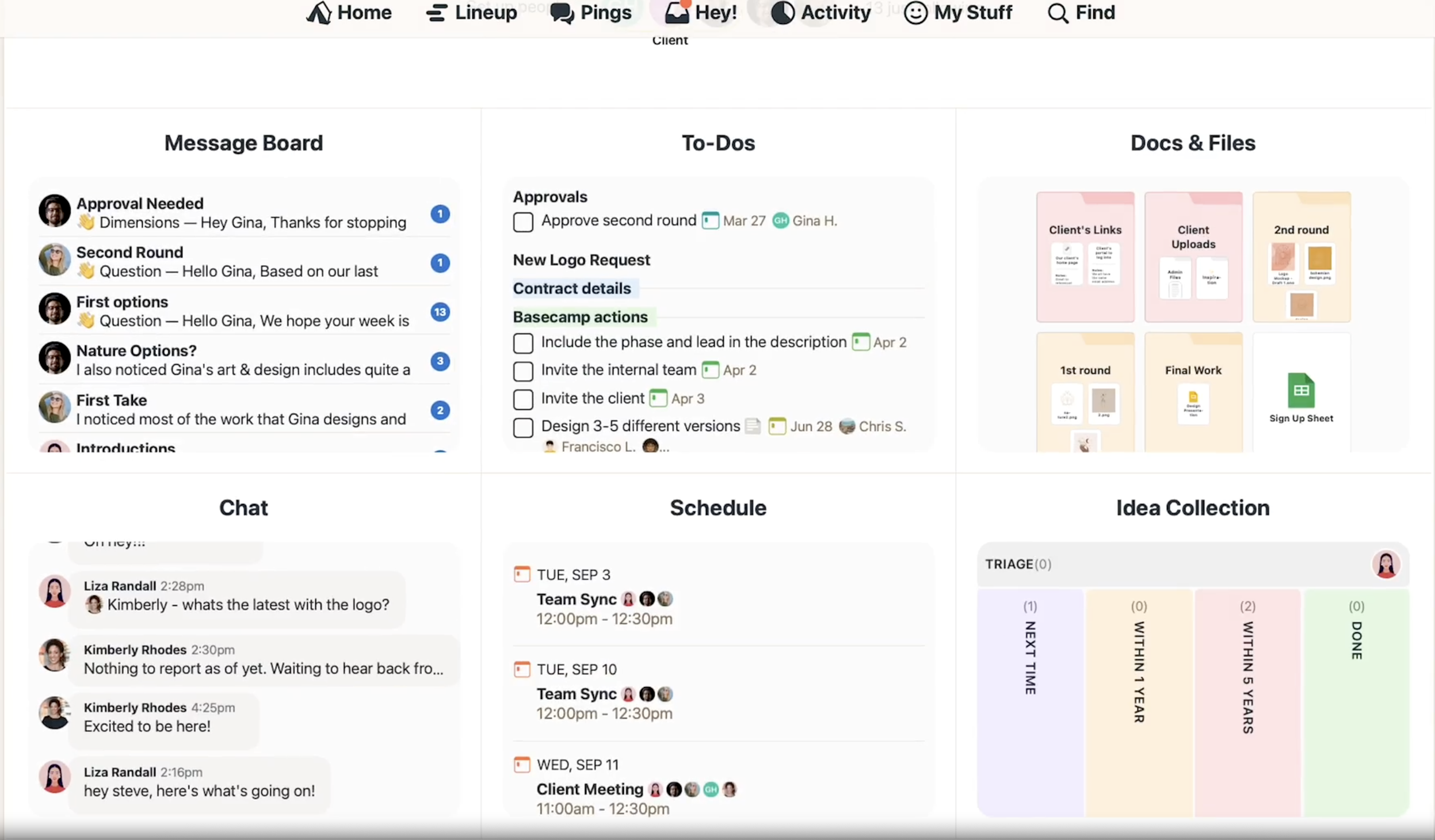
Image source: basecamp.com
Key features of Basecamp
Basecamp's simplicity is one of its most appealing attributes. Key features include:
- To-Do lists: Easily assign tasks and track progress within teams.
- Message Boards: Facilitate communication and discussions around project updates.
- File sharing: Store important documents and collaborate in real-time.
- Schedules: Integrate team calendars for better planning and coordination.
These features are designed to eliminate the clutter often found in project management tools, allowing teams to focus more on completing their tasks.
Pros and cons of using Basecamp
Pros:
- User-friendly interface: New users can quickly get accustomed to the platform.
- Flat pricing: A single price covers all users, making it budget-friendly for growing teams.
- Focused tools: Essential features for effective communication and task tracking.
Cons:
- Limited advanced features: Teams needing customization or advanced reporting may find it lacking.
- Less suitable for larger projects: As project complexity increases, users may feel constricted by the tool's capabilities.
Overview of ClickUp
What is ClickUp?
ClickUp is marketed as an integrated project management platform that aims to replace multiple tools with one comprehensive solution. With its flexible features, ClickUp appeals to a wide range of users, from small businesses to large enterprises.
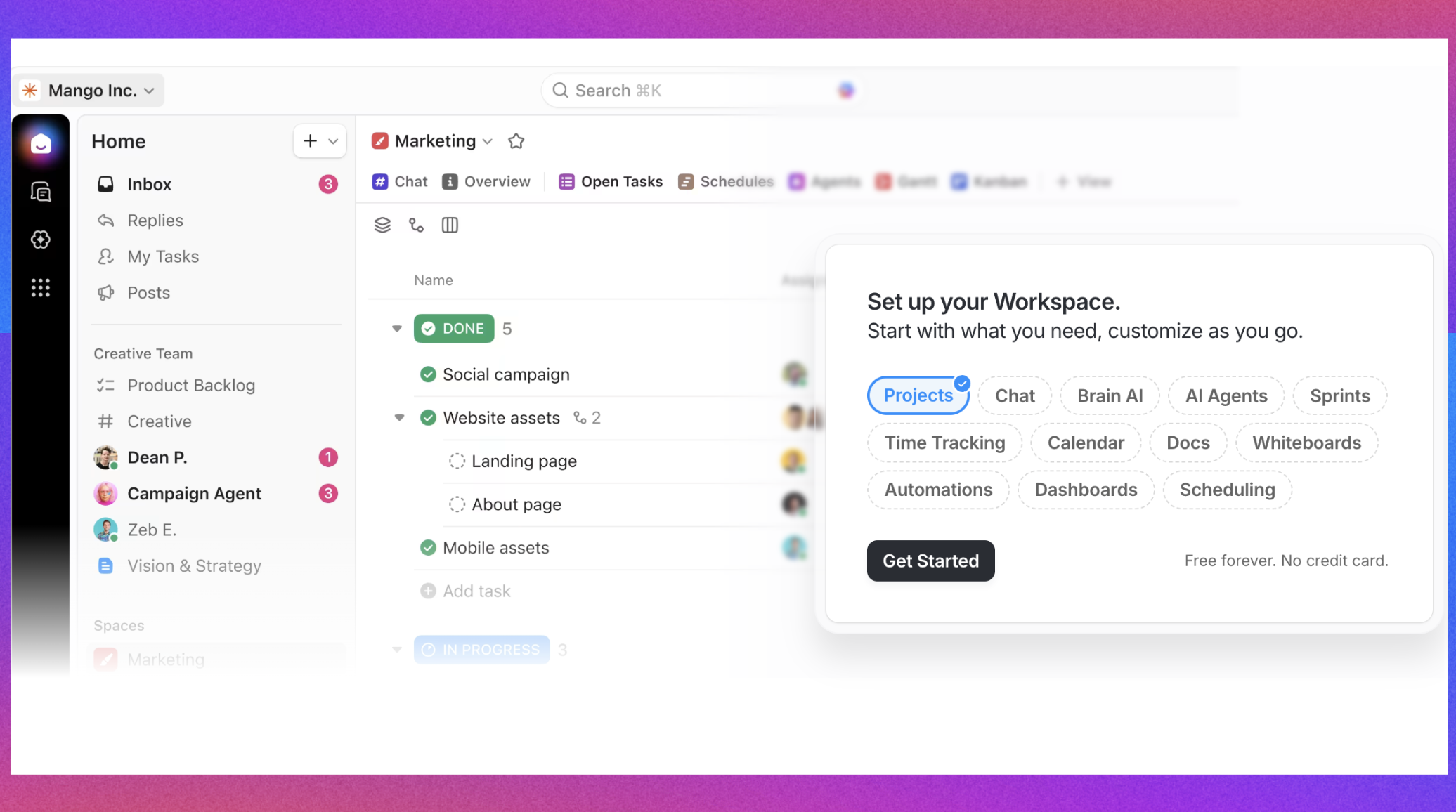
Image source: clickup.com
Key features of ClickUp
ClickUp is renowned for its variety of features, including:
- Task management: Create tasks, set priorities, and establish dependencies.
- Goal tracking: Align team objectives with organizational goals effectively.
- Time tracking and reporting tools: Analyze productivity and performance metrics seamlessly.
- Customization options: Users can tailor workflows and views to fit their specific needs.
With such a robust feature set, ClickUp is often viewed favorably in discussions, such as those found on ClickUp vs Basecamp reddit threads, where users share their experiences and insights.
Pros and cons of using ClickUp
Pros:
- High degree of customization: Adjust the platform to meet various team workflows.
- Scalability: Suitable for teams of all sizes, adapting as needs grow.
- Comprehensive integration: Connect with numerous other applications to enhance workflows.
Cons:
- Steeper learning curve: New users may require more time to understand the interface and features.
- Potential for feature overload: The abundance of options might overwhelm teams looking for simplicity.
Boost your productivity without worrying about limitations
Comparing features of Basecamp and ClickUp
When evaluating project management tools, a thorough understanding of the features they offer can significantly influence your choice. Let's delve into the ClickUp vs Basecamp features comparison to understand how each platform addresses the needs of modern teams.
Task management and organization
Effective task management is the cornerstone of any project management tool, and both Basecamp and ClickUp provide distinct approaches to handle tasks and assign priorities.
Basecamp is designed with simplicity in mind, making it an excellent choice for teams that prefer straightforward task management. Users can create to-do lists within projects, allowing for clear task assignments and deadlines. Each team member can easily see their assigned tasks, and project managers can view overall progress with minimal effort. The platform's intuitive interface ensures that new users can navigate it quickly, which is particularly appealing for small businesses or teams that do not require intricate workflows.
In contrast, ClickUp offers a more advanced task management system that includes features such as subtasks, task dependencies, and priorities. This level of organization allows teams to break larger projects into manageable segments, making it easier to track progress across multiple phases or initiatives simultaneously. ClickUp's ability to implement different views—such as list, board, or calendar—further enhances its versatility. This functionality is particularly beneficial for medium to large teams that must juggle various tasks and prioritize them effectively.
Team collaboration features & communication
Communication is vital in any collaborative setting, and both ClickUp vs Basecamp team collaboration features offer unique methods to keep teams connected.
Basecamp incorporates built-in messaging systems that include message boards for project discussions and a chat feature called Campfire. This dual approach facilitates both real-time communication and threaded conversations, allowing team members to stay in the loop without the chaos of constant updates. The centralization of communication within tasks and projects assures that relevant conversations are easily accessible, thereby reducing the chances of information getting lost in lengthy email threads.
On the other hand, ClickUp integrates communication directly into its task management structure. Users can leave comments on tasks and tag team members, ensuring discussions occur within the context of the work being discussed. Notifications keep everyone informed of updates in real time, which is essential for fast-paced projects. Moreover, ClickUp's compatibility with external communication apps (like Slack and Microsoft Teams) allows teams to work within their preferred environments while still benefiting from ClickUp's project management features.
Reporting and analytics
A robust project management tool should provide effective reporting capabilities, and this is where the strengths of Basecamp and ClickUp truly diverge.
Basecamp offers basic reporting features, giving users a straightforward overview of project progress and task completion. While this simplicity works well for teams that favor less complexity, those looking for detailed insights may find Basecamp lacking. It does not provide advanced analytics, making it less suitable for businesses that require in-depth performance tracking or resource allocation analysis. For many, the absence of comprehensive reporting capabilities can be a significant limitation.
In contrast, ClickUp excels in providing a wide range of reporting options that cater to the needs of data-driven teams. Users can generate reports on task completion rates, time tracking, and productivity metrics, offering valuable insights into team performance. These analytics enable project managers to assess team efficiency, identify bottlenecks, and make informed decisions about resource allocation. As teams increasingly rely on data to guide their strategies, ClickUp's robust reporting tools become a notable advantage, especially in more complex project environments.
Customization options
Customization plays a crucial role in how a project management tool fits into a team's workflow. In this aspect, ClickUp clearly outshines Basecamp.
Basecamp provides a relatively fixed structure for how projects and tasks are managed, which can be beneficial for teams that prefer to stick to a simplified workflow without many distractions. Users can create projects and tasks, but there are limited options for customizing how those tasks are viewed or managed. This limitation makes Basecamp ideal for smaller teams or organizations that do not need a high degree of flexibility.
ClickUp, however, offers extensive customization options. Users can tailor their workflows to reflect specific processes, customize dashboards with relevant widgets, and choose from multiple views and layouts for task management. The ability to set up custom statuses, tags, and fields means that teams can align ClickUp with their specific needs and preferences. For teams that operate across various projects with differing demands, the flexibility offered by ClickUp can be a game-changer, allowing for tailored workflows that enhance productivity.
Integration capability
The ability to integrate with other tools is crucial for many organizations that rely on various software solutions to manage their workflows.
Basecamp offers a limited number of integrations compared to ClickUp. While it does connect with popular tools like Zapier, Google Drive, and various time-tracking software, the available options are fewer. For teams that rely heavily on specific applications or need seamless interoperability across numerous services, Basecamp may not provide the breadth of integration options desired.
For more Google Workspace's information, you can refer to and .
In stark contrast, ClickUp shines in its integration capabilities. With compatibility with over 1,000 apps, including tools like Slack, Trello, Zoom, and many more, ClickUp allows teams to centralize their workflows efficiently. This extensive integration capability means teams can embed their preferred tools directly into ClickUp, helping to eliminate cumbersome switching between applications and enhancing overall productivity.
Security
When selecting a project management tool, security is a top priority, especially for businesses handling sensitive information.
Basecamp takes security seriously, offering features such as two-factor authentication, data encryption, and secure hosting. The company also commits to data privacy, ensuring that user information is protected against unauthorized access and breaches. This focus on security makes Basecamp an attractive option for teams that prioritize data protection.
On the other hand, ClickUp also emphasizes security with strong measures, including two-factor authentication, data encryption, and compliance with various security standards, such as GDPR. ClickUp also conducts regular security audits to ensure that data is safeguarded, which is essential for teams that need assurance regarding their information security.
Through this comprehensive examination of Basecamp and ClickUp, it becomes clear that while both platforms have their advantages and limitations, the best choice ultimately depends on your team's specific needs. As we move forward, we will analyze the pricing structures of both platforms, providing clarity on which option offers the best value for your organization.
Stop comparing and try the best alternative beyond imagination
Pricing comparison of Basecamp and ClickUp
When considering a project management tool, pricing can significantly influence your decision. Here, we will compare the pricing structures of Basecamp and ClickUp, identifying their suitability for different types of teams and businesses.
Basecamp pricing structure
Basecamp offers a straightforward and transparent pricing structure. This pricing is advantageous for larger teams and organizations, as it allows for predictable budgeting without the complexities of per-user fees.
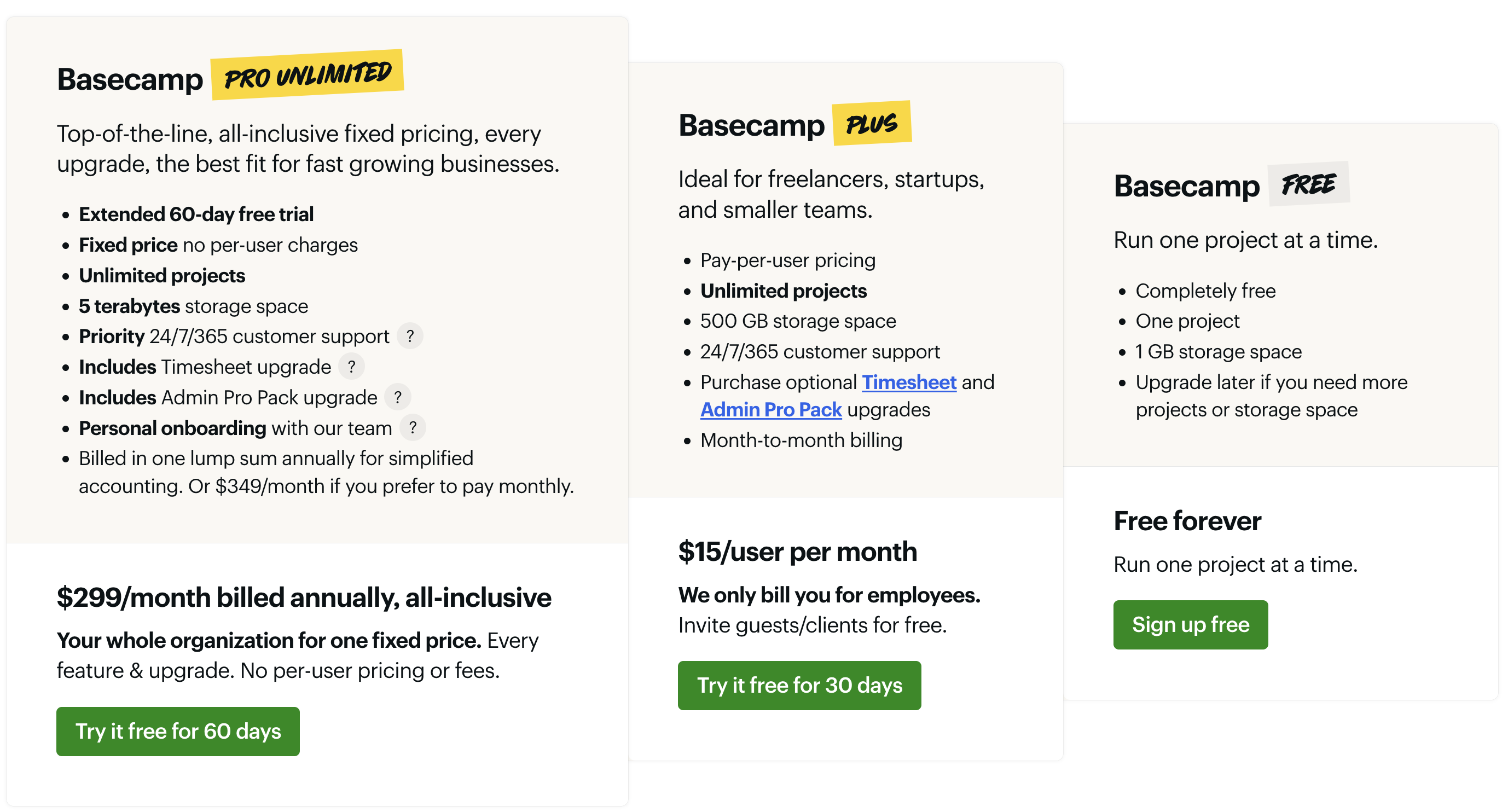
Image source: basecamp.com
Basecamp pricing plans in detail:
- Pro unlimited: This top-tier plan is designed for established businesses and growing teams, offering unlimited projects, users, and advanced client access. It operates on a flat-rate annual billing system with no per-user fees, providing and scalability. Priority support and enhanced control features are included to facilitate large-scale collaboration.
- Plus: Aimed at small teams and startups, this plan supports a limited number of users and includes core project management tools with fixed storage. Its monthly per-user pricing structure allows teams to scale precisely with their needs, while optional add-ons offer flexibility for specialized requirements.
- Free: This entry-level plan enables teams to manage one active project with essential task and file-sharing capabilities. It serves as an ideal starting point for new users to evaluate Basecamp's workflow before upgrading, and remains free indefinitely for individual or trial use.
This flat fee structure is particularly suitable for businesses with a stable team size that need collaboration tools without worrying about escalating costs as they grow. Startups and smaller businesses that anticipate growth might also prefer Basecamp for its simplicity, particularly if they value a no-frills approach to project management. Basecamp's focus on essential project management features, along with the one-price model, makes it an attractive option for teams looking for clarity in their budgeting while accessing tools for collaboration, task management, and communication.
ClickUp pricing tiers
ClickUp provides a more flexible pricing structure, accommodating a wide variety of team sizes and needs. The platform offers several tiers:
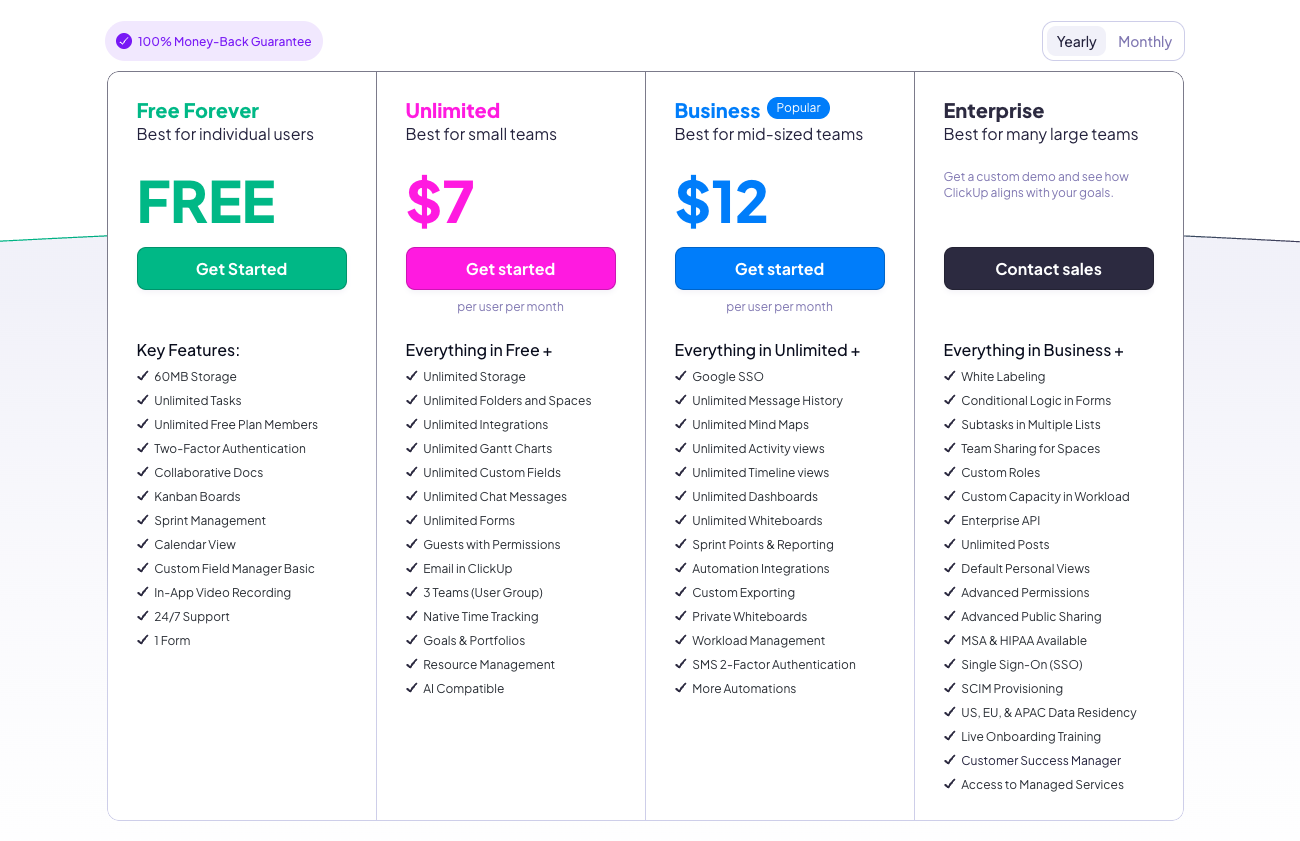
Image source: clickup.com
- Free plan: Ideal for individuals or very small teams that need basic, limited task management without cost.
- Unlimited plan: Priced at $7 per user per month, this plan includes unlimited integrations, dashboards, and more features than the free version, making it well-suited for small to medium-sized teams.
- Business plan: For $12 per user per month, users gain access to even more advanced features such as goal tracking, timelines, and custom exporting, providing robust options for teams that need deeper project management capabilities.
- Enterprise plan: This tier offers custom pricing, tailored features for larger organizations with specific needs, and is designed for teams that require extensive functionality and support, ensuring they can manage complex projects effectively.
This tiered structure allows teams to select the plan that fits their specific requirements, providing flexibility as they scale. Organizations can start on the free or lower-cost plans and upgrade as their needs grow, which is an appealing option for small businesses looking for a customizable project management solution.
Value for money
When analyzing the value for money for each platform, it's crucial to consider the features provided at each pricing tier and taking business scales into consideration. For example, Basecamp vs ClickUp for small business, which to choose?
Basecamp, with its flat fee of $299 per month, offers a robust set of tools that includes task management, team communication, file sharing, and scheduling. While it suits teams that prefer a simple structure and predictable pricing, it lacks advanced features such as in-depth reporting and extensive integrations that may be essential for more complex project environments. For teams that don't require these elements, Basecamp offers great value given its comprehensive feature set for an all-encompassing price.
On the other hand, ClickUp provides more adaptability and scalability at varied price points. For example, the Unlimited Plan, at $7 per user per month, allows teams to access unlimited integrations and templates, making it a powerful option at a low cost. As teams grow and require more advanced features, the higher tiers like the Business Plan can be justified due to the extensive capabilities offered, including robust reporting tools and customizable workflows. Thus, ClickUp provides compelling value, especially for teams that will benefit from its extensive feature set.
For more ClickUp's information? 👉
User experience and learning curve
The user experience is another critical aspect when choosing a project management tool, as it affects how quickly teams can adapt and begin using the software effectively. Below, we'll explore the usability of both Basecamp and ClickUp.
Usability of Basecamp
Basecamp is designed with a strong emphasis on an intuitive user interface, which greatly aids in onboarding new users. The platform's simplicity allows teams to get started quickly, with minimal training required. Its clean layout and straightforward navigation ensure that even those unfamiliar with project management tools can understand the workflow without extensive instruction.
Customer support is also a notable strength for Basecamp. They offer a range of resources, including tutorials, guides, and responsive customer service, ensuring that users can find answers to their questions promptly. This can be particularly beneficial for smaller teams that may not have dedicated IT resources to troubleshoot issues.
Overall, Basecamp's user-friendly design and comprehensive support make it well-suited for teams looking to implement a project management solution quickly without a steep learning curve.
Usability of ClickUp
ClickUp, while offering a wealth of features, comes with a more complex user interface, which may pose a steeper learning curve for new users. The range of functionalities available can initially overwhelm users, particularly those used to simpler tools like Basecamp. For teams that require a deep understanding of task management and project tracking features, ClickUp offers extensive help resources, including video tutorials, webinars, and an active community forum to assist users in navigating the software.
The learning resources available help contextually, allowing users to explore features at their own pace. Additionally, ClickUp frequently updates its platform with new features and improvements, meaning that users must commit to continuous learning to fully leverage the tool.
In conclusion, while ClickUp provides powerful features that can significantly enhance productivity, teams should prepare for a more intensive onboarding process. Organizations looking for more advanced project management solutions will find that investing time in learning ClickUp will ultimately pay off as they leverage its full capabilities.
Try to get a project management tool that ensures satisfaction
A great alternative to Basecamp and ClickUp: Lark
As organizations seek robust solutions, Lark has emerged as a compelling alternative to traditional platforms like Basecamp and ClickUp. Its integrated approach to communication and collaboration makes it a versatile option for teams of all sizes.
Overview of Lark
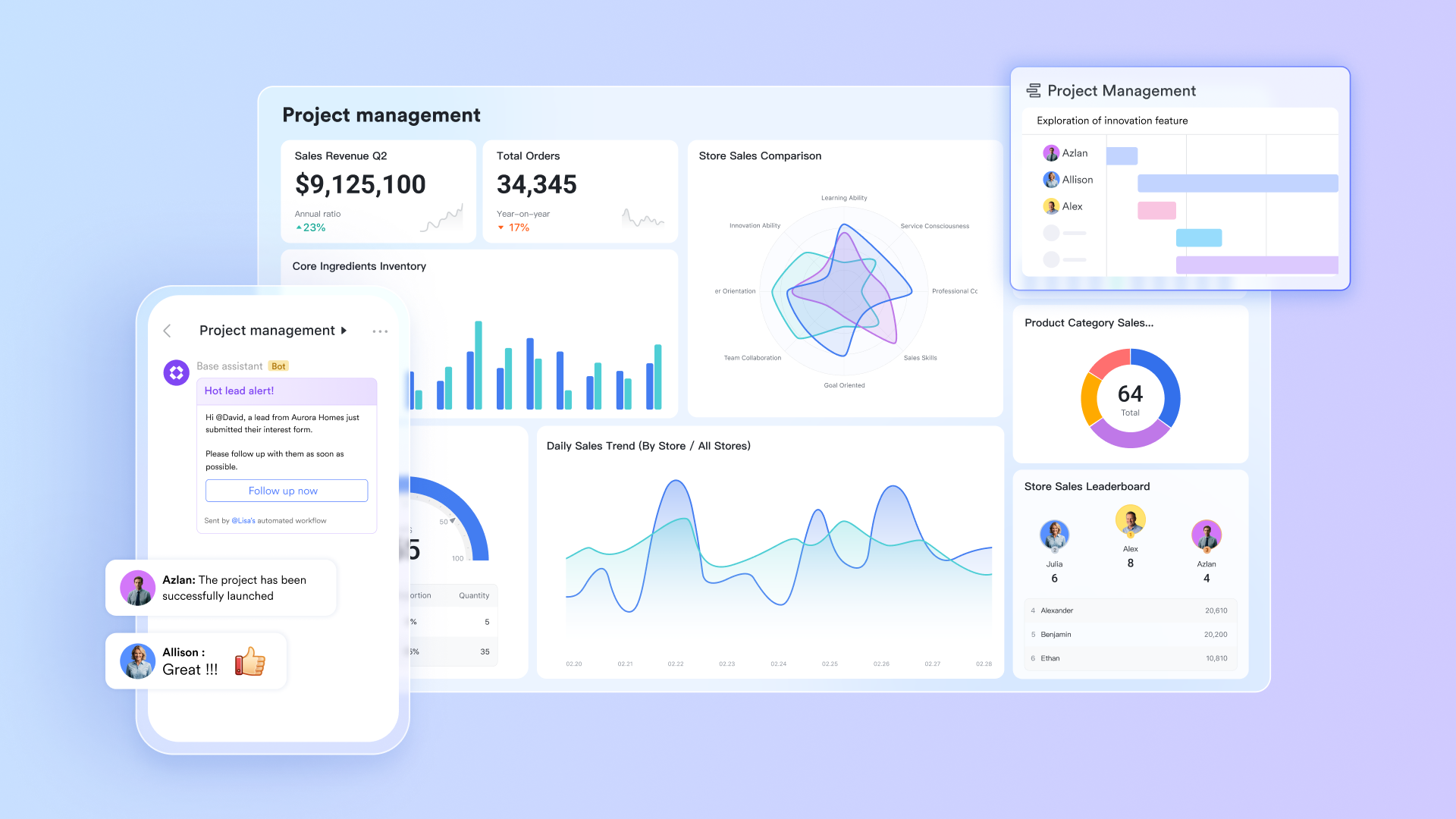
is a comprehensive collaboration platform designed to enhance productivity and streamline workflows. It combines essential tools for communication, project management, documentation, and scheduling into one cohesive environment. By positioning itself as an all-in-one solution, Lark aims to minimize the need for multiple applications, simplifying the user experience and among team members. When evaluating Lark against Basecamp and ClickUp, it's essential to consider the breadth of features available across several key areas:
Task management
Lark includes Lark Tasks, a feature that empowers users to create, assign, and track tasks efficiently. Users can list tasks directly within documents, making it easy to turn a task list into actionable items while maintaining context. This capability allows teams to shift from a document's task list to formal tasks seamlessly, ensuring nothing falls through the cracks. 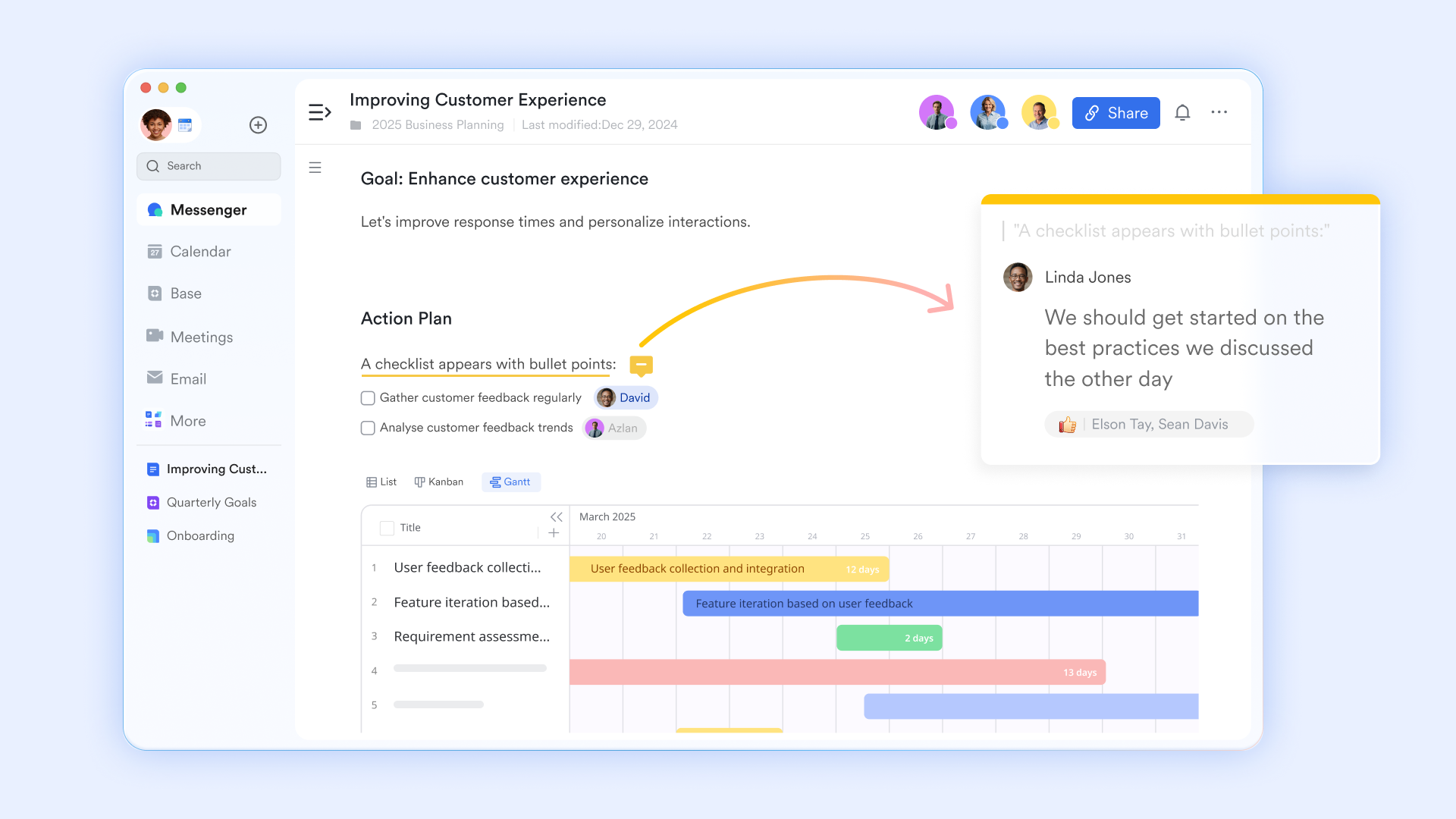
Moreover, Lark Tasks provides the functionality to set recurring tasks, which reminds team members periodically about their responsibilities. This can be particularly helpful for ongoing projects or regular deliverables, ensuring that users remain on track without needing to manually set reminders each time. Users can also manage their tasks through task Kanban view or Gantt view. 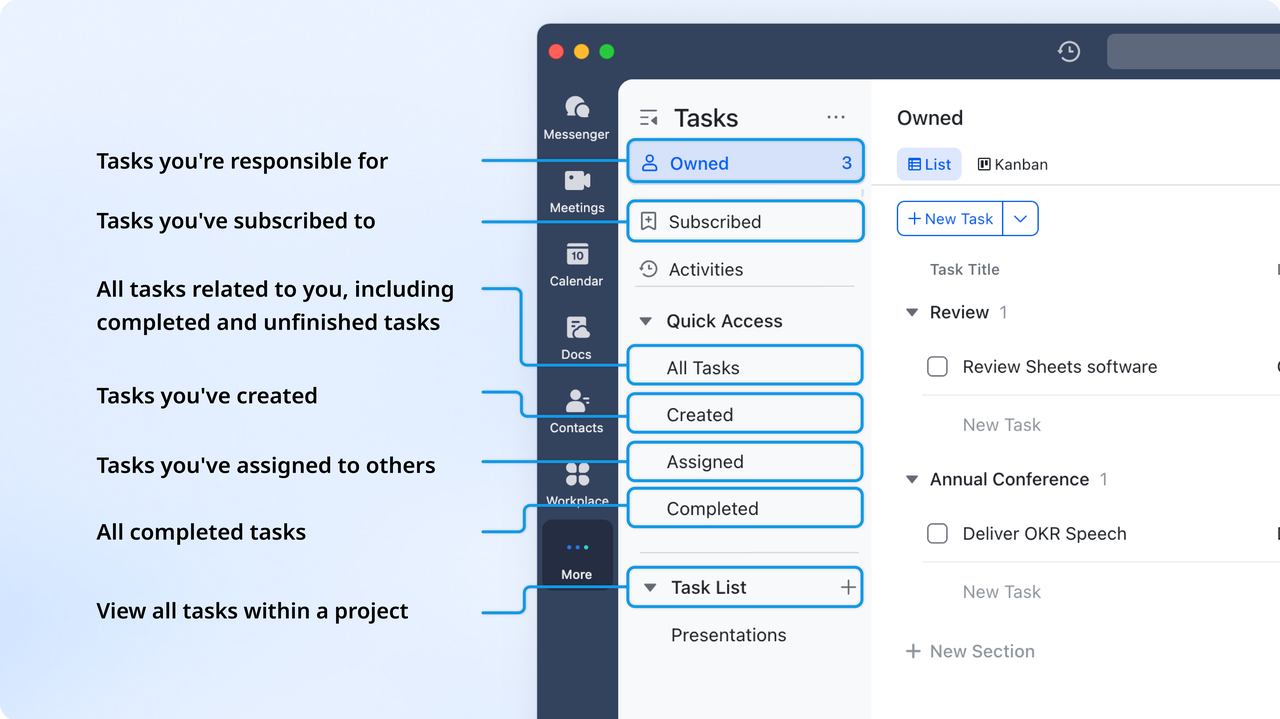
In addition, task owners have the option to assign the same task to multiple users, enabling a macro oversight of . This is beneficial for large teams that may need to collaborate on a singular objective, allowing the manager to monitor overall completion rates while fostering teamwork.
Communication
Communication in Lark is robust, featuring tools like and Lark Meetings that excel in facilitating real-time interaction among team members. Lark Messenger supports instant messaging, where users can share files, reference historical messages, add context to discussions, and start 1-on-1 or group meetings in chat channels with Lark Meetings. This feature ensures that every conversation is productive and well-informed, as contextual information is readily accessible. 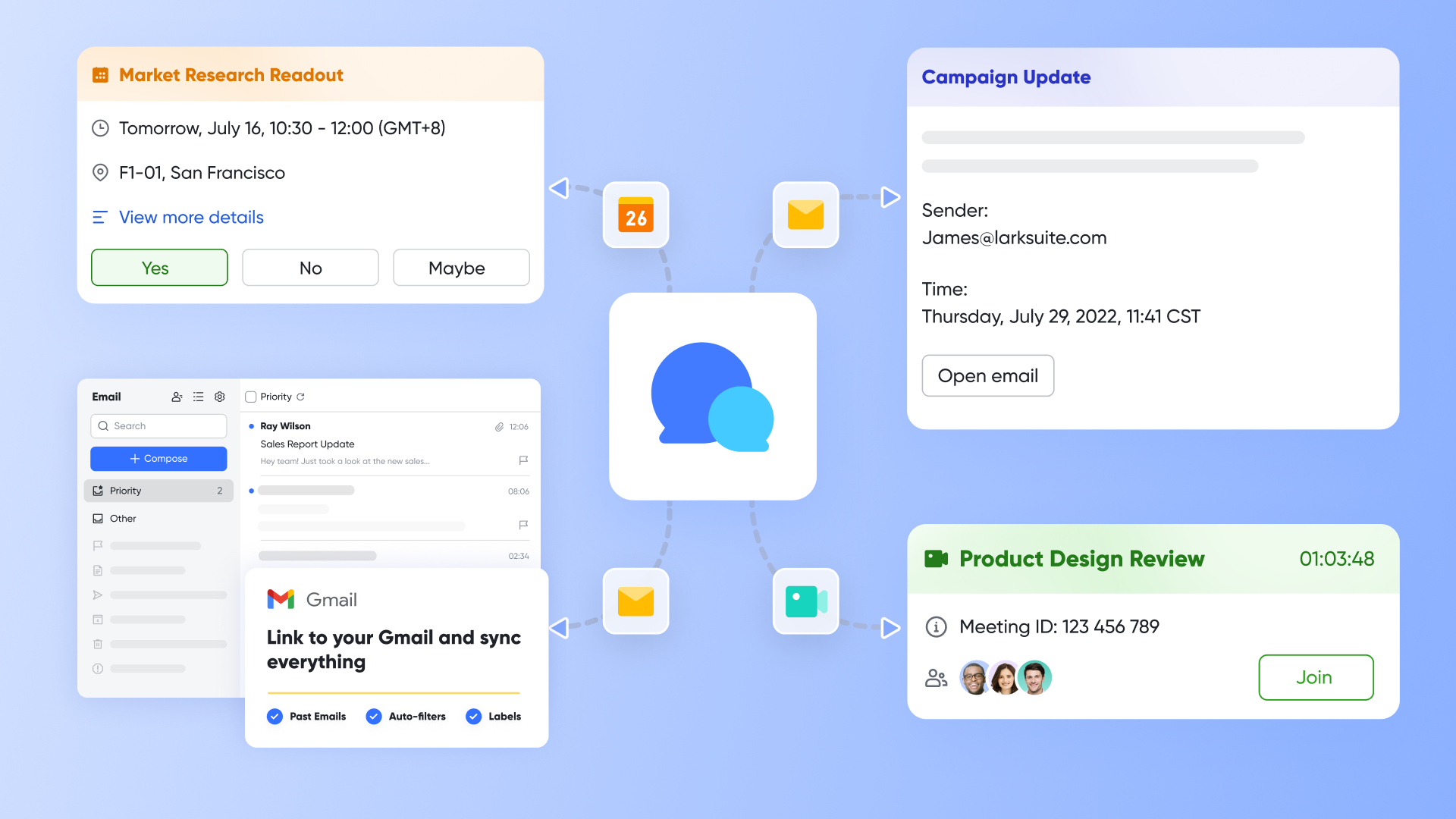
enhances this capability by allowing users to initiate video conferencing directly from individual or group chats. Users can share their screens during meetings via Magic Share, which is essential for collaborative work and presentations. Additionally, Lark employs an feature that automatically summarizes meeting content with just a click for setting, minimizing the tedious task of note-taking and allowing team members to focus on discussion. This built-in communication setup effectively mirrors the strengths of ClickUp and Basecamp while providing the convenience of a unified platform, making collaboration effortless. Reporting and analytics
Unlike many project management tools that offer reporting in a complex manner, Lark's approach is designed to be intuitive. supports various visualization options, including Gantt charts, Kanban boards, and gallery views, allowing teams to analyze their work from multiple perspectives. These diverse views cater to different project management needs and preferences, giving teams flexibility in how they . 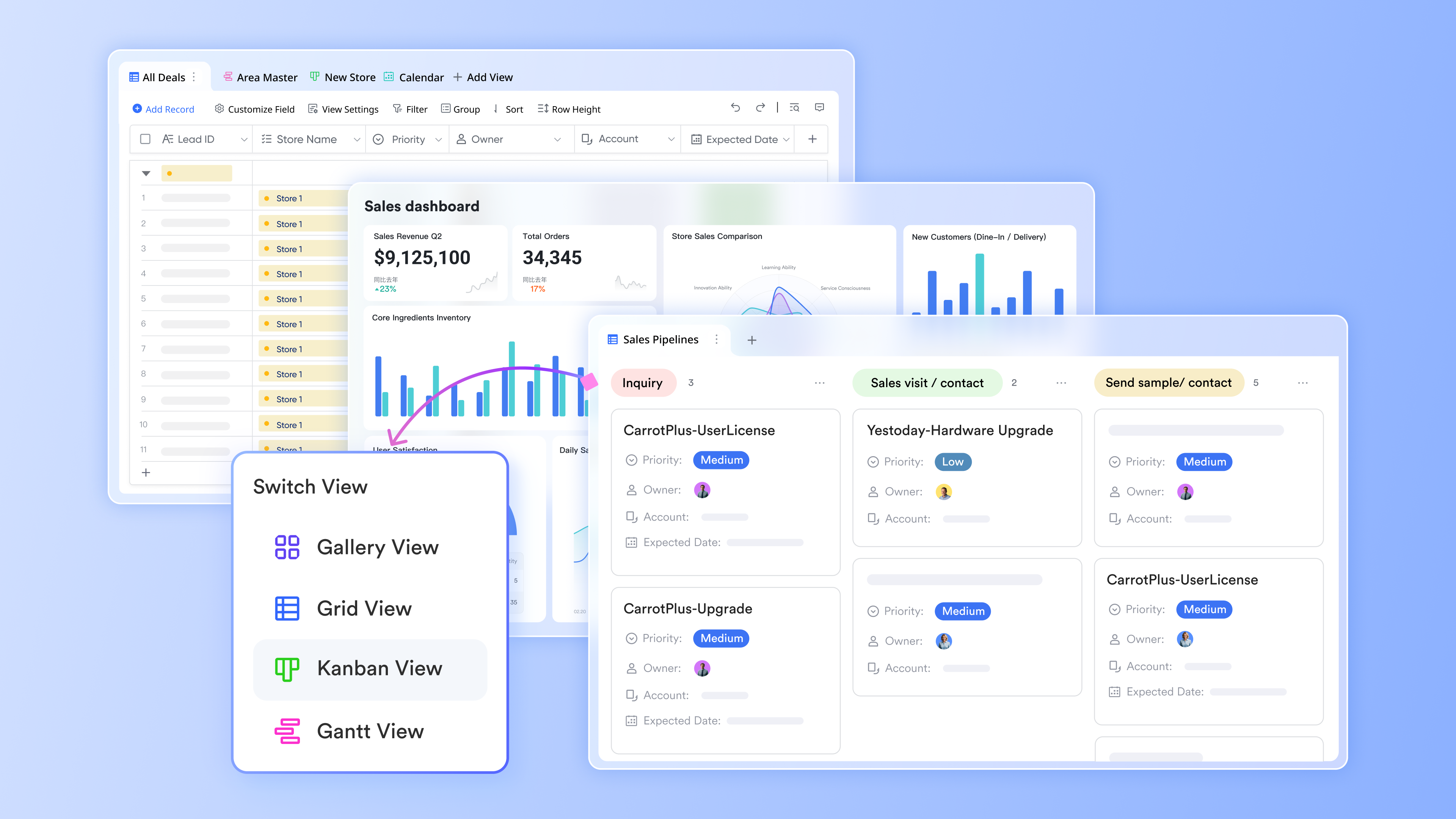
Additionally, users can leverage to perform calculations, run formulas, and generate pivot tables, granting them robust data analysis capabilities directly within the platform. This combination of spreadsheet functionalities with project management tools empowers teams to analyze data comprehensively and derive actionable insights, elevating Lark's utility beyond basic reporting capabilities. 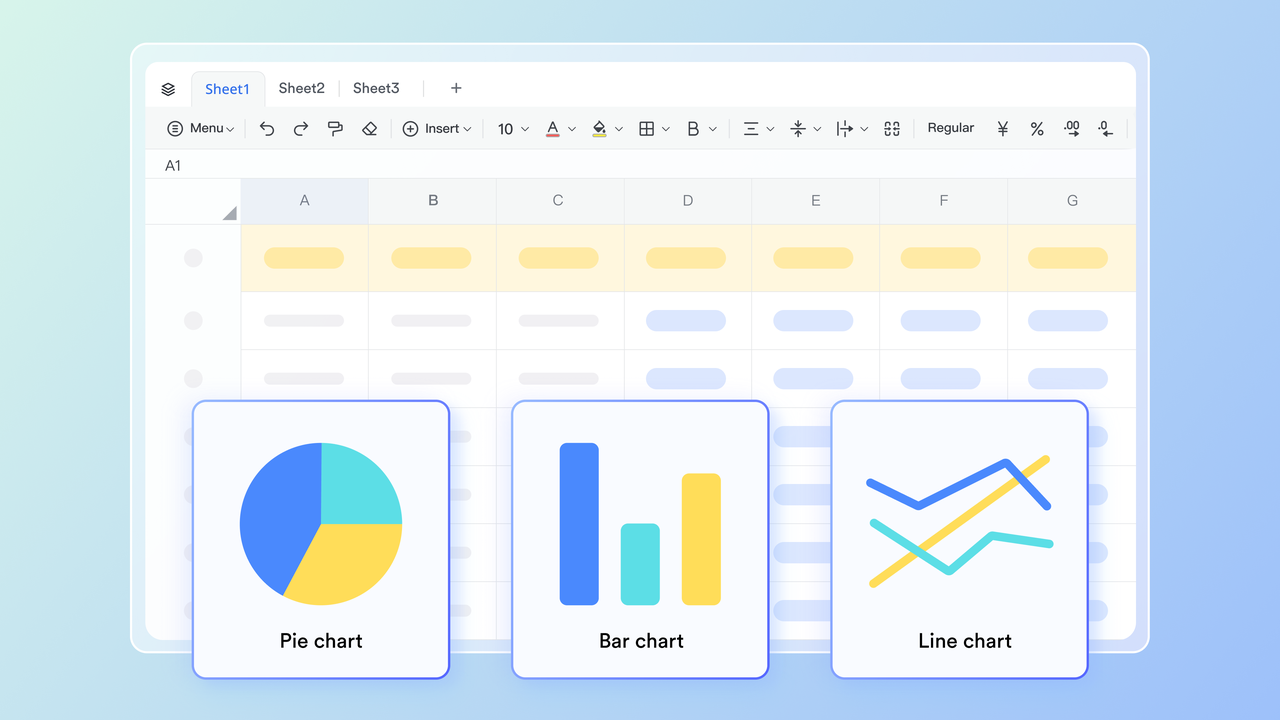
Customization
Lark offers numerous customization options to adapt to distinct team needs. Key features like personalized Lark Base dashboards allow users to create an interface tailored to their workflow, ensuring that the tools they use most frequently are easily accessible. 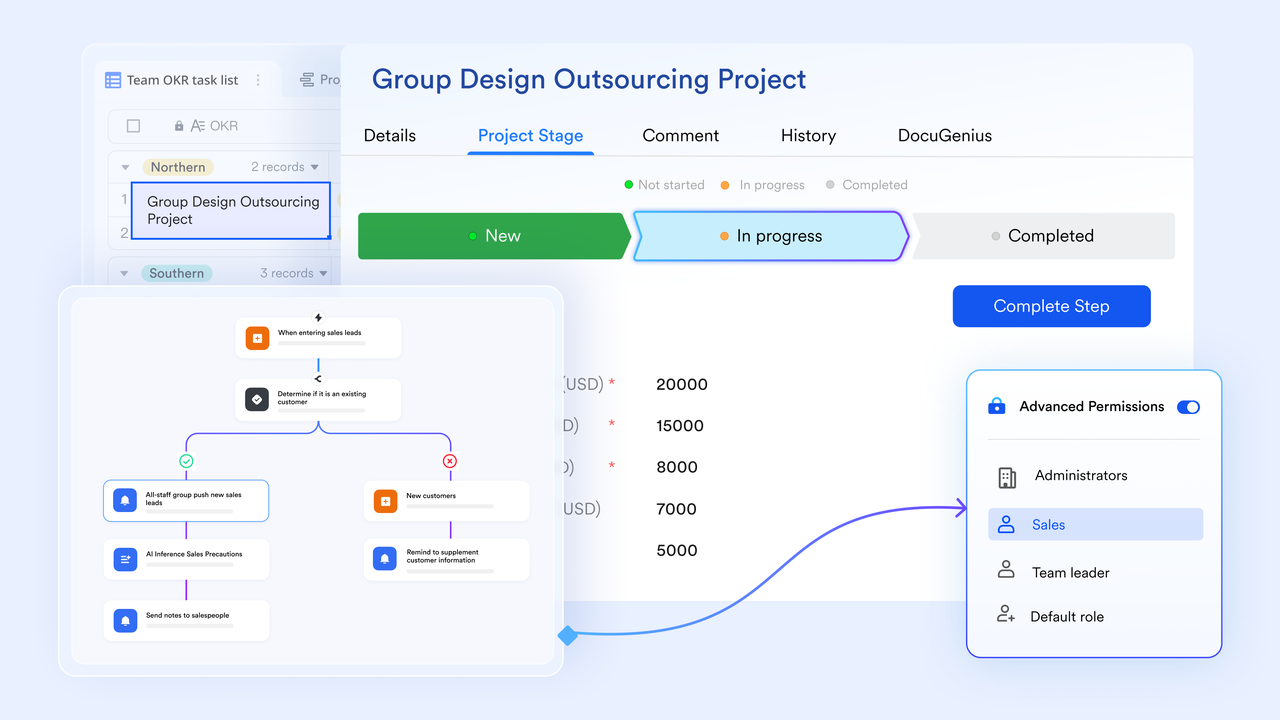
Furthermore, Lark Approval and Lark Base functionalities enable teams to set up custom , streamlining processes that might otherwise require manual intervention. Requests are sent with attached discussions or files, saving time for anyone in the approval process.
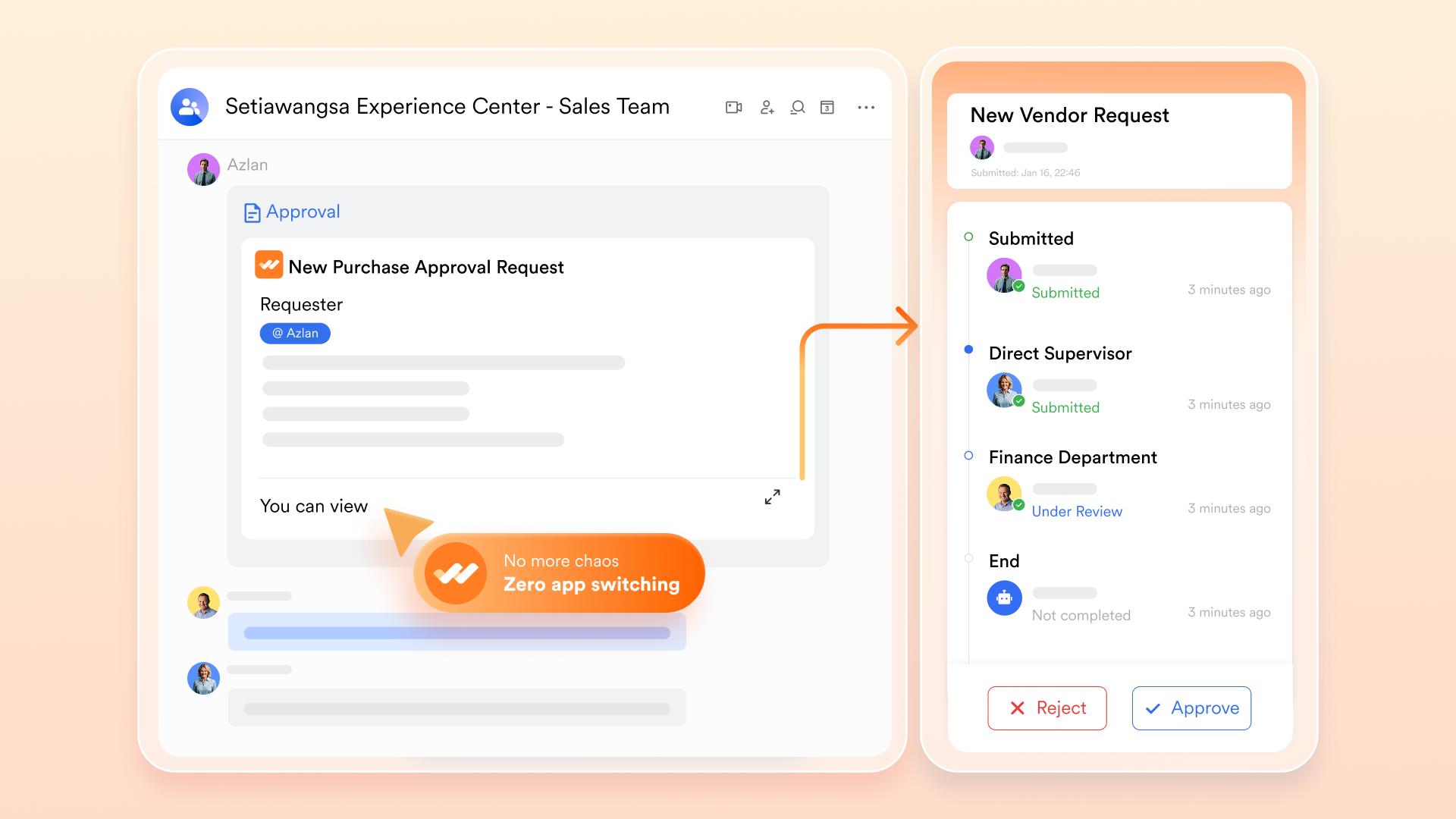
This flexibility positions Lark as an adaptable solution, similar to ClickUp's extensive customization features, but presented in a more straightforward manner that emphasizes user-friendliness and ease of implementation.
Integration
Lark enhances its functionality through robust integrations with various third-party applications. This capability significantly broadens the tool's utility, allowing teams to incorporate Lark into their existing ecosystems seamlessly. Lark can easily integrate with tools commonly used in business environments, such as integration for automation, mirroring ClickUp's extensive integration network. This ensures that teams can maintain their preferred workflows while leveraging the powerful features Lark has to offer. Security
is paramount for any organization, and Lark places a strong emphasis on protecting user data and ensuring compliance with industry standards. This commitment to security aligns with ClickUp's robust measures, offering teams peace of mind regarding the protection of sensitive information.
Pricing comparison with Basecamp and ClickUp
Lark presents a competitive edge in pricing, offering multiple plans that cater to different team sizes and needs:
Lark's :
- Starter plan: Free forever plan that includes 11 powerful tools for up to 20 users. It also comes with 100GB of storage, 1,000 automation runs, AI translations, and more.
- Basic plan: $6/user/month (billed annually) for up to 500 users, including everything in Starter plus 1-on-1 video meetings, 5TB of storage, 1,000 automation runs, and more. To know more about Basic plan, .
- Pro plan: $12/user/month (billed annually) for up to 500 users. It includes everything in Basic plus a group calling for up to 500 attendees, 15TB of storage, 50,000 automation runs, and more.
- Enterprise plan: for custom pricing. Supports unlimited users and includes even more automation runs and advanced security, compliance, and management features.
For small teams with simple communication needs

18 months message history
1000 Base automation runs/month
2000 rows per table in Base
Most POPULAR
For companies with comprehensive collaboration and management needs
Unlimited message history
500-participant video meetings
50k Base automation runs/month
20k rows per table in Base
For large companies with advanced security and organizational management needs
Get a personalized demo and pricing
Unlimited message history
500-participant video meetings
15 TB storage + 30 GB storage/user
500k Base automation runs/month
50k Base automation runs/month
Most POPULAR
For companies with comprehensive collaboration and management needs
Unlimited message history
500-participant video meetings
50k Base automation runs/month
20k rows per table in Base
When compared to the pricing structures of Basecamp's flat fee and ClickUp's tiered system, Lark's offerings provide a compelling case for affordability, especially for startups and small to medium-sized businesses that require powerful tools without breaking the bank.
Streamline your workflow and strengthen your project
Conclusion
In the evolving landscape of project management tools, Basecamp, ClickUp, and Lark each offer distinct advantages tailored to various team needs. Basecamp remains a reliable choice for those seeking simplicity and frugality with its flat-rate pricing model, making it ideal for smaller teams or businesses prioritizing straightforward task management and collaboration. ClickUp, with its robust feature set and flexible pricing tiers, appeals to organizations that require extensive customization and reporting capabilities, effectively supporting complex project management needs. Meanwhile, Lark stands out as a modern, all-in-one solution, integrating various collaboration tools within a user-friendly interface at an affordable price point, making it suitable for teams of all sizes looking for comprehensive management features.
Ultimately, the best choice will depend on your team's size, complexity of projects, and specific collaboration needs. By carefully assessing each platform's features, pricing, and user experience, teams can find the most suitable project management solution that meets their goals and enhances productivity.
FAQs
What is replacing Basecamp?
While there is no single tool that universally "replaces" Basecamp, alternatives like ClickUp, Trello, and Lark are frequently recommended for those looking for more comprehensive features or different interface styles. These tools provide advanced task management, reporting, and collaborative functionalities that may better suit the evolving needs of teams.
Is there anything better than ClickUp?
Whether there is something "better" than ClickUp depends on specific user needs. Tools like Lark and Trello offer different strengths, such as integrated collaboration features or a more visual task management approach. Users should assess the particular functionalities they prioritize, such as ease of use, customization, or integration capabilities, to determine the best fit for their team.
Why is Basecamp so popular?
Basecamp's popularity stems from its simplicity, user-friendly interface, and a flat pricing model that avoids the complexities of per-user fees. It offers essential project management features without overwhelming users with too many options, making it particularly appealing for smaller teams or organizations seeking a straightforward management tool.
Is Basecamp still in business?
Yes, Basecamp is still in business. The platform continues to be active and regularly updates its features to meet user needs. Despite increased competition in the project management space, Basecamp remains a trusted tool for teams that appreciate its straightforward approach to project organization and collaboration.
Related reading






























