














Basecamp Review 2026 – Honest Look at Features, Pros, Cons & Pricing

Cecilia Lin
Go-to-Market Associate
Nov 3, 2026
Cecilia Lin
Nov 3, 2026

17 min read
Add to preferred sources


In today's rapidly moving digital work environment, teams are constantly balancing structure and freedom. That's where Basecamp stands out — a project management platform that redefines simplicity for collaboration. This Basecamp review explores how its design philosophy, tools, and communication flow shape productivity for small to medium teams. Whether you're searching for a comprehensive Basecamp project management review, comparing different tools, or simply evaluating how Basecamp fits into your workflow, this guide offers a transparent look at what the software does well — and where it shows its limits. Along the way, you'll also see how modern alternatives like Lark position themselves for teams that crave both clarity and scalability.
What is Basecamp and who is it for?
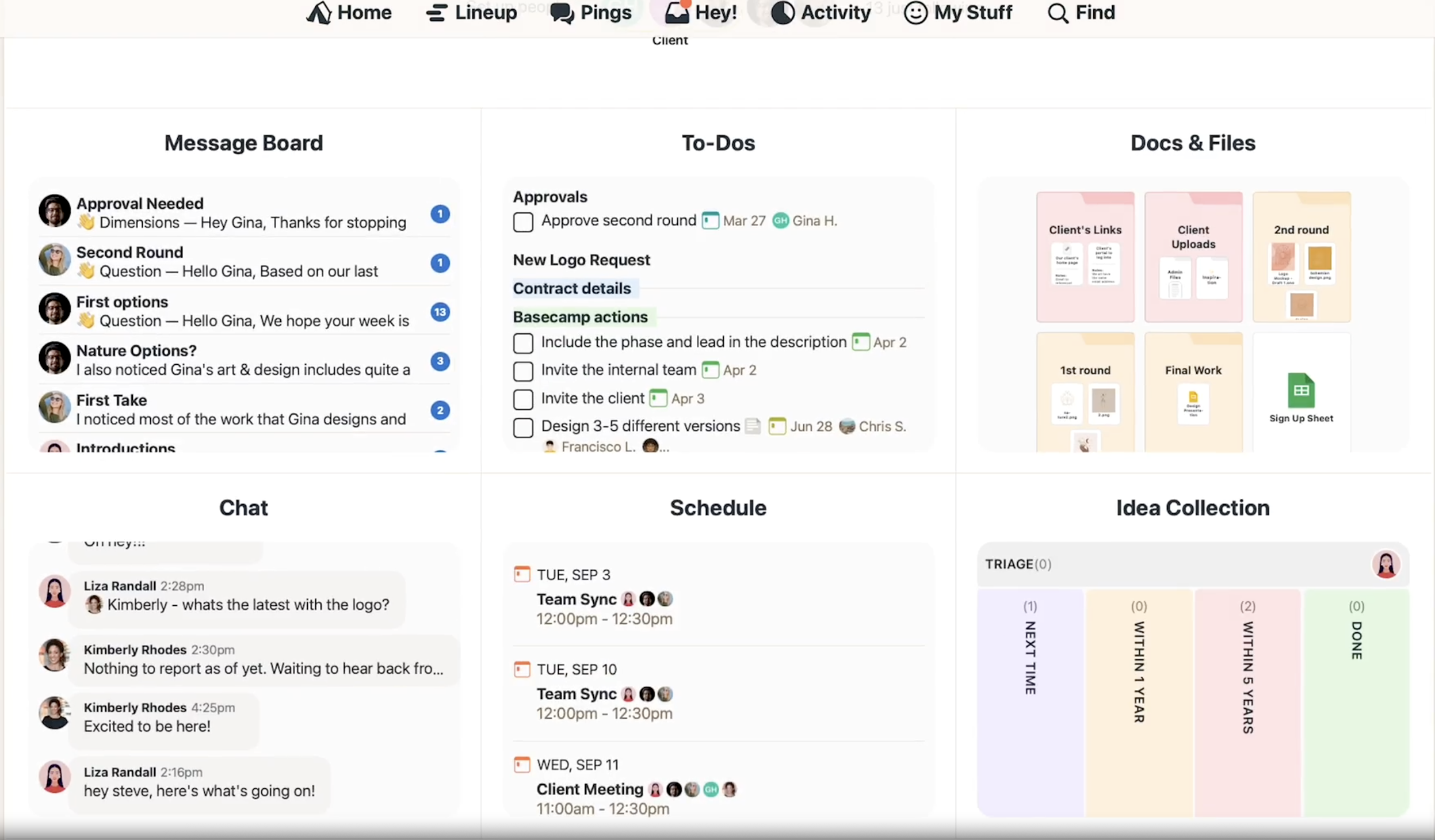
Image source: basecamp.com
Basecamp is a web‑based collaboration and project management and collaboration tool developed by 37signals. It's built on a simple idea: reduce complexity and help teams focus on communication that matters. This isn't a platform overloaded with charts or automation layers — it's an intuitive workspace combining to‑do lists, message boards, file storage, and check‑ins.
Basecamp appeals most to small businesses, start‑ups, and organizations that need a shared online space without heavy configuration. Compared with advanced tools that demand setup training, Basecamp's philosophy is “get in and start working.” In many Basecamp software reviews, users praise how new teammates can onboard within hours.
However, this streamlined approach also defines its boundaries. Teams managing multi‑level task dependencies or custom workflows may find Basecamp limiting as projects grow. That's when alternatives become part of the conversation — tools offering structured data management or automation beyond Basecamp's scope. Later sections of this Basecamp review project management article explore when that transition makes sense.
In short, Basecamp is ideal for:
- Small teams and agencies needing basic coordination and communication.
- Non‑technical departments that prefer less setup and more conversation.
- Leaders seeking transparency without daily micromanagement.
Exploring Basecamp's core features
Basecamp organizes work around six main tools: To‑dos, Message Board, Campfire chat, Schedule, Docs & Files, and Hill Charts. Together, these build an environment for communication, task tracking, and progress visualization. Each module is intentionally simple — functional enough for coordination, not so heavy that it overwhelms non‑technical users.
To‑dos and task management
Basecamp's task lists are straightforward. Each team or project has its own To‑do section for assigning responsibilities and deadlines. Discussions stay attached to each task, keeping context visible and . This form of Basecamp project management consistently highlights one main strength: clarity. Everyone knows what needs to be done.
Still, the simplicity has trade‑offs. There are no nested subtasks, and dependencies must be handled manually. For linear or iterative teams needing Gantt‑style planning, this limitation may hinder adoption. Some organizations solve this by pairing Basecamp with specialized workflow apps, though doing so introduces another layer of complexity that Basecamp originally sought to minimize.
Message boards, chat, and automation
Communication is where Basecamp's design truly shines. Each project has a Message Board for organized announcements and threaded discussions. The chat feature enables quick, informal dialogue for immediate questions, while automatic check‑ins replace some status meetings by prompting teammates for updates at set intervals. This separation between asynchronous updates (Message Boards) and real‑time chats makes conversations easy to track later. Many Basecamp project management review discussions praise this clean separation as an antidote to notification overload common in other platforms.
What Basecamp doesn't offer yet is built‑in real‑time document co‑editing or deep integration with advanced calendar systems. Though Basecamp remains reliable for calm communication, today's hybrid teams often seek that live, connected feel.
Overall, these fundamental tools showcase why Basecamp remains enduring: it brings order, transparency, and conversation together — a reminder that productivity isn't about more features, but the right rhythm of communication.
Ease of use and onboarding experience
One of the strongest themes in every Basecamp software review is its emphasis on ease of use. From the first login, the platform feels minimal yet complete — an interface that focuses on getting work done rather than configuring the tool itself. For many small teams, that design philosophy removes the friction often found in more complex applications.
Even if you're coming from another project management platform, the onboarding experience is intuitive. Invitations are straightforward, tasks and message boards are clearly labeled, and navigation avoids unnecessary depth. In my own exploration for this Basecamp project management review, I noticed how quickly a team could begin collaborating without documentation or setup tutorials. That ease makes Basecamp particularly welcoming for teams that prioritize communication over configuration.
However, simplicity carries trade‑offs. Teams seeking advanced dashboards or automated workflows might find Basecamp restrictive after initial setup. The platform's minimalism works best when structure is straightforward — not when you need layered permissions or interdependent tasks.
To summarize, Basecamp's onboarding succeeds because:
- It minimizes steps between account creation and first collaboration.
- Visuals and instructions stay consistent across web and mobile.
- Teams can focus on actual projects, not learning software architecture.
This functionality, as many Basecamp review project management articles highlight, keeps the tool universally approachable — a core reason for its ongoing relevance even as new competitors appear.
Reporting and customer support
A recurring theme in a detailed Basecamp project management review is how the platform approaches reporting and customer care. Unlike tools built around analytics dashboards, Basecamp focuses on communication transparency rather than raw data storage and visualization. Progress appears through Hill Charts, status check‑ins, and real‑time updates instead of dense charts or spreadsheets.
That approach sits well with creative teams who prefer insight over metrics. Yet, some operations‑heavy organizations feel data tracking is limited. Many Basecamp software reviews point out that while you can view task completion and participant activity at a glance, there's no built‑in advanced reporting system. Exporting data or connecting via third‑party services like Zapier becomes necessary for detailed performance metrics.
Where Basecamp shines is its customer service. The support team is accessible, well‑documented, and recognized for practical, human‑tone communication. Most queries receive detailed guidance rather than automated responses—a fact repeatedly highlighted in Basecamp review project management articles. For users balancing between minimal oversight and reliability, that support quality is a quiet but consistent strength.
Overall, Basecamp's philosophy toward reporting and customer help ties back to its broader identity: clarity over complexity. While it may not serve enterprises needing audit‑level analytics, it fits teams who rely on open communication instead of dashboards.
Pricing and plans explained
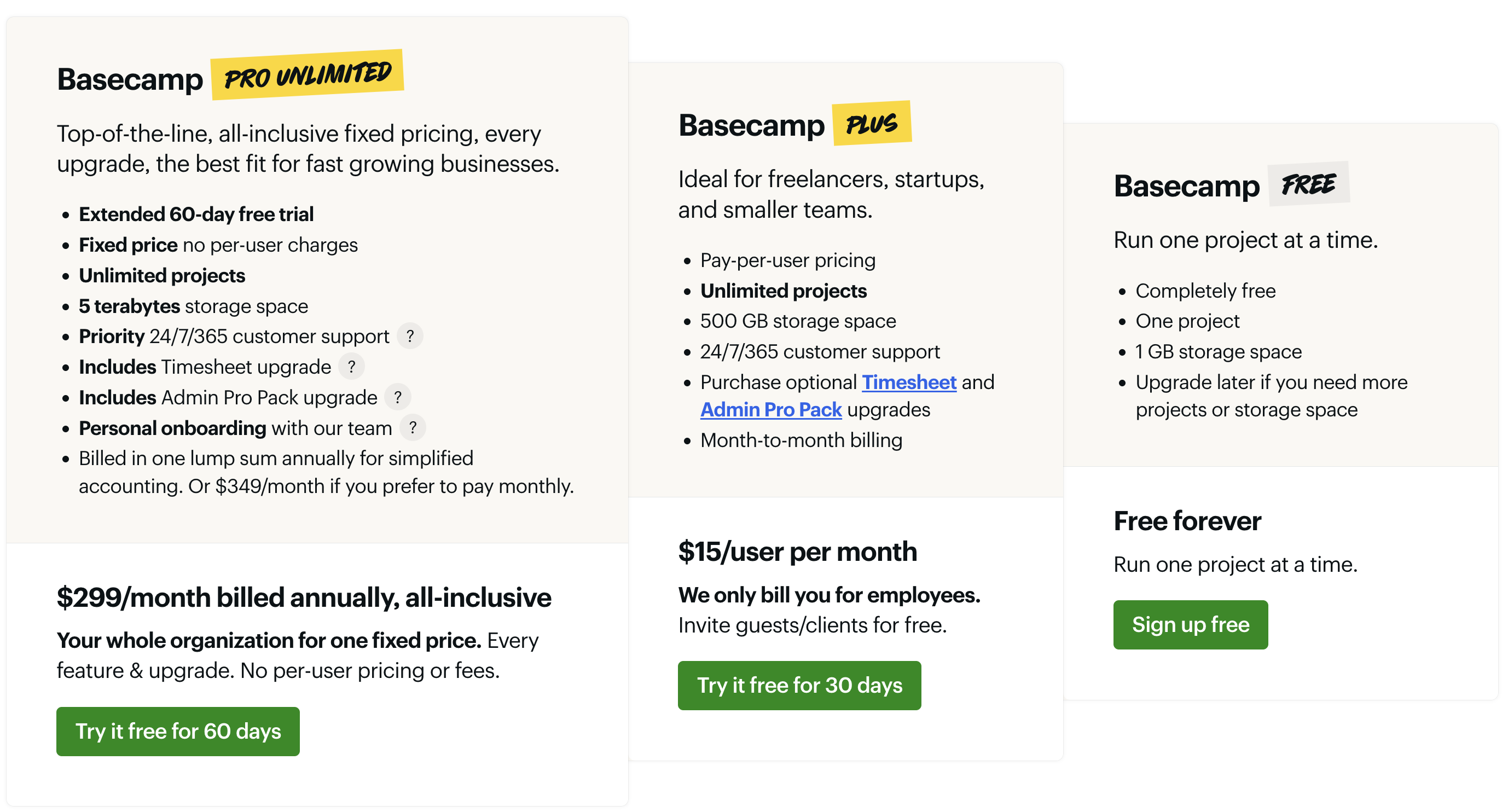
Image source: basecamp.com
Instead of complicated enterprise licenses or user‑based limits, the company offers three straightforward options designed for different team sizes and collaboration styles. Many users see it as a refreshing alternative to tools that charge per feature or per seat.vBelow is a concise comparison table reflecting the current official pricing and benefits, as accurate as of this Basecamp project management review:
Information source: basecamp.com
Update time: 2025-11-12
Each version reflects Basecamp's minimalist philosophy: clarity over complexity. Teams can start with the free plan, then scale up as collaboration grows. What sets Basecamp apart—often emphasized in detailed Basecamp review project management discussions—is not only the pricing fairness but also the psychological ease of predictable cost.
However, for teams requiring granular billing or automation layers, other solutions like Lark provide a more flexible approach. Still, as one clever analogy goes, "less can truly be more"—and Basecamp's pricing structure proves it. Evaluating Google Workspace pricing and ClickUp pricing alongside competing platforms can also provide useful budgeting insights.

Integration options and mobile app experience
Seamless integration has become a deciding factor in nearly every software review. While Basecamp's strength lies in its simplicity, it intentionally limits deep third‑party integrations to maintain a clean, distraction‑free environment. Instead of overwhelming users with endless plugin options, it supports widely used tools that align with everyday workflows — email, calendar links, time tracking apps like Harvest, and automation through Zapier.
In my own testing for this Basecamp project management review, integrations worked reliably but are somewhat minimal when compared with enterprise‑grade competitors. You can sync deadlines to external calendars or link files from cloud‑storage platforms, but advanced workflow automation or native CRM integrations are out of scope for now. That's by design; Basecamp trades extensibility for clarity.
Basecamp's mobile app experience continues this theme. The interface translates cleanly to phones and tablets, maintaining nearly full feature parity with the desktop version. Notifications are customizable, file uploads are quick, and interface loading remains smooth even on slower connections. For remote teams, this makes checking in or replying to messages uncomplicated.
Of course, some users—especially those coming from multifunctional ecosystems—might prefer a broader integration layer. In such cases, solutions like Lark demonstrate how real‑time communication, document editing, and automation can live inside one interface without switching apps. Still, Basecamp's mobile reliability and no‑nonsense integrations remain its defining virtues, as reinforced across every major Basecamp review project management discussion online.
Pros and cons of Basecamp
Every fair Basecamp project management review acknowledges both sides of its minimalist philosophy. Users either love its simplicity or wish for deeper customization. To understand Basecamp's appeal—and its boundaries—it's best to look at both perspectives side by side.
Across dozens of Basecamp software review threads and case studies, the same conclusion appears: Basecamp excels for teams seeking calm, organized collaboration without distractions. Yet, for process engineers or fast‑scaling teams demanding automation and scalable data structures, this “calm software” may feel restrictive.
That's why many reviewers, including myself, mention new players like Lark in their analyses. Not as competitors trying to outshine Basecamp, but as complementary philosophies—Lark merging structure with flexibility, and Basecamp defending calm simplicity.
Basecamp alternatives – when simplicity reaches its limit
Even the most positive Basecamp software review acknowledges that simplicity can become a constraint as teams scale. Basecamp excels for communication and coordination, but users eventually require features like workflow automation, structured data handling, and real‑time document collaboration. This is why the conversation around a Basecamp project management review often leads naturally to exploring alternatives that complement or extend its capabilities.
Why users look for Basecamp alternatives
The decision to move beyond Basecamp typically happens when:
- Projects grow more complex and demand layered dependencies.
- Teams need automation or advanced integration with HR, CRM, or analytics tools.
- Managers want granular permission settings and custom dashboards.
In other words, Basecamp resolves communication overload, but not process complexity. This differentiation becomes central in any Basecamp review project management analysis.
Lark as a smarter Basecamp alternative
Lark represents a modern evolution of teamwork: an all‑in‑one collaboration platform merging chat, video meetings, documents, project management, cloud storage, and automation — all under one unified interface. It approaches work as a single connected ecosystem instead of separate apps held together by integrations. In comparison to Basecamp, Lark's modular yet cohesive architecture gives growing teams both structure and agility.
Customizable data workflows
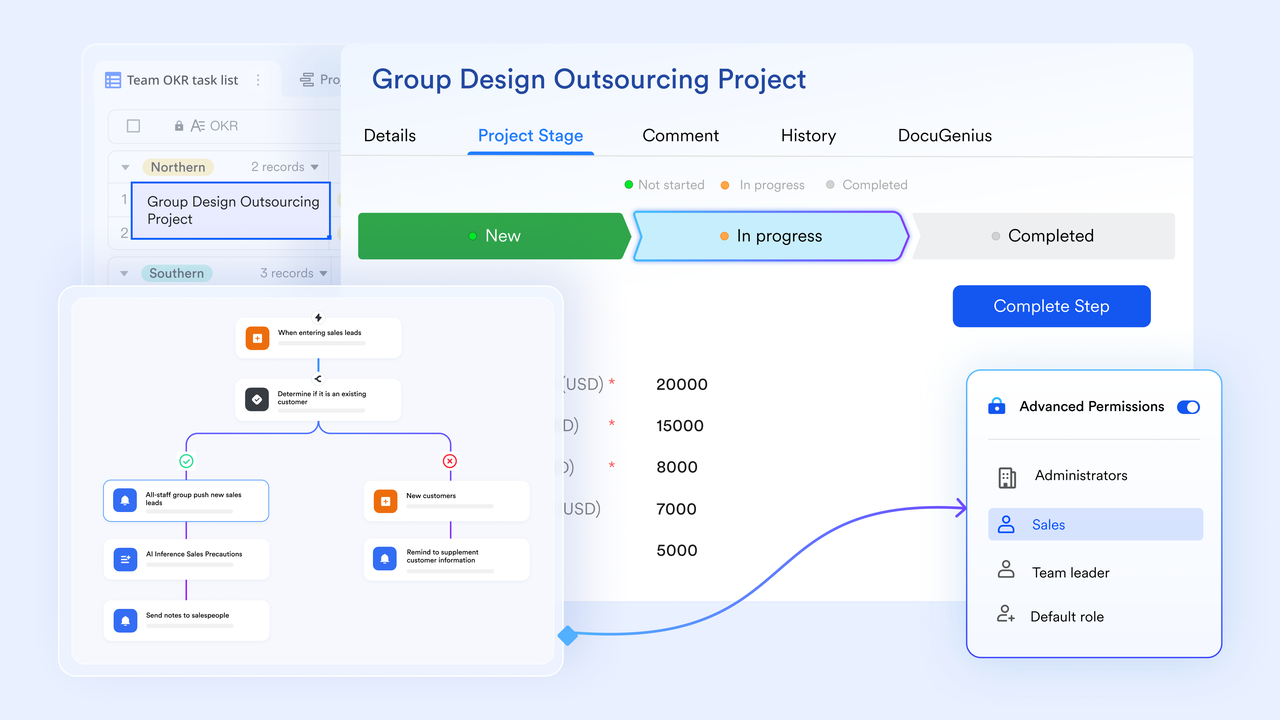
In Basecamp, task lists keep work visible but can feel rigid for teams managing structured projects.Lark Base, part of the Lark suite, allows teams to build dynamic databases that link information from multiple sources. Users can view data in grid, gallery, or kanban modes — similar to spreadsheets but connected to chat messages, documents, and forms.
Lark's solution:
- Flexible data tables with relation‑based tracking.
- Custom automation that updates projects in real time.
- Integration with third-party tools and bots for repetitive task elimination.
This level of workflow customization transforms project management from lists into living, automated data flows—something Basecamp intentionally avoids but many scaling teams eventually need.
Document and data collaboration built into the workspace
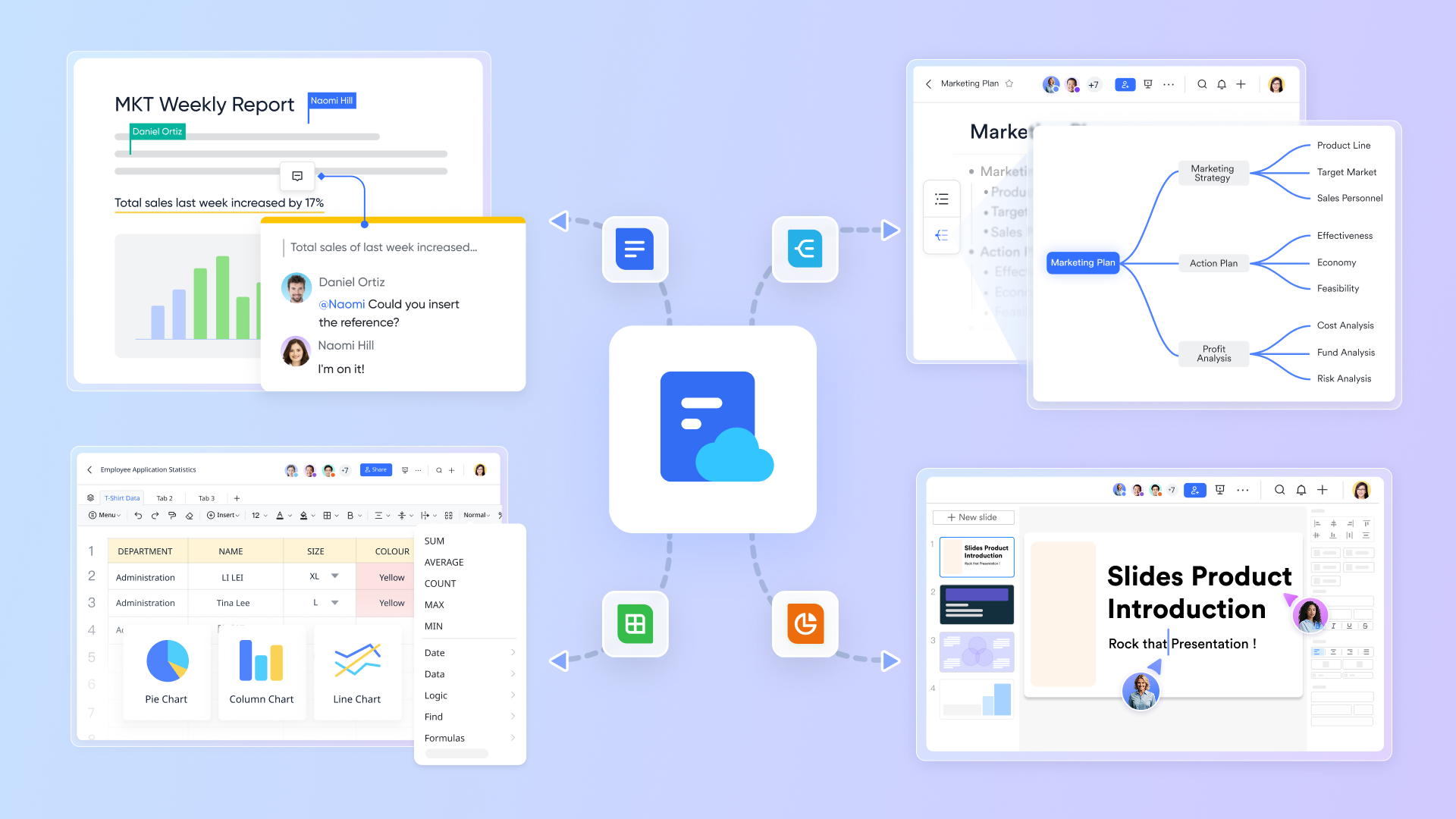
While Basecamp project management review discussions often praise its structured communication, some users note its lack of real‑time co‑editing. Lark solves that naturally: its Lark Docs and enable multiple users to edit simultaneously while chatting or video calling in the same window.
Lark's solution:
- Collaboration occurs inside one workspace — meetings, chat, and editing without switching tools.
- Version history, permissions, and notifications are seamlessly aligned.
- AI‑assisted writing and translation for global teams boost productivity.
The effect is less tool fatigue, more natural teamwork. It's as if everyone sits around the same digital table instead of jumping between apps.
Real‑time collaboration and meeting synergy
In Basecamp, communication thrives through asynchronous updates — message boards, check‑ins, and task comments keep everyone informed without the need for constant meetings. Lark Meetings turns meetings from isolated events into part of the continuous workflow. Teams can move fluidly from chat to video meetings to document co‑editing — all within the same workspace.
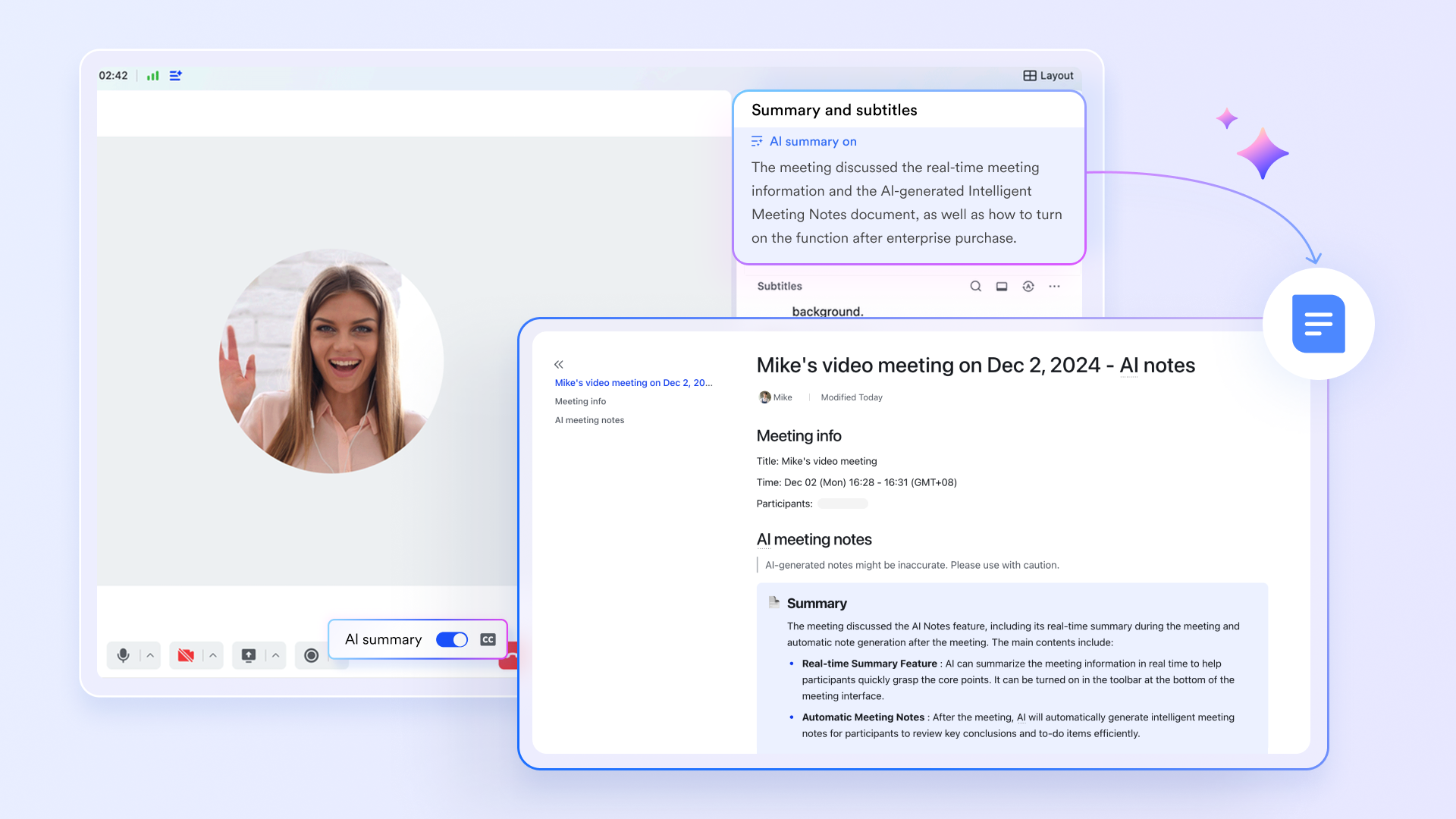
Lark's solution:
- Lark AI Meeting Notes automatically records, summarizes, and organizes meeting discussions, extracting action points and key takeaways without manual effort. This ensures decisions are documented and accessible instantly afterward.
- Magic Share allows participants to work together on documents, slides, or spreadsheets during the meeting itself, enabling real‑time input and reducing follow‑ups. Everyone sees updates live — perfect for brainstorming or reviewing deliverables.
- Lark Minute turns meeting insights into actionable tasks directly within the workspace. No need to copy notes or rewrite checklists; everything syncs instantly with team workflows.
This makes Lark Meetings not just a communication tool, but a productivity hub — connecting what's said with what's done.
Lark & Basecamp pricing comparison
Other notable alternatives worth testing
Beyond Lark, several tools frequently surface in Basecamp software review comparisons:
- Asana: Designed for structured planning and timeline visualization.
- ClickUp: Offers extensive automation and customization for technical teams.
- Trello: Ideal for visual task tracking on smaller projects.
- Monday.com: Provides modular templates for departments like HR or sales.
Each platform approaches work differently. Basecamp's philosophy of calm efficiency still appeals to many; however, tools like Lark showcase how integration and automation define the next stage of productivity. To know more about these tools in detail, check our other software review:
Conclusion
In reviewing Basecamp, one truth stands firm: simplicity is its greatest strength — and its biggest boundary. If your projects rely on clear communication, document sharing, and quick onboarding, Basecamp remains a reliable solution. Many small teams value its transparency, pricing clarity, and distraction‑free design.
However, for organizations transitioning to data‑rich, collaborative environments, limited automation and reporting may feel restrictive. This doesn't make Basecamp outdated — it just defines its unique purpose amid advanced alternatives. Platforms like Lark extend that foundation by connecting chat, meetings, docs, and project data into one unified space, guiding teams naturally from simplicity to smart scalability.
FAQs
Is Basecamp free to use?
Yes, Basecamp offers a free version that allows one project with limited storage, perfect for testing its workflow before upgrading.
Does Basecamp integrate with other software?
Basecamp supports basic integrations through Zapier and time‑tracking tools like Harvest, but advanced automation may require third‑party support.
Is there a mobile app for Basecamp?
Absolutely. The Basecamp app is available on iOS and Android, providing a stable experience for managing messages, files, and tasks on the go.
How is Basecamp different from Lark?
Basecamp emphasizes simplicity and asynchronous communication, while Lark offers an all‑in‑one platform combining chat, meetings, docs, automation, and data management.
Does Basecamp include reporting or analytics?
Reporting is minimal in Basecamp. It includes Hill Charts and activity views but lacks detailed, customizable analytics dashboards.
Who should choose Basecamp?
Basecamp suits small teams, creative agencies, and freelancers seeking structure without complexity. Larger organizations needing automation or scalability may prefer Lark or similar integrated platforms.
Related reading
Table of contents
Start using Lark today

Manage all your work in one place
Boost team efficiency by 10x
Save up to 70% on software costs
Table of contents
Start using Lark today
Manage all your work in one place
Boost team efficiency by 10x
Save up to 70% on software costs
Keep reading








2026 Lark Technologies Pte. Ltd.
Headquartered in Singapore with offices worldwide.






Explore: