Scheduling sounds simple—until it isn't. Anyone who has tried to coordinate a meeting across busy calendars knows how quickly email threads and chat messages spiral out of control. That exact frustration is what made Doodle popular, and it remains the reason many people search for a Doodle review today. For years, it has been the go-to tool for asking one straightforward question: When are you available?
But the way teams work has changed. Meetings are no longer isolated events—they connect to projects, decisions, documents, and follow-ups. This naturally raises a fair question many users now ask: Is Doodle still the right fit? In this in-depth Doodle review, we examine how it works, where it helps, where it struggles, and why some teams consider broader tools like Lark for connected workflows.
What is Doodle, and who is it for?
Doodle is an designed to help people find a mutually convenient time to meet without long email threads or back-and-forth messages. At its core, Doodle works by letting an organizer propose multiple time options, which invitees then vote based on their availability. The option with the most agreement becomes the chosen meeting time.
Doodle is best suited for individuals and groups who need to coordinate schedules quickly, especially when participants are outside the same organization. Freelancers use it to book client calls, recruiters rely on it to line up interviews, and educators often use it to schedule group sessions or office hours. It is also popular for informal coordination, such as volunteer sign-ups, community meetings, or one-off team syncs.
The tool works particularly well when the goal is limited to agreeing on a time. It is less focused on what happens before or after the meeting, making it a lightweight solution rather than a .
Key features and real-world usability
Doodle's core strength lies in its simplicity. The platform is designed to remove scheduling friction by focusing on one clear outcome: . Rather than managing full calendars or workflows, Doodle offers lightweight tools that work well even when participants are external or unfamiliar with the organizer's systems. In real-world use, this makes it easy to get quick responses and avoid long coordination loops, especially for one-off meetings or informal group planning.
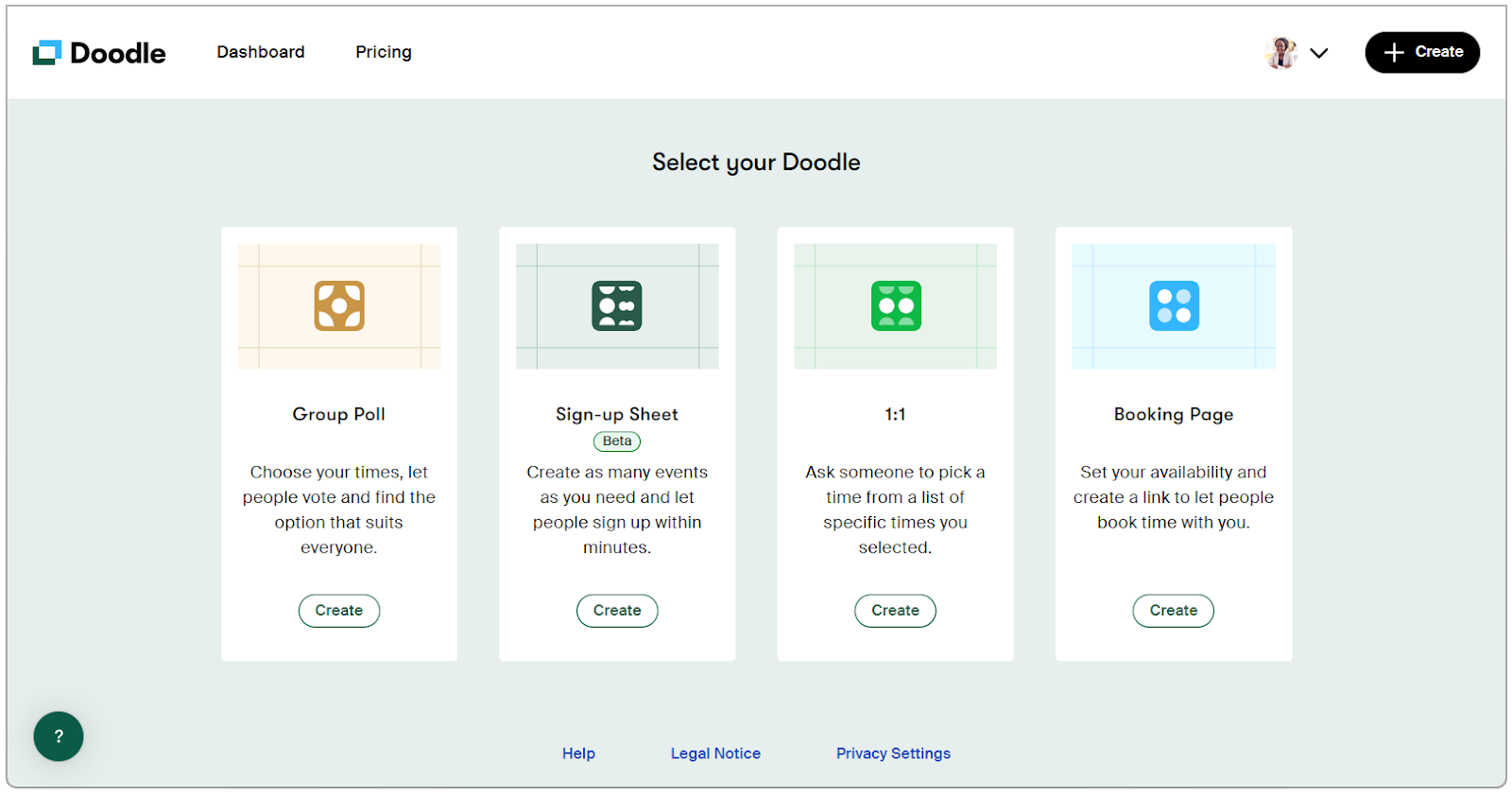
Image source: doodle.com
- 1:1 Invite: Doodle's 1:1 invite feature allows individuals to share a set of available time slots with one person. It works well for interviews, client calls, or quick check-ins without needing shared calendars.
- Booking page: The booking page lets users publish a personal scheduling link where others can select an available time. This is useful for external meetings, though remain limited.
- Group poll: Group polls are Doodle's most recognized feature, enabling multiple participants to vote on proposed time options. It but relies on manual follow-ups if responses are delayed.
- Sign-up sheet: Sign-up sheets allow participants to register for specific time slots or activities. They are commonly used for events or volunteering, but offer minimal tracking once slots are filled.
- Pricing feels restrictive over time: Key features like and branding are locked behind paid plans. This can feel limiting as usage increases.
Doodle pricing explained and what you actually pay for
Understanding Doodle pricing means knowing what features you get at each tier and how they align with your use cases. Pricing typically reflects the , integration, and administrative controls included. Below, we explain what users can expect to pay and what they actually receive at different levels.
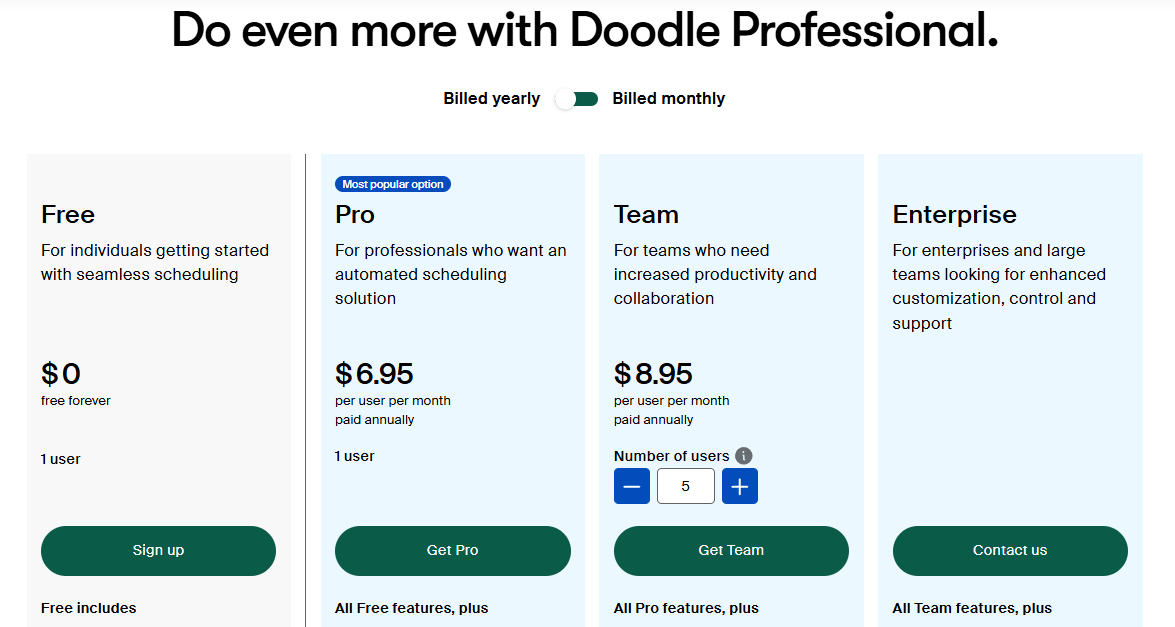
Image source: doodle.com
Information source: Official vendor sites
Update time: 2025-12-23
Note: Pricing and plan details reflect publicly available data as of the update date and may vary based on region, billing cycle, and number of agents.
Where Doodle fits well in real workflows
Doodle works best in situations where scheduling is lightweight and time agreement is the only goal. It is most effective when coordination needs to be quick, informal, and inclusive of external participants.
- One-off meetings: Doodle is well-suited for single, non-recurring meetings where finding a standard time is the only requirement. It avoids unnecessary setup for meetings that won't repeat.
- Informal group polls: For casual planning such as or community events, Doodle makes it easy to gather availability. Participants can respond quickly without accounts or training.
- Interviews and shortlisting calls: Recruiters often use Doodle to coordinate interviews with multiple candidates. It simplifies the collection of availability when calendars are not shared.
- External coordination with non-users: Doodle works smoothly with clients, partners, or volunteers who don't use the same tools. The lack of mandatory sign-ups lowers response friction.
What real users say about Doodle: Reddit insights
User feedback on Doodle is generally consistent across review . While many appreciate its simplicity, recurring concerns appear as usage becomes more frequent or professional.
- Common praise from G2, Trustpilot, and GetApp users: Users frequently highlight how easy Doodle is to set up and share, especially with external participants. Many reviews praise its usefulness for quick polls and .
- Frequent complaints on Reddit threads and forums: Users often express frustration with feature restrictions and rising paywalls. Others point to slow responses, poll clutter, and the need for manual follow-ups.
- Trends in sentiment: Sentiment trends show strong approval for usability but mixed feelings about value for money. Reliability concerns tend to surface when Doodle is used at scale or for recurring workflows.
Pros and cons of using Doodle today
Doodle remains a familiar scheduling tool for many users, especially for quick coordination. Its simplicity makes it easy to adapt without training or setup. However, as work becomes more , the limitations of a single-purpose scheduling tool become more noticeable.
Pros
- Easy for external participants: Invitees do not need an account to respond, which reduces friction. This makes Doodle effective for interviews, clients, and one-time coordination.
- Fast setup for simple meetings: or booking link takes only minutes. Users can propose time options quickly without managing complex settings.
- Minimal learning curve: The interface is straightforward and intuitive. Most users can understand how to vote or book a time without guidance.
Cons
- Manual coordination required: Organizers must chase responses and confirm outcomes manually. Delays in scheduling can occur when participants respond late.
- Polls detached from real work: Doodle polls exist independently from . Once a time is chosen, the scheduling context does not carry forward into execution.
- No ownership or follow-up tracking: There is no built-in way to assign responsibility or track the steps that follow after a meeting is scheduled. Teams must rely on separate tools to manage accountability.
- Scheduling decisions living outside team systems: stay confined to Doodle rather than syncing with internal workflows. This forces teams to manually update calendars and collaboration tools.
Doodle works well when the goal is simply to agree on a time. But as frequently and meetings become part of ongoing projects, scheduling alone starts to feel incomplete. Once a time is chosen, teams still need to prepare agendas, share context, capture decisions, and follow up on action items—often across multiple tools. This gap between scheduling a meeting and actually getting work done afterward is where many teams begin looking beyond single-purpose tools like Doodle toward platforms that connect scheduling with collaboration and execution.
Discover better ways to turn meetings into action
Meet Lark: Manage agendas, communication, and workflows in one place
Rather than treating scheduling as a standalone task, approaches it as part of everyday work. Meetings and scheduling connect to calendars, documents, conversations, and . This means scheduling is not just about finding a time, but about ensuring the meeting actually moves work forward. As teams grow and meetings become recurring, this approach reduces manual coordination and context switching. Lark focuses on helping teams align before meetings, collaborate during them, and act on outcomes afterward.
Smart group scheduling with real availability matching
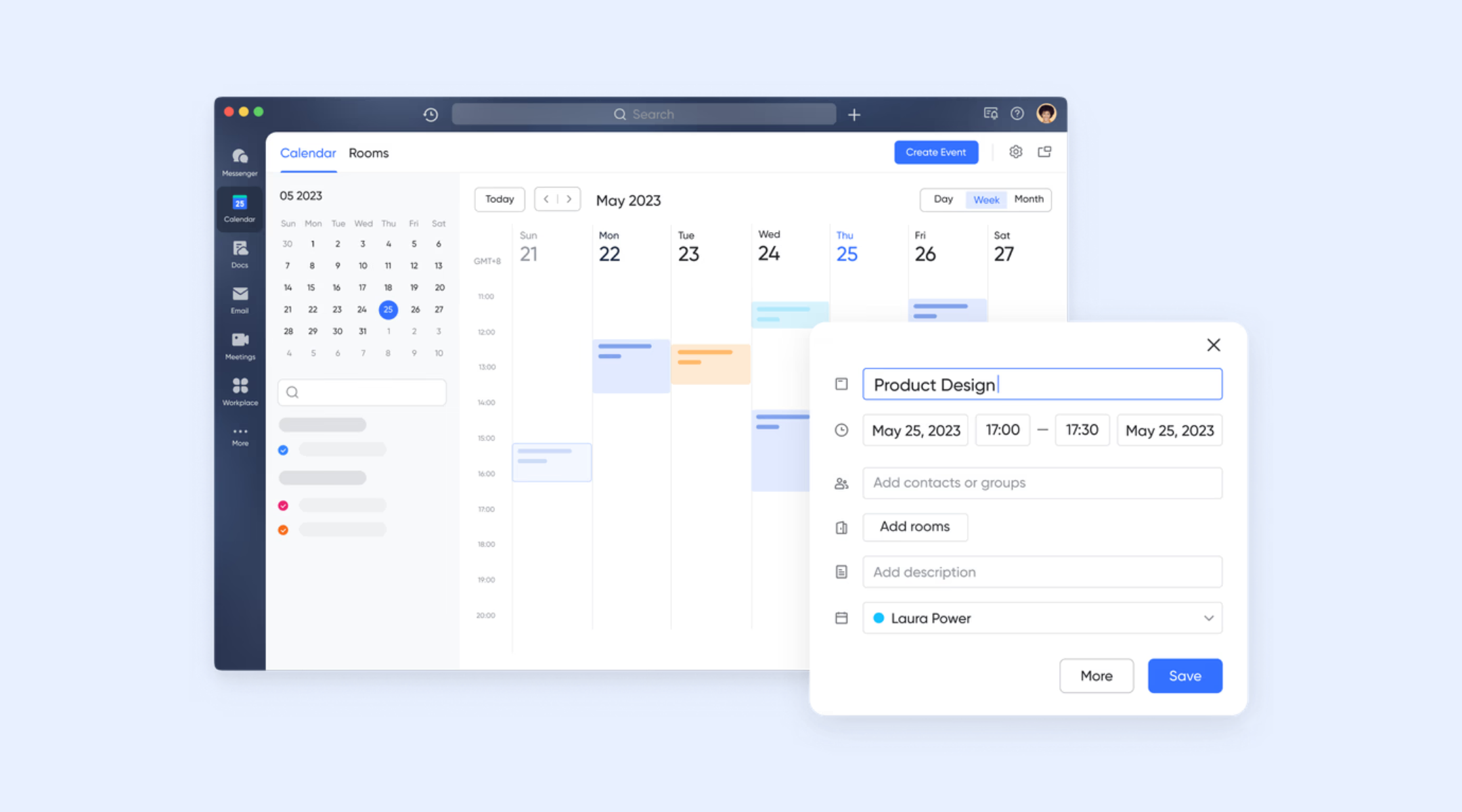
analyzes participants' calendars and instantly identifies time slots that work for everyone. Organizers can see participant status—such as busy, awaiting response, or tentative—before confirming the meeting. This avoids guesswork and follow-up. Doodle relies on availability voting, which introduces waiting time and uncertainty. Lark replaces polling with intelligence, allowing meetings to be scheduled faster and with more confidence.
Automated scheduling triggered by real workflows
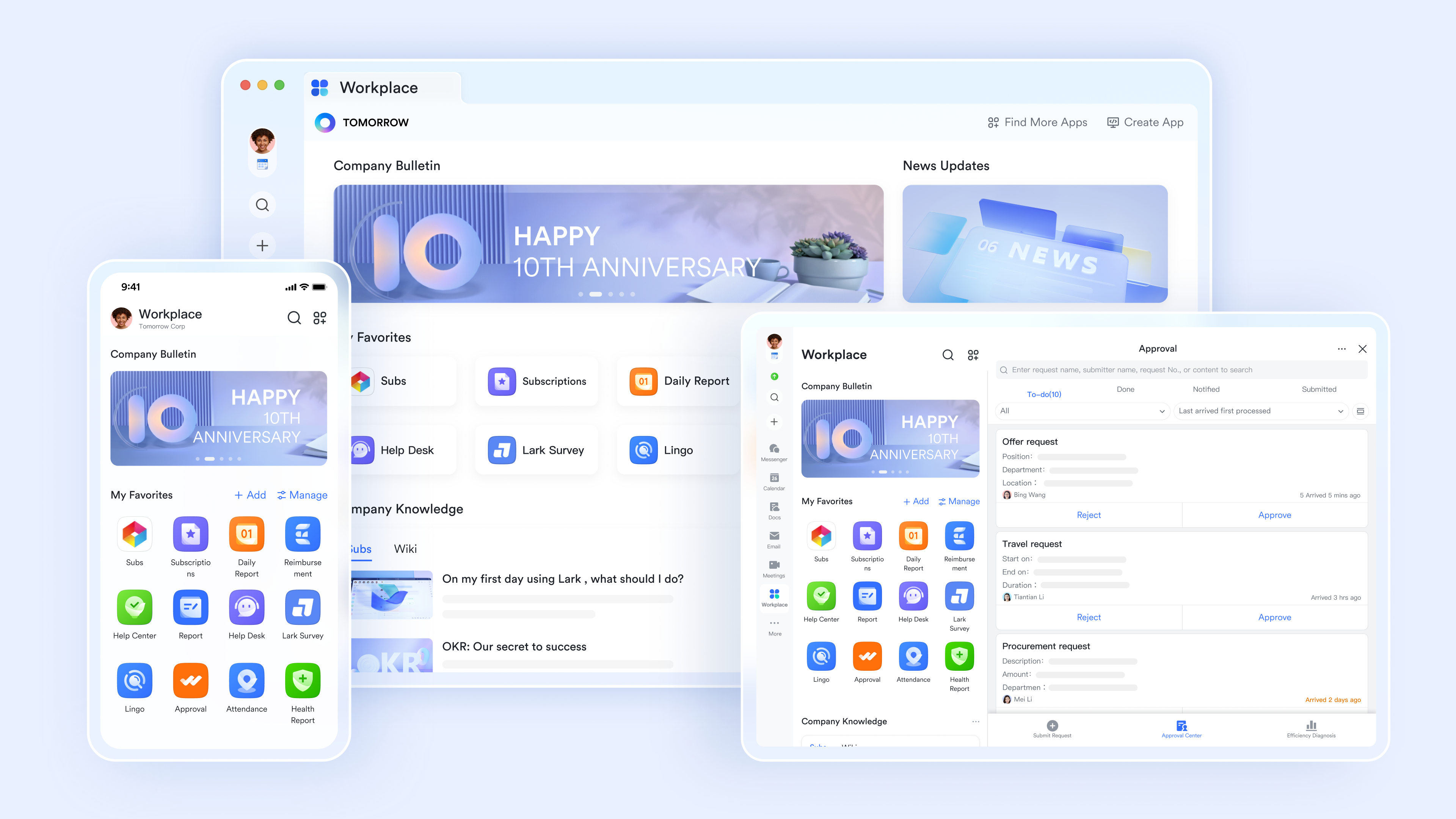
Lark Base workflow connects with Lark Calendar to turn your database into a dynamic planning engine that automates scheduling and improves project visibility. Through the "Create Lark Event" action in the workflow builder, Base can automatically book meetings on your calendar the moment a new record is added or a specific condition—like a deal status change—is met. This removes manual coordination and reduces delays. Doodle requires someone to create a poll and actively manage responses for every meeting; Lark treats scheduling as a background operation driven by real work, not a manual step. 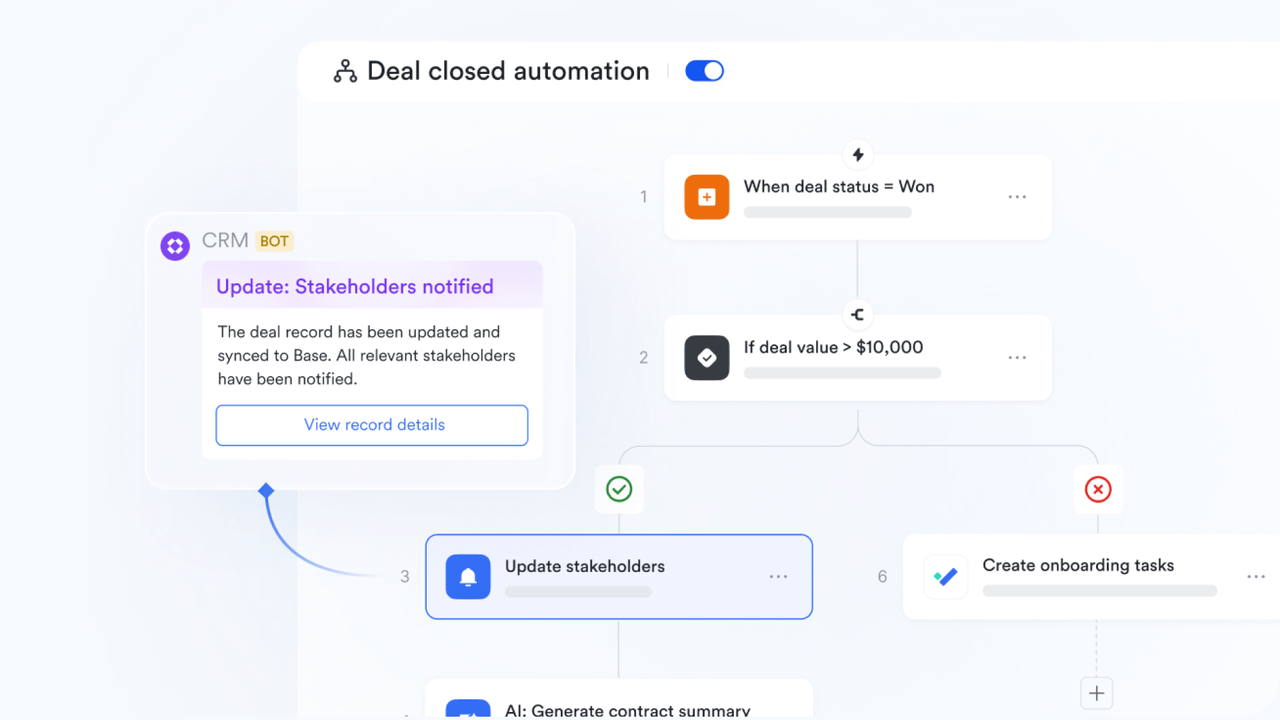
Built-in video meetings and centralized calendar management
Lark supports one-click Zoom meetings directly from Calendar events, with meeting links automatically included for all participants. It also syncs external calendars such as Google Calendar, ensuring all commitments are visible in one place and preventing conflicts. Doodle does not manage calendars or meetings itself—it only helps choose a time. Lark centralizes , reducing tool sprawl and missed meetings. 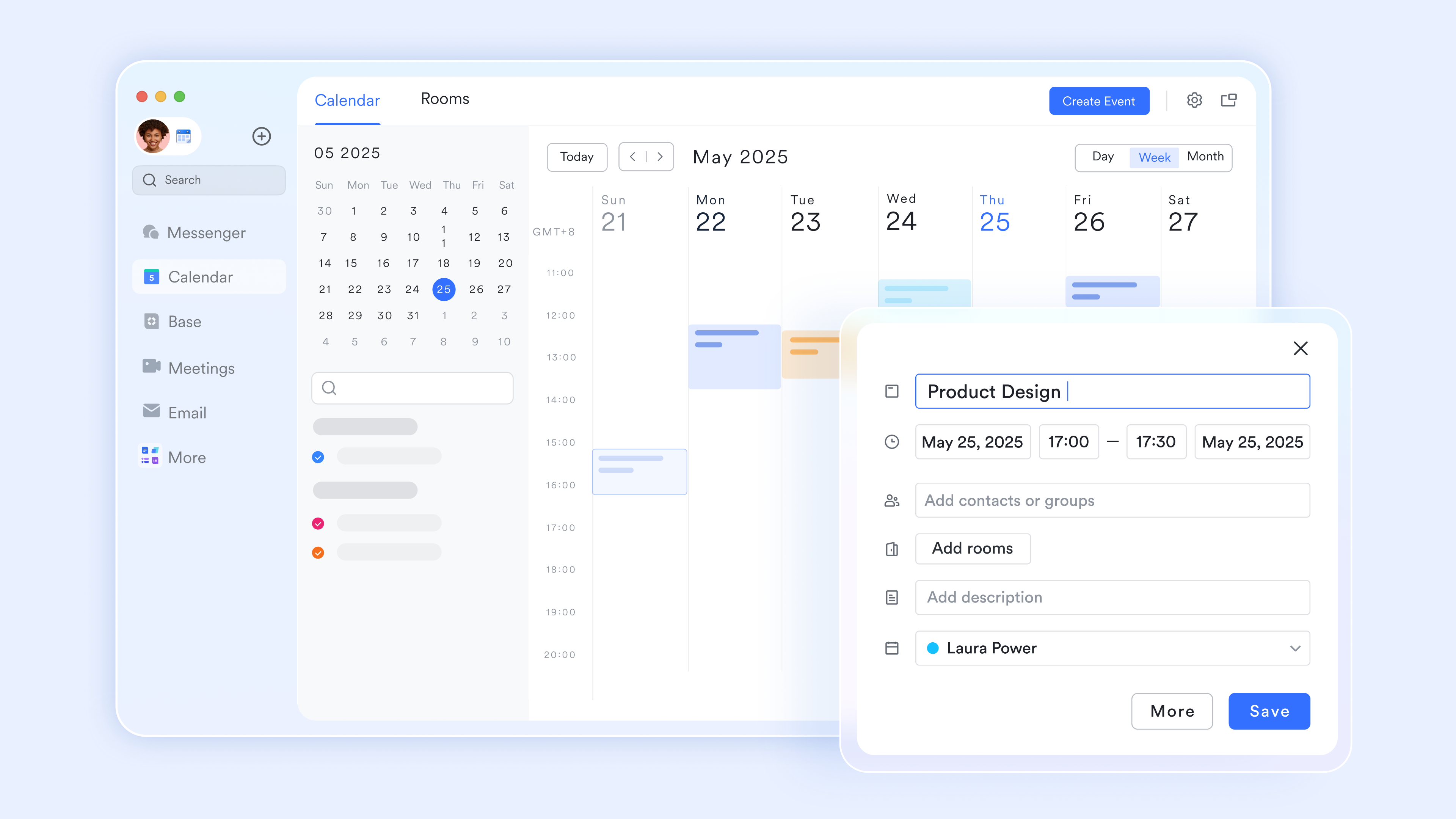
Meetings connected to collaboration before and after
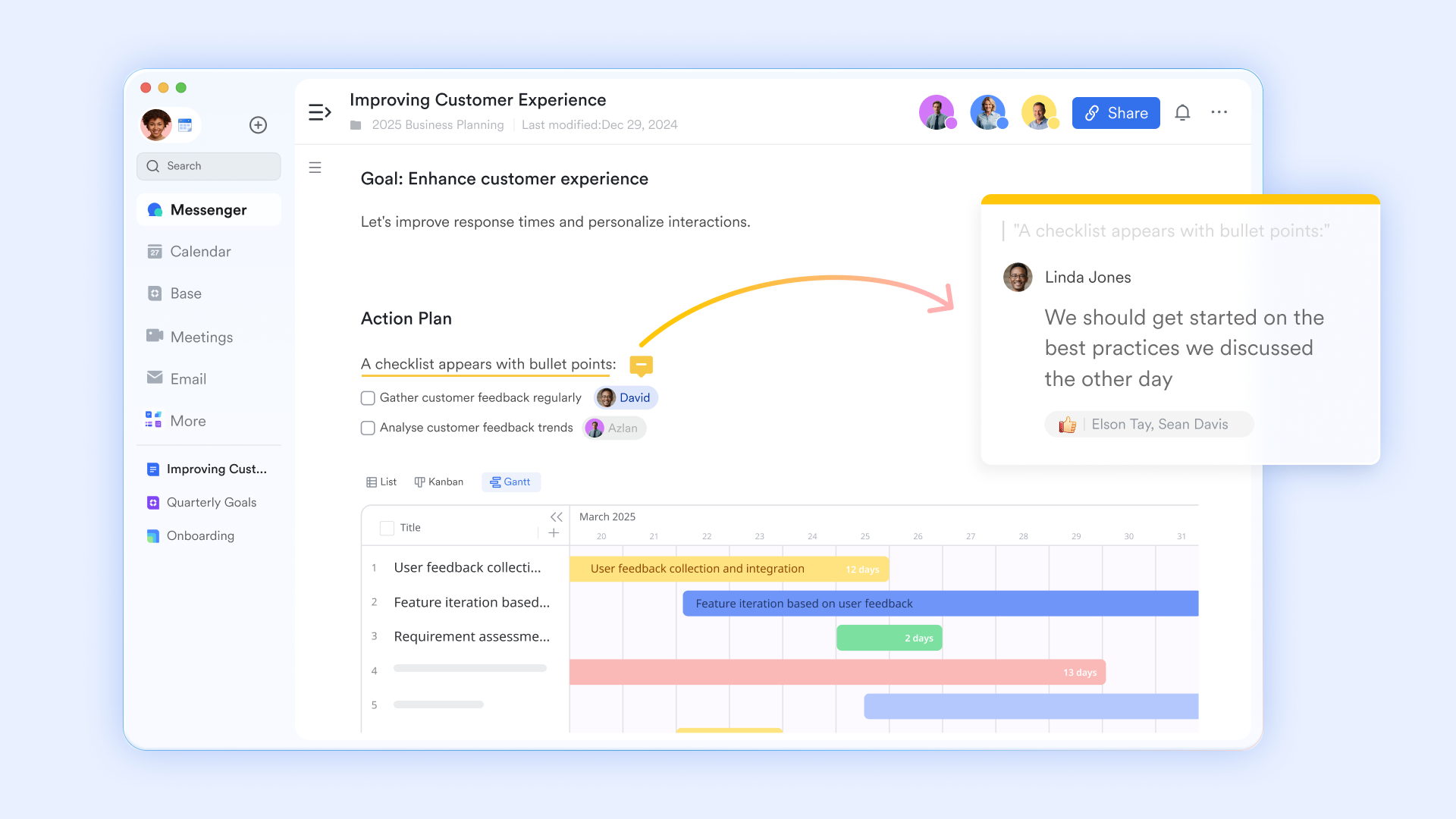
In Lark, meetings can be directly linked to for agendas and preparation, and to group chats for discussion and follow-up. Teams can align on plans before the meeting and afterward without switching tools. Doodle ends once a time is selected, leaving preparation and follow-up fragmented across other platforms. Lark keeps scheduling, context, and collaboration tightly connected in one workspace.
AI-powered meeting summaries with action tracking
When the AI summary button is on, Lark can automatically generate AI Meeting Notes that include summaries, action items, and structured sections. These notes are editable, shareable, and can be converted into tasks for follow-through. Doodle provides no support beyond scheduling confirmation. Lark ensures meetings produce and accountable next steps, turning time spent into measurable outcomes. 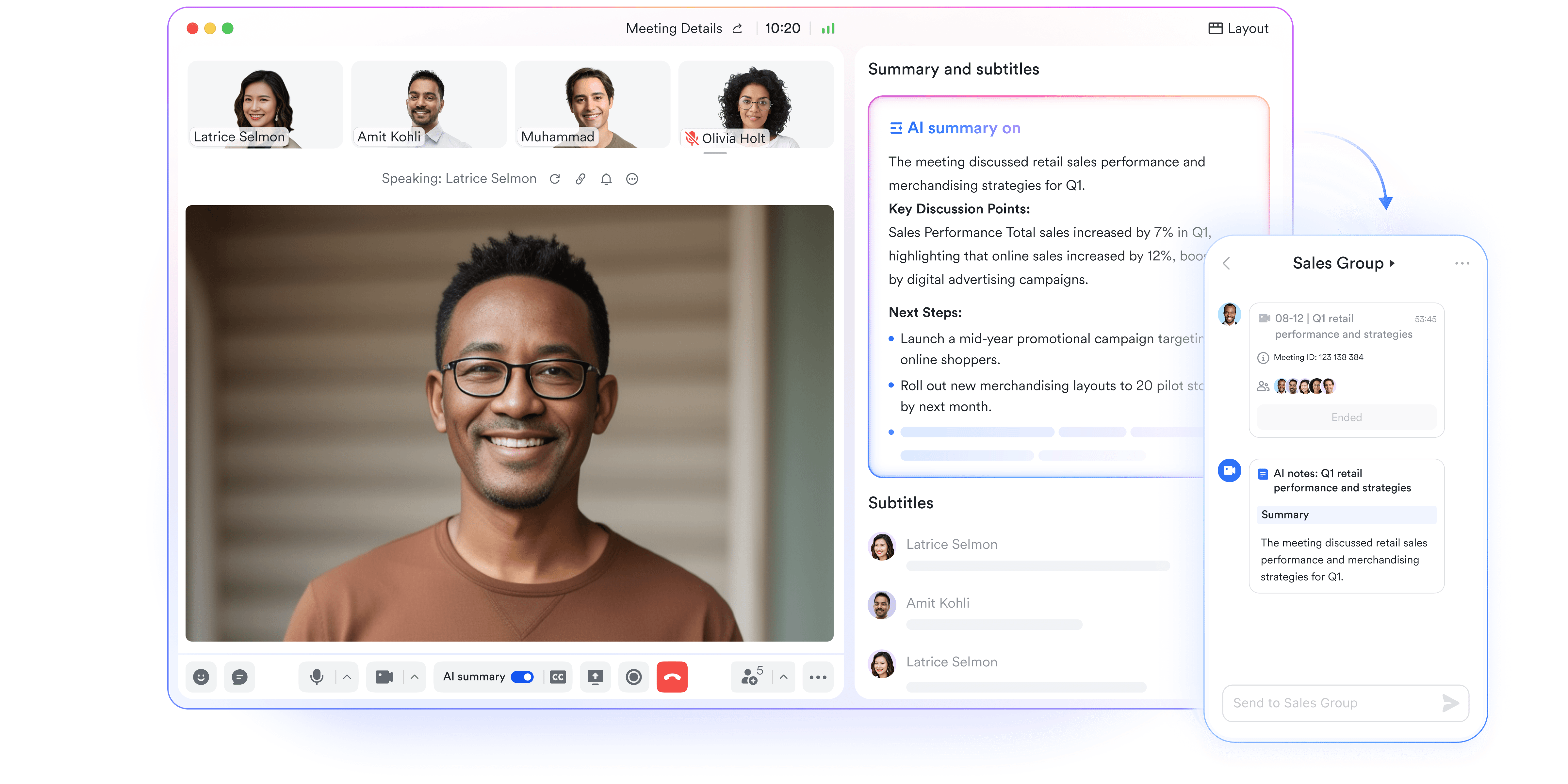
:
- Starter plan: Free forever plan that includes 11 powerful tools for up to 20 users. It also comes with 100GB of storage, 1000 automation runs, AI translations, and more.
- Basic plan: $6/user/month (billed annually) for up to 500 users. It includes everything in Starter plus group calling for up to 500 attendees, 5TB of storage, 1000 automation runs, and more. For more details, please .
- Pro plan: $12/user/month (billed annually) for up to 500 users. It includes everything in Basic plus group calling for up to 500 attendees, 15TB of storage, 50,000 automation runs, and more.
- Enterprise plan: for custom pricing. Supports unlimited users and includes even more automation runs and advanced security, compliance, and management features.
For small teams with simple communication needs

18 months message history
1000 Base automation runs/month
2000 rows per table in Base
Most POPULAR
For companies with comprehensive collaboration and management needs
Unlimited message history
500-participant video meetings
50k Base automation runs/month
20k rows per table in Base
For large companies with advanced security and organizational management needs
Get a personalized demo and pricing
Unlimited message history
500-participant video meetings
15 TB storage + 30 GB storage/user
500k Base automation runs/month
50k Base automation runs/month
Most POPULAR
For companies with comprehensive collaboration and management needs
Unlimited message history
500-participant video meetings
50k Base automation runs/month
20k rows per table in Base
Doodle vs Lark: Practical comparison for teams
Who should choose Doodle, and who should switch to Lark
Choosing between Doodle and a depends on how scheduling fits into daily work. The correct option varies based on meeting frequency, team size, and what happens after meetings. Understanding these differences helps teams avoid over- or under-tooling.
- Doodle is a good fit for individuals or small groups scheduling occasional, one-off meetings. It works well for interviews, external coordination, or informal polls where time selection is the only requirement. Minimal setup keeps things simple.
- Lark is better suited for teams that run meetings regularly and need follow-through. When , tasks, and ongoing projects, a collaborative workspace reduces manual work. It supports continuity beyond scheduling.
If your goal is simply to agree on time, Doodle remains effective. If meetings are part of continuous collaboration and execution, switching to Lark offers more long-term value without relying on multiple disconnected tools.
Conclusion
Doodle remains a reliable option for simple scheduling needs. It removes friction from finding a meeting time, works well with external participants, and requires minimal setup. For one-off meetings, interviews, or informal coordination, it still does exactly what many users expect. However, as this Doodle review shows, its limitations become more visible when meetings are frequent, collaborative, and closely tied to ongoing work.
Modern teams often need more than time selection. They need context before meetings, clarity during discussions, and accountability afterward. That's where broader platforms begin to make sense. Instead of stitching together multiple tools, teams increasingly look for scheduling that naturally , conversations, and follow-ups.
If your scheduling needs are lightweight, Doodle remains a practical choice. If meetings are central to how your team collaborates and executes, exploring a more effective approach, like , can help reduce coordination gaps and keep work moving more smoothly.
Find a scheduling approach that fits growing workflows
FAQs
Is Doodle a safe site to use?
Doodle is generally considered safe and uses standard security practices to protect user data and links. Most concerns raised in a Doodle maker review relate more to feature limits than security risks. Teams needing stronger control and visibility often evaluate platforms like Lark for added governance.
Is Doodle a good scheduling app?
Doodle remains a top-tier choice for group scheduling, using intuitive visual polls to find a consensus among multiple participants quickly. While its free version is heavily ad-supported and lacks advanced business features like buffer times, its seamless integration with major calendars (Google, Outlook, iCloud) makes it highly reliable for both casual and professional use. For 1-on-1 scheduling or deep integrations, however, many users now prefer more specialized tools like Calendly.
For more Google Workspace's information, you can refer to and .
Is there a better tool than Doodle?
Whether there is a "better" tool depends on your workflow needs. Discussions on Doodle alternatives on Reddit often point to tools that connect scheduling with and follow-through. Lark is commonly explored when teams want meetings tied to documents and ongoing work.
Can Doodle be used effectively without paying?
Doodle's free plan can work for basic, occasional scheduling. However, many free Doodle alternatives highlight missing controls and branding limitations. Some teams use free Doodle short-term before testing broader tools like Lark for daily coordination.
Why do many Reddit users say Doodle has declined in value?
In Doodle reviews on Reddit, users frequently mention rising paywalls and reduced value at lower tiers. Complaints often focus on pricing rather than usability. This drives interest in platforms like Lark that bundle scheduling into a more expansive workspace.
Is Doodle suitable for large teams or organizations?
Doodle can support teams, but it is not designed for deep internal coordination at scale. Large organizations often need ownership, context, and follow-up beyond polls. In such cases, teams tend to consider solutions like Lark.
Related reading












