Evernote pricing has evolved as the product has grown from a personal note-taking tool into a platform that supports team collaboration. While individual plans focus on capturing and organizing information, Evernote teams pricing introduces shared access, higher limits, and basic administrative controls. As teams begin relying on Evernote for everyday work, understanding how these pricing tiers affect collaboration becomes increasingly important.
At the same time, some teams start questioning whether note-centric tools alone are enough. Pricing decisions often highlight gaps around execution, follow-up, and visibility. This is where connected workspaces like Lark enter the conversation, offering an approach that keeps notes alongside communication, tasks, and shared workflows without forcing an abrupt change in how teams work.
Explore a new experience of note-taking today
What is Evernote today?
Evernote today positions itself as a central place for notes, documents, and . It combines note capture with features like Tasks, Calendar, offline access, and AI-assisted search. These additions make the platform more powerful, but also make Evernote pricing harder to evaluate at a glance. As users store more content and rely on Evernote across devices, pricing limits start to shape behavior. Upload caps, device sync rules, and AI access directly affect daily usage.
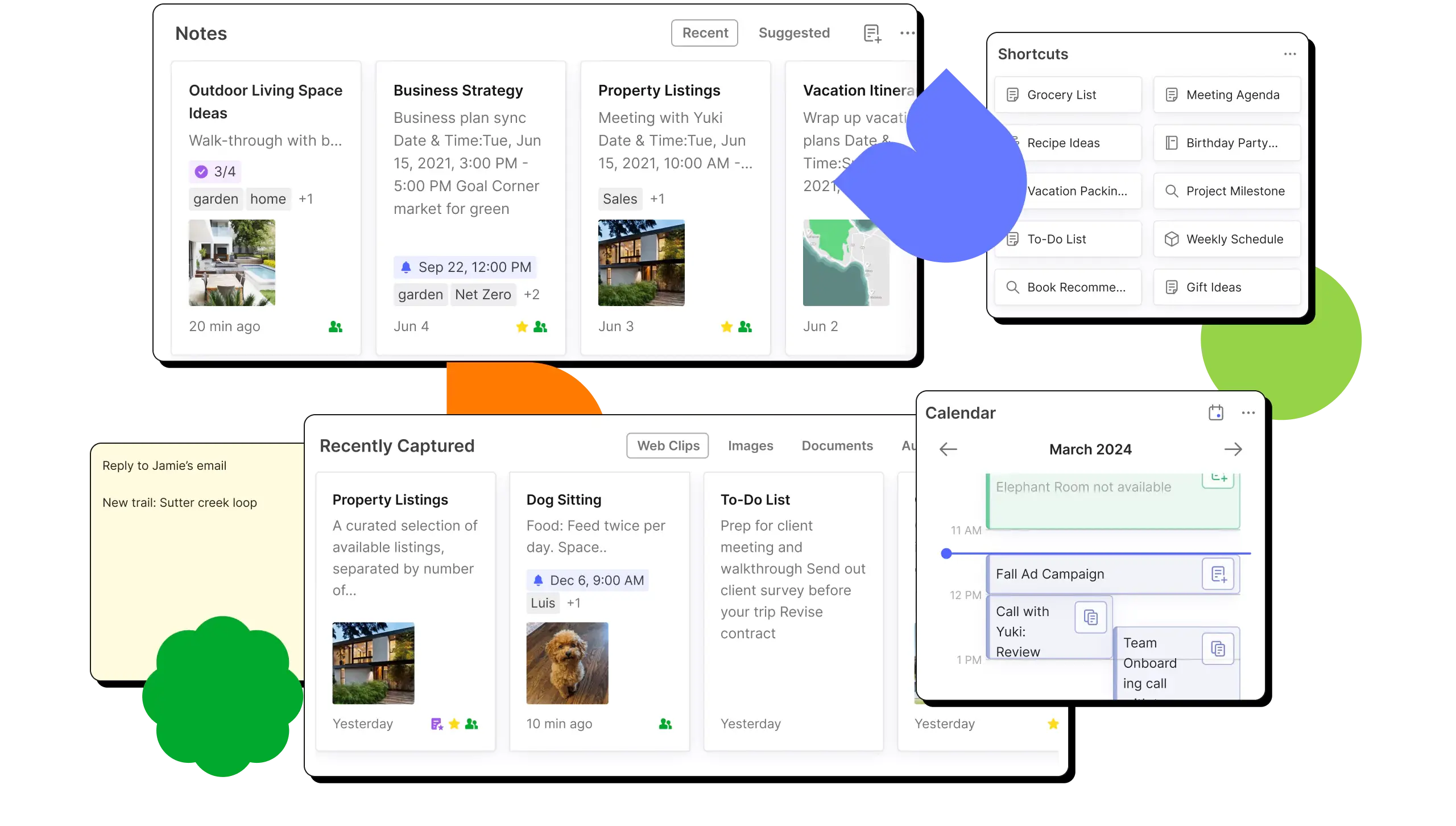
Image source: evernote.com
Evernote Free plan: What you get at no cost
The Evernote Free plan is designed for light, individual use focused on quick idea capture and basic organization:
- Capacity limits: Users are restricted to 50 notes and one single notebook, making it best for light, short-term usage.
- Device connectivity: Access is limited to only one connected device at a time.
- Upload and size constraints: Includes a 250 MB monthly upload cap and a 200 MB maximum size per note, which is ideal for text and small attachments.
- Core features included: Despite the limits, it provides access to organization tools like tasks and calendar integration, as well as capture tools like the web clipper and offline mode.
- Advanced utility: Users can still utilize PDF annotations and advanced search for images and documents.
Evernote paid pricing: How much does Evernote cost exactly
Evernote pricing plans 2026 are structured around expanding limits rather than fundamentally changing how the product works. As you move up tiers, caps are lifted and AI features become available.
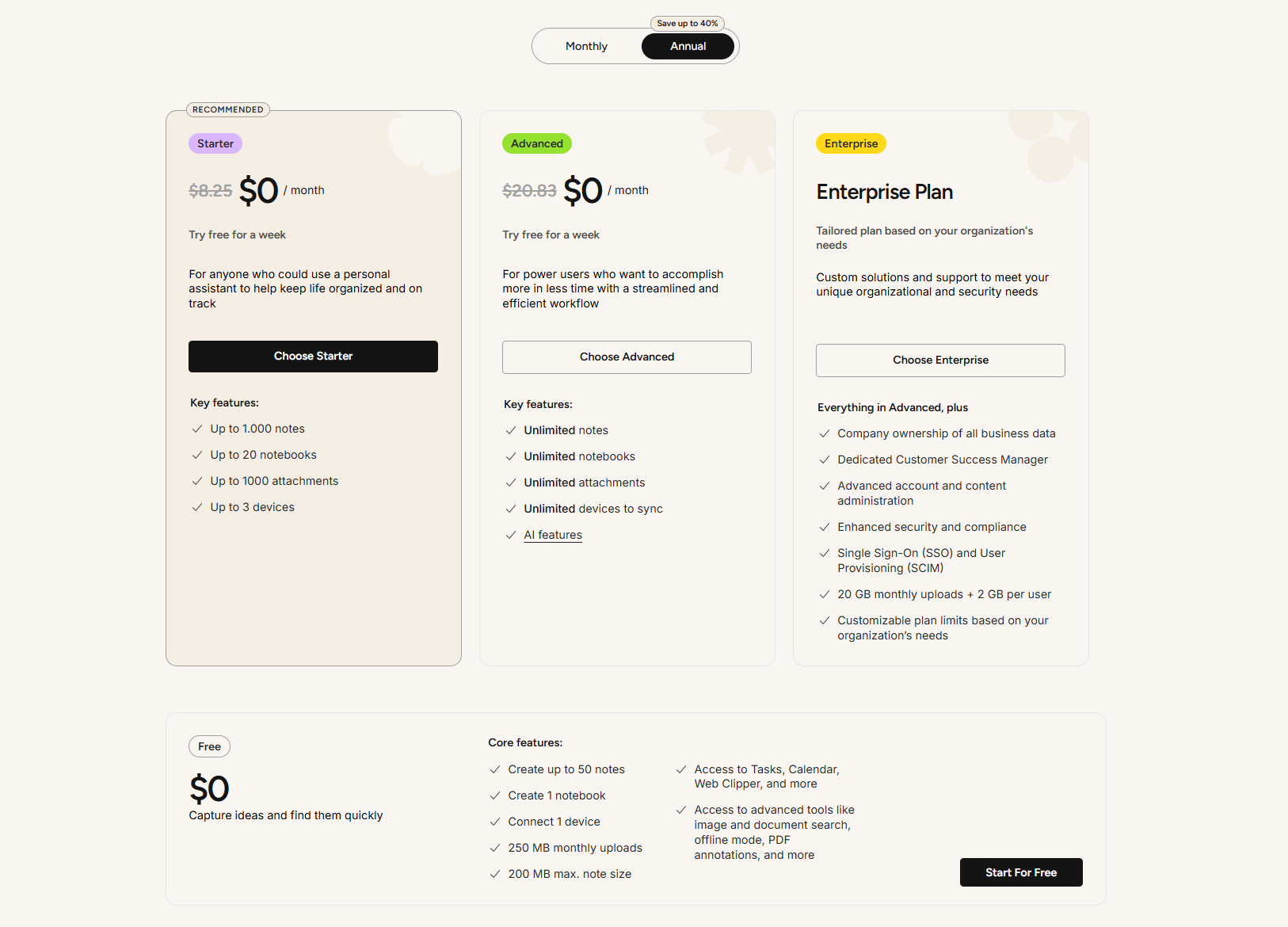
Image source: evernote.com
Information source: evernote.com
Update time: 2025-12-20
Note: Pricing and plan details reflect publicly available data as of the update date and may vary based on region, billing cycle, and number of agents.
Hidden trade-offs behind Evernote's premium tiers
Evernote pricing plans remove many surface limits, but practical constraints still exist. These trade-offs often become clear only after prolonged use.
- Feature access grows, but limits still exist: Feature access grows, but limits still exist even on paid tiers. Upload speeds, syncing behavior, and AI usage are not unlimited in practice. Power users working with PDFs and images often encounter friction. These constraints can slow . Evernote pricing 2026 costs more as usage intensifies.
- Costs rise as needs become clearer: Costs rise as needs become clearer when users require more devices, storage, or collaboration. Higher tiers bundle features that some users rarely use. The jump between plans can feel steep. Evernote pricing plans cost more without always delivering proportional value.
- Collaboration remains note-centric: Collaboration remains note-centric across all Evernote pricing plans. Shared notebooks work well for reading and editing. However, there is limited support for task execution or structured workflows. Teams often rely on additional tools for coordination.
- AI features are not unlimited in practice: AI features are not unlimited in practice despite premium positioning. Usage thresholds and performance constraints apply. Heavy users may outgrow these tools quickly. AI assists content review but does not replace workflow automation.
- Enterprise controls are locked behind custom plans: Enterprise controls are locked behind custom plans with negotiated pricing. Growing teams may need Enterprise earlier than expected. come at a higher cost. This can complicate scaling decisions.
- Productivity stays document-focused: Productivity stays document-focused even at higher tiers. Evernote excels at storing and retrieving notes. It does not evolve into an execution system. Tasks and workflows remain secondary.
When Evernote still makes sense and when it doesn't
Evernote pricing still makes sense for individuals and small teams focused on . It works well for writers, researchers, and professionals who primarily organize information. However, as teams grow, note-centric tools often struggle to support execution, accountability, and collaboration. This is where some organizations start exploring connected workspaces that combine notes with communication, tasks, and . Evernote remains strong at documentation, but it is rarely the final system that teams rely on.
As teams grow, note-taking alone stops meeting the demands of and execution. Notes capture information, but they do not assign ownership, track progress, or ensure follow-through. Decisions recorded in documents often require separate tools to turn them into action. Context becomes fragmented as conversations, tasks, and files live in different places. Over time, teams spend more effort managing information than moving work forward. This gap is why many growing teams look beyond note-taking as a standalone solution.
Explore workflows beyond note-taking
Meet Lark: A smarter workspace that turns your ideas into outcomes
transforms traditional note-taking into an all-in-one that feels more like a "smart canvas" than a document editor. Instead of static files, you get dynamic tools like MindNotes for fluid brainstorming and a centralized Wiki that acts as your team's single source of truth. Its standout capability is how it integrates AI directly into your , automatically turning meeting conversations into clear, actionable summaries with defined outcomes.
Robust note-taking with rich content insertions
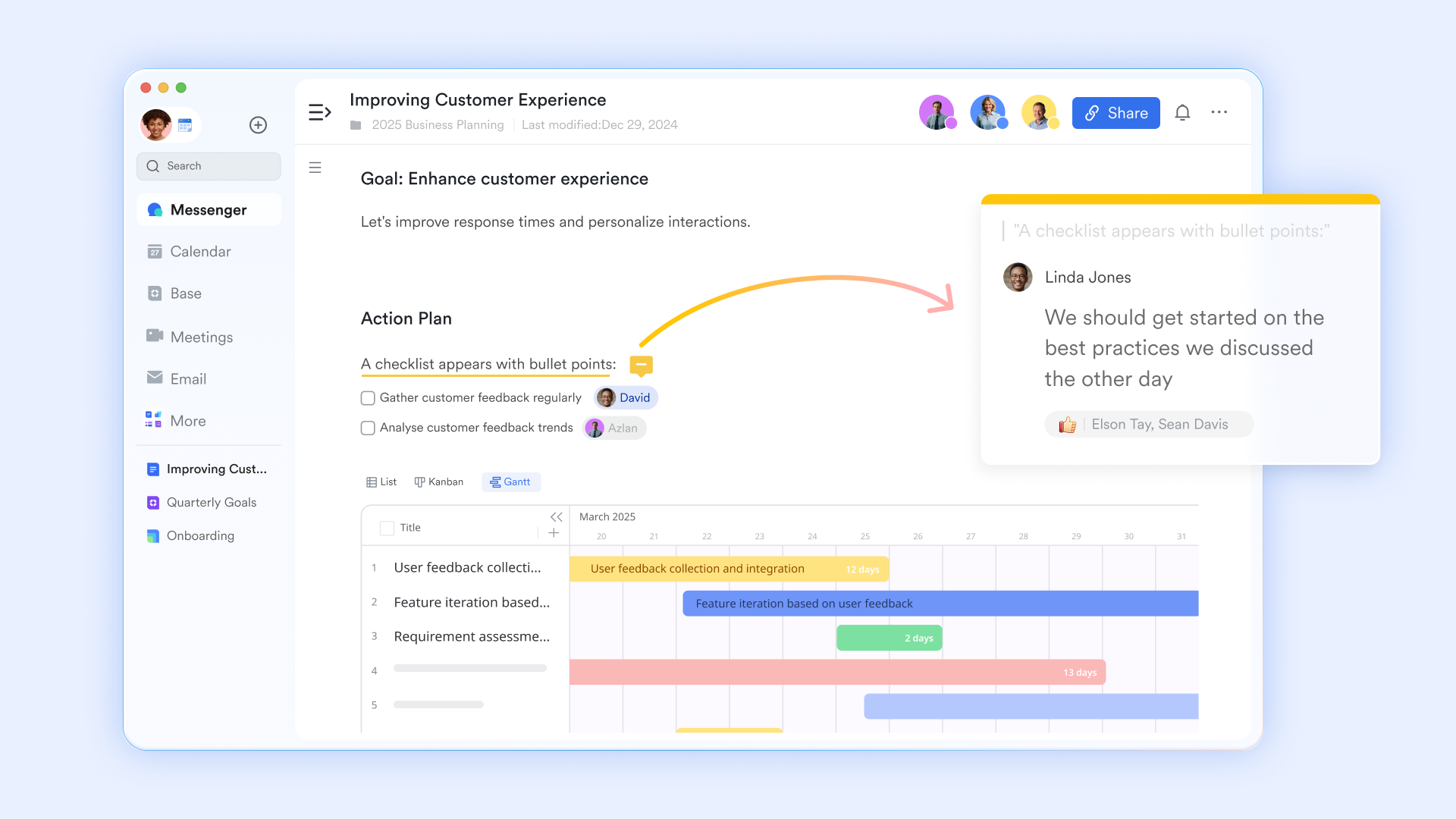
takes note-taking to the next level by functioning as a smart canvas where in one place. Instead of working with plain text alone, you can embed diagrams such as swimlane flows, mind maps, tree diagrams, and timelines to clearly visualize ideas and processes. Figma designs can be inserted directly by pasting the design link, making it easy to review and discuss visuals without leaving the document. Google Maps can also be embedded to show locations in different views, alongside task lists, shapes, icons, emojis, wireframes, and images. With synced Blocks, updates made in one place automatically reflect across every document where that content appears, keeping information consistent and up to date.
Fluid note-taking with outlines and mind maps
Lark Docs MindNotes makes note-taking feel a lot more fluid because it lets you toggle instantly between a structured outline and a visual . It's perfect for those moments when you need to dump ideas quickly using keyboard shortcuts and then immediately see how they connect in a big-picture diagram. The key feature is the "Zoom-in" function, which lets you focus on a single sub-topic without the distraction of the rest of your notes. It really bridges the gap between raw and organized planning, making it easy to turn a messy list of thoughts into a shareable project map. 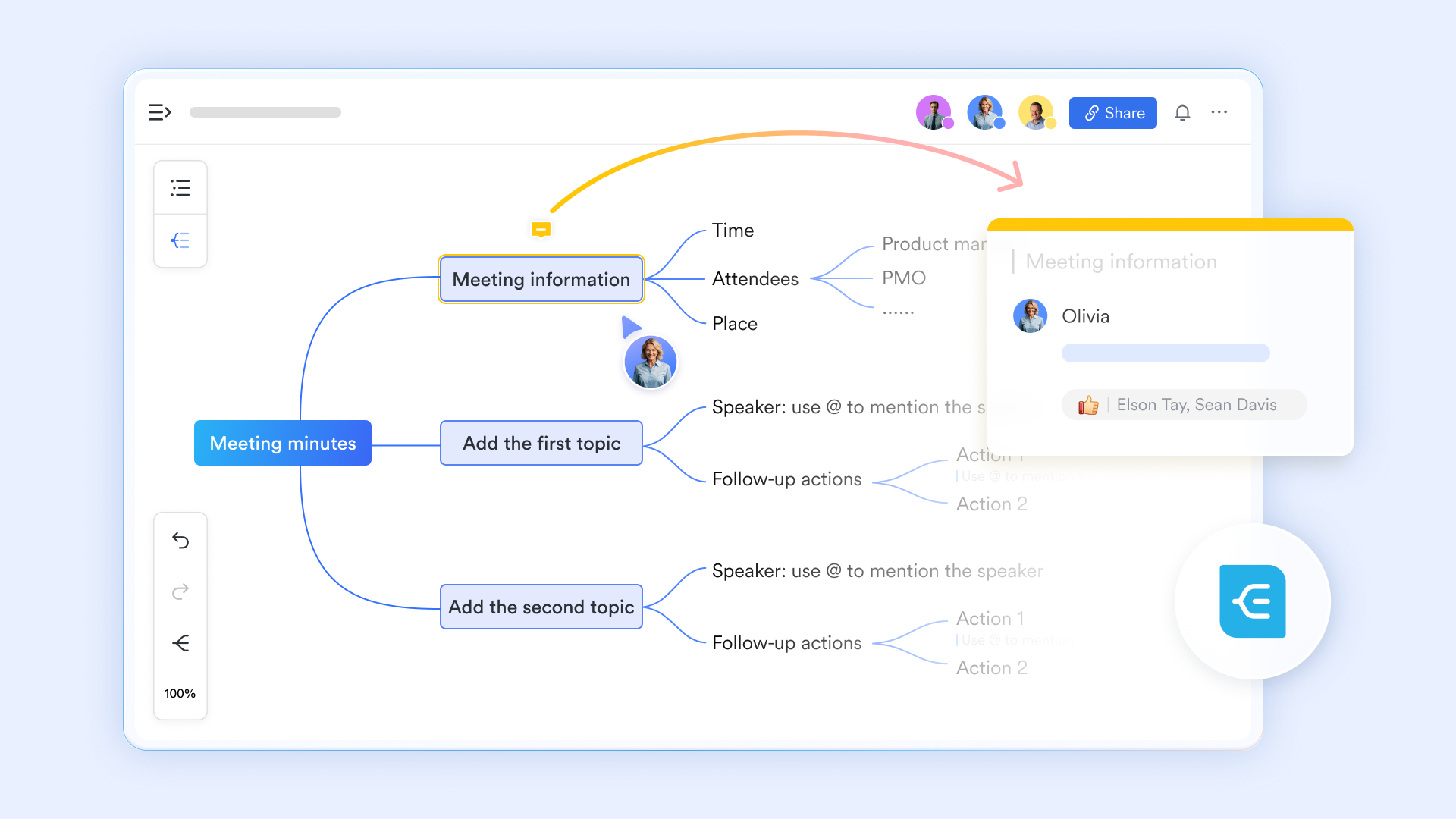
A centralized knowledge base for all levels
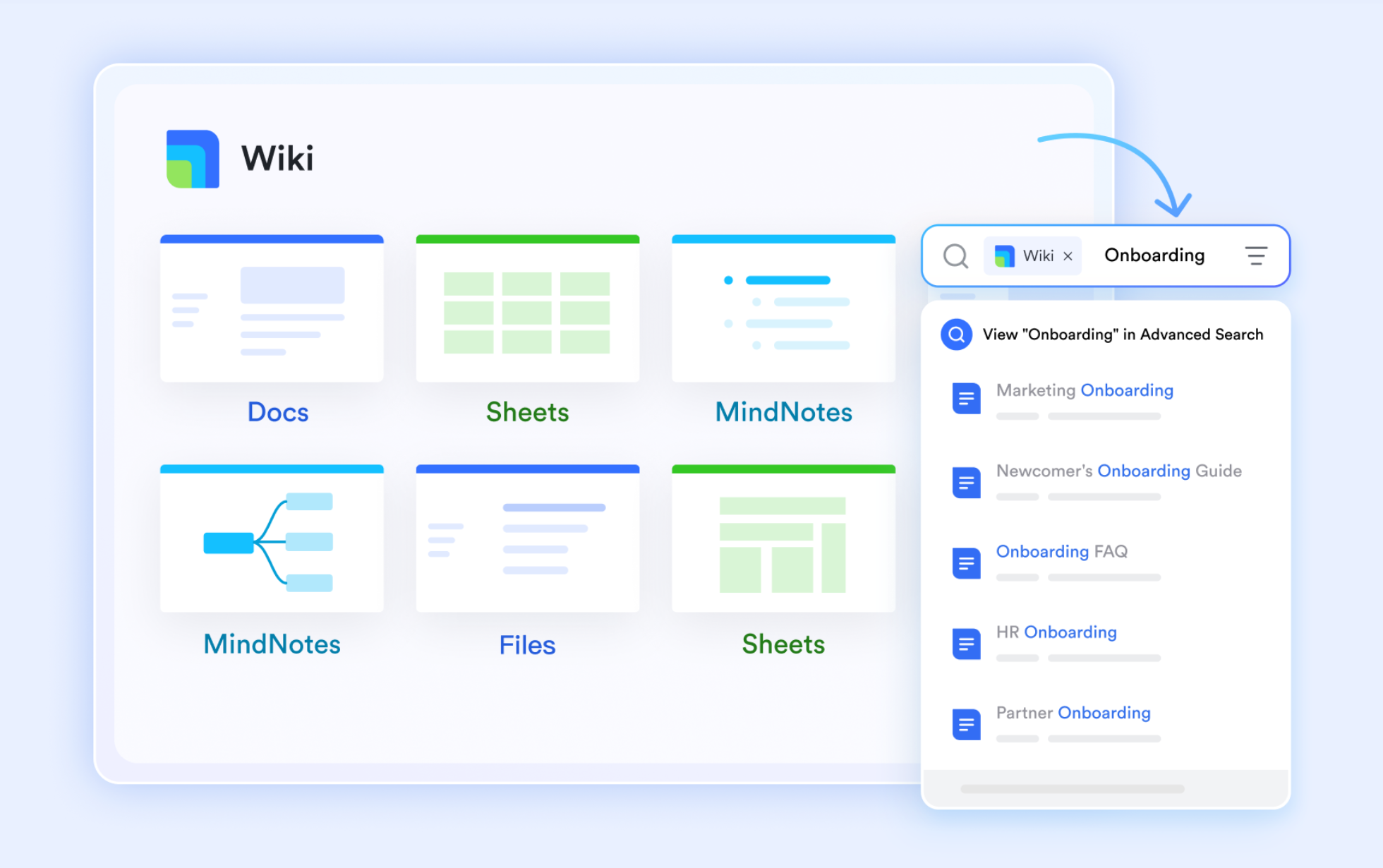
is basically your team's "single source of truth," turning messy individual notes into a clean and comprehensive . Unlike standard folders, the Wiki sidebar displays a tree structure of all pages and sub-pages, allowing you to jump between different topics instantly without losing your place in a project. Also, you can search for keywords across all wiki spaces you have access to, saving time when looking for old notes.
AI meeting notes that clarify outcomes, not just content
Lark takes a more proactive approach to every meeting. When the AI summary button is on, transforms meeting content into clear outcomes the moment a meeting ends. Instead of rewriting notes in a document or sending recap messages in teams receive concise summaries highlighting decisions and priorities. Because it's built directly into the video call, you can see the AI summary developing in a side panel during the meeting.

:
- Starter plan: Free forever plan that includes 11 powerful tools for up to 20 users. It also comes with 100GB of storage, 1000 automation runs, AI translations, and more.
- Basic plan: $6/user/month (billed annually) for up to 500 users. It includes everything in Starter plus group calling for up to 500 attendees, 5TB of storage, 1000 automation runs, and more. For more details, please .
- Pro plan: $12/user/month (billed annually) for up to 500 users. It includes everything in Basic plus group calling for up to 500 attendees, 15TB of storage, 50,000 automation runs, and more.
- Enterprise plan: for custom pricing. Supports unlimited users and includes even more automation runs and advanced security, compliance, and management features.
For small teams with simple communication needs

18 months message history
1000 Base automation runs/month
2000 rows per table in Base
Most POPULAR
For companies with comprehensive collaboration and management needs
Unlimited message history
500-participant video meetings
50k Base automation runs/month
20k rows per table in Base
For large companies with advanced security and organizational management needs
Get a personalized demo and pricing
Unlimited message history
500-participant video meetings
15 TB storage + 30 GB storage/user
500k Base automation runs/month
50k Base automation runs/month
Most POPULAR
For companies with comprehensive collaboration and management needs
Unlimited message history
500-participant video meetings
50k Base automation runs/month
20k rows per table in Base
Evernote vs Lark: Value comparison
Comparing Evernote and Lark purely on pricing misses a larger part of the decision. Both tools support note-taking, but they are designed around very different ideas of how work happens. This comparison looks beyond pricing to evaluate how each platform fits into everyday team workflows.
Feature comparison
Pricing comparison
Conclusion
For individuals who primarily focus on capturing ideas, organizing information, and retrieving notes later, Evernote continues to offer solid value. Its structure, search capabilities, and familiarity still make it a reliable choice for personal knowledge management and . However, as teams grow and rely on notes for shared work, the limits of a note-centric approach become more visible. Collaboration remains focused on documents rather than execution, and workflows such as , task ownership, and follow-through often require additional tools.
This is why many teams begin looking beyond note-taking alone. Connected workspaces like preserve documentation while linking it directly to meetings, communication, tasks, and shared workflows. The right choice ultimately depends on whether notes are meant to remain the final output or serve as the starting point for coordinated, accountable work across teams.
Build connected workflows beyond notes
FAQs
Does Evernote pricing change by region or currency?
Evernote pricing can vary by region, currency, and billing cycle. Local taxes and may affect the final amount users pay. While plan structures are generally consistent, features and costs can differ slightly by market. Teams operating across regions often review these differences carefully. Some compare this with platforms like Lark that offer more predictable per-user pricing globally.
Can Evernote replace task and project management tools?
Evernote includes basic task features, but it is not designed as a full task or system. Tasks remain closely tied to individual notes rather than shared workflows. As teams grow, tracking ownership and progress becomes difficult. Many teams pair Evernote with other tools or explore workspaces like Lark that connect notes directly to tasks and execution.
Can you use Evernote without a subscription?
Yes, you can still use Evernote without a subscription via the Free plan, but it has become significantly more restrictive in 2025. You are limited to just 50 notes and one notebook per account, and you can only sync your data across one device plus the web app. While it still includes features like the web clipper and search, it is now primarily designed as a limited trial for new users rather than a long-term storage solution for heavy note-takers.
Will I lose my notes if I cancel Evernote?
No, you will not lose your existing notes if you cancel your subscription. Your account will simply revert to the Free plan at the end of your billing cycle, and all your data will remain accessible for viewing, editing, and exporting. However, if your existing library exceeds the free limit (more than 50 notes or one notebook), you will be unable to create new notes or notebooks until you either delete content to get back under the limit or resubscribe.
What happens to your notes if you downgrade plans?
When downgrading an Evernote plan, existing notes are typically retained, but access to certain features becomes restricted. Device limits, upload caps, and rules apply immediately. Some content may become read-only until usage aligns with the lower tier. Teams often plan downgrades carefully. Others evaluate tools like Lark that maintain core collaboration features without sudden lockouts.
Related reading






























