














15 Best Brainstorming Tools to Generate Ideas Faster

Ryan Tanner
Product Marketing Specialist
Sep 18, 2026
Ryan Tanner
Sep 18, 2026


Top 5 brainstorming tools at a glance

What are brainstorming tools?
15 Best brainstorming tools for teams
1. Lark: Best all-in-one brainstorming tool for collaborative teams
- Starter plan: Free forever plan that includes 11 powerful tools for up to 20 users. It also includes 100GB of storage, 1,000 automation runs, AI translations, and more.
- Basic plan: $6/user/month (billed annually) for up to 500 users. It includes everything in Starter plus group calling for up to 500 attendees, 5TB of storage, 1000 automation runs, and more. For more details, please contact sales.
- Pro plan: $12/user/month (billed annually) for up to 500 users. It includes everything in Starter, plus group calling for up to 500 attendees, 15 TB of storage, 50,000 automation runs, and more.
- Enterprise plan: Contact sales for custom pricing. Supports unlimited users and includes even more automation runs and advanced security, compliance, and management features.
Starter
For small teams with simple communication needs
$0
/ user / month

Pro
For companies with comprehensive collaboration and management needs
$12
/ user / month
Enterprise
For large companies with advanced security and organizational management needs
Get a personalized demo and pricing
Pro
For companies with comprehensive collaboration and management needs
$12
/ user / month
2. Miro: Virtual brainstorming board for creative teams
- An infinite canvas that allows teams to expand ideas without limits and build large, detailed workflows or mind maps with ease.
- A robust library of templates supporting design sprints, journey maps, brainstorming sessions, and structured problem-solving frameworks.
- Interactive sticky notes, shapes, connectors, and drawing tools that make brainstorming visual, intuitive, and collaborative.
- Real-time teamwork where members interact through live cursors, comments, reactions, timers, and guided workshop tools.
- Versatile enough for free-form brainstorming, structured workshops, planning sessions, and diagramming.
- A large and diverse template collection that saves setup time and improves the quality of workshops.
- Smooth real-time collaboration, even with large teams working simultaneously on the same board.
- A wide feature set may feel overwhelming for beginners who prefer simpler brainstorming environments.
- Extremely large or layered boards can slow performance, depending on the device's capabilities.
- Starter plan: $8 per user per month (billed annually).
- Business plan: $16 per user per month (billed annually).
- Enterprise plan: Custom pricing.
3. Mural: Visual brainstorming tool for workshops
- Large collaborative canvas that supports interactive brainstorming, structured frameworks, and detailed workshop layouts.
- Extensive library of templates for retrospectives, planning sessions, innovation exercises, customer journey mapping, and more.
- Sticky notes, shapes, connectors, drawing tools, and diagramming options that help teams visualize and organize complex ideas.
- Facilitation features such as timers, voting sessions, private mode, and guided paths that help moderators run smooth, high-impact workshops.
- Purpose-built for structured workshops, making it ideal for design thinking and innovation teams.
- Highly intuitive interface that supports both beginners and advanced facilitators during collaborative sessions.
- Excellent facilitation tools that help organizers guide discussions, maintain flow, and keep sessions productive.
- Canvas limitations can feel restrictive for extremely large or free-form brainstorming boards.
- It can become visually crowded when many participants add ideas simultaneously.
- Starter plan: $10 per user per month (billed annually).
- Plus plan: $18 per user per month (billed annually).
- Enterprise plan: Custom pricing.
4. MindMeister: Online mind-mapping tool for idea flow
- Intuitive mind-mapping interface that allows users to create branches, subtopics, and hierarchical idea structures with ease.
- Real-time collaboration where multiple contributors can edit, comment, and restructure maps simultaneously.
- Customizable themes, icons, colors, and formatting tools that help present ideas more clearly and visually.
- Presentation mode that turns mind maps into slide-style walkthroughs for sharing concepts with teams or stakeholders.
- Easy to learn and simple for users of all skill levels, making it accessible for students, professionals, and teams who want quick visual clarity without steep onboarding.
- Highly visual environment that improves understanding, helps break down complex concepts, and supports deeper exploration through branching and thematic mapping.
- Excellent for structured brainstorming, early-stage planning, strategy alignment, and creative exploration where teams need a clean, organized view of ideas.
- Limited functionality compared to full whiteboard platforms, which may restrict teams that require sticky notes, diagrams, or workshop-style features.
- Some advanced styles, export formats, and customization tools require paid plans, which may not be ideal for users looking for extensive free options.
- Personal plan: $6 per user per month (billed annually).
- Pro plan: $10 per user per month (billed annually).
- Business plan: $15 per user per month (billed annually).
5. Stormboard: Sticky-note-based ideation platform
- Digital sticky notes and idea walls that let teams brainstorm in a familiar, structured format with color coding, tagging, and sorting tools.
- Templates for strategic planning, retrospectives, workshops, product development, and project kickoffs, helping teams start sessions with a clear framework.
- Real-time collaboration that enables participants to add ideas, vote, comment, and work together across different devices and locations.
- Built-in reporting that automatically converts brainstorming outputs into organized summaries, making follow-up and execution easier.
- Structured environment that helps teams avoid clutter and keeps ideas neatly organized, even during fast-paced brainstorming sessions.
- Intuitive and straightforward sticky-note interface that feels natural for new users while still offering advanced options for experienced collaborators.
- Great for distributed teams because real-time updates, comments, and voting features ensure everyone participates equally, regardless of location.
- Less flexible than open whiteboard tools, which can limit creative free-form brainstorming for teams that prefer visual sketching or diagramming.
- The structured layout may feel rigid for users who want more open-ended exploration of ideas without predefined sections.
- Business plan: $5 per user per month (billed annually).
- Enterprise plan: Custom pricing
6. Lucidspark: Visual brainstorming for structured teams
- Sticky notes, freehand drawing, shapes, and color-coded cursors to capture ideas in a natural, visual way on a limitless canvas.
- Voting sessions and a built-in timer to run facilitated activities, interactive workshops, and decision-making sessions efficiently.
- Breakout boards that let teams split into smaller groups for focused ideation, then sync ideas back to the main board.
- Tagging, sorting, and assisted grouping to help organize brainstorms by theme, priority, or effort.
- The intuitive, free-form canvas encourages creativity and gives users plenty of space to explore ideas freely without constraints.
- Facilitator tools like voting, timers, and breakout boards make it easy to run structured meetings, design sprints, or remote workshops.
- Real-time collaboration with color-coded cursors, chat, and comments helps every team member feel included, regardless of their location.
- Compared to full-fledged diagramming or whiteboard tools, it may lack some detailed drawing or design features that power users need.
- Some advanced features — like AI-assisted clustering, breakout boards, or facilitator controls — are only available on paid plans.
- Individual plan: $7.95 per month (billed annually).
- Team plan: $9.00 per user per month (billed annually).
- Enterprise plan: Custom pricing.
7. FigJam: Fun interactive brainstorming tool by Figma
- Unlimited whiteboard canvas for free-form ideation with sticky notes, shapes, connectors, and sketching tools.
- A variety of interactive widgets, such as stamps, emotes, cursors, and stickers, to make brainstorming fun and engaging.
- Real-time collaboration where team members can draw, comment, and react together across different devices.
- Timer and voting tools to support structured workshops, decision-making, and guided activities.
- A very playful, visually engaging interface that makes ideation feel more like a creative session than a formal meeting.
- Widgets and cursors bring energy to the board and help participants feel more expressive and involved.
- Real-time sketching and freehand tools make it easy to prototype, draw, and iterate on ideas rapidly.
- More limited in diagramming and advanced visual modeling compared to dedicated whiteboard platforms or mind-map tools.
- The free plan limits the number of boards, which may be a constraint for teams with heavy workshop needs.
- Team plan: $8 per editor per month (billed annually).
- Enterprise plan: Custom pricing.
8. Coggle: Lightweight tool for quick mind maps
- A drag-and-drop mind-map canvas that lets you create branches, looped connections, and multiple starting points for flexible idea structuring.
- Real-time collaboration, so several people can edit the same diagram and comment on it simultaneously.
- Unlimited image uploads — you can embed images directly into your mind map to give ideas more context and visual appeal.
- Version history to track changes, go back to earlier iterations, and compare how your diagram has evolved.
- Very easy to pick up and use — the clean, simple interface lets new users start building mind maps quickly, with minimal training or setup overhead.
- Encourages visual thinking — the branching structure and loop support help you reflect complex relationships and hierarchical ideas clearly, enabling richer ideation.
- Excellent for collaborative brainstorming — real-time editing means teams can work together fluidly and build on each other's thoughts, reducing friction in shared idea spaces.
- Limited non-map features — unlike complete whiteboard tools, Coggle doesn't support freehand drawing or more complex diagram types, which may restrict more visual workflows.
- Public diagram trade-off on the free plan — you get unlimited public maps, but private maps are capped in the free tier.
- Awesome plan: $5 per user per month (billed annually).
- Organization plan: $8 per user per month (billed annually).
9. ClickUp: Brainstorming + project planning in one
- Whiteboard and mind map integration that enables visual idea exploration and connection building within the same workspace.
- Docs and Notepad support that help teams draft ideas, conduct brainwriting, and expand on complex ideas in real time.
- Comments, mentions, and reactions that streamline collaboration and keep discussions tied to individual ideas for clarity.
- Tasks from ideas functionality that lets users convert sticky notes or mind-map nodes into actionable tasks instantly.
- The ability to create mind maps and whiteboards in the same place makes it flexible for both visual thinkers and planners.
- Voting and priority features promote democratic idea selection and help teams decide which concepts deserve attention.
- Templates and strong integration options reduce setup time and accelerate the use of remote brainstorming tools across teams.
- Certain powerful collaboration features, such as voting and custom templates, are available only in higher-tier plans.
- As a complete productivity system, it may feel less like a free-flow creative space compared to lighter free brainstorming tools online.
- Unlimited plan: $7 per user per month (billed annually).
- Business plan: $12 per user per month (billed annually).
- Enterprise plan: Custom pricing (billed annually).
10. Notion: Idea database + collaborative writing
- Drag-and-drop editing that helps teams rearrange ideas, sections, and creative blocks without restrictions.
- Linked databases that allow teams to convert brainstormed ideas into trackable items, views, and workflows.
- Real-time collaboration that lets users comment, mention teammates, and co-edit pages without version conflicts.
- Visual embeds, including images, videos, whiteboard links, and diagrams, enrich brainstorming sessions with context.
- Highly flexible structure that works for both unstructured creative dumping and well-organized idea systems, making it useful across diverse team workflows.
- Real-time collaboration enables distributed teams to brainstorm, refine, and finalize ideas together without needing multiple external tools.
- A wide range of content types, such as databases, kanban boards, scribbles, and toggles, allow deep idea exploration and layered thinking.
- Flexibility can become overwhelming because it requires intentional structure, especially for teams new to creating organized workspaces.
- Lacks advanced visual mapping features found in dedicated ideation platforms, which may limit highly visual brainstorming activities.
- Plus plan: $10 per user per month (billed annually).
- Business plan: $18 per user per month (billed annually).
- Enterprise plan: Custom pricing.
11. Trello: Card-based idea organization
- Drag-and-drop kanban boards that help teams sort ideas into lists such as brainstormed, shortlisted, and in progress.
- Cards with descriptions, images, checklists, and attachments that allow detailed idea expansion and context building.
- Real-time collaboration with comments, mentions, and quick card updates that keep everyone aligned during ideation.
- Power-Ups, including voting, mind mapping, forms, and automation, that extend Trello's brainstorming capabilities.
- Extremely easy to use with a minimal learning curve, allowing teams to begin brainstorming immediately with little setup time.
- Visual card layout helps teams categorize ideas clearly, making it easier to refine, expand, or prioritize concepts during sessions.
- Collaboration features such as mentions, comments, and shared checklists allow distributed teams to stay engaged and connected.
- Limited free-form creativity since it lacks native whiteboards or advanced mind-mapping features found in more visual brainstorming platforms.
- Boards can become cluttered during large brainstorming sessions unless teams intentionally manage lists and card grouping.
- Standard plan: $5 per user per month (billed annually).
- Premium plan: $10 per user per month (billed annually).
- Enterprise plan: $17.50 per user per month (billed annually).
12. Whimsical: Diagrams + mind maps for visual thinkers
- Mind maps, flowcharts, and wireframes that help teams explore ideas using structured, visual formats.
- Sticky notes and canvas sections that allow free-form brainstorming while maintaining clarity and organization.
- Real-time collaboration, so multiple contributors can add diagrams, notes, and visual elements simultaneously.
- Easy drag-and-drop editing that supports rapid idea movement, restructuring, and refinement without friction.
- Intuitive interface that enables quick idea creation, making it great for teams who want to brainstorm with minimal setup or training.
- Strong balance between structure and flexibility, allowing users to choose between mind maps, sticky notes, or flowcharts depending on the session type.
- Real-time co-editing makes brainstorming feel dynamic and interactive, helping remote teams stay aligned and engaged.
- Free plan limits the number of boards and may feel restrictive for teams that brainstorm frequently or manage multiple projects.
- Lacks advanced workshop facilitation features like timers, voting, or breakout modes found in competing brainstorming platforms.
- Pro plan: $10 per user per month (billed annually).
- Organization plan: $20 per user per month (billed annually).
13. Ideaflip: Conversation-friendly brainstorming
- Digital sticky notes allow teams to jot down ideas instantly and organize them into groups without visual clutter.
- Smooth drag-and-drop layout that helps participants reorganize thoughts, refine concepts, and see patterns emerge naturally.
- Commenting features on individual notes that support deeper discussions and help teams explore ideas more thoughtfully.
- Real-time collaboration where team members can add notes, react, or contribute insights collectively.
- An uncluttered, straightforward interface that keeps teams focused on the core activity of ideation, without unnecessary tools or distractions.
- Encourages thoughtful discussion through note-level comments, which helps teams analyze and refine ideas more deeply than in fast-paced whiteboard tools.
- Easy to navigate for new users, making it suitable for workshops, client sessions, or teams unfamiliar with more complex brainstorming software.
- Lacks the advanced visual features or drawing tools found in full whiteboard platforms, limiting creative expression for more visual teams.
- Freehand sketching, flowcharts, or mind maps are not supported, which may be a drawback for teams that rely heavily on visual ideation formats.
- Solo plan: $9 per month (billed annually).
- Team plan: $19 per user per month (billed annually).
- Enterprise plan: Custom pricing.
14. MindManager: Enterprise mapping system
- Advanced mind-mapping spaces that help teams break down complex topics into clear visual hierarchies for better understanding.
- Flowcharts, timelines, and concept maps that visually represent processes, dependencies, and multi-step ideas.
- Powerful data-linking features that attach files, notes, spreadsheets, and external information directly to nodes for richer context.
- Co-editing and sharing options that support distributed teams working together on structured brainstorming sessions.
- Excellent for managing large and complex brainstorming outputs because it organizes information into logical, deeply layered visual structures.
- Helps teams transition seamlessly from ideation to planning by connecting maps to data, tasks, and documentation.
- Rich visualization tools make it easier for stakeholders to understand relationships, dependencies, and priorities across a project.
- Steeper learning curve compared to lightweight brainstorming apps, which may require onboarding time for new users.
- A desktop-heavy focus makes it feel less fluid for fast, spontaneous sessions than modern browser-based brainstorming tools.
- Perpetual license: $169 one-time purchase (billed annually).
- Subscription plan: $169 per user per year (billed annually).
- Enterprise solutions: Custom pricing.
15. Canva Whiteboard: Free brainstorming tool with templates
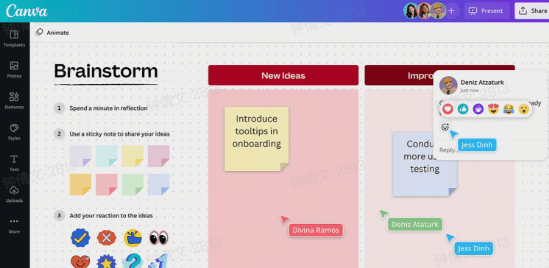
- Real-time collaboration that lets multiple team members add sticky notes, shapes, and ideas simultaneously during brainstorming sessions.
- An infinite canvas that gives teams complete freedom to map concepts, create diagrams, sketch flows, and expand ideas without space limits.
- Extensive template library that includes mind maps, workshop boards, workflows, and strategy frameworks to speed up ideation.
- Drag-and-drop interface that helps non-designers create polished, visually appealing boards quickly, without technical complexity.
- Extremely easy for beginners to use, reducing onboarding time and helping teams jump into brainstorming without setup hurdles.
- Highly visual environment that enhances clarity and makes complex ideas easier to understand through graphics and structured elements.
- Works well for remote or hybrid teams because collaborators can join instantly and participate in sessions effortlessly.
- Not as advanced as specialized whiteboarding apps when handling large or deeply layered brainstorming sessions.
- Limited automation and advanced diagramming tools compared to enterprise-focused competitors.
- Pro plan: $14.99 per month (billed annually).
- Teams plan: $29.99 per month (billed annually).
Why online brainstorming tools are essential for modern teams
- Real-time ideation: Real-time capabilities allow team members to contribute ideas instantly, making the session dynamic and highly interactive. With features like digital sticky notes, live cursors, and shared boards, everyone can participate simultaneously without slowing down the process. These tools reduce delays by eliminating the back-and-forth typical in offline sessions. Teams can also brainstorm alongside chat or video discussions, increasing context and clarity. The result is a fast-moving ideation rhythm where ideas build on each other naturally.
- Easy documentation: Online brainstorming tools automatically record every idea, comment, and visual element, removing the need for manual transcription. This ensures nothing gets lost, even during fast-moving discussions. Many platforms offer structured storage, tagging, and export features similar to those of creative workflow platforms, making it easy to find and reuse ideas later. Teams can create organized summaries instantly, saving hours of cleanup work. Documentation becomes a seamless part of the process rather than a time-consuming afterthought.
- Visual creativity: These tools provide a flexible canvas for users to combine shapes, colors, diagrams, and mind-mapping tools to visually express ideas. Visual thinking helps teams explore connections and uncover insights that text alone can't reveal. Templates for flows, journeys, and concept maps guide teams through structured creativity. Rich visual elements also make workshops more engaging and easier to follow. This makes ideation accessible to both analytical and creative thinkers.
- Supports remote brainstorming tools workflows: Online platforms make virtual brainstorming sessions feel natural, allowing distributed teams to collaborate as if they were in the same room. Shared boards, comments, timers, voting, and facilitation modes replicate the experience of an in-person workshop. Remote participants can contribute simultaneously without waiting for turns or dealing with delays. These tools also accommodate asynchronous input for different time zones. Ultimately, they create a unified brainstorming workflow that works for both hybrid and fully remote teams.
- Helps individuals and teams refine ideas: Beyond idea generation, modern tools offer features that help evaluate, group, prioritize, and refine concepts. AI suggestions, clustering tools, and voting systems help teams move from raw ideas to meaningful insights. Integrations with innovation management systems ensure ideas can transition seamlessly into projects or tasks. These platforms allow individuals to structure their thoughts, and teams collectively enhance them. The refinement process becomes more data-driven and collaborative.
Effective brainstorming techniques to generate better ideas
- Mind mapping: Mind mapping encourages nonlinear thinking by visually connecting ideas, themes, and subtopics. Teams start with a central concept and branch out into related thoughts, making it ideal for exploring broad problem spaces. Digital mind-mapping tools make this process faster and more collaborative, especially for virtual brainstorming.
- Brainwriting (silent idea generation): Instead of speaking out loud, participants write their ideas silently for a set amount of time. The ideas are then shared and discussed as a group. This technique reduces groupthink, helps introverts contribute, and improves idea diversity—especially when using free online brainstorming tools that allow anonymous submissions.
- SCAMPER method: SCAMPER (Substitute, Combine, Adapt, Modify, Put to another use, Eliminate, Reverse) provides a structured lens for analyzing and transforming existing ideas or products. This method is beneficial for creative teams, product designers, and marketing brainstorming sessions.
- Round-robin brainstorming: Each participant contributes an idea in turn in a circular sequence. This ensures equal participation, prevents dominant voices from taking over, and builds a steady flow of diverse ideas—making it a strong technique for remote brainstorming tools where equal visibility matters.
- SWOT brainstorming (Strengths, Weaknesses, Opportunities, Threats): This SWOT framework is perfect for strategic planning. Teams break ideas into four categories, enabling structured, actionable insights. Using virtual brainstorming tools enhances this technique by allowing everyone to add inputs simultaneously in real time.
- Rapid ideation (time-boxed brainstorming): Teams set a short, strict timer and generate as many ideas as possible within the allotted time. This reduces overthinking, encourages creativity, and energizes brainstorming sessions—especially effective when paired with AI brainstorming tools that can instantly expand or refine ideas after the timer ends.
- Reverse brainstorming: Instead of asking "How do we solve this problem?", the team asks "How could we make this problem worse?" By exploring the opposite direction, teams often uncover root causes and new insights that lead to stronger solutions.
- Dot voting (idea prioritization): After generating a list of ideas, participants use dots, emojis, or color markers to vote for their top choices. This fast, democratic method helps teams narrow down options and move into execution with clarity. Many online brainstorming tools include built-in voting features to streamline the process.
Common challenges when using brainstorming tools (and how to fix them)
- Too many ideas without structure: Teams often generate large idea pools that feel exciting initially but quickly become overwhelming without a system. Virtual ideation spaces help categorize inputs, but they still require intentional grouping and evaluation methods. Creating clusters, tags, or categories keeps discussions aligned with goals rather than veering into unrelated paths. Using frameworks like mind maps or prioritization grids gives ideas a logical flow. Establishing structure early ensures that creativity stays productive rather than chaotic.
- Lack of participation: Some team members hesitate to contribute due to unclear prompts, group pressure, or fatigue from remote meetings. Online whiteboards offer features that support anonymous input, helping quieter contributors feel more comfortable. Facilitators can also use timed activities and breakout tasks to boost engagement. Encouraging everyone to add at least one idea using digital sticky notes reduces the fear of judgment. A mix of synchronous and asynchronous formats ensures everyone has an equal opportunity to contribute.
- Idea duplication: Cluttered boards and slow decision-making, especially in large groups. Ideation platforms often include search, grouping, or merging features that reduce redundancy. Assigning a facilitator to scan for similar contributions helps maintain board clarity. Encouraging participants to review existing ideas before adding new ones also decreases overlap. Deduplication keeps the brainstorm focused and prevents wasted time.
- Poor follow-up: Even intense brainstorming sessions lose impact if next steps are unclear or undocumented. Teams should convert ideas into tasks, owners, and deadlines immediately after the session. Creative collaboration tools make this easier by linking brainstorm outputs to project workflows. Exporting summaries or visual boards helps reinforce decisions and keep alignment across teams. Consistent follow-up ensures that ideas move forward rather than being forgotten.
- Choosing the wrong tool: Not every tool fits every team, and mismatched platforms lead to confusion and reduced participation. Some teams need simple boards, while others require structured ideation systems with advanced capabilities. Evaluating needs such as visual mapping, workflow integration, or facilitation features prevents friction later. Running a small trial helps teams assess usability and the flow of collaboration. Choosing the right tool directly improves engagement and productivity.
- Ensuring post-brainstorm execution: Turning ideas into action requires seamless handoff from brainstorming to planning. Online whiteboards that sync with task managers help teams bridge this gap. Assigning action owners, project timelines, and priorities right on the board strengthens accountability. Visual workflows help teams track the maturity of ideas from concept to execution. This ensures the session results in progress rather than simply producing a colorful board.
Conclusion
FAQs
What is the difference between mind-mapping tools and brainstorming tools?
Can free brainstorming tools support large teams?
Are AI brainstorming tools reliable for creative work?
How do brainstorming tools help remote teams work better?
What file formats can brainstorming platforms export ideas to?
Related reading

Start using Lark today

Manage all your work in one place
Boost team efficiency by 10x
Save up to 70% on software costs
Start using Lark today
Manage all your work in one place
Boost team efficiency by 10x
Save up to 70% on software costs
Keep reading


![What Is a 2-2-3 Work Schedule? Explanation and More [2026]](https://framerusercontent.com/images/uKHRfkp4v7y4azRNTYUmuteNQz8.png)



2026 Lark Technologies Pte. Ltd.
Headquartered in Singapore with offices worldwide.





