Every successful project begins with clarity. Before timelines are drafted or tasks are assigned, teams need a shared understanding of why the work exists, what success looks like, and who is responsible for what. This is where a project brief plays a foundational role. A well-written project brief transforms abstract ideas into actionable direction, helping teams align early and avoid costly misunderstandings later.
As organizations grow more cross-functional and distributed, the importance of a clear project brief becomes even more critical. Modern teams must coordinate across roles, time zones, and priorities, making upfront alignment a requirement rather than a formality. This guide explores what a project brief is, why it matters, how to write one effectively, and how teams can move beyond static documents toward living, collaborative briefs that support real execution.
What is a project brief?
A project brief is a concise document that defines the purpose, scope, objectives, and key parameters of a project before work begins. It acts as a single reference point that ensures everyone involved understands the problem being solved and the intended outcome. Unlike detailed specifications, a brief focuses on alignment rather than execution detail through .
In practice, a project brief answers fundamental questions. Why does this project exist? What does success look like? Who owns the work and who needs to be involved? By addressing these questions early, teams reduce ambiguity and create a shared mental model before committing time and resources.
A strong project brief is not about length or formality; it is about relevance and clarity. Whether used for marketing campaigns or product launches, the brief sets the tone for how work will progress. Utilizing a ensures that these questions are answered consistently across every initiative.
Why a project brief matters before work begins
Starting a project without a clear brief often leads to misaligned expectations, scope creep, and rework. Teams may move quickly, but speed without direction rarely produces good outcomes. A project brief slows the beginning slightly to accelerate everything that follows.
When a project brief is created early, it provides a shared reference that teams can return to whenever questions arise. It reduces dependency on memory, verbal explanations, or fragmented conversations. This is especially valuable in cross-functional teams where assumptions vary widely. Using ensures that this shared reference is accessible to everyone in real time.
A project brief also supports accountability. By documenting objectives, scope boundaries, and ownership upfront, it becomes easier to evaluate progress and make tradeoffs. Instead of debating opinions, teams can anchor decisions to the original intent captured in the brief. This structured approach to ensures that every initiative contributes directly to the organization's growth.
Ready to start every project with clarity?
Core elements of an effective project brief
Every effective project brief comprises a set of core components that, together, create clarity and alignment. While formats may vary, these elements ensure the brief is complete and usable.
- Project background and problem statement: The project background explains the context that led to the initiative. It describes the situation, challenge, or opportunity that prompted the project, helping stakeholders understand why the work matters now. Without this context, tasks can feel arbitrary and disconnected from business goals. A strong problem statement clearly defines what is not working or what opportunity is being pursued. It avoids solutions and focuses instead on the underlying issue. This clarity prevents teams from solving the wrong problem or optimizing for the bad outcome as the project evolves.
- Objectives and success criteria: Objectives define what the project aims to achieve in clear, outcome-oriented terms. They translate the problem into measurable or observable goals that guide decision-making throughout the . Well-defined objectives keep teams focused when priorities compete. Success criteria explain how those objectives will be evaluated. This might include metrics, deliverables, or stakeholder acceptance conditions. By defining success upfront, teams reduce ambiguity at the project's end and avoid last-minute disagreements about whether the work is complete.
- Scope boundaries and assumptions: Scope boundaries clarify what is included in the project and what is explicitly excluded. This protects teams from unplanned expansion and helps stakeholders understand tradeoffs. Clear boundaries also make it easier to say no when requests fall outside the agreed scope. Assumptions capture conditions the project depends on, such as available resources, timelines, or external dependencies. Making assumptions visible allows teams to revisit them if circumstances change, rather than discovering misalignment too late.
- Stakeholders and ownership: This section identifies who owns the project and who has a stake in its outcome. Ownership defines accountability for decisions, progress, and final delivery. ensures that the right voices are consulted at the right time. By documenting roles early, teams avoid confusion about approval paths and communication responsibilities. This is especially important in cross-functional environments where authority and responsibility may not be obvious.
- Timeline expectations and constraints: Timeline expectations outline key milestones without detailing every task, leaving room for flexibility. However, fixed constraints like launch dates or regulatory deadlines must be visible to everyone. Capturing these, along with your project assumptions, allows teams to pivot quickly if circumstances change. To keep these moving parts organized, many teams use that link these high-level brief components directly to the tactical task lists used by the execution team.
5 steps to writing a clear project brief
By adopting , your brief remains a flexible, living document that adapts to new information without losing its core purpose. Furthermore, leveraging allows these steps to happen synchronously, reducing the time spent in review cycles and accelerating the transition from planning to execution.
Step 1: Clarify the problem before proposing solutions
Begin by deeply understanding the problem or opportunity driving the project. Resist the urge to jump to solutions too early. A clearly articulated problem statement provides a stable foundation for all subsequent decisions.
Engage key stakeholders in validating the problem definition. This early alignment reduces the risk of conflicting interpretations later and builds shared ownership of the brief.
Step 2: Define outcomes, not activities
Focus on what the project should achieve rather than how the work will be done. Outcomes keep the brief flexible and relevant even as execution details evolve. Activities can change, but desired outcomes should remain stable.
Clear outcomes also make it easier to prioritize tasks and evaluate progress. When tradeoffs arise, teams can ask which option best supports the stated objectives.
Step 3: Make scope explicit and visible
Documenting scope boundaries forces difficult but necessary conversations early. It clarifies expectations and prevents silent assumptions from becoming future conflicts. Explicit scope also protects teams from unplanned workload expansion.
Revisit the scope with stakeholders to ensure alignment. A shared understanding of what is included and excluded builds trust and reduces friction during execution.
Step 4: Assign clear ownership
Every project needs a clearly identified owner who is accountable for progress and decisions. This does not mean doing all the work, but it does mean owning outcomes. Without clear ownership, projects stall or fragment.
In addition to the primary owner, identify contributors and reviewers. This clarity improves coordination and speeds up feedback cycles.
Step 5: Review and validate before execution
Before work begins, review the project brief with all key stakeholders. This validation step ensures alignment and surface concerns while changes are still easy to make. It also signals that the brief is a serious reference, not a formality.
Once validated, treat the brief as a living reference. Encourage teams to revisit it at key milestones and adjust as necessary when conditions change.
Project brief templates in Word and their limitations
Many teams rely on a project brief template, Word file, or similar static formats to capture project information. While these templates provide structure, they also introduce limitations that become more apparent as projects grow in complexity.
- Static documents and version confusion: Static templates often lead to multiple versions circulating via email or shared drives. As edits accumulate, it becomes unclear which version is authoritative. This confusion undermines trust in the document and reduces its usefulness as a reference. issues also discourage updates. Teams may stop maintaining the brief altogether, turning it into an outdated artifact rather than a living guide.
- No visibility into execution progress: Traditional templates separate planning from . Once the brief is written, it rarely reflects real-time progress or changes. Stakeholders must rely on separate reports or meetings to understand the status. This disconnect weakens the link between intent and action. When progress is not visible within the brief, alignment gradually erodes.
- Difficult collaboration and ownership tracking: Word-based templates are not designed for collaborative, cross-functional work. Simultaneous editing, commenting, and role-based access control are limited. This makes it harder to involve the right people at the right time. Ownership tracking is also manual and fragile. As teams change or projects evolve, roles documented in static files often become outdated.
Bring alignment to your next project phase
How Lark helps teams create living project briefs
Traditional project briefs often stop being useful the moment execution begins. They capture intent, but fail to evolve as priorities shift, tasks move forward, and decisions are made. need project briefs that stay active, connected, and reflective of real progress rather than static snapshots.
This is where Lark comes in. By combining documentation, real-time data, collaboration, and automation in one workspace, turns the project brief into a living system. Instead of managing plans in one tool and executing in another, teams can create briefs that continuously update, communicate status automatically, and stay aligned with strategic goals throughout the project lifecycle.
Collaborative document creation platform for project briefs
Lark collapses the distance between documentation and conversation by allowing teams to start a group chat directly from a project brief. bridges that gap by turning document creation into real-time collaboration. It streamlines alignment through real-time co-editing and inline @mentions, allowing stakeholders to resolve questions without leaving the document. High-level organization is simplified with interactive headings, mind maps, and pre-built templates that keep complex goals readable. For global or multi-departmental teams, features like synced blocks and instant translation ensure that every contributor stays updated and aligned on the latest project version. 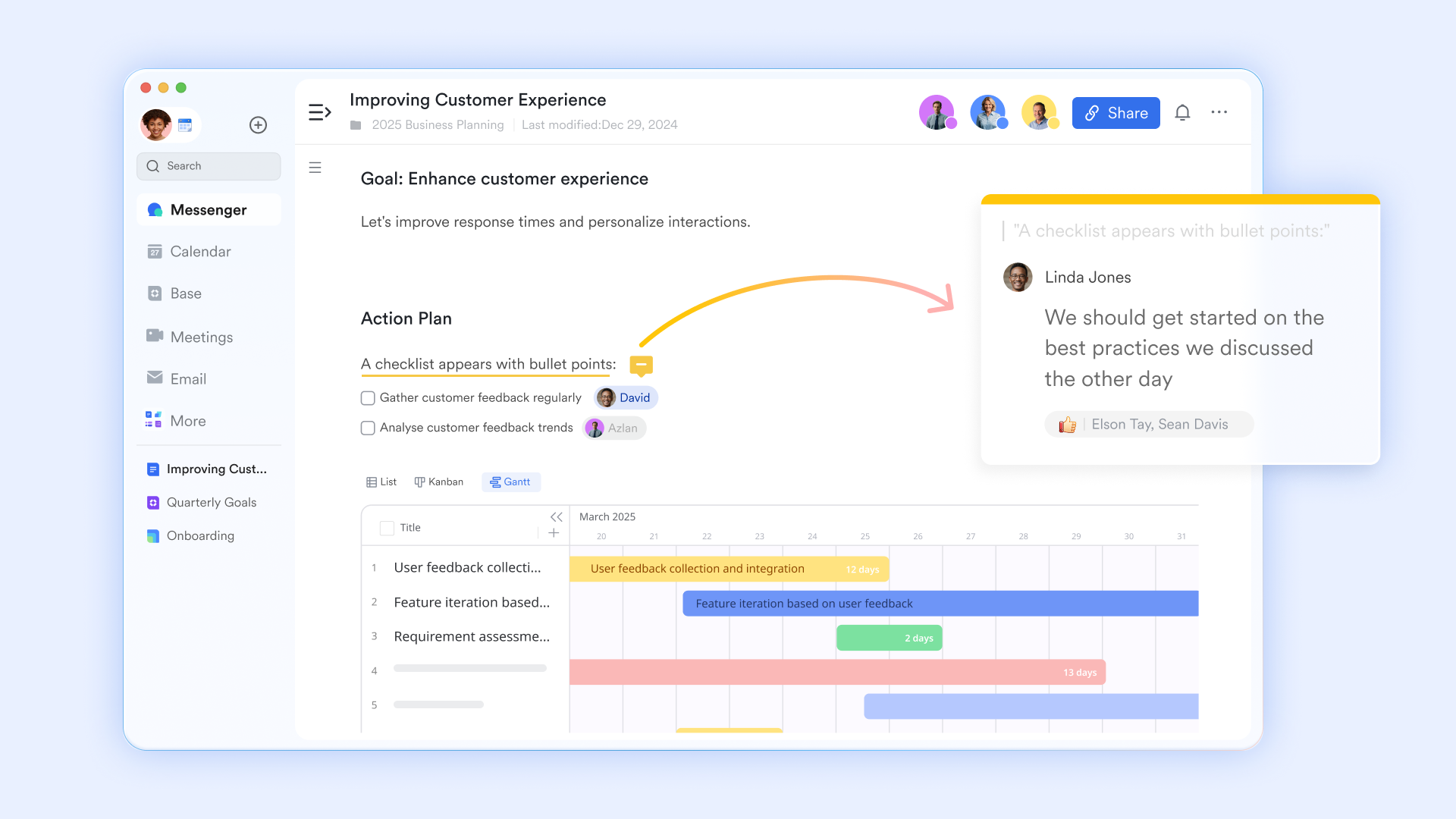
Multi-dimensional Base embeds
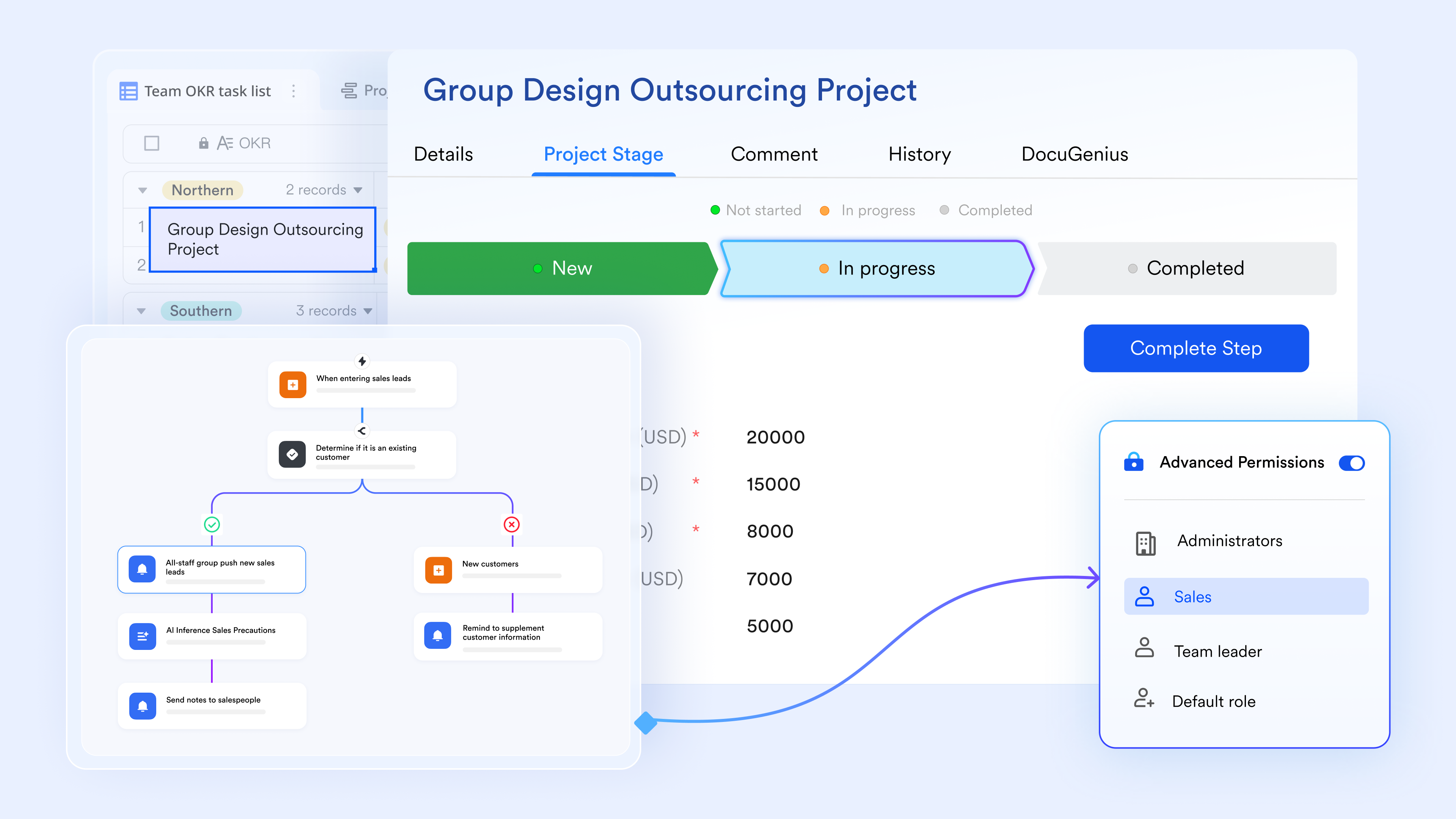
The core of a living brief is its ability to visualize data in various formats without manual reformatting. By inserting a Base in Docs, you can toggle between Gallery, Kanban, Gantt views, or Grid views. This allows a project manager to view the timeline while a designer views the asset gallery, all within the same document. Because the data is live, any card moved in the Kanban view automatically updates the underlying data and any other linked views, ensuring every stakeholder sees the most current version of the truth. 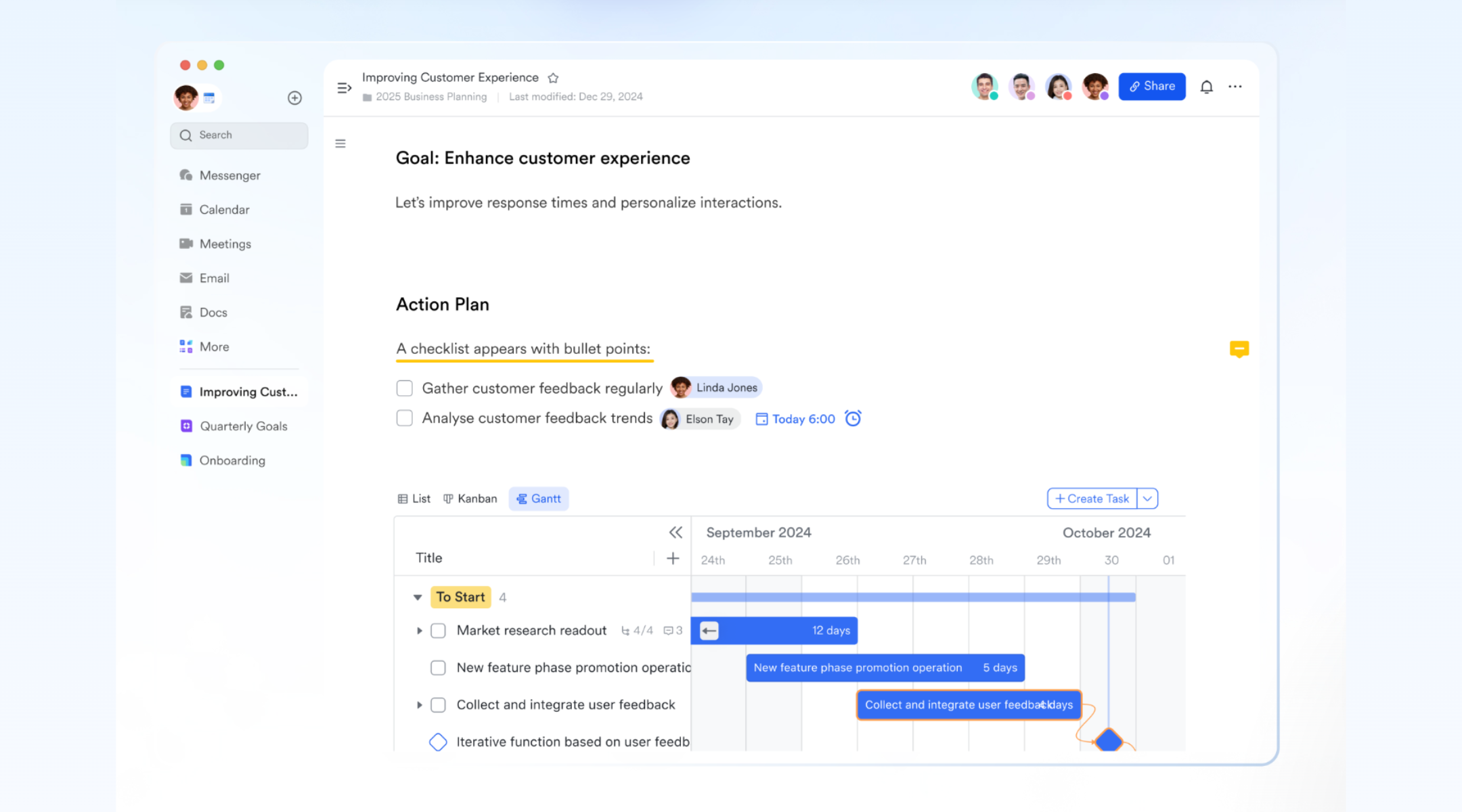
Bi-directional OKR linking
Lark allows you to link specific project milestones directly to Key Results within the Lark OKR module. Instead of manually reporting progress, the project brief can display a live progress bar that pulls data directly from the system. This creates a "bi-directional" relationship where the tactical work described in the brief is visually tied to the company's high-level strategic goals. When a sub-task is completed, the progress bar in the brief moves, providing immediate visual gratification and alignment. 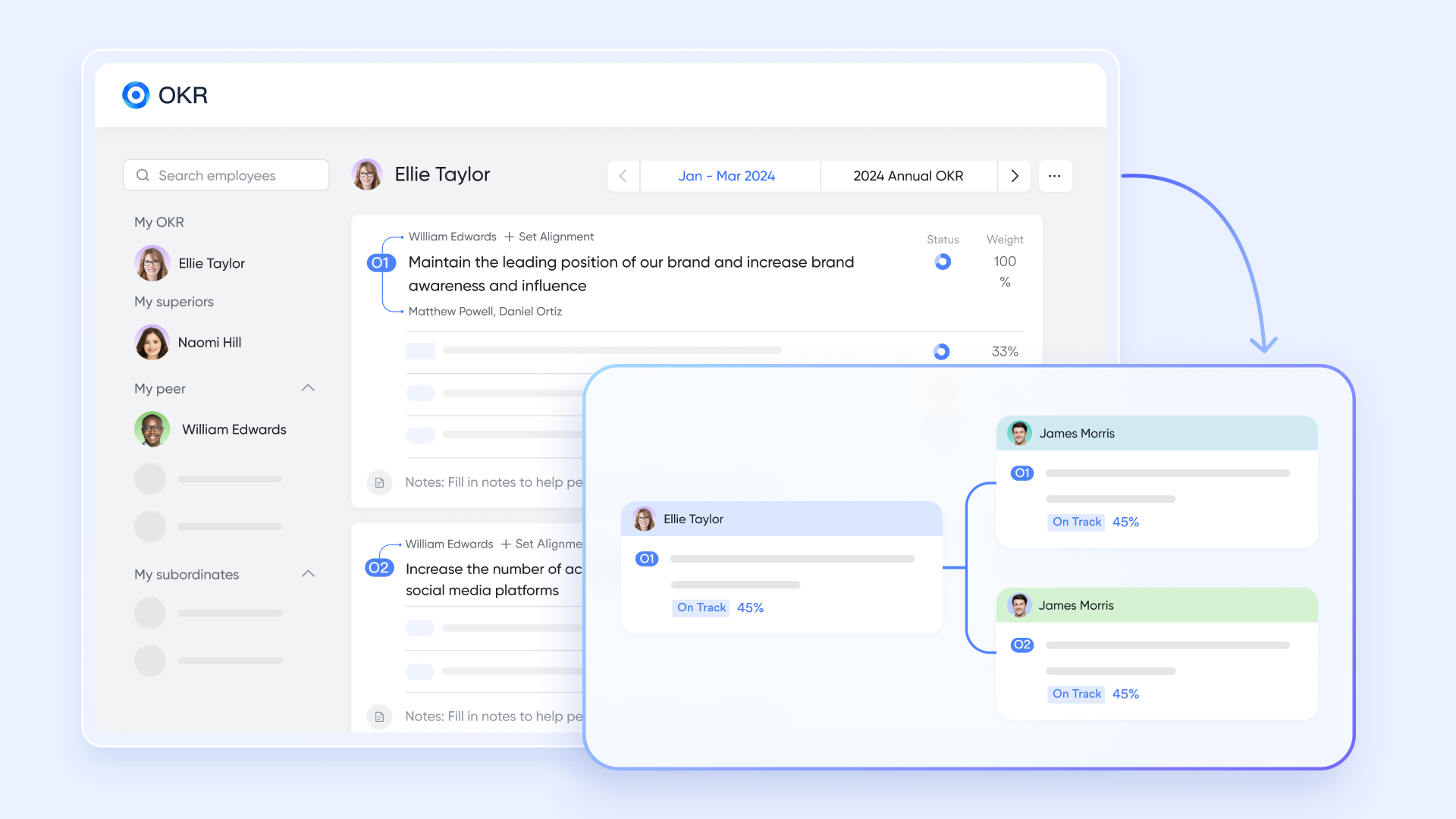
Smart document permissions and roles
A living brief often involves cross-functional teams and external partners, requiring sophisticated access control. Lark's advanced permission settings allow you to grant "View-only" access to the narrative parts of a brief while giving "Edit" access to specific base tables within that same doc. You can also set time-bound permissions or "Comment-only" roles for stakeholders. This ensures the brief remains a secure environment where the right people can contribute to the "living" parts of the plan without accidentally altering the core project scope. 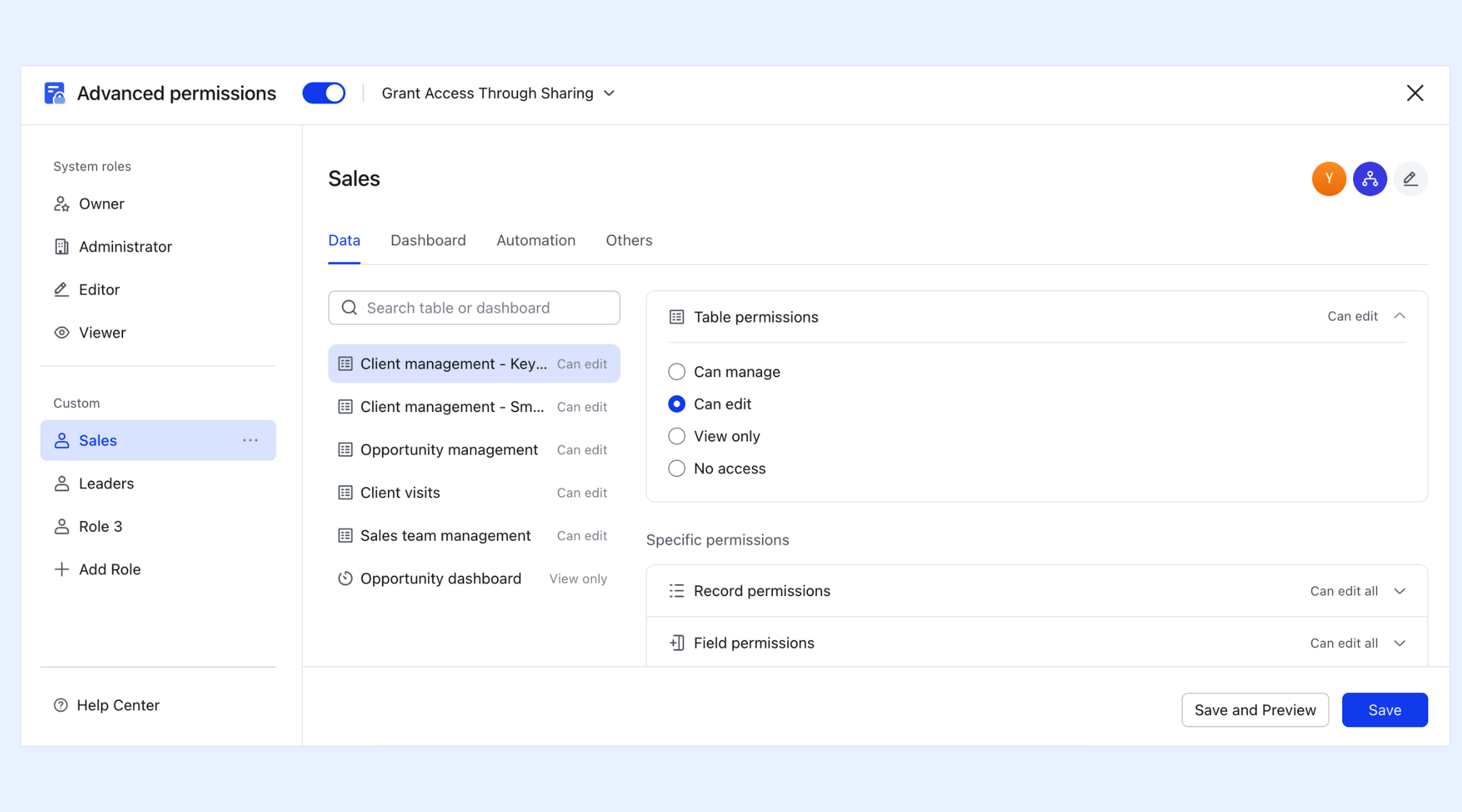
Automated status reporting
One of the most powerful "living" features is the ability to automate communication based on changes within the brief. By setting up automation rules in Base, the document can "speak" to the team. For example, if a project status is changed to "Delayed" within the brief's tracking table, Lark can automatically send an alert to a specific project group chat or email the project sponsor. This removes the need for manual status update meetings, as the brief itself handles the reporting. By utilizing , you can ensure that critical updates are never missed and that the right stakeholders are notified the moment a risk is identified.
Interactive "Magic Share" for meetings
During project kickoff or review meetings, the Lark Meetings Magic Share feature allows the presenter to share the project briefly within the video call window. Unlike standard screen share, participants can independently scroll, edit, and click on links within the document while the meeting is ongoing. This transforms the brief into an interactive whiteboard where decisions are documented, and tasks are assigned the moment they are discussed. 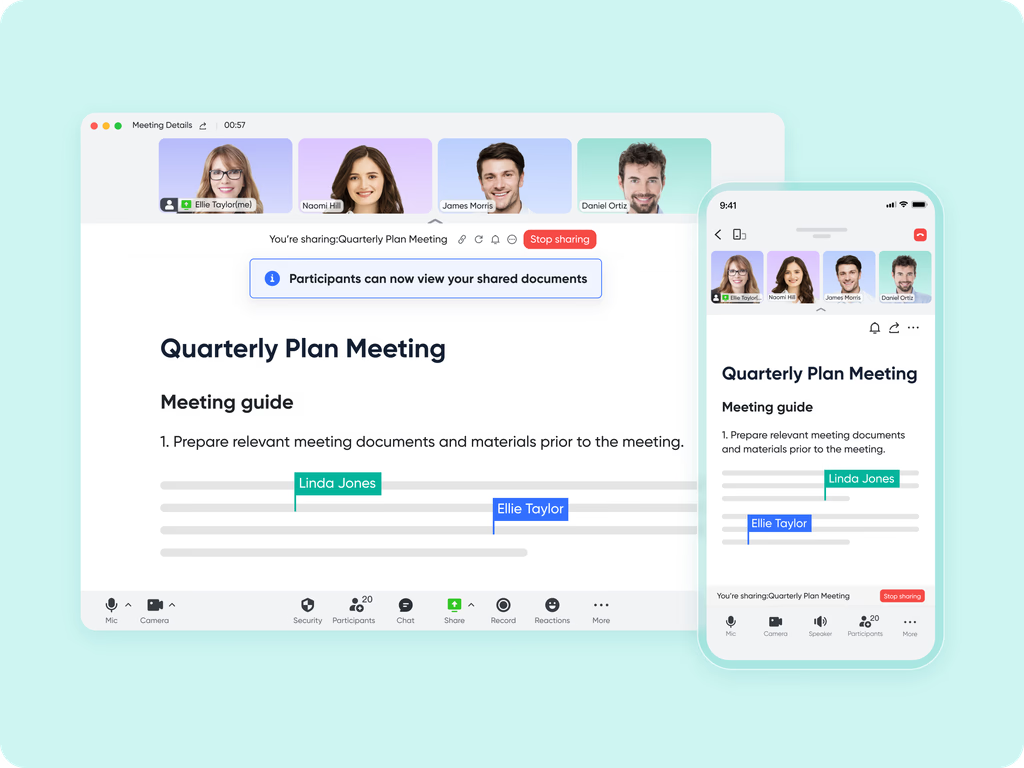
:
- Starter plan: Free forever plan that includes 11 powerful tools for up to 20 users. It also comes with 100GB of storage, 1000 automation runs, AI translations, and more.
- Pro plan: $12/user/month (billed annually) for up to 500 users. It includes everything in Starter plus group calling for up to 500 attendees, 15TB of storage, 50,000 automation runs, and more.
- Enterprise plan: for custom pricing. Supports unlimited users and includes even more automation runs and advanced security, compliance, and management features.
For small teams with simple communication needs

18 months message history
1000 Base automation runs/month
2000 rows per table in Base
Most POPULAR
For companies with comprehensive collaboration and management needs
Unlimited message history
500-participant video meetings
50k Base automation runs/month
20k rows per table in Base
For large companies with advanced security and organizational management needs
Get a personalized demo and pricing
Unlimited message history
500-participant video meetings
15 TB storage + 30 GB storage/user
500k Base automation runs/month
50k Base automation runs/month
Most POPULAR
For companies with comprehensive collaboration and management needs
Unlimited message history
500-participant video meetings
50k Base automation runs/month
20k rows per table in Base
Ready-to-use project brief templates
Starting a project brief from scratch often slows teams down and leads to inconsistent structure across projects. Ready-made templates remove this friction by giving teams a proven foundation that already reflects best practices. Instead of debating format, teams can focus immediately on clarity, alignment, and execution.
Within Lark, project brief templates are designed to be practical, flexible, and live by default. Each template combines structured fields, collaborative documents, and execution visibility, so the brief evolves naturally as the project progresses, rather than becoming outdated once work begins.
Project planning and implementation template
This template bridges the gap between planning and execution by combining high-level objectives with actionable tasks and timelines. It allows teams to define scope, milestones, and responsibilities while maintaining visibility into ongoing progress. Unlike static planning documents, this template updates automatically as tasks progress, ensuring the project brief always reflects the current execution status. It is beneficial for cross-functional teams managing dependencies and phased delivery.
Design brief template
The design brief template is built to support creative alignment between designers, product teams, and stakeholders. It captures objectives, target audience, constraints, and success criteria while leaving room for creative exploration. By embedding assets, feedback, and timelines directly into the brief, teams avoid scattered feedback loops. This ensures design decisions remain connected to the original intent throughout the creative process.
Creative brief template
For marketing and content-driven projects, the creative brief template provides clarity around messaging, tone, audience, and deliverables. It helps teams align early in creative direction while reducing subjective interpretation later. Because collaboration happens directly within the brief, feedback and approvals are documented alongside the original requirements. This makes it easier to maintain consistency across campaigns and channels as work progresses.
Campaign brief template
The campaign brief template is designed for end-to-end campaign planning and execution. It supports goal definition, channel strategy, timelines, and performance tracking in one place. As campaign activities roll out, progress and results can be updated directly within the brief. This creates a single reference point for marketers, stakeholders, and leadership to monitor alignment and outcomes.
Project management Gantt chart template
This template focuses on timeline visualization and dependency management. By using a embedded within the project brief, teams can see how tasks relate to one another and how changes impact delivery dates. Updates to task status automatically adjust the timeline, ensuring stakeholders always see an accurate schedule. It is especially valuable for projects with complex sequencing or fixed deadlines.
Best practices for writing project briefs that actually get used
Even a well-structured project brief can fail if it is treated as a one-time formality rather than a working reference. The most effective briefs are written with daily use in mind. They guide decisions, clarify tradeoffs, and evolve as the project progresses. Following a few proven best practices helps ensure that a project brief remains relevant, trusted, and actively used by the team instead of being forgotten after kickoff.
- Keep it concise but decisive: A project brief should be easy to read and quick to reference, especially during moments of uncertainty. Concision forces clarity by eliminating unnecessary detail and focusing attention on the most important decisions. At the same time, the brief must be decisive, clearly stating objectives, scope boundaries, and success criteria. When teams can understand the brief in minutes, they are far more likely to return to it throughout the .
- Make ownership explicit: Clear ownership is one of the strongest predictors of project momentum. A project brief should explicitly name who owns the overall initiative and who is responsible for key decisions and deliverables. This removes ambiguity, speeds up approvals, and reduces the risk of work stalling due to unclear accountability. When ownership is documented in brief, teams know exactly where to go for guidance or resolution.
- Revisit the brief at key milestones: A project brief should not remain static once execution begins. Revisiting it at major milestones allows teams to confirm alignment, reassess assumptions, and adjust scope or priorities when needed. This practice helps prevent slow drift away from the original intent. Regular review also reinforces the brief as a living reference rather than a document that only mattered at kickoff.
- Tie execution back to intent: Every task, decision, and tradeoff should be traceable back to the original purpose of the project. A strong project brief makes this connection explicit. Many teams ensure this by integrating directly into their workspace, turning intent into actionable, repeatable steps.
Conclusion
A project brief is the foundation that determines whether a project moves forward with clarity or confusion. When written thoughtfully, it aligns teams on purpose, scope, ownership, and success criteria before execution begins. This early alignment reduces rework, minimizes misunderstandings, and gives teams a shared reference point they can rely on when priorities shift or tough decisions arise.
As work becomes more cross-functional and fast-moving, project briefs must evolve beyond static documents. Teams increasingly benefit from briefs that stay connected to real progress, conversations, and outcomes. Over time, many organizations discover that like help transform project briefs into living workspaces, where planning and execution remain aligned from kickoff to completion.
Build a project foundation that teams trust
FAQs
How long should a project brief be?
A project brief should be long enough to create clarity but short enough to remain usable. For complex projects, this often means a few focused sections that explain intent, scope, and ownership without turning into a full specification. Teams using like Lark can keep the brief concise while linking out to supporting details when needed.
What is a project brief?
A project brief is a concise, high-level document that outlines the "why, what, and who" of a project to keep stakeholders and team members aligned. It summarizes essential elements like the project's objectives, scope, target audience, and key timeline without getting bogged down in day-to-day tasks. Essentially, it acts as a "North Star" or a blueprint that defines success before detailed planning begins.
What is the difference between a project proposal and a project brief?
A project proposal is a persuasive document used in the initiation phase to secure approval or funding by arguing why the project is worth doing. In contrast, a project brief is a condensed version of the finalized project plan used for internal alignment and execution once the project is already approved. While the proposal "sells" the idea to decision-makers, the brief "guides" the collaborators on the high-level vision and boundaries.
How many pages is a project brief?
A typical project brief should be 1 to 2 pages long to ensure it remains easy to read and digest at a glance. For very simple initiatives, it might even be a single well-structured page, whereas highly complex projects might stretch slightly longer but should rarely exceed three pages. The goal is to provide enough detail to be useful while remaining short enough that busy stakeholders will actually read it.
Who should approve a project brief in cross-functional teams?
Approval should come from the project owner and key who control resources or outcomes. Early validation ensures alignment and prevents conflicting expectations later. In shared workspaces such as Lark, approvals and comments can happen directly within the brief, making the process more transparent.
Can agile teams rely on project briefs instead of specs?
Yes, many agile teams use project briefs to define goals and constraints while allowing solutions to evolve through . The brief provides direction without limiting flexibility. Platforms like Lark support this approach by keeping the brief lightweight while connected to ongoing work.
Related reading

















