














The Complete Guide to Building Smarter Automation Flows

Sreya Anumolu
Content Specialist
Nov 4, 2026
Sreya Anumolu
Nov 4, 2026

15 min read
Add to preferred sources


Teams rely on digital systems to manage communication, scheduling, and repetitive work, but manual processes often slow everything down. Automation flows help remove friction by connecting triggers, actions, and structured logic that keep work moving. Many teams begin by exploring marketing automation flows, email automation flows, and Google Workspace flow automation to handle large recurring workloads. Others focus on business process automation with Salesforce flows for CRM operations or backend processes supported by Directus flows automation documentation and Directus flows automation docs. Understanding these patterns shows how modern organizations maintain speed and accuracy across daily operations.

What are automation flows?
Automation flows help teams set up clear rules that guide how information moves, how tasks begin, and how actions run automatically. These flows replace repeated manual steps with structured sequences that follow logical triggers. They ensure information moves correctly from one point to another without depending on constant human involvement. Teams across marketing, IT support, operations, and finance use automation flows to handle routine work, reduce delays, and keep processes consistent. By using automation flows, organizations improve reliability, speed, and visibility across shared processes.
Automation flows usually start with a trigger, follow a defined path, and complete actions based on conditions. They help teams avoid missed updates, forgotten tasks, and inconsistent decisions. They also reduce the risk of errors by offering predictable execution. Automation flows become especially powerful when multiple systems, tools, or data sets are involved. These flows also support better compliance because every step follows predefined rules and is recorded. With the right setup, automation flows simplify complex work and free teams to focus on problem-solving.
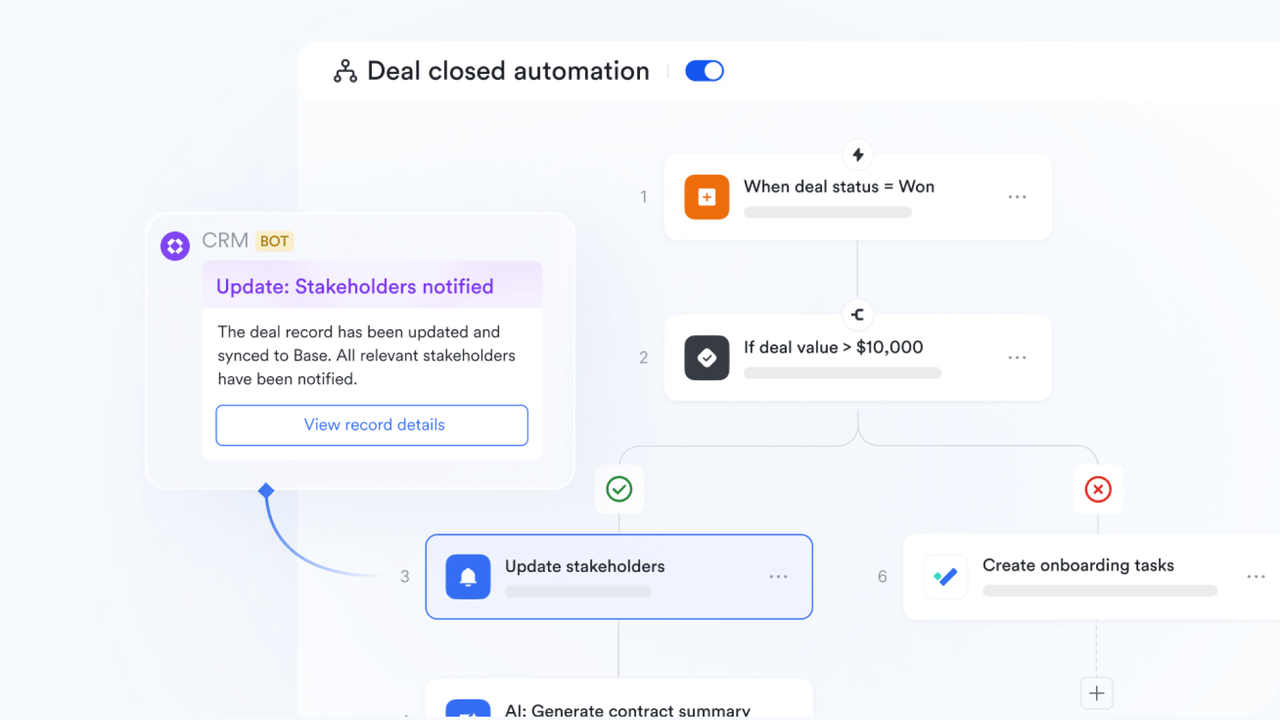
Types of automation flows
This section outlines common categories based on references from Atlassian, Techtarget, Workato, Power Automate, and Qflow. Each type serves a specific purpose and helps teams manage structured business activities. Understanding these categories makes it easier to design flows that match your unique operational needs. Below you will find the primary types used across organizations of all sizes.
- Trigger-based flows: Trigger-based flows begin when a specific event occurs. These flows help teams react instantly to activities such as a new form submission, a new lead, a new email, or a file upload. They are helpful for fast-moving environments where information needs immediate handling.
- Scheduled flows: Scheduled flows run at predefined times. They help teams complete recurring tasks like daily updates, weekly reports, or reminders without human intervention. These flows maintain regular cadence and reliability across operations.
- Approval flows: Approval flows help teams route requests through proper decision paths. These flows support multi-step approvals used in finance, HR, procurement, and operations. They ensure work moves forward only after the correct person reviews and confirms each stage.
- Data routing flows: Data routing flows help teams move information across systems or update records based on conditions. They are essential for keeping data synchronized and accurate. These flows reduce manual updates and help centralize visibility across tools.
- Action-based flows: Action-based flows handle follow-up tasks, notifications, alerts, or automatic responses. These flows help maintain momentum across processes by ensuring the next step always happens.
How workflow automation works
Workflow automation uses task and process tools to move work, information, and decisions between people and systems automatically using rules, conditions, and triggers. Instead of manually forwarding tasks or updating trackers, the system handles handoffs such as assigning the next owner once a step is completed or updating dashboards the moment progress changes. This reduces repetitive work, shortens delays, and minimizes human error. To get started, follow this structured approach:
Step 1: Map how work currently moves across teams
Begin by documenting how tasks originate, who handles each step, what information is required, and where delays typically occur. Understand triggers that start tasks, criteria for completion, approval dependencies, and common bottlenecks. This gives you a clear picture of the workflow before automation.
Step 2: Visualize the workflow to uncover inefficiencies
Create a visual outline using flowcharts, whiteboards, or simple diagrams to review the process with cross-functional teams. This helps highlight unnecessary steps, unclear responsibilities, siloed approvals, or redundant communication loops. Collaborators can suggest improvements based on real-day frustrations.
Step 3: Identify where external systems feed into the workflow
Pinpoint tasks that rely on inputs from CRM, HR, finance, ticketing, or other platforms. Ensure your workflow tool can support these connections or adjust the process to break tasks into smaller, manageable components that work smoothly with your automation setup.
Step 4: Address pain points and communication gaps
Resolve recurring issues such as unclear handoffs, delayed approvals, or information scattered across multiple tools. This may involve defining task ownership more clearly, aligning teams on required inputs, or standardizing how information flows from one stage to another.
Step 5: Build the workflow inside your automation platform
Define each step directly in your chosen tool: assign owners, set conditions, add task types, and select visual formats like Gantt timelines, calendars, or process maps. This ensures that everyone sees the entire workflow and understands their role.
Step 6: Configure triggers and automated actions
Set rules for when tasks should start, move forward, escalate, or notify team members, whether based on time, status changes, form submissions, or data updates. Use ready-made automation templates if available, or customize your own for more specific needs.
Step 7: Test, refine, and monitor performance
Run trial workflows with small groups to identify issues. Track KPIs such as turnaround time, task completion rates, and workload distribution. Use dashboards to spot bottlenecks early and adjust rules or responsibilities as needed.
Step 8: Train teams and manage change effectively
Walk teams through the new workflow with hands-on demos. Provide clear guidance on what has changed and why. Ongoing support helps ensure everyone adopts the new system smoothly and understands how automation supports their work.
If you need help getting started, you can use a free workflow template to quickly structure your process and begin automating your project workflows with minimal setup.
Essential components of an effective automation flow
Understanding core components helps teams build automation flows that run reliably. Each part plays a role in determining when the flow starts, how logic follows, and what actions it performs. This overview introduces each component to help teams design stronger workflows.
- Triggers that initiate the workflow: A trigger defines the exact moment an automation should begin. It could be a new record being created, a status changing, a form being submitted, or a date reaching a specific value. Clear triggers ensure the workflow activates only when it should, preventing unnecessary actions or missed events.
- Conditions that filter which records qualify: Conditions determine whether automation should continue after the trigger fires. They help narrow the scope, for example, "apply only if priority = High" or "run when total amount exceeds a set value." Proper conditions prevent workflows from acting on the wrong items and help maintain operational accuracy.
- Logic paths that determine the next step: Effective automation includes branching logic, such as IF/ELSE paths that adjust the flow based on real data. Decision paths allow the workflow to follow different routes for different scenarios, supporting complex operations like approvals, escalations, or multi-team handoffs.
- Actions that execute the actual work: Actions are the tasks the automation performs: sending notifications, creating tasks, updating fields, routing items to another team, generating documents, or triggering follow-up steps. Clear and purposeful actions help teams shift repetitive work away from manual effort and keep processes moving.
- Scheduled steps that handle time-based requirements: Some automation requires delays or timed events, for instance, sending reminders 24 hours later or escalating tasks after deadlines pass. Scheduled actions ensure the workflow aligns with real operational timelines and supports SLAs without constant monitoring.
- Error handling to manage exceptions: Even well-designed flows can encounter missing data, conflicting conditions, or unexpected changes. Adding fallback rules, alerts, or manual review steps helps prevent workflow breakdowns and ensures accountability when exceptions occur.
- Visibility tools that help teams monitor progress: Dashboards, activity logs, and run histories give teams insight into what's happening inside each workflow. Visibility is essential for detecting bottlenecks, optimizing efficiency, and ensuring processes stay compliant and traceable.
- Feedback loops for improvement and refinement: Automation flows should evolve. Regular testing, user feedback, and performance monitoring help refine triggers, adjust conditions, and enhance reliability. An effective workflow isn't static; it continuously improves as business needs change.
Once these components are understood, it becomes easier to see the value of having a single environment where workflows, tasks, documents, and communication operate in sync. When all moving parts work together rather than across separate tools, automation becomes more reliable, easier to maintain, and far more scalable. This sets the stage for exploring a platform like Lark, designed to support end-to-end workflow automation in one place.
Build your flows: Try Lark to easily construct automation flows across teams
Many organizations rely on different tools for document handling, task tracking, and workflow automation. This creates complexity because information lives in separate places. Lark brings everything together into one unified workspace so teams can manage tasks, notifications, and automation without switching tools. You will see how this benefits teams once you understand pricing options and capabilities.
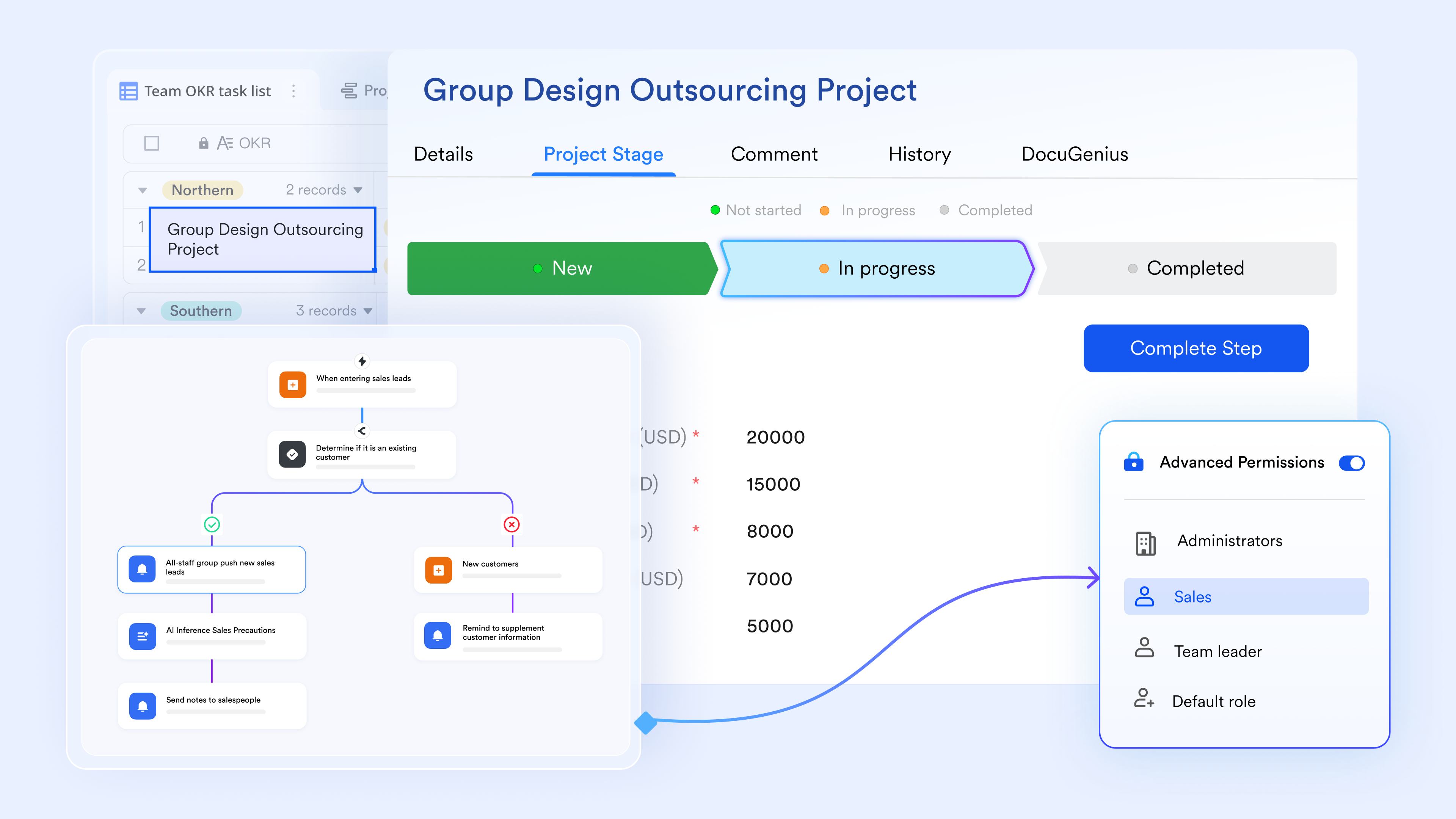
Instant workflow processing via different features in one ecosystem
Lark Base lets teams automate actions based on real-time events happening anywhere across Lark, not just within a single module. Workflow in Lark Base can start when a new record is added, when a message arrives in Lark Messenger, or when a webhook event comes in from an external source. Actions can then move into other Lark features, such as creating an event that appears in Lark Calendar, generating a task that shows up in Lark Tasks, or creating a chat group directly in Lark Messenger. This unified automation helps teams keep work moving smoothly across all Lark tools without manual effort.
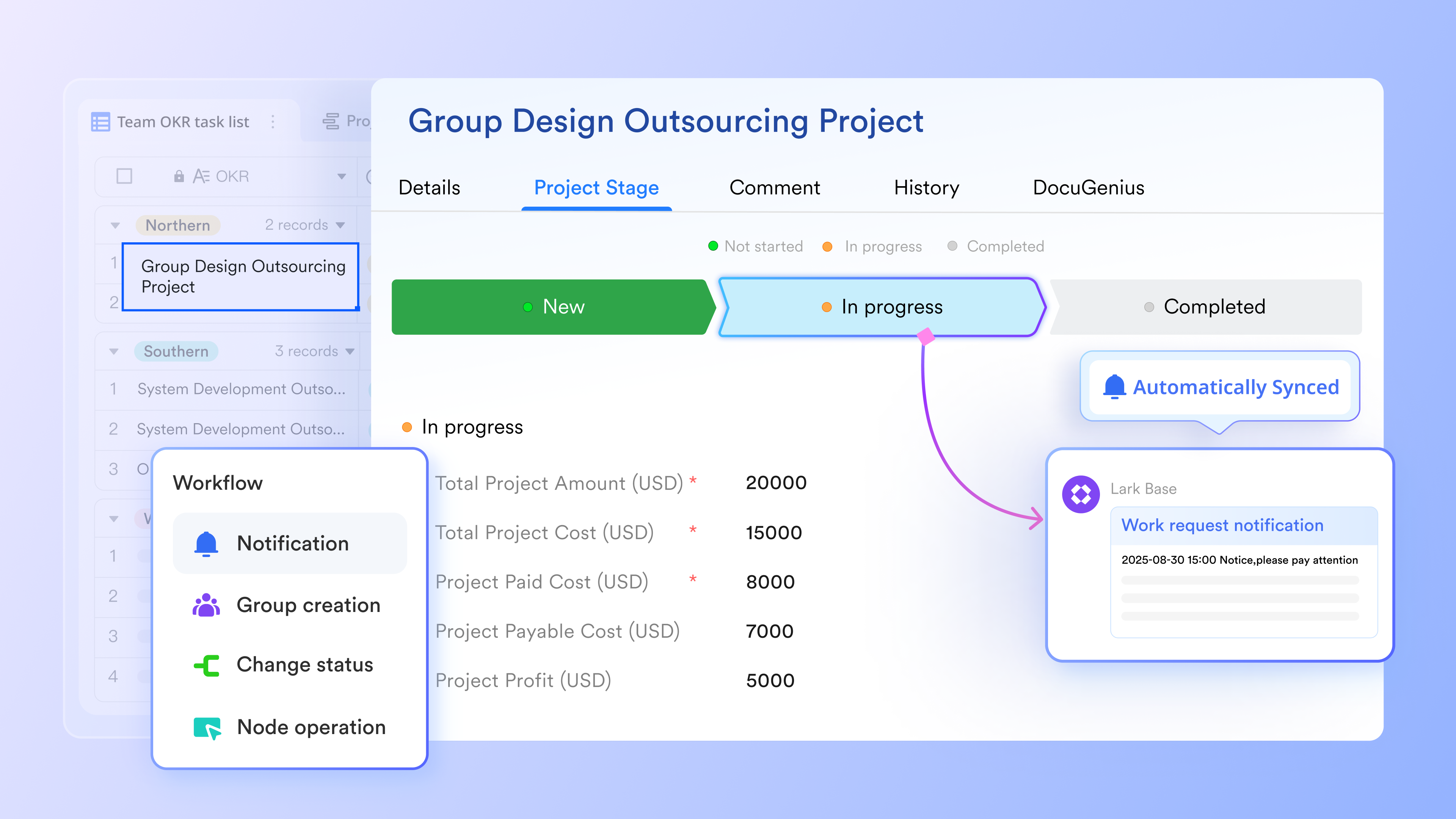
Multiple formulas for smart and easy automation rules building
Lark Base workflows make automation building smarter and more flexible by letting you use various formulas to process data, calculate values, and format text as part of each step. You can apply these formulas inside conditions to route flows dynamically, or use them to transform variables and pass results into later actions. Formula fields in Base tables also integrate directly with workflows, ensuring consistent, real-time computed data. Together, these capabilities let you build more adaptive, precise, and automated processes with far less manual effort.
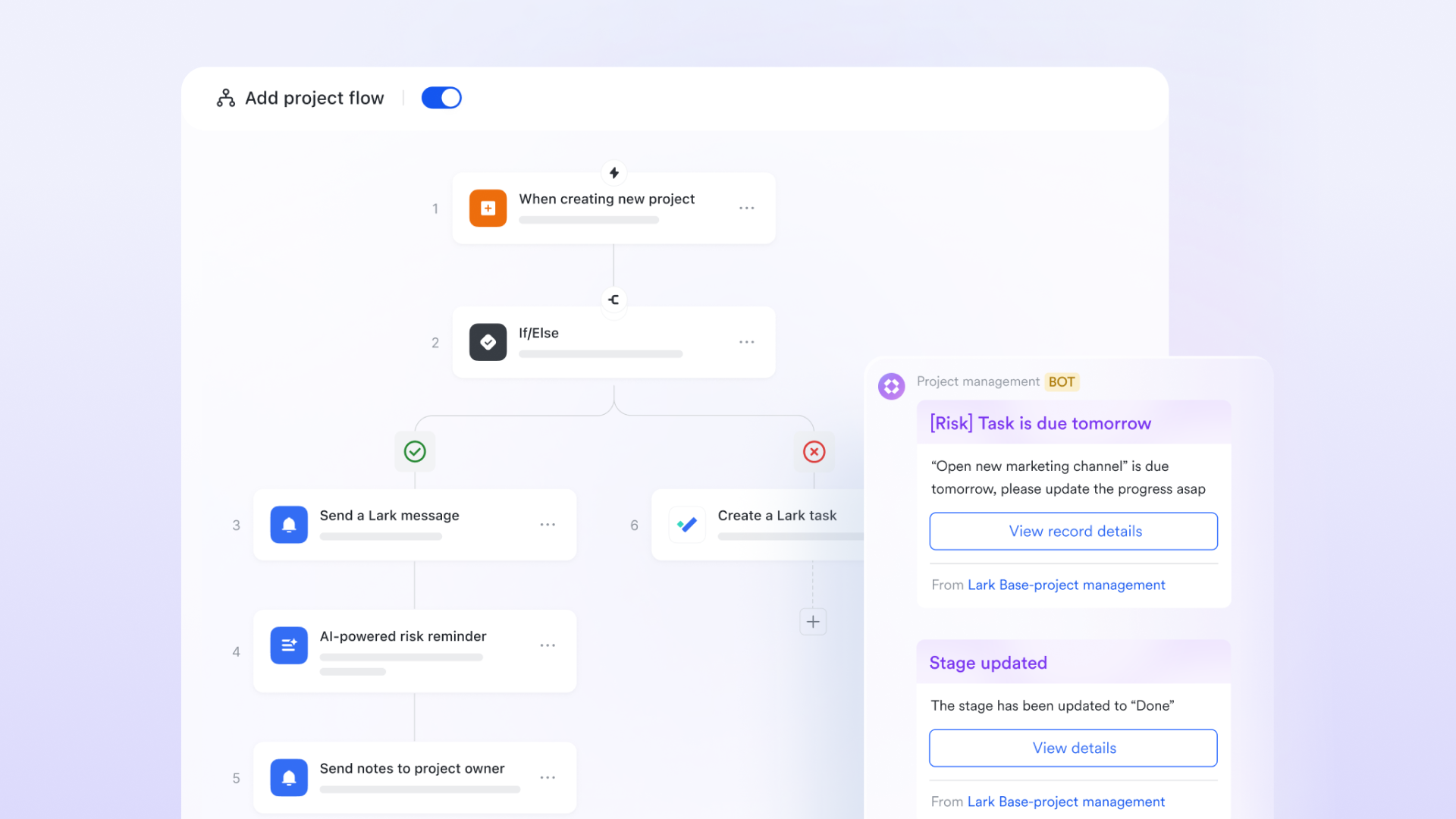
Node shortcuts provide fast-tracks every time you need
Lark Base workflows simplify automation building with node shortcuts, which let you drop in preconfigured actions instead of setting up every step from scratch. You can quickly add logic blocks like If/Else, repeat actions with Loop, or AI-generated text to generate or transform data automatically. These ready-made nodes reduce setup time, keep flows consistent, and make it much easier to design clear, reliable automation paths.
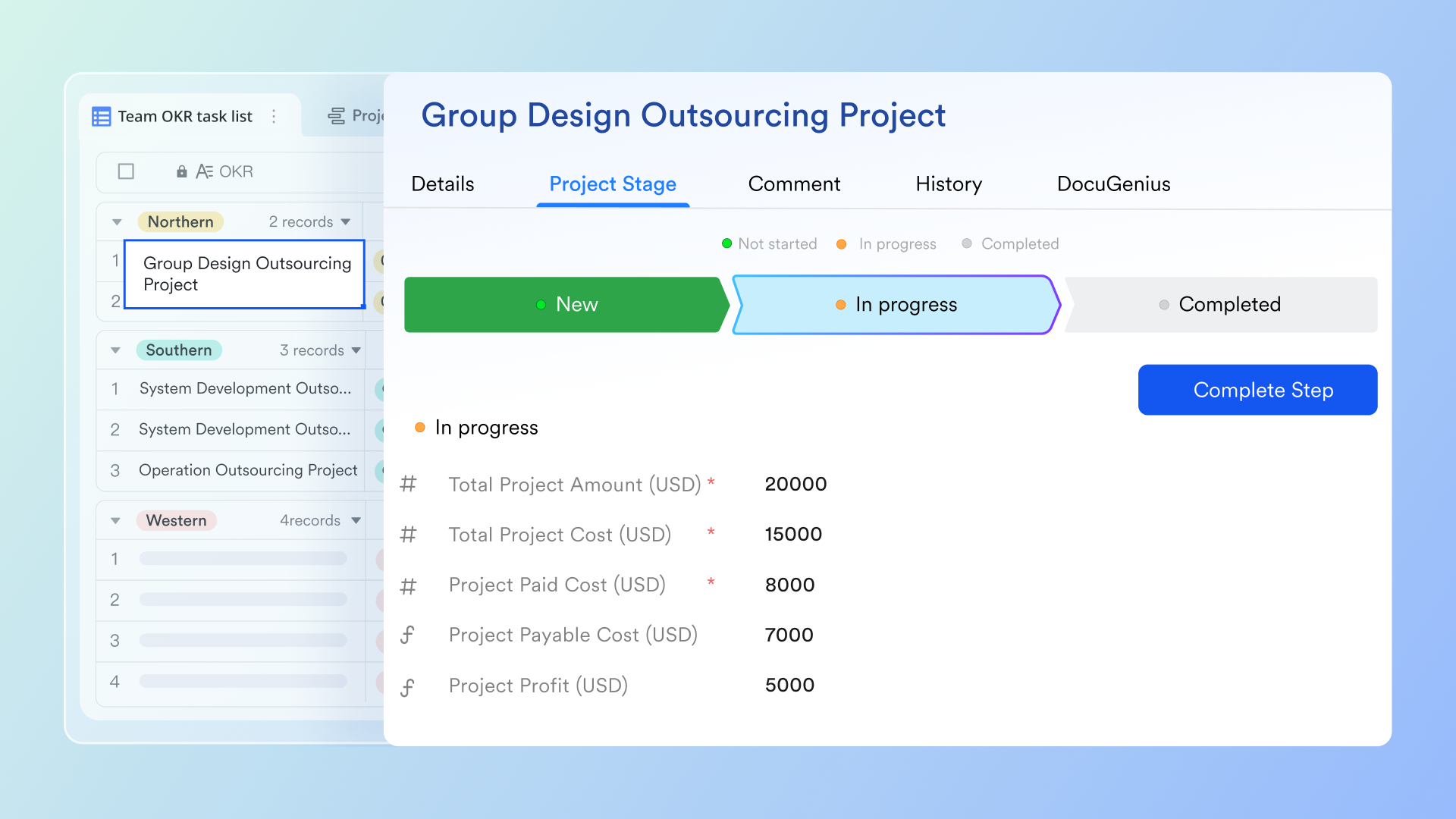
Strong third-party integration routes for automation across platforms
Lark Base workflows also support third-party integrations, allowing your automations to connect seamlessly with external tools. Through platforms like Zapier, you can link Lark with apps such as Google Sheets for data syncing, Gmail for automated emails, Slack for cross-platform notifications, Salesforce or HubSpot for CRM updates, and Typeform for form-to-Base data collection. These integrations let your workflows move information effortlessly across systems, reducing manual transfers and creating a more connected automation environment.

- Starter plan: Free forever plan that includes 11 powerful tools for up to 20 users. It also comes with 100GB of storage, 1000 automation runs, AI translations, and more.
- Pro plan: $12/user/month (billed annually) for up to 500 users. It includes everything in Starter plus group calling for up to 500 attendees, 15TB of storage, 50,000 automation runs, and more.
- Enterprise plan: Contact sales for custom pricing. Supports unlimited users and includes even more automation runs and advanced security, compliance, and management features.
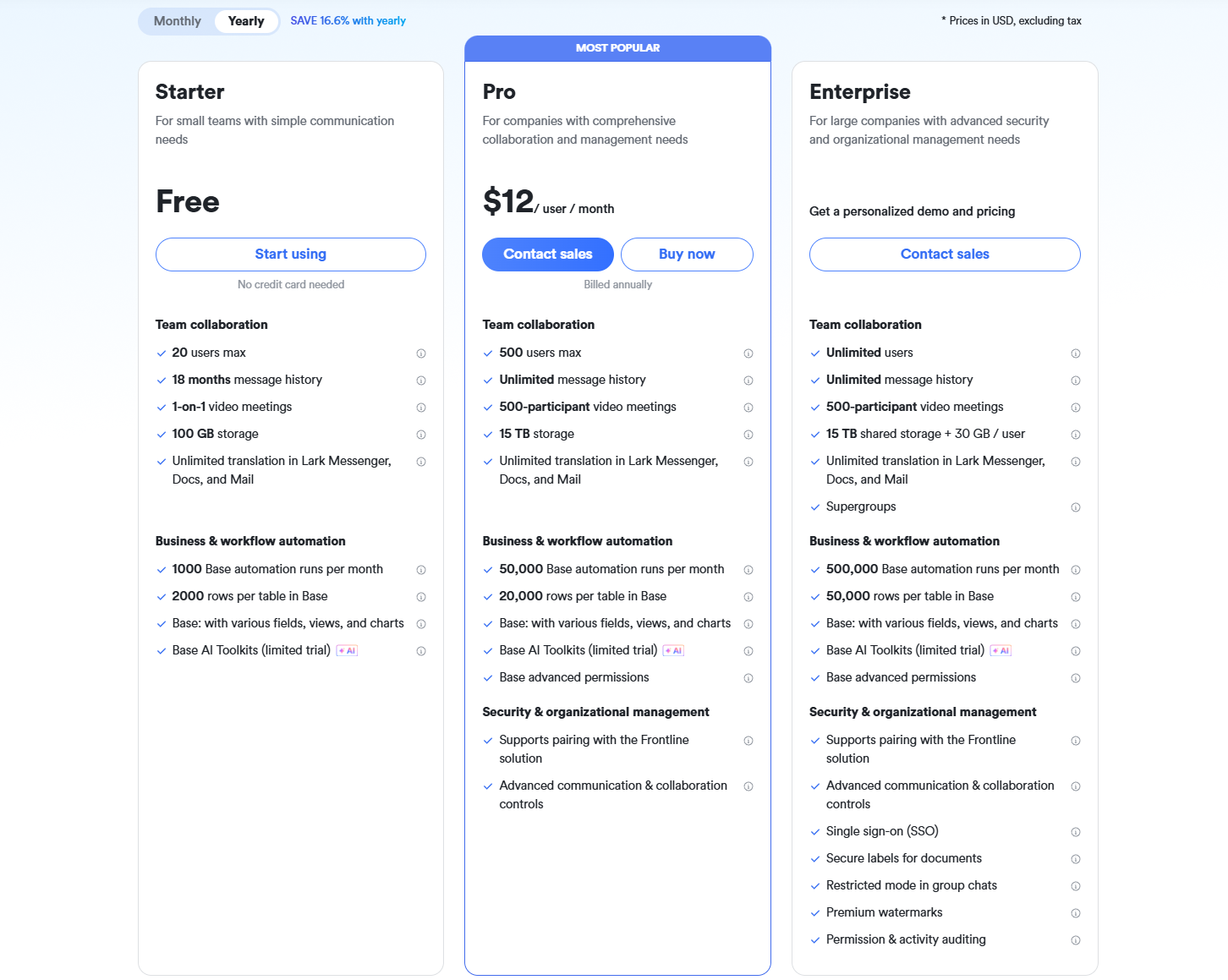
Companies looking to optimize software spending frequently compare their options against Google Workspace pricing and ClickUp pricing.
Common mistakes when designing automation flows
Organizations often run into predictable problems when building automation flows. Avoiding these mistakes helps teams maintain efficient and stable workflows.
- Overcomplication happens when teams try to build too many steps into one flow. Simpler designs improve performance and reduce confusion. Keeping flows clear makes long-term management easier.
- Missing exception handling causes workflows to fail when unexpected events occur. Adding fallback paths ensures processes keep functioning correctly.
- Poor data structure creates mapping issues that break flows. Clean fields and naming conventions help prevent these problems.
- Ignoring access and permissions leads to failed notifications or blocked actions. Correct permissions ensure smooth execution.
- Lack of monitoring prevents teams from finding workflow issues early. Running history and logs help maintain stability.
Conclusion
Automation flows give teams a dependable way to manage routine tasks, route information, and maintain clear process logic across departments. Many organizations begin by building simple patterns through marketing automation flows or email automation flows, then expand into business process automation with Salesforce flows as their operations grow. Structured work continues through Google Workspace flows automation for documents and schedules.
At the same time, backend teams depend on Directus flows automation documentation and Directus flows automation documentation to maintain consistent system behavior. As teams adopt more connected processes, many gradually explore platforms like Lark because it brings communication, data, and workflow steps closer together. This helps organizations maintain consistency, reduce delays, and support long-term operational growth.
FAQs
How do automation flows help teams reduce operational risk?
Automation flows reduce risk by preventing human errors in repetitive activities and keeping processes consistent. They help teams follow predictable sequences instead of relying on manual effort. By maintaining logs and clear action trails, flows make it easier to trace issues and improve accountability. Many teams begin exploring tools like Lark when they want to strengthen reliability through automation. With the right structure, automated paths prevent skipped approvals, outdated records, and missed deadlines.
Can automation flows work across multiple departments or only within one team?
Automation flows can operate across multiple departments when built with shared rules and proper permissions. They help marketing, HR, sales, IT, and finance stay connected during cross-functional tasks. These flows reduce communication gaps when work must move between different groups. As organizations scale, platforms like Lark make it easier to unify interactions by keeping conversations, tasks, and workflows close together. This ensures teams work in sync even when responsibilities overlap.
Do automation flows require technical skills to build and maintain?
Most modern workflow tools provide visual builders that do not require coding skills. Users can create triggers, checks, and actions using simple interfaces. While advanced use cases may still require technical support, most daily flows can be created by coordinators or managers. Many teams find it easier to build and maintain processes inside flexible workspaces like Lark because the structure stays visible and intuitive. This helps automation become more accessible across an organization.
How do I test automation flows before launching them to the entire team?
Testing begins with running the flow using sample data and reviewing each step to confirm correct behavior. Teams check triggers, conditions, notifications, and record updates to ensure accuracy. It is also helpful to test alternative paths to see how the flow responds to different scenarios. Workspaces such as Lark provide run history views that help teams validate performance before rollout. Careful testing improves confidence and reduces issues after launch.
Can automation flows support real-time updates for remote or hybrid teams?
Automation flows support real-time updates through instant notifications, task updates, and system alerts. This helps remote and hybrid teams stay aligned even when working from different locations. When workflows deliver timely information, teams avoid delays and maintain steady progress. Many organizations use platforms like Lark to combine automation with communication, so updates reach people right when needed. This supports smooth collaboration regardless of distance or schedule.
Related reading
Table of contents
Start using Lark today

Manage all your work in one place
Boost team efficiency by 10x
Save up to 70% on software costs
Table of contents
Start using Lark today
Manage all your work in one place
Boost team efficiency by 10x
Save up to 70% on software costs
Keep reading






2026 Lark Technologies Pte. Ltd.
Headquartered in Singapore with offices worldwide.






Explore: