














Workflow Optimization: Meaning, Benefits, and Strategies

Ryan Tanner
Product Marketing Specialist
Sep 18, 2026
Ryan Tanner
Sep 18, 2026

14 min read


Workflow optimization helps teams work smarter by removing friction, reducing manual effort, and improving the flow of everyday tasks. It focuses on identifying bottlenecks, streamlining processes, and creating systems that support faster, more accurate work. Whether you're managing projects, handling approvals, or coordinating across departments, optimized workflows make everything more predictable and easier to manage. With tools like Lark, teams can organize tasks, share information, and collaborate more efficiently. This guide breaks down what workflow optimization means, why it matters, the benefits it brings, and the strategies you can use to improve the way work moves through your organization.

What is workflow optimization?
Workflow optimization meaning refers to the process of improving how tasks, information, and responsibilities move through your organization. It involves examining each step in a workflow, identifying delays or unnecessary action items , and creating a more efficient path from start to finish. The goal is to reduce manual work, avoid repetition, eliminate bottlenecks, and make processes easier for teams to follow.
By refining workflows, businesses can work faster, deliver more accurate results and respond quickly to changing priorities. Effective workflow optimization also helps teams collaborate better, stay organized and maintain consistency across projects and daily operations.
Why workflow optimization matters
Improving your workflows isn't just about getting things done faster. It strengthens how your team operates day to day and removes the friction that slows progress. When approval workflow are optimized, the entire system becomes easier to manage, more reliable and more aligned with business goals. Here's why it makes such a noticeable impact:
- Faster execution: Optimized workflows eliminate extra steps, long review cycles and confusing handoffs. When each task follows a clear path, teams spend less time waiting for updates or approvals and more time moving projects forward. This is especially helpful for time-sensitive work where delays can affect the entire project timeline.
- Reduced manual work: Repetitive, routine tasks drain time and attention. Streamlining processes and adding automation where it fits can handle jobs like notifications, data entry, approvals and status updates. This lets team members focus on work that requires skill and problem-solving instead of getting stuck in task admin.
- Lower operational costs: Inefficient workflows often create hidden costs. These include duplicated work, unnecessary meetings, delayed approvals or constant follow-ups. When processes are tightened, the team spends less time juggling avoidable tasks. Over time, this reduction in wasted effort leads to lower operational expenses and a more cost-efficient way of working.
- More predictable results: When everyone follows the same structured workflow, the output becomes more consistent. Clear steps reduce the chance of mistakes, missed approvals or last-minute rework. This predictability helps leaders plan better, schedule resources more accurately and deliver results that meet expectations every time.
- Better visibility and accountability: Well-structured workflows make it easier to see who's responsible for each step, project tracker and identify areas that need improvement. Optimized workflows make it easier to track who is responsible for each stage. This transparency improves ownership and reduces confusion. Teams can quickly identify where a project is stuck, who needs support or which part of the process needs improvement.
Steps of the workflow optimization process
Improving a workflow starts with understanding how it currently functions and making focused changes that remove delays and unnecessary work. When each step of the process is examined closely, it becomes easier to see where time is lost, which tasks can be simplified and how teams can work together more efficiently. Here's a more detailed breakdown of how the process works:
Step 1: Map existing workflows
Begin by documenting every step, handoff, and tool involved from start to finish. This gives you a visual overview of how tasks move through the system today. It also helps uncover hidden steps or informal workarounds that might not be obvious at first glance.
Step 2: Identify bottlenecks and friction points
Look for anything that slows work down. Common issues include unclear responsibilities, repetitive project tasks tasks, scattered information or long approval loops. Pinpointing these pain points makes it easier to decide what needs attention first.
Step 3: Define ideal outcomes
Set clear goals for your improved workflow. This could be faster turnaround times, better accuracy, higher output or more predictable results. Having measurable targets makes it easier to evaluate the success of the changes later.
Step 4: Redesign the workflow
Rebuild the process with simplicity in mind. Remove redundant steps, reorganize the sequence. of tasks and tighten up approval chains. The goal is to create a more logical path that supports smooth progress without unnecessary back-and-forth.
Step 5: Automate repetitive work
Identify routine tasks that don't require manual effort, such as sending reminders, updating task status or triggering approvals. Adding automation saves time and reduces the chance of errors or missed steps.
Step 6: Improve communication pathways
Make sure teams have clear and consistent ways to share updates. Whether it's through chat tools, project management platforms or structured check-ins, good communication reduces confusion and helps tasks move forward without delays.
Step 7: Track performance and refine
After the new workflow is in place, monitor how it performs. Collect feedback from the people using it, review key metrics and make small adjustments as needed. Optimization is an ongoing effort, and continuous refinement keeps the workflow efficient over time.
Workflow optimization strategies that actually work
Putting the right strategies in place can make workflows smoother, faster and easier to manage. These practical approaches help teams cut unnecessary steps, reduce friction and stay focused on meaningful work instead of getting lost in routine tasks. Here's a closer look at the methods that consistently deliver results:
- Standardize steps and documentation: Create clear guidelines for tasks that repeat often. When everyone follows the same sequence, there's less confusion and fewer errors. Standardized templates, checklists and documentation also keep information organized, which helps new team members get up to speed faster.
- Reduce redundant tasks: Take a careful look at which tasks truly add value and which ones don't. Some steps may overlap, require duplicate input or exist only out of habit. Removing or combining these tasks keeps the workflow lean and reduces the time spent on low-impact work.
- Apply automation: Use automation to handle repetitive work like updates, reminders and handoffs, freeing your team to focus on higher-value tasks. Automation is one of the simplest ways to speed up workflows. It can handle routine tasks like status updates, reminders, approvals and notifications. This reduces manual effort and keeps work moving even when team members are occupied with other responsibilities.
- Improve communication flow: Make sure information moves smoothly between team members with well-defined channels and timely updates. Work often slows down because updates arrive late or information is scattered across tools. Setting clear communication channels and expectations helps everything move more smoothly. Whether it's structured check-ins or dedicated project spaces, consistent communication reduces unnecessary back-and-forth.
- Introduce AI for faster decision-making: Use AI automation tools to analyze data, suggest next steps and speed up decisions that normally require manual review. AI tools can review data, detect patterns and suggest best actions faster than manual analysis. They can support quick approvals, identify risks early or help teams prioritize tasks. This cuts down decision-making time and keeps the workflow from stalling at key moments.
- Use visual workflow tools: Vision boards and flowcharts help teams understand the process at a glance and spot gaps that need fixing. Flowcharts, boards and other visual tools help teams see the entire process in one view. This makes it easier to understand how tasks connect, spot gaps or spot steps that need improvement. Visuals also help align teams and reduce misunderstandings.
- Ensure clear task ownership: Assign responsibility for each step so everyone knows who's accountable and work doesn't get stuck in handoffs. Assigning responsibility to the right individuals prevents tasks from getting stuck. When each step has a clear owner, it becomes easier to track progress, avoid delays and maintain accountability. Everyone knows who to follow up with, and work flows more predictably.
Reliable tool: Why Lark is best for workflow optimization
Lark brings your team's everyday tools together in one place, which makes it easier to build smoother, more connected workflows. Instead of switching between chats, documents, task boards, and approvals across separate apps, everything happens inside a single workspace. This reduces friction, keeps information organized, and helps teams move from one step to the next without losing context. With built-in workflow automation software, real-time collaboration, and easy-to-follow processes, Lark gives teams a simpler way to optimize their workflows and stay focused on the work that matters.
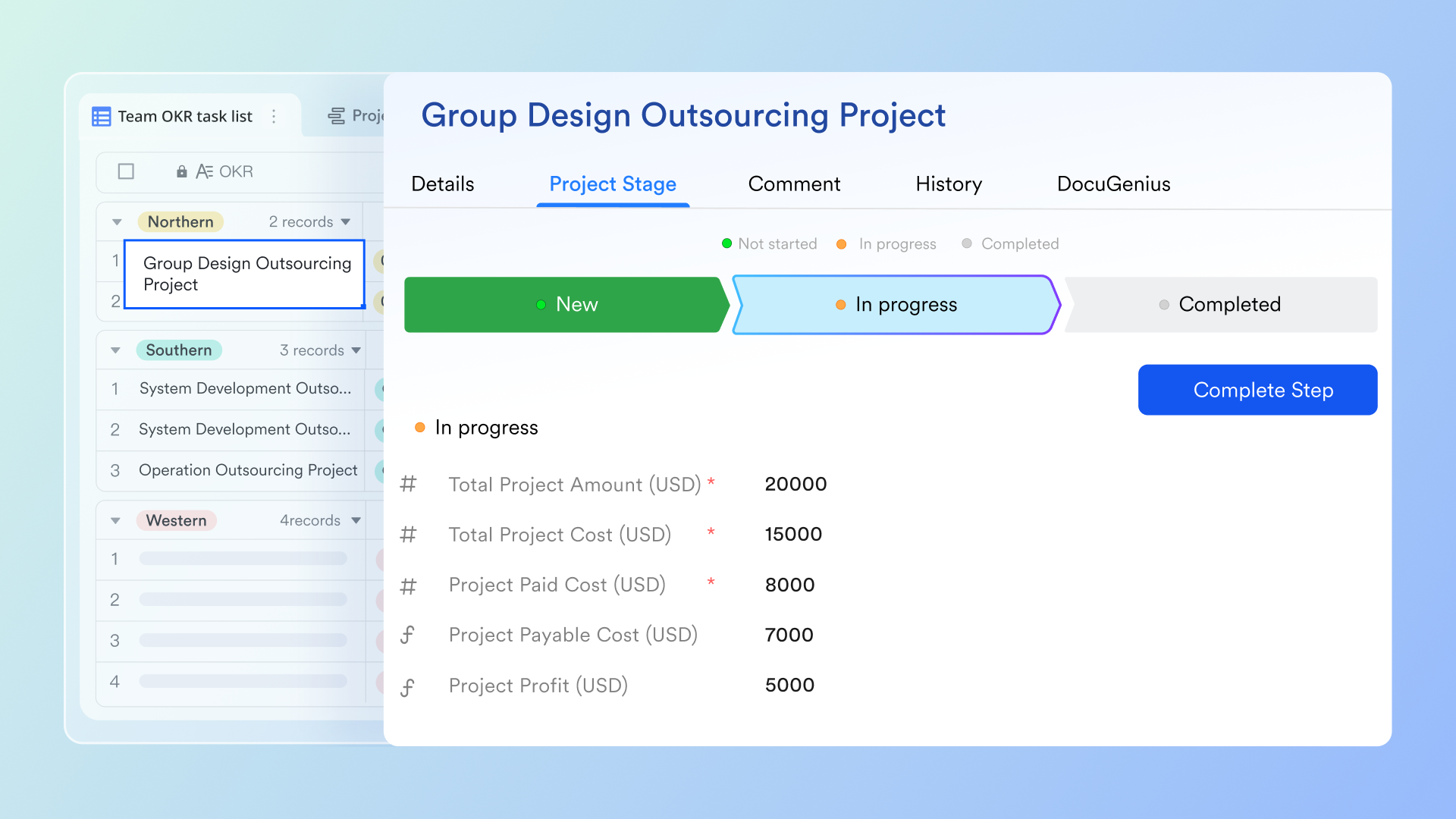
Drag-and-drop canvas supports instant and flexible setup
The visual page of Lark Base workflow is a drag-and-drop canvas where each step appears as a node; you can zoom in to examine a single sub-flow or zoom out to see the entire process management map. Nodes are connected with lines that show the exact routing and dependencies, making it easy to spot branching points, loops, or long paths that might cause delays. The ability to reposition nodes and rearrange the layout turns abstract rules into a readable diagram, which is helpful for onboarding, audits, and stakeholder reviews. Visual clarity also makes it simpler to explain the process to non-technical stakeholders and to spot optimization opportunities.
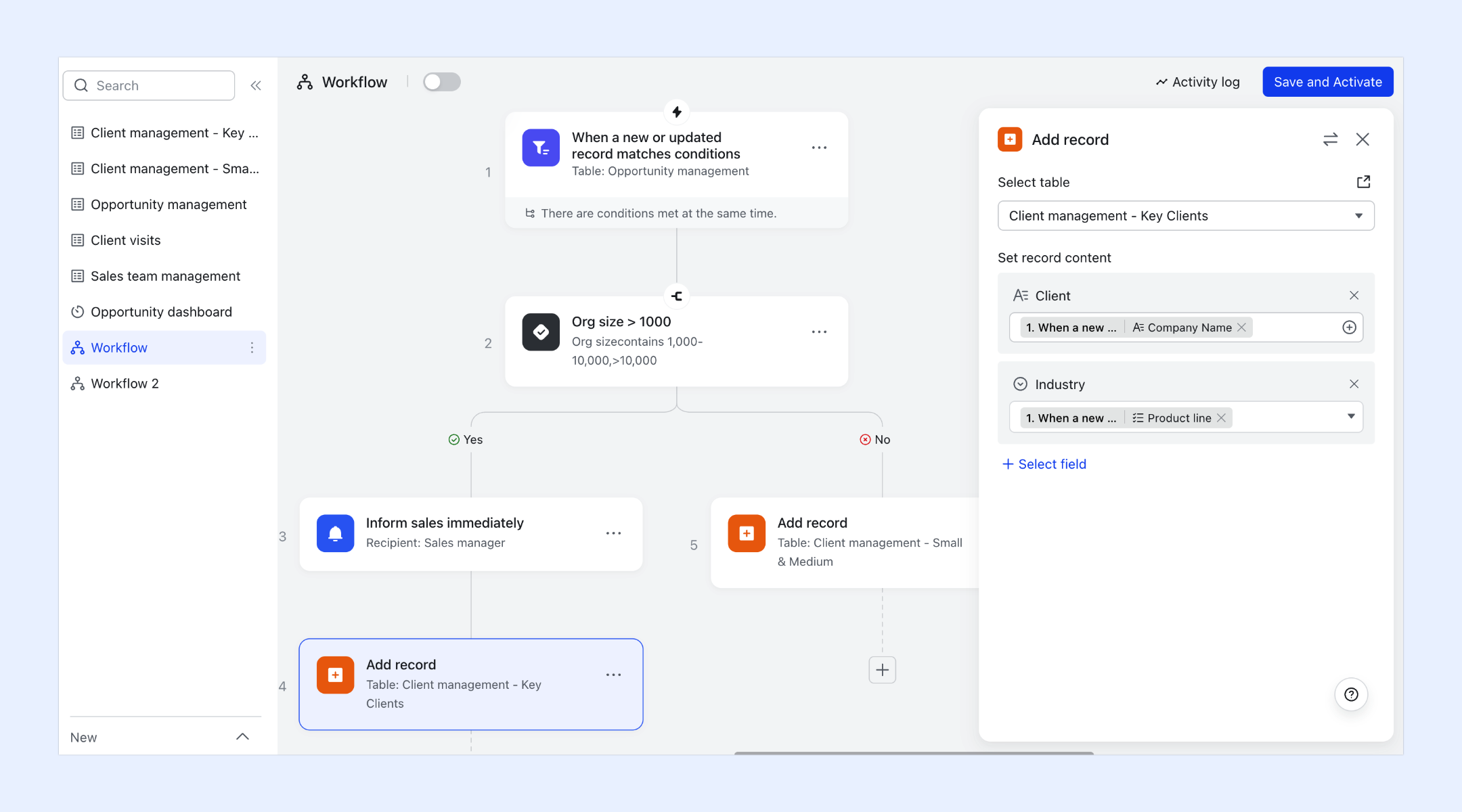
Automating complex, multi-step processes with conditional branches
Lark Base workflows let you model real-world processes that require multiple decisions and handoffs. Instead of a single linear flow, you can add If/Else branches that route items based on field values, approval outcomes, or computed conditions (for example: "If budget > $50k → send for senior approval; else → proceed to scheduling"). This conditional logic lets the pipeline handle decision-making automatically so only items that meet criteria move to the next stage. For teams that evaluate many proposals or requests, this reduces manual routing, enforces consistent rules, and speeds up movement from idea to execution.
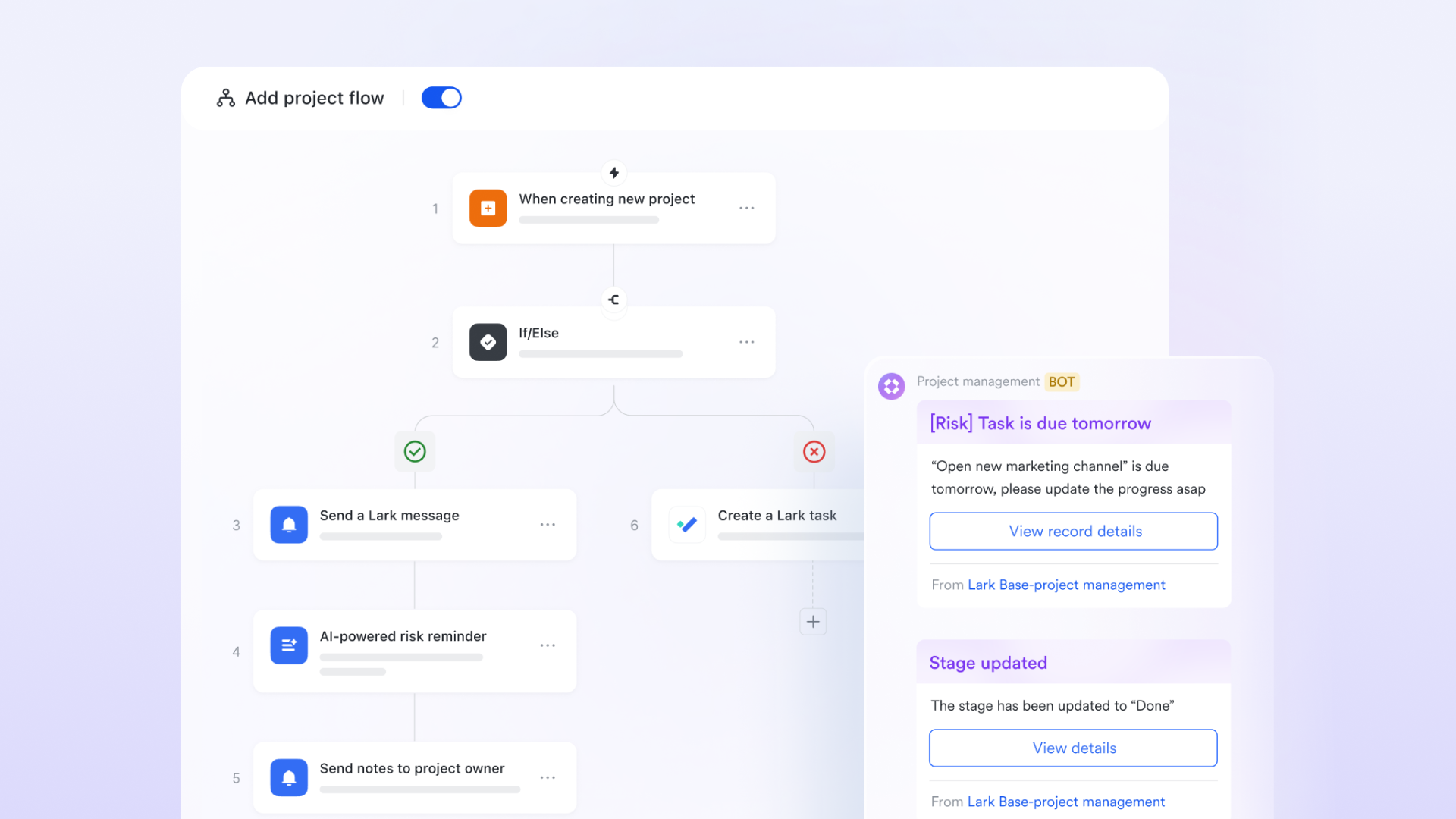
Build more powerful conditional logic and data flows with formulas
Lark supports formulas in workflow to optimize processes by allowing you to automate calculations and data handling at every step of your pipeline. Within any workflow node, you can insert formulas into input fields to dynamically compute values—whether it's dates, numbers, text, or logic decisions. The formula editor lets you reference data from earlier steps and apply over 100 built-in functions, enabling smart automation such as auto-calculating deadlines, generating IDs, validating inputs, or formatting text. Because formula results sync directly into workflow fields, teams reduce manual work, minimize errors, and keep data consistent across the entire process.
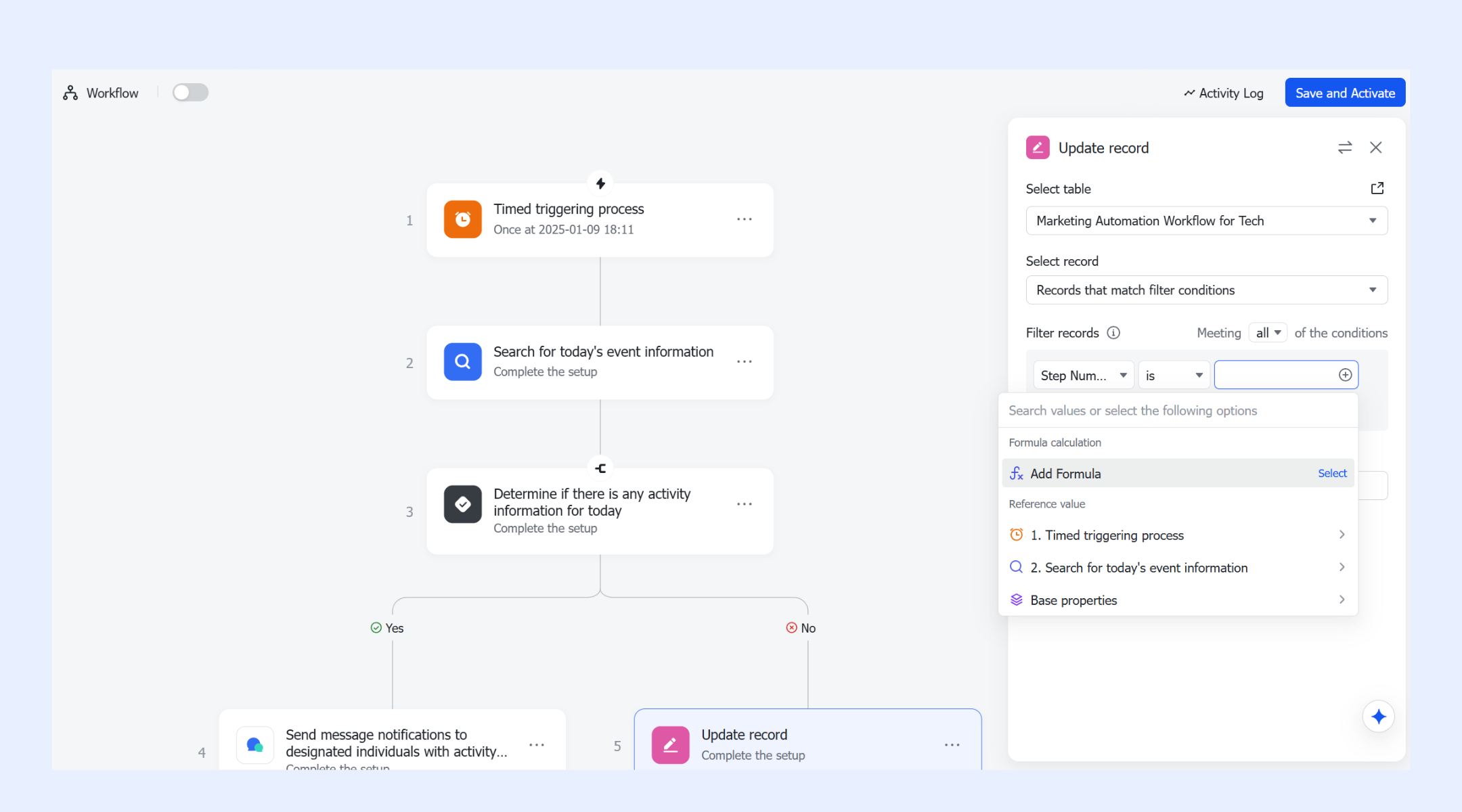
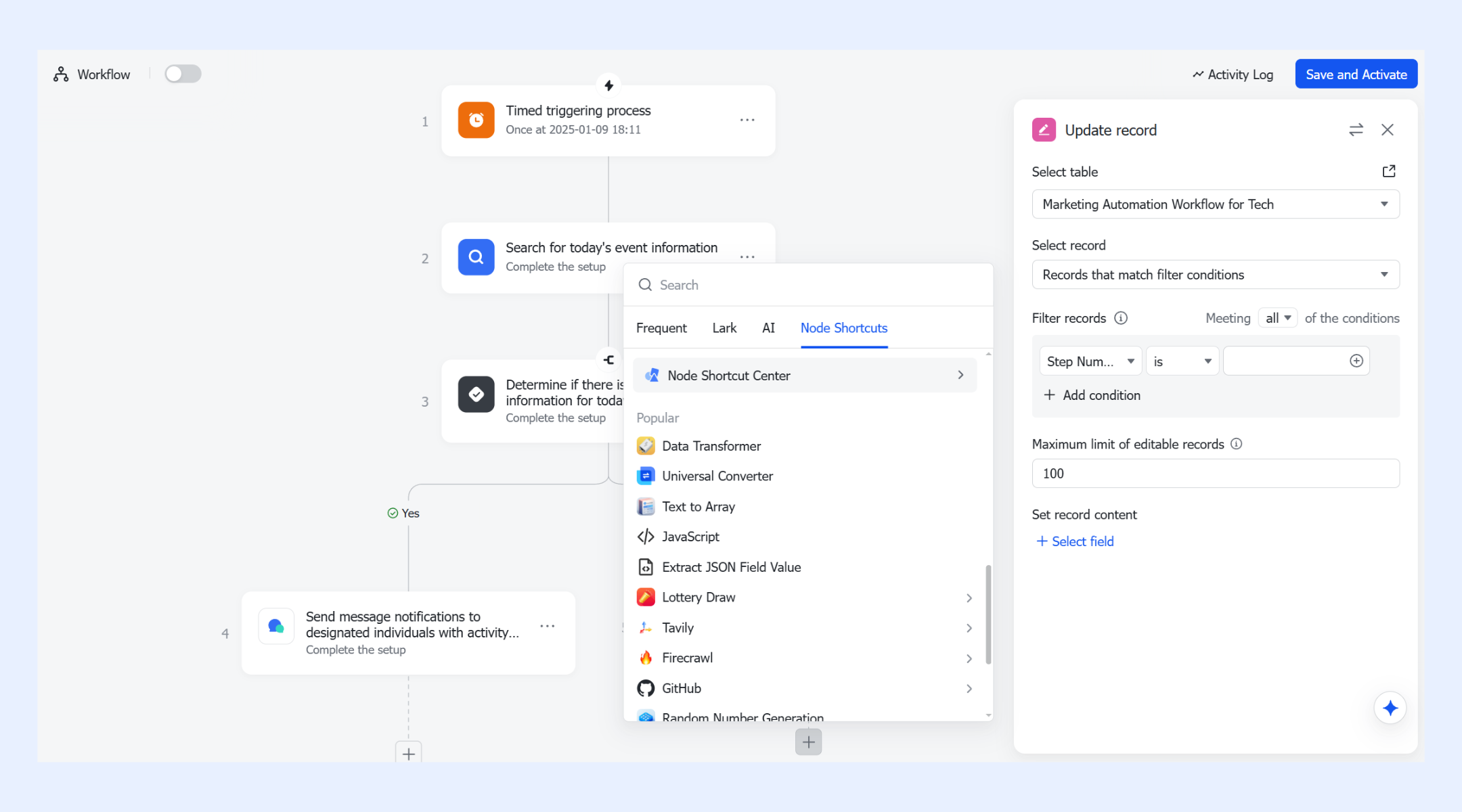
Customize your workflow with a variety of node shortcuts
Lark Base can include various nodes that perform tasks like summarizing long descriptions, classifying incoming requests, extracting key fields from text, or generating suggested next steps. These nodes can run within the flow so results appear as data values or comments on the documents—for example, a node could scan a project brief and auto-fill risk tags or a short executive summary for reviewers. Custom node shortcuts enable teams to encapsulate common combinations of AI and actions (e.g., "summarize + route”) so that complex behaviors are available without repeatedly configuring every detail.
- Starter plan: Free forever plan that includes 11 powerful tools for up to 20 users. It also comes with 100GB of storage, 1000 automation runs, AI translations, and more.
- Pro plan: $12/user/month (billed annually) for up to 500 users. It includes everything in Starter plus group calling for up to 500 attendees, 15TB of storage, 50,000 automation runs, and more.
- Enterprise plan: Contact sales for custom pricing. Supports unlimited users and includes even more automation runs and advanced security, compliance, and management features.
Real-world workflow optimization examples
Workflow optimization software becomes more meaningful when you see how it works in everyday situations. These examples show how different teams use structured processes and automation to move faster, reduce errors and keep work consistent across departments.
- Marketing approval cycles: Automating content reviews and routing approvals to the right people cuts delays and helps campaigns move forward on time. Content reviews often involve several people, which can slow things down if the process isn't organized. Automated routing sends each piece of content to the right reviewer at the right time. Deadline reminders keep work on track, and version control helps teams avoid mix-ups. This makes it easier for marketing teams to launch campaigns without unnecessary delays.
- Sales-to-fulfillment handoffs: A structured workflow ensures customer details, requirements and project time management flow smoothly from sales teams to operations without missing information. A smooth transition between sales and operations is essential for delivering strong customer experiences. With a structured workflow, customer details, requirements and timelines move seamlessly from one team to the next. This reduces the risk of missing information and helps operations start work without waiting for clarifications.
- IT ticket routing: Smart routing tools categorize incoming requests and assign them to the right technician, reducing backlog and speeding up issue resolution. IT teams deal with a constant flow of requests, and manual sorting can slow everything down. Smart routing tools categorize incoming tickets based on urgency or issue type and automatically assign them to the right technician. This improves resolution times and keeps IT workloads balanced.
- HR onboarding: Automated checklists, document collection and task reminders help new hires settle in faster and ensure nothing is missed during onboarding. Onboarding often involves many steps, from paperwork to training schedules. Automated workflows help HR track each task, send reminders and collect documents on time. This gives new employees a smooth start and ensures that important steps aren't forgotten during the onboarding process.
- Finance request routing: Clear approval paths and automated notifications streamline expense approvals, purchase requests and budget confirmations. Expense approvals, purchase requests and budget checks can pile up quickly if they rely on manual handoffs. Clear approval paths and automated notifications speed up the process by sending each request directly to the right decision-maker. This improves accuracy and reduces delays that can hold up purchasing or financial reporting.
Bonus tips: Manual vs. software-based workflow optimization
Comparing manual methods with software-based systems makes it clear how much efficiency modern workflow management tools can bring. Here's how both approaches differ in workflow examples in the real world and where software offers a clear advantage.
New trends: How AI enhances workflow optimization
AI adds an extra layer of speed and intelligence to optimized workflows. It helps teams automate decisions, reduce manual work and spot issues before they become bottlenecks. AI adds a layer of intelligence that makes optimized workflows even more effective. It speeds up decision-making, cuts down manual work and helps teams stay ahead of potential issues. When AI supports your processes, tasks move with less friction and teams gain more time to focus on work that actually matters.
- AI-generated summaries: AI quickly turns long conversations, documents or updates into clear summaries, helping teams understand what's important without reading everything. Long documents, emails and conversations can take time to review. AI can turn them into concise summaries that highlight the key points. This helps teams absorb important information quickly and stay aligned without digging through pages of text.
- Automated routing based on conditions: AI project management tools can direct tasks, tickets or automated approval to the right person based on rules, workload or past patterns, reducing delays and manual sorting. AI-powered tools can route tasks, approvals or tickets automatically based on workload, priority, skill set or previous patterns. This removes the guesswork and manual sorting that often slows teams down. Each item reaches the right person faster, reducing bottlenecks and keeping work flowing.
- Faster data handling: AI processes large amounts of information instantly, making tasks like data entry, classification and verification much faster and more accurate. AI can process large volumes of information almost instantly. Tasks like classification, verification and data entry that normally take hours can be completed in seconds. This improves accuracy and reduces the risk of human error, especially in repetitive or detail-heavy work.
- Improved prediction of bottlenecks: AI identifies patterns in your workflows and predicts where delays are likely to happen, giving teams a chance to fix issues before they slow things down. AI learns from past activity and identifies patterns that lead to delays. When it detects a potential slowdown, it can alert teams early so they can adjust plans or redistribute tasks. This proactive approach keeps workflows efficient and prevents issues from piling up.
Conclusion
Workflow optimization is ultimately about making work smoother, clearer, and easier for teams. By identifying weak points, simplifying processes, and using the right workflow management tools, organizations can reduce friction and improve overall performance. With the help of automation and AI, workflows become faster and more predictable, giving teams the freedom to focus on meaningful tasks instead of routine busywork. Whether you're streamlining communication, approvals or daily operations, the goal is the same: build a system that supports consistency, clarity and long-term efficiency—and platforms like Lark make that even easier to achieve.
FAQs
What is the main goal of AI workflow optimization tools?
The primary goal is to remove friction, shorten execution time, and create smoother, predictable processes. It ensures teams spend less time on repetitive work and more on strategic tasks.
How do you measure the success of workflow optimization?
Teams typically track metrics like cycle time, task completion rate, error frequency, resource utilization, and on-time delivery. These KPIs reveal how effectively the workflow is performing after changes.
Can small businesses benefit from workflow optimization software?
Yes. Smaller teams often see faster improvements because streamlined workflows eliminate unnecessary steps and reduce dependency on manual communication. This helps them operate more efficiently with fewer resources.
How often should a workflow be reviewed or updated?
Most organizations review workflows quarterly or whenever operational conditions change. Regular refinement ensures workflows stay aligned with team capacity, new tools, and evolving business goals.
What is the difference between workflow optimization and process automation?
Workflow optimization focuses on improving the structure and clarity of a process, while automation executes repetitive tasks automatically. Automation is often one component within a broader optimization effort.
How can healthcare teams improve workflow efficiency?
Healthcare teams can boost efficiency by using tools that support radiology workflow optimization, clinical workflow optimization, and otterpilot workflow optimization. These solutions streamline documentation, automate routine tasks, and reduce delays—helping teams work faster and more accurately.
Related reading
Table of contents
Start using Lark today

Manage all your work in one place
Boost team efficiency by 10x
Save up to 70% on software costs
Table of contents
Start using Lark today
Manage all your work in one place
Boost team efficiency by 10x
Save up to 70% on software costs
Keep reading







2026 Lark Technologies Pte. Ltd.
Headquartered in Singapore with offices worldwide.






Explore: