


Jira vs Notion: A Modern Team Guide

Matthew Sia
Product Marketing Manager
Aug 5, 2026
Matthew Sia
Aug 5, 2026

15 min read


Every team faces a fundamental choice in how they organize work. On one side, there is a need for structure and process. On the other, a desire for flexibility and connection. This tension is perfectly captured in the modern workplace debate: Jira vs Notion.
Jira is renowned for its robust project management capabilities, especially in software development. Notion has captured attention as an all-in-one workspace that adapts to nearly any workflow. The common question is a simple one: which tool is better?
However, the right question in the Jira vs Notion discussion is often more nuanced. It is not just about features, but about workflow, collaboration, and how a team aligns its efforts. This analysis moves beyond a simple feature list. We will explore the core strengths of both platforms, identify the real-world collaboration gaps they can create, and introduce a more connected way for modern teams to operate.
What is Jira: The engine of software development
Jira is a powerful project and issue tracking tool developed by Atlassian. It was created specifically to help software developers track bugs and manage agile development workflows. Over time, it has evolved into a comprehensive work management platform, though its core identity remains deeply rooted in software engineering.
The fundamental unit of work in Jira is an "issue." An issue can represent anything a team needs to track: a software bug, a new feature request, a help desk ticket, or a single task within a larger project. This flexible foundation allows teams to model their unique processes. Issues are organized on visual boards, primarily supporting Scrum and Kanban methodologies. Scrum boards facilitate sprint planning, with features for backlog grooming, capacity planning, and sprint retrospectives. Kanban boards focus on visualizing workflow stages and limiting work-in-progress to optimize continuous delivery.
Jira's true power emerges in its granular control. Workflows can be customized to match a team's specific process, with defined statuses, transitions, and conditions. For instance, a bug might follow a path from "Open" to "In Progress" to "Code Review" before finally being resolved. Permission schemes ensure that only authorized users can perform certain actions, such as closing a critical issue or moving a task to a "Done" column. This level of detail provides structure and accountability for complex projects.
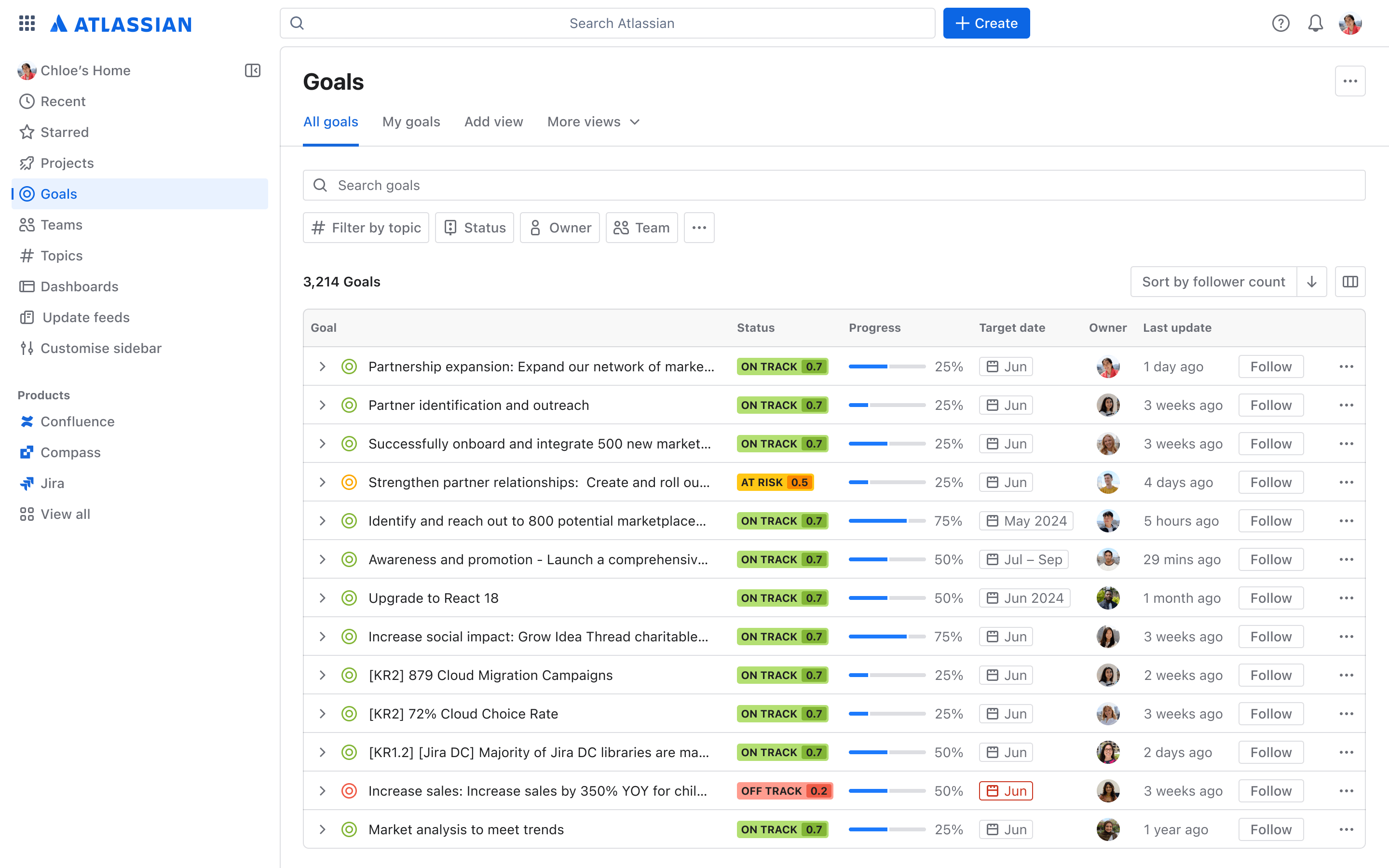
Image source: atlassian.com
Key strengths of Jira include:
- Advanced agile project management: Native support for Scrum and Kanban with features for sprint planning, backlog management, and velocity tracking. This provides teams with a disciplined framework for iterative development.
- Deep customization and automation: Teams can build complex workflows, create custom fields, and set up automated triggers to handle repetitive tasks. This reduces manual overhead and enforces process consistency.
- Powerful reporting and insights: A suite of built-in reports, such as burndown charts, cumulative flow diagrams, and velocity charts, gives teams clear visibility into their performance, bottlenecks, and progress toward goals.
- Extensive developer ecosystem: Jira integrates deeply with a vast array of development tools, including code repositories like Bitbucket and GitHub, CI/CD platforms like Jenkins, and documentation tools like Confluence. This creates a connected pipeline for the entire software development lifecycle.
- Scalability for large organizations: With robust permission schemes, project roles, and the ability to handle thousands of issues, Jira is designed to scale from a small startup team to a large enterprise with multiple departments.
The ideal Jira user is a software developer, QA engineer, scrum master, or engineering manager. It is the definitive tool for teams that require rigor, traceability, and powerful process control for their technical work.
What is Notion: The adaptable all-in-one workspace
Notion is an all-in-one workspace designed to consolidate a team's tools into a single, unified platform. It breaks down the barriers between different types of work by using a flexible, block-based editor. Every element in Notion—a paragraph of text, a to-do list, an image, a video, or an embedded database—is a "block" that can be moved, rearranged, and styled freely. This architecture allows it to function as a note-taking app, a wiki, a project manager, and a database all at once.
At the heart of Notion's versatility are its databases. A Notion database is a structured collection of information, but its power lies in the multiple ways it can be visualized. The same dataset can be viewed as a traditional table, a Kanban board for task management, a calendar for date-based planning, a gallery for multimedia assets, or a simple list. Each entry in a database is its own page, which can be opened to contain a rich document with nested sub-pages, checklists, and more. This creates a deeply interconnected web of information.
Notion excels as a knowledge base and collaboration hub. Teams can create a central wiki with linked pages that never go out of date. Project documentation, meeting notes, and company handbooks can live directly alongside the tasks and projects they reference. Its real-time editing and commenting features make collaboration intuitive, reducing the need for long email threads and scattered file versions.
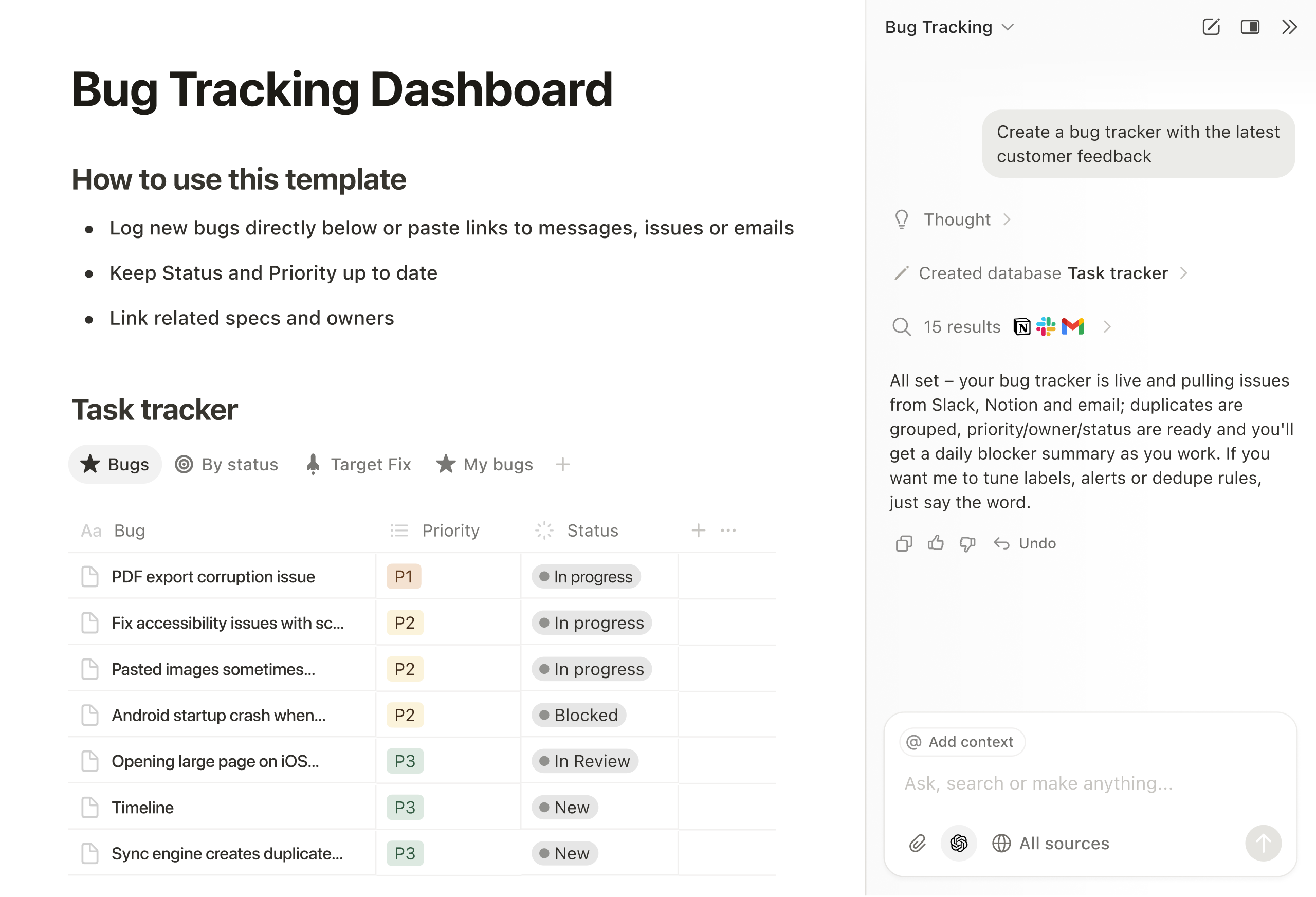
Image source: bradfrost.com
Key strengths of Notion include:
- Unmatched flexibility and customization: The block-based editor and database system allow teams to build exactly the workspace they need, from a simple personal task list to a complex company-wide operating system.
- Integrated note-taking and knowledge management: Notion eliminates the gap between dynamic tasks and static documentation. Project briefs, research notes, and wikis are first-class citizens within the workspace.
- User-friendly templates and onboarding: A vast library of pre-built templates for everything from product roadmaps to employee directories helps teams get started quickly, lowering the barrier to entry.
- Unified workspace for cross-functional teams: By replacing multiple single-purpose apps, Notion reduces context switching and creates a single source of truth for the entire team, from engineering and design to marketing and HR.
- Adaptable project tracking for lightweight workflows: While not a replacement for specialized tools like Jira in complex software development, its database boards provide excellent task management for non-technical projects and personal productivity.
The ideal Notion user is a startup, a small to medium-sized team, or any individual or group that values adaptability over rigid structure. It thrives in environments where processes are evolving and where consolidating information into one accessible place is a top priority.
A detailed jira vs notion feature comparison
To provide a clear visual representation of their core differences, we'll begin with a detailed comparison table that offers an at-a-glance overview of Jira and Notion across key functional dimensions. This will be followed by an in-depth analysis of key aspects.
Feature comparison table at a glance
To make an informed decision, a side-by-side look at their capabilities is essential. This comparison highlights how their design philosophies translate into practical features.
Project management and task tracking
Jira provides a structured, opinionated system for project management. Work is organized into sprints, with clear beginnings and ends. Capacity planning, story point estimation, and sprint retrospectives are native concepts. This structure is excellent for ensuring predictability and focus in software development.
Notion offers a more freeform approach to task management. Using database boards, teams can create Kanban-style workflows. However, it lacks the built-in rituals and reporting of Jira. It is powerful for tracking projects but requires the team to build and enforce their own processes, which can lead to inconsistency.
Collaboration and documentation
This is a area of stark contrast. Notion seamlessly blends documentation with task management. Project briefs, meeting notes, and knowledge bases live right next to the work being done. Collaborative editing feels natural and integrated.
Jira, by itself, is not a strong documentation tool. Teams typically pair it with Confluence, Atlassian's wiki product. This creates a context switching problem. Details documented in Confluence must be linked to issues in Jira, forcing team members to constantly jump between two separate applications.
Customization and complexity
Jira is highly customizable. Workflows, fields, and issue types can be tailored to precise needs. However, this power comes with significant complexity. Administering Jira often requires a dedicated expert, and its interface can be overwhelming for casual users.
Notion is customizable in a more user-friendly way. Anyone can build a database or rearrange a page. The trade-off is the potential for chaos. Without strong governance, workspaces can become disorganized, with different teams building conflicting systems.
Integrations and ecosystem
Jira boasts deep, mature integrations within the developer toolchain. Connecting with code repositories, CI/CD pipelines, and monitoring tools is straightforward. Its ecosystem is built for technical teams.
Notion has a growing marketplace of integrations with popular productivity and business apps. It connects well with tools like Slack, Figma, and Google Drive, making it a hub for a wider range of business functions.
Pricing analysis: Cost comparison and value assessment
On the surface, both tools offer competitive and similar pricing tiers for small teams and large enterprises. However, the true cost extends beyond the subscription fee.
For Jira, the hidden cost can be administrative overhead and the need for additional licenses for Confluence. For Notion, the cost can be the time spent building and maintaining custom workspaces. For both, there is a productivity tax paid by teams who must operate across a fragmented tool landscape. Companies looking to optimize software spending frequently compare their options against Google Workspace pricing and ClickUp pricing.
The hidden challenge: Collaboration gaps between tools
The choice between Jira and Notion is often presented as a simple binary decision. However, the reality in many modern organizations is more complex. Teams frequently end up using both tools simultaneously, creating a fragmented digital workplace. This division generates significant, often unaddressed, collaboration gaps that can silently erode productivity and alignment.
- Information silos and disconnected knowledge
- When engineering teams work in Jira and other departments like product, marketing, or design operate in Notion, critical information becomes trapped in separate containers.
- The product spec problem: A product manager writes a detailed product requirements document (PRD) in Notion. Developers then break down this work into tasks and bugs in Jira. Any updates or clarifications to the original PRD require manual synchronization across both platforms. The link between the source of truth (the PRD) and the execution (the Jira tickets) is fragile and easily broken.
- The status update black hole: Getting a holistic view of project status requires manually combining data from two systems. Leaders must ask: "What's the progress in Jira, and what are the latest notes in Notion?" This disjointed process makes it difficult to have a single, reliable source of truth for project health, leading to misinformed decisions.
- The high cost of constant context switching
- The mental burden of constantly jumping between specialized applications creates a significant "productivity tax" that is rarely calculated.
- A developer's fragmented workflow: A developer might need to: read a brief in Notion, check a task in Jira, discuss it in a separate communication app like Slack or Teams, and then update a code repository. Each switch interrupts their deep work state.
- Broken work continuity: There is no seamless flow from discussion to action. A conversation about a new feature idea in a Notion document cannot directly create a Jira ticket. Someone must manually copy the information, a process that is slow, prone to error, and breaks the natural momentum of collaboration.
- Misalignment between different team functions
- The use of different tools can inadvertently reinforce organizational silos, creating friction in cross-functional collaboration.
- Divergent work languages: The engineering team "thinks" in terms of Jira issues, sprints, and story points. The product and marketing teams "think" in terms of Notion databases, pages, and toggle lists. This tool-driven divergence can create a communication barrier, where each function has a different vocabulary and workflow for describing the same project.
- Onboarding and accessibility: For non-technical stakeholders, Jira can be intimidating and complex. They may struggle to find information or update statuses, making them reluctant participants in the development process. Conversely, developers may find Notion's lack of rigid structure insufficient for tracking complex dependencies. This mismatch forces teams to operate at the level of the lowest common denominator of tool accessibility.
In essence, the problem is not that Jira or Notion are ineffective tools. The problem is the seam between them. This seam is where details fall through, where delays are introduced, and where the collective understanding of a project can fracture. A truly efficient team requires not just powerful tools, but a powerfully connected work environment.

Jira vs Notion: Which tool is the right choice?
The decision between Jira and Notion is not about finding a universally "better" tool, but about identifying which solution best aligns with your team's primary work style, core requirements, and tolerance for process management. The right choice becomes clear when evaluated against specific scenarios.
Choose Jira if your team's work revolves around complex, process-driven software development.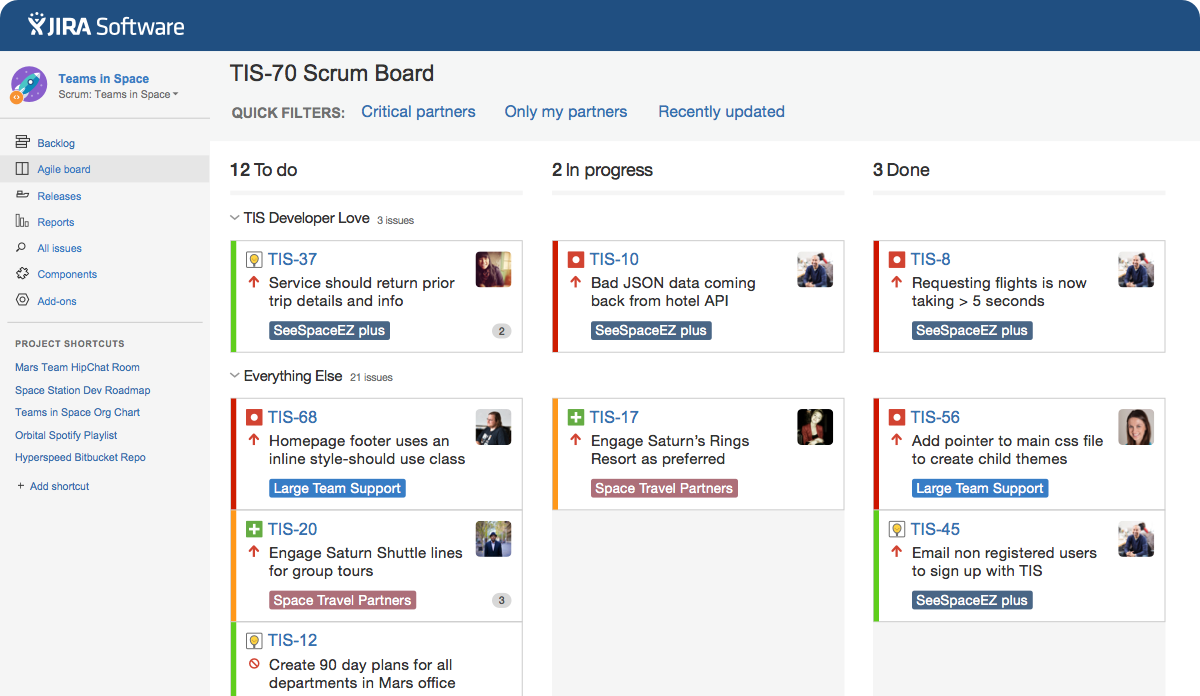 Image source: atlassian.com
This is the definitive choice for teams that require rigorous structure and advanced project tracking. If your work is characterized by defined sprints, strict deadlines, numerous dependencies between tasks, and a need for detailed reporting on velocity and progress, Jira's methodology-native approach is invaluable. It is particularly suited for:
- Dedicated software development teams practicing Scrum or Kanban.
- Large organizations that require granular permission schemes, detailed audit trails, and scalable project structures.
- Environments where process compliance is critical, and the overhead of administering a complex tool is justified by the need for control and predictability.
In these contexts, Jira acts as a powerful engine that provides the structure necessary to manage intricate technical work efficiently.
Choose Notion if your team prioritizes flexibility, knowledge synthesis, and lightweight project tracking.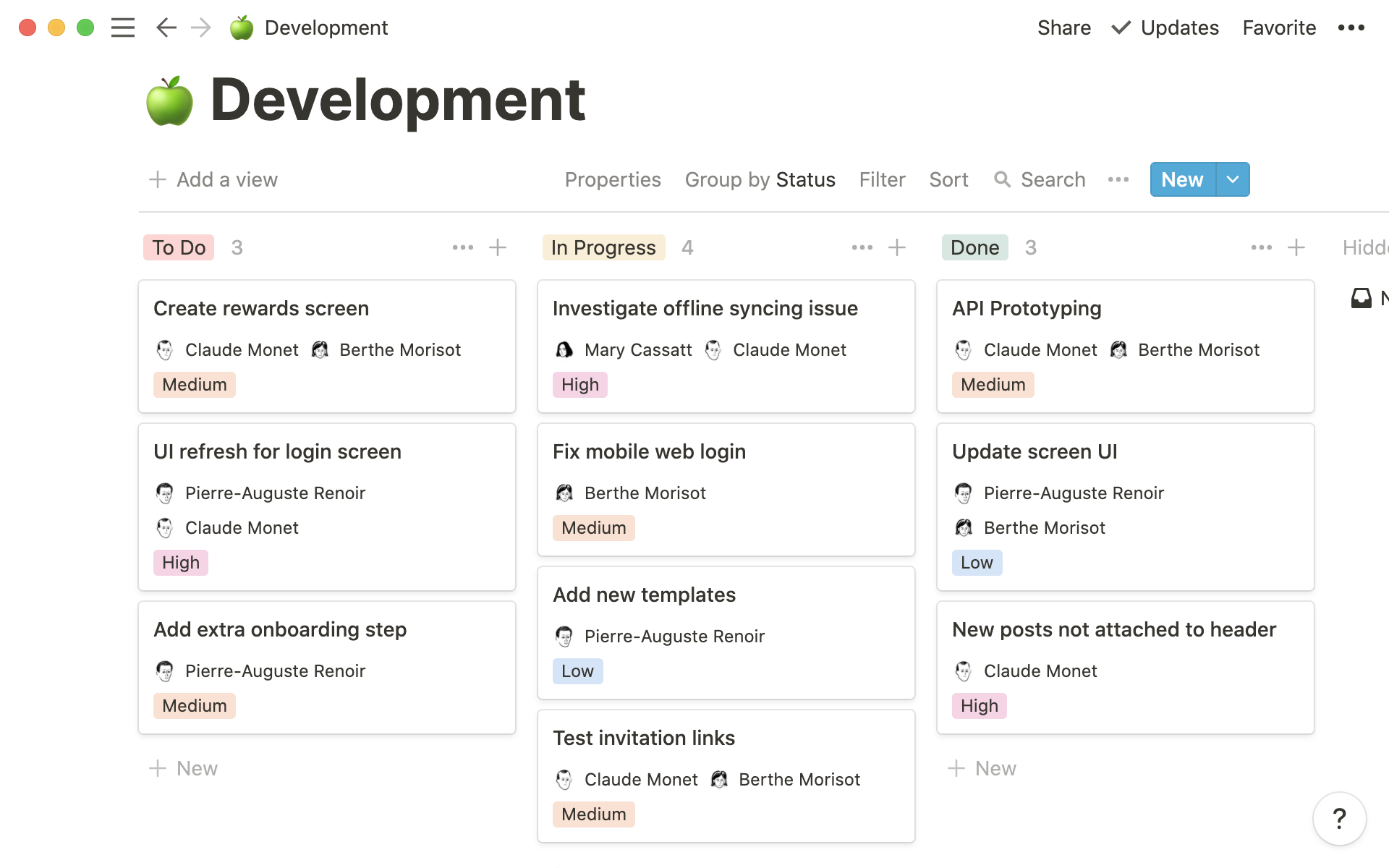 Image source: notion.com
Notion excels for teams whose work is more adaptive and information-centric. It is the superior option when the primary need is to break down information silos and create a dynamic, interconnected knowledge base alongside task management. It is ideal for:
- Startups and small to medium-sized teams where processes are still evolving and roles are fluid.
- Cross-functional teams that need a shared space for documentation, project briefs, and task lists without the complexity of a dedicated project management tool.
- Groups that value customization and are willing to invest time in building and maintaining their own workspace structures.
Here, Notion serves as a centralized hub for thought and collaboration, empowering teams to work in a more connected and adaptable manner.
However, you can also consider a third path. If your team needs both powerful project management and seamless, cross-functional collaboration without the friction of tool switching, a unified platform may be the optimal solution.
How Lark creates a connected workflow for agile teams
The choice between power and flexibility, or between structure and collaboration, feels like a compromise. What if a team did not have to choose? The emerging category of unified collaboration platforms challenges the idea that teams need a patchwork of best-in-class tools that do not speak to each other. A unified workspace combines core functionalities like messaging, project management, docs, and calendar into a single, cohesive experience. This approach directly addresses the collaboration gaps and context switching problems inherent in using separate tools like Jira and Notion.
Lark transcends this dilemma by involving their strengths into a single, cohesive platform. As one of the best Google Workspace alternatives, Lark doesn't just offer features; it creates a connected ecosystem where information and action flow seamlessly. Here’s how specific Lark functionalities deliver a unified experience that standalone tools cannot match.
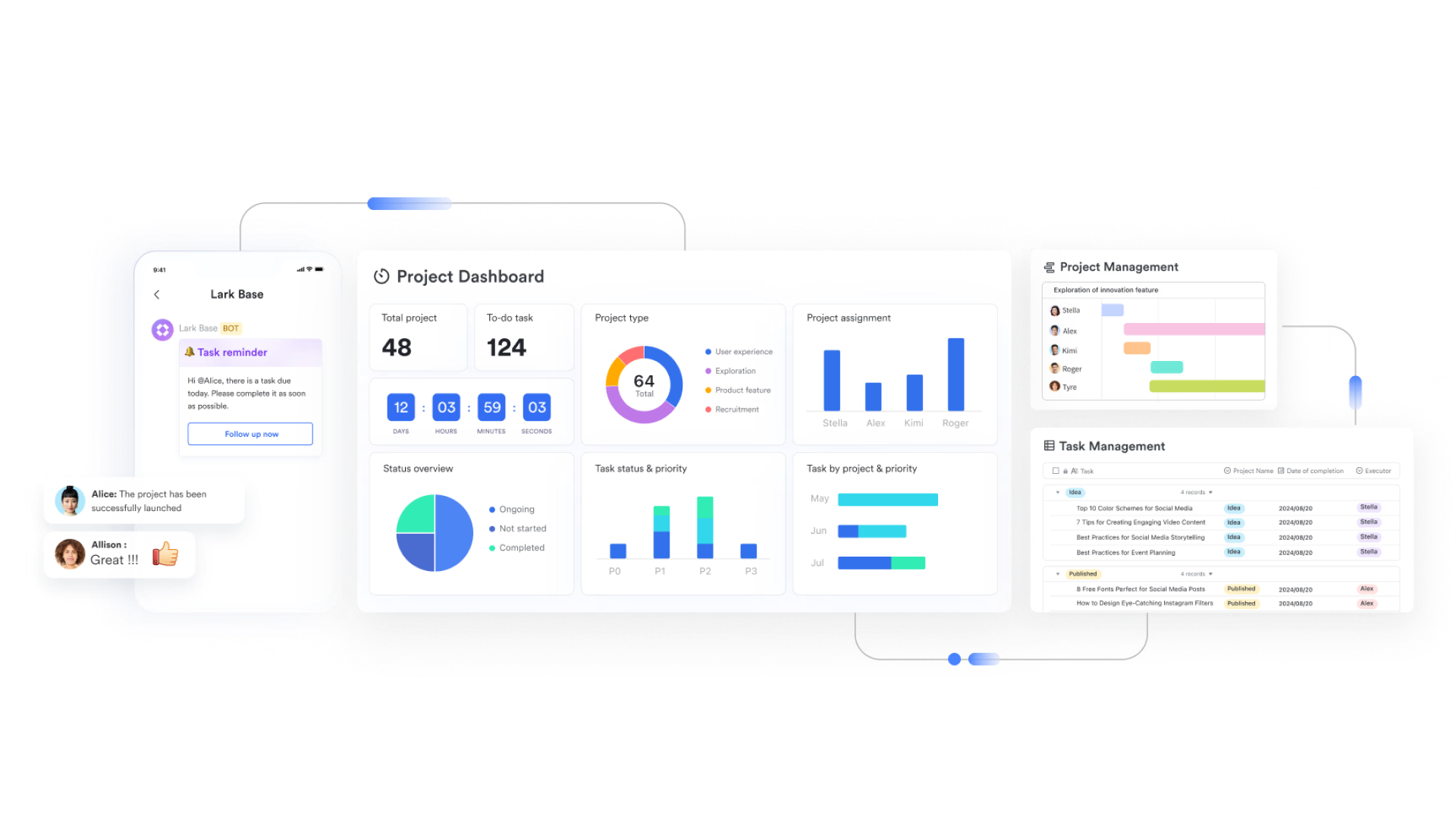
Lark Base: The central, context-rich project hub
Lark Base is more than a flexible database; it is the dynamic core of your team's work, combining the adaptability of Notion with the structured tracking power akin to Jira.
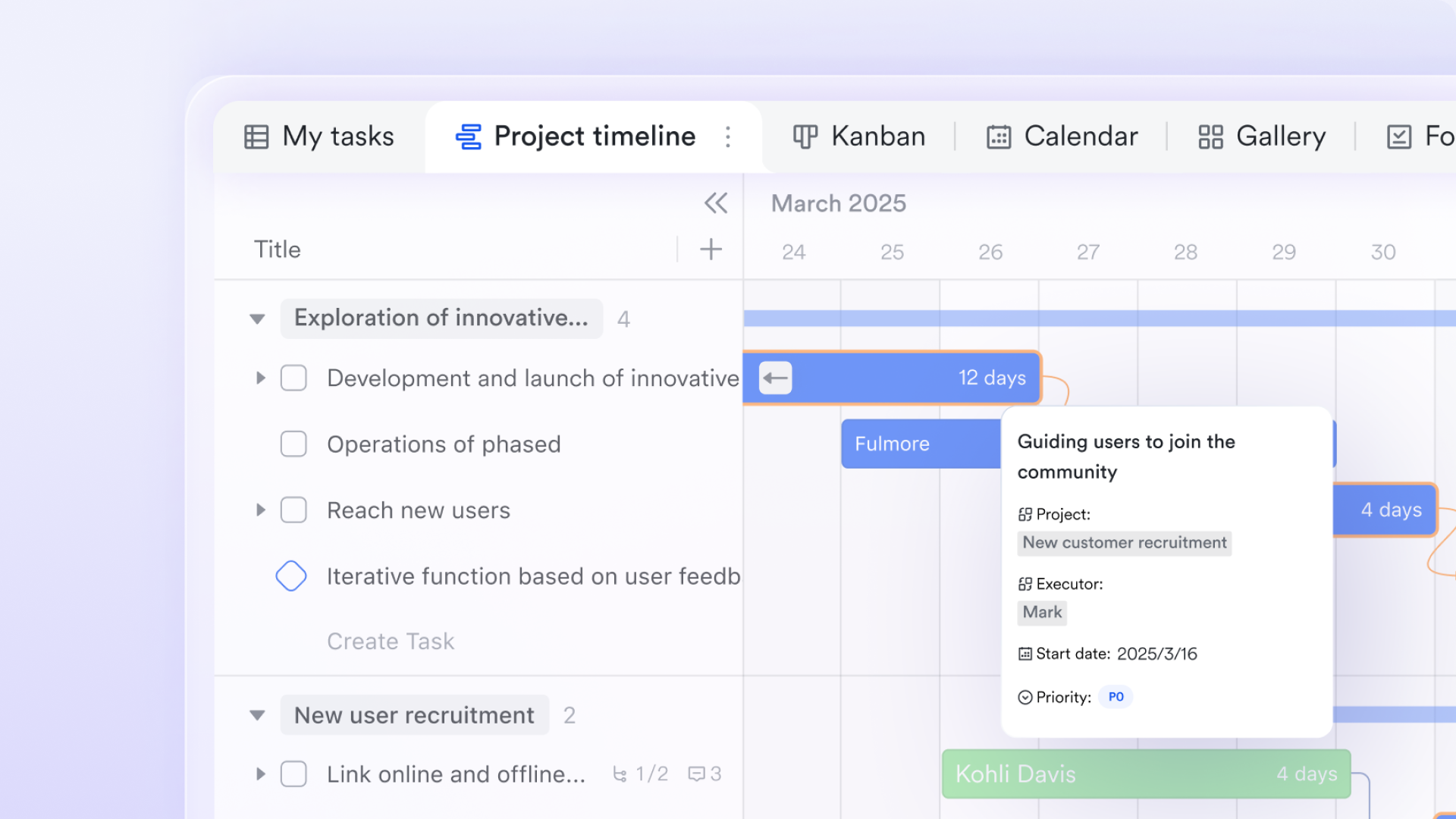
- Dynamic information association: In Lark Base, a product requirement entry can be directly linked to relevant market research documents, design drafts, and code repository addresses. This resolves the issue of information being siloed within individual "issues" in Jira and the hassle of manually maintaining relationships between different databases in Notion.
- Automated workflows: You can configure automation rules so that when a task status in Base changes to "Ready for Testing," a notification is automatically sent to the testing team's group chat. This business logic-driven automation is significantly more powerful and intuitive than the complex configurations required in Jira or the limited automation capabilities in Notion.
- Rich project views: Every team member can view the same dataset in their preferred format: product managers track feature status via Kanban boards, developers manage dependencies through Gantt charts, and managers gain macro-level project health insights from dashboards. This flexibility enables Lark Base to handle complex R&D scenarios where Jira excels while maintaining the adaptability characteristic of Notion.
Lark AI Meeting Notes: From discussion to decisive action
This is where Lark intelligently bridges the gap between conversation and execution, a process that is manual and fragmented when using Jira and Notion alongside a video conferencing tool.
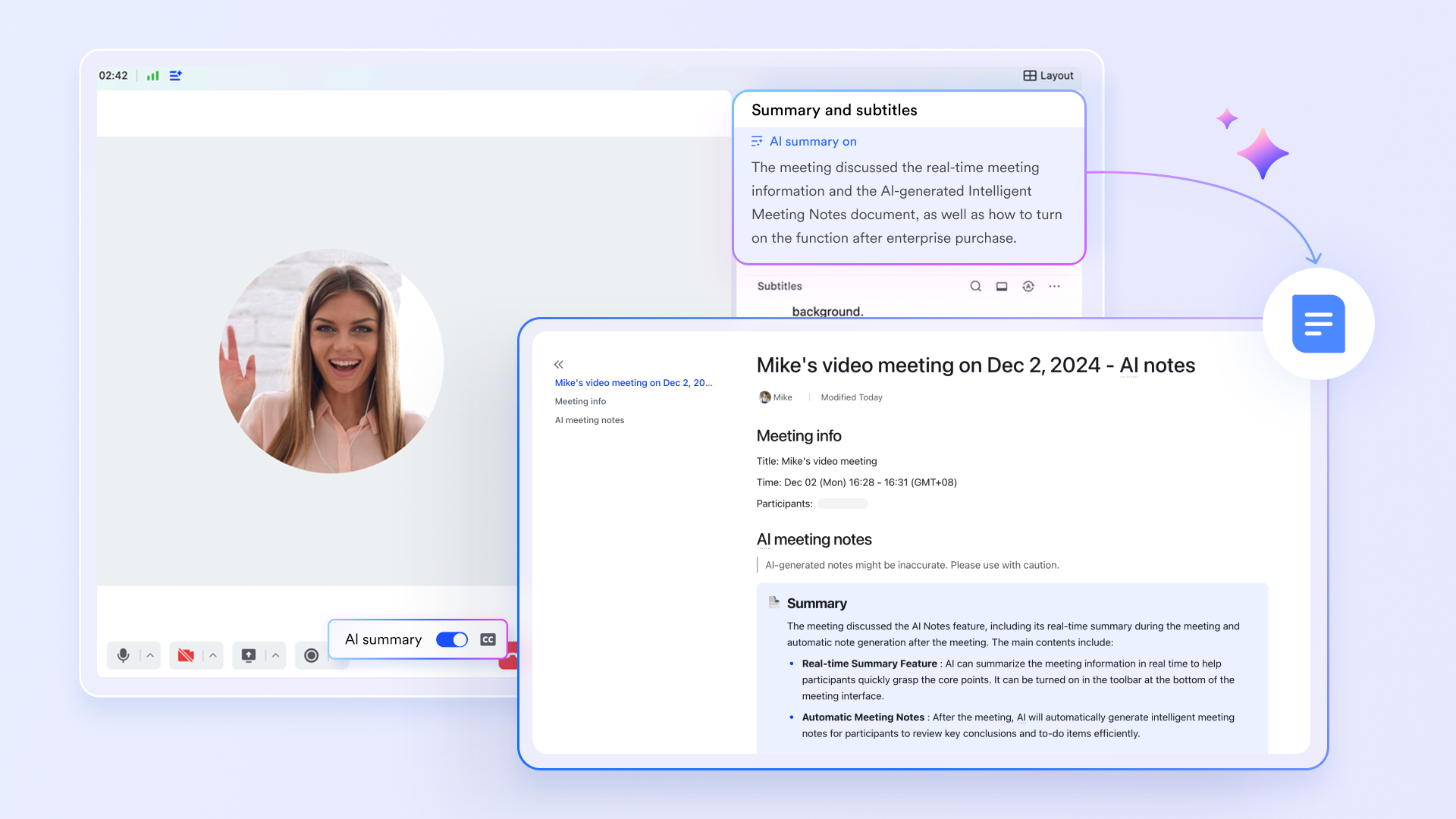
- Intelligent action item detection: During a Sprint planning session in Lark Meetings, the AI Meeting Notes feature does more than just transcribe discussion. It automatically identifies and highlights potential action items and key decisions from the conversation.
- Streamlined task creation: With a clear list of AI-generated action items, the meeting host or participants can swiftly create corresponding Lark Tasks with the correct assignees and deadlines. This process eliminates the need for someone to manually parse pages of notes post-meeting to extract to-dos.
- Closing the collaboration loop: The AI-generated summary, complete with action items, can be instantly shared with the broader team in a linked Lark Messenger group. This ensures everyone is aligned on decisions and their responsibilities, directly tackling the misalignment that occurs when meeting outcomes are manually transferred to Jira or Notion.
Lark Messenger: The glue for contextual collaboration
Lark Messenger is not a separate app; it is the nervous system that connects all work, eliminating the context-switching between a chat tool and your project management software.
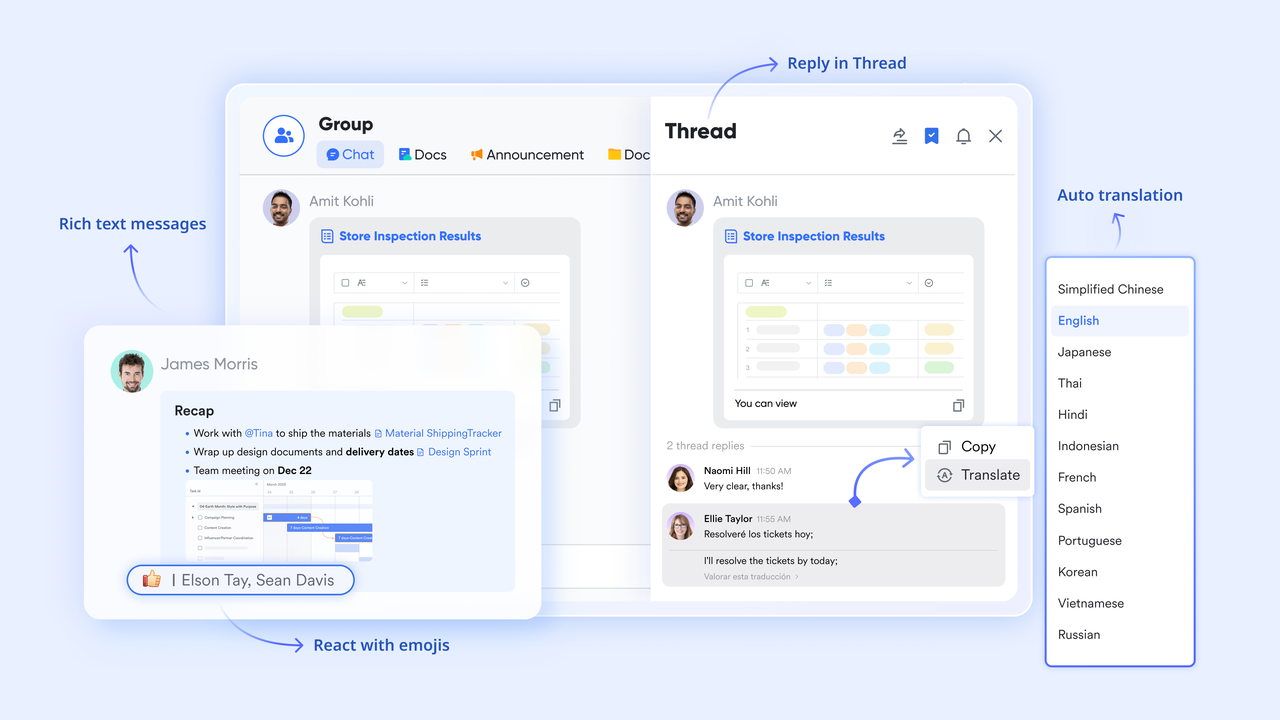
- Discussion anchored to work: Any task in Lark Base can have an associated group chat. Instead of describing a Jira ticket number in Slack, team members can discuss issues directly in the context of the work item. All files, decisions, and conversations are permanently logged with the task.
- Accelerated decision-making: Team members can pin critical tasks, documents, or calendar events to a chat to focus discussion. This keeps conversations productive and action-oriented, resolving the problem of information getting lost in endless chat streams that are disconnected from Jira or Notion.
Lark Calendar & Tasks: Unified work orchestration
This integration provides a holistic view of an individual's commitments, solving the problem of a fragmented workload across multiple tools.
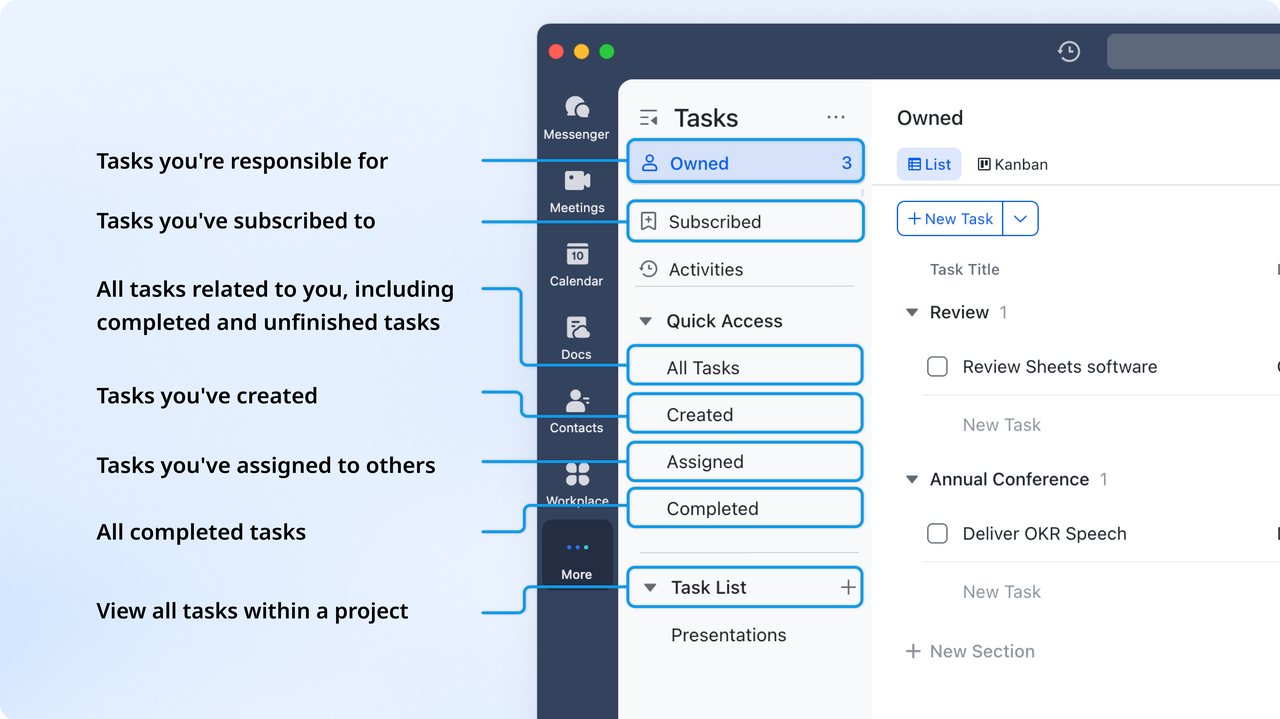
- A single view of work: Tasks assigned from a Messenger conversation automatically appear in an individual's centralized task list and can be visualized on their Lark Calendar. This prevents tasks from being missed because they were buried in a specific project board or a long chat history.
- Reduced cognitive load: A developer no longer needs to juggle Jira for tickets, Notion for meeting notes, and Google Calendar for events. Lark Calendar and Tasks bring all personal work items into one streamlined interface, clearly showing the intersection of scheduled events and task deadlines.
By weaving these functionalities together, Lark creates a truly connected workflow. It ensures that a decision made in a meeting effortlessly transforms into a tracked task, that task's discussion happens in context, and its deadline is visible in a unified schedule. This native integration is what allows agile teams to move with unparalleled speed and alignment, beyond the limitations of combining Jira and Notion.
Pricing:
- Free plan: Includes 11 powerful products, supporting up to 20 users, 100 GB storage, 1,000 automation runs and unlimited AI translation in chats, docs and email.
- Basic plan: Starts at $6/user/month, supporting teams with over 20 users. Includes 1,000 runs/month for workflows and automations, 2,000 rows in a single Base table, 5TB storage, unlimited Open API calls, and 10 SSO apps.
- Paid plans: Starts at $12/user/month, supporting up to 500 users. Includes unlimited message history, 50,000 automated Base workflow executions per month.
- Enterprise plan: Contact sales for custom pricing. Supports unlimited users and includes even more automation runs and advanced security, compliance, and management features.
Conclusion
The jira vs notion debate highlights a real divide in how teams work. Jira offers unmatched power for structured software development. Notion provides incredible flexibility for knowledge and lightweight project management. Both are excellent tools for their primary use cases. However, the decision must account for the hidden costs of tool fragmentation. The collaboration gaps and constant context switching can erode the very productivity these tools seek to enhance.
For teams that refuse to accept this compromise, a unified platform like Lark offers a compelling path forward. It bridges the gap between structure and collaboration, providing a seamless environment where projects, communication, and schedules work in concert. This all-in-one approach allows teams to focus on what truly matters: building great products together, without the friction.
It is time to think beyond a single tool and consider how your entire work ecosystem connects. The future of efficient teamwork is not just powerful features, but a powerfully connected experience.
FAQs
Can you replace Jira with Notion?
For complex software development teams, fully replacing Jira with Notion is challenging. Notion excels in flexibility and documentation but lacks Jira's native, powerful agile tracking and automation. It's better suited for lightweight project management or teams that prioritize a unified wiki over rigorous process control.
Is Notion still relevant in 2025?
Absolutely. Notion remains highly relevant by continuing to innovate, particularly with its AI features. Its strength as a customizable, all-in-one workspace for notes, wikis, and databases ensures its place as a key tool for teams aiming to consolidate information and streamline collaboration.
Who is Jira's biggest competitor?
The competitive field is broad, with strong contenders like Asana, Monday.com, and ClickUp. A significant and growing category of competitors is unified platforms like Lark, which involve messaging, project management, and docs into a single environment, offering a compelling alternative to Jira's more segmented toolset.
Is Jira being phased out?
No, Jira is not being phased out. It remains a core product for Atlassian. The company is, however, shifting its focus to the Cloud version and will stop selling new server/Data Center licenses. This strategic pivot has led some organizations to re-evaluate their tooling, but Jira itself continues to be actively developed.
Related reading
Table of contents
Start using Lark today

Manage all your work in one place
Boost team efficiency by 10x
Save up to 70% on software costs
Table of contents
Start using Lark today
Manage all your work in one place
Boost team efficiency by 10x
Save up to 70% on software costs
Keep reading








2026 Lark Technologies Pte. Ltd.
Headquartered in Singapore with offices worldwide.






Explore: