Managing one project is a planning problem. Managing ten is a visibility problem. Which projects are on track, which are consuming more resources than planned, which are at risk of missing a strategic milestone, and which should be deprioritized to protect the ones that matter most—these are not questions a single project plan can answer. A project management portfolio template creates the structure to answer all of them from one place. This guide covers what a portfolio template should include, the best formats for different use cases, how to build one in Excel, and the 15 best templates for teams ready to start immediately.
What is a project management portfolio template?
A portfolio template is a structured framework for tracking, evaluating, and managing multiple projects in a single centralized view. Instead of handling projects individually, it allows teams and leaders to monitor performance, prioritize initiatives, and allocate resources across the entire portfolio. This ensures better strategic alignment and visibility into what is delivering value versus what needs adjustment.
A well-designed template typically includes key fields such as project status, timelines, budgets, resource allocation, risk levels, and priority scores. Teams often use tools like a project portfolio management template in Excel to organize data in a simple, accessible format, especially for smaller or early-stage portfolios.
At a more advanced level, a template helps standardize the evaluation, approval, and tracking of projects over time. This creates consistency in decision-making and ensures that every project contributes to broader business goals while minimizing inefficiencies and overlaps.
4 types of project portfolio management templates
Different organizations require different portfolio views depending on their goals, team size, and decision-making needs. A single format cannot effectively support operational tracking, executive reporting, and strategic planning simultaneously.
Choosing the right template ensures clarity, better prioritization, and alignment across teams while reducing manual effort and confusion.
- Excel-based portfolio templates for basic tracking: Excel project portfolio management templates are ideal for teams starting with portfolio management and needing a simple, flexible structure. They help , budgets, timelines, and priorities in a centralized sheet without complex setup. A Microsoft Project Portfolio Management template often integrates well with Excel, allowing teams to combine familiarity with more advanced tracking features for small- to mid-sized portfolios.
- Dashboard templates for leadership reporting: Focus on high-level visibility, presenting key metrics such as project health, ROI, and risk in visual formats like charts and graphs. These are designed for quick decision-making by senior stakeholders. Tools like a Smartsheet project portfolio management template provide dynamic dashboards that automatically update, making it easier for leadership to monitor portfolio performance in real time.
- Resource planning templates for operations: These templates are designed to manage team capacity, distribute workloads, and allocate resources across multiple projects. They help identify bottlenecks and prevent overutilization of key team members. By mapping resources against timelines and priorities, operations teams can ensure smoother execution while maintaining productivity and avoiding burnout across the portfolio.
- Strategic portfolio templates for executives: Designed for long-term planning and alignment with business objectives. They focus on prioritization models, investment decisions, and rather than day-to-day tracking. These templates often include scoring systems, ROI analysis, and alignment with company goals, helping executives decide which projects to accelerate, pause, or eliminate for maximum impact.
Optimize your project portfolio strategy today
20 Project portfolio management Excel template examples
These templates are especially useful for small to mid-sized teams that need flexibility and quick implementation. With the right structure, they can support visibility, prioritization, and better decision-making across the portfolio.
Multi-project tracker
Multi-project tracker helps teams manage multiple projects simultaneously by organizing tasks, timelines, and statuses in one place. It provides clear visibility into progress across projects, making it easier to identify delays and overlaps. This template improves coordination, accountability, and overall execution efficiency.
Project roadmap Gantt chart
A project roadmap provides a visual timeline of tasks, milestones, and dependencies across a project or portfolio. It helps teams plan schedules, track progress, and identify overlaps or delays. This template improves coordination, visibility, and timely delivery of project goals.
Task management
Task management outlines the vision, direction, and planned evolution of a product over time. It highlights key features, milestones, and priorities aligned with business goals. This template ensures strategic clarity, team alignment, and focused product development.
Roadmap
A roadmap provides a high-level view of a project or product's direction, outlining key milestones, timelines, and priorities. It helps teams align with goals and understand the overall progression of work. This template ensures clarity, strategic focus, and better long-term planning.
Project tracking
Project tracking helps teams monitor progress, tasks, timelines, and performance in real time. It provides clear visibility into what is on track, delayed, or at risk. This template improves accountability, transparency, and overall project control.
Project portfolio management
Project portfolio management provides a centralized view of all projects, , priorities, and performance in one place. It enables better decision-making by aligning projects with strategic goals and resource availability. This template ensures improved visibility, coordination, and control across the entire portfolio.
Executive project status report
The executive project status report provides a high-level summary of project performance, including key metrics, risks, and progress updates. It helps leadership quickly understand project health and make informed decisions. This template and alignment between teams and executives.
Project status report
A project status report provides a structured update on project progress, including timelines, tasks, risks, and overall status. It helps teams and stakeholders stay informed about current developments and potential issues. This template improves transparency, communication, and the efficiency of project tracking.
Resource planning
Resource planning helps teams allocate people, time, and budget effectively across multiple projects. It provides visibility into workload distribution and identifies potential resource gaps or conflicts. This template ensures balanced utilization and smoother project execution.
Project management plan
A project management plan outlines the overall approach, scope, timelines, resources, and processes required to execute a project successfully. It serves as a guiding document for teams and stakeholders throughout the project lifecycle. This template ensures , alignment, and effective project delivery.
Project plan
The project plan defines the detailed steps, timelines, resources, and deliverables required to complete a project. It helps teams organize tasks, set expectations, and track progress effectively. This template ensures clarity, coordination, and successful execution of project goals.
Risk register
The risk register captures and tracks potential risks, their impact, likelihood, and mitigation strategies throughout a project. It helps teams proactively identify and manage uncertainties before they escalate. This template , preparedness, and overall project resilience.
Delegation of authority matrix
The delegation of authority matrix defines roles, responsibilities, and decision-making authority across projects and teams. It clarifies who is responsible for approvals, actions, and key outcomes. This template improves accountability, reduces confusion, and streamlines governance.
IT project status tracker
IT project status tracker helps , issues, and performance of technology-focused projects in real time. It provides visibility into development stages, risks, and resource utilization. This template improves coordination, accountability, and timely delivery of IT initiatives.
Strategic portfolio overview template
A strategic portfolio overview template provides a centralized, high-level dashboard for all projects, capturing key data such as status, priority score, ROI, and alignment with business goals. It enables leadership to quickly assess which initiatives are delivering value and which require attention or reprioritization. By consolidating critical insights into a single view, it enables faster, data-driven investment and strategic decision-making.
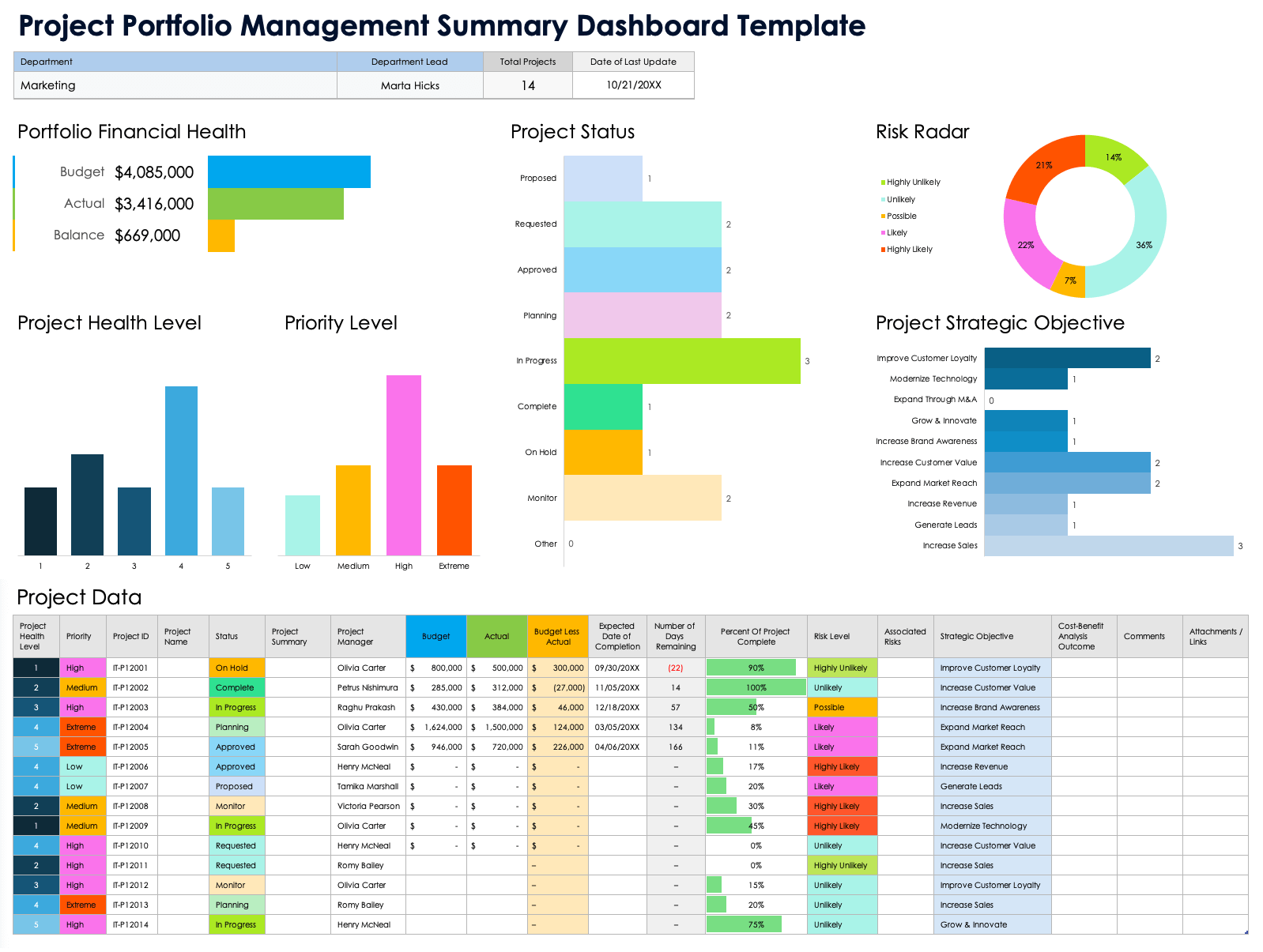
Image source: smartsheet.com
Resource allocation portfolio template
A portfolio template helps visualize team capacity across multiple projects by clearly showing who is assigned to what tasks and timelines. It highlights workload distribution, making it easier to identify overutilization, underutilization, and potential conflicts early. This enables managers to rebalance resources efficiently, prevent bottlenecks, and maintain steady project execution.
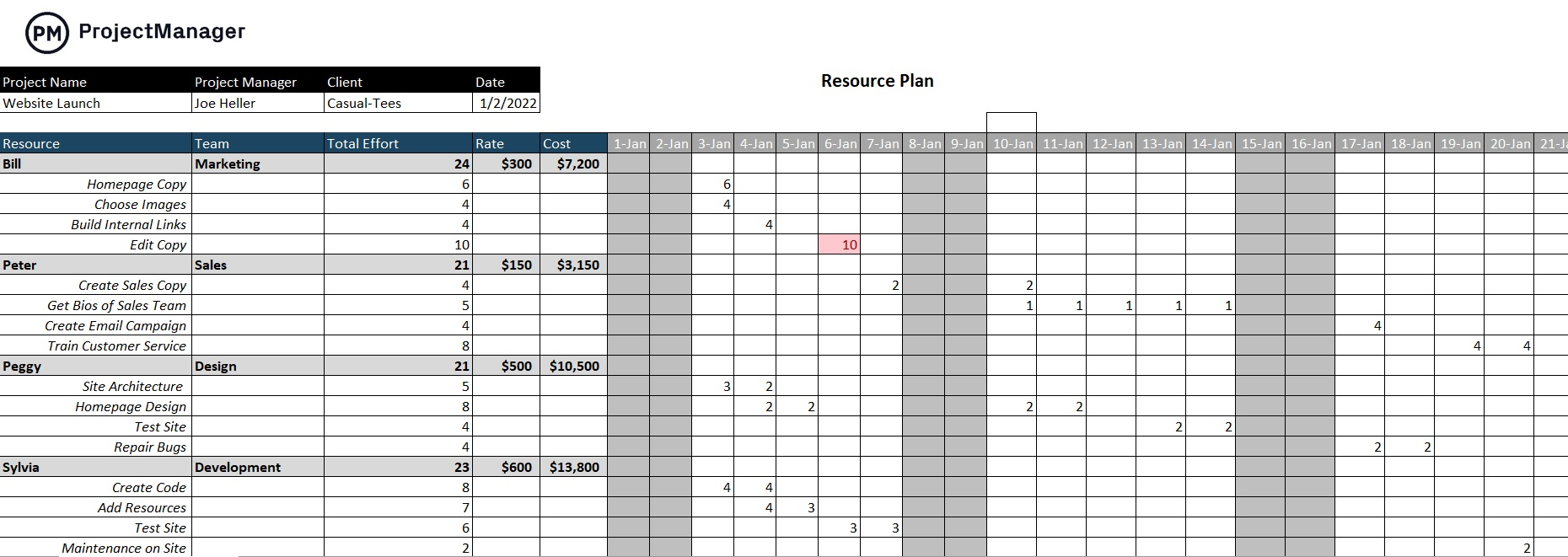
Image source: projectmanager.com
Project prioritization scoring template
A project prioritization scoring template uses structured models, such as cost vs. value or risk vs. impact, to evaluate and rank projects objectively. It applies weighted criteria so teams can compare initiatives based on strategic importance, feasibility, and expected returns. This approach enables data-driven decision-making, ensuring resources are focused on the most valuable and high-impact projects first.
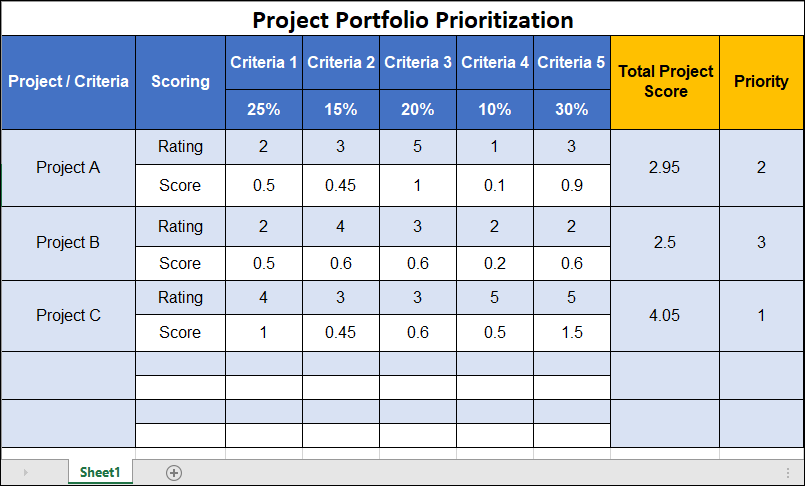
Image source: itsm-docs.com
Portfolio timeline and milestone template
A portfolio timeline and milestone template provides a of all projects, allowing teams to visualize schedules across the entire portfolio. It highlights overlapping timelines, key dependencies, and critical milestones that impact overall delivery. This helps managers coordinate projects more effectively, avoid scheduling conflicts, and ensure the timely completion of strategic goals.
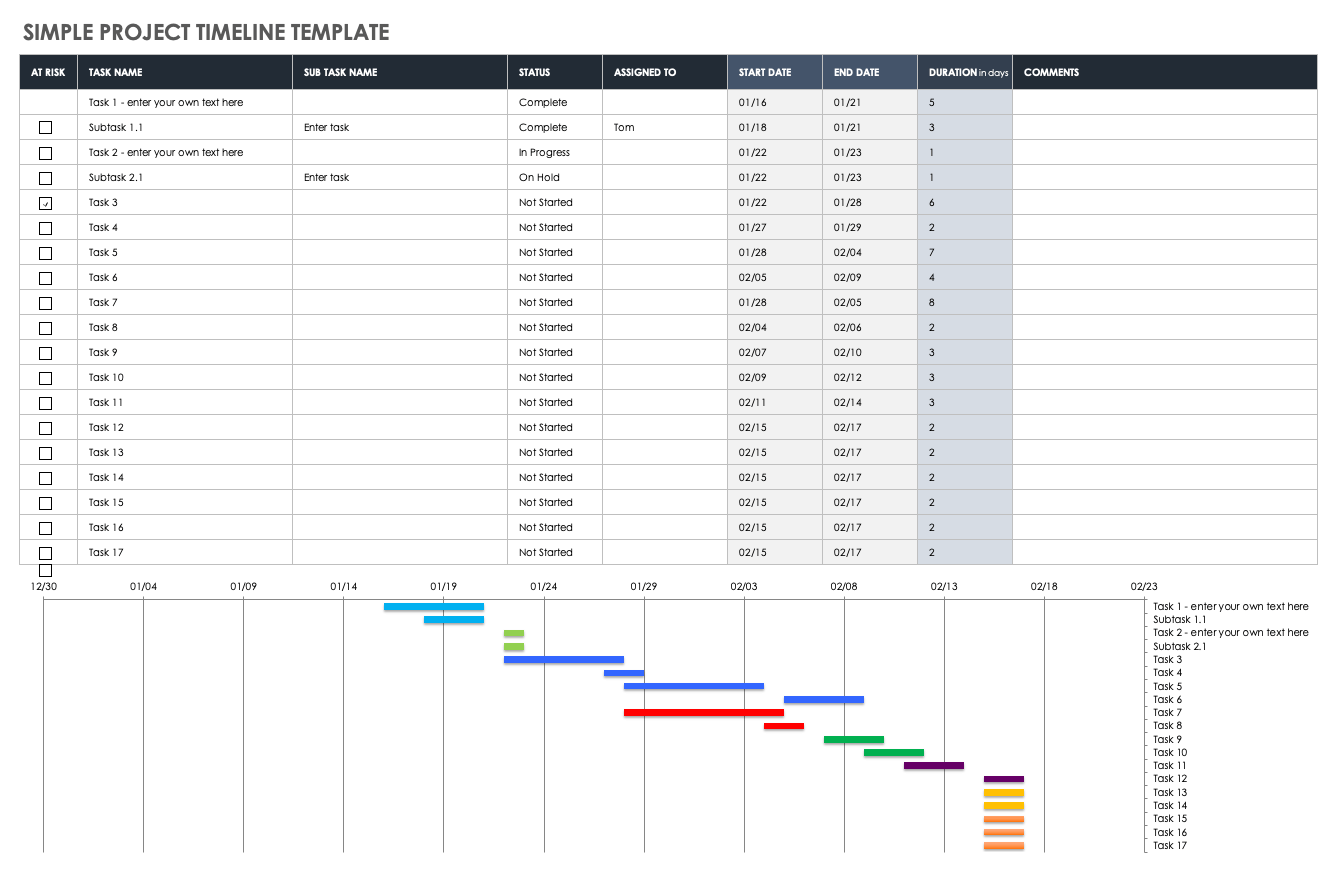
Image source: smartsheet.com
Financial portfolio tracking template
A financial portfolio tracking template provides a consolidated view of budgets, actual costs, forecasts, and ROI across all projects. It enables finance and leadership teams to monitor spending patterns, identify cost overruns, and evaluate overall portfolio performance. By offering clear financial visibility, it supports better budgeting decisions and ensures resources are allocated efficiently.
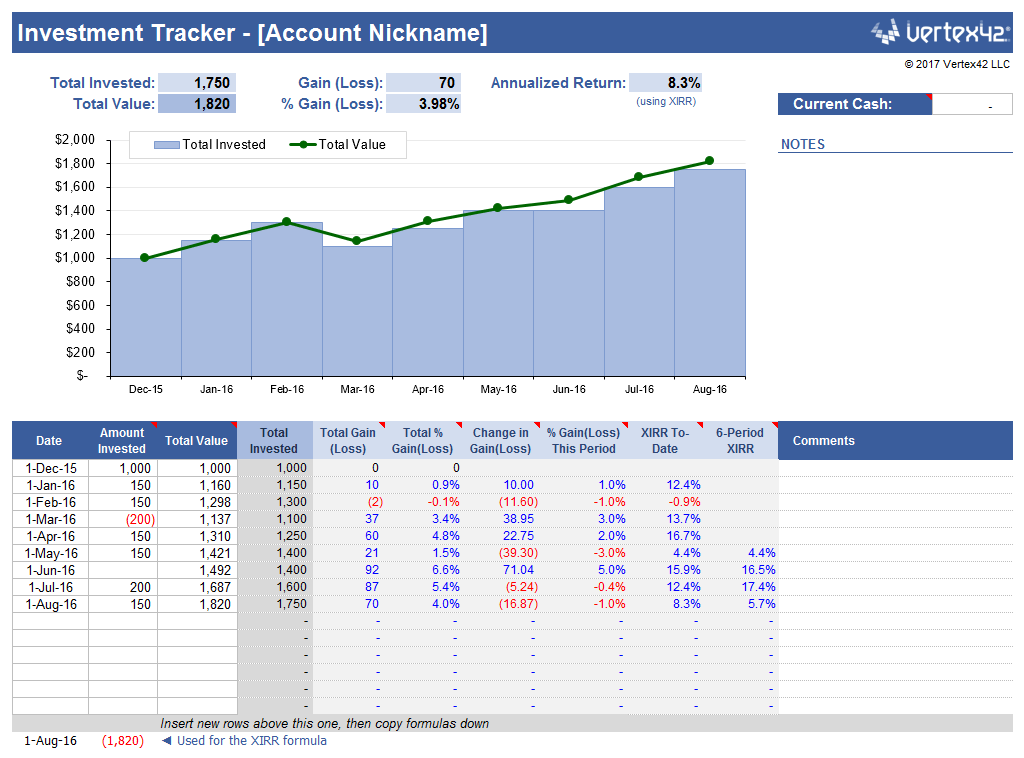
Image source: vertex42.com
Risk and dependency tracking template
A risk and dependency tracking template centralizes all identified risks, inter-project dependencies, and mitigation plans in one structured view. It helps teams understand how delays or issues in one project can impact timelines and outcomes across the entire portfolio. This visibility enables , better coordination, and quicker responses to potential disruptions.
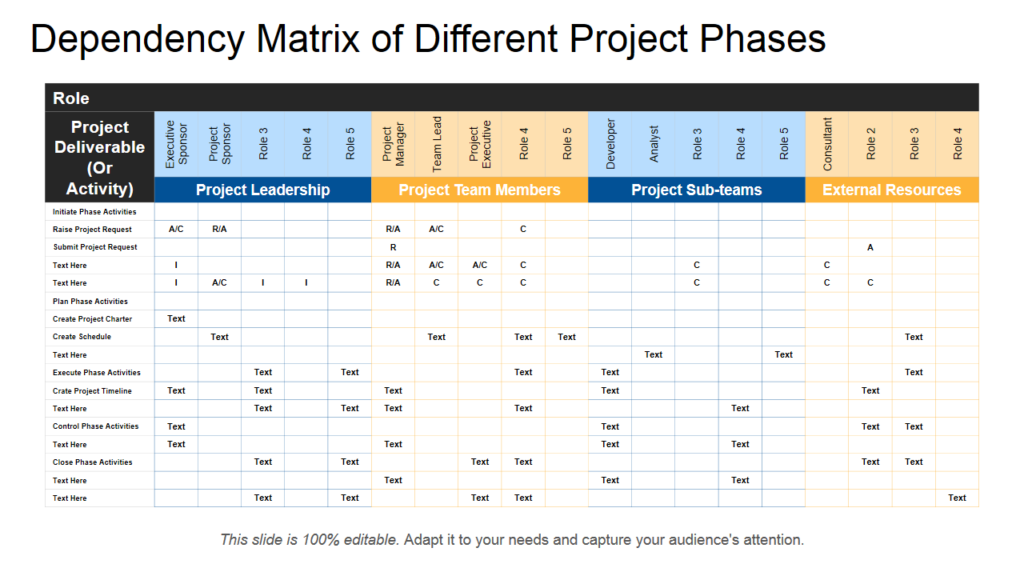
Image source: slideteam.net
Find the right project portfolio solution with Lark
Modern tool: Try Lark to manage your entire portfolio in one place
Traditional templates provide structure, but they often fall short in and execution. goes beyond static tracking by connecting data, workflows, and communication in a single unified platform. It transforms portfolio management into a dynamic system where updates, approvals, and insights happen automatically. Teams no longer need to switch between tools or rely on manual reporting. This creates a more agile, transparent, and efficient way to manage complex project portfolios at scale.
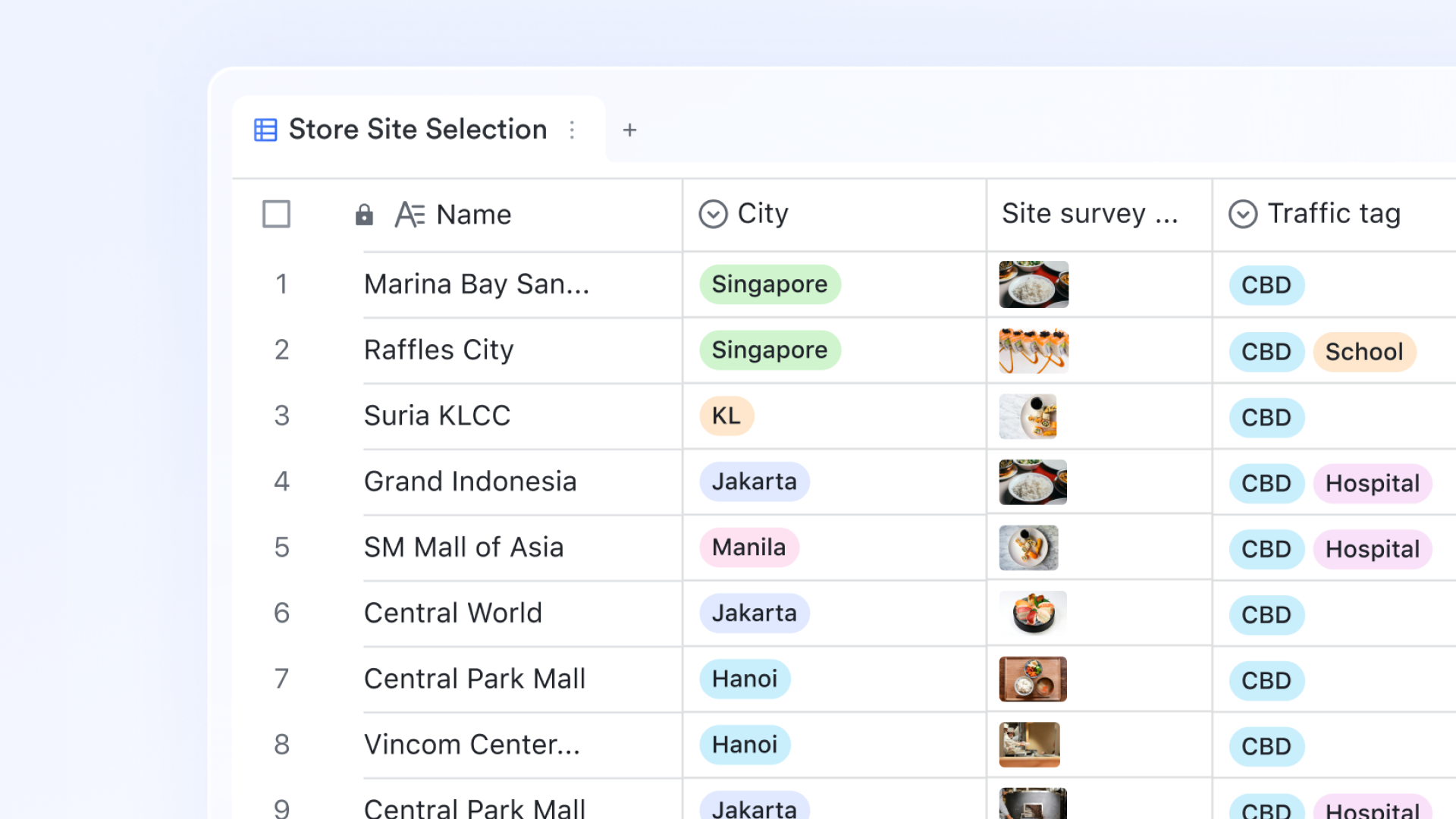
Relational portfolio tracking
serves as the engine for portfolio management by moving beyond the limitations of static spreadsheets and into . Unlike a standard grid, a Base allows you to link a "Master Portfolio" table directly to individual project trackers. This creates a "roll-up" effect where a project manager's update on a single milestone instantly reflects in the executive-level view.
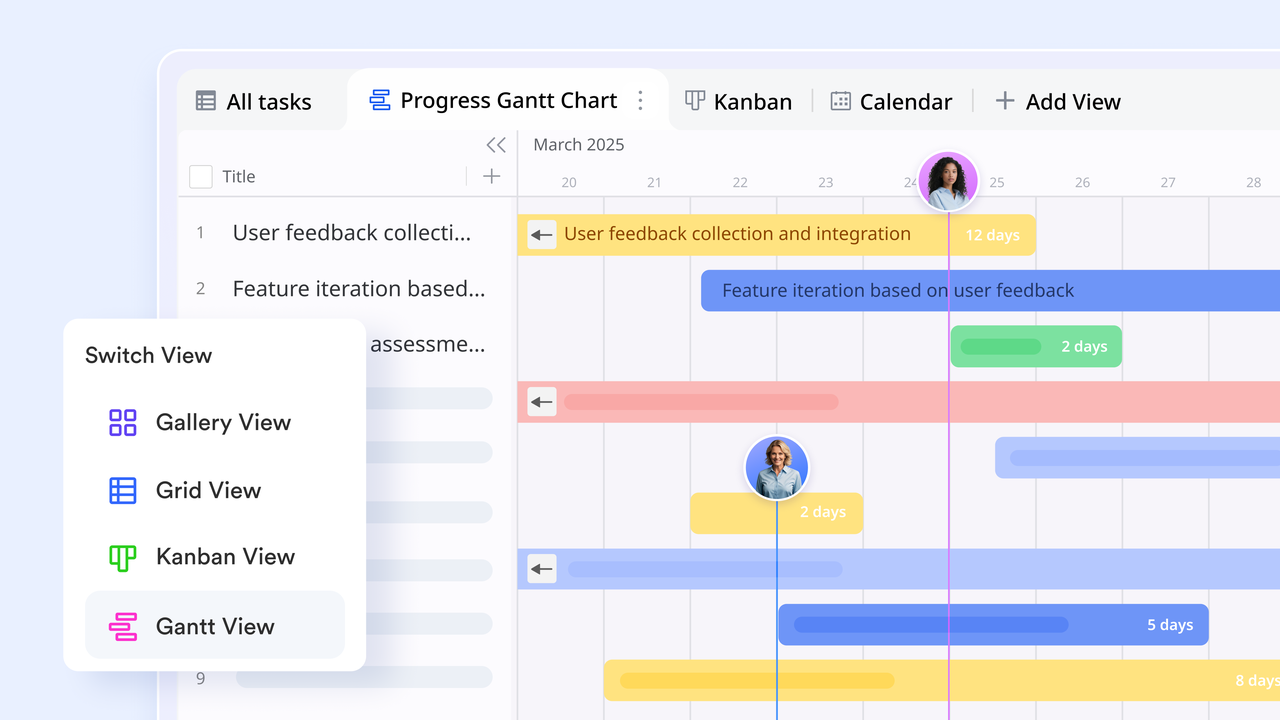
Cross-project resource capacity planning
One of the most difficult aspects of portfolio management is avoiding team burnout and resource collisions. Lark provides a unified that spans across all active initiatives in the portfolio. This allows managers to view a horizontal timeline of all projects simultaneously, making it easy to spot when a lead developer or designer is overallocated across three high-priority launches in the same week.
Multi-dimensional dashboards for real-time KPIs
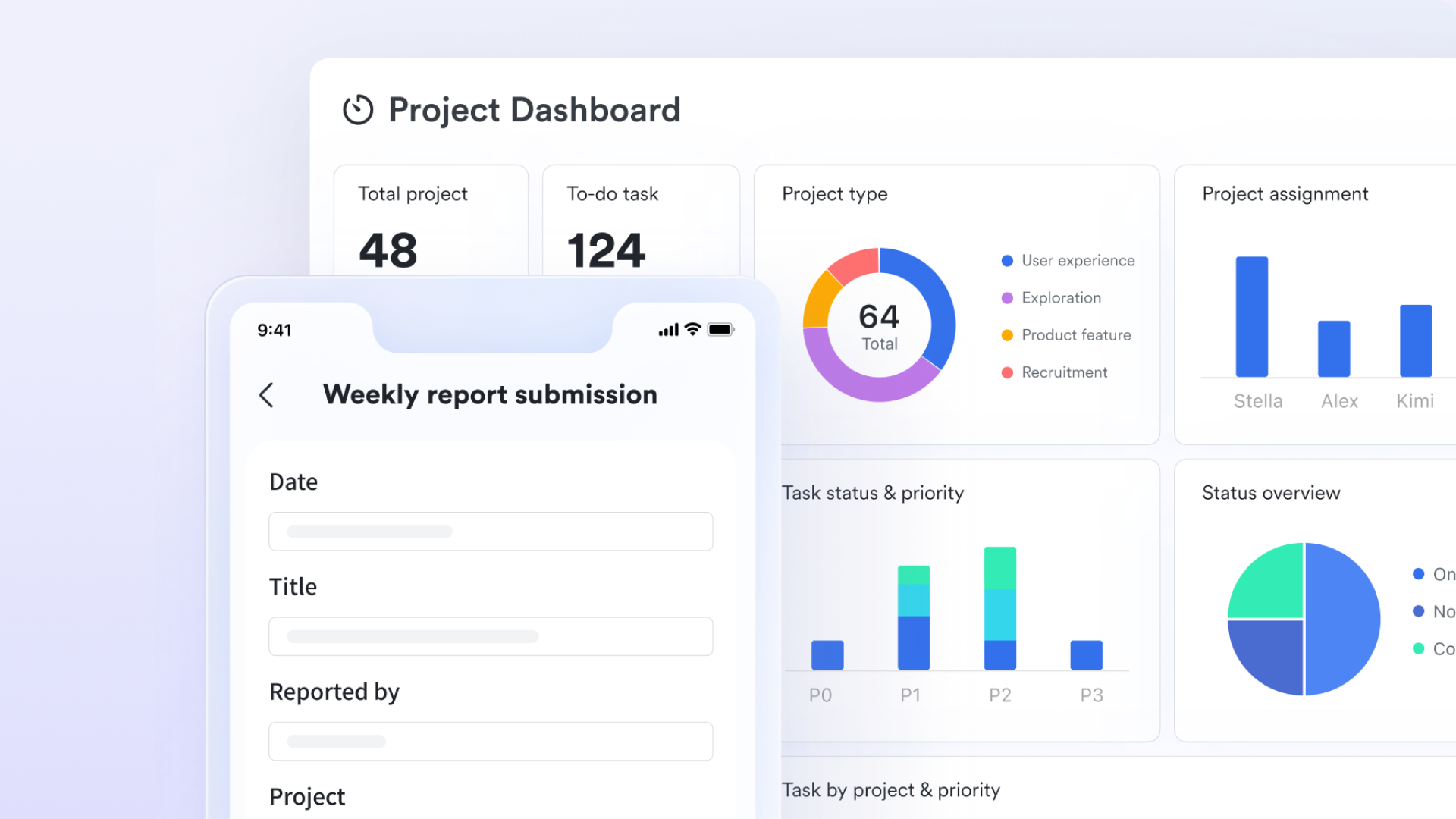
Strategic oversight is driven by high-level visibility, which Lark provides through its . These dashboards aggregate data from multiple tables to create visual representations of portfolio health, such as "Budget vs. Actual" bar charts, "Project Status" pie charts, and "Resource Allocation" heatmaps. Because these charts are built on live data, they serve as a real-time command center identifying bottlenecks or high-risk projects the moment the underlying data changes.
Strategic alignment with Lark OKRs
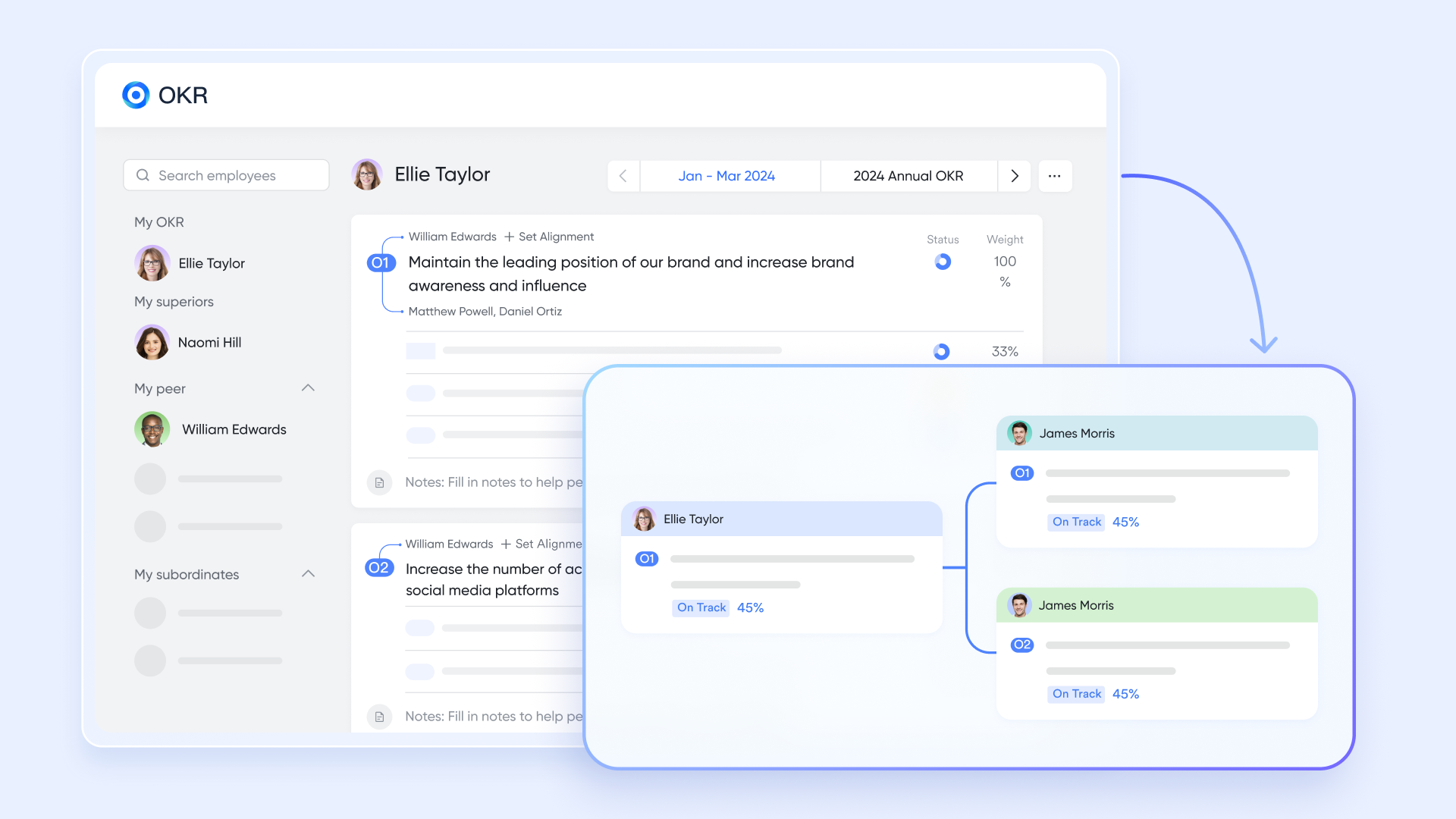
A portfolio is only successful if its projects actually drive business value, and helps you nail it down. Each project in the portfolio can be linked to a , creating a clear "line of sight" from daily tasks to executive goals. This transparency helps PMOs identify and sunset "zombie projects", thereby ensuring the portfolio remains lean and impactful.
Automated governance workflows
Managing a portfolio requires strict adherence to decision gates and approval protocols to ensure resources are spent wisely. Lark's these administrative hurdles by using "if-this-then-that" logic. For example, a workflow can be set to automatically trigger a request to the CFO if a project budget exceeds a certain threshold, or instantly alert a specific Lark Messenger group if a project's RAG (Red-Amber-Green) status shifts to "At Risk." 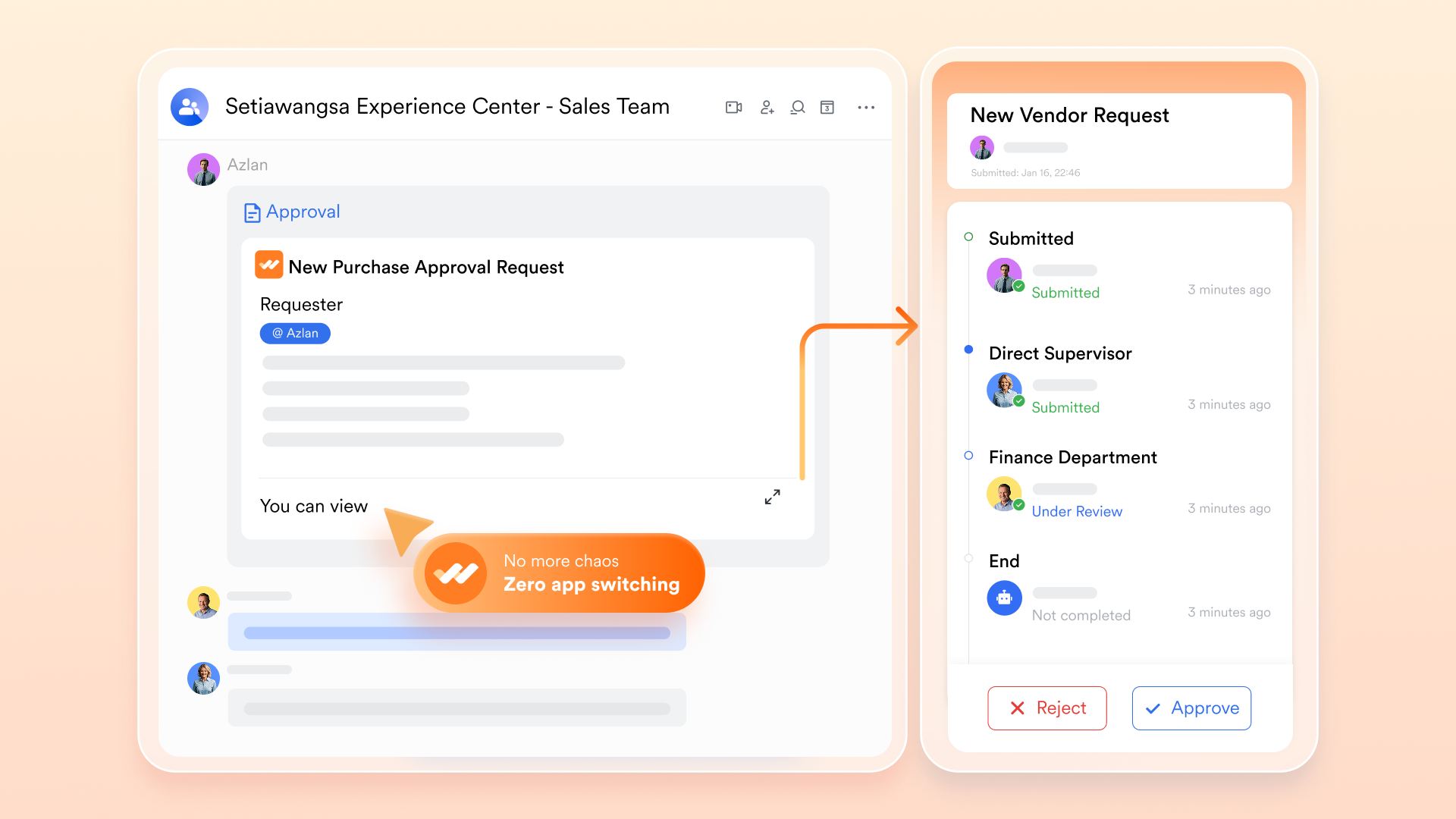
:
- Starter plan: Free forever plan that includes 11 powerful tools for up to 20 users. It also comes with 100GB of storage, 1000 automation runs, AI translations, and more.
- Pro plan: $12/user/month (billed annually) for up to 500 users. It includes everything in Starter plus group calling for up to 500 attendees, 15TB of storage, 50,000 automation runs, and more.
- Enterprise plan: for custom pricing. Supports unlimited users and includes additional automation runs, as well as advanced security, compliance, and management features.
For small teams with simple communication needs

18 months message history
1000 Base automation runs/month
2000 rows per table in Base
Most POPULAR
For companies with comprehensive collaboration and management needs
Unlimited message history
500-participant video meetings
50k Base automation runs/month
20k rows per table in Base
For large companies with advanced security and organizational management needs
Get a personalized demo and pricing
Unlimited message history
500-participant video meetings
15 TB storage + 30 GB storage/user
500k Base automation runs/month
50k Base automation runs/month
Most POPULAR
For companies with comprehensive collaboration and management needs
Unlimited message history
500-participant video meetings
50k Base automation runs/month
20k rows per table in Base
Future trends in project portfolio management tools and templates
Project portfolio management is rapidly evolving as organizations demand more speed, accuracy, and strategic alignment. Traditional tools are being replaced by smarter, connected systems that reduce manual work and improve decision-making. These trends are shaping how teams manage complex portfolios in a more dynamic and scalable way.
- AI-driven prioritization: uses data and predictive models to rank projects based on impact, risk, and strategic value. It removes bias from decision-making and helps teams focus on the most valuable initiatives. Even a free project portfolio management Excel template is starting to incorporate AI-driven insights for smarter planning.
- Real-time portfolio analytics: Real-time analytics provide instant visibility into project performance, resource usage, and risks across the portfolio. This allows teams to identify issues early and make faster, data-driven decisions. A project portfolio management dashboard template plays a key role in effectively visualizing these insights.
- Automation-first workflows: reduce manual effort by triggering actions such as approvals, alerts, and updates automatically. This ensures processes run consistently without delays or human error. Teams can focus more on strategy rather than administrative tasks.
- Integrated collaboration platforms: Integrated platforms combine communication, data tracking, and workflows into a single system. This eliminates tool fragmentation and keeps everyone aligned in real time. As a result, teams can collaborate more efficiently and execute projects with greater speed and clarity.
Conclusion
Managing multiple projects without a structured system quickly leads to confusion, misaligned priorities, and inefficient use of resources. A project management portfolio template brings clarity by centralizing project data, enabling better prioritization, and improving visibility across the organization. From Excel-based trackers to and strategic templates, the right approach helps teams make informed decisions and stay aligned with business goals. However, static templates alone are not enough in fast-moving environments where real-time updates and collaboration are essential.
This is where makes a significant difference by connecting data, workflows, and communication in one unified platform. With live dashboards, automated processes, and seamless collaboration, Lark transforms portfolio management into a dynamic and scalable system. If you want to move beyond manual tracking and manage your project portfolio more effectively, now is the time to try Lark and experience a smarter way to work.
Get a clearer view of your project portfolio now with Lark
FAQs
How is portfolio management different from project management?
focuses on executing a single project, including tasks, timelines, and deliverables. , on the other hand, oversees multiple projects to ensure they align with strategic goals and resource capacity. Tools like Lark help connect both levels by linking execution with high-level portfolio visibility.
Can Excel be used for project portfolio management?
Yes, Excel can be used to manage project portfolios, especially for basic tracking and smaller teams. It allows you to organize project data, timelines, and resources in a structured way. However, platforms like Lark provide real-time updates, automation, and collaboration that go beyond Excel's limitations.
What should a portfolio template include?
A portfolio template should include project details, status, timelines, resource allocation, risks, and performance metrics. It should also support prioritization and alignment with business objectives. Lark enhances this by integrating all these elements into a live, connected system.
What is the best tool for project portfolio management?
The best tool depends on your needs, but it should offer visibility, automation, and collaboration in one place. Traditional tools often fall short when managing complex portfolios at scale. Lark stands out by combining project tracking, dashboards, and workflows into a unified platform.
Related reading

















