














10 Best Free Gantt Chart Solutions for Teams and Project Managers

Ryan Tanner
Product Marketing Specialist
Sep 18, 2026
Ryan Tanner
Sep 18, 2026

21 min read


Managing projects without a clear visual plan can quickly lead to confusion and missed deadlines. That's where Gantt charts come in—they turn complex timelines into simple, easy-to-track visuals. Whether you're a small team or a large organization, having the right Gantt chart tool can make a big difference in how efficiently you plan, assign, and monitor tasks.
In this guide, we've rounded up the 10 best free Gantt chart solutions that help teams stay organized and projects on schedule. From intuitive drag-and-drop interfaces to real-time collaboration, these tools make project planning smoother:
- Lark: Offers collaborative, free Gantt chart templates
- TeamGantt: Ideal for teams looking for free Gantt chart templates
- ProjectManager: Delivers free Gantt chart templates perfect
- ClickUp: Great choice for developers who need customizable templates
- Asana: Provides user-friendly free Gantt chart templates
- Canva: Known for its visually appealing free Gantt chart templates
- Jira: Features advanced free Gantt chart templates tailored
- Smartsheet: Offers professional-grade free Gantt chart templates
- Unito: Helps teams connect tools using synchronized free Gantt chart templates
- Vertex42: Specializes in Excel-based free Gantt chart templates

What is Gantt chart and why use a free Gantt chart?
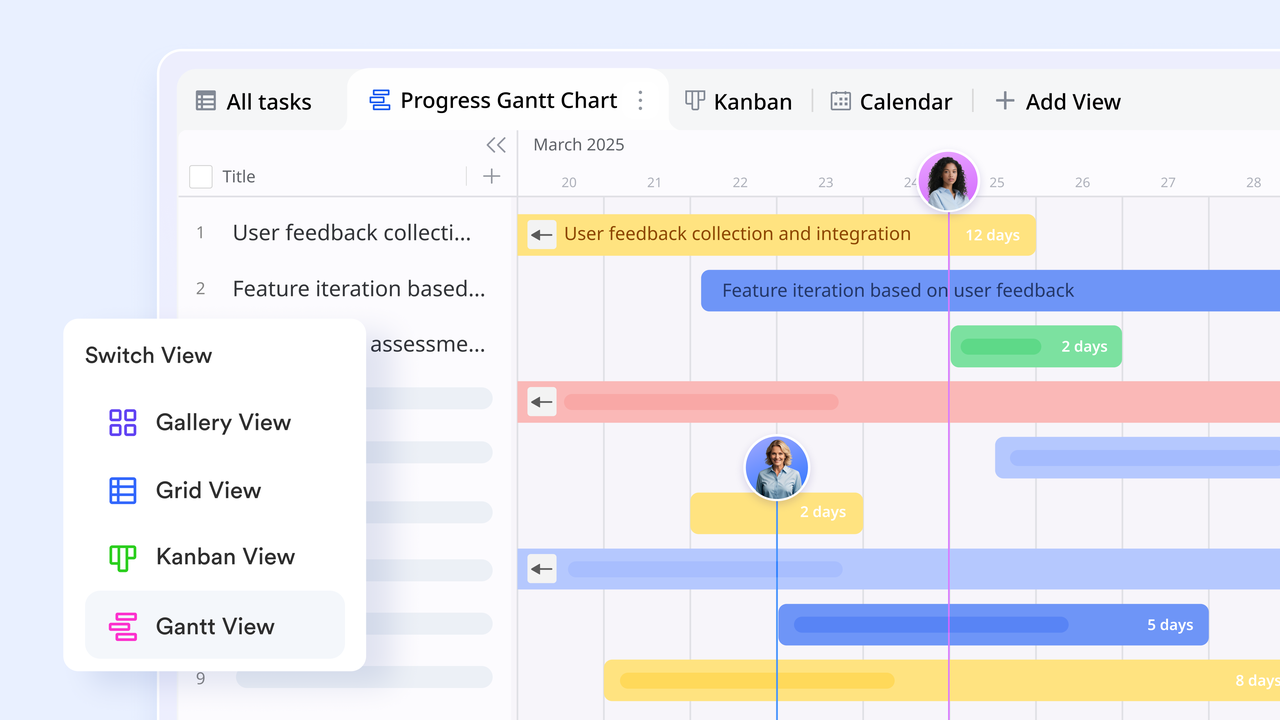
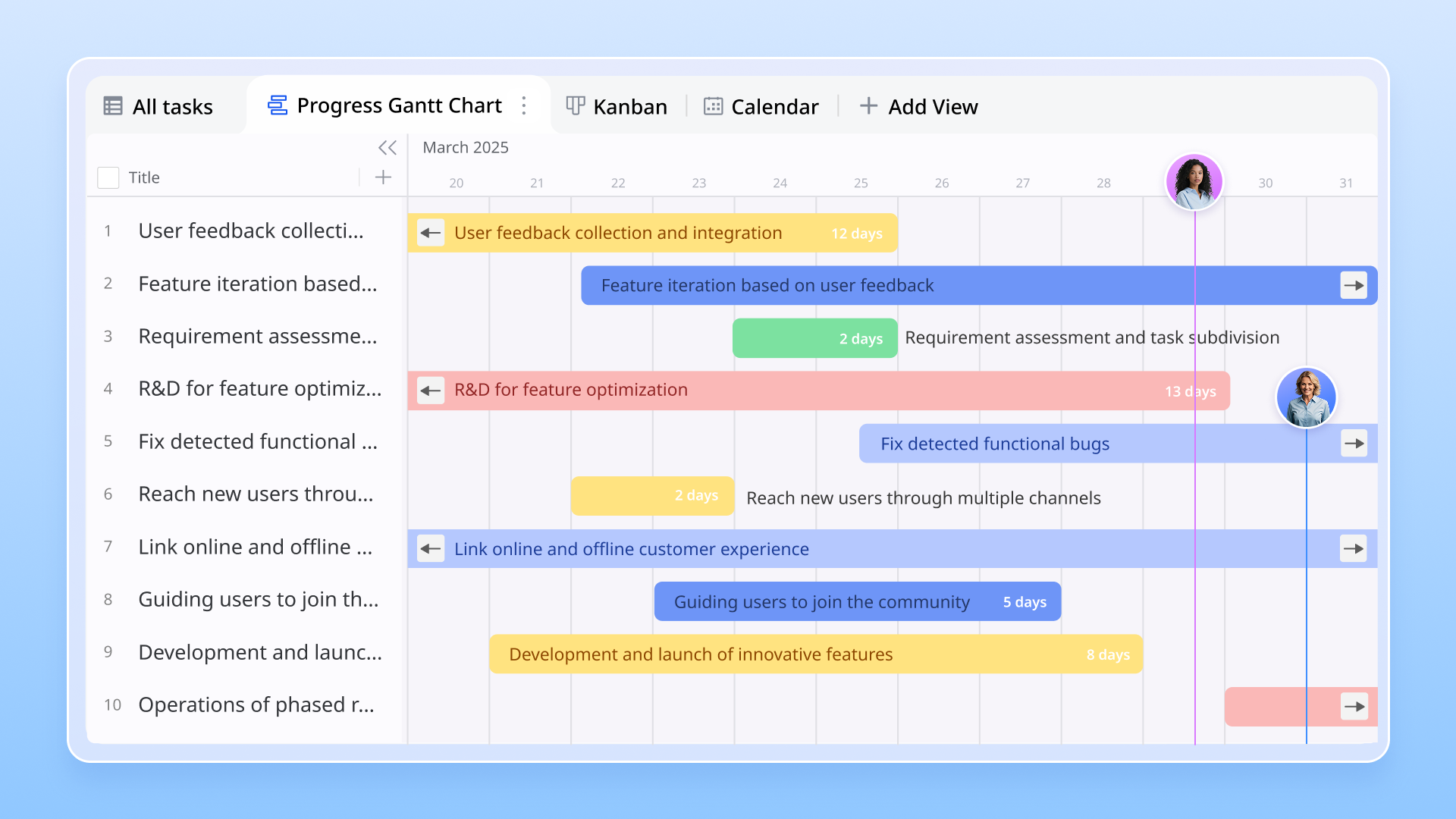
A Gantt chart is a visual project management tool that shows tasks, deadlines, and dependencies on a timeline. Each task appears as a horizontal bar, with its position and length representing the start date, duration, and end date. This format helps teams see the overall project schedule at a glance, understand how tasks overlap, and identify potential bottlenecks. It's especially useful for tracking progress and ensuring everyone stays aligned on what needs to be done and when.
Free Gantt chart templates are ideal for teams or individuals who want structured project planning without the cost of premium software. They provide essential features like task scheduling, progress tracking, and team collaboration—all without breaking the budget. Many free options also integrate with popular apps for communication and file sharing. Using a free Gantt chart lets teams test different tools, streamline workflows, and improve time management before committing to paid plans. It's a practical way to stay organized and maintain project visibility from start to finish.
Best free Gantt chart software and templates (Top picks)
1. Lark: Collaborative platform with multiple free Gantt chart templates
Lark stands out as a modern workspace that brings project visualization, communication, and task management together in one connected platform. It's more than a simple Gantt chart tool—Lark gives teams a unified environment where planning, execution, and collaboration happen side by side.
With flexible features like Lark Base for timeline tracking, Lark Tasks for accountability, and Lark Messenger and Docs for real-time updates, teams can manage entire projects from concept to delivery without switching tools. Its clean interface, automation options, and seamless coordination across mobile and desktop make it a top choice for businesses seeking a free yet powerful solution to plan projects, monitor progress, and keep teams aligned.
Key features:
Lark Base: Gantt-style timelines for smarter project tracking
Lark Base is a flexible, no-code database that turns raw project data into visual timelines and dependency-aware Gantt-style views. Teams design a Lark Base table with fields such as task name, owner, start and end dates, status, and dependency links, then switch to the timeline view to see how tasks map across a schedule. Setup is also simple: create a record type for project phases, add date fields and dependency lookups, and save a timeline view template for each project type. Use automations inside Lark Base to move a record between stages, notify stakeholders, or create follow-up tasks when milestones complete.
Example: A product team builds a launch Base with design, QA, and marketing stages; when the design completion date shifts, the timeline instantly shows impacted QA and launch milestones, and Base automatically alerts the release manager to replan resources.
Lark Tasks: Clear accountability and automated progress updates
Lark Tasks turns decisions and requests into tracked work with owners, priorities, subtasks, and due dates that appear across personal and project boards. Tasks can be created from chats, Docs comments, or Base records, so nothing discussed verbally is lost.
For teams, Tasks via Base provides multiple views—list for detailed tracking, Kanban for flow management, and calendar for deadlines—so each role sees what matters most. You can set recurring tasks, attach files, and configure reminders that fire before due dates. Best practice is to attach the primary project Doc and a link to the relevant Base record to each task so assignees have context.
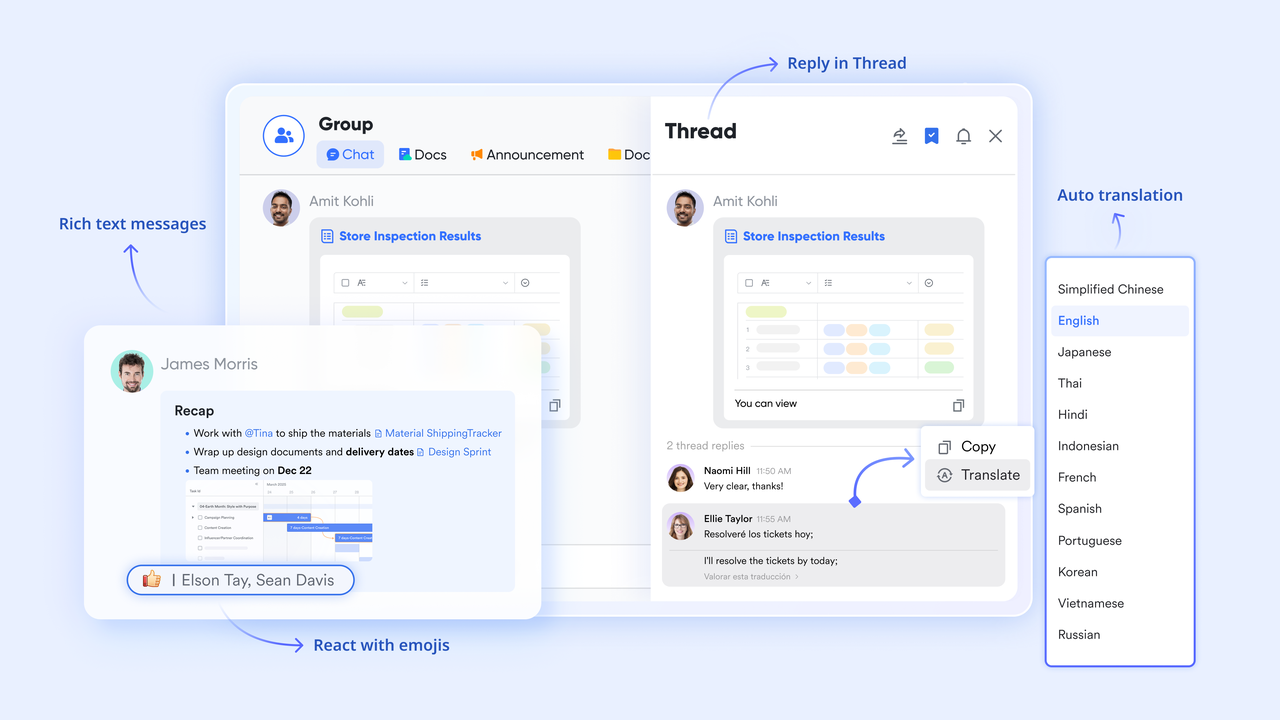
Lark Messenger: Real-time communication linked to project context
Lark Messenger provides fast, threaded conversations with the ability to mention people, pin important messages, and jump straight to linked tasks or documents. Chats remain searchable, so teams can find past decisions or shared files quickly. Because messages can be converted into tasks or linked back to a Base record, conversations naturally produce traceable work items rather than forgotten action items. Use topic-specific groups or channels for each project or client and pin the project brief Lark Docs for easy access. For time-sensitive situations, Messenger supports quick polls and reaction-based approvals to speed consensus.
Example: A design review happens in a project chat; the client's feedback message is converted into a task for the designer, the updated visual is posted in that thread, and the client's final thumbs-up is recorded in the same place for the project file.
Lark Sheets: Collaborative sheet creation and live project planning
Lark Sheets brings the flexibility of spreadsheets into project planning, making it easy to build tools like Gantt charts for visualizing timelines and progress. With its familiar spreadsheet layout and collaborative features, teams can map out tasks, set start and end dates, and use formulas or conditional formatting to turn simple data into an interactive project timeline. Because Lark Sheets sync seamlessly with other Lark tools—like Tasks, Calendar, and Docs—your Gantt chart stays connected to real work updates.
Example: A consulting team co-writes a client strategy in Docs while analysts add performance tables; the delivery lead comments on milestones, those comments become tracked tasks, and the final approved plan is moved into Base as the official project record.
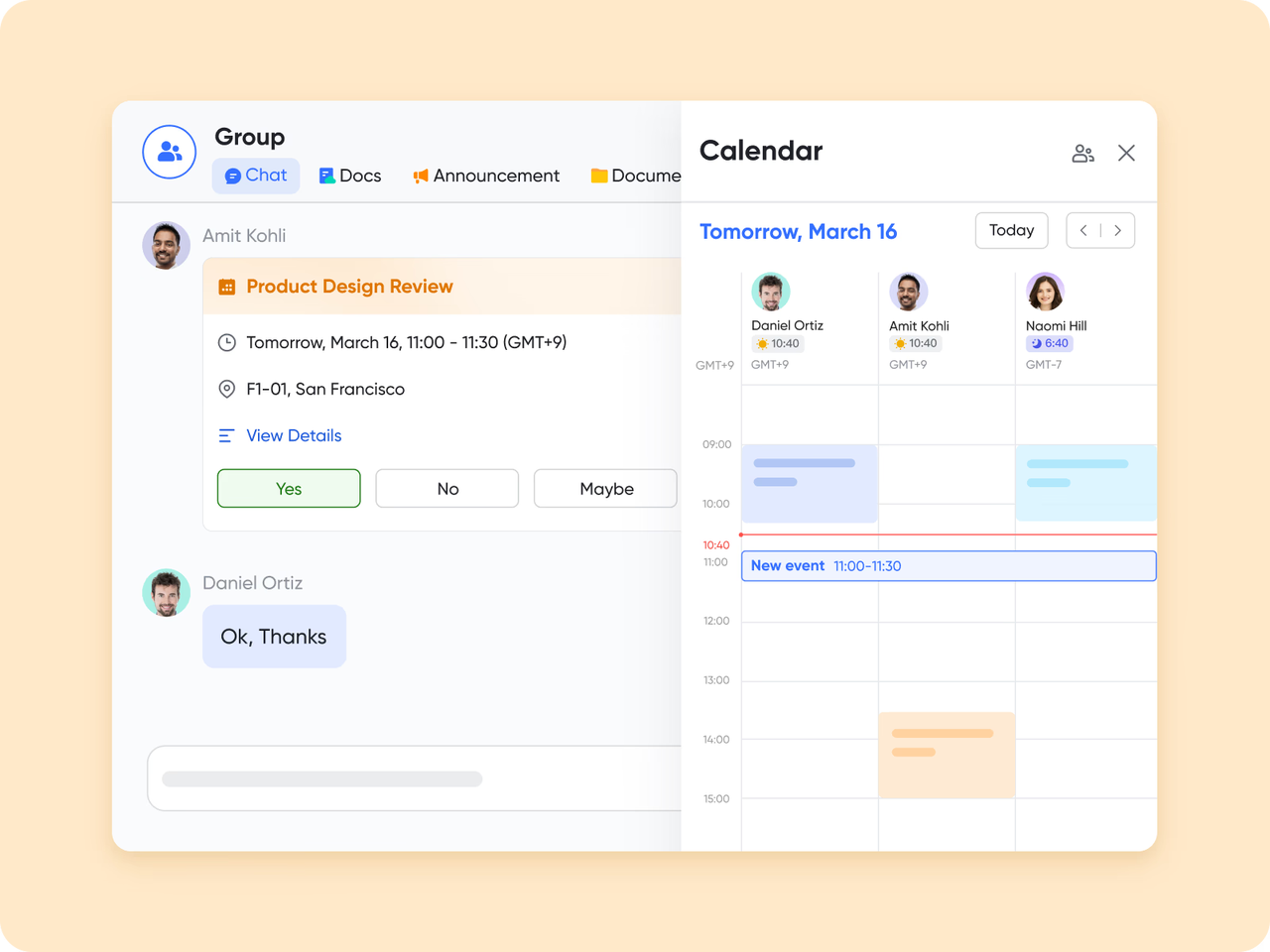
Lark Calendar: Seamless scheduling for reviews and milestones
Lark Calendar centralizes all project events, deadlines, and review sessions in a single view and shows colleagues' public availability so scheduling is faster and less error-prone. Events can include links to relevant Docs, Base records, or tasks so attendees arrive with the right materials. Calendar reminders and event attachments reduce last-minute scrambling; recurring review sessions and milestone check-ins are easy to set up. For effective use, maintain a shared team calendar for project checkpoints and a personal calendar for deep-work slots, and encourage teams to mark focused hours to prevent meeting overload.
Example: A PM schedules a weekly milestone review, attaches the project timeline Doc and current task board to the event, and invites stakeholders; when the meeting ends, follow-up tasks created during the call are already linked to the event and visible in the team's task board
Best for: Teams that want more than just timelines—collaboration, workflows, and communication in one free platform.
- Templates: All templates are built-in and free to use.
- Starter plan: Free forever plan that includes 11 powerful tools for up to 20 users. It also comes with 100GB of storage, 1000 automation runs, AI translations, and more.
- Pro plan: $12/user/month (billed annually) for up to 500 users. It includes everything in Starter plus group calling for up to 500 attendees, 15TB of storage, 50,000 automation runs, and more.
- Enterprise plan: Contact sales for custom pricing. Supports unlimited users and includes even more automation runs and advanced security, compliance, and management features.
2. TeamGantt free template
TeamGantt offers a simple and intuitive Gantt chart interface that helps teams plan, schedule, and track projects visually. Its drag-and-drop setup makes it easy to adjust timelines and assign tasks. The free version includes collaborative features like file sharing, task comments, and workload tracking, making it great for small teams managing multiple projects. Users can also access templates to quickly create structured project plans.
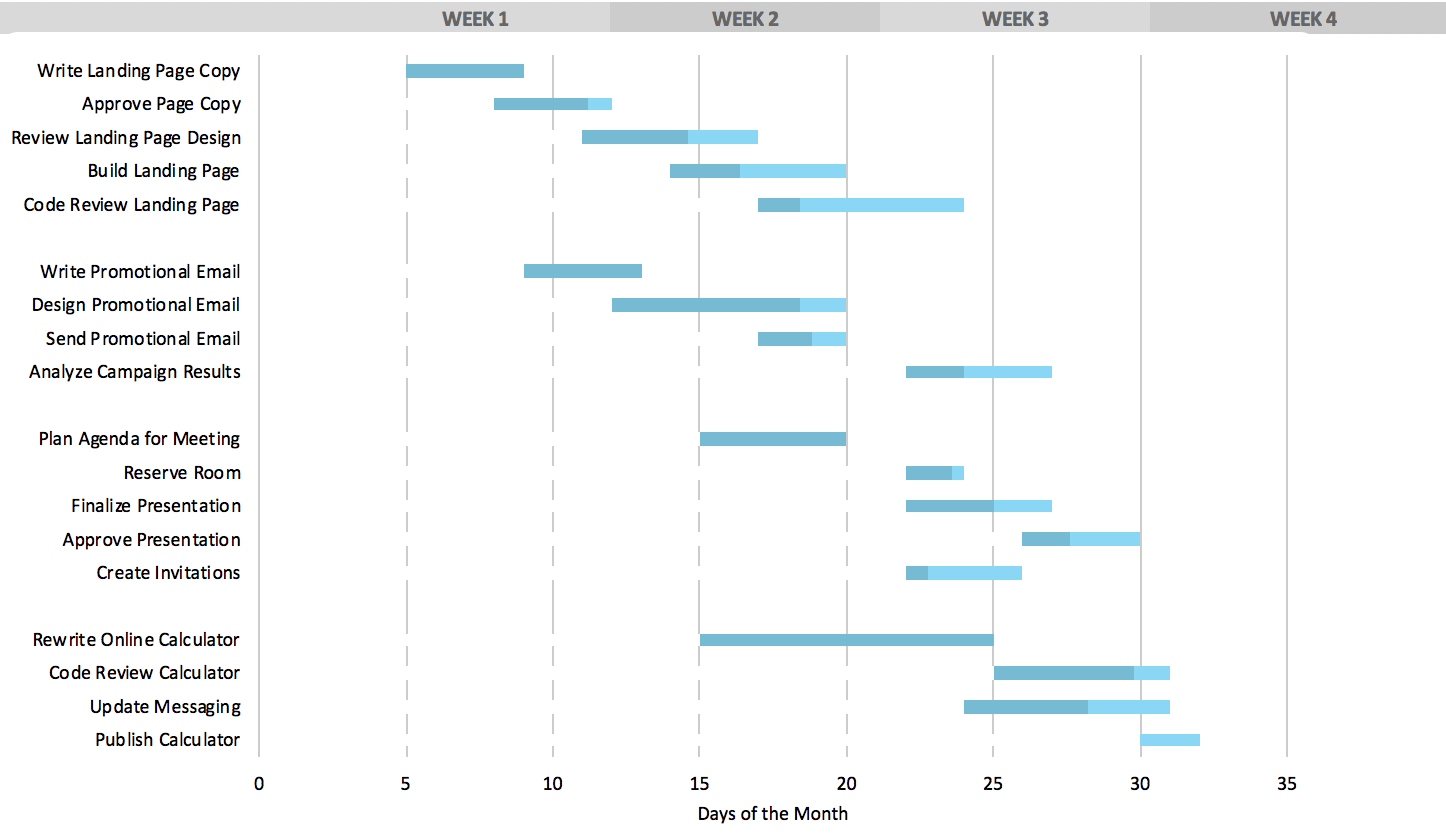
Image source: teamGantt.com
Strengths:
- Clean, user-friendly interface
- Easy drag-and-drop scheduling
- Real-time collaboration and task commenting
- Built-in workload management
- Mobile access for on-the-go updates
Limitations:
- Limited number of active projects in the free plan
- Fewer integrations compared to paid tools
- No advanced reporting or analytics
- Free version supports only a few users
Best suited for:
- Small teams or freelancers managing simple projects
- Teams that need a quick visual planner without complex setup
Pricing:
- Templates: Built-in Gantt templates, free to use.
- Free plan: 1 project, 1 manager, up to 60 tasks.
- Standard plan: $19/month per manager with unlimited projects and reports.
- Enterprise plan: Custom pricing for portfolio and automation features.
3. ProjectManager free Gantt chart template
ProjectManager offers a free, ready-to-use Gantt chart template in Excel, perfect for mapping out project timelines, dependencies, and milestones. It's ideal for users who prefer working offline but still want a clear visual layout. The online version adds more flexibility, allowing teams to collaborate, track progress, and switch between views like kanban, list, or calendar. It's a good starting point for managing small to medium projects.
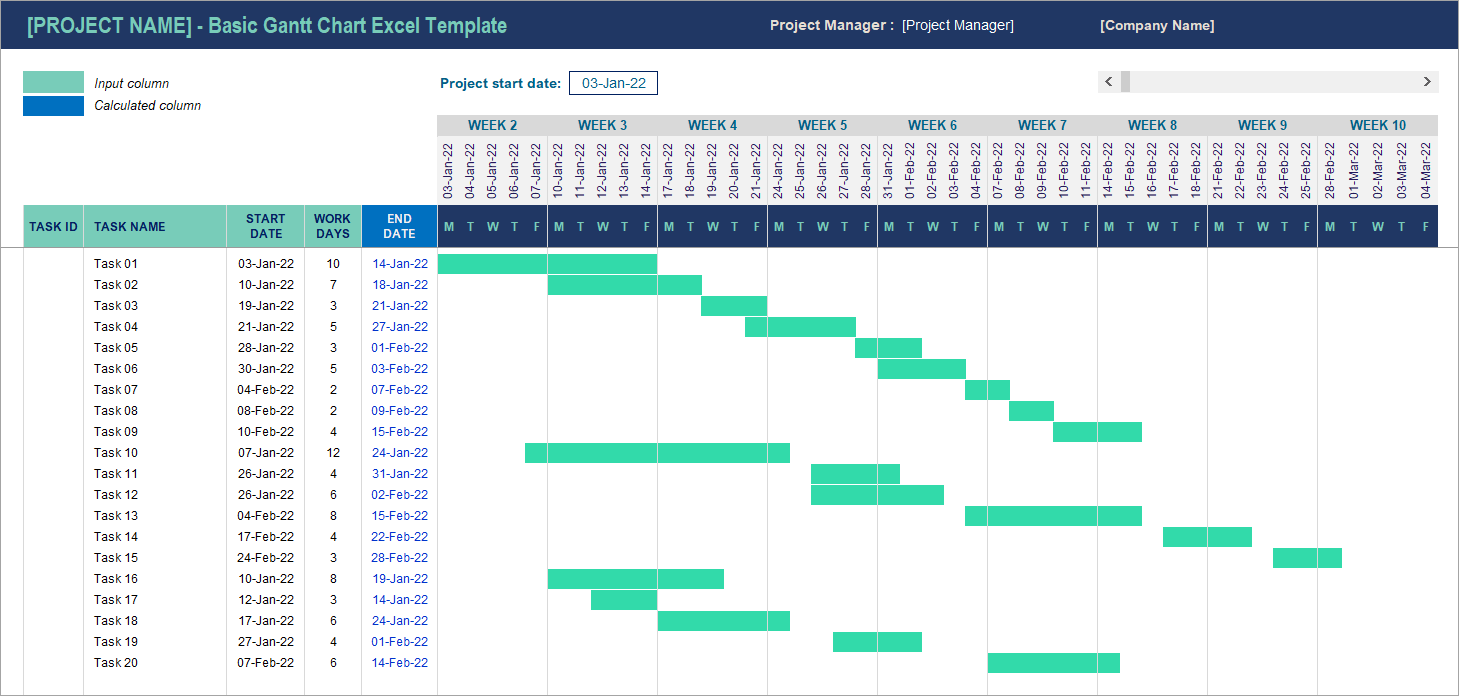
Image source: coupler.com
Strengths:
- Easy-to-edit Excel format with a predefined structure
- Industry-specific templates available
- Online version supports multiple project views
- Real-time collaboration in the web version
- Option to track dependencies and baselines
Limitations:
- Manual updates required in Excel version
- Limited automation and reporting in the free plan
- Not ideal for large, complex projects
- Collaboration is basic in the offline version
Best suited for:
- Individuals or small teams managing simple projects
- Users who prefer Excel-based planning before moving to a full online tool
Pricing:
- Templates: Built-in Gantt and project templates, available with paid plans.
- Team plan: $13/user/month (billed annually).
- Business plan: $24/user/month with portfolio dashboards and time tracking.
- Enterprise plan: Custom pricing with advanced workflows.
4. ClickUp free Gantt chart software
ClickUp's free plan includes an interactive Gantt chart that helps teams visualize timelines, track dependencies, and manage workloads. The drag-and-drop interface makes it easy to update tasks and deadlines. It also offers multiple project views, collaboration tools, and unlimited users, making it one of the most flexible free options available.
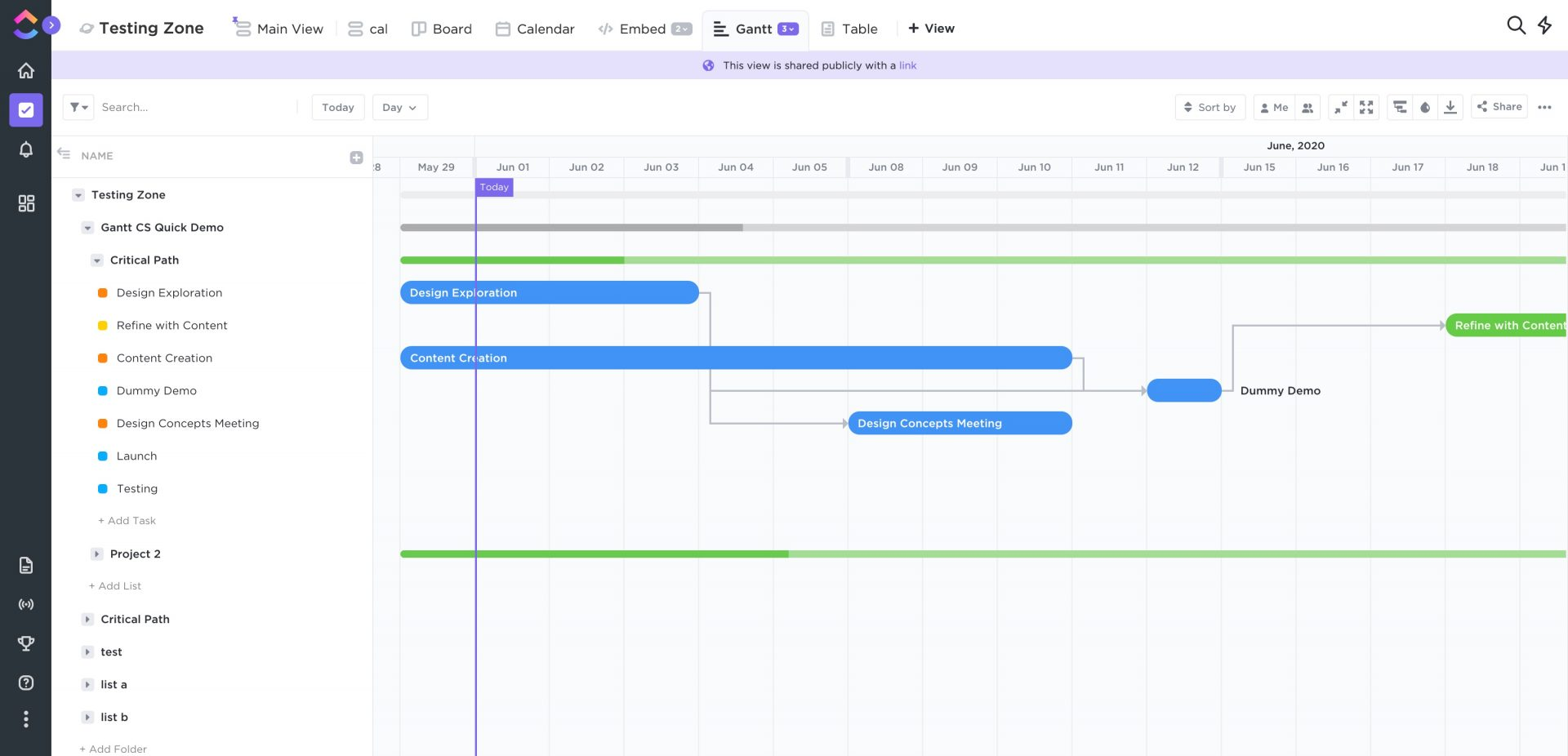
Image source: clickup.com
Strengths:
- Easy drag-and-drop Gantt view
- Unlimited users and tasks in the free plan
- Real-time collaboration with chat and comments
- Multiple project views (list, board, calendar, Gantt)
- Task dependencies and milestones supported
Limitations:
- Limited access to Gantt chart uses in the free plan
- 100 MB storage cap
- Advanced features require a paid upgrade
- Can slow down with large, complex projects
Best suited for:
- Small to medium teams managing ongoing projects
- Users who want flexible project views and strong collaboration tools
Pricing:
- Templates: Thousands of built-in Gantt and workflow templates, free in all plans.
- Free plan: Unlimited users, limited Gantt use.
- Unlimited plan: $7/user/month (billed annually).
- Business plan: $12/user/month with advanced automations.
5. Asana free Gantt chart template
Asana's free plan doesn't include a native Gantt chart view. However, users can create a Gantt-style chart by utilizing the timeline view, which allows for visual representation of project tasks, durations, and dependencies. Additionally, Asana offers a free Gantt chart template that can be customized to fit specific project needs.
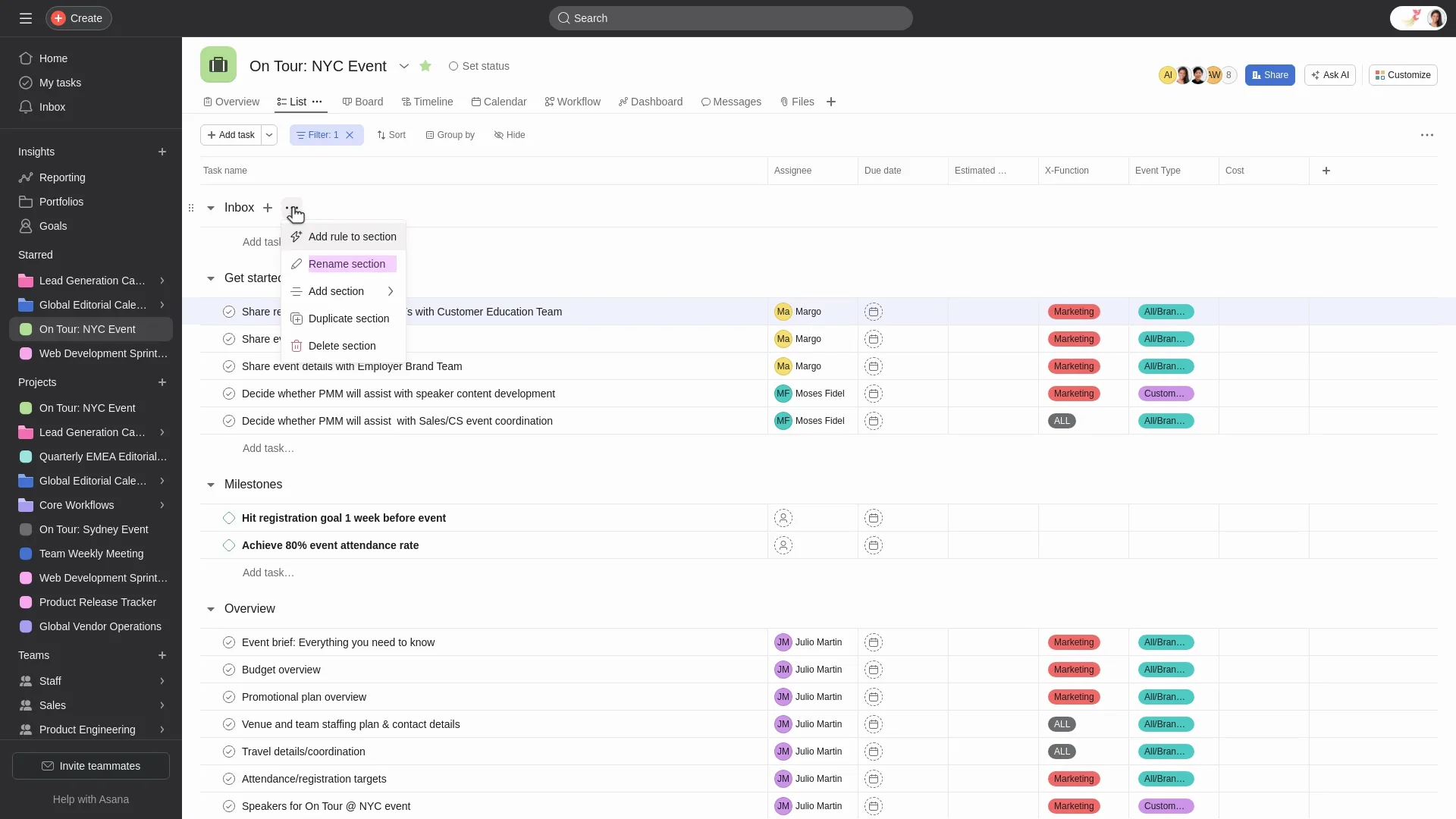
Image source: asana.com
Strengths:
- Provides a visual representation of project timelines and dependencies.
- Offers a free Gantt chart template for easy setup.
- Allows for task assignments and due dates.
- Facilitates team collaboration and communication.
- Integrates with other Asana features for comprehensive project management.
Limitations:
- Gantt chart features are limited in the free plan.
- Advanced Gantt chart functionalities require a paid plan.
- Customization options may be restricted in the free version.
- Lacks some advanced project tracking features available in other tools.
Best suited for:
- Small teams or individuals seeking a basic Gantt chart solution.
- Users already utilizing Asana for task management and collaboration.
Pricing:
- Templates: Project and Gantt-style templates; free templates available, advanced templates require paid plans.
- Basic plan: Free for up to 10 users.
- Starter plan: $10.99/user/month with Timeline (Gantt) view.
- Advanced plan: $24.99/user/month with resource management.
6. Canva Gantt chart maker
Canva provides a free Gantt chart maker that allows users to create visually appealing project timelines using customizable templates. While it lacks dynamic project management features like task dependencies or real-time collaboration, it's suitable for producing static Gantt charts for presentations or reports.
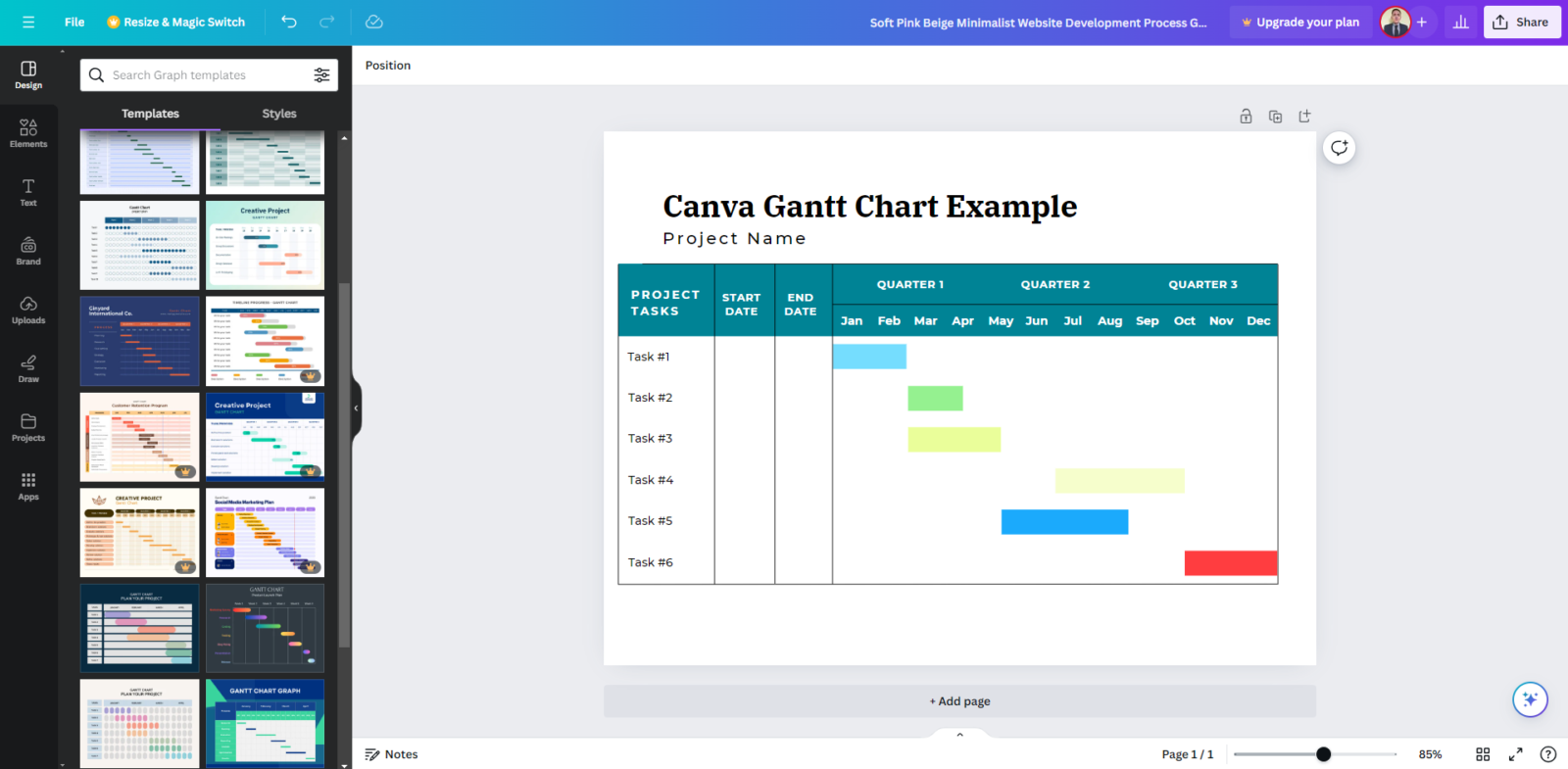
Image source: canva.com
Strengths:
- User-friendly drag-and-drop interface
- Extensive library of customizable templates
- High-quality visuals suitable for presentations
- No technical expertise required
- Free to use with optional premium upgrades
Limitations:
- Lacks dynamic project management features
- Manual updates required for timeline changes
- No task dependencies or milestones
- Limited integration with other project management tools
Best suited for:
- Individuals or small teams needing visually appealing Gantt charts for presentations
- Users seeking a simple tool for creating static project timelines
Pricing:
- Templates: Thousands of Gantt chart templates; free templates available, premium templates require Pro plan.
- Free plan: Core design tools and templates.
- Pro plan: $12.99/user/month with premium assets.
- Teams plan: $14.99/user/month with collaboration tools.
7. Jira Gantt chart template
Jira's Gantt chart template offers a visual approach to project planning, enabling teams to organize, schedule, and prioritize tasks effectively. It provides a clear overview of project timelines, helping teams manage dependencies and allocate resources efficiently. This template is designed to enhance collaboration and communication among team members by offering a structured format for task management.
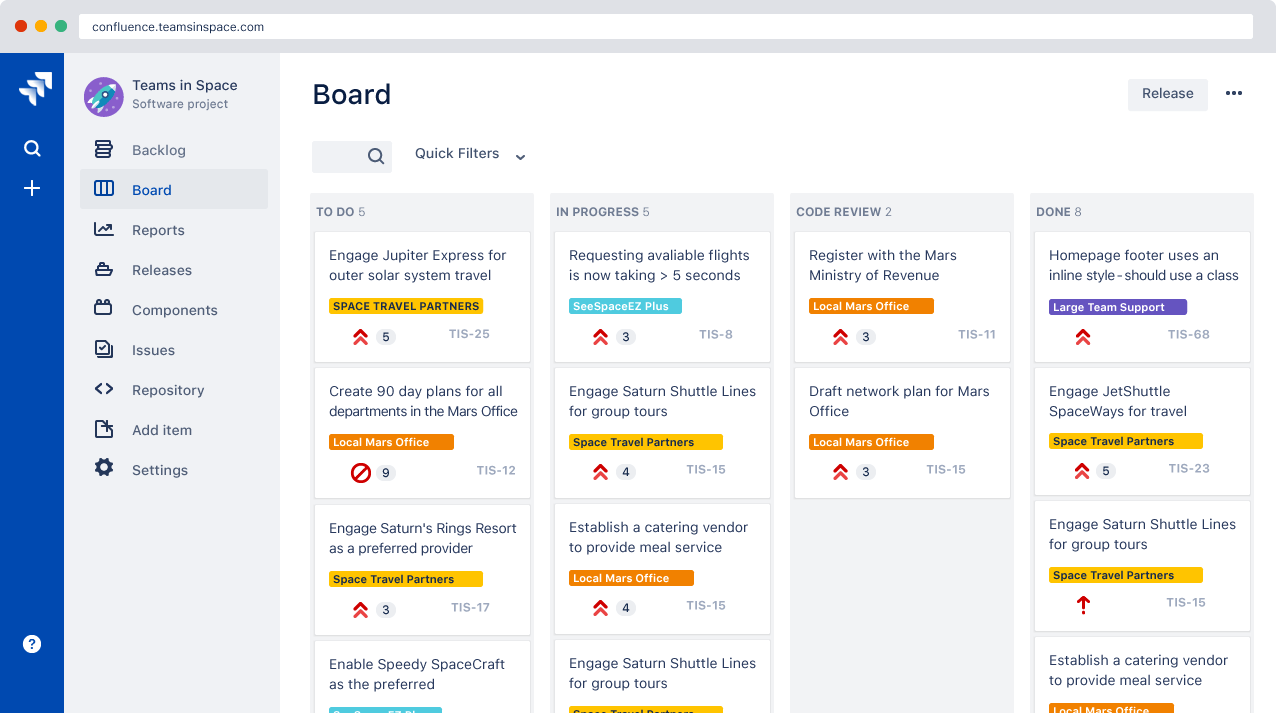
Image source: jira.com
Strengths:
- Provides a visual representation of project timelines and dependencies.
- Enhances task organization and prioritization.
- Facilitates team collaboration and communication.
- Offers a structured format for task management.
- Integrates seamlessly with other Jira features.
Limitations:
- Advanced features may require a paid Jira plan.
- Customization options might be limited compared to other tools.
- May require some learning curve for new users.
- Not suitable for teams not already using Jira.
Best suited for:
- Teams already using Jira for project management.
- Projects requiring detailed task scheduling and tracking.
Pricing:
- Templates: Project templates built-in; free templates available for Free plan, advanced templates with paid plans.
- Free plan: Up to 10 users.
- Standard plan: $8.15/user/month.
- Premium plan: $16/user/month with advanced roadmaps.
8. Smartsheet free Gantt chart template
Smartsheet offers a free 30-day trial that includes access to its Gantt chart features. This trial allows users to explore the platform's capabilities in visual project planning, task dependencies, and real-time collaboration. Smartsheet's Gantt charts are designed to help teams manage complex projects with ease.
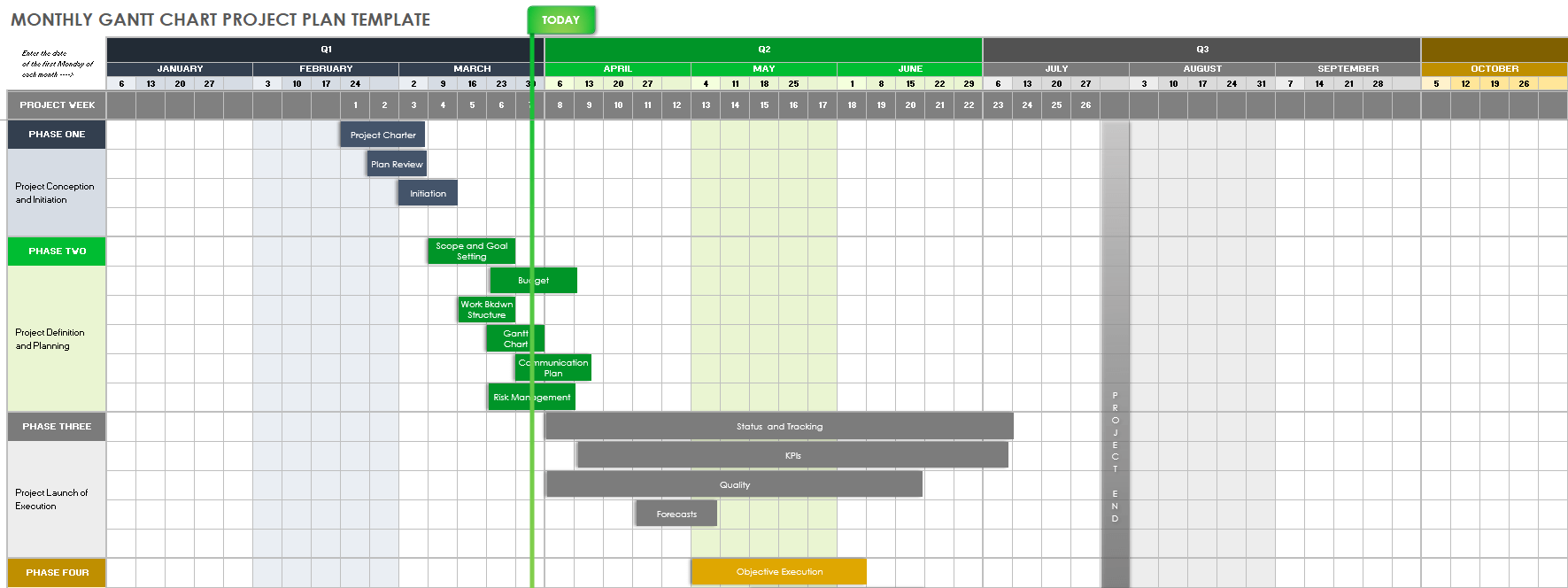
Image source: smartsheet.com
Strengths:
- Provides a comprehensive Gantt chart view for project planning.
- Supports task dependencies and critical path analysis.
- Offers real-time collaboration and sharing features.
- Integrates with various third-party applications.
- User-friendly interface suitable for teams of all sizes.
Limitations:
- Access to Gantt chart features is limited to the 30-day trial period.
- Requires a paid subscription after the trial ends for continued use.
- Some advanced features may have a learning curve for new users.
- Limited offline capabilities compared to desktop-based tools.
Best suited for:
- Teams seeking a comprehensive project management tool with Gantt chart capabilities.
- Organizations interested in exploring smartsheet's features before committing to a subscription.
Pricing:
- Templates: Built-in templates; available with paid plans, not free in trial.
- Pro plan: $9/user/month for small teams.
- Business plan: $25/user/month with advanced reporting.
- Enterprise plan: Custom pricing with full governance tools.
9. Unito free Gantt chart templates
Unito offers a collection of 19 free Gantt chart templates tailored for Google Sheets. These templates cater to various project types, from event planning to software development, and are designed to help teams visualize timelines, track dependencies, and manage tasks effectively.
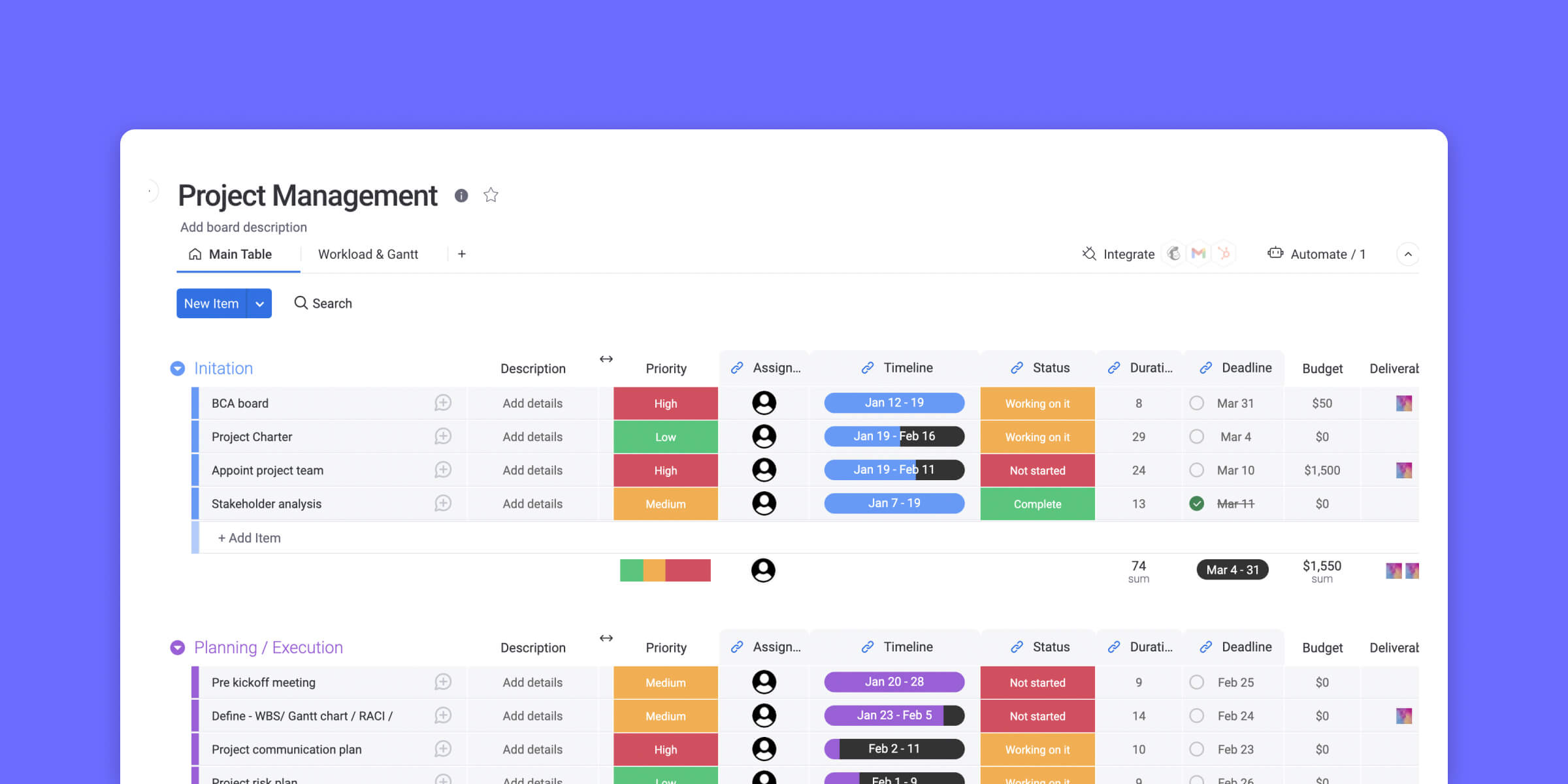
Image source: unito.com
Strengths:
- Tailored templates for diverse project types
- Designed for easy customization in Google Sheets
- Helps visualize timelines and track dependencies
- Free to use with no sign-up required
- Accessible via Google Sheets, facilitating real-time collaboration
Limitations:
- Lacks advanced project management features
- Limited to Google Sheets; no standalone application
- Manual updates required for task progress
- No built-in automation or notifications
Best suited for:
- Teams seeking a simple, customizable Gantt chart solution
- Projects requiring basic timeline visualization without complex dependencies
Pricing:
- Templates: Workflow and sync templates; free templates available, full features require paid plans.
- Personal plan: From $10/user/month.
- Team plan: $19/user/month.
- Company plan: $24/user/month and up.
10. Vertex42 Excel Gantt chart template
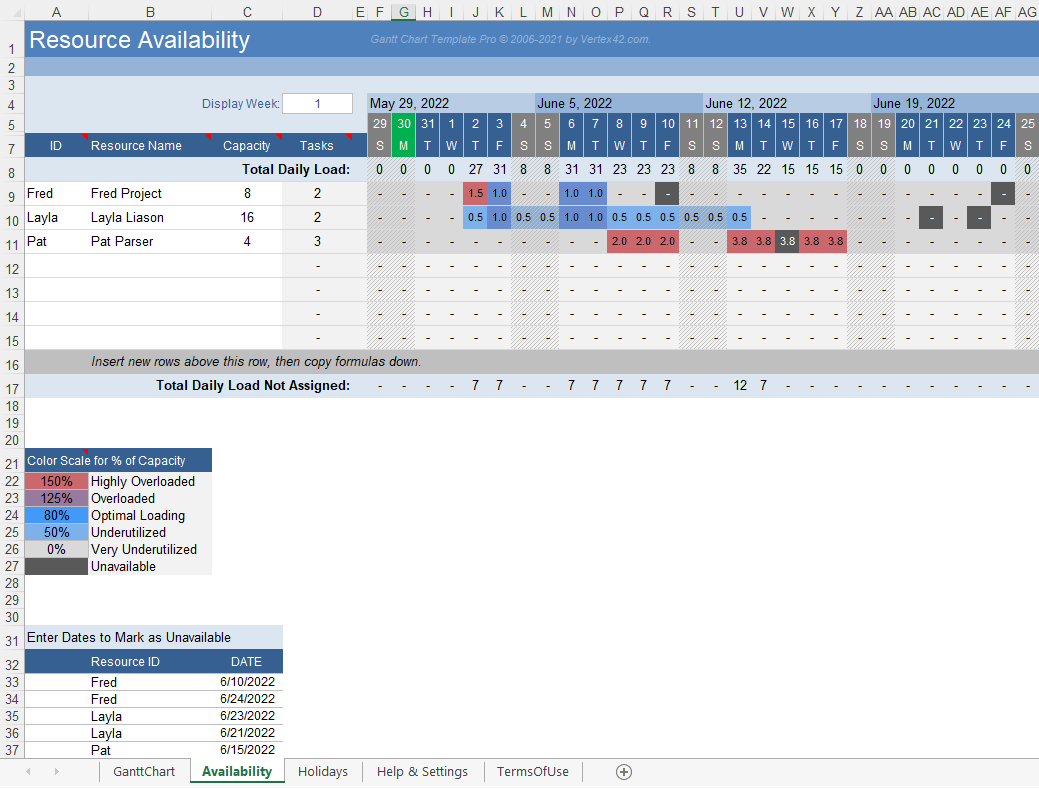
Image source: vertex42.com
Vertex42 offers a free Excel-based Gantt chart template designed for straightforward project scheduling. Users can define tasks, start dates, and durations, with the chart updating automatically to reflect progress. This template is suitable for those seeking a simple, no-fuss tool for visualizing project timelines.
Strengths:
- No installation or macros required
- Easy to customize and extend
- Automatically updates with task progress
- Includes a visual indicator for the current date
- Suitable for small to medium-sized projects
Limitations:
- Lacks advanced project management features
- Limited to Excel users
- Manual updates needed for task changes
- No built-in collaboration tools
Best suited for:
- Individuals or small teams needing a basic Gantt chart
- Projects where simplicity and ease of use are priorities
Pricing:
- Templates: Excel & Google Sheets templates; all templates are free to use, optional paid premium packs.
How to choose the best free Gantt chart tool
Selecting the right free Gantt chart tool can make a huge difference in how smoothly your projects run. Here are some key factors to consider:
- Ease of use: Look for tools with intuitive interfaces and drag-and-drop functionality. A simple layout reduces the learning curve, letting your team start planning immediately without confusion.
- Team size: Some free tools limit the number of users or projects. Make sure the tool you choose can accommodate your team size and the number of ongoing projects without forcing an upgrade too soon.
- Real-time collaboration: If your team works remotely or across departments, choose a tool that allows multiple users to update tasks, leave comments, and track progress in real time. This ensures everyone stays aligned.
- Automation: Even in free plans, some tools offer basic automation like recurring tasks, notifications, or status updates. Automation saves time, reduces errors, and keeps projects on track with minimal manual effort.
By weighing these factors, you can pick a free Gantt chart solution that balances usability, functionality, and team efficiency.
Tips for getting the most out of a free Gantt chart
- Keep timelines simple: Avoid overcomplicating your chart with too many tasks or sub-tasks. A clear, straightforward timeline is easier to follow and manage.
- Update regularly: Ensure your Gantt chart reflects current progress. Regular updates prevent confusion and help identify delays or bottlenecks early.
- Assign clear responsibilities: Each task should have a clearly assigned owner. This ensures accountability and reduces overlap or missed tasks.
- Use free versions as a test: Free Gantt chart tools are a great way to trial features and workflows before deciding whether to upgrade to a paid version. This helps you choose the tool that best fits your team's needs.
Conclusion
Free Gantt charts are a great way for small teams to start managing projects without investing in expensive software. They provide a visual overview of tasks, deadlines, and dependencies, helping teams stay organized and on track. Among the options available, Lark stands out because it goes beyond static templates. It combines Gantt charts with real-time collaboration, file sharing, and automated updates, making it a true all-in-one solution. For teams looking to plan, track, and communicate efficiently, Lark offers a powerful free option that keeps everyone aligned and projects moving forward smoothly.
FAQs
Can I customize a free Gantt chart to match my project needs?
Yes, most free Gantt chart templates and tools allow you to adjust task names, durations, start and end dates, and colors to fit your specific project requirements.
Do free Gantt chart tools support task dependencies and milestones?
Many free tools support basic task dependencies and milestones, but advanced dependency tracking and automatic updates are usually limited to paid versions.
Are free Gantt chart templates secure for business use?
Templates used offline (like Excel or Google Sheets) are generally secure if stored properly. Cloud-based free tools often offer secure access, but it's important to review their privacy policies for sensitive business data.
What's the difference between free Gantt chart templates and free Gantt chart software?
Templates are static files you edit manually, usually in Excel or Google Sheets. Free software provides dynamic features like real-time updates, task assignments, collaboration with other tools.
Can I collaborate with my team on a free Gantt chart?
Yes, many free tools and online templates allow multiple users to view and update the chart. Collaboration features vary, so check if real-time updates, comments, or notifications are supported.
Related reading
Table of contents
Start using Lark today

Manage all your work in one place
Boost team efficiency by 10x
Save up to 70% on software costs
Table of contents
Start using Lark today
Manage all your work in one place
Boost team efficiency by 10x
Save up to 70% on software costs
Keep reading







2026 Lark Technologies Pte. Ltd.
Headquartered in Singapore with offices worldwide.






Explore: