














Why Selenium Isn't Enough: A Governance Strategy for Enterprise PDF Assurance

Cecilia Lin
Go-to-Market Associate
Nov 4, 2026
Cecilia Lin
Nov 4, 2026

10 min read
Add to preferred sources


In the modern enterprise technology stack, we often obsess over the fluidity of user interfaces and the responsiveness of web applications. Traditionally, most automation tools (e.g., Selenium) used in software testing were designed to test web UIs and browsers' behavior. These tools excel at simulating a user clicking through a portal, but they are fundamentally "blind" to the content of a downloaded file. Selenium is not designed to handle file-based verifications, such as PDFs, so many QA teams are searching for an alternative solution that can bridge this gap. This article will guide you through what is PDF testing and its importance, and its role within a broader automation framework, transforming it from a manual bottleneck into a scalable, auditable governance program.
Key takeaways for enterprise leaders
- Governance over validation: Treat PDF testing not as a "bug hunt" but as a compliance necessity. The integrity of invoices, contracts, and reports directly impacts revenue recognition and legal risk.
- The selenium gap: Acknowledge that standard web automation tools cannot "read" or "judge" the visual and textual content of a static file. A two-layer strategy (UI Automation + Document Inspection) is required.
- Audit readiness: Automated PDF testing provides an immutable audit trail. Every generated document can be verified against a "Gold Master" template, ensuring 100% consistency across releases.
- Scalability crisis: Manual inspection of documents is the single largest bottleneck in release cycles. Automating this layer unlocks true Continuous Delivery for document-heavy industries (Insurance, Fintech, LegalTech).
- Unified workflow: The solution isn't just a new tool; it's a new workflow. Integrating PDF validation results into a collaboration platform like Lark ensures that failures are visible, actionable, and traceable.
What is PDF testing?
At its core, PDF testing is the automated process of validating the content, structure, and visual fidelity of Portable Document Format files generated by software systems. Unlike web pages, which are dynamic and rendered differently across devices, a PDF is intended to be a fixed snapshot of truth. PDF testing automates the testing of the PDF files produced by software applications to ensure that this snapshot matches the business requirements perfectly.
In an enterprise context, this goes far beyond simply checking if the file opens. It involves a granular inspection of every element on the page to ensure data integrity and brand consistency. When we define the scope of a robust PDF governance strategy, we look for specific validation points that manual reviewers often miss due to fatigue or volume.
Key aspects tested in PDF automation include:
- Correct generation of files (presence, name, location): Verifying that the system actually produces the artifact, assigns the correct naming convention, and stores it in the secure directory.
- Validation of textual content: Ensuring that the text extracted from the document matches the expected database values exactly, character for character.
- Formatting and layout checks (fonts, headers, page structure): Confirming that the brand guidelines are respected, fonts are embedded correctly, and headers/footers appear consistently on every page.
- Verification of dynamic data insertion (names, totals, tables): The most critical step—checking that variable data (such as a customer's specific total owing or transaction list) is inserted correctly into the static template.
- Image rendering and alignment: Ensuring logos, signatures, and charts are not pixelated, stretched, or overlapping with text blocks.
- Hyperlink validation: Testing every active link within the PDF to ensure it directs the user to the correct, secure web destination—crucial for digital invoices and contracts.
By automating these checks, organizations move from a "sample-based" quality control model (checking 1 out of 100 documents) to a "comprehensive" coverage model (checking 100% of generated outputs), thereby significantly reducing the risk of compliance violations or customer friction. A deeper look at the techniques of PDF testing tools can be found in this guide.
Challenges in testing PDFs manually
Despite the critical nature of these documents, many enterprises still rely on human review. This approach is sustainable only at very low volumes. As soon as a business scales, manual PDF testing becomes a significant liability. It is time-consuming, error-prone, and difficult to scale. The human eye is excellent at spotting obvious layout breaks but terrible at detecting subtle data discrepancies across hundreds of pages.
Some common challenges include:
- Verifying long, complex documents: When a document spans 50+ pages (like an insurance policy or technical manual), it is physically impossible for a human tester to verify every line of text against the requirement specification without fatigue setting in.
- Comparing generated files with expected templates: "Spot the difference" is a difficult game to play with mission-critical data. Detecting a 2px shift in a logo or a missing disclaimer in the footer is often missed during manual review.
- Handling multi-language content and dynamic formatting: For global enterprises, verifying that characters are verified correctly in Chinese, Arabic, or German requires specialized linguistic knowledge that the QA team may not possess.
- Locating visual errors or layout shifts: A table that bleeds into the margin by 5 pixels might print incorrectly, but on a screen, it looks "good enough." Manual testers rarely catch these print-readiness issues.
From a project management perspective, the hidden cost here is velocity. Manual comparisons often require multiple team members and delay release cycles. If your sprint is two weeks long, but it takes three days to manually review the billing engine's PDF output, you have created a permanent bottleneck. This is where automated PDF testing has become a necessity for quality-driven teams, allowing the verification process to run in minutes rather than days.

Where Selenium comes in, and where it stops
It is important to define the boundary between "Web Automation" and "Document Automation." Selenium is often the default hammer in the QA toolbox, and teams frequently try to use it for everything. Selenium is one of the most popular tools for browser-based test automation and simulates real user interactions like clicks, form fills, and navigations. It is the gold standard for testing the *journey* to the document.
To clarify, here's what Selenium is great at:
- UI automation across browsers: Verifying that the "Download PDF" button works on Chrome, Firefox, and Edge.
- Validating user workflows like login, search, and checkout: Ensuring the user can navigate the complex path required to generate the document.
- Handling alerts, frames, dropdowns, and forms: Managing the web-based inputs that populate the document.
However, once the file leaves the browser and lands on the file system, Selenium loses its vision. It operates within the DOM (Document Object Model) of the web page, not the internal structure of a PDF file.
But when it comes to file handling:
- Selenium cannot open or read PDF content directly: It cannot assert that "Page 1 contains the text 'Total: $500'."
- It lacks native libraries for validating document layout or formatting: It cannot tell you if the company logo is blurry or if the margins are incorrect.
- Parsing PDF data requires external libraries or workarounds: Engineers often have to write brittle, custom Java or Python code to "crack open" the PDF, which adds technical debt and maintenance overhead.
This limitation necessitates a "Two-Layer Governance Approach": Use Selenium to drive the web application and generate the file, but hand off the actual validation of that file to a specialized tool designed for content inspection.
Automation tools that support PDF testing
To close the gap left by Selenium, enterprises should look for specialized platforms or libraries that treat PDFs as structured data objects. Some modern platforms offer native support for PDF validation, eliminating the need for custom scripts. When selecting a tool for your governance stack, you should evaluate it based on specific capability criteria.
While legacy approaches involved writing custom code using libraries like PDFBox or iText, modern specialized validation platforms natively support PDF validation out of the box. Teams can scrape the content, check the layout structure, and verify the document is accurate across any environment, all without extensive coding. Paired with headless browsers using something like Selenium, this provides good coverage for apps that dynamically generate documents, creating a seamless "Generation to Validation" pipeline.
When to prioritize PDF testing in your strategy
Implementing deep inspection of documents is an investment. Not all applications require deep PDF testing, but it becomes crucial when the cost of error exceeds the cost of implementation. Leaders should assess their portfolio against the following risk tiers to determine where to deploy this capability.
Neglecting PDF validation in high-risk contexts can lead to reputational risk, data discrepancies, or compliance failures. If your organization operates in Fintech, InsurTech, or LegalTech, this is not an optional "nice-to-have"; it is a fundamental control requirement.
How to implement PDF testing as a governance program
Moving from "ad-hoc checking" to "governance" requires a structured implementation plan. It is not enough to just buy a tool; you must define the roles and responsibilities that surround the document lifecycle.
- Inventory assessment: Map every system that generates a PDF. Classify them by volume and risk (High/Medium/Low).
- Define "gold masters": For each high-risk document, work with Product and Legal to approve a perfect "Gold Master" template that will serve as the comparison baseline.
- Select the toolchain: Choose a validation library or platform that integrates with your existing Selenium/CI pipeline.
- Automate the "happy path": Start by automating the most common document scenarios (e.g., Standard Invoice) before tackling edge cases.
- Integrate reporting: Ensure pass/fail results are pushed to a central dashboard (like Lark Base) for visibility.
- Quarterly review: Schedule regular reviews of the "Gold Masters" to ensure they still comply with changing regulations.
Roles & responsibilities matrix:
How Lark helps: Making PDF quality auditable and scalable
While specialized tools handle the "technical" validation of the PDF, Lark serves as the "governance and collaboration" layer that binds the process together. In a complex enterprise environment, a test failure is not just a log entry; it is a task that needs to be assigned, discussed, and resolved. Lark closes the loop between the testing machine and the human decision-makers.
Lark features for governance:
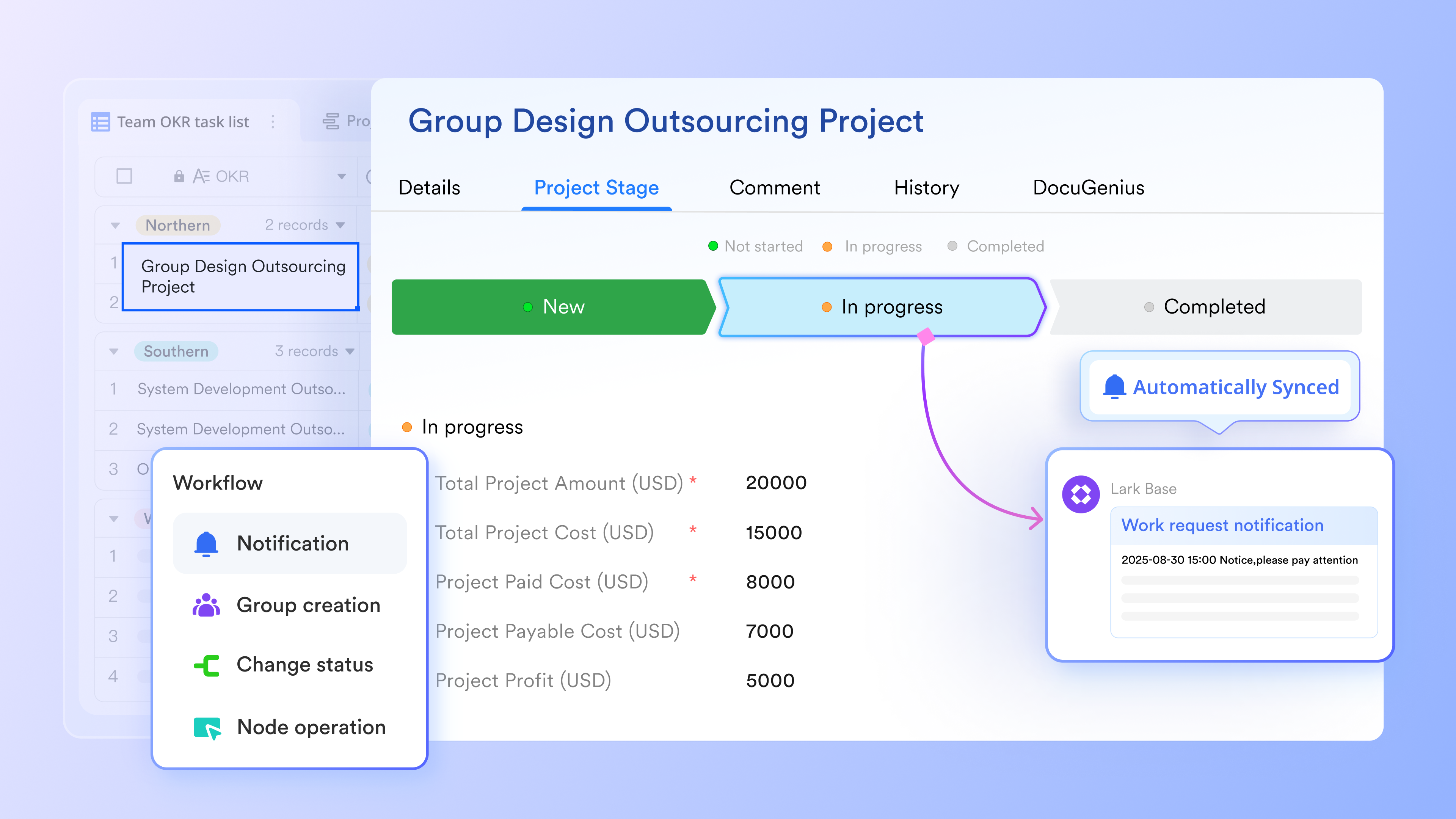
Lark Base as the system of record: Instead of burying test results in Jenkins logs, push summary data (Pass/Fail, Link to PDF, Timestamp) into a Lark Base table. This creates a searchable, permanent audit trail of every document generated. Pre-set, customizable automated workflows can further reduce manual work and boost the team's productivity.
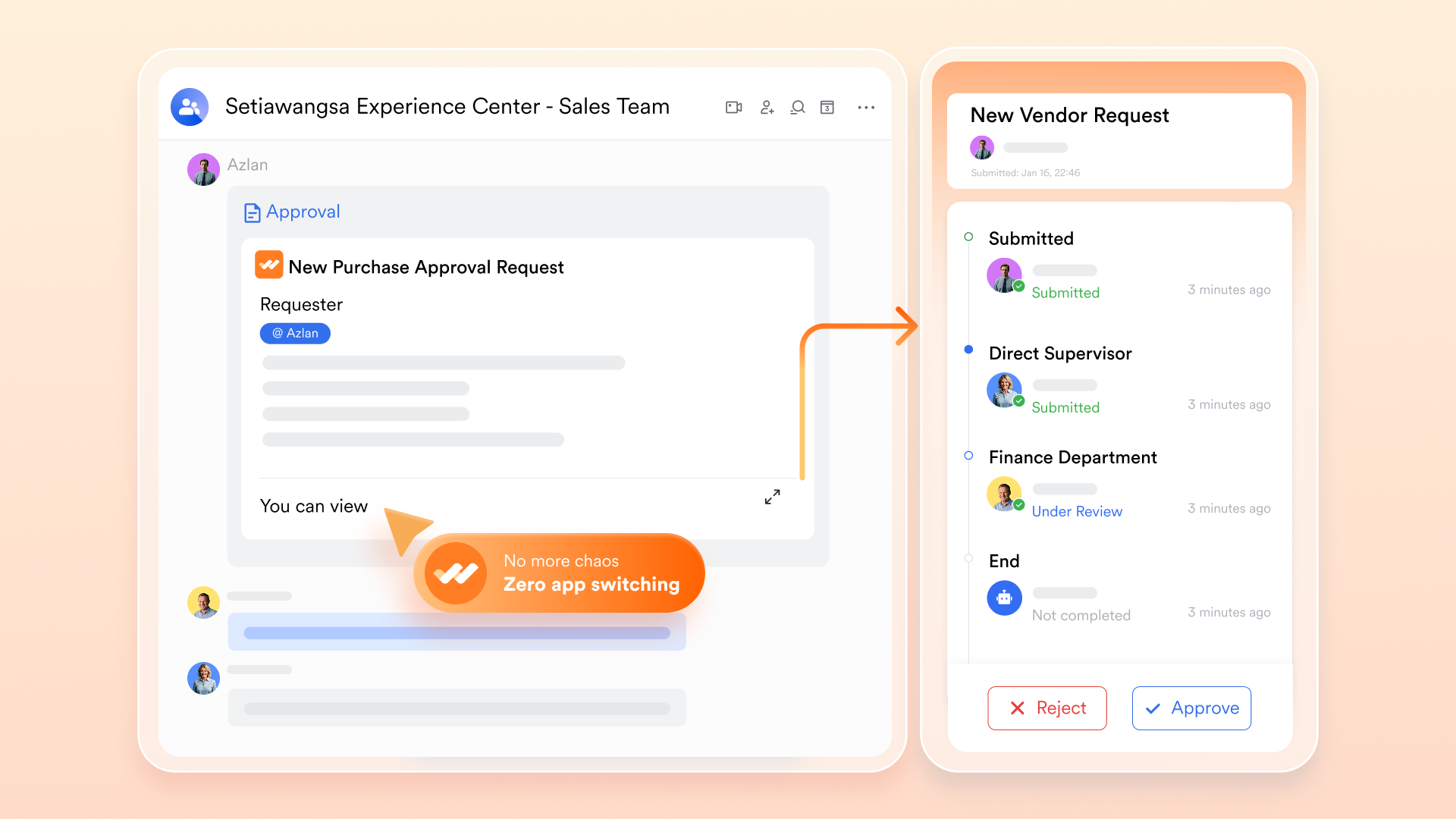
Lark Approval for gold masters: Before a new PDF template goes live, use Lark Approval to route the "Gold Master" PDF to Legal, Finance, and Product for digital sign-off. No more "I didn't approve that change" emails.
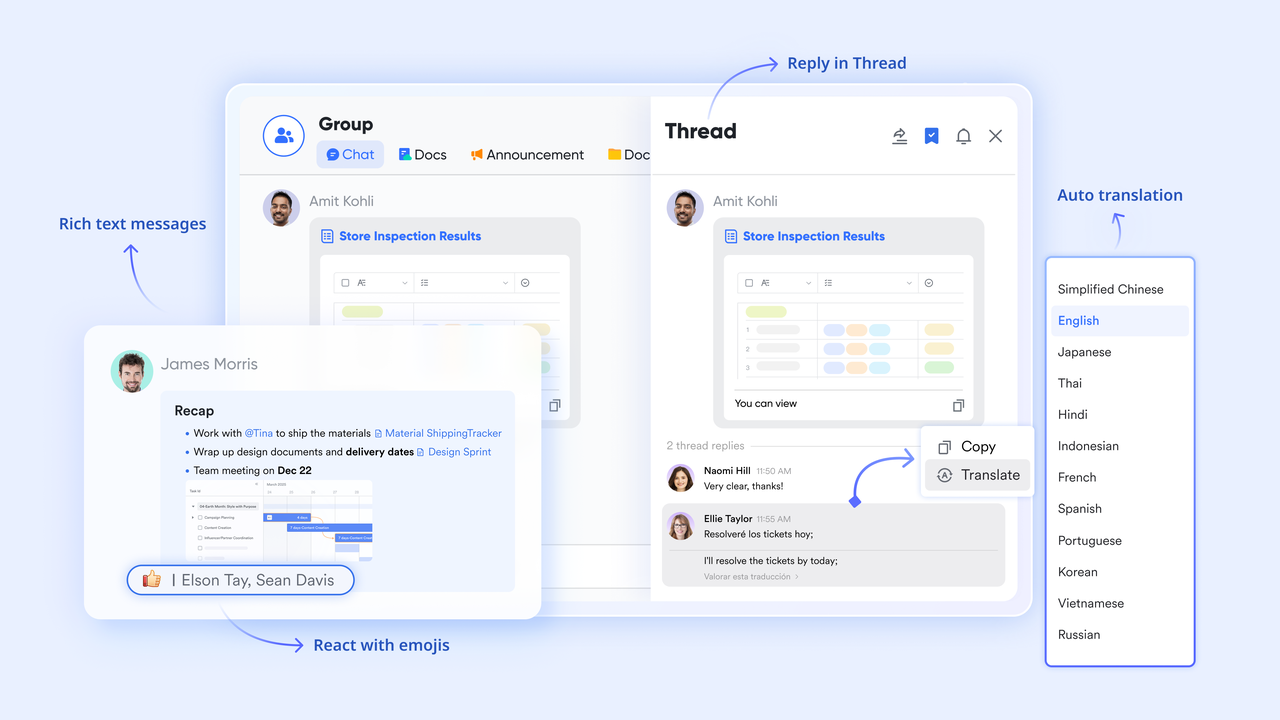
Lark Messenger for instant alerting: Connect your CI/CD pipeline (via Webhook) to a dedicated Lark group. If a critical PDF test fails (e.g., "Contract missing signature field"), the team is notified instantly with a direct link to the artifact.
Conclusion
PDF testing bridges a significant void in contemporary test automation approaches. It is often the case that the integrity of a document heavily influences business results, yet it remains under-tested. As we have seen, Selenium is pretty good at testing UI-related interactions, but you can't rely entirely on it to check file-based output formats, including PDFs.
The path forward for the modern enterprise is a "Best of Breed" strategy. By pairing Selenium for browser actions with specific PDF validation tools or consolidating them into unified platforms that integrate the two, QA teams will be able to verify that every aspect of the user journey—from the first click to the final downloaded contract—has been thoroughly tested and is ready for release. The result is a robust, reliable, and high-quality software experience that builds trust with every document delivered.
FAQs
Is PDF automation expensive to implement?
While there is an initial setup cost (selecting tools, defining templates), the ROI is often realized within the first few regression cycles. The cost of a single production error in a financial contract often outweighs the cost of the entire tooling suite.
Can we just use image comparison tools?
Pure image comparison is brittle; a 1% difference in rendering can cause false alarms. It is better to use tools that can parse the structure (text, metadata, DOM) of the PDF, rather than just its pixels.
How do we handle dynamic data like dates or invoice numbers?
Robust PDF testing tools allow you to define "exclusion zones" or use regular expressions (Regex) to validate patterns (e.g., ensure the date format is `YYYY-MM-DD`) without failing the test because today's date is different from the template.
Where should we store our "Gold Master" PDF templates?
These should be version-controlled alongside your code in your Git repository. This ensures that when a developer changes the invoice layout, they also update the Gold Master in the same pull request, keeping tests and code in sync.
Related readings
Table of contents
Start using Lark today

Manage all your work in one place
Boost team efficiency by 10x
Save up to 70% on software costs
Table of contents
Start using Lark today
Manage all your work in one place
Boost team efficiency by 10x
Save up to 70% on software costs
Keep reading







2026 Lark Technologies Pte. Ltd.
Headquartered in Singapore with offices worldwide.






Explore: