If you have ever spent a Friday evening hunting down a missing receipt just to close the books, you know the frustration of manual accounting. Finance teams are hired for their strategic thinking, yet many spend their days acting as data janitors—typing numbers from PDFs into spreadsheets and chasing approvals over email. Accounting automation changes this reality. By letting software handle repetitive data entry, routing, and reconciliations, you free your team to focus on financial forecasting and risk management. Let us look at how replacing manual tasks with automated workflows can transform your operations.
What is accounting automation?
Accounting automation is the practice of using software to execute manual, repetitive financial tasks with minimal human intervention. Instead of having a person manually type invoice details into an accounting system or cross-reference bank statements line by line, software handles the heavy lifting.
At its most basic level, this involves setting up rule-based triggers. For example, if an invoice comes in from a specific vendor, the accounting workflow software automatically routes it to the correct department head using for sign-off. At a more advanced level, technologies like Robotic Process Automation (RPA) and Machine Learning (ML) can "read" unstructured data from receipts, categorize expenses, and flag anomalies that might indicate fraud.
Whether it is accounts payable automation software processing incoming bills or accounts receivable software sending automated payment reminders to clients, or broader streamlining processes across departments, the goal is identical: improve accuracy, speed up the workflow, and give your finance team their time back.
The true cost of manual accounting processes
Many companies hesitate to invest in automation because they believe their current manual processes are "good enough." But relying on humans to move data between systems carries hidden, compounding costs.
First, there is the raw cost of human error. When an accountant manually enters hundreds of invoices a week, a misplaced decimal point is inevitable. Finding and fixing that error during the month-end close takes hours of investigative work.
Second, manual processes create severe operational bottlenecks, particularly in accounts payable (AP), where purpose-built can dramatically reduce delays and errors.
Scenario: The manual AP bottleneck
Imagine your marketing team hires a freelance designer. The designer emails their invoice to the marketing director. The director forgets about the email for five days, then forwards it to finance. Finance prints it out, realizes the purchase order number is missing, and emails marketing back. By the time the invoice is finally manually entered into the AP software and paid, the vendor is frustrated, and the finance team has wasted 45 minutes on a single transaction.
Finally, there is the toll it takes on your people. High-performing finance professionals want to analyze data, advise leadership on cash flow, and build financial models. When you force them to spend 80% of their time acting as data entry clerks, burnout and high turnover are the natural results.
Stop manual data entry with accounting automation in Lark
Core benefits of automating your financial workflows
Transitioning away from manual data entry delivers immediate, tangible returns for a growing business. When you implement proper accounting automation software, you see improvements across three main areas.
Faster month-end close cycles
The month-end close is notoriously stressful because it requires reconciling a month's worth of fragmented data in a few days. Automation tools handle bank reconciliations and expense categorizations continuously in the background throughout the month. When the end of the month arrives, the team is simply reviewing and verifying the data, rather than building it from scratch.
Reduced fraud risk and better compliance
Manual processes are easy to manipulate and hard to audit. Automated workflows leave a clear, unalterable digital paper trail. If a payment is made, the system records exactly who requested it, who approved it, and when the funds were released. This level of visibility makes it much harder for fraudulent invoices to slip through the cracks and makes life significantly easier when auditors ask for documentation.
Scalable operations without linear headcount growth
As a company grows, transaction volumes increase. In a manual environment, doubling your transaction volume means doubling your data entry headcount. Accounting automation breaks this cycle. Once an automated workflow is built, it costs the same amount of effort for the software to process 50 invoices as it does to process 500, allowing your business to scale aggressively while keeping overhead costs lean. As businesses grow, helps optimize financial operations by automating repetitive tasks and delivering actionable insights from accounting data.
Key areas to automate: AP, AR, and beyond
Once you decide to move away from manual data entry, the next question is where to start. Most finance teams see the highest immediate return on investment by targeting the two most transaction-heavy areas of their department: accounts payable and accounts receivable, especially in complex, low-margin environments like .
Accounts payable (AP) automation
Processing incoming bills is often the most tedious job in the finance department. takes over the entire lifecycle of a vendor bill. It uses optical character recognition (OCR) to extract data from a PDF invoice, matches that invoice against the original , routes it to the appropriate manager for approval based on pre-set rules, and schedules the payment.
Accounts receivable (AR) automation
If AP is about controlling cash going out, AR is about accelerating cash coming in. Accounts receivable software automates the generation of client invoices based on project milestones, , or subscription billing cycles.
Scenario: The automated AR follow-up
Instead of having an accountant manually check bank records every Friday and draft awkward emails to clients who are 15 days late on a payment, AR automation handles the follow-up. The system tracks the invoice status and automatically sends a polite, pre-written reminder on day 15, day 30, and day 45, ensuring consistent cash flow management without the manual effort.
Expense management and payroll
Beyond standard invoices, automation tools can sync employee credit card feeds directly into the accounting system, categorizing expenses based on merchant codes. Similarly, integrating or a dedicated ensures that salary, tax, and benefit entries are posted to the general ledger automatically each pay period, removing another massive data entry burden.
The hidden trap: Why accounting-only automation fails
Many companies invest heavily in top-tier AP automation software, , or a robust ERP system, expecting all their month-end close problems to disappear. Yet, months later, they find that invoice approvals are still delayed and cross-departmental frustration is higher than ever.
Why does this happen? Because fixing your accounting software does not fix a broken communication culture.
The reality is that financial transactions do not exist in a vacuum. A software license renewal involves the IT team, the department using the tool, and finance. A marketing agency retainer involves the CMO, procurement, and the AP clerk. When an invoice has a discrepancy, the finance team cannot resolve it alone.
If your organization uses a fragmented tool stack—where finance works in the , marketing lives in project management software, and leadership communicates via siloed chat apps and emails—approvals will stall. Finance teams will still have to download a PDF from the AP software, attach it to an email or drop it in a chat window, and hunt down a department head for an explanation. Automating the ledger is useless if the human communication around the transaction remains painfully manual.
Automate your financial management with the best tool
Bridging the gap: Integrating accounting with team communication
goes beyond traditional ledger tools by bringing accounting automation directly into your As an all-in-one suite that combines ,, cloud storage,, , and , it eliminates the friction of scattered emails and disconnected software. This unified approach ensures that distributed finance teams can process transactions and resolve discrepancies efficiently and transparently.
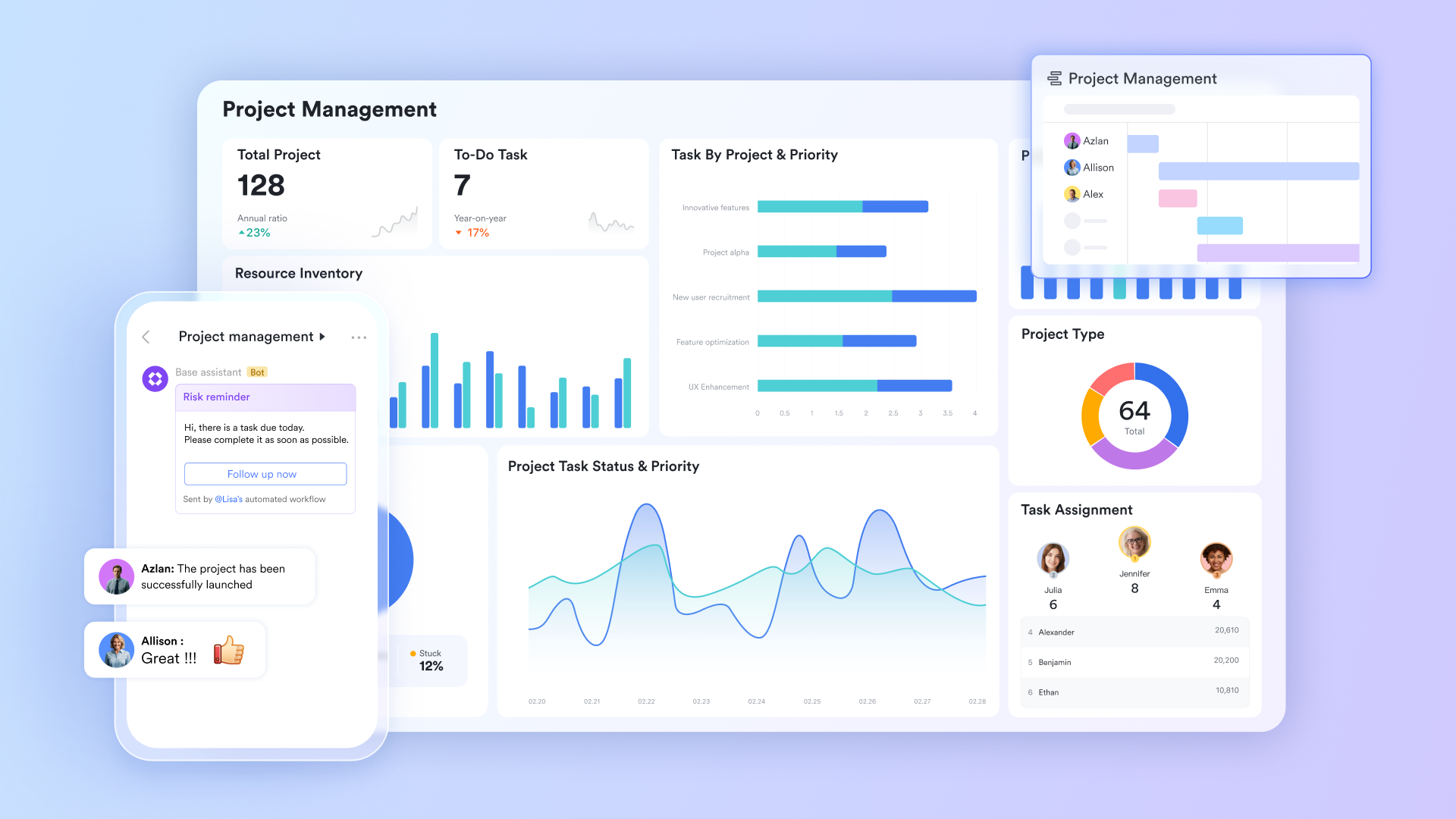
Centralized, real-time tracking to eliminate spreadsheet fatigue
stores expense records, vendor details, budget allocations, and payment status in a structured database with formula fields that auto-calculate budget variance, running totals, and cost per category. Finance teams filter, sort, and report on live financial records without manually compiling data from separate spreadsheet files across departments.
Smart AI-powered data entry automation
Lark AI field shortcuts convert standard financial records into a highly efficient processing system. By focusing on rapid and precise execution, these features take over the manual chores of your accounting process. Right from within Lark Base, your team can rely on the software to assign expense categories, distill complex audit memos, and translate invoices from global suppliers. 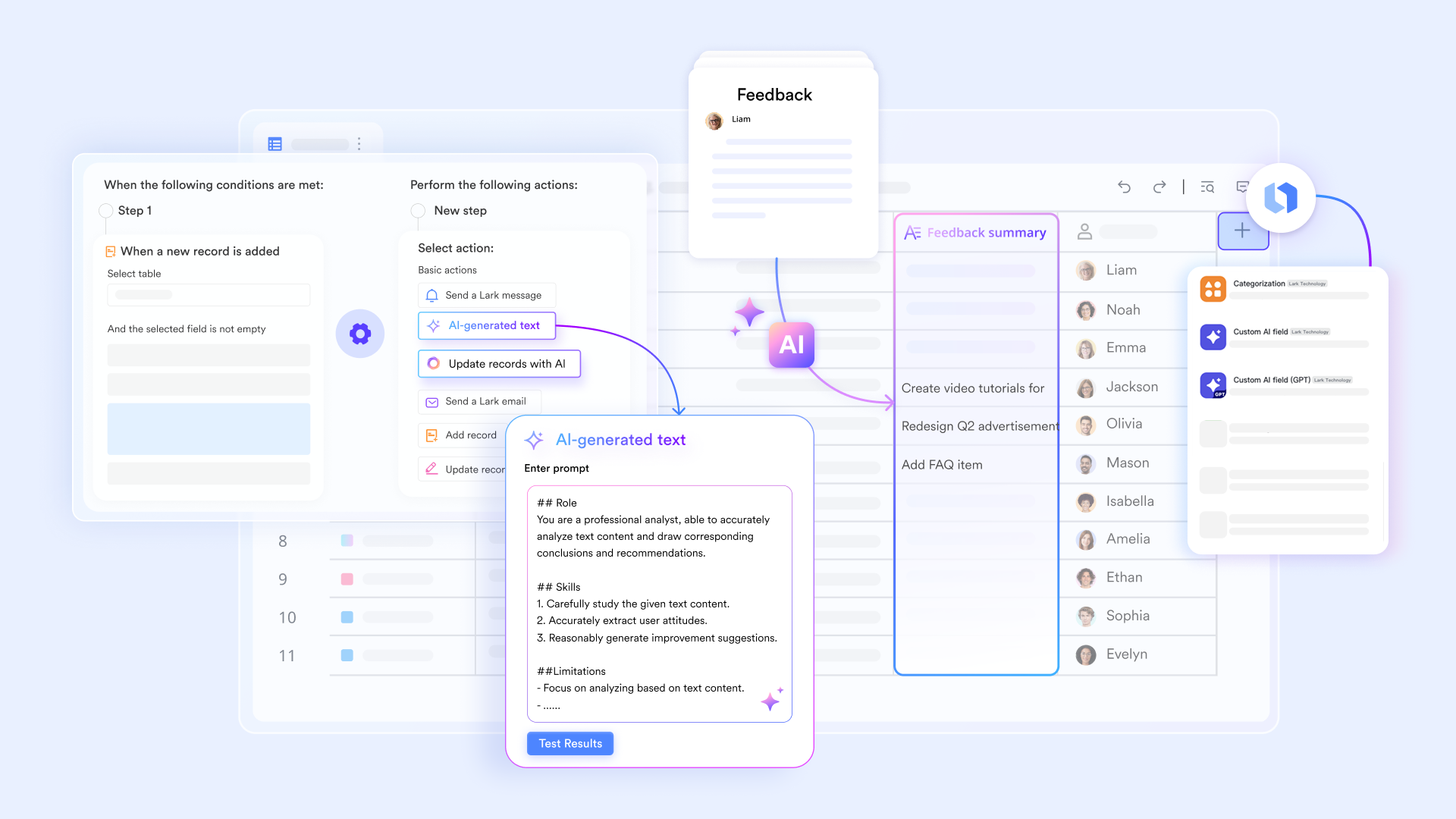
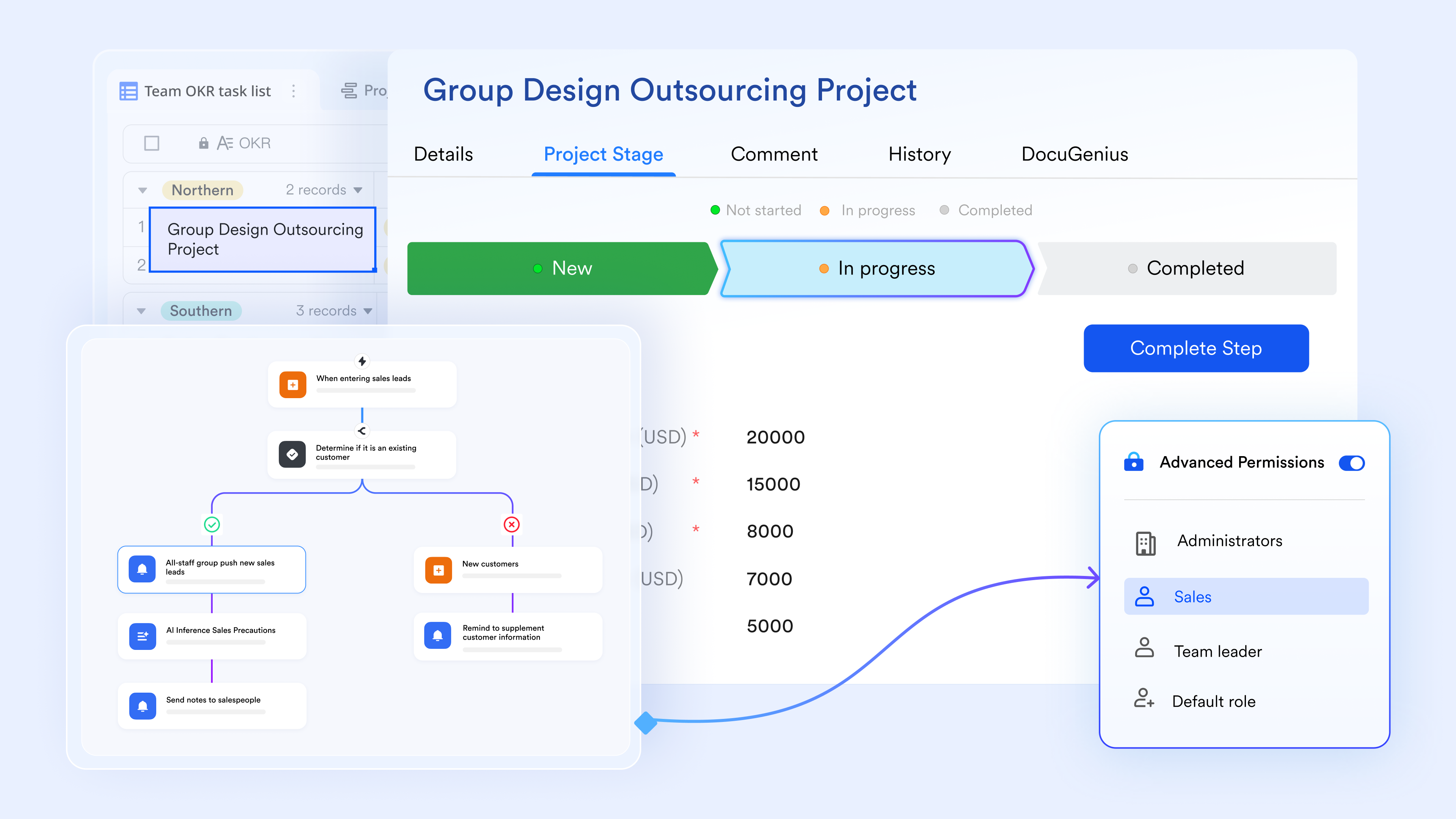
Automated payment reminders and budget alerts
Lark Base automation supports with no-code configuration. With triggers and actions set, it can fire notifications when invoice due dates approach, when actual spend exceeds a budget threshold, or when an expense claim has been pending approval beyond a defined period. Each alert is sent directly to the relevant finance team member in with the specific record attached, requiring no manual monitoring.
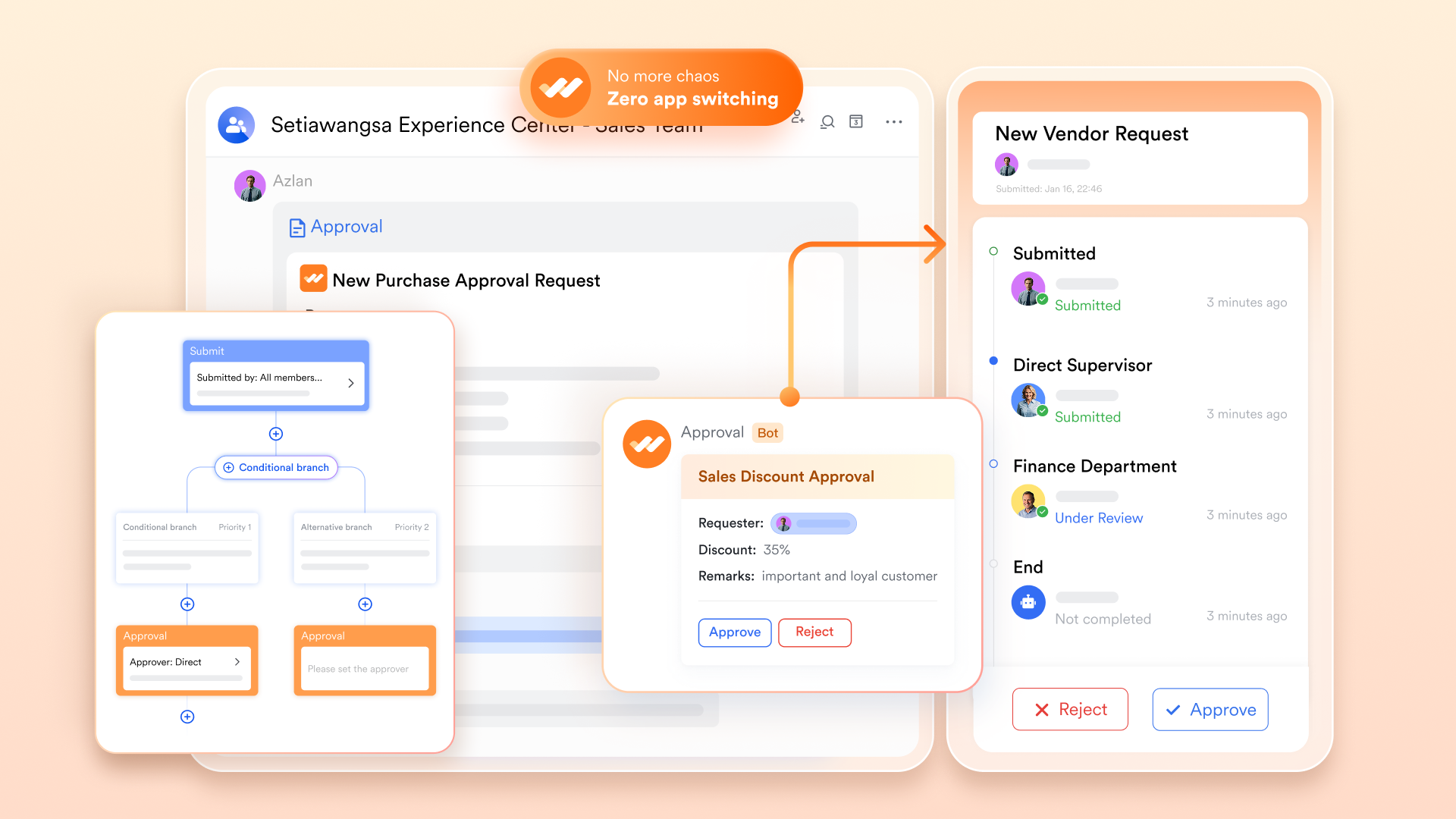
Multi-step financial approval workflows without email chains
configures structured approval flows for expense claims, purchase orders, budget requests, and invoice sign-offs. Each request routes automatically through a defined approver sequence—finance manager, department head, CFO—with conditional routing based on amount thresholds. Every decision is timestamped and stored as a traceable audit record.
:
- Starter plan: Free forever plan that includes 11 powerful tools for up to 20 users. It also comes with 100GB of storage, 1000 automation runs, AI translations, and more.
- Basic plan: $6/user/month (billed annually) for up to 500 users. It includes everything in Starter plus group calling for up to 500 attendees, 5TB of storage, 1000 automation runs, and more. For more details, please .
- Pro plan: $12/user/month (billed annually) for up to 500 users. It includes everything in Basic plus group calling for up to 500 attendees, 15TB of storage, 50,000 automation runs, and more.
- Enterprise plan: for custom pricing. Supports unlimited users and includes even more automation runs and advanced security, compliance, and management features.
For small teams with simple communication needs

18 months message history
1000 Base automation runs/month
2000 rows per table in Base
Most POPULAR
For companies with comprehensive collaboration and management needs
Unlimited message history
500-participant video meetings
50k Base automation runs/month
20k rows per table in Base
For large companies with advanced security and organizational management needs
Get a personalized demo and pricing
Unlimited message history
500-participant video meetings
15 TB storage + 30 GB storage/user
500k Base automation runs/month
50k Base automation runs/month
Most POPULAR
For companies with comprehensive collaboration and management needs
Unlimited message history
500-participant video meetings
50k Base automation runs/month
20k rows per table in Base
How to choose the right accounting automation software
Evaluating accounting workflow software requires looking beyond the basic feature list. You need a solution that scales with your transaction volume and fits naturally into your company's daily operations.
When reviewing options, consider these three critical factors:
- Core feature set: Ensure the software includes reliable OCR for reading documents, that can handle multi-tiered authorizations, and strong integration capabilities with your existing bank feeds.
- Ease of use for non-finance staff: If the software is too complex, department heads will avoid using it, and finance will be stuck doing manual entry anyway. The interface for submitting expenses and approving invoices must be intuitive.
- Scalability and pricing: As your company grows, your automation needs will expand. Look for pricing models that do not penalize you for adding users or running basic workflows. For example, Lark offers a free forever Starter plan that includes 11 powerful tools for up to 20 users. It comes with 1,000 automation runs and 100GB of storage space, with no credit card required, making it highly cost-efficient for teams testing the waters with automated approval workflows. As your needs grow, consulting a guide to the and paid plans like the Basic or Pro tiers offer up to 50,000 automation runs and massive storage limits for up to 500 users.
Start by mapping out your current manual steps. Identify where the physical bottlenecks live—is it data entry, or is it waiting for approvals?—and choose a tool designed to solve that specific friction point with .
Get visibility into your team's budget and spending with Lark
A step-by-step guide to implementing your first automated workflow
When I speak with finance leaders, their biggest hurdle is usually figuring out how to get started. Trying to overhaul your entire financial operation in one weekend is a recipe for disaster. Instead, you need a methodical approach that builds trust with your team.
Step 1: Map your current manual steps
Sit down with your team and sketch out the exact journey of a single financial transaction, such as an employee expense report. Document every click, every email, and every manual data entry point. You will quickly identify the physical bottlenecks—usually a specific approval stage where documents sit unread in an inbox.
Step 2: Start small and specific
Do not attempt to automate your entire month-end close on day one. Pick a single, low-risk process. Automating internal expense approvals or basic invoice routing is an excellent starting point. It requires minimal technical setup and immediately relieves a noticeable pain point for both the finance team and general employees.
Step 3: Build and test with a pilot group
Configure your new accounting workflow software to handle this specific task. Before rolling it out company-wide, select a small pilot group—perhaps just the marketing department—to test it. Run the automated process in parallel with your manual process for two weeks to ensure the routing rules and data extraction work exactly as intended, especially if you plan to scale into broader later.
Step 4: Train the broader team
Once you have ironed out the bugs, launch it to the rest of the company. Provide clear, simple instructions. Because you chose an intuitive tool that integrates with their daily communication platform, adoption should be swift. After this first workflow runs smoothly, you can begin automating more complex cycles using .
Will AI and automation replace accountants?
This is the most common fear in the industry, and it deserves a direct answer. No, automation will not replace accountants. It will, however, replace the administrative tasks that accountants currently despise doing.
The transition from manual to automated processes represents a shift in the profession. Technologies like Natural Language Processing (NLP) and machine learning are excellent at reading receipts, categorizing expenses, flagging duplicate payments, and even powering that connects finance and sales data. They are terrible at advising a CEO on whether to secure a line of credit or how to structure a new pricing model.
By removing the burden of manual data entry, automation actually elevates the accountant’s role. It transitions finance professionals from transactional workers into strategic advisors, analytical thinkers, and risk managers. The companies that thrive will be those whose finance teams know how to leverage these tools to deliver predictive insights, rather than those who just report on historical data.
Conclusion
Accounting automation is no longer a luxury reserved for massive enterprises; it is a structural necessity for any growing finance team. By shifting away from manual data entry, you protect your organization from costly human errors, accelerate your month-end close, and build a scalable foundation. Stop wasting hours chasing lost receipts or cross-referencing spreadsheets. When you give your team the right workflow tools, you give them the time and clarity to focus on strategic growth. By utilizing an all-in-one suite like , you can connect those financial workflows directly with everyday team collaboration to start building that foundation today.
Connect those financial workflows directly with Lark
FAQs
What is the difference between AP and AR automation?
Accounts payable (AP) automation focuses on the money leaving your business. It streamlines how you receive, approve, and pay vendor invoices. Accounts receivable (AR) automation manages the money coming in, handling tasks like generating client invoices, sending payment reminders, and reconciling incoming bank transfers.
Is accounting automation secure?
Yes, automated systems are generally much more secure than manual processes. They establish a rigid, unalterable digital audit trail for every transaction. This visibility drastically reduces the risk of internal fraud and ensures compliance, as you can easily prove exactly who approved a specific payment and when.
Can small businesses benefit from AP software?
Absolutely. Small businesses often benefit the most because they do not have the budget to hire a large finance team. Implementing AP software allows a single founder or early-stage accountant to manage a high volume of transactions without being overwhelmed. Many modern platforms also offer free entry-level plans, making the technology highly accessible.
Will CPA be replaced by AI?
No, certified public accountants (CPAs) will not be replaced by AI. According to industry analyses on the future of accounting, technologies like Robotic Process Automation (RPA) and AI are eliminating the repetitive, rule-based tasks—such as data entry and manual auditing checks. Instead of replacing accountants, AI augments their capabilities. The profession is experiencing a shift where there is increased demand for accountants who can leverage intelligence systems to provide predictive insights, manage complex compliance issues, and offer strategic business guidance.
What are the 4 pillars of automation?
When implementing an automated financial operation, successful strategies typically rest on four foundational pillars:
1. Document digitization and capture: Using OCR and intelligent document processing to turn physical receipts and invoices into structured digital data.
2. Workflow routing: Establishing rule-based triggers to move data automatically between departments (such as routing a purchase order for approval without an email chain).
3. System integration: Connecting discrete tools—like syncing your team communication platform, expense software, and core ERP—so data flows seamlessly across the business.
4. Analytics and monitoring: Utilizing real-time dashboards and AI to track cash flow, flag anomalies, and detect potential fraud continuously, rather than waiting for month-end reviews.
Related reading






























