


16 Best BPM Platform Tools for Business Process Automation

Ryan Tanner
Product Marketing Specialist
Aug 5, 2026
Ryan Tanner
Aug 5, 2026


Key takeaways: Top 5 platforms supporting low-code BPM
Snapshot: 5 best platforms with low-code BPM features

What is a BPM platform?
Low-code BPM platform vs traditional BPM systems differences
- Faster deployment with low-code tools: Low-code development platforms use visual builders and drag-and-drop interfaces, allowing teams to create and launch workflows quickly. Traditional BPM systems often require longer development cycles due to heavy coding and testing.
- Reduced reliance on developers: With low-code tools, non-technical users can design and manage processes with minimal IT support. In contrast, traditional BPM systems depend heavily on developers for customization, updates, and maintenance.
- Greater flexibility for business teams: Low-code platforms empower business users to make changes in real time, adapt workflows, and respond to evolving needs. Traditional systems are less flexible, as even small changes may require technical intervention.
- Trade-offs between customization and simplicity: While low-code platforms are easy to use and quick to deploy, they may have limitations in handling highly complex or deeply customized processes. Traditional BPM systems, though slower, often offer more advanced customization options to meet complex enterprise needs.
Full list: Top 16 platforms providing BPM capabilities
1. Lark: Collaboration platform supporting automated workflows for BPM
- Lark works as a true all-in-one platform by combining project, task, time, communication, and knowledge management in one workspace.
- Lark offers strong automation and workflow control through Base and Approval, reducing manual effort and approval delays.
- Lark enables deep collaboration by integrating chat, tasks, calendars, and documents directly into daily work.
- Lark scales smoothly from small teams to large organizations with flexible pricing and advanced governance options.
- New users may require guidance from the Lark Help Center during initial setup due to the platform's broad range of features.
- Starter plan: Free forever plan that includes 11 powerful tools for up to 20 users. It also comes with 100GB of storage, 1000 automation runs, AI translations, and more.
- Pro plan: $12/user/month (billed annually) for up to 500 users. It includes everything in Starter plus group calling for up to 500 attendees, 15TB of storage, 50,000 automation runs, and more.
- Enterprise plan: Contact sales for custom pricing. Supports unlimited users and includes even more automation runs and advanced security, compliance, and management features.
Starter
For small teams with simple communication needs
$0
/ user / month

Pro
For companies with comprehensive collaboration and management needs
$12
/ user / month
Enterprise
For large companies with advanced security and organizational management needs
Get a personalized demo and pricing
Pro
For companies with comprehensive collaboration and management needs
$12
/ user / month
2. Appian: Low code bpm platform for enterprise applications and workflows
- Project workflows and task dependencies for structured planning
- Task assignments with due dates and priority levels
- Multiple project views, including list, board, and timeline
- Built-in reporting for tracking progress and workloads
- Clean and intuitive user interface
- Strong support for structured team workflows
- Effective task dependency and workflow management
- Reliable collaboration for mid-sized teams
- Limited customization compared to more flexible tools
- Advanced features are locked behind higher pricing tiers
- Can feel rigid for rapidly changing workflows
- Custom pricing
3. Pega: BPM platform with AI-powered case management capabilities
- Custom task statuses, fields, and views
- Built-in automation for repetitive workflows
- Goal tracking and performance dashboards
- Support for documents, tasks, and workflows
- Extremely flexible and customizable
- Suitable for complex and cross-functional teams
- Wide range of features on one platform
- Strong automation capabilities
- Steep learning curve for new users
- The interface can feel cluttered with many features
- Performance may slow on large workspaces
- Custom pricing
4. Kissflow: No-code BPM platform for business process automation
- Board and card-based task organization
- Drag-and-drop task movement
- Labels, checklists, and due dates
- Power-Ups for added functionality
- Very easy to learn and use
- Ideal for visual task tracking
- Fast setup with minimal configuration
- Generous free plan
- Limited reporting and analytics
- Not suitable for complex project dependencies
- Requires add-ons for advanced features
- Basic: $2,500 per month
- Enterprise: Custom pricing
5. Nintex: Workflow automation BPM platform for enterprise document processes
- Simple task lists with priorities and due dates
- Natural language task input
- Recurring tasks and reminders
- Cross-device synchronization
- Lightweight and fast to use
- Excellent for personal task management
- Clean and distraction-free interface
- Strong mobile app experience
- Limited project management capabilities
- Basic collaboration features
- Not suitable for large teams
- Custom pricing
6. Bizagi: BPM platform for process modeling and automation workflows
- Customizable boards and dashboards
- Automation for routine processes
- Multiple views, including workflows and workload
- Reporting and analytics tools
- Strong visual reporting and dashboards
- Flexible workflow configuration
- Good cross-team visibility
- Supports a wide range of use cases
- Pricing increases quickly as teams scale
- Can feel complex for simple workflows
- Limited features on lower-tier plans
- Custom pricing
7. Bonitasoft: Open-source BPM platform for flexible workflow customization
- Custom databases and templates
- Integrated documents and wikis
- Task and project tracking
- Flexible page-based structure
- Highly customizable and adaptable
- Combines knowledge and task management
- Suitable for creative and technical teams
- Strong documentation capabilities
- Requires significant setup effort
- Lacks native workflow automation
- Performance can slow with large databases
- Custom pricing
8. Zoho Creator: Low-code BPM platform for custom business applications
- Advanced workload and resource management
- Custom workflows and approval processes
- Detailed reporting and analytics
- Enterprise-grade security controls
- Scales well for large organizations
- Strong reporting and governance features
- Supports complex project structures
- Reliable performance for enterprise use
- Steep learning curve
- The interface can feel overwhelming
- Higher cost compared to simpler tools
- Standard: $8 per user/month (billed annually)
- Professional: $20 per user/month (billed annually)
- Enterprise: $25 per user/month (billed annually)
- Flex: Custom pricing
9. ProcessMaker: BPM platform with AI-driven process optimization features
- Spreadsheet-style grid interface
- Automation rules for workflows
- Project workflows and Gantt views
- Reporting and dashboards
- Familiar spreadsheet-like experience
- Strong automation for repetitive tasks
- Good collaboration and sharing controls
- Suitable for operational teams
- Less intuitive for non-spreadsheet users
- Limited visual task management
- Can feel rigid for creative workflows
- Standard: $3000 per month (billed annually)
- Professional: Custom pricing
- Enterprise: Custom pricing
10. Cflow: An AI-powered approval workflow automation platform that simplifies business processes with no-code automation
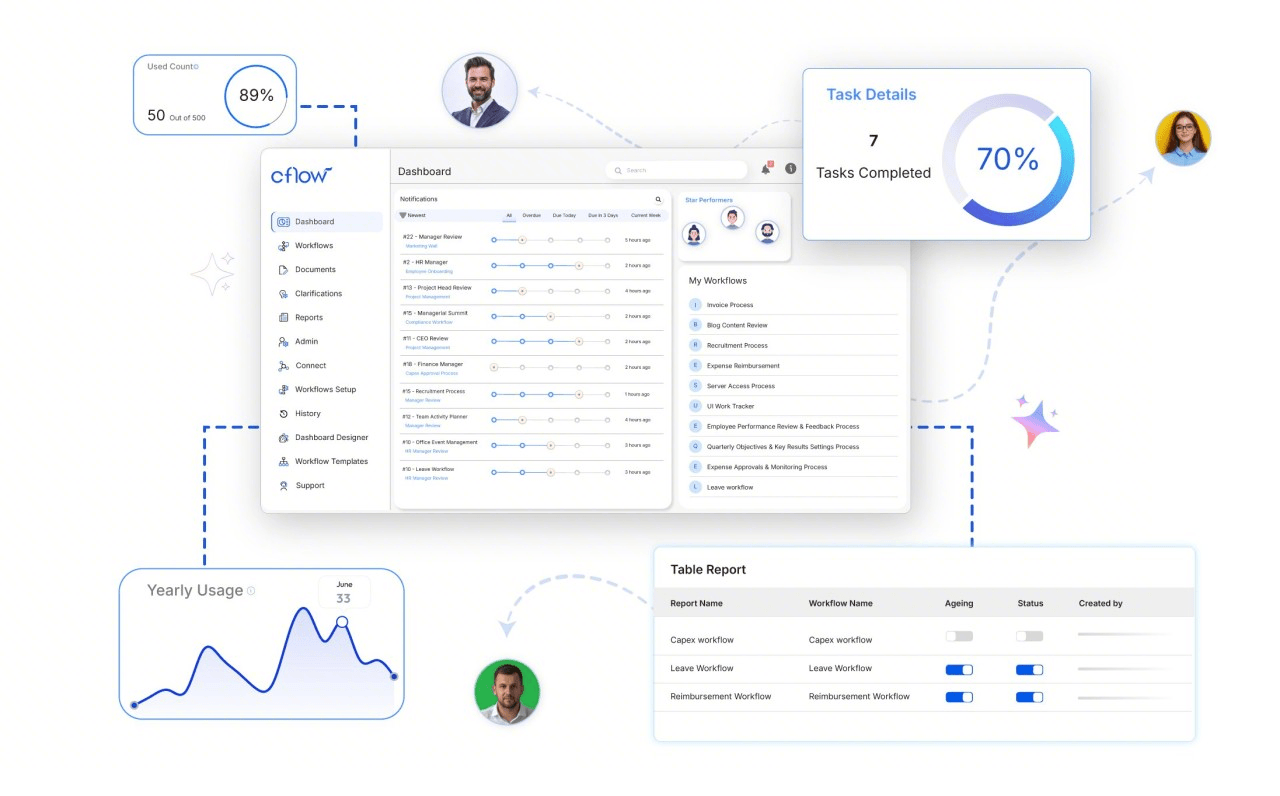
- AI-based drag-and-drop workflow builder
- Multi-level approval workflows with conditional routing
- AI-powered document processing and workflow automation
- Integrates with 1,000+ applications via Zapier
- Easy-to-use interface with no coding required
- Quick deployment and workflow customization
- AI-powered automation reduces manual effort
- Suitable for finance, HR, procurement, and IT workflows
- Advanced ERP or industry-specific capabilities may require third-party systems
- Highly complex enterprise implementations may require additional configuration
- Joy: $11/user/month
- Bliss: $16/user/mo
- Zen: Custom pricing
11. Creatio: BPM platform combining CRM workflows and automation tools
- To-do lists and message boards
- Team chat and file sharing
- Automatic check-ins
- Centralized project spaces
- Very easy to use
- Minimal setup and learning curve
- Strong communication features
- Flat pricing model
- Limited reporting and analytics
- Not suitable for complex projects
- Few customization options
- Growth: $25 per user/month
- Enterprise: $55 per user/month
- Unlimited: $85 per user/month
12. Pipefy: No-code BPM platform for structured process automation workflows
- Scrum and Kanban boards
- Issue and bug tracking
- Sprint planning and backlog management
- Advanced reporting for agile teams
- Powerful software development workflows
- Strong agile and issue tracking tools
- Highly configurable
- Scales well for large engineering teams
- Complex interface for non-technical users
- Steep learning curve
- Requires setup and administration
- Custom pricing
13. TIBCO BPM: Enterprise BPM platform for large-scale process management
- Workflow tracking with timers
- Workflows and reports
- Project and client tracking
- Team activity monitoring
- Strong free plan
- Easy to use for automation
- Useful reporting features
- Supports teams and individuals
- Limited project management features
- Basic interface design
- Advanced features require paid plans
- Custom pricing
14. Camunda: BPM platform for advanced process orchestration and control
- One-click workflows tracking
- Detailed automation reports
- Cross-platform support
- Idle detection
- Extremely easy to use
- Clean and simple interface
- Strong reporting for individuals
- Excellent mobile experience
- Limited collaboration features
- Not suitable for complex team workflows
- Basic project management capabilities
- Custom pricing
15. IBM BPM: Enterprise-grade BPM platform with advanced analytics tools
- Strong integration support
- Content calendar
- Social monitoring and listening
- Analytics and reporting
- Supports multiple social networks
- Strong analytics tools
- Team collaboration features
- Reliable scheduling
- Expensive for small teams
- Limited features on lower-tier plans
- The interface can feel crowded
- Custom pricing
16. Oracle BPM: BPM platform for complex enterprise workflow automation
- Strong reporting for individuals
- Content queue management
- Basic analytics
- Team collaboration
- Simple and intuitive interface
- Easy content scheduling
- Affordable for small teams
- Quick setup
- Limited advanced analytics
- Fewer integrations than competitors
- Not suitable for large marketing teams
- Custom pricing
How to choose the right bpm platform for your business needs
- Define your business processes and goals clearly: Start by identifying which processes you want to automate and optimize. Whether it's approvals, customer onboarding, or operations, having clear goals helps you choose a platform that aligns with your needs. Many businesses also rely on BPM platform implementation services to ensure a smooth setup and faster results.
- Evaluate ease of use and low-code capabilities: Look for a platform that offers intuitive interfaces, drag-and-drop builders, and low-code tools. This allows both technical and non-technical users to design workflows, reducing dependency on IT teams and speeding up process development.
- Check support for case management and workflows: If your business handles complex, case-driven operations, choose a platform that supports BPM-based case management frameworks. This ensures better handling of dynamic processes, customer interactions, and multi-step workflows.
- Assess integration and scalability: A good BPM platform should integrate seamlessly with your existing systems, like CRM systems, ERP, and communication tools. It should also scale with your business as processes grow more complex over time.
- Consider analytics, support, and long-term value: Advanced reporting and analytics help track performance and identify areas for improvement. Also, evaluate vendor support, pricing, and future upgrades to ensure the platform delivers long-term value for your organization.
Common challenges in BPM platform adoption and implementation
- Complex setup and onboarding: Some BPM platforms require detailed configuration, training, and technical expertise during initial setup. Without proper planning or support, this can delay implementation and reduce early adoption success.
- Resistance to process change: Employees may be hesitant to adopt new workflows, especially if they are used to manual or legacy systems. Change management and proper training are essential to encourage acceptance and a smooth transition.
- Integration challenges: Integrating BPM platforms with existing systems like CRM, ERP, or communication tools can be complex. Poor integration can disrupt workflows and limit the effectiveness of automation.
- Lack of clear workflow ownership: Without defined roles and responsibilities, workflows can become inefficient or mismanaged. Leveraging bpm-platform-based case management frameworks can help assign ownership, improve accountability, and ensure smoother execution of business processes.
Conclusion
FAQs
How does BPM differ from workflow automation tools?
Which industries benefit most from BPM platforms?
Can BPM platforms be used without technical expertise?
What is the difference between BPM and low-code platforms?
How do BPM platforms improve compliance and governance?
Related reading

Start using Lark today

Manage all your work in one place
Boost team efficiency by 10x
Save up to 70% on software costs
Start using Lark today
Manage all your work in one place
Boost team efficiency by 10x
Save up to 70% on software costs
Keep reading







2026 Lark Technologies Pte. Ltd.
Headquartered in Singapore with offices worldwide.





