








16 Budget Tracking Tools for Work, Projects, and Teams

Ryan Tanner

Product Marketing Specialist

Aug 6, 2026

Ryan Tanner

Product Marketing Specialist

Aug 6, 2026

Try Lark for free
15 min read
Managing finances effectively is the cornerstone of any successful venture, whether you are balancing a household or overseeing a multi-million dollar corporate initiative. Without precise budget tracking, resources vanish into hidden costs, and "minor" overruns quickly escalate into project-ending deficits.
Finding a solution that bridges the gap between daily tasks and high-level fiscal reporting ensures that every dollar spent aligns with your strategic goals. This guide explores the most effective tools to keep your finances firmly under control. Let's dive in now.

Key takeaways: 5 best budget tracking apps

To help you get the best tools at first glance, we have highlighted five standout budget tracking tools below:
1. Lark: Team-based budget tracking with real-time visibility
2. Monarch: Flexible budgeting for modern earners
3. YNAB: Zero-based budget tracking app for financial discipline
4. QuickBooks: Business budget tracking with accounting control
5. FreshBooks: Budget tracking app for freelancers and agencies

Snapshot: 5 best budget tracking software

We are starting with these five because they are the most popular choices for different needs, from personal savings to big company projects. Since every team works differently, we have also included a full list of 15 tools below, so you can find the one that fits your specific workflow perfectly.
Tool
Best for
Primary use
Pricing (USD/annual)
Lark
Team and project budget tracking
Budgets + tasks + collaboration
Free plan available; paid from $6/user/month
Monarch
Personal budgeting
Expense tracking
No free plan; paid from $8.33/month
YNAB
Zero-based budgeting
Personal finance
No free plan; paid from $9.08/user/month
QuickBooks
Small businesses
Accounting + budgets
No free plan paid from $19/user/month
FreshBooks
Freelancers
Invoicing + budgets
No free plan; paid from $23/user/month
Information source: Official vendor sites
Update time: 2026-02-01
Note: Pricing and plan details reflect publicly available data as of the update date and may vary based on region, billing cycle, and number of agents.

Track your budgets accurately with the top tool

What is a budget tracking app?

A budget tracking app is a tool that helps you monitor and manage your spending and financial goals. It lets you record income, track expenses, categorize transactions, and set budgets for different areas like bills, groceries, or projects. By giving you real-time insight into where your money is going, a budget tracking app helps you stay on track, avoid overspending, and make smarter financial decisions. Many of these apps also offer features like alerts, reports, and visual flowcharts to make understanding your finances easier.

When spreadsheets stop working for budget tracking

Spreadsheets are often the first tool used for budget tracking, but they start to fall short as budgets grow more complex and involve more people.
  • Version control issues: When multiple people work on the same spreadsheet, it quickly becomes hard to know which version is correct. Files get copied, renamed, and shared across email or chat, leading to confusion and outdated data. This makes it difficult to trust numbers or maintain a single source of truth.
  • Manual update delays: Spreadsheets rely heavily on manual data entry. Expenses, income, and adjustments often get updated late or inconsistently, which means budgets are rarely up to date. These delays limit real-time visibility and make it harder to react quickly to overspending or unexpected costs.
  • Error-prone forecasting: Formulas in spreadsheets are easy to break and hard to audit. A small mistake in a cell or calculation can throw off the entire forecast without being noticed. As budgets scale, this increases the risk of inaccurate projections and poor financial decisions.

Full list: 16 best budget tracking software ​​

1. Lark: Unified budget tracking across projects and teams

Lark brings budget tracking, collaboration, and project visibility into a single workspace. Instead of managing budgets in disconnected tools or spreadsheets, teams can track expenses, updates, and approvals alongside everyday work. With shared documents, real-time communication, and workflow management, Lark helps teams stay aligned on budgets across projects and departments. This unified approach improves transparency, reduces delays, and makes it easier to keep spending under control while work moves forward.
loading...
Features:
Custom multi-dimensional databases
Lark Base provides a powerful, no-code environment to build custom project budget trackers. You can use the "Currency" field to track exact costs and "Formula" fields to calculate real-time variances between planned and actual spend. By linking records between task lists and budget tables, every project update automatically adjusts your remaining balance, ensuring financial data stays current.
Lark Base: Custom multi-dimensional databases
Real-time resource dashboards
Lark Base dashboards allow you to visualize your budget health using data pulled directly from your project bases. By using bar and pie chart gadgets, you can monitor resource distribution and identify which departments are nearing their spending caps. These project reports update automatically as team members log expenses, providing a live snapshot of your total cost of ownership across all active projects.
Lark Base dashboards visualize budget health
Automated expense approval workflows
Lark Approval streamlines the spending process by digitizing purchase requests and reimbursement forms. You can set up conditional routing so that expenses over a specific limit are automatically sent to the department head for a digital signature. This function operates directly within the chat interface, allowing managers to approve or reject budget-impacting requests instantly without switching applications.
Lark Approval automated expense workflows
Unified time tracking and attendance
Lark Attendance helps you manage labor costs, which are often the largest part of a project budget. The function allows employees to clock in via mobile with GPS verification, ensuring billable hours are logged accurately. By exporting this data to your budget base, you can calculate precise labor expenses and compare them against your initial payroll forecasts to prevent overtime overruns.
Lark Attendance manages labor costs
Pros:
  • Consolidates budget tracking with collaboration and project management in a single platform.
  • Facilitates real-time tracking of expenses and approvals.
  • Improves transparency and reduces delays through unified workflows.
  • Automates expense approval workflows.
  • Unifies time tracking and attendance for managing labor costs.
Cons:
  • While it offers comprehensive features, the learning curve for new users might be steep due to the breadth of functionalities.
  • May be more robust than needed for very small teams or individuals solely focused on basic budget tracking.
Pricing:
  • Starter plan: Free forever plan that includes 11 powerful tools for up to 20 users. It also comes with 100GB of storage, 1000 automation runs, AI translations, and more.
  • Basic plan: $6/user/month for up to 500 users. It includes everything in Starter plus group calling for up to 500 attendees, 5TB of storage, 1000 automation runs, and more. For more details, please contact sales.
  • Pro plan: $12/user/month for up to 500 users. It includes everything in Basic plus group calling for up to 500 attendees, 15TB of storage, 50,000 automation runs, and more.
  • Enterprise plan: Contact sales for custom pricing. Supports unlimited users and includes even more automation runs and advanced security, compliance, and management features.
Starter
Pro
Enterprise

Starter

For small teams with simple communication needs

$0

/ user / month

Try for free

No credit card needed

20 users max
18 months message history
1-on-1 video meetings
100 GB storage
Lark Docs & Mail
1000 Base automation runs/month
2000 rows per table in Base

Pro

For companies with comprehensive collaboration and management needs

$12

/ user / month

Billed annually

500 users max
Unlimited message history
500-participant video meetings
15 TB storage
Lark Docs & Mail
50k Base automation runs/month
20k rows per table in Base

Enterprise

For large companies with advanced security and organizational management needs

Get a personalized demo and pricing

Unlimited users
Unlimited message history
500-participant video meetings
15 TB storage + 30 GB storage/user
Lark Docs & Mail
500k Base automation runs/month
50k Base automation runs/month
Single sign-on (SSO)

Pro

For companies with comprehensive collaboration and management needs

$12

/ user / month

Billed annually

500 users max
Unlimited message history
500-participant video meetings
15 TB storage
Lark Docs & Mail
50k Base automation runs/month
20k rows per table in Base

2. Monarch: Holistic wealth-tracking app for modern earners

Monarch is a popular personal budget tracking app that helps users manage their finances in one place. It connects to bank accounts, credit cards, and bills to automatically categorize transactions and show where money is going. With visual charts and alerts for overspending, Monarch makes it easy to see your financial picture at a glance. Users can set spending limits, track savings goals, and receive reminders about upcoming bills.
Monarch budget tracking app
Image source: monarch.com
Features:
  • Budget tracking via timer or manual entry
  • Allows two partners to manage a shared dashboard
  • AI-powered prediction of your future account balances
  • Team management and absence logging
Pros:
  • Features a modern, intuitive design
  • Transparent pricing and reports
  • Supports multiple styles
  • Provides robust "bulk editing" tools
Cons:
  • Limited integrations compared to larger tools
  • Basic design and dashboard customisation
Pricing:
  • Yearly: $8.33/month

3. YNAB: Zero-based budget tracking for disciplined planning

YNAB (You Need A Budget) is a budgeting app built around the zero-based budgeting method, where every dollar is assigned a purpose before it's spent. This approach encourages disciplined planning by helping users allocate income to expenses, savings, and goals with intention. YNAB's interface makes it easy to create categories, track spending in real time, and adjust allocations as priorities change.
YNAB zero-based budget tracking platform
Image source: ynab.com
Features:
  • Budget tracking directly inside project management tools
  • Budget and cost tracking by project or client
  • Detailed team reports and analytics
  • Expense tracking and invoicing
Pros:
  • Excellent integration with existing PM tools
  • Transparent time and budget management
  • Detailed reporting for agencies and consultants
  • Simple, intuitive design
Cons:
  • Limited standalone functionality without integrations
  • No offline tracking mode
Pricing:
  • Annual: $9.08/user/month
  • Monthly: $14.99/user/month

4. QuickBooks: Budget tracking software for small businesses

QuickBooks is a widely used financial platform that includes built-in budget tracking tools tailored for small businesses. It helps teams create, monitor, and adjust budgets tied directly to actual income and expenses. With automated categorization, customizable reports, and dashboards, QuickBooks makes it easy to see how spending compares to forecasts. Small business owners can track cash flow, manage invoices, and get alerts when budgets are at risk.
QuickBooks budget tracking tools for small businesses
Image source: quickbooks.com
Features:
  • Mobile clock-in/out with geofencing
  • Scheduling and shift management
  • Budget approvals and overtime alerts
  • Integration with QuickBooks for payroll and invoicing
Pros:
  • Perfect for payroll and compliance
  • Real-time mobile budget tracking
  • Excellent QuickBooks integration
  • Strong customer support
Cons:
  • Not ideal for freelancers or small teams
  • Pricing can increase with add-ons
Pricing:
  • Simple start: $19/user/month
  • Essentials: $37.50/user/month
  • Plus: $57.50/user/month
  • Essentials: $137.50/user/month

5. FreshBooks: Budget tracking for freelancers and agencies

FreshBooks is a budget tracking and invoicing platform designed to help freelancers and small agencies manage finances without complexity. It lets users set budgets for projects, track expenses, and monitor billable hours in real time. With easy-to-read dashboards and customizable reports, FreshBooks shows how actual spending compares to planned budgets.
FreshBooks budget tracking and invoicing platform
Image source: freshbooks.com
Features:
  • Easy budget tracking via desktop, mobile, or browser
  • Expense logging with receipt uploads
  • Built-in invoicing and payment tracking
  • Powerful project and budget reporting
Pros:
  • Excellent for client billing and expense reporting
  • Clean, user-friendly interface
  • Insightful visual reports for projects and costs
  • Strong third-party integrations
Cons:
  • Limited free plan (only for two projects)
  • Higher pricing for larger teams
Pricing:
  • Lite: $23/user/month
  • Plus: $43/user/month
  • Premium: $70/user/month

6. Brex: Budget tracking and spend management for finance teams
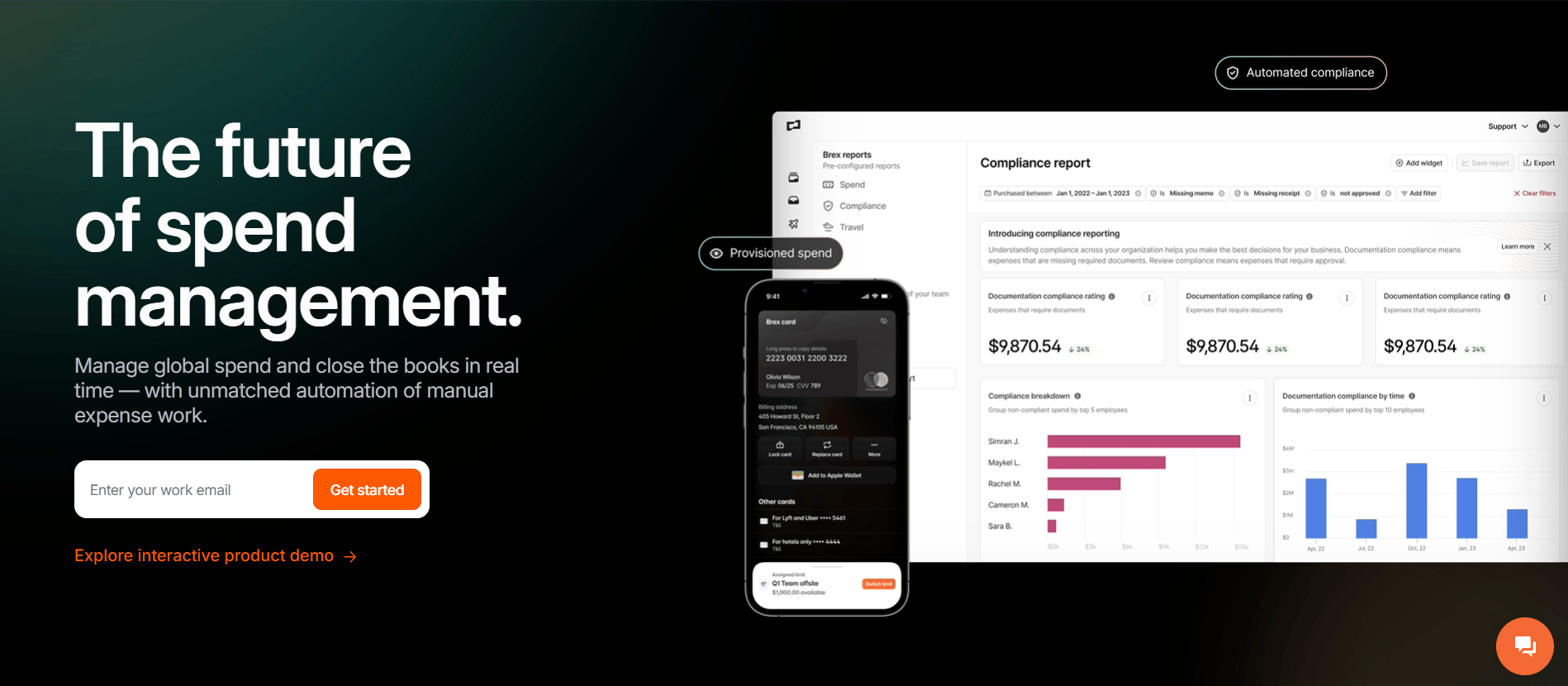
Brex combines corporate cards, expense management, and bill pay into a single platform, giving finance teams real-time visibility into where money is going across the entire organization. Rather than reconciling spending after the fact, teams can set budget limits by department, vendor, or employee, and enforce them automatically through card controls. With every transaction captured and categorized as it happens, actual spending always reflects current reality, not last week's export.
image source: brex.com
Features:
  • Real-time spend visibility across cards, reimbursements, and bills in one dashboard
  • Budget controls with automated limits and approval workflows
  • AI-powered receipt matching and expense categorization
  • Bill Pay with vendor tracking and payment scheduling
  • Accounting integrations with NetSuite, QuickBooks, Xero, and Sage
Pros:
  • Eliminates the lag between spending and reporting with live transaction data
  • Combines card spend, reimbursements, and vendor payments in a single view
  • Budget controls are enforced at the point of spend, not discovered after the fact
  • Strong integrations reduce manual reconciliation work
Cons:
  • Designed for businesses, not suitable for personal or freelance budgeting
  • Full feature set is most valuable for teams with moderate to high transaction volume
Pricing:
  • Essentials: Free (cards + expense management)
  • Premium: $12/user/month
  • Enterprise: Custom pricing

7. Clickup: Project budget tracking inside task workflows

ClickUp is a flexible budget tracking tool that brings budgeting directly into your task and project workflows. It lets teams set budget targets, track actual expenses, and monitor time spent right alongside the tasks driving work forward. With customizable fields, dashboards, and reporting views, ClickUp helps teams see how spending aligns with project progress in real time.
ClickUp flexible budget tracking tool
Image source: clickup.com
Features:
  • Budget tracking per task or project
  • Start/stop timers or manual entries
  • Reporting dashboards and time estimates
  • Billable time tracking with budget alerts
Pros:
  • Fully integrated with task and project management
  • Highly customisable and flexible
  • Great for agile and sprint-based teams
  • Affordable pricing for feature depth
Cons:
  • It can feel overwhelming for new users
  • Mobile apps are less polished than desktop ones
Pricing:
  • Free plan: $0 (free forever)
  • Unlimited: $7/user/month
  • Business: $12/user/month
  • Enterprise: Custom pricing

8. Asana: Budget visibility for structured project plans ​​

Asana is a task and project management platform that also supports budget visibility within structured project plans. Teams can add custom fields to track estimated costs, actual expenses, and budget variances alongside tasks and milestones. With timelines, portfolios, and progress dashboards, Asana helps teams see how work and spending align at every stage of a project.
Asana task and project management platform
Image source: asana.com
Features:
  • Automatic background tracking of apps and websites
  • Focus sessions to minimise distractions
  • Productivity scoring by activity type
  • Daily and weekly performance summaries
Pros:
  • Hands-free automatic tracking
  • Excellent productivity insights
  • Ideal for individuals improving focus
  • Works on desktop and mobile seamlessly
Cons:
  • Limited manual tracking options
  • Less suitable for billing or team projects
Pricing:
  • Personal: $0 (free forever)
  • Starter: $10.99/user/month
  • Advanced: $24.99/user/month
  • Enterprise: Custom pricing

9. Smartsheet: Spreadsheet-style budget tracking software ​​

Smartsheet brings the familiarity of spreadsheets together with powerful budget tracking features for teams and projects. It lets you build detailed budgets with custom columns, formulas, and dependencies while maintaining a structured, table-based view. Teams can set estimated costs, enter actual spending, and monitor variances in real time, all within a familiar interface.
Smartsheet spreadsheet-style budget tracking software
Image source: smartsheet.com
Features:
  • Timer-based budget tracking with optional screenshots
  • GPS and geofencing for field teams
  • Productivity metrics and idle time detection
  • Project budgets and automated payroll
Pros:
  • Ideal for remote, hybrid, and field teams
  • Strong employee monitoring features
  • Built-in payroll and invoicing options
  • Supports GPS and mobile tracking
Cons:
  • May feel intrusive to some employees
  • Complex setup for smaller teams
Pricing:
  • Pro: $9/user/month
  • Business: $19/user/month
  • Enterprise: Custom pricing
  • Advanced work management: Custom pricing

10. Monday.com: Visual budget tracking for teams ​​

Monday.com is a budget tracking tool that uses visual boards and customizable views to help teams monitor spending and stay on track. It lets you set budget limits, track actual costs, and visualize financial data with charts, timelines, and dashboards. Teams can link budgets to specific projects or tasks, assign ownership, and automate alerts when spending approaches or exceeds limits.
Monday.com visual budget tracking tool
Image source: monday.com
Key features:
  • Automatic budget tracking for apps & websites
  • Focus and distraction analysis
  • Productivity scoring and daily reports
  • Goal setting and alerts for time limits
Pros:
  • Runs quietly with minimal manual input
  • Excellent visibility into digital habits
  • Helps identify productivity blockers
  • Great for individual focus improvement
Cons:
  • Limited task or project-level tracking
  • Some advanced insights require paid plans
Pricing:
  • Free: $0 (up to 2 seats)
  • Basic: $9 per seat/month (total $90/month)
  • Standard: $12 per seat/month (total $120/month)
  • Pro: $19 per seat/month (total $190/month )
  • Enterprise: Custom pricing

​11. Zoho Projects: Budget tracking for SMB project teams ​​

Zoho Projects is a practical budget tracking tool built to help small and mid-sized project teams keep spending under control. It lets you set budget limits, track actual costs, and monitor time spent on tasks all in one place. With built-in dashboards and reporting features, Zoho Projects gives teams visibility into how projects are performing financially.
Zoho budget tracking for SMB project teams
Image source: zoho.com
Key features:
  • Budget organization with boards, buckets, and checklists
  • Shared team calendars and timeline views
  • Labels, priorities, and due dates for task clarity
  • Basic progress tracking and notifications
Pros:
  • Seamless integration with the Zoho platform
  • Easy to use for teams
  • Visual task boards help organize work clearly
  • No extra cost if you use extra fextures
Cons:
  • Limited built-in time tracking capabilities
  • Basic reporting compared to dedicated work trackers
Pricing:
  • Free: $0 (up to 5 users)
  • Premium: $3.06/user/month
  • Enterprise: $6.88/user/month
  • Unlimited: $10.71/user/month
  • Zoho project plus: Custom pricing

12. Wrike: Enterprise budget tracking for complex projects ​​

Wrike is a robust budget tracking tool designed for teams managing complex, cross-departmental projects. It combines financial visibility with workflow and task management, letting teams define budget estimates, track actual costs, and monitor variances across large initiatives. With customizable dashboards and real-time reporting, Wrike gives leaders clear insight into spending trends, resource allocation, and financial risks before they escalate.
Image source: wrike.com
Key features:
  • Task and project organization with lists, boards, and timelines
  • Custom fields and workflow automation
  • Integrations with budget-tracking apps
  • Collaboration tools like comments and mentions
Pros:
  • Excellent task management and planning features
  • Great for team collaboration and communication
  • Flexible views (list, board, calendar, timeline)
  • Strong ecosystem with many integrations
Cons:
  • No native built-in time tracking
  • Advanced reporting and features require paid plans
Pricing:
  • Free: $0
  • Team: $10/user/month
  • Business: $25/user/month
  • Pinnacle: Custom pricing (contact sales)
  • Apex: Custom pricing (contact sales)

13. Float: Resource-based budget forecasting ​​

Float is a specialized budget tracking tool that focuses on resource-based budget forecasting. Instead of only tracking past expenses, it lets teams project future costs by planning how resources are allocated over time. By mapping people, hours, and rates against upcoming work, Float helps teams estimate spending more accurately and spot budget pressure before it happens.
Float budget tracking tool on resource-based budget forecasting
Image source: float.com
Key features:
  • Resource scheduling tied directly to budget forecasting
  • Real-time visibility into future costs based on people, hours, and rates
  • Visual timelines showing the budget impact of workload changes
  • Capacity planning to prevent over-allocation and budget overruns
Pros:
  • Strong focus on forward-looking budget forecasting
  • Clear visual interface that's easy to understand
  • Helps teams link resourcing decisions to financial outcomes
  • Useful for agencies and teams managing multiple projects
Cons:
  • Limited expense tracking compared to full accounting tools
  • Less suitable for detailed invoicing and billing needs
  • Can feel restrictive for teams wanting deep customization
Pricing:
  • Starter: $7/user/month
  • Pro: $12/user/month
  • Enterprise: Custom pricing

14. Clockify: Time-based budget tracking software ​​

Clockify is a budget tracking tool that focuses on linking time tracking with budget visibility. It lets teams record hours spent on tasks and projects, then compares that time against budgeted estimates. With built-in timers, reports, and dashboards, Clockify helps teams see how actual work hours affect overall project costs. This time-based approach makes it easier to monitor billable and non-billable work, adjust forecasts, and understand where budget pressure is coming from.
Clockify time-based budget tracking software
Image source: clockify.com
Features:
  • Unlimited users and projects
  • Manual and timer-based budget tracking
  • Visual time reports and analytics dashboards
  • Billable hours tracking and invoicing
Pros:
  • 100% free core version with no user limits
  • Simple and fast setup with intuitive navigation
  • Great reporting features for teams and clients
  • Cross-platform support for web, desktop, and mobile
Cons:
  • Limited automation in the free plan
  • Interface can feel basic for enterprise users
Pricing:
  • Standard: $5.49/user/month
  • Pro: $7.99/user/month
  • Enterprise: $11.99/user/month

15. Toggl Track: Budget tracking through time analytics ​​

Toggl Track is a budget tracking tool that uses time analytics to help teams understand how work impacts project costs. By recording hours spent on tasks and projects, Toggl Track lets you compare actual time against planned budgets and identify where resources are being used. Its detailed reports and visual charts give insight into time patterns, efficiency, and cost drivers, helping teams make smarter decisions about future work.
Toggl Track budget tracking through time analytics
Image source: toggle.com
Features:
  • One-click budget and manual budget entry options
  • Project and client tagging for clear categorisation
  • Detailed reports and visual summaries of tracked hours
  • Integrations with tools like Asana, Monarch, and Smartsheet
Pros:
  • Extremely easy to use with no learning curve
  • Generous free plan for individuals and small teams
  • Works across web, desktop, and mobile devices
  • Strong reporting and export capabilities for clients and teams
Cons:
  • Limited advanced features in the free version
  • Lacks built-in invoicing and expense tracking
Pricing:
  • Free: $0 (up to 5 users)
  • Starter: $9/user/month
  • Premium: $18/user/month
  • Enterprise: Custom pricing

16. PlanGuru: Advanced budget planning and forecasting ​​

PlanGuru is a powerful budget tracking tool designed for teams and organizations that need sophisticated planning and forecasting capabilities. It goes beyond basic tracking by offering tools for multi-period budgeting, scenario analysis, and long-term financial modeling. Users can build detailed budget plans, compare multiple what-if scenarios, and forecast outcomes based on projected revenue and expenses.
PlanGuru advanced budget planning tool
Image source: planguru.com
Key features:
  • Budget tracking with clock-in/clock-out
  • Attendance logs and shift scheduling
  • Facial recognition and biometrics (optional)
  • Budget sheets and exportable reports
Pros:
  • Easy attendance and budget tracking for teams
  • Mobile app with GPS tracking for field work
  • Useful for shift-based teams and hourly workers
  • Free plan available with core features
Cons:
  • Limited task or project-level tracking
  • Some advanced features require paid plans
Pricing:
  • Single entity: $83/user/month
  • Multi department consolidations: $250/user/month

How to choose the right budget tracking tool

Picking the right budget tracking tool means matching its capabilities to how your team works and what you need to achieve. Here are key factors to consider.
  • Personal vs project vs enterprise budgets: Start by identifying the scale of your budgets. Personal budgeting tools are simple and focused on individual expenses. Project budget tools track costs across tasks, milestones, and resources. Enterprise solutions support complex structures, multiple teams, and heavy reporting needs. Choosing a tool built for your budget type ensures you're not paying for features you don't need, or missing critical ones you do.
  • Collaboration requirements: If multiple team members need to view, update, or approve budget changes, choose a tool that supports collaboration. Look for shared views, real-time updates, comment threads, and role-based access. Strong collaboration features help teams stay aligned and reduce errors from outdated or conflicting information.
  • Forecasting vs reporting needs: Consider whether you need forward-looking insights or detailed historical reports. Some tools focus on forecasting future spending and financial scenarios, while others excel at summarizing past performance. The best choice depends on whether your priority is planning upcoming work or analyzing results after the fact.
  • Total cost of ownership: Budget tracking isn't just about monthly subscription fees. Evaluate setup costs, training time, support fees, and add-ons you might need. A less expensive tool can end up costing more in time and frustration if it lacks essential features or requires workarounds. Choose a solution that delivers value over time, not just at first glance.

Common budget tracking challenges teams face

Budget tracking often becomes difficult when tools and processes don't match how teams actually work. These are some of the most common issues teams run into.
  • Budgets disconnected from work execution: Many teams plan budgets in one tool and execute work in another. This disconnect makes it hard to see how daily tasks, changes, and decisions impact spending. Without budgets tied directly to projects and workflow management, teams lose context and struggle to manage costs in real time.
  • Delayed visibility into overruns: When budget updates rely on manual entries or periodic reviews, overruns are often discovered too late. By the time teams notice the issue, corrective action is limited. Delayed visibility reduces control and increases the risk of unexpected cost overruns.
  • Too many tools, no single source of truth: Using multiple budgeting, tracking, and reporting tools creates fragmented data. Numbers don't always match, updates get missed, and teams lose confidence in the information. Without a single source of truth, decision-making becomes slower and less reliable.

Conclusion

Managing budgets across work, projects, and teams requires more than basic tracking. The right budget tracking tools provide real-time visibility, reduce manual effort, and help teams make informed decisions before costs get out of control. As projects grow and collaboration increases, integrated management becomes essential for maintaining accuracy and alignment. Tools like Lark stand out by combining budget tracking with communication, documents, and workflows in a single workspace. By choosing a solution that fits your team's structure and scale, you can move beyond spreadsheets and build a more transparent, efficient approach to budgeting.

Improve team productivity today

FAQs

What is the best way to track your budget?

The best way to track a budget is to use a centralized digital tool that updates in real time. This allows you to record expenses as they happen, compare actual spending against planned budgets, and spot issues early. Integrated tools reduce manual work and give clearer visibility than spreadsheets.

What is the 50/30/20 rule budget?

The 50/30/20 rule is a simple budgeting method where 50 percent of income goes to needs, 30 percent to wants, and 20 percent to savings or debt repayment. It's a helpful framework for personal budgeting, though project and team budgets often need more detailed tracking.

Which budget tracker is the best?

The best budget tracker depends on your needs. For teams and projects, tools that combine budgeting with collaboration and workflow tracking work best. Platforms like Lark help teams manage budgets alongside projects, communication, and approvals in one place.

How often should project budgets be reviewed?

Project budgets should be reviewed regularly, ideally weekly or biweekly. Frequent reviews help catch overspending early, adjust forecasts, and keep stakeholders aligned as project priorities change.

Related reading

Ryan Tanner

Product Marketing Specialist

Ryan is a Product Marketing Specialist. Having helped over 150 project managers overcome challenges, Ryan delivers actionable strategies and forward-thinking insights to elevate your team's performance by leveraging innovative methods for revolutionary project execution.

Keep reading







