














15 Best Bug Trackers: Free, Online & Open-Source Tools

Nidhi
Freelance Content Writer
Nov 3, 2026
Nidhi
Nov 3, 2026

24 min read
Add to preferred sources


Bug tracking has grown from basic ticket lists into structured systems that help development, QA, IT, and cross-functional teams capture and resolve issues with clarity. A modern bug tracker lets teams log, prioritize, assign, and verify defects consistently across web, mobile, and backend environments. Whether you need a free bug tracker for a small team, an online issue tracker for distributed contributors, or an open-source bug tracker for complete control, the right tool keeps workflows predictable.
Today's bug-tracking software combines issue fields, collaboration, automation, and reporting in one place, with platforms like Lark offering unified workspaces that simplify how teams manage and communicate about bugs.
Key takeaways: Top 6 bug tracker software
1. Lark: Best for unified bug tracking and team collaboration
2. Jira: Best for software development and sprint-based bug workflows
3. Linear: Best for fast, developer-friendly bug management
4. ClickUp: Best all-in-one bug tracking and project execution platform
5. Bugzilla: Best enterprise-grade open-source bug tracker
6. MantisBT: Best lightweight and simple open-source bug tracker

Quick preview: Comparison table of bug tracker tools
Information source: Official vendor sites
Update time: 2025-11-28
Note: Pricing and plan details reflect publicly available data as of the update date and may vary based on region, billing cycle, and number of agents.
What is a bug tracker tool?
A bug tracker is a structured system for recording, organizing, prioritizing, assigning, and monitoring defects that occur during software development, testing, or IT operations. It provides a central place for teams to capture detailed information about an issue—such as severity, reproduction steps, expected behavior, logs, and screenshots—so developers and QA teams can resolve it efficiently. A bug-tracking project typically includes workflows that move issues through stages such as Open, In Progress, Resolved, and Closed, and often integrates smoothly with project management tools to ensure transparency across the team. Many teams use an online issue tracker to coordinate work remotely, while mobile teams rely on an Android issue tracker for logging defects directly from devices. Whether used as a lightweight system or a free bug tracker, the goal remains the same: improve quality by systematically tracking and resolving every defect.
Core features to look for in a bug tracking tool
Choosing the right system requires understanding the capabilities that support accuracy, speed, and predictability in defect management. Modern teams rely on structured platforms that reduce manual tracking and make collaboration easier across development, QA, and IT functions. A strong setup ensures teams can log issues consistently, track changes clearly, and maintain smooth release cycles. It should also adapt to different project sizes and testing environments without complicating workflows. With multiple tools available, from lightweight options to advanced platforms, the ideal feature set should balance usability with depth. Selecting well-rounded capabilities ensures your team fully benefits from a dedicated bug-tracking foundation.
- Real-time updates: Real-time updates ensure that every change to an issue is instantly visible, helping teams stay synchronized even when working across distributed environments. This prevents outdated information and reduces confusion during active sprints or testing cycles. Notifications and instant refreshes help catch escalations quickly and maintain visibility over fast-moving work. Developers gain immediate clarity on assignments or newly found defects without manual refresh. This responsiveness supports the smooth operation of any bug tracker tool.
- Issue fields: Issue fields provide structured spaces for details such as device type, environment, reproduction steps, and severity. This consistency ensures bugs can be diagnosed and resolved without unnecessary back-and-forth. Well-defined fields also support filtering and grouping for better planning across releases. QA members rely on these fields to maintain clarity across multiple testing cycles. Their presence enhances the effectiveness of any bug-tracking app.
- Lifecycle tracking: Issue fields provide structured spaces for details such as device type, environment, reproduction steps, and severity. This consistency ensures bugs can be diagnosed and resolved without unnecessary back-and-forth. Well-defined fields also support filtering and grouping for better planning across releases. QA members rely on these fields to maintain clarity across multiple testing cycles. Their presence enhances the effectiveness of any bug-tracking app.
- Automation: Automation eliminates repetitive actions such as updating statuses, sending reminders, or re-assigning issues based on conditions. This reduces human error and keeps workflows moving even when teams are busy with development or testing. Automated rules ensure consistent handling of issues, improving the reliability of the defect process. Notifications triggered by automation prevent overlooked tasks. These capabilities enhance the efficiency of any bug-tracking software.
- Reporting: Reporting helps teams understand trends such as recurring issues, severity distribution, or slow areas in the workflow. Clear dashboards guide better sprint planning and capacity allocation across teams. Reports also highlight long-pending bugs that may threaten release timelines. Historical data helps identify areas for process improvement. This analytical view is valuable whether teams use system-heavy platforms or community tools like Mantis Bug Tracker.
- Workflow customization: Workflow customization allows teams to adapt bug tracking to their own processes, whether they prefer simple flows or detailed multi-step paths. This flexibility ensures the tool reflects real-world operations instead of forcing teams into rigid structures. Custom workflows help larger organizations maintain alignment across multiple projects. Smaller teams benefit from simplifying flows for faster movement. This adaptability is essential even in simple solutions such as an online bug tracker.
- Mobile-friendly use for Android issue trackers: Mobile-friendly access lets testers and developers log issues directly from devices, which is essential for mobile apps or field testing. Screenshots, recordings, and logs can be attached instantly while reproducing issues on physical devices. This speed reduces the delay between discovery and documentation. It also supports distributed teams that test across multiple environments. A mobile-ready system is valuable whether using enterprise tools or a lightweight option like a free bug tracker.
Full list: 15 best bug tracking tools
1. Lark: Best for unified bug tracking and team collaboration
Lark offers a workspace that brings bug tracking, documentation, communication, and task management together under one roof. Instead of juggling separate tools for issues, chats, and project tracking, teams can centralize their operations. This unified approach reduces context switching and keeps everyone—developers, QA, and project managers—aligned.
With customizable issue fields and flexible views, teams can adapt Lark to suit their workflow. Built-in communication tools make collaboration around bugs seamless and trackable. For teams seeking both clarity and coordination, Lark delivers a cohesive environment for handling development, testing, and release cycles.
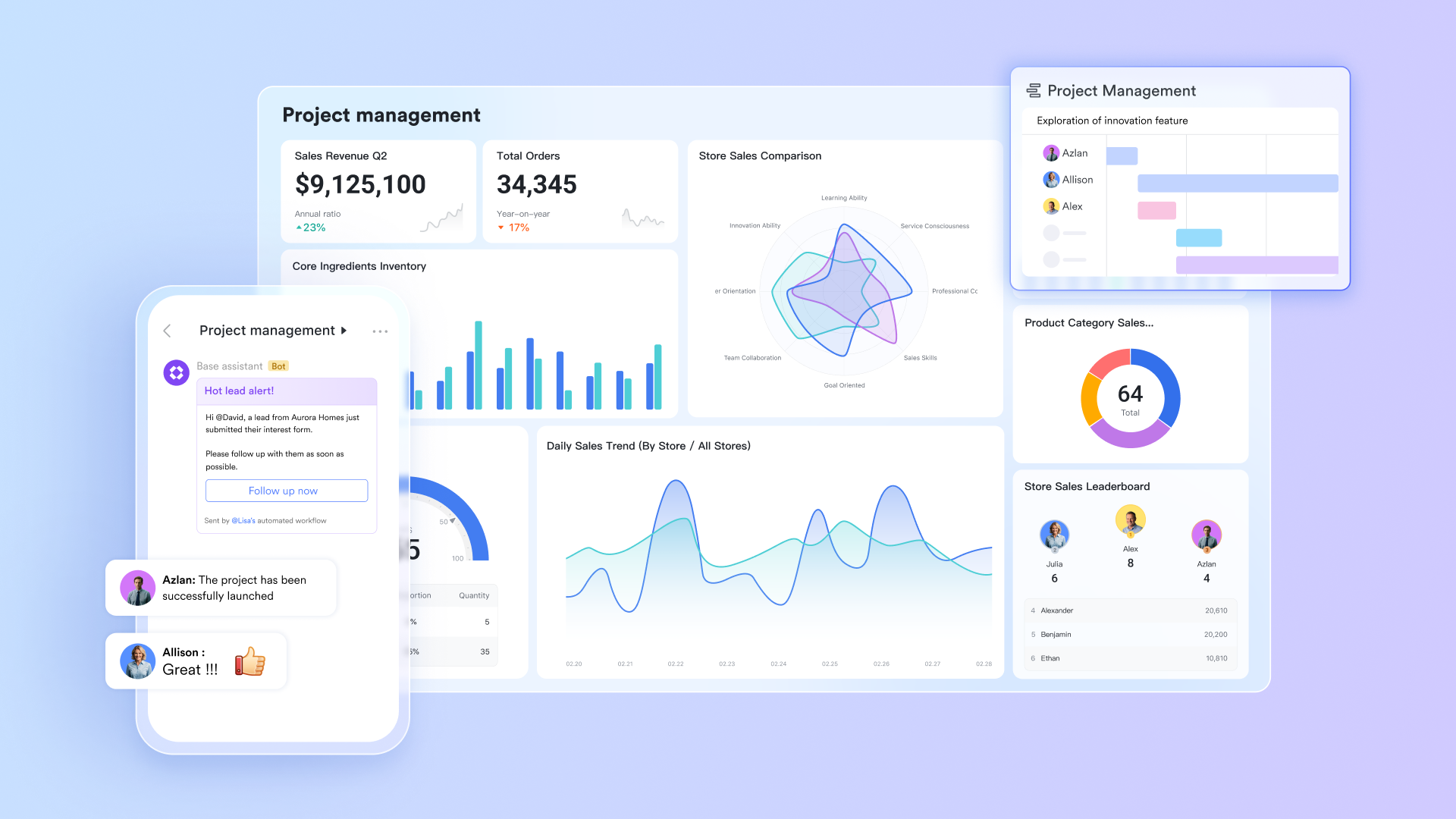
Issue logging and classification with Lark Base
Lark Base serves as the structured foundation for recording bugs in a clear, consistent format. Teams can create custom fields for severity, environment, reproduction steps, expected behavior, and attachments, giving every issue a complete context. Because Base supports different views—tables, Kanban boards, and forms—teams can log bugs quickly without losing track of crucial details. This creates a unified, reliable repository that anchors the entire project's quality assurance workflow.
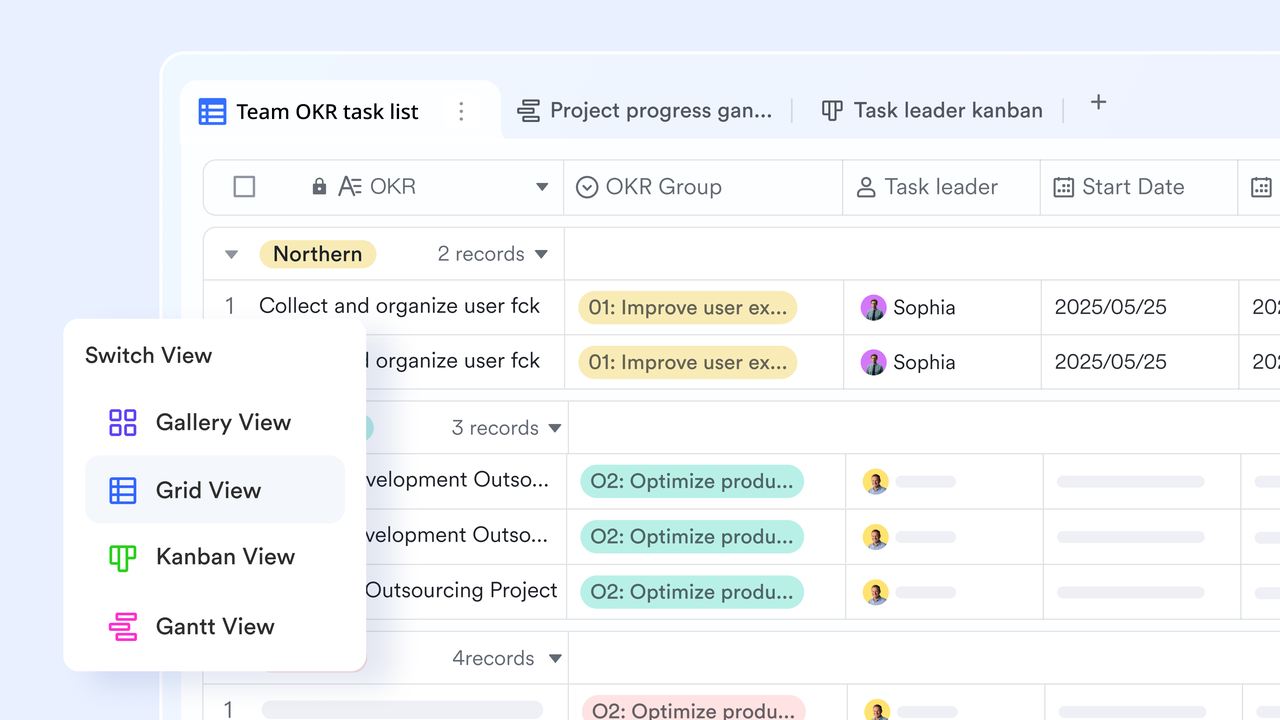
Version and release linking using Base fields and filtering
Teams can create custom fields in Base to associate issues with specific app versions, features, sprints, or release milestones. This allows project managers to understand which problems threaten release readiness and which can be scheduled for future cycles. By grouping or filtering issues by version, teams can organize their QA and release planning with greater precision.
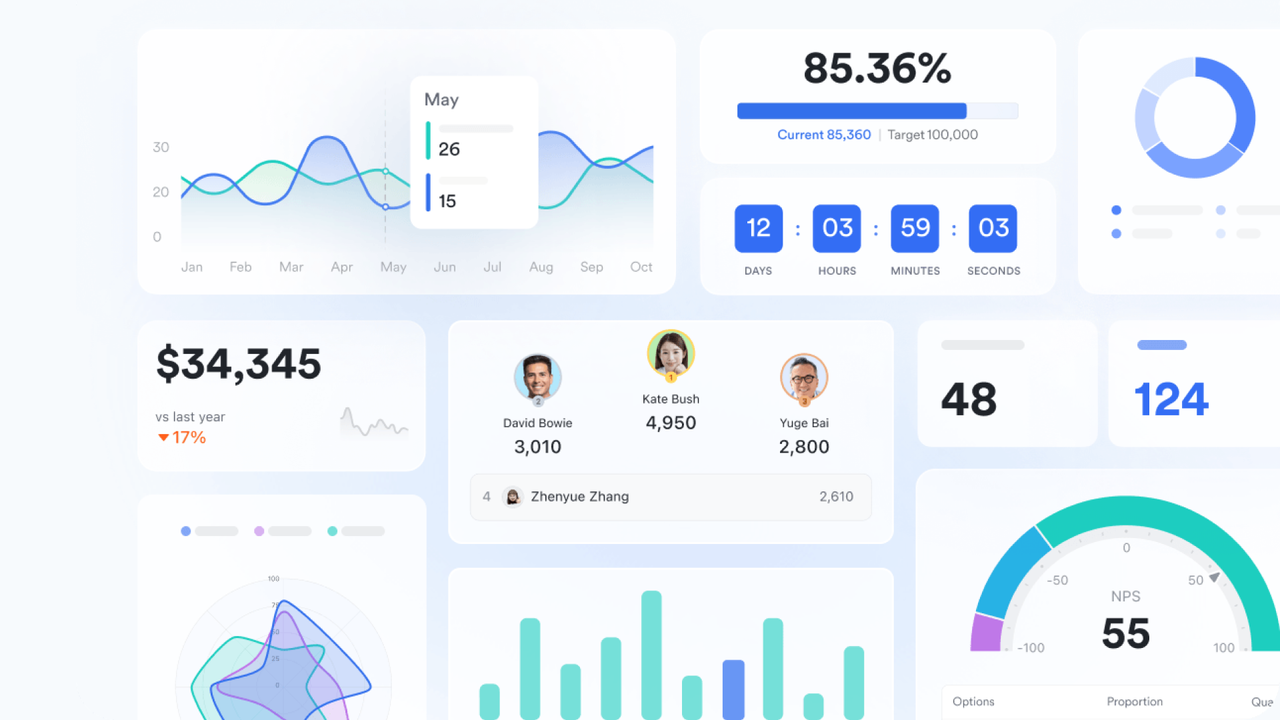
Reporting and dashboards with Base dashboards
Dashboards in Lark Base provide a real-time overview of bug distribution, team workload, progress by status, aging issues, and release-blocking items. Project managers can see trends at a glance and quickly understand whether the team is on track or at risk. Visual insights help guide sprint planning, resource allocation, and decision-making throughout the project lifecycle.
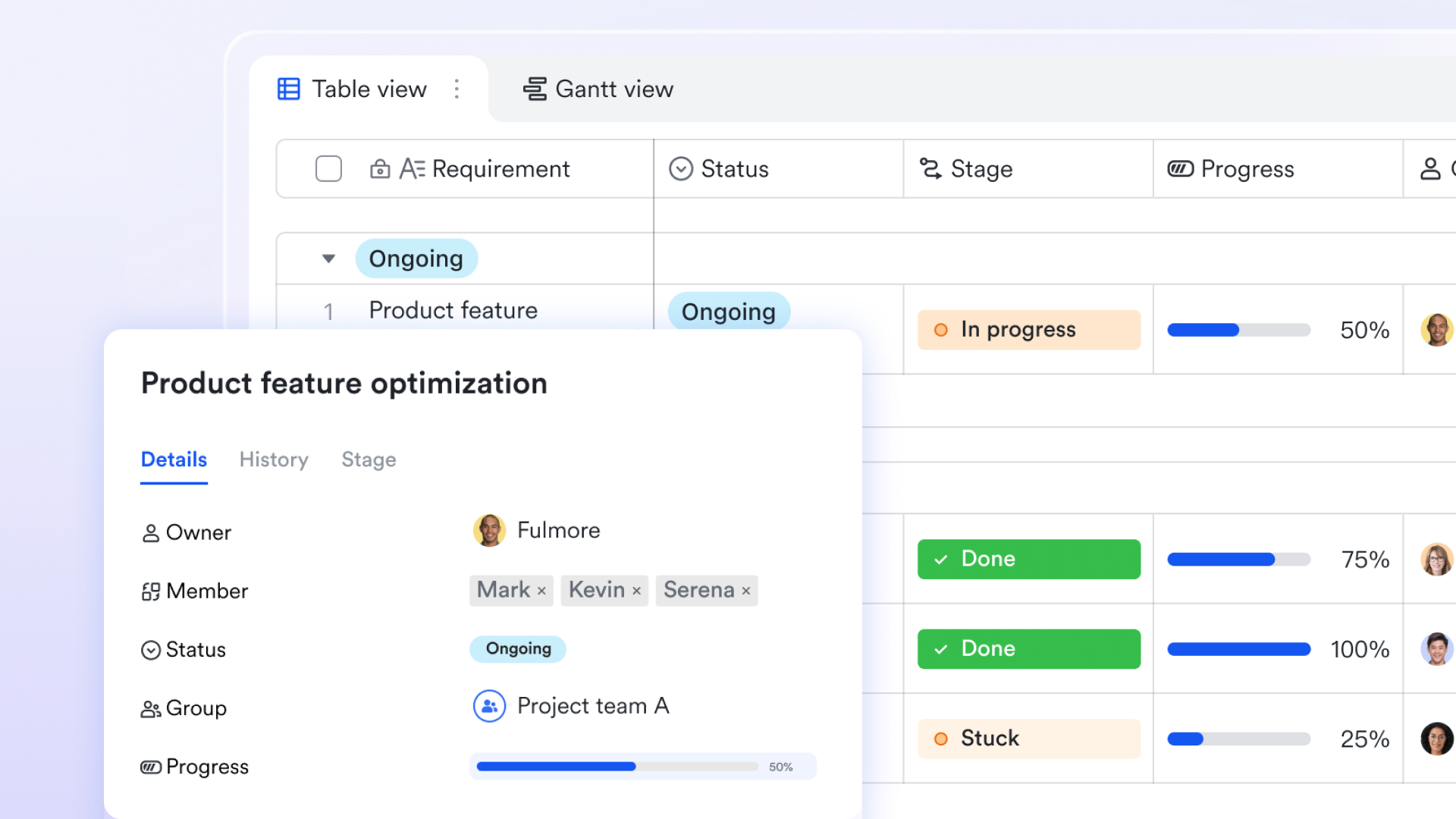
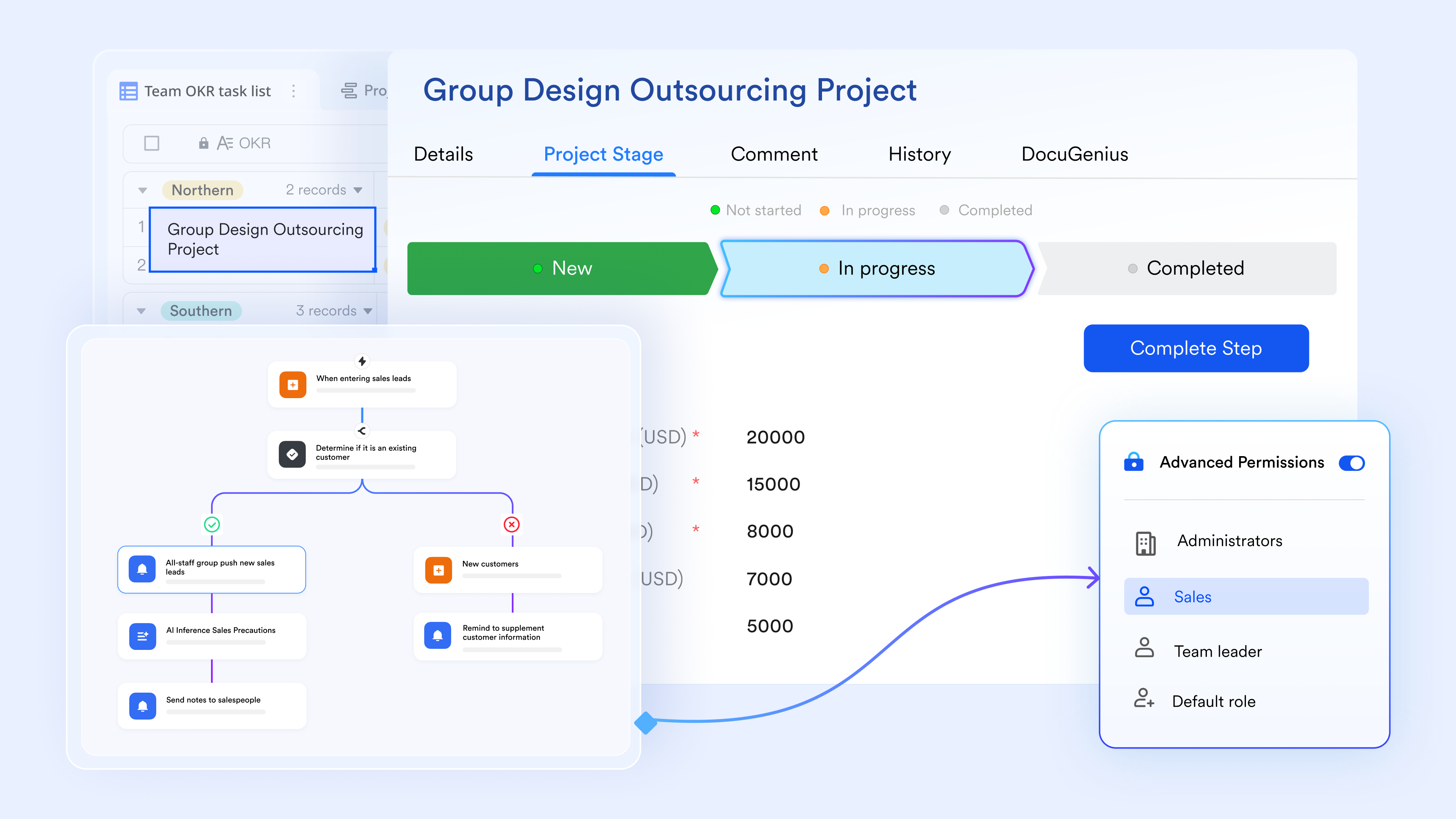
Mapped status and workflow stages through Base flow fields
Lark Base allows teams to create flow fields that represent the exact lifecycle of a bug—such as "Open → In Progress → Under Review → Fixed → Verified → Closed." As issues move through these stages, Base automatically updates to reflect the most current status. Project managers can quickly spot roadblocks, track aging issues, and maintain predictable progress across sprints or release cycles.
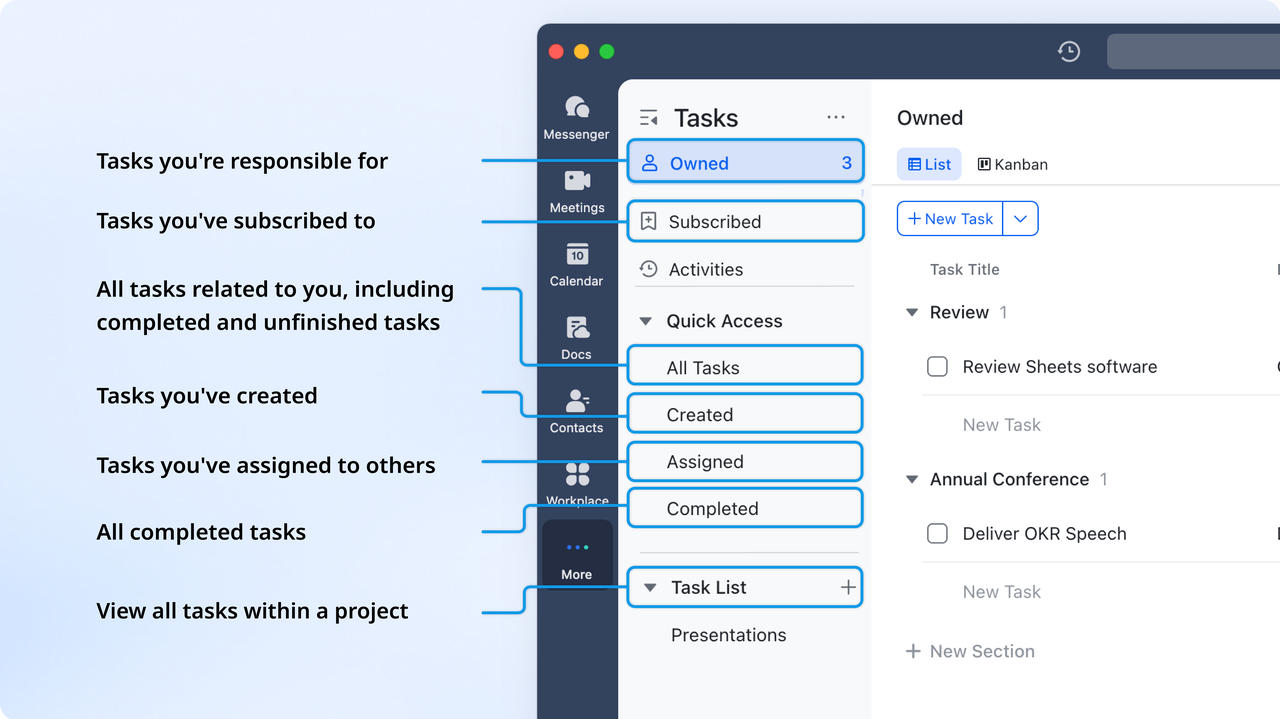
Assignment and ownership tracking with Lark Tasks
Once an issue is logged in Base, it can be linked to or converted into Lark Tasks for execution. Tasks make ownership unmistakable by assigning a responsible teammate, due date, and any necessary sub-steps. This ensures clarity about who is working on each bug, its current stage, and when it's expected to be resolved. The combination of Base for structure and Tasks for action gives project managers the visibility they need to keep timelines steady.
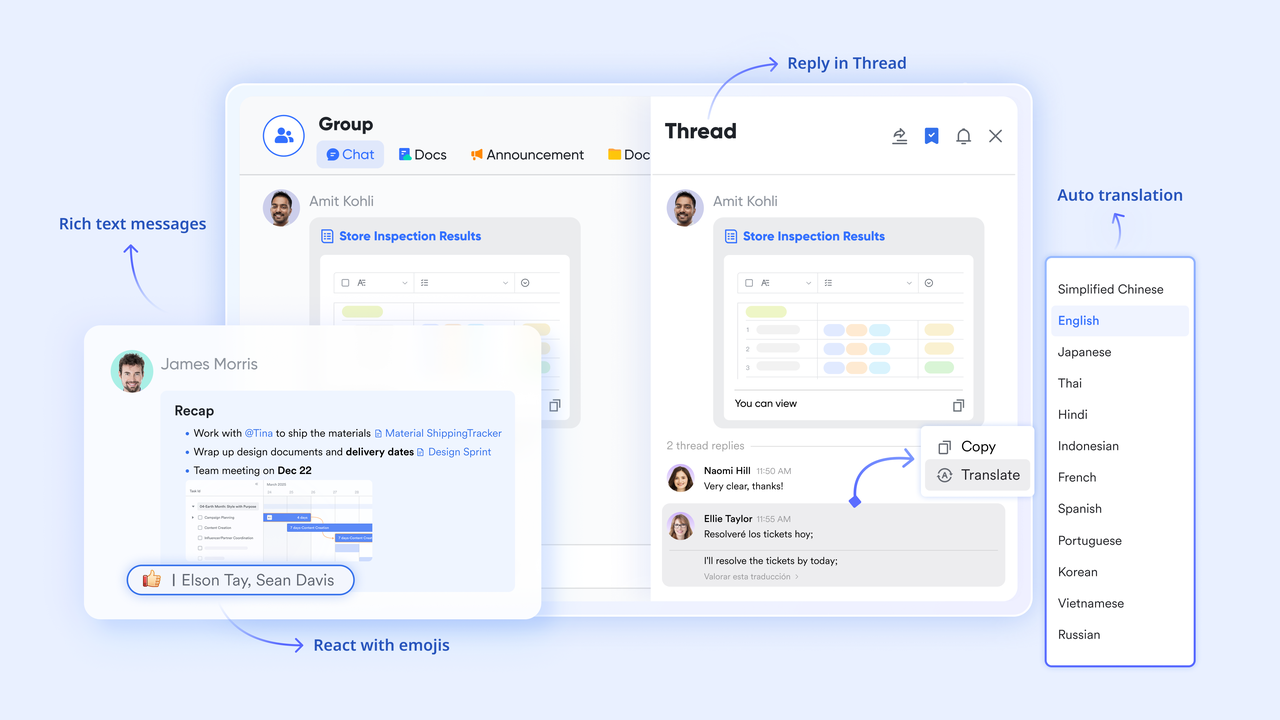
Comments and contextual communication through Lark Messenger
Every bug often requires quick clarifications, additional information, or real-time decision-making. With Lark Messenger, teams can discuss issues instantly while linking directly to the related Base entry or Task. This keeps the context intact and avoids unnecessary tool switching. Threaded discussions, mentions, and file sharing inside Messenger ensure that all communication tied to a bug stays accessible and organized.
- Starter plan: Free forever plan that includes 11 powerful tools for up to 20 users. It also includes 100GB of storage, 1,000 automation runs, AI translations, and more.
- Basic plan: $6/user/month (billed annually) for up to 500 users. It includes everything in Starter plus group calling for up to 500 attendees, 5TB of storage, 1000 automation runs, and more. For more details, please contact sales.
- Pro plan: $12/user/month (billed annually) for up to 500 users. It includes everything in Basic plus group calling for up to 500 attendees, 15TB of storage, 50,000 automation runs, and more.
- Enterprise plan: Contact sales for custom pricing. Supports unlimited users and includes even more automation runs and advanced security, compliance, and management features.

Starter
Pro
Enterprise
Starter
For small teams with simple communication needs
$0
/ user / month
20 users max
18 months message history
1-on-1 video meetings
100 GB storage
Lark Docs & Mail
1000 Base automation runs/month
2000 rows per table in Base
Pro
For companies with comprehensive collaboration and management needs
$12
/ user / month
500 users max
Unlimited message history
500-participant video meetings
15 TB storage
Lark Docs & Mail
50k Base automation runs/month
20k rows per table in Base
Enterprise
For large companies with advanced security and organizational management needs
Get a personalized demo and pricing
Unlimited users
Unlimited message history
500-participant video meetings
15 TB storage + 30 GB storage/user
Lark Docs & Mail
500k Base automation runs/month
50k Base automation runs/month
Single sign-on (SSO)
Pro
For companies with comprehensive collaboration and management needs
$12
/ user / month
500 users max
Unlimited message history
500-participant video meetings
15 TB storage
Lark Docs & Mail
50k Base automation runs/month
20k rows per table in Base
2. Jira: Best for software development and sprint-based bug workflows
Jira stands out as a comprehensive platform designed specifically for teams following agile or sprint-based development cycles. It excels when software projects demand structured workflows, frequent iterations, and detailed issue tracking. Its versatility makes it suitable for projects ranging from small to medium startups to large enterprises. Teams get end-to-end visibility over bugs, tasks, and release planning. When used as an online bug tracker, Jira brings together backlog management, bug triage, and sprint planning in one place. For development and QA teams seeking rigorous process adherence, Jira provides a reliable foundation for managing bugs and features across full release cycles.
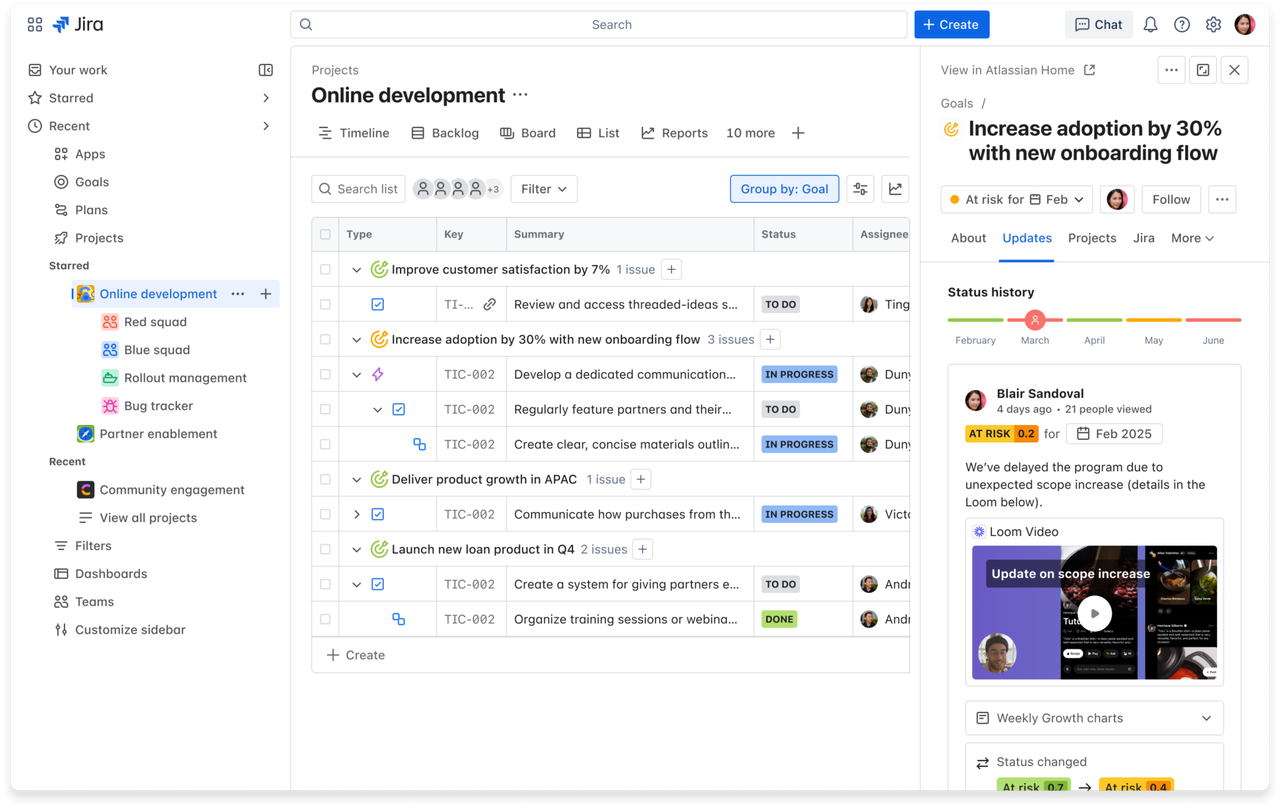
Image source: jira.com
Key features:
- Highly customizable issue types and fields allow teams to define bug, task, sub-task or feature report forms according to project needs, including severity, priority, components, environment, and custom metadata—enabling consistency across all logged items.
- Sprint boards and agile workflow support provide native Scrum and Kanban views, backlog grooming, sprint planning, burndown charts, and velocity tracking—making Jira ideal for development processes that revolve around time-boxed iterations.
- Automation rules help streamline repetitive tasks such as auto-assigning issues based on labels, transitioning issue statuses after builds, or notifying relevant team members when certain conditions are met—reducing manual overhead and human error.
- Integration with version control, CI/CD, and development pipelines ensures that bugs can be linked to commits, pull requests, build statuses, or deployment activities—tying issue tracking directly into your software delivery lifecycle.
Pros:
- Offers deep flexibility and configuration to fit complex project structures or enterprise-scale workflows, making it highly adaptable across varied development environments.
- Strong reporting and analytics capabilities provide visibility into issue trends, team velocity, sprint health, and backlog churn, aiding planning, retrospectives, and quality assessments.
- Seamless integration with source control, build, and deployment tools helps maintain traceability from bug discovery through resolution and release, ensuring accountability.
Cons:
- Complexity and rich features can be overwhelming for small teams or simple projects, requiring time and effort to configure optimally.
- The user interface and workflows may feel heavy or bloated when teams only need basic bug tracking or simple issue management.
Pricing:
- Standard plan: $23,500/year (billed annually) for 201-300 users.
- Premium plan: $43,500/year (billed annually) for 201-300 users.
- Enterprise plan: Custom pricing.
3. Linear: Best for fast, developer-friendly bug management
Linear is designed for teams that want a rapid, streamlined way to manage issues without the heaviness of traditional systems. Its interface focuses on speed, clean visuals, and effortless navigation, making it a favorite among engineering teams that value flow and minimal friction. Linear fits exceptionally well for startups and product teams that iterate quickly and require a responsive tool that mirrors their development pace. Its real strength lies in how easily it integrates with engineering habits, from keyboard-driven actions to Git-based automations. Teams adopting Linear often find that the reduced cognitive load helps them stay more focused. For teams seeking a modern, intuitive issue tracker, Linear offers a fast, engaging experience.
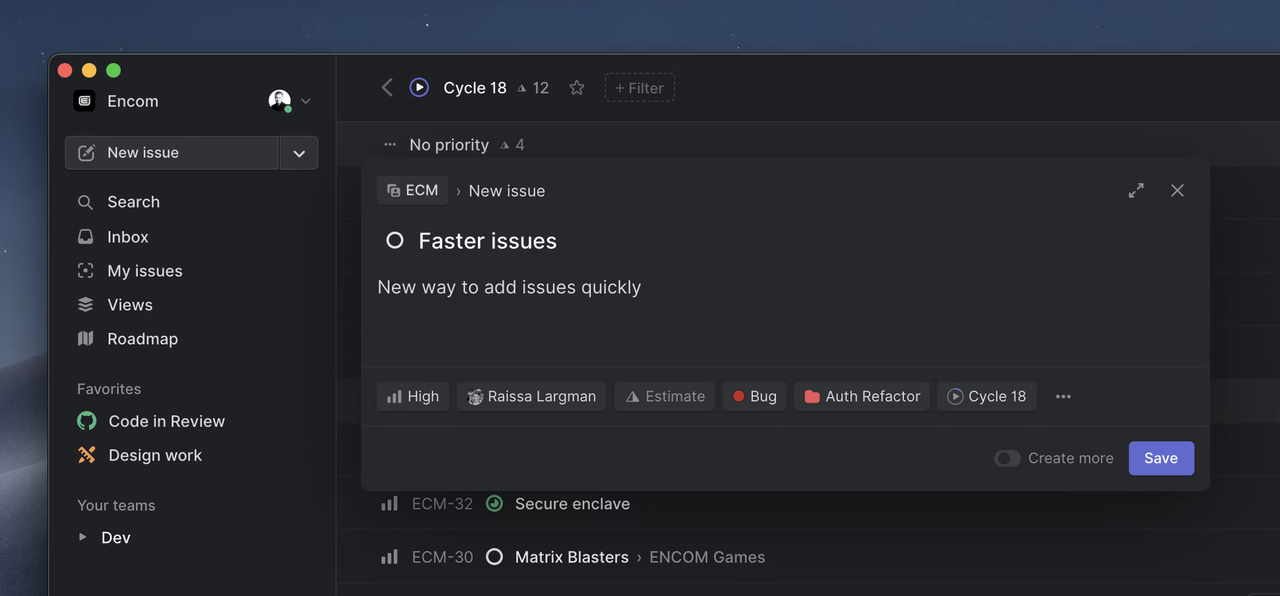
Image source: linear.com
Key features:
- Cycles provide structured time-boxed work periods, allowing teams to plan, commit, and track progress with clarity across short development bursts that match real product velocity.
- Roadmaps offer a clear visualization of long-term feature plans, helping teams understand strategic direction while keeping execution aligned with broader release milestones.
- Git workflow integrations automatically update issues based on branches, commits, and pull requests, keeping engineering activity synchronized with issue statuses without manual updates.
- Issue templates and custom fields enable quick, consistent bug reporting, allowing teams to maintain consistency while still adapting the structure to different parts of the product.
Pros:
- Linear's interface is high-speed and responsive, enabling developers to jump between issues, update statuses, and navigate large boards with minimal delays.
- Keyboard-first interaction enables rapid creation, search, and editing, significantly reducing friction during high-volume bug triage.
- The clean design helps eliminate visual clutter and makes it easier for teams to focus on the most critical work, improving execution discipline.
Cons:
- Limited customization options may feel restrictive for teams with complex workflows or highly specialized processes that require deep configuration.
- Reporting and analytics capabilities are lighter than those of enterprise-oriented platforms, making it less suitable for teams that need extensive dashboards.
Pricing:
- Basic plan: $10/user/month (billed annually).
- Business plan: $16/user/month (billed annually).
- Enterprise plan: Custom pricing.
4. ClickUp: Best all-in-one bug tracking and project execution platform
ClickUp is built as a multifunctional workspace that brings tasks, bugs, documents, automation, and collaboration into a single environment. Its flexibility makes it appealing to teams that want to unify issue tracking with broader project execution rather than using separate systems. ClickUp adapts to both simple and highly detailed workflows, giving teams the freedom to build views, fields, and spaces that match their preferred working style. Its visual structure supports fast navigation through bugs, sprints, releases, and documentation. With strong customization options, it works well for cross-functional teams handling development, design, QA, and operations. For organizations seeking a single tool to manage both work execution and bug tracking, ClickUp offers a comprehensive, scalable solution.
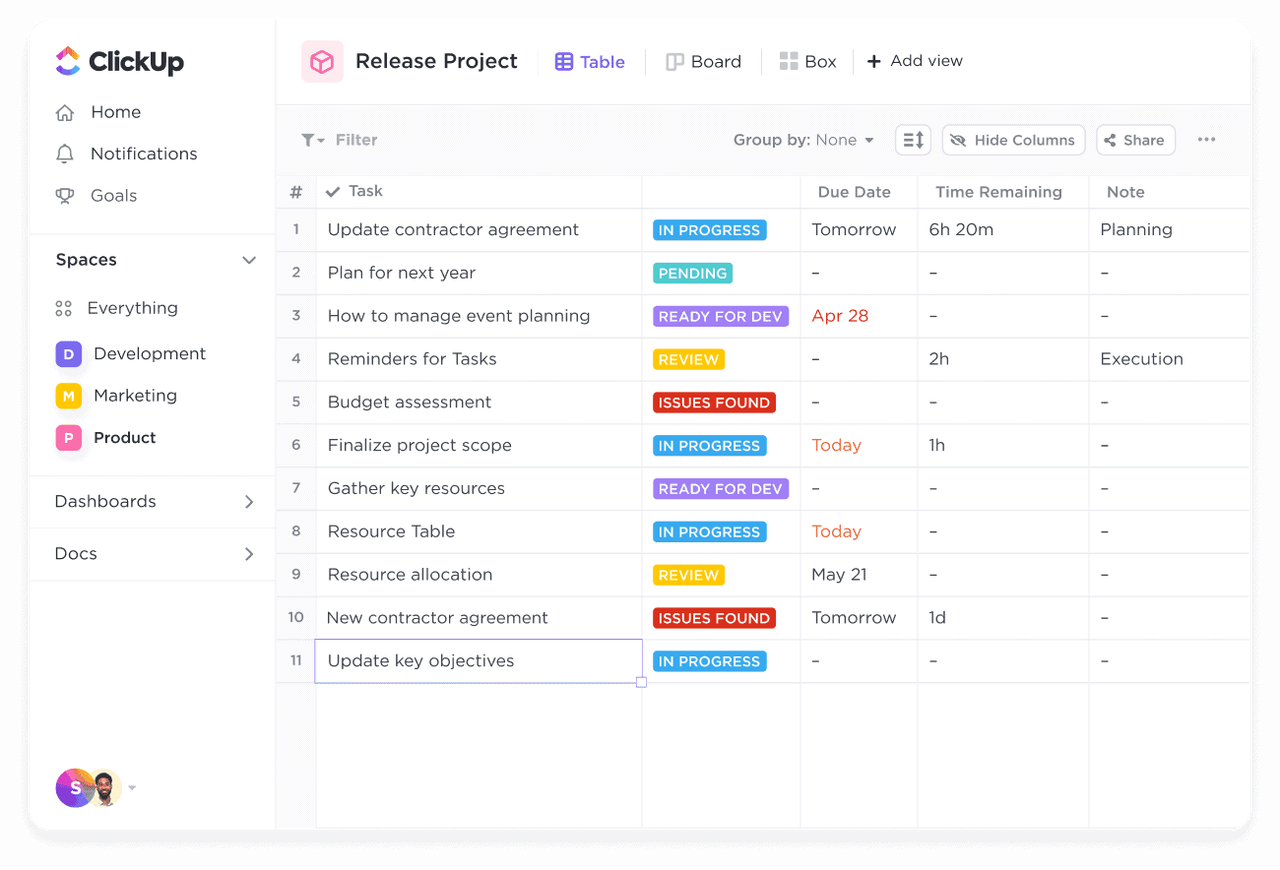
Image source: clickup.com
Key features:
- Custom issue types and fields allow teams to design bug forms with severity, environment, reproduction steps, and component details, ensuring complete clarity across all reported defects and creating reliable triage patterns.
- Multiple views, such as lists, Kanban boards, timelines, and tables, help visualize bugs in whichever format best supports planning, sprint reviews, or daily standups, allowing teams to switch seamlessly between perspectives.
- Built-in docs let teams create test cases, RCA notes, and troubleshooting guides directly following bug reports, reducing tool switching and keeping analysis close to work.
- Automation options support repetitive workflows by triggering alerts, updating fields, assigning tasks, or moving issues when conditions change, reducing manual overhead during fast-paced development cycles.
Pros:
- The highly customizable structure allows you to tailor bug tracking to simple or enterprise-grade workflows without rigid templates or predefined rules.
- Centralized documentation and issue tracking create a unified workspace that improves visibility and reduces communication gaps between development and QA teams.
- A wide range of built-in views helps teams analyze bugs from different angles, improving planning and prioritization during active release cycles.
Cons:
- The depth of features may feel overwhelming for smaller teams that only need lightweight bug logging or a simple issue management process.
- Performance can slow down in large workspaces with many fields, dependencies, or automations running simultaneously.
Pricing:
- Unlimited plan: $7/user/month (billed annually).
- Business plan: $12/user/month (billed annually).
- Enterprise plan: Custom pricing.
5. Bugzilla: Best enterprise-grade open-source bug tracker
Bugzilla is one of the longest-standing and most powerful open-source systems for organizations that require deeply configurable bug tracking. Its structured design supports large software teams that need reliability, auditability, and precise control over workflows. Bugzilla offers extensive fields, permission layers, and search capabilities, making it ideal for projects that prioritize thorough documentation and traceability. The platform is particularly suited for engineering-heavy environments where detailed metadata and historical tracking are essential. While its interface is traditional, its stability and robustness remain unmatched for long-term bug management. Teams that want full ownership and customization of their system often turn to Bugzilla for long-term scalability.
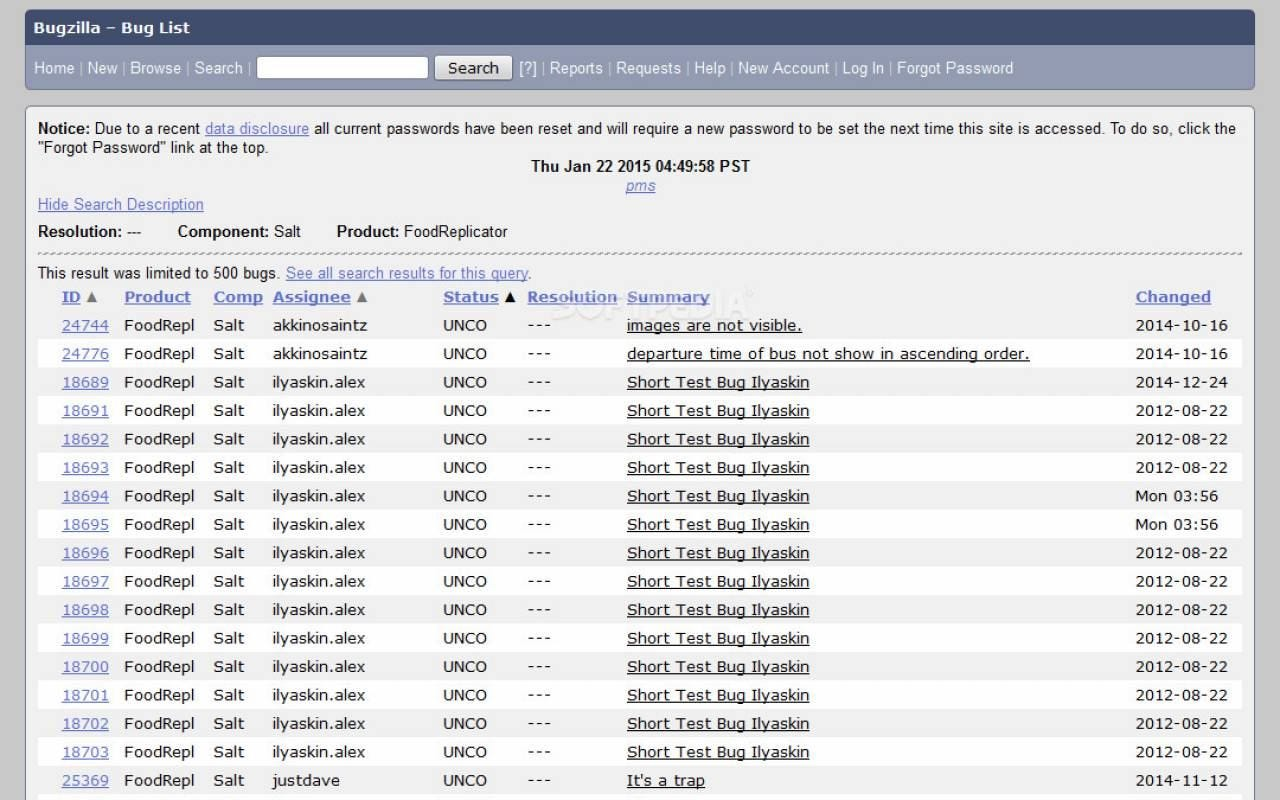
Image source: bugzilla.com
Key features:
- Advanced issue fields enable detailed tracking of severity, component, operating system, hardware, reproducibility level, and custom metadata, ensuring highly accurate, comprehensive reporting.
- Powerful search and filtering features support complex queries, saved searches, and multi-dimensional views, helping teams identify patterns and recurring blockers across large projects.
- Workflow customization provides fine-grained control over issue states, transitions, permissions, and required fields, making Bugzilla adaptable to strict engineering processes.
- Extensive email notifications and change logs help maintain transparency with a complete audit trail, ensuring no detail is lost across long development cycles.
Pros:
- Fully open-source nature gives teams complete control over installation, customization, hosting, and security without vendor lock-in.
- Highly stable and proven platform that can support massive volumes of bugs across multi-year product lifecycles.
- Mature workflow capabilities make it suitable for complex software ecosystems that require strict governance and detailed traceability.
Cons:
- Interface feels older and less intuitive compared to modern tools, potentially slowing onboarding for new contributors or non-technical users.
- Customization requires technical knowledge, making setup and configuration more time-consuming than cloud-based alternatives.
Pricing:
- Bugzilla is entirely free to download, install, and use.
- Costs apply only to hosting, maintenance, and any optional internal infrastructure that internal infrastructure teams choose to support.
6. MantisBT: Best lightweight and simple open-source bug tracker
MantisBT is a streamlined, easy-to-use open-source bug tracker designed for teams that want simplicity without sacrificing essential capabilities. Its clean structure makes onboarding fast, especially for smaller teams or organizations that prefer a straightforward approach to issue management. MantisBT provides enough flexibility to adapt to different workflows while maintaining a minimal learning curve. It balances functionality and simplicity, providing clarity without overwhelming teams with excessive configuration. The system is particularly effective for teams seeking a reliable and predictable tool that doesn't require heavy administration. For those seeking a practical, self-hosted solution for everyday bug reporting, MantisBT delivers a stable, dependable experience.
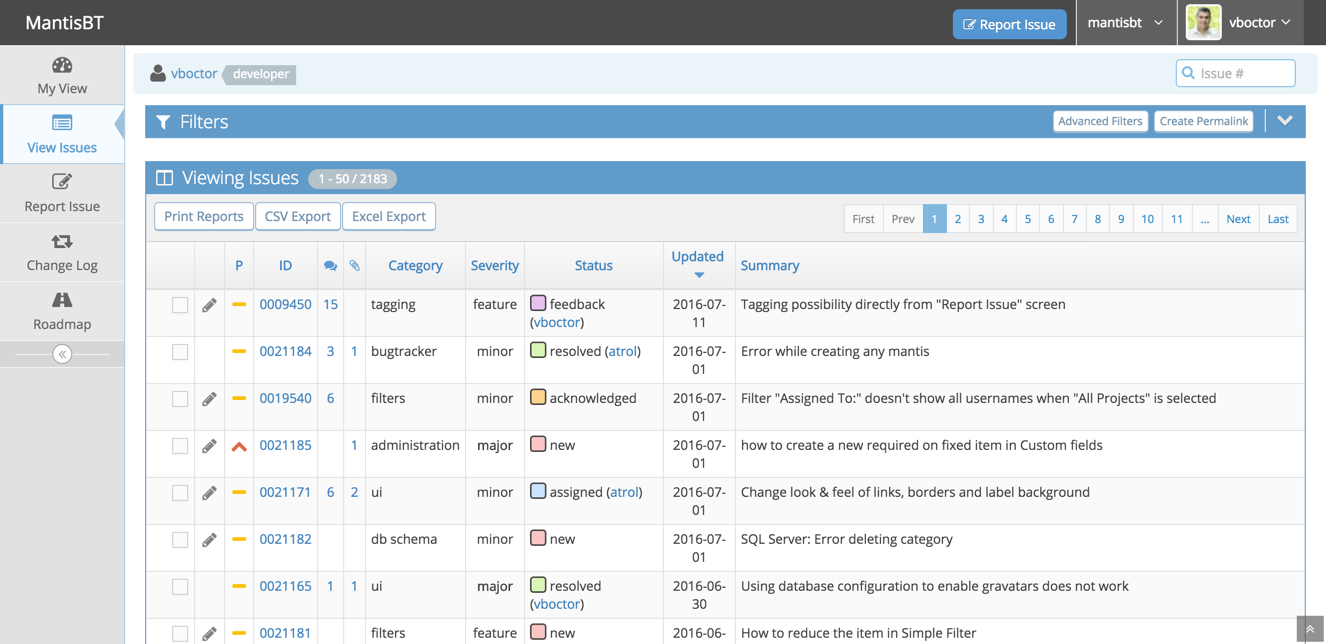
Image source: mantisbt.com
Key features:
- Customizable issue fields and categories allow teams to structure bug reports with relevant details such as severity, reproducibility, and versioning, improving consistency across all submissions.
- Simple workflow transitions help teams define how bugs move between statuses while keeping the overall flow uncluttered and easy to understand.
- Multiple project management capabilities support separate workspaces, access controls, and configurations for each project, allowing teams to maintain clear boundaries and organization.
- URL support extends functionality with add-ons such as time tracking, enhanced reporting, integrations, and automation, enabling teams to tailor the system to evolving needs.
Pros:
- Lightweight design makes the platform fast and responsive, ideal for smaller teams or organizations without dedicated admin resources.
- Easy installation and configuration allow quick setup on everyday hosting environments, reducing the technical barrier to self-hosting.
- Straightforward interface keeps navigation simple, helping new contributors and non-technical users adopt the system quickly.
Cons:
- More limited modern interface and visuals may feel dated for teams accustomed to newer cloud-based tools.
- Advanced customization often requires technical knowledge or plugins, which may add to the setup time.
Pricing:
- MantisBT is entirely free and open-source for all users.
- Any costs depend solely on hosting, maintenance, or optional infrastructure chosen by the organization.
7. Zoho BugTracker: Best for business and IT operations bug tracking
Zoho BugTracker is designed for teams that manage bugs alongside broader business, IT, and operational workflows rather than purely software development pipelines. It blends issue tracking, time tracking, SLAs, task management, and client collaboration, making it useful for organizations supporting both internal and external stakeholders. Its structured approach helps teams document, triage, and resolve bugs with consistent visibility across departments. Zoho BugTracker is especially effective for teams that need clear accountability and process-driven execution. Its clean interface supports rapid navigation through issues, projects, and deadlines. For companies already using the Zoho ecosystem, this tool fits smoothly into the overall workflow without additional complexity.
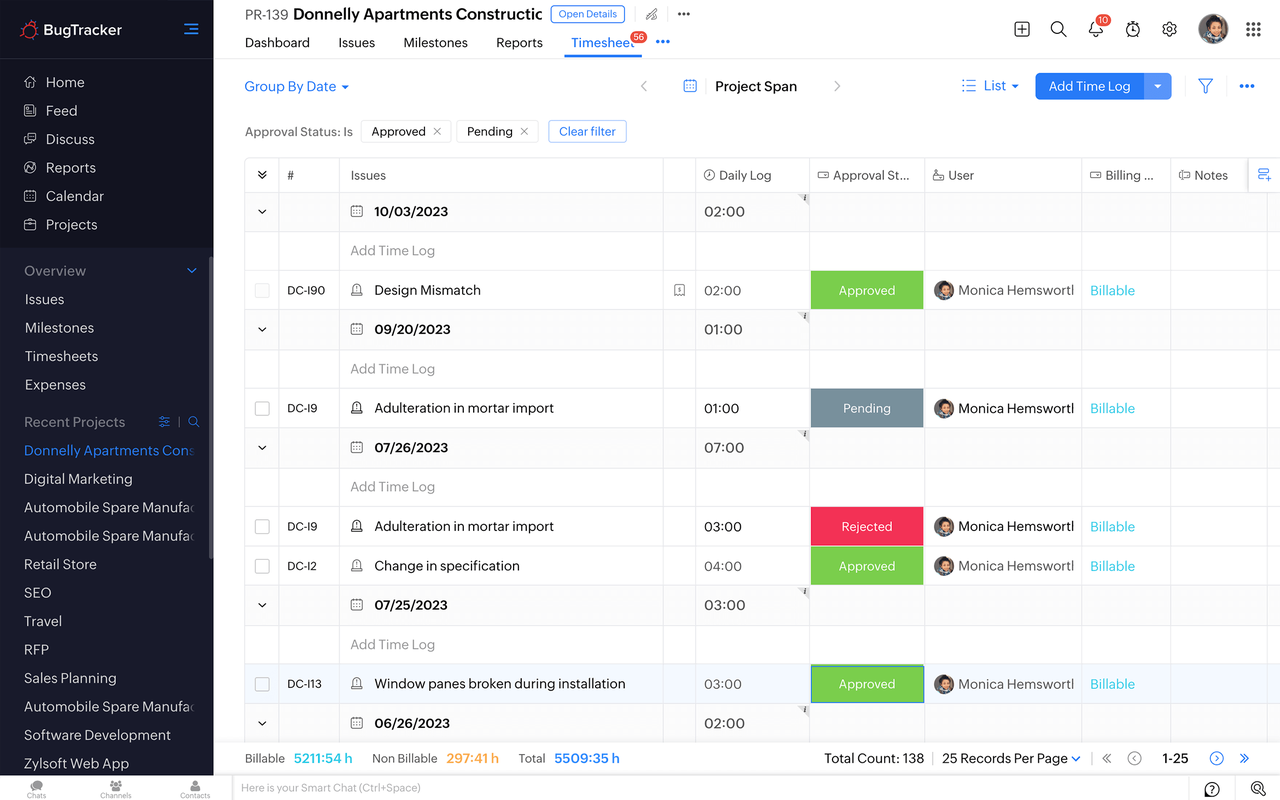
Image source: zoho.com
Key features:
- SLA-based workflows ensure that each bug follows defined resolution timelines, allowing IT and support teams to track response and fix commitments with complete clarity and accountability.
- Automated rules help teams assign issues, update statuses, notify owners, or escalate high-severity defects without manual intervention, reducing delays during busy cycles.
- Built-in timers and worklogs allow teams to record the actual time spent on resolving bugs, improving project tracking, cost analysis, and internal reporting accuracy.
- Client portals enable external clients or stakeholders to submit bugs, view updates, and participate in discussions, helping teams maintain transparency in service-oriented environments.
Pros:
- Strong alignment with IT, business operations, and service teams that need structured processes rather than purely developer-focused workflows.
- A clean and straightforward interface makes onboarding easy for mixed teams, including non-technical staff or clients submitting issues.
- SLA and time tracking tools help organizations maintain compliance and improve delivery predictability.
Cons:
- Not as developer-centric as other platforms, making it less suited to code-heavy workflows that require Git automation or CI/CD integrations.
- Fewer advanced features for software engineering teams that rely on technical metadata or complex workflows.
Pricing:
- Premium plan: $5/user/month (billed annually).
- Enterprise plan: $10/user/month (billed annually).
8. YouTrack: Best shortcut-driven bug tracker for fast issue updates
YouTrack is built for teams that want blazing-fast issue management powered by keyboard shortcuts, smart commands, and flexible navigation. Its design emphasizes speed and automation, allowing developers and QA teams to resolve issues, update fields, or change statuses without leaving the keyboard. YouTrack works exceptionally well for teams with high-volume issue flows or complex Agile processes. Its powerful search language and customizable workflows give teams precise control over how bugs move across stages. YouTrack also includes project management features such as sprints, dashboards, and planning tools that complement everyday bug tracking. For teams that value efficiency and deep configurability without overwhelming interfaces, YouTrack strikes an ideal balance.
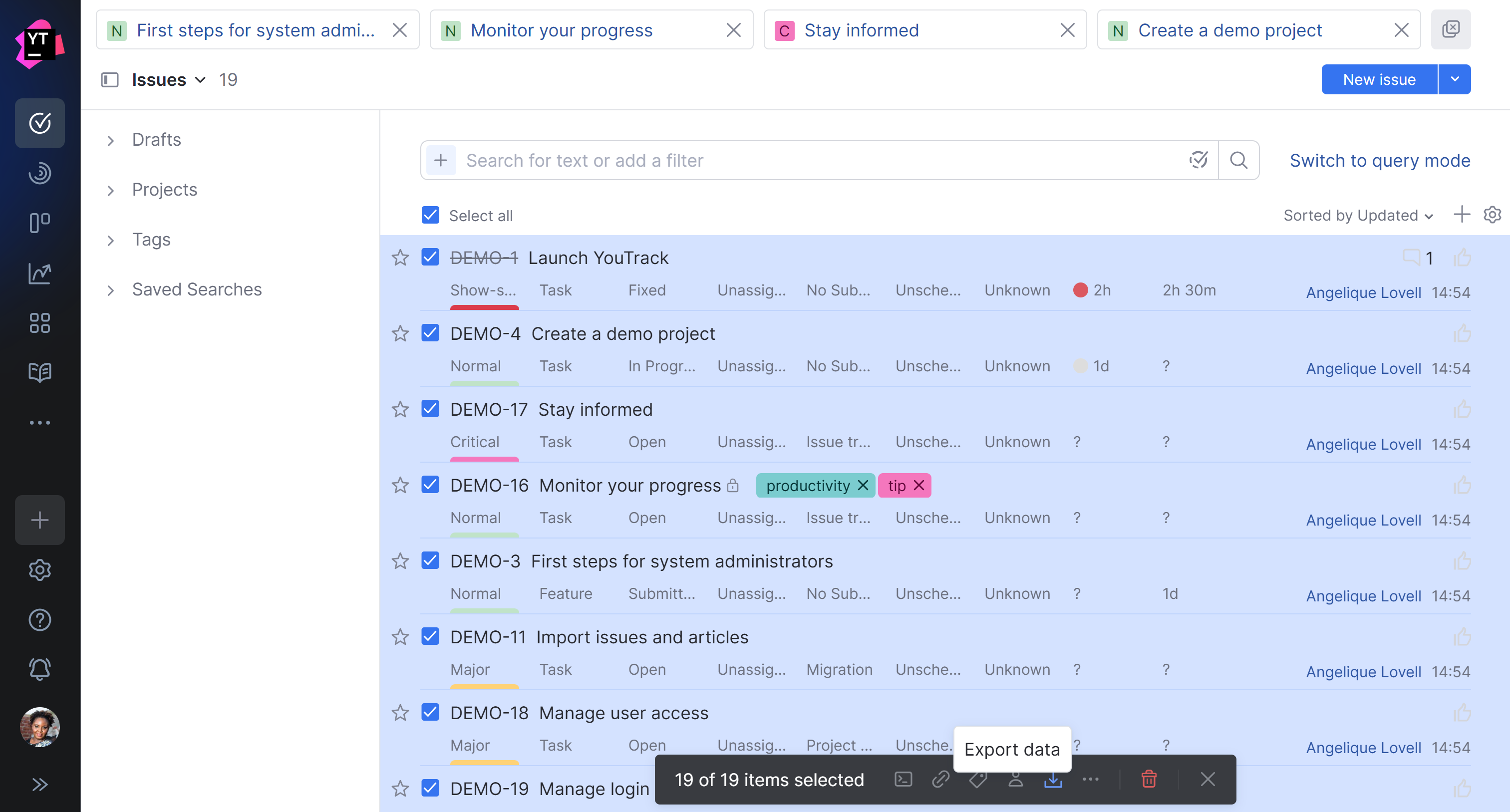
Image source: youtrack.com
Key features:
- Command-based issue updates let users modify fields, assign owners, change priorities, or transition statuses instantly through a single typed command, significantly speeding up triage.
- Agile boards support Scrum, Kanban, or custom workflows, giving teams flexibility to visualize bugs and tasks in the format that best fits their delivery model.
- A powerful search language helps teams filter issues, create complex queries, and save searches for recurring workflows, making it easier to navigate large projects.
- Custom workflows allow rules, automation, and triggers that adapt to any process, such as auto-assigning bugs or alerting teams when critical issues remain unresolved.
Pros:
- Extremely fast to use thanks to command-based controls and keyboard shortcuts, reducing reliance on mouse-driven navigation.
- Strong Agile support makes it suitable for teams managing sprints, backlogs, and multi-stage bug lifecycles.
- Highly customizable fields and workflows allow deep personalization without compromising performance.
Cons:
- The command-based system may feel unfamiliar to new users, requiring a short learning curve for full efficiency.
- Interface, while powerful, may appear complex for small teams that only need simple bug logging.
Pricing:
- Free plan: for 1-10 users
- 11+ users: $4.50/user/month (billed annually).
9. Redmine: Best classic open-source bug tracking and project management tool
Redmine is a long-standing, open-source project management and bug tracking platform known for its stability, flexibility, and multi-project capabilities. It appeals to teams that want complete control over configuration while maintaining a traditional interface suitable for structured workflows. Redmine supports issue tracking, time logging, wikis, Gantt charts, and role-based access management, making it particularly useful for engineering groups and IT teams that prefer self-hosted solutions. Its plugin ecosystem expands functionality across reporting, automation, and integrations. Redmine works well for teams that want predictable performance and full ownership of their bug tracking environment. For organizations that value transparency and long-term reliability, Redmine provides a robust foundation.
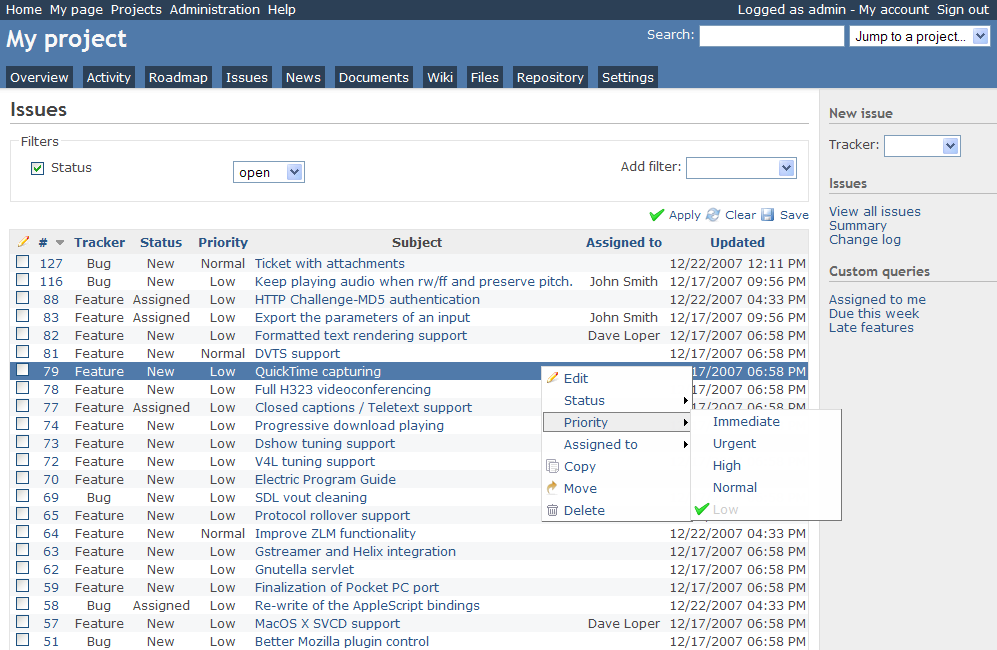
Image source: redmine.com
Key features:
- Issue tracking with customizable fields enables teams to define detailed fields for defects, tasks, and updates, supporting precise documentation across multiple projects.
- Gantt charts and calendars offer clear timelines for project progress, helping managers understand workload distribution and release readiness at a glance.
- Built-in wiki and documentation spaces allow teams to maintain test cases, troubleshooting notes, and internal guides directly alongside issues.
- Role-based permissions and user groups provide granular control over who can view, edit, or manage issues, ensuring secure workflows across teams.
Pros:
- Fully open-source and free, allowing organizations to host, customize, and modify the platform to suit their exact internal requirements.
- Strong multi-project support makes it ideal for organizations managing multiple technical streams under a single umbrella.
- URL ecosystem enhances reporting, automation, and integration, enabling teams to extend Redmine's capabilities over time.
Cons:
- The interface feels outdated compared to newer cloud-based tools and may require customization to look more modern.
- Setup, hosting, and maintenance require technical expertise, making it less ideal for teams without internal IT support.
Pricing:
- Free and open-source: Redmine is entirely free to use, with no licensing fees.
- Costs may apply for self-hosting, such as servers, maintenance, security, and optional paid plugins or third-party support.
10. Trello: Best simple Kanban-style bug tracking board
Trello is a lightweight, visual tool that simplifies bug tracking through card-based boards, ideal for smaller teams or straightforward workflows. Its drag-and-drop interface makes it easy for anyone to organize bugs, track progress, and communicate updates without complex setup. Trello works particularly well when teams want clarity at a glance without diving into detailed forms or rigid structures. Its flexibility allows teams to adapt boards to their preferred bug-reporting, prioritization, and sprint flow. Trello is often chosen by product, design, marketing, and early-stage development teams that want a simple and collaborative workspace. For teams seeking an easy entry into bug tracking, Trello offers a clean, accessible experience.
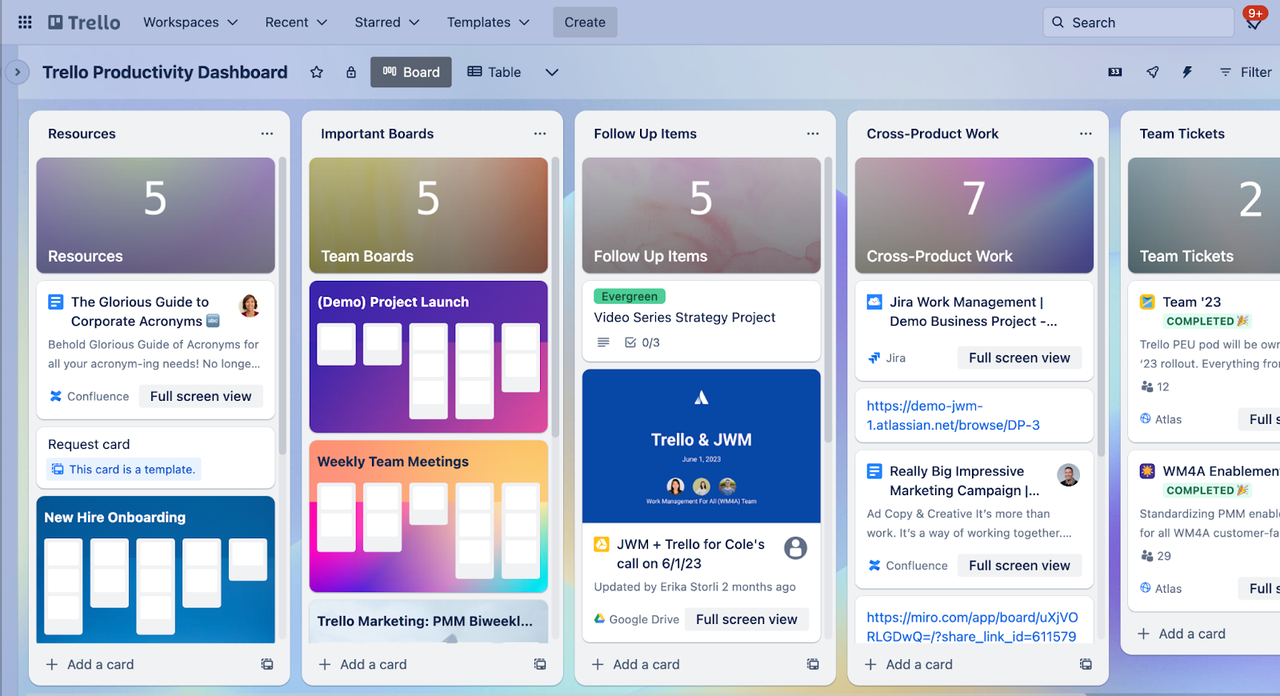
Image source: trello.com
Key features:
- Kanban boards allow teams to visualize bugs as cards and move them through customizable columns, offering a simple and intuitive workflow for tracking issue progress.
- Card details can include checklists, comments, attachments, labels, and due dates, helping teams store all essential bug information in an organized layout.
- Power-Ups extend Trello with automation, Git integrations, reporting tools, and advanced fields, enabling teams to enhance functionality as their needs evolve.
- Team collaboration features enable quick comments, mentions, and file sharing, keeping discussions attached to each bug for easy reference.
Pros:
- A simple, user-friendly interface reduces onboarding time, making it ideal for teams unfamiliar with complex project management or bug-tracking tools.
- A visual Kanban layout provides instant clarity on what's in progress, what's blocked, and what's ready to test.
- Flexible structure adapts to many workflows, whether teams track simple bugs or broader project tasks.
Cons:
- Lacks deeply structured bug fields such as reproducibility, environmental data, or custom metadata that engineering-focused tools provide.
- Not ideal for large teams or complex development workflows requiring multi-stage QA, automation, or technical integrations.
Pricing:
- Standard plan: $5/user/month (billed annually).
- Premium plan: $10/user/month (billed annually).
- Enterprise plan: $17.50/user/month (billed annually).
11. Asana: Best bug tracking for cross-functional teams
Asana is designed for teams that need a collaborative, structured workspace that handles bugs alongside broader project tasks, workflows, and cross-functional initiatives. Its clean UI and flexible layout make it accessible to non-technical teams while still providing enough structure for development and QA activities. Asana excels in environments where design, product, engineering, and operations all contribute to issue resolution. Its flexibility allows teams to convert bugs into tasks, track dependencies, manage approvals, and monitor project timelines without switching platforms. Asana's strong coordination features make it worthwhile for teams that want visibility across multiple workstreams. For organizations seeking a lighter alternative to engineering-heavy tools, Asana offers clarity, simplicity, and broad adoption.
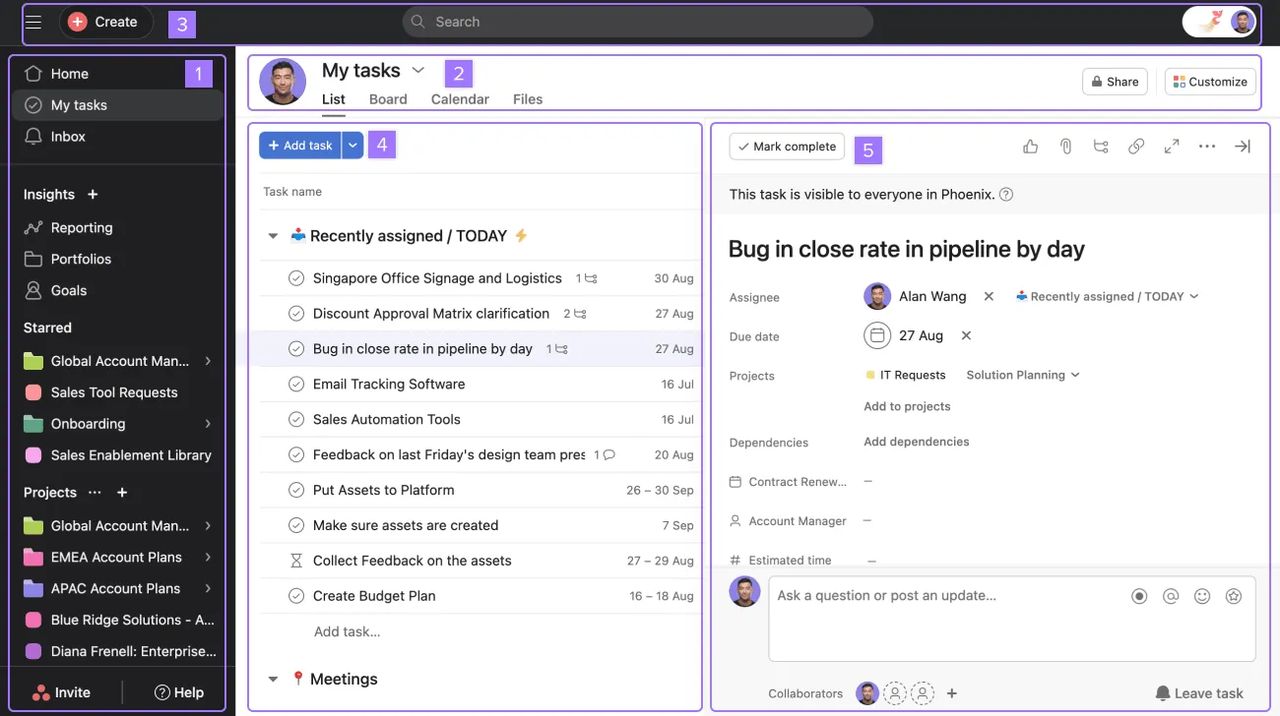
Image source: asana.com
Key features:
- Multiple views, such as list, board, timeline, and calendar, enable teams to visualize bugs based on workflow needs, enhancing planning and prioritization across cross-functional teams.
- Custom fields support detailed bug reporting with severity, impact, environment, or category tags, allowing teams to maintain structured defect logs.
- Task dependencies help teams track how bugs relate to other tasks or features, preventing blockers from delaying key milestones or release cycles.
- Rules and automation simplify routine actions such as assignments, status updates, or notifications, reducing manual overhead and improving workflow consistency.
Pros:
- A user-friendly interface helps non-technical and mixed teams adopt bug tracking without extensive onboarding or training.
- Strong collaboration features, such as comments, mentions, file attachments, and sub-tasks, keep discussions organized for each bug.
- Integrates well with tools used outside engineering, supporting alignment between product, design, marketing, and engineering.
Cons:
- Not explicitly engineered for software development, which means fewer technical fields or advanced integrations compared to developer-focused tools.
- Lacks deep QA features such as test case management, version linking, or environment metadata standard in more specialized tools.
Pricing:
- Premium plan: $10.99/user/month (billed annually).
- Business plan: $24.99/user/month (billed annually).
- Enterprise plan: Custom pricing.
12. Freshservice: Best IT and incident management bug tracking
Freshservice is designed for IT teams, help desks, and service operations that need structured incident, change, and problem management with the ability to track bugs alongside tickets. It offers a service-oriented approach, making it ideal for organizations that manage internal tools, infrastructure, or employee-facing systems. Freshservice centralizes reporting, resolution workflows, and knowledge management, enabling teams to diagnose issues faster and prevent recurring incidents. Its user-friendly experience makes it accessible to both technical and non-technical staff. With strong automation features and integration across ITSM processes, Freshservice is well-suited for teams that want more than simple bug logging. For IT operations seeking predictable workflows and service consistency, Freshservice offers a polished, scalable solution.
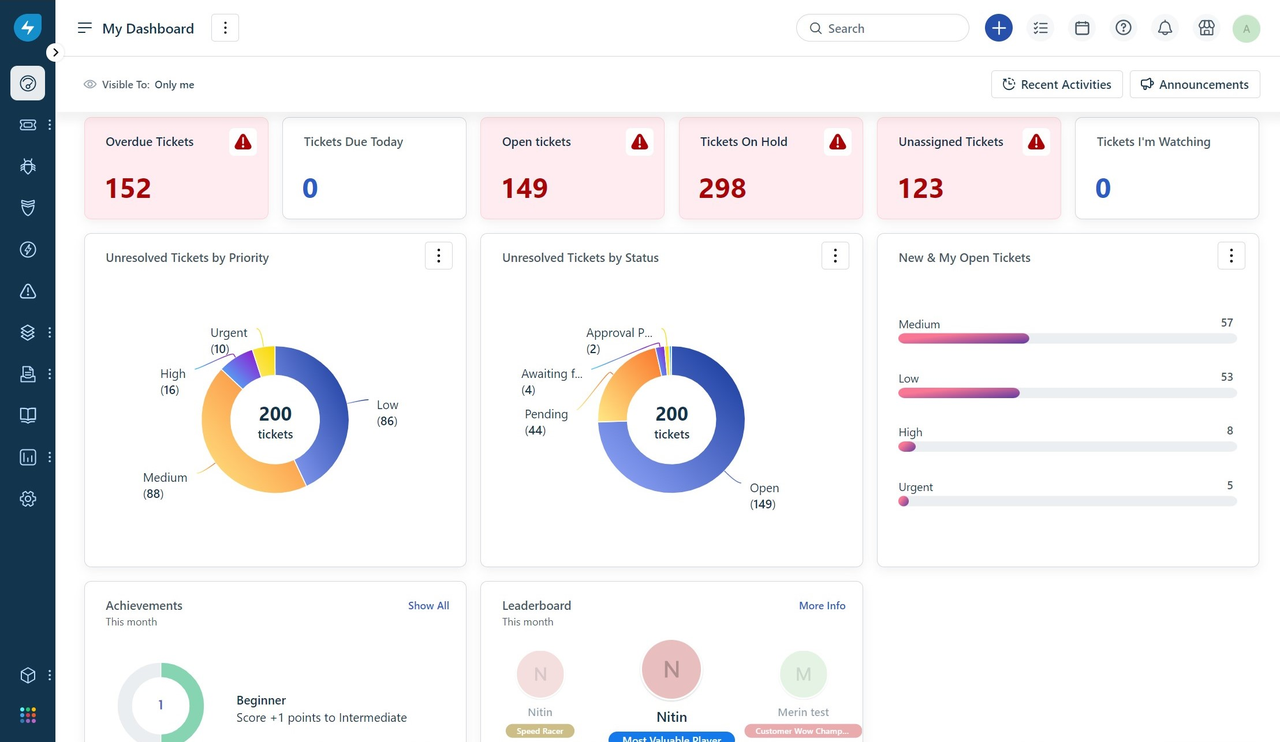
Image source: freshservice.com
Key features:
- Incident, problem, and change management modules let teams track bugs in the context of broader IT processes, helping classify whether an issue is a defect, recurring problem, or part of a planned change.
- Automated workflows route bugs and incidents to the right teams, escalate critical issues, and update statuses based on conditions, reducing manual intervention for high-volume environments.
- CMDB integration links bugs to specific assets, configurations, or services, helping IT teams understand which systems are affected and trace root causes effectively.
- Knowledge management supports documenting resolutions, troubleshooting steps, and known issues, improving response time and reducing the need to repeat work on recurring bugs.
Pros:
- Strong alignment with IT operations makes Freshservice suitable for teams managing internal systems rather than purely software development pipelines.
- A clean interface and simple ticketing processes reduce friction for both end users and IT staff when reporting or addressing bugs.
- Automation and asset linking help teams diagnose issues faster and maintain more accurate infrastructure visibility.
Cons:
- Less ideal for developer-heavy teams that require Git automation, CI/CD links, or deep technical bug metadata.
- Complex ITSM features may feel heavy for small teams that only need a lightweight bug tracker.
Pricing:
- Starter plan: $19/agent/month (billed annually).
- Growth plan: $49/agent/month (billed annually).
- Pro plan: $95/agent/month (billed annually).
- Enterprise plan: $119/agent/month (billed annually).
13. Azure DevOps: Best bug tracker for DevOps and CI/CD teams
Azure DevOps is built for engineering organizations that want end-to-end integration across source control, CI/CD pipelines, testing, and bug tracking. Its Boards module offers structured issue tracking tightly connected to repositories, builds, and releases, making it ideal for teams practicing DevOps or managing large-scale engineering projects. Azure DevOps shines when teams require deep visibility into how bugs relate to code changes, branch activity, or automated deployments. Its hierarchical work items allow teams to link defects to epics, features, tasks, and test cases. Azure DevOps is beneficial for enterprise teams that need strong governance, compliance, and traceability. For organizations already using the Microsoft ecosystem, it becomes a natural extension of the engineering workflow.
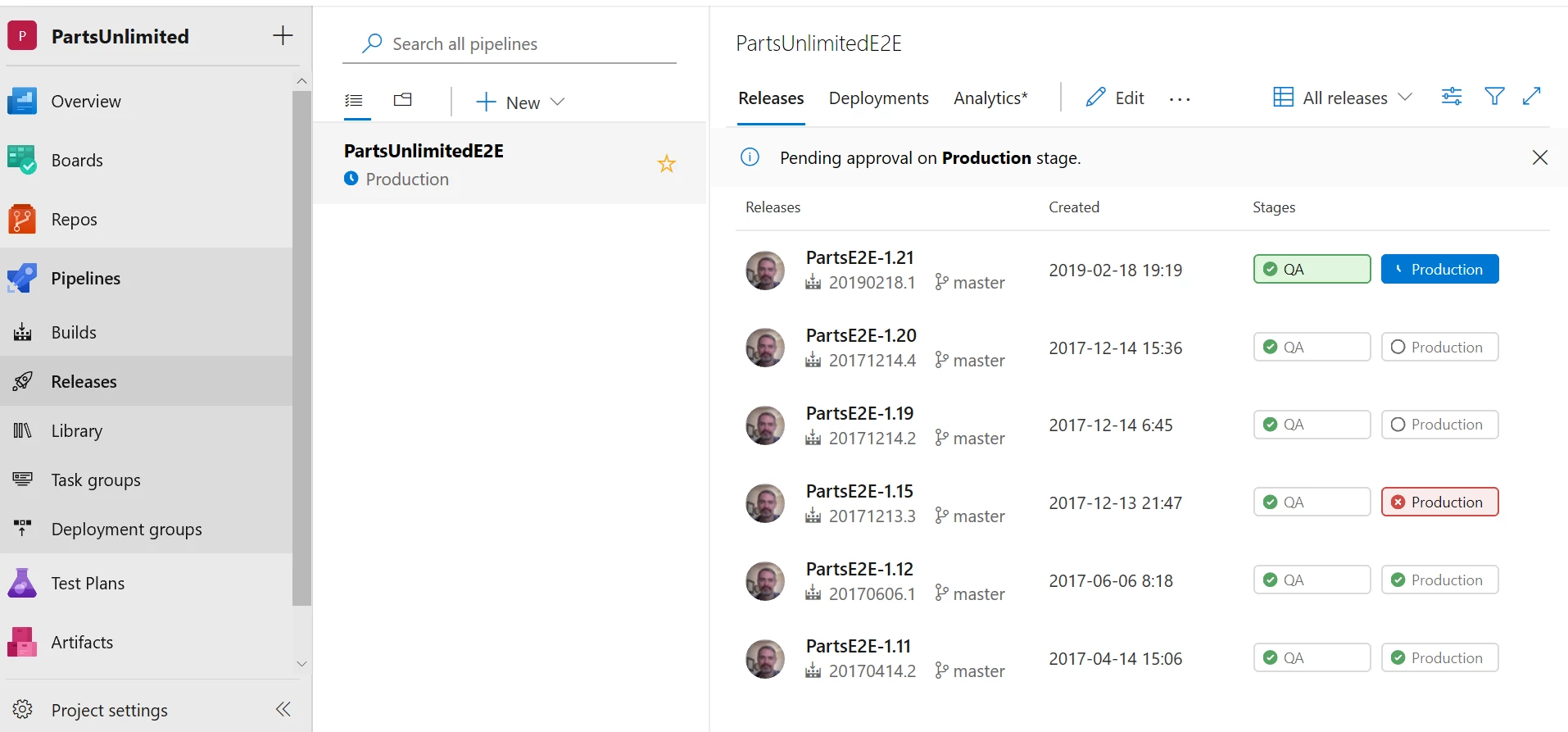
Image source: microsoft.com
Key features:
- Work items support customizable fields, detailed bug metadata, acceptance criteria, reproduction steps, and linked commits or branches, giving developers full context for each defect.
- Azure Boards provide backlogs, sprints, Kanban views, and queries that help teams visualize and prioritize bugs across multiple projects and services in a single unified interface.
- Tight integration with pipelines allows teams to link bugs to build failures, test runs, and release progress, improving traceability across the delivery chain.
- Hierarchical relationships let teams connect bugs to user stories, features, test cases, and parent epics, creating structured visibility from strategy down to execution.
Pros:
- Deep integration with Microsoft tools, making it ideal for teams using Azure, Visual Studio, Git repos, or enterprise Windows infrastructure.
- Strong traceability from bug discovery through code fixes, builds, and automated deployments, enabling complete lifecycle visibility.
- Scales well across large engineering organizations with multiple codebases, pipelines, and interconnected services.
Cons:
- Interface can feel complex for teams not already familiar with Microsoft development tools or structured DevOps workflows.
- Setup may require administrative configuration, especially when integrating across multiple repositories and environments.
Pricing:
- Basic plan: $6/user/month (billed annually).
- Basic + Test Plans: $52/user/month (billed annually).
- Enterprise and larger deployments: Custom pricing.
14. GitHub Issues: Best developer-native issue and bug tracker
GitHub Issues is built directly into the GitHub ecosystem, making it a natural choice for engineering teams that already manage code, branches, and pull requests on the platform. Its simplicity, proximity to code, and seamless connection to repositories make it ideal for developers who want bug tracking woven into their daily workflow. GitHub Issues helps teams link defects to commits, discussions, and code reviews, eliminating the friction of switching between tools. It's widely used by open-source communities and product teams alike because of its clean interface and collaborative structure. For teams that prioritize developer-first workflows, GitHub Issues provides a highly integrated, familiar environment for efficiently managing bugs.
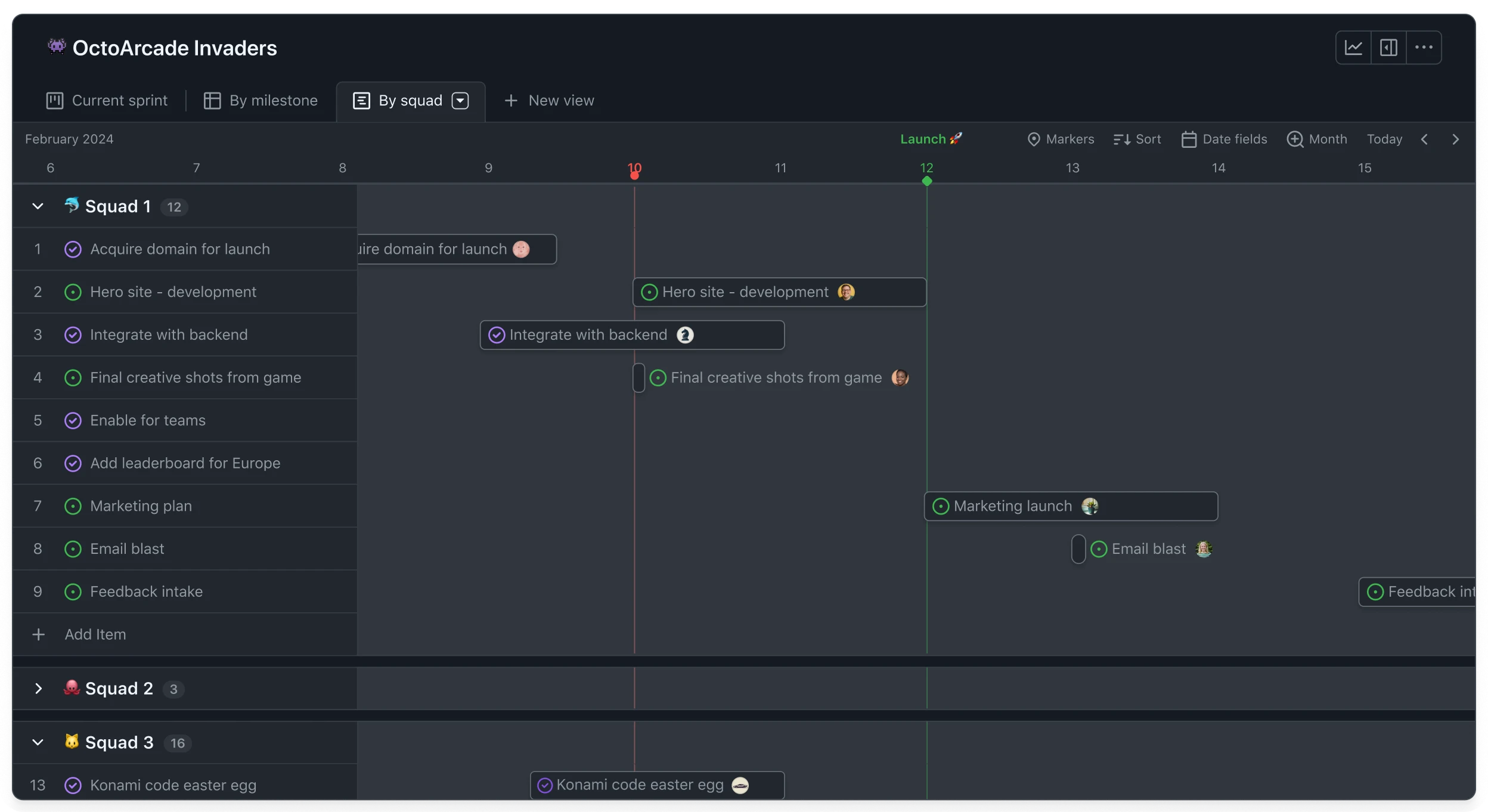
Image source: github.com
Key features:
- Issues can be linked directly to branches, commits, and pull requests, providing transparent traceability between code changes and the bugs they fix or introduce.
- Labels, milestones, and project boards allow teams to categorize bugs, group them by priority or feature, and visualize progress through customizable workflows.
- Templates ensure consistent bug reporting with predefined fields such as steps to reproduce, expected behavior, and device or environment details.
- Discussions, comments, and mentions keep communication tied to each issue, helping developers collaborate without leaving the development environment.
Pros:
- Built directly into the repository workflow, making bug reporting and triage seamless for developers who already use GitHub daily.
- Easy to adopt with a minimal learning curve, especially for teams familiar with Git-based processes or open-source collaboration styles.
- Flexible structure supports everything from simple bug lists to fully managed project boards and roadmaps.
Cons:
- Lacks advanced workflow automation compared to full-fledged enterprise bug trackers, limiting more complex QA or multi-team environments.
- Reporting and analytics are basic unless teams rely on external integrations or additional tools.
Pricing:
- Team plan: $4/user/month (billed annually).
- Enterprise plan: $21/user/month (billed annually).
15. DoneDone: Best simple client-friendly bug reporting system
DoneDone is designed for teams that need a straightforward, easy-to-use bug tracking system that works well for both internal users and external clients. Unlike heavier, developer-centric tools, DoneDone keeps workflows simple so teams can focus on resolving issues rather than managing complex configurations. Its clean interface makes bug submission intuitive, especially useful for agencies, client service teams, and small software companies. DoneDone helps keep feedback loops short by allowing clients to submit bugs, track updates, and collaborate without requiring technical knowledge. This simplicity makes DoneDone a practical choice for teams wanting low-maintenance bug tracking. For organizations seeking a no-frills yet reliable setup, DoneDone offers an approachable, efficient experience.
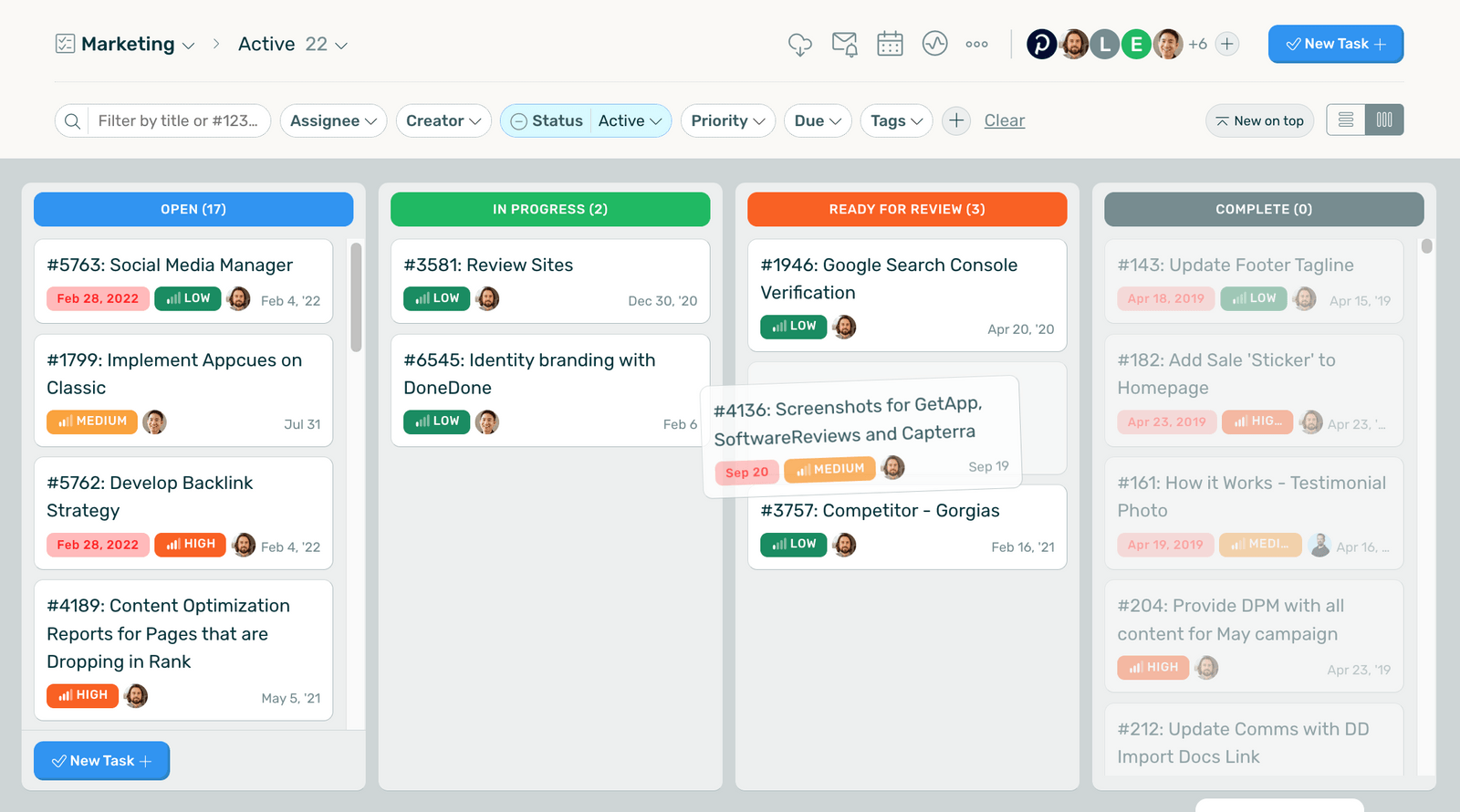
Image source: donedone.com
Key features:
- Simple issue lists allow teams to organize bugs with clear statuses, priorities, comments, and attachments, keeping workflows uncluttered and easy for all stakeholders to understand.
- Client-friendly portals let external users submit bugs directly without navigating a complex interface, improving communication between teams and customers.
- Workflow controls allow teams to define statuses and transitions to match their preferred process while keeping systems lightweight and easy to manage.
- Email integration enables bug submissions, updates, and notifications directly through inboxes, making bug reporting effortless for non-technical contributors.
Pros:
- Extremely easy for clients and non-technical users to adopt, making it ideal for agencies or customer-facing product teams.
- Minimal setup and configuration reduce administrative overhead, allowing teams to start tracking bugs quickly.
- Straightforward workflows help maintain focus on resolving issues rather than managing complex tooling.
Cons:
- Limited advanced features mean it may not support larger engineering teams requiring detailed metadata, version linking, or automation.
- Reporting tools are basic, offering only essential insights into bug trends and team performance.
Pricing:
- Startup plan: $45/month (billed annually).
- Professional plan: $89/month (billed annually).
How to choose the best bug tracker for your workflow
Choosing the right bug tracking system begins with understanding how your team works today and how you expect to grow in the coming months. Different tools offer varying levels of structure, automation, and customization, so the best choice depends on your operational style. Some teams need tight developer integrations, while others focus on clarity, collaboration, or customer reporting. It also helps to consider the type of projects you handle—web, mobile, backend, or IT operations—and whether you need modern cloud tools or self-hosted setups. Evaluating your requirements upfront ensures you avoid overpaying or adopting a tool that becomes a bottleneck later. With the wide variety available, the ideal system should feel supportive, not restrictive.
- Team size: Team size directly influences the amount of structure and complexity your bug-tracking system requires. Smaller teams often prefer tools with minimal configuration so they can stay focused on delivery without managing a heavy workflow engine. Larger teams, however, benefit from detailed fields, permissions, and lifecycle controls to maintain alignment. Choosing a system that fits your scale prevents unnecessary process overhead. This becomes especially important when reviewing solutions like Palia bug tracker for different team types.
- Workflow complexity: Your workflow determines how flexible and customizable your bug tracker should be, especially if your team manages multiple product lines or long release cycles. Simple projects may require only a few statuses, while complex pipelines may require branching workflows, custom fields, and automation triggers. Matching the tool capability to your process prevents chaos or stagnation in issue movement. As workflows grow, the need for lifecycle clarity increases. This is particularly relevant when evaluating structured tools like Zoho Bug Tracker.
- Automation needs: Some teams depend heavily on automation to reduce manual work—especially when handling repetitive triage tasks, reminders, or transitions. A system with strong automation can keep bugs moving through the pipeline even when team members are occupied. Automation also improves consistency by enforcing rules across all issues. The more frequently you handle recurring patterns, the more essential this becomes. Teams looking to reduce repetitive tasks often benefit from options that include automation, even in a free bug tracker.
- Mobile or Android coverage: If your team tests mobile apps, field operations, or multi-device experiences, mobile support is essential. Being able to log bugs directly from a phone, attach screenshots, and capture real-time behavior reduces friction during testing. Native mobile access also helps distributed QA teams deliver faster reports. Ensuring the tool works smoothly on Android devices avoids delays during testing cycles. This requirement is common when reviewing broad bug-tracking tool options for mobile-first teams.
- Dev tools connection: Development-heavy workflows benefit from bug trackers that integrate tightly with repositories, branches, commits, and CI/CD pipelines. These connections help teams trace bugs to code changes, automate updates, and simplify debugging. Integrations also improve auditability by linking defects to release artifacts. Choosing a system that fits naturally into your development workflow accelerates resolution timelines. Many teams emphasize this when selecting a compatible bug tracker app.
- UI simplicity: A clear and intuitive interface helps teams adopt the tool quickly and reduces time spent navigating cluttered screens. Simple designs speed up triage, logging, and updates, especially for contributors who aren't deeply technical. A lightweight interface also helps maintain focus during busy release cycles. The easier the system is to understand, the more consistently your team will use it. This matters greatly when selecting a bug-tracking application for mixed-functional teams.
- Pricing: Budget plays a central role in choosing the right tool, especially for growing teams or organizations managing multiple projects. Some systems charge per user, while others charge per agent or per feature set, so understanding long-term cost is crucial. Pricing should align with your expected scale and complexity without forcing unnecessary add-ons. Evaluating the total cost of ownership prevents surprises later. This becomes even more relevant when comparing options like a website issue tracker for cost-conscious teams.
Conclusion
Choosing the right bug tracker is ultimately about finding a system that matches your team's scale, technical depth, and collaboration needs. Whether you prefer open-source tools, enterprise-grade platforms, or lightweight solutions, each option in this guide offers strengths that support different development, QA, and IT operations styles.
By evaluating features like workflow customization, automation, mobile access, integration depth, and pricing, teams can identify a tool that keeps bugs visible, organized, and resolved efficiently. Even as projects grow more complex, the right platform ensures clarity across sprints, releases, and day-to-day troubleshooting.
If your team is also exploring more unified collaboration beyond issue tracking, Lark provides an unified workspace where tasks, docs, messaging, and structured bug tracking work together smoothly. It's a practical next step for teams wanting a single environment that supports both communication and execution.
FAQs
What is the difference between bug tracking and incident management?
Bug tracking focuses on software defects, while incident management addresses unexpected disruptions in live environments, often requiring immediate resolution. A problem tracker may combine both, but each serves different stages of the product lifecycle. Teams using Lark can connect structured bug logs with workflow discussions to keep both streams aligned. Clear separation ensures issues flow through the right channels without confusion.
How do QA teams control duplicate bug reports?
QA teams prevent duplicates by using consistent fields, strong search practices, and automated similarity checks during triage. Many teams rely on tools like an azure devops bug tracker to cross-reference known issues before logging new ones. With Lark, teams centralize discussions and evidence, helping testers identify overlap early. This improves accuracy and reduces clutter during active sprints.
What fields should every bug report include?
A detailed bug report generally includes severity, environment, reproduction steps, expected behavior, and attachments for clarity. Teams using free bug-tracking software often add custom fields to improve categorization. Lark's structured Base fields help ensure every detail is captured consistently. Transparent reporting reduces back-and-forth and accelerates developer response time.
Can bug trackers be used for customer-reported issues?
Yes, many teams use their bug tracker to collect and organize issues submitted directly by customers or external stakeholders. Some organizations prefer an open-source bug tracker for transparent reporting, especially in community-driven ecosystems. Lark supports shared forms and linked tasks, making it easy to gather structured customer feedback. This keeps issue intake smooth while maintaining internal workflow control.
How do small teams decide between a free bug tracker and a paid one?
Small teams typically start with simple systems to test their workflow before committing to a larger investment. They often compare ease of use, mobile access, and whether the tool supports needs like an Android bug tracker for on-device testing. Lark offers a balanced option with a generous free tier, helping teams get started without an upfront cost. As needs grow, upgrading becomes easier once workflows are established.
Related reading
Table of contents
Start using Lark today

Manage all your work in one place
Boost team efficiency by 10x
Save up to 70% on software costs
Table of contents
Start using Lark today
Manage all your work in one place
Boost team efficiency by 10x
Save up to 70% on software costs
Keep reading








2026 Lark Technologies Pte. Ltd.
Headquartered in Singapore with offices worldwide.






Explore: