Choosing the right CRM today goes beyond tracking deals—it requires a clear understanding of Close pricing, scalability, and long-term return on investment. Close CRM has earned a strong reputation as a sales-focused platform, particularly for teams that rely on outbound calling and email outreach. However, as organizations grow and workflows extend beyond pure sales execution, pricing structures, per-user costs, and feature boundaries become increasingly important factors in evaluation.
This guide provides a clear breakdown of Close pricing, explaining what each plan includes, how costs scale as teams expand, and where additional expenses may arise. It also reviews Close CRM's value for money and briefly compares it with broader collaboration platforms, such as Lark, to help growing teams assess their options objectively.
Make a confident CRM decision for long-term growth
Quick overview of Close pricing
Information source: close.com
Update time: 2025-12-13
Note: Pricing and plan details reflect publicly available data as of the update date and may vary based on region, billing cycle, and number of agents.
What is Close CRM and who it is designed for?
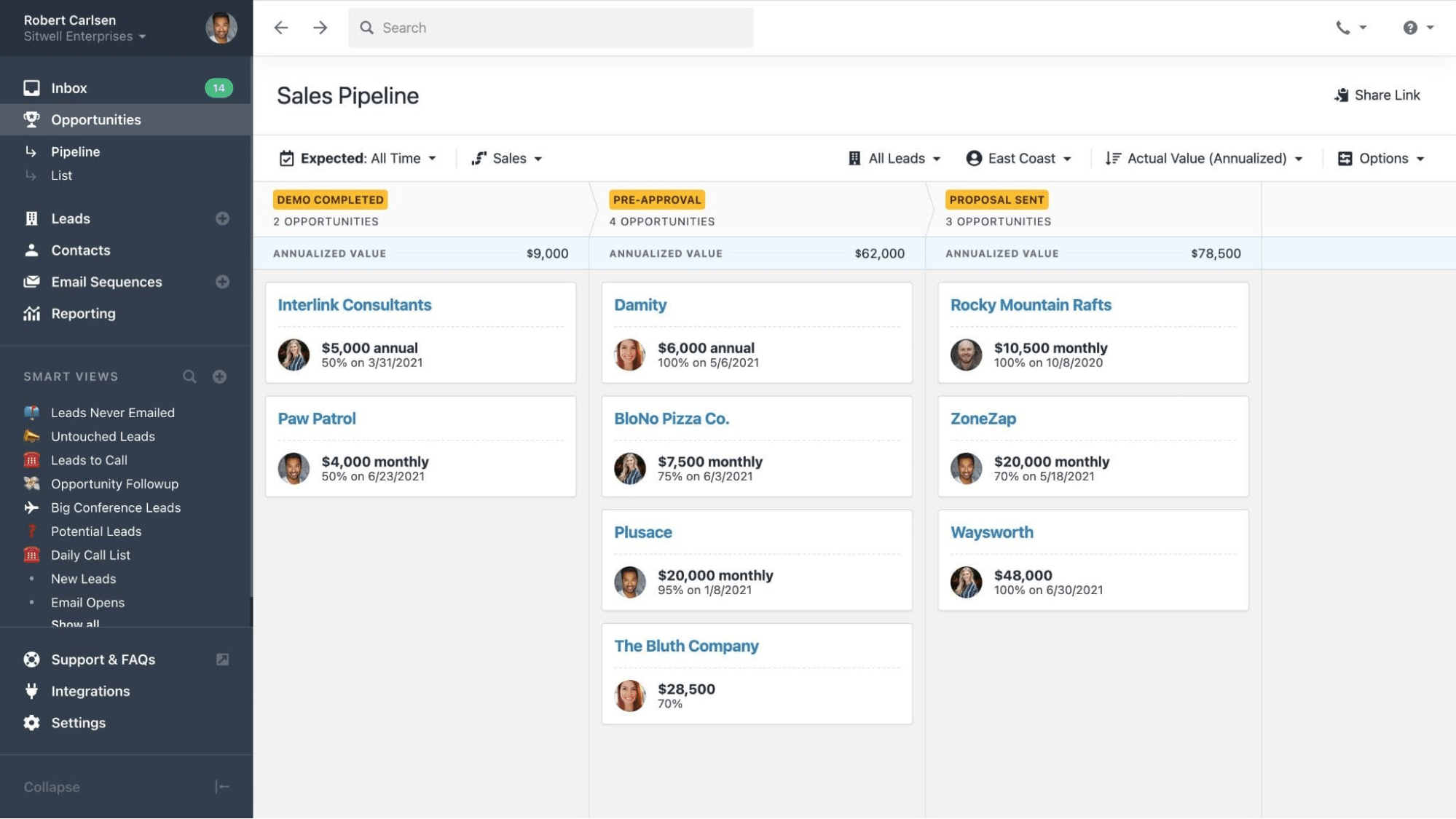
Close CRM is a sales-focused built specifically for teams that rely on high-volume outbound communication. It is designed to help sales representatives manage leads, track deals, and engage prospects efficiently through built-in calling, SMS, and email tools. By keeping communication and pipeline activity in one interface, Close aims to reduce tool switching and improve sales productivity.
Close CRM is best suited for startups, small to mid-sized businesses, and inside sales teams that prioritize speed, outreach, and deal execution. It works particularly well for organizations running structured sales processes such as cold calling, lead follow-ups, and pipeline-driven revenue models. However, Close is intentionally optimized for sales use cases rather than broader organizational workflows, making it less suitable for teams that require deep collaboration, , or cross-departmental coordination beyond sales.
Information source: close.com
Update time: 2025-12-13
Note: Pricing and plan details reflect publicly available data as of the update date and may vary based on region, billing cycle, and number of agents.
Key features included across Close CRM
Close CRM includes a focused set of features designed to support fast-moving sales teams. These tools prioritize communication, , and sales execution rather than broad organizational workflows.
- Built-in calling tools: Sales reps can place and receive calls directly within the CRM, automatically logging call activity. This removes reliance on external dialers and improves call tracking accuracy.
- SMS & email sync: Text messages and emails are synced automatically with lead records, creating a centralized communication history. This helps teams maintain consistent follow-ups and context.
- Customizable pipelines: Teams can create multiple pipelines with custom stages to match their sales process. Deals move visually through stages for more precise .
- Sales automation workflows: Automation supports tasks like follow-up reminders, deal updates, and activity logging. This reduces manual data entry and keeps sales actions consistent.
- Reporting & forecasting: Built-in reports provide insights into deal progress, win rates, and revenue forecasts. Managers can using real-time pipeline data.
- Integrations & API access: Close integrates with common sales and productivity tools through native integrations and APIs. This allows teams to connect external systems as needed.
- User roles & permissions: Admins can control access levels by role, protecting sensitive data. Permissions help maintain structure as sales teams grow.
Detailed breakdown of Close CRM pricing plans
Close CRM pricing is structured around tiered plans that scale based on feature access, usage limits, and the size of the sales team. Each plan builds on the previous one, adding , automation capabilities, and reporting depth. While the core CRM experience remains consistent, higher tiers unlock features designed for more complex sales operations. Understanding what each plan includes is essential for evaluating how costs grow as user count and calling volume increase.
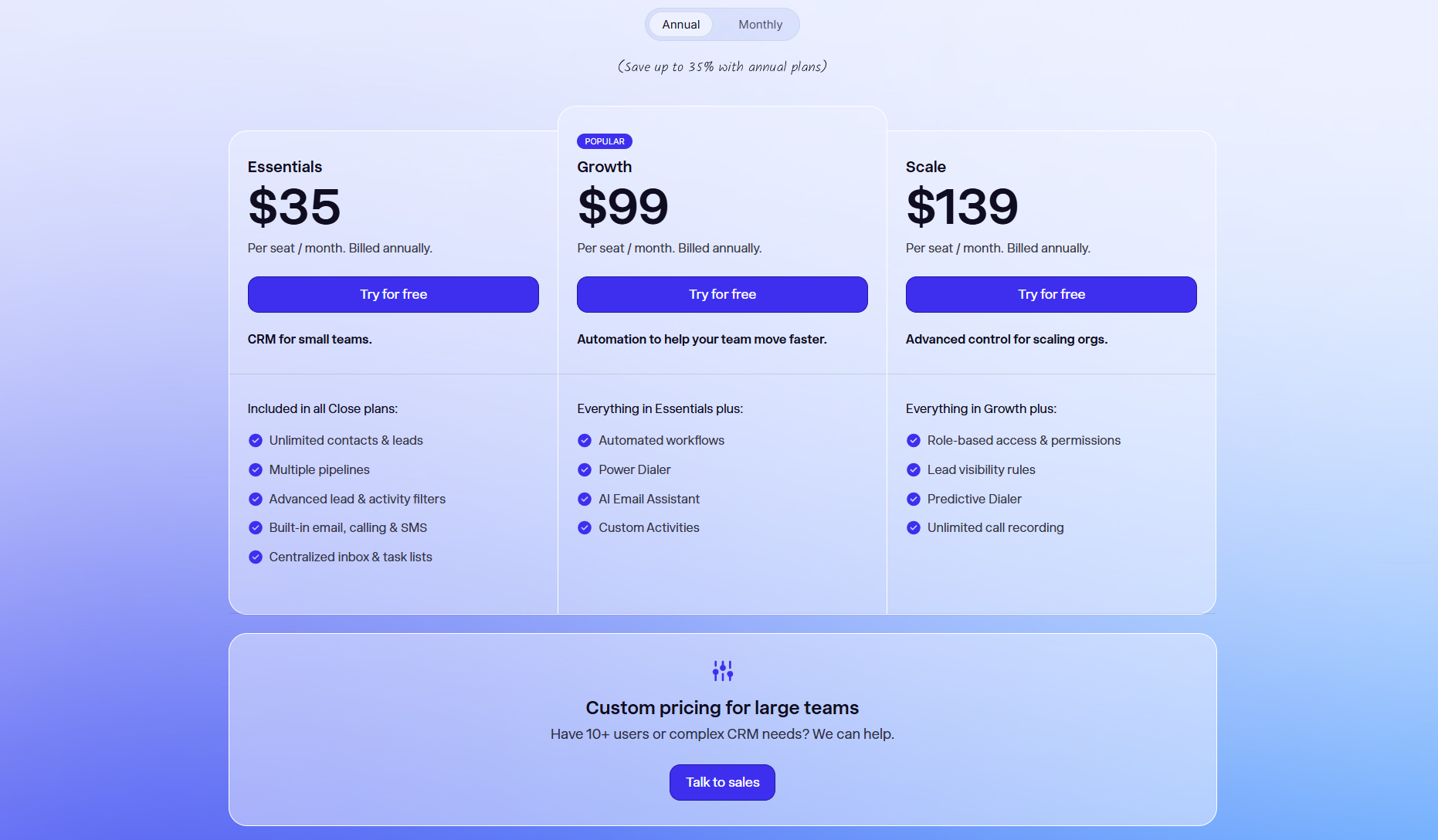
Image source: close.com
Free trial
Close offers a free 14-day trial when you sign up
Solo plan
The Solo plan is the entry-level Close CRM offering designed for individual users, priced at $9 per seat per month when billed annually. It is ideal for individuals organizing leads, managing pipelines, and keeping communication centralized, without needing team-based workflows or large data storage.
Key limitations:
- Limited to 1 user: This plan restricts access to a single user, making it unsuitable for even the smallest two-person teams. It is strictly for solo professionals or founders.
- Limited leads: Users are restricted to managing a maximum of 10,000 leads. This limitation ensures the plan remains affordable for those with a smaller, focused database.
- No automated workflows: Unlike the higher-tier plans, the Solo plan does not include automated workflows. This means follow-ups and task creation must be managed manually.
Essentials plan
The Essentials plan is the entry-level Close CRM offering, priced at $35 per seat per month when billed annually. It is designed for small sales teams that need core CRM and communication features. This plan focuses on deal tracking and outreach without .
Key features:
- Unlimited contacts and leads: Teams can store and manage unlimited contacts and leads without record caps. This ensures data limits do not restrict . It is suitable for teams building large prospect databases over time.
- Multiple pipelines: Users can create various pipelines to represent different sales processes or offerings. Each pipeline can be customized with unique stages. This helps teams track deals more accurately across varied workflows.
- Built-in email, calling, and SMS: Sales reps can communicate with prospects directly from the CRM interface. All emails, calls, and messages are logged automatically. This keeps communication history centralized and easy to reference.
Growth plan
The Growth plan is priced at $99 per seat per month when billed annually and is positioned for scaling sales teams. It adds automation and productivity tools on top of the Essentials feature set. This plan suits organizations with higher outreach volume and structured sales workflows.
Key features:
- Automated workflows: Actions can trigger automatically based on defined rules. Everyday tasks like follow-ups and status updates can run without manual input. This improves consistency and reduces administrative effort.
- Power dialer: The Power dialer enables rapid outbound calling by dialing leads sequentially. It reduces idle time between calls for sales representatives. This feature helps increase daily call volume efficiently.
- AI Email Assistant: The helps generate and refine sales emails. It supports faster responses while maintaining consistent messaging. This can improve outreach speed across high-volume campaigns.
Scale plan
The Scale plan is the highest tier, priced at $139 per seat per month when billed annually. It is built for larger sales organizations with complex access and visibility requirements. This plan supports high-volume outbound operations and governance needs.
Key features:
- Role-based access and permissions: Administrators can assign detailed permissions based on user roles. This controls access to sensitive data and . It helps maintain structure as teams expand.
- Predictive dialer: The Predictive dialer automatically places calls based on agent availability. It minimizes downtime between conversations. This is suited for teams running intensive outbound operations.
- Unlimited call recording: All calls can be recorded without usage restrictions. Recordings support training, quality reviews, and compliance needs. Managers can use them for coaching and performance analysis.
Plan for a larger team
For 10+ users or complex CRM needs, Close also provides a tailored solution. You need to contact sales for the pricing details.
Pros and cons of Close CRM based on value for price
Close CRM delivers substantial value for teams that prioritize . However, its pricing model and feature focus can affect overall return on investment as teams scale or diversify workflows.
Pros of Close CRM
- Native calling & SMS tools: Close CRM includes built-in calling and SMS functionality without relying on third-party dialers. This reduces tool switching for sales reps. It also keeps the communication history tightly linked to deals.
- Fast onboarding & ease of use: The platform features a clean, sales-first interface. New users can become productive quickly with minimal training. This lowers onboarding time and early adoption costs.
- Strong outreach automation: support follow-ups, sequences, and activity tracking. These tools help maintain consistent outreach at scale. Sales teams can focus more on conversations than manual updates.
- Sales-focused efficiency: Close CRM is optimized for speed and execution in sales workflows. Features are purpose-built for prospecting and closing deals. This focus benefits teams with high outbound volume.
Cons of Close CRM
- High cost with scaling users and calls: Pricing increases as more users are added to the platform. Additional calling and usage-based charges can accumulate over time. This may affect budget predictability for growing teams.
- Limited collaboration and project management: Close CRM offers only basic deal comments. It lacks structured and cross-functional workflows. Teams often need external tools to fill these gaps.
- Not suitable for multi-department teams: The platform is designed primarily for sales teams. Other departments may find its features insufficient for their workflows. This can result in fragmented systems across the organization.
- Lacks all-in-one workspace features: Close CRM does not combine CRM, messaging, documents, and . Teams may rely on multiple tools alongside it. This can increase overall software costs and complexity.
Afterthought
It's entirely common for fast-growing teams to hit a wall with traditional CRMs like Close. You start realizing that the per-user cost climbs quickly, and suddenly your team is juggling, for example, Close for sales, Slack for communication, and Trello for project tracking. This fragmentation is exactly where productivity dies. If your goal is to cut down on that tool sprawl, improve cross-departmental alignment, and stop paying high fees for add-on features, you need a different kind of platform. Keep scrolling and find out how an all-in-one alternative can reshape your workflows.
Reshape your CRM workflows with a new option
Why do more teams choose Lark as a better alternative to Close CRM
is positioned as an all-in-one platform for modern organizations seeking to minimize tool clutter and optimize teamwork. It provides a single, unified workspace that natively blends communication, advanced document collaboration, and . This integrated approach allows Lark to simplify the IT stack and reduce reliance on separate, often costly, applications for functions like chat, email, and task tracking, driving efficiency and better cross-functional alignment across the entire business.
Centralised, dynamic CRM database & record management
enables teams to create customizable , similar to those in a traditional CRM. Leads, accounts, and deals can be tracked through defined stages, with custom fields including contact data, deal value, priority, and owner. Records can be linked across tables to maintain relationships between prospects, activities, and follow-ups. Real-time updates keep pipeline data accurate for forecasting and performance review. This flexibility allows teams to tailor their CRM structure to match evolving sales processes. 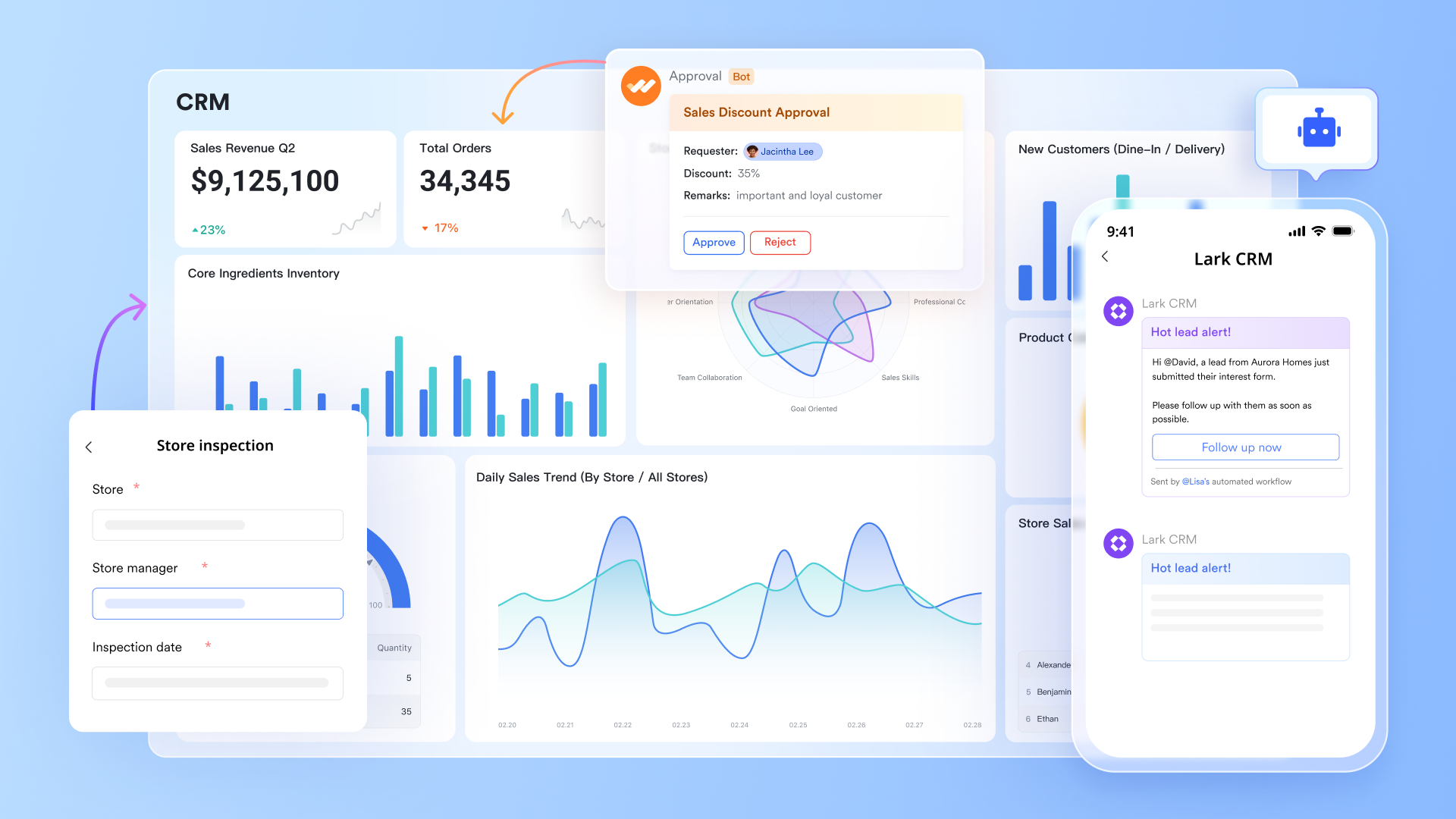
Smart visualization methods for sales data
Lark Base views are vital for CRM success because they enable users to visualize the same underlying sales data in multiple functional formats. The allows sales reps to visually manage pipelines by dragging deals between stages, while the calendar view organizes critical follow-up dates and meetings. The form view streamlines lead capture by turning the table into a data entry form. Since all these dynamic views share a single data source, they collectively ensure real-time accuracy and adaptability for every stage of the sales and post-sales process. 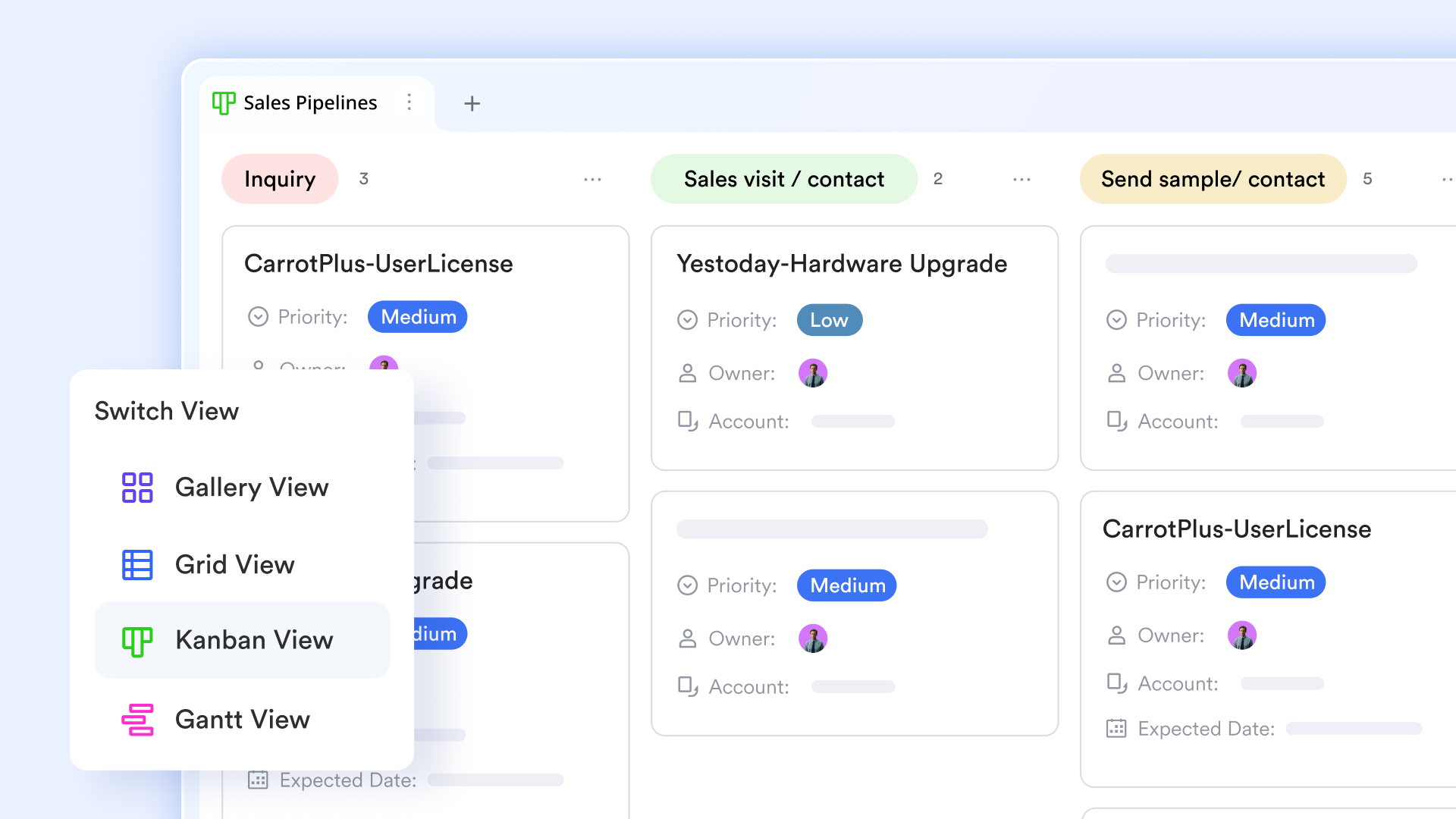
Dashboards with multiple elements for data insights
Lark Base dashboards enhance CRM by providing a visual, centralized platform for . They use funnel charts to visualize the sales pipeline, helping analyze conversion and progression through different stages of the customer journey. metrics blocks track critical KPIs, calculating sums, averages, and showing trend comparisons like Year-over-Year (YoY) and Month-over-Month (MoM) sales data. The dashboard also utilizes ranking blocks to easily evaluate the performance of sales team members or different projects. This comprehensive visualization supports real-time operational monitoring and data-driven decision-making in the CRM process. 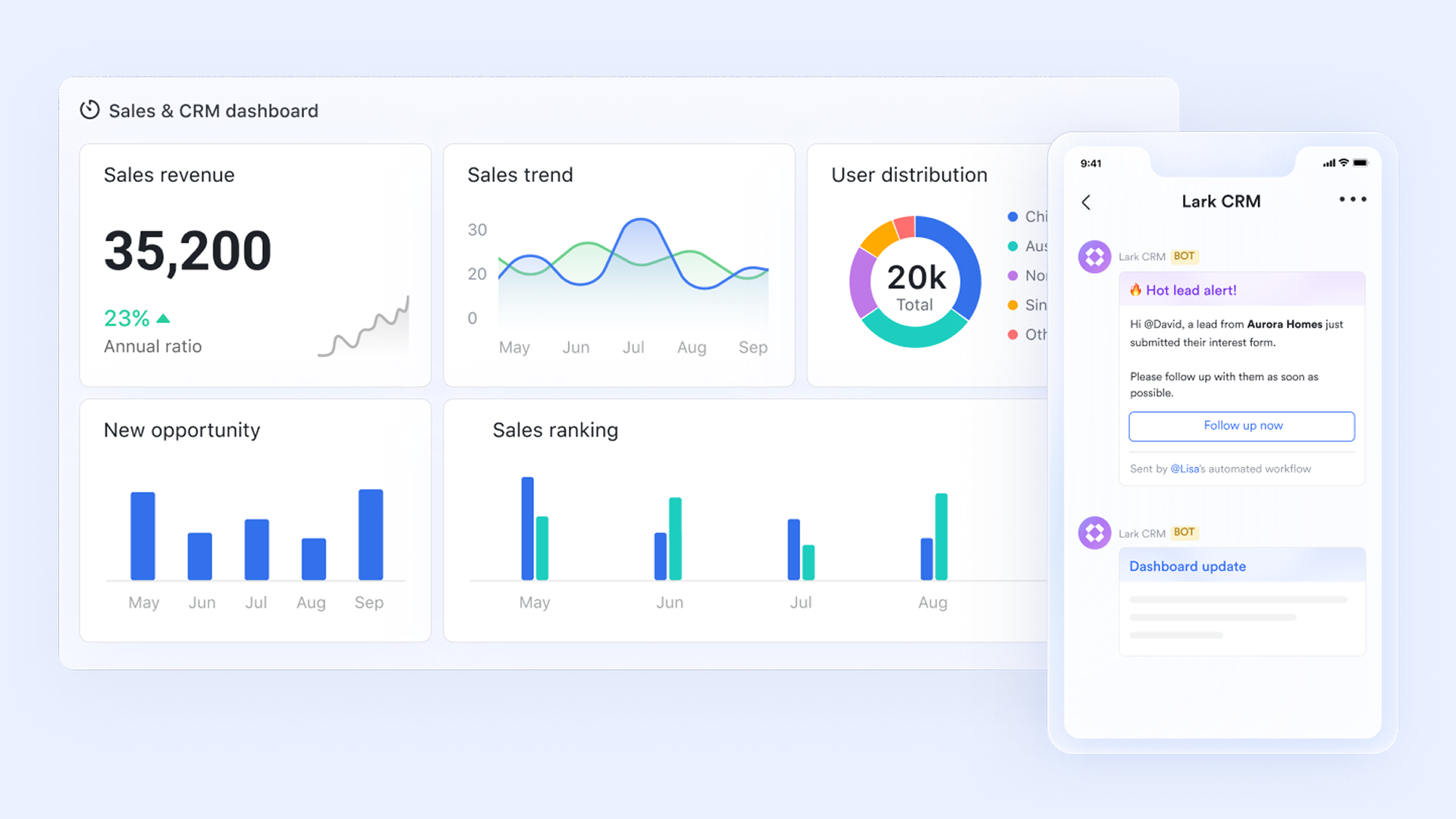
Workflow automation to reduce manual efforts
Through the automations feature in Lark Base, Lark supports sales process automation beyond simple triggers. Lead assignments, deal stage transitions, reminder notifications, and record updates can all follow predefined logic paths. This automated workflow removes repetitive manual actions and ensures no follow-ups are missed. Automated workflows standardize handoffs between sales, finance, and operations, improving speed and consistency from first contact to deal closure. 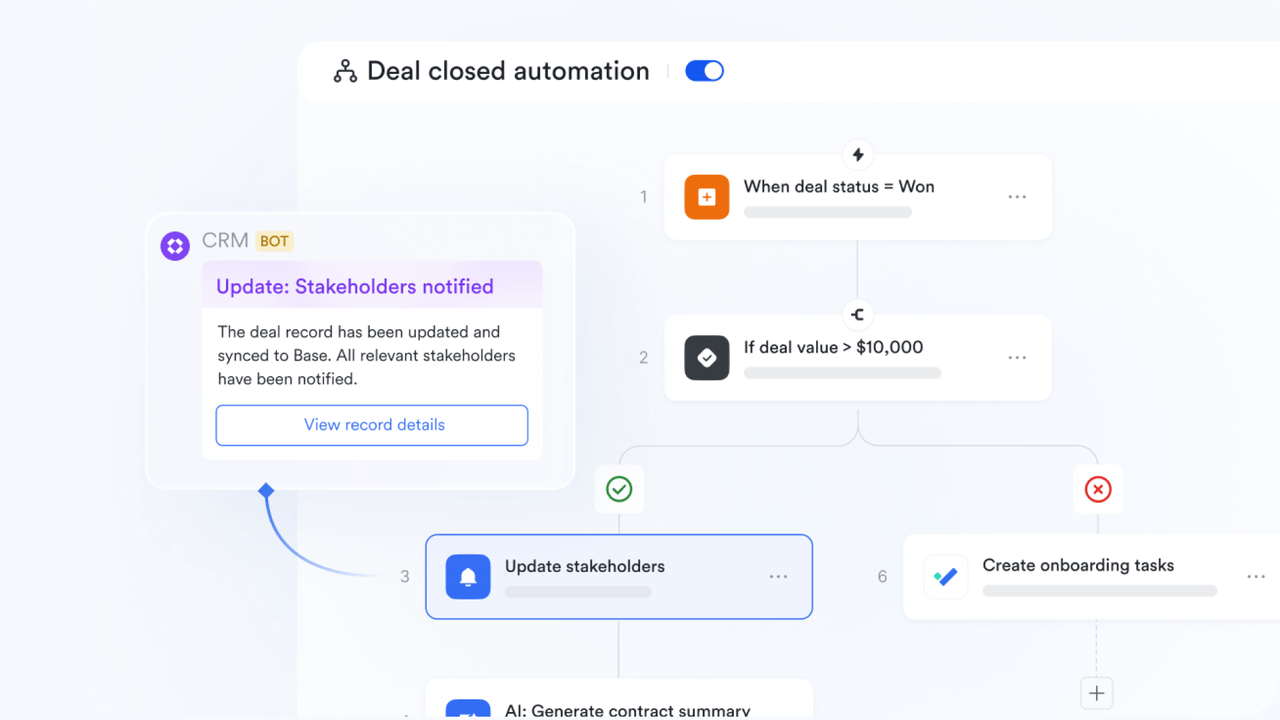
Task management and document collaboration go hand in hand
Lark Tasks turns pipeline activities into structured assignments with deadlines, priorities, and owners, keeping sales accountable. Each task links to related deals and documents stored in , where on proposals, contracts, pitch decks, and onboarding materials in real time. This combination ensures that execution is tightly aligned with the sales strategy, keeping all contributors aligned throughout the customer acquisition and onboarding process. 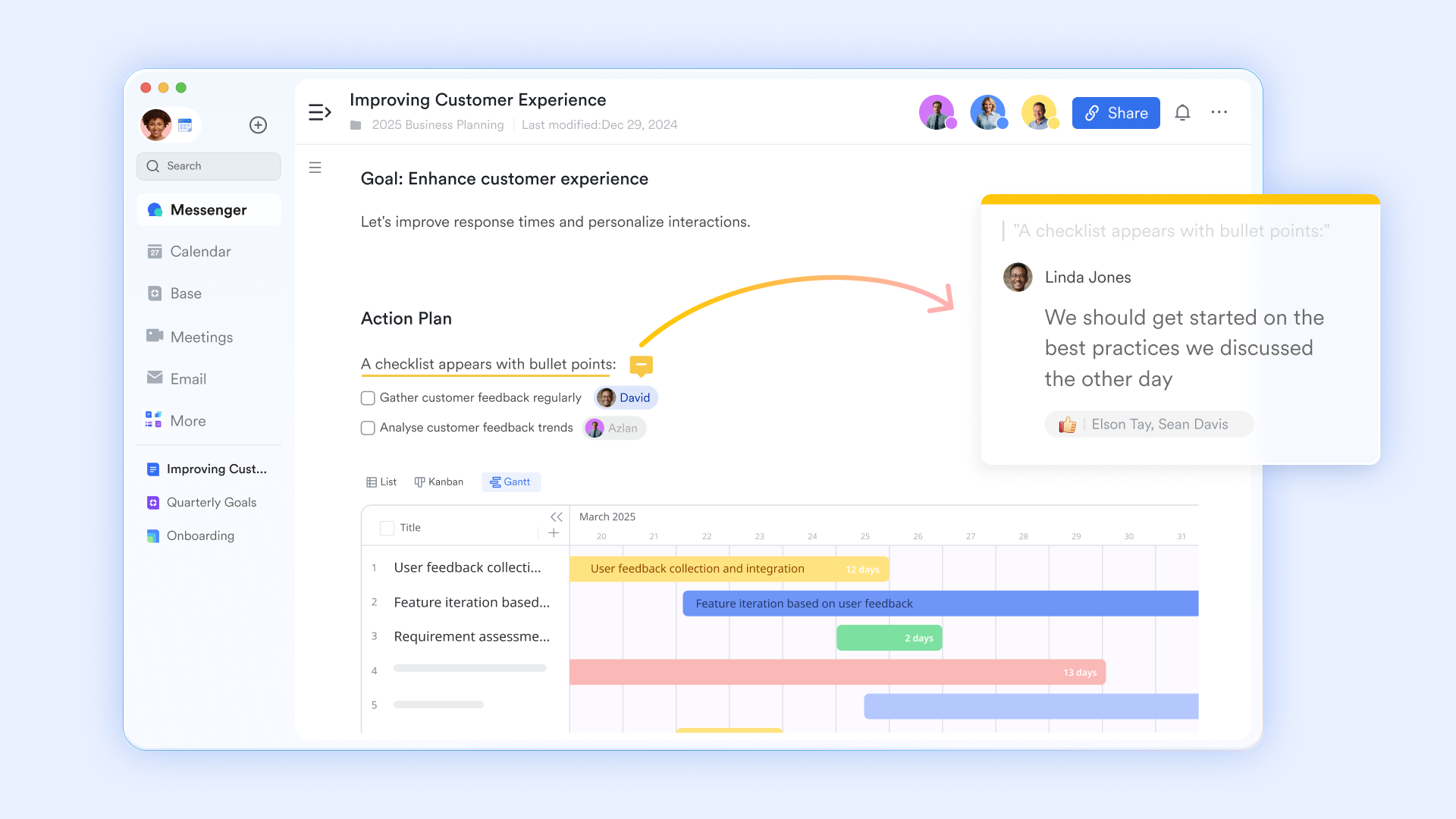
Email and team communication with Lark Mail and Lark Messenger
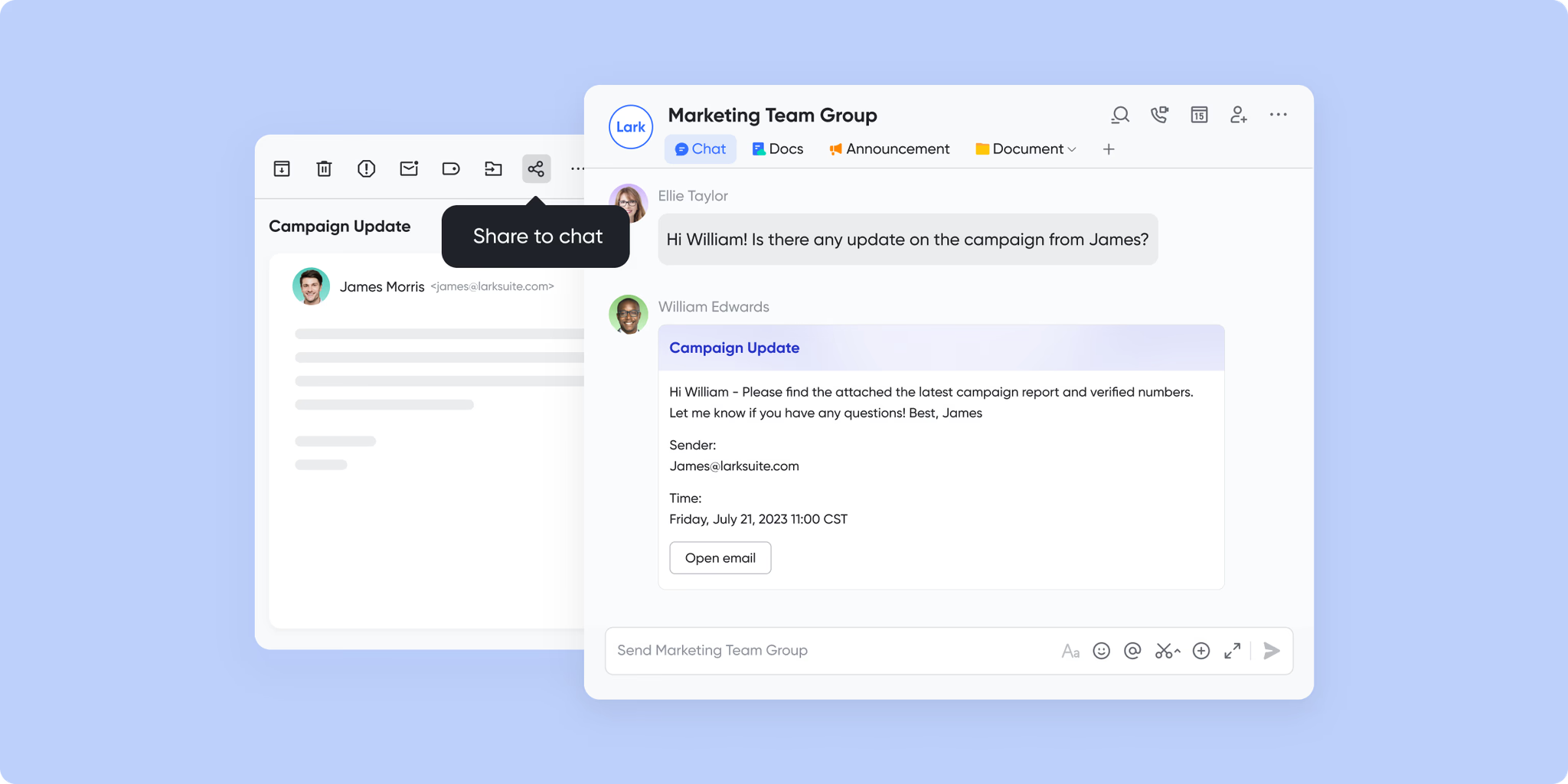
and provide unified communication for sales teams without relying on separate tools. Emails, internal discussions, file sharing, and quick updates all occur within the same workspace. Sales reps coordinate follow-ups, escalate requests, and clarify deal details instantly through chat, while client emails remain centralized for easy reference. This reduces communication silos and ensures context remains .
:
- Starter plan: Free forever plan that includes 11 powerful tools for up to 20 users. It also comes with 100GB of storage, 1000 automation runs, AI translations, and more.
- Basic plan: $6/user/month (billed annually) for up to 500 users. It includes everything in Starter plus group calling for up to 500 attendees, 5TB of storage, 1000 automation runs, and more. For more details, please .
- Pro plan: $12/user/month (billed annually) for up to 500 users. It includes everything in Basic plus group calling for up to 500 attendees, 15TB of storage, 50,000 automation runs, and more.
- Enterprise plan: for custom pricing. Supports unlimited users and includes even more automation runs and advanced security, compliance, and management features.
For small teams with simple communication needs

18 months message history
1000 Base automation runs/month
2000 rows per table in Base
Most POPULAR
For companies with comprehensive collaboration and management needs
Unlimited message history
500-participant video meetings
50k Base automation runs/month
20k rows per table in Base
For large companies with advanced security and organizational management needs
Get a personalized demo and pricing
Unlimited message history
500-participant video meetings
15 TB storage + 30 GB storage/user
500k Base automation runs/month
50k Base automation runs/month
Most POPULAR
For companies with comprehensive collaboration and management needs
Unlimited message history
500-participant video meetings
50k Base automation runs/month
20k rows per table in Base
Lark vs Close CRM: Feature and value comparison
If you are an organization whose primary focus is high-volume outbound sales and requires deeply integrated dialing and call tracking, Close CRM is the better choice for its specialized native pipelines and built-in sales tools.
If you are an organization that needs an all-in-one collaborative workspace supporting sales alongside operations, marketing, and other departments, Lark is the superior solution, offering configured CRM via Lark Base, integrated document management, comprehensive approvals, and a more scalable, cost-effective pricing model.
Conclusion
Close CRM is a strong option for sales teams that rely heavily on outbound calling, email outreach, and fast-moving pipelines. Its native communication tools and sales-focused design make it effective for executing high-volume sales activities. However, as teams grow, pricing per user, calling costs, and the need for additional tools can impact overall value. Organizations that require deeper collaboration, , and centralized communication may find Close CRM limiting over time.
For teams evaluating long-term scalability and total cost of ownership, it is worth considering platforms that go beyond traditional CRM boundaries. offers a workspace where sales pipelines, communication, tasks, documents, and automation coexist in one system. This unified approach helps reduce tool sprawl and supports collaboration across sales, operations, and leadership. If your team is planning for growth and wants a more connected way to manage sales and work together, explore Lark to see how it fits your evolving CRM and collaboration needs.
Assess CRM value beyond basic sales tracking
FAQs
How does Close CRM handle data storage limits and file attachments?
Close CRM primarily focuses on contact data and activity logs rather than large-scale file storage, with attachments supported but not central to the platform's design. Storage limits and usage considerations can become relevant as teams scale their history. Teams comparing Close CRM pricing features often look at broader platforms like Lark that include built-in document storage and collaboration.
Can Close CRM replace tools like project management or internal documentation platforms?
Close CRM is designed for sales execution and does not function as a complete project management or documentation system. Teams typically rely on additional tools for tasks, knowledge bases, and internal . When reviewing Close CRM features pricing, some teams consider Lark to consolidate CRM, tasks, and documents in one workspace.
Is Close CRM suitable for remote or distributed sales teams?
Close CRM works well for remote sales teams by centralizing calls, emails, and pipelines in one interface. However, collaboration beyond sales conversations may require external communication tools. For teams evaluating Close CRM pricing per user, Lark is often assessed for its built-in chat, meetings, and shared workspaces.
How easy is it to migrate data from Close CRM to another platform?
Close CRM offers data export via standard formats and API, making migration technically feasible, with complexity varying by data volume and integrations. Teams evaluating transition to new often compare Close CRM pricing per user with other platforms, assessing scalability and migration effort. This includes weighing Close against the potential for leveraging CRM-like functionalities within various tiers, aiming to optimize costs and integration with existing project management workflows.
Related reading
































