














Confluence vs Notion: Which Knowledge Platform is Worthy

Ryan Tanner
Product Marketing Specialist
Sep 18, 2026
Ryan Tanner
Sep 18, 2026

14 min read


Every modern team depends on how well it captures and shares knowledge. Whether it's project notes, wikis, or SOPs, the right tool determines how efficiently work flows. Two major contenders dominate this space—Confluence and Notion—each offering unique strengths for different kinds of teams.
In this guide, we'll unpack the Confluence vs Notion debate, comparing their key features, pricing, and collaboration models, and introduce Lark—a new-generation platform that unites knowledge, communication, and execution in one connected workspace.

Confluence vs Notion at a glance
Before diving deep into their features, here's a quick snapshot comparing Confluence vs Notion at a glance. Both platforms aim to simplify team knowledge sharing but cater to different audiences. Confluence thrives in structured, enterprise environments, while Notion attracts agile teams seeking flexibility and speed. This side-by-side view highlights how each stacks up in usability, collaboration, and cost.
Confluence vs Notion: Feature-by-feature comparison
Documentation and knowledge management
When it comes to organizing information, the Confluence vs Notion debate often begins with how each handles documentation. Both aim to make knowledge easy to create, find, and share—but their philosophies couldn't be more different. Let's see how each platform approaches structured documentation and content creation.
Confluence: Built for structured Documentation
Confluence is designed for teams that rely on well-organized, long-term documentation. Its hierarchical page system helps companies maintain detailed technical wikis, SOPs, and internal policies. Version control and revision history ensure every change is traceable, making it ideal for compliance-driven environments where accuracy and accountability matter.
Notion: Built for fluid, interlinked Pages
Notion focuses on flexibility and ease of use, allowing teams to create interconnected pages that feel more like a living wiki. Its drag-and-drop blocks and linkable databases make content creation fast and intuitive. However, it lacks enterprise-grade version tracking and governance, which can create challenges for larger teams that require strict oversight.
Analysis
In essence, Confluence vs Notion represents two different documentation philosophies:
- Confluence supports top-down knowledge governance with structured systems.
- Notion promotes bottom-up collaboration and creative freedom.
Both perform well within their scope—but neither connects documentation directly to live projects, real-time communication, or automated workflows that modern teams increasingly depend on.

Image source: atlassian.com
Collaboration and communication
When comparing Confluence vs Notion, one of the biggest differences lies in how teams interact while working on content. Collaboration isn't just about editing together—it's about keeping conversations close to the work itself. Here's how both platforms approach communication and where they fall short.
Confluence: Comment-based discussions
Confluence enables basic collaboration through comments, mentions, and page discussions. However, these interactions are static and asynchronous, meaning real-time brainstorming or decision-making often happens elsewhere. Most teams rely on external tools like Jira or Slack to discuss work, which fragments context and slows execution.
Notion: In-line comments for co-editing
Notion offers a more fluid collaborative experience, allowing users to leave inline comments, tag teammates, and co-edit pages simultaneously. This makes content creation smoother and more interactive. Yet, the lack of live messaging or task-linked discussions means teams still switch between tools to finalize decisions.
Analysis
In the Confluence vs Notion comparison, both tools encourage collaboration but stop short of true, integrated communication.
- Teams must depend on separate chat platforms for real teamwork.
- The gap remains clear: teams need conversation to happen where the work happens, not in disconnected channels.
Project context and workflow alignment
When evaluating Confluence vs Notion, another key consideration is how well each tool connects documentation to actual project work. Modern teams don't just store information—they need to turn it into action. Let's explore how both platforms handle project context and workflow alignment.
Confluence: Documentation-first approach
Confluence was built as a documentation hub, not a project execution platform. While it integrates with Jira for task management, the two tools function separately, forcing teams to toggle between spaces. This separation often leads to lost context—documentation lives in one place, while project tracking happens in another.
Notion: Flexible but manual workflows
Notion offers more flexibility with linked databases that can mimic project boards or task lists. Teams can customize tables, connect pages, and design lightweight workflows. However, most processes remain manual, with limited automation or status syncing, which makes scaling complex projects cumbersome.
Analysis
In the Confluence vs Notion comparison, neither tool creates a seamless bridge between documentation, tasks, and automation.
- Confluence relies on external tools for project visibility.
- Notion connects data but lacks automation depth.
As a result, teams still jump between platforms to align content with execution, reducing efficiency and real-time clarity.
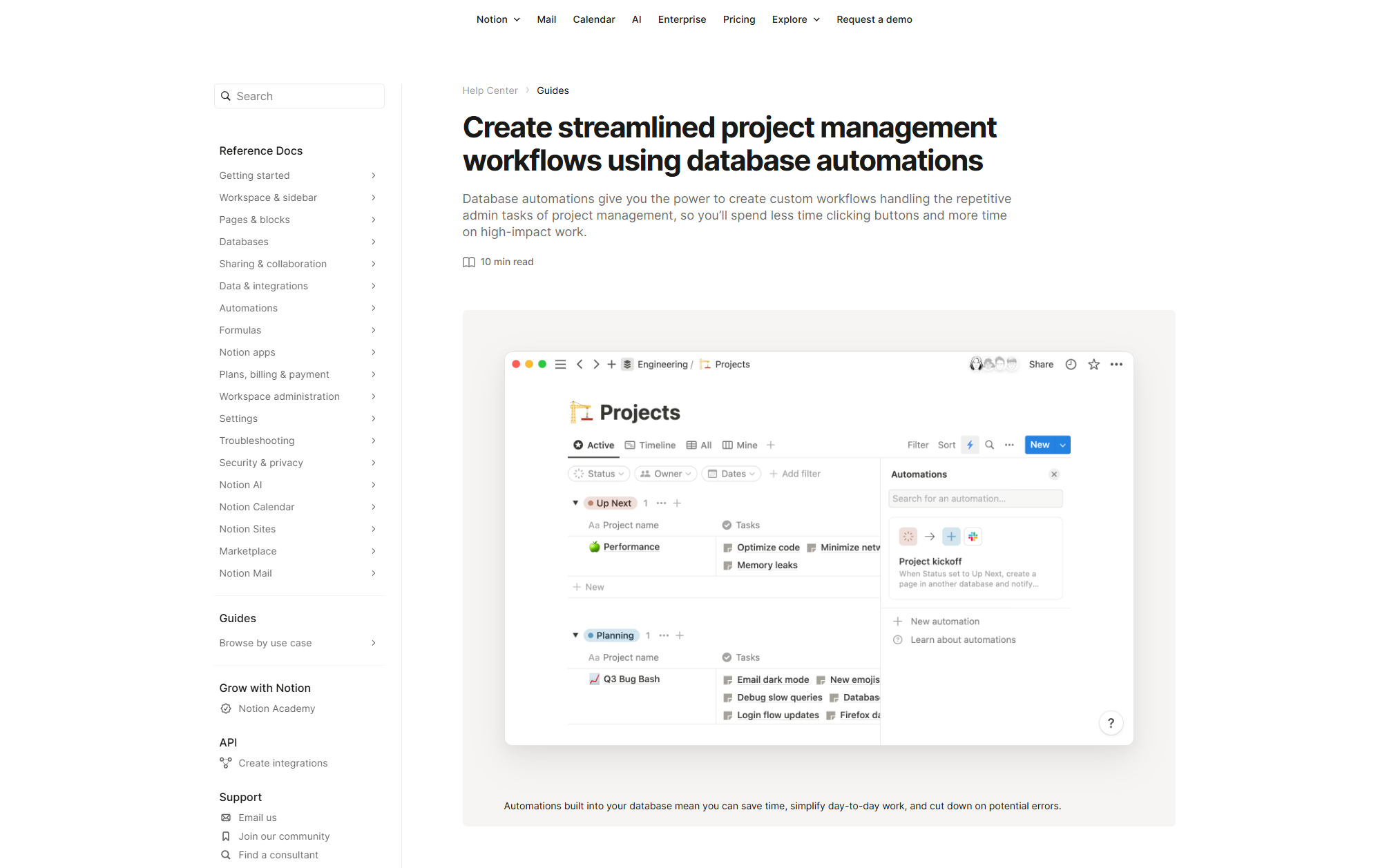
Image source: notion.com
User experience and accessibility
When it comes to usability, the Confluence vs Notion comparison highlights two very different design philosophies. While both tools aim to simplify knowledge management, their user experience caters to distinct types of teams—one prioritizing structure, the other creativity.
Confluence: Clean but corporate
Confluence delivers a professional, no-frills interface built for clarity and control. However, customizing layouts, templates, or spaces often requires administrator access, which can slow down agile teams. Its design feels more corporate than creative, making it well-suited for structured environments but less appealing for fast-moving startups.
Notion: Modern and user-friendly
Notion stands out for its minimalist design and intuitive interface. The block-based editor makes content creation smooth, and users can personalize pages with ease. Yet, as databases grow, performance can lag—especially for large teams managing extensive content libraries or complex workflows.
Analysis
In the Confluence vs Notion debate, each platform appeals to different work cultures.
- Confluence fits structured, process-oriented teams.
- Notion fits creative, design-led teams.
But for mid-sized hybrid organizations, both can feel limiting—they need a more streamlined, balanced experience that blends structure with flexibility.
Pricing and scalability
When discussing Confluence vs Notion, pricing and scalability play a major role in long-term adoption. A tool that starts affordably must also scale without friction as teams grow. Both Confluence and Notion approach pricing differently—one focuses on enterprise control, while the other emphasizes accessibility for smaller teams.
Confluence: Scalable but enterprise-oriented
Confluence provides four plans:
- Free plan: $0, for up to 10 users.
- Standard plan: $5.42 /user/month, includes core team collaboration features.
- Premium plan: $10.44 /user/month, includes advanced features, more storage, and enterprise-scale capabilities.
- Enterprise: Custom pricing for global scale and advanced governance.
(Billing: Annual billing available with ~17% savings.)
Confluence is designed to grow with large organizations. Its user-based billing model and advanced admin controls make it ideal for enterprises managing thousands of users and permissions. However, this scalability comes at a cost—both financially and operationally—as customization, governance, and integrations often require paid tiers and dedicated IT support.
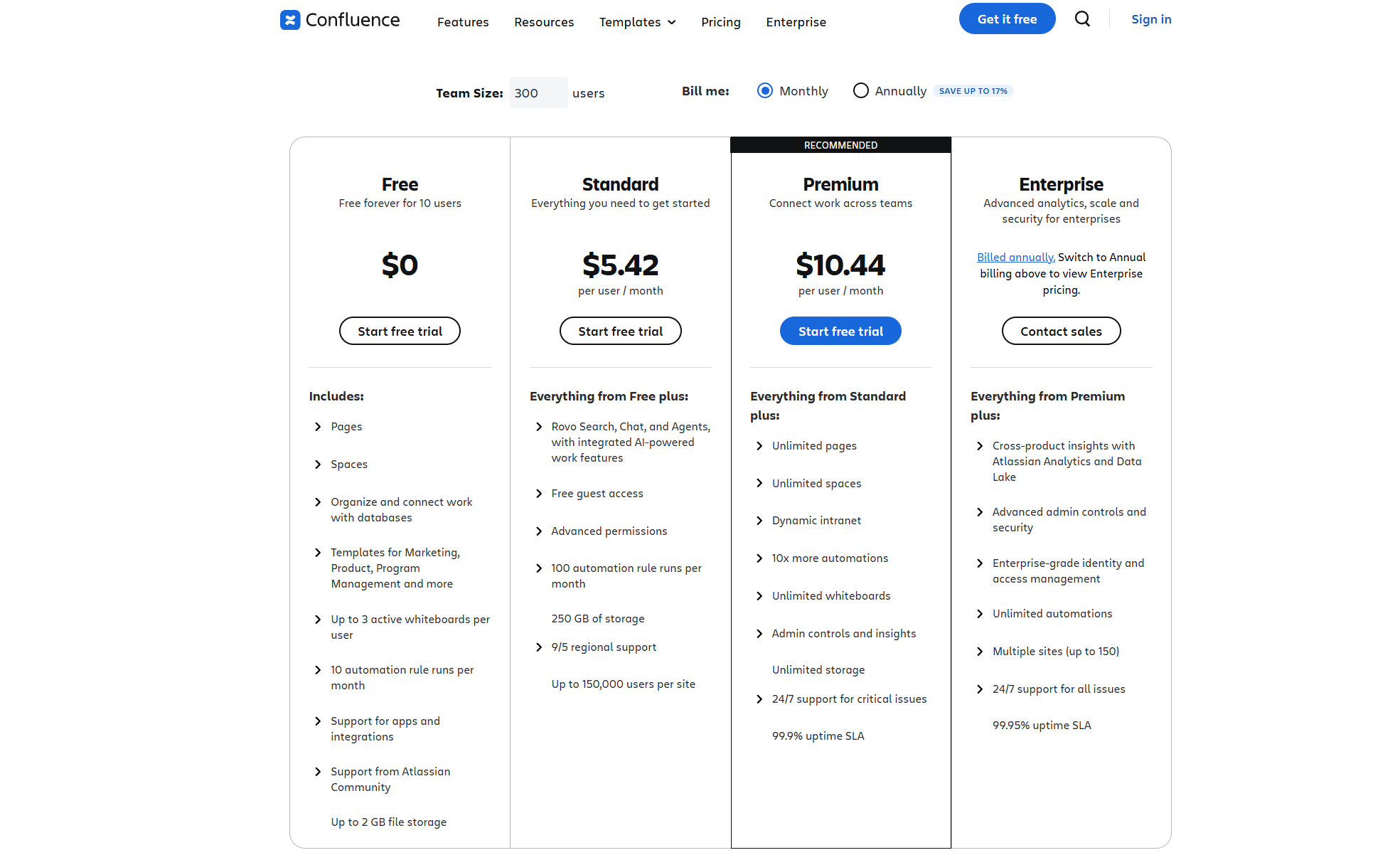
Image source: confluence.com
Notion: Affordable but harder to manage at scale
Notion also provides four plans:
- Free plan: $0 /user/month, unlimited for individuals; limited for teams.
- Plus plan: $12 /user/month, for small teams and professionals.
- Business plan: $24 /user/month, for growing businesses with enhanced permissions and security.
- Enterprise: Custom pricing for full-scale organizations.
(Billing: Annual billing offers up to ~20% savings.)
Notion offers one of the lowest entry points in the market, making it attractive for individuals and small teams. Its free plan supports basic documentation and collaboration, and paid plans remain cost-effective. But as organizations expand, permission chaos and version confusion can arise, especially when multiple departments create overlapping content or databases.
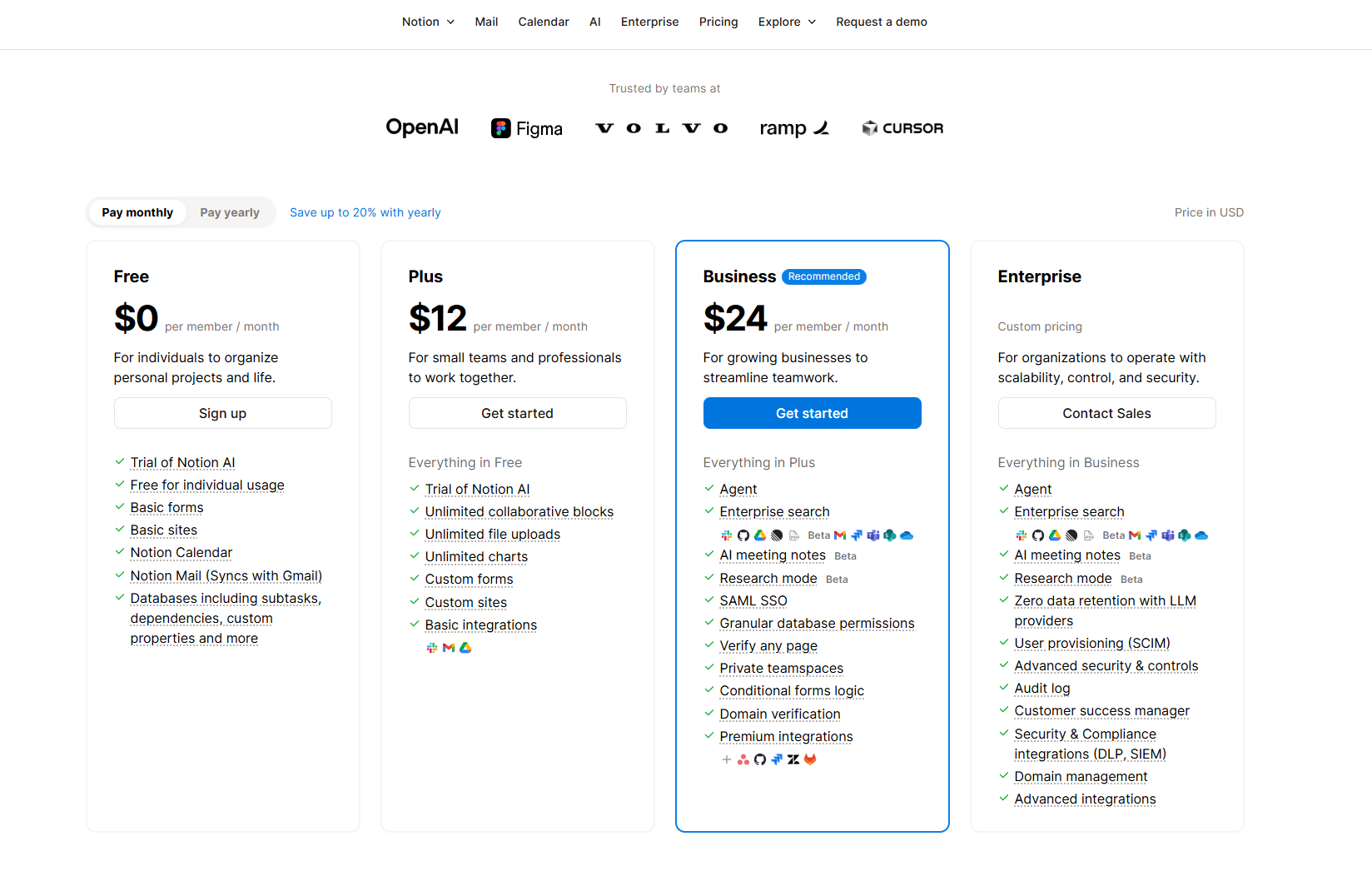
Image source: notion.com
Analysis
In the Confluence vs Notion comparison, scalability becomes the dividing line:
- Confluence = scalable but costly, built for enterprise governance.
- Notion = affordable but less manageable at scale.
Both deliver value in their niches, yet neither offers a truly seamless scaling experience that balances cost, control, and usability across growing teams.
Verdict: Choosing between Confluence and Notion
- If your team values governance, compliance, and enterprise stability, Confluence is reliable.
- If you prioritize flexibility, design, and quick collaboration, Notion wins.
- But if your teams work across multiple tools, handle both content and projects, or need chat + automation built in, neither option feels complete.
Confluence offers structure, and Notion brings creative flexibility—but if you’re looking for a truly connected workspace where chat, projects, and documents flow together effortlessly, Lark is the next step forward. Let's take a closer look and find where Lark makes differences.
Lark: The next generation alternative for connected documentation
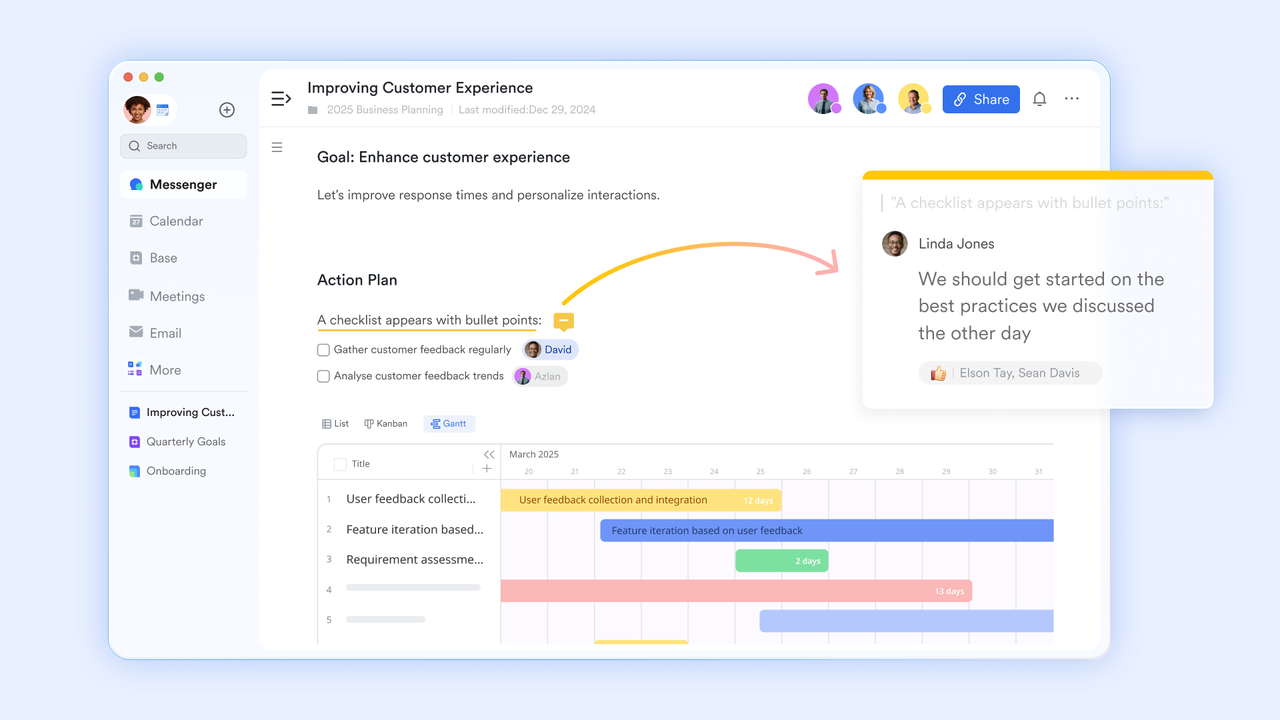
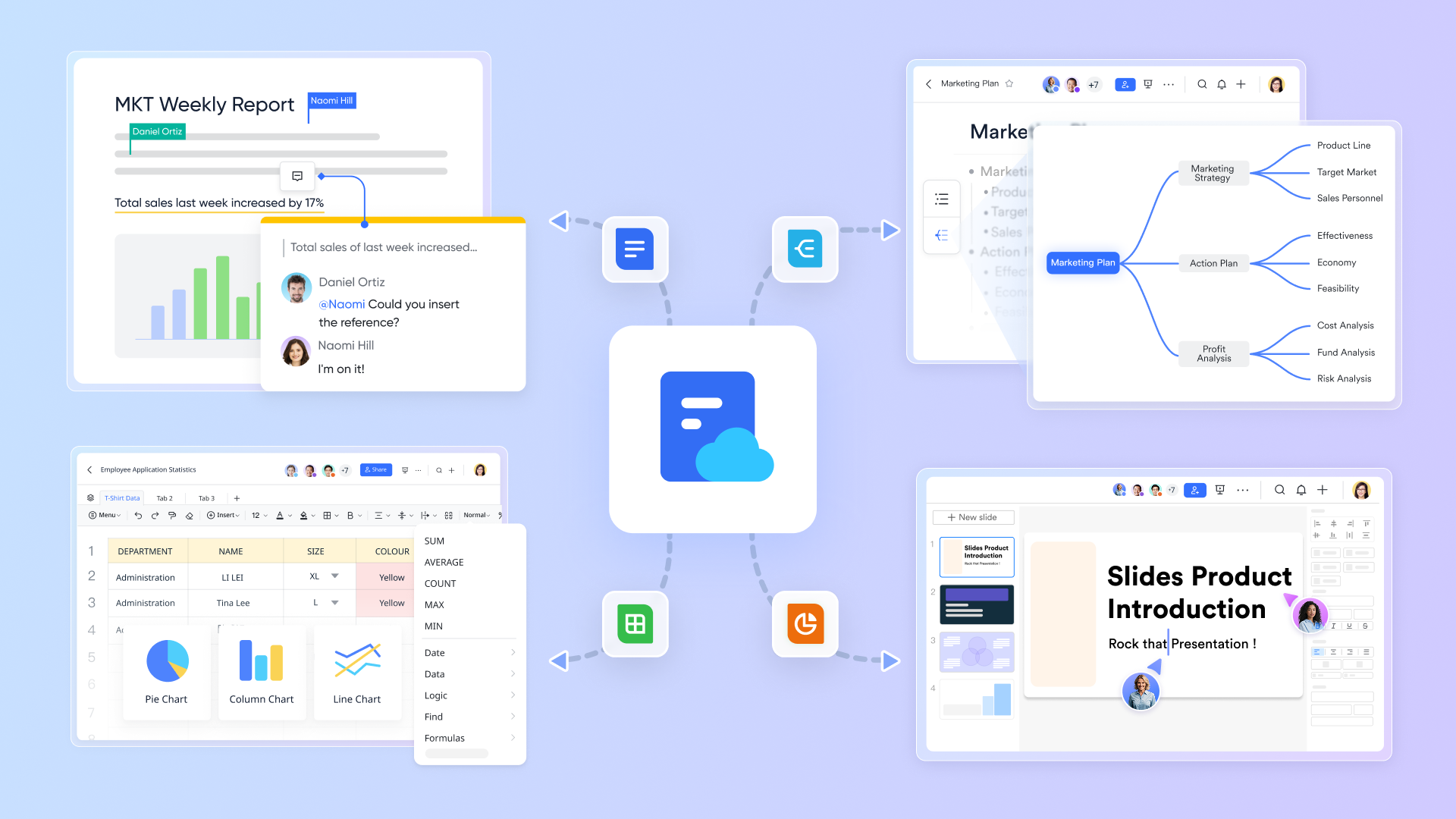
Lark redefines how teams create, organize, and collaborate on information—combining the depth of Confluence with the flexibility of Notion, and expanding beyond both. Unlike traditional knowledge bases that live in isolation, Lark is deeply integrated with instant chat, video meetings, task management, and data from across your workspace. Teams can co-edit documents in real time, embed tables, dashboards, or sheets directly within a page, and link discussions to specific sections for instant context.
Lark Docs: Create and collaborate in a living document effortlessly
Experience a reimagined Docs environment where creation feels intuitive and fast. Using the forward slash (/) command, users can instantly add tables, embeds, tasks, or media without breaking flow. Real-time co-editing, comments, and reactions make collaboration seamless—helping teams turn ideas into structured documents in seconds.
Lark Base: Transform raw data into actionable insights
Lark Base transforms raw data into actionable insights by integrating data management, automation, and visualization in a single workspace. Teams can capture and organize information in structured tables, automate workflows to respond instantly to data changes, and visualize key metrics through dynamic dashboards. These dashboards update in real time, offering an immediate view of performance and trends. Automations trigger follow-up actions—like alerts or task creation—ensuring insights lead directly to execution. With Base, data isn’t just stored—it drives smarter, faster decisions across teams.

Cloud storage: Centralized document management
Lark provides flexible storage and organization through My Document Library, Drive, and Wiki. Whether for personal use or team-wide access, documents can be securely stored, shared, and categorized for long-term knowledge management. Wiki spaces transform static files into living repositories, fostering collective intelligence across the organization.
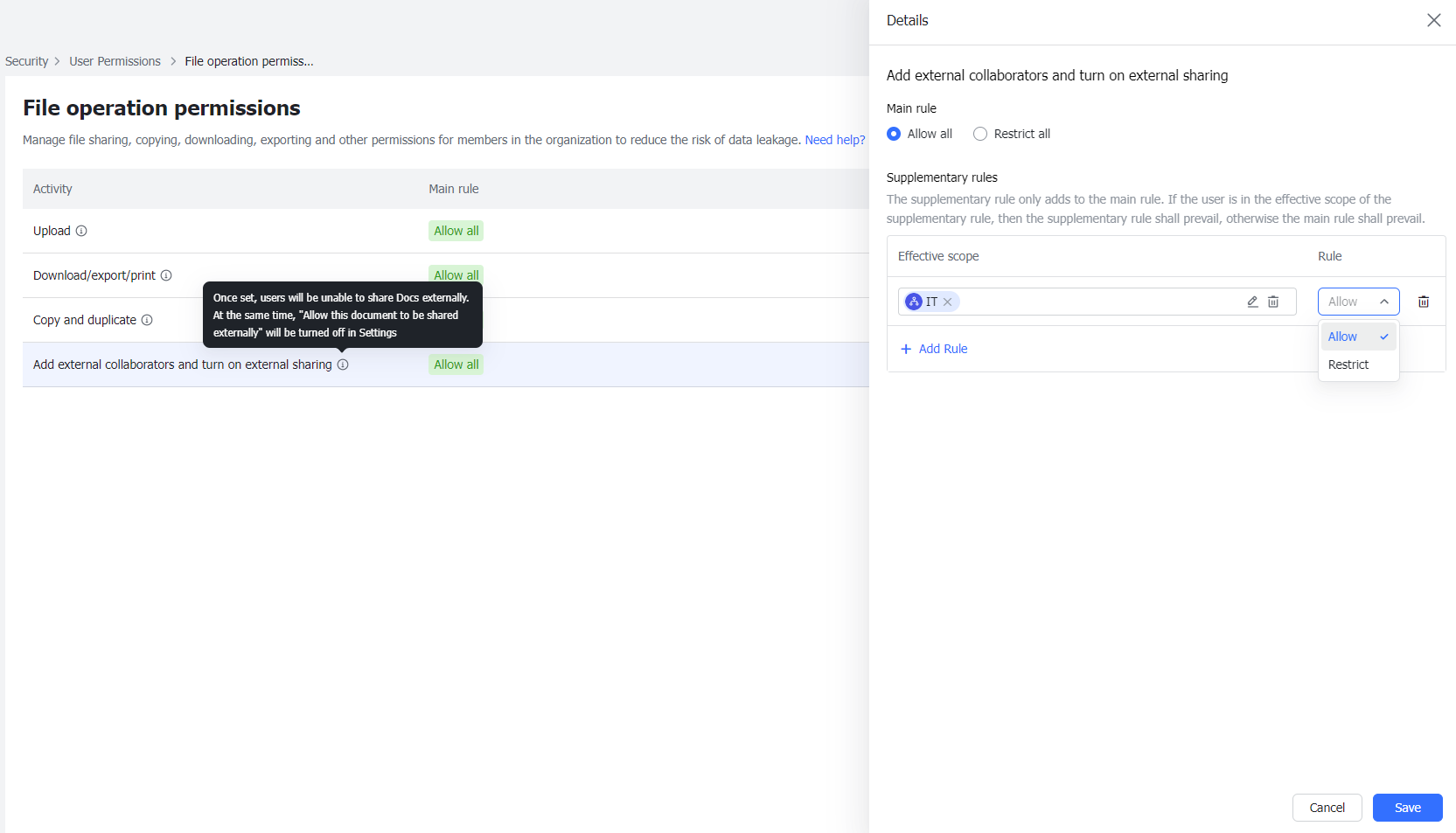
Permission control: Secure access, simplified
Keep sensitive data protected with granular permission settings. Admins can define who views, edits, or shares documents at every level—ensuring transparency without compromising privacy. Custom roles and access layers make compliance easy for teams of all sizes.
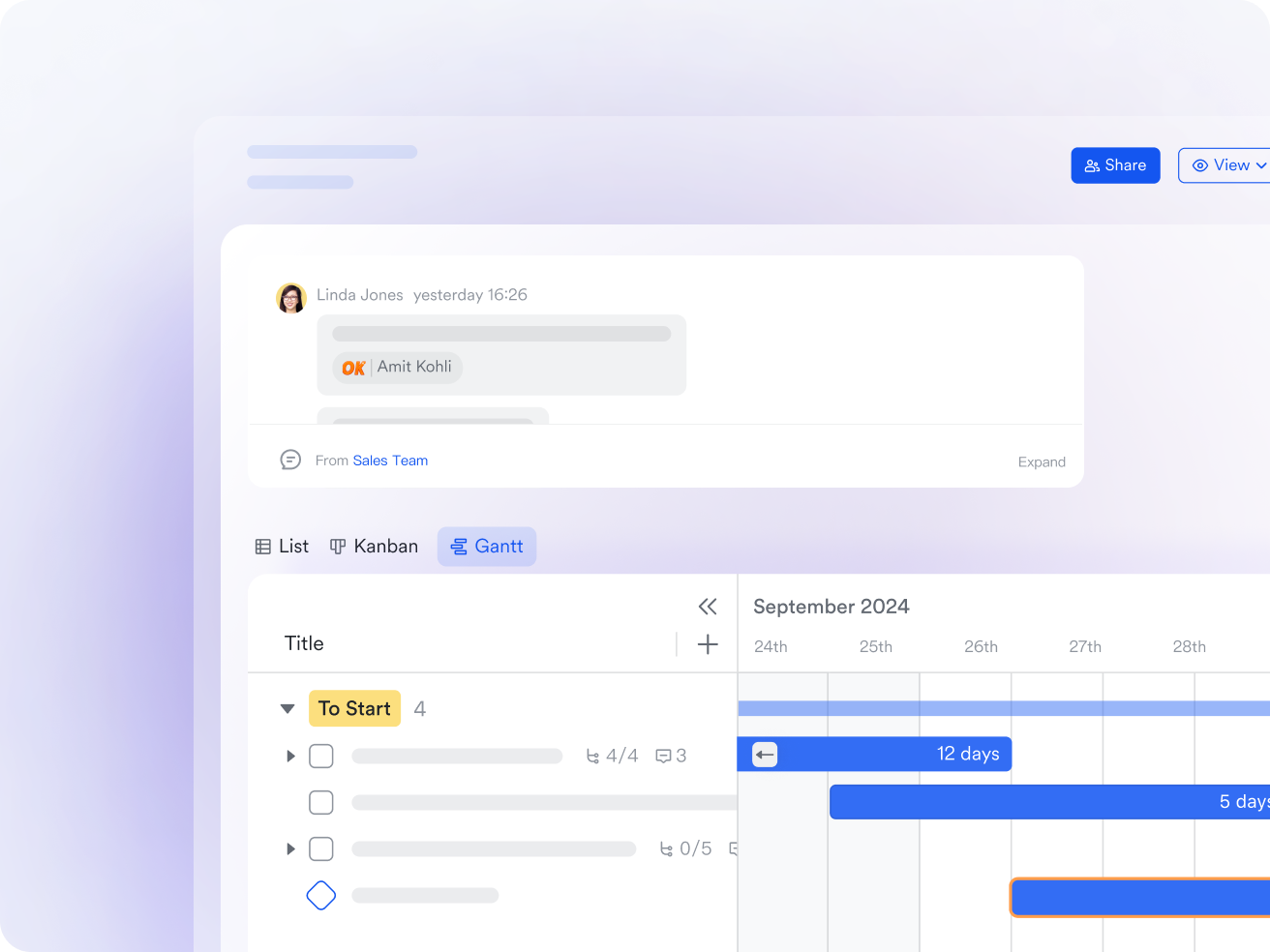
Instant sharing: All your content, connected
Every file in Lark can be shared, discussed, and refined in real time. Add shortcuts, pin key documents, or link directly to conversations in Messenger to maintain context. Teams stay aligned—whether they're drafting a proposal, reviewing a report, or planning the next big project.
- Starter plan: Free forever plan that includes 11 powerful tools for up to 20 users. It also comes with 100GB of storage, 1000 automation runs, AI translations, and more.
- Basic plan: $6/user/month (billed annually) for up to 500 users. It includes everything in Starter plus group calling for up to 500 attendees, 5TB of storage, 1000 automation runs, and more.
- Pro plan: $12/user/month (billed annually) for up to 500 users. It includes everything in Starter plus group calling for up to 500 attendees, 15TB of storage, 50,000 automation runs, and more.
- Enterprise plan: Contact sales for custom pricing. Supports unlimited users and includes even more automation runs and advanced security, compliance, and management features.
Lark vs Confluence vs Notion: Rethinking documentation
As the way teams work continues to evolve, documentation tools must do more than just store information—they need to connect technical knowledge, collaboration, and task execution. In the Confluence vs. Notion debate, both platforms offer strong yet distinct advantages. However, modern teams now expect real-time collaboration, built-in communication, and automated workflows. That's where Lark steps in—bridging the gap between documentation and action, with a connected workspace that unites teams and their work in motion.
Conclusion
In the Confluence vs Notion comparison, both platforms bring valuable strengths to modern teams—Confluence excels in structured documentation and governance, while Notion shines in flexibility and creative collaboration. Yet, both fall short when it comes to uniting documentation, communication, and execution in real time. Today's teams need a single workspace where ideas move seamlessly into action.
That's where Lark stands apart—combining powerful documentation, live chat, video calls, task management, and automation within one connected platform, helping teams not just manage knowledge, but act on it together.
FAQs
Which is better for large teams—Confluence or Notion?
For large teams, Confluence scales better with enterprise-grade admin controls, advanced permissions, and compliance features. Notion offers flexibility but can become messy at scale. However, Lark provides the best of both—a structured yet dynamic workspace where documentation, tasks, and communication stay connected, helping large teams work faster without tool overload.
Can Notion replace Confluence entirely for documentation?
Notion can replace Confluence for lightweight wikis, project notes, and creative documentation, but it lacks the advanced governance, audit trails, and structured hierarchy that large organizations rely on. Lark bridges this gap with real-time versioning, permissions, and integrated workflows—offering a balanced platform for both creative and compliance-focused documentation.
Does Lark support version control like Confluence?
Yes. Lark Docs automatically tracks real-time version history, allowing users to view, restore, and compare edits across collaborators—similar to Confluence, but far more seamless. Every update is saved instantly, ensuring teams always work on the latest version while keeping full traceability for accountability and compliance without needing external tools.
How does Lark improve collaboration compared to Notion?
Unlike Notion, which depends on inline comments or external chat tools, Lark integrates messaging, video calls, and document co-editing in one workspace. Teams can discuss, decide, and edit simultaneously without leaving their documents. This tight connection between communication and content shortens feedback loops and turns collaboration into real-time action.
Is Lark suitable for enterprises migrating from Confluence?
Absolutely. Lark offers enterprise-ready features like role-based access, advanced permissions, and workflow automation—making migration from Confluence smoother. It also simplifies team adoption with a modern interface, native communication tools, and scalable infrastructure. For enterprises seeking a connected, cost-efficient alternative to traditional documentation systems, Lark is built to grow with them.
Related reading
Table of contents
Start using Lark today

Manage all your work in one place
Boost team efficiency by 10x
Save up to 70% on software costs
Table of contents
Start using Lark today
Manage all your work in one place
Boost team efficiency by 10x
Save up to 70% on software costs
Keep reading



Lark recognized in 2023 Gartner® Collaborative Content Workspaces and Meeting Solutions reports
Lark, the global superapp for productivity, is delighted to announce it receives recognition in the Gartner's 2023 Innovation Insight for Collaborative Content Workspaces and Market Guide for Meeting Solutions.





2026 Lark Technologies Pte. Ltd.
Headquartered in Singapore with offices worldwide.






Explore: