














Customer Portal Explained: Features, Benefits & Software

Satvik Saxena
Content Specialist
Nov 3, 2026
Satvik Saxena
Nov 3, 2026

15 min read
Add to preferred sources


Today, customers expect quick answers, personalized experiences, and simple ways to manage their interactions with businesses. A customer portal helps meet these expectations by providing a single place for users to access information, track requests, and get support whenever they need it. For teams, it creates clarity and saves time by reducing back-and-forth communication. If you are just getting close to this notion recently, no problem: this guide will tell you what customer portal is actually, and provide you a tool to practice with ease. Let's dive in and make knowledge for your own use.

What is a customer portal? (Explained with examples)
A customer portal is a secure online platform that allows customers to access personalized information, manage accounts, track services, and communicate with support teams all in one place. It acts as a digital bridge between businesses and customers, enabling convenience and transparency. Modern customer portal software is designed to deliver seamless customer self-service portal experiences, reducing reliance on support agents while improving satisfaction.
For instance, the SolarWinds customer portal helps users access product downloads and licenses, while the Tableau customer portal offers analytics resources and support management. Similarly, the Sage customer portal streamlines invoice access and payment history, and the Red Hat customer portal centralizes documentation and updates. Each of these examples shows how effective portals empower customers, enhance service quality, and strengthen trust through accessible, real-time information and connected collaboration tools.
Image source: unsplash.com
Core components of an effective customer portal
A powerful customer portal software combines usability, automation, and security to create a seamless customer self-service portal experience. The best portals from the Ansys customer portal to the Red Hat customer portal share common core features that enhance accessibility, trust, and engagement
- A personalized dashboard: displays relevant customer data such as account information, order status, and service preferences. It gives users full visibility into their interactions with the business in real time. This customization not only improves user satisfaction but also builds a sense of control and trust in the system.
- Knowledge Base access: A built-in knowledge base offers FAQs, articles, and troubleshooting guides within the portal. Platforms like the Sage customer portal and Tableau customer portal use this feature to reduce ticket volume and empower customers to find answers independently. It turns customer education into a self-driven experience.
- Ticketing and messaging tools: Efficient customer service portals provide built-in ticketing systems and messaging tools for real-time issue tracking. These ensure queries are organized, prioritized, and resolved faster. For instance, the SolarWinds customer portal lets users monitor open cases and communicate directly with support teams
- Secure authentication and data storage: Data security is a cornerstone of any customer portal software. Multi-factor authentication, encrypted data storage, and strict access control ensure privacy and compliance. Businesses like LIC customer portal and Stripe customer portal emphasize robust protection to maintain customer confidence.
- Real-time updates and notifications: Real-time alerts keep customers informed about order renewals, billing updates, and support status changes. This transparency enhances the user experience and minimizes uncertainty. The GreenSky customer portal online payments is an example where instant updates improve satisfaction and trust.
- Collaboration Links and shared documents: Modern portals encourage collaboration between clients and teams by integrating shared reports, Docs, and dashboards. This strengthens engagement and ensures aligned communication. Companies using tools like Lark, or built-in resident portal customer service systems, make collaboration effortless and efficient.
Challenges in building and managing a customer portal
Creating a customer portal that delivers consistent value requires careful planning and ongoing management. From technology unification to content freshness and security compliance, several operational challenges can affect user experience and scalability. Addressing these early ensures that the portal remains reliable, secure, and easy to use as the business grows. Below are key challenges organizations often face while building and maintaining customer portals.
- Association with legacy systems or CRM databases
Many companies rely on older systems that weren't designed for modern connectivity. Bringing a new customer portal into this environment can be complex and time-consuming. Data synchronization issues often appear, leading to inconsistencies and manual intervention. To ensure smooth operations, businesses must invest in reliable data connectors and unified infrastructure strategies.
- Keeping information up to date
A portal's usefulness depends on how current its content is. Outdated FAQs, incorrect order statuses, or old pricing details can quickly frustrate users and damage credibility. Teams need to establish a consistent update routine with automated alerts and version control. Regular content audits help maintain accuracy and reliability, fostering trust among users.
- Security and privacy compliance
Since portals store sensitive customer information, security cannot be an afterthought. Businesses must implement encryption, access controls, and compliance measures aligned with data protection standards like GDPR or SOC 2. Routine security audits and user authentication checks are crucial to maintain safety. A strong security posture reassures customers that their data is protected.
- Ensuring an intuitive interface for customers
Even the most feature-rich portal fails if it's difficult to navigate. A clean, minimal interface with clear labels and simple workflows ensures that users can find what they need quickly. Responsive design also plays a big role in accessibility across devices. A user-friendly experience reduces frustration and encourages customers to return for self-service tasks.
- Coordinating updates between support, marketing, and IT teams
Successful portals rely on seamless teamwork between multiple departments. Support handles FAQs, marketing manages content, and IT ensures technical performance. Without coordination, updates can become inconsistent, leading to broken pages or outdated resources. Regular cross-team syncs and shared dashboards help maintain alignment and ensure smooth updates across the board.
Addressing these customer portal challenges requires a platform that unifies collaboration, task management, and data tracking in a single workspace. That's where Lark comes into play. It provides tools to streamline cross-department coordination, automate content updates, and bridge the gap between your portal and your existing CRM software. Keep scrolling and find out how it leads to a new pathway
How to create a customer portal strategy that works
Building an effective customer portal strategy is about more than just software. It is about creating a space where customers feel empowered, supported, and in control. The right plan ensures that every feature serves a clear purpose and enhances user experience. Think of it as designing a digital hub that makes customers self-reliant and your support team more strategic. Below are essential steps to craft a strategy that drives engagement and long-term success.
- Define clear goals: faster support, transparency, or customer engagement: A customer portal without well-defined goals is like a ship without a compass. Before diving into design or development, identify what you want to achieve such as faster issue resolution, improved transparency, or deeper engagement. Setting measurable targets ensures that every feature you add has a reason to exist. This clarity helps align the project with customer and business priorities.
- Identify what data customers need to access (orders, invoices, usage metrics): One of the biggest advantages of a customer portal is data visibility. By giving users access to essential details like order history, invoices, and usage metrics, you remove guesswork and build trust. When customers can view real-time data on their own, it reduces confusion and cuts down repetitive inquiries. A transparent experience creates confident, self-sufficient users.
- Ensure internal teams are aligned before rollout: Successful portal launches depend heavily on teamwork behind the scenes. Support, IT, and product teams must coordinate their efforts from day one. Shared goals, regular updates, and collaborative planning keep everyone moving in the same direction. This alignment not only ensures a smooth rollout but also makes post-launch management more efficient and consistent.
- Use workflow automation to handle repetitive requests: Automation turns your customer portal into a productivity powerhouse. Tasks like password resets, order status updates, or onboarding sequences can run automatically. This reduces manual workload and response times while improving accuracy. With routine tasks handled by automated systems, teams can focus on solving complex, high-impact customer issues that truly matter.
- Pair your portal with strong collaboration tools like Lark for consistent updates: A customer portal thrives on collaboration across departments. Tools like Lark connect teams through shared documents, task tracking, and instant messaging, ensuring quick responses and real-time coordination. This helps maintain fresh content, timely updates, and an active feedback loop. The result is a customer portal that evolves continuously to meet user needs.
Meet Lark: An innovative CRM platform for customer portal
A well-built customer portal empowers customers to find answers, track requests, and stay informed, but behind every seamless experience is a coordinated internal team. Considering that, Lark provides the unified infrastructure for communication, visibility, and workflow automation that drives exceptional customer experience. Here's how each Lark feature supports customer relationships and self-service management in depth, with real-world use cases.
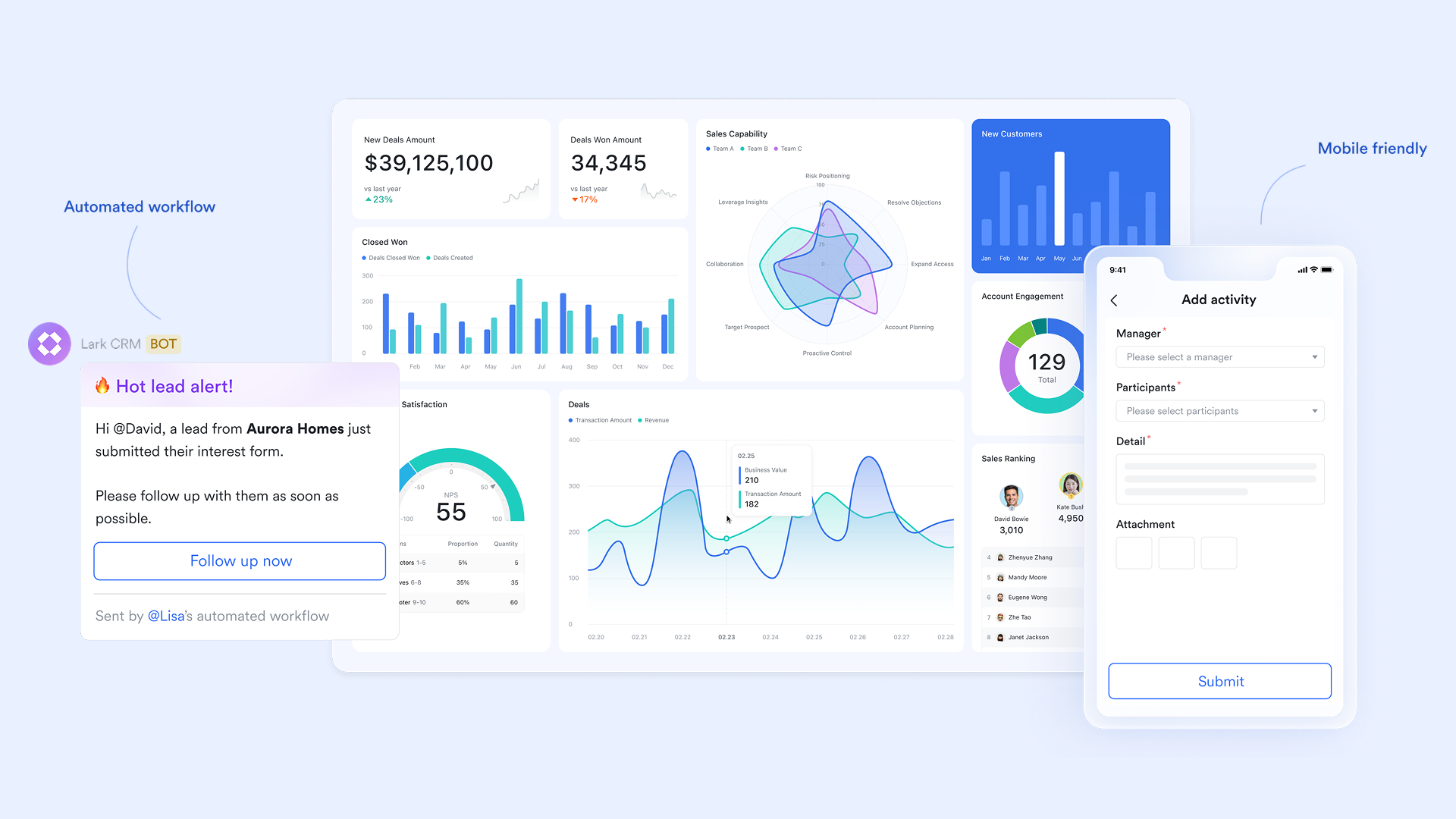
Lark Base: Centralized customer records and request tracking
Lark Base acts as your customer data foundation, a living database where account information, service requests, feedback, and renewal details live side by side. It's fully customizable, allowing you to create tables for customers, tickets, satisfaction scores, and communication logs.
You can visualize records in table, kanban, or dashboard views, making it easy to monitor active requests, pending resolutions, and long-term relationships. Built-in automation rules let you notify responsible team members when updates occur or when service-level deadlines approach.
Example: A SaaS provider uses Lark Base to track customer onboarding progress. When a new customer completes setup, the system automatically updates their "Onboarding Status" to "Complete," triggers a Messenger notification for the account manager, and logs the event in the success dashboard. This ensures both customer visibility and internal accountability essential for long-term retention.
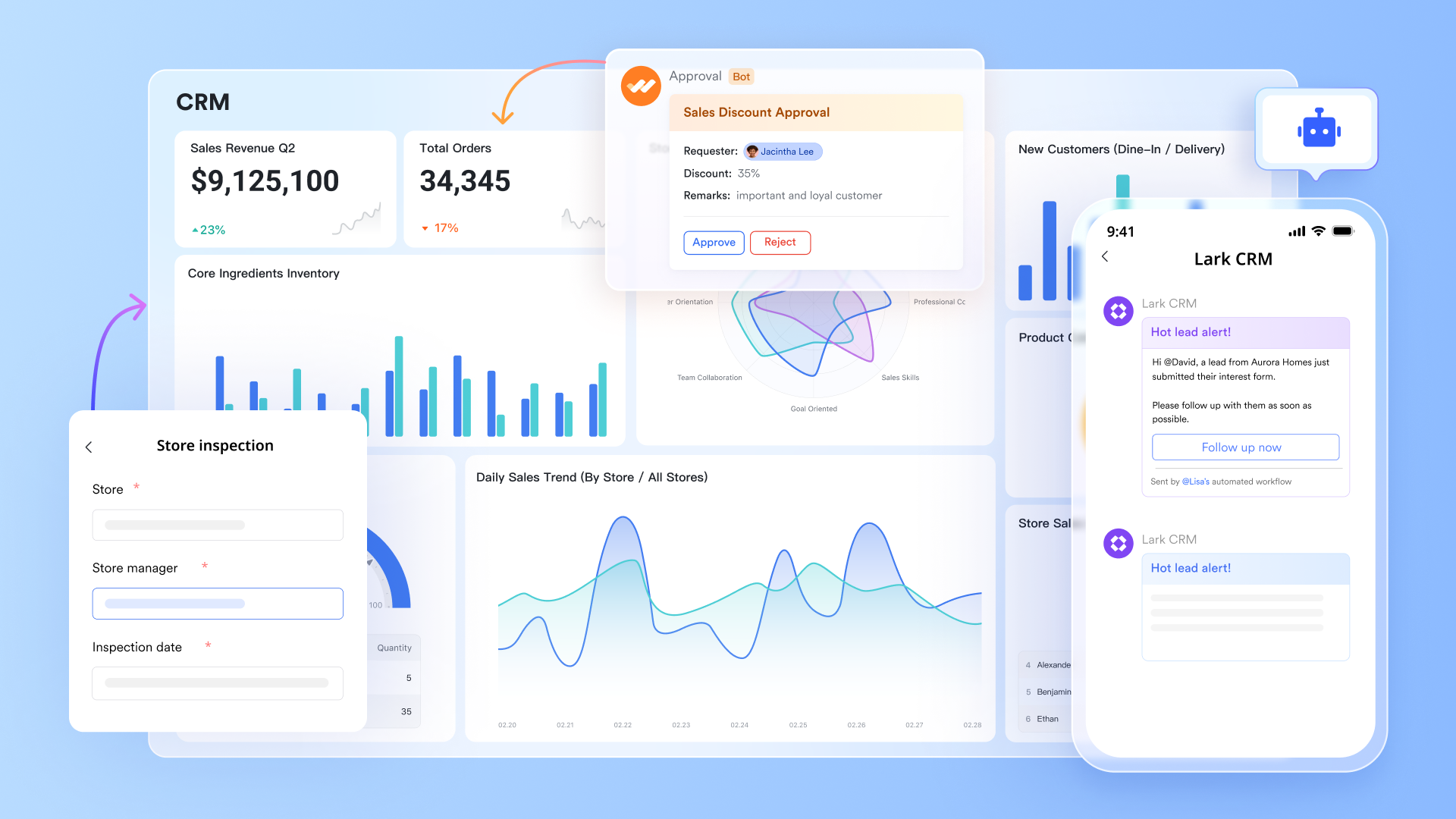
Lark Messenger: Real-time communication that keeps everyone aligned
Customer service depends on speed and coordination. Lark Messenger connects cross-functional teams, support, sales, operations, and customer success so they can resolve issues faster and deliver a unified message to customers. Messages, , and pins are linked contextually, so no update ever gets lost in silos. Messenger's group chat can serve as internal "customer war rooms" for high-value accounts or as external communication spaces where select clients are invited for transparent collaboration.
Example: When a customer submits a service escalation, the success lead shares the Base record link in the account's Messenger group chat. Support attaches a troubleshooting guide, operations confirm the resolution time, and leadership can follow the thread in real time, no emails, no duplication, just visible accountability.
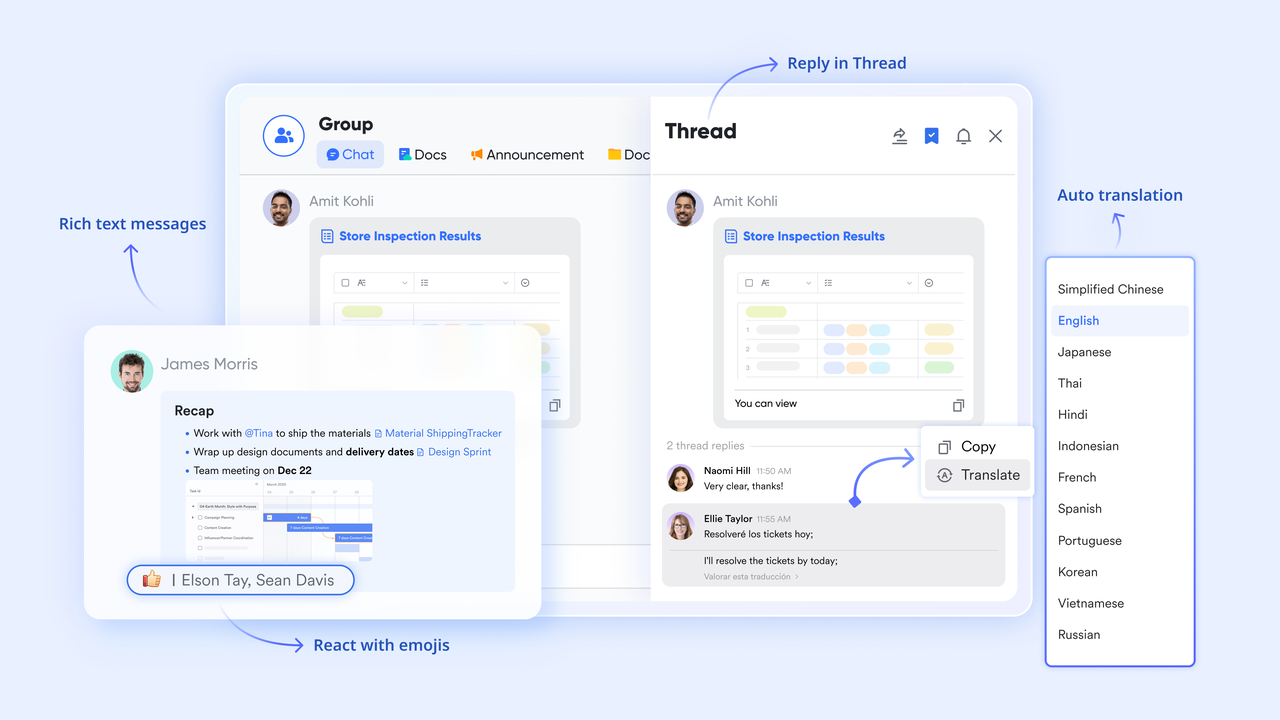
Lark Docs & Lark Wiki: Self-service knowledge and shared playbooks
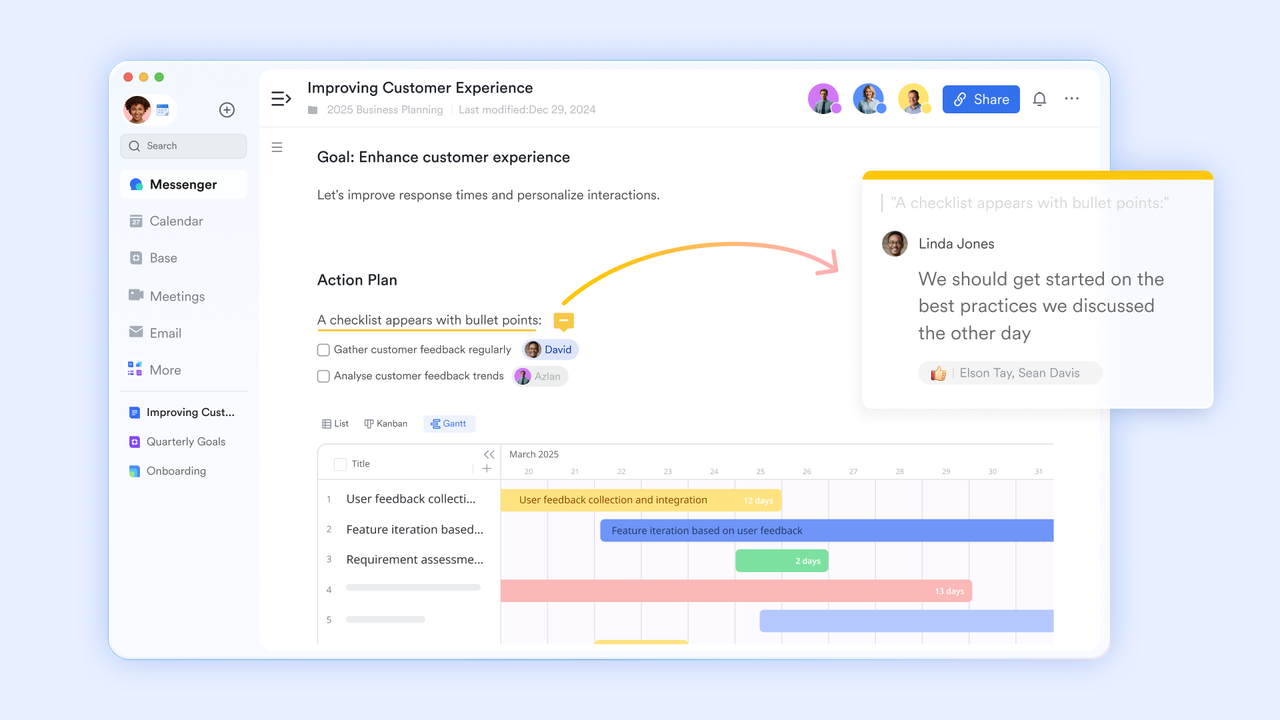
The heart of every customer portal is its knowledge base. Lark Docs and Lark Wiki enable teams to build and maintain self-service resources from FAQs and onboarding guides to process documentation all editable in real time. Teams can collaborate on troubleshooting articles, embed screenshots or Sheets, and control visibility with sharing permissions. Docs also support collaborative note-taking during customer meetings, which can later be converted into shareable guides or training materials.
Example: A customer success manager maintains a "Common Setup Issues" Wiki inside Lark. When new questions arise from support calls, they add solutions directly to the Wiki. Within a week, repetitive support tickets drop by 20%, freeing the team to focus on higher-impact relationships.
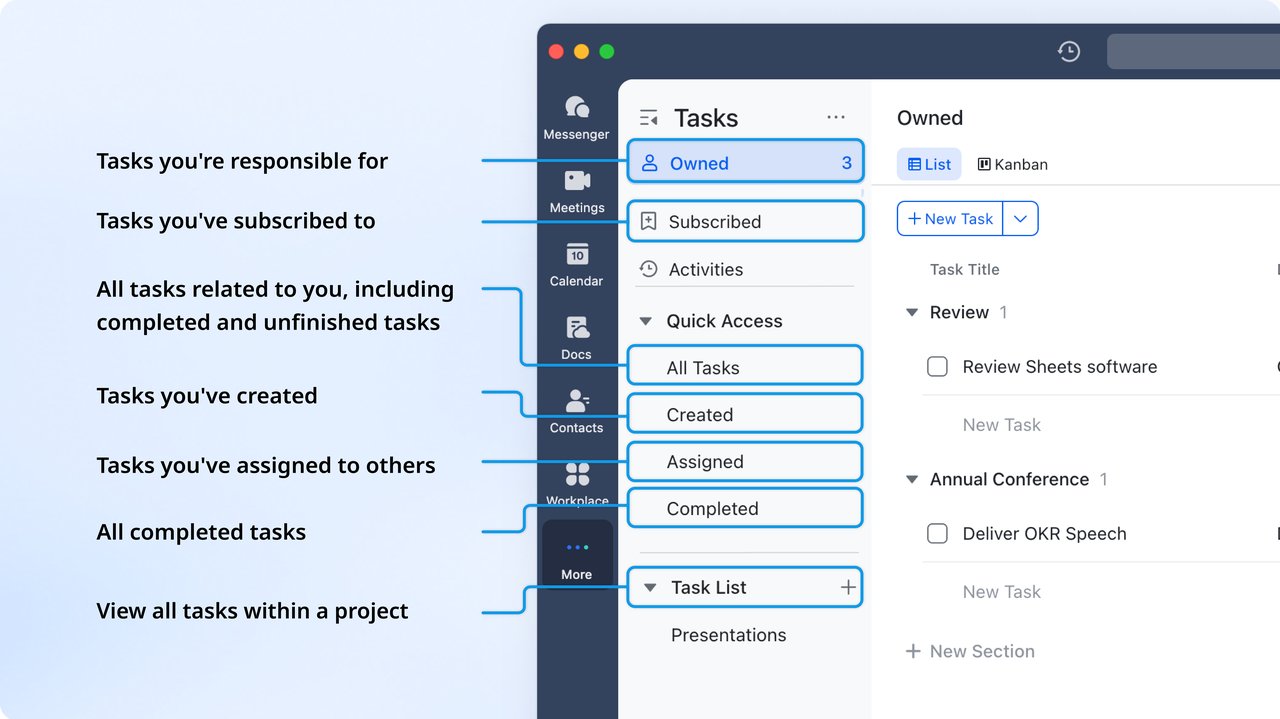
Lark Tasks: Track every follow-up and deliver accountability
Every customer request, from renewals to support inquiries, becomes an actionable task in Lark. Lark Tasks can be organized by client, issue type, or SLA priority, ensuring nothing falls through the cracks. Managers get a clear check-box style UI or kanban view of open requests, overdue items, and workload distribution. Tasks unify seamlessly with Messenger and Base, so clicking on a customer name opens all linked tickets, Docs, and updates instantly.
Example: When a customer logs a "Billing Discrepancy" case, Lark automatically creates a Task titled "Resolve Billing Issue - Customer X." The Task is assigned to finance, linked to the customer record in Base, and given a three-day SLA. Once completed, the system updates Base and notifies the account manager, ensuring full visibility across teams.
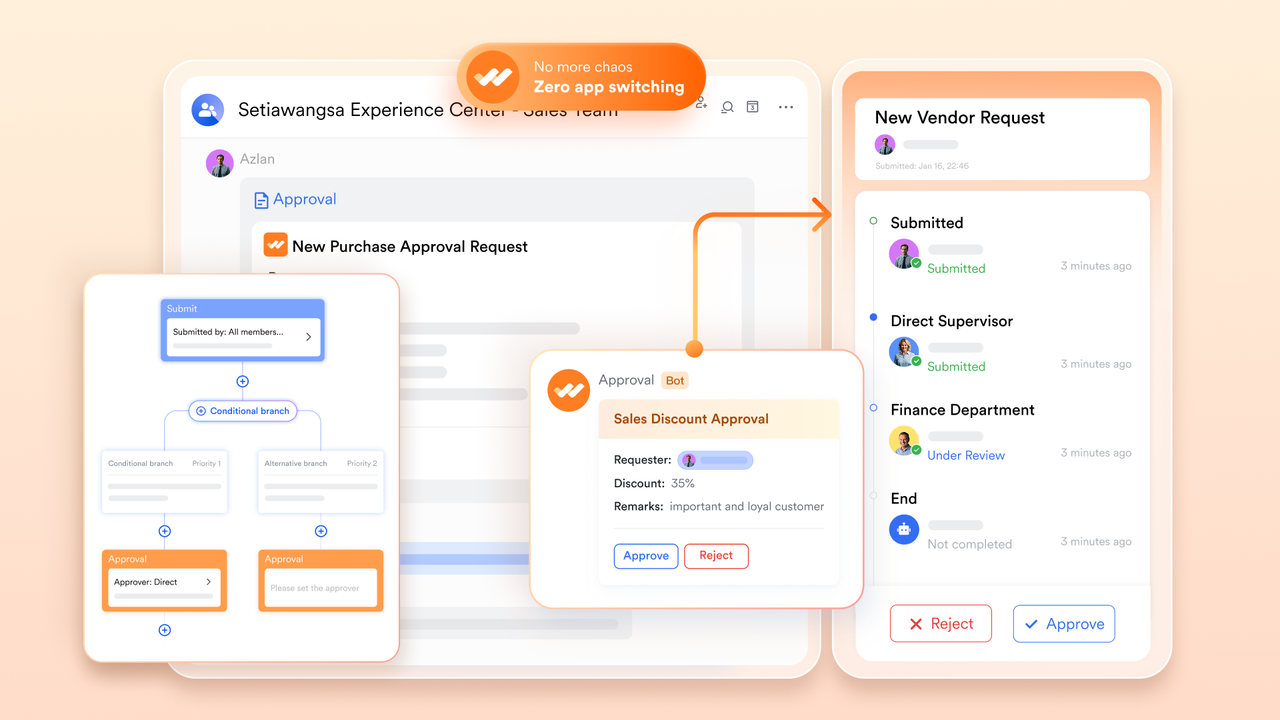
Lark Approval: Streamlined customer-facing decision workflows
Approvals often slow down customer service, whether it's a pricing exception, a refund, or an escalation. Lark Approval simplifies this with digital forms and automated routing. Each request includes relevant details, documents, and approver roles, reducing manual handoffs. Approvers receive instant notifications in Messenger, can review context directly in the form, and approve or reject with one click. This keeps processes compliant, traceable, and customer-friendly.
Example: A retail supplier receives a refund request from a long-term client. The account manager triggers an automated approval request in Lark, attaching the purchase record from Base. It routes to Finance → Operations → Leadership automatically. Within hours, the request is approved, logged, and the customer receives confirmation, turning a potential frustration into a loyalty-building experience.
- Starter plan: Free forever plan that includes 11 powerful tools for up to 20 users. It also comes with 100GB of storage, 1000 automation runs, AI translations, and more.
- Pro plan: $12/user/month (billed annually) for up to 500 users. It includes everything in Starter plus group calling for up to 500 attendees, 15TB of storage, 50,000 automation runs, and more.
- Enterprise plan: Contact sales for custom pricing. Supports unlimited users and includes even more automation runs and advanced security, compliance, and management features.
Business benefits: Why companies invest in customer portals
Customer portals are more than just tools for convenience; they are long-term business enablers. By centralizing information, automating workflows, and empowering customers with self-service access, companies can significantly enhance customer experience and operational agility. These platforms play a vital role in reducing costs, improving transparency, and strengthening customer relationships over time. Below are some of the most impactful customer portal benefits that businesses experience.
- Reduces dependency on support agents through self-service
A well-designed customer portal gives users the ability to find answers independently through FAQs, product guides, and automation. This reduces the volume of repetitive support tickets, freeing up agents to focus on complex, high-value tasks. Teams gain breathing room, customers get faster resolutions, and overall support efficiency improves dramatically. Over time, this creates a more scalable service model.
- Improves transparency and customer trust
Trust grows when customers can access real-time updates about their orders, invoices, and service requests. Portals bring this transparency to the forefront by offering easy access to historical data and current progress. Customers no longer need to reach out for updates, they can see everything at a glance. This visibility strengthens credibility and builds lasting confidence in the brand.
- Increases operational efficiency by automating requests
Customer portals automate repetitive tasks such as renewals, account updates, and onboarding processes. This reduces manual effort and human error while improving response times. Automated workflows ensure that routine requests are handled consistently, allowing teams to focus on strategic priorities. The result is higher productivity, faster service delivery, and measurable cost savings.
- Builds loyalty and reduces churn through consistent communication
Constant, meaningful engagement keeps customers connected to a brand. Through personalized dashboards, automated notifications, and in-portal messaging, customer portals maintain this communication effortlessly. Customers feel seen and valued, which enhances satisfaction and retention. Over time, this consistency translates into deeper relationships and stronger loyalty.
- Helps gather usage data for future product decisions
Every interaction within a portal provides valuable data about customer behavior, preferences, and pain points. Businesses can use this information to guide product updates, enhance support materials, and refine their overall strategy. With these insights, teams make data-backed decisions that align better with user needs, ensuring product growth stays customer-driven.
Best practices for maintaining a great customer portal
Even the most well-built customer portal needs ongoing attention to stay valuable. Regular updates, strong analytics, and clear communication between teams keep it relevant and user-friendly. A great portal behaves like a round-the-clock assistant that is responsive, reliable, and always improving. The following best practices help ensure your customer portal remains an asset that drives satisfaction and loyalty.
- Keep FAQs and Docs updated weekly: Information is only useful when it is accurate. Updating FAQs, user guides, and troubleshooting steps weekly ensures customers always have the latest answers. This consistency prevents outdated advice from causing frustration. A regularly refreshed knowledge base reflects a brand that listens, adapts, and values its users' time.
- Track portal analytics (logins, resolution time, satisfaction): Analytics tell the story of how customers use your portal. By tracking metrics like login frequency, issue resolution time, and satisfaction scores, teams can identify what is working and where improvements are needed. Data-backed insights guide better content decisions, interface adjustments, and automation opportunities. Continuous monitoring ensures steady progress toward customer success.
- Ensure accessibility and mobile responsiveness: Accessibility should never be an afterthought. A portal that adapts smoothly to phones, tablets, and assistive devices ensures every customer can engage without barriers. Responsive design improves usability for mobile users, while accessible layouts make navigation simpler for everyone. A customer portal that is inclusive by design earns broader trust and loyalty.
- Gather feedback to improve user experience: The best improvements come from listening to real users. Embedding short surveys, rating options, or feedback forms inside the portal gives direct insight into what customers like or struggle with. Acting on this feedback builds stronger relationships and demonstrates commitment to continuous improvement. Every small adjustment can lead to big satisfaction gains.
- Maintain cross-department communication through shared dashboards: Behind every seamless portal experience is strong collaboration. Support, marketing, and IT teams must stay aligned using shared dashboards and status trackers. This transparency ensures updates are rolled out smoothly and messages remain consistent. When every department has visibility, the customer experience stays cohesive, reliable, and polished.
Conclusion
Customer portals have become essential for building long-term relationships between businesses and customers. They bring together convenience, transparency, and self-service to create a more satisfying experience for users while helping teams work smarter. When customers can manage their own data, track progress, and get answers anytime, trust and loyalty naturally grow.
For internal teams, success depends on strong collaboration behind the scenes. This is where connected platforms like Lark make a real difference. Lark unifies communication, automation, and data sharing, so teams can deliver fast, transparent, and consistent customer service without silos or delays. Whether you are creating a customer portal or improving existing workflows, Lark helps you keep every process connected and every customer interaction seamless.
FAQs
What's the difference between a customer portal and a help desk?
A customer portal is a self-service platform where customers can access their information, track orders, view invoices, and find support resources on their own. A help desk, on the other hand, focuses on agent-assisted support and ticket management. Many teams now combine both to create a complete customer experience. With Lark, teams can manage internal collaboration and ticket workflows together, ensuring customers get faster, more transparent support.
How secure are customer portals for client data?
Modern customer portals use encryption, access controls, and compliance standards like GDPR or SOC 2 to protect sensitive data. Security audits and permissions ensure only authorized users can view customer information. Lark follows the same high security standards, keeping communication and data exchange safe across teams and regions.
Can small businesses benefit from customer portals?
Yes, even small businesses gain huge advantages from customer portals. They reduce support workload, improve transparency, and help customers feel more connected without requiring large budgets. Lark’s free Starter plan gives small teams access to automation, Docs, and task tools that support self-service and customer visibility.
How do you measure customer portal success?
Success can be measured through metrics like login frequency, issue resolution time, reduced ticket volume, and overall satisfaction ratings. Continuous improvement is key, so reviewing analytics and feedback regularly helps refine the experience. Lark’s dashboards and Base database views make it easy to track and share these insights across teams.
What role does collaboration software play in customer service?
Collaboration software keeps teams connected so they can respond to customer needs quickly and consistently. Lark brings together messaging, task management, document sharing, and approvals in one place. This means support, IT, and sales teams stay aligned, customers get faster answers, and every interaction feels connected and professional.
Related reading
Table of contents
Start using Lark today

Manage all your work in one place
Boost team efficiency by 10x
Save up to 70% on software costs
Table of contents
Start using Lark today
Manage all your work in one place
Boost team efficiency by 10x
Save up to 70% on software costs
Keep reading








2026 Lark Technologies Pte. Ltd.
Headquartered in Singapore with offices worldwide.






Explore: