Growing enterprise teams often experience a significant drain on productivity as top talent spends hours every week manually extracting data from PDFs, copying meeting notes, or updating fragmented knowledge bases. Documentation AI changes this equation. Instead of simply reading text faster, modern document intelligence transforms static files into automated workflows. This guide explores the practical capabilities of documentation AI, compares specialized extraction tools against unified workspaces, and demonstrates how organizations can turn unstructured data into actionable execution plans without adding friction to daily operations.
What exactly is documentation AI?
When evaluating documentation AI, enterprise managers often picture a basic Optical Character Recognition (OCR) scanner. While OCR is a foundational element, the reality of modern document intelligence is far more expansive.
Documentation AI refers to the application of machine learning, Natural Language Processing (NLP), and generative AI to read, understand, generate, and organize business documents. It bridges the gap between unstructured data—like an image of a receipt or a scattered brainstorming session—and structured, usable information.
To fully understand its value, the technology can be divided into two main categories:
Intelligent Document Processing (IDP): This is the heavy lifting. Tools in this category ingest complex formats like legacy PDFs or a scanned AI form, recognize the layout (such as tables and signatures), and extract specific data points required for a database.
Generative AI workspaces: This focuses on creation and synthesis. It includes an AI document that drafts reports based on company context, or a meeting minutes Ai that processes a video call and instantly generates an executive summary.
The objective for organizations should not be to simply acquire one of each tool. Instead, the focus must be on identifying which end of this spectrum addresses the most significant bottleneck in daily operations.
How AI docs transform meeting minutes into trackable workflows
The most immediate return on investment for documentation AI is often found in meeting management. Conversations represent the most raw, unstructured form of company knowledge; historically, if information was not manually recorded, it was permanently lost.
Introducing a meeting minutes Ai into a unified workspace fundamentally changes this dynamic. Documents transition from static archives into active software interfaces. Rather than merely generating a transcription, robust workspace AI connects conversations directly to operational workflows.
This transformation is best illustrated through an automated approval scenario:
- Real-time synthesis: During a weekly resource planning video call, the and automatically detects key decisions, such as an agreement to hire a new freelance designer.
- Automated task generation: Because the documentation and exist within the same ecosystem, the AI drafts the specific action item directly within the meeting document.
- Workflow integration: This generated action item automatically triggers a corresponding budget request within the company's approval system.
- Contextual alignment: The finance team receives that includes the exact context and linked transcript of the conversation, placed right next to the approval button.
Ultimately, the standard for modern documentation AI extends far beyond rapid text generation. The core advantage is the ability to take unstructured insights captured in a meeting and immediately translate them into a living, trackable execution system.
Transform your meetings into automated, trackable tasks
Comparing the top document AI tools in 2026
1. Lark: All-in-one workspace with AI-powered docs and wikis
Lark is the best fit for fast-moving, globally distributed teams that want their documentation to live alongside chat, meetings, and projects, not in a separate tab. It stands out by bundling Docs, Wiki, Messenger, Meetings, Base into one super app, so knowledge is created, discussed, and acted on without ever leaving the workspace.
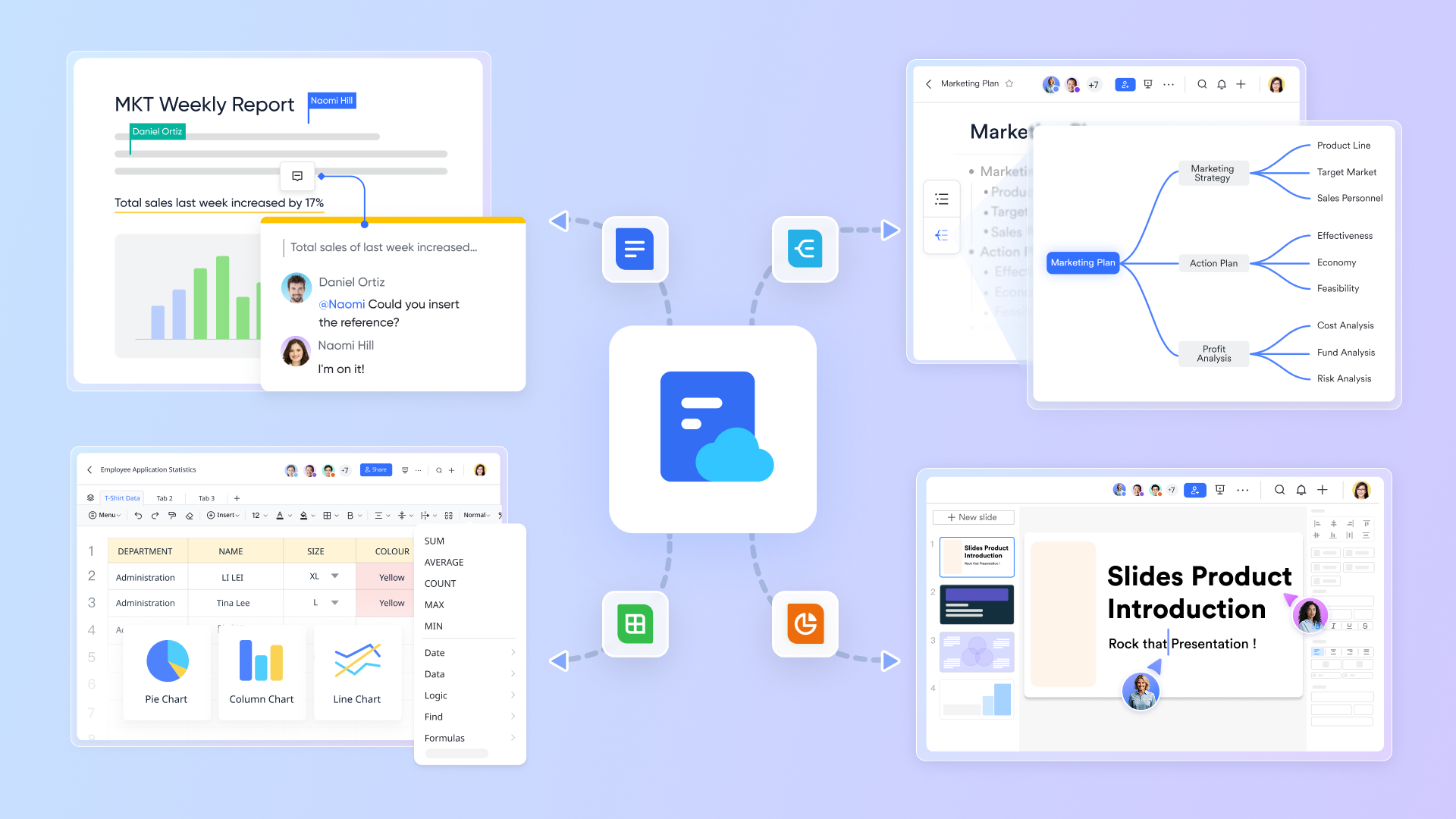
Documentation workflows usually break at the seams: specs live in Google Docs, feedback scatters across Slack, and approvals stall in email, leaving the "source of truth" buried three tools deep. Lark is an all-in-one collaboration workspace that combines messaging, meetings, documents, and essential workflows within a single interface, collapsing that stack into one flow. and let teams co-author rich pages with embedded Base tables and diagrams, while the built-in AI assistant drafts, summarizes, and translates inline. Because Docs, Wiki, and Messenger share the same identity layer, a PM can @-mention a spec in chat, review comments in real time, and documentation becomes a living communication channel rather than a dead artifact.
Real-time collaboration with instant AI-powered retrieval
Replacing slow sequential emails, lets cross-functional teams co-edit simultaneously using inline comments, @mentions, reactions, and cloud auto-save. Its built-in AI search instantly extracts exact passages across all accessible documents, rather than just filenames. The experience remains identical across desktop, web, and mobile, supported by fine-grained permissions.
One hub for everything teams generate and need to find
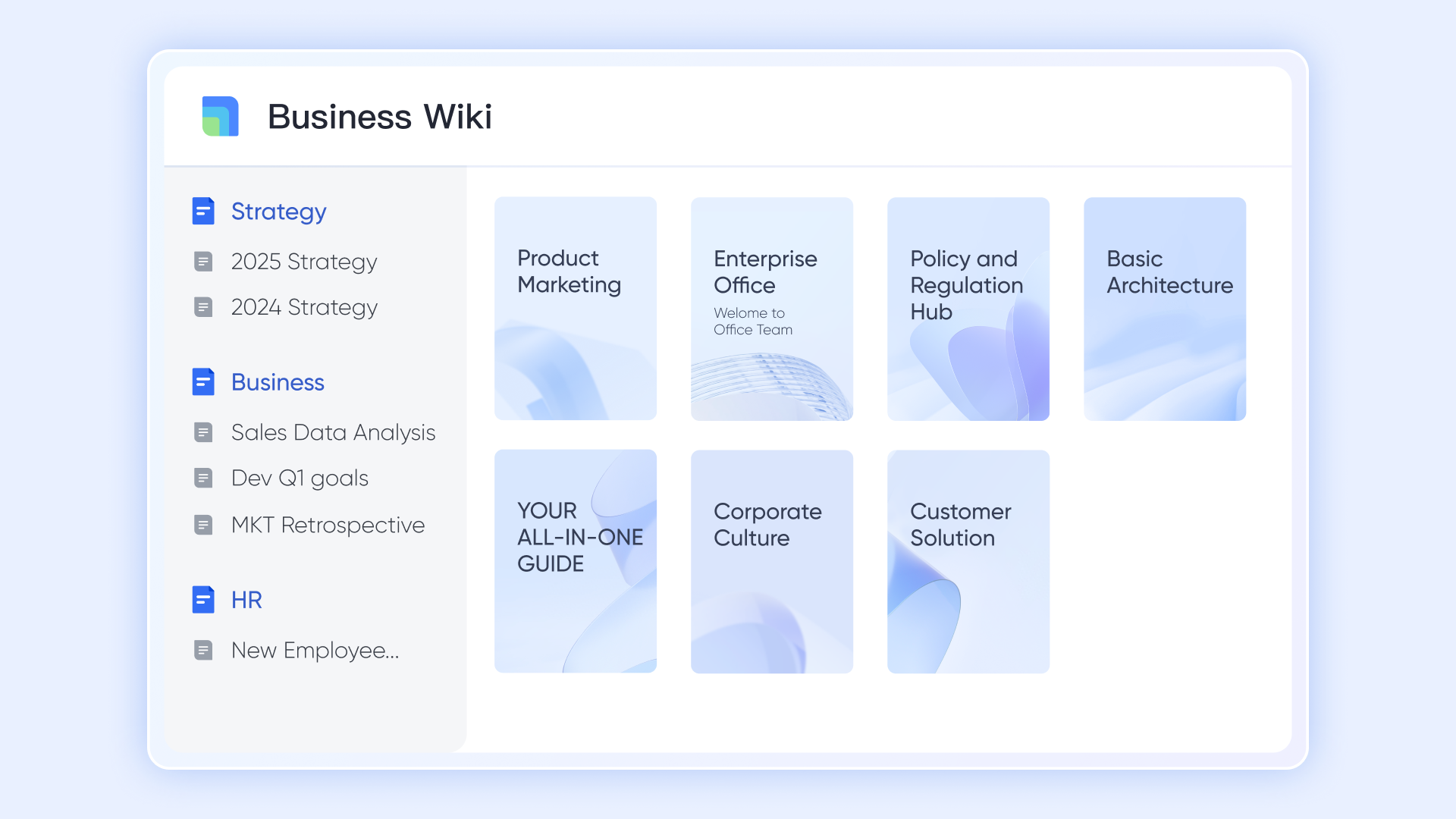
Scattered documentation is where institutional knowledge goes to die. pulls docs, sheets, mind maps, and databases into one organized hierarchy, and automatically stores artifacts produced by Lark Base — contracts, reports, SOPs — in structured, permissioned spaces. Legacy content from Confluence, Word, Excel, CSV, or XMind imports in a few clicks, so teams move to a genuine single source of truth without leaving years of corporate history behind.
From unstructured documents to automated, governed workflows
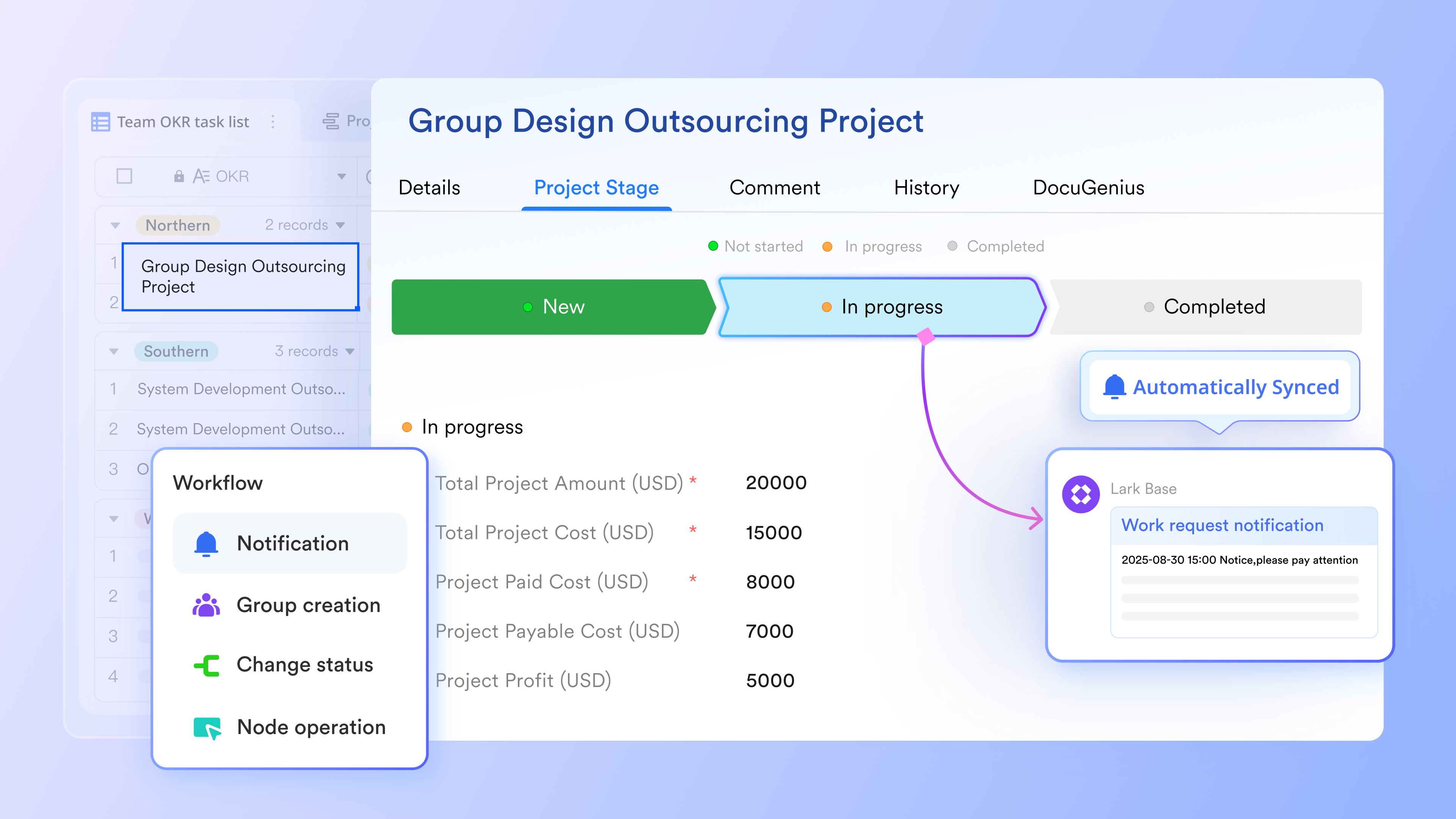
A folder of contracts is useful; a queryable table of clauses, owners, templates, and effective dates is transformative. converts the content locked inside documents into structured relational records teams can filter, report, and trigger actions against. Its drag-and-drop builder lets any team assemble conditional routing, multi-stage approvals, and time-based triggers without IT tickets — so the people closest to the work own the automation that serves them, and contracts move from "drafted" to "signed and filed" without ever leaving the platform.
Pros:
- One app replaces many: Docs, Wiki, Messenger, Meetings, Mail, Base, and Approvals under a single login cuts software spend and kills context switching.
- AI built into the workspace: Lark AI drafts, summarizes, and translates directly inside Docs, Wiki, and Messenger — no separate add-on or per-seat AI upsell.
- Seamless global collaboration: Built-in, real-time translation across Messenger chats, Docs, and live Meeting captions supports several languages, instantly breaking down communication barriers for distributed or international teams.
Cons:
The extensive feature set can feel overwhelming to new users at first, though the built-in onboarding guides help ease the transition.
:
- Starter plan: that includes 11 powerful tools for up to 20 users. It also comes with 100GB of storage space, 1000 automation runs, AI translations, and more. No credit card needed.
- Pro plan: (billed annually) for up to 500 users. It includes everything in Starter plus group calling for up to 500 attendees, 15TB of storage space, 50,000 automation runs, and more.
- Enterprise plan: for custom pricing. Supports unlimited users and includes even more automation runs and advanced security, compliance, and management features.
For small teams with simple communication needs

18 months message history
1000 Base automation runs/month
2000 rows per table in Base
Most POPULAR
For companies with comprehensive collaboration and management needs
Unlimited message history
500-participant video meetings
50k Base automation runs/month
20k rows per table in Base
For large companies with advanced security and organizational management needs
Get a personalized demo and pricing
Unlimited message history
500-participant video meetings
15 TB storage + 30 GB storage/user
500k Base automation runs/month
50k Base automation runs/month
Most POPULAR
For companies with comprehensive collaboration and management needs
Unlimited message history
500-participant video meetings
50k Base automation runs/month
20k rows per table in Base
2. DocuWriter.ai: AI code-to-docs autopilot
DocuWriter.ai is best for software engineering teams and solo developers who want to automate code, API, and test documentation directly from their source repositories. It stands out because it treats code as the single source of truth, using AI to transform raw files into polished technical docs in minutes rather than hours.
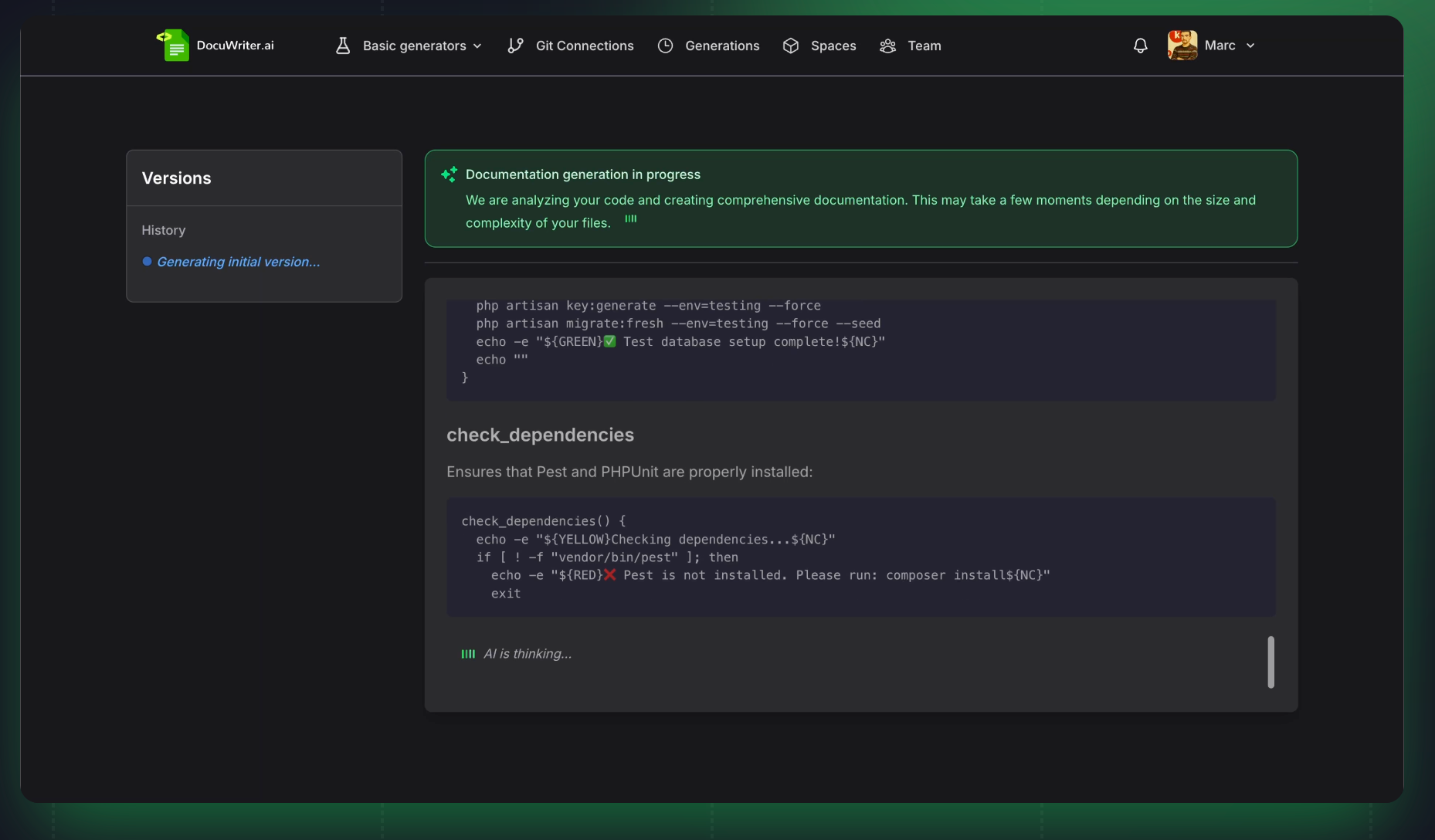
Image source: docuwriter.ai
The DocuWriter.ai experience is anchored around a clean upload-and-generate workflow: developers feed in source files (or connect repositories) and the platform produces structured code documentation, API references, and even generated test suites. The UI emphasizes speed-to-output, with dedicated modules for code documentation, API docs, code refactoring, code conversion, and an AI-powered search layer over the generated knowledge base. This addresses a classic developer pain point—docs that drift out of sync with code, by re-generating documentation from the current codebase on demand.
Beyond one-shot generation, DocuWriter.ai positions itself as a full "documentation intelligence" layer. Teams can query their codebase in natural language, convert code between languages, and refactor with AI assistance, which helps onboard new engineers and shortens the loop between writing code and publishing understandable references. Output formats are developer-friendly (Markdown, PDF, etc.), fitting naturally into existing Git and static-site workflows.
Pros:
- End-to-end coverage of code docs, API docs, and automatically generated unit tests from a single input.
- Bonus developer utilities—code refactoring and code conversion between languages—extend value beyond pure documentation.
- Multiple export formats and an AI search layer make generated docs reusable across teams.
Cons:
- Heavily dev-centric; non-engineering teams (marketing, HR, ops) will find little use for it.
- Quality of generated docs depends on code clarity and comments—messy legacy codebases can produce shallow output.
Pricing:
- Professional: $49/month(monthly paid)
- Enterprise: $129/month(monthly paid)
- Unlimited: $299/month(monthly paid)
3. Bit.ai: 100+ integrations smart documents
Bit.ai is ideal for cross-functional teams that need a single workspace for living documents, wikis, and client-facing material enriched with rich media. It differentiates itself through 100+ integrations and "smart documents" that embed interactive content—something traditional doc editors struggle to match.
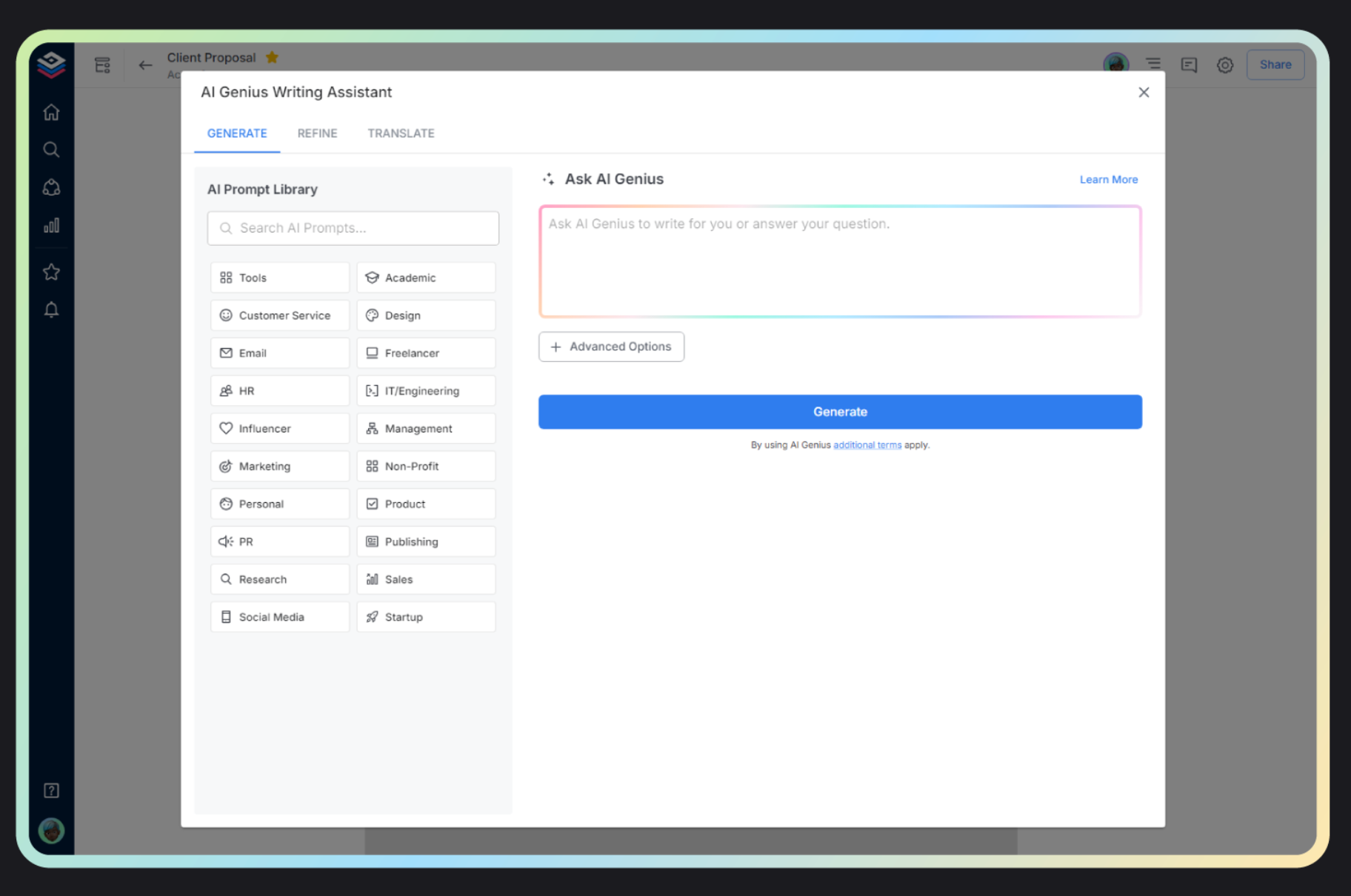
Image source: bit.ai
Bit.ai's interface is organized around workspaces, folders, and documents, with a minimalist editor that lets users drop in embeds from Figma, YouTube, Airtable, Google Drive, spreadsheets, code snippets, and more. The core pain point it targets is content fragmentation—teams juggling Notion, Google Docs, Confluence, and Dropbox—by letting authors pull all of that into a unified, trackable document with AI-assisted writing on top.
The platform also doubles as a lightweight knowledge management and client portal system. Document tracking shows when and how recipients engage with shared material, and AI Genius helps draft, summarize, and rewrite content inline. That combination positions Bit.ai between a wiki (like Notion) and a document-sharing tool (like DocSend), which is useful for teams that currently bolt those two categories together.
Pros:
- 100+ integrations let teams embed live content from design, data, and video tools directly inside docs.
- Built-in document tracking and sharing analytics for client- and prospect-facing documents.
- AI Genius assistant handles drafting, summarization, and rewriting inside the editor.
Cons:
- The broad feature set (wiki + docs + client portal + tracking) creates a steeper onboarding curve than single-purpose editors.
- Advanced features like tracking, unlimited storage, and premium integrations sit behind paid tiers.
Pricing
- Free: $0 (up to 5 members)
- Pro: $8/user/month (annual)
- Business: $15/user/month (annual)
- Enterprise: Custom pricing
4. Google Cloud Document AI: Pre-trained document extraction
Google Cloud Document AI is the right choice for enterprises and developers building automated pipelines that extract structured data from forms, invoices, contracts, and identity documents at scale. It stands out thanks to Google's OCR heritage, a library of pre-trained processors, and tight integration with BigQuery and Vertex AI.
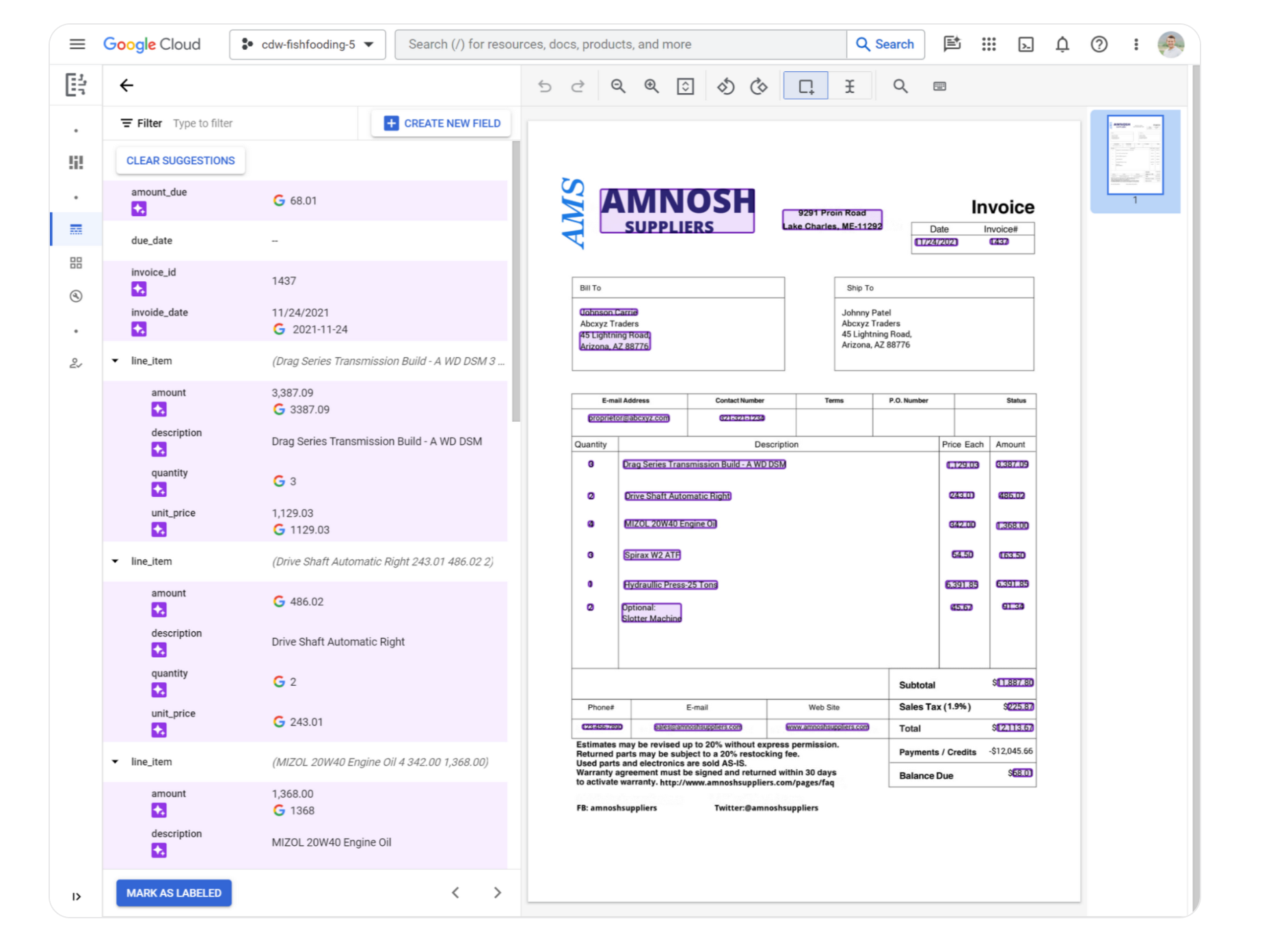
Image source: cloud.google.com
Document AI is a Google Cloud service rather than an authoring tool—you consume it via APIs, the console, or SDKs. The console exposes processors (pre-trained, custom-trained, and generative) for parsing, splitting, classifying, and extracting entities from documents. It directly targets the pain of manual data entry and brittle regex pipelines by offering production-grade OCR, layout parsing, and entity extraction that plug into existing data warehouses.
For complex workloads, Google layers in Custom Extractor training with Vertex AI, a generative AI-backed Layout Parser, and Document AI Warehouse for search and governance over extracted content. This makes it well suited to regulated industries—lending, insurance, healthcare—where accuracy, auditability, and scale matter more than editor UX.
Pros:
- Broad library of pre-trained processors for invoices, receipts, W-2s, IDs, contracts, and more.
- Native integration with BigQuery, Vertex AI, and Google Cloud Storage for downstream analytics.
- Custom model training with relatively small labeled datasets via Vertex AI.
Cons:
- Requires real engineering effort—APIs, IAM, billing, and pipeline code—before business users see value.
- Pay-per-page pricing and Google Cloud lock-in can escalate costs at high volume.
Pricing:
- Enterprise OCR: ~$1.50 per 1,000 pages
- Form Parser: ~$30 per 1,000 pages
- Enterprise: Custom pricing
5. Microsoft Azure AI Document Intelligence: Intelligent document processing
Microsoft's Document AI / Intelligent Document Processing research stack is best suited to enterprises standardizing on Azure and Microsoft 365 for large-scale document understanding. It stands out for its deep research lineage—LayoutLM, TrOCR, MarkupLM—and its productization through Azure AI Document Intelligence.
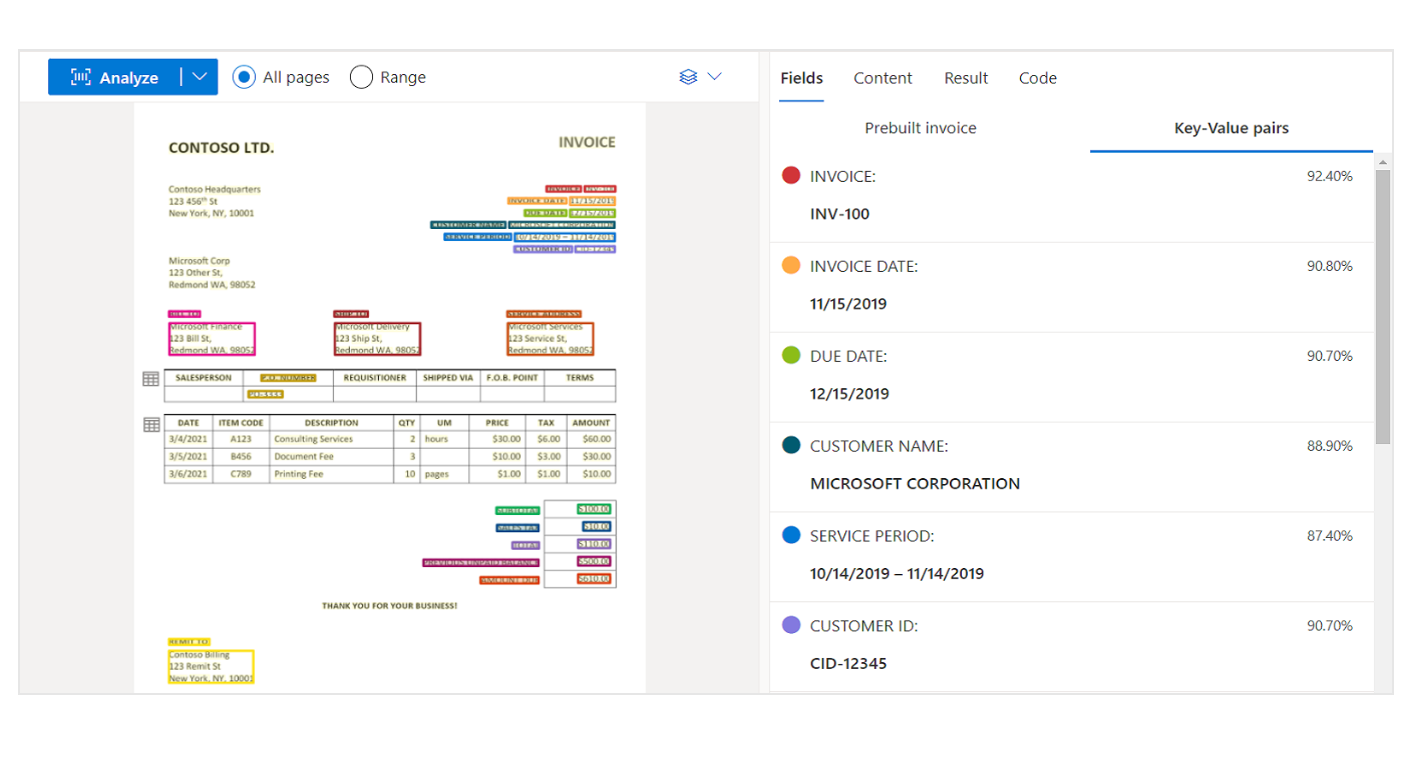
Image source: learn.microsoft.com
Microsoft Research frames Document AI as the discipline of automatically reading, understanding, and analyzing business documents, and contributes foundational models (LayoutLM family, TrOCR, UniLM) that power Azure's production services. The experience for practitioners typically flows through Azure AI Document Intelligence: prebuilt models for invoices, receipts, IDs, and contracts; layout models for tables and structure; and custom models trained on user data.
The platform addresses the pain of fragmented document pipelines by unifying OCR, layout, key-value extraction, and semantic understanding in one service, and by integrating with Power Automate, Logic Apps, and Microsoft 365 to push extracted data into existing business processes. For organizations already on Azure, this shortens time-to-production significantly versus building from scratch.
Pros:
- Backed by leading research (LayoutLM, TrOCR, MarkupLM) continuously productized into Azure services.
- Strong prebuilt model catalog for common document types, reducing custom training needs.
- Deep integration with Power Platform, Microsoft 365, and Azure data services.
Cons:
- Research site itself is not a product—practitioners must navigate between MSR content and Azure docs to implement.
- Full capability is realized primarily inside the Azure ecosystem, which limits portability.
Pricing:
- Free : 0 - 500 pages free per month
- S0 - Web/Container-Read: 0-1M pages - $1.50 per 1,000 pages
- All Prebuilt Models: $10 per 1,000 pages
6. Documentation.AI: AI-native help center with MCP server
Documentation.AI is a solid pick for SaaS teams and support organizations that want an AI-native knowledge base and help center without stitching together multiple tools. It stands out by combining documentation authoring, AI search, and customer-facing help center publishing in a single product.
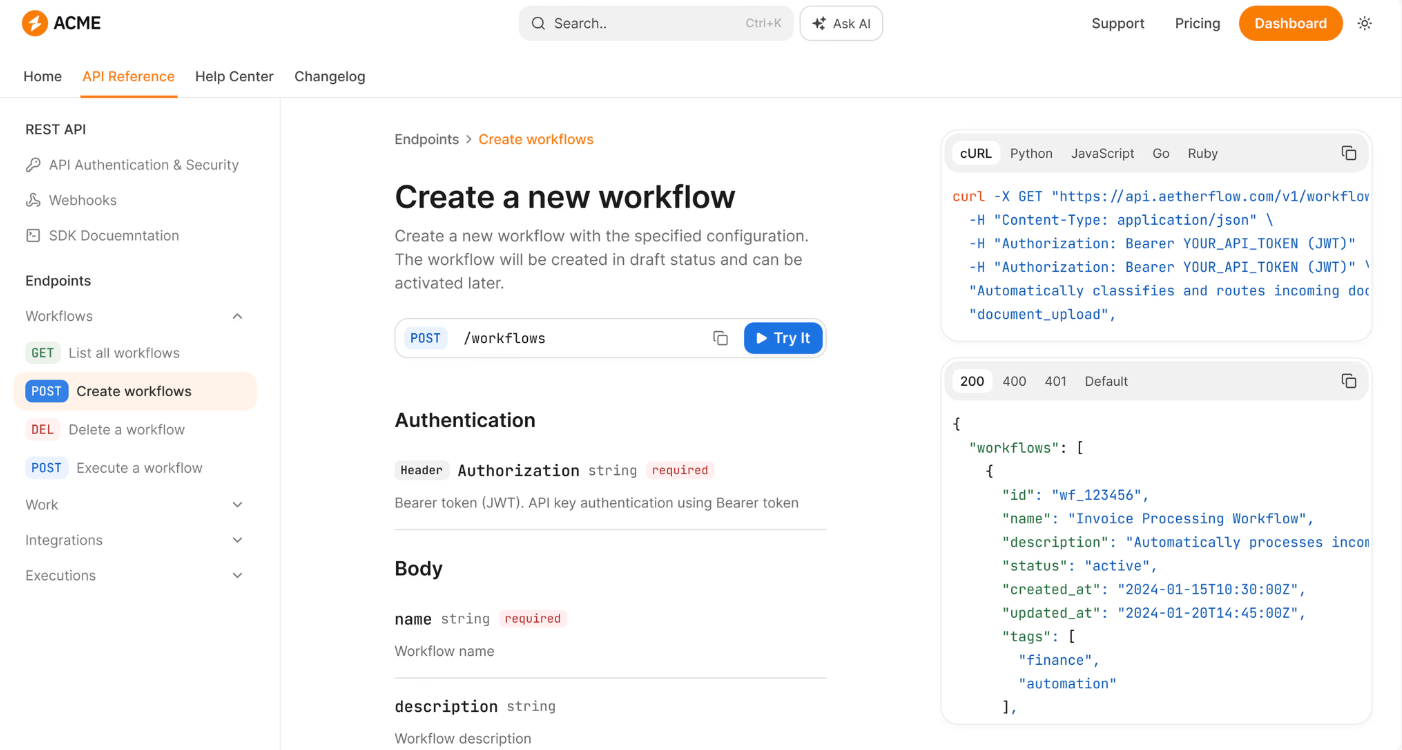
Image source: documentation.ai
Documentation.AI centers on a clean editor plus an AI assistant that helps draft, rewrite, and answer questions grounded in the team's own content. Teams can organize articles into collections, publish a branded help center, and surface an AI chatbot that responds to user questions using the indexed knowledge base—directly attacking the pain of stale support docs that customers can't navigate.
Workflow-wise, the tool emphasizes fast publishing: write once, and the same content powers internal wikis, external help centers, and AI-driven Q&A. Analytics on article performance and unanswered questions give content owners a feedback loop to improve coverage over time, which is typically missing from generic doc editors.
Pros:
- Unified authoring, AI search, and public help center in one platform.
- AI chatbot grounded in the team's own documentation reduces hallucination risk versus generic LLM chat.
- Content analytics highlight gaps and underperforming articles.
Cons:
- Less suited to heavy engineering docs (API references, code-heavy documentation) compared to specialist tools like Mintlify.
- As a relatively newer entrant, the integration catalog is narrower than established players.
Pricing:
- Starter: $0 (1 seat, 50 AI credits/mo)
- Enterprise: Custom pricing
7. Mintlify: Git-based MDX docs with AI assistant
Mintlify is the go-to choice for developer-first companies that want beautiful, fast, AI-augmented product and API documentation. It stands out through its modern design system, Git-based workflow, and built-in AI chat trained on the docs.
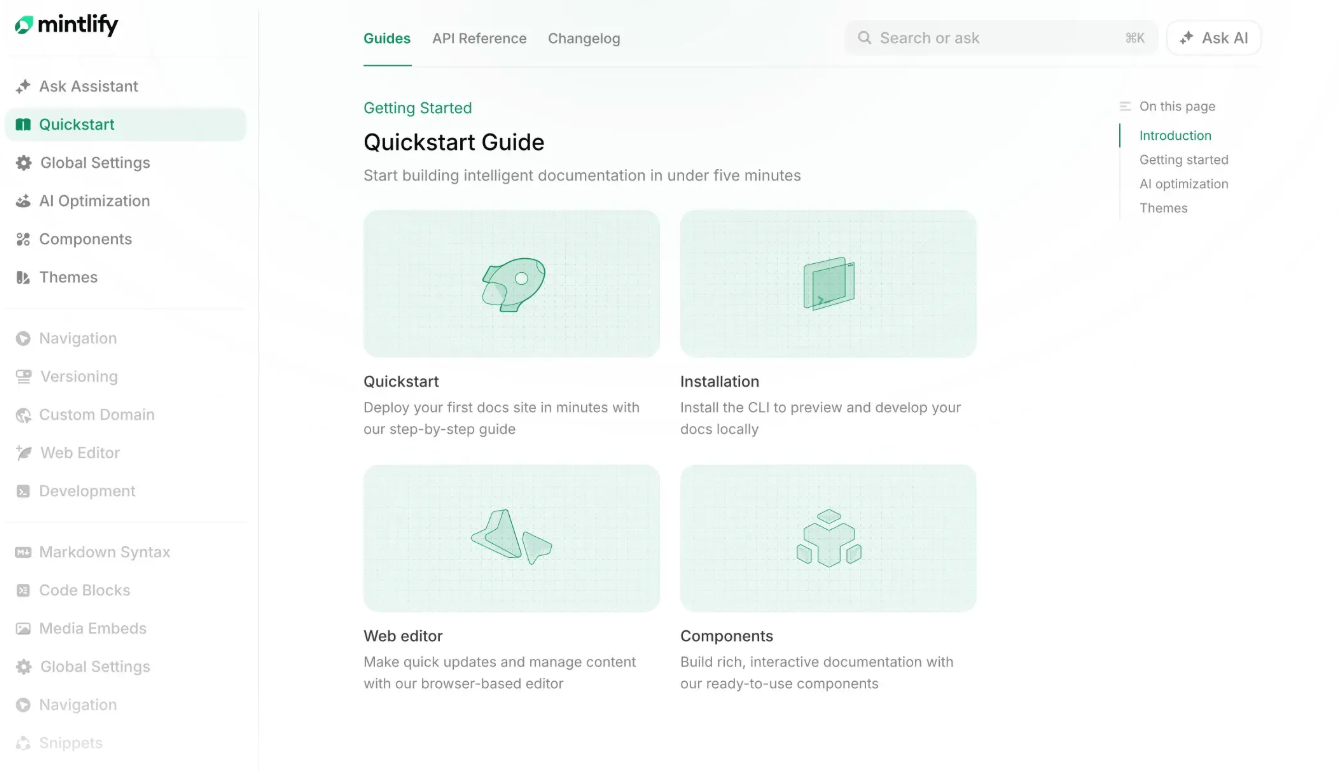
Image source: mintlify.com
Mintlify bills itself as an "intelligent knowledge platform." Docs are written in MDX, versioned in Git, and deployed via a managed platform that renders a polished, highly performant site out of the box. The editor supports code samples with interactive API playgrounds, and the platform auto-generates API reference pages from OpenAPI specs—directly targeting the pain of fragmented docs/reference/changelog stacks that developer-tool companies usually cobble together.
On top of this, Mintlify adds an AI chat widget that answers user questions using the site's content, plus analytics on what users search and where they drop off. The combination is aimed at DevRel and product teams who want docs that feel like a product surface rather than a static site, with measurable impact on activation and support deflection.
Pros:
- Best-in-class design and performance for developer-facing documentation sites.
- OpenAPI-driven API reference generation with interactive playgrounds.
- Built-in AI chat and search trained on the customer's own documentation.
Cons:
- MDX + Git workflow has a learning curve for non-technical contributors.
- Premium features (advanced analytics, custom AI, SSO, higher traffic) are concentrated in higher-priced tiers.
Pricing:
- Enterprise: Custom pricing
8. Scribe: Auto-captured step-by-step workflow guides
Scribe is ideal for operations, customer success, and enablement teams that need to turn repetitive workflows into step-by-step guides without writing them manually. It stands out by auto-capturing clicks and screenshots as users perform a task, producing an instant, editable how-to guide.
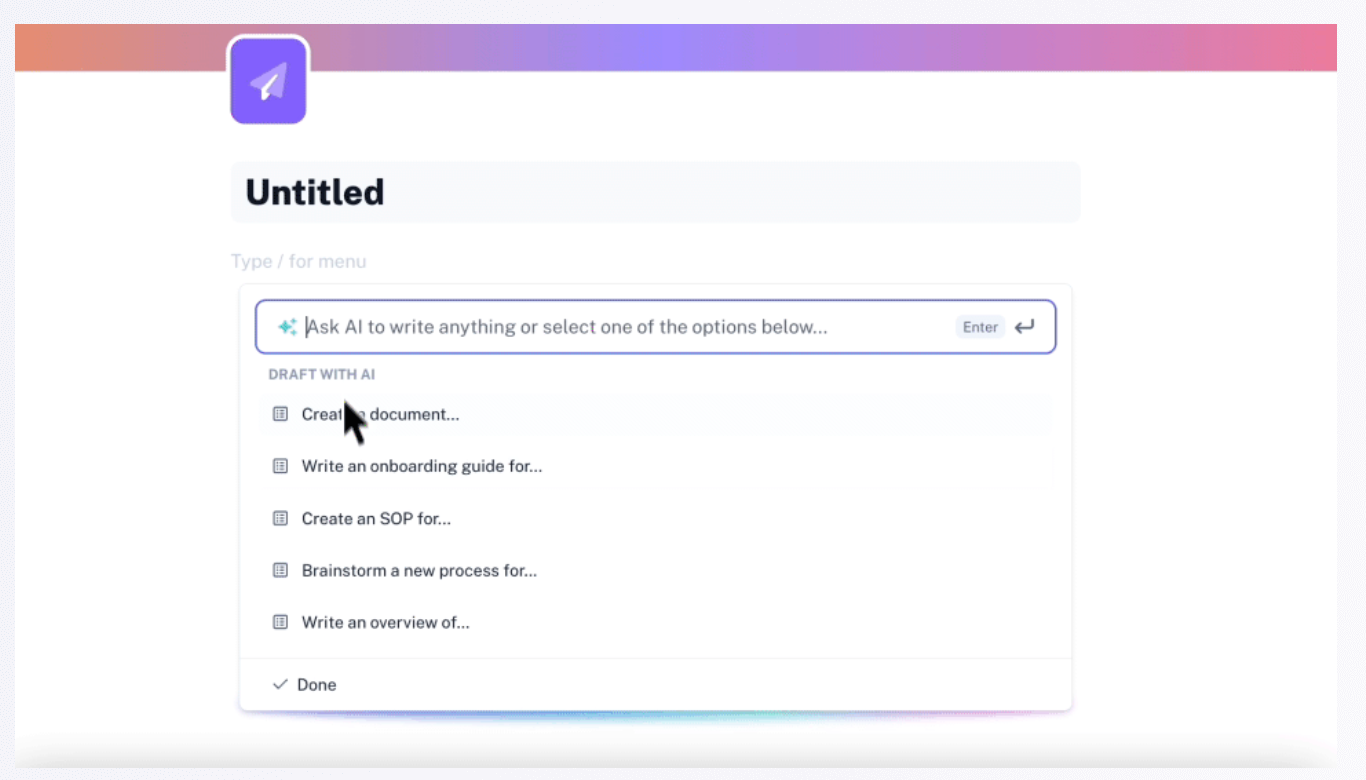
Image source: scribe.com
Installed as a Chrome extension (with desktop capture on paid tiers), Scribe records a user's actions across any web app and converts them into a structured guide with annotated screenshots, text instructions, and links. The core pain point—SOPs and training docs going stale the moment a UI changes—is addressed by making recreation fast: re-record the flow and republish in minutes.
The editor lets users redact sensitive data, add tips, brand guides with logos and colors, and export to PDF, HTML, or embed into Confluence, Notion, and LMS platforms. Enterprise features add auto-redaction of PII, SSO, and analytics on guide usage, making it viable for regulated environments as well as scrappy startup enablement teams.
Pros:
- Auto-generates step-by-step guides with screenshots from a single screen recording—minutes instead of hours.
- Strong redaction and branding controls suitable for customer-facing and internal SOPs.
- Wide export and embed options (PDF, HTML, Confluence, Notion) integrate into existing knowledge stacks.
Cons:
- Core capture is browser-based; full desktop/app capture requires a paid plan.
- Guides are inherently procedural—Scribe is not a replacement for conceptual documentation, wikis, or API references.
Pricing:
- Pro Personal: $25/user/month (annual)
- Pro Team: $13/user/month (annual, min 5 seats)
- Enterprise: Custom pricing
9. Theneo: AI-generated API reference from OpenAPI specs
Theneo is best for API-first companies that want beautiful, AI-enhanced developer documentation generated directly from OpenAPI, Postman, or code. It stands out by using AI to auto-describe endpoints, generate examples, and keep reference docs in sync with specs.
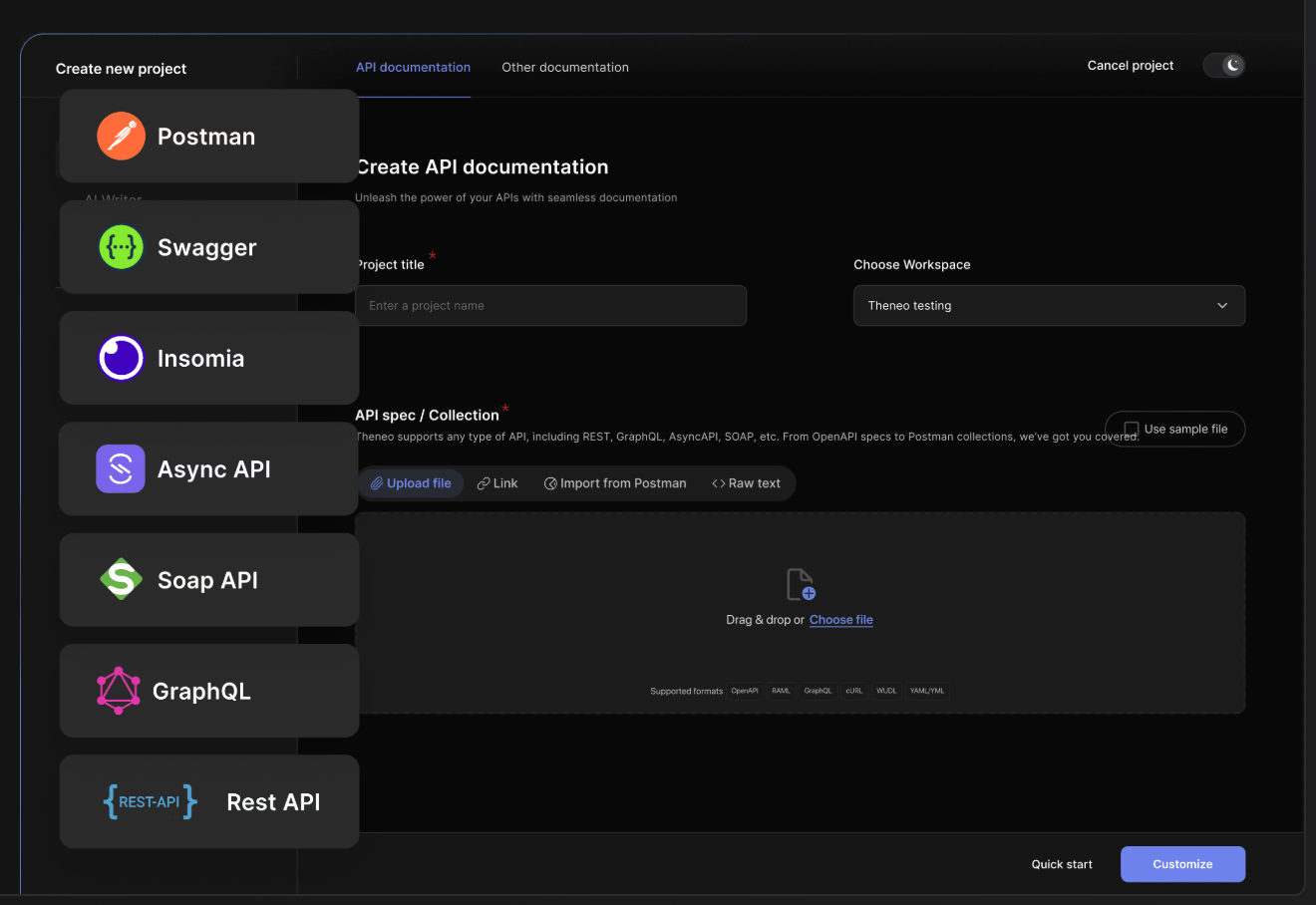
Image source: theneo.io
Theneo's workflow starts with importing an API specification (OpenAPI, Swagger, Postman collections) or connecting a repository. The platform then uses AI to generate human-readable descriptions, code samples in multiple languages, and a navigable reference site—attacking the familiar pain of "we have an OpenAPI file but no real docs." A collaborative editor lets PMs, writers, and engineers co-edit without breaking the underlying spec.
The published portal includes interactive "try it" consoles, versioning, custom domains, and an AI assistant that answers developer questions based on the documentation. Theneo positions itself as a lighter-weight, more automated alternative to hand-crafted docs stacks like Redoc plus a static site generator, and targets startups that want Stripe-grade docs without a dedicated docs team.
Pros:
- AI-driven generation of endpoint descriptions, examples, and code samples from raw API specs.
- Collaborative editor bridges technical writers, PMs, and engineers on a single source.
- Interactive API consoles, versioning, and custom domains in the hosted portal.
Cons:
- Focused squarely on API documentation—not a fit for general knowledge bases, SOPs, or help centers.
- AI-generated descriptions still require human review for accuracy and brand voice.
Pricing:
- Business: $120/month/workspace (annual)
- Growth: $400/month/workspace (annual)
- Enterprise: Custom pricing
How to build an automated AI knowledge base from scratch
Transitioning from scattered local folders to a is one of the highest-impact projects a management team can undertake. A true AI knowledge base does not merely store files; it actively organizes information, enables natural language search, and flags outdated content.
Here is a practical, step-by-step approach to building an automated system without overwhelming employees:
- Establish a single source of truth: Project specifications should not remain in private messaging channels or personal cloud drives. Organizations must select a unified platform that supports and strict folder hierarchies. Every new company policy, project brief, or meeting summary must reside within this central hub.
- Standardize input formats: AI models thrive on consistency. Implementing strong, structured templates for remote or hybrid teams is essential. If every project post-mortem follows the exact same format—Background, Execution, Results, Learnings. Document can parse and summarize that data much more efficiently.
- Leverage NLP for semantic search: A major limitation of traditional wikis is keyword-dependent search functionality. Modern platforms use Natural Language Processing (NLP) to understand the intent behind a query. This allows staff members to search conversational questions, such as "What was the Q3 marketing budget?", and have the AI instantly extract the exact figure from a lengthy financial report.
- Connect documentation to daily workflows: A knowledge base stagnates if it requires manual, extra effort to update. Establishing unifications ensures that when a developer pushes code or a sales representative closes a deal, the resulting documentation is automatically routed into the correct wiki folder.
Build an automated AI knowledge base easily with Lark
Future trends in artificial intelligence doc processing
The next phase of document intelligence is moving away from purely text-based analysis toward more complex, automated systems.
Multimodal capabilities: There is a rapid shift toward models that process text, images, and video simultaneously within the same workflow. For example, workspace of a product design meeting, interpret a physical whiteboard sketch shown on camera, and automatically generate a structured, text-based technical specification document based on that drawing.
Predictive generation: The technology is transitioning from reactive tools to predictive systems. Instead of requiring a user to open a blank ai document and prompt a report, predictive AI will anticipate documentation needs based on operational data. A system could automatically analyze upcoming calendars and recent customer support tickets to draft a weekly priority brief before the workday even begins.
Fundamentally, the industry focus is shifting from simply increasing writing speed to maximizing the amount of business context a system can .
Conclusion
The true return on investment for documentation AI is rarely found in acquiring a slightly faster text parser; it lies in consolidation. When organizations transition from treating documents as static files to utilizing them as active components of a unified workflow, they eliminate hours of administrative friction.
Management teams are encouraged to audit their current tool stacks to map out the number of manual handoffs performed daily. If a significant operational bottleneck exists between where a meeting occurs and where the resulting tasks are tracked, a platform like is specifically engineered to bridge that gap. Rather than patching together a separate AI writer, a messaging application, and a project management tool, deploying a unified workspace ensures that an AI-generated meeting summary can instantly trigger an automated approval process within a single, cohesive environment.
Unify documents and automated workflows instantly with Lark
FAQs
Is there any AI for documentation?
Yes. The market is divided into two main categories: Intelligent Document Processing (IDP) and generative AI workspaces. IDP tools, like Google Cloud Document AI, are built to extract structured data from legacy PDFs and forms. Generative workspace tools, like Lark or Notion AI, focus on synthesizing information, such as turning video meeting transcripts into formatted project briefs and actionable tasks.
What is the 30% rule in AI?
In enterprise software adoption, the 30% rule is a pragmatic benchmark: an AI tool should automate at least 30% of a manual, repetitive workflow to justify the financial cost and the friction of change management. If an AI writing assistant saves a team member five minutes on a draft but forces them to spend ten minutes copy-pasting that text into a separate project management tool, it fails this threshold.
Is there a free AI for creating documents?
Yes. Several platforms offer robust free tiers that allow small teams to test the technology before committing to an enterprise contract. Lark provides a comprehensive free starter plan that includes AI-driven document creation, automated meeting minutes, and basic workflow automations. Other platforms like Google Workspace and Notion also offer limited AI features on their free or basic tiers for individual users.
What is the best AI model for documentation?
There is no single "best" model; there is only the optimal fit for specific operational bottlenecks. If the goal is heavy-duty, layout-aware data extraction from scanned invoices, Microsoft's LayoutLM models are industry leaders. If an organization needs to generate technical software specifications, IBM's watsonx is highly specialized for code. However, if the objective is to consolidate team knowledge, eliminate data silos, and turn meeting notes into trackable operations, unified workspace models like Lark are the most practical choice.
What is the difference between OCR and documentation AI?
is a foundational technology that simply converts an image of text into readable digital text. It does not understand the underlying meaning of that text. Documentation AI builds on top of OCR by utilizing Natural Language Processing (NLP) and machine learning to understand context, categorize data, and trigger subsequent workflows based on that gathered information.
Related reading




























