Managing a growing organization often means drowning in repetitive requests. IT resets passwords, HR answers the same PTO policy questions, and support teams handle routine status checks, driving up operational costs. An enterprise bot solves this by automating high-volume queries. But rushing to add another standalone AI tool often backfires, creating isolated data silos and security risks. In this guide, I will walk you through how to choose, deploy, and manage an enterprise chat bot that actually connects your workflows, secures your company data, and reduces manual overhead without forcing your team to learn a dozen new tools.
What makes an enterprise bot different from a standard chatbot?
When people hear "bot," they often picture the simple, rule-based widgets that pop up in the corner of a retail website, offering a rigid menu of options. An enterprise bot operates on a completely different level. These systems are designed to handle complex logic, access secure corporate data, and execute multi-step workflows across various departments.
The core differentiator lies in the enterprise bot ai capabilities. Instead of relying on pre-scripted dialogue trees, modern solutions utilize advanced generative AI. They interpret natural language, understand organizational context, and rely on high LLM accuracy to provide specific, actionable answers.
Consider this mini-scenario:If an employee asks a standard chatbot, "How much vacation time do I have?", the bot will likely reply with a link to the company handbook. If that same employee asks an enterprise chat bot, the system will securely connect to the company's HR database, verify the employee's identity, retrieve their exact PTO balance, and offer a button to submit a time-off request right in the chat window.
This level of utility requires deep connectivity. Business-grade bots cannot function in a vacuum; they must tie directly into your CRMs, ERPs, and daily communication platforms to be effective.
The standalone bot problem: Why isolated AI creates organizational silos
There is a common misconception among IT directors that buying the most advanced AI tool will automatically fix productivity issues. I often see companies purchase powerful bot enterprises, only to watch adoption rates flatline. The reason is simple: a standalone bot creates organizational silos.
When you introduce a disconnected AI assistant, you force employees to change their behavior. If a project manager has to leave their primary workspace, log into a separate portal, and copy-paste context just to get an answer from the bot, the friction outweighs the benefit. This context switching breaks data flows and frustrates users.
drops to zero if it adds another layer of administrative overhead. I have found that a bot is only as valuable as the ecosystem it lives in. When you embed a bot directly into a unified workspace—where your team already chats, holds video meetings, and edits documents, you remove the friction. The bot becomes a natural participant in the daily workflow rather than an external tool that requires a separate login. Connecting automated assistants to your central hub is the true driver of productivity.
Start improving your team operations today
Internal vs. external bots: Mastering the Agentic AI deployment paradox
Right now, the market is obsessed with agentic AI—systems that do not just answer questions, but proactively plan and execute complex tasks from start to finish. For many enterprise managers, the immediate instinct is to deploy these autonomous agents in external contact centers to handle omnichannel support and cut customer service costs.
However, this rush toward external deployment creates a paradox:
- The problem: Scaling fully autonomous bots to customer-facing channels without first testing them on internal processes often leads to embarrassing errors and significant security risks.
From a leadership perspective, the smarter strategy is to start inside your own walls:
- The recommended approach: Deploy your enterprise bot to handle internal HR ticketing, IT helpdesk requests, and facility management first.
- The benefits of internal deployment: This controlled environment allows your team to validate the bot's logic, refine its accuracy, and ensure its access controls are functioning properly.
By mastering internal orchestration first, you build a reliable framework. Once the bot successfully handles complex employee workflows and proves it can navigate internal databases securely, you can then scale that technology outward to customer-facing channels with total confidence. Building a no-code internal helpdesk with an enterprise chat bot
For many companies, the internal support process is a chaotic mix of emails, direct messages, and clunky portal logins. If an employee needs a new monitor or has a payroll question, they often do not know where to look, so they ping someone directly, breaking concentration and slowing down work. You can fix this by building a no-code internal helpdesk driven by an enterprise chat bot.
Instead of forcing your team to learn complex programming or routing logic, you can use unified workspace tools to set up an automated ticketing system in just a few steps. Here is a concrete workflow for handling IT requests:
- Set up the front end: The chat window serves as the initial point of contact. Employees simply open their daily communication app and send a natural language message to the bot, such as, "My laptop battery is dying, I need a replacement."
- Link the bot to a structured database: Connect the bot to a system like Lark base. Without writing a single line of code, you can to specific columns in your database. The bot automatically extracts the employee's name, department, and the item requested, creating a new ticket in the system.
- Configure automated approval workflows: Once the ticket hits the database, the system triggers a direct message to the IT manager's chat window. This message contains the full context of the request along with two buttons: "Approve" or "Reject." The manager reviews the request and clicks approve right from their mobile phone or desktop app. The database updates automatically, and the bot sends a confirmation message back to the employee.
This workflow removes the friction of manual data entry and keeps everyone inside their primary work environment.
Top-rated bot management for enterprise security
Giving an AI assistant access to your company's internal databases is inherently risky if not managed correctly. When deploying these tools, enterprises face a dual challenge: protecting infrastructure from external threats while ensuring respects strict data boundaries. This is precisely why investing in top-rated bot management for enterprise security is non-negotiable.
- Robust access control is fundamental: A bot should only surface information that the specific user is authorized to see. Lark's unified workspace is built with enterprise-grade access controls, ensuring that any bot operating within its ecosystem adheres to your organization's precise permission settings.
- Preventing unauthorized data exposure is crucial: Consider a scenario: a junior analyst asks the bot, "What are the Q3 bonus payouts for the marketing team?" If the bot's logic is disconnected from your company's organizational chart and permission settings, it might inadvertently retrieve and share this highly sensitive information. A secure management framework, however, ensures the bot first checks the user's role-based access permissions. If the user lacks clearance, the bot politely and securely declines the request.
- Ensuring data privacy and compliance: This demands that all information processed by the bot—both user prompts and retrieved data—remains strictly within your secure corporate perimeter. With Lark, your benefits from the platform's stringent security standards and compliance protocols, including end-to-end encryption and regular security audits. Crucially, we ensure your proprietary information is never used to train public models, keeping it securely within your organizational environment and respecting global data privacy regulations. When configuring your system, it's vital to confirm that your bot provider does not use your proprietary internal data to train their public models.
Secure your bots with Lark today
Evaluating Lark as an enterprise solution for bot deployment
When operational executives begin comparing platforms, the technical specifications can quickly become overwhelming. To cut through the marketing noise, what's truly needed is a solution that integrates seamlessly, performs reliably, and scales effectively for enterprise-level bot deployment. Lark stands out as a premier enterprise solution for robust bot deployment and management, offering a unified platform where intelligent automation truly enhances your business.
Lark's comprehensive ecosystem provides distinct advantages, making it the ideal choice for your enterprise bot needs:
Unified workflow automation
Unlike standalone bot systems, offers deep, native integrations with the tools your team already uses daily. This includes for shared documents and Lark Meeting for scheduling, alongside comprehensive approval flows. This means Lark-powered bots can pull real-time data from CRMs, ERPs, and other critical systems, and even initiate actions directly within the user's primary workspace. Imagine a bot summarizing minutes from and automatically updating a task list within . This seamless integration eliminates context switching, ensures bots deliver precise, up to the minute information, and executes multi-step workflows without friction, significantly boosting operational efficiency.
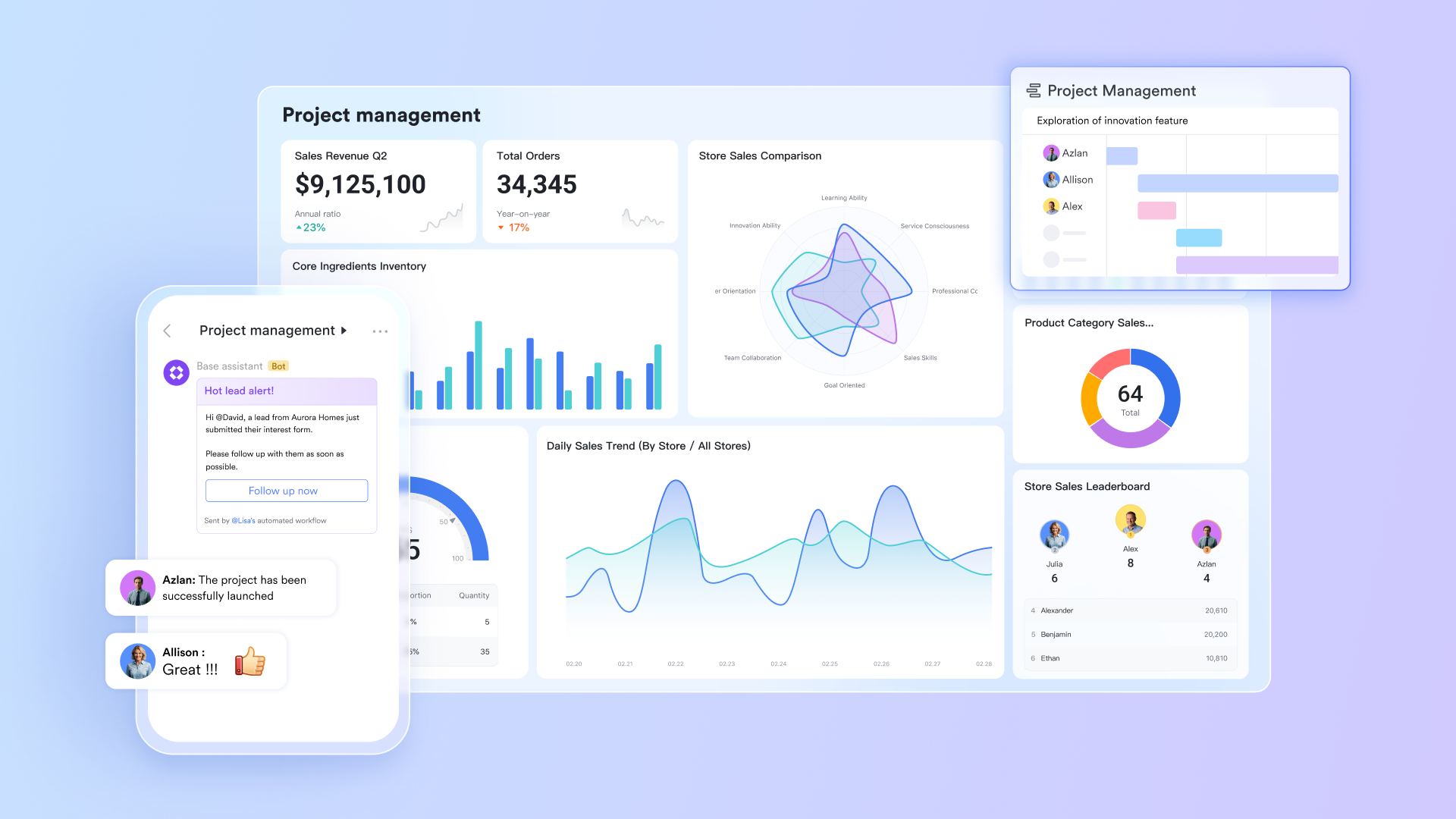
Empowering no-code bot creation and management
empowers business users, not just developers, to build and manage sophisticated bot-driven workflows. Its intuitive, no-code interfaces, particularly within Lark Base, are central to this capability. With , bot managers can easily design complex interactions and manage the underlying data, such as configuring a bot to gather team updates via Lark Messenger and organizing that information within a Lark Base database. This dramatically reduces technical barriers and training overhead, accelerating the deployment and adoption of enterprise bots across the organization.
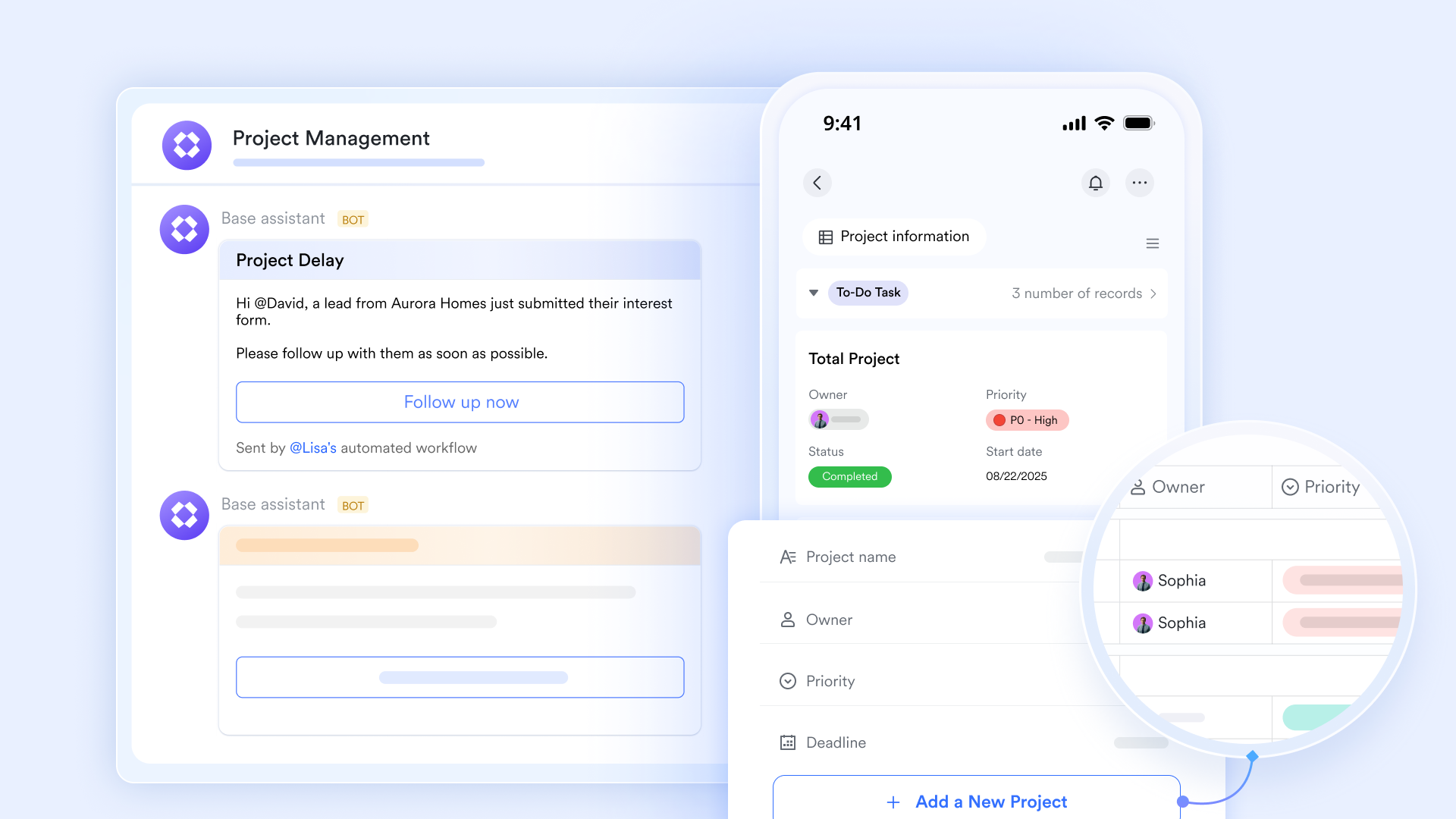
Scalable and unified platform for enterprise operations
empowers AI-driven text generation and automation directly within its workflows. Leveraging 's AI features, users can optimize, summarize, or generate content from Lark Base data or previous steps, feeding intelligent text into subsequent actions. Configuration is simple: in Workflow, set a trigger, choose "AI-generated text" as an action node, configure instructions (Lark AI or OpenClaw), then save and activate to integrate powerful AI text generation into your automated processes.
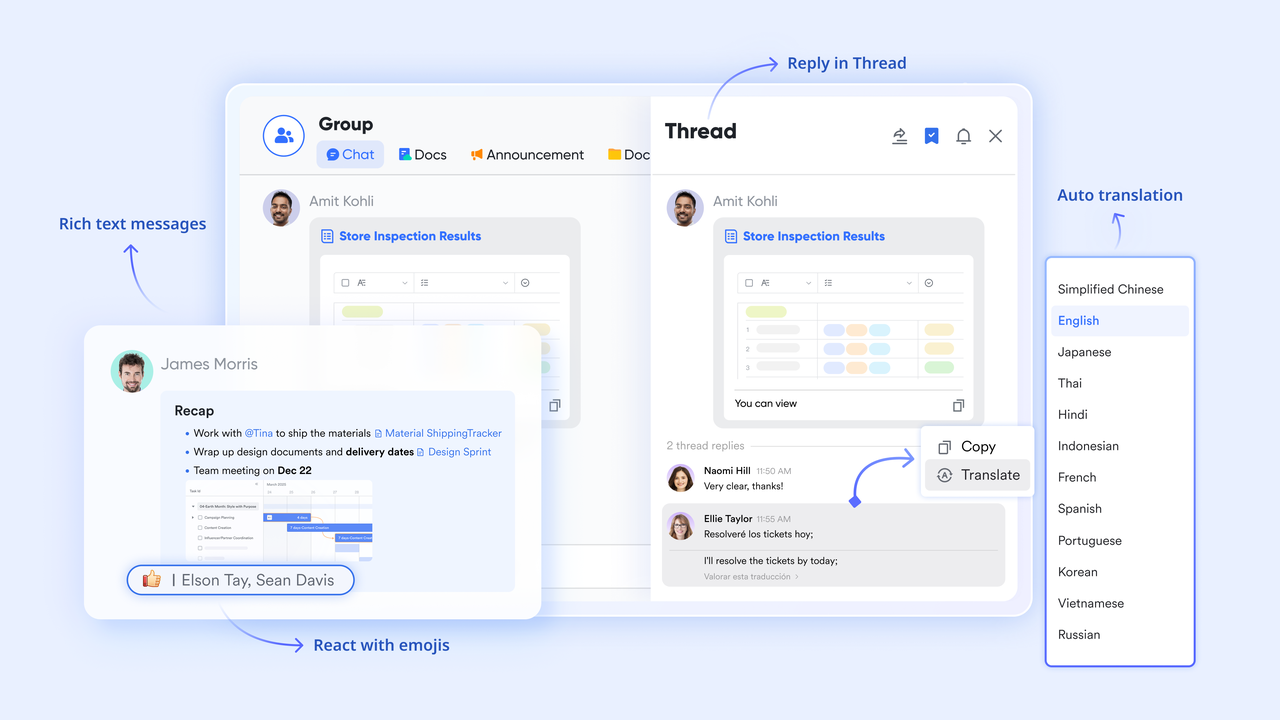
By choosing Lark, you're not just getting a bot; you're leveraging a unified, intuitive, and highly capable platform where your enterprise bots can deliver maximum strategic value, transforming complex operations into streamlined, intelligent workflows that drive real business outcomes.
:
- Starter plan: that includes 11 powerful tools for up to 20 users. It also comes with 100GB of storage space, 1000 automation runs, AI translations, and more. No credit card needed.
- Basic plan: (billed annually) for up to 500 users. It includes everything in Starter and unlimited message history, 5TB of storage space, 1,000 automation runs, and more. Some users may need to to purchase this plan.
- Pro plan: (billed annually) for up to 500 users. It includes everything in Basic plus group calling for up to 500 attendees, 15TB of storage space, 50,000 automation runs, and more.
- Enterprise plan: for custom pricing. Supports unlimited users and includes even more automation runs and advanced security, compliance, and management features.
For small teams with simple communication needs

18 months message history
1000 Base automation runs/month
2000 rows per table in Base
Most POPULAR
For companies with comprehensive collaboration and management needs
Unlimited message history
500-participant video meetings
50k Base automation runs/month
20k rows per table in Base
For large companies with advanced security and organizational management needs
Get a personalized demo and pricing
Unlimited message history
500-participant video meetings
15 TB storage + 30 GB storage/user
500k Base automation runs/month
50k Base automation runs/month
Most POPULAR
For companies with comprehensive collaboration and management needs
Unlimited message history
500-participant video meetings
50k Base automation runs/month
20k rows per table in Base
How the enterprise bot manager role is changing operations
The shift toward automated workplaces has created a new, vital role: the enterprise bot manager. Rather than writing code or configuring servers, these professionals act as the bridge between human workflows and AI logic. Their primary responsibilities involve training models on company guidelines, monitoring to catch administrative bottlenecks, and ensuring LLM accuracy by continually refining prompts and correcting misinterpretations. This pivotal role ensures that AI tools not only function efficiently but also align seamlessly with organizational goals, driving continuous improvement and operational intelligence.
A major challenge for organizations is the high training overhead usually associated with onboarding these administrators. Many legacy systems require bot managers to learn separate, highly technical interfaces that feel completely disconnected from daily operations. To reduce this learning curve, platforms must enable administrators to control bot behavior using visual, no code interfaces. When a manager can adjust bot logic, such as mapping a chat response to a database field or dragging and dropping a new step into an approval chain, directly within their primary workspace, they become productive in days instead of months. This approach shifts the focus from managing software complexity to actually improving business operations by uniting all essential functions within a single, coherent environment.
Conclusion
Deploying an enterprise bot successfully requires more than just buying smart AI; it requires connecting that AI directly to your central work hub. When you break down data silos and build automated workflows inside the platform where your team already collaborates, you reduce manual effort and protect corporate data. The future of productivity belongs to companies that unite their tools. If you are ready to bring messaging, documents, databases, and automation into a single secure workspace, explore today.
Turn enterprise bot into execution using Lark
FAQs
Who is the CEO of Enterprise bot?
Pranay Jain is the CEO and cofounder of Enterprise Bot.
What is an enterprise bot?
An enterprise bot is an advanced AI assistant designed for complex business operations. Unlike simple, rule-based website widgets, an enterprise bot securely connects to internal databases, executes multi-step workflows, and uses generative AI to provide accurate, context-aware answers for both employees and customers.
Is using bots illegal?
No, using automated bots for business operations is completely legal. However, companies must ensure their AI systems comply with regional data privacy laws (such as GDPR or HIPAA) and maintain strict access controls. Deploying secure, enterprise-grade solutions ensures your automated workflows handle sensitive information legally and responsibly.
What is an example of Enterprise AI?
A practical example of Enterprise AI is an automated internal helpdesk. If an employee needs a new laptop, they can simply type their request into their primary chat app. The AI understands the request, pulls the employee's department data, creates a ticket in a structured database, and sends a direct message to the IT manager for approval—all without forcing anyone to log into a separate portal.
What is the pricing structure for high-volume support tasks?
Pricing models vary depending on the provider, but many unified productivity suites offer transparent, tiered plans based on user count and usage. For example, Lark offers a Starter plan that is free forever for up to 20 users and includes 1,000 automation runs. For larger teams, the Pro plan costs $12 per user per month (billed annually) and includes 50,000 automation runs, while custom Enterprise plans are available for massive organizational volumes.
How do you connect an enterprise bot to existing communication platforms?
Rather than wrestling with custom APIs and middleware to link entirely separate software vendors, the most effective method is utilizing a unified workspace. By choosing a platform where messaging, databases, and automation tools are built into the same foundation, the bot is naturally embedded into your daily chat. This removes the need for complex third-party bridges and ensures a reliable flow of information.
How does a bot ensure data privacy and enterprise-grade security?
A secure bot infrastructure protects corporate information by enforcing strict access controls, meaning the bot will only retrieve and display data that the specific requesting user has permission to see. Additionally, business-grade solutions employ encrypted connections, comprehensive audit logs, and strict privacy policies to ensure your internal data remains within your corporate perimeter and is never used to train public models.
Related Reading






























