














Discover The Best Free Gantt Chart Tools Online with Lark

Ryan Tanner
Product Marketing Specialist
Sep 18, 2026
Ryan Tanner
Sep 18, 2026

30 min read


Whether you're managing a marketing campaign, overseeing a construction project, or planning software development timelines, using a Gantt chart tool can transform how you organize work. These tools provide a clear visual timeline that maps out tasks, dependencies, and milestones, helping teams stay on schedule and aligned.
With drag-and-drop scheduling and real-time updates, a Gantt chart tool makes project tracking simple and transparent. From popular options like Lark, TeamGantt, Asana, and ClickUp, modern solutions make it easier than ever to plan, monitor, and deliver projects efficiently, no matter the size or industry. Here are the top 11 Gantt chart tools to streamline your project planning:
1. Lark: All-in-one Gantt chart collaboration
2. TeamGantt: Beginner-friendly project planning tool
3. Trello: Simple Gantt power-up
4. Asana: Timeline view for project tracking
5. OpenProject: Open-source Gantt chart solution
6. Jira: Agile-friendly Gantt planning
7. ClickUp: Flexible workflows with Gantt charts
8. Wrike: Enterprise-ready Gantt chart features
9. ProjectManager: Construction-specific templates and scheduling
10. Monday: Customizable boards and timelines
11. Zoho Projects: Budget-friendly Gantt charts

History and evolution of Gantt charts
The Gantt chart was first developed by Henry L. Gantt in the early 1900s as a simple bar chart used to plan and track industrial production schedules. Originally drawn by hand on paper, these charts helped visualize project progress and identify delays, an innovation far ahead of its time. As technology advanced, Gantt charts transitioned to spreadsheets and desktop software like Microsoft Project, allowing easier edits and calculations. Today, evolution continues with online Gantt chart tools, offering real-time collaboration, automation, and cloud accessibility.
Teams can now co-edit timelines, manage dependencies, and communicate seamlessly, all within a single digital workspace. Modern Gantt tools like Lark, ClickUp, and TeamGantt have turned this classic scheduling method into an intelligent, interactive project management powerhouse.
Why Gantt chart tools are essential for project management
In modern project management, clarity and coordination are everything. A Gantt chart tool gives teams a unified view of timelines, responsibilities, and progress—helping them stay aligned and proactive. Whether managing small tasks or complex workflows, these tools ensure every milestone is clear and achievable.
- Visualizing timelines and dependencies: A Gantt chart tool transforms your project into a visual roadmap. It displays all tasks, start and end dates, and how each task connects to others. By mapping dependencies, teams can quickly identify potential bottlenecks and adjust schedules before issues arise. This makes project timelines easier to understand and manage, even for large, multi-phase initiatives.
- Improving accountability and transparency: When every team member can see what needs to be done and by when, accountability naturally increases. Gantt charts make responsibilities visible, allowing managers to track progress in real time. Team members understand their role in the bigger picture, which fosters ownership and collaboration. Transparency across the project also helps reduce miscommunication and ensures better decision-making.
- Handling deadlines and milestones: Deadlines and milestones are at the heart of effective project planning. Gantt chart tools allow you to set, monitor, and adjust these critical points easily. Automated reminders and progress indicators ensure teams stay on track without last-minute surprises. By clearly visualizing key delivery stages, managers can celebrate progress, anticipate risks, and keep stakeholders informed at every step.
What to look for in an online Gantt chart tool
Choosing the right online Gantt chart tool can greatly improve how your team plans, tracks, and collaborates on projects. A strong tool should be easy to use, visually clear, and built to adapt as your projects and teams grow. The following features are essential to ensure smooth scheduling, effective communication, and reliable project execution.
- Drag-and-drop scheduling: This feature allows you to easily adjust task durations, start dates, and deadlines without complex setup. Instead of manually editing data, you can simply drag tasks to update timelines instantly. It's especially useful when priorities shift or projects face delays. A seamless drag-and-drop interface helps maintain real-time accuracy and keeps scheduling flexible.
- Dependencies and milestones: Dependencies link related tasks so one automatically begins when another finishes, ensuring logical project flow. Milestones, on the other hand, mark critical checkpoints or goals along the timeline. Together, they help teams visualize progress, anticipate bottlenecks, and manage complex workflows efficiently. These features also improve forecasting and coordination across departments.
- Collaboration and communication features: Modern Gantt chart tools combine chat, comments, and file-sharing capabilities directly into the platform. This allows teams to communicate and make updates without switching between multiple apps. Real-time collaboration ensures everyone stays aligned, reduces misunderstandings, and keeps feedback organized within the context of the project timeline.
- Free vs paid functionality: Most Gantt chart tools offer free plans that include basic scheduling and tracking features. Paid plans typically unlock advanced capabilities like automation, detailed reporting, and integration with CRM or analytics tools. It's wise to start with a free version to test usability and fit before investing in a premium plan that scales with your needs.
- Scalability for teams of different sizes: A reliable Gantt chart tool should support your growth as projects expand and teams evolve. Look for software that allows multiple users, customizable roles, and unlimited projects. Collaborations with other productivity or management tools also boost scalability. Choosing a flexible, scalable solution ensures long-term efficiency and consistent performance as your organization grows.
Comparison table of online Gantt chart software
Best online Gantt chart tools you should explore
1. Lark: All-in-one collaboration platform featuring Gantt charts
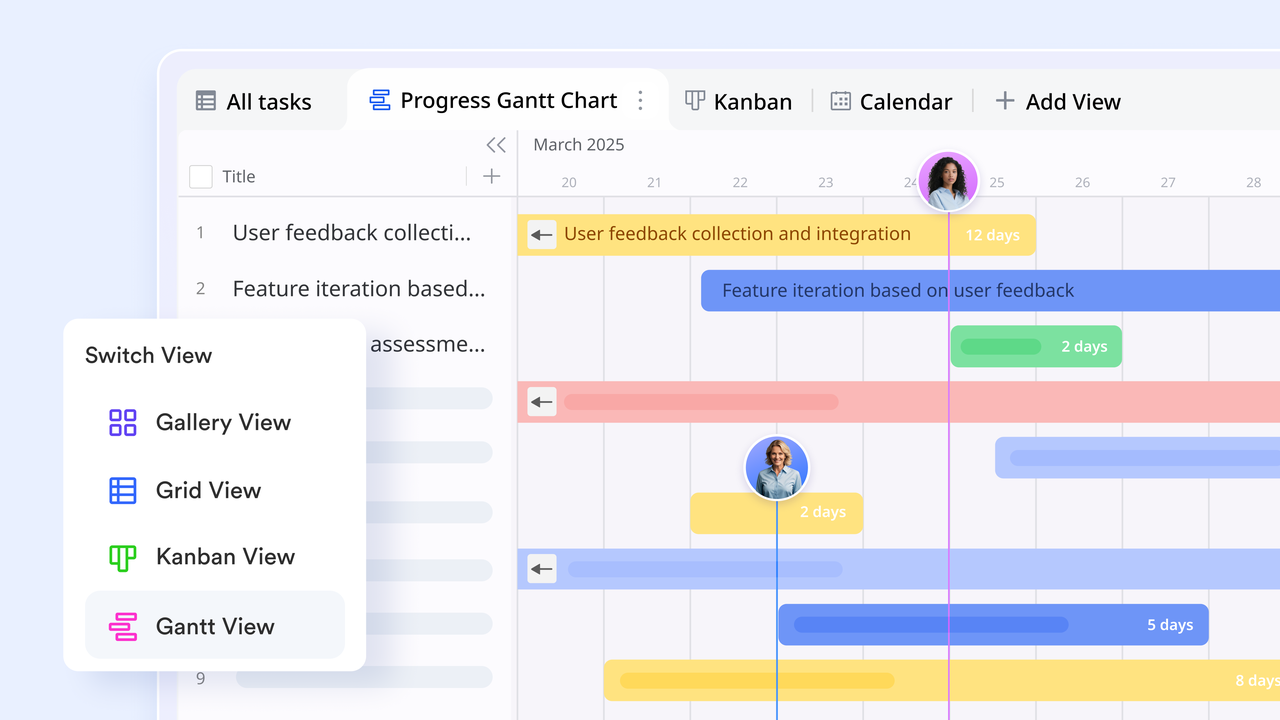
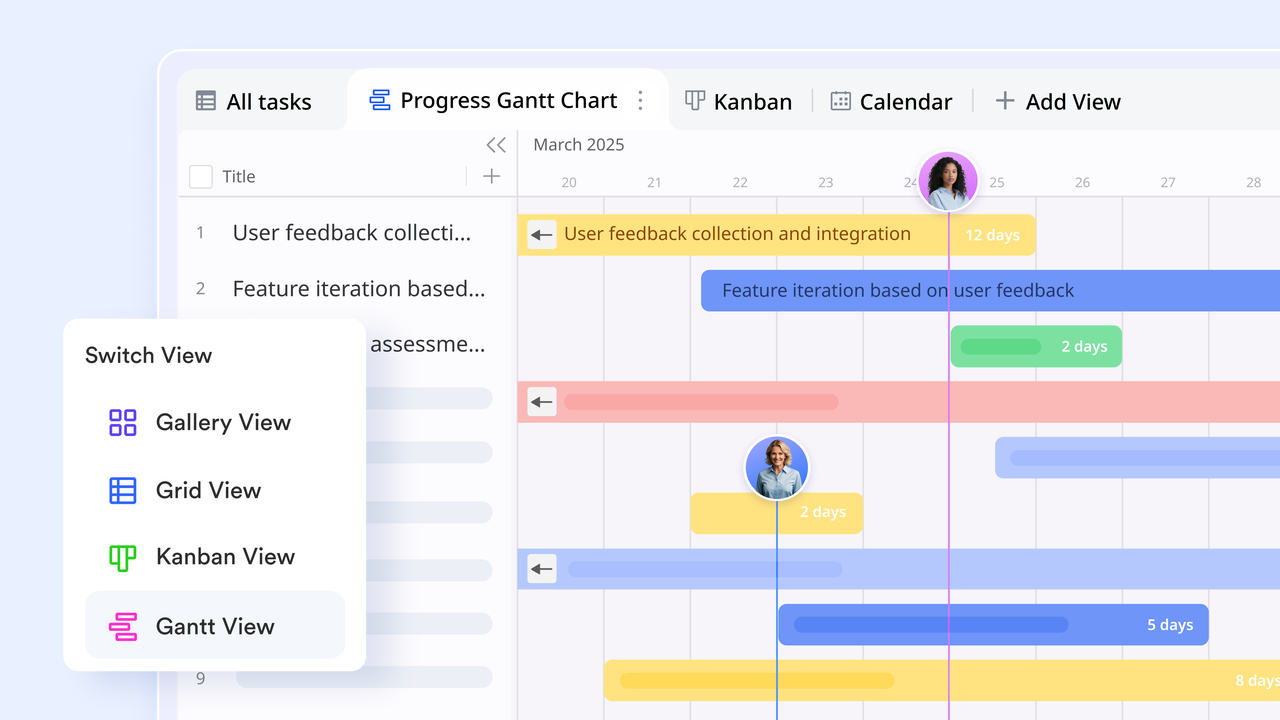
Lark is a next-generation all-in-one Gantt chart collaboration tool that connects planning, communication, and execution within a single workspace. It unifies tasks, documents, messages, meetings, and automation, giving teams one source of truth. Its Native Gantt in Lark Base transforms traditional project tracking into a real-time, interactive experience. Updates appear instantly across multiple views—grid, kanban, calendar, and Gantt keeping everyone on the same page. Whether managing marketing campaigns, product roadmaps, or engineering projects, Lark helps teams stay aligned, agile, and efficient.
Native Gantt chart in Lark Base:
Lark Base delivers a fully collaborative Gantt chart experience, no add-ons or complex setups required. Tasks are rendered directly from structured fields, allowing teams to toggle dependencies, collapse phases, and visualize progress clearly. Unlike Excel, where adjustments are manual, Lark's Gantt updates automatically when task data changes. The same dataset powers all views—Gantt, calendar, grid, and kanban, so every team member sees consistent, live information. This unified data model makes planning and tracking effortless across the entire organization.
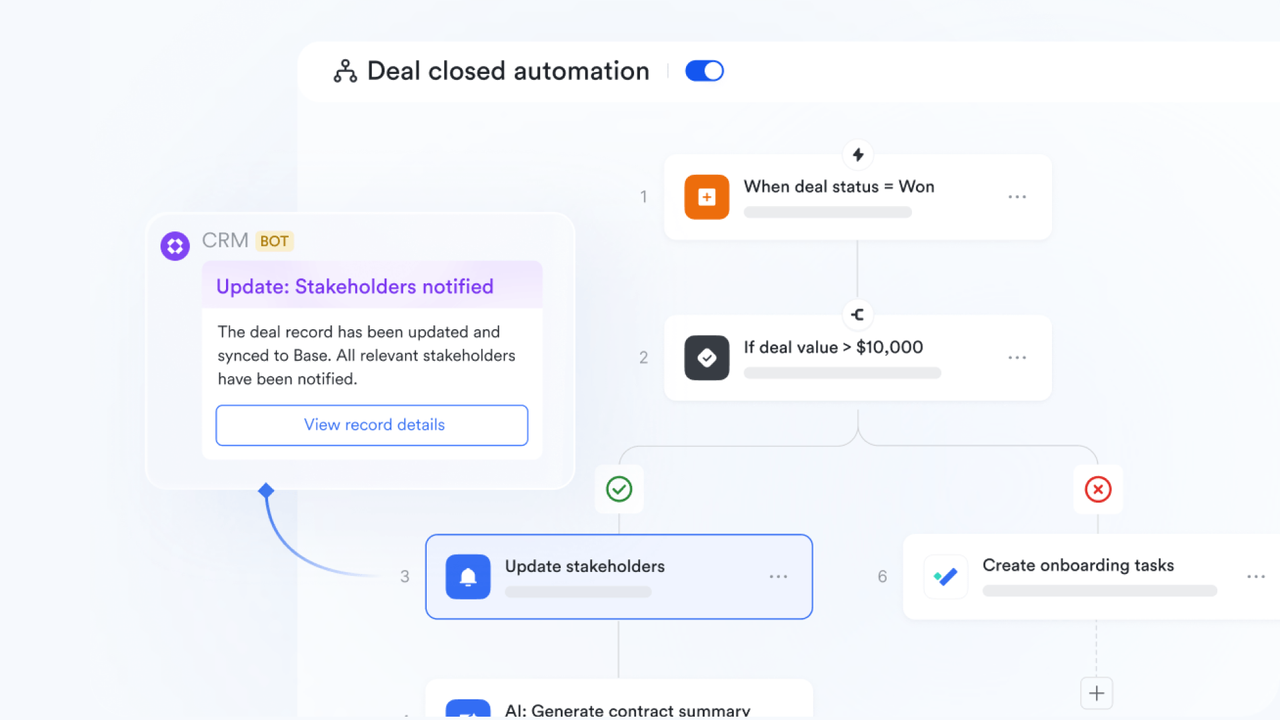
Automation from intake to reporting:
Automation lies at the heart of Lark Base's Gantt workflow. Teams can use Forms to collect project requests, which are instantly converted into tasks on the Gantt chart. Approvals, scope updates, and date changes route automatically for review, reducing manual follow-ups. Lark Messenger and Mail deliver real-time updates to task owners, keeping everyone informed. These automations eliminate repetitive work and ensure project schedules remain accurate. With governance built into the flow, teams maintain precision from project intake to final reporting.
Real-time collaboration with context:
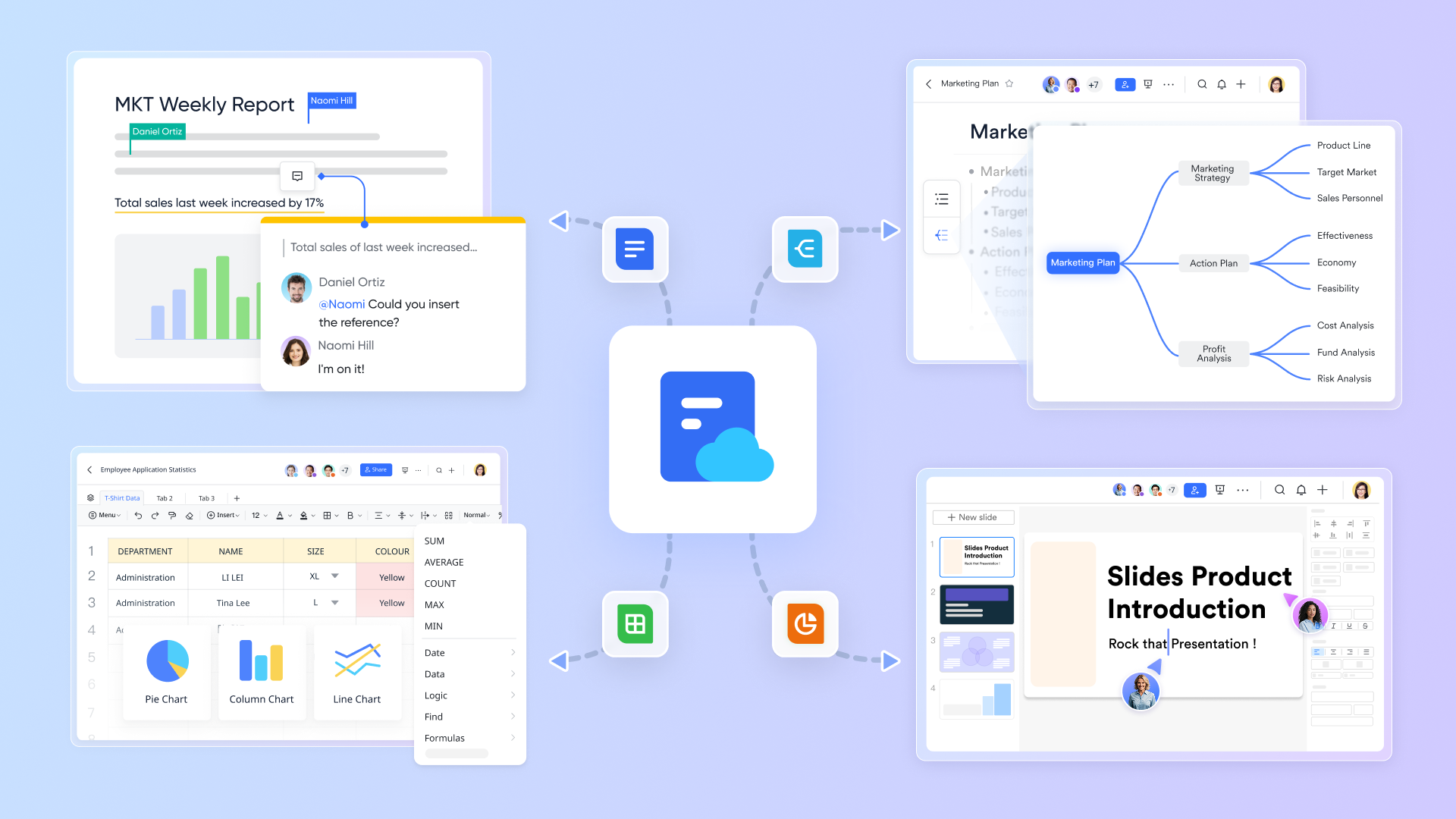
Lark enables true real-time co-editing on Gantt timelines, allowing multiple contributors to adjust dates, statuses, and owners simultaneously. Field-level permissions protect sensitive data, ensuring each user sees what's relevant to them. Conversations and @mentions remain anchored to each task, providing immediate communication context. Teams can embed live Gantt charts into Lark Docs and reference key details in the Lark Wiki, keeping visuals and documentation synchronized. This connected environment replaces scattered updates with organized, contextual collaboration.
Calendars, meetings, and synced notes:
Every Gantt chart in Lark syncs seamlessly with Lark Calendar, turning timelines into reminders and team availability signals. During meetings, project schedules can be reviewed in real time while AI Meeting Notes capture decisions and feed them back into Base automatically. This loop ensures no decision is lost across chat logs or files. All discussions, notes, and updates remain linked to project timelines, giving teams a transparent history of what was decided and when—without switching between apps.
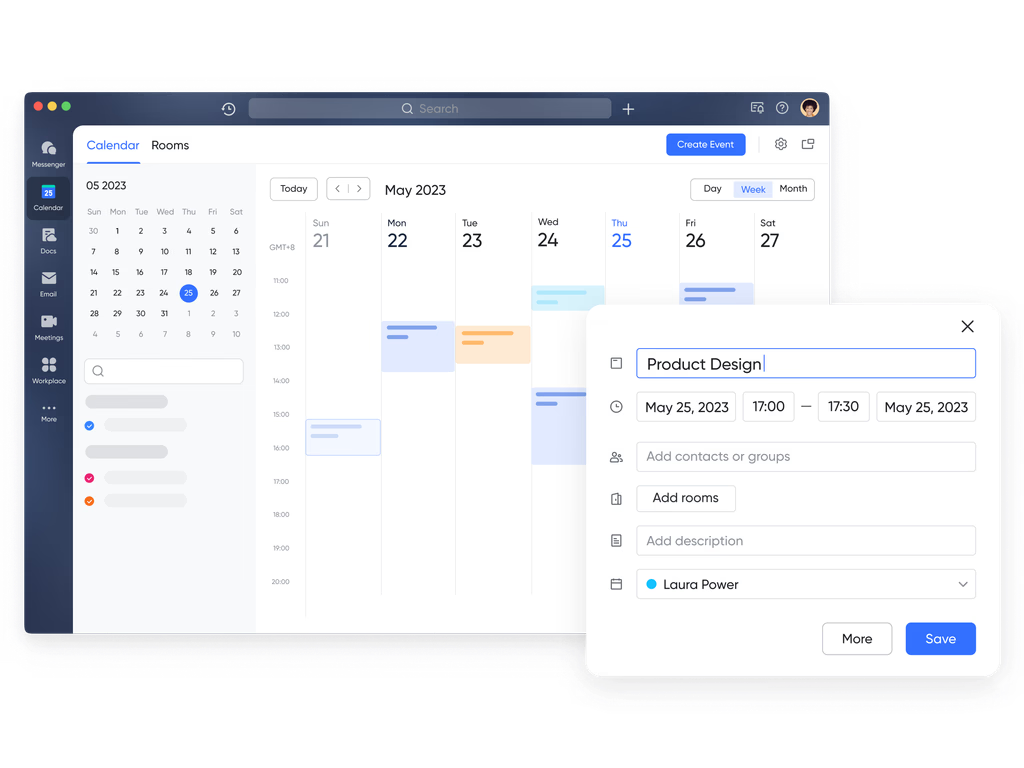
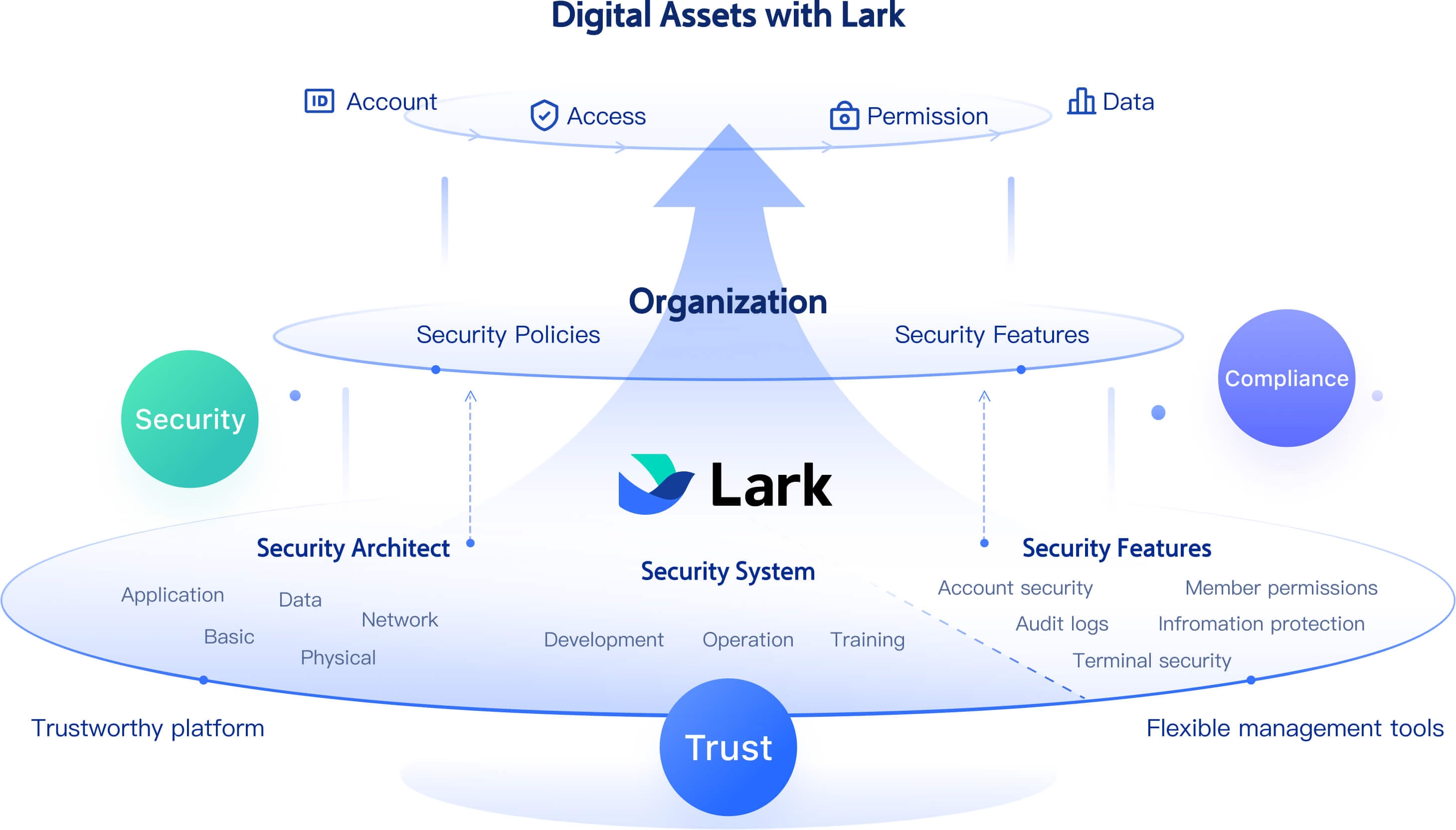
Security, sharing, and traceability: Lark prioritises enterprise-level security and transparency. Managers can share Gantt views externally without exposing sensitive internal data, maintaining control over who sees what. Every change is recorded through audit trails, providing full traceability of edits and updates. Unlike emailed spreadsheets that fragment version history, Lark's Gantt remains a live, secure view of the project. This ensures accountability, data integrity, and confidence for all stakeholders working on the same real-time information.
Multiple built-in Gantt chart templates: Getting started with Lark Base is effortless thanks to a library of ready-to-use Gantt chart templates. These templates simplify setup and help teams start tracking projects instantly.
- Project roadmap Gantt chart template: Ideal for project managers and team leads. This template provides a time-based overview of tasks, owners, and deliverables. Use it to align cross-functional teams on goals, timelines, and key milestones. Perfect for product roadmaps, campaign launches, and multi-department initiatives.
- R&D personnel Gantt chart template: Designed for engineering and research teams, this template helps coordinate experiments, sprints, and lab projects. It visualises workloads, priorities, and dependencies, allowing managers to balance resources and identify gaps early.
- Employee task tracker template: A flexible, all-purpose Gantt chart designed for HR managers, supervisors, and project coordinators. It provides both a big-picture timeline and granular task-level views, helping teams manage day-to-day operations alongside long-term goals.
Each template supports custom fields, filters, and grouped views, allowing users to pivot between Gantt, kanban, and grid modes without rebuilding setups. This adaptability makes Lark a universal tool for structured planning, execution, and tracking across industries.
Pros:
- Fully native Gantt chart—no plug-ins or external integrations needed.
- Seamless synchronization between Base, Docs, Calendar, Mail, and Messenger.
- Built-in automation that eliminates manual updates and improves consistency.
- Strong security and permissions ensure safe sharing and traceability.
- Real-time co-editing and collaboration enhance visibility and reduce delays.
Cons:
- Users new to Lark may need time to learn advanced features fully.
- Starter plan: Free forever plan that includes 11 powerful tools for up to 20 users. It also comes with 100GB of storage, 1000 automation runs, AI translations, and more.
- Pro plan: $12/user/month (billed annually) for up to 500 users. It includes everything in Starter plus group calling for up to 500 attendees, 15TB of storage, 50,000 automation runs, and more.
- Enterprise plan: Contact sales for custom pricing. Supports unlimited users and includes even more automation runs and advanced security, compliance, and management features.
2. TeamGantt: Beginner-friendly project planning tool
TeamGantt is designed for teams and individuals who want a simple yet effective way to plan and manage projects visually. It focuses on an intuitive, drag-and-drop Gantt interface that makes task scheduling and tracking effortless. Whether you're organizing marketing campaigns, product launches, or client projects, TeamGantt's clean layout helps you see progress at a glance. It's especially suited for beginners or small teams who want project visibility without technical complexity.
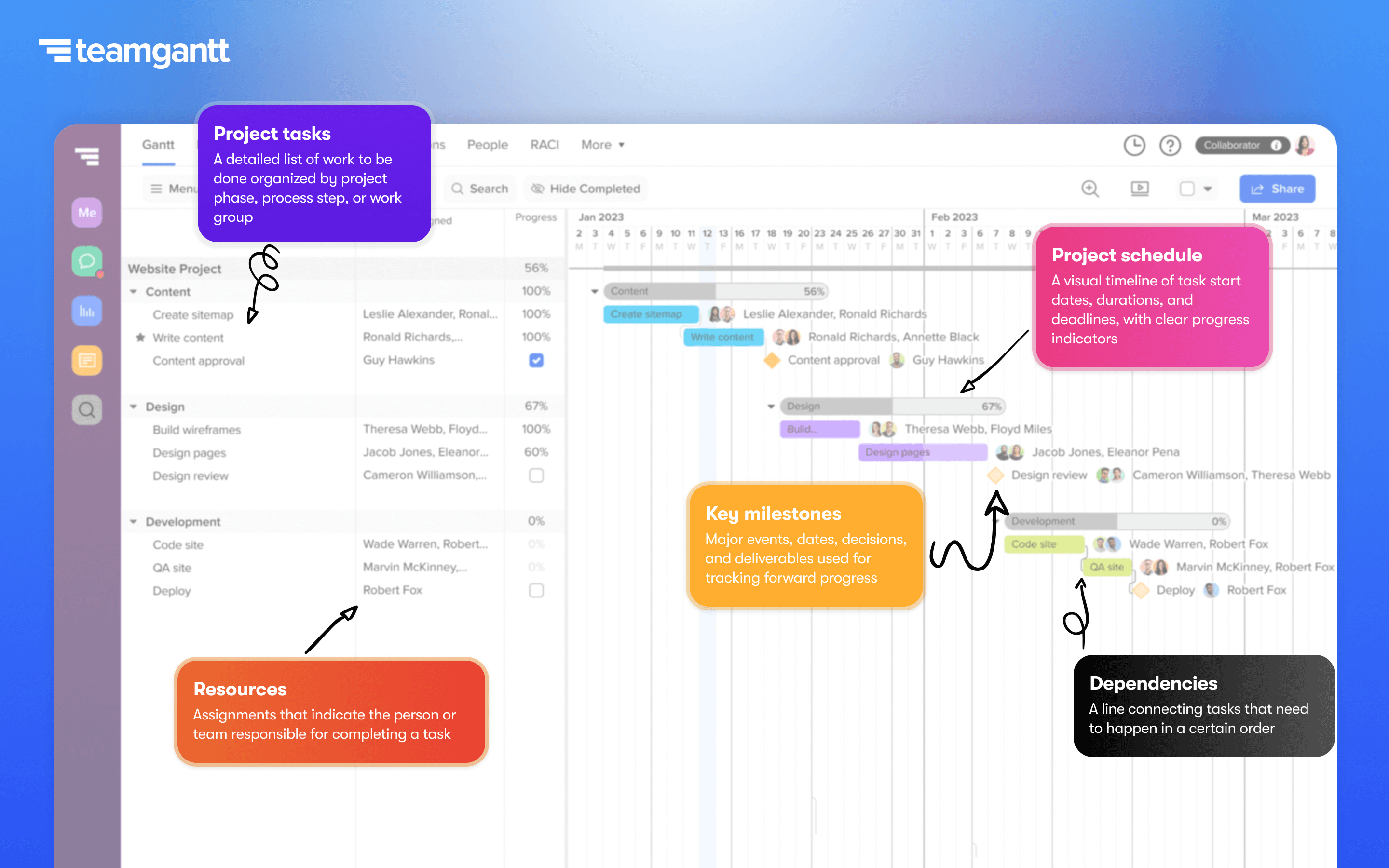
Image source: teamgantt.com
Features:
- Drag-and-drop Gantt chart editing: Easily move tasks, extend durations, and adjust schedules with a simple interface.
- Milestone tracking and baselines: Set key milestones and compare planned timelines with actual progress.
- Resource and workload views: Monitor team capacity to prevent overwork and balance assignments efficiently.
- Multiple view modes: Switch between Gantt, list, board, or calendar views to match your workflow.
- Collaboration and file sharing: Add comments, upload files, and communicate directly within project tasks.
Pros:
- Intuitive and user-friendly interface with minimal learning curve.
- Combines simplicity with essential project management features.
- Clear visual display of dependencies, progress, and milestones.
- Allows external collaborators to view or contribute with flexible permissions.
Cons:
- Limited reporting and analytics features compared to advanced project management tools.
- Pricing can become expensive for larger teams or multiple project managers.
Pricing:
- Free plan: Includes 1 project manager, a single active project, and basic task management features.
- Pro plan: Starts at $49 per month per manager, offering up to 20 projects, unlimited tasks, and advanced views.
- Enterprise plan: Custom pricing with unlimited projects, enhanced security, and dedicated support.
3. Trello: Simple Gantt power-up
Trello is one of the most popular project management tools known for its visual Kanban-style boards, but with its Gantt Power-Up (Timeline view), it can easily transform into a simple and effective online Gantt chart tool. This feature lets teams visualize project timelines, deadlines, and dependencies while maintaining Trello's signature ease of use. Ideal for small teams, freelancers, or marketing projects, Trello offers flexibility and simplicity without overwhelming users with complex configurations.
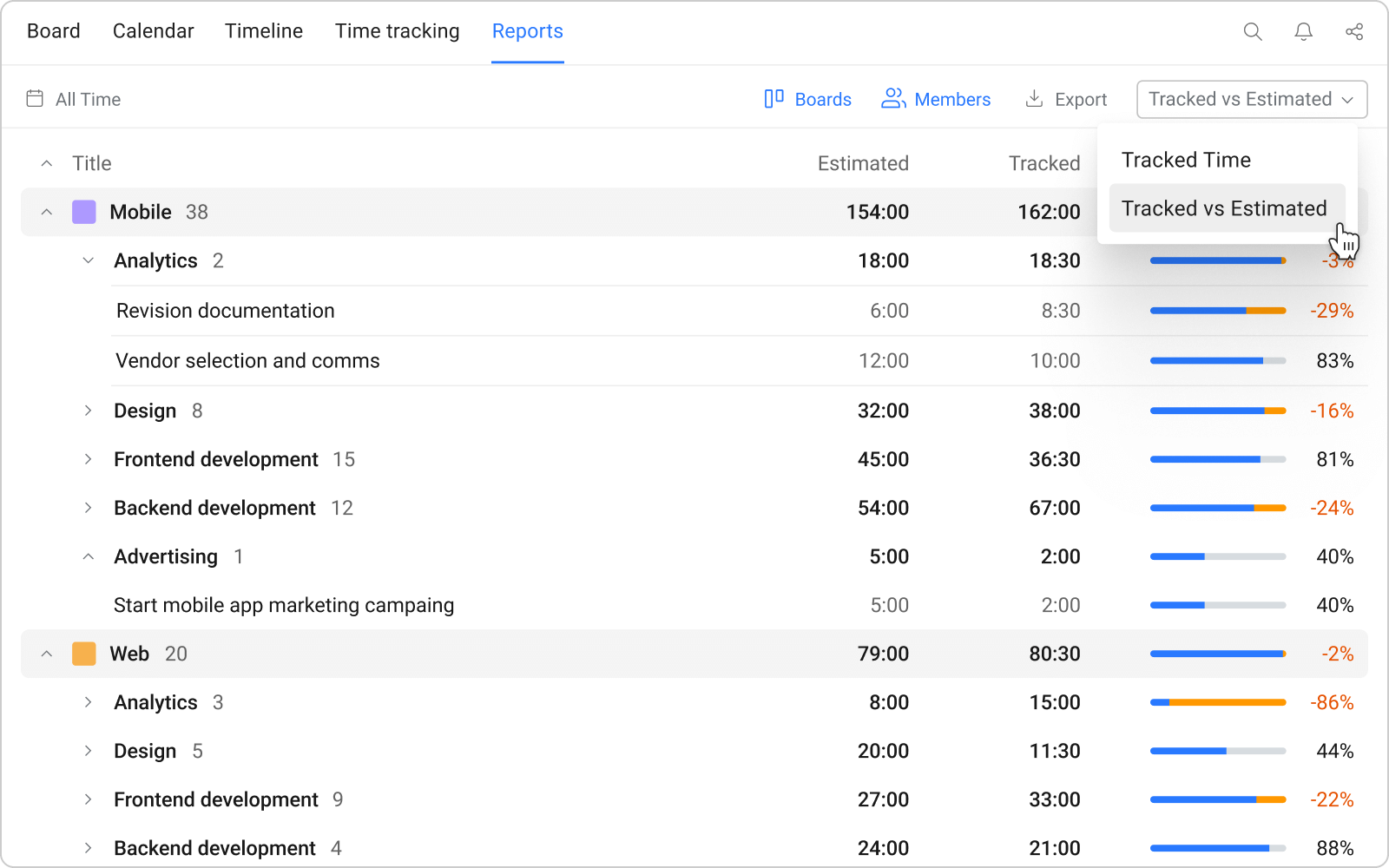
Image source: trello.com
Features:
- Timeline (Gantt) view: Visualize all tasks and cards along a clear timeline to manage deadlines effectively.
- Task cards and checklists: Break down larger projects into actionable items and monitor progress.
- Integrations and power-ups: Connect with tools like Slack, Google Drive, and Calendar for better workflow.
- Collaboration tools: Add comments, tag teammates, and share files directly within each card.
- Automation with Butler: Use Trello's built-in automation to trigger due-date reminders or task movements.
Pros:
- Extremely simple to use, making it great for teams new to project management.
- Flexible board structure suitable for a wide variety of workflows.
- Integration-friendly with many popular productivity tools.
- Affordable and scalable, with a functional free plan for small teams.
Cons:
- The Gantt Power-Up (Timeline view) is only available in paid plans.
- Lacks native advanced reporting and resource management capabilities.
Pricing
- Free plan: Includes unlimited cards, up to 10 boards per workspace, and basic task tracking.
- Standard plan: Starts at $5 per user/month, adding unlimited boards and advanced checklists.
- Premium plan: From $10 per user/month, includes Timeline (Gantt), Calendar, Dashboard, and Map views.
- Enterprise plan: Custom pricing for large organizations with enhanced admin and security features.
4. Asana: Timeline view for project tracking
Asana is one of the most widely used project management platforms, and its Timeline view functions as a dynamic Gantt chart tool that helps teams plan, track, and manage projects visually. Perfect for marketing, product development, and creative teams, Asana turns complex task lists into structured timelines. Its intuitive interface and powerful integrations make it a favorite among organizations looking for transparency, accountability, and coordination across departments.
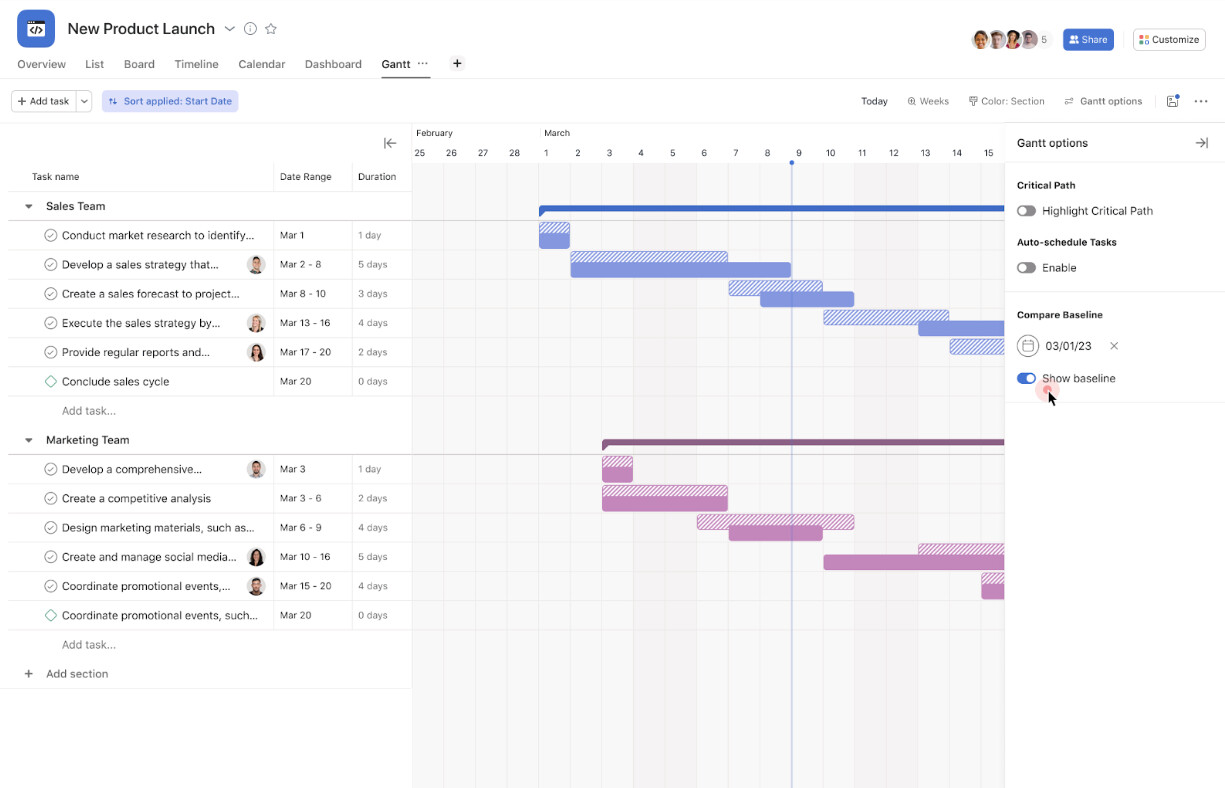
Image source: asana.com
Features:
- Timeline (Gantt) view: Offers a visual overview of all project tasks, dependencies, and deadlines.
- Task management and subtasks: Break large objectives into smaller, trackable steps with assigned owners.
- Workflow automation: Create automated rules for due-date reminders, approvals, or status updates.
- Integrations and apps: Connects seamlessly with Slack, Google Drive, Jira, and Microsoft Teams.
- Portfolio and workload view: Monitor multiple projects, assess workloads, and track resource utilization.
Pros:
- Highly intuitive interface with minimal setup required.
- Excellent for cross-functional collaboration and communication.
- Supports multiple project views (list, board, calendar, and timeline).
- Integrates with hundreds of productivity and communication apps.
Cons:
- Some advanced features like workload tracking and portfolios are only available in higher-tier plans.
- Can become expensive for large organizations with many users.
Pricing:
- Free plan: Supports unlimited tasks and projects for up to 15 team members.
- Premium plan: Starts at $10.99 per user/month, unlocking the Timeline view, automation, and advanced search.
- Business plan: At $24.99 per user/month, adds portfolio management, workload tracking, and integrations with advanced apps.
- Enterprise plan: Custom pricing with enhanced security, compliance, and dedicated support.
5. OpenProject: Open-source Gantt chart solution
OpenProject is a powerful open-source Gantt chart tool designed for teams that prioritize transparency, security, and flexibility. It's ideal for organizations that prefer hosting their own project management system or need strong compliance controls—such as government agencies, research institutions, and software development teams. With its robust scheduling, collaboration, and documentation features, OpenProject enables teams to plan, visualize, and track every project stage with complete ownership of their data.
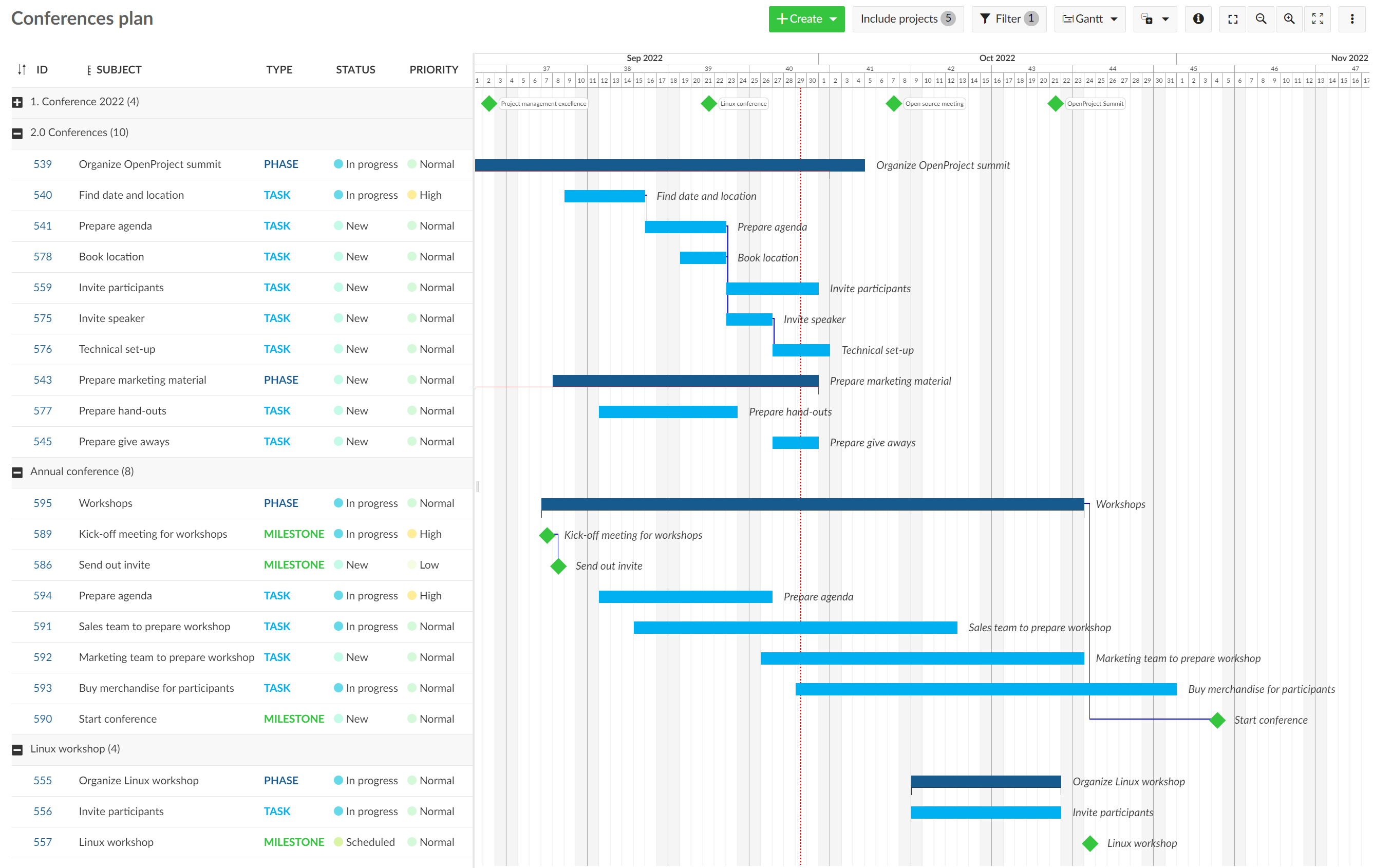
Image source: openproject.com
Features:
- Advanced Gantt chart planning: Create, modify, and visualize project timelines and dependencies effortlessly.
- Milestones and critical path tracking: Identify crucial tasks and monitor deadlines to stay on schedule.
- Integrated wiki and documentation: Store requirements, project notes, and technical documents in one place.
- Agile boards and roadmaps: Combine traditional Gantt charts with agile sprints and product planning.
- On-premise or cloud hosting: Choose between hosting on your own servers or using OpenProject's secure cloud service.
Pros:
- Fully open-source and highly customizable for unique business needs.
- Strong security and data privacy options through on-premise deployment.
- Comprehensive project planning with support for both agile and traditional methodologies.
- Ideal for technical and enterprise-level teams that require deep control over data and workflows.
Cons:
- Interface may feel complex for beginners unfamiliar with advanced project management tools.
- Requires technical setup and maintenance for on-premise hosting.
Pricing:
- Community edition (Free): Open-source version with all essential Gantt, task, and documentation features.
- Cloud edition: Starts at $7.25 per user/month, including hosting, maintenance, and regular updates.
- Enterprise on-premise: Custom pricing with premium features, advanced authentication, and dedicated support.
6. Jira: Agile-friendly Gantt planning
Jira, developed by Atlassian, is one of the most trusted project management tools for software and agile teams worldwide. While it's known for sprint and issue tracking, Jira also supports Gantt chart planning through built-in features like Advanced Roadmaps or third-party plugins such as BigPicture. These tools make Jira an excellent choice for teams that want to combine agile flexibility with visual project scheduling. It's ideal for managing complex product releases, sprint cycles, and multi-team dependencies all in one unified platform.
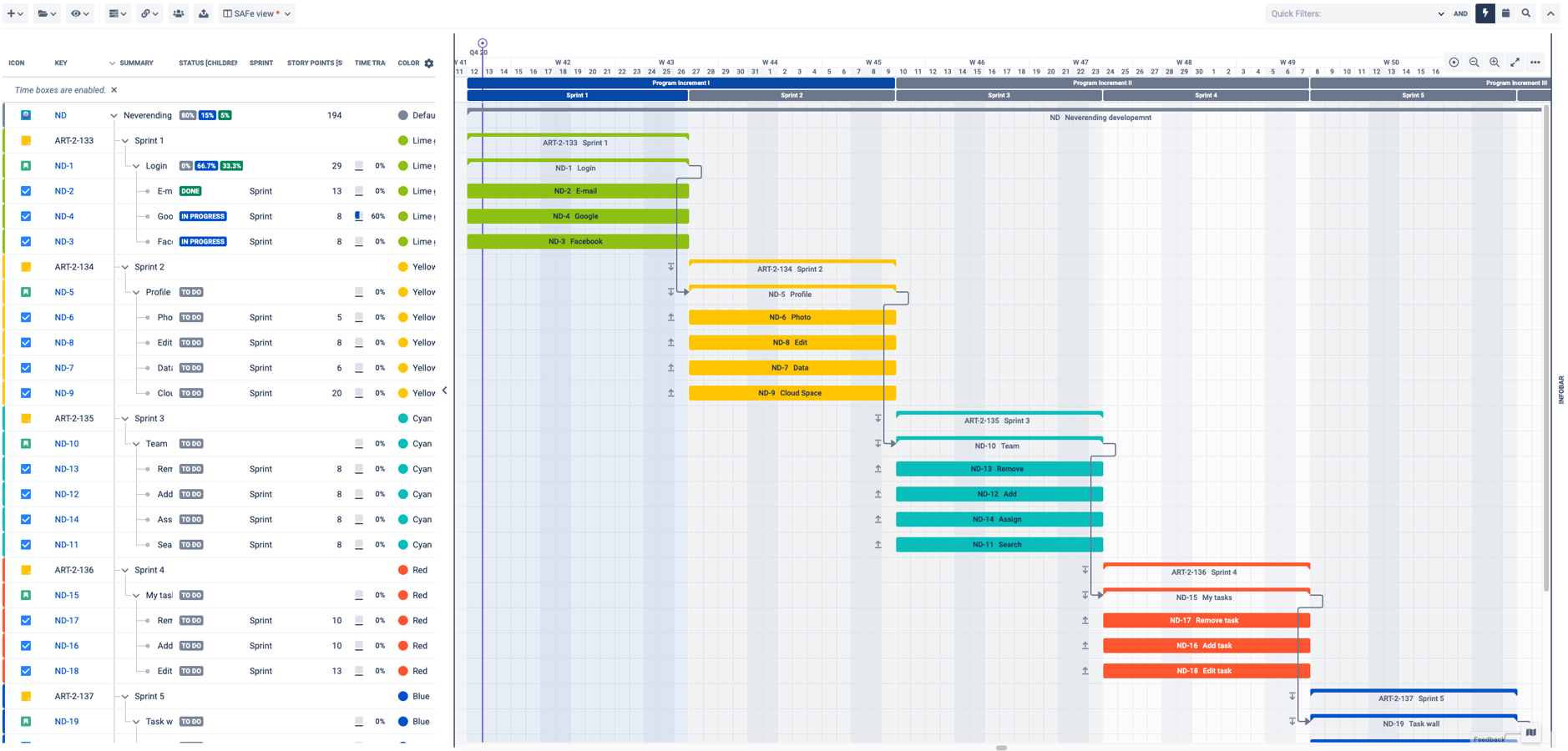
Image source: jira.com
Features:
- Advanced roadmaps and Gantt views: Visualize project timelines, dependencies, and milestones across teams.
- Agile sprint and backlog management: Plan, prioritize, and track tasks using scrum or kanban boards.
- Dependency tracking and forecasting: Identify potential bottlenecks and predict project completion based on progress.
- Integration with development tools: Connect with Bitbucket, GitHub, and Confluence for seamless dev workflows.
- Customizable dashboards and reporting: Create detailed progress reports, burndown charts, and release tracking views.
Pros:
- Perfect for agile teams managing multiple projects or releases.
- Offers deep integration with developer and CI/CD tools.
- Supports both agile and hybrid Gantt-based project planning.
- Highly customizable with thousands of plugins and add-ons.
Cons:
- Can feel complex for non-technical teams due to its advanced configuration options.
- Gantt chart functionality often requires paid add-ons or higher-tier subscriptions.
Pricing:
- Free plan: For up to 10 users with essential scrum, kanban, and reporting features.
- Standard plan: Starts at $8.15 per user/month, includes advanced permissions and reporting.
- Premium plan: At $16 per user/month, adds Advanced Roadmaps (Gantt charts), automation, and admin controls.
- Enterprise plan: Custom pricing for large organizations with global-scale support and compliance options.
7. ClickUp: Flexible workflows with Gantt charts
ClickUp is one of the most versatile project management and Gantt chart tools available today, designed to adapt to any workflow—from marketing and operations to engineering and design. It offers multiple project views, including Gantt, list, board, and calendar formats, allowing teams to visualize work in the way that suits them best. With automation, time tracking, and strong integration capabilities, ClickUp helps teams streamline processes while maintaining complete visibility over timelines and dependencies.
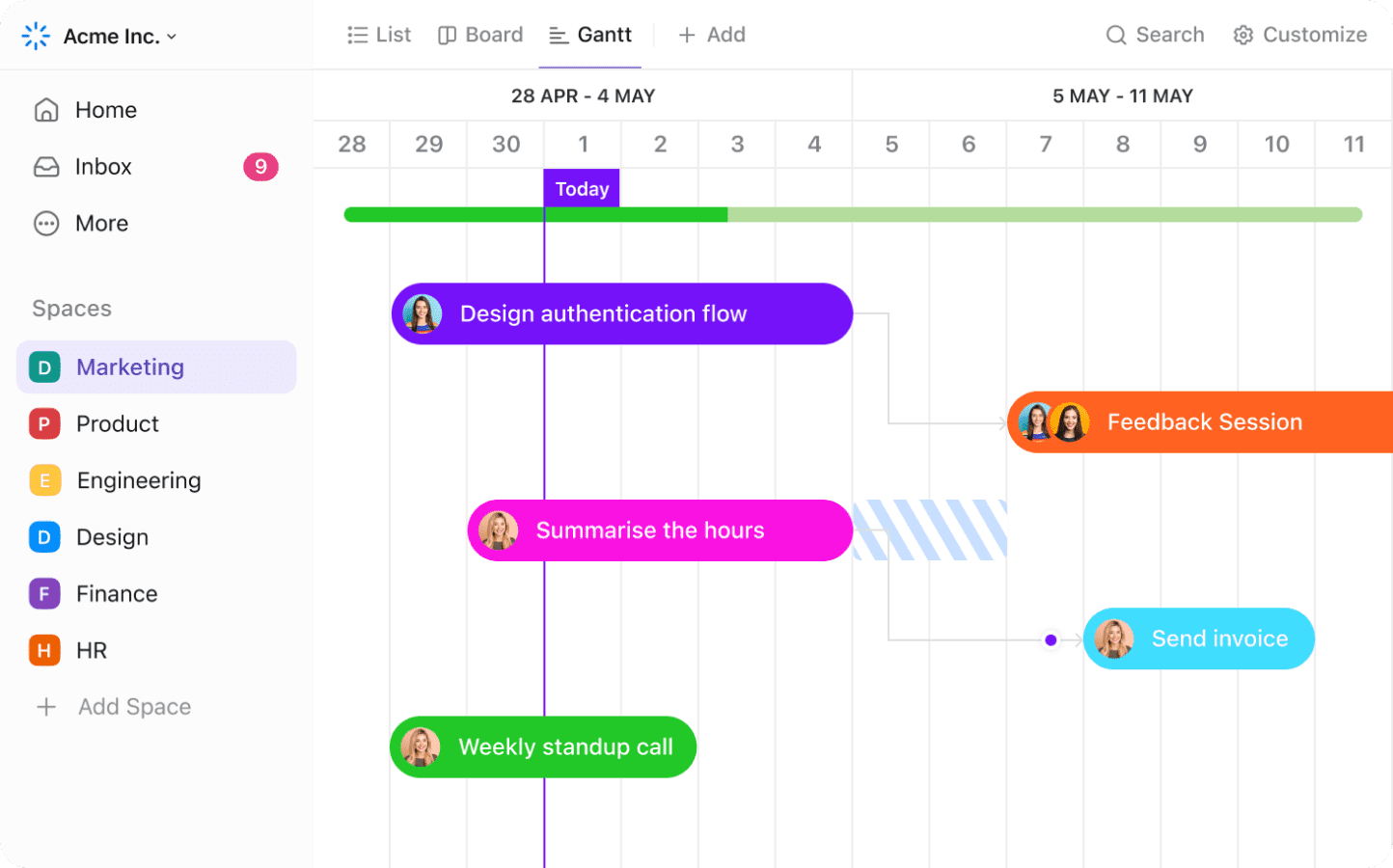
Image source: clickup.com
Features:
- Dynamic Gantt view: Plan and manage project timelines with real-time drag-and-drop scheduling.
- Dependencies and critical path tracking: Link tasks to show relationships and calculate project completion paths automatically.
- Multiple project views: Switch between list, board, box, and calendar views to suit different work styles.
- Built-in time tracking and reporting: Track time per task and generate reports for productivity and workload analysis.
- Automation and integrations: Create custom workflows with automation and connect to tools like Slack, Google Drive, and Zoom.
Pros:
- Extremely flexible and customizable for any project type or team size.
- Offers a wide range of views, including detailed Gantt and workload tracking.
- Free plan includes most essential features, making it ideal for startups.
- Built-in time tracking and goal-setting tools enhance productivity and focus.
Cons:
- The abundance of customization options can feel overwhelming for new users.
- Performance may slow down for very large projects with extensive data.
Pricing:
- Free plan: Unlimited tasks and members, with access to basic Gantt, board, and list views.
- Unlimited plan: Starts at $5 per user/month, adding integrations, dashboards, and advanced reporting.
- Business plan: At $12 per user/month, includes advanced automations, goal tracking, and workload management.
- Enterprise plan: Custom pricing with advanced permissions, white-labeling, and dedicated support.
8. Wrike: Enterprise-ready Gantt chart features
Wrike is a robust enterprise-grade Gantt chart tool designed for large organizations that require advanced project tracking, resource management, and reporting. Its interactive Gantt chart, called the Timeline View, enables managers to visualize complex project dependencies, critical paths, and workloads across multiple teams and departments. Wrike combines powerful scheduling tools with real-time collaboration, automation, and analytics—making it an excellent choice for enterprises managing high-stakes or cross-functional projects.
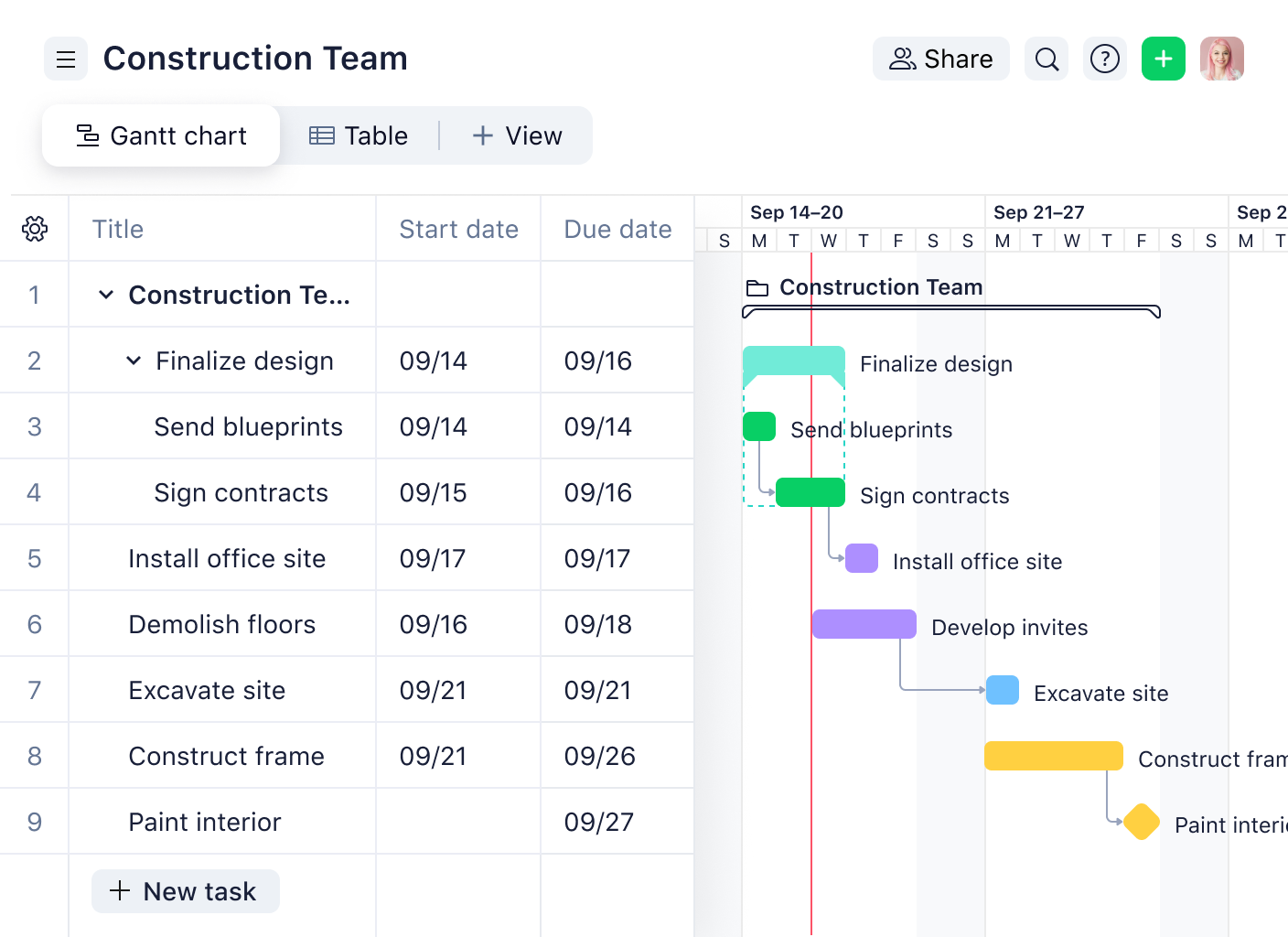
Image source: wrike.com
Features:
- Interactive Gantt timeline: View and manage tasks, dependencies, and milestones with simple drag-and-drop adjustments.
- Critical path analysis: Identify the most important sequence of tasks that determine overall project completion time.
- Advanced resource management: Allocate workloads effectively and avoid overbooking through built-in capacity views.
- Real-time collaboration tools: Enable teams to comment, attach files, and co-edit documents directly within tasks.
- Custom dashboards and reporting: Monitor project health, KPIs, and timelines using real-time visual analytics.
Pros:
- Excellent for large, distributed teams needing deep visibility and structure.
- Offers advanced analytics, dashboards, and workload balancing features.
- Highly customizable workflows suitable for both agile and waterfall methods.
- Integrates seamlessly with Microsoft Teams, Salesforce, and Google Workspace.
Cons:
- Steeper learning curve due to its wide range of enterprise-level capabilities.
- Pricing may be higher for smaller teams compared to simpler Gantt chart tools.
Pricing:
- Free plan: Basic task management for small teams, including list and board views.
- Team plan: Starts at $9.80 per user/month, offering Gantt charts, dashboards, and automation.
- Business plan: Priced at $24.80 per user/month, includes advanced resource management and reporting.
- Enterprise plan: Custom pricing with advanced security, SSO, and admin controls for large organizations.
9. ProjectManager: Construction-specific templates and scheduling
ProjectManager is a versatile and professional-grade online Gantt chart tool built for teams handling complex, large-scale projects — especially in construction, engineering, and manufacturing. It combines traditional Gantt chart planning with modern real-time collaboration, resource management, and reporting tools. What sets ProjectManager apart is its focus on industry-specific templates and scheduling features, making it ideal for project managers who need precision, structure, and visibility from planning to delivery.
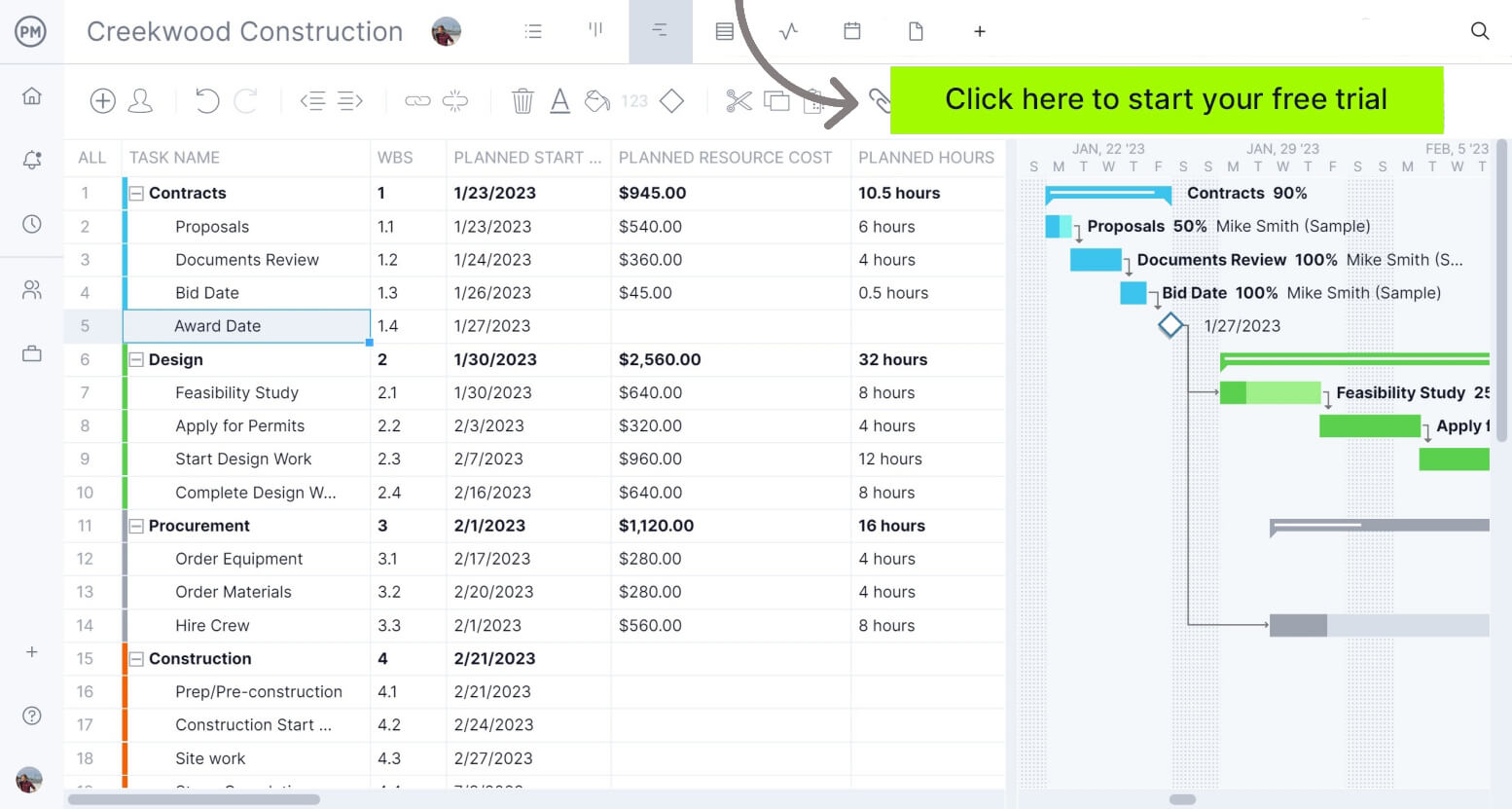
Image source: projectmanager.com
Features:
- Construction-ready Gantt chart templates: Get started quickly with prebuilt templates designed for construction, engineering, and operational projects.
- Dynamic scheduling: Adjust timelines easily with drag-and-drop features that automatically realign dependencies.
- Real-time progress tracking: Monitor project health, costs, and resources through interactive dashboards.
- Resource and workload management: Allocate labor, materials, and budgets efficiently across multiple tasks or projects.
- Reporting and forecasting tools: Generate reports for stakeholders, including cost tracking, time management, and risk assessments.
Pros:
- Purpose-built for construction and large-scale project teams needing structured Gantt scheduling.
- Offers comprehensive reporting, budgeting, and resource tracking capabilities.
- Real-time dashboards provide instant visibility into progress and performance.
- Strong collaboration tools for on-site and remote team coordination.
Cons:
- Interface may feel overwhelming for smaller teams or simpler projects.
- Limited customization options in the free version.
Pricing:
- Free trial: Available for all paid plans with access to Gantt, dashboard, and reporting tools.
- Team plan: Starts at $13 per user/month, offering Gantt charts, task tracking, and team collaboration features.
- Business plan: Priced at $24 per user/month, adds advanced reporting, time tracking, and resource management.
- Enterprise plan: Custom pricing for large organizations, includes premium integrations, security controls, and dedicated support.
10. Monday: Customizable boards and timelines
Monday.com is a visually appealing and highly customizable online Gantt chart tool that helps teams organize tasks, track progress, and visualize deadlines. Known for its colorful interface and flexibility, Monday allows teams to manage projects across departments with ease. Its Timeline view functions as an interactive Gantt chart—perfect for teams looking to balance structure with creativity. From marketing campaigns to IT roadmaps, Monday makes it simple to plan, collaborate, and adapt to changing priorities.
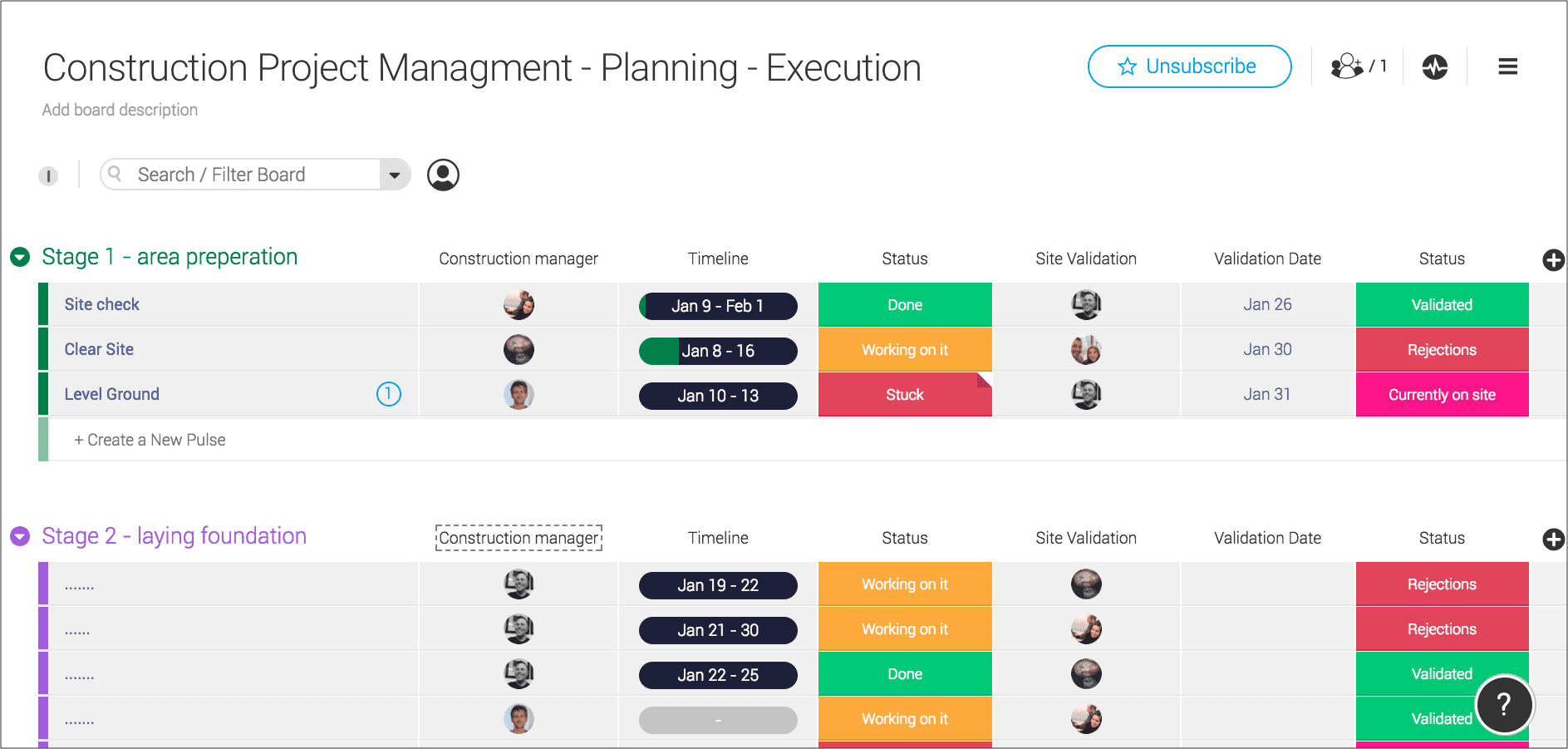
Image source: monday.com
Features:
- Timeline (Gantt) and calendar views: Visualize projects, deadlines, and dependencies in one intuitive dashboard.
- Customizable boards: Design project boards with tailored columns for statuses, priorities, owners, and due dates.
- Automations and integrations: Automate repetitive workflows and connect with over 200 tools like Slack, Zoom, and Jira.
- Workload management: Track team capacity and balance workloads across multiple ongoing projects.
- Dashboards and analytics: Gain insights into project performance, timelines, and team productivity in real time.
Pros:
- Extremely visual and user-friendly, suitable for teams of all skill levels.
- Offers high flexibility with customizable workflows and templates.
- Strong automation and integration ecosystem for seamless work management.
- Ideal for teams working on marketing, operations, or cross-functional projects.
Cons:
- Gantt (Timeline) view is available only in paid plans.
- Can become expensive as user count and automation needs grow.
Pricing:
- Free plan: For individuals and small teams with up to 2 users, includes unlimited boards and docs.
- Basic plan: Starts at $10 per user/month, adds dashboard views and simple automations.
- Standard plan: At $12 per user/month, unlocks Timeline (Gantt) view, calendar, and integrations.
- Pro plan: Priced at $20 per user/month, offers advanced reporting, time tracking, and workload management.
- Enterprise plan: Custom pricing for large organizations with enhanced security, permissions, and scalability.
11. Zoho Projects: Budget-friendly Gantt charts
Zoho Projects is a cost-effective yet feature-rich Gantt chart tool tailored for small and medium-sized businesses. It combines powerful scheduling, task management, and collaboration tools within an easy-to-use interface. With its intuitive Gantt chart, Zoho Projects helps teams visualize dependencies, track progress, and meet deadlines efficiently. It's a great choice for teams looking for professional project management software that doesn't break the budget but still delivers enterprise-quality features.
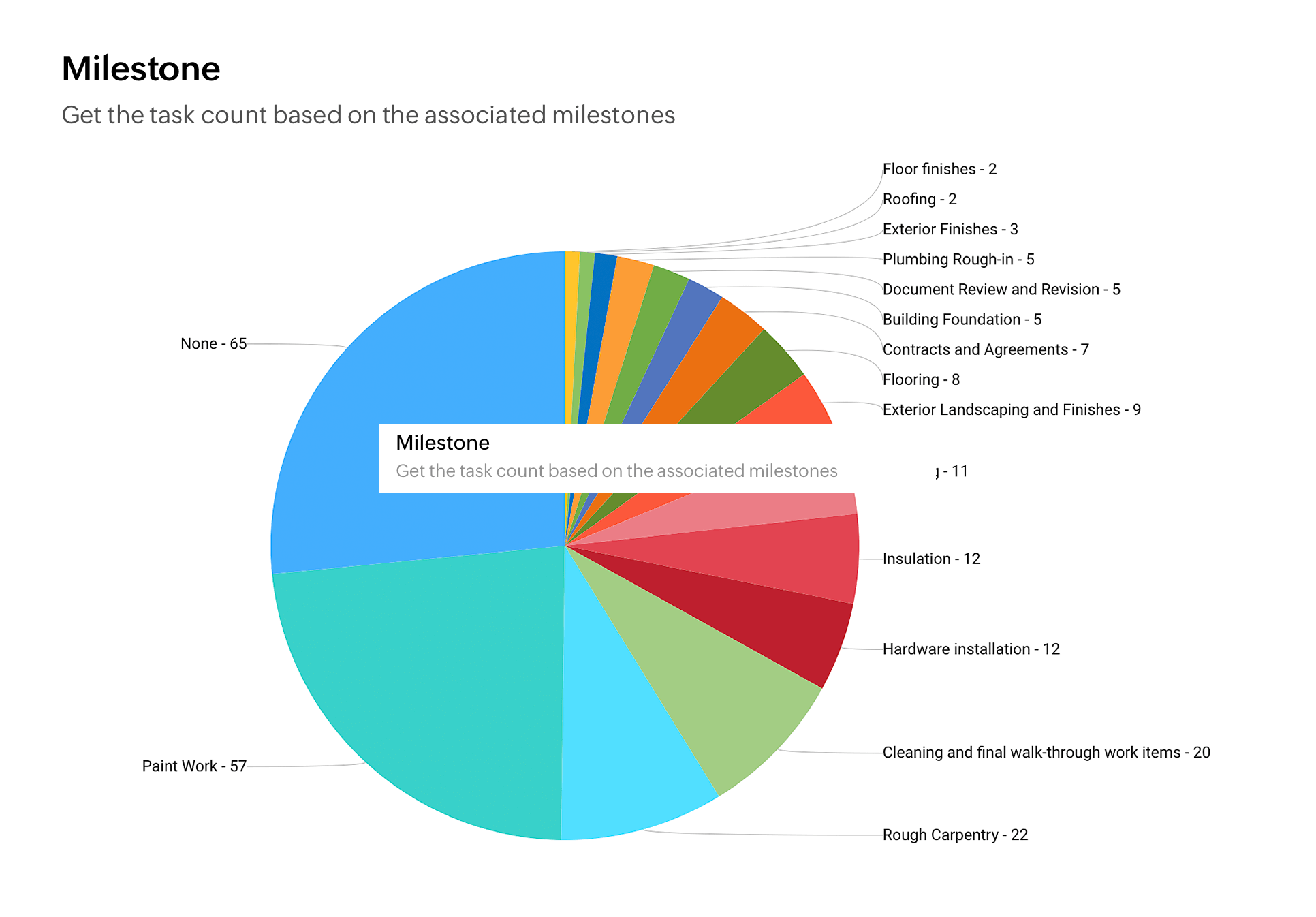
Image source: zoho.com
Features:
- Comprehensive Gantt chart view: Visualize project tasks, dependencies, and milestones in a single interactive chart.
- Task automation and blueprints: Automate repetitive workflows, approvals, and task transitions to save time.
- Resource utilization and time tracking: Monitor how resources are allocated and track billable or non-billable hours.
- Issue tracking and reporting: Identify bottlenecks early and generate reports on performance, progress, and risks.
- Integrations with Zoho ecosystem and third-party apps: Seamlessly connect with Zoho CRM, Google Drive, Slack, and Microsoft Teams.
Pros:
- Highly affordable for startups and SMBs with strong value for money.
- Offers essential Gantt chart features and time tracking in even lower plans.
- Simple user interface suitable for teams with little technical background.
- Integrates smoothly with Zoho's suite of productivity and finance tools.
Cons:
- Limited customization compared to more advanced enterprise platforms.
- The mobile app can feel less responsive for heavy data editing.
Pricing:
- Free plan: Up to 3 users and 2 projects, includes basic task and milestone tracking.
- Premium plan: Starts at $5 per user/month, adds Gantt charts, automation, and resource utilization.
- Enterprise plan: At $10 per user/month, it includes portfolio management, advanced analytics, and global integrations.
Tips for Adopting Gantt Chart Tools Successfully
Adopting a Gantt chart tool is not just a tech upgrade—it’s a shift in how teams plan, track, and collaborate. To get real value, teams must combine the right tool with clear processes and consistent usage. These tips ensure smooth adoption and lasting project success.
- Start with templates for faster onboarding: Most tools offer pre-built templates for different project types, helping teams begin quickly. Choose one that fits your workflow, then customize it as needed. This approach shortens the learning curve and boosts early confidence.
- Keep timelines realistic and flexible: Avoid rigid or overly ambitious schedules that can lead to burnout. Add buffer time for delays or reviews to keep progress steady. Flexibility helps teams adapt to changes while maintaining productivity and morale.
- Train your team in visual planning methods: Offer short, hands-on sessions on creating tasks, managing dependencies, and tracking progress. Ensure everyone can use the Gantt view confidently, not just managers. This shared understanding improves collaboration and accountability.
- Review and adjust regularly: Treat your Gantt chart as a living document that evolves with the project. Schedule regular check-ins to update milestones and resolve issues early. Continuous review keeps plans accurate and teams aligned.
Benefits of using a Gantt chart tool
A Gantt chart tool is more than a scheduling aid—it's a strategic project management solution that enhances visibility, coordination, and performance. It helps teams plan smarter, manage resources better, and achieve goals efficiently.
- Improved time management: Gantt charts clearly display when tasks start, how long they last, and when they finish. This clarity helps teams prioritize effectively, avoid overlaps, and maintain steady progress toward deadlines.
- Optimized resource allocation: By mapping tasks to team members, Gantt charts simplify workload balancing. Managers can spot overbooked employees, redistribute tasks, and ensure efficient use of available resources.
- Reduced project risks: Early visibility into dependencies and bottlenecks allows managers to act before problems escalate. This proactive approach minimizes delays, keeps schedules realistic, and boosts project reliability.
- Enhanced accountability and collaboration: Gantt charts make responsibilities and timelines visible to everyone. This shared transparency strengthens accountability, improves teamwork, and promotes consistent communication across the project.
Conclusion
In today's dynamic work environment, a Gantt chart tool is one of the most effective ways to plan, monitor, and deliver projects on time. By visualizing tasks, dependencies, and milestones, it turns complex workflows into clear, actionable roadmaps. Whether managing construction projects, marketing campaigns, or software releases, Gantt charts provide structure, improve collaboration, and enhance accountability across teams.
Modern solutions—like Lark, ClickUp, and TeamGantt go beyond scheduling to include automation, communication, and analytics, helping teams stay agile and efficient.Ultimately, the right Gantt chart tool empowers managers to make data-driven decisions and ensures every project milestone is achieved with clarity and confidence.
FAQs
What is the difference between a Gantt chart and a Kanban board?
A Gantt chart visually represents a project's timeline, showing task durations, dependencies, and milestones. In contrast, a Kanban board focuses on workflow visualization, displaying tasks in columns (e.g., To Do, In Progress, Done) to manage work progress. Gantt charts are time-based, while Kanban boards are process-based.
Can I create a Gantt chart in Excel or Google Sheets?
Yes, both Excel and Google Sheets allow you to create basic Gantt charts using bar charts or templates. However, they require manual setup and updates. Dedicated online Gantt chart tools offer automation, collaboration, and easier tracking compared to spreadsheets.
Which online Gantt chart tool has the best free plan?
Lark provides one of the best free plans with built-in Gantt charts, task automation, and team collaboration features. ClickUp and TeamGantt also offer strong free versions with essential scheduling and tracking options.
Are Gantt charts suitable for agile projects?
Yes, Gantt charts can complement agile methodologies by visualizing sprint timelines, release plans, and dependencies. They provide a high-level view of progress while agile tools like boards handle daily task management.
How do Gantt charts improve deadline management?
Gantt charts make deadlines visible by mapping every task along a project timeline. This helps identify overlaps, prioritize critical tasks, and anticipate delays. Regular updates ensure teams stay aligned and deliver projects on schedule.
Related reading
Table of contents
Start using Lark today

Manage all your work in one place
Boost team efficiency by 10x
Save up to 70% on software costs
Table of contents
Start using Lark today
Manage all your work in one place
Boost team efficiency by 10x
Save up to 70% on software costs
Keep reading







2026 Lark Technologies Pte. Ltd.
Headquartered in Singapore with offices worldwide.






Explore: