Planning an IT project is rarely just about timelines and tasks. IT projects involve complex dependencies across systems, teams, vendors, and business goals. Without a clear structure, even well-funded initiatives can stall or fail. That is why an IT project plan plays such a critical role in modern organizations.
A strong IT project plan helps teams translate technical requirements into coordinated execution. It clarifies scope, ownership, risks, and success criteria before work begins. In this guide, you will learn how to create an effective IT project plan, explore real templates and examples, and apply best practices used by experienced teams. Toward the end, we also look at how platforms like Lark support collaborative IT planning as projects grow in complexity.
Plan IT projects with clarity and control
What is an IT project plan?
An IT project plan is a that outlines how an IT initiative will be planned, executed, monitored, and delivered. It defines objectives, scope, timelines, resources, budgets, and risks in a single reference point. Unlike informal task lists, an IT project plan aligns technical execution with business outcomes.
In practice, an IT project plan template helps teams standardize how projects are planned across departments. It ensures consistency in documentation, approvals, and reporting. A sample IT project plan template often includes sections for requirements, milestones, dependencies, and escalation paths. In more formal environments, an IT project management plan example is used to demonstrate governance, compliance, and delivery readiness before execution begins. Why an IT project plan is critical for success
Many IT projects struggle not because of technical difficulty, but because planning gaps create confusion and misalignment. A well-built IT project plan addresses these risks early.
- Common reasons fail without structured planning: Projects fail when the scope is unclear, dependencies are missed, or responsibilities are assumed rather than defined. Without an IT project plan template, teams rely on fragmented documents and informal updates. This leads to missed deadlines and rework. Structured planning reduces ambiguity. It gives teams a shared direction from the start.
- Alignment between business goals, technical scope, and delivery timelines: An IT project plan connects technical work to business outcomes. and how they contribute to goals. Timelines reflect real constraints rather than optimistic estimates. This alignment improves decision-making throughout the project. It is a core principle in every IT project management plan example.
- , accountability, and stakeholder clarity: Risks are easier to identify when dependencies and assumptions are documented. Ownership becomes visible across teams. Stakeholders know when and how to engage. This reduces last-minute escalations. Clear planning improves confidence at every level.
What should an IT project plan include?
An effective IT project plan balances detail with usability. It includes enough information to guide execution without overwhelming teams.
- Project objectives and success criteria: Objectives define what success looks like beyond technical completion. Success criteria may include performance benchmarks, adoption metrics, or business impact. Clear objectives guide prioritization. They also support post-project evaluation. Every IT project management plan template should begin here.
- Scope definition and exclusions: Scope defines what is included and what is intentionally excluded. This prevents scope creep during execution. Exclusions are just as important as inclusions. They protect timelines and budgets. A sample IT project plan template always documents the scope clearly.
- Timeline and milestones: Milestones break the project into manageable phases. Timelines reflect dependencies and review points. This improves predictability. Teams can measure progress objectively. Timelines are essential in both agile and waterfall plans.
- including people, tools, and vendors: Resources must be planned realistically. This includes internal teams, external vendors, and required tools. Capacity constraints should be visible early. A strong IT project plan template Excel often supports this view. Resource clarity prevents overload.
- Budget and cost controls: Budgets should be tracked at a category level. This includes labor, software, infrastructure, and services. Cost controls define approval thresholds. Financial visibility improves governance. This is critical in enterprise IT projects.
- Risk management and mitigation strategies: Risks should be documented with likelihood and impact. Mitigation plans reduce uncertainty. Owners are assigned to each risk. This proactive approach reduces disruption. Risk planning is central to IT project management plan, example best practices.
- Communication and reporting plan: define who receives updates and when. Reporting formats should be consistent. This reduces confusion across stakeholders. Clear communication supports trust. It is especially important during transitions.
How to write a simple IT project plan
Creating an IT project plan requires both technical understanding and coordination skills. Following a structured approach improves quality and consistency.
Step 1: Define business and technical requirements
Start by gathering requirements from business and . Document functional needs, performance expectations, and constraints. Clarify assumptions early. This reduces rework later. Requirements form the foundation of every IT project plan.
Step 2: Identify stakeholders and roles
List all stakeholders involved in delivery and approval. Define decision makers and contributors clearly. Role clarity prevents delays. Escalation paths should be documented. This step improves accountability.
Step 3: Break down tasks and dependencies
Decompose work into logical tasks. Identify dependencies between systems and teams. This reveals critical paths. It also highlights integration risks. Task breakdown supports realistic scheduling.
Step 4: Build timelines and delivery phases
Group tasks into phases such as design, build, test, and deploy. Assign milestone dates. Include review checkpoints. Timelines should reflect capacity constraints. This improves predictability.
Step 5: Assign resources and ownership
Assign owners to tasks and deliverables. Validate availability. Avoid over-allocation. Ownership clarity supports execution. This step connects planning to accountability.
Step 6: Plan for risks, change, and escalation
Document known risks and change processes. Define how scope changes are approved. Escalation procedures should be clear. This prepares teams for uncertainty. Flexibility improves resilience.
Step 7: Set communication and review checkpoints
Define meeting cadence and reporting formats. Schedule reviews at key milestones. Ensure stakeholders stay informed. Communication consistency reduces friction. Execution becomes smoother.
Turn IT planning into real execution
Make it happen: Create, brainstorm, and practice IT project plans with Lark
As IT projects grow, becomes just as important as planning. Teams need shared visibility across documents, tasks, timelines, and updates. This is where platforms like gradually become useful. By bringing planning and execution into one workspace, teams reduce fragmentation andacross IT initiatives.
Documenting requirements and decisions
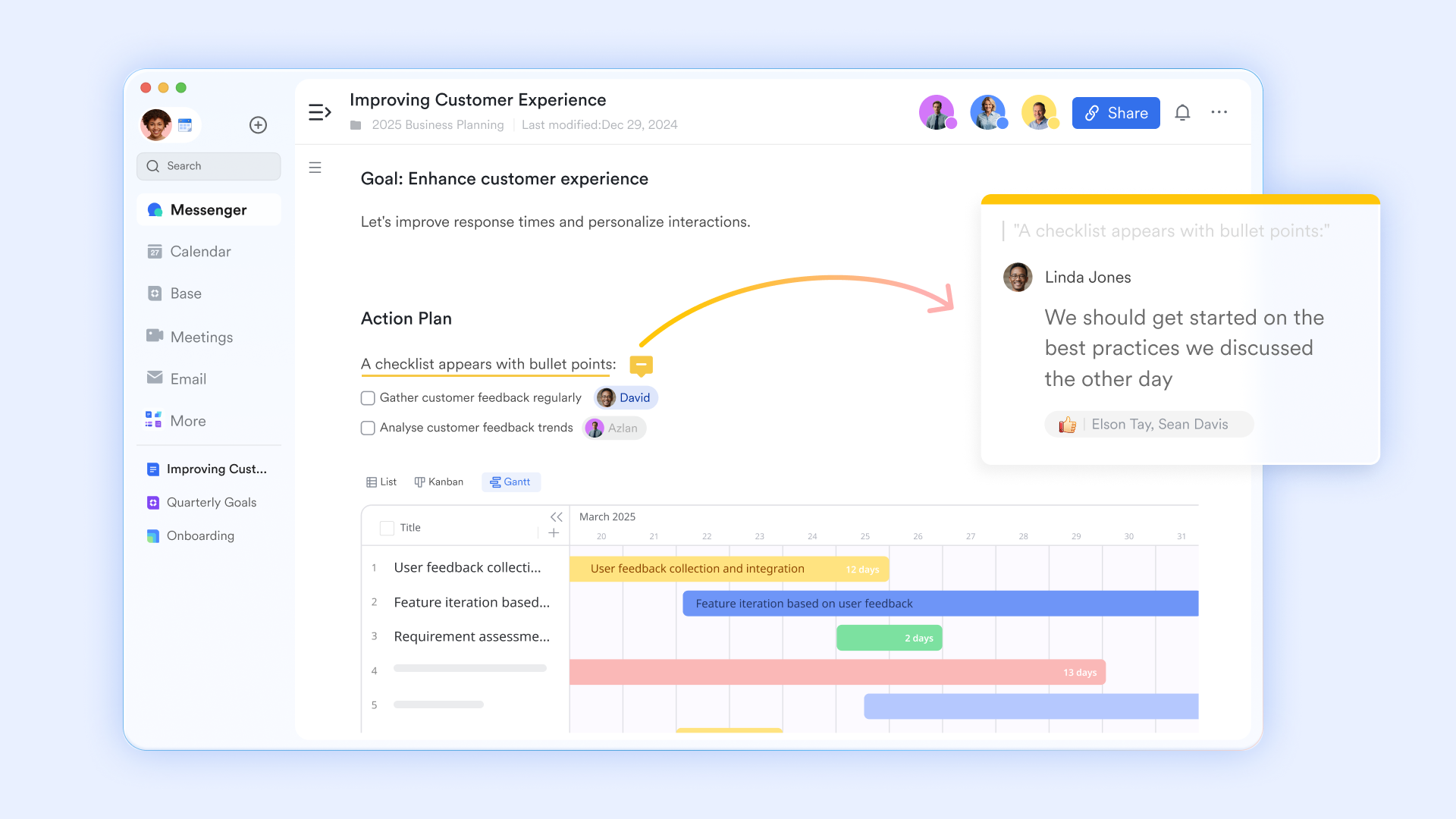
supports collaborative documentation of requirements, assumptions, and technical decisions. Teams can capture meeting notes, architecture plans, and change logs in one shared space. Inline comments keep discussions tied to specific sections. Version history preserves a clear record of changes and decisions over time. Documentation remains connected to the active project plan, reducing drift between planning and execution.
Keeping communication contextual
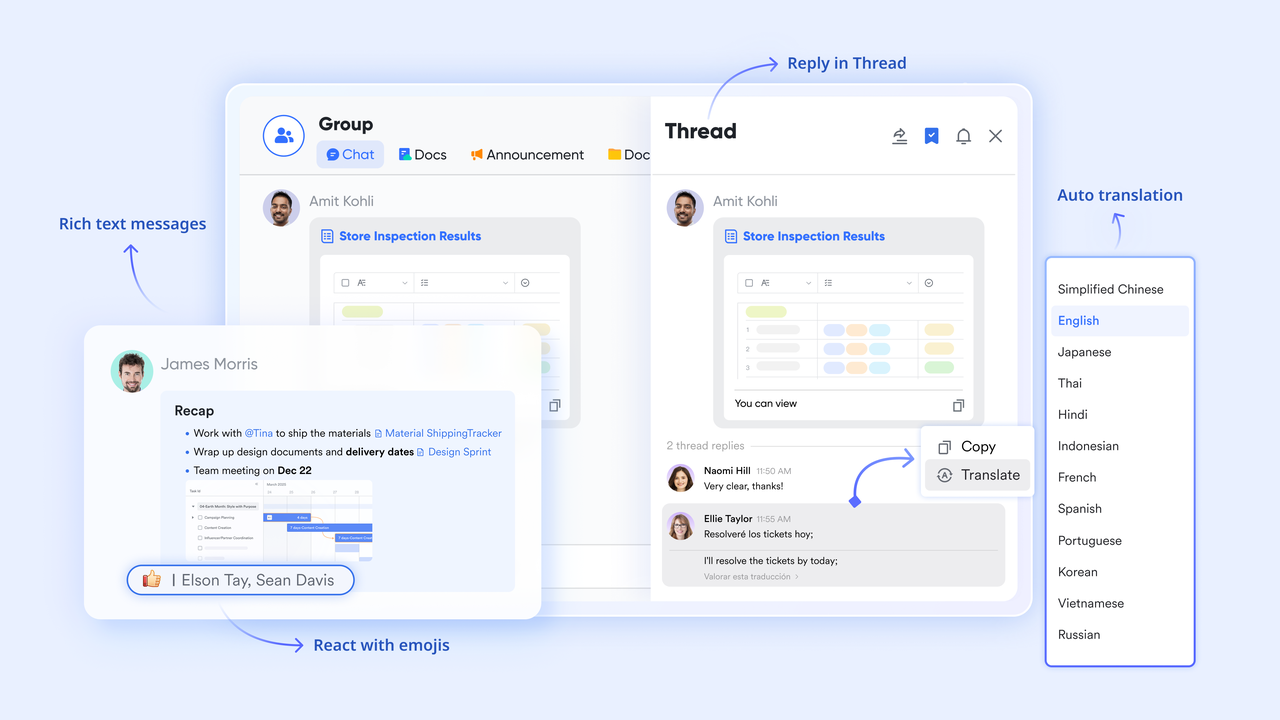
allows teams to discuss issues directly alongside project data and documents, while also referencing past files, images, and messages within the same conversation. Conversations remain searchable and tied to context. Quick clarifications reduce delays and misalignment. Teams avoid switching between tools. Communication becomes part of the workflow rather than a separate channel.
Structuring the IT project plan
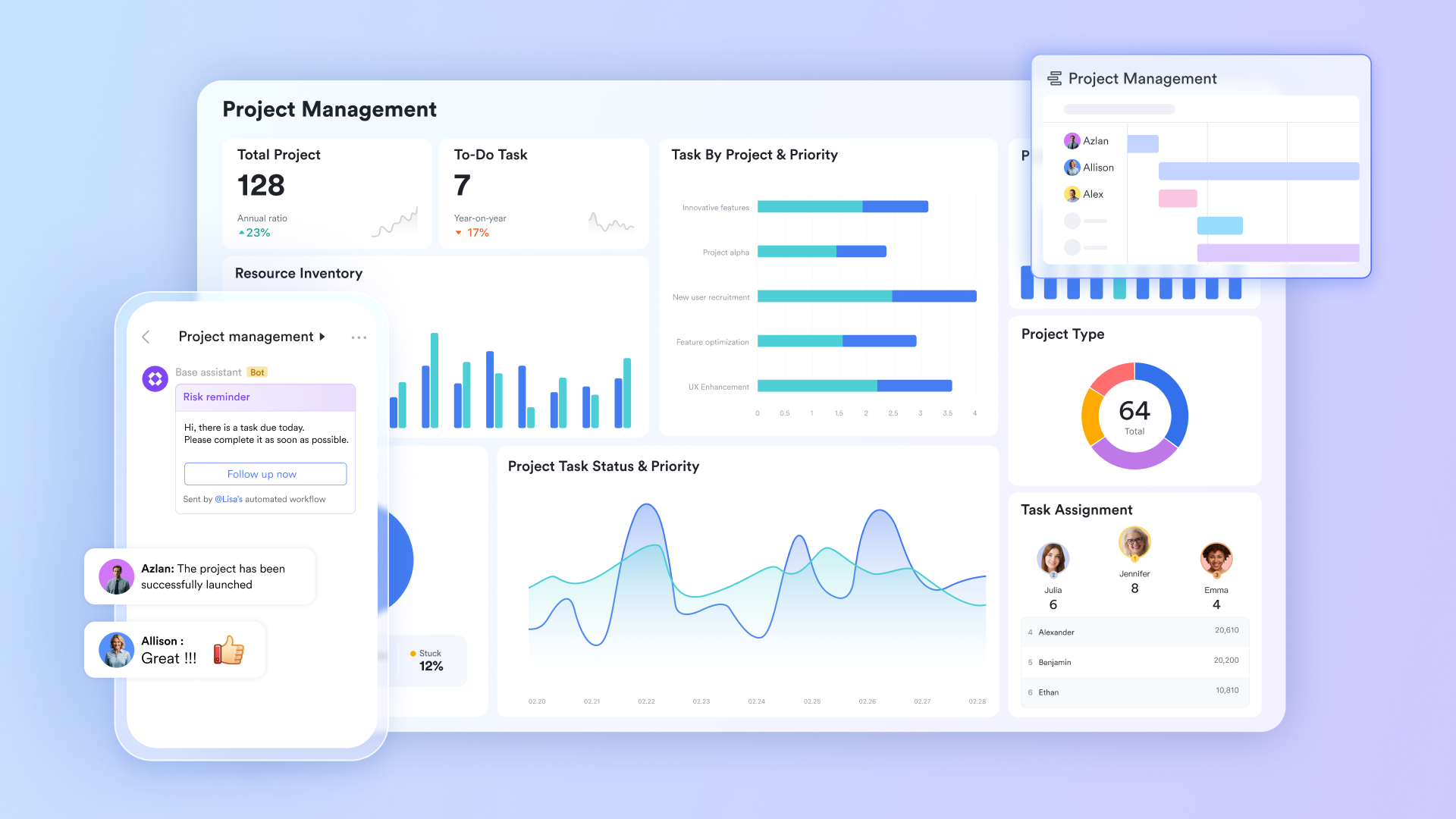
acts as the central system for managing structured IT project data. Teams can organize milestones, tasks, owners, dependencies, and status fields in one place. Updates happen in real time across all views and users, so everyone works from the same source of truth. Changes to status, ownership, or timelines are reflected instantly, eliminating duplicate files and conflicting versions. This keeps the IT project plan consistent as execution progresses.
Managing timelines and dependencies
Lark Base provides timeline and grouped views that make dependencies easier to understand. Project phases, handoffs, and critical paths remain visible. Teams can identify delays early and adjust plans accordingly. This improves predictability by showing how changes in one task affect related work, without forcing teams into fixed timelines. Teams can adapt plans as priorities shift, dependencies change, or new requirements emerge. Planning stays responsive while maintaining a clear view of overall progress and risk. 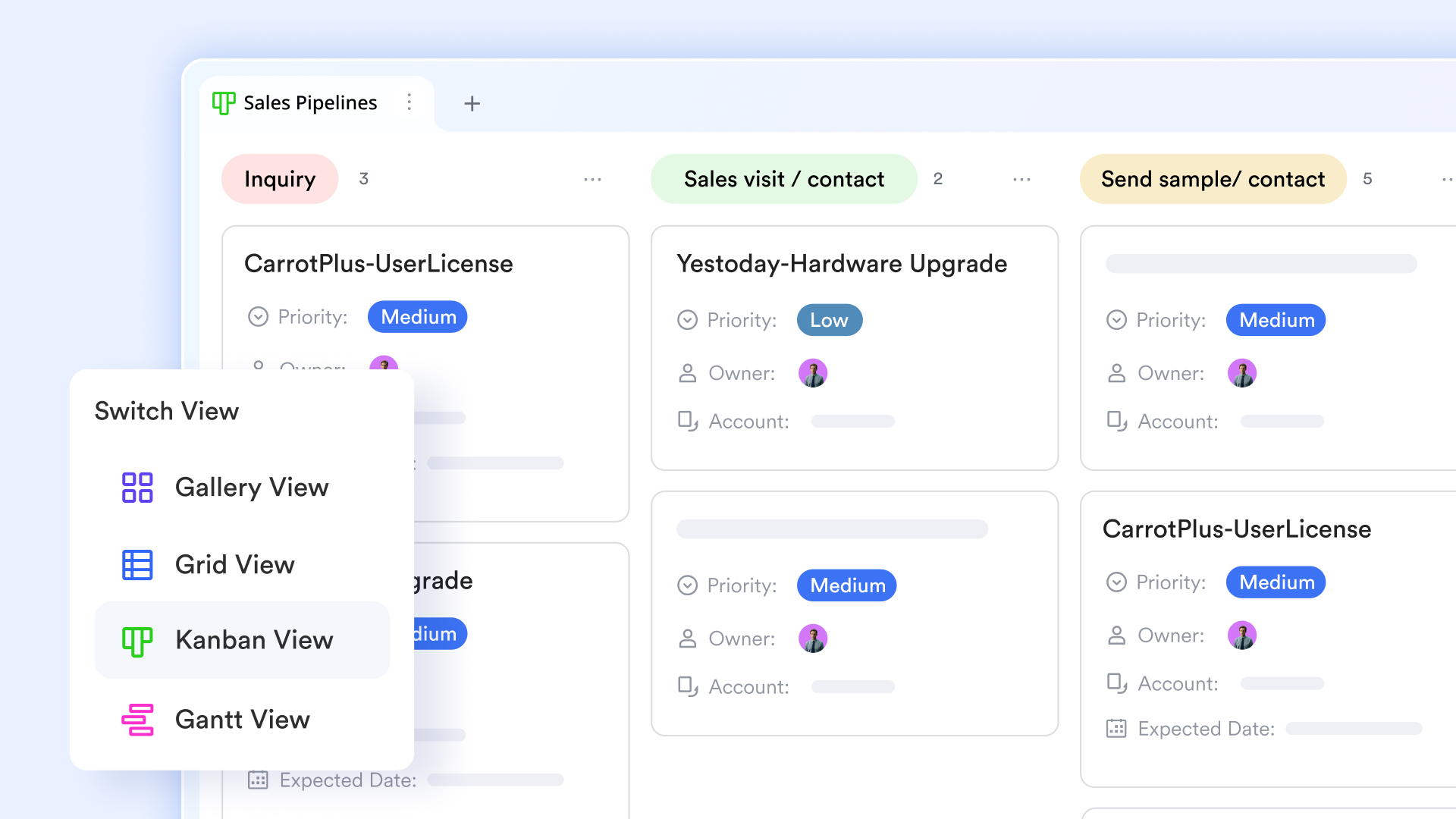
Coordinating execution
Lark Tasks turns planning into action by assigning work with clear owners and deadlines. Tasks can be linked directly to project records in Lark Base, keeping execution grounded in the broader project context. Progress updates remain visible across teams, making dependencies and priorities easier to manage. This helps execution stay aligned with the IT project plan as work moves forward. 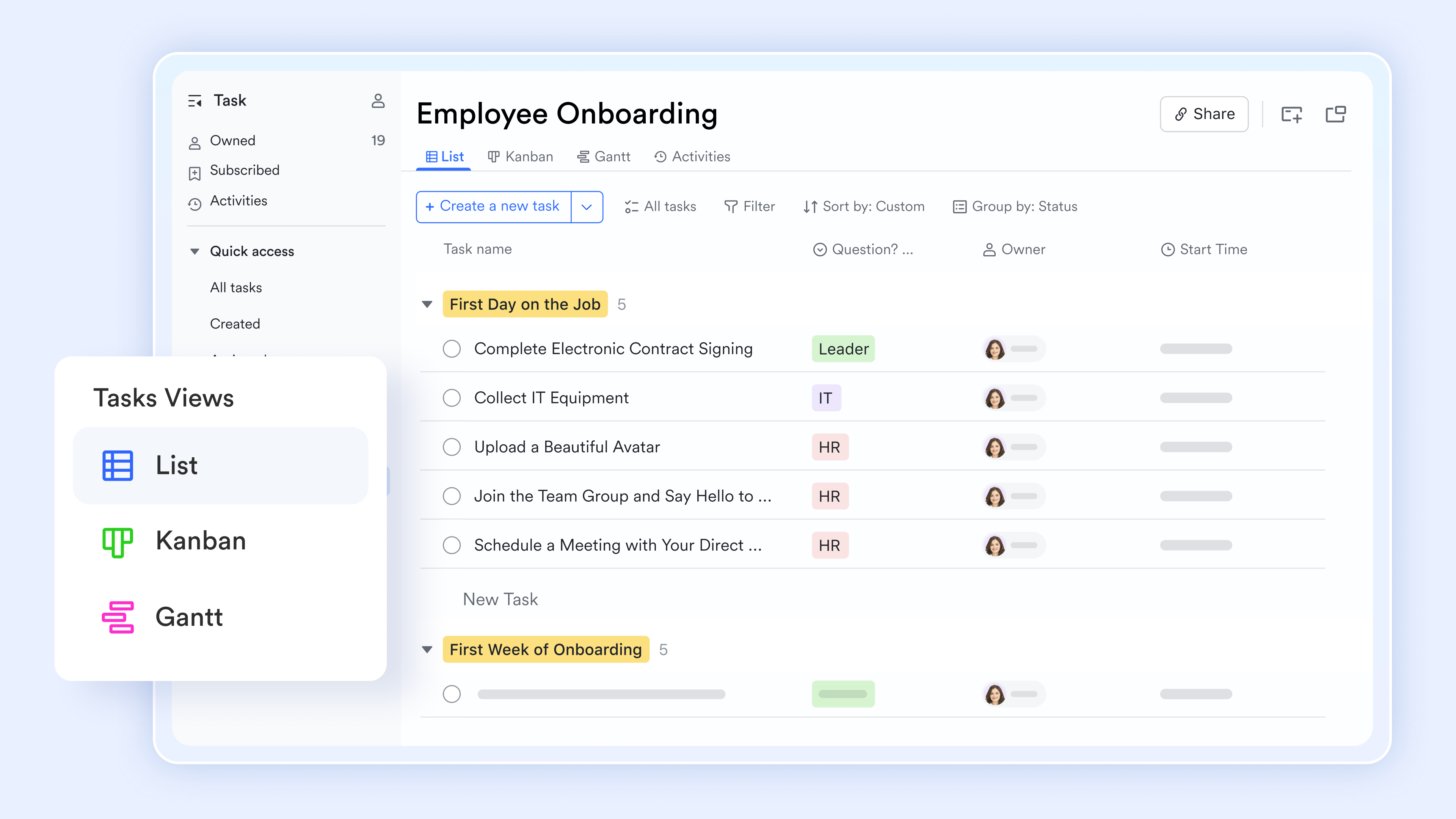
:
- Starter plan: Free forever plan that includes 11 powerful tools for up to 20 users. IT also comes with 100GB of storage, 1000 automation runs, AI translations, and more.
- Pro plan: $12/user/month (billed annually) for up to 500 users. IT includes everything in Starter plus group calling for up to 500 attendees, 15TB of storage, 50,000 automation runs, and more.
- Enterprise plan: for custom pricing. Supports unlimited users and includes even more automation runs and advanced security, compliance, and management features.
For small teams with simple communication needs

18 months message history
1000 Base automation runs/month
2000 rows per table in Base
Most POPULAR
For companies with comprehensive collaboration and management needs
Unlimited message history
500-participant video meetings
50k Base automation runs/month
20k rows per table in Base
For large companies with advanced security and organizational management needs
Get a personalized demo and pricing
Unlimited message history
500-participant video meetings
15 TB storage + 30 GB storage/user
500k Base automation runs/month
50k Base automation runs/month
Most POPULAR
For companies with comprehensive collaboration and management needs
Unlimited message history
500-participant video meetings
50k Base automation runs/month
20k rows per table in Base
Ready-to-use IT project management plan template
Below are ready-to-use templates that support different IT planning scenarios. Each template aligns with common IT project plan structures and use cases.
Project planning and implementation template
This template connects planning phases directly to implementation activities. It helps teams translate plans into executable tasks with defined ownership. Dependencies and handoffs are easier to manage. The structure supports phased delivery models. It is a strong fit for teams using an IT project management plan template.
Technology implementation roadmap for project managers
This roadmap template supports complex technology rollouts and system changes. It visualizes phases, milestones, and dependencies in a single view. Stakeholders gain clarity on progress and timing. Technical execution stays aligned with business goals. It works well as a sample IT project plan template for large initiatives.
Short-term project plan
This template is designed for IT projects with short timelines or limited scope. It emphasizes clarity and speed without excessive documentation. Planning remains lightweight but structured. Teams can move quickly while maintaining control. It is ideal for pilots or rapid delivery projects.
IT project status tracker
This template focuses on consistent reporting and project visibility. Status updates follow a standard format. Risks, blockers, and dependencies are easy to spot. Stakeholders stay informed without extra meetings. It complements any IT project plan.
Best practices for IT project planning
Strong IT project planning balances structure with flexibility. Best practices help teams manage complexity without slowing execution. These principles are based on patterns seen across successful IT initiatives. They support clearer decision-making and smoother delivery. Applying them consistently improves outcomes over time.
- , not just delivery: IT projects rarely follow a fixed path from start to finish. Requirements, priorities, and constraints often evolve during execution. Effective planning accounts for change rather than resisting it. Flexible timelines, clear change processes, and regular reviews help teams adapt without losing control. This approach reduces disruption and improves long-term outcomes.
- Keeping stakeholders aligned throughout the lifecycle: Alignment should be maintained from planning through delivery and transition. Regular updates help stakeholders understand progress and risks. prevents last-minute surprises. Feedback loops improve decision-making. Strong alignment builds trust and support across the project.
- Balancing documentation with execution speed: Documentation is necessary, but excessive detail can slow teams down. The goal is to document what supports action and clarity. Clear, concise plans are easier to maintain. Teams spend more time delivering value. Execution remains the focus.
- Reviewing and refining plans after project completion: Post-project reviews help teams improve future planning. Lessons learned should be documented and shared. Successful practices can be reused. Gaps and mistakes become learning opportunities. Continuous improvement strengthens planning maturity.
Common mistakes to avoid in IT project plans
Even well-planned IT projects can fail due to common and avoidable mistakes. These issues often emerge when planning assumptions are not challenged. Recognizing these risks early helps teams build more resilient plans. Avoiding these mistakes improves delivery confidence. Awareness is the first step toward prevention.
- Overly rigid timelines: often fail to account for uncertainty. When plans cannot adapt, teams rush or cut corners. This increases risk and burnout. Flexible buffers support realistic delivery. Adaptability leads to better outcomes.
- Underestimating dependencies and integrations: IT systems are rarely isolated. Hidden dependencies cause delays and rework. Integration planning should happen early. Clear dependency mapping reduces surprises. This is a common source of project overruns.
- Ignoring transition and post-launch support: Delivery does not end at go-live. Teams need plans for handover, training, and support. Without transition planning, adoption suffers. Issues escalate quickly. Post-launch support protects long-term success.
- Poor communication planning: Unclear communication leads to misalignment and confusion. Stakeholders miss important updates. Decisions are delayed. A structured keeps everyone informed. Strong communication supports smoother execution.
Conclusion
An IT project plan is the backbone of successful IT delivery. It transforms complex requirements into coordinated action. Strong IT project plan examples show how clarity improves execution, budgeting, and accountability. Without structured planning, even skilled teams struggle to deliver consistently.
As projects scale, teams increasingly rely on to manage planning and execution together. Tools like help teams centralize documentation, tasks, schedules, and communication in one place. This supports better visibility and faster coordination. With the right structure and the right tools, teams can plan IT projects with confidence and deliver with control.
Build your IT project plan effectively in Lark
FAQs
How detailed should an IT project plan be for small teams?
For small teams, an IT should focus on clarity rather than depth. Core elements such as objectives, scope, timelines, and ownership are usually enough. Overly detailed documentation can slow progress and reduce flexibility. As projects grow, teams can expand the plan gradually. Tools like Lark make it easier to scale detail only when needed.
What is an example of an IT project?
A common example of an IT project is the implementation of a new cloud-based Inventory Management System. This involves migrating physical or spreadsheet-based data into a centralized database, configuring user access for warehouse and procurement teams, and integrating the software with existing sales channels. Other common examples include network infrastructure upgrades, such as installing enterprise-grade Wi-Fi across a campus, or developing a custom mobile application to enhance customer loyalty.
How do you test an IT project?
Testing an IT project follows a structured hierarchy starting with Unit Testing, where individual code components are verified for accuracy. This is followed by Integration Testing to ensure different systems or modules work together, and System Testing to validate the entire setup against business requirements. The final and most critical stage is User Acceptance Testing (UAT), where actual end-users perform real-world tasks to confirm the system is intuitive and functional before it goes live.
How often should an IT project plan be updated during execution?
An IT project plan should be reviewed at major milestones or whenever changes occur. Scope adjustments, timeline shifts, or new risks should trigger updates. Regular reviews keep assumptions current. Outdated plans create blind spots. Using Lark helps teams keep plans alive and visible.
What is the biggest difference between an IT project plan and a transition plan?
An IT project plan focuses on delivery from initiation to launch. An IT project transition plan focuses on handover, adoption, and ongoing support after launch. Both are important, but serve different stages. ensures long-term success beyond delivery. Many teams manage both plans together in Lark for better continuity.
Related reading





























