














Kanban Principles: A Guide to Smarter Workflow Management

Ryan Tanner
Product Marketing Specialist
Sep 18, 2026
Ryan Tanner
Sep 18, 2026

15 min read


Kanban is one of the most effective workflow management approaches for teams that want to improve clarity, speed, and accountability. By visualizing work on a board and limiting what's in progress, Kanban helps teams focus on the right tasks at the right time. Whether you're in software development, operations, marketing, or support, the Kanban principles keep work flowing smoothly and bottlenecks visible.
Modern digital platforms make it easier than ever to empower teams with Kanban boards that update in real time. And since Lark is ranked among the best project management tools, it gives teams a unified space to apply Kanban practically across projects.

What is Kanban and why does it matter?
Kanban is a visual approach to workflow management that helps teams improve how work moves from start to finish. Originally developed at Toyota to optimize manufacturing, Kanban has evolved into a popular method for modern knowledge work across software development, marketing, operations, and customer support. Its central idea is simple: when teams can clearly see every task and its status on a board, they can quickly identify bottlenecks, avoid overload, and maintain a steady flow of progress.
Instead of planning large batches of work, Kanban encourages minor, continuous improvements that adapt to real-world changes. It also emphasizes limiting how much work is in progress at once, allowing people to focus and deliver faster. By making priorities transparent and handoffs smoother, Kanban builds a culture of accountability and collaboration. For fast-moving businesses, this visibility and flexibility are essential to delivering consistent value without chaos.
The core Kanban principles explained
To make the most of Kanban, it's essential to understand its core principles. These aren't just theoretical ideas—they translate into everyday practices that improve how teams deliver work.
- Start with what you do now: Kanban doesn't demand a major process change on Day 1. Teams simply map out their current workflow and make it visible, so everyone understands how work actually moves. This prevents disruption and helps reveal improvements naturally through real data instead of assumptions.
- Pursue continuous, evolutionary change: Instead of large, risky transformations, Kanban favors small, steady improvements over time. Teams adjust work stages, rules, and communication step-by-step, learning as they go. This makes the process more resilient, because improvements are based on real team feedback and proven outcomes.
- Respect existing roles and responsibilities: Kanban enhances collaboration without rewriting job titles or ownership. Everyone continues doing what they do best, but gains more clarity and coordination. This reduces resistance to change and allows the system to evolve while keeping accountability clear.
- Encourage leadership at every level: Kanban empowers the people closest to the work to drive improvement. Anyone can surface blockers, propose changes, or highlight opportunities to optimize flow. This builds a culture where innovation and ownership aren't limited to managers—every team member contributes to efficiency and success.
Benefits of Kanban for workflow management
When teams apply Kanban correctly, it brings noticeable improvements to how work moves and how people collaborate. These benefits make Kanban a practical choice for any organization aiming to deliver faster and with greater clarity.
- Faster delivery and fewer blockers: By visualizing every stage of progress, Kanban helps teams quickly spot where work is slowing down. Bottlenecks become visible sooner, resulting in faster throughput and smoother delivery.
- More focus and less context switching: Limiting work-in-progress encourages teams to finish tasks before starting new ones. This reduces multitasking and helps people maintain focus on what truly drives results.
- Transparency encouraging accountability: When the board clearly shows who owns each task and its current status, responsibilities remain visible. This builds trust across the team and ensures commitments are consistently followed through.
- Adaptability to business changes: Kanban's flexible structure makes it easy to adjust priorities based on new requirements or market demands. Teams can reorganize workflow instantly without disrupting the entire system.
Understanding the benefits of Kanban for workflow management is one thing, but putting it into practice is another. To help you understand and practice with a reliable tool, here we introduce Lark in the following parts. Let's see to what extent it can work as your assistant.
How Lark helps teams apply Kanban principles and implementation
Lark supports Kanban by letting teams visualize work, limit overload, and improve workflow—all within one connected workspace. Tasks move across clearly defined stages, making bottlenecks instantly visible and enabling faster, more informed decision-making. With real-time updates, automation, and built-in collaboration tools, teams can maintain steady progress and prioritize effectively.
Key features:
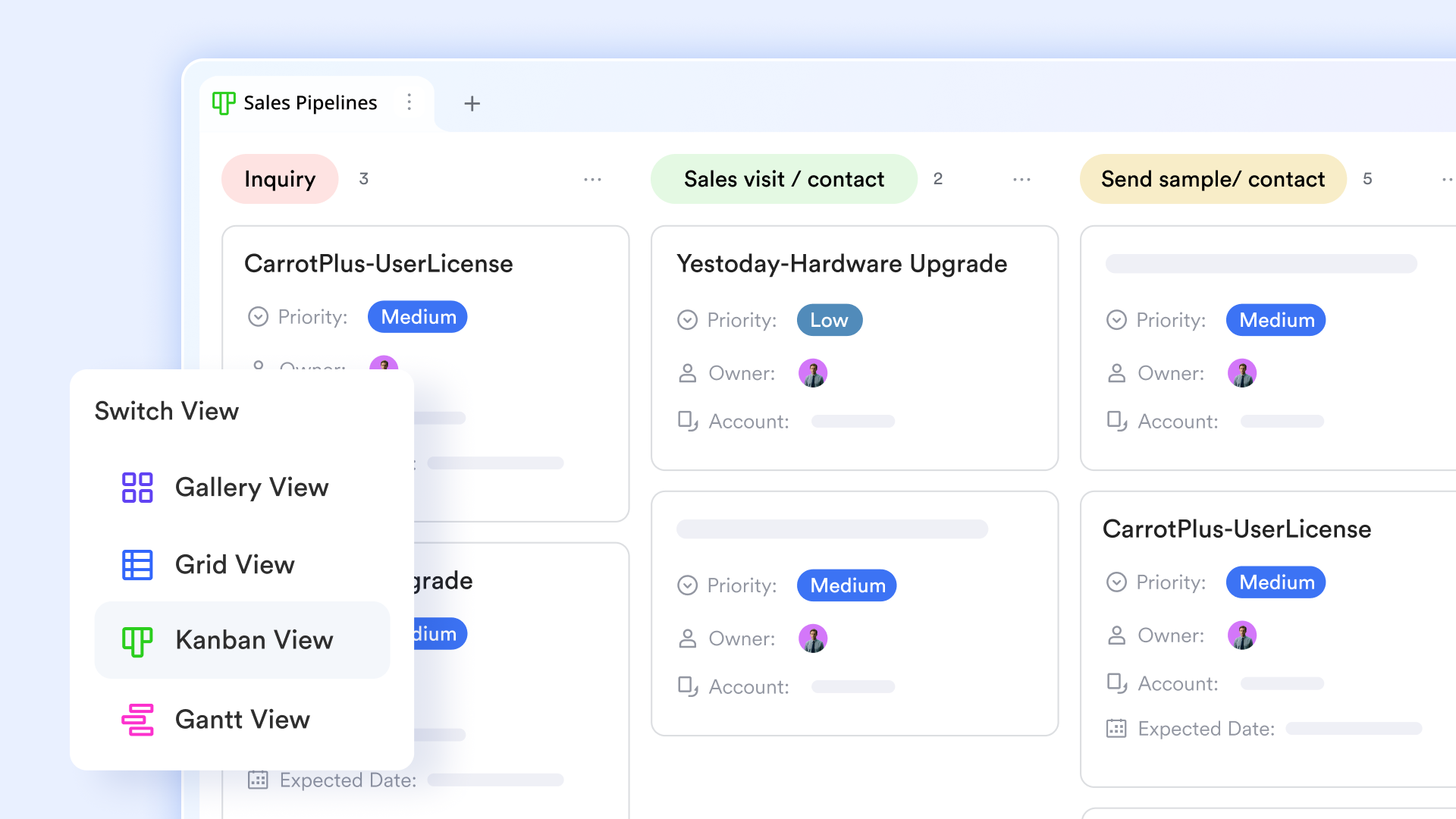
- Views in Lark Base: Kanban, Grid, Gantt, Gallery
With Views in Lark Base, teams can switch between different views for data visualization, depending on what detail they need. Kanban shows flow and status; Grid view supports quick editing and sorting; Gantt reveals timelines and dependencies; Gallery is ideal for design or content previews. Everyone works from the same dataset with no duplication.
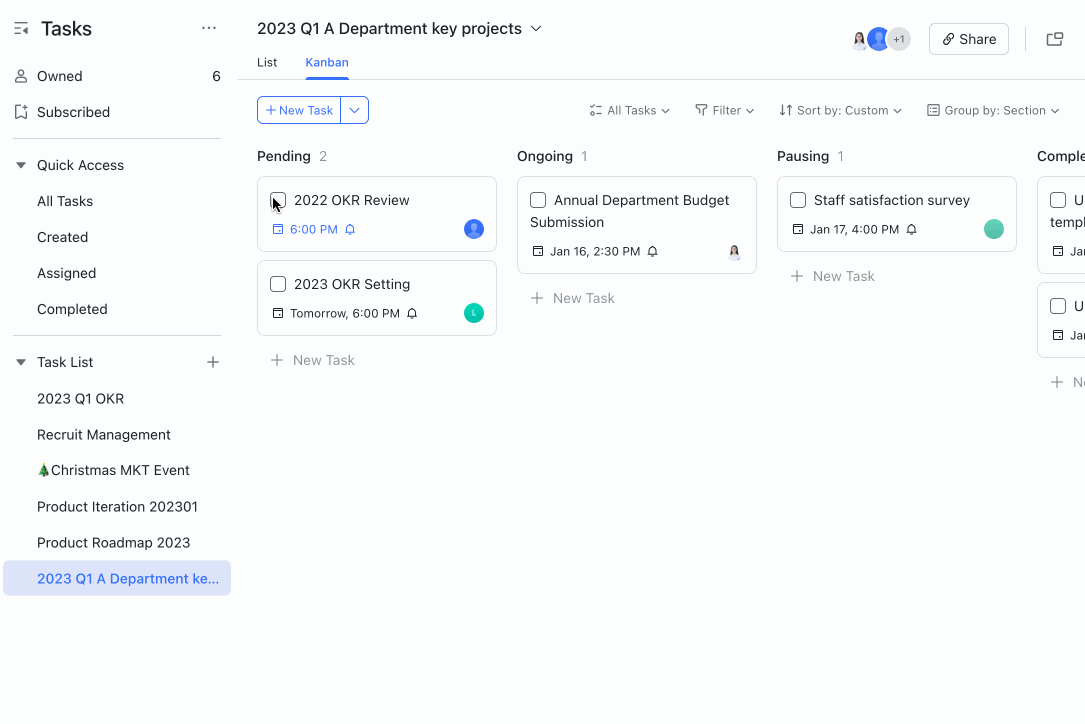
- Lark Tasks: Assign and complete Tasks in Kanban
Lark Tasks embraces the core principles of the Kanban methodology, offering a visual and efficient way to manage workflows. In Kanban view, tasks are represented as cards that move across customizable columns such as "To Do," "In Progress," and "Completed," providing a clear overview of work status. This visual representation enhances transparency and helps teams identify bottlenecks early.
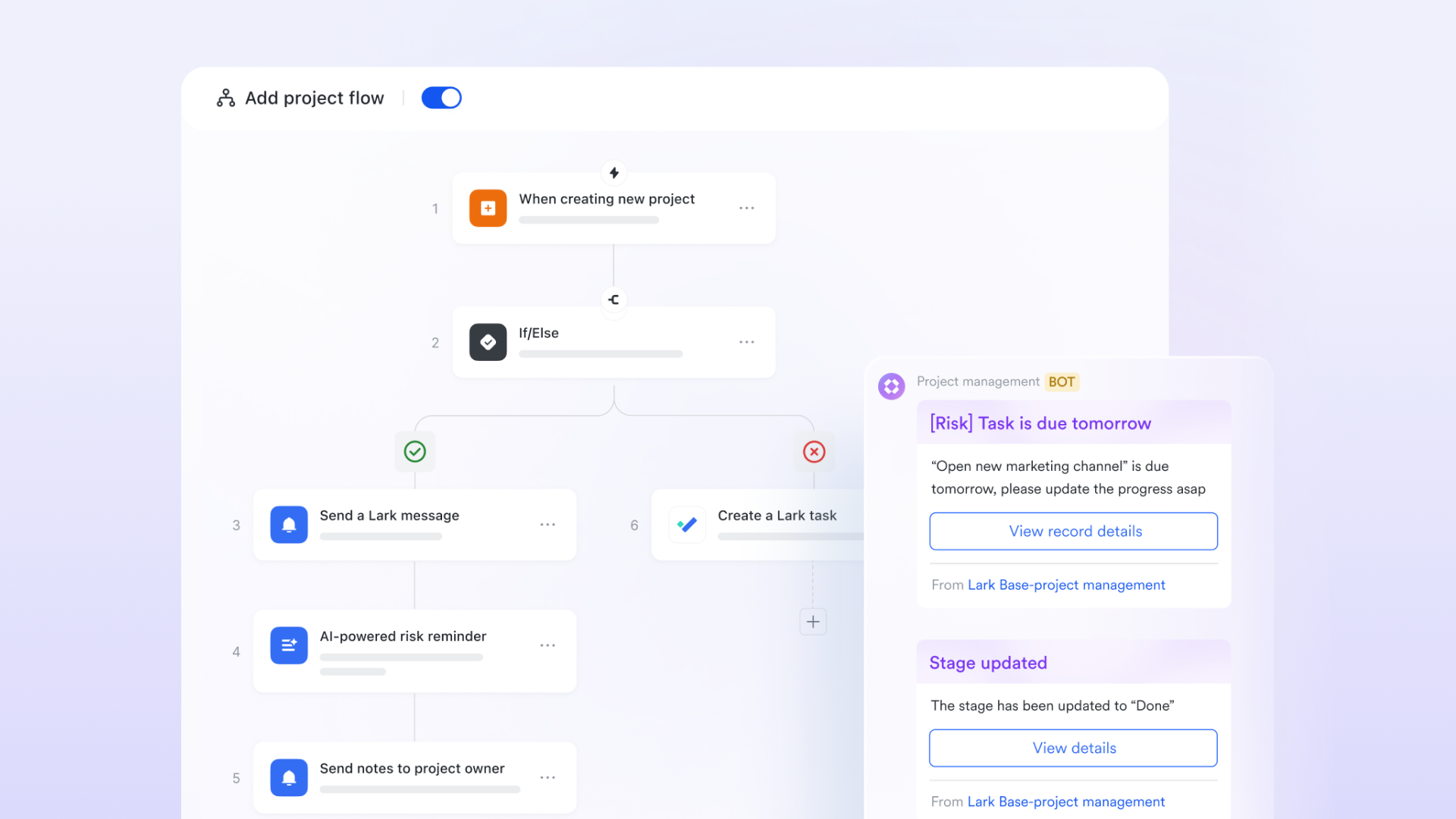
- Workflow in Lark Base: smooth handoffs and faster progress
Workflow in Lark Base triggers updates and notifications when work changes stage. With this automated workflow, teams don't waste time waiting for someone to notice their next action—the system guides momentum. Status fields, reminders, and follow-up tasks update automatically. This reduces delays, miscommunication, and recurring blockers.
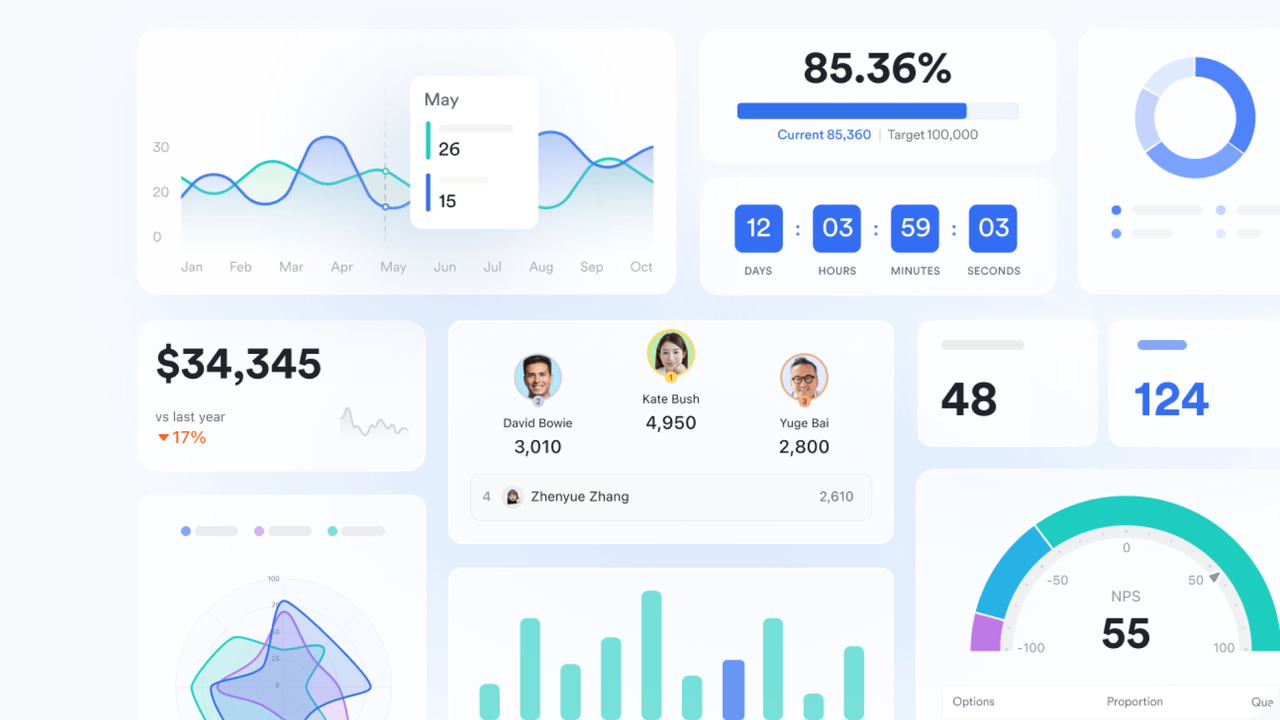
- Dashboard in Lark Base: continuous improvement through data
Dashboards surface metrics like workload distribution, cycle times, and cards stuck in queues. Rich visuals—rankings, area charts, metric blocks—help leaders and teammates see where performance drops or bottlenecks form. Data-backed discussion guides process changes that actually work.
- Permission control: transparency with precision
Different stakeholders see exactly what's relevant to them—managers get full project metrics while team members view personal or team-level progress. This keeps focus sharp and prevents distraction from unnecessary information. Sensitive insights remain protected, but accountability is never lost.
Popular Kanban templates:
Priorities Kanban template
The priorities Kanban template empowers teams to manage and prioritize tasks effectively. Organize tasks into categories such as product design, business development, and marketing, and track their progress through customizable columns. This approach ensures that high-priority tasks are addressed promptly, maintaining a steady workflow. Ideal for professionals across various fields, this template enhances task visibility and team coordination.
Kanban board (with AI) template
Lark's AI-powered Kanban board template offers a visual tool to organize and manage work efficiently. It provides a clear overview of project status, progress, and potential bottlenecks. The integrated AI feature enhances traditional Kanban boards by offering intelligent suggestions and automating repetitive tasks, saving time and improving efficiency.
Content calendar template
The content calendar template allows teams to plan, organize, and track content creation seamlessly. With features like campaign names, content formats, progress tracking, and associated events, teams can visualize their content strategy over time. The included Kanban board facilitates tracking content progress from conception to publication, ensuring timely delivery and collaboration.
Demand collection & management template
The demand collection & management template aids teams in efficiently managing project demands. It includes a Gantt chart for project tracking and a progress Kanban for visualizing task status. This structure ensures that all demands are captured, prioritized, and addressed in a timely manner, enhancing project flow and team alignment.
- Starter plan: Free forever plan that includes 11 powerful tools for up to 20 users. It also comes with 100GB of storage, 1000 automation runs, AI translations, and more.
- Pro plan: $12/user/month (billed annually) for up to 500 users. It includes everything in Starter plus group calling for up to 500 attendees, 15TB of storage, 50,000 automation runs, and more.
- Enterprise plan: Contact sales for custom pricing. Supports unlimited users and includes even more automation runs and advanced security, compliance, and management features.
Kanban practices to keep work flowing smoothly
Kanban works best when teams apply a few core practices that protect focus and reduce delays. These methods turn the board into a true system for improving how work moves every day.
- Visualize work: Teams place tasks on a Kanban board so everyone can see what is being done, who is doing it, and what's coming next. This makes hidden work visible and exposes blockers immediately. Priorities stay clear, helping the team avoid misalignment. In Lark Base, the Kanban view gives a real-time picture of task progress at every stage.
- Set WIP limits: Limiting how much work is in progress prevents overload and improves quality. When fewer tasks compete for attention, teams can finish faster without constant context switching. WIP limits encourage discipline and reduce bottlenecks in busy stages. In Base, task grouping and status views reveal when too much work is piling up—prompting action before delays grow.
- Manage flow: Healthy flow means tasks move smoothly from start to finish without unnecessary pauses. Teams monitor cycle times, blocked items, and handoffs to ensure momentum continues. The goal is predictable delivery—not rushing at the end. Automated workflow in Lark Base keeps work moving forward by notifying the next owner when a task enters their stage.
- Make policies explicit: Clear guidelines help everyone follow the same process. Rules like "definition of done," review requirements, and approval conditions reduce confusion and rework. When policies are written and visible, less time is wasted debating expectations. Teams use Lark Docs to record workflow policies and link them directly to cards for quick reference.
- Implement feedback loops: Regular reflection allows teams to detect delays, remove friction, and adjust quickly when priorities shift. Standups, retrospectives, and flow reviews ensure decisions are data-driven. Dashboards in Base reveal where work is slowing down, so discussions focus on real issues, not guesses.
- Improve collaboratively: People closest to work often see the best opportunities to enhance the workflow. Encouraging everyone to suggest improvements builds shared ownership and momentum toward efficiency. With Lark Messenger connected to task cards, teams discuss solutions directly where the work happens.
Common Kanban challenges and how to avoid them
Even though Kanban is simple to start, teams often run into challenges when the workflow isn't monitored or supported properly. Understanding these common pitfalls—and how to avoid them—helps ensure your Kanban system continues to deliver real improvements over time.
- Ignoring WIP limits: When too many tasks sit in "In Progress," attention gets scattered and delivery slows down. Work piles up in queues, causing stress and delays. Teams often forget to regulate how much they take on because priorities keep shifting.
Solution: Regularly review workload capacity and apply WIP limits that protect focus and ensure tasks are completed before new ones start.
- Treating Kanban as only a board design: Simply arranging tasks in columns doesn't guarantee improvement. Without clear rules and purpose, the board becomes a visual to-do list instead of a workflow engine.
Solution: Clarify the meaning of each stage and use actual performance data to guide adjustments, rather than relying on assumptions.
- Lack of explicit policies: When teams don't define what "ready" or "done" means, everyone uses different standards. This leads to rework, confusion, and quality inconsistencies.
Solution: Write down guidelines for handoffs, quality checks, and approvals so expectations stay aligned and predictable.
- Minimal feedback loops: Without checkpoints to reflect on work, mistakes repeat and blockers stay hidden. The board looks active, but values delivery stalls.
Solution: Schedule regular standups, retrospectives, or flow reviews to discuss delays and make small improvements continuously.
- Over-customization without purpose: Adding too many stages, tags, or labels can make the board harder to maintain and understand. Teams waste time organizing work instead of delivering it.
Solution: Keep the board as simple as possible—and only add elements that genuinely enhance clarity, not clutter.
Conclusion
Kanban gives teams a clear way to see work, stay focused, and improve continuously without changing everything at once. By visualizing workflows and reducing overload, businesses can deliver faster and keep collaboration smooth. With Lark and its automated workflow, teams can apply Kanban principles every day using features that keep progress visible and communication connected. Everything stays in one place, making it easier to turn improvements into long-term habits. If you're ready to modernize how your team works, Lark offers a powerful project management software foundation to bring Kanban to life across every project.
FAQs
What are examples of Kanban in real projects?
Kanban is widely used across industries—marketing teams manage campaign progress, IT departments handle support tickets, and ecommerce businesses track orders and returns. These real-world cases show how Kanban principles and practices improve visibility and flow. With Lark Base Kanban boards, teams can not only visualize work but also automate updates, ensuring every project stays on track without manual effort.
What is the difference between Kanban and Scrum?
Scrum follows structured sprints with fixed iterations, while Kanban offers continuous flow and flexibility without time-boxed cycles. This makes Kanban more adaptable for teams that face shifting priorities. Lark Base supports both structured planning and flexible Kanban boards, while project management tools like Lark Calendar help organize reviews and planning sessions, giving teams the best of both worlds.
How do WIP limits improve productivity?
Work in Progress (WIP) limits help teams focus by restricting how many tasks are active at once. This reduces multitasking, prevents burnout, and improves quality outcomes. Enforcing WIP is a critical part of Kanban practices and principles, but many teams forget to monitor them. With Lark automation, WIP alerts are triggered instantly, keeping workflows balanced and productive.
Can Kanban be used outside software teams?
Absolutely—Kanban isn't just for developers. HR can manage hiring pipelines, sales can track deals, finance can oversee approvals, and operations can streamline requests. The principles of Kanban—visibility, focus, and flow—apply to any function. With Lark Base, these diverse teams can create custom Kanban boards while using Messenger and Calendar to collaborate and review progress in real time.
What tools can help implement Kanban?
Popular tools like Jira, Trello, and Asana help implement Kanban, but they often require additional apps for collaboration. The difference with Lark is that it combines Kanban boards, Messenger, Calendar, and Docs in one platform. This means teams not only visualize tasks but also discuss blockers, schedule reviews, and document processes seamlessly without switching between multiple tools.
Related reading
Table of contents
Start using Lark today

Manage all your work in one place
Boost team efficiency by 10x
Save up to 70% on software costs
Table of contents
Start using Lark today
Manage all your work in one place
Boost team efficiency by 10x
Save up to 70% on software costs
Keep reading







2026 Lark Technologies Pte. Ltd.
Headquartered in Singapore with offices worldwide.






Explore: