














Notion vs Todoist: Which tool helps you stay more productive

Ryan Tanner
Product Marketing Specialist
Sep 18, 2026
Ryan Tanner
Sep 18, 2026

16 min read


Among today's top productivity apps, Notion and Todoist consistently lead the discussion for their ability to simplify work and personal organization. This Notion vs Todoist comparison examines how each tool approaches task management, usability, and pricing, revealing which suits different working styles. Notion provides a flexible, all-purpose workspace ideal for documentation and planning, while Todoist delivers a fast, focused experience for managing daily tasks. For teams seeking a more connected approach to productivity, Lark introduces a unified platform that brings together communication, tasks, and shared documents enabling smoother collaboration without overwhelming complexity or the need to switch between multiple tools.

Overview: Notion vs Todoist at a glance
Notion and Todoist are two of the most popular productivity apps helping users organize work, manage tasks, and stay focused. Both offer powerful ways to plan and track progress but cater to different needs and workflows. This Notion vs Todoist comparison explores their key differences in features, pricing, and collaboration.
What is Notion?
Notion is an all-in-one productivity platform designed to help individuals and teams organize information, manage projects, and collaborate efficiently. It combines notes, databases, and task management into a customizable workspace where users can build anything—from simple to-do lists to complex project dashboards. Notion's block-based system allows flexibility in structuring pages, linking databases, and creating wikis or knowledge hubs. It's ideal for teams that document processes, track goals, or manage multi-step workflows. While its adaptability is a major advantage, Notion can require setup time and planning to maintain consistency and avoid clutter in larger or more dynamic projects.
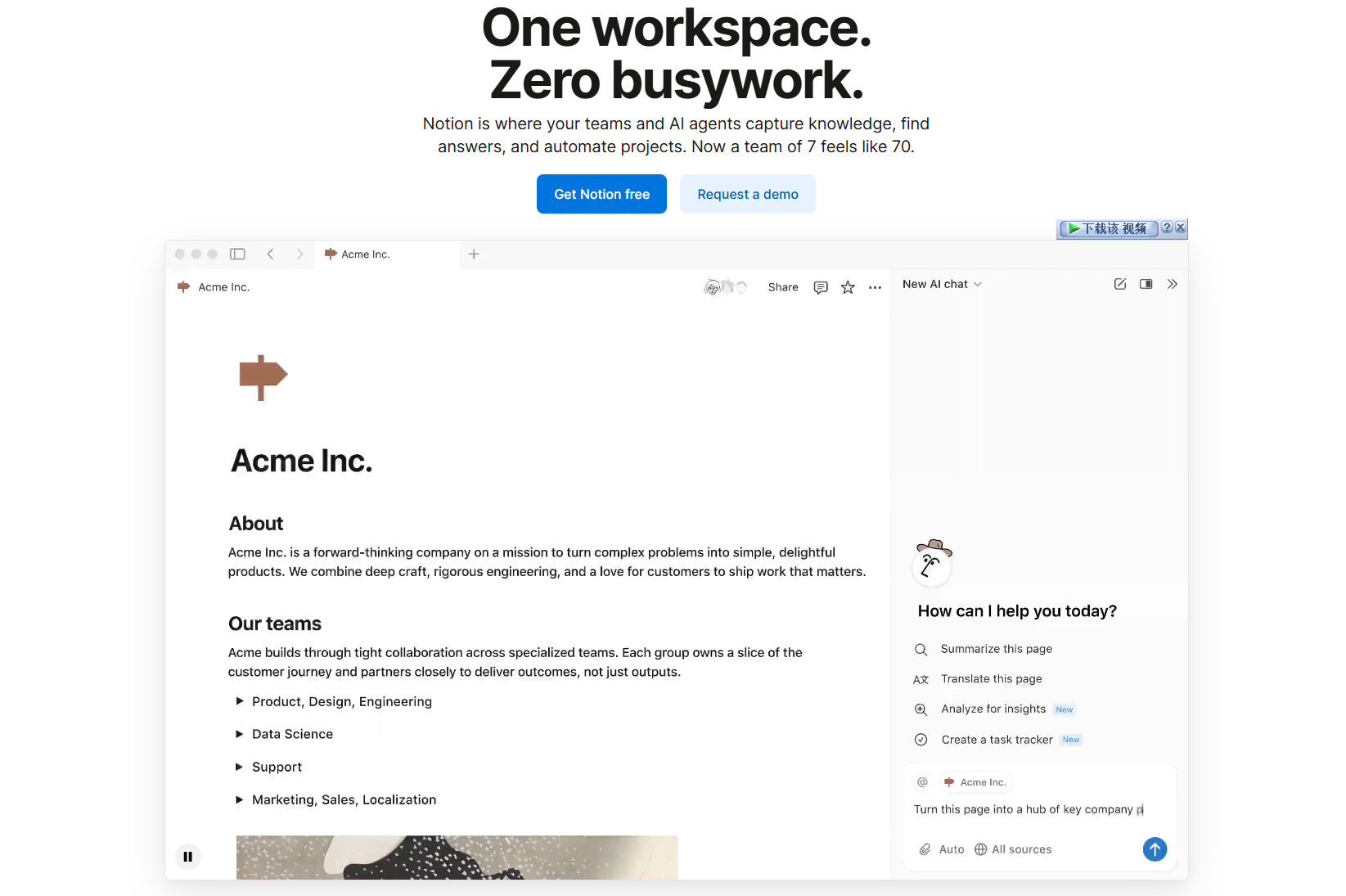
Image source: notion.com
What is Todoist?
Todoist is a streamlined task management app built for personal and professional productivity. It focuses on helping users capture, organize, and complete tasks quickly using lists, projects, and priorities. With features like recurring due dates, labels, and natural language input, Todoist makes it easy to manage daily work and long-term goals. Its lightweight design and intuitive interface make it popular among individuals and small teams who value simplicity over customization. Todoist also supports collaboration through shared projects and comments, offering a practical balance between structure and speed. It's particularly well-suited for users who prefer straightforward task execution.
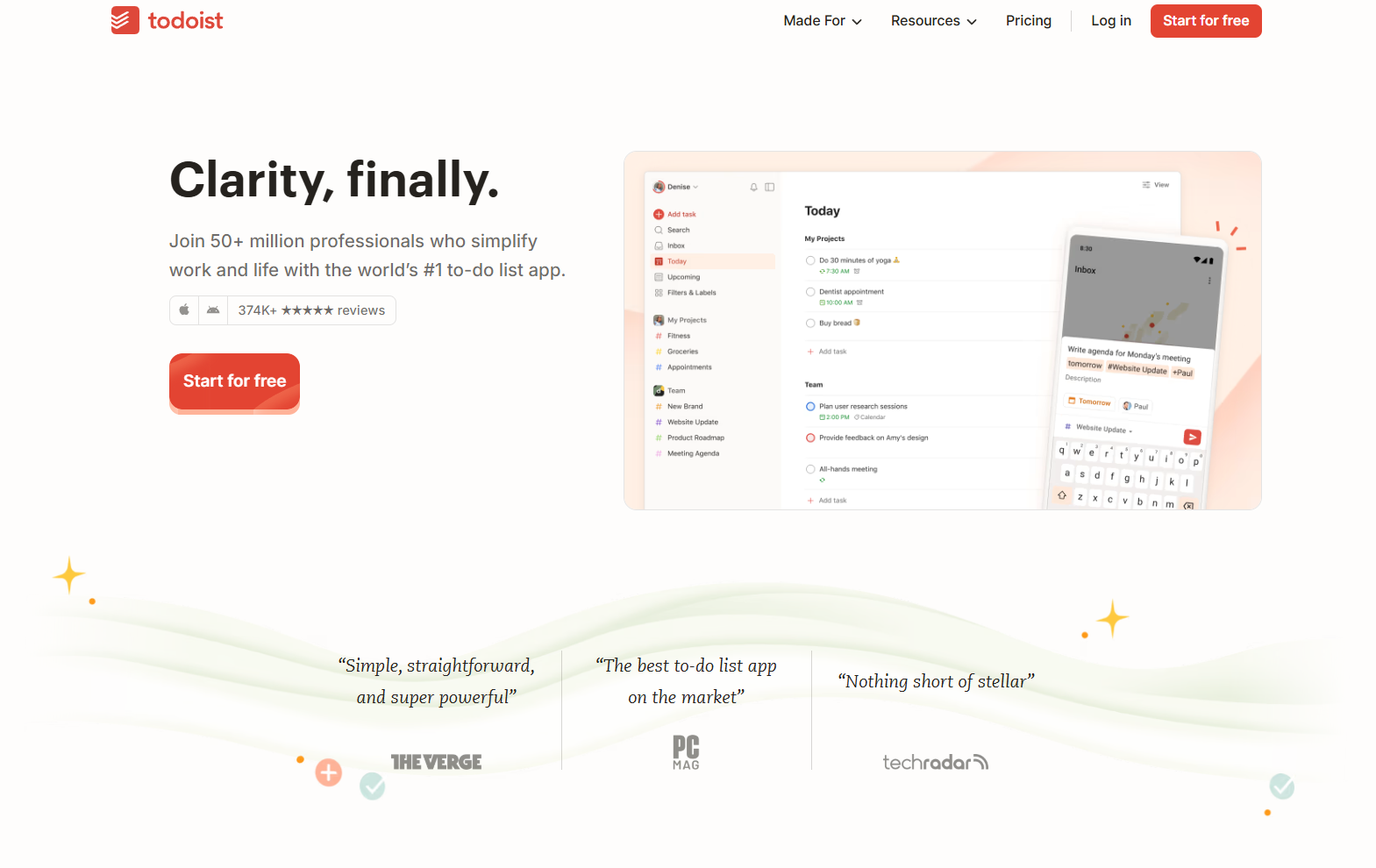
Image source: todoist.com
Feature comparison Notion vs Todoist: Which tool stands out?
When comparing Notion vs Todoist, it's clear both tools excel in different areas of productivity. Notion offers flexibility for building structured systems, while Todoist focuses on simplicity and task completion speed. This Notion vs Todoist comparison highlights how each performs across key categories like task management, collaboration, automation, and knowledge sharing. Understanding their strengths helps
Interface and ease of use
- Notion: Offers a flexible, block-based design that allows users to create pages and databases tailored to their workflow. However, this freedom requires setup time and structure to stay organized. Once properly configured, Notion provides a visually rich and customizable experience that can adapt to almost any project or process.
- Todoist: Minimalist and fast. Adding, editing, and sorting tasks is frictionless, with smart filters and natural language input for due dates. Its lightweight interface makes it easy for users to stay focused on priorities without distractions or unnecessary setup.
- Which stands out: Todoist wins for quick daily productivity, while Notion suits users building complex or multi-layered systems that require more customization.
Task management and workflow design
- Notion: Supports task lists, kanban boards, and linked databases, making it suitable for managing project pipelines and team workflows. However, task reminders and automation are limited, requiring manual setup or external tools for advanced scheduling. Its versatility makes it ideal for users who want to connect tasks with broader documentation or databases.
- Todoist: Purpose-built for task management. Users can set priorities, recurring due dates, and subtasks effortlessly, making everyday organization simple and fast. The "Upcoming" and "Today" views provide clear visibility into deadlines and workload, helping users stay focused and consistent.
- Which stands out: Todoist is stronger for personal and small-team task execution, while Notion works better for project documentation and multi-department workflows that need structured context.
Collaboration and sharing
- Notion: Enables real-time co-editing and shared workspaces where team members can comment, tag, and update content together. It's excellent for collaboration across departments, offering shared databases, meeting notes, and documentation in one place. However, coordination can become slower for teams that prefer lightweight task management tools.
- Todoist: Allows shared projects, task delegation, and threaded comments to keep team communication organized. It's efficient for quick collaboration but lacks advanced workspace features like shared knowledge bases or linked project documentation. Its simplicity works well for smaller teams needing clear accountability and progress tracking.
- Which stands out: Notion excels in collaboration-rich environments requiring documentation and shared context, while Todoist is best for focused task coordination among smaller teams.
Automation and reminders
- Notion: Offers limited built-in automation, relying mostly on external tools like Zapier or Make for repetitive or conditional workflows. It allows users to set reminders within tasks or databases, but these are basic and not suitable for complex task scheduling. Despite this, Notion's flexibility still supports creative workarounds through templates and linked pages for semi-automated processes.
- Todoist: Provides smart recurring tasks, reminders, and simple rule-based automations that make daily planning effortless. Its natural language input lets users quickly schedule tasks like "every Monday" or "in two weeks," adding speed to repetitive workflows. Todoist also syncs well across devices, ensuring reminders stay consistent and visible wherever you work.
- Which stands out: Todoist offers smoother automation and reminder features for everyday productivity, while Notion requires additional setup or third-party tools to achieve similar results.
Knowledge management and documentation
- Notion: Excels at building detailed knowledge bases, SOPs, and shared content libraries that help teams store and access information easily. Its database structure allows users to connect documents, tasks, and notes, creating a centralized hub for company knowledge. This makes it ideal for long-term reference, onboarding, and process documentation across departments.
- Todoist: Focuses purely on task execution, offering limited support for note-taking or information storage. While it helps users stay on top of tasks, it doesn't provide tools for maintaining wikis, guides, or structured documentation. Todoist's simplicity keeps users focused on what needs to be done but lacks the depth for content organization.
- Which stands out: Notion dominates in knowledge management and documentation, while Todoist remains best for straightforward task completion without added complexity.
Pricing comparison: Notion vs Todoist
Information source: Official vendor sites
Update time: 2025-11-13
Note: Pricing and plan details reflect publicly available data as of the update date and may vary based on region, billing cycle, and number of agents.
Notion pricing
- Free: $0/user. It includes basic use with unlimited pages and blocks for individuals, limited guest access, 7‑day page history, and up to 5 MB file upload.
- Plus: $10/user/month (annual) or $12/user/month (monthly). It adds unlimited file uploads, 30-day page history, up to 100 guest collaborators, and priority support.
- Business: $20/user/month (annual) or $24/user/month (monthly). It includes SAML SSO, private teamspaces, advanced permissions, and advanced page analytics.
- Enterprise: Custom pricing. It offers enterprise-level features like user provisioning (SCIM), audit logs, workspace analytics, advanced security controls, and dedicated support.
Notion AI note: Notion AI is included by default in the Business and Enterprise plans.
Todoist pricing
- Beginner (Free): $0. It includes up to 5 personal projects, basic reminders, 3 filter views, and 1‑week activity history.
- Pro: $4/user/month (billed annually at $48). It offers up to 300 personal projects, custom reminders, task duration, 150 filter views, unlimited activity history, and AI Assistant.
- Business: $6/user/month (billed annually at $72). It includes everything in Pro plus a shared team workspace, up to 500 team projects, team roles & permissions, 1,000 team members/guests, team activity logs, and centralized billing.
Which stands out: Todoist remains more affordable for personal productivity and small teams, while Notion's pricing reflects its expanded capabilities for documentation, database management, and cross-functional collaboration.
While Notion and Todoist both help individuals stay organized, they fall short when teams need real-time communication, automation, and connected data. Lark bridges these gaps by offering a unified workspace where teams can chat, assign tasks, manage docs, and track workflows, all without juggling multiple apps.
Meet Lark: One platform that manages documents, projects, & tasks
While Notion focuses on documentation and Todoist on personal task management, Lark combines both worlds into a single, collaborative workspace. It unifies team communication, documentation, and task execution—enabling teams to brainstorm, assign, and act without switching tools. Below is a detailed look at how Lark's features extend beyond what Notion and Todoist offer individually.
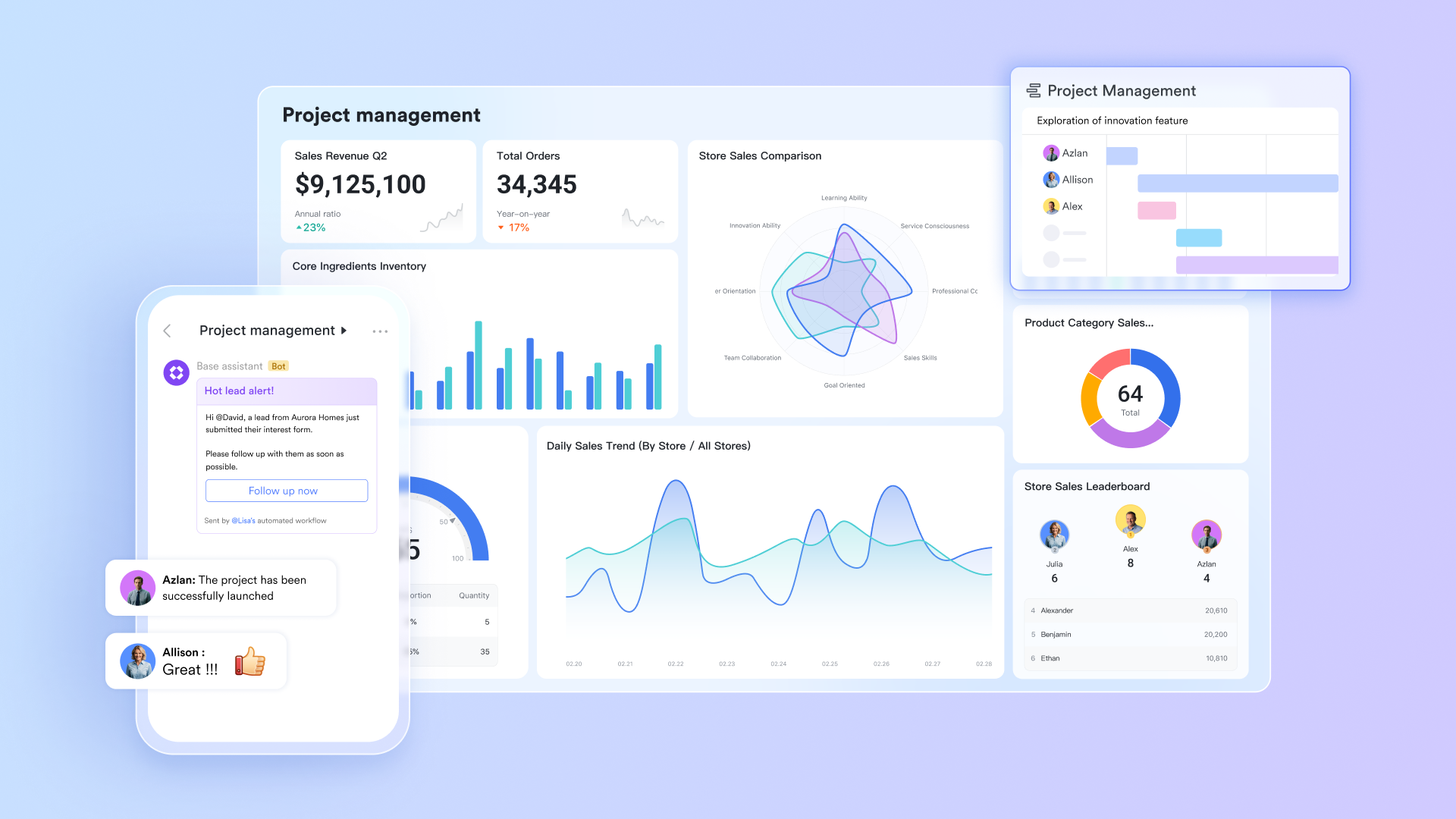
Lark Base: Organized data and workflow automation
Lark Base acts as your team's operational hub combining the structure of a database with the usability of a spreadsheet. You can create multiple tables for projects, clients, or campaigns, connect them through two-way links, and visualize them in Grid, Kanban, or Gantt views. Base's automation engine allows you to set up rule-based workflows, such as sending notifications when deadlines approach or generating new Tasks automatically when records meet certain criteria.
Why it's better: Notion's database views are flexible but manual, while Todoist lacks advanced data management. Lark Base offers both structured data organization and no-code automation, eliminating the need for external integrations or scripts.
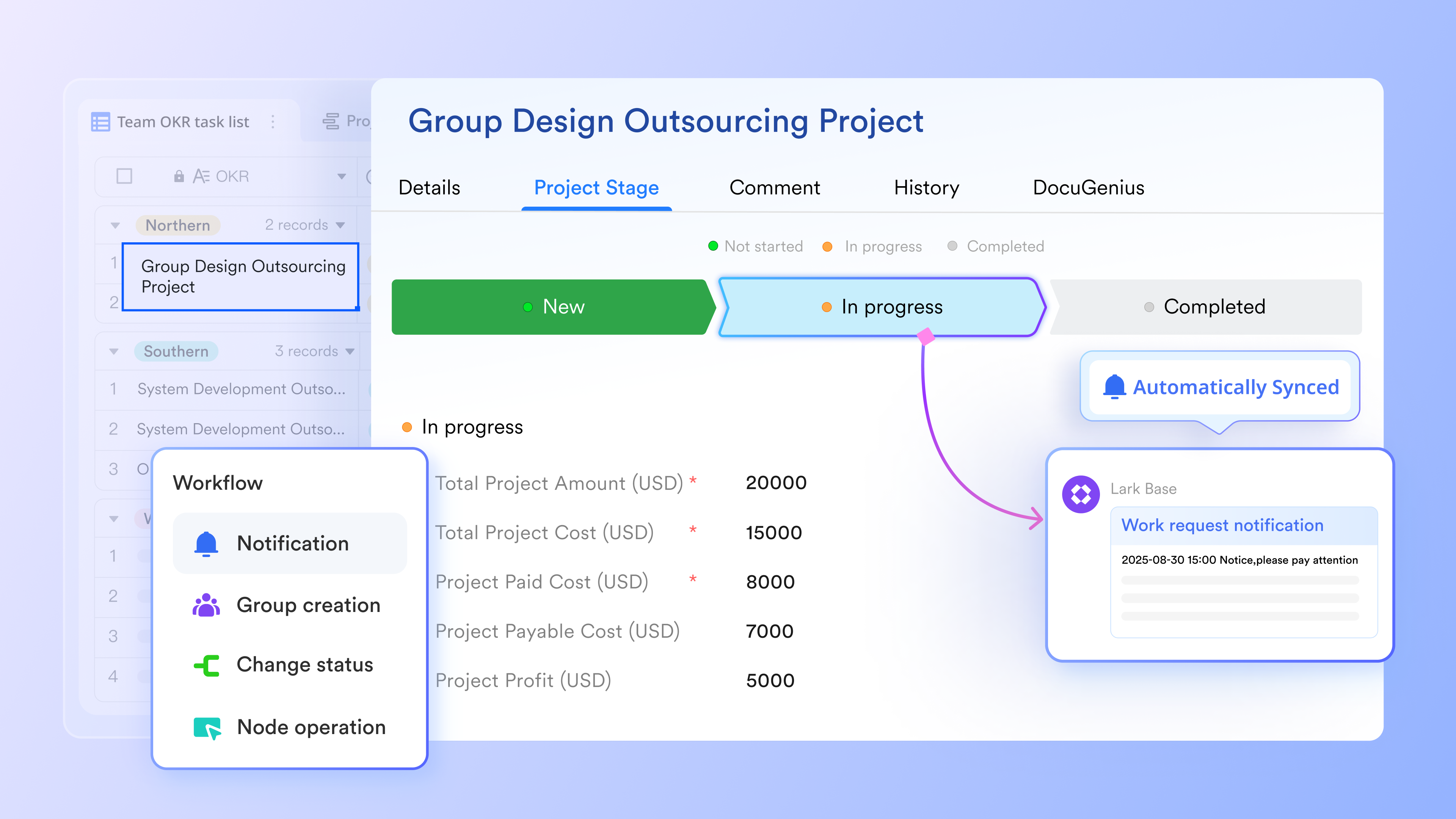
Lark Tasks: Smart task tracking across teams
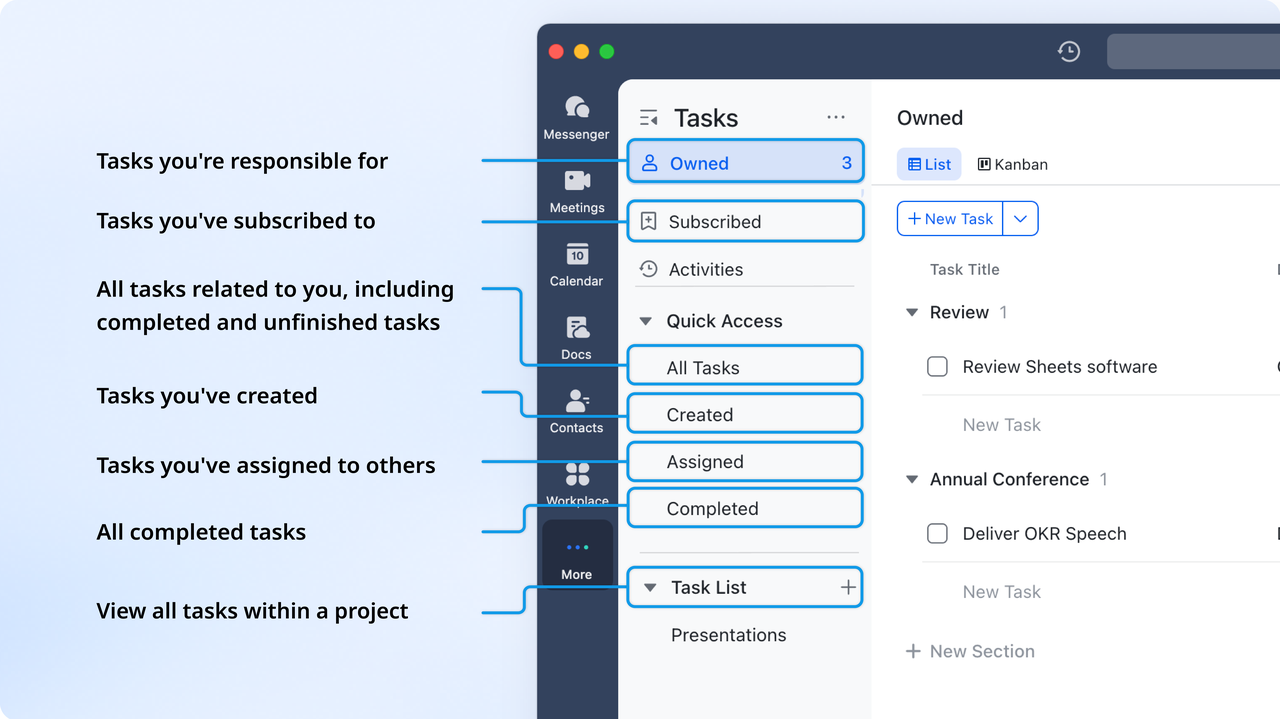
Lark Tasks ensures accountability and clarity across teams. You can assign owners, set deadlines, attach related Docs or Base records, and visualize progress through Kanban boards or task lists. Tasks update in real time across all linked projects, ensuring everyone stays aligned. Managers can view workload distribution and track completion status through task reports and dashboards.
Why it's better: Todoist focuses on individual task lists, while Notion's task databases require manual setup. Lark Tasks blends both approaches delivering structured project tracking for teams with the ease of a personal to-do app.
Lark Docs & Wiki: Collaborative documentation and shared knowledge
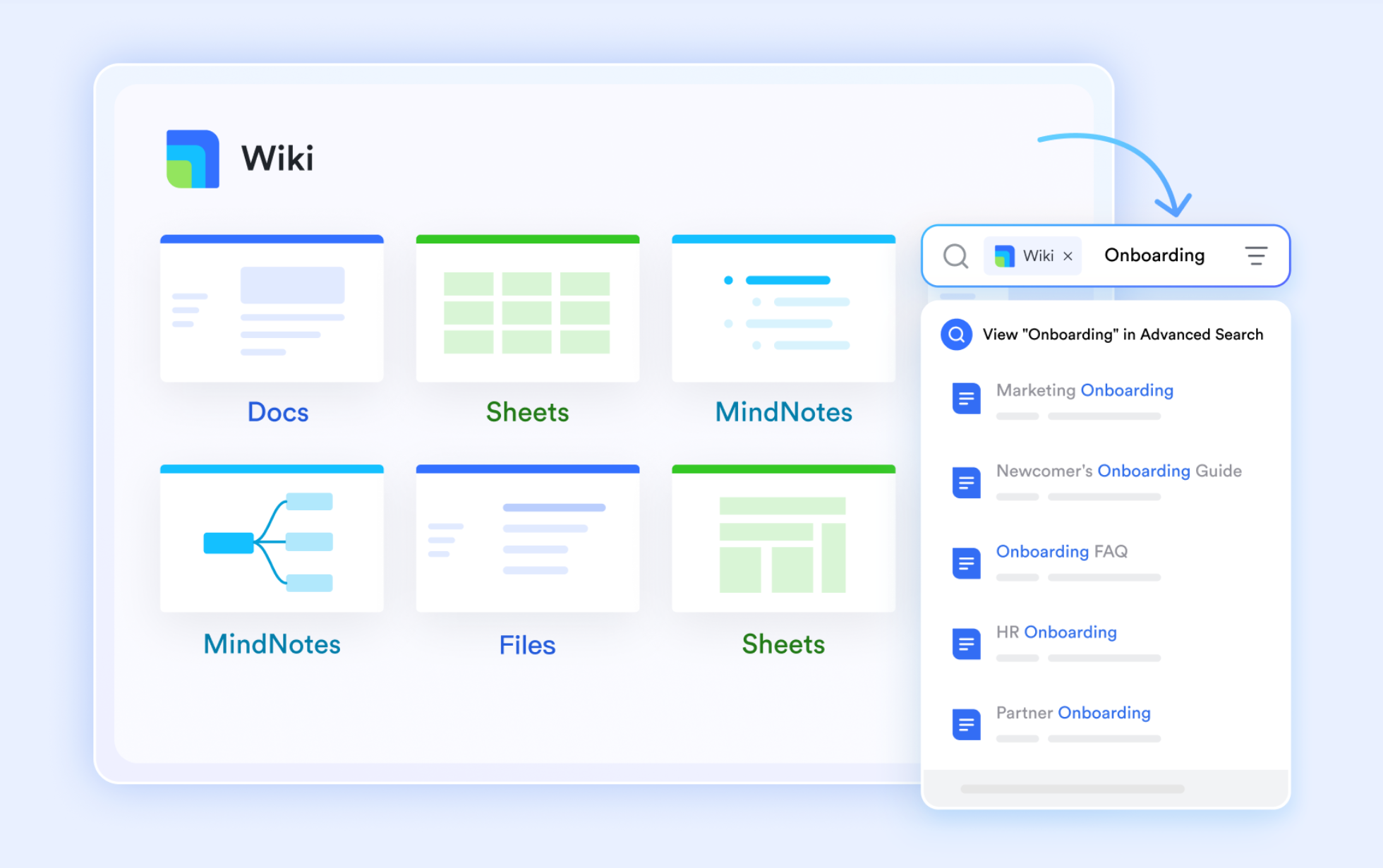
Lark Docs transforms team documentation into an interactive workspace. Team members can co-edit documents, add comments, embed databases from Base, or even link Tasks directly inside text. With Lark Wiki, organizations can create knowledge libraries, onboarding guides, or SOPs that are searchable and always up to date. Docs also support embedding multimedia, charts, and emails—making them dynamic collaboration spaces rather than static pages.
Why it's better: Notion is strong for documentation, but Lark goes further by connecting content to live workflows you can track edits, attach conversations from Messenger, or update linked data instantly.
Lark Messenger: Real-time communication that connects to work
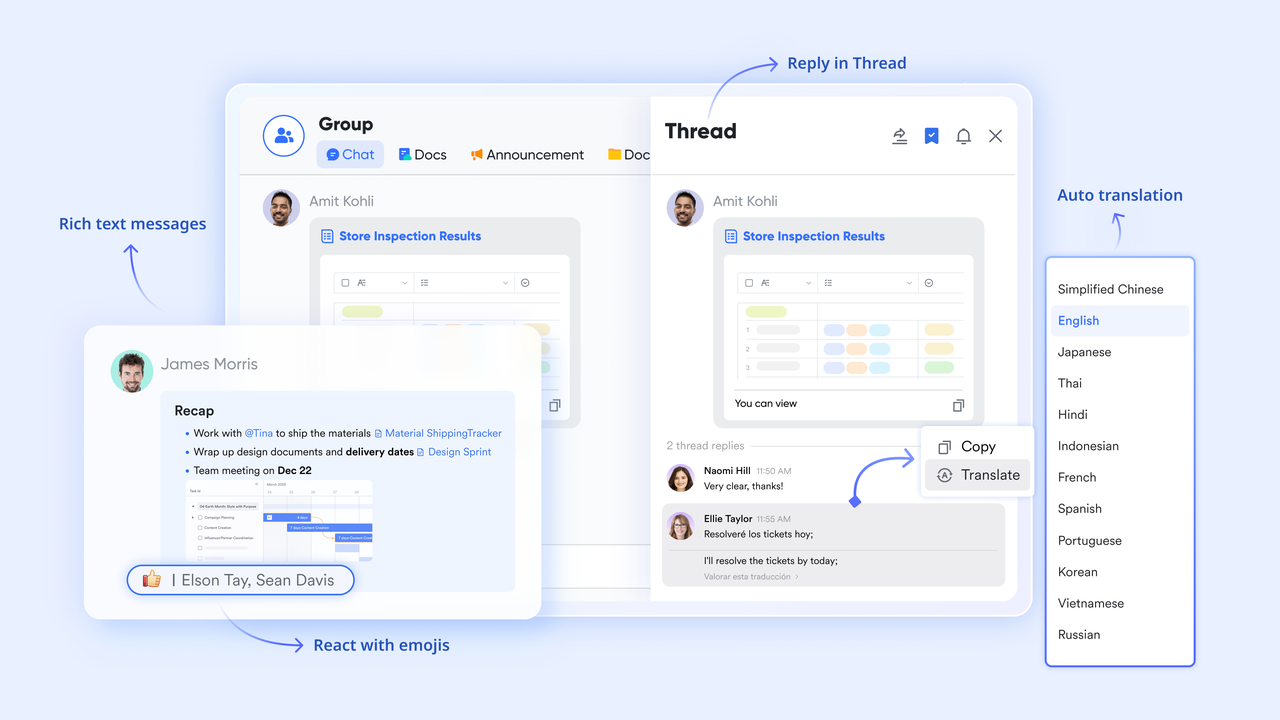
Unlike Notion or Todoist, which rely on external apps for live messaging, Lark Messenger is built-in. Teams can chat, share files, and even preview linked Docs or Tasks directly in conversations. Smart group chats allow you to tag documents, assign tasks, or start meetings from the same chat thread.
Message threads remain tied to the context of work. For example, a project chat automatically links to its related Base table or Docs.
Why it's better: Lark eliminates context switching. Instead of moving between Slack, Notion, and Todoist, all collaboration happens in one place, reducing distractions and ensuring faster decision-making.
Lark Calendar & Lark Meetings: Time-bound collaboration made simple
Lark Calendar and Lark Meetings bring scheduling and teamwork together. You can create shared calendars for teams, link events to meeting Docs, and attach action items or tasks directly to events. AI-powered scheduling suggestions find the best time across global teams. During meetings, Lark's AI Meeting Notes automatically summarize discussions, capture decisions, and generate follow-up tasks—turning meetings into actionable outcomes.
Why it's better: Neither Notion nor Todoist offers built-in calendar automation or live meeting integration. Lark connects scheduling directly with projects and tasks, ensuring nothing discussed is lost post-meeting.

Lark Sheets: Real-time data collaboration
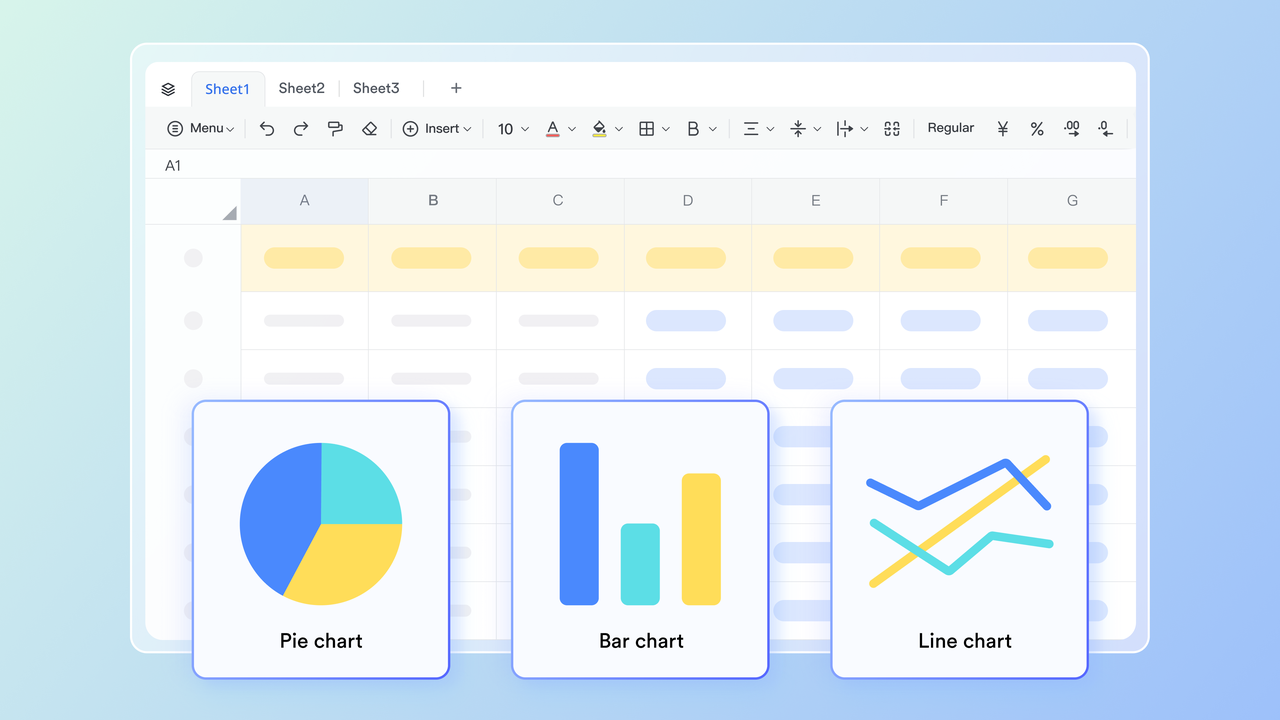
Lark Sheets provides a familiar spreadsheet interface but with live co-editing, data connection to Base, and built-in formulas. You can generate reports, visualize data with charts, and share interactive dashboards with stakeholders. Teams can use Sheets to analyze performance metrics, resource planning, or campaign results without exporting to other tools.
Why it's better: While Notion offers databases and Todoist exports task data, Lark Sheets provides spreadsheet-level analytics and reporting—within the same ecosystem.
- Starter plan: Free forever plan that includes 11 powerful tools for up to 20 users. It also comes with 100GB of storage, 1000 automation runs, AI translations, and more.
- Basic plan: $6/user/month (billed annually) for up to 500 users. It includes everything in Starter plus group calling for up to 500 attendees, 5TB of storage, 1000 automation runs, and more. Some users may need to contact sales to learn details about this plan.
- Pro plan: $12/user/month (billed annually) for up to 500 users. It includes everything in Starter plus group calling for up to 500 attendees, 15TB of storage, 50,000 automation runs, and more.
- Enterprise plan: Contact sales for custom pricing. Supports unlimited users and includes even more automation runs and advanced security, compliance, and management features.
Notion vs Todoist vs Lark: Side-by-side comparison
When evaluating productivity and collaboration tools, it's important to consider how each platform balances task management, documentation, collaboration, and automation—notion, Todoist, and Lark each approach these needs differently. The following side-by-side comparison highlights their capabilities across core features, collaboration, automation, and pricing to help teams choose the solution that best fits their business workflow.
Conclusion
Both Notion and Todoist are excellent productivity tools, but they cater to different styles of work. Notion is ideal for users who want to create structured workspaces, manage projects, and store documentation in one place. Todoist, on the other hand, focuses on speed and simplicity, helping individuals and small teams manage daily tasks efficiently. However, when organizations need to connect people, projects, and knowledge in real time, Lark offers a more cohesive solution. It combines task management, communication, and document collaboration within one platform, reducing the friction of switching between multiple apps. Ultimately, the best choice depends on your priorities—customization with Notion, streamlined task execution with Todoist, or unified teamwork with Lark for long-term productivity growth.
FAQs
Is Notion better than Todoist for team projects?
Notion is generally better suited for team projects because it offers shared workspaces, documentation, and real-time collaboration. Teams can co-edit pages, build project dashboards, and maintain centralized knowledge. Todoist supports shared tasks and comments but lacks the depth needed for complex teamwork. For structured project management and shared planning, Notion provides a more comprehensive setup.
Can Lark replace both Notion and Todoist?
Yes, Lark can effectively replace both Notion and Todoist by combining documentation, task management, and communication in a single workspace. It enables teams to collaborate in real time, manage workflows, and store shared information without relying on separate tools. This reduces fragmentation and helps maintain productivity across departments. Lark's unified design supports both project execution and documentation seamlessly
What are the main differences between Notion and Todoist?
The main difference lies in their core purpose: Notion focuses on building flexible, customizable workspaces for documentation and planning, while Todoist centers on quick, structured task management. Notion is ideal for project overviews and shared knowledge bases, whereas Todoist excels in personal task tracking and prioritisation. Essentially, Notion manages systems; Todoist manages actions.
How does Lark compare with Notion vs Todoist for business productivity?
Lark offers broader functionality for business productivity by connecting communication, task tracking, and documentation. While Notion organises information and Todoist manages tasks, Lark does both while adding real-time teamwork and workflow automation. Businesses benefit from fewer tools, faster collaboration, and clearer visibility into progress. This all-in-one approach helps streamline operations across teams.
Which is better: Notion, Todoist, or Lark for hybrid teams?
For hybrid teams that balance remote and in-office collaboration, Lark provides the most complete experience. Notion helps with documentation and Todoist keeps tasks on track, but Lark unites both functions alongside chat, meetings, and shared calendars. This makes it easier for hybrid teams to communicate, plan, and execute work efficiently within one connected environment.
Related reading
Table of contents
Start using Lark today

Manage all your work in one place
Boost team efficiency by 10x
Save up to 70% on software costs
Table of contents
Start using Lark today
Manage all your work in one place
Boost team efficiency by 10x
Save up to 70% on software costs
Keep reading







2026 Lark Technologies Pte. Ltd.
Headquartered in Singapore with offices worldwide.






Explore: