If you're considering Nutshell as your CRM solution, understanding its pricing structure is crucial for effective budgeting as your sales team grows. This guide provides a detailed overview of Nutshell pricing, including its core tiers, optional marketing costs, and essential add-ons. We’ll explain the seat tiers, usage limits, and long-term costs that buyers typically seek, ensuring you have a complete picture of your investment.
However, there can be challenges in navigating Nutshell's pricing model, particularly with hidden costs related to user adoption and administrative time that may impact your overall budget. Later in this guide, we will address these potential issues and offer a better solution to help you optimize your CRM investment.
Embark on your CRM journey with a cure-all
Breaking down Nutshell's Sales Suite plans
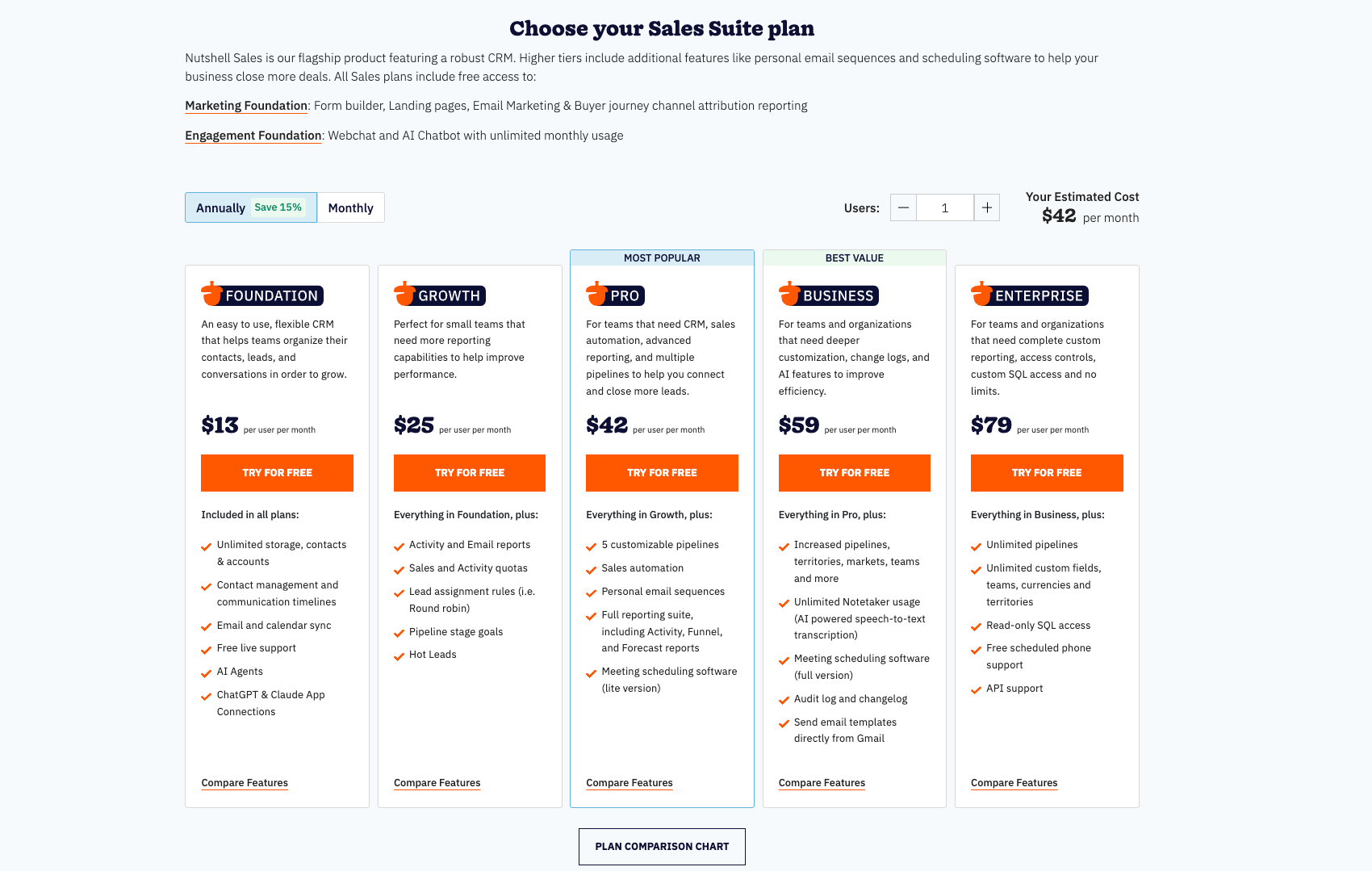
The Sales Suite is the core of Nutshell, integrating CRM, sales software, and scheduling tools into one cohesive system. Understanding its pricing is essential for assessing fit for your business. Notably, prices are based on annual subscriptions, offering discounts compared to month-to-month billing. Nutshell's five plans—Foundation, Growth, Pro, Business, and Enterprise—cater to organizations at varying growth stages. Each plan builds on the previous one, introducing advanced features from basic to AI tools, allowing businesses to start small and scale their investment as needed.
The following table provides a clear, at-a-glance comparison of all five Sales Suite plans, highlighting the starting price and core feature progression to help you quickly identify the potential fit for your team.
Information source: nutshell.com
Update time: 2025-11-20
Foundation plan: Perfect for essential sales management
The Foundation plan, starting at $13 per user per month when billed annually, serves as Nutshell's accessible entry point into the world of structured sales management. This plan is strategically designed for , , or individual sales professionals who are transitioning from disparate spreadsheets and seeking a single source of truth for their and sales process. By providing a focused set of powerful tools, it offers a low barrier to entry, making the initial CRM cost per month highly manageable for lean teams.
The core features are built around fundamental needs:
- Unlimited data storage: This ensures you never have to worry about purging old customer records or deal history, allowing your database to grow organically with your business.
- Centralized and company management: This goes beyond a simple address book, enabling you to track interactions, manage relationships, and see the complete history of any contact or account.
- One : You can visualize your sales process from lead to close, tailoring stages to match your unique workflow and providing clear visibility into your team's deals.
This plan effectively addresses the core CRM cost meaning for a new adopter: it's an investment in foundational organization and efficiency, providing the essential tools for tracking deals and managing customer interactions without the financial burden of advanced features that may not yet be necessary.
Growth plan: Introducing reporting and quotas
The Growth plan, starting at $25 per user per month (annual billing), represents a significant step up by introducing data-driven management tools. This tier is ideally suited for team leaders and managers who have moved beyond basic tracking and now need to measure performance, set targets, and actively drive growth. It builds directly upon the Foundation feature set, adding a layer of analytical insight.
With the Growth plan, you gain all the benefits of Foundation, plus critical tools for oversight:
- Activity and email reports: These reports provide tangible insights into your team's outreach efforts and engagement levels, allowing you to measure productivity and identify coaching opportunities based on data, not guesswork.
- Sales and activity quotas: This feature enables management to set and track clear, quantifiable targets for both deal outcomes (sales) and leading indicators (activities), aligning the team towards common goals.
- Pipeline stage goals: This allows you to monitor the health and velocity of your sales funnel by tracking how deals are moving through each stage, helping to identify bottlenecks and improve forecasting accuracy.
This plan shifts the focus from "what happened" to "why it happened and how we can improve." It is a strategic investment for a growing team that understands that managed performance is the key to scalable growth, justifying a higher CRM cost per month with the promise of greater output and control.
Pro plan: Powering up with automation and multiple pipelines
The Pro plan, at $42 per user per month (annual billing), is where Nutshell's capabilities expand to empower sophisticated sales processes with automation and scalability. This plan is tailored for established sales teams that manage multiple product lines, sales motions, or complex workflows that require more than a single, linear pipeline.
It includes everything in the Growth plan and introduces powerful efficiency engines:
- Five customizable pipelines: This allows you to segment and manage different sales processes simultaneously—for example, one for new business, one for account management, and one for partner sales—without cross-contamination of data or stages.
- Advanced and email sequencing: These features streamline repetitive tasks and communication, enabling your team to automate follow-ups, internal notifications, and multi-touch email campaigns, thereby increasing overall capacity.
- The full reporting suite and Scheduler Lite: This provides access to Nutshell's most powerful analytics tools and integrates a lightweight version of their meeting scheduling tool, reducing the friction in the booking process.
For a team that has outgrown manual processes, the Pro plan offers a compelling return on investment. The automation alone can reclaim hours per week per rep, making the increased CRM software cost for small business a easily justifiable expense when measured against gains in team productivity and deal velocity.
Business and Enterprise plans: Leveraging AI and unlimited scale
For organizations where the CRM is a mission-critical system integral to complex operations, Nutshell offers the Business and Enterprise plans. These tiers are designed for businesses that require deep customization, advanced intelligence, and high-touch support.
The Business plan, starting at $59 per user per month (annual billing), includes all the benefits of Pro and introduces to enhance productivity and insight. With custom pricing that requires a direct quote, this plan adds features like AI-powered timeline summaries, voice-to-text transcription for notes, and advanced integration capabilities like sending email templates directly from Gmail. It is designed for companies ready to leverage artificial intelligence to reduce administrative overhead and gain deeper insights from customer interactions.
The Enterprise plan, starting at $79 per user per month (annual billing), is Nutshell's most powerful and unrestricted offering. It includes all Business features and removes critical limitations, providing:
- Unlimited pipelines and custom fields: This offers total flexibility to model any business process without constraints.
- Multiple currencies and read-only SQL access: These features are essential for international businesses and those with data teams that need to perform deep, custom analysis outside of the standard reporting environment.
- A dedicated customer success strategist and API support: This ensures a high level of personalized support and enables technical teams to build robust integrations.
The average cost of CRM implementation at this level is substantial, but it is justified by the platform's role as a central nervous system for the sales organization, enabling unparalleled customization, scalability, and strategic support.
Calculating your CRM investment with Nutshell
Understanding the per-user monthly cost is essential, but the overall CRM investment for small businesses includes the total costs for the entire team and any additional products or services. Nutshell offers a CRM cost calculator on its website, allowing you to input your team size and plan to see total monthly and annual expenses. However, it's important to consider more than just the subscription fee. Effective CRM implementation involves hidden costs such as system setup, data migration, and training to ensure user adoption and maximize returns. Nutshell's does streamline deployment, but dedicating resources for proper implementation is crucial for success. Additionally, businesses should consider the cost of any necessary add-on suites.
Furthermore, the core Nutshell CRM pricing for the Sales Suite is just one part of the financial picture. To build a complete commercial engagement platform, businesses often need to consider the add-on suites.
- The Engagement Suite is priced separately and integrates seamlessly with any Sales Suite plan. Its Foundation plan offers unlimited access to Web chat during its beta period, while the Pro plan adds two-way text messaging (SMS), 150 free outbound messages per user, and integration with popular messaging apps like Facebook, Instagram, and WhatsApp Business.
- The Marketing Suite is another add-on, with a Foundation plan offering unlimited marketing contacts and web forms, and a Pro plan unlocking landing pages, CompetitorSpy, and SMS broadcasts.
When you synthesize all these elements—the total for your Sales Suite plan, the optional costs for Engagement or Marketing Suites, and the internal investment of time and resources—you arrive at a holistic and realistic picture of your total CRM cost per month and overall investment. This comprehensive view is essential for accurate budgeting, strategic planning, and justifying the ROI of deploying a powerful platform like Nutshell.
Navigating Nutshell add-ons and extra costs
While the Sales, Engagement, and Marketing Suites form the primary product structure, Nutshell offers a range of strategic add-ons designed to provide specific, powerful functionalities without requiring a full plan upgrade. This a-la-carte approach allows for a highly tailored and scalable strategy, which is crucial for managing the total CRM software cost for small business. Understanding these options is key to creating a realistic budget and avoiding unexpected expenses.
- Quotes and invoices: For $67 per month, you can create, send, and track your sales quotes and invoices with one click. This feature allows you to customize an unlimited number of quotes and invoices, send them via link, and track when your lead opens and accepts your quote or pays your invoice. It is available to your entire team for a low fixed price.
- Nutshell IQ: A powerful suite of tools for sales intelligence and lead generation. It includes ProspectorIQ for finding new contacts, VisitorIQ for identifying visiting companies, and PeopleIQ for enriching contact data. This add-on starts at $37 per company per month for 100 credits, with every account receiving 10 free credits monthly. It directly fuels the sales pipeline by uncovering new opportunities and providing valuable context on prospects, thereby adding a tangible revenue-generation component to the platform.
- SMS: Another key add-on which enables your team to send and receive text messages directly within Nutshell. It's important to note that this functionality is available as part of the Engagement Pro plan, which starts at $15 per user per month, and includes 150 text messages per user. This integration ensures that all customer communication, across multiple channels, can be centralized within a single record.
The table below summarizes these key add-ons for easy comparison:
These add-ons demonstrate Nutshell's flexible approach to functionality. Instead of forcing you into a higher-priced plan for one or two specific features, they allow you to pay for advanced capabilities only when your business needs them. This modularity helps control the overall CRM cost per month, allowing you to scale your toolset in line with your actual business requirements and growth stage.
The pros and cons of choosing Nutshell
Making an informed decision requires a balanced view. Based on its features and market position, Nutshell presents a compelling case for many businesses, but it's not a one-size-fits-all solution.
Pros:
- Transparent and scalable pricing: The tiered plan structure makes it easy to understand the CRM cost per month as your team grows. You can start with Foundation and scale up to Pro or Enterprise as your needs become more complex.
- All-in-one platform potential: The availability of the Engagement and Marketing Suites, alongside the core Sales Suite, reduces the need for multiple disparate tools. This consolidation can simplify workflows and potentially lower overall software spending.
- Intuitive user experience: Nutshell is widely recognized for its clean and user-friendly interface. This reduces the learning curve for new team members, which can significantly cut down on training time and costs—a often overlooked part of the average cost of CRM implementation .
- Strong : At its heart, Nutshell provides robust contact management, pipeline tracking, and sales automation that meet the essential needs of most sales teams .
Cons:
- Feature limits in lower tiers: Advanced automation, multiple pipelines, and sophisticated reporting are primarily available in the higher-priced Pro and Enterprise plans. This means growing teams will inevitably face a price jump to access the tools they need.
- Potential for add-on costs: While the base plans are clear, the total cost can increase if you opt for multiple add-ons like VisitorIQ or Campaigns. Businesses must budget for these extras if they are part of their strategy.
- Custom quote for Business Plan: The requirement to contact sales for the Business plan's pricing can be a hurdle for companies that prefer fully transparent, self-service pricing for all tiers.
How Nutshell stacks up against CRM alternatives
The CRM market is vast, and understanding where Nutshell fits helps contextualize its value. When compared to industry giants, Nutshell often positions itself as a more streamlined and affordable alternative.
For instance, while a platform like Salesforce offers immense power and , it is also known for its complexity and significantly higher cost. In contrast, Nutshell provides a more focused set of sales tools with a gentler learning curve, making it a strong contender for small to mid-sized businesses that find enterprise solutions overwhelming.
Other popular alternatives like HubSpot CRM offer a generous free plan, but their premium sales features can become expensive quickly. Nutshell's Nutshell CRM pricing is often more straightforward for its core sales functionality, without the upsell pressure towards a massive marketing-centric suite. Platforms like Zoho CRM offer a wide array of apps, but this can lead to complexity. Nutshell's advantage often lies in its simplicity and dedicated focus on the sales process .
Try the best CRM alternative for smarter spending
A smarter CRM alternative: Lark
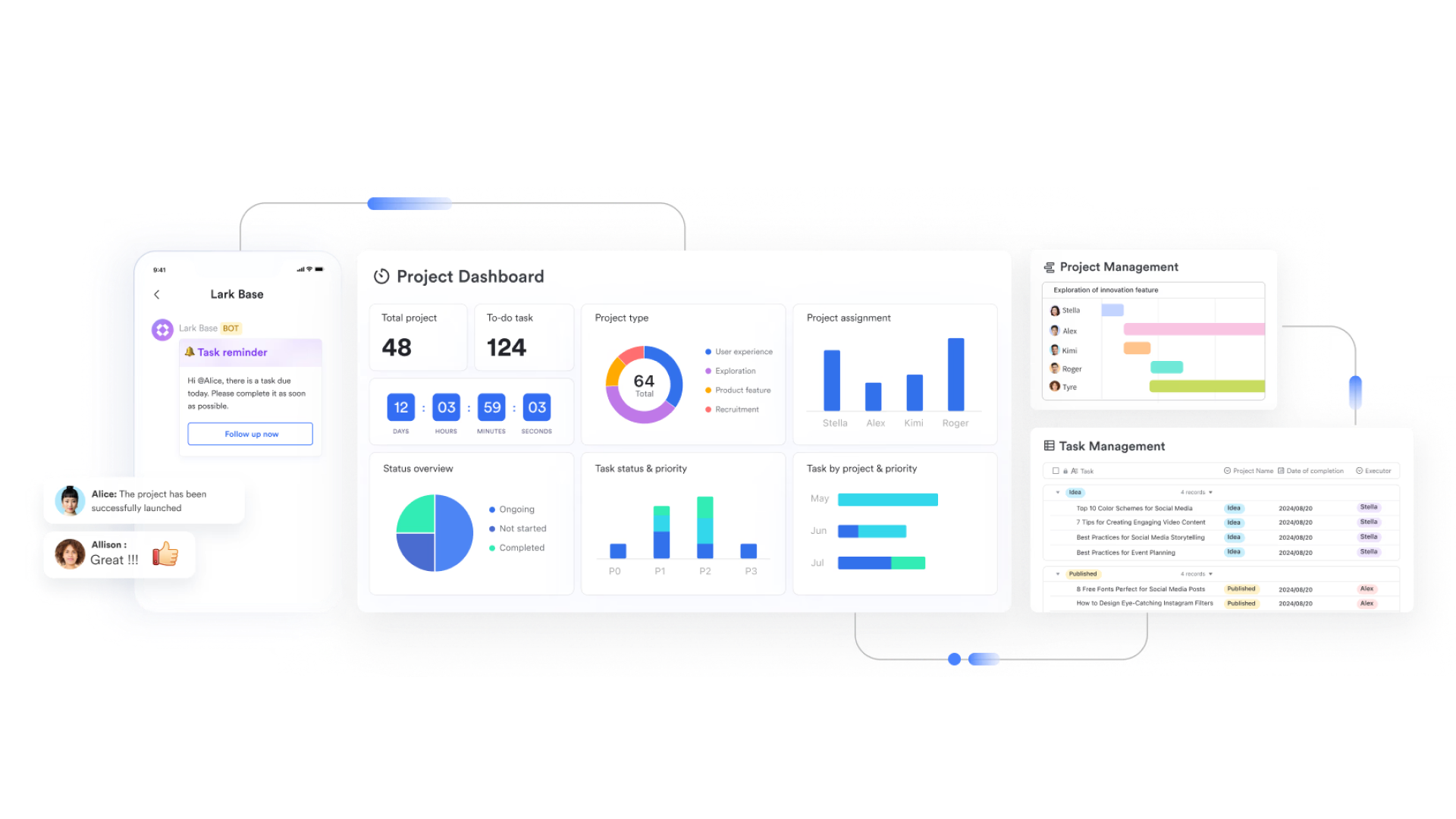
For teams that need more than a traditional sales-focused CRM, offers a robust and smart alternative. Lark not only enhances productivity but also supports effective . While Nutshell excels at external customer interactions, Lark provides a more comprehensive solution that streamlines team collaboration and communication, making it ideal for fast-paced, agile businesses seeking to improve their overall CRM capabilities.
Key features:
Enhance CRM data management:
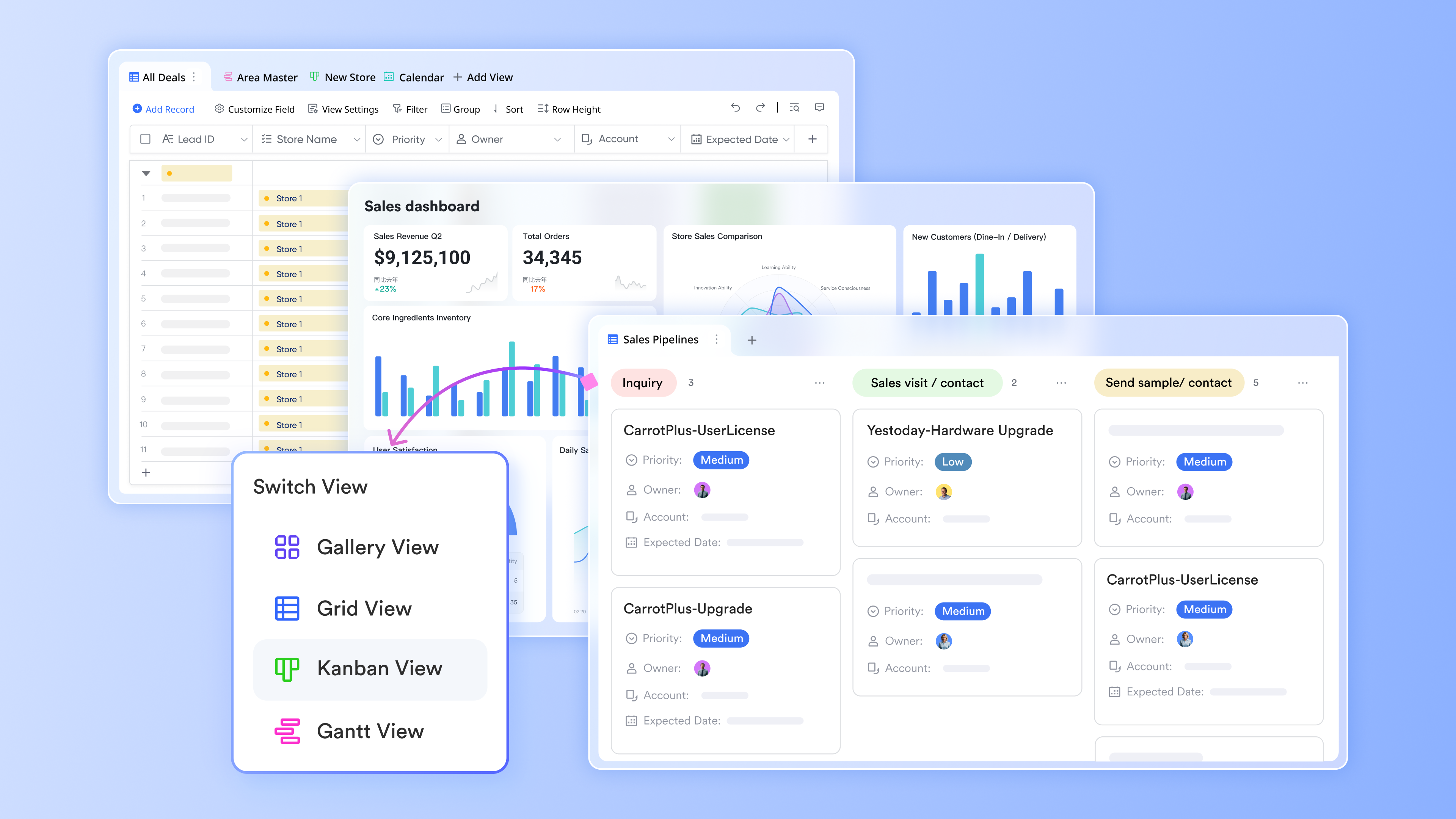
is a no-code database solution tailored for companies seeking without needing extensive development skills. It offers features that significantly enhance CRM capabilities, particularly for organizations that find traditional systems like Nutshell lacking in customization and automation.
- Create custom tables: Design tables that include rich fields such as select, multi-select, formula, and assignee. This flexibility allows users to tailor their databases to suit specific needs, whether for managing leads, tracking tasks, or organizing client information.
- Link tables and build reports: Businesses can establish relationships between different sets of data, enabling them to generate comprehensive reports and rollup summaries that provide valuable insights at a glance. This feature addresses a common limitation of traditional CRMs, providing critical insights for monitoring project progress and performance metrics.
- Automate lead management: Capture leads directly from your website by creating customizable forms in Lark Base. You can share these forms via a link, allowing users to fill them out. Their responses will automatically populate designated tables in Base. Additionally, you can set up automations in Base to trigger actions when a new lead is added, such as assigning next actions or sending notifications based on preset criteria, ensuring that opportunities are followed up efficiently. This level of automation may not be as easily achievable within Nutshell, where users sometimes face constraints in customizing workflows.
These capabilities position Lark Base as an invaluable tool for optimizing client relationship management while simplifying workflows.
Streamline CRM communication:
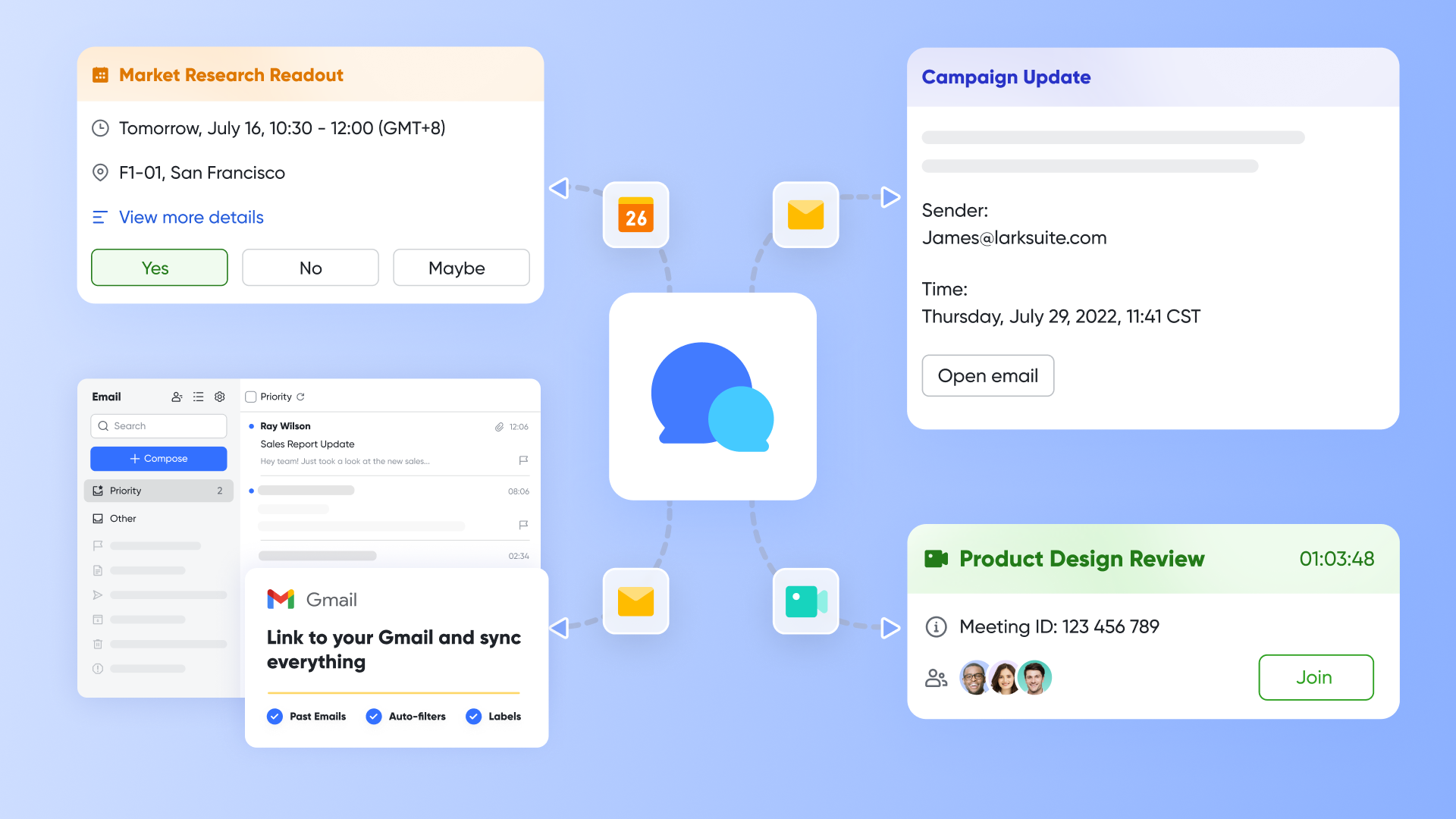
is essential for users managing multiple client interactions and project discussions. Lark Messenger offers a centralized platform for efficient communication and collaboration.
- Centralized communication: Lark Messenger provides a centralized platform for efficient communication, including integrated chat for one-on-one and group conversations. You can share, view, and adjust collaboration permissions for documents directly within chats, enhancing accessibility and teamwork. This streamlining enhances teamwork, something that can be cumbersome in Nutshell, where communication tools are often separate from the CRM functionalities.
- Built-in chat and file sharing: Keep all client conversations, proposals, and files in one place. This integration allows businesses to easily access previous discussions and documents, improving collaboration and continuity. In contrast, some users of Nutshell have reported challenges in navigating between communication and documentation, which can disrupt workflow and efficiency.
- Cross-device accessibility: With Lark Messenger, users can manage their chats on the go, ensuring they stay responsive to clients and team members regardless of their location.
Using helps businesses maintain professionalism and organization in their communications, which is critical for building strong client relationships.
Boost CRM efficiency with
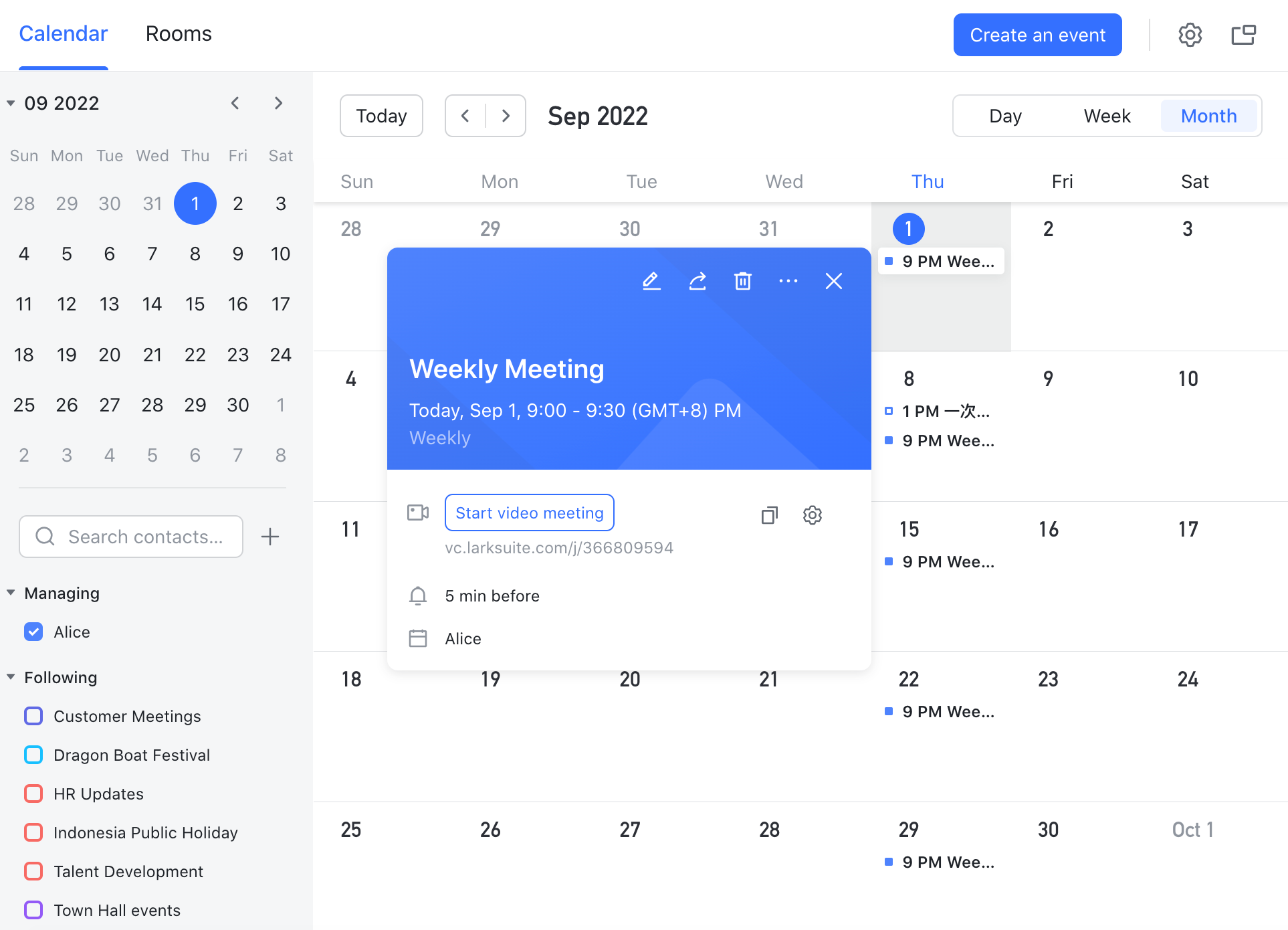
is crucial for optimizing customer relationship management, and Lark Calendar provides a streamlined solution for coordinating meetings and deadlines related to client interactions.
- Booking links and time zone handling: Publish booking links that allow clients to schedule meetings based on availability. This feature minimizes misunderstandings around time zones, ensuring that client meetings are organized smoothly and efficiently.
- Event association with deals: Link calendar events directly to specific deals within your CRM. This functionality allows businesses to maintain a clear overview of commitments associated with each client or project, facilitating better organization of sales activities.
- Buffer management: Manage buffers between meetings to ensure adequate preparation time. This reduces the risk of burnout and helps maintain an efficient schedule, allowing you to prioritize client relationships and follow-ups more effectively.
By combining these tools, Lark provides a comprehensive CRM solution that not only tracks sales but also enhances team collaboration, communication, and scheduling. This multifaceted approach can mitigate some of the drawbacks experienced with traditional CRMs like Nutshell, offering a more holistic way to manage customer relationships and streamline productivity.
for Lark:
- Starter plan: Free forever plan with 11 powerful tools for up to 20 users, 100GB storage, 1,000 automation runs, AI translations, and more. No credit card needed.
- Basic plan: $6/user/month (billed annually) for up to 500 users. Includes everything in Starter plus unlimited message history, 5TB storage, 1,000 automation runs, and more. Some users may need to to purchase.
- Pro plan: $12/user/month (billed annually) for up to 500 users. Includes everything in Basic plus group calling for up to 500 attendees, 15TB storage, 50,000 automation runs, and more.
- Enterprise plan: for custom pricing. Supports unlimited users and includes advanced automation, security, compliance, and management features.
For small teams with simple communication needs

18 months message history
1000 Base automation runs/month
2000 rows per table in Base
Most POPULAR
For companies with comprehensive collaboration and management needs
Unlimited message history
500-participant video meetings
50k Base automation runs/month
20k rows per table in Base
For large companies with advanced security and organizational management needs
Get a personalized demo and pricing
Unlimited message history
500-participant video meetings
15 TB storage + 30 GB storage/user
500k Base automation runs/month
50k Base automation runs/month
Most POPULAR
For companies with comprehensive collaboration and management needs
Unlimited message history
500-participant video meetings
50k Base automation runs/month
20k rows per table in Base
Direct comparison: Nutshell vs Lark
Making your final decision: Is Nutshell right for you?
Choosing the right platform depends entirely on your business's primary needs, growth stage, and budget. Here is a simple decision matrix to guide you:
- Choose Nutshell if: Your primary need is a powerful, easy-to-use CRM to manage your sales pipeline and customer relationships. It's an excellent fit if you want transparent per-user pricing and the option to add sophisticated engagement or marketing tools later without the complexity of an enormous enterprise suite.
- Consider an alternative like if: You need a comprehensive CRM solution that enhances customer relationship management while also providing seamless . Lark is perfect for organizations looking to unify communication across chat, meetings, and document management within a single platform. If internal team agility and effective collaboration are your top priorities, Lark offers a CRM that fits naturally into your broader work environment, enabling you to engage customers more effectively and streamline your operations.
Start a smarter, more integrated journey
Conclusion
In conclusion, understanding Nutshell's pricing structure is crucial for any organization aiming to optimize its sales processes. This guide has thoroughly covered the various plans—Foundation, Growth, Pro, Business, and Enterprise—highlighting their respective features, costs, and long-term value. Recognizing factors such as usage limits, marketing add-ons, and the overall cost of CRM implementation enables you to make informed decisions that align with your business objectives.
While Nutshell provides a robust set of tools for managing customer relationships and sales pipelines, it has limitations, especially when it comes to broader collaboration and internal agility. In contrast, Lark offers a versatile all-in-one CRM solution that enhances customer engagement while also facilitating team communication and project management. By providing a cohesive environment for collaboration alongside CRM functionalities, Lark effectively overcomes the shortcomings of Nutshell. Ultimately, the best choice hinges on your unique operational needs, budget, and growth aspirations.
FAQs
How much does nutshell cost?
Nutshell charges per user per month with annual discounts; Marketing is priced by usage. Exact rates change—see the official page. Model seats, email volume, and any calling.
How much does a CRM subscription cost?
Around $10–$150+ per user/month depending on features, support, contract length, and industry needs. Add-ons (marketing emails, dialer minutes, storage) often exceed license costs, so price total usage, not just seats.
How much does a CRM license cost?
Usually the same as the per-seat subscription. Budget beyond licenses for implementation, data migration, training, integrations, and admin time—these drive real total cost of ownership (TCO).
Which CRM is the cheapest?
Among reputable options, Less Annoying CRM, Zoho Bigin, and Capsule's entry tier are often the lowest. Compare limits and add-ons carefully. Collaboration-heavy teams can lower overall stack cost by consolidating in Lark.
How can I reduce CRM total cost?
Pick the right tier, buy annual seats for stable roles, keep a few monthly seats flexible, trim unused add‑ons, and consolidate collaboration (docs, chat, meetings, forms) in Lark or similar to cut the "collaboration tax."
Related reading






























