The Pomodoro technique is more than just a timer; it is a fundamental shift in how we perceive and utilize our most finite resource: time. By breaking the workday into manageable sprints, professionals can overcome procrastination and maintain high levels of mental clarity. Whether you are tackling deep work or managing administrative overflow, this method offers a structured framework to ensure every minute counts toward your primary goals. In this exploration, you will discover the operational mechanics of the method, its psychological benefits, and the ways modern collaborative technology can safeguard your deep-work sessions from the digital distractions of today's workplace.
Key takeaways
1. The Pomodoro technique uses 25-minute intervals to maximize cognitive focus.
2. Regular breaks prevent mental fatigue and promote sustained productivity.
3. Modern digital ecosystems like Lark can automate and protect your focus sessions.
4. It is particularly effective for those struggling with ADHD or "task paralysis."
What is the Pomodoro technique?
Developed by Francesco Cirillo in the late 1980s, the is a that encourages people to work with the time they have—rather than against it. The name "Pomodoro" comes from the Italian word for tomato, inspired by the tomato-shaped kitchen timer Cirillo used as a university student.
At its core, the method is simple: you break your workday into 25-minute chunks separated by five-minute breaks. These intervals are referred to as "Pomodoros." After about four Pomodoros, you take a longer break of about 15 to 30 minutes. The philosophy is that the timer creates a sense of urgency. Instead of feeling like you have endless hours in the workday to get things done, you know you only have 25 minutes to make as much progress as possible. Moreover, forced breaks help minimize that "burnt-out" feeling many of us experience by mid-afternoon.
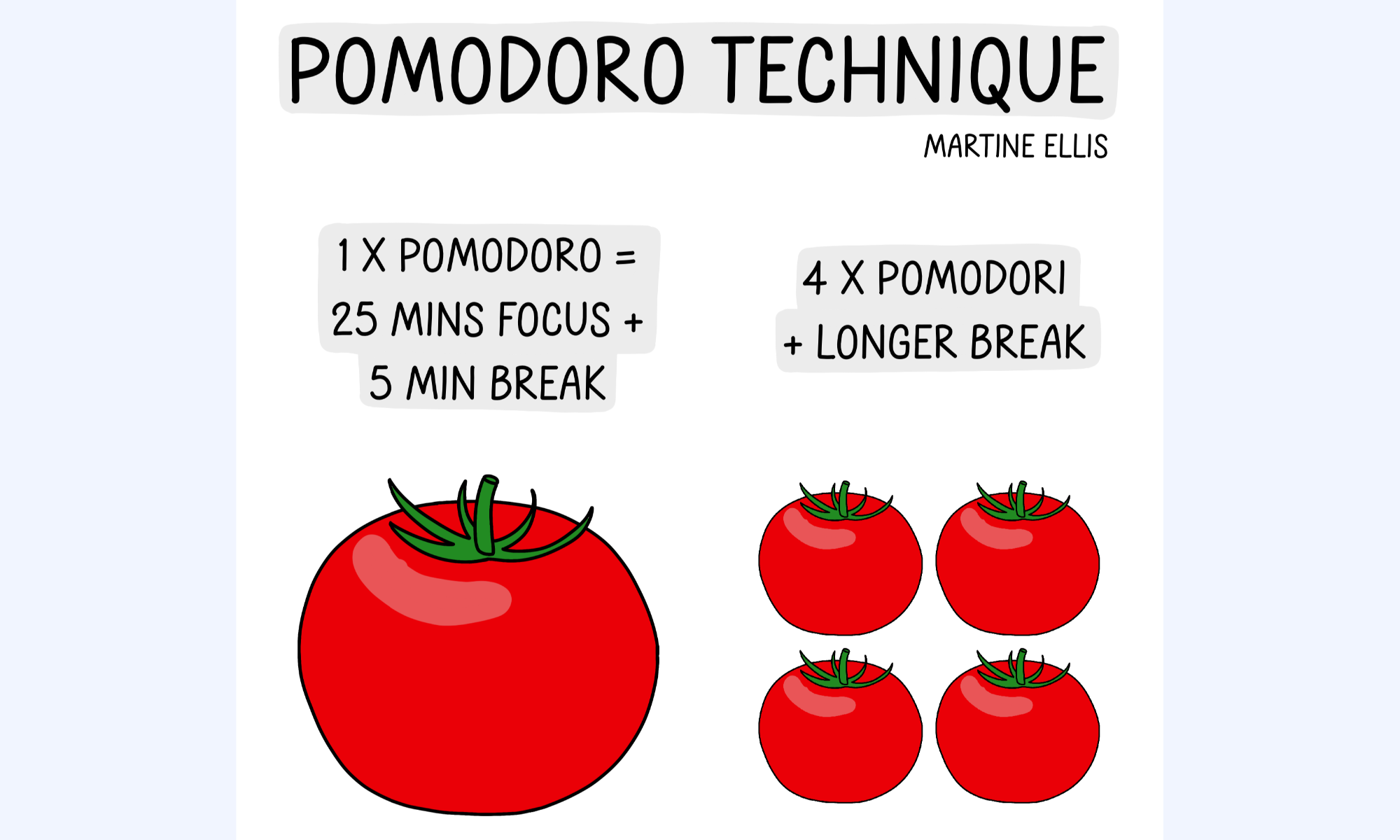
Image source: martineellis.com
How to use the Pomodoro technique
To master your workflow, implementing the Pomodoro technique requires minimal equipment but high discipline. By following these five essential steps, you can transform your productivity:
Step 1: Select a single objective
Choose one high-priority task from your list. The Pomodoro technique is most effective when you eliminate multitasking and commit to one goal for the duration of the sprint.
Step 2: Initialize your clock
Set your Pomodoro technique timer for exactly 25 minutes. This specific duration is designed to keep the brain alert without causing mental fatigue.
Step 3: Maintain deep focus
Work until the alarm sounds. If a distraction arises, quickly jot it down and return to the task immediately. Success is defined by keeping the "" intact.
Step 4: Execute a short recovery
Once the timer rings, step away for a 5-minute break. This physical reset is crucial for sustained Pomodoro technique success.
Step 5: Take a longer reset
After completing four sessions, take a 20–30 minute break. This prevents burnout and prepares your cognitive load for the next set of challenges.
Manage your routines with a productivity superapp
Pomodoro technique for different types of work
Adapting the Pomodoro technique to your specific role is essential for maintaining a high performance management state without hitting a wall of mental fatigue. While the standard 25-minute sprint is a great baseline, different cognitive tasks benefit from varied interval lengths.
Below is a breakdown of how to structure your Pomodoro technique time management based on the nature of your work:
Deep creative work (Writing, coding, designing)
Creative tasks often require a "flow state," which can take 15–20 minutes to enter. A 25-minute timer might cut you off just as you become productive.
- The adjustment: Use 50-minute work blocks followed by 10-minute breaks.
- Why it works: Longer blocks provide the mental space needed for complex problem-solving, while the 10-minute break offers a true cognitive reset.
Administrative & reactive tasks (Email, data entry)
When dealing with "shallow work" or a high volume of small tasks, momentum is key.
- The adjustment: Stick to the classic Pomodoro technique time of 25 minutes.
- Why it works: It gamifies boring tasks, encouraging you to "clear the deck" before the timer rings, which prevents administrative drag.
Learning and technical study
Research on the Pomodoro study technique suggests that our brains absorb information best in short, intense bursts followed by immediate rest.
- The adjustment: 25 minutes of active recall/study, followed by 5 minutes of "diffuse mode" thinking (walking or stretching).
- Why it works: It leverages the spacing effect, helping transfer information from short-term to long-term memory more effectively.
High-pressure roles (sales, customer support)
In roles where interruptions are constant, a rigid 25-minute block can be stressful.
- The adjustment: Use "Micro-Pomodoros" for 15 minutes with 2-minute "buffer" breaks.
- Why it works: It allows you to handle urgent pings between without abandoning the structure of your Pomodoro technique timer.
4 real-world examples of the Pomodoro application
To make the Pomodoro technique time management strategy more actionable, let's look at concrete examples of how specific professionals structure their day using these modified intervals.
Example 1: The software developer (The 50/10 flow)
Imagine a developer tasked with refactoring a complex module.
- 09:00 – 09:50: Deep coding. This 50-minute block allows them to keep the entire logic tree in their working memory.
- 09:50 – 10:00: A 10-minute break away from the screen (e.g., making coffee).
- Outcome: By avoiding the 25-minute interruption, they avoid "context switching" costs that typically derail technical progress.
Example 2: The content marketer (The 25/5 classic)
A marketer needs to write three separate social media captions and respond to community comments.
- 14:00 – 14:25: Draft three captions. The ticking Pomodoro technique timer prevents them from over-analyzing a single sentence.
- 14:25 – 14:30: Quick stretch.
- 14:30 – 14:55: Rapid-fire (responding to comments).
- Outcome: High-velocity output for repetitive, medium-concentration tasks.
Example 3: The career student (The 25/5 spacing effect)
A student preparing for a certification exam uses the Pomodoro study technique.
- Session 1 (25m): Active recall on Chapter 1.
- Break (5m): Quick walk around the room.
- Session 2 (25m): Active recall on Chapter 2.
- Outcome: The frequent breaks allow the brain to move information from short-term to long-term memory more efficiently than a three-hour cramming session.
Example 4: The sales executive (The 15/2 micro-sprint)
A sales rep has a 45-minute window between client calls.
- Sprint 1 (15m): Log notes from the previous call into the .
- Break (2m): Deep breathing/water.
- Sprint 2 (15m): Send two follow-up emails.
- Outcome: They stay productive in small gaps without feeling overwhelmed by the next scheduled meeting.
Equip your team with the tools to master their focus
The advantages and disadvantages of the Pomodoro method
Evaluating the Pomodoro technique requires a balanced look at how it impacts different cognitive styles and office environments. While it is a powerhouse for personal productivity, it is not a "one-size-fits-all" solution.
Pros:
- Eliminates the pain of starting: For many, the hardest part of work is overcoming the initial resistance. Because a "Pomodoro" is only 25 minutes, it lowers the psychological barrier to entry, making it an effective tool for those struggling with procrastination.
- Enhances sustained focus: By setting a Pomodoro technique timer, you create a closed environment where distractions are explicitly forbidden. This trains the brain to ignore the urge to check or email, strengthening your "focus muscle" over time.
- Prevents mental and physical fatigue: Frequent 5-minute breaks act as a "release valve" for stress. Moving your body and resting your eyes every half hour prevents the late-afternoon burnout that usually follows four or five hours of continuous sitting.
- Improves time estimation accuracy: One of the hidden benefits of the Pomodoro technique time management is the data it provides. You quickly learn that writing a report takes "6 Pomodoros" rather than a vague "three hours," allowing for much more accurate .
- Support for neurodiversity: The Pomodoro technique ADHD connection is widely recognized by experts. The externalized sense of urgency provided by the timer helps individuals with executive dysfunction stay on track without getting lost in "time blindness."
Cons:
- Flow state interruption: The most common criticism of the Pomodoro technique is that the timer doesn't care if you're in "the zone." Forging deep creative connections often takes longer than 25 minutes, and a ringing alarm can shatter a productive flow state.
- Rigidity in collaborative roles: If your job requires constant interaction, a strict Pomodoro schedule can feel impossible. Colleagues may find it frustrating if you are "inaccessible" for 25-minute blocks multiple times a day.
- Initial anxiety: For some users, the "ticking clock" sensation creates a sense of pressure rather than motivation. This can lead to rushing through tasks and making errors just to finish before the alarm sounds.
- The "Break" rabbit hole: Without discipline, a 5-minute break can easily spiral into a 20-minute distraction. If you use your break to check a news feed, your brain doesn't actually get the "diffuse mode" rest it needs to recover.
- Administrative overhead: Managing the timer, logging sessions, and tracking breaks is an extra task in itself. For some, the effort of maintaining the Pomodoro technique feels like more work than the actual tasks they are trying to complete.
Want to upgrade your workflows into efficient ones?
Synchronize deep: How Lark helps you maintain focus and flow
While the Pomodoro technique is traditionally associated with simple analog timers, the modern presents a unique challenge: the constant influx of notifications that can shatter a 25-minute sprint. is designed to mitigate this "context switching" tax by integrating focus-protection directly into your communication ecosystem. By aligning your team's expectations with your personal productivity cycles, Lark turns the Pomodoro technique time management strategy into a synchronized team standard.

Protecting the deep work window
One of the most significant challenges to maintaining a 25-minute Pomodoro sprint is the constant influx of digital notifications. addresses this through its custom status, which allows you to set a "Do not disturb" status, letting you mute all incoming pings for a designated period. When this status is active, a specialized icon appears next to your name, signaling to colleagues that you are currently in a deep-work cycle and should not be interrupted unless there is an emergency. 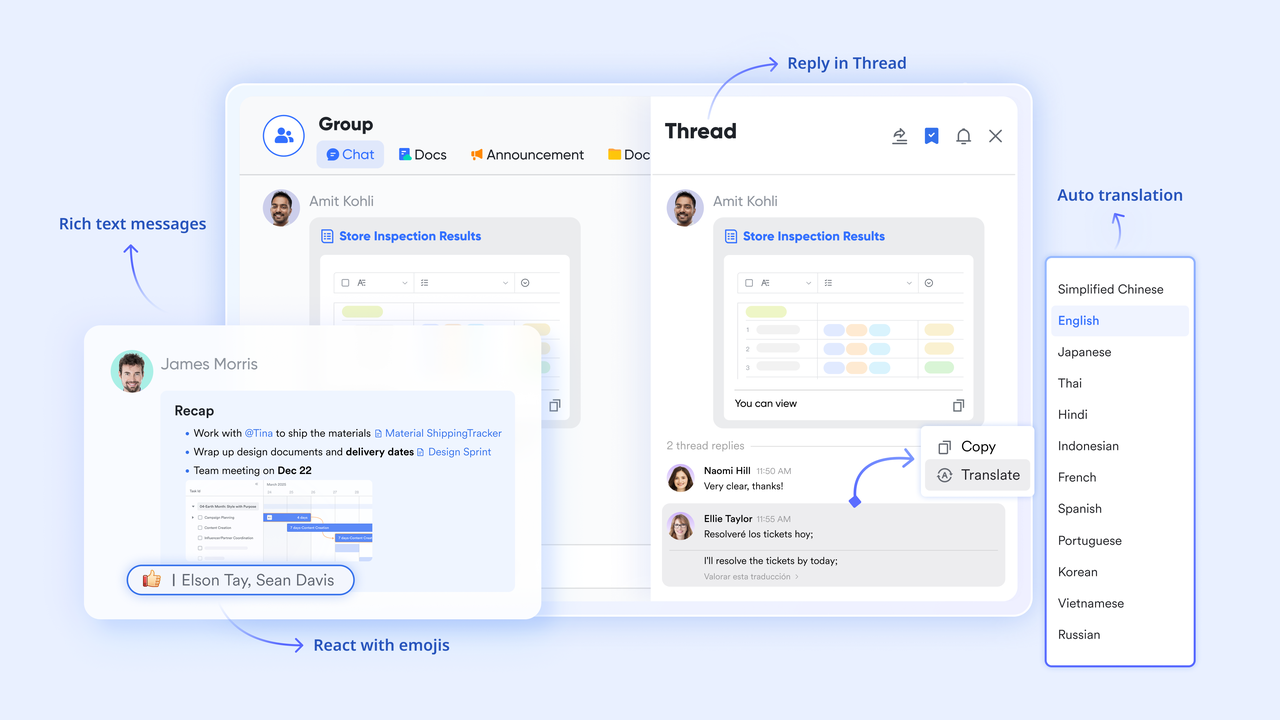
Quantifying productivity with data
For professionals who want to move beyond simple timers and analyze their output, serves as a robust productivity database. You can easily build a "" to record the number of Pomodoros dedicated to specific projects, providing a clear visualization of where your time is being spent. By using custom fields and formulas, you can calculate total work hours versus break times, helping you achieve your future time management goals.
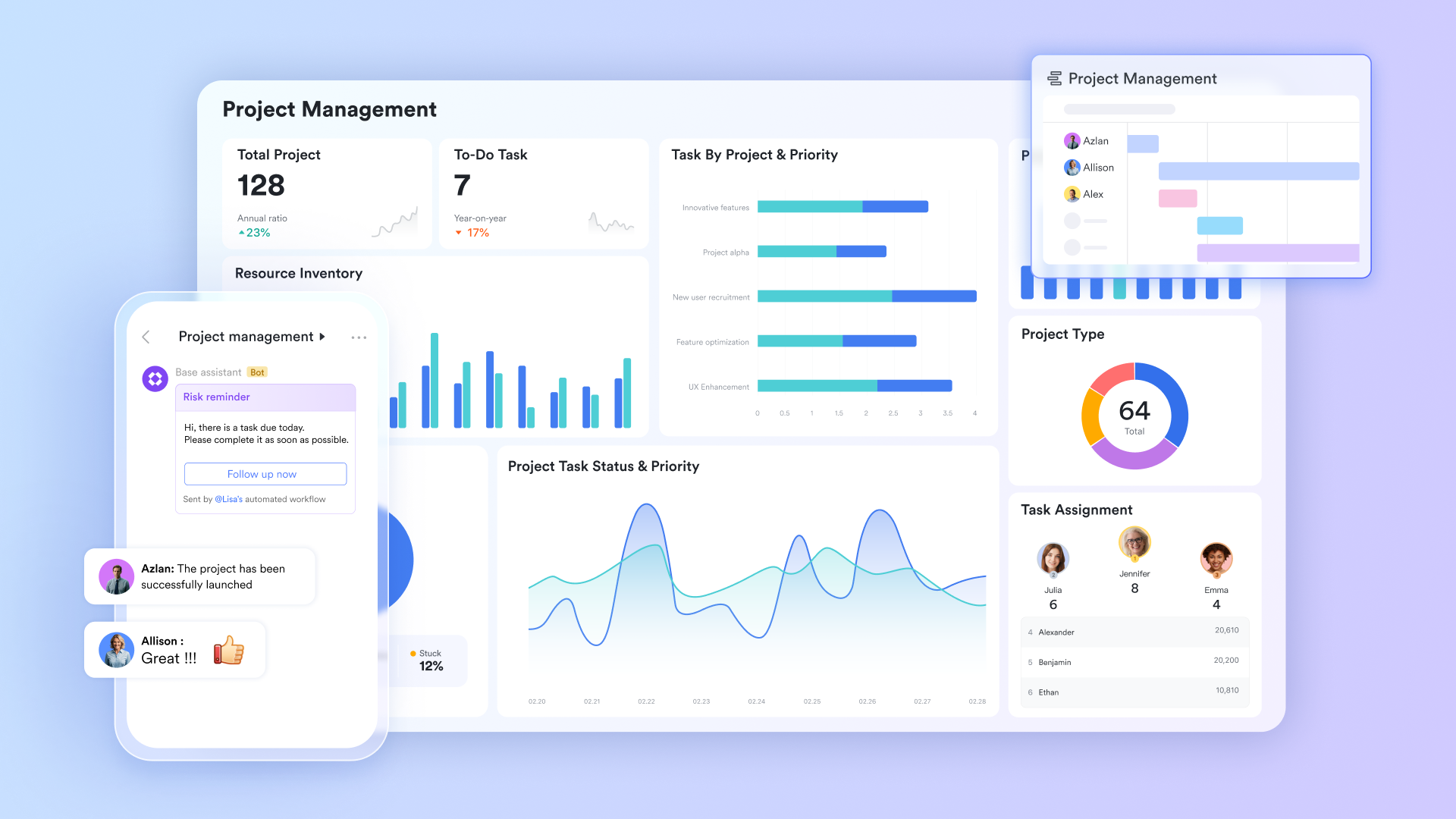
Proactive time-blocking
The Pomodoro technique time is most effective when it is proactively defended against meeting invitations. allows you to create public "Focus blocks" that appear as "Busy" to anyone attempting to schedule your time. Because the is fully integrated with the rest of the Lark suite, colleagues will see your unavailability the moment they try to book a slot, ensuring that your 50-minute "Flow" cycles or 25-minute sprints remain uninterrupted by external scheduling conflicts.
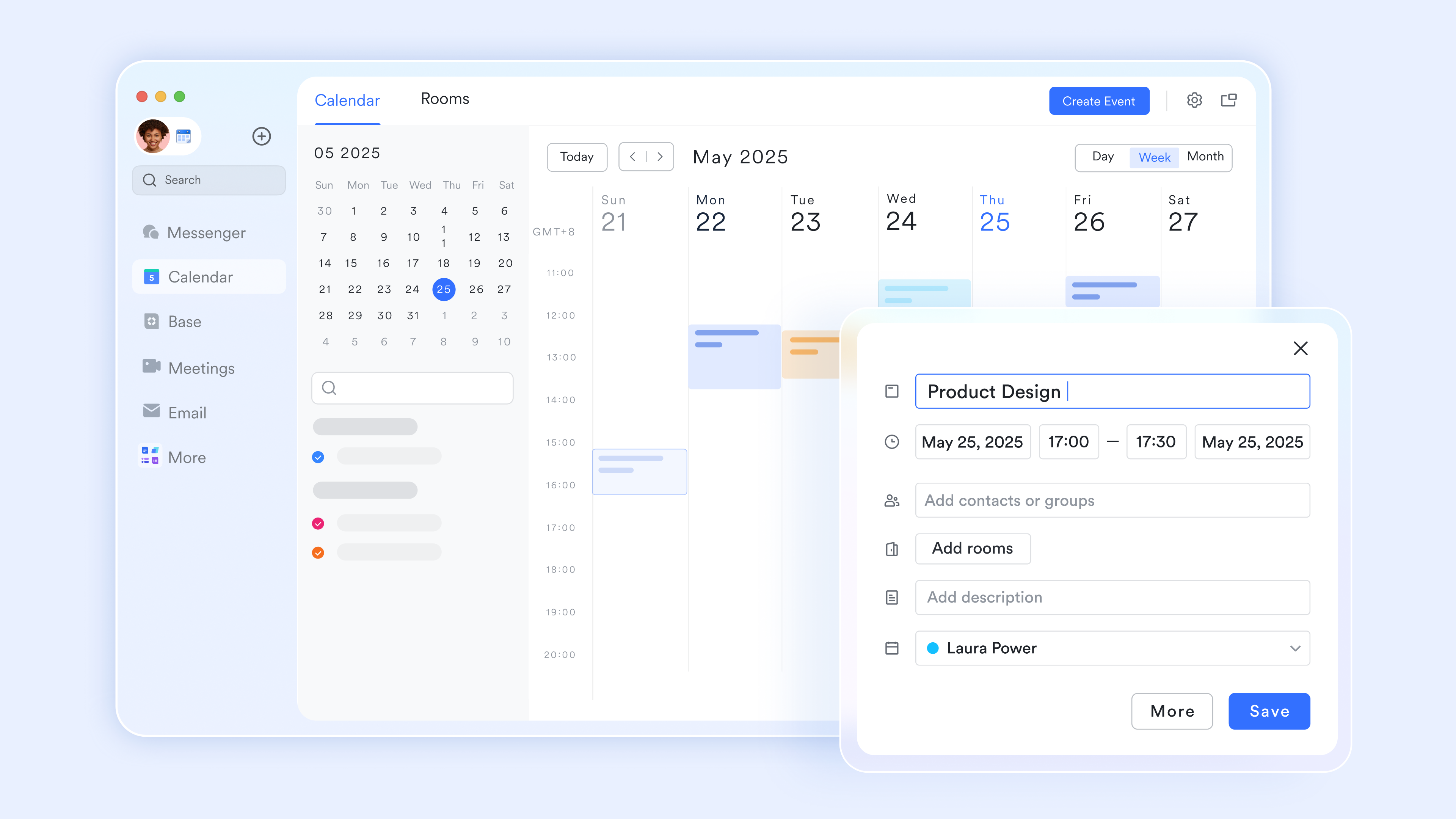
Asynchronous meetings
Urgent meetings are the natural enemy of deep work. When an invite threatens to derail your 25-minute sprint, you don't have to choose between productivity and staying in the loop. Use to record the session while you keep working and turn them into searchable text. Once your timer dings, you can skim the Minutes and catch up in seconds, rather than losing an hour of your best focus time.

Visualizing progress
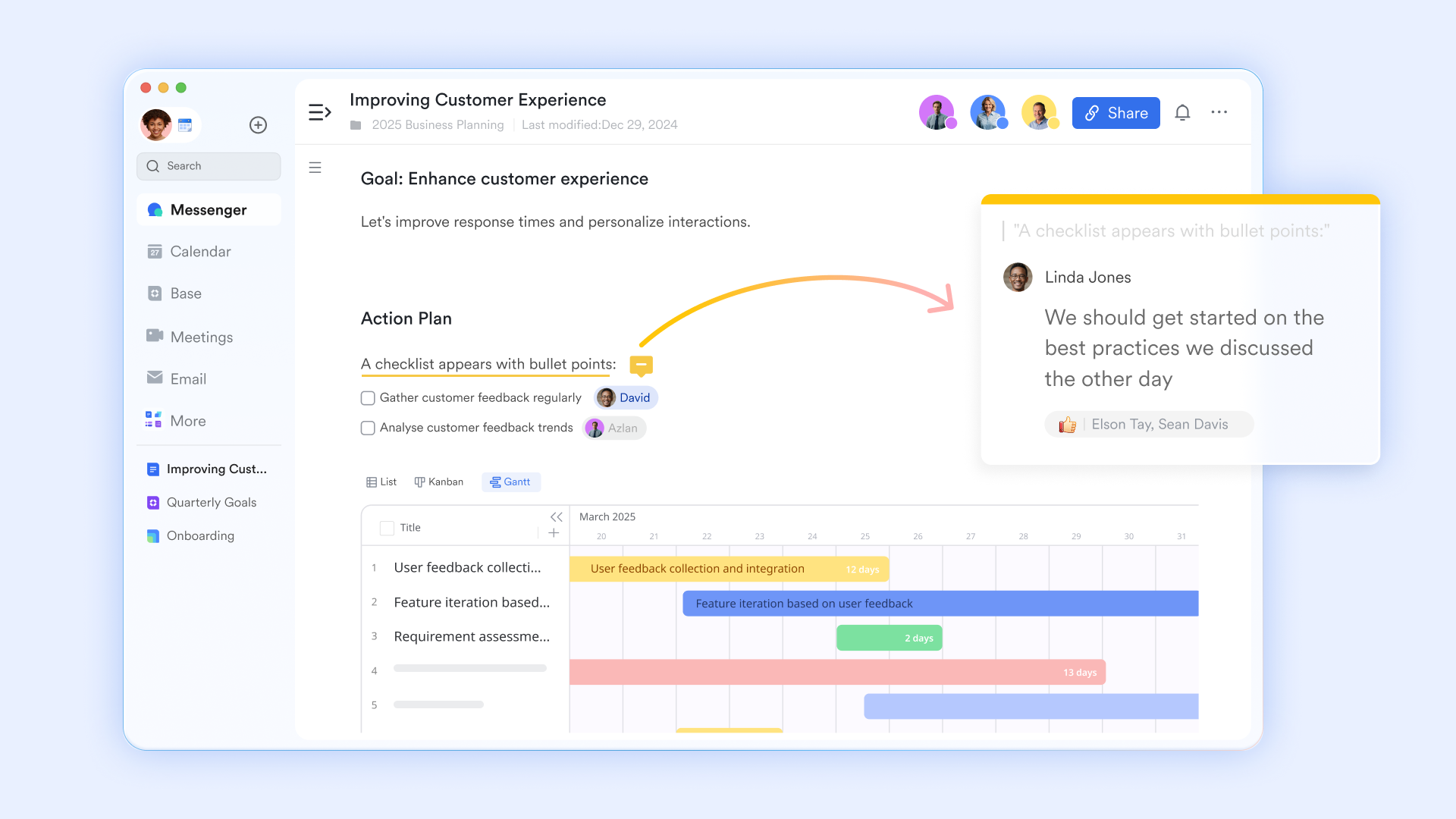
Breaking down a large, intimidating project into 25-minute milestones is a core tenet of productivity. Within , you can embed task lists to create interactive, Pomodoro-aligned checklists. Each sub-task can be assigned a specific estimated "Pomodoro count," turning your document into a living roadmap. As you check off items at the end of each timer cycle, you gain a sense of tangible that fuel motivation for the next session.
:
- Starter plan: Free forever plan that includes 11 powerful tools for up to 20 users. It also comes with 100GB of storage, 1000 automation runs, AI translations, and more.
- Pro plan: $12/user/month (billed annually) for up to 500 users. It includes everything in Starter plus group calling for up to 500 attendees, 15TB of storage, 50,000 automation runs, and more.
- Enterprise plan: for custom pricing. Supports unlimited users and includes even more automation runs and advanced security, compliance, and management features.
For small teams with simple communication needs

18 months message history
1000 Base automation runs/month
2000 rows per table in Base
Most POPULAR
For companies with comprehensive collaboration and management needs
Unlimited message history
500-participant video meetings
50k Base automation runs/month
20k rows per table in Base
For large companies with advanced security and organizational management needs
Get a personalized demo and pricing
Unlimited message history
500-participant video meetings
15 TB storage + 30 GB storage/user
500k Base automation runs/month
50k Base automation runs/month
Most POPULAR
For companies with comprehensive collaboration and management needs
Unlimited message history
500-participant video meetings
50k Base automation runs/month
20k rows per table in Base
Benefits of the Pomodoro technique
Implementing the Pomodoro technique is more than just a survival strategy for a busy afternoon; it is a fundamental rewire of how you approach deep work. By moving away from the "marathon" mindset, you gain several psychological and operational advantages. Here are the primary benefits of using this method to manage your output:
- Higher resistance to distractions: When you set a Pomodoro technique timer, you are creating a mental contract to ignore the "noise." Knowing you only have to stay focused for 25 minutes makes it much easier to silence your phone or ignore non-urgent pings, as there is a guaranteed break just around the corner.
- Reduced decision fatigue: Constant task-switching drains your cognitive energy. By committing to a single objective per sprint, you eliminate the "what should I do next?" anxiety that often leads to procrastination. This clarity is a cornerstone of effective Pomodoro technique time management.
- Prevention of mental burnout: Working for hours without a pause creates a "diminishing returns" effect where your quality of work drops. The forced 5-minute intervals in the Pomodoro technique act as a release valve, keeping your brain fresh and preventing the mid-afternoon "brain fog" typical of traditional 9-to-5 grinds.
- Improved task estimation: Many professionals suffer from "planning fallacy"—underestimating how long a project will take. By in units of time, you gain data-driven insights. You'll soon realize a blog post takes "8 Pomodoros" rather than a vague "few hours," allowing for much more realistic scheduling.
- Sustainable physical health: Modern office work is notoriously sedentary. The Pomodoro technique time structure encourages you to stand up, stretch, and rest your eyes every half hour. These micro-breaks reduce the physical strain of sitting, leading to better long-term focus and fewer tension-related headaches.
- Immediate sense of accomplishment: Large projects can feel overwhelming because the "finish line" is so far away. Breaking a massive task into several 25-minute sprints provides frequent "micro-wins." This consistent dopaminergic reward keeps motivation high during .
Bridge the gap between focus theory with Lark
Conclusion
To wrap things up, we've broken down how the Pomodoro technique transforms chaotic workdays into structured wins by leveraging human psychology and timed sprints. We explored why tailored intervals matter for different roles and how consistent breaks actually fuel, rather than hinder, long-term output.
To bridge the gap between theory and results, you need a workspace that respects your focus. By adapting your cycles to , you turn a personal habit into a seamless, that protects your time and keeps your team in sync.
FAQs
How many Pomodoro sessions should someone complete in a day?
Most professionals reach peak output within 12 to 16 sessions, totaling about six to eight hours of deep work. Exceeding this often leads to mental fatigue and sharply diminishing returns on your effort. To stay on track, you can use Lark Base to log each completed cycle, providing a clear visual map of your daily productivity trends.
Can the Pomodoro technique work in meeting-heavy roles?
Yes, by utilizing 15-minute "Micro-Sprints" to tackle quick tasks during the small gaps between scheduled calls. This keeps your momentum alive without the frustration of constant interruptions. If a meeting runs long, Lark Minutes can provide an AI-generated summary of the discussion, allowing you to stay focused on your sprint without missing key decisions.
What are the 5 steps in the Pomodoro Technique?
The process involves picking one task, setting a timer for 25 minutes, working until the alarm sounds, taking a 5-minute break, and a longer 20-minute reset every four cycles. Maintaining these boundaries is easier when you use Lark Messenger to set a "Focus" status, which automatically mutes pings and signals to teammates that you are currently unavailable.
How long should breaks be for extended focus days?
Standard short breaks should last five minutes to reset your mind, while longer breaks every two hours should be at least 20 to 30 minutes. These intervals are vital for physical recovery and preventing the "brain fog" associated with long-term sitting. By scheduling these blocks in Lark Calendar, you ensure your recovery time is respected by the rest of your team.
Is Pomodoro good for ADHD?
The technique is highly effective for ADHD as it provides the external structure and frequent dopamine rewards needed to overcome task initiation hurdles. The 25-minute timer creates a manageable sense of urgency that helps ground a wandering mind. To support this, Lark Docs allows you to turn intimidating projects into interactive checklists, providing the visual feedback necessary to stay engaged.
Related reading





























