














Top 10 Project Management Software for Creative Agencies

Satvik Saxena
Content Specialist
Oct 30, 2026
Satvik Saxena
Oct 30, 2026

22 min read
Add to preferred sources


In creative agencies, every project is a mix of imagination and execution—from concept sketches to campaign delivery. Managing multiple clients, assets, and feedback cycles demands more than spreadsheets or chat threads—it. It requires the right project management software for creative agencies. The right platform streamlines collaboration, simplifies approvals, and keeps every creative effort on track. In this guide, we'll explore the top tools that help agencies stay productive and aligned—including Lark, Productive, Wrike, Asana, and ClickUp—to find which project management software best fits your agency's workflow and creative goals.
1. Lark: Unified collaboration and automation
2. Productive: Financial and resource management
3. Wrike: Enterprise-level creative teams
4. Paymo: Small creative teams with tight budgets
5. Scoro: Business and project management suite
6. Plaky: Free visual workflows
7. Jira Work Management: Agile or tech-driven teams
8. Asana: Campaign planning and visualization
9. Monday.com: Highly visual and customizable project boards
10. ClickUp: All-in-one customization and scalability

Why creative agencies need specialized project management tools
Creative agencies operate differently from traditional businesses. Instead of linear processes, their workflows involve constant brainstorming, asset creation, and client feedback—often happening all at once. This dynamic environment demands project management software for creative agencies that can handle both structure and flexibility.
Unlike standard project management tools, creative teams need platforms that centralize visual asset management, streamline feedback and approval loops, and enable real-time collaboration across design, content, and marketing teams. When multiple versions of files, tight deadlines, and client revisions come into play, traditional tools often create bottlenecks rather than clarity.
With a specialized project management tool for creative teams, agencies can manage deadlines, track progress visually, and keep creative discussions organized in one workspace—ensuring smoother delivery, fewer errors, and faster decision-making. It's not just about managing projects; it's about creating the right environment for creativity to thrive.
Key features to look for in a project management tool for creative agencies
When choosing the best project management software for creative agencies, it is essential to look beyond simple task tracking. The right platform should empower teams to collaborate creatively, streamline workflows, and connect every stage of a project—from concept to delivery—in one seamless workspace.
- Centralized workspace (chat, docs, tasks, assets): a unified workspace keeps all creative assets, conversations, and deliverables in one place. This ensures designers, writers, and clients stay aligned, reducing confusion and improving creative project management efficiency.
- Real-time collaboration and feedback: instant feedback loops enable faster revisions and fewer misunderstandings. With real-time co-editing and commenting, creative teams can brainstorm, refine, and finalize projects together—even across different time zones.
- Visual task management (Gantt, Kanban, or timelines): creative projects thrive on visual clarity. Using Gantt charts, kanban boards, or timeline views, teams can map every stage of production and track progress at a glance, keeping deadlines and dependencies visible.
- Integration with creative tools (Adobe, Figma, Google Workspace, etc.): seamless integration with leading creative software helps teams work faster. Designers can sync files from Adobe or Figma, while marketers manage assets via Google Workspace—all within one platform.
- Automation and AI-assisted task management: modern AI-powered project management tools reduce manual work by automating routine tasks like scheduling, follow-ups, and approval reminders. This frees up more time for high-value creative thinking.
- Scalability and client-access options: As agencies grow, scalability is key. The best platforms let you expand your workspace, manage multiple clients securely, and provide controlled access for feedback or project updates without compromising data privacy.
How to choose the right software for your agency
Selecting the best project management software for creative agencies starts with understanding your team's unique workflow, communication habits, and project complexity. Every agency has its rhythm—the right tool should enhance it, not disrupt it.
- Define your agency's workflow and pain points: Identify bottlenecks in your current system—whether it's disorganized feedback, missed deadlines, or version chaos. The goal is to find project management software that directly solves those challenges.
- Determine collaboration needs (internal vs client): Creative agencies often balance internal brainstorming with client approvals. Choose a tool that supports both—offering secure client access while maintaining team-only spaces for ideation.
- Evaluate scalability and integrations: Ensure the platform integrates smoothly with creative tools like Adobe, Figma, and Google Workspace, and scales as your agency grows.
- Test user experience with a small team: Run a short trial to assess usability, responsiveness, and adoption. A tool that feels natural boosts long-term engagement.
- Assess pricing vs. feature fit: Balance cost with value—ensure the pricing structure aligns with your agency's size, features, and growth plans.
Best project management software for creative agencies
1. Lark: The connected workspace built for creative flow
Creative agencies thrive on collaboration, imagination, and timing—and Lark brings all three together in one connected workspace. It goes beyond traditional project management software for creative agencies by combining task management, communication, document collaboration, and automation in a single platform. From brainstorming campaign concepts to managing client approvals, Lark empowers creative teams to stay aligned, move faster, and deliver standout results—without switching between apps. It's where creativity meets clarity, and ideas turn into action seamlessly.
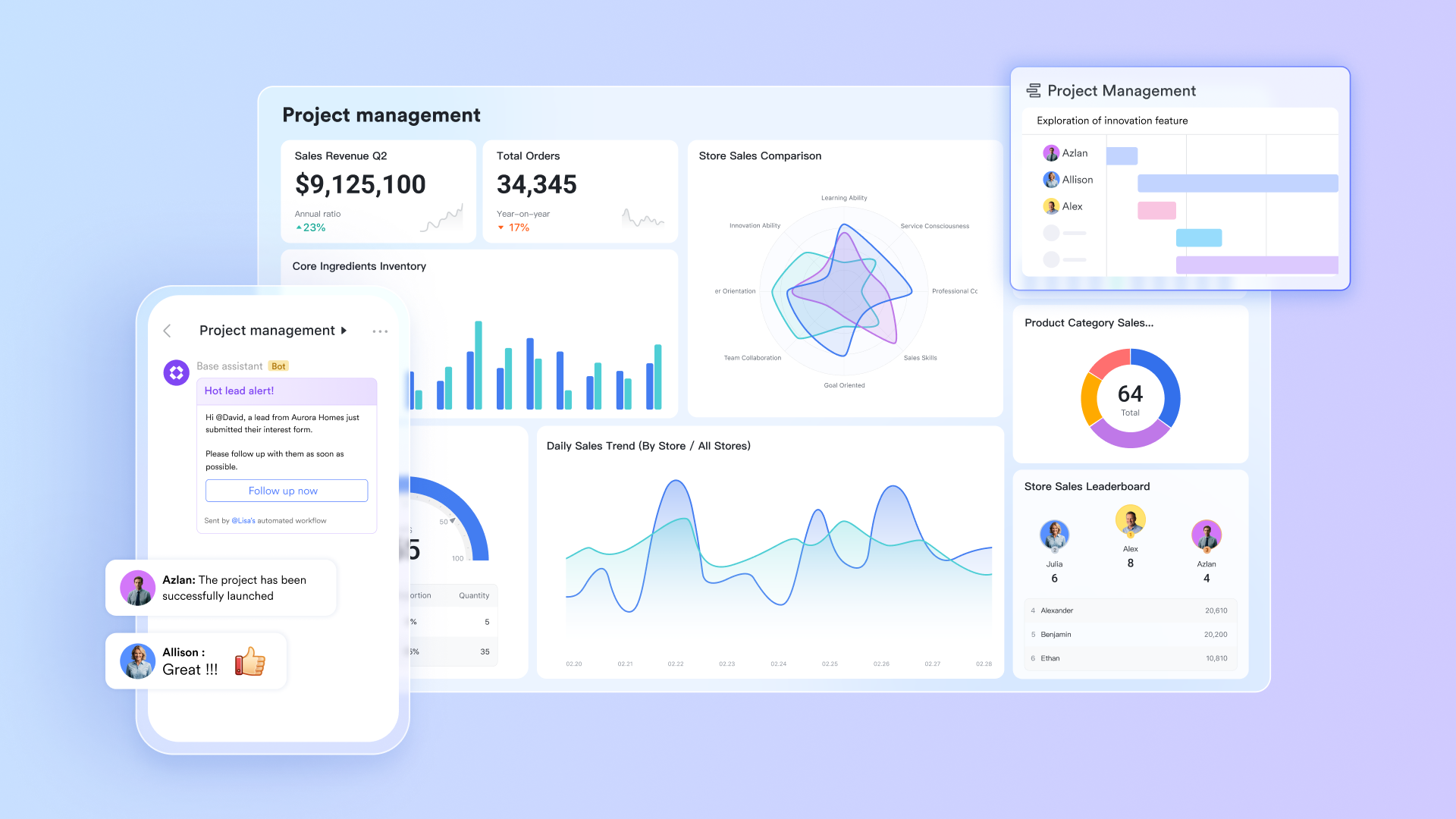
Key features
Building agency workflows with Lark Base
Lark Base acts as a flexible, no-code database tool, serving as a dynamic foundation for all your agency's projects and creative assets. It allows you to design custom workflows that perfectly mirror your creative process, setting up custom fields, stages, and views like Kanban, Gantt, or table to visualize campaign progress and production schedules. This centralization is essential for visibility and efficient project management.
For example: you can map your entire project pipeline from "initial brief" to "client delivery" using customizable stages in a kanban view, giving managers an immediate, clear snapshot of every project's current status. You can also implement automated approval trails that trigger reminders and status changes when a task reaches a key milestone, ensuring no creative asset moves forward without necessary client or internal sign-off. This creates a centralized decision log where every major decision, approval date, and revision request is recorded, guaranteeing accountability and a tamper-proof audit trail for every creative campaign.
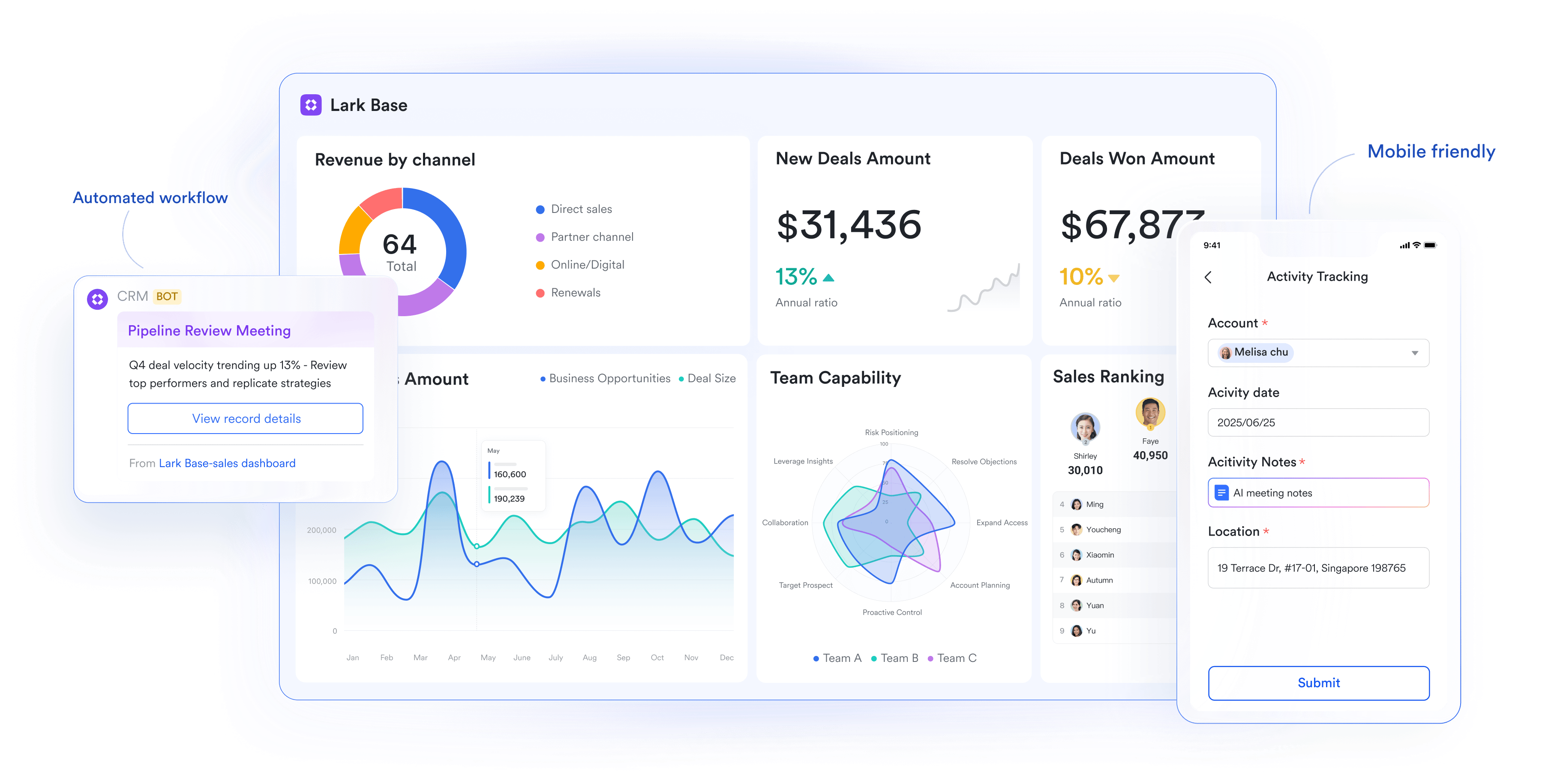
Real time collaborative Lark Docs:
Lark Docs's real-time collaborative document are where the conceptual work of your agency lives. Creative agencies can draft campaign concepts, project proposals, and detailed creative briefs together in the same document. With instant co-editing and smart commenting features, design teams, copywriters, and project managers can iterate on content simultaneously, which is crucial for eliminating version control chaos and speeding up the creation of time-sensitive pitch decks.
For example: while the copywriter drafts the headline in the doc, the project manager can simultaneously add the budget table, and the design lead can drop in image placeholders—all, all visible instantly. The built-in contextual feedback loops are a game-changer: users can tag team members directly within the document's body text to assign an action item or request clarification, instantly turning feedback into an trackable task. This ensures the document serves as the single source of truth, centralizing all content and guaranteeing the entire agency is always working from the final version, preventing costly mistakes from outdated briefs.
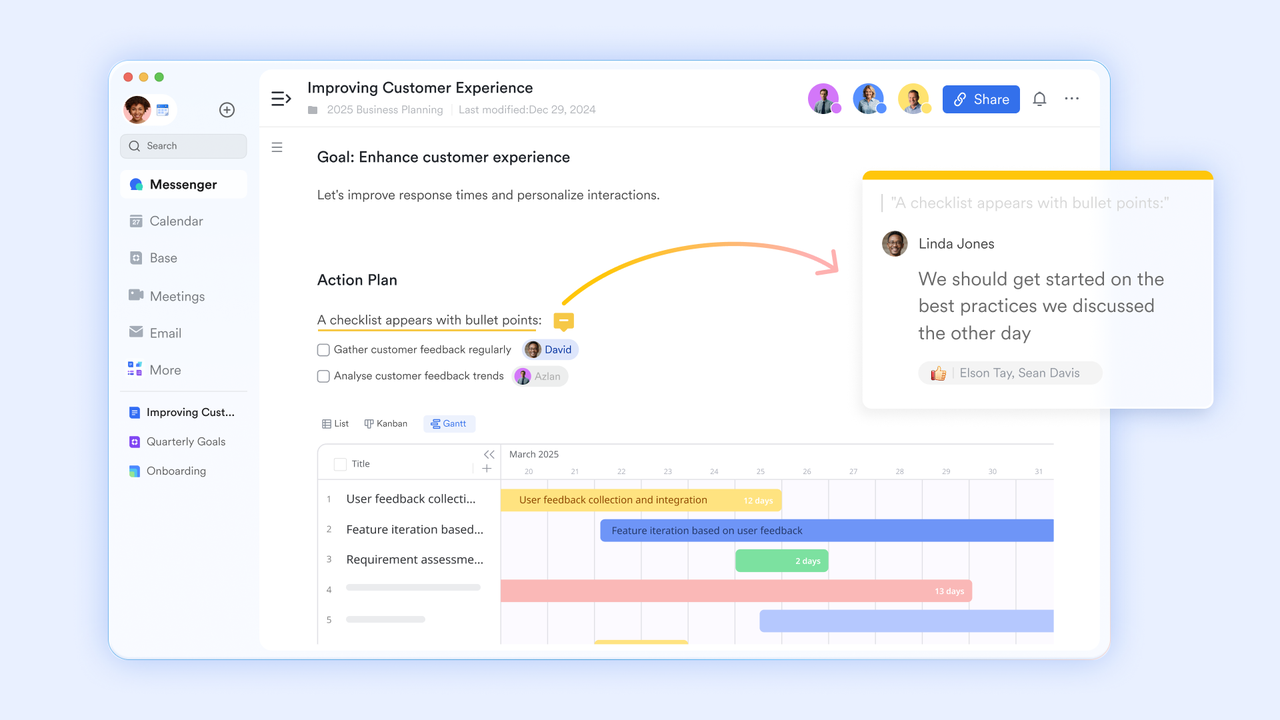
Lark Sheets with data analysis and financial visibility:
Lark Sheets acts as your agency's hub for all quantitative and operational data, turning basic tables into actionable insights critical for creative project management. Teams can track budgets, billable hours, and resource utilization, giving managers a real-time view of project health. This ensures complete financial visibility and empowers agencies to make timely, informed decisions without juggling multiple spreadsheets or tools.
For example: A project manager can pull in hourly logs across multiple campaigns and immediately spot that a project's margin has decreased from $10,000 to $8,500. This allows leadership to adjust scope, reallocate resources, or renegotiate timelines proactively. Creative directors can also monitor team utilization to balance workloads, prevent burnout, and ensure that every team member contributes efficiently—all from a single, centralized Lark Sheet dashboard.
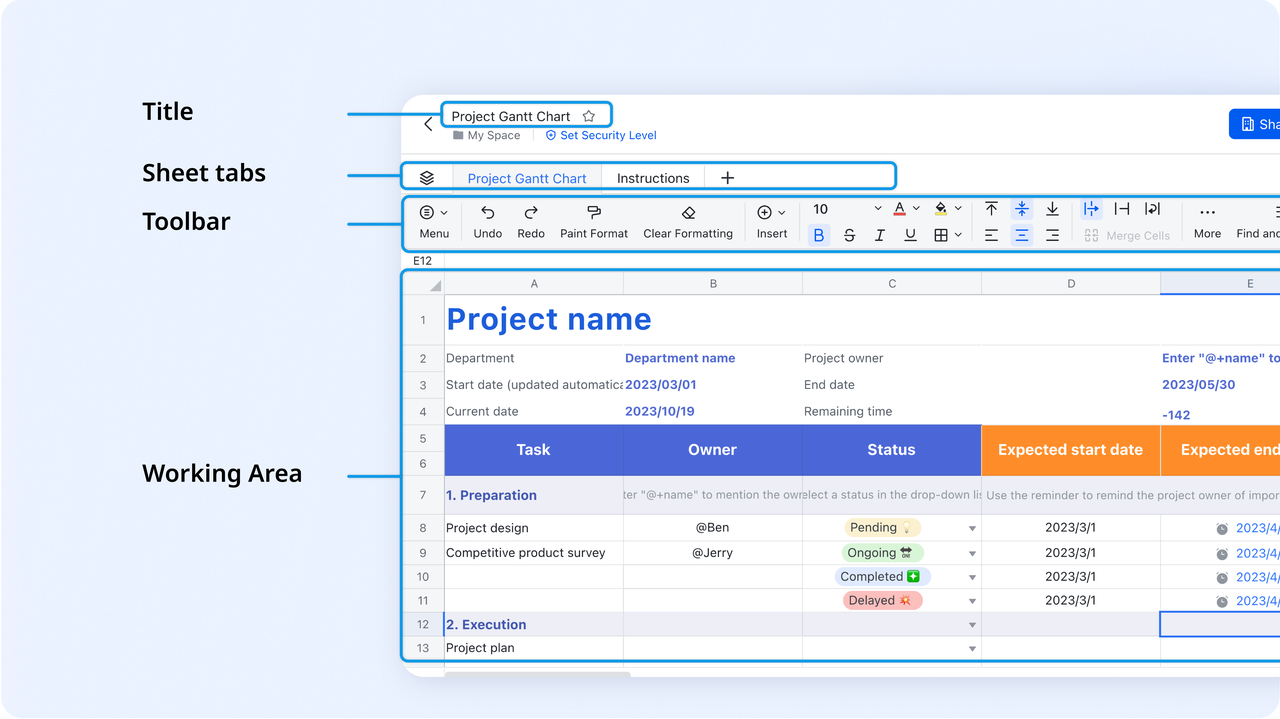
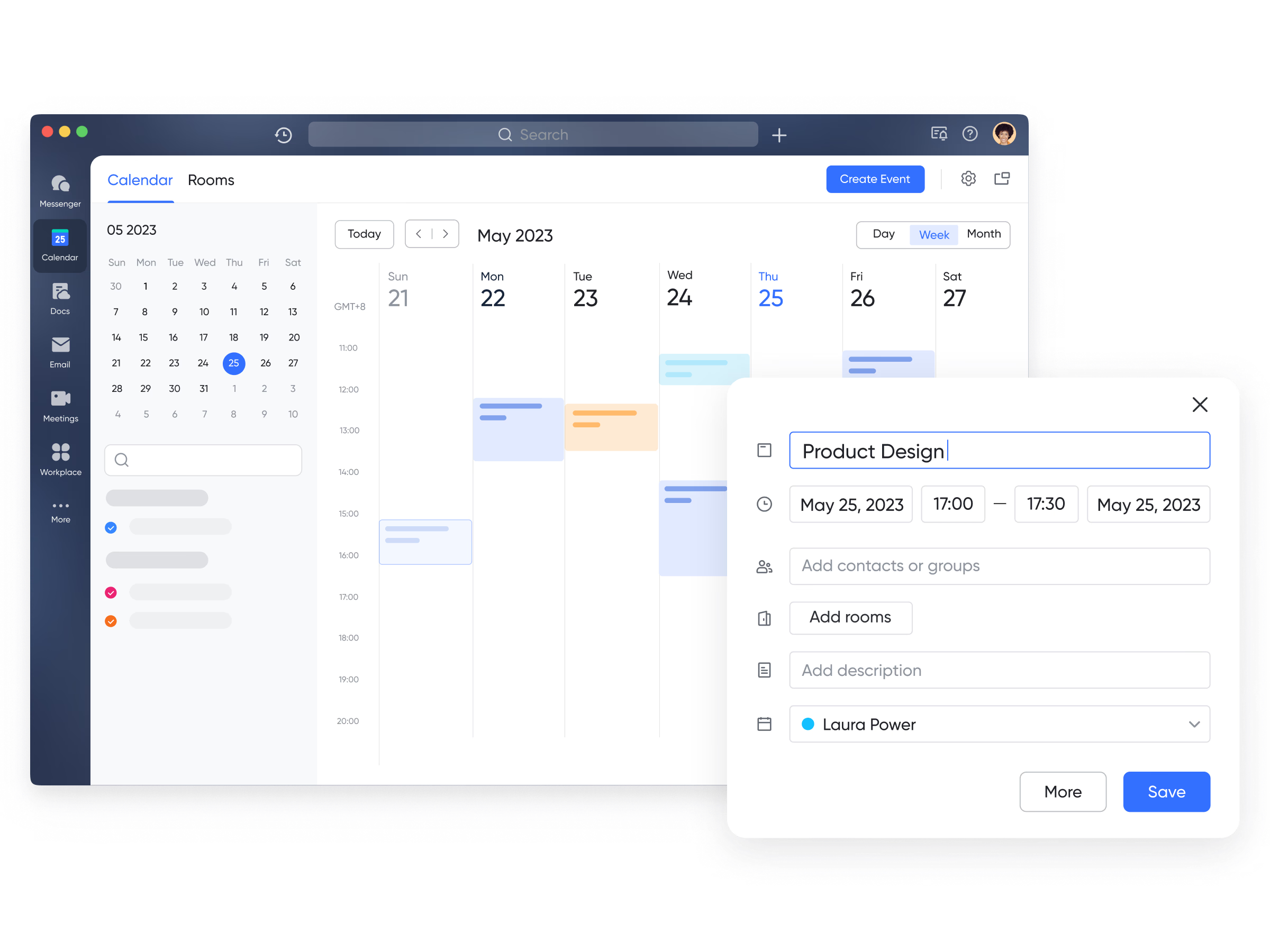
Centralized scheduling with calendar:
Lark Calendar serves as the central hub for project timing and team coordination in creative agencies. It enables scheduling of all key project activities—from client review meetings to internal brainstorming sessions and deadlines—so teams can view and manage timelines in one place. Instead of automated Meeting Creation or conflict-free booking, users can check teammates' public calendars to quickly see their availability and arrange meetings accordingly. This makes it easy for project managers to find suitable time slots among designers, copywriters, and clients. Every task with a due date also appears in the calendar, providing a clear, visual timeline of all upcoming milestones.
For example:A project manager can instantly find a time slot when the client and the lead designer are both free. Finally, every task with a due date automatically appears on the individual and team calendars, providing a visual and chronological map of all upcoming project milestones through Deadline Visualization.
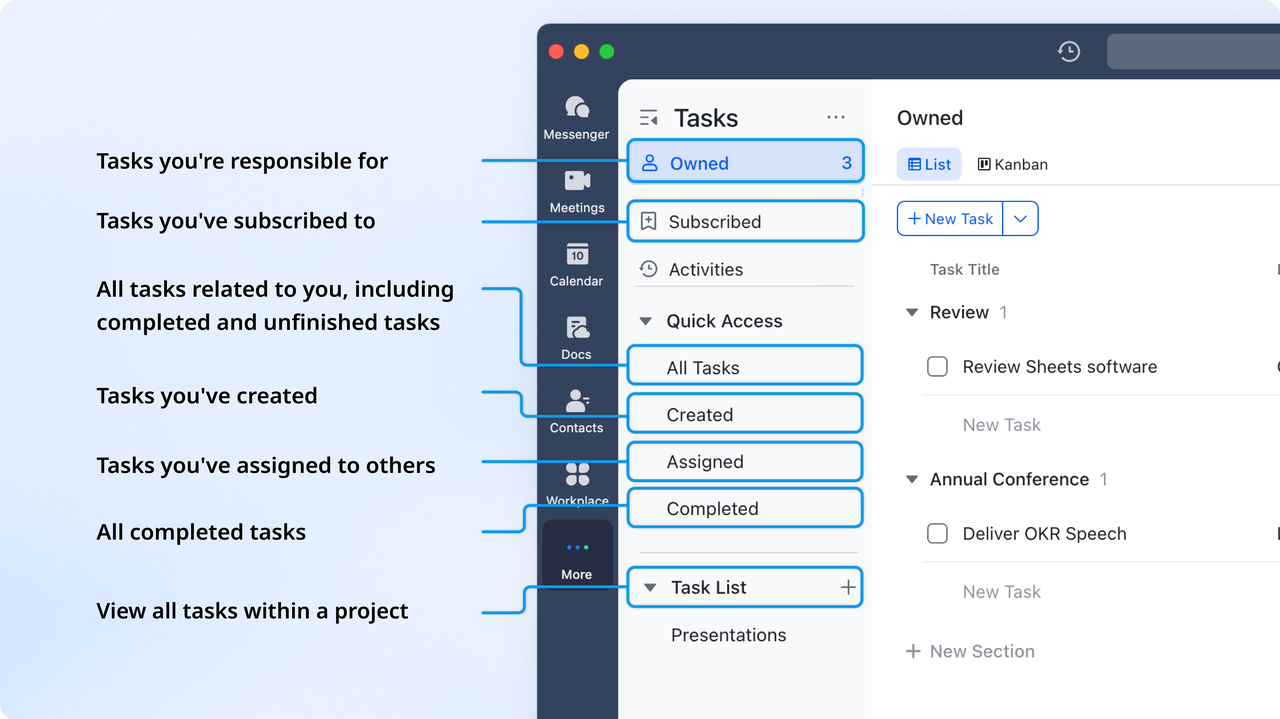
Streamlined task assignment (Lark Tasks):
Crucial decisions and requests can easily get lost in endless conversation threads. Lark solves this by adding communication and action through its Tasks feature. Any message in a group chat, document comment, or email can be instantly converted into an actionable task with an assigned owner and due date. This ability to Turn Conversation into Action is incredibly powerful.
For example: A team lead can simply flag a chat message that reads, "Please design three mockups for the new client pitch," instantly converting that request into a tracked task assigned to a designer. All assigned Tasks are collected and synced , regardless of whether they originated from a Messenger, a Docs, or a Calendar reminder, giving every creative a clear and unified daily to-do list. Crucially, this creates an Audit Trail and Accountability: since the task links back to the original source (the exact message or comment), the context is never lost, guaranteeing a complete record of why and how a task was assigned.
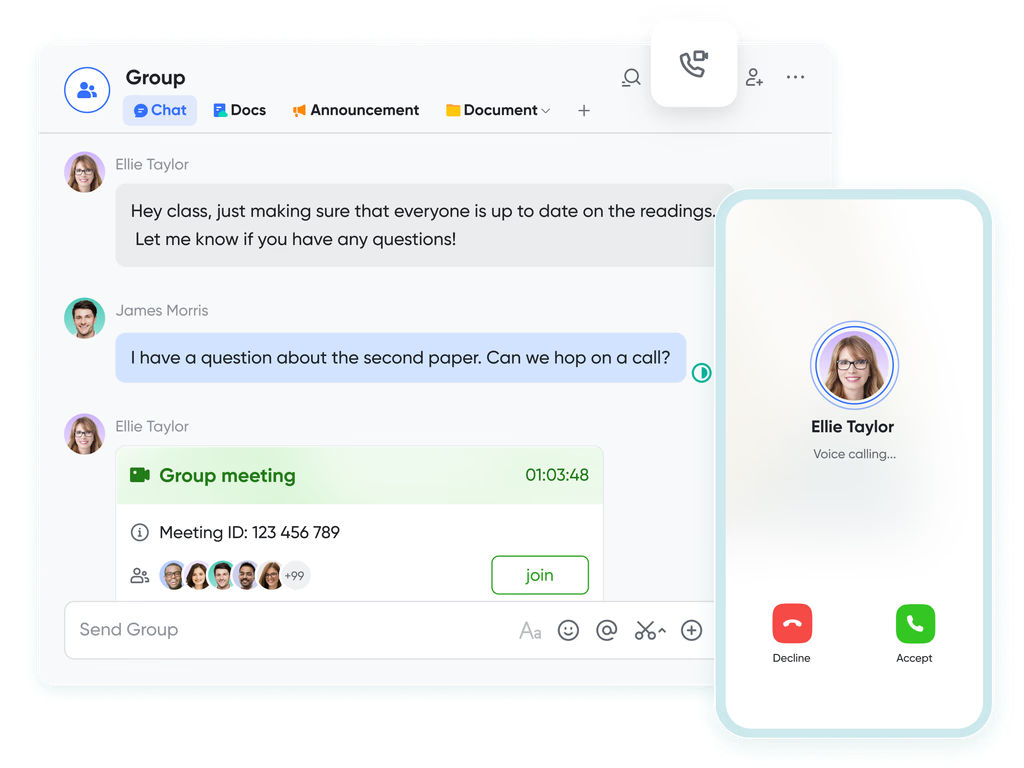
Instant communication (Messenger & Meetings):
Lark Instant Communication tools, including group chats and bots are designed for the fast-paced demands of creative agencies. Group Chats enable real-time discussion, quick brainstorming, and immediate feedback, supporting real-time decision-making. For instance, a designer can share a draft concept in a chat and instantly receive client or team feedback using reactions, reducing delays caused by email threads or multiple follow-ups. Automated Bots further streamline communication by posting automatic updates, reminders, and status notifications, keeping everyone aligned without manual check-ins.
For example: A bot can automatically post a task update in the relevant project chat whenever the status changes from "In Review" to "Approved," ensuring full transparency. Combined with message-to-task conversion, teams can convert chat discussions or flagged messages directly into actionable, trackable tasks, turning casual conversation into structured project work seamlessly.
- Starter plan: Free forever plan that includes 11 powerful tools for up to 20 users. It also comes with 100GB of storage, 1000 automation runs, AI translations, and more.
- Pro plan: $12/user/month (billed annually) for up to 500 users. It includes everything in Starter plus group calling for up to 500 attendees, 15TB of storage, 50,000 automation runs, and more.
- Enterprise plan: Contact sales for custom pricing. Supports unlimited users and includes even more automation runs and advanced data security, compliance, and management features.
2. Productive: Best for agency financial and resource management
Productive is a full-featured agency management platform designed for creative, marketing, and professional services firms. It combines sales, resource planning, project management, and financial reporting into a single system. Teams can track profitability, utilization, and project progress in real-time. Ideal for agencies where operational efficiency and financial visibility are critical.
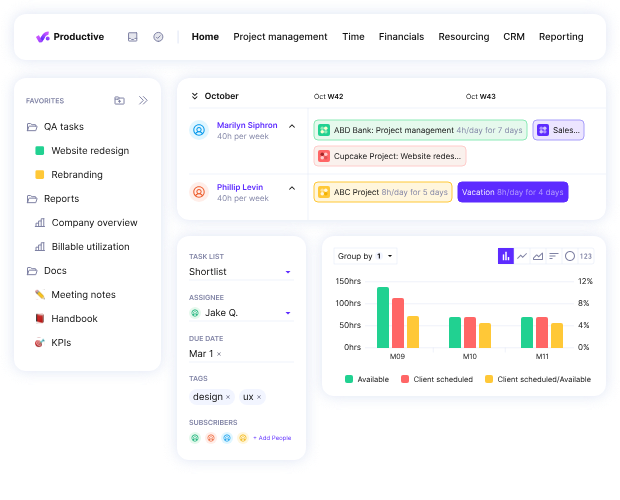
Image source: productive.com
Features
- Visualizes team availability and workload; allocates resources by skills and capacity.
- Converts won deals into live projects with budgets and financial parameters set automatically.
- Log hours linked to budgets and rates, enabling accurate invoices for billable time or retainers.
- Over 50 customizable reports, including utilization, profitability, and revenue forecasting.
Pros
- Financial Focus: Highly specialized in tracking agency-specific financial metrics like profitability, cost rates, and overhead calculation in one place.
- All-in-One Solution: Consolidates CRM, resource planning, project management, time tracking, and invoicing, reducing reliance on disconnected tools.
- Purpose-Built for Agencies: The features and terminology are tailored specifically to the needs of professional services and creative firms.
Cons
- Learning Curve: The extensive, comprehensive feature set can be overwhelming for new users, requiring a dedicated onboarding period.
- Customization: While robust, some users note that the customization options for visual workflows or complex tech stacks can be limited compared to highly flexible tools.
- Basic CRM: The CRM, while functional for sales-to-project conversion, is generally less feature-rich than dedicated CRM platforms.
Pricing
- Essential: $9 (limited features)
- Professional: $24/user/month (monthly billing)
- Ultimate: $32/user/month (monthly billing)
3. Wrike: Best for enterprise-level creative teams
Wrike is a scalable, AI-powered work management platform designed for large organizations and enterprise creative teams. It streamlines proofing, asset management, and complex workflow automation, connecting strategy to execution across departments. Wrike provides a unified digital workspace that eliminates silos and simplifies intake. Trusted by over 20,000 global organizations.
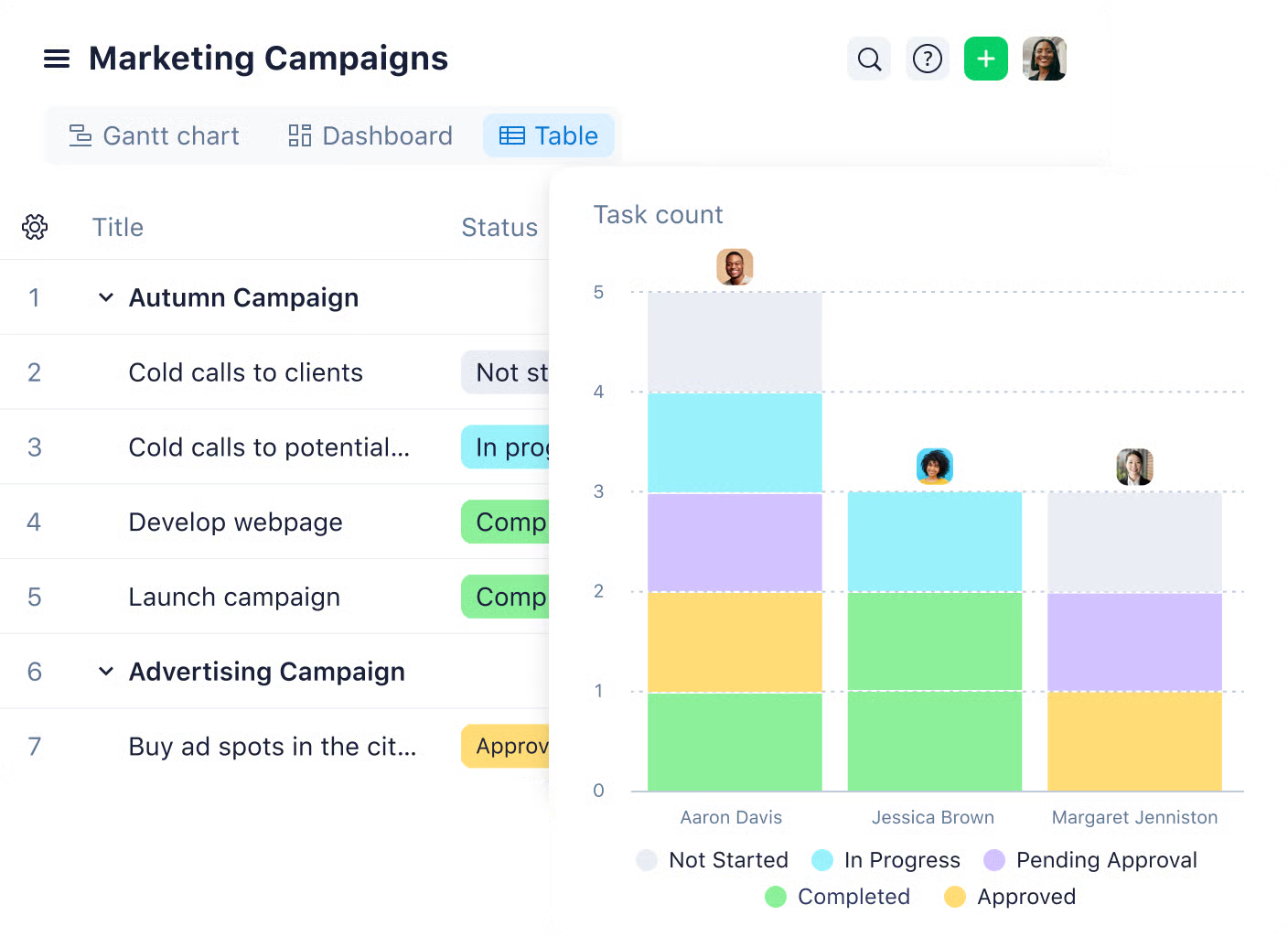
Image source: wrike.com
Features
- Visualize timelines, manage dependencies, and monitor team capacity.
- Automate routine tasks and use AI to predict project risks.
- Work on Photoshop, Illustrator, and other Adobe files without leaving Wrike.
- Two-step verification, advanced access control, and data governance add-ons.
Pros
- Excellent for creative teams with proofing and Adobe integration.
- Highly customizable workflows, fields, and dashboards.
Cons
- Steep learning curve for new users or smaller teams.
- Pricing can be expensive for mid-sized or small organizations.
Pricing
- Free: $0
- Team: $9.80/user/month (annual billing)
- Business: $24.80/user/month (annual billing)
- Enterprise: Custom quote
- Pinnacle: Custom quote
4. Paymo: Best for small creative teams with tight budgets
Paymo is an affordable, all-in-one work management platform tailored for small creative teams and freelancers. It helps manage projects, track time, and handle invoicing from a single interface. Perfect for studios or agencies that need to keep tight control over budgets, billable hours, and client relationships. Paymo connects tasks and time tracking directly to financial outcomes, simplifying project profitability.
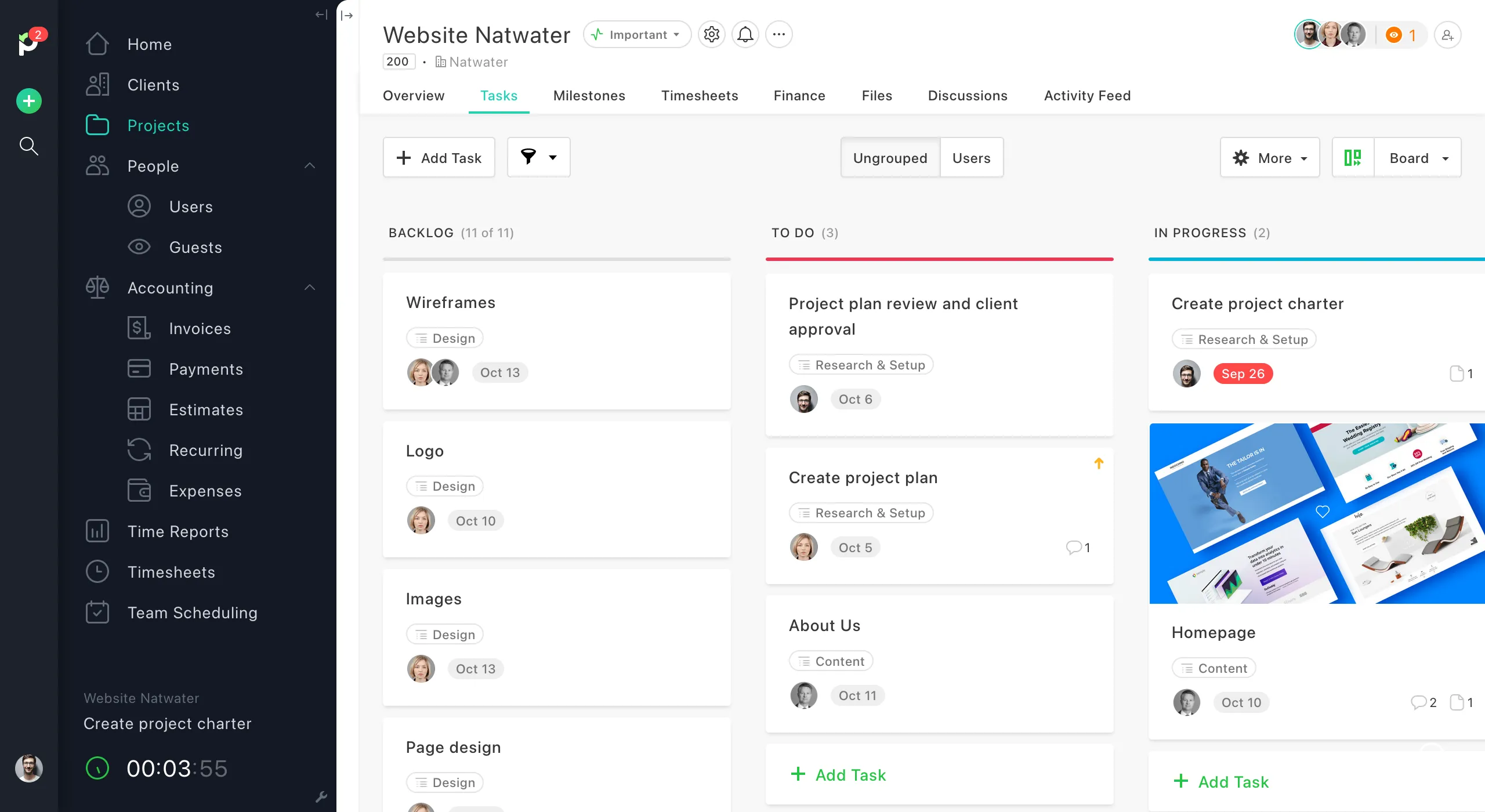
Image source: paymo.com
Features
- One-click time tracker linking hours to tasks and clients.
- Generate invoices from tracked time; monitor project profitability.
- Flexible task management with Kanban, Gantt, List, Table views.
Pros
- Cost-effective with free and competitively priced plans.
- Combines project management, time tracking, and invoicing in one platform.
Cons
- Lacks advanced enterprise features like complex automation or DAM.
- May be less scalable for very large or fast-growing teams.
Pricing
- Free: $0
- Starter: $5.90/user/month (annual billing)
- Small Office: $10.90/user/month (annual billing)
- Business: $16.90/user/month (annual billing)
5. Scoro: Best for business and project management in one
Scoro is a comprehensive work management solution designed for professional services, consultancies, and creative agencies. It unifies project management with business-critical functions like CRM, billing, and financial reporting. Teams can manage clients, projects, resources, and finances all in one platform. Ideal for agencies looking for full visibility into project performance and business profitability.
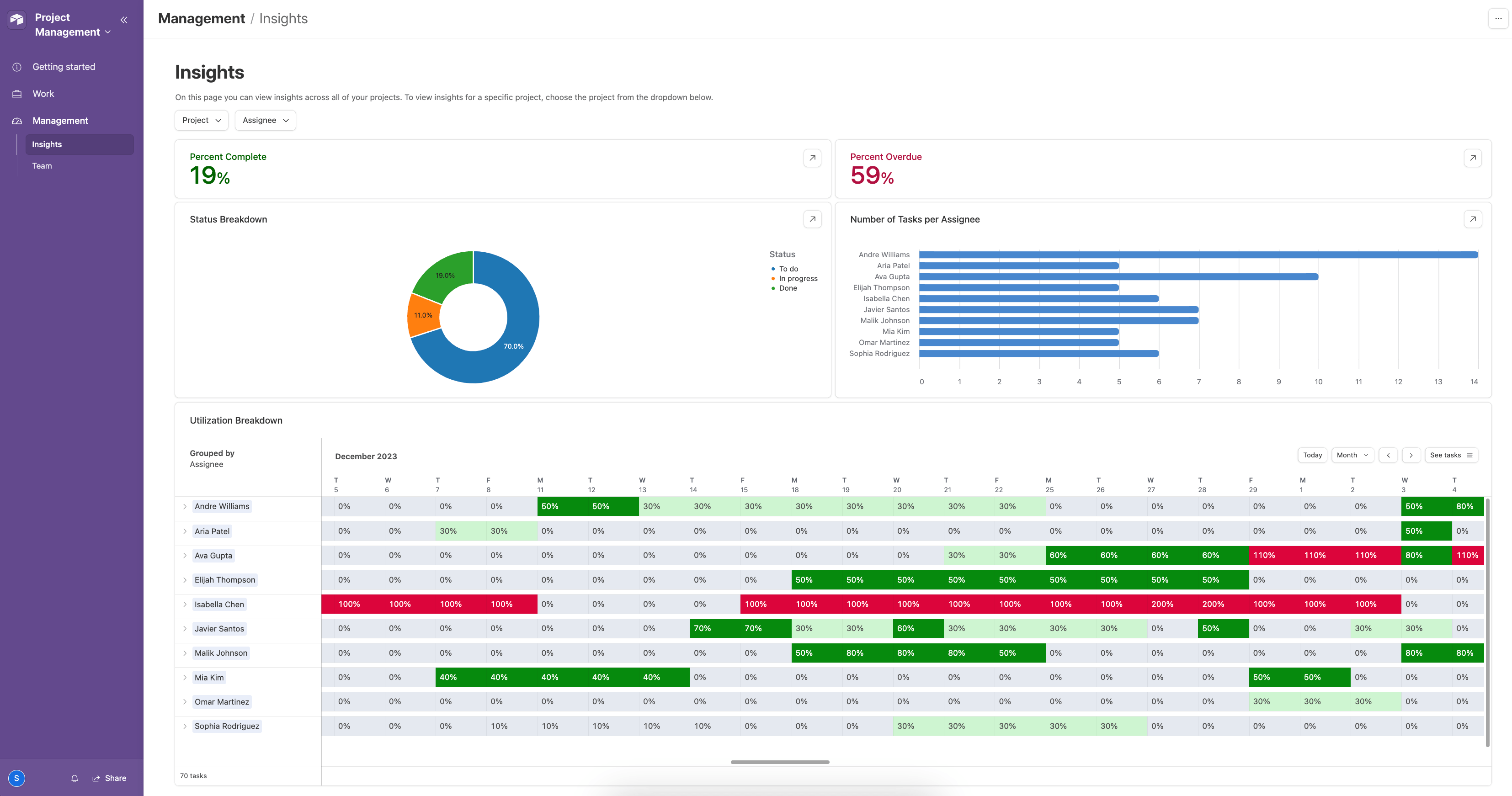
Image source: scoro.com
Features
- Project and task management with timelines and dependencies.
- CRM for client and contact management.
- Billing, invoicing, and financial reporting.
- Resource planning and team workload management.
- Custom dashboards and analytics.
Pros
- Combines project management with business operations.
- Strong reporting and financial oversight.
- Scales well for mid-to-large agencies.
- Centralizes multiple workflows in one platform.
Cons
- Can be complex for small teams.
- Higher price point than simpler tools.
- Learning curve for setup and customization.
Pricing
- Essential: $26 per user/month
- Work Hub: $37 per user/month
- Business: $63 per user/month
- Enterprise: Custom pricing
6. Plaky: Best free option for simpler creative workflows
Plaky is a lightweight project management tool designed for teams that need clarity without complexity. It helps creative teams organize tasks, track progress, and stay aligned through simple boards and lists. The clean interface makes it easy to get started, even for beginners. Perfect for small agencies or freelancers managing multiple clients.
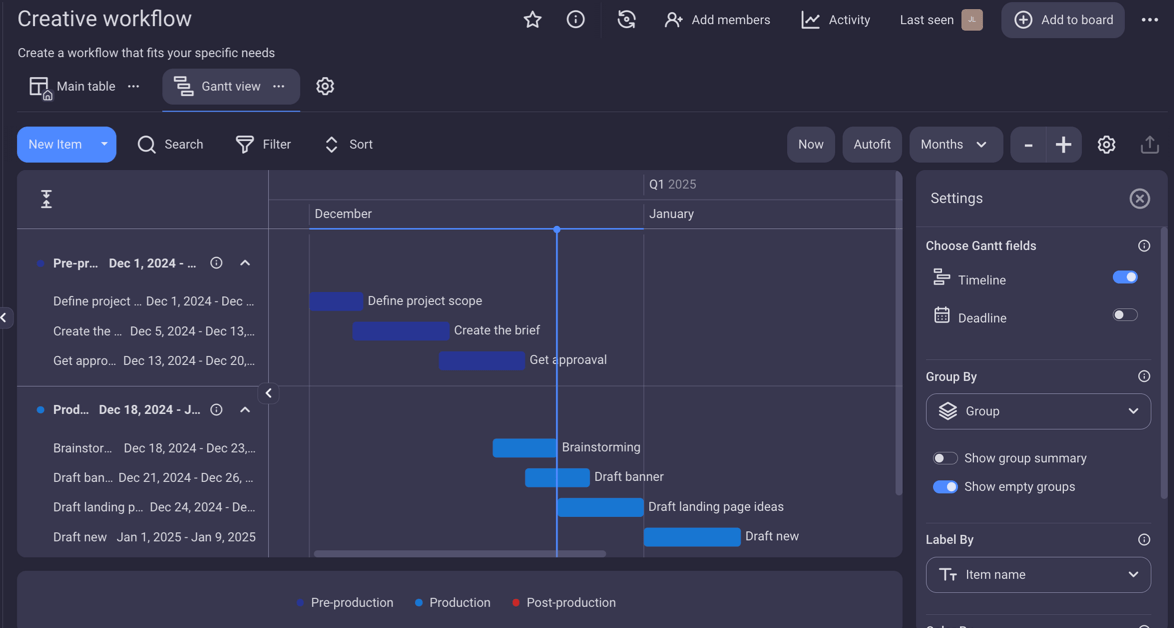
Image source: plaky.com
Features
- Kanban boards for task management.
- Custom fields and labels for easy organization.
- File attachments and comments on tasks.
- Task deadlines and assignees for accountability.
Pros
- 100% free with unlimited users.
- Simple, intuitive layout.
- Great for small creative teams.
- No learning curve.
Cons
- Lacks advanced automation.
- Limited integrations with other tools.
- No built-in time tracking.
Pricing
- Free: $0
- Pro: $3.99/seat/month (annual) • $4.99/seat/month (monthly)
- Enterprise: $8.99/seat/month (annual) • $10.99/seat/month (monthly)
- Cake Bundle: $12.99/seat/month (annual) • $15.99/seat/month (monthly)
7. Jira work management: Best for tech-heavy or agile creative teams
Jira Work Management is a robust platform built for teams that thrive on structure and precision. It's ideal for creative teams that follow Agile or technical workflows, offering advanced tracking and reporting capabilities. With customizable workflows and powerful automation, teams can manage complex projects efficiently. Perfect for agencies handling large-scale campaigns or tech-integrated creative work.
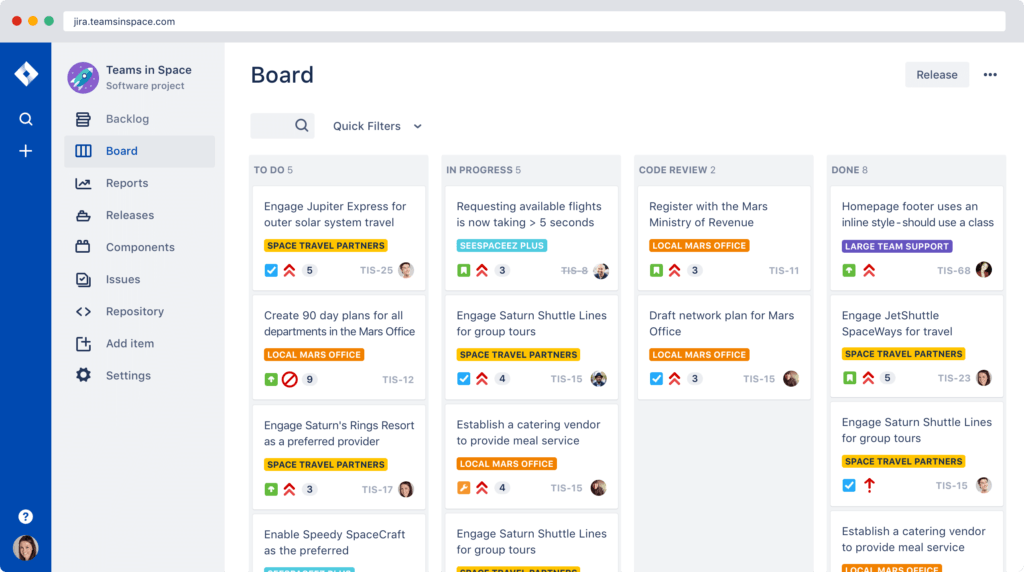
Image source: jira.com
Features
- Custom workflows for each team or project.
- Kanban, list, calendar, and timeline views.
- Advanced reporting and dashboards.
- Automation rules to reduce manual work.
- Integration with development tools and other Atlassian apps.
Pros
- Highly customizable for complex workflows..
- Strong reporting and analytics.
- Scales well for large teams.
- Ideal for Agile project management.
Cons
- It can be overwhelming for beginners.
- Steeper learning curve than simpler tools.
- Cost increases with larger teams and premium features.
Pricing
- Free :$0 for up to 10 users
- Standard :$8 per user/month
- Premium: $16 per user/month
- Enterprise: Custom pricing
8. Asana: Best for campaign planning and task visualization
Asana is a versatile project management tool that helps creative teams plan, track, and execute campaigns with clarity. Its visual layout and flexible views make it easy to see progress at a glance. Teams can coordinate tasks, deadlines, and resources in one centralized platform. Ideal for agencies managing multiple campaigns or cross-functional projects.
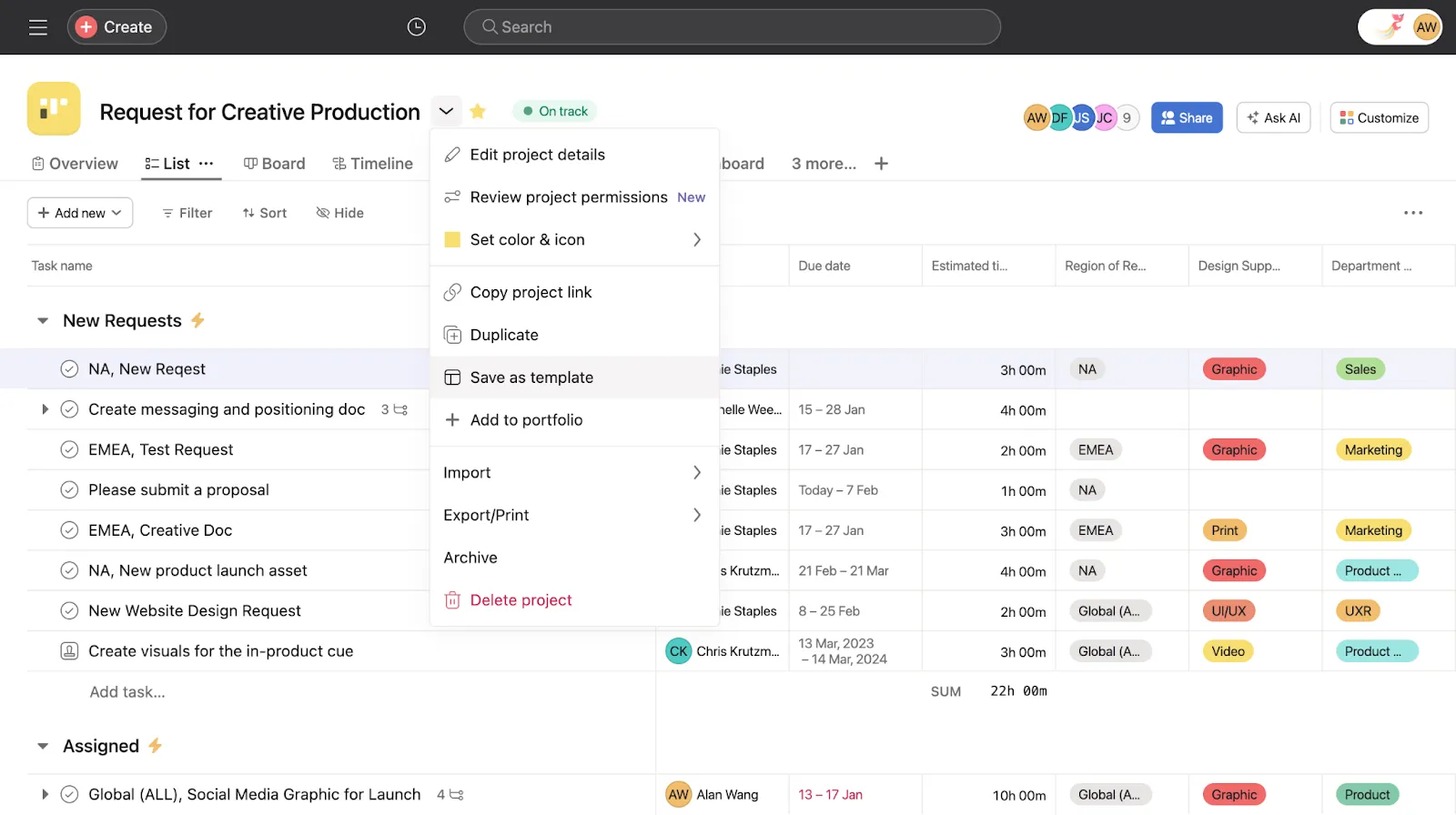
Image source: asana.com
Features
- Multiple views: list, board, timeline, and calendar.
- Task dependencies and subtasks for complex projects.
- Custom fields, tags, and sections.
- Collaboration with comments, attachments, and notifications.
- Reporting dashboards and project progress tracking.
Pros
- Highly visual and intuitive interface.
- Flexible for different project types.
- Strong collaboration features.
- Good for both small and large teams.
Cons
- Free plan has limited features
- Can become complex with large projects.
- Advanced reporting only in premium plans.
Pricing
- Free: $0 for basic use
- Premium: $10.99 per user/month
- Business: $24.99 per user/month
- Enterprise: Custom pricing
9. Monday.com: Best for highly visual and customizable project boards
Monday.com is a flexible work operating system that lets creative teams visualize, manage, and customize every aspect of their projects. Its colorful boards and drag-and-drop interface make tracking tasks engaging and intuitive. Teams can tailor workflows to match their processes, from simple task tracking to complex campaigns. Ideal for agencies that value both creativity and organization.
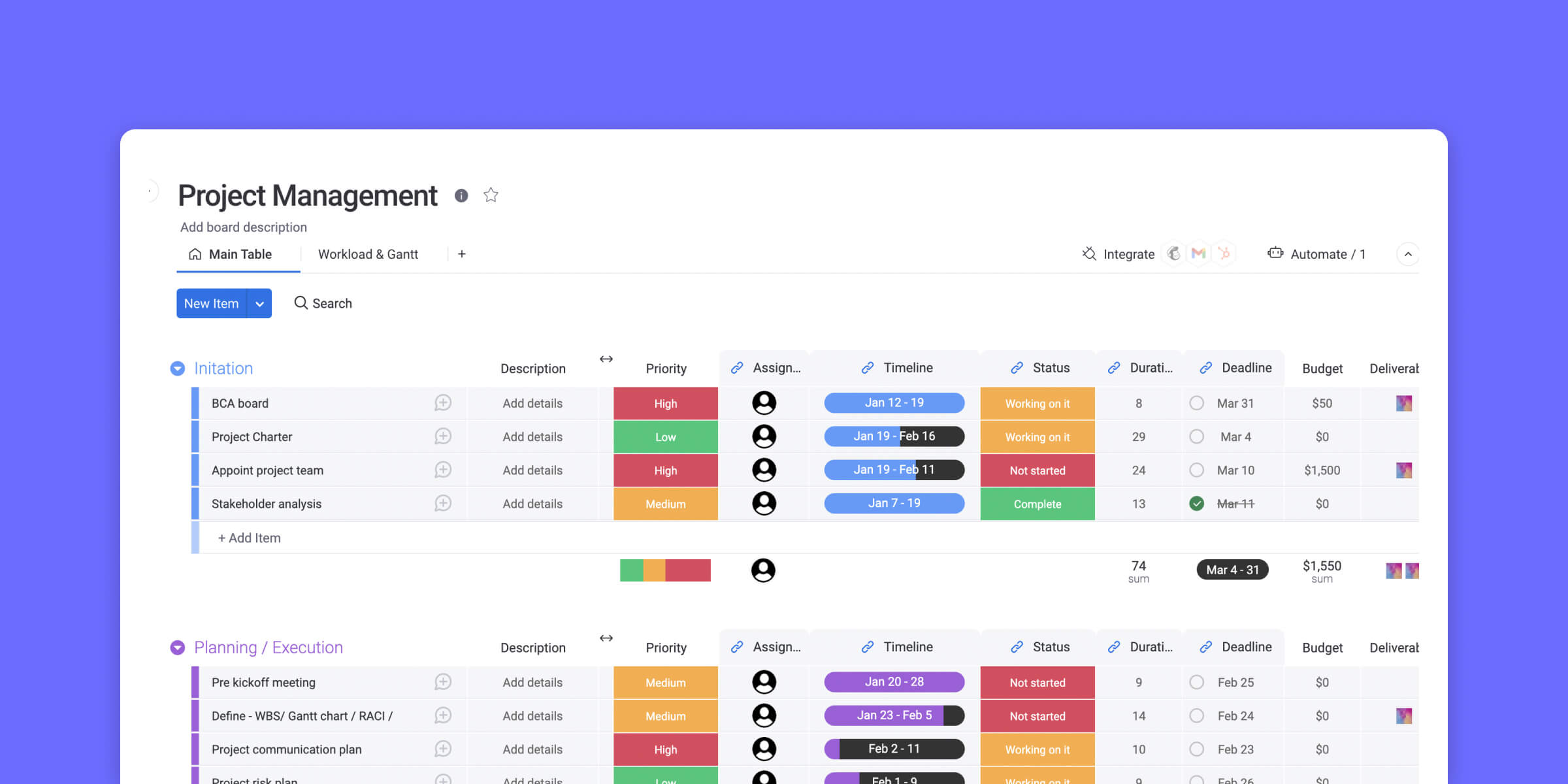
Image source: monday.com
Features
- Fully customizable boards with columns, statuses, and labels.
- Multiple views: Kanban, timeline, calendar, map, and table.
- Automation rules to streamline repetitive tasks.
- File attachments, comments, and collaboration tools.
- Advanced reporting and dashboards.
Pros
- Highly visual and easy to use.
- Extremely flexible and customizable.
- Automation reduces manual work.
- Scales from small teams to large agencies.
Cons
- It can become expensive for larger teams.
- Some advanced features require higher-tier plans.
- Occasional complexity for beginners.
Pricing
- Free: $0 for up to 2 users
- Basic: $10 per user/month
- Standard: $12 per user/month
- Pro: $20 per user/month
- Enterprise: Custom pricing
10. ClickUp: Best for all-in-one customization and scalability
ClickUp is a powerful project management platform that combines task management, docs, goals, and time tracking in one place. Its flexibility allows creative teams to tailor workflows to any project size or type. With a variety of views and automation options, teams can streamline collaboration and productivity. Ideal for agencies looking for a single tool to manage everything from tasks to campaigns.
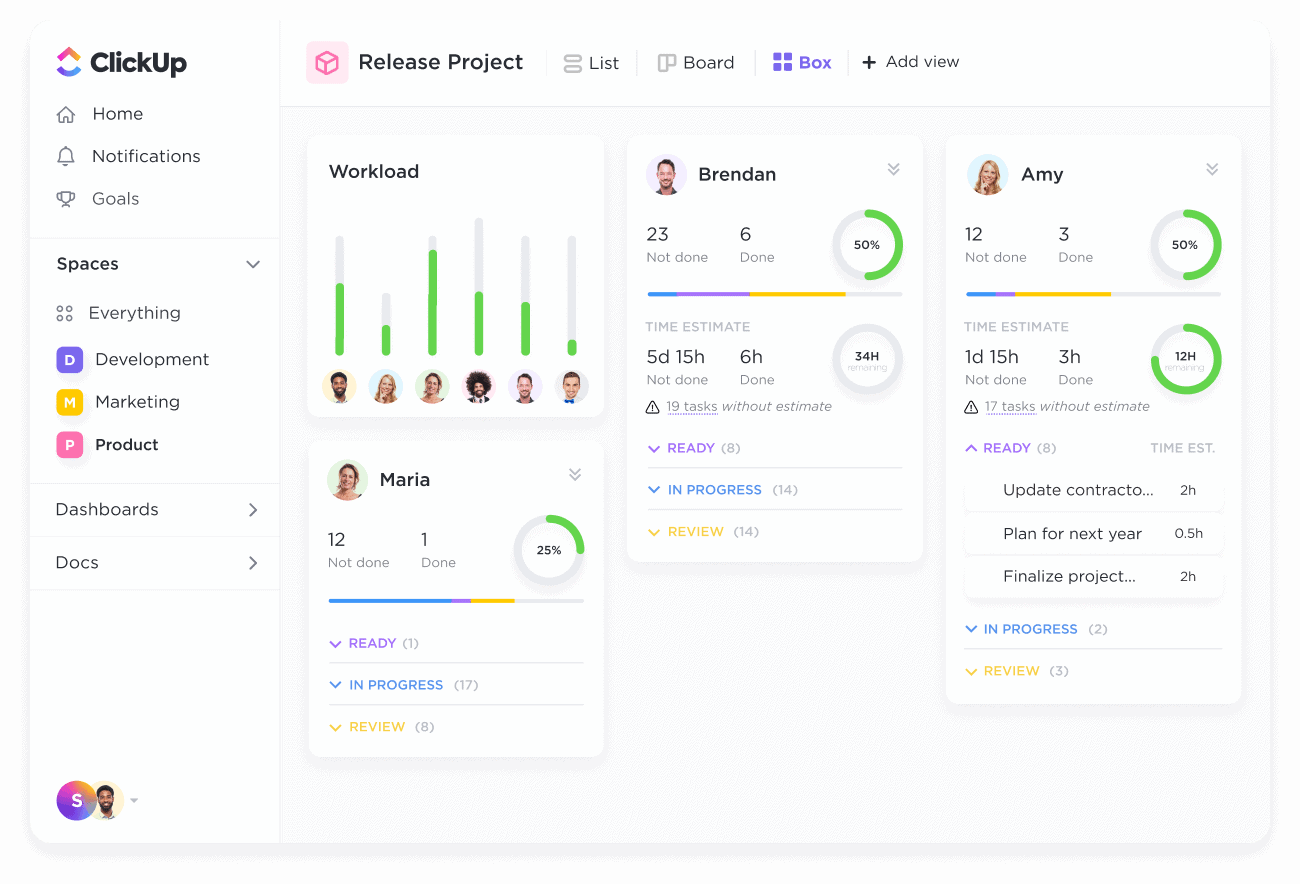
Image source: clickup.com
Features
- Multiple task views: list, board, calendar, Gantt, and timeline.
- Custom statuses, fields, and workflows.
- Docs, goals, and time tracking are added into one platform.
- Automations to reduce repetitive work.
- Collaboration through comments, mentions, and file sharing.
Pros
- Extremely customizable for any workflow.
- All-in-one platform reduces the need for multiple tools.
- Scales easily for small to large teams.
- Robust free plan with many features.
Cons
- Can feel overwhelming due to extensive features.
- Some advanced features require paid plans.
- Learning curve for new users.
Pricing
- Free: $0 per user/month
- Unlimited: $5 per user/month
- Business: $12 per user/month
- Business Plus: $19 per user/month
- Enterprise: Custom pricing
Conclusion
For creative agencies, managing multiple clients, assets, and deadlines can quickly become overwhelming without the right tools. The project management software for creative agencies like Lark, Wrike, and Productive streamlines workflows, centralizes communication, and simplifies collaboration—allowing teams to focus on creativity rather than administrative chaos. By unifying tasks, documents, timelines, and approvals in one platform, agencies gain visibility, efficiency, and control over every project stage.
Among the top solutions, Lark stands out for its all-in-one workspace that combines task management, messaging, docs, calendars, and AI-powered features, making it a top choice for modern creative agencies seeking both productivity and innovation.
FAQs
How is project management different for creative agencies compared to other industries?
Project management for creative agencies focuses on collaboration, iterative workflows, and asset management rather than purely task completion. Unlike traditional industries, creative teams deal with dynamic briefs, multiple revisions, and simultaneous design, content, and marketing projects. Tools must support real-time communication, visual task tracking (Kanban, Gantt), and centralized asset management to keep creative workflows efficient and ensure deadlines are met without compromising quality.
What are the most common mistakes creative agencies make when using project management software?
Common mistakes creative agencies make with project management software include using it only for task tracking, and approvals. Failing to customize workflows for the agency's creative process and overcomplicating dashboards can reduce adoption. Ignoring client collaboration needs also leads to scattered feedback and delays. The right software centralizes tasks, feedback, and assets in one platform, ensuring smoother collaboration, faster approvals, and more efficient project delivery.
Can project management tools help manage client feedback and approvals?
Yes. Modern tools like Lark, Wrike, and Productive provide structured approval workflows, version control, and comment tracking. Clients can review assets directly, submit feedback, and approve changes in-context. This centralization reduces email chains, prevents lost feedback, and accelerates project delivery, ensuring creative teams stay aligned with client expectations.
How much does project management software typically cost for creative agencies?
Pricing varies depending on the features, team size, and scalability. For example:
- Lark Starter: Free for up to 20 users, includes chat, docs, tasks, and basic automation.
- Lark Pro: $12/user/month (billed annually) with advanced collaboration, group calling, and extended storage.
- Enterprise-level solutions for larger agencies or complex workflows may require custom pricing. Most tools offer tiered plans to accommodate small, medium, and large creative teams.
What integrations should creative agencies look for in project management tools?
Key integrations include creative software (Adobe Creative Cloud, Figma), collaboration apps (Google Workspace, Slack), cloud storage (Dropbox, OneDrive), and communication tools (email, video conferencing). Automation and AI integrations also help streamline repetitive tasks, summarize updates, and manage workflows efficiently, making the tool an all-in-one solution for creative agencies.
Related reading
Table of contents
Start using Lark today

Manage all your work in one place
Boost team efficiency by 10x
Save up to 70% on software costs
Table of contents
Start using Lark today
Manage all your work in one place
Boost team efficiency by 10x
Save up to 70% on software costs
Keep reading







2026 Lark Technologies Pte. Ltd.
Headquartered in Singapore with offices worldwide.






Explore: