Chasing team members for updates and formatting spreadsheets that stakeholders barely read is a recognized frustration for project managers. A solid reporting cadence should drive decisions, not create busywork.
Using the right project status templates transforms scattered data into a clear narrative about project health, risks, and next steps. In this guide, I will break down the essential components of effective reporting, provide actionable templates for different audiences, and show you how to move away from static documents toward automated, real-time updates.
What is a project status report?
A project status report is a standardized document that provides a snapshot of a project's progress at a specific moment in time. Unlike a detailed project plan that maps out every granular task from day one, a status update focuses on current health, recent achievements, and immediate roadblocks.
Think of it as the communication bridge between the execution team and the stakeholders. Its primary goal is to provide transparency and prevent surprises.
Consider this mini-scenario: A marketing team is preparing for a major product launch. The design phase is delayed by three days. Without a regular status update, the engineering and PR teams continue working under the assumption that the original timeline holds. By the time the delay is discovered casually in a chat channel, launch deadlines are jeopardized. A structured weekly update surfaces this blocker immediately, allowing you to reallocate resources or adjust expectations before a minor delay turns into a critical failure, mirroring the value of that keep cross-functional teams aligned.
Effective professional project status reporting templates ensure that critical variables—schedule, budget, scope, and quality—are routinely checked and communicated to everyone involved.
Why static project status templates are failing your team
For decades, project management has relied on static tools like Excel templates or PowerPoint decks for status reporting. While familiar, these formats are ill-suited for modern distributed teams, especially with the availability of and collaborative reporting tools. Static documents become outdated immediately upon sharing, creating version control chaos that leads to misaligned decisions. They also exist in isolation, disconnected from real work in task trackers and chat apps, forcing teams to waste time on manual data entry instead of focusing on real-time reporting needs. Leading teams are adopting cloud-native live documents, where status reports function as auto-syncing dashboards within unified workspaces. This shift ensures data accuracy, eliminates administrative overhead, and lets teams focus on steering projects effectively through real-time KPIs and status visibility
Essential elements of a professional project status template
A well-crafted project status update template does more than just list completed tasks. It anticipates the questions your stakeholders will ask and provides the answers upfront. Regardless of the specific format you choose, every professional template should include the following core components, and you can accelerate setup by starting from that cover common reporting needs.
The executive summary
This is often the only section high-level stakeholders will read. It should be a concise, one-paragraph overview of the project's current standing. If a decision is required from leadership, state it clearly right here.
Project health and RAG status
A simple visual indicator saves everyone time. The RAG (Red, Amber, Green) system is universally understood:
- Green: The project is on track regarding timeline, budget, and scope.
- Amber: There are emerging risks or minor delays that need monitoring.
- Red: The project is blocked or significantly off-course, requiring immediate intervention.
Milestones and timeline tracking
Instead of a granular list of daily to-dos, focus on major milestones. Show what was recently achieved, what is currently in progress, and what the next major deliverable is. Comparing the planned completion date against the actual completion date provides a clear picture of schedule adherence, especially when paired with a that visualizes key dates and dependencies.
Budget overview and resource allocation
Financial surprises are a project manager's worst enemy. A brief update on budget utilization—how much was planned versus how much has been spent to date—keeps expectations aligned. It is also helpful to note if specific team members are over capacity, which becomes much easier when you have a task management dashboard that highlights workload and ownership across the team.
Risks, issues, and blockers
Be transparent about what is going wrong. An issue is a problem currently affecting the project, while a risk is a potential future problem. A strong report not only identifies the blocker but also proposes a mitigation plan or requests specific help to resolve it, and is far more effective when supported by a .
Streamline reports and boost alignment with Lark
Ready-to-use project status report templates
Different projects and cadences require different reporting structures. Here are ten template variations designed for specific use cases, helping you communicate progress accurately without starting from scratch.
Weekly project status report templates
Designed for the core project team and immediate supervisors, this template focuses on short-term wins and immediate blockers. It answers the question: "What did we do this week, and what is stopping us from moving forward next week?" It heavily features task-level updates and immediate resource needs, making it perfect for fast-moving execution teams.
Executive project status report templates
This format strips away the daily operational details. It is built for the C-suite or steering committee, focusing entirely on high-level KPIs, overall project health, budget burn rates, and strategic risks. The primary goal is to secure ongoing buy-in or request necessary interventions without overwhelming executives with technical jargon.
Monthly project health tracking template
Ideal for long-term initiatives, the monthly template takes a step back to look at broader trends. It compares the past 30 days of progress against the master schedule and often includes a deeper dive into quality control metrics and stakeholder engagement activities.
Agile sprint update template
For software development or agile marketing teams, this template aligns with sprint cycles. It highlights the sprint goal, points completed versus points committed, user stories delivered, and any technical debt or bugs carrying over to the next sprint.
Daily stand-up summary template
While often verbal, distributed or asynchronous teams benefit from a written daily update. This micro-template asks three simple questions: What did you complete yesterday? What are you working on today? Are there any blockers in your way?
Client-facing project update template
When communicating with external clients, tone and presentation matter. This template focuses on deliverables, upcoming approval deadlines, and budget transparency. It intentionally omits internal team conflicts or raw, unpolished data, presenting a clean narrative of value delivered.
Project milestone sign-off template
Used at the end of a major project phase, this template acts as both a status update and an approval document. It summarizes the deliverables for that specific milestone and requires a formal signature (often via an approval workflow) from the client or sponsor before work on the next phase begins.
Risk and issue log reporting template
Sometimes, the standard status report is not enough to convey complex challenges. This specialized template categorizes risks by probability and impact, assigns an owner to each issue, and details the specific mitigation strategies being deployed.
Marketing campaign status template
Tailored for marketing teams, this template includes sections for creative asset development, media spend, and early performance metrics (like cost-per-click or lead generation numbers) alongside standard timeline updates.
Go-to-market launch status template
A highly cross-functional template used in the weeks leading up to a product launch. It tracks the readiness of different departments—engineering, product marketing, sales enablement, and customer support—ensuring no single team is holding up the release.
How to automate your project status updates using Lark
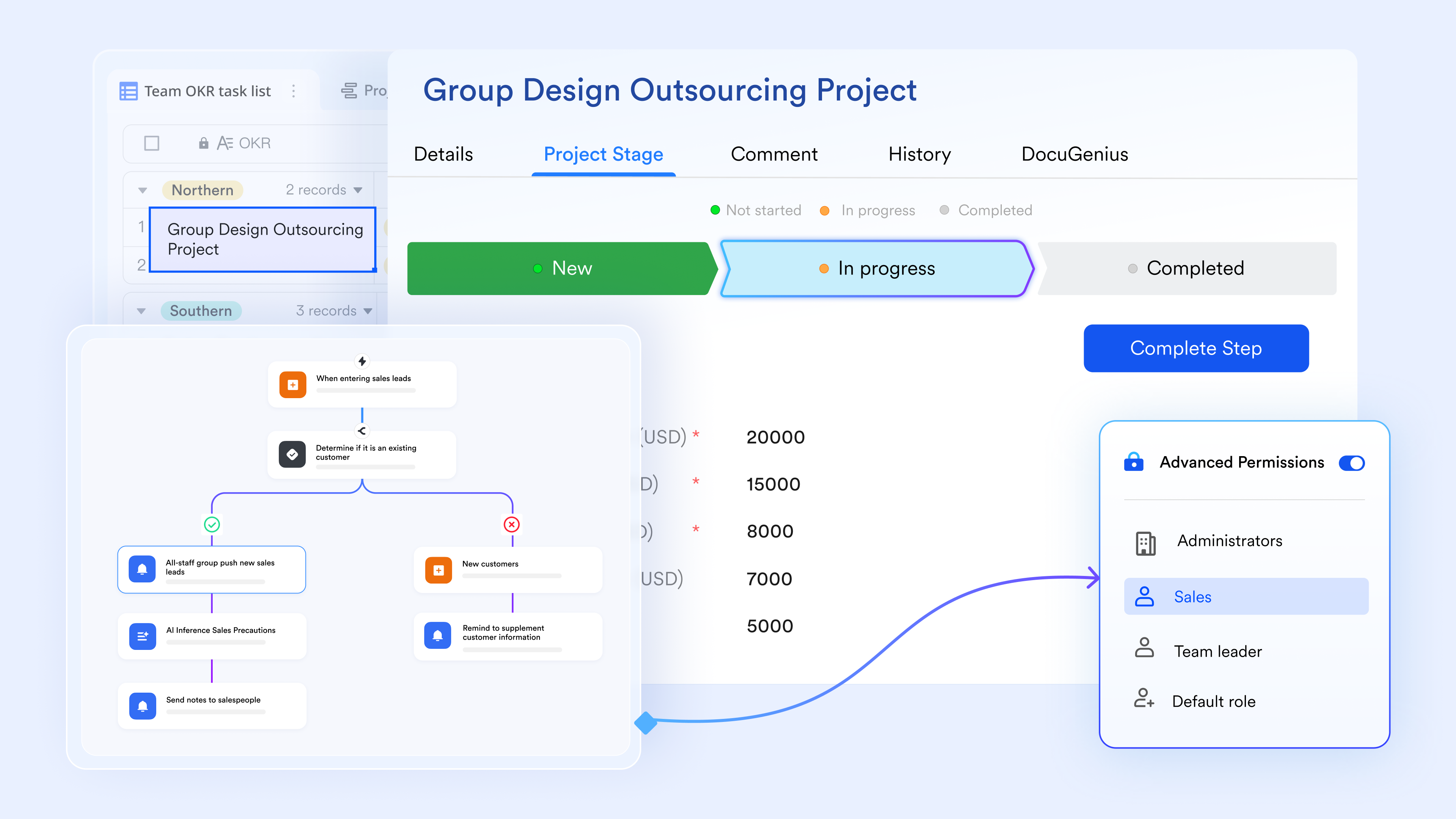
A static project status template provides a snapshot, but it is often outdated the moment it is exported. As projects evolve, progress updates, blockers, and budget discussions get scattered across different tools, making it nearly impossible to maintain a single source of truth. transforms this by turning your project status reporting into a connected, living system rather than a one-time document. It links your reporting templates directly to task databases, automated approvals, and team communication in real time. This ensures that project health is not just documented, but actively monitored and managed throughout the project lifecycle.
supports real-time collaborative editing with inline comments, version history, and structured content blocks, including tables, RAG (Red, Amber, Green) status trackers, and embedded Lark Base records. Project managers build their weekly project status report templates or executive summaries directly in Lark Docs. Each milestone and deliverable in Lark Base is linked directly to the relevant section of the report. When stakeholders review the status update, they can open the linked document and see the exact progress of underlying tasks without asking for a separate briefing.
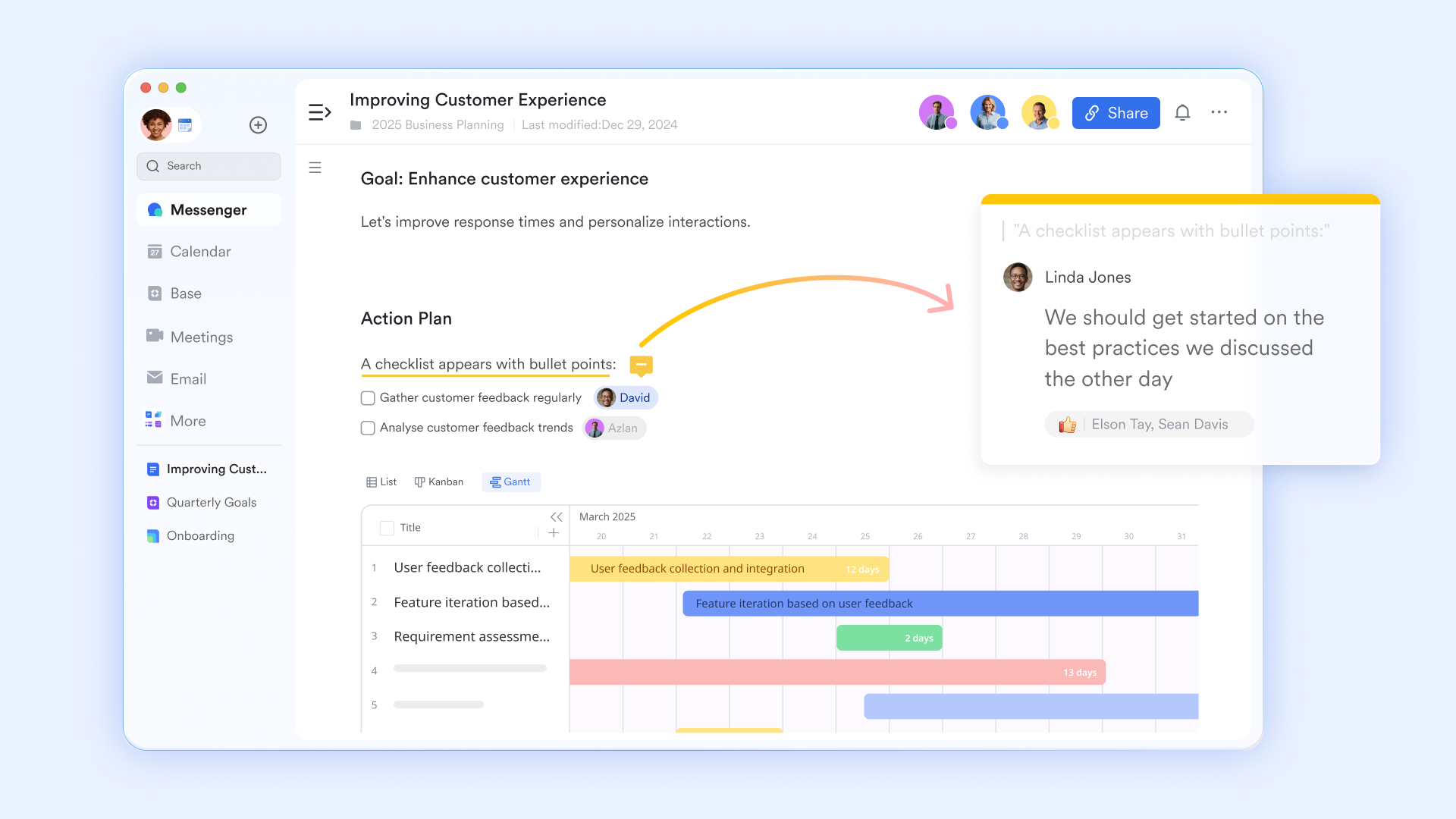
lets project managers maintain a live project tracker as a structured database with fields for task owners, deadlines, current status, budget impact, and priority levels. Each record in the tracker can be embedded into your project status report template. When team members update a task status in Lark Base from "In Progress" to "Completed", the overarching status report document updates automatically. When stakeholders ask for the latest timeline, the answer is always current and in one place—not reconstructed from Friday afternoon email threads.
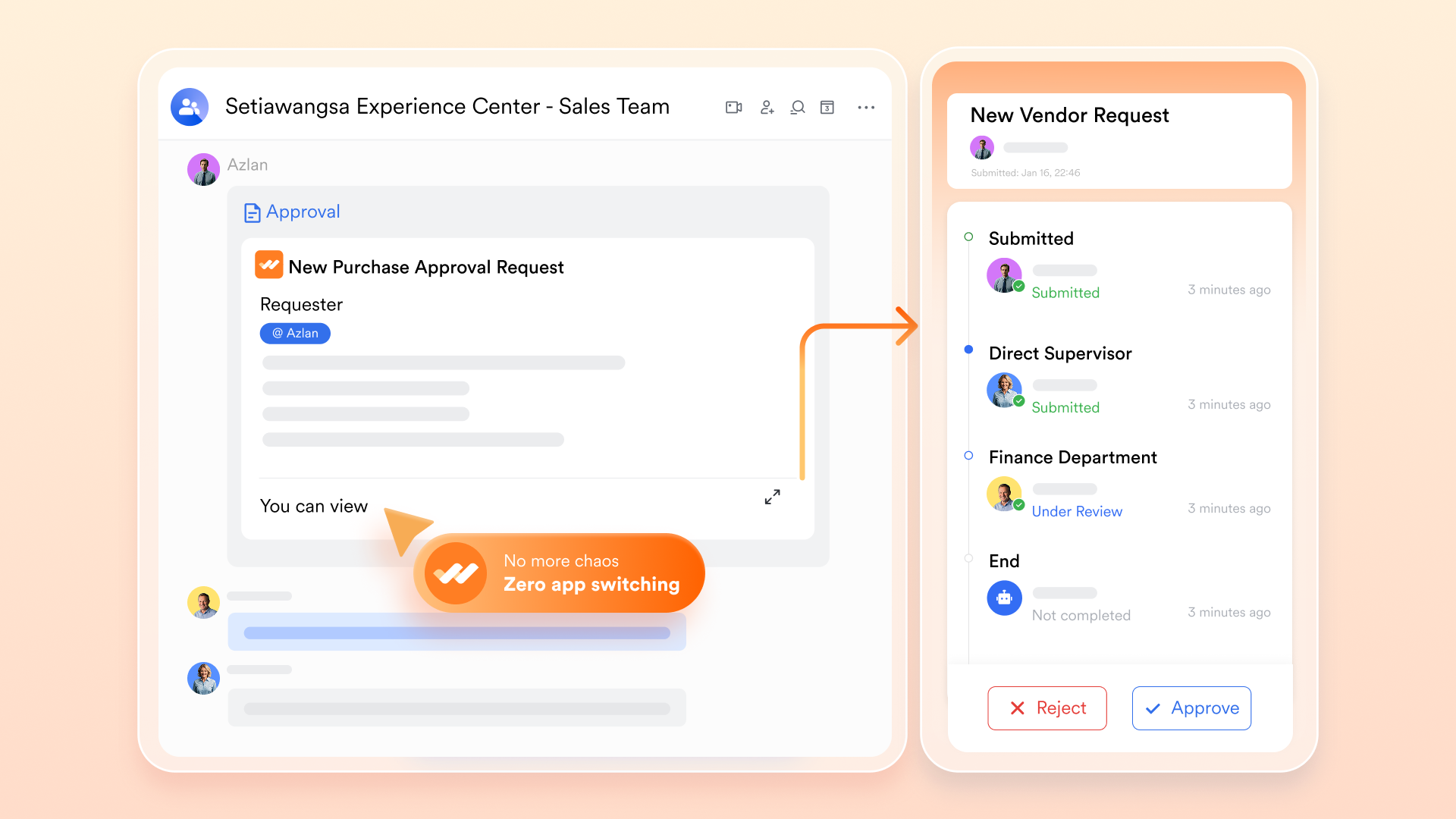
lets project managers configure a multi-step approval flow specifically for critical project phases or budget requests mentioned in the status report. When a project manager flags a resource shortage in the weekly update, they can submit an approval request that routes automatically to the defined sequence—department head, then budget owner. Each approver receives a notification in Lark Messenger containing the request details and the linked status report. The decision is recorded with a timestamp, ensuring leadership sign-off is formally captured.
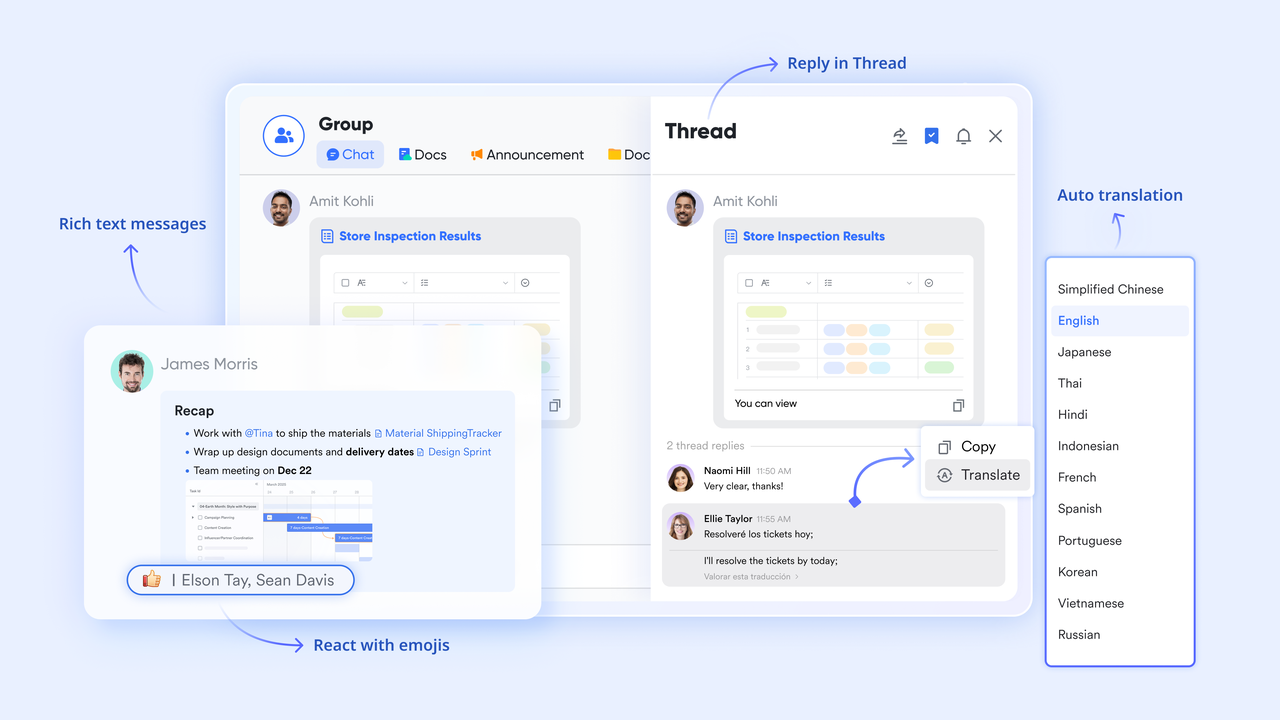
supports project group chats, direct messages, and topic-based threads within the exact same platform where your status reports and task trackers live. When an executive raises a question about a specific budget variance in the monthly update, the project manager can share the specific Lark Base record directly in the Messenger thread. It appears as an embedded card showing the current status and financial data. The discussion, context, and subsequent decisions happen in the same thread as the actual report.
:
- Starter plan: Free forever plan that includes 11 powerful tools for up to 20 users. It also includes 100GB of storage, 1000 automation runs, AI translation, and more.
- Pro plan: $12/user/month (billed annually) for up to 500 users. It includes everything in Starter plus group calling for up to 500 attendees, 15TB of storage, 50,000 automation runs, and more.
- Enterprise plan: for custom pricing. Supports unlimited users and includes additional automation runs, as well as advanced security, compliance, and management features.
For small teams with simple communication needs

18 months message history
1000 Base automation runs/month
2000 rows per table in Base
Most POPULAR
For companies with comprehensive collaboration and management needs
Unlimited message history
500-participant video meetings
50k Base automation runs/month
20k rows per table in Base
For large companies with advanced security and organizational management needs
Get a personalized demo and pricing
Unlimited message history
500-participant video meetings
15 TB storage + 30 GB storage/user
500k Base automation runs/month
50k Base automation runs/month
Most POPULAR
For companies with comprehensive collaboration and management needs
Unlimited message history
500-participant video meetings
50k Base automation runs/month
20k rows per table in Base
Best practices for writing a status update that stakeholders will actually read
Having the right templates is only half the battle. If the information inside is dense, confusing, or irrelevant, stakeholders will simply stop reading it. To ensure your updates drive alignment and action, I recommend adopting a few core writing habits.
Know your audience and filter accordingly
Not every stakeholder needs to know that a specific design ticket took two hours longer than expected. When reporting to the C-suite, focus strictly on budget constraints, timeline shifts, and major risks. When updating the core project team, dive into the granular blockers and upcoming . Tailoring the depth of your information prevents reader fatigue.
Keep it actionable
A status update should not read like a diary entry. Instead of just listing what happened, clearly state what needs to happen next. Consider this scenario: You are running behind on a software deployment because you need a third-party vendor contract signed. Instead of burying "vendor delay" on page three of a spreadsheet, put a clear call-to-action in the executive summary: "Need VP of Engineering to approve vendor contract by Tuesday to maintain our current launch date." Make it incredibly easy for leadership to know exactly what you need from them.
Be honest about risks early
There is a common trap in known as the "watermelon project"—everything looks green on the outside (in the report), but it is bleeding red on the inside. Do not hide delays or budget overruns hoping you can fix them before anyone notices. Use your weekly updates to surface amber and red flags as early as possible. A proactive warning builds trust; a last-minute surprise destroys it.
Drive action and transparency with professional project updates
Conclusion
Writing a project status report should not be a tedious administrative chore. By choosing the right template and moving away from static files to dynamic, unified workspaces, we turn raw data into actual decisions. The real goal is alignment, not just documentation. Keep your updates actionable, automate your data collection where possible, and give your team the absolute clarity they need to deliver successful projects on time. If you're looking for a comprehensive platform to simplify project reporting and enhance team collaboration, consider trying . Its integrated tools can transform how you manage and communicate project progress, all in one place.
FAQs
What is the best format for a project status report?
The best format is one that supports real-time collaboration and single-source-of-truth accuracy. While traditional Excel files are common, cloud-native documents or automated dashboards inside a unified workspace are highly recommended to avoid version control issues and data silos.
How often should I send a project status update?
The reporting cadence depends entirely on the project's pace and the audience. Weekly updates are the standard for active project teams to track short-term tasks and blockers. However, daily updates might be necessary during critical agile sprints, while monthly executive summaries are usually sufficient for steering committees and leadership.
What does RAG status mean?
RAG stands for Red, Amber, and Green. It is a visual traffic-light system used in project management to quickly communicate the overall health of a project. Green indicates everything is on track, Amber signals minor risks or delays that need monitoring, and Red means the project is blocked or facing severe issues requiring immediate leadership intervention.
Related reading































