














13 RFI Templates You Need to Know and Best Practices

Ryan Tanner
Product Marketing Specialist
Sep 18, 2026
Ryan Tanner
Sep 18, 2026

20 min read


Every project relies on clear documentation when questions come up about drawings, materials, specifications, or site conditions. RFIs help teams request clarification in a structured way, so issues are resolved before they cause delays or rework. A well-designed RFI template keeps this process organized by capturing the right details every time, instead of relying on improvised emails or scattered files.
As projects grow and the number of RFIs increases, teams often look for a cleaner way to track submissions, responses, and status updates. That is when tools like Lark start to become useful, because they keep RFIs and related documents visible in one shared workspace instead of separated across folders. Let's step closer to RFI templates and master it for your own use.

What is an RFI template?
An RFI template is a document used to submit questions or clarification requests when something in the drawings, specifications, or contract documents is unclear. Instead of sending informal messages or unformatted emails, teams use a recognizable template to ensure every request includes the same key details. This format helps standardize communication, maintain deadlines, and avoid confusion that otherwise happens when information is shared on scattered channels. Since RFIs affect cost, schedule, safety, and compliance, the format matters just as much as the question itself.
A strong RFI template includes project details, a unique reference number, the date issued, the person submitting the request, and the specific issue that needs clarification. Some templates also allow recommended solutions or notes about schedule or cost impact. Without this structured approach, teams face delays caused by unclear wording, missing attachments, or lost messages. Most teams rely on a Word, Excel, or PDF RFI template, while others track requests inside collaborative software, so every update is visible in real time.
Core elements of a good RFI template
A well-structured RFI template works only when every field inside it captures the right level of detail. These elements act as checkpoints so nothing is missed during submission, review, or documentation. Since RFIs often affect timelines, budgets, and contractual decisions, each section of the template serves a specific purpose in preventing delays or disputes. The goal is to make every request clear enough that the reviewer can respond without extra back and forth. Below are the core fields that appear in an effective RFI template, along with why each one matters.
- RFI number or ID: Every request needs a unique RFI number or id so it can be tracked across emails, logs, and project reports. This prevents mix-ups between multiple RFIs related to similar issues. Many companies use sequential numbering that resets per project, while others use coded numbering that includes project and discipline identifiers. Without a numbering system, RFIs become difficult to trace, and teams waste time searching for information. A clean numbering format also makes the RFI log template easier to filter when reviewing open, closed, or overdue requests.
- Project name, location, contract number: Every RFI form template should include the project name, site location, and contract reference so there is no doubt which project the question belongs to. This is especially important for firms handling multiple projects or for consultants who respond to RFIs across different clients. If this information is missing, RFIs can be misrouted or ignored, delaying responses and disrupting schedules. A complete project reference ensures that all parties reviewing the request have the same context and know which design documents apply.
- Date submitted, required response date: RFIs are time bound, so the template must capture both the date submitted and the date by which a response is needed. This prevents long gaps between submission and action, especially when the answer affects procurement or installation timelines. A useful RFI template excel version often includes formulas that auto calculate target dates based on company standards. When no response date is defined, the RFI can sit idle, which may trigger schedule delays, rework, or dispute claims later in the project lifecycle.
- Submitted by/to: This part of the RFI template lists who is submitting the question and who is responsible for answering it. Construction projects rarely involve a single team, so clarity around ownership prevents confusion and makes follow-up easier. The submitted by field usually includes the contractor or subcontractor, while the submitted to field lists architects, engineers, owners, or consultants. Without these fields, RFIs often get forwarded repeatedly, leading to missed deadlines and lack of accountability.
- Subject or issue description: The description field explains the exact issue that needs clarification. A good RFI template encourages the user to describe one specific question per request so that responses stay focused. The description should make it clear whether the issue relates to design conflict, missing details, unclear measurements, or conflicting specifications. If this field is vague or incomplete, the RFI will likely require multiple follow-up messages, which slows down review and adds unnecessary work for both sides.
- Reference drawings or specifications: RFIs must reference the exact page, detail, or section that needs clarification. Without this, the reviewer must search through multiple documents, wasting time and increasing the chance of misinterpretation. A strong RFI form template includes fields for sheet numbers, detail references, or document links. Many teams also attach annotated screenshots so the reviewer can see the issue immediately. When this reference section is missing, the RFI becomes harder to answer, which often results in request rejection or delay.
- Proposed solution (optional): Some companies allow contractors to suggest a solution directly in the RFI. This is helpful when the contractor has already identified a workable fix but needs approval before proceeding. Including a proposed solution can speed up turnaround time, reduce design review cycles, and keep the schedule moving. Not all RFIs need this field, but having it available encourages proactive problem-solving. Many free RFI template downloads include a suggested solution box for this reason.
- Priority or schedule impact/cost impact: Not all RFIs carry the same urgency. The template should allow the sender to indicate whether the request will affect cost, timeline, safety, or scope if not answered in time. This helps the reviewer prioritize which RFIs need immediate attention. Without a priority indicator, high-impact RFIs may get lost among low-priority ones, leading to preventable delays. A professional RFI template will include visual or written priority tags to support effective workflow sorting.
- Response section: The response section is where the reviewer documents the official answer, including the date of response and the name of the person who issued it. This creates a formal record that proves when the clarification was provided and by whom. Without a built-in response field, answers often remain inside email threads and never make it into the project file. This becomes a risk later during audits, conflict resolution, or claims. The response section ensures that the RFI log template reflects complete and final answers.
- Status or tracking log: RFIs should show whether they are open, answered, approved, closed, or void. A status field prevents requests from disappearing into inboxes with no resolution. Teams often maintain a separate Excel log or a digital dashboard that updates automatically whenever the status changes. Without a visible status record, RFIs pile up unnoticed and become bottlenecks. That is why a good template helps track both individual RFIs and the overall volume of requests on a project.
Ready-to-use RFI template: streamline requests and responses
Many teams begin with downloadable Word or Excel versions of an RFI template, but eventually discover that email attachments and static files make tracking difficult. As projects grow, so does the number of RFIs, which means teams need real-time visibility instead of scattered documents. Lark, one of the most versatile project management tools, helps centralize submissions, responses, approvals, and overdue alerts, so nothing is missed. The templates below are designed for teams that want structure, but without the friction of traditional document sharing.
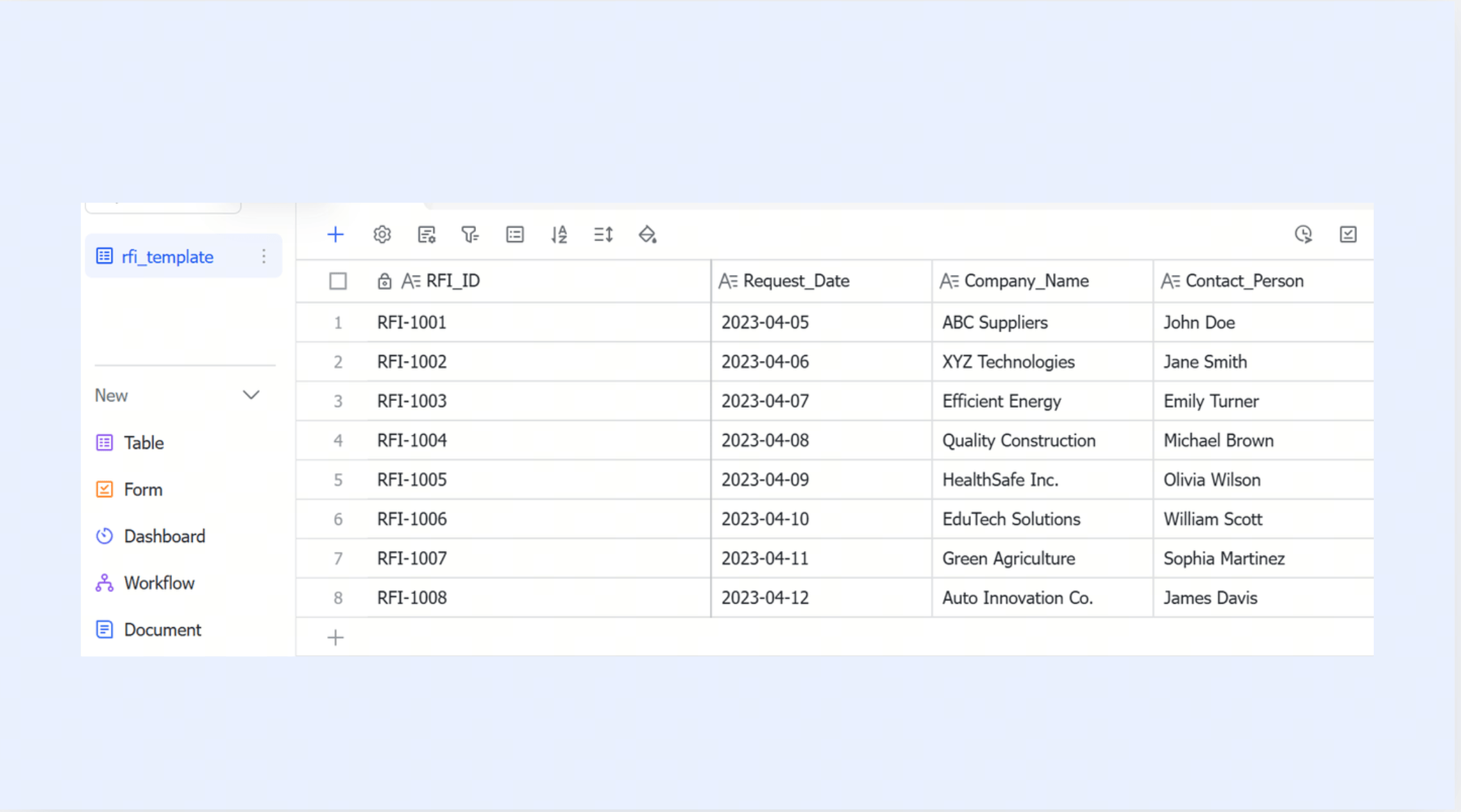
RFI template
Many teams start with static Word or Excel forms, but later need a faster way to submit, review, and track RFIs in real-time. A digital workflow keeps every request, comment, and attachment in one place, rather than scattered across email threads. The Lark RFI template builds on this setup, allowing teams to create, assign, and close RFIs without exporting files or manually managing version control.
Request form template
Construction projects don't only rely on RFIs; they also require approvals, material requests, coordination questions, and internal handoffs. A single request format keeps all of these organized instead of forcing teams to manage different spreadsheets and PDF versions. The Lark request form template serves as a shared intake form, allowing different departments to track what was submitted, who owns it, and what remains pending.
Requests management template
Once a project has dozens of active requests at different stages, teams need more than just a form, they need a dashboard that shows what is open, approved, rejected, or overdue. This becomes difficult when tracking happens manually in spreadsheets. The Lark requests management template gives teams a filtered view of everything in progress so nothing is lost between inboxes or meetings.
New product request form
Some project requests are not about drawings or RFIs, but about approving alternate materials, replacements, or substitutions during procurement. A dedicated form helps document why the change is needed and stores attachments, pricing, and signs off in one place. The Lark new product request form helps keep specification decisions visible to procurement, engineering, and site teams at the same time.
Project request list
Large construction teams often track dozens of requests beyond RFIs, including access permits, equipment needs, punch items, safety documents, and change approvals. A running list gives everyone one place to check progress instead of piecing updates together across different message threads. It helps turn these requests into a shared list with filtering by owner, status, category, and due date. The Lark project request list helps teams review progress during coordination meetings without switching between multiple trackers.
Construction contract template
Many teams still draft contract documents in Word or PDF and then share updated versions through email, which makes version control difficult during negotiations. A shared document format helps keep every revision, comment, and approval in one place instead of generating multiple file copies. Storing the contract alongside RFIs, proposals, and change orders also keeps all project agreements traceable during execution and handover.
Construction proposal template
This template helps contractors submit structured proposals during bidding or change request stages, including timelines, scope descriptions, cost breakdowns, and assumptions. A consistent format prevents confusion or misinterpretation when owners compare multiple proposals. It also helps maintain clear audit trails, as every revision and approval can be logged with the same document. When stored in a shared workspace, the proposal can be linked to the related RFI or contract, ensuring that stakeholders always have access to the full negotiation history.
Action plan for construction template
When an RFI is approved or a clarification is issued, teams often need a follow-up action plan that breaks the decision into tasks, owners, and due dates. Spreadsheets can handle this at first, but they do not update automatically when responsibilities or dates change. With this template, teams can connect each step directly to the RFI or drawing that triggered the work, instead of keeping action notes in separate documents.
Construction daily report template
Daily reports typically arrive in email, chat, or handwritten notes, making it hard to consolidate data across supervisors and dates. A form-based system helps capture consistent fields like weather, delays, manpower, and site activities in the same structure every day. With a searchable log, project managers can filter reports by date, subcontractor, or issue. It prevents missing records and reduces the effort of compiling daily summaries from scattered messages.
Construction gantt chart template
Project schedules change whenever RFIs, delivery delays, or design updates affect critical tasks, and updating a standalone Gantt file can quickly become disconnected from real site conditions. This helps ensure that schedule updates are visible to field teams, planners, and subcontractors without sending out revised PDFs every time a task shifts.
Construction site safety plan template for project managers
Safety plans are often shared as static PDFs that get outdated when procedures or site rules change. A live document format keeps safety sections, checklists, and certifications always current and accessible to everyone on site. Linking the safety plan to daily reports and action plans ensures that compliance and incident follow ups stay connected instead of handled in isolation.
Contractor estimate template
Cost estimating requires clear itemization of materials, equipment, labor, and overhead, which is why spreadsheets are the most common format. Lark Sheets supports formulas, subtotals, and shared editing so teams can update values together without needing to re-upload new versions. When stored next to proposals, RFIs, and contract clauses, the estimate becomes part of the same negotiation trail and can be referenced easily if scope changes later.
Contractor agreement template
Subcontractor agreements often go through multiple revisions, sign offs, and scope clarifications before work begins. Using a shared document instead of emailing attachments helps legal, procurement, and field teams stay aligned on the final version. When linked with RFIs, schedules, and safety plans, the agreement becomes a fully traceable part of the project record.
- Starter plan: Free forever plan that includes 11 powerful tools for up to 20 users. It also comes with 100GB of storage, 1000 automation runs, AI translations, and more.
- Pro plan: $12/user/month (billed annually) for up to 500 users. It includes everything in Starter plus group calling for up to 500 attendees, 15TB of storage, 50,000 automation runs, and more.
- Enterprise plan: Contact sales for custom pricing. Supports unlimited users and includes even more automation runs and advanced security, compliance, and management features.
How to use the RFI template in your workflow
Having a well-designed RFI template is only the first step. The real value comes from using it consistently across every project phase, so communication stays predictable and traceable. A structured workflow also helps new team members understand the process without needing extensive training. Below is a recommended approach for how to apply the RFI template construction format inside a real project workflow, from first issue to final closure.
- Review the details: Start by reviewing contract documents, drawings, and specs to confirm that the issue cannot be resolved internally. RFIs should only be raised when clarification is necessary, not as a substitute for proper document reading. This prevents unnecessary requests and maintains good relationships between teams.
- Fill the template: Fill in the RFI form template completely before sending it out. Missing fields slow down reviewers and force extra follow-up communication. A fully completed form increases the chances of getting an accurate response on the first attempt.
- Submit it to the right place: Submit the RFI to the correct party based on contract responsibility. For example, design clarifications typically go to architects or engineers, while site logistics questions may go to owners. Routing it correctly avoids delays caused by internal forwarding.
- Log it as a track: Log every submitted RFI into a central tracker so it is not forgotten after sending it. Whether stored in Excel, software, or a shared workspace, a log helps track open, closed, or overdue items. This also becomes useful during status meetings or payment stages.
- Follow and keep updated: Follow up before the required response date if no answer is received. Delays in RFI reviews can affect procurement, fabrication, or installation, so proactive reminders help prevent timeline slippage.
- Respond to the final answer: Attach the final response to the original RFI template and update the status to close once the answer has been accepted. This enables future teams, inspectors, or auditors to view the complete record without needing to search through multiple systems.
Bonus tips: RFI workflow do's and don'ts for project success
Managing RFIs effectively can significantly impact a project's momentum. While the right tools and processes help streamline communication, following best practices ensures that every request for information is handled clearly, promptly, and accurately. Here are some key "Dos" and "Don'ts" to keep your RFI workflow efficient and your projects on track.
✅ Do's
- Use a consistent RFI template across all teams: keeping structure the same ensures information is complete, formatted correctly, and easy to review. When every subcontractor submits RFIs differently, reviewers spend extra time decoding layouts instead of answering questions.
- Reference drawings, specs, or photos clearly: attaching visual context or detail numbers eliminates guesswork and reduces follow up messages. Reviewers can make decisions faster when they do not have to search through documents.
- Assign responsibility and due dates for every RFI: unanswered RFIs become silent blockers in the schedule, especially during installation phases. Ownership makes it clear who is expected to respond and by when.
- Log every RFI in a central tracker or dashboard: email chains are not a tracking system, and requests get buried easily. A log gives project managers visibility into both pending and overdue RFIs at once.
- Follow up regularly on unanswered RFIs: many delays happen not because of wrong answers, but because of slow replies. Proactive reminders show urgency and maintain accountability.
- Include cost and schedule impact when relevant: if the answer affects procurement, sequencing, or installation, reviewers need that context to prioritize the request properly.
- Keep communication clear and concise: long narratives slow down review, especially when decision makers only need one precise question. One RFI should cover one issue at a time.
- Archive closed RFIs for future reference: stored RFIs become evidence during claims, disputes, or warranty work. Without this archive, teams lose documentation history once email inboxes are clear.
- Leverage automation or alerts: automatic reminders reduce forgotten RFIs and increase turnaround speed, especially when dozens are active at once.
- Review RFI patterns during project milestones: repeated topics often indicate errors in design documents, unclear specifications, or coordination gaps worth solving before they repeat.
❌ Don'ts
- Don't submit vague or incomplete RFIs: missing details create more questions instead of answers, increasing turnaround time and frustration on both sides.
- Don't combine multiple issues into one RFI: multi-topic RFIs slow down tracking and force reviewers to reply in fragments. Breaking them into separate items keeps responsibility and closure clear.
- Don't skip numbering or versioning: RFIs without IDs become impossible to reference in site meetings, status reports, or legal records.
- Don't ignore overdue RFIs: late decisions can stop site work, delay fabrication, or trigger change orders. Escalation should happen before deadlines pass.
- Don't rely only on email chains: emails get lost, filtered, forwarded, or overwritten, leaving no project-wide record of what was approved.
- Don't treat RFIs as confrontational: they exist to clarify scope, not assign blame. Tone should stay professional and factual.
- Don't delay asking questions: waiting until installation begins leads to costly rework and wasted materials. RFIs should be raised early in the review phase.
- Don't close RFIs without confirming field action: some RFIs require drawings, approvals, or corrective steps. Closure should reflect full resolution, not just an answer.
- Don't forget to notify stakeholders if scope changes: if an RFI changes design, cost, or installation sequence, affected teams must be informed immediately.
- Don't overlook quality reviews of RFI trends: repeated RFIs in similar areas often expose documentation weaknesses that should be corrected for future projects.
Conclusion
RFIs are more than simple question forms. They are a critical part of communication, accountability, and schedule control on every construction site. A structured RFI template helps teams avoid delays, standardize documentation, and reduce disputes by keeping every clarification recorded from submission to closure. Once the format becomes consistent, the next challenge is not how to fill out RFIs, but how to manage them without losing track of versions, status updates, or overdue responses.
That is why many teams eventually move RFIs out of standalone files and into a shared workspace where the full request history stays visible to everyone involved. Platforms like Lark make this possible by letting teams store templates, submit requests, add comments, track status, and link related project documents in one place instead of using spreadsheets and email chains. This type of setup reduces follow-up delays and gives project managers clearer oversight during coordination, handover, and change review.
FAQs
Can an RFI be used to change the contract scope?
An RFI is meant for clarification, not for modifying contract scope, but some RFIs reveal missing details that lead to a formal change request. In those cases, the RFI becomes supporting documentation for the change order process. Teams usually link both documents, so there is a clear record of why the change was needed. When RFIs and change records are managed in separate files, it becomes harder to track the full history. Platforms like Lark help keep RFIs and follow-up actions connected so the full chain stays visible in one place
How many RFIs are typical on a construction project?
The number varies based on project size, contract clarity, and design complexity. Smaller projects may only have a few, while multi-phase builds can generate hundreds across subcontractors, consultants, and site teams. The challenge is not the number, but controlling response time and avoiding forgotten RFIs. Many teams move from spreadsheets to a shared dashboard so they can see open, closed, and overdue RFIs at a glance. Tools like Lark help automate this tracking instead of relying on manual logs.
What's the difference between an RFI log and an RFI register?
An RFI log is usually a live working list used throughout construction, while an RFI register is often the final archived version for turnover, legal review, or project closeout. Some teams use both, but others merge them into one structured tracker with status filters. The key is making sure every submission, response, revision, and closure date is recorded. When RFIs are logged in a digital workspace like Lark, the register updates automatically instead of needing re-entry at the end of the job.
What should you do if an RFI response is overdue and work is delayed?
The first step is to escalate before the overdue RFI affects procurement, installation, or inspection timelines. The delay should also be documented, so schedule impact is recorded for future claims or coordination meetings. Teams using email or spreadsheets often miss overdue items because no one sees the full list. When RFIs sit inside a shared system like Lark, overdue responses are visible to everyone, helping teams react earlier instead of waiting until the delay becomes costly.
Related reading
Table of contents
Start using Lark today

Manage all your work in one place
Boost team efficiency by 10x
Save up to 70% on software costs
Table of contents
Start using Lark today
Manage all your work in one place
Boost team efficiency by 10x
Save up to 70% on software costs
Keep reading







2026 Lark Technologies Pte. Ltd.
Headquartered in Singapore with offices worldwide.






Explore: