SAP has long been regarded as one of the most powerful enterprise software providers in the world. It supports core business functions such as finance, operations, HR, and compliance for organizations operating on a global scale. When teams search for a SAP review, they usually evaluate whether SAP still aligns with how modern teams work today.
This review takes a practical look at SAP's strengths, limitations, pricing realities, and user experience. It also explores why some organizations now complement SAP with more collaborative platforms, enabling faster execution and day-to-day teamwork without disrupting core systems.
What is SAP, and how is it commonly used
SAP is an enterprise software company best known for its ERP systems that manage core business processes. It is commonly used by medium to large organizations that need strong financial controls, compliance support, and . SAP systems are often deeply embedded in back-office operations and are considered mission-critical.
In practice, SAP is rarely a single product. SAP ERP and S/4HANA form the foundation of most deployments. SAP Business One targets smaller organizations. SAP Concur manages expenses and travel. HR products cover payroll, scheduling, and performance. Each platform operates as a specialized system.
Most companies run multiple SAP modules across finance, procurement, HR, travel, and analytics. These systems are usually customized heavily to match internal processes. As a result, SAP environments tend to be powerful but complex, requiring dedicated IT teams and external consultants to manage and evolve them over time.
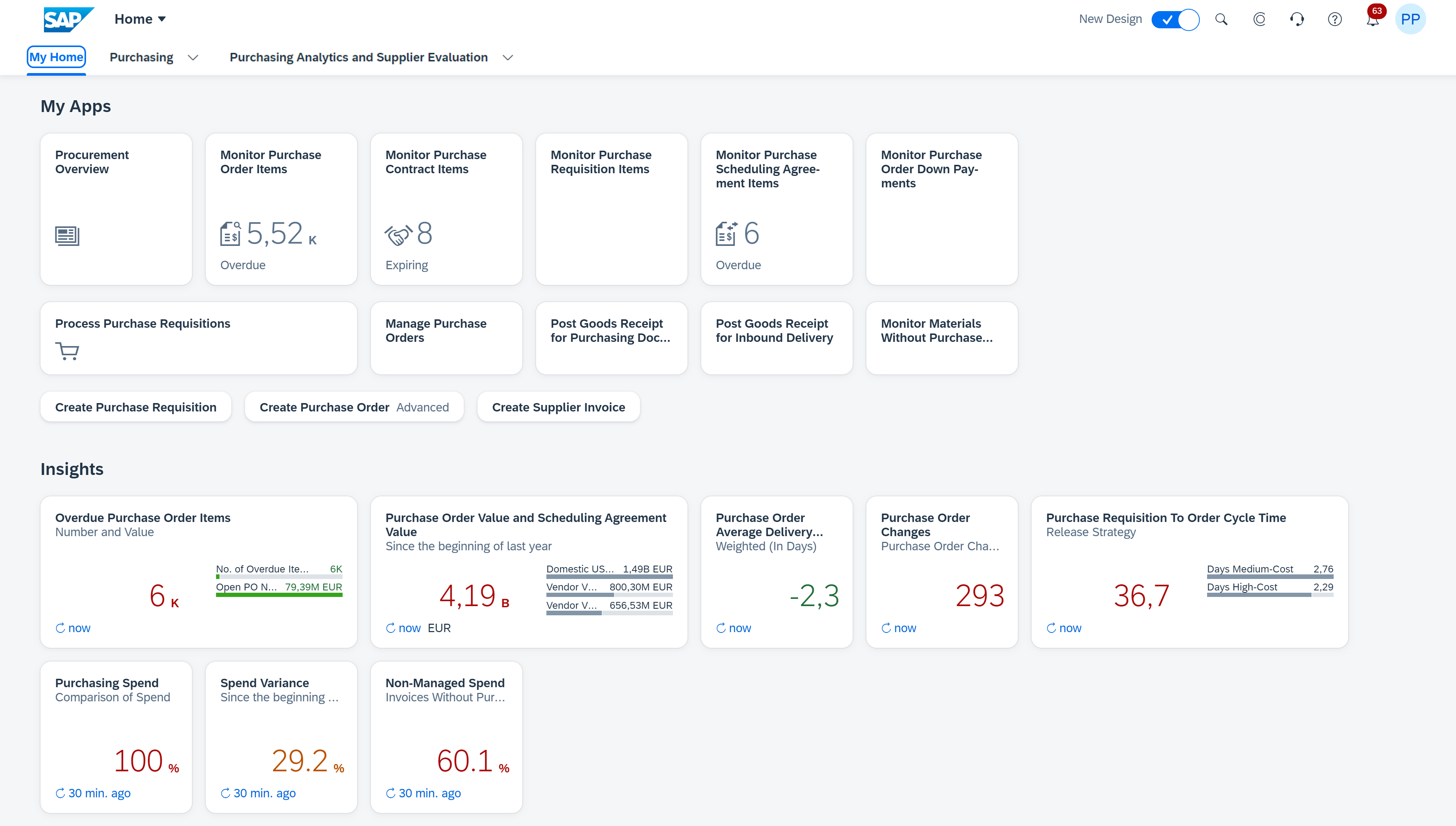
Image source: sap.com
SAP key features across different uses
SAP offers a broad range of features built for enterprise scale and control. These capabilities are delivered through modular products that can be combined based on organizational needs. While this approach provides flexibility, it also introduces operational and usability challenges.
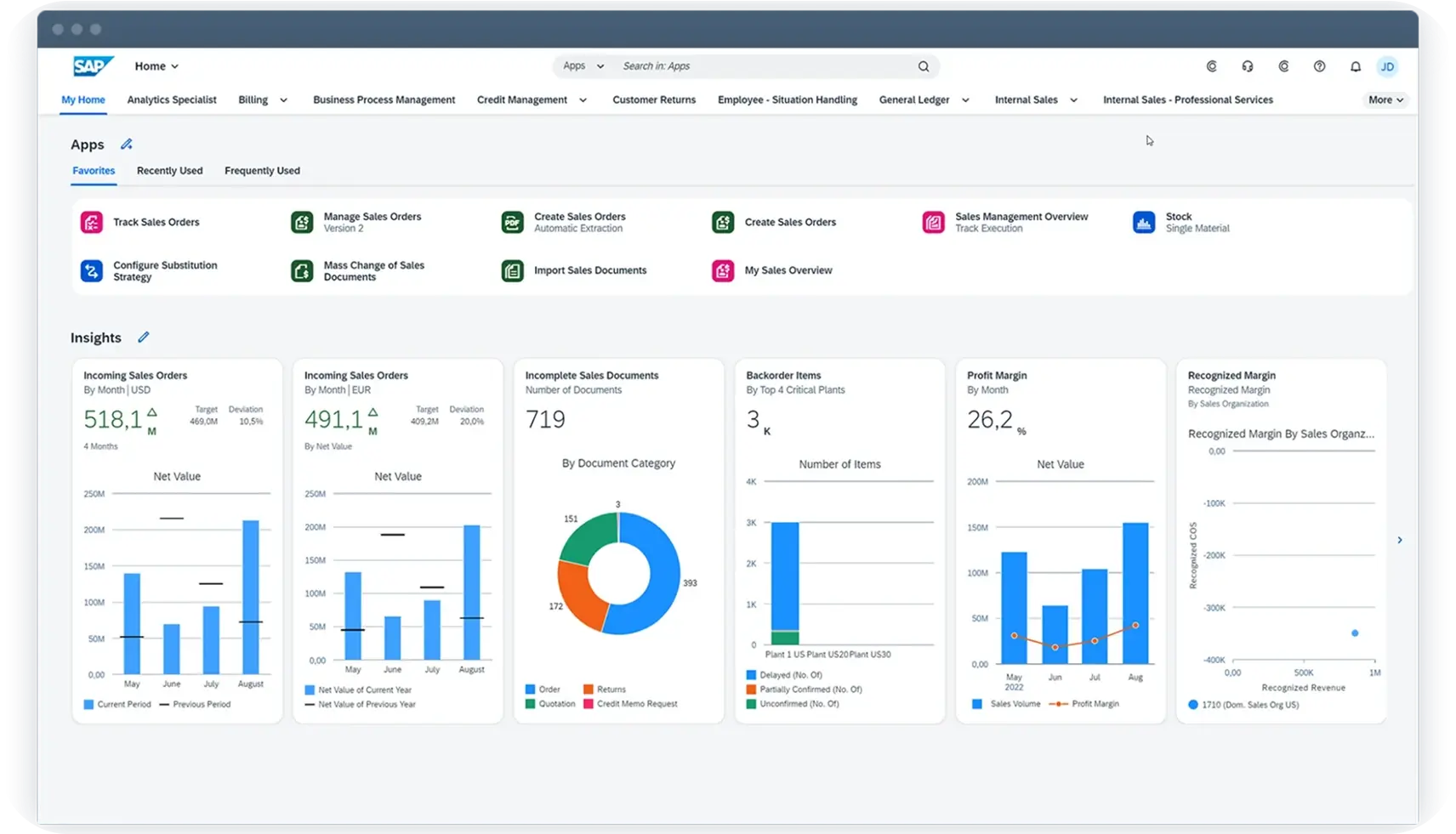
Image source: sap.com
Enterprise resource planning ERP
SAP ERP centralizes financials, procurement, supply chain, and operations into a single system of record. It helps large organizations maintain consistent data across departments and regions. are highly configurable to meet regulatory and operational needs. However, setup and ongoing management often require experienced consultants. Daily usage is usually limited to trained operational users.
Financial management and compliance controls
SAP is known for strong financial governance and audit capabilities. It supports complex accounting structures, multi-currency reporting, and detailed approval workflows. Compliance requirements can be enforced at every transaction level. This strength makes SAP attractive for regulated industries. At the same time, financial workflows often feel rigid for non-finance teams.
Travel and expense automation
SAP Concur manages travel booking, expense reporting, and reimbursement workflows. Most SAP Concur reviews often highlight its ability to enforce policies and improve audit readiness. Expense data flows into finance systems with strong controls. However, users frequently report slow submission experiences. Configuration complexity is a common concern for administrators.
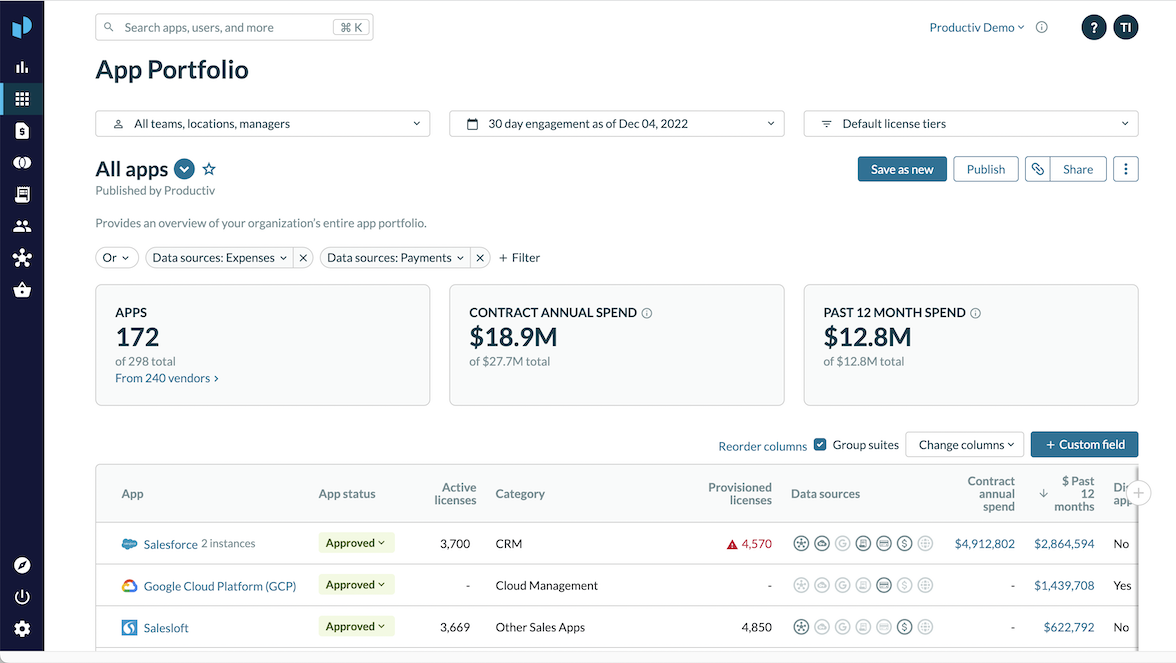
Image source: sap.com
Corporate credit card integrations
SAP Concur integrates directly with corporate credit card providers to automate transaction capture, significantly reducing manual data entry for employees. By automatically matching card charges to expense reports, the system allows auditors to focus their reviews on policy enforcement and reconciliation accuracy. However, despite these efficiencies, ongoing system configurations and regional variations can introduce additional administrative overhead.
HR and workforce management capabilities
Via SAP HCM, SAP offers a comprehensive HR suite encompassing employee records, payroll, benefits, and performance management. While an SAP HCM review typically highlights its robust compliance support for global workforces, advanced features such as scheduling and are managed through separate modules. Consequently, successful adoption relies heavily on user training, though many organizations choose to restrict core system access primarily to HR teams.
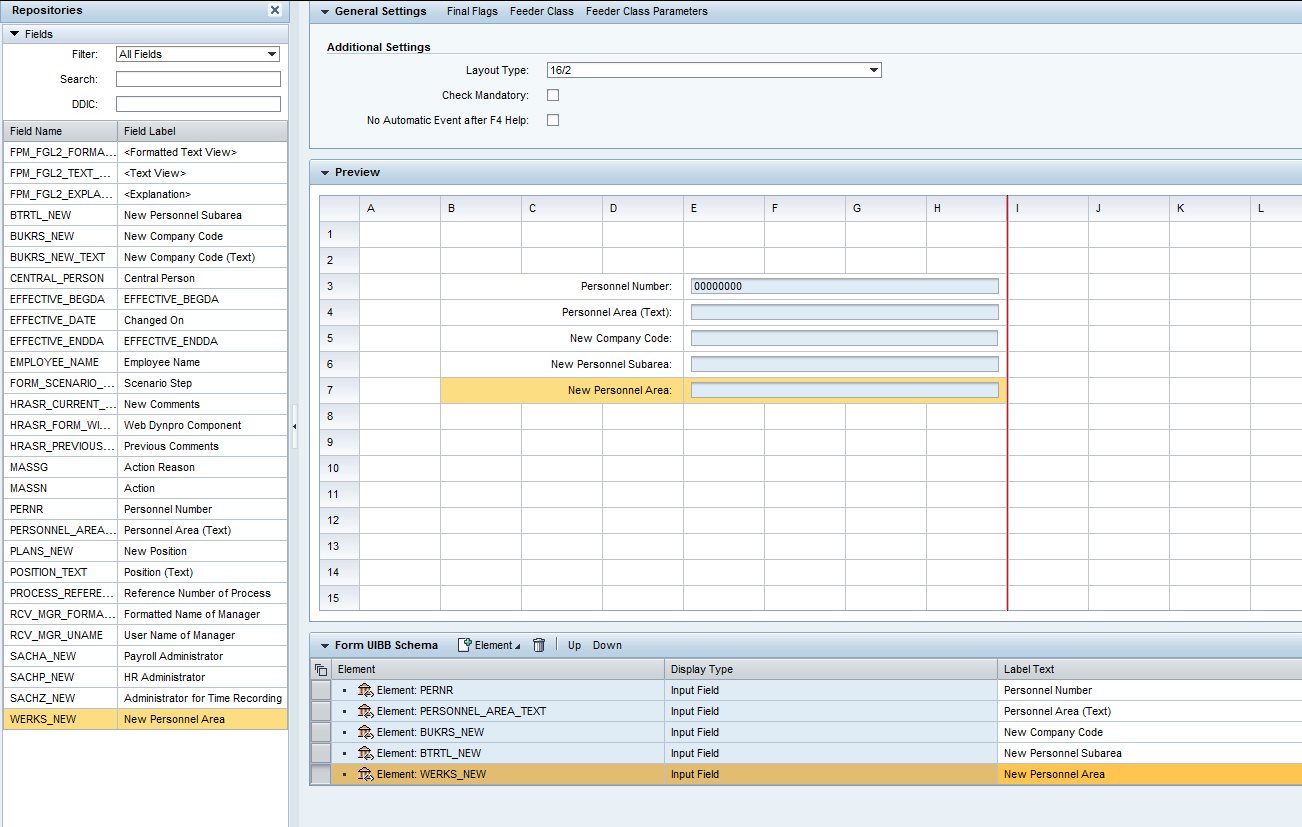
Image source: sap.com
Advanced reporting and analytics
SAP provides a robust suite of reporting tools designed to handle vast volumes of structured data across finance, operations, and leadership functions. While platforms like SAP Business One are frequently recognized for their exceptional reporting accuracy, the actual creation of these reports often requires specialized technical expertise. As a result, business users frequently remain dependent on technical analysts to implement even minor modifications or updates.
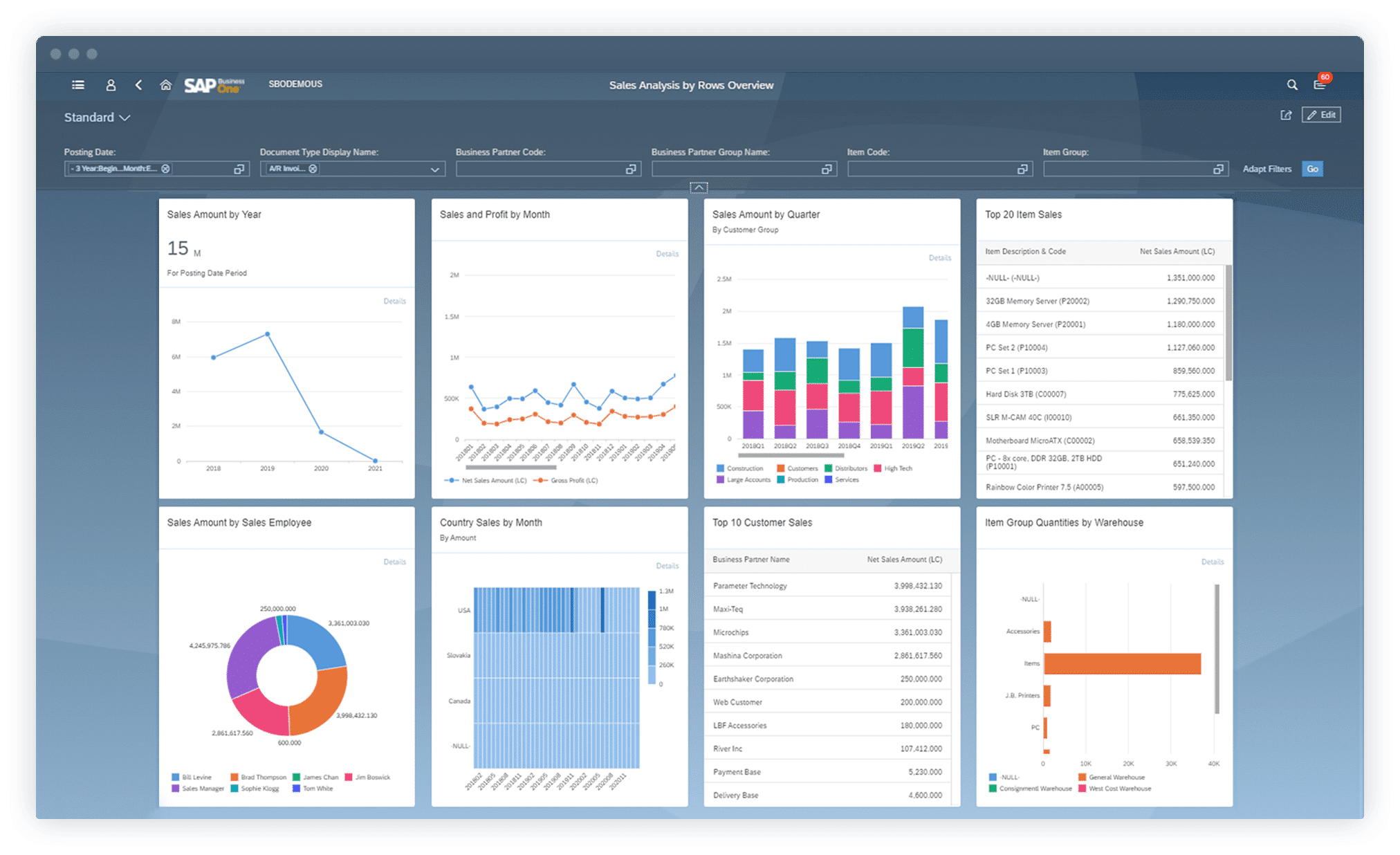
Image source: sap.com
High customization and configuration options
SAP allows deep , fields, and business rules. This flexibility supports complex organizational requirements. At the same time, heavy customization increases long-term maintenance costs. System upgrades become more complicated to manage. Knowledge is often concentrated among a small group of experts.
Advantages of using SAP
SAP remains widely adopted because it delivers stability, control, and scalability for large organizations. These advantages explain its long-standing presence in enterprise environments.
- Proven enterprise-grade reliability: SAP systems are designed to handle high transaction volumes with minimal downtime. Many organizations run SAP continuously for years without significant disruptions. This reliability is critical for finance and supply chain operations. Leadership teams trust SAP for mission-critical workloads. Few platforms match this track record.
- Strong compliance, audit, and governance support: SAP excels at enforcing governance across financial and operational processes. Detailed audit trails and approval workflows are standard. This is frequently cited in any SAP review focused on risk management. Compliance teams benefit from built-in controls. External audits are easier to support.
- Scales well for global, complex organizations: SAP supports multi-entity, multi-currency, and multi-language operations. Global organizations can standardize processes while allowing regional variation. Data consolidation across geographies is robust. This makes SAP suitable for multinational enterprises. Smaller teams may not need this level of scale.
- Deep industry-specific functionality: SAP provides industry-focused solutions for manufacturing, retail, utilities, and other sectors. These include predefined workflows and reporting models. Industry alignment reduces initial design effort. However, it can also limit flexibility. Adapting to new business models may require additional customization.
- Large ecosystem of partners and integrations: SAP has an extensive global partner network. and system integrators support implementation and maintenance. This ecosystem provides expertise but also increases dependency. Costs can rise quickly. Organizations often rely on partners for ongoing changes.
Disadvantages of SAP
Despite its strengths, SAP presents several challenges that impact usability, cost, and agility. These limitations are commonly mentioned by teams evaluating alternatives.
- Very high licensing and implementation costs: SAP licensing is expensive and often difficult to forecast. Costs are typically per user and per module. Implementation projects can run for months or years. Consulting fees add significantly to total spend. Budget overruns are common in large deployments.
- Long deployment and onboarding timelines: SAP implementations require extensive planning, configuration, and testing. Business teams often wait months before systems go live. Delays are frequent due to changing requirements. Onboarding new users also takes time. This slows time to value.
- Steep learning curve for end users: SAP interfaces require training for effective use. Occasional users struggle with navigation and workflows. Productivity can drop during early adoption. This issue appears frequently in SAP Concur review feedback. Ease of use remains a challenge compared to modern tools.
- Heavy reliance on consultants and system integrators: Most SAP environments depend on external experts. Internal teams may lack deep system knowledge. Even small changes can require consultant support. This increases cost and slows iteration. Long-term dependency becomes a risk.
- Poor user experience compared to modern tools: SAP prioritizes control over usability. Interfaces differ across modules. Navigation feels inconsistent. Many users describe workflows as slow. This gap becomes more visible as teams adopt modern collaboration tools.
- Limited capabilities: SAP is designed for transactions, not teamwork. Discussion, commenting, and shared context are limited. Teams rely on email or chat outside the system. This fragments information. Collaboration remains disconnected from data.
Overcome these shortcomings in a smarter tool
SAP pricing: Transparency vs reality
Pricing is one of the most debated aspects of any SAP review. While SAP provides licensing structures, real-world costs often exceed expectations:
- Per-user and per-module licensing model: SAP licenses are assigned by role and functionality. Each module adds cost. User access levels affect pricing. Forecasting becomes complex as teams grow. Adjusting licenses later can be difficult.
- Additional costs for hosting, customization, and support: Beyond licenses, organizations pay for infrastructure and hosting. Customization adds long-term maintenance costs. Support contracts are significant. Consulting fees often continue after launch. Total spend grows steadily.
- Why total cost of ownership often exceeds expectations: Many organizations underestimate ongoing costs. Change requests, upgrades, and compliance updates add up. Internal admin effort increases. Over time, SAP becomes expensive to evolve and maintain.
To navigate these complexities and avoid the pitfalls of underestimated TCO, it is essential to break down the specific financial commitments required. The following table provides a clear view of the current pricing tiers and modular costs, serving as a baseline for more accurate budget forecasting:
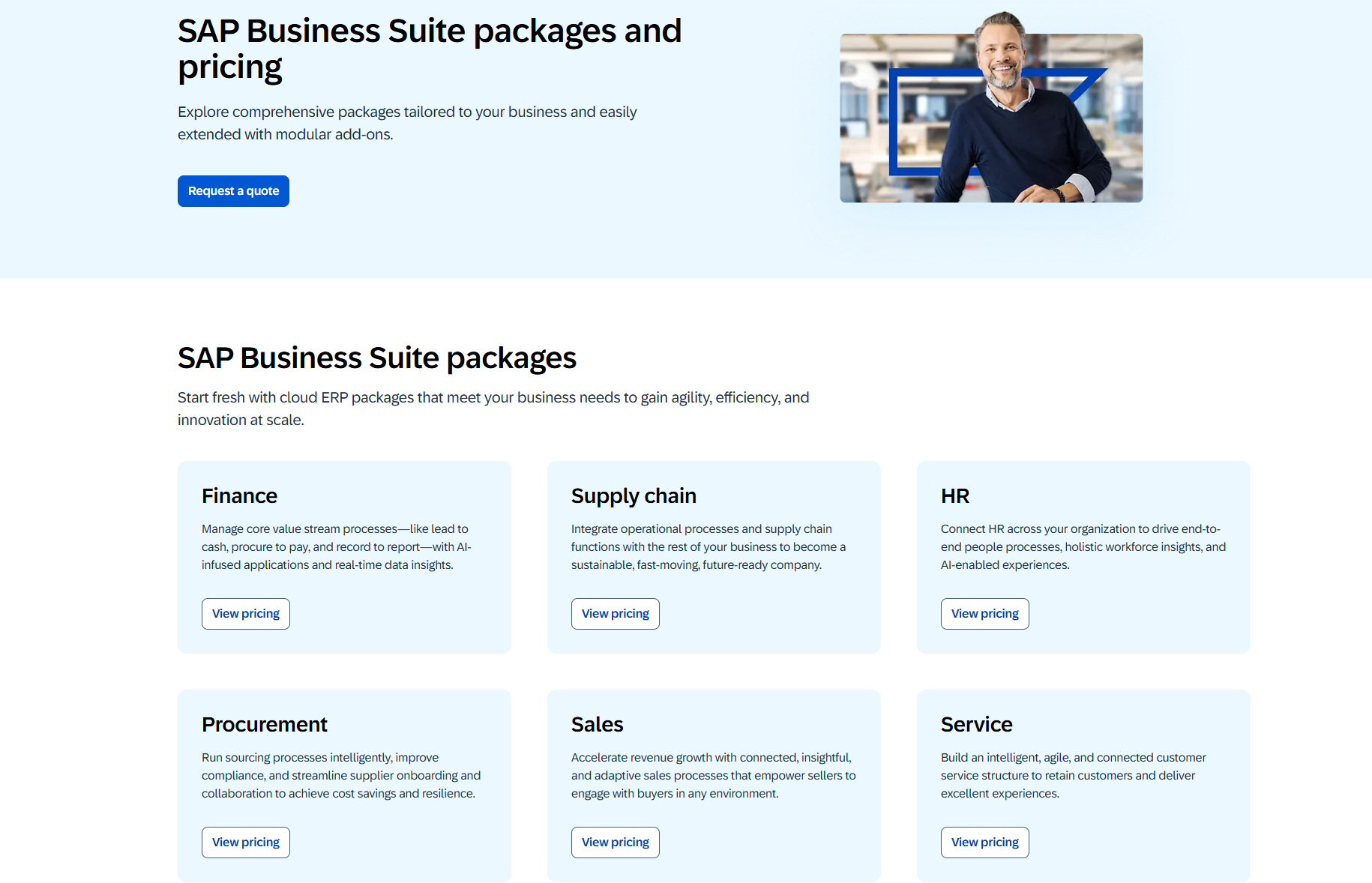
Image source: sap.com
Information source: sap.com
Update time: 2025-12-29
Note: Pricing and plan details reflect publicly available data as of the update date and may vary based on region, billing cycle, and number of agents.
What real users say about SAP
User feedback provides practical insight into how SAP performs beyond feature lists and marketing claims. Reviews from finance leaders, IT teams, and operational users show a clear pattern. SAP is widely respected for its reliability and control, but it also draws consistent criticism around usability, speed, and cost. These perspectives help explain why satisfaction with SAP varies so widely by role and organization size.
Common positive feedback
Users consistently praise SAP's stability and reliability in high-volume environments. Systems run for long periods without downtime, which builds trust among finance and operations teams. Financial reporting is seen as accurate and dependable, making SAP a preferred choice for regulated industries. are frequently mentioned as strengths. Many large enterprises feel secure relying on SAP as a long-term system of record. These themes appear across nearly every SAP review focused on enterprise use cases.
Common negative feedback
Complexity is the most frequently cited concern among users. Workflows often require multiple steps for simple tasks, which slows productivity. Customization and configuration changes are described as expensive and difficult to manage without expert support. Upgrades are disruptive and can introduce new training requirements. Many SAP Concur HR software reviews on Reddit mention usability challenges for everyday users. Over time, these issues contribute to frustration outside core finance and IT teams.
Why do many teams look for SAP alternatives
While SAP remains a cornerstone for enterprise-level data management, the evolving demands of the modern workplace are creating a significant gap between legacy capabilities and current operational needs. This disconnect is pushing organizations to seek more agile solutions that address specific friction points in cost, collaboration, and user experience, as detailed below.
- Need for and execution: Teams want real-time visibility and quicker decisions. SAP does not prioritize collaboration. External tools fill the gap. Fragmentation increases over time.
- Desire to reduce operational and licensing costs: Budget pressure leads teams to reassess ROI. Licensing and consulting costs grow. Smaller teams feel constrained. Alternatives promise simpler pricing models.
- Preference for simpler, all-in-one platforms: Modern teams prefer fewer tools. Platforms that combine communication, tasks, and data improve adoption. Learning time decreases. Efficiency improves.
- Shift toward agile and : Remote work requires shared context and async collaboration. SAP was designed for centralized operations. This mismatch drives exploration of alternatives.
Explore flexible collaboration beyond SAP
New option: Use the Lark all-in-one platform for smooth teamwork
Many organizations add to address gaps in , visibility, and execution that SAP was not designed to solve. As teams become more cross-functional and distributed, the need for tools that connect people and in real time grows. Lark is increasingly chosen because it supports daily work without the cost and complexity associated with expanding SAP usage.
Centralised hub for operational data and information
empowers teams to manage structured records with the agility of a spreadsheet but the power of a database. In this way, it bypasses the heavy overhead of traditional enterprise ERP configurations. By enabling business users to build custom tables for projects, , and without requiring technical expertise, the platform democratizes data management. Unlike SAP, where data is often siloed or restricted, Lark Base ensures that information remains visible and editable across cross-functional teams to maintain a single source of truth. 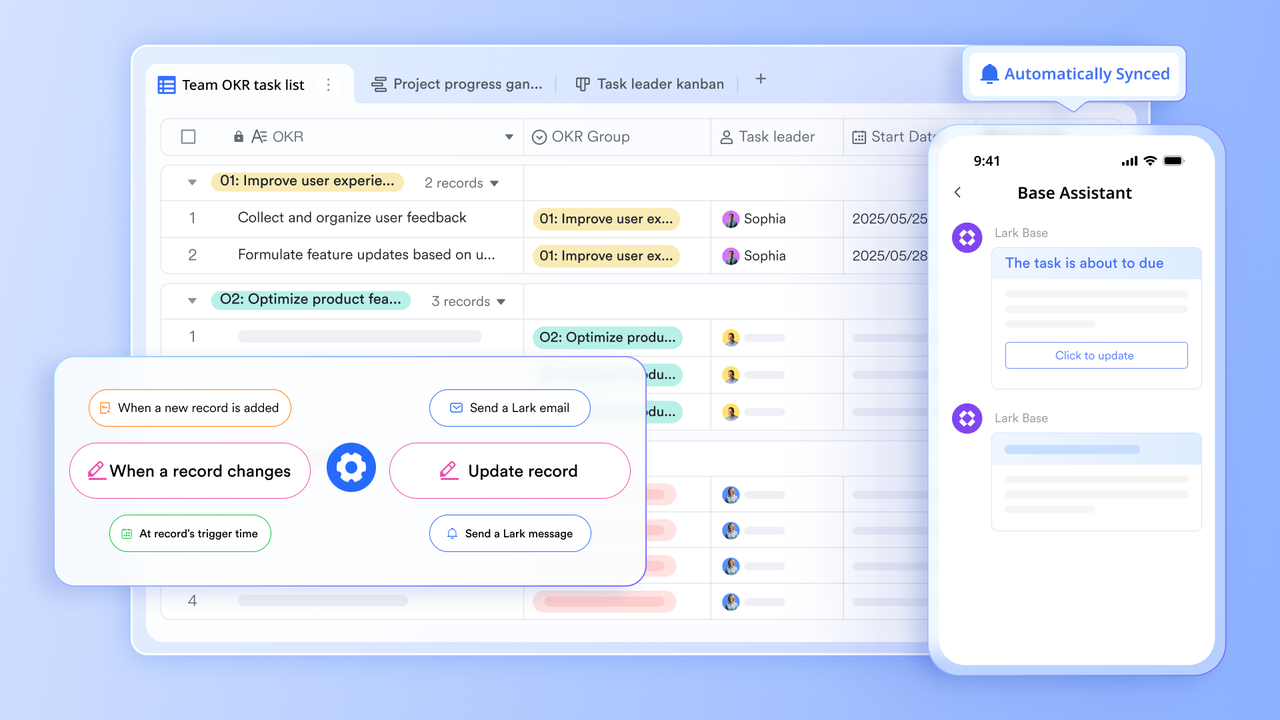
Shared documentation and brainstorming
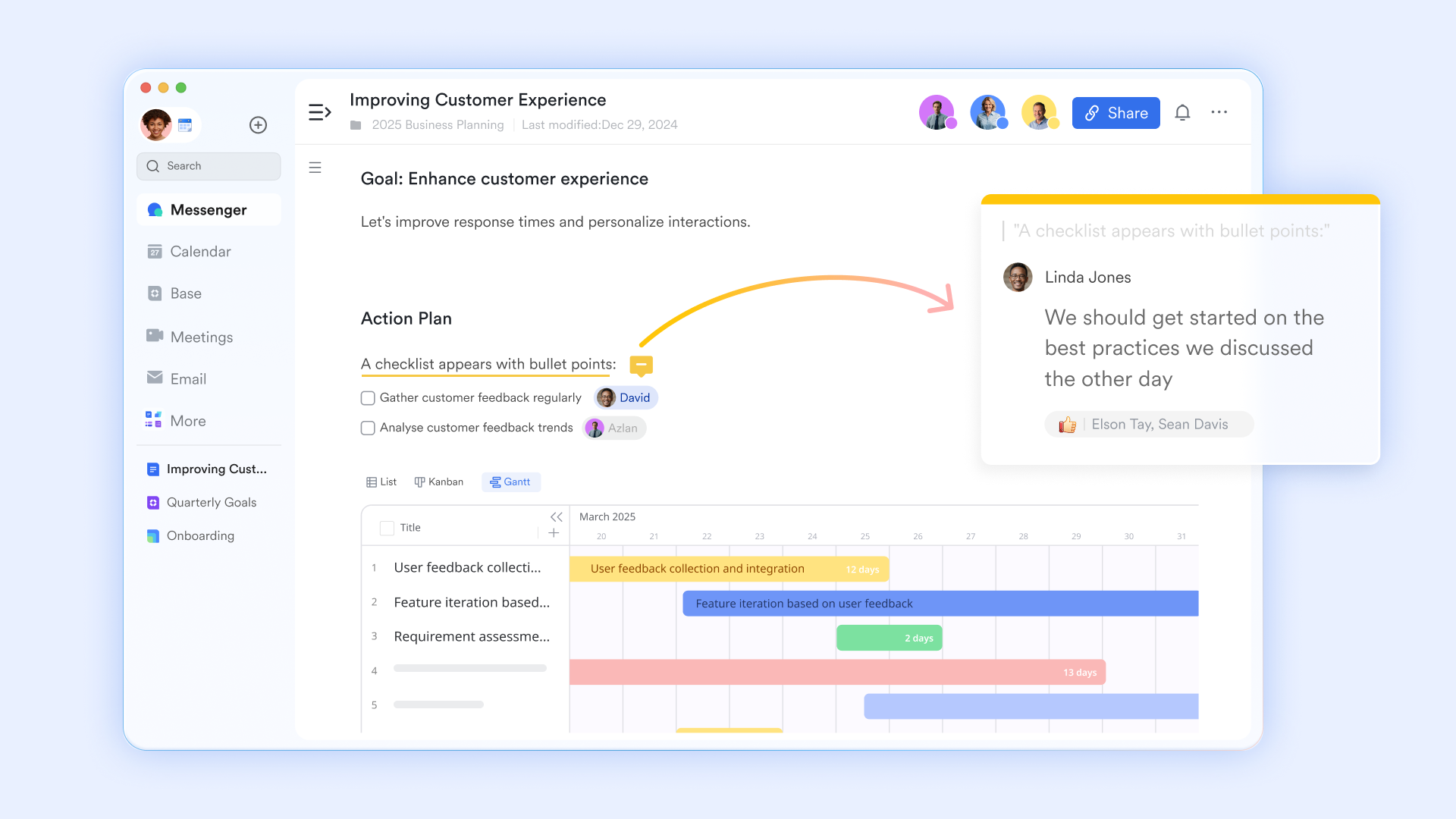
provides a that live alongside data and conversations. By enabling teams to document processes, strategic decisions, and project updates in real time, it ensures that institutional knowledge remains an active part of the workflow. Unlike SAP documentation, which often resides in disconnected external files, Lark Docs stays natively linked to ongoing work, allowing comments and edits to occur directly within the relevant context.
Task execution and clear accountability
Lark Tasks helps teams turn plans into action with clear ownership and visibility. With customizable views such as Kanban boards and lists, teams can visualize project progress in real time, set automated reminders to prevent bottlenecks, and use sub-tasks to break down complex objectives. Unlike SAP task handling, which is usually limited to specific modules, Lark Tasks is accessible to all teams. Progress is visible without complex reporting. Accountability improves naturally. 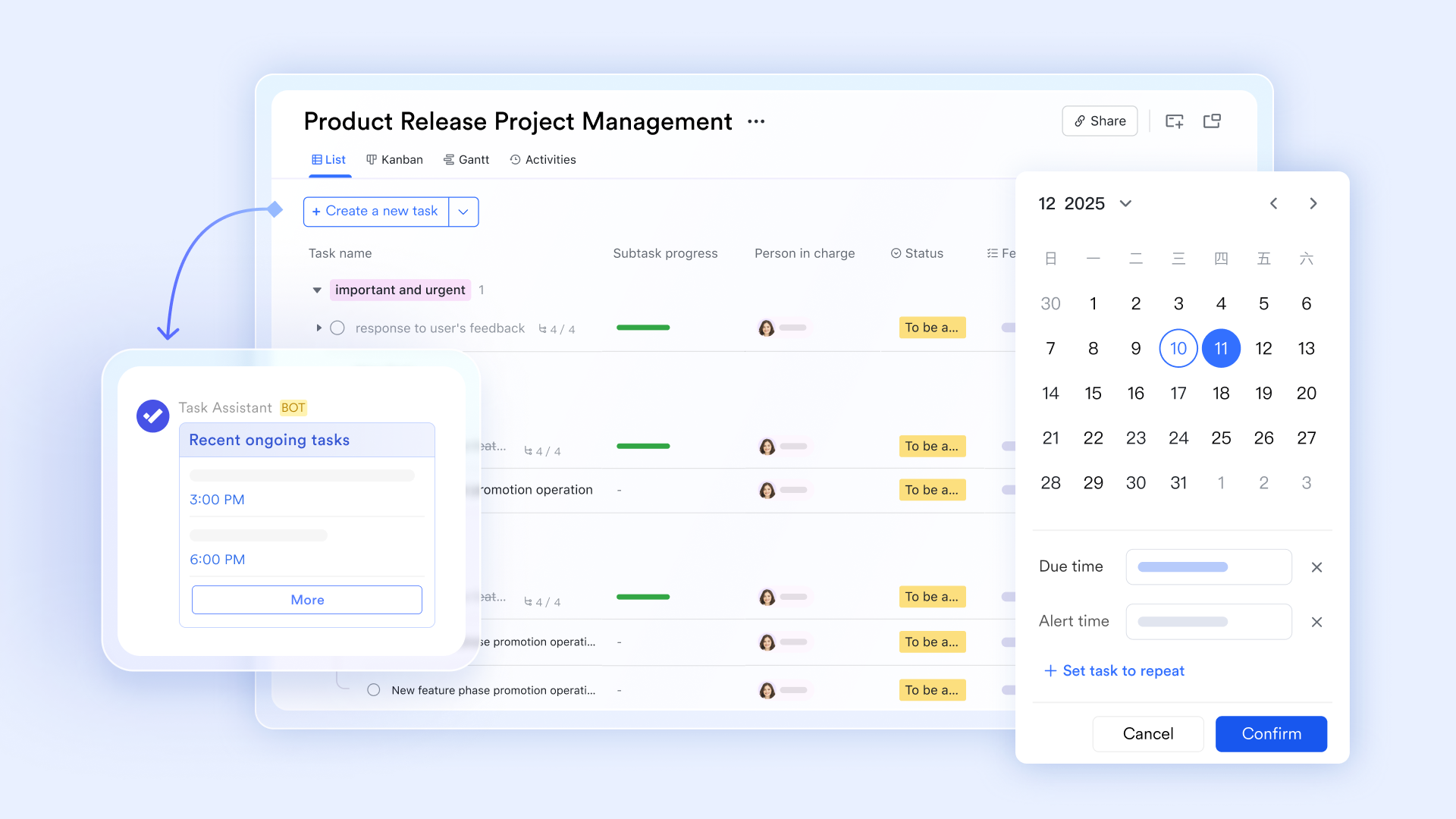
Real-time collaboration and communication
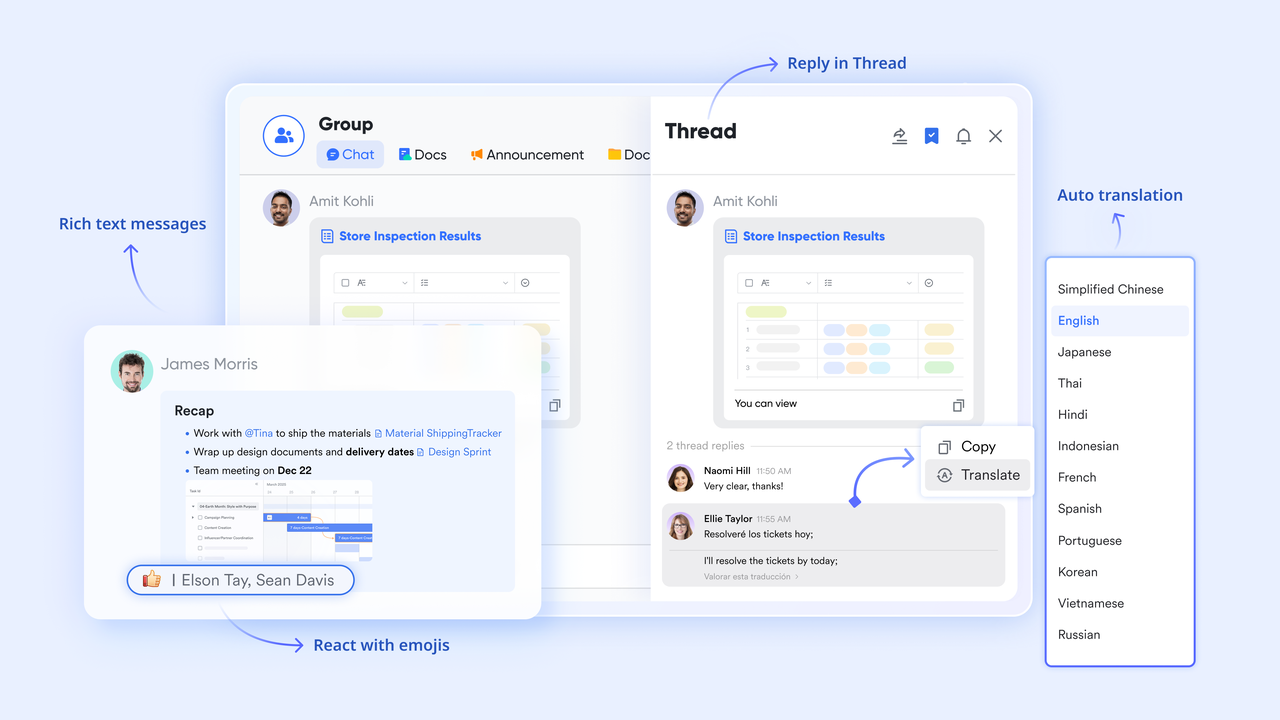
bridges the gap between communication and execution by embedding conversations directly within the context of documents, tasks, and data. Rather than operating in isolated chat threads, teams can reach decisions rapidly within a unified workspace, eliminating the productivity loss associated with switching tools. While legacy systems like SAP often require communication to happen externally—leading to fragmented information—Lark preserves the full context of every project.
Built-in, no-code workflow automation
Lark Base includes built-in automation that allows teams to trigger actions based on changes in data or status. Common workflows such as status change, notifications, and task creation can be automated without coding. This contrasts with SAP, where automation often requires consultants or complex configuration. Lark automation supports iteration as processes change. Teams gain speed without sacrificing clarity. 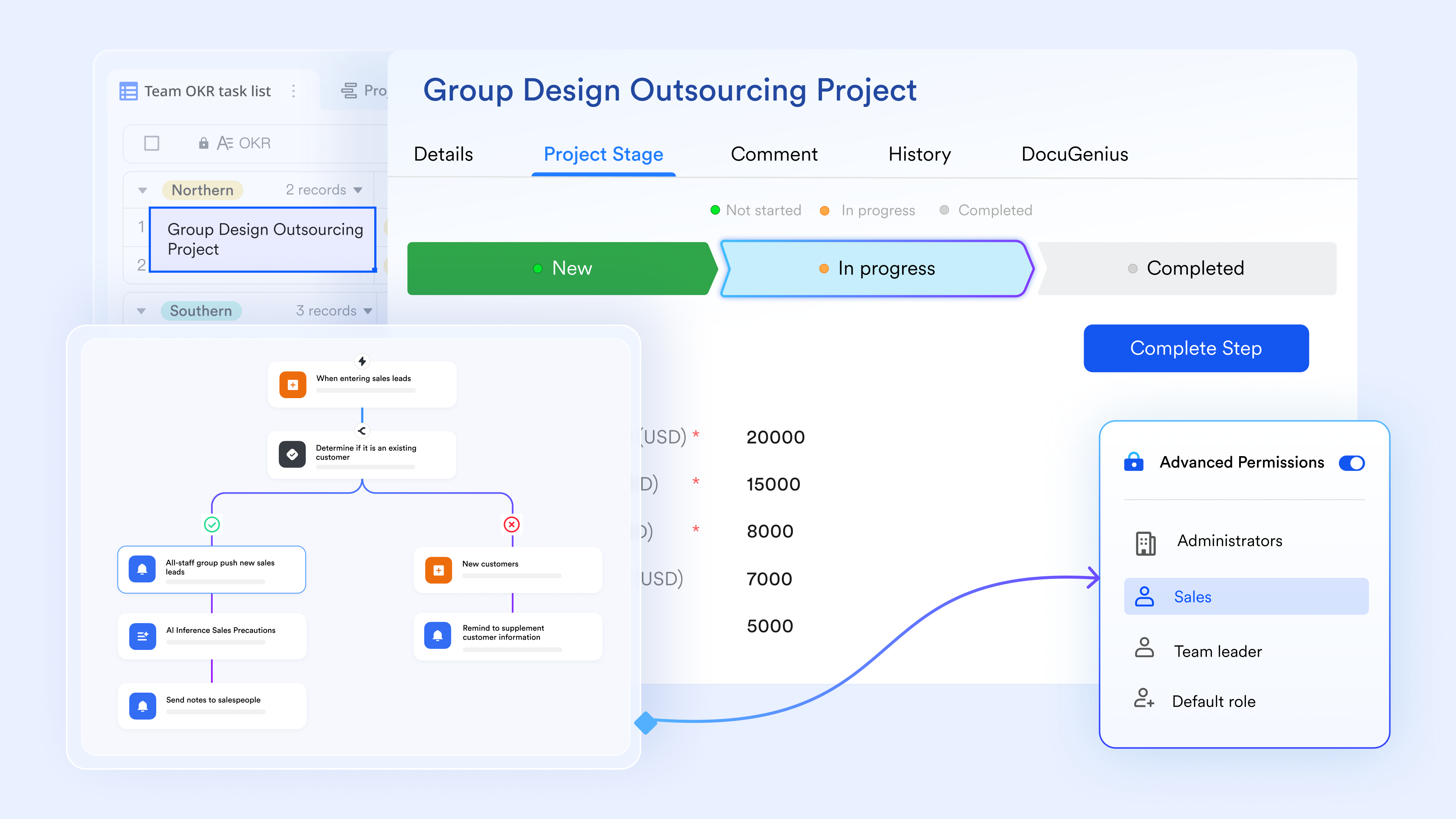
:
- Starter plan: Free forever plan that includes 11 powerful tools for up to 20 users. It also comes with 100GB of storage, 1000 automation runs, AI translations, and more.
- Pro plan: $12/user/month (billed annually) for up to 500 users. It includes everything in Starter plus group calling for up to 500 attendees, 15TB of storage, 50,000 automation runs, and more.
- Enterprise plan: for custom pricing. Supports unlimited users and includes even more automation runs and advanced security, compliance, and management features.
For small teams with simple communication needs

18 months message history
1000 Base automation runs/month
2000 rows per table in Base
Most POPULAR
For companies with comprehensive collaboration and management needs
Unlimited message history
500-participant video meetings
50k Base automation runs/month
20k rows per table in Base
For large companies with advanced security and organizational management needs
Get a personalized demo and pricing
Unlimited message history
500-participant video meetings
15 TB storage + 30 GB storage/user
500k Base automation runs/month
50k Base automation runs/month
Most POPULAR
For companies with comprehensive collaboration and management needs
Unlimited message history
500-participant video meetings
50k Base automation runs/month
20k rows per table in Base
Final verdict: Is SAP still worth it?
SAP remains a strong choice for organizations that , financial accuracy, and operational control across complex environments. Its ability to support global accounting standards, regulatory requirements, and large-scale transaction volumes continues to make it a trusted system for enterprise back office functions. For finance, procurement, and governance-heavy workflows, SAP still delivers reliability that few platforms can match.
At the same time, SAP's strengths are narrow and highly specialized. High licensing costs, long implementation timelines, and ongoing dependence on consultants limit flexibility for many teams. As business units demand faster execution, easier collaboration, and more intuitive tools, SAP often struggles to keep pace with how work actually happens day to day.
This is why many organizations no longer view the decision as SAP versus something else. Instead, they complement SAP with like Lark. SAP continues to serve as the system of record for core processes, while Lark supports execution, coordination, and visibility across teams. This approach allows organizations to move faster without disrupting critical financial and compliance systems.
Conclusion
This SAP review highlights why SAP continues to play an important role in enterprise environments while also explaining why its adoption model is evolving. SAP is not obsolete, and for many organizations it remains essential. Its strengths in stability, governance, and are well proven. However, SAP is not designed to support every type of work, especially collaborative and fast-moving workflows.
As teams become more distributed and cross-functional, gaps in usability and collaboration become more visible. Business users increasingly rely on tools outside SAP to communicate, plan, and execute work. Platforms like are introduced gradually to address these gaps, not as direct replacements, but as complementary layers that improve day-to-day productivity.
Streamline data management and teamwork with Lark
FAQs
Is SAP suitable for mid-sized companies with limited IT resources?
SAP can work for mid-sized companies, especially through SAP Business One. A review often highlights strong accounting capabilities but also notes cost and complexity. Limited IT resources make implementation challenging. Many teams adopt SAP only for finance. Tools like Lark are then added to support collaboration and execution.
Can SAP Concur work effectively without the full SAP ecosystem?
SAP Concur can function independently for travel and expenses. A SAP Concur review shows many organizations using it standalone. Expense controls and reporting remain strong. However, configuration still requires effort. Some teams pair Concur with platforms like Lark to improve approval speed and visibility.
How difficult is it to migrate data away from SAP?
Migration difficulty depends on customization depth. Heavily customized systems are harder to exit. Data models are complex and require planning. Many organizations choose partial migration instead. They keep historical data in SAP while moving active workflows to tools like Lark.
Does SAP support real-time collaboration for distributed teams?
SAP offers limited collaboration features. Real-time discussion and shared context are not core strengths. Teams rely on external tools. This creates silos. Platforms like Lark are introduced to bridge collaboration gaps without replacing SAP immediately.
Can Lark fully replace SAP or does it work better as an alternative layer?
For most enterprises, Lark works best as an alternative layer. It supports collaboration, workflows, and visibility. SAP continues handling finance and . Over time, some processes may move fully to Lark. This gradual approach reduces risk and improves adoption.
Related reading






























