














6 Best Simple Gantt Chart Templates for Easy Project Planning
Oct 28, 2026
Oct 28, 2026

20 min read
Add to preferred sources


Today, teams need simple and visual tools to plan projects, track progress, and stay on the same page. That's where a simple Gantt chart template comes in handy—helping teams see what needs to be done, when it's due, and how tasks depend on one another. These charts turn complex schedules into visual timelines, making project management more intuitive and efficient.
Modern tools like Lark, Vertex42, and Microsoft now include free Gantt chart templates that make planning and collaboration simpler than ever. With real-time visibility, automation, and easy drag-and-drop scheduling, teams can quickly organize their workflows—without needing advanced setup or training.
1. Lark: All-in-one Gantt chart collaboration platform
2. Vertex42: Simple Excel-based Gantt chart template
3. Microsoft Office: Pre-built Excel Gantt chart layout
4. Smartsheet: Online Gantt tool for team tracking
5. Unito: Cross-platform Gantt chart synchronization tool
6. OnlineGantt: Web-based, free project timeline creator

Why teams need a simple Gantt chart template
A simple Gantt chart template makes project planning easier by turning complex timelines into a clear visual roadmap. It helps teams see what's coming next, stay organized, and manage deadlines with confidence. Whether you're a solo freelancer or leading a large team, it brings structure and clarity to every step of your project. With just a few updates, everyone stays on track without the chaos of endless spreadsheets or messages.
- Visual clarity: A simple Gantt chart template makes project progress easy to understand at a glance. Tasks, timelines, and dependencies appear in one view, helping teams identify overlaps and priorities instantly. This visual clarity ensures no deliverable slips through the cracks.
- Time management: Using a simple Excel Gantt chart template or online version allows teams to allocate time effectively. By spotting bottlenecks and balancing workloads early, managers can make timely adjustments to keep projects on track and deadlines realistic.
- Collaboration: Modern tools like Lark and ClickUp turn static templates into collaborative dashboards. Team members can update statuses, share feedback, and track real-time progress—making coordination effortless, even across time zones.
- Flexibility for different users: A simple Gantt chart template in Google Sheets or Excel caters to diverse users—from small startups to remote teams. It's quick to set up, customizable, and scales as projects grow, offering structure without complexity.
Comparison table of simple Gantt chart templates
Top simple Gantt chart templates and tools
1. Lark: A smart platform with a streamlined Gantt chart solution
Managing multiple projects, timelines, and dependencies can easily become overwhelming—especially for fast-growing teams. Lark simplifies this challenge with an all-in-one platform designed to help teams plan, execute, and track progress visually. With Gantt charts built into Lark Base, project leaders can see how every task aligns, where bottlenecks occur, and how timelines adjust in real time.
Lark, one of the most versatile project management tools, helps teams manage projects with clarity and agility by putting everything in one place—from communication and documentation to scheduling and reporting. Whether your team is planning marketing campaigns, managing recruitment pipelines, or overseeing product development, Lark's visual Gantt chart and database capabilities give you full control and visibility.
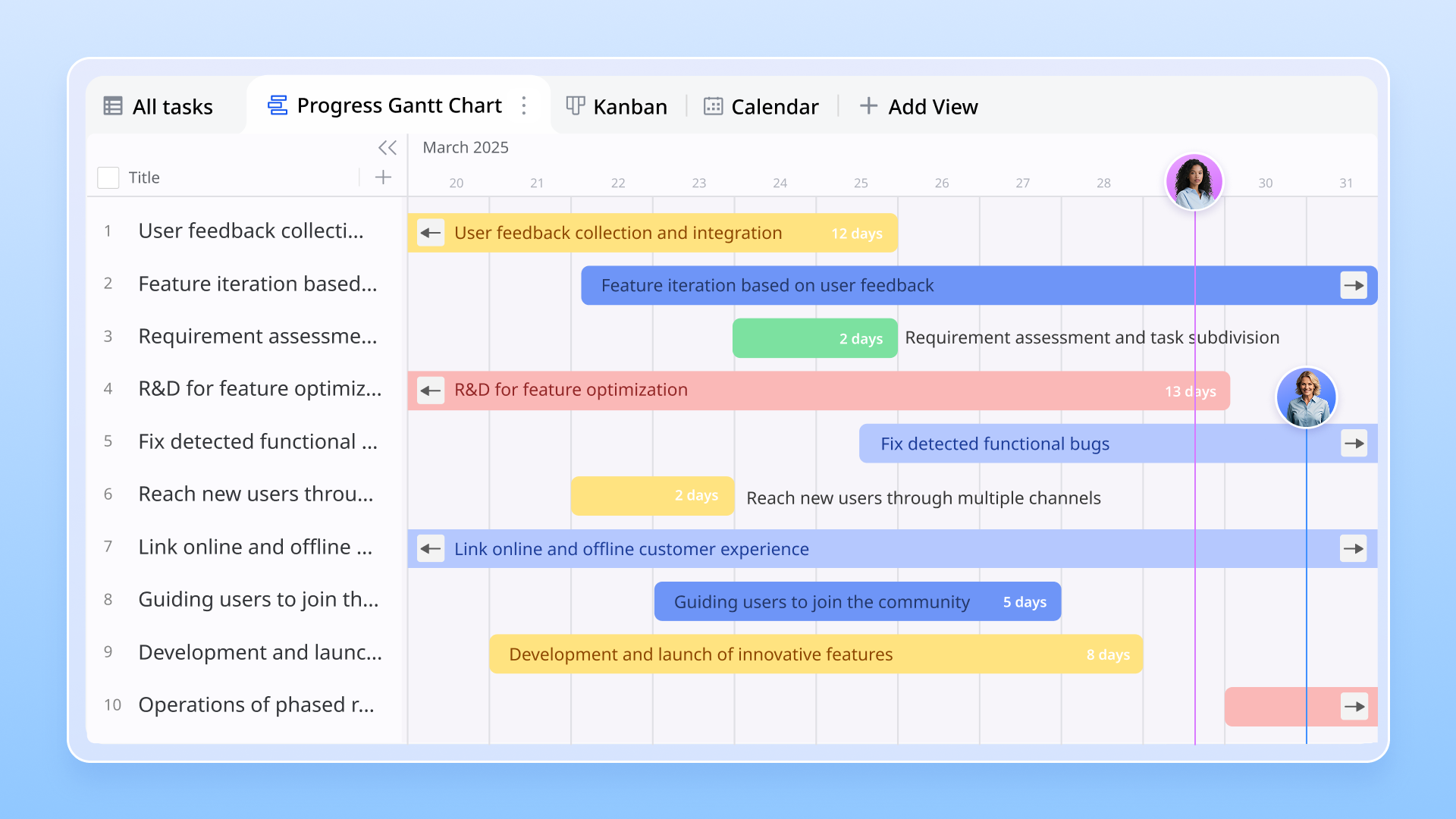
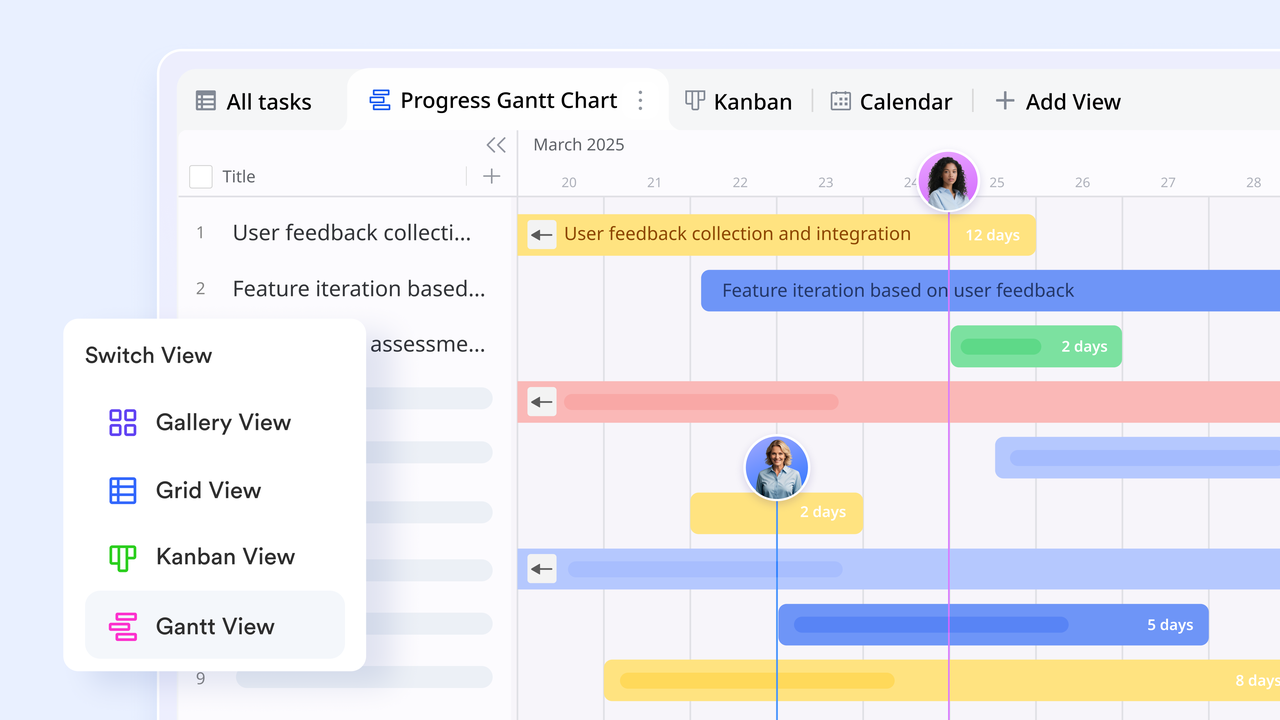
- Lark Base for Gantt charts
At the heart of Lark's project planning features is Lark Base—a flexible tool that combines data management with visual workflows. It allows teams to build, customize, and track Gantt charts directly within their workspace. With features like automation, real-time updates, and linked records, teams can manage projects without juggling multiple tools. Lark Base turns everyday project tracking into a smooth, collaborative experience.
- Plan projects visually: Build and manage Gantt charts to visualize timelines, dependencies, and milestones.
- Automate progress updates: Create smart triggers that adjust statuses, notify owners, or update related tasks automatically.
- Track dependencies with confidence: See real-time updates as changes ripple across your workflow, ensuring alignment without manual coordination.
With AI-assisted tracking and automation, Lark Base ensures every project stays on schedule while reducing administrative overhead.
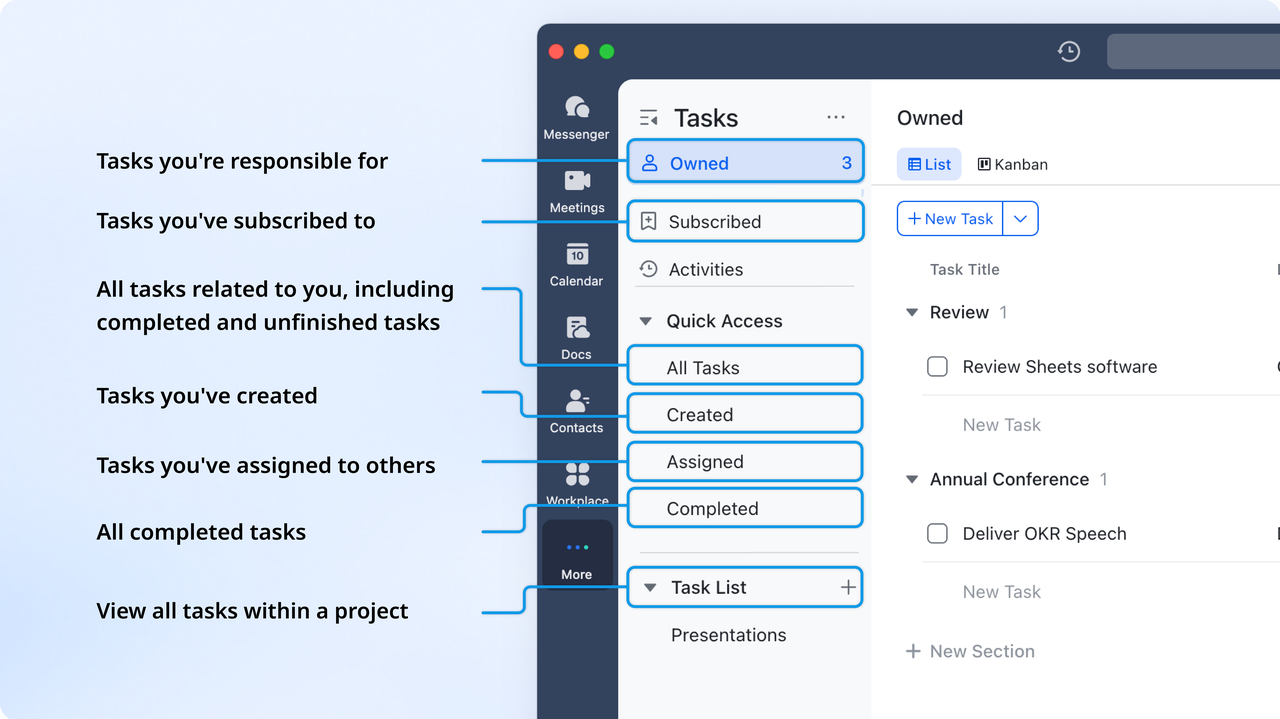
- Lark Tasks for accountability
Lark Tasks complements Base's Gantt view by giving teams a clear structure for ownership and follow-through. Each task can be assigned, prioritized, and monitored from the same workspace—no switching between tools. Automatic notifications and progress tracking keep people involved on the same page, while dashboards visualize team capacity and workload. Together, Base and Tasks create a unified system for managing both strategy and execution.
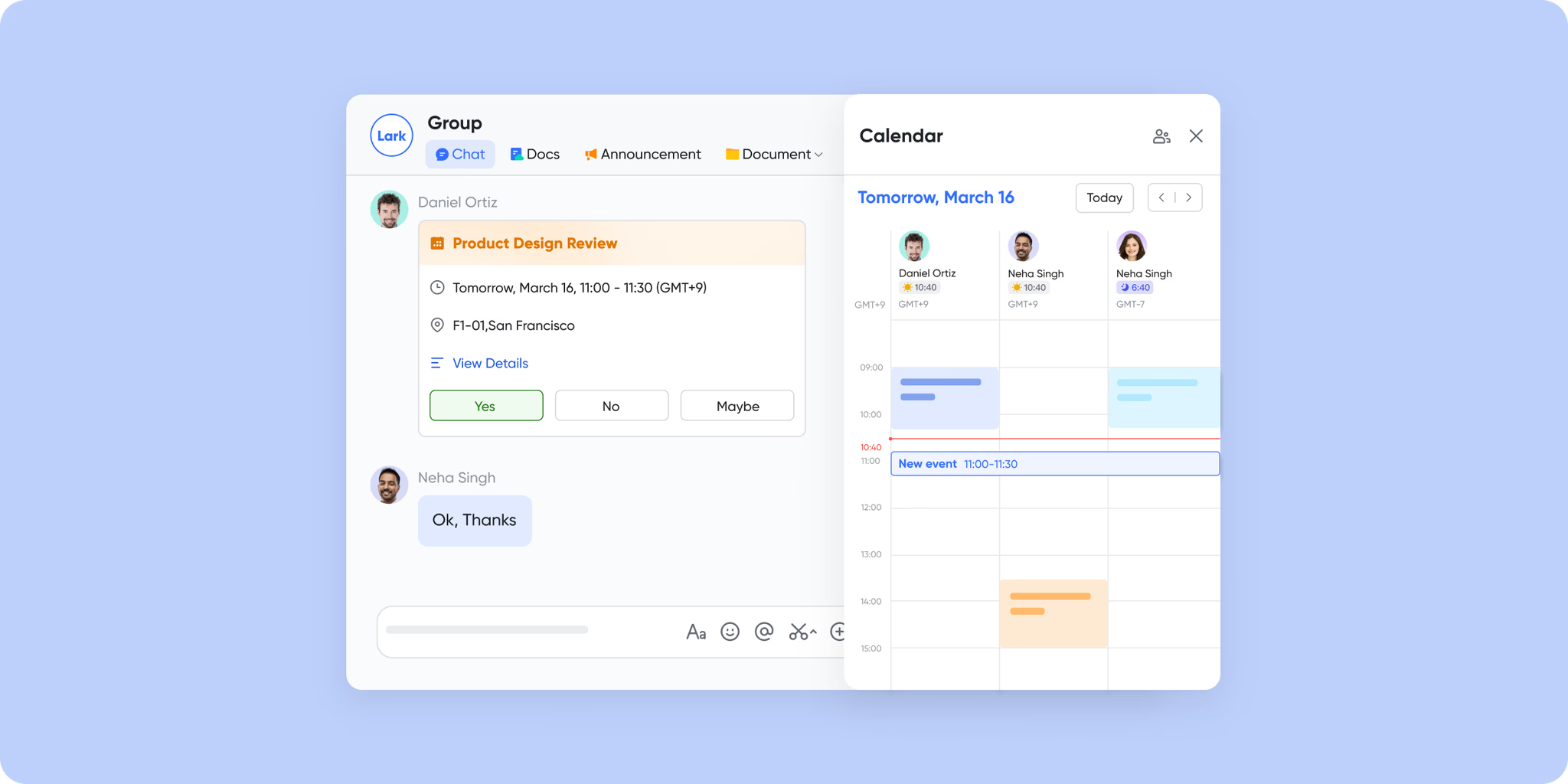
- Lark Calendar and Lark Messenger for coordination
Efficient scheduling and communication keep projects on track. Lark Calendar allows users to align milestones with meetings, deadlines, and deliverables. Meanwhile, Lark Messenger connects teams in real time—enabling quick discussions, feedback, and approvals directly within the workflow. This combination keeps context, communication, and accountability in sync.
Try ready-to-use Lark templates
Lark offers customizable templates to help you build your own visual workflows instantly. Whether you're tracking OKRs, managing hiring pipelines, or planning content calendars, these templates provide a quick start for structured, AI-powered collaboration.
- Project management Gantt chart overview
In fast-moving projects, clarity over timeline, dependencies, and ownership is essential. With the Gantt chart overview template from Lark Base, teams get a visual roadmap—tasks mapped out with start and end dates, linked subtasks, milestones, and automatic updates as things change. It's not just a schedule—it's your project story at a glance.
- OKR management
Setting bold goals is only half the job. The OKR management template gives you the structure to define high-impact objectives, break them down into measurable key results, and track progress using board and timeline views. With everything in one place, you keep teams aligned, visible, and focused on turning ambition into achievement.
- Lark Gantt chart template
This Lark Gantt view showcases how teams can plan and track tasks effortlessly. Each key result is visually mapped with clear dependencies, durations, and color-coded timelines. With customizable fields and real-time collaboration, it simplifies complex workflows into one unified view.
- Lark marketing campaign Gantt chart
This Gantt chart template in Lark highlights how marketing teams can plan, schedule, and track campaigns throughout the year. Each event—like product launches or seasonal promotions—is mapped clearly for quick visibility. With drag-and-drop adjustments and shared access, teams stay synchronized across every campaign milestone.
- Lark recruitment tracking template
This Lark Base template helps HR teams manage candidate pipelines efficiently—from application to interview stages. Each column tracks critical details like department, skills, and interview progress in one unified view. With color-coded tags and smart filters, recruiters can easily monitor hiring timelines and collaboration across departments.
- Podcast production schedule
This Gantt chart view illustrates how podcast teams can plan, schedule, and manage episodes efficiently. Each topic, host, and channel is visually aligned with clear timelines and progress tracking. With color-coded bars and structured task mapping, it streamlines coordination and ensures every episode is delivered on time.
- Website design project tracker
This structured task list view outlines each stage of a website project—from research and content creation to design and development. Every task is categorized by phase, owner, and priority for transparent progress tracking. With organized timelines, reference links, and completion metrics, it enables teams to collaborate efficiently and deliver high-quality websites on schedule.
Pros:
- Intuitive and modern interface
- Seamless integration of communication and project tracking
- Robust automation and AI-assisted scheduling
- Free plan with generous features for small teams
Cons:
- Slight learning curve for advanced automations
- Templates: Free to use
- Starter plan: Free forever plan that includes 11 powerful tools for up to 20 users. It also comes with 100GB of storage, 1000 automation runs, AI translations, and more.
- Pro plan: $12/user/month (billed annually) for up to 500 users. It includes everything in Starter plus group calling for up to 500 attendees, 15TB of storage, 50,000 automation runs, and more.
- Enterprise plan: Contact sales for custom pricing. Supports unlimited users and includes even more automation runs and advanced security, compliance, and management features.
2. Vertex42 simple Gantt chart template: Free Excel download
The Vertex42 simple Gantt chart template is a free, ready-to-use Excel file that simplifies project scheduling for professionals of all levels. Designed for ease of use, it lets you plan tasks, set deadlines, and visualize timelines without needing any specialized software. It's especially useful for teams or individuals who prefer an offline, no-fuss solution. With built-in Excel formulas and formatting, the template delivers a clear overview of your project's progress at a glance.
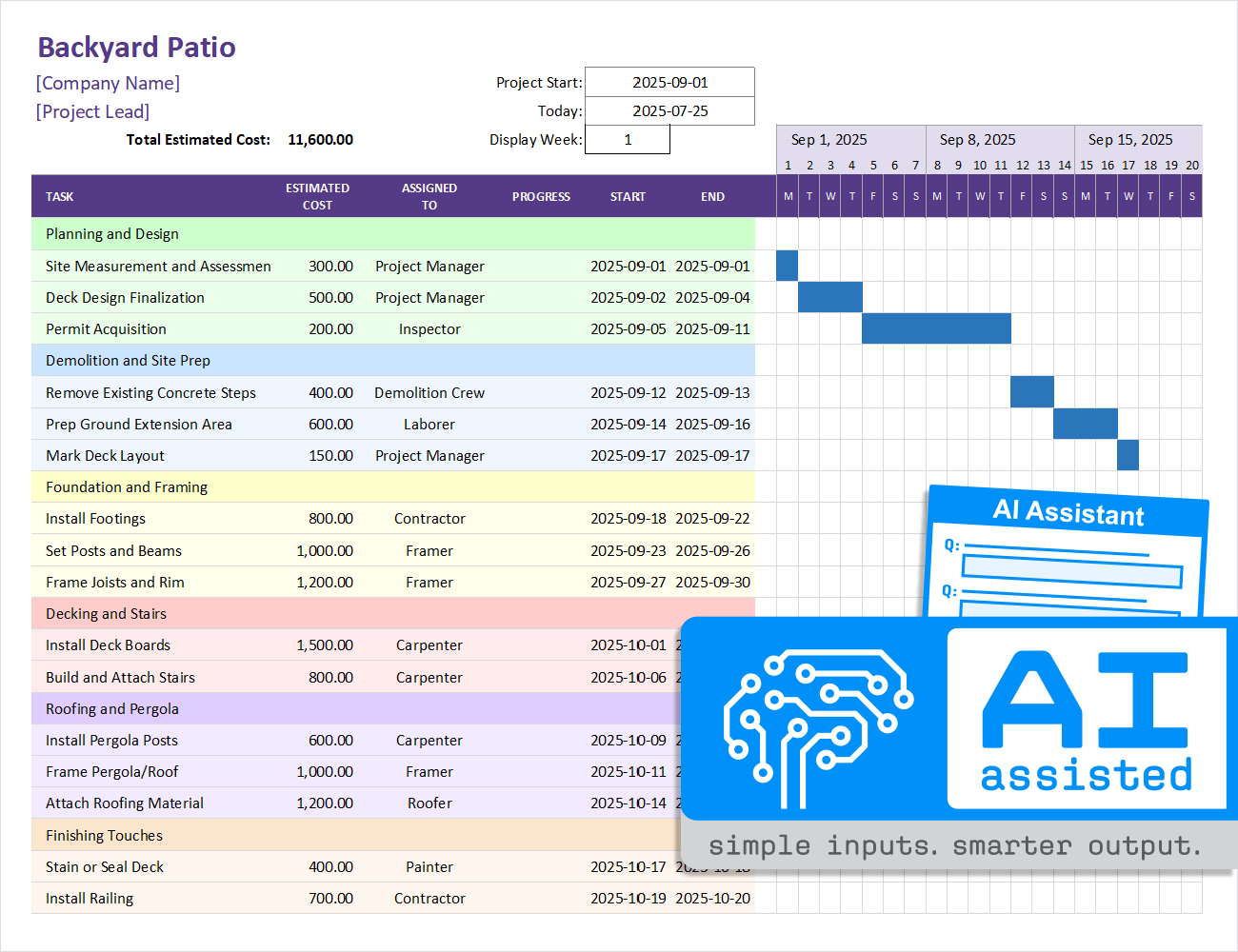
Image source: vertex42.com
Features:
- Editable Excel spreadsheet with color-coded bars.
- Automatic date calculations for start and end times.
- Customizable task names, durations, and dependencies.
- Works with Excel 2007 or later versions.
- Printable layout for reports and presentations.
Pros:
- Free and easy to customize.
- No need for additional software or sign-ups.
- Ideal for freelancers and small teams.
- Simple learning curve for Excel users.
Cons:
- Limited automation and collaboration options.
- Not suitable for large or complex projects.
- Lacks real-time updates or integrations.
Pricing: Free download
3. Microsoft office gantt chart template: Easy project tracking in excel
The Microsoft Office Gantt chart template provides a simple yet effective way to plan, organize, and monitor projects directly in Excel. It includes all the core Gantt chart features—from defining tasks and setting deadlines to tracking milestones and overall progress. Designed for accessibility, it's ideal for beginners and professionals who want a quick setup without complex tools. The familiar Excel interface ensures smooth collaboration and easy customization for any project size.
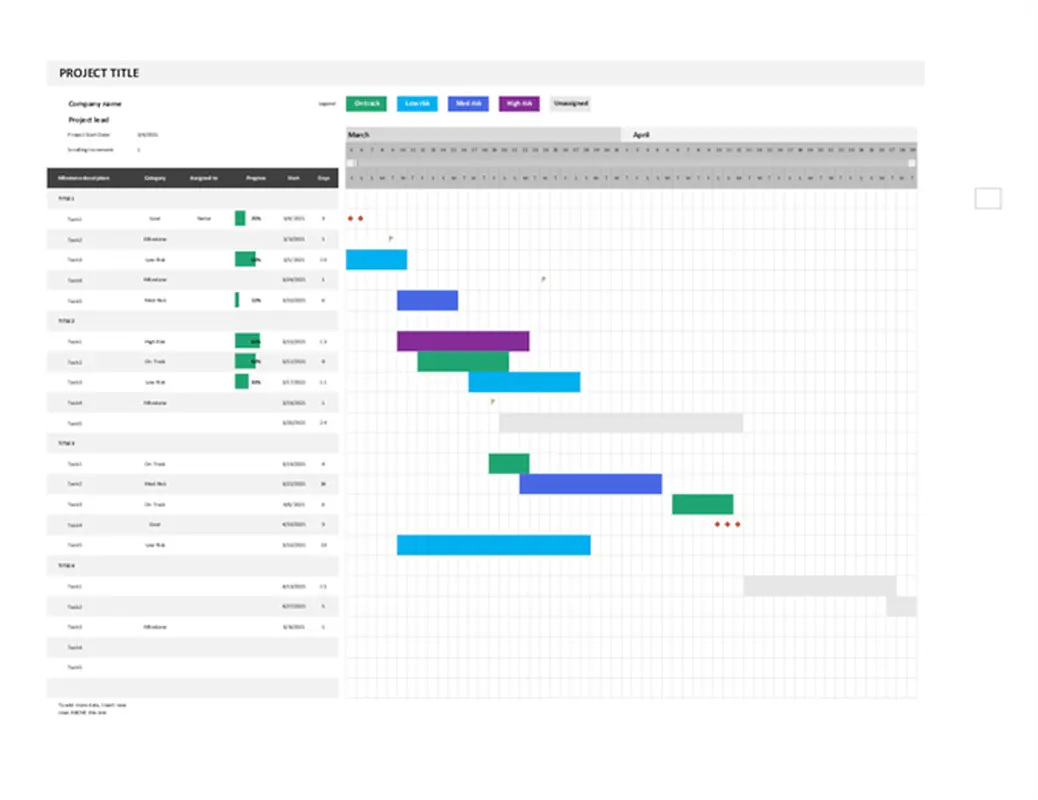
image source: microsoft.com
Features:
- Pre-built Excel template with editable task bars.
- Supports task dependencies and progress tracking.
- Customizable colors and data fields.
- Integrates easily with other Microsoft 365 tools.
- Accessible through Excel desktop or online.
Pros:
- Familiar interface for Microsoft users.
- Quick to set up and modify.
- Great for basic project visualization.
- Compatible across Microsoft 365 platforms.
Cons:
- Lacks automation and team collaboration tools.
- Limited scalability for complex projects.
- Manual updates required for tracking progress.
Pricing: Free download
4. Smartsheet Gantt chart template: Online project timeline tool
The Smartsheet Gantt chart template brings the power of cloud collaboration to traditional project planning. It offers a dynamic interface where teams can manage timelines, assign tasks, and track progress in real time. With automation features, dependency tracking, and shared access, it's ideal for fast-moving teams that need visibility and accountability across multiple projects. The template's flexibility makes it suitable for both small business projects and enterprise-level operations.
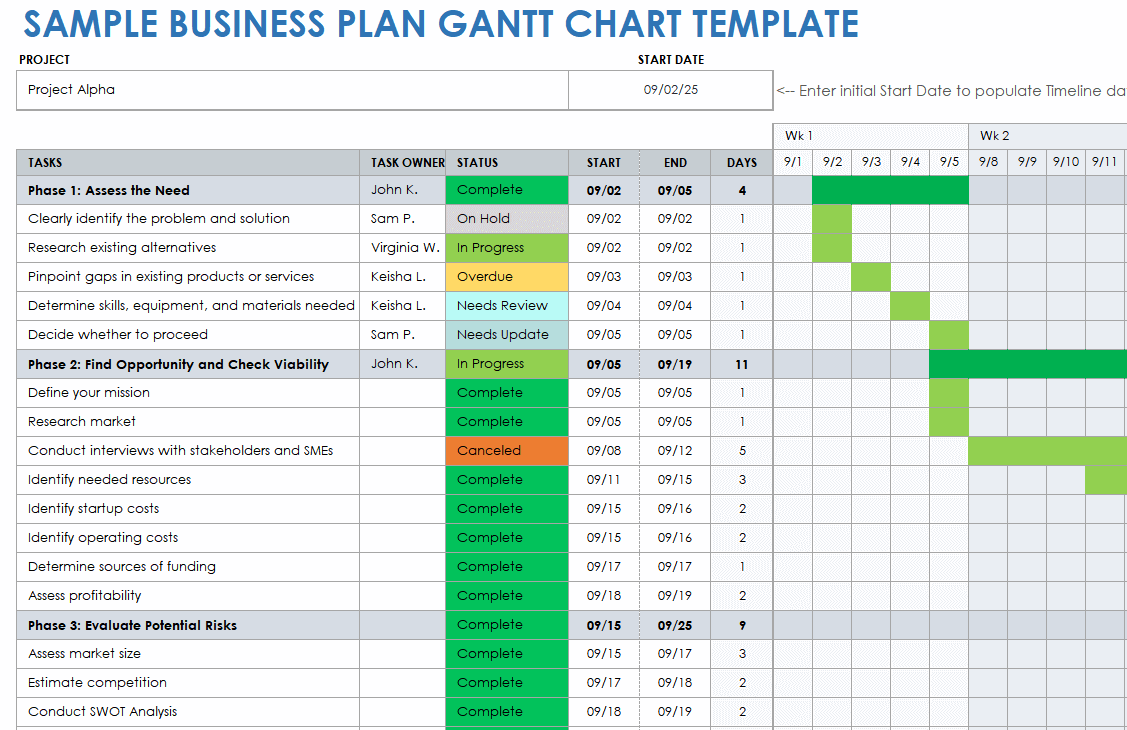
image source: smartsheet.com
Features:
- Cloud-based editable Gantt chart with sharing options.
- Real-time collaboration and automatic updates.
- Critical path tracking and resource allocation.
- Integration with tools like Slack, Google Drive, and Jira.
- Custom reports and dashboards.
Pros:
- Excellent for remote or distributed teams.
- Offers both spreadsheet and Gantt views.
- Supports automation and data-driven decisions.
- Great reporting and visibility options.
Cons:
- Requires subscription for advanced features.
- Slight learning curve for beginners.
- May feel overpowered for small projects.
Pricing:
- Free trial available.
- Paid plans start at $7/user/month (billed annually).
5. Unito Gantt chart template: Simple cross-tool project timelines
The Unito Gantt chart template allows teams to bring all their tasks and projects together, no matter which tools they use. By syncing data across platforms like Asana, Trello, ClickUp, and more, it creates a unified timeline that updates automatically. This makes it perfect for cross-functional teams working in different systems but needing a single, shared project view. With real-time syncing and visual clarity, Unito simplifies collaboration and ensures everyone stays aligned on deadlines.
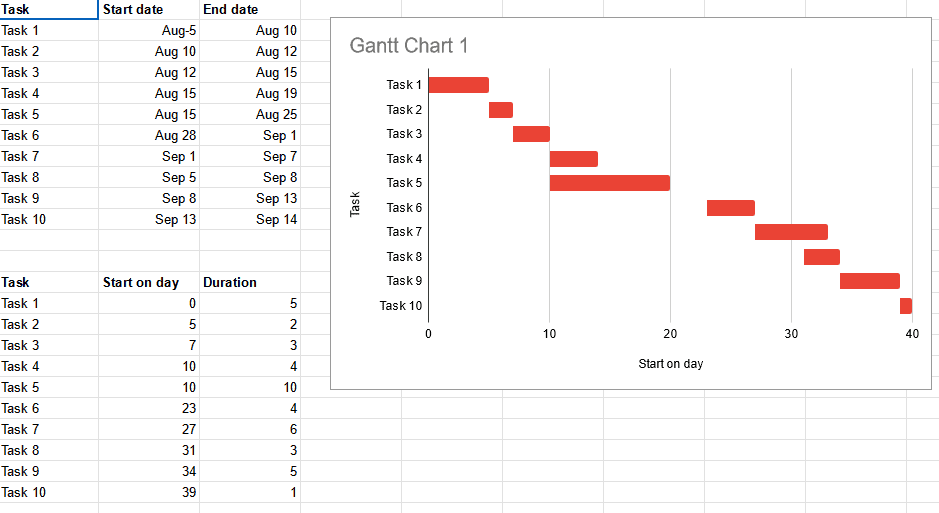
Image source: unito.com
Features:
- Sync tasks from Asana, Trello, ClickUp, and more.
- Real-time updates across connected tools.
- Visualize timelines, dependencies, and milestones.
- Drag-and-drop interface for quick edits.
- Web-based access with sharing options.
Pros:
- Perfect for teams using multiple platforms.
- Simplifies cross-tool project visualization.
- Easy to use with no coding required.
- Real-time data synchronization.
Cons:
- Requires integration setup for syncing.
- Limited offline capabilities.
- Some features locked behind premium plans.
Pricing:
- Free trial available.
- Paid plans start at $10/user/month (billed annually).
6. OnlineGantt chart template: Free web-based project planning
The OnlineGantt chart template provides an easy-to-use, browser-based solution for managing project timelines without any downloads or installations. With intuitive drag-and-drop scheduling, users can quickly create, edit, and visualize tasks directly online. It's ideal for small teams, freelancers, or educators who want a lightweight yet functional planning tool. The platform also allows for simple sharing and collaboration, making real-time updates and progress tracking effortless from any device.
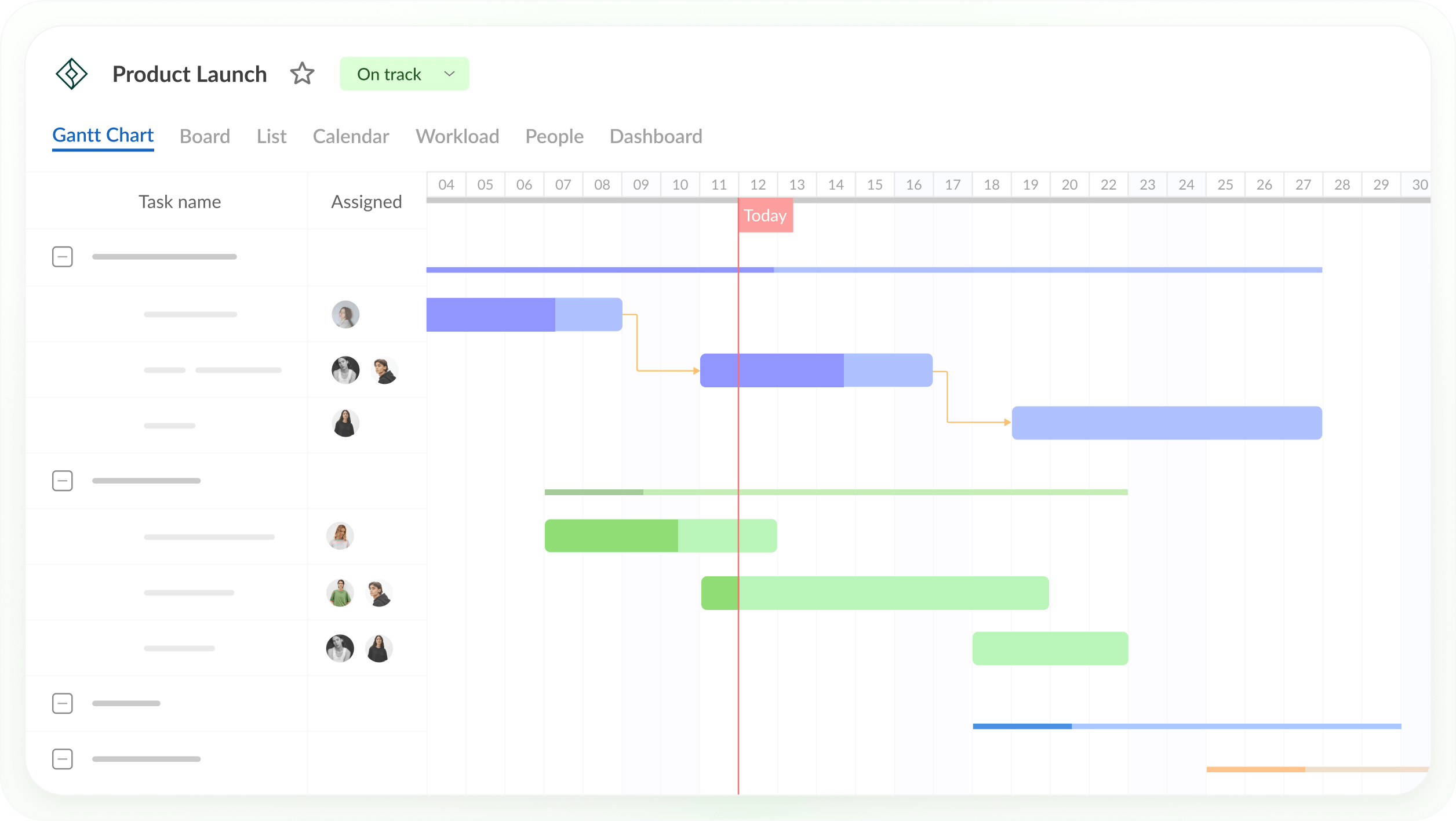
Image source: ganttpro.com
Features:
- Web-based Gantt chart with interactive task bars.
- Real-time editing and sharing capabilities.
- Supports task dependencies and milestones.
- Export options to PDF, PNG, or Excel.
- No sign-up required for basic use.
Pros:
- 100% online and accessible anywhere.
- Simple and intuitive interface.
- Great for quick project setups.
- Free to use for basic functionality.
Cons:
- Lacks advanced automation and reporting.
- Limited data security and storage options.
- No offline access.
Pricing:
- Free basic version available.
- Premium plans with extra features vary by provider.
Tips for adopting Gantt chart templates successfully
Implementing a simple Gantt chart template effectively requires more than just setup—it's about building habits around consistency, clarity, and collaboration. These best practices help teams streamline adoption and get the most value from their chosen Gantt chart tool, whether it's Excel, Google Sheets, or an online platform like Lark.
- Start small: Begin by using the Gantt chart template for a single project or team before expanding to company-wide use. This allows you to identify what works and refine your approach without overwhelming users. Once the system is smooth, scale it across departments for unified tracking.
- Customize templates: Adapt your simple Gantt chart template to match your team's workflow. Modify fields like task owners, due dates, and milestones to ensure clarity and accountability. A customized setup ensures every member understands their role and how their work fits into the larger timeline.
- Train your team: Even the most intuitive Gantt chart Excel template or online version can fail without proper training. Conduct short sessions to show how to add tasks, mark progress, and track dependencies. This shared understanding reduces confusion and keeps updates consistent across the board.
- Automate reporting: Modern tools like Lark's simple Gantt chart template or Smartsheet make automation easy. Automate repetitive updates, reminders, or progress reports using built-in AI features. This reduces manual errors, saves time, and ensures stakeholders always have real-time visibility.
- Review weekly: Keep your simple Gantt chart template Google Sheets or online version current by reviewing it weekly. Regular updates help spot delays early, realign resources, and maintain accuracy. This habit ensures that your Gantt chart remains an active, living part of your project strategy rather than a static file.
Use cases of Gantt chart templates by industry
A simple Gantt chart template adapts to virtually any industry, offering teams the structure they need to manage time, dependencies, and deliverables effectively. From marketing teams to construction managers, these templates bring order and visibility to even the most complex projects.
- Marketing: For marketing teams, a simple Gantt chart template helps plan campaign launches, content calendars, and social media schedules in one view. Shared timelines ensure design, copy, and ad teams stay aligned on deadlines. This structure keeps campaigns cohesive and delivery consistent across multiple channels.
- Software development: In tech environments, a simple Gantt chart template for software projects enables teams to link dependencies, track sprints, and manage feature releases efficiently. Visual timelines make it easy to see progress across QA, development, and deployment stages. The result is smoother collaboration and fewer missed milestones.
- Education: Academic institutions and researchers use a simple Gantt chart Excel template to plan courses, manage student projects, and track publication deadlines. It provides a clear visual for long-term academic goals and ensures faculty and students stay on schedule. Collaboration becomes easier when everyone can see timelines in one place.
- Construction: For builders and civil engineers, a simple Gantt chart template Google Sheets helps visualize critical paths, resource allocation, and subcontractor scheduling. Tracking dependencies ensures that materials and labor arrive just in time for each phase. This proactive planning prevents costly project delays.
- Startups: Startups thrive on agility, and a simple online Gantt chart template gives teams the flexibility to manage cross-functional workflows. Founders and teams can prioritize deliverables, align timelines, and monitor goals in real time. It keeps operations transparent while allowing quick pivots as business needs evolve.
Gantt chart templates for different project sizes
Every organization, regardless of size, needs a clear way to manage timelines, milestones, and dependencies effectively. Gantt chart templates offer scalable solutions that fit everything from small team projects to enterprise-level initiatives. Whether you're coordinating a few tasks or overseeing multiple departments, these templates help visualize workloads, track progress, and ensure accountability. With customizable fields and flexible layouts, teams can tailor each Gantt chart to match their project's scope and complexity.
- Small teams: For small teams or startups, using a simple Gantt chart template in Lark or Asana provides effortless task tracking and scheduling. These tools offer intuitive drag-and-drop timelines and real-time collaboration, perfect for lightweight project management. Free plans make them ideal for teams just starting with structured workflows.
- Medium teams: Growing organizations benefit from a simple Gantt chart template in ClickUp or Monday.com, which introduces automation, and workload balancing. These tools scale seamlessly as team structures expand, helping managers assign resources efficiently. With customizable views, mid-sized teams can adapt templates to their evolving needs.
- Enterprises: Large organizations rely on advanced Gantt chart templates in Smartsheet or Wrike for enterprise-level planning, tracking, and reporting. These platforms support complex dependencies, multi-project dashboards, and data-driven decision-making. They're designed to give executives visibility and control across multiple departments and global operations.
Conclusion
Throughout this post, we explored how Excel, Google Sheets, and online Gantt tools like Lark, Asana, and ClickUp empower teams to plan smarter and collaborate better. Each platform offers unique advantages—but the goal remains the same: keeping projects on time and teams aligned.
Among these, Lark stands out for its all-in-one experience. With integrated chat, docs, calendar, and automation, Lark lets teams manage Gantt charts and communication in one connected workspace—no switching between tools. If your team is ready to plan faster, collaborate seamlessly, and stay on track, Lark's free Gantt chart templates are the perfect place to start.
FAQs
Can I customize a Gantt chart template in Excel?
Yes, Excel Gantt chart templates allow you to modify colors, task durations, and dependencies manually. However, this process can become time-consuming for larger projects. Lark simplifies customization with drag-and-drop updates, automated date adjustments, and live collaboration. It gives teams real-time flexibility while eliminating the hassle of manual edits.
Are online Gantt charts secure for team projects?
Online Gantt charts are generally safe when hosted on trusted platforms. Tools like Lark use enterprise-grade encryption, role-based access control, and compliance certifications to protect sensitive data. Teams can confidently collaborate without worrying about data leaks. This makes Lark a secure yet open environment for managing shared timelines.
How do I track dependencies in Google Sheets?
In Google Sheets, dependencies are typically managed using formulas, color codes, or manual references. While functional, this method requires constant attention and can lead to version errors. Lark Base automates dependency tracking—when one task's timeline shifts, related tasks adjust instantly. It ensures accuracy, saves time, and keeps schedules synchronized.
What is the best Gantt chart template for small teams?
Small teams need tools that are both easy to use and collaborative. Lark's Gantt chart templates combine automation, task tracking, and visual clarity in one workspace. Unlike static spreadsheets, it lets everyone update timelines in real time. This makes Lark perfect for startups or teams scaling their project workflows efficiently.
Can I share Gantt charts with clients outside my team?
Yes, most project tools allow external sharing through links or exported files. Lark takes this further with secure, permission-based access—letting you control what clients can view or edit. You can share live project timelines while keeping sensitive internal data private. This balance of transparency and control strengthens client trust.
Related reading
Table of contents
Start using Lark today

Manage all your work in one place
Boost team efficiency by 10x
Save up to 70% on software costs
Table of contents
Start using Lark today
Manage all your work in one place
Boost team efficiency by 10x
Save up to 70% on software costs
Keep reading








2026 Lark Technologies Pte. Ltd.
Headquartered in Singapore with offices worldwide.






Explore: