














10+ Best Time Tracking Software: Features & Pricing Listed

Ryan Tanner
Product Marketing Specialist
Sep 18, 2026
Ryan Tanner
Sep 18, 2026


Top time tracking software at first glance
What is time tracking software?
Time tracking challenges businesses face
- Manual timesheet errors: Paper timesheets and manual entries often lead to missing hours, typos, or rushed end-of-week updates. These small mistakes add up and create inaccurate reports, payroll delays, and confusion about actual workloads.
- Over/under-reporting: Some employees log more hours than they worked, while others forget to record tasks until the end of the day. Without a consistent system, it becomes difficult to measure true productivity or understand how long projects really take.
- Low adoption: Even with modern tools, employees may avoid tracking their time because it feels tedious or intrusive. If the software isn't simple or fast to use, adoption drops and managers lose reliable data.
- Lack of integration with workflows: Time tracking works best when it fits naturally into daily routines. When tools don't sync with project management tools, communication apps, or payroll systems, teams end up switching between apps and wasting time.
- Tracking billable time accurately: Service teams need a clear record of client work, but manual tracking often misses small tasks, meetings, or revisions. This leads to lost revenue and difficulty proving billable hours when clients ask for clarification.
Key features to look for in employee time tracking software
- Automatic timers: Automatic timers help employees start and stop tracking with a single click. This reduces missed hours and makes it easier to capture real-time work instead of relying on memory.
- Automated timesheets: Automated timesheets offer a clean way to review weekly and monthly hours. They help managers check for inconsistencies and employees avoid manual updates that often lead to mistakes.
- Project tagging: Project tagging links each hour to a task, client, or category. This gives teams a clearer view of how time is spent and helps managers understand which activities consume the most effort.
- GPS tracking: GPS tracking is especially useful for field teams. It verifies on-site work locations and helps companies manage distributed or mobile employees without constant check-ins.
- Scheduling: Built-in project scheduling tools help managers assign shifts, plan workloads, and balance staffing needs. It also helps employees see upcoming tasks or shifts in one place.
- Approvals: Approval workflows let managers review submitted hours before they reach payroll or invoicing. This adds a layer of accuracy and helps resolve mistakes quickly.
- Reporting & analytics: Reports highlight trends such as total hours, overtime, project costs, and productivity patterns. Analytics make it easier to forecast workloads and improve planning.
- Mobile time tracking: Mobile tracking lets employees log hours from any location. It's essential for remote teams, field workers, and anyone who isn't at a desk all day.
10+ best time-tracking software tools
1. Lark: Unified platform with smart time tracking and streamlined views
- Starter plan: Free forever plan that includes 11 powerful tools for up to 20 users. It also comes with 100GB of storage, 1000 automation runs, AI translations, and more.
- Basic plan: $6/user/month (billed annually) for up to 500 users. It includes everything in Starter plus group calling for up to 500 attendees, 5TB of storage, 1000 automation runs, and more. For more details, please contact sales.
- Pro plan: $12/user/month (billed annually) for up to 500 users. It includes everything in Basic plus group calling for up to 500 attendees, 15TB of storage, 50,000 automation runs, and more.
- Enterprise plan: Contact sales for custom pricing. Supports unlimited users and includes even more automation runs and advanced security, compliance, and management features.
Starter
For small teams with simple communication needs
$0
/ user / month

Pro
For companies with comprehensive collaboration and management needs
$12
/ user / month
Enterprise
For large companies with advanced security and organizational management needs
Get a personalized demo and pricing
Pro
For companies with comprehensive collaboration and management needs
$12
/ user / month
2. Toggl Track: Fast, simple timers for busy teams
- One-click timer and manual time entry options
- Project and client tagging for clear categorisation
- Detailed reports and visual summaries of tracked hours
- Integrations with tools like Asana, Trello, and Google Calendar
- Idle detection to prevent inaccurate tracking
- Extremely easy to use with no learning curve
- Generous free plan for individuals and small teams
- Works across web, desktop, and mobile devices
- Strong reporting and export capabilities for clients and teams
- Limited advanced features in the free version
- Lacks built-in invoicing and expense tracking
- Free Plan: Core tracking features for up to 5 users
- Starter Plan: $10/user/month – billable rates, time rounding, and project templates
- Premium Plan: $20/user/month – advanced reporting, team dashboards, and time audits
- Enterprise Plan: Custom pricing – tailored support and dedicated success manager
3. Buddy Punch: Clock-in system with built-in payroll and identity verification
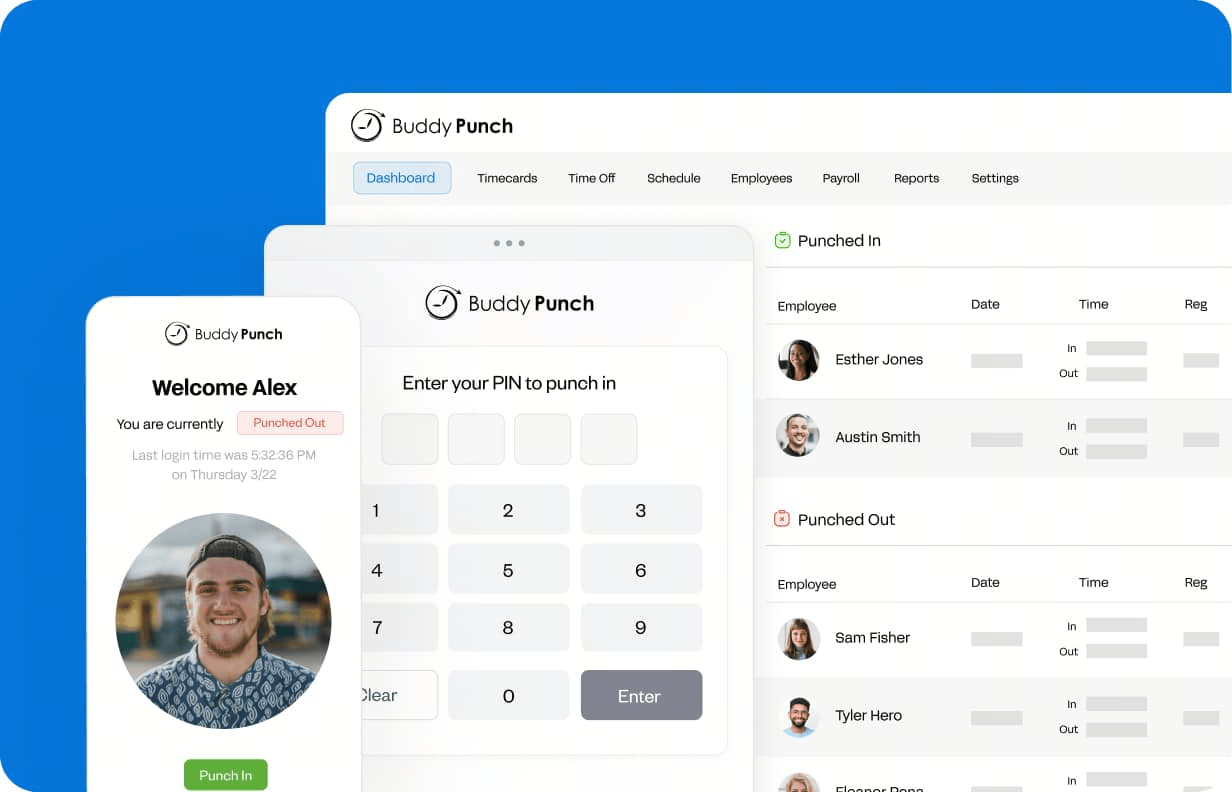
- Punch clock with multiple verification methods (facial recognition, QR codes, PIN/kiosk, webcam photos)
- GPS tracking and geofencing to restrict clock-ins to approved locations
- Integrated payroll add-on with direct deposit, automated W-2/1099 handling, and tax-form filing
- Drag-and-drop employee scheduling with shift trades and recurring shifts
- PTO tracking with automated accruals and manager approvals
- Overtime alerts and automatic break deductions
- Payroll runs inside the same platform where hours are tracked, so manual transfers are reduced
- Multiple punch verification options help prevent buddy punching and time theft
- Administrators are included at no additional cost across all plans
- Clean, straightforward interface that works well for non-technical staff
- No free plan available, only a 14-day free trial
- More oriented toward employee attendance and in-house payroll than project-based billing or freelance invoicing
- Starter: $4.49/user/month (annual) + $19 base fee/month
- Pro: $5.99/user/month (annual) + $19 base fee/month
- Enterprise: $10.99/user/month (annual) + $19 base fee/month
- Payroll add-on: $6/user/month + $39 base fee/month
4. Clockify: Free time tracking for growing teams
- Core time tracker with timers and manual time entry
- Timesheets view for weekly or daily approvals
- Projects, tasks, tags, and billable rate settings
- Summary, detailed, and weekly reports
- Team management and limited scheduling on paid plans
- Very generous free plan with unlimited users and projects
- Simple interface that works for many different team types
- Affordable paid plans for additional features like approvals and advanced reporting
- Strong browser extension and app coverage
- Advanced features (like approvals, budgets, and more automation) sit on paid tiers
- Interface is functional but less "modern workspace" compared to all-in-one suites
- Free Plan: Basic tracking features for up to 3 users
- Standard: $4.99 per seat/month (annual)
- Pro: $11.99 per seat/month (annual)
5. Harvest: Track time and invoice clients easily
- Time tracking across projects and tasks
- Invoicing for billable time and expenses
- Basic expense tracking for client work
- Reports on project budgets, utilization, and costs
- Connections to accounting tools (QuickBooks Online, Xero, etc.)
- Excellent for agencies and consultants billing clients by the hour
- Clean UI, easy to train teams on
- Strong project and budget reporting for small/medium firms
- Simple pipeline from logged time → invoice → payment
- Less suitable as a full HR timesheet/attendance solution
- Per-user pricing can add up for very large teams
- Pro: $12 per seat/month (unlimited seats & projects)
- Premium: Custom pricing with advanced reporting, approvals & SSO
6. Hubstaff: GPS and activity tracking for teams
- Time tracking with desktop, web, and mobile apps
- GPS tracking and geofencing for field workers
- Activity levels with optional screenshots and app/URL usage
- Scheduling, timesheets, and payments (on higher plans)
- Budgeting, reports, and optional add-ons (locations, more screenshots, etc.)
- Ideal for mobile and field teams needing location-aware tracking
- Flexible tiers from simple tracking to advanced monitoring
- Scheduling and payroll-style features on mid/high plans
- Add-ons let teams choose how much detail they want
- Monitoring (screenshots, activity) may feel invasive for some teams
- Add-ons and per-seat pricing can become costly at scale
- Starter: $7/seat/month (annual), 2-seat minimum
- Team: $10/seat/month (annual), 2-seat minimum
- Enterprise: $25/seat/month (annual), includes custom setup & dedicated support
7. QuickBooks Time: Timesheets connected to payroll faster
- Employee time tracking with mobile apps and GPS
- Job and shift scheduling inside QuickBooks Time
- Time-off management and alerts/notifications
- Sync to QuickBooks Online for payroll and invoicing
- Time kiosk mode and workforce app for employees
- Excellent fit for businesses already on QuickBooks Online
- Strong GPS, scheduling, and payroll connections
- Good for mobile crews, field workers, and trades
- Clear visibility into who is working and where
- Pricing includes both a base fee and per-user fee, which can be pricey
- Requires QuickBooks Online for full value, so less attractive if you use other accounting tools
- Time elite: $20/month+$10 per user/month. Base fee includes 1 admin.
- Time premium + payroll premium: $26.40/month+ $10 per employee/month.
- Time elite + payroll elite: $40.20/month + $12 per employee/month.
8. Time Doctor: Detailed productivity tracking for remote teams
- Automatic and manual time tracking with desktop and mobile apps
- Screenshots and web/app usage for activity insights
- Attendance, schedules, and break/leave tracking
- Productivity metrics, reports, and "unusual activity" alerts
- Client access, executive dashboards, and optional AI analytics (Benchmarks, etc.)
- Very detailed visibility into how time is spent
- Good choice for distributed or BPO-style teams needing close monitoring
- Flexible tracking modes (automatic or user-controlled)
- Strong reporting and management dashboards
- Monitoring features (screenshots, app usage) can feel intrusive
- Overkill for teams that mainly want simple timesheets and light reporting
- Basic plan: $7/month per user
- Standard: $11.70/month per user
- Premium: $16.70/month per user
- Enterprise: Custom pricing
9. Everhour: Project budgeting and time tracking combined
- Time tracking tied closely to projects, tasks, and budgets
- Billing and budgeting for clients or internal projects
- Invoicing and expense tracking
- Time approval flows and time-off tracking
- Deep connections to tools like Asana, Trello, ClickUp, and others
- Very strong for project and budget-focused teams
- Great match for agencies and product teams using PM tools
- Detailed reporting on costs and billable vs non-billable work
- Flexible enough for accountants and finance-focused users
- Requires at least a small team commitment (minimum seats on some plans)
- Not primarily designed as a core HR attendance solution
- Team: $10/seat/month when paid yearly (minimum 5 seats), includes all features and integrations
10. TimeCamp: Automatic time tracking with attendance insights
- Time tracking per task or project
- Start/stop timers or manual entries
- Reporting dashboards and time estimates
- Billable time tracking with budget alerts
- Integrations with calendars and third-party tools
- Fully integrated with task and project management
- Highly customisable and flexible
- Great for agile and sprint-based teams
- Affordable pricing for feature depth
- Can feel overwhelming for new users
- Mobile apps are less polished than desktop
- Free plan: Basic time tracking features
- Unlimited plan: $4.99/user/month – advanced reports and dashboards
- Business plan: $15/user/month – automations, custom fields, and workload views
11. Paymo: Creative teams' workflow and time manager
- Time tracking via timer or manual entry
- Client and project-based reports
- Cost and revenue tracking
- Team management and absence logging
- Export-ready invoices and summaries
- Clean, easy-to-use interface
- Transparent pricing and reports
- Excellent for service-based SMEs
- Reliable customer support
- Limited integrations compared to larger tools
- Basic design and dashboard customisation
- Standard plan: $5.95/user/month – full access to time, projects, and reports
Future trends in time tracking software
- AI-generated work logs: AI will reduce manual entry by creating automatic summaries of tasks, meetings, and project activity. Instead of typing out hours, employees will review and confirm logs that AI generates based on real activity.
- Predictive scheduling: Predictive scheduling uses past data to forecast workloads, shift needs, and staffing gaps. This helps managers plan ahead, reduce burnout, and balance resources more effectively.
- Activity insights: Advanced analytics will offer deeper insights into how work actually happens. Teams will see trends in focus time, context switching, task duration, and productivity patterns across roles and projects.
- Unified workspaces (with a subtle nod to Lark): Future platforms will combine communication, tracking, documents, and automated workflows in one place. This unified approach helps teams avoid app overload and makes time tracking a natural part of daily work rather than a separate chore.
- Remote-first time tracking innovations: As distributed teams grow, tools will support better mobile tracking, GPS verification, automated check-ins, and integrations that help remote employees log hours without friction.
Conclusion
FAQs
Is time tracking software legal for remote employees?
How do you choose between free time tracking software and paid tools?
Can time tracking software integrate with payroll and invoicing tools?
What's the difference between project time tracking and employee time tracking?
How accurate is GPS-based mobile time tracking for field workers?
Related reading

Start using Lark today

Manage all your work in one place
Boost team efficiency by 10x
Save up to 70% on software costs
Start using Lark today
Manage all your work in one place
Boost team efficiency by 10x
Save up to 70% on software costs
Keep reading







2026 Lark Technologies Pte. Ltd.
Headquartered in Singapore with offices worldwide.





