














6 Best To-Do List Apps for Mac: Top Picks for 2026

James Lewis
Product Manager
Sep 18, 2026
James Lewis
Sep 18, 2026

11 min read


Finding a reliable to do list app Mac professionals actually enjoy using is surprisingly difficult. You likely want software that matches Apple's clean design while packing enough power to manage a heavy workload. Many popular web tools feel clunky on macOS, forcing you to juggle disconnected browser tabs just to track daily deadlines. Whether you need a simple digital notepad for personal admin or a robust collaborative workspace to align a remote team, the right setup prevents tasks from slipping through the cracks. Let's explore the top task managers available this year to organize your workflow.
What makes a great Mac to-do list app?
Evaluating software for macOS requires looking beyond a simple digital checklist. A good tool should fit naturally into your daily rhythm rather than forcing you to change how you work. When reviewing options, I focus on four essential pillars that separate a basic notepad from a truly effective productivity system:
- Contextual task creation: The best tools let you capture action items exactly where the work is happening. Instead of opening a separate window to type out a reminder, a great app allows you to highlight a chat message or a comment in a document and turn it directly into a tracked assignment with a deadline.
- Unified scheduling: A list of chores is only helpful if you actually have the time to do them. Top-tier task managers combine your to-do items with your daily calendar. Seeing your project deadlines right next to your video meetings ensures you do not overcommit your schedule.
- Built-in automation and scalability: Your workload will eventually grow. A reliable application scales from a simple personal daily agenda to managing complex team OKRs (Objectives and Key Results). It should include automated approval workflows, so when you check off a project milestone, the relevant manager is notified immediately without you needing to draft an update email.
- Instant cross-device synchronization: Your agenda cannot live exclusively on your MacBook. A modern task app must be cloud-native, syncing your updates instantly to your mobile device or web browser. This ensures that if an urgent project update happens while you are away from your desk, your list reflects the new priority in real time.

Top 6 to-do list apps for Mac in 2026
Finding the right app means matching the tool's complexity to your daily workload. Here is a breakdown of the top task management options available for macOS users this year.
1. Lark: An all-in-one suite for growing teams
When managing a team, jumping between a chat client, a document editor, and a standalone task manager often causes vital context to get lost. You might discuss a project requirement in Slack, draft the specs in Google Docs, and try to track the deadline in Asana—leading to a fragmented workflow where details inevitably slip through the cracks. Lark acts as an all-in-one super app that brings messaging, video calls, document collaboration, project management, and approvals into a single platform. Instead of losing a request in a long chat thread, Lark allows you to turn a message directly into an actionable task with a deadline. Its unified calendar and project tools ensure your team finds what they need without leaving the communication window, effectively preventing project delays.
Pros:
Centralize all your to-dos in one place
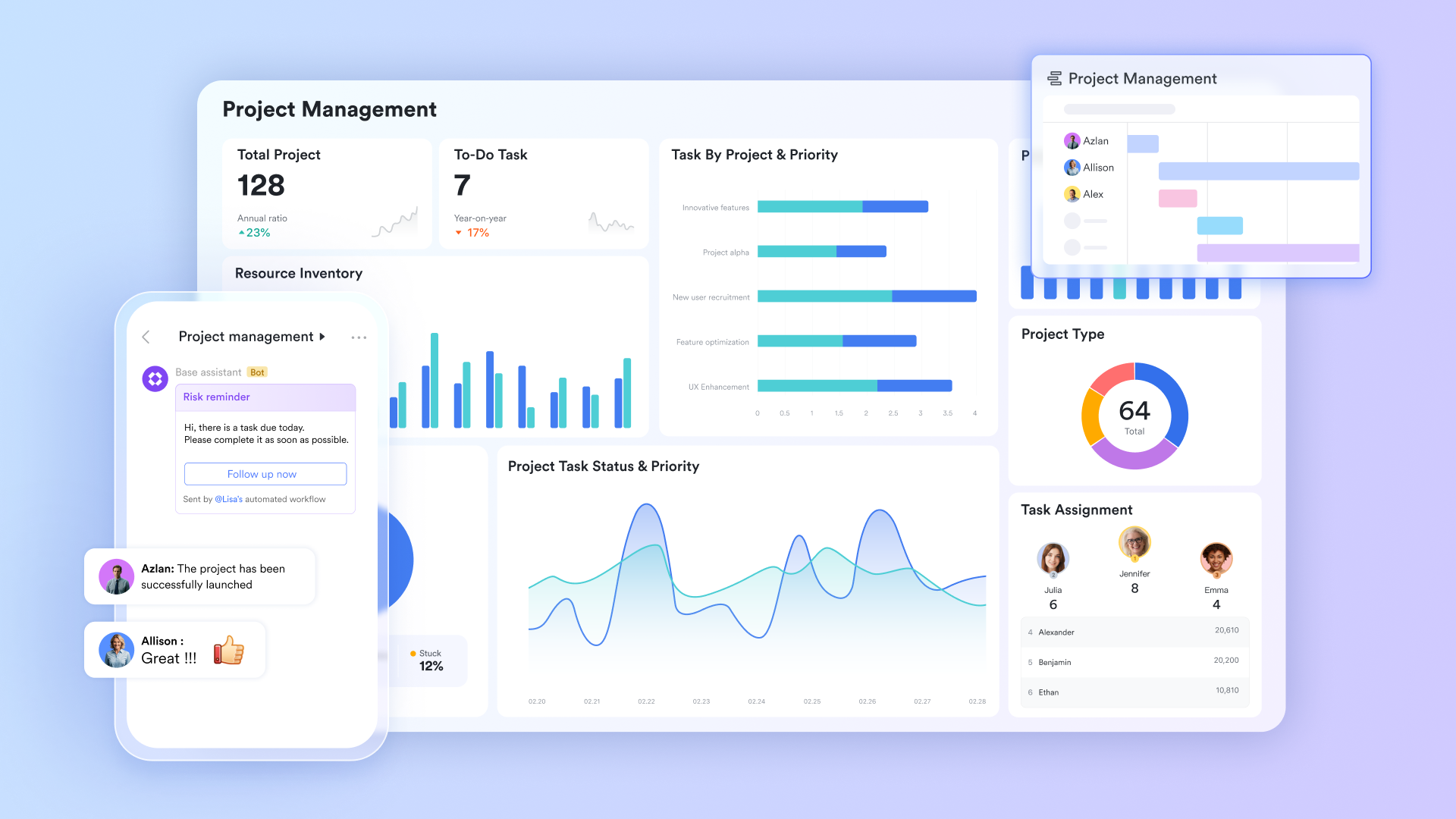
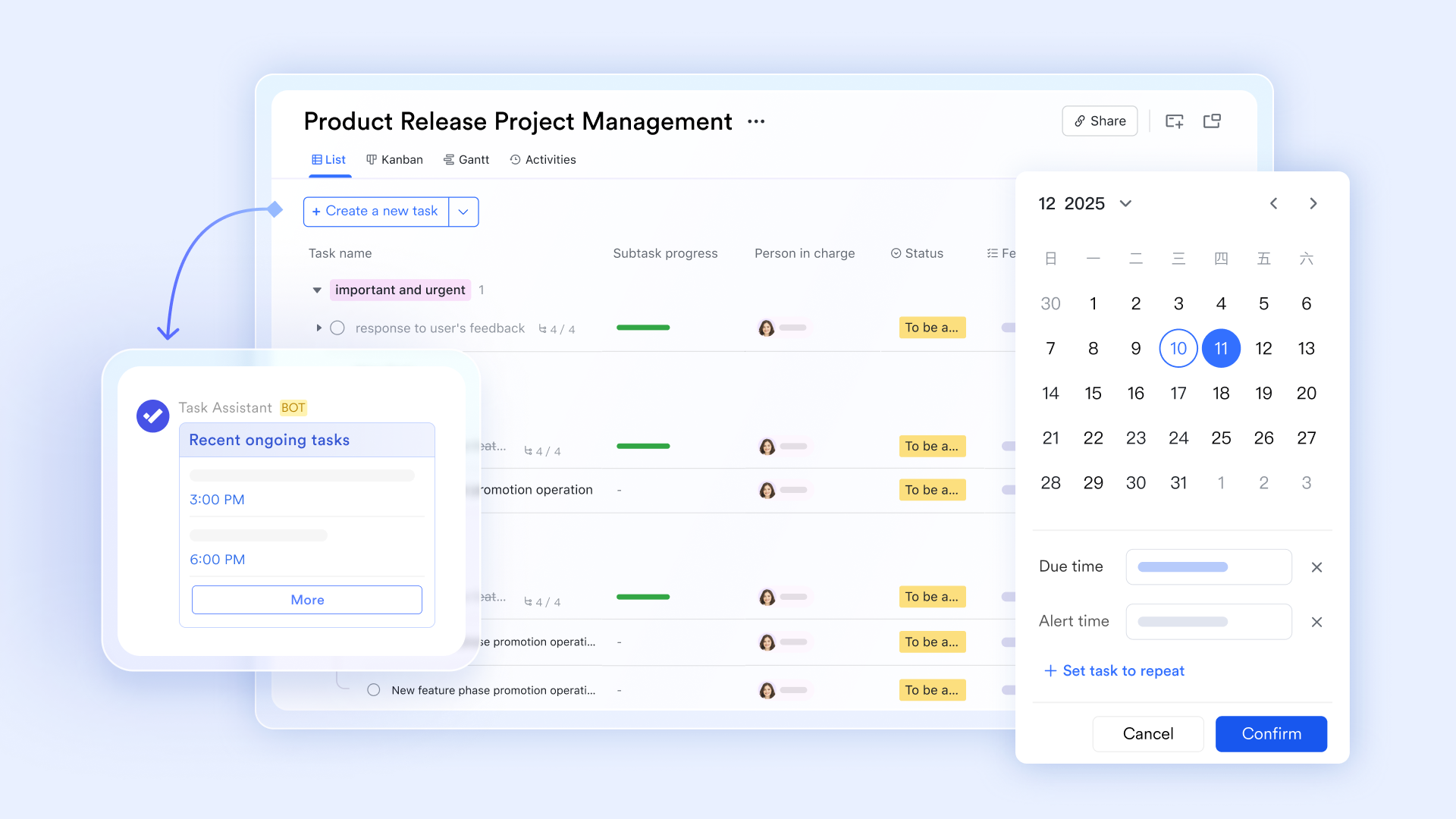
Lark Tasks is the unified hub for all your personal tasks. Whether it's a development task assigned to you from a project board, an action item automatically generated from meeting notes, or a to-do converted from a chat message with one click, everything appears in your task list. When creating a task, you can add detailed descriptions, upload attachments, and break down complex items into multi-level subtasks to track progress step by step. You can organize tasks by due date or by project, so you always know how many things are on your plate and which ones are most urgent.
Gain control over your task rhythm with multiple views
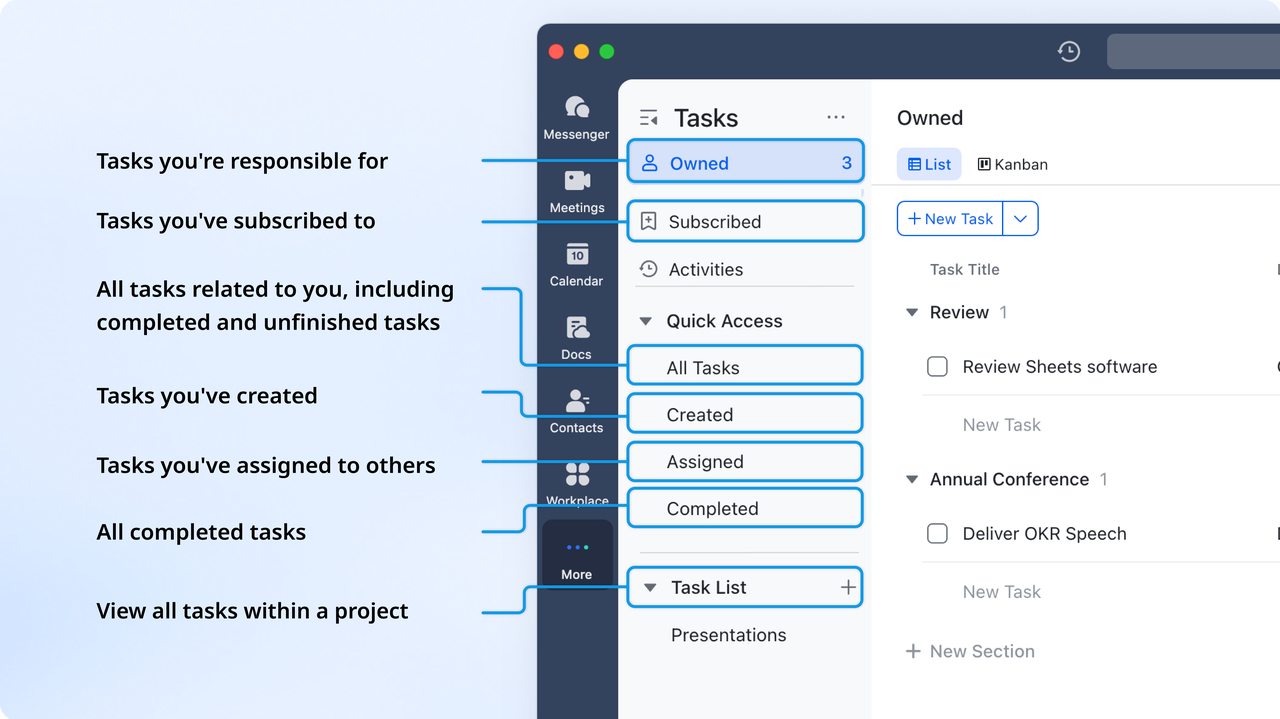
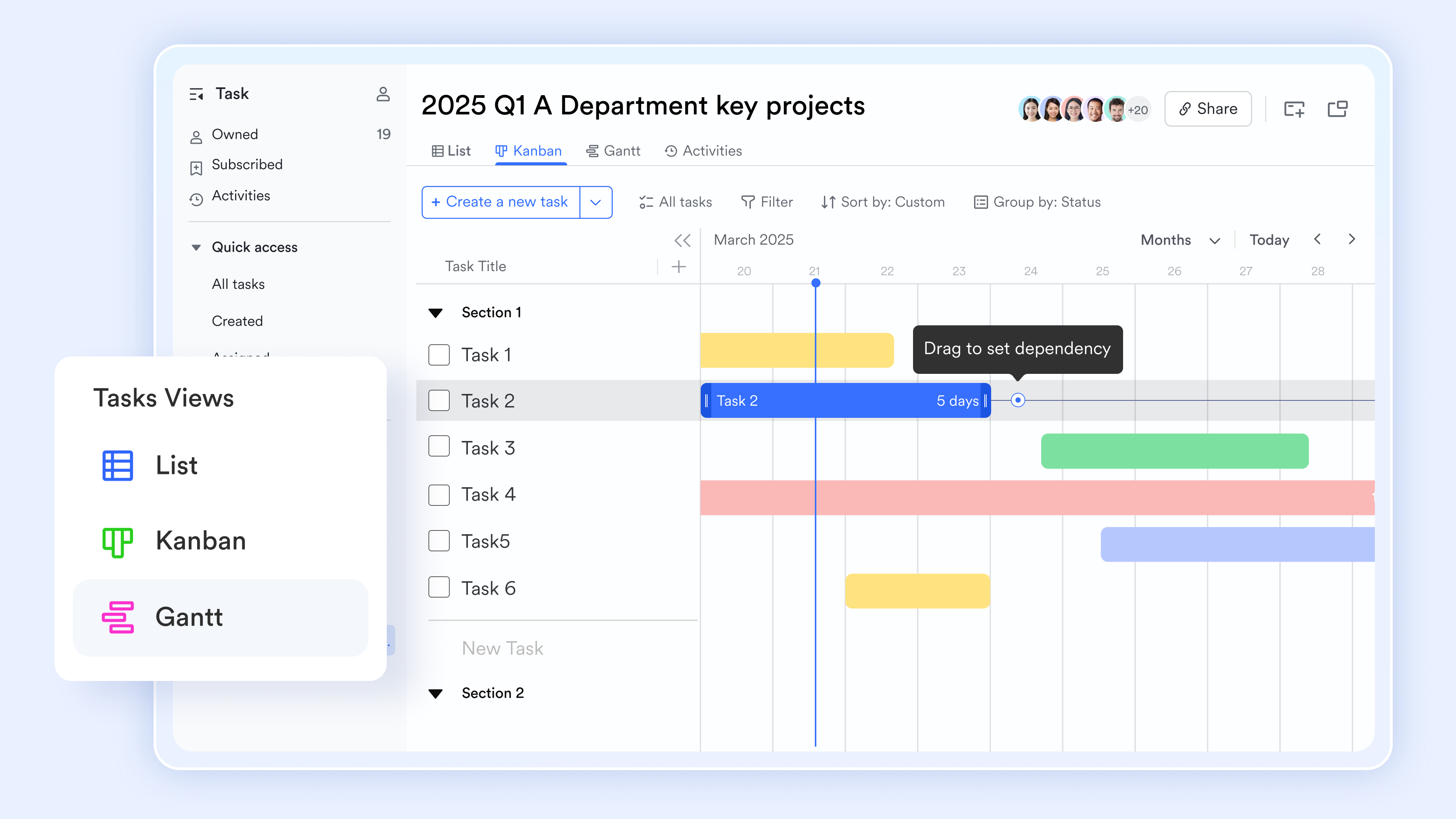
A long list of tasks can feel overwhelming and directionless. Lark Tasks supports switching between multiple views. Switch to Kanban view to group tasks by status (To Do, In Progress, Done) or by project, giving you a clear picture of where work is flowing and where bottlenecks are. Switch to Gantt view and all your tasks appear as time bars on a timeline. You can clearly see each task's start date, end date, duration, and dependencies between tasks. You can also drag the time bars directly on the Gantt chart to adjust schedules. With the same task data available in different views, you can always choose the perspective that works best for how you manage your day.
Turn chat discussions into tasks instantly
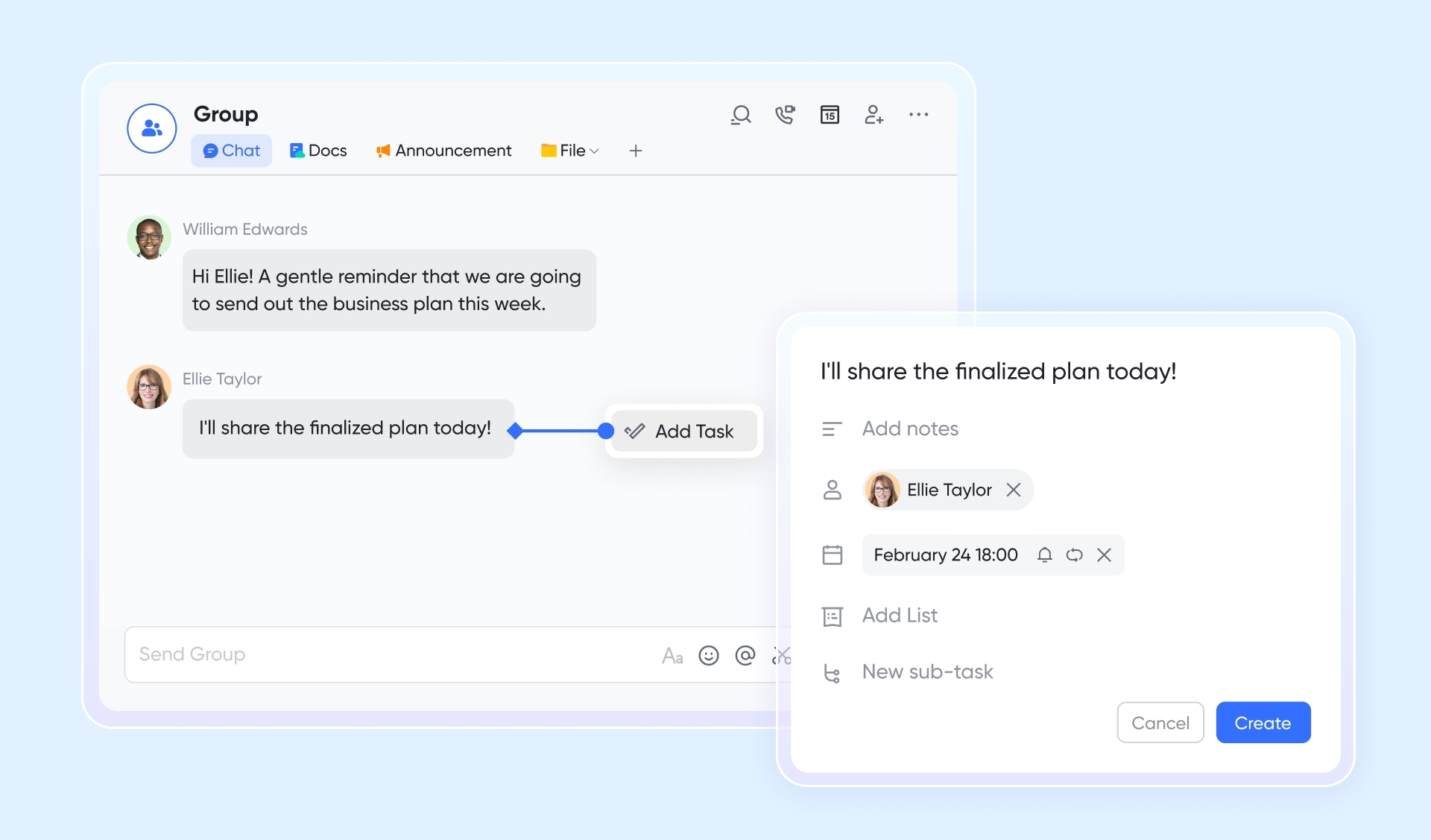
Group chats often produce spontaneous commitments like "I'll organize the document" or "remind me to send the email tomorrow," but these messages quickly get buried. Lark Messenger lets you turn any message into a task with one click. Just right-click the message, select "Create task," and the content is automatically filled in. You can then assign an owner, set a due date, and the task will immediately appear in the assignee's Lark Tasks. Chat is no longer a black hole for information—it becomes the starting point for action.
Protect important commitments with due date reminders
No matter how good your to-do list is, it's useless if you forget to check it. Lark Tasks offers flexible due date reminders. The task assistant will list all overdue tasks and tasks that are coming due at a set time. You can also set a default reminder time for new tasks, choosing to be automatically notified when a task is due. Let the tool come to you instead of you chasing after the tool. That's what an efficient Mac to-do app should be.
Cons:
- Advanced customization and features may require initial learning, though guidance is available through the Lark Help Center.
The verdict: Lark is the best to do list app for mac for remote and hybrid teams struggling with a fragmented tech stack. It stands out because it doesn't just manage tasks; it houses the communication, documentation, and automation that surround the work, replacing the need for separate standalone apps.
- Starter plan: Free forever plan that includes 11 powerful tools for up to 20 users. It also comes with 100GB of storage space, 1000 automation runs, AI translations, and more. No credit card needed.
- Basic plan: $6/user/month (billed annually) for up to 500 users. It includes everything in Starter and unlimited message history, 5TB of storage space, 1,000 automation runs, and more. Some users may need to contact sales to purchase this plan.
- Pro plan: $12/user/month (billed annually) for up to 500 users. It includes everything in Basic plus group calling for up to 500 attendees, 15TB of storage space, 50,000 automation runs, and more.
- Enterprise plan: Contact sales for custom pricing. Supports unlimited users and includes even more automation runs and advanced security, compliance, and management features.

Starter
Pro
Enterprise
Starter
For small teams with simple communication needs
$0
/ user / month
20 users max
18 months message history
1-on-1 video meetings
100 GB storage
Lark Docs & Mail
1000 Base automation runs/month
2000 rows per table in Base
Pro
For companies with comprehensive collaboration and management needs
$12
/ user / month
500 users max
Unlimited message history
500-participant video meetings
15 TB storage
Lark Docs & Mail
50k Base automation runs/month
20k rows per table in Base
Enterprise
For large companies with advanced security and organizational management needs
Get a personalized demo and pricing
Unlimited users
Unlimited message history
500-participant video meetings
15 TB storage + 30 GB storage/user
Lark Docs & Mail
500k Base automation runs/month
50k Base automation runs/month
Single sign-on (SSO)
Pro
For companies with comprehensive collaboration and management needs
$12
/ user / month
500 users max
Unlimited message history
500-participant video meetings
15 TB storage
Lark Docs & Mail
50k Base automation runs/month
20k rows per table in Base
2. Todoist: A versatile cross-platform task manager
Known for its incredible natural language processing, Todoist is a task management heavyweight that caters to users who want a frictionless way to dump ideas out of their heads. By simply typing "Buy office supplies every Friday at 4 PM," the app understands the intent, categorizes the item, and sets the recurring deadline automatically. While it operates beautifully across the web and mobile, its macOS version feels highly responsive, integrating neatly with the system menu bar so you can capture tasks without interrupting your current work.
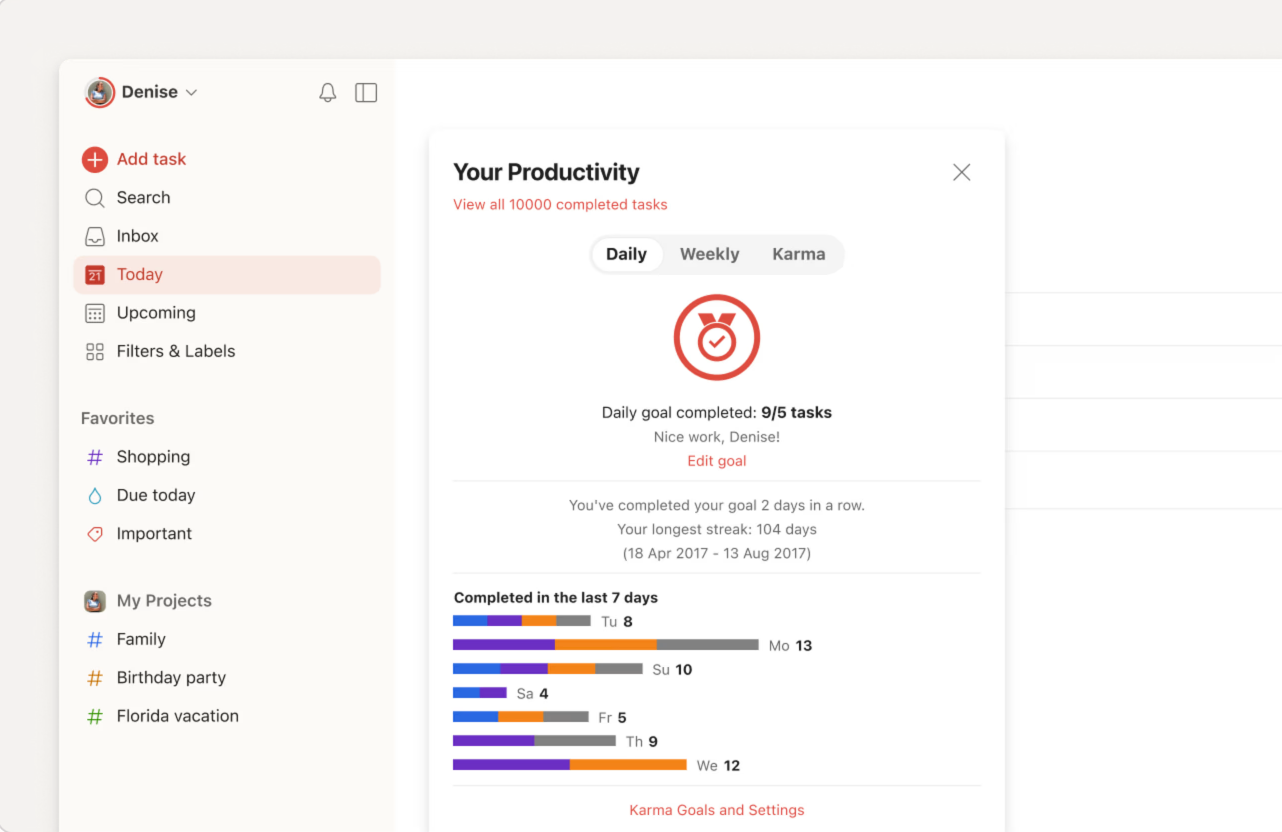
Image source: todoist.com
Pros:
- Industry-leading natural language input speeds up task creation.
- Widely available across Mac, Windows, iOS, Android, and web browsers.
- Clean, intuitive list and board views that adapt to different project sizes.
- Supports shared projects for basic family or small group organization.
- Integrates easily with third-party calendars and email clients.
Cons:
- The free tier imposes strict limits on project numbers and reminders.
- It lacks the deep native widget capabilities found in built-in macOS tools.
The verdict: Todoist is best for individuals who work across different operating systems (like a Mac at home and a PC at the office) and want a fast way to capture thoughts. It stands out due to its unbeatable natural language parsing.
Pricing:
- Basic: $0.00
- Pro: $5/month
- Business: $8/month
3. Things: The gold standard for elegant design
Things blends powerful features with a famously elegant, uncluttered design. For Mac users who care deeply about aesthetics and a native macOS feel, this app provides a calming environment to organize daily to-dos. It uses straightforward categories like Today, Upcoming, and Someday, allowing you to structure complex goals without feeling overwhelmed by an overly technical interface. The app also features exceptional keyboard shortcut support, enabling you to navigate entirely without a mouse.
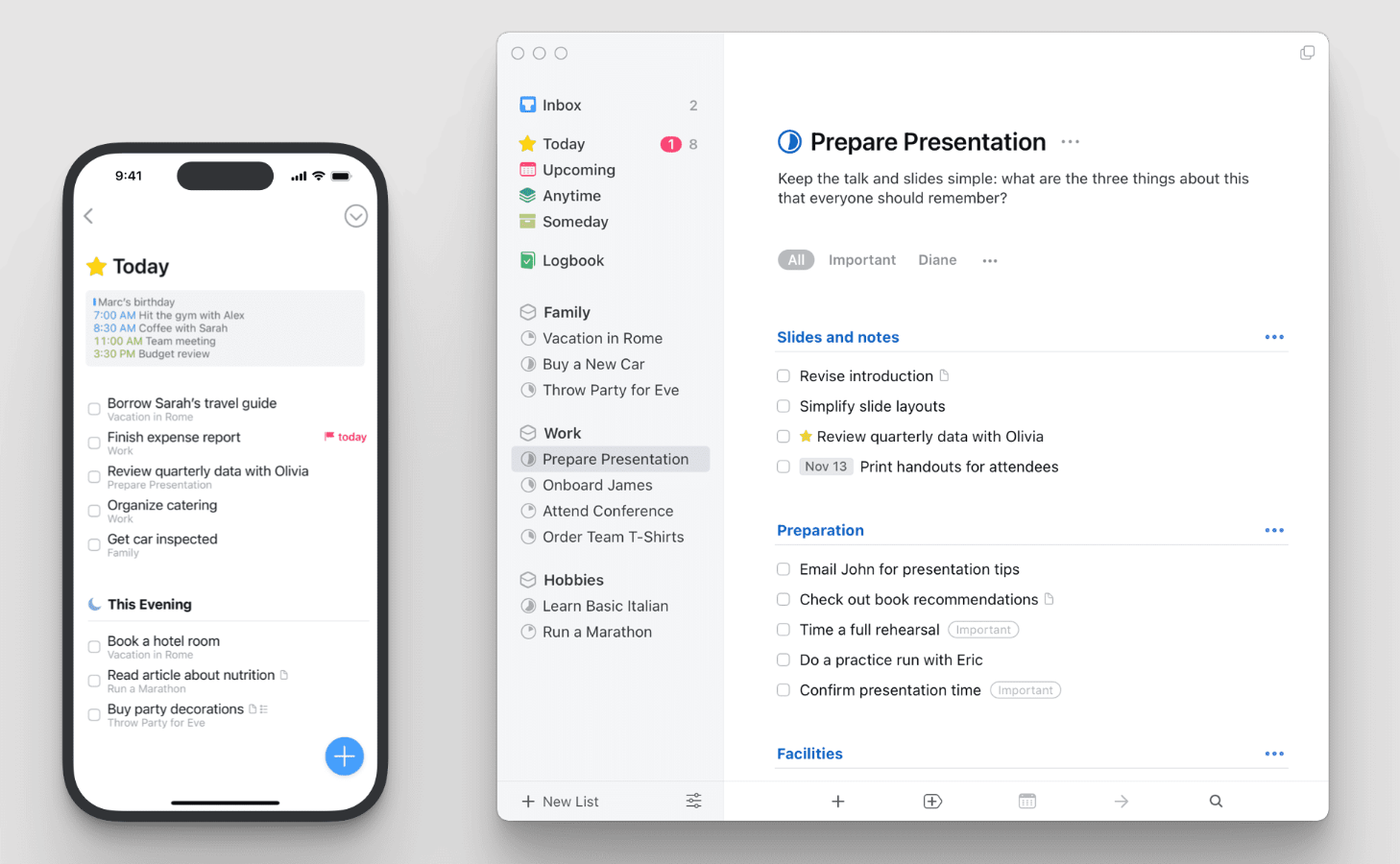
Image source: things.com
Pros:
- Beautiful, award-winning user interface that feels right at home on macOS.
- Robust keyboard shortcut support for rapid navigation.
- Excellent "Quick Add" feature that functions from anywhere on the system.
- Flawless integration with Apple Calendar to view meetings alongside tasks.
- High-level privacy, as data processing happens locally on your device.
Cons:
- No native versions exist for Windows or Android.
- Requires separate purchases for the Mac, iPad, and iPhone applications.
The verdict: Things is ideal for solo professionals and creatives who value a highly polished, distraction-free environment. It stands out by turning task organization into a visually pleasing, almost tactile experience.
Pricing:
- Mac: $49.99
- iPad: $19.99
- iPhone: $9.99
4. OmniFocus: A powerhouse for GTD methodology
OmniFocus is tailored specifically for power users and die-hard fans of the Getting Things Done (GTD) methodology. Instead of acting as a simple checklist, it operates as a robust database for your life, handling hundreds of concurrent tasks, sub-projects, and complex dependencies. You can create custom "Perspectives" to filter tasks by context—such as showing only high-energy tasks tagged "office" that require less than 15 minutes of effort.
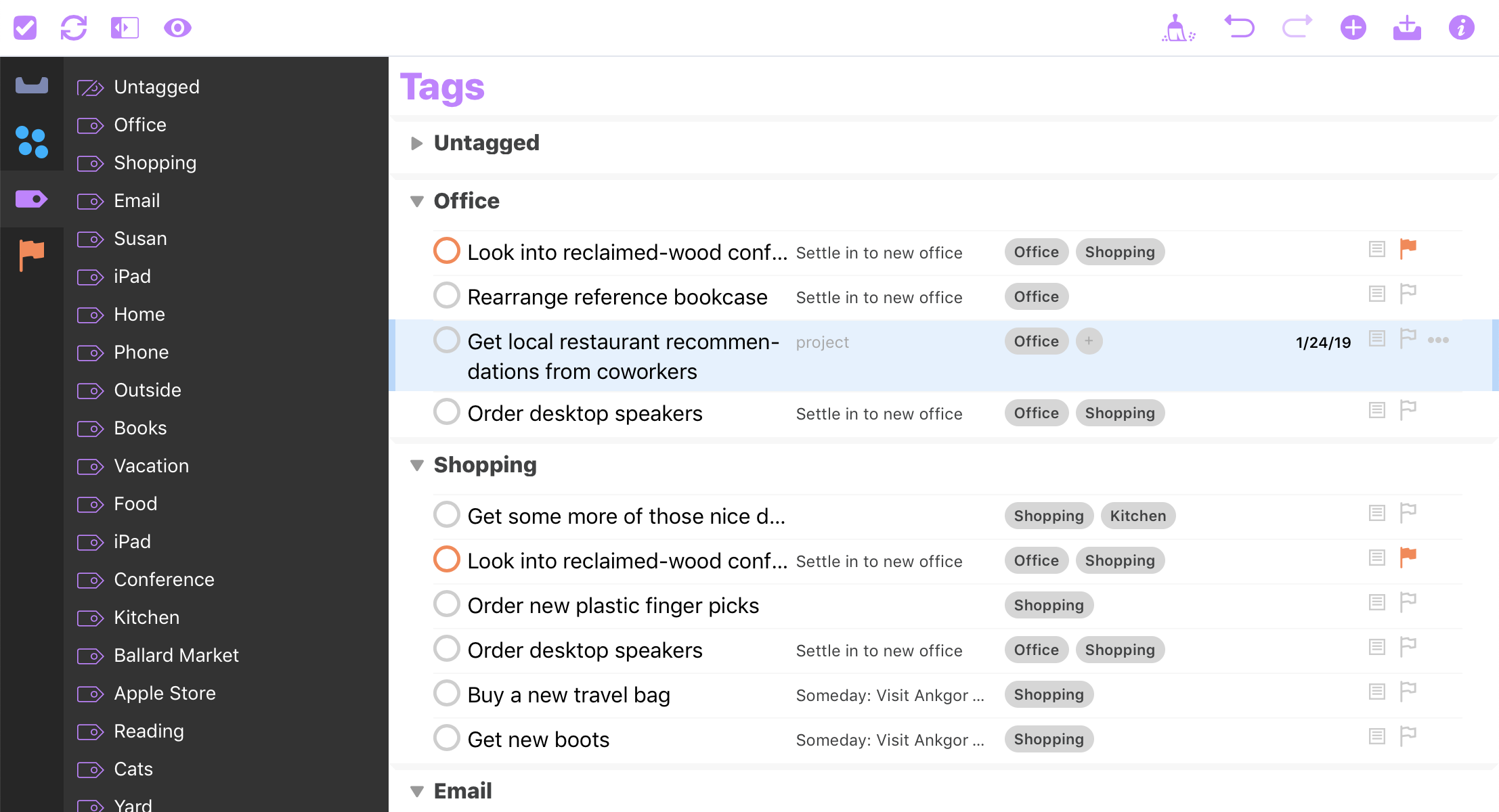
Image source: omnigroup.com
Pros:
- Unmatched depth for organizing complex project hierarchies.
- Highly customizable filtering through custom Perspectives.
- Supports defer dates, keeping future tasks hidden until they become actionable.
- Deep AppleScript and automation capabilities for personalized workflows.
- End-to-end encryption ensures your synced data remains entirely private.
Cons:
- Features a notoriously steep learning curve for beginners.
- Pricing is quite high compared to standard list apps.
The verdict: OmniFocus is best for executives, project managers, and productivity enthusiasts who need granular control across massive workloads. It stands out as the most rigorous and customizable organizational system available natively on Mac.
Pricing:
- Standard License: $74.99
- Pro License: $149.99
5. 2Do: A highly adaptable custom task organizer
2Do takes a unique approach by offering extensive customization, allowing users to mold the interface to fit their exact workflow rather than forcing them into a rigid system. Whether you want a basic daily checklist or a full-blown project management layout with start dates and tags, 2Do scales to your needs. It excels at batch operations, meaning you can select dozens of tasks at once and apply tags, change due dates, or move them between lists in just a few clicks.
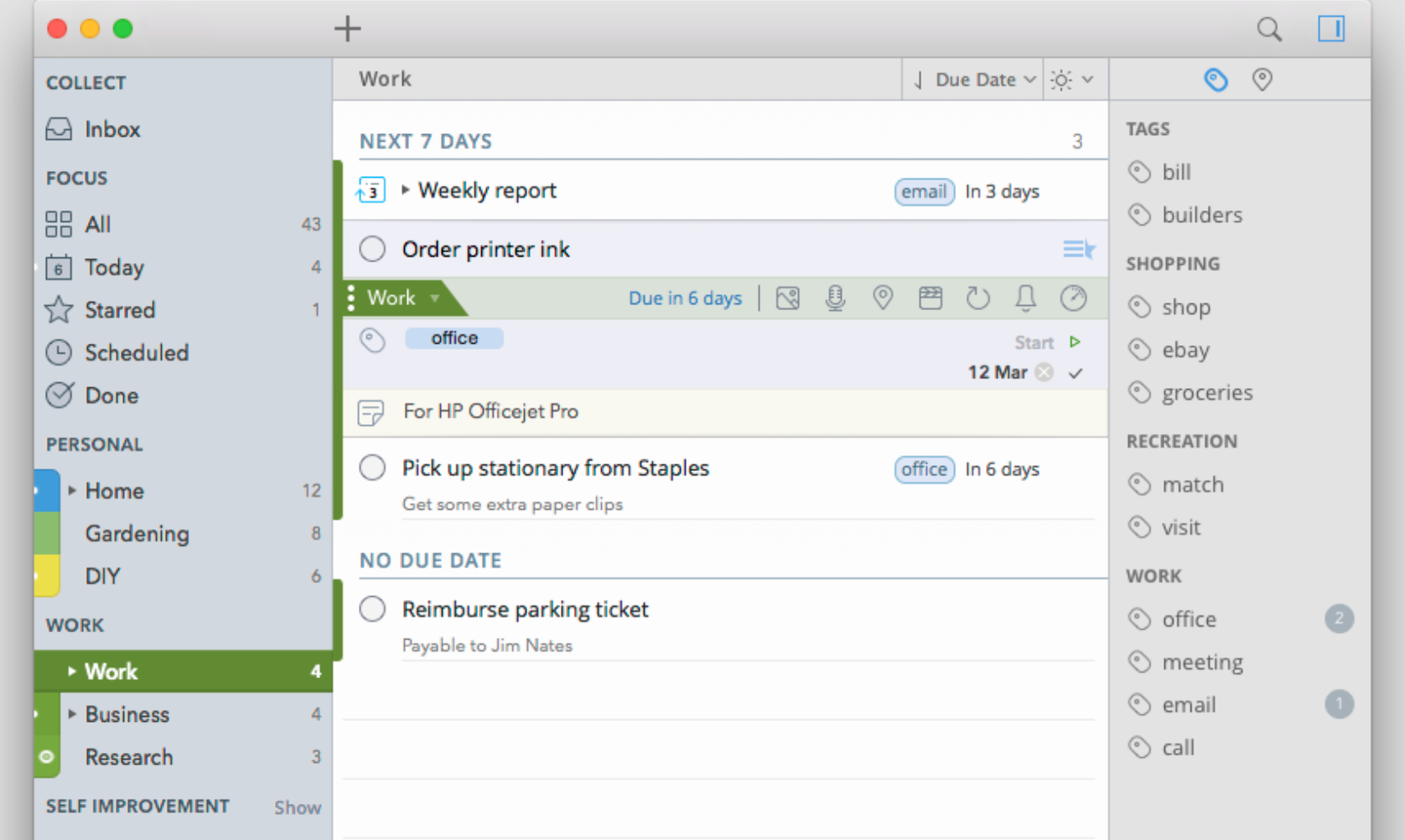
Image source: 2do.com
Pros:
- Extremely flexible interface that adapts to both basic and advanced workflows.
- Powerful batch editing capabilities save significant administrative time.
- Robust search parameters and smart list functions.
- Supports multiple sync protocols, including iCloud, Dropbox, and CalDAV.
- Offers password protection for individual lists holding sensitive information.
Cons:
- The user interface can feel slightly dated compared to modern minimalist apps.
- Setting up cross-device sync requires technical configuration if you avoid built-in cloud options.
The verdict: 2Do is best for users who want total control over how their task app looks and behaves. It stands out for its impressive batch processing power and highly adaptable list structure.
Pricing:
- Mac: $49.99
- iPhone and iPad: $9.99
6. GoodTask: A powerful upgrade for Apple Reminders
GoodTask takes the basic foundation of Apple's built-in Reminders app and enhances it with the functionalities that power users crave. If you already use iCloud to sync your daily chores but find the default app too limiting for project management, GoodTask serves as a robust overlay. It reads your existing Reminders and Calendar data, transforming them into Kanban boards, detailed smart lists, and comprehensive daily agendas without forcing you to migrate to a new database.
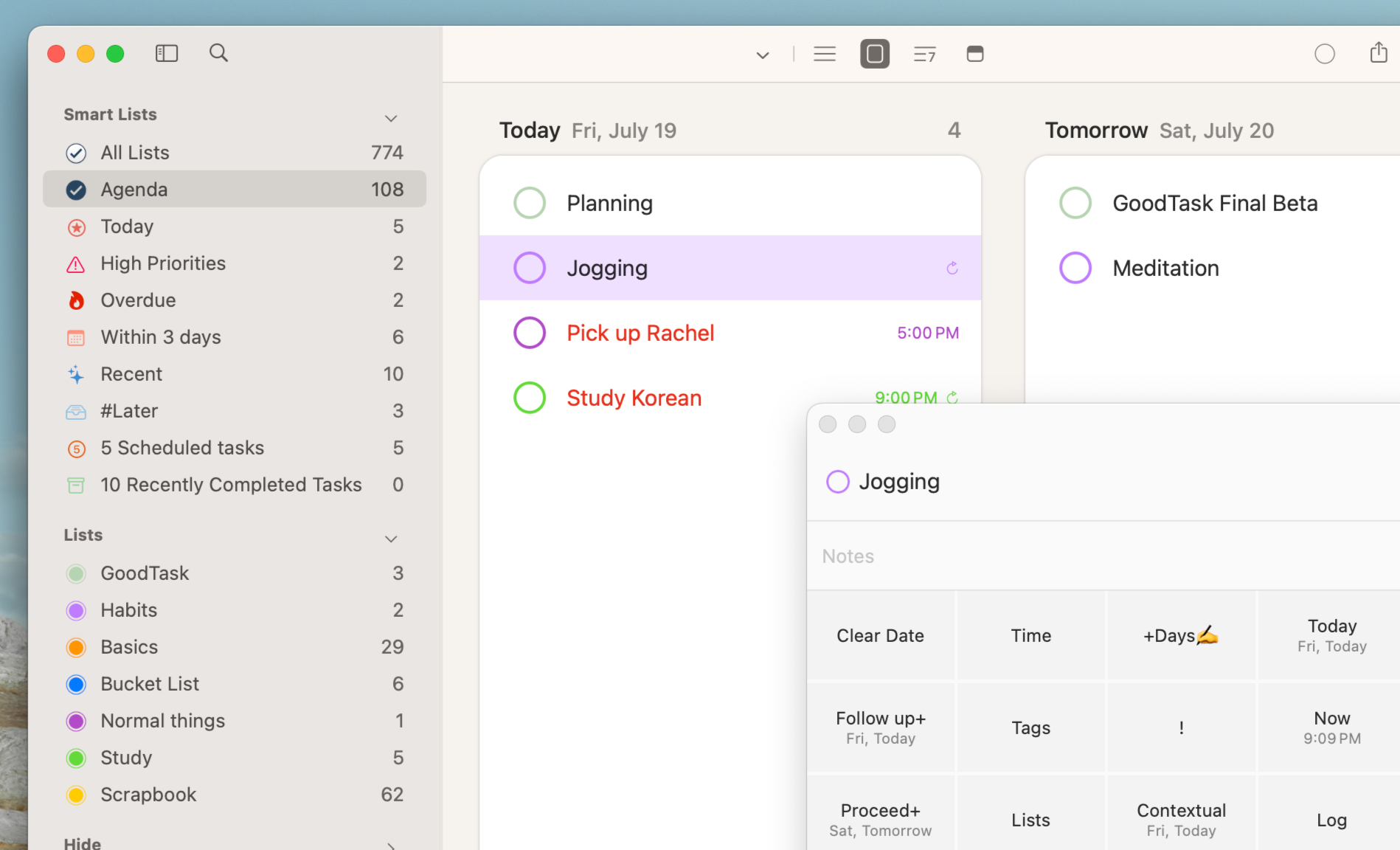
Image source: goodtask.com
Pros:
- Builds directly on top of your existing Apple Reminders and Calendar data.
- Offers Kanban board views for visual project tracking.
- Highly customizable smart lists based on precise tags, dates, and text snippets.
- Powerful quick actions allow you to edit task details instantly.
- Includes a highly functional menu bar application and interactive widgets.
Cons:
- Because it relies on Apple's database, it is entirely restricted to the Apple ecosystem.
- The sheer volume of customization options can feel overwhelming at first glance.
The verdict: GoodTask is best for existing Apple Reminders users who need advanced project views like Kanban boards without migrating to a completely new system. It stands out by brilliantly leveraging the native macOS database to deliver pro-level features.
Pricing:
- Mac: $39.99
- iPhone and iPad: Free (in-app option of $19.99)
Key features to consider when choosing your Mac to-do list app
Choosing the right to-do list app for your Mac goes beyond just listing tasks. It's about finding a tool that seamlessly integrates into your workflow and addresses your unique needs. Here are the crucial features I recommend looking for:
- Workflow flexibility: Whether you're a GTD enthusiast, a Kanban board lover, or someone who just needs a simple checklist, the app should adapt to your preferred method of organizing. Avoid tools that force you into a single, rigid system.
- Collaboration capabilities: If you work with others, even occasionally, the ability to share lists, assign tasks, and track project progress is non-negotiable. Look for features like comment threads, real-time updates, and shared views.
- Cross-device synchronization: Your tasks shouldn't be trapped on your desktop. Ensure the app offers reliable, fast syncing across your iPhone, iPad, and potentially other platforms like Windows or Android if you use them. This ensures you can always capture ideas and check your lists, no matter where you are.
- Automation and integrations: The best tools can talk to other apps you use. Consider if it integrates with your calendar, email, or even offers powerful automation rules to streamline repetitive tasks. This can save you significant time and mental effort.
Conclusion
Finding the best to do list app for Mac is about choosing a system that removes friction from your daily routine. If you work entirely alone, native tools or premium minimalist apps provide excellent focus. However, if your day involves coordinating with a team, relying on isolated task apps will only create silos and slow you down. Consolidating your work into a unified platform ensures nothing falls through the cracks. Ready to stop jumping between chat windows and task trackers? Try Lark today to bring your communication, documents, and project deadlines into one workspace.
FAQs
Is there a to do list app on Mac?
Yes, Mac users have plenty of options, starting with the built-in Apple Reminders for basic personal tasks and grocery lists. For professional work and team collaboration, you can download third-party tools directly from the App Store or developer websites. For example, Lark provides a native Mac app that combines your to-do lists, team messaging, and shared calendars into one unified workspace. This setup allows you to track individual assignments and manage complex team projects without constantly switching between different browser tabs.
Is there a Microsoft Todo app for Mac?
Yes, Microsoft To Do has a dedicated, native application available for macOS that you can download directly from the Mac App Store. It is an excellent choice if you already use the broader Microsoft 365 ecosystem, as it syncs directly with your Outlook Tasks and Planner. The Mac version offers a clean interface tailored for Apple displays while maintaining reliable cross-platform synchronization. This ensures your daily lists and reminders stay updated whether you are typing on your MacBook or checking your Android phone on the go.
How to create a to-do list on Mac?
The simplest way to create a basic list is by opening the pre-installed Apple Reminders app and adding your items, or by using the checklist formatting tool inside Apple Notes. However, for work-related projects, using a centralized collaborative workspace is much more efficient. In Lark, you can instantly generate a to-do list directly within a team chat or use Lark Base to build detailed project trackers. This approach allows you to assign actionable steps and due dates to colleagues right where the conversation is already happening.
Is there a Mac equivalent to Task Manager?
If you are looking for the system utility to monitor CPU usage or force-quit frozen applications, the Mac equivalent to the Windows Task Manager is called "Activity Monitor," which is located in your Utilities folder. If you are referring to software for organizing daily chores and work assignments, macOS relies on its built-in solution called Reminders. For professional project tracking and managing complex workflows, Mac users usually download specialized third-party applications to handle their structured daily agendas.
Related reading
Table of contents
Start using Lark today

Manage all your work in one place
Boost team efficiency by 10x
Save up to 70% on software costs
Table of contents
Start using Lark today
Manage all your work in one place
Boost team efficiency by 10x
Save up to 70% on software costs
Keep reading








2026 Lark Technologies Pte. Ltd.
Headquartered in Singapore with offices worldwide.






Explore: