Most projects don't fail because the work is too hard. They fail because no one could see the full picture. Deadlines live in someone's inbox, priorities shift without notice, and stakeholders ask for updates that take half a day to pull together. Project roadmap templates fix that before it starts. It gives every team a shared, structured view of what's being built, who owns it, and when it lands, without starting from a blank page. This guide covers every type of project roadmap template worth using, when to reach for each, and how to make your roadmap a living document rather than a filing-cabinet artefact.
Key takeaways: Objectives of project roadmap templates
- A project roadmap template is not a task list; it is a communication tool that maps goals, phases, milestones, and owners against a timeline for every stakeholder level.
- Different methodologies and audiences require different roadmap formats; using a Gantt-style template for an agile sprint team creates confusion rather than clarity.
- A milestone template anchors the roadmap to measurable checkpoints, preventing the common failure of team tracking activity without ever confirming progress.
- Lark offers free, collaborative project roadmap templates built on Lark Base, with Gantt view, Kanban view, real-time editing, and built-in automation that keeps the roadmap current without manual updates.
What does a project roadmap template actually do?
A project roadmap template provides a high-level visual overview of a , phases, timelines, and major milestones. Its main purpose is communication rather than task management. It helps stakeholders, project managers, and team members understand the project's overall direction, how phases connect, and when key deliverables are expected. By organising information into a timeline or milestone-based structure, a roadmap ensures that everyone sees the same plan and understands the priorities.
However, a roadmap template is not a . It does not replace sprint boards, task management systems, or detailed project schedules. Instead of listing every small task, it focuses on strategic checkpoints and progress indicators. The roadmap also cannot automatically guarantee project success—it simply provides visibility. Teams still need to maintain and update the roadmap regularly, so it reflects real progress rather than becoming an outdated planning document.
Types of project roadmap templates
Project roadmap templates come in different formats depending on the team's workflow, audience, and project complexity. Common types include timeline-based roadmaps, milestone templates, agile sprint roadmaps, cross-functional roadmaps, and presentation-ready formats such as flowchart PPT templates. Choosing the right template ensures the clearly while matching how the team actually plans and delivers work.
- Timeline roadmap template for projects with fixed delivery dates, presented as a horizontal Gantt-style view by phase and milestone. Used by PMs to show executive stakeholders a delivery sequence without surfacing task-level detail.
- Milestone template strips everything back to key checkpoints and go/no-go decisions. Used when leadership only needs to know whether the project is on track at phase boundaries, not what the team does daily.
- Agile sprint roadmap template maps epics and user stories across quarters, with sprint cycles nested within. Used by product and engineering teams running iterative delivery.
- Flowchart PPT template for presentations where the roadmap is shown to a non-technical audience once. Communicates decision logic and as a visual flow rather than a timeline. Best for kickoff decks, board updates, or client proposals.
- Google Docs project roadmap template covers when a simple text or table-based roadmap in Google Docs is appropriate (solo operators, early alignment docs, small teams) and where it starts to fail (live status tracking, multi-owner accountability, dependency mapping).
- Cross-functional roadmap template for projects spanning multiple departments and separate workstreams. Uses swimlane formatting to show each team's contribution against a shared timeline.
- Marketing campaign roadmap template maps campaign phases (brief, creative, launch, reporting) against a calendar timeline, with dependencies between content production and channel activation.
Outline your project roadmap and execute with Lark
Ready-to-use project roadmap templates
Building a roadmap from scratch can slow down project planning and create inconsistencies across teams. Ready-made project roadmap templates provide a structured starting point with predefined fields for milestones, timelines, and ownership. With Lark's collaborative templates, teams can quickly set up roadmaps, customize views, and keep project progress up to date in real time.
Project roadmap
A project roadmap template provides a high-level overview of a project's goals, phases, and major milestones over time. It helps teams of work connect and ensures stakeholders understand the overall direction of the project. By organizing deliverables, ownership, and timelines in one place, the roadmap keeps everyone aligned throughout the project lifecycle.
Project management Gantt roadmap
This template is a visual tool designed for detailed project scheduling. It allows project managers and stakeholders to display project timelines, task dependencies, and owners in a single view. Mapping tasks against a time axis, it helps identify potential delays early and ensures efficient resource allocation.
Task roadmap chart
This is a comprehensive, multi-functional tool designed to centralize all work items in one place. It includes a variety of perspectives, such as a Task List for detail, a Status Kanban for workflow tracking, and a Task Calendar for deadline management.
Project management roadmap
This template serves as a "command center" for your projects. It streamlines the management process by combining high-level project information (background and objectives) with granular execution data. Key features include weekly progress-reporting forms that sync automatically with a dashboard.
Roadmap
A roadmap template helps teams outline strategic goals, key initiatives, and timelines in a clear visual format. It provides a big-picture view of what needs to be achieved and when, making it easier for stakeholders to understand priorities. By structuring plans around phases and milestones, the roadmap keeps teams focused on long-term objectives while tracking progress.
Product roadmap
A product roadmap template outlines the planned development of a product over time, including major features, releases, and milestones. It helps product managers communicate priorities, align teams around product strategy, and toward upcoming launches. By organizing initiatives along a timeline, the roadmap ensures that development efforts remain aligned with broader product goals.
Feature roadmap and timeline for product strategy
A feature roadmap and timeline template helps product teams plan and prioritize upcoming features across a defined timeframe. It outlines when specific features are expected to be developed, tested, and released, ensuring alignment between product strategy and execution. By visualizing feature delivery over time, teams can coordinate development efforts, manage expectations, and communicate product progress clearly to stakeholders.
Project roadmap Gantt chart
A project roadmap visualizes project phases, tasks, and milestones along a timeline using horizontal bars. It helps project managers track progress, identify scheduling overlaps, and understand dependencies between different project activities. By presenting the entire project schedule in one view, the Gantt chart makes it easier to manage timelines and keep teams aligned on delivery deadlines.
Sprint planning
A template helps agile teams organize and prioritize tasks for an upcoming sprint. It outlines sprint goals, user stories, task assignments, and timelines, so the team clearly understands what needs to be delivered during the sprint cycle. By structuring work before the sprint begins, the template helps teams stay focused, manage workloads, and track progress efficiently.
Technology implementation roadmap for project managers
A technology implementation roadmap template helps project managers plan and coordinate the rollout of new systems, tools, or infrastructure. It outlines key phases such as planning, testing, deployment, and adoption, along with the milestones associated with each stage. By mapping these steps along a timeline, the roadmap ensures technical teams, stakeholders, and leadership stay aligned throughout the implementation process.
Meet Lark: The all-in-one collaboration platform for project planning
is an all-in-one collaboration platform designed to help teams plan, manage, and execute projects more efficiently. It combines project management, communication, and in a single workspace, so teams can coordinate work without switching between multiple apps. With features like Lark Base, shared docs, messaging, and automation, teams can build and manage project roadmaps in real time.
One dataset, every view of your roadmap needs
lets project managers build the roadmap as a using custom field types: single-select status dropdowns (Not Started, In Progress, At Risk, Complete), date fields for phase start and end, member fields for milestone owners, and link fields to map dependencies between records. Every record updates in real time across all users simultaneously. When a milestone owner changes a status field from "In Progress" to "At Risk," every team member, stakeholder, and executive viewing the base sees the update instantly, without a file being re-exported, re-shared, or re-presented.
One roadmap, three audiences, zero duplicate files
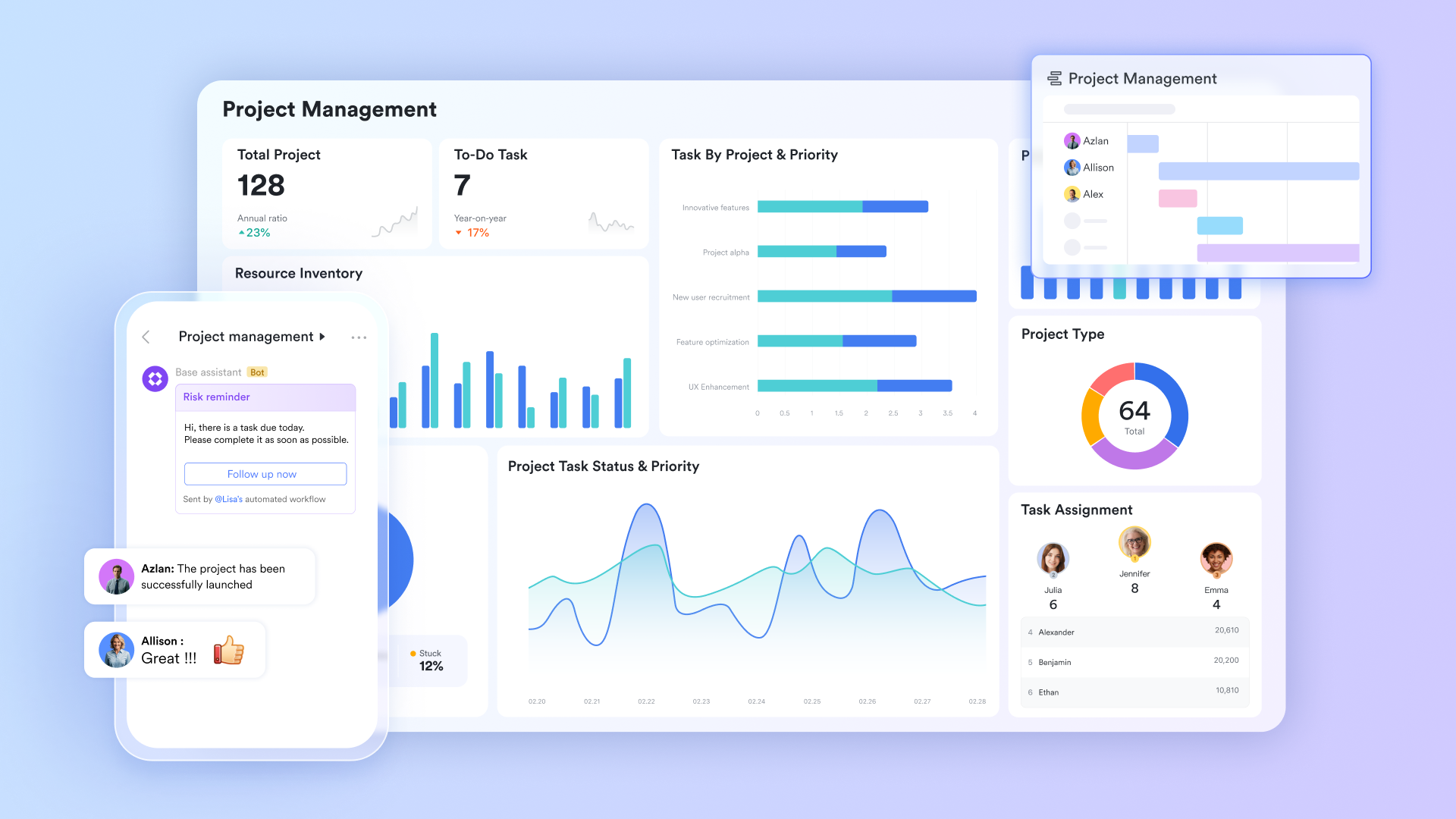
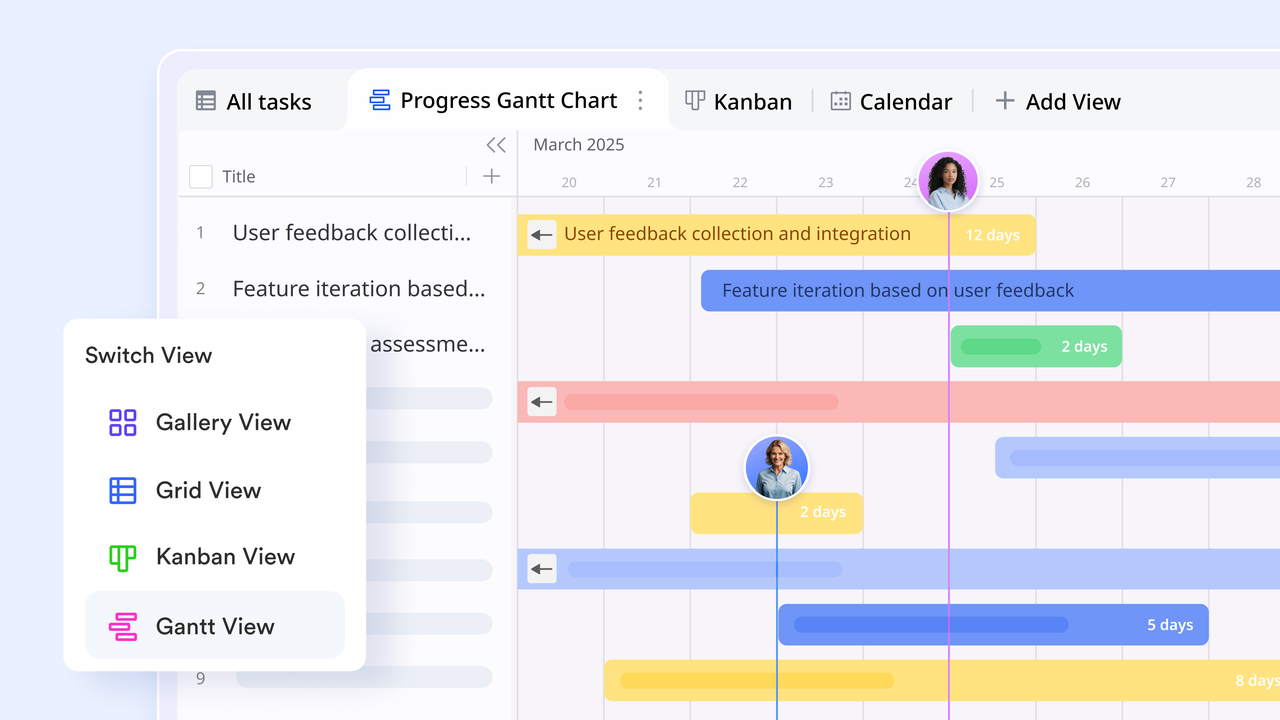
The same roadmap table renders in five formats without duplicating or reformatting data. The renders milestone start and end dates, and dependencies, as a visual timeline, so project managers can spot scheduling conflicts and critical-path risk at a glance. Kanban views groups of tasks by status field, so team members drag cards across columns as work progresses. Calendar view maps milestone due dates across a monthly layout. The displays configurable charts—milestone completion rate, overdue item count, and phase progress by owner—giving stakeholders a live read on project health without opening the task table.
Status updates and automated workflows
Lark Base Automation lets project managers configure trigger-action rules that keep the roadmap current without manual follow-up. When a milestone's due date passes, and the status field is still set to In Progress, an automation rule sends a notification directly to the milestone owner via Lark Messenger. When a dependent milestone is marked complete, the the next milestone's status from Not Started to In Progress and notifies the new owner. When a phase reaches a certain level across all milestones, the rule automatically updates the phase-level status field. 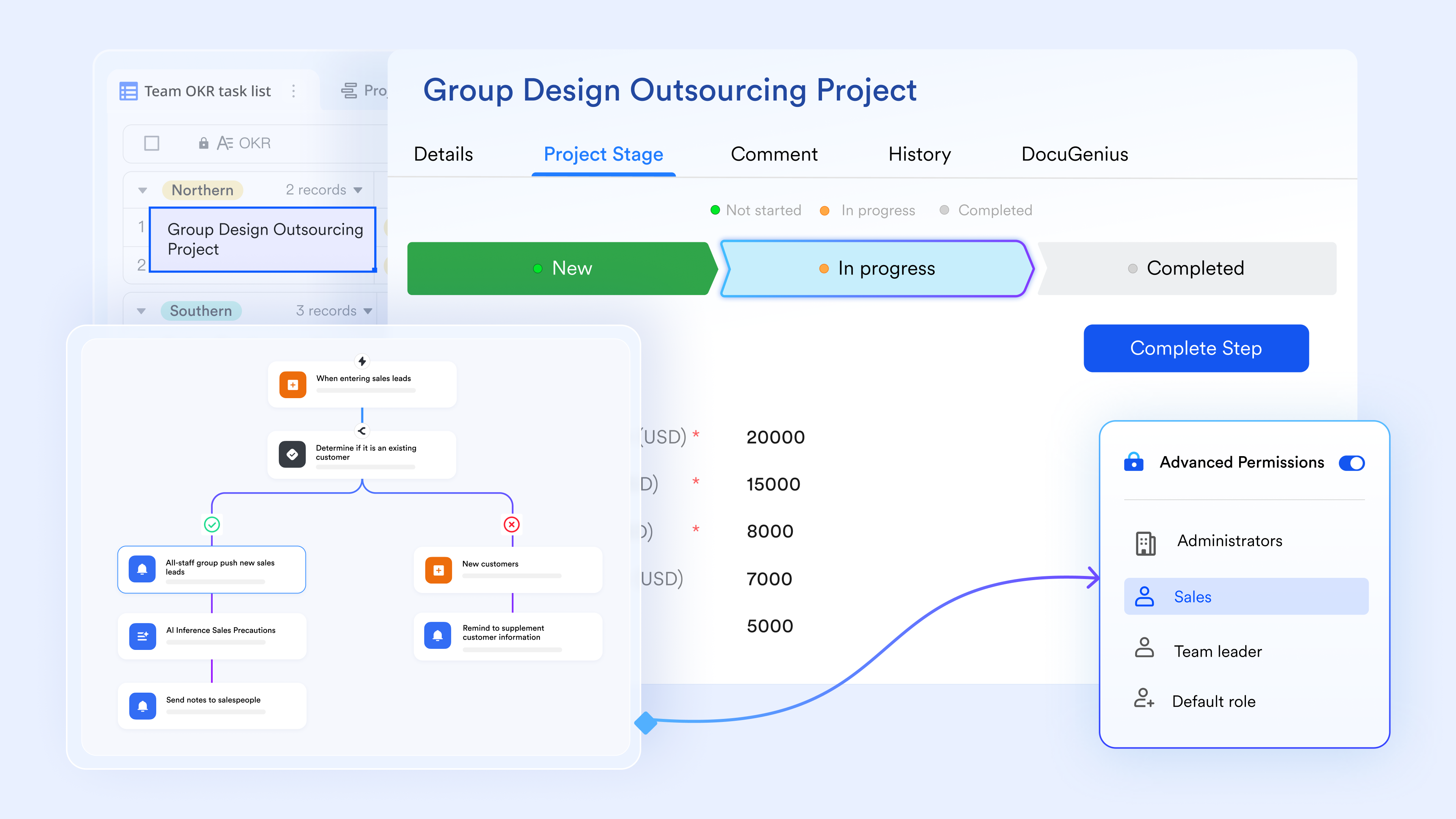
Project briefs and scope documents
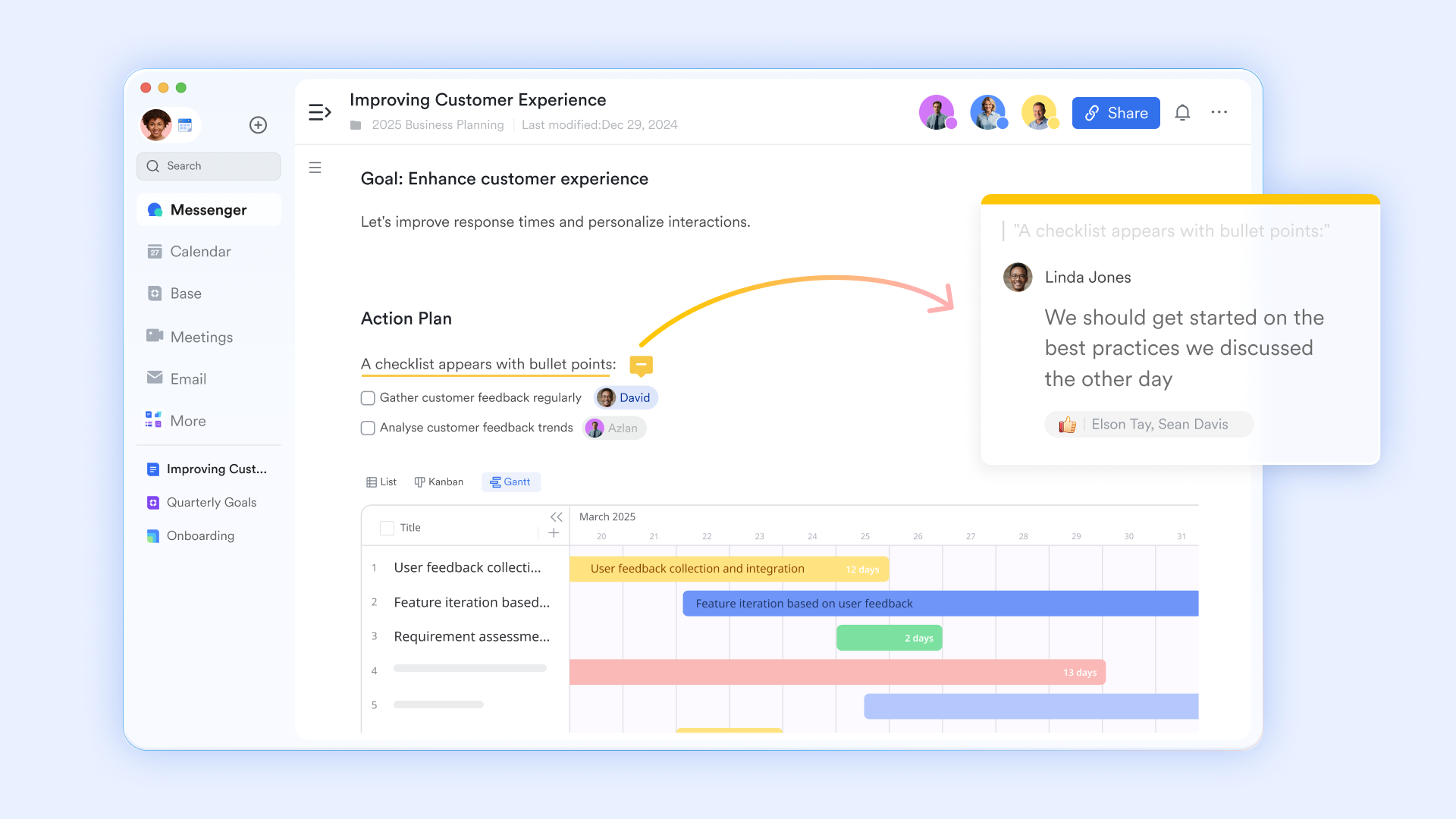
supports with inline comments, version history, and structured content blocks, including tables, checklists, and embedded Lark Base records. Project managers create the project brief, scope statement, and milestone acceptance criteria in Lark Docs and link each document directly to the corresponding milestone record in Lark Base. When a team member opens a milestone record, the linked Lark Doc is accessible from the same view.
Roadmap updates connected to the work
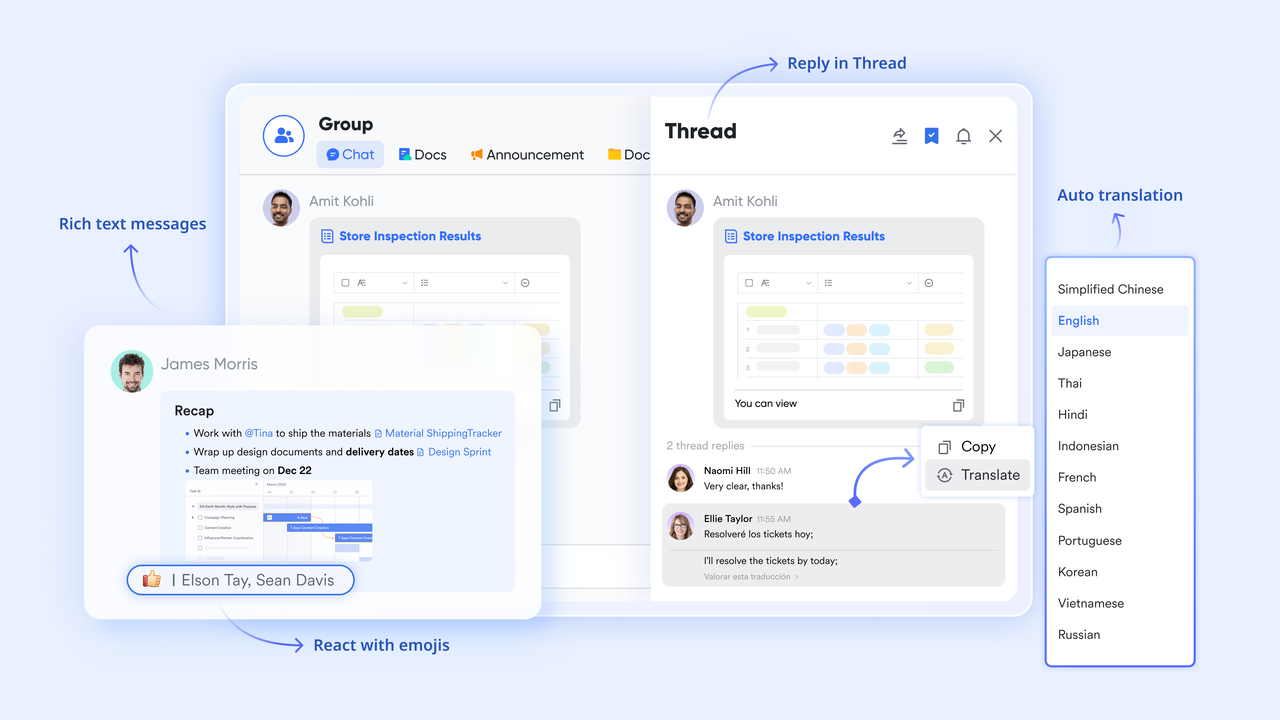
supports dedicated project group chats, direct messages, and topic threads within the same platform where the roadmap lives. When a milestone status changes or an automation fires, the notification arrives in Lark Messenger as a structured message that includes the specific Lark Base record, the field that changed, and the new value. Team members can share a milestone record directly into a , discuss blockers inline, and attach a Lark Doc for review—without switching to a separate communication tool.
:
- Starter plan: Free forever plan that includes 11 powerful tools for up to 20 users. It also comes with 100GB of storage, 1000 automation runs, AI translations, and more.
- Pro plan: $12/user/month (billed annually) for up to 500 users. It includes everything in Starter plus group calling for up to 500 attendees, 15TB of storage, 50,000 automation runs, and more.
- Enterprise plan: for custom pricing. Supports unlimited users and includes additional automation runs, as well as advanced security, compliance, and management features.
For small teams with simple communication needs

18 months message history
1000 Base automation runs/month
2000 rows per table in Base
Most POPULAR
For companies with comprehensive collaboration and management needs
Unlimited message history
500-participant video meetings
50k Base automation runs/month
20k rows per table in Base
For large companies with advanced security and organizational management needs
Get a personalized demo and pricing
Unlimited message history
500-participant video meetings
15 TB storage + 30 GB storage/user
500k Base automation runs/month
50k Base automation runs/month
Most POPULAR
For companies with comprehensive collaboration and management needs
Unlimited message history
500-participant video meetings
50k Base automation runs/month
20k rows per table in Base
Signs your project roadmap template is no longer doing its job
A project roadmap should act as a reliable source of truth for teams and stakeholders. When it stops reflecting real progress or becomes difficult to interpret, teams begin relying on separate updates and meetings instead. Recognizing these warning signs early helps organizations fix roadmap issues before alignment breaks down.
- Stakeholders ask for a status update that already exists in the roadmap: If stakeholders repeatedly request in the roadmap, it usually indicates the roadmap is unclear or difficult to access. Important information may be buried, outdated, or presented in a confusing format. A roadmap should make progress easy to understand at a glance.
- The roadmap shows all milestones as "On Track" even when deadlines have already slipped: When milestone statuses remain unchanged despite delays, the roadmap loses credibility. Stakeholders begin to question whether the information reflects reality. Accurate status updates are essential for maintaining trust and enabling teams to address risks early.
- Different teams are using different versions of the roadmap exported at different times: Multiple versions of the roadmap create confusion and misalignment across teams. Some stakeholders may follow outdated timelines while others work from newer plans. A single shared roadmap ensures everyone references the same information.
- The roadmap was last updated the week it was created: A roadmap that remains unchanged after its initial creation quickly becomes irrelevant. Projects evolve constantly, and the roadmap should reflect those changes. Regular updates help the roadmap remain a living document rather than a static planning artefact.
- New team members cannot understand the plan without someone walking them through it verbally: If a new team member needs a detailed explanation to understand the roadmap, the structure may be too complex or unclear. A well-designed roadmap should communicate the project flow, milestones, and priorities independently. Clear formatting and logical organization improve readability.
- The roadmap shows what was planned, not what is actually happening: Some roadmaps reflect the original plan but fail to capture ongoing changes and progress. This disconnect prevents teams from accurately and identifying risks. A useful roadmap should evolve with the project and always represent the current reality.
Conclusion
Project roadmap templates play a critical role in keeping teams aligned, informed, and focused on shared goals. By clearly , milestones, responsibilities, and dependencies, a well-structured roadmap helps organizations communicate strategy while ensuring everyone understands the delivery path. Choosing the right roadmap format—whether it's a milestone template, an agile sprint roadmap, or a cross-functional roadmap—makes it easier for stakeholders to track progress and make informed decisions. However, a roadmap only remains valuable when it is actively maintained, updated, and accessible to everyone involved in the project.
This is where modern collaboration platforms make a difference. Instead of relying on static documents that quickly become outdated, teams can use tools designed for real-time planning and visibility. provides collaborative roadmap templates, live editing, automation, and multiple project views that help teams keep their roadmaps accurate and actionable. If you want a smarter way to plan, track, and align your projects, start building your next roadmap with Lark today.
Streamline roadmap planning and coordination with Lark
FAQs
How are project management roadmap templates different from project plans?
roadmap templates provide a high-level overview of goals, milestones, and timelines, while project plans usually include detailed tasks and execution steps. Roadmaps focus on strategic direction and communication across stakeholders. Tools like Lark help teams maintain these templates collaboratively with real-time updates.
When should a team use a flow chart PPT template instead of a roadmap timeline?
A flowchart PPT template is useful for visually explaining processes, decision paths, or project stages during presentations. It helps stakeholders quickly understand how different steps connect. Teams often create and share these presentation visuals alongside project roadmaps using collaboration platforms like Lark.
Can project roadmaps be used for small teams or startups?
Yes, roadmaps are especially helpful for small teams because they keep everyone aligned on priorities and upcoming milestones. Even early-stage projects benefit from a clear visual plan that outlines direction. With Lark, small teams can build and update roadmaps easily without complex project management systems.
How often should a project roadmap be reviewed or updated?
Most teams review their roadmaps weekly or after major milestones to ensure timelines and priorities remain accurate. Regular updates prevent the roadmap from becoming outdated or misleading. Platforms like Lark make this easier by allowing teams to update roadmap data in real time.
What features should teams look for in a roadmap management tool?
A good roadmap tool should support collaboration, timeline visualization, , and integration with communication tools. These features help teams keep plans accurate and accessible to everyone involved. Lark combines roadmap planning, documentation, messaging, and automation into a single platform to simplify project coordination.
Related reading

















