Project management timeline tool is essential for keeping complex projects on track, acting as the central nervous system for successful team collaboration. Relying on static spreadsheets or scattered emails is no longer sufficient. Without a clear visual map of your project's lifecycle, critical dependencies get missed, and bottlenecks go unnoticed until it is too late. A robust timeline tool solves this by translating abstract goals into a clear, chronological strategy that ensures every stakeholder stays aligned on deadlines and deliverables. This article will guide you through the ins and outs of these valuable tools.
What is a project management timeline tool?
A project management timeline tool is a digital solution that helps teams visualize, plan, and track project schedules from start to finish. At its core, a project management timeline tool provides a clear, visual representation of a project's progression, allowing project managers and teams to outline key milestones, tasks, dependencies, and deadlines. These tools offer a bird's-eye view of the entire , empowering stakeholders to make informed decisions, allocate resources efficiently, and adapt to changes seamlessly. This type of management tool fosters collaboration by centralizing project-related information and facilitating communication among team members. Essentially, it serves as a central hub for all project-related activities, from assigning tasks and setting priorities to monitoring progress and identifying bottlenecks. Having an efficient timeline tool project management system in place makes it easy to identify risks such as , constraints, and deadlines, and helps calculate task durations accurately to reduce the chance of unexpected delays.
Support real-time teamwork with a clean project timeline
Key features of project management timeline tools
When looking for the best project management timeline tool, several key features stand out. These functionalities are crucial for effective project planning, execution, and monitoring.
- Timeline visualization: This includes the ability to create clear, visual timelines such as or project management calendars. Gantt charts, a staple in tools, graphically represent project tasks and their dependencies over time. A good timeline tool project management system will also allow you to track project progress visually.
- Task dependencies: These allow users to define relationships between different tasks, ensuring they are completed in the correct sequence. For instance, a finish-to-start dependency means one task cannot begin until another is completed. Many project timeline tools offer intuitive ways to link tasks, often through drag-and-drop functionality, which is invaluable for a free project plan or any detailed project.
- Milestone tracking: Milestones, often represented by distinct markers on the timeline, provide a quick overview of significant project events and are essential for keeping any project on schedule.
- Resource management features: These allow you to allocate team members, equipment, or budgets to specific tasks, helping to avoid overbooking or shortages and ensuring optimal utilization of resources.
- Progress tracking: It provides real-time updates on task completion and timeline shifts, keeping the entire team informed. This feature often includes visual indicators like percentage complete or color-coding to easily show the status of each task.
- Custom templates: They offer pre-built timeline formats tailored to common project types. This saves valuable time during setup, especially for those looking for a free project planning calendar or starting a new project quickly.
- Collaboration tools: They enable teams to comment on tasks, share updates, and work together directly within the software. This ensures everyone is on the same page, regardless of their location.
- Automated notifications: They send alerts for approaching deadlines, task updates, or overdue items, helping everyone stay on track and proactive in their work. This is a common feature even in a management tool free version.
Benefits of project management timeline tools
Implementing a project management timeline tool can bring a multitude of advantages to your team and business. These tools are designed to streamline operations, enhance , and ultimately lead to more successful project outcomes.
- Improved organization: One of the most immediate benefits is improved organization. A timeline project management tool helps structure tasks and deadlines clearly, ensuring that every team member understands their responsibilities and the timing of their contributions. This clarity is invaluable for maintaining order in complex projects and is a core component of effective project timeline management tool usage.
- Better collaboration: Better collaboration is another significant advantage. With shared timelines, real-time updates, and integrated commenting features, everyone stays on the same page. This fosters a sense of teamwork and ensures that all stakeholders are aware of project progress and any potential roadblocks. This shared visibility is particularly crucial for distributed or remote teams, making a project management tool timeline an indispensable asset.
- Considerable time savings: These tools also offer considerable time savings. By automating updates, notifications, and timeline adjustments, they significantly reduce the manual effort typically involved in project tracking. This frees up project managers and team members to focus on more strategic tasks rather than administrative overhead. Even a project management timeline tool free version can offer substantial time-saving benefits.
- Enhanced visibility: Moreover, project management timeline tools provide enhanced visibility. They allow you to see the big picture of your project's progress and quickly spot potential delays before they escalate. This proactive approach helps in addressing issues promptly, minimizing their impact on the overall project schedule.
- More accurate planning: For planning, these tools facilitate more accurate planning. They help project managers account for dependencies, resources, and deadlines, leading to more realistic and achievable project schedules. This level of detail in planning is essential for setting proper expectations and delivering projects on time and within budget.
- Reduced risks: By identifying bottlenecks or overloaded resources early on, project management timeline tools contribute to reduced risks. This allows for timely adjustments and interventions, preventing minor issues from becoming major problems. The data and insights provided by these tools also support informed decision-making, enabling project managers to adjust plans and prioritize tasks based on real-time information.
Top 10 project management timeline tools
1. Lark: An all-in-one platform for seamless project timeline management
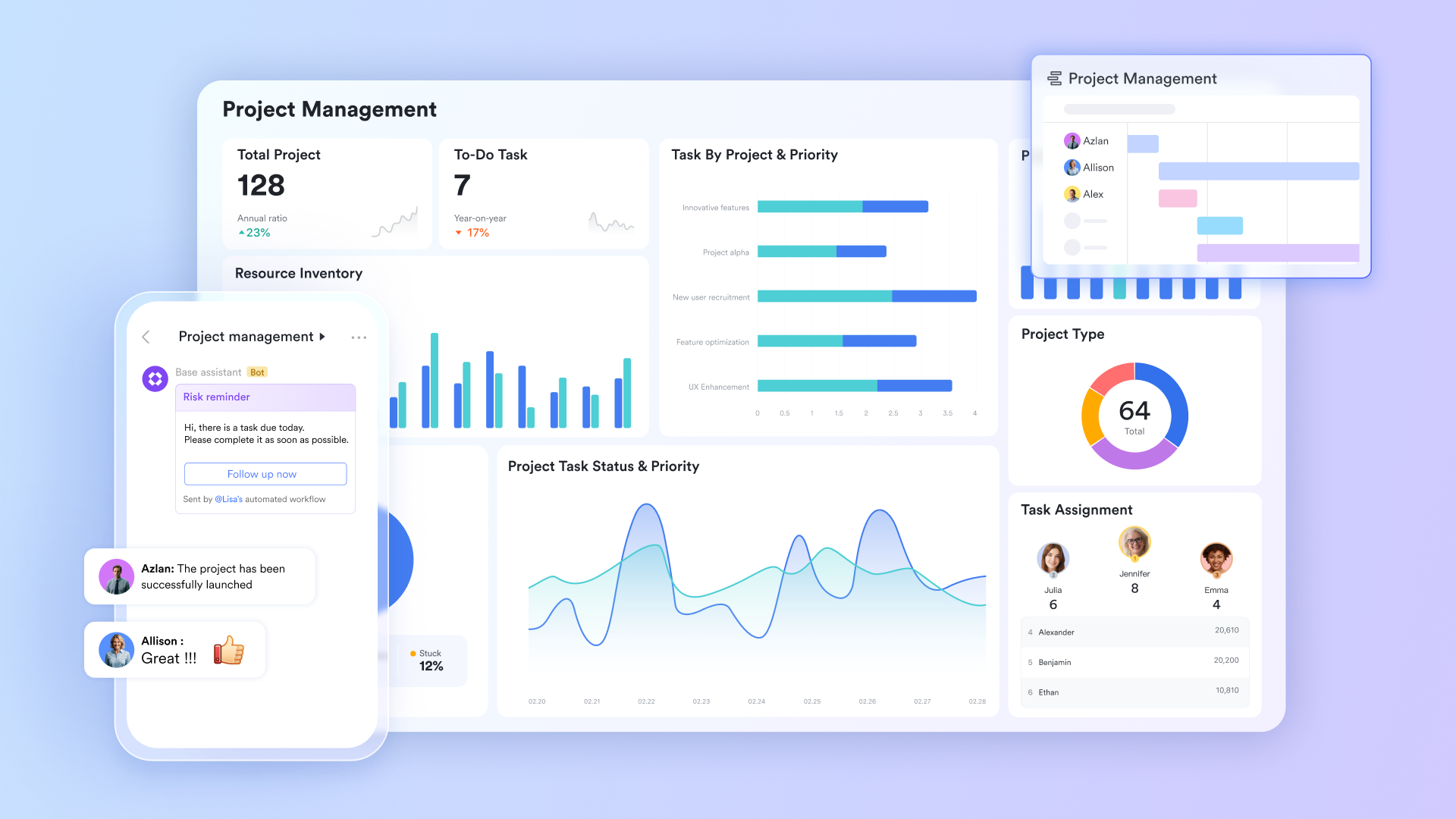
If you're searching for an all-encompassing solution to streamline project planning, execution, and monitoring, stands out as an exceptional project management timeline tool. Designed to foster efficiency and collaboration, Lark, one of the most versatile , goes beyond basic timeline creation, offering a unified suite of tools that empower teams to manage projects with unparalleled ease and precision. It's more than just a timeline creator; it's a cohesive workspace that connects every aspect of your . By bringing together robust timeline functionalities with seamless communication and data management, Lark ensures that your team remains aligned, productive, and always on schedule. This unified approach makes Lark an ideal choice for teams seeking to eliminate the complexities of disparate tools and embrace a comprehensive, streamlined project management experience.
Key takeaways
Lark redefines project timeline management through its intelligent automation, intuitive design, and powerful internal cohesion.
Automated timeline generation: A core strength lies in its automated timeline generation, which significantly reduces the manual effort often associated with setting up project schedules. Simply input your dates into 's fields, and the platform intelligently generates visual time bars and dynamically adjusts task durations based on formula-based calculations. This not only saves valuable time but also ensures accuracy, as start and end dates automatically update whenever related tasks are modified. This automation is a game-changer for maintaining dynamic and accurate project timelines.
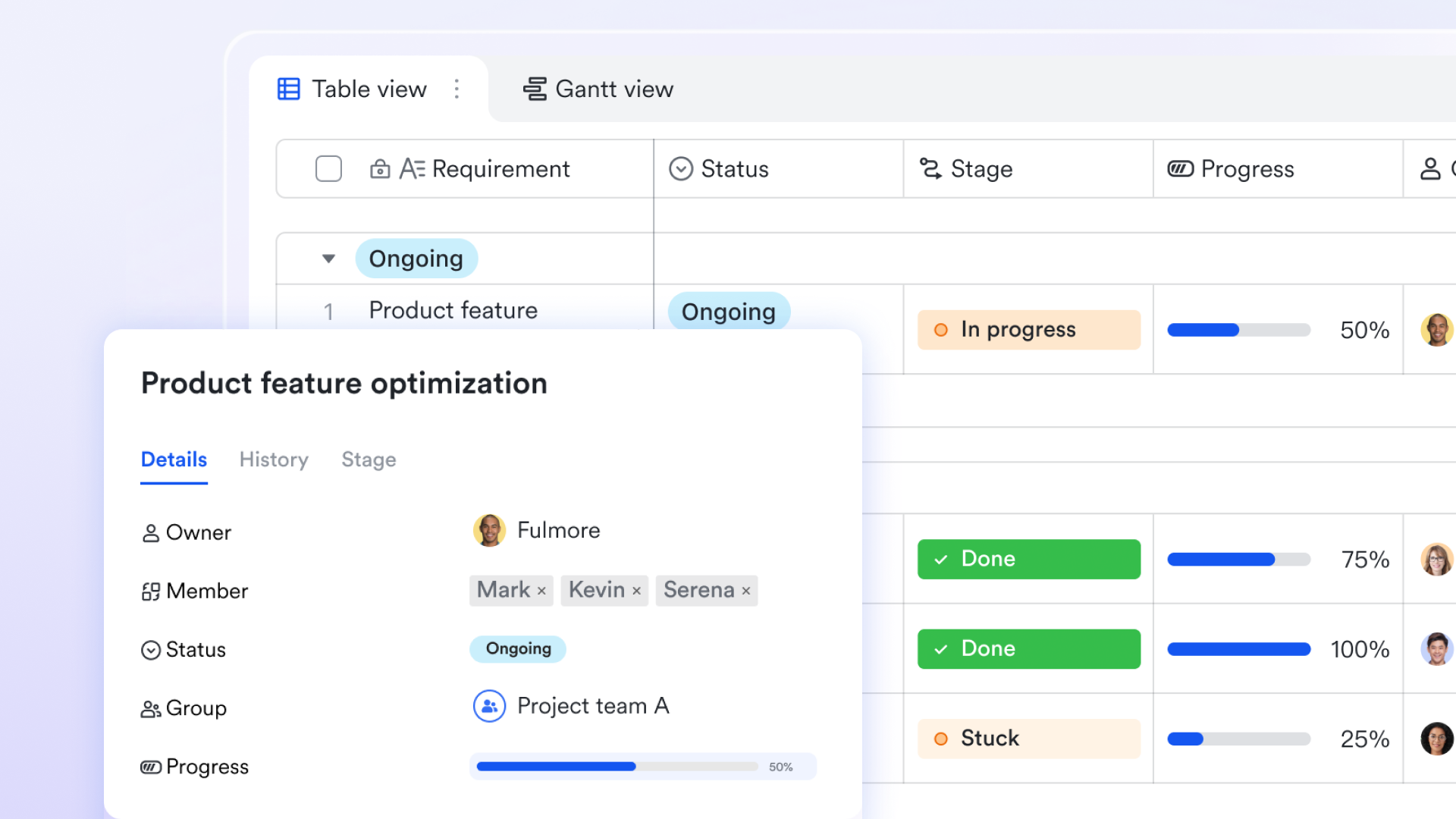
Intuitive drag-and-drop functionality: Managing these timelines is made effortless with Lark Tasks' drag-and-drop functionality. Teams can quickly adjust task start and end times, reorganize priorities, or expand task details with a simple click. All modifications are synchronized in real-time, ensuring that every team member always has access to the most current version of the timeline. This real-time synchronization is critical for maintaining alignment across distributed teams. 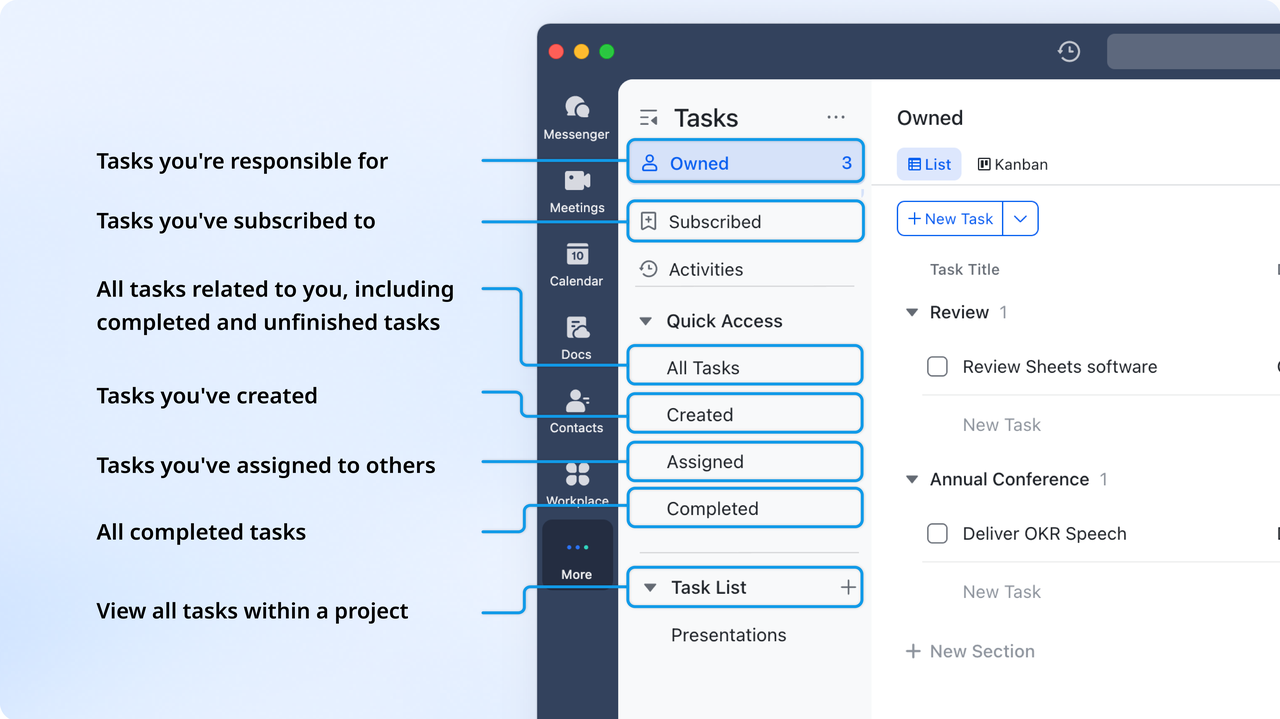
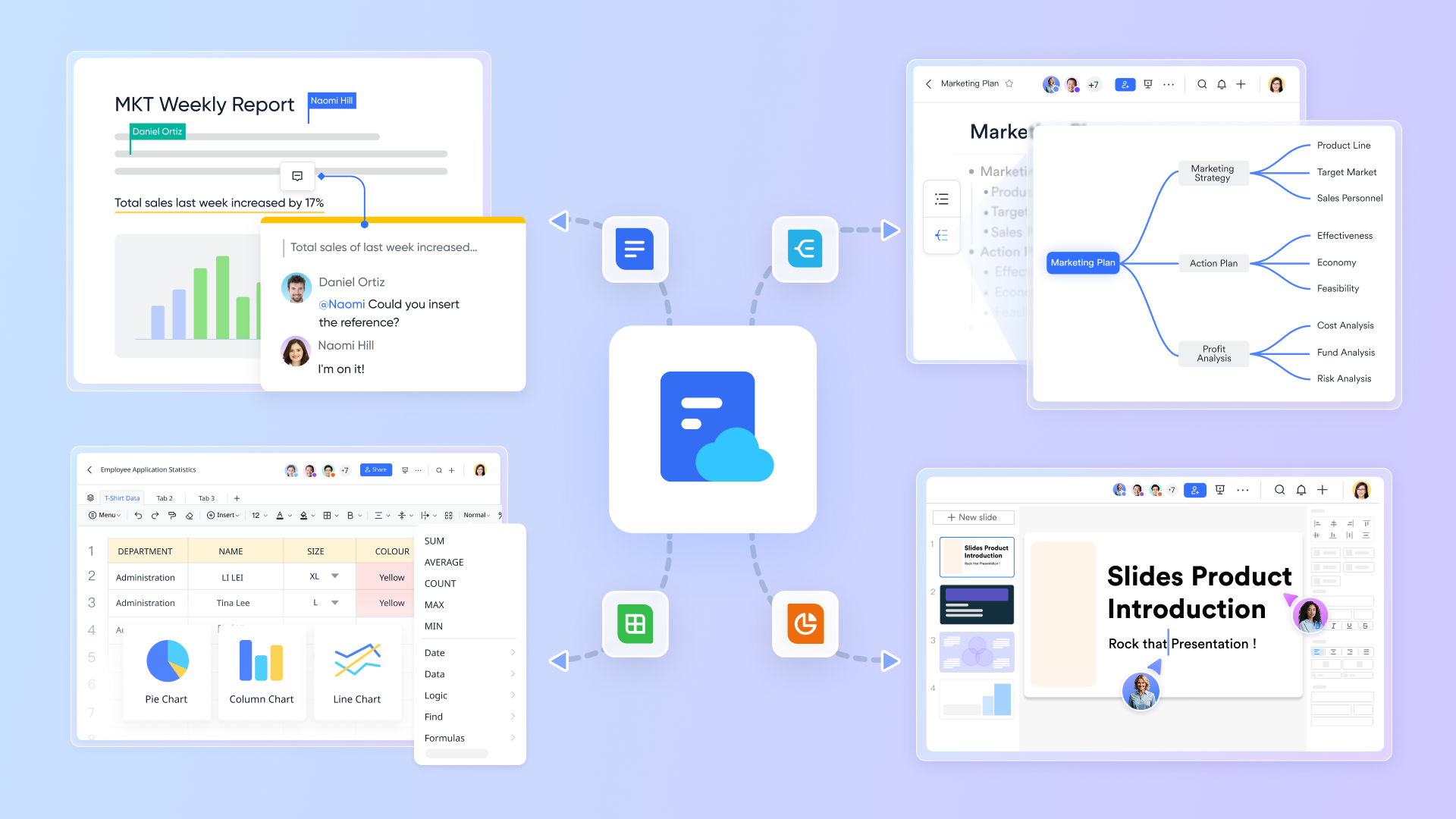
Unified collaboration environment: What truly sets Lark apart as a comprehensive project management timeline tool is its unified collaboration environment. While and provide the foundation for timeline creation and management, the seamless operation with , , and elevates the entire project management experience. This means teams can discuss specific tasks in Messenger, schedule meetings in Calendar, and update timelines within Base—all without ever leaving the Lark platform. This cohesive workspace eliminates the need to switch between multiple applications, fostering seamless and enhancing productivity.
Real-time notifications: Lark's built-in notification system, delivered directly through Messenger, ensures that team members are always informed about task progress, timeline changes, and approaching deadlines, minimizing the risk of missed updates.
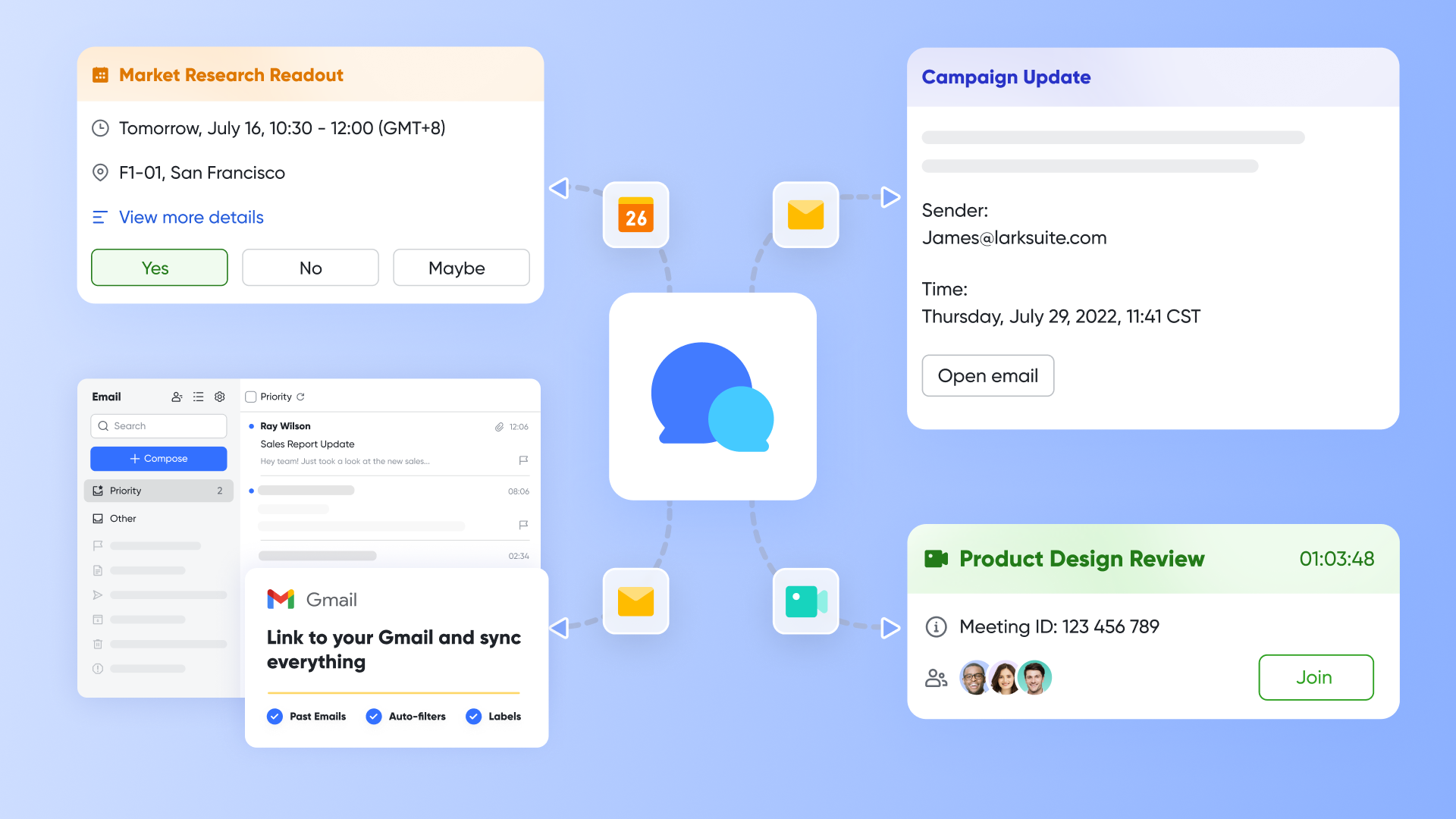
Lark's combination of automation, customization, and real-time collaboration makes it an outstanding choice for any team aiming for efficient and successful project delivery.
- Starter plan: Free forever plan that includes 11 powerful tools for up to 20 users. It also comes with 100GB of storage, 1000 automation runs, AI translations, and more.
- Basic plan: $6/user/month (billed annually) for up to 500 users. It includes everything in Starter plus group calling for up to 500 attendees, 5TB of storage, 1000 automation runs, and more. For more details, please .
- Pro plan: $12/user/month (billed annually) for up to 500 users. It includes everything in Basic plus group calling for up to 500 attendees, 15TB of storage, 50,000 automation runs, and more.
- Enterprise plan: for custom pricing. Supports unlimited users and includes even more automation runs and advanced security, compliance, and management features.
For small teams with simple communication needs

18 months message history
1000 Base automation runs/month
2000 rows per table in Base
Most POPULAR
For companies with comprehensive collaboration and management needs
Unlimited message history
500-participant video meetings
50k Base automation runs/month
20k rows per table in Base
For large companies with advanced security and organizational management needs
Get a personalized demo and pricing
Unlimited message history
500-participant video meetings
15 TB storage + 30 GB storage/user
500k Base automation runs/month
50k Base automation runs/month
Most POPULAR
For companies with comprehensive collaboration and management needs
Unlimited message history
500-participant video meetings
50k Base automation runs/month
20k rows per table in Base
2. GanttPRO: A dedicated Gantt chart solution for project management
GanttPRO is an online Gantt chart maker that has evolved into a robust project management solution, primarily focusing on visual timeline planning. It excels at providing a comprehensive, user-friendly platform for teams to create, track, and manage project schedules. Its strength lies in offering a dedicated environment for detailed Gantt chart functionality, making it an excellent choice for users who prioritize visual task organization and dependency management.
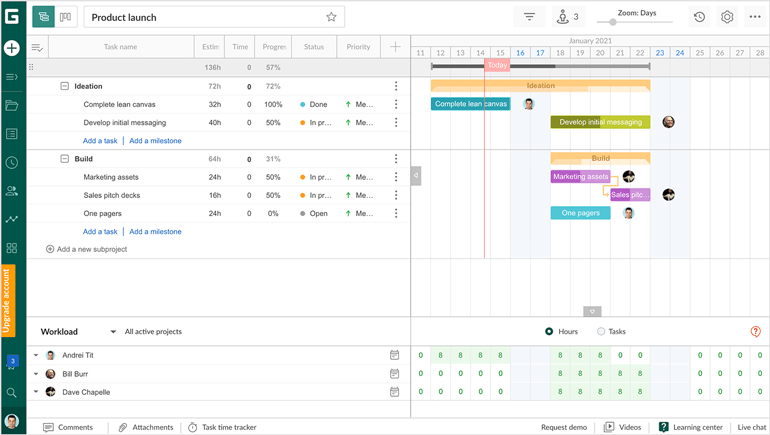
Image source: ganttpro.com
Key takeaways
GanttPRO offers powerful features to visualize and manage project timelines effectively:
- Project templates with dependencies: Start new projects quickly with pre-defined structures and dependency linking.
- Hourly lead & lag time: Precisely define delays or overlaps between tasks for accurate scheduling.
- Critical path: Identify the shortest sequence of tasks that determines the project's overall duration.
- Baselining: Set project baselines to track deviations from the original plan.
- Cost budget tracking: Monitor expenses with precise cost tracking and budget reports.
- Export options: Easily export timelines to PDF, PNG, Excel, or CSV for sharing and reporting.
- Portfolio Gantt chart: Manage multiple projects simultaneously within a single, high-level view.
Pricing
GanttPRO offers a clear pricing structure based on user count and annual billing:
- Individual: $15/user/month for one user, billed annually ONLY.
- Team: $8.9/user/month for five users, billed annually ONLY.
- Enterprise: Custom pricing is available for larger organizations with specific needs.
3. Miro: A versatile visual collaboration platform
Miro is an online whiteboard and visual collaboration platform supporting diverse project management activities. It offers an infinite canvas for brainstorming, planning, and execution, with numerous templates for timelines, , and . Its strength lies in facilitating dynamic, visual workflows, making it ideal for creative and collaborative project phases, and allowing for the importation of existing charts from tools like Visio.
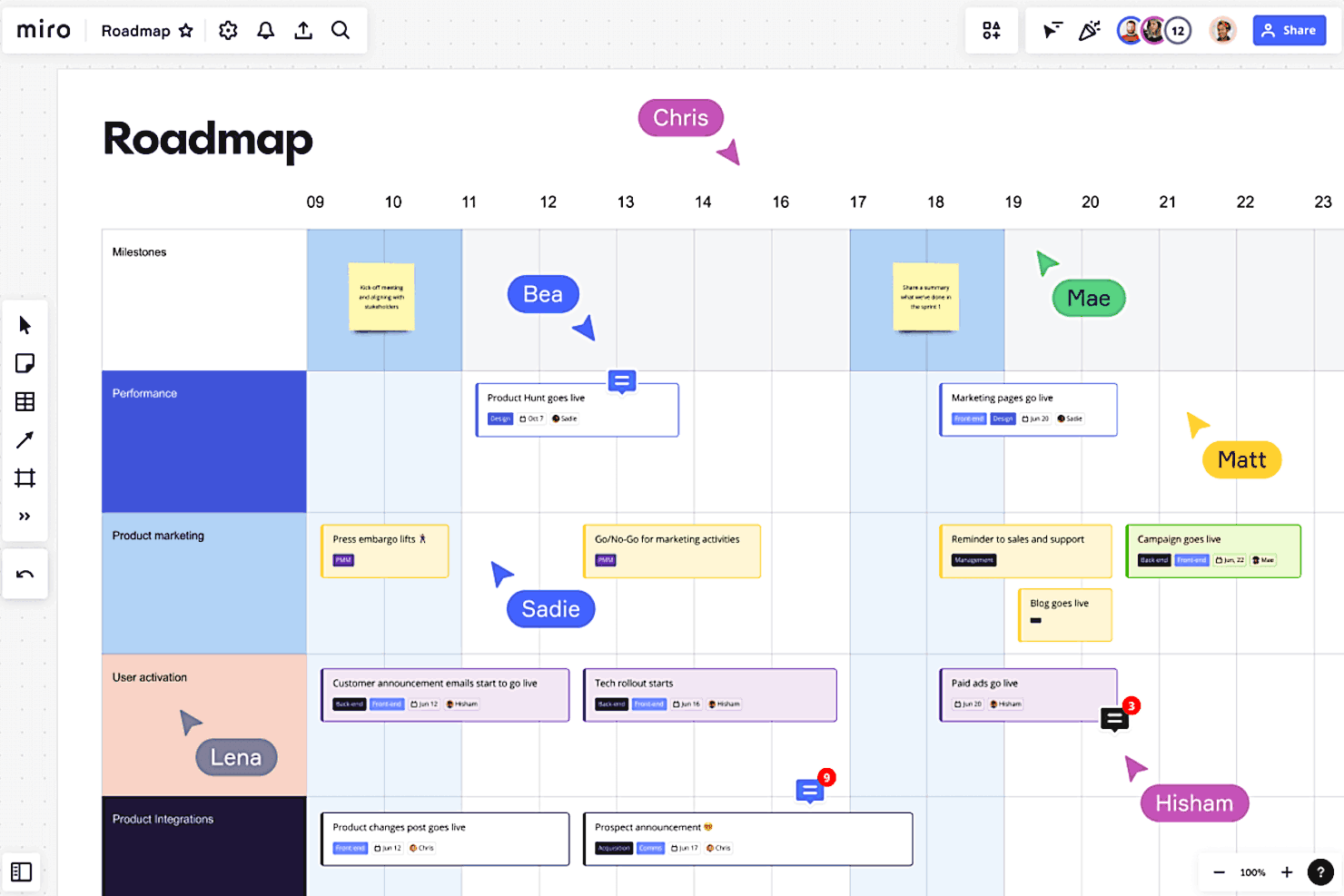
Image source: miro.com
Key takeaways
Miro provides a dynamic environment for visual project management:
- Versatile canvas: Infinite whiteboard for brainstorming and planning with diverse project artifacts.
- Extensive templates: Access templates for timelines, roadmaps, , and Gantt charts.
- Real-time collaboration: Adjust projects with voting, sticky notes, and comments.
- Third-party integrations: Connects with tools like Figma, Slack, and Jira to streamline workflows.
Pricing
- Free plan: Unlimited members.
- Starter plan: $8/mo per member.
- Business plan: $16/mo per member.
- Enterprise plan: Contact sales.
4. Monday.com: A versatile work OS for project management
Monday.com is a widely used enterprise project management tool, trusted by numerous companies across various industries. It offers a highly visual and customizable platform designed to manage projects, tasks, and team collaboration effectively. Its intuitive timeline view provides a clear presentation of project schedules, enabling teams to plan and track progress efficiently. Beyond basic task management, monday.com integrates collaboration and CRM functionalities, making it a comprehensive solution for diverse project needs. Its appealing interface and automation capabilities contribute to its popularity.
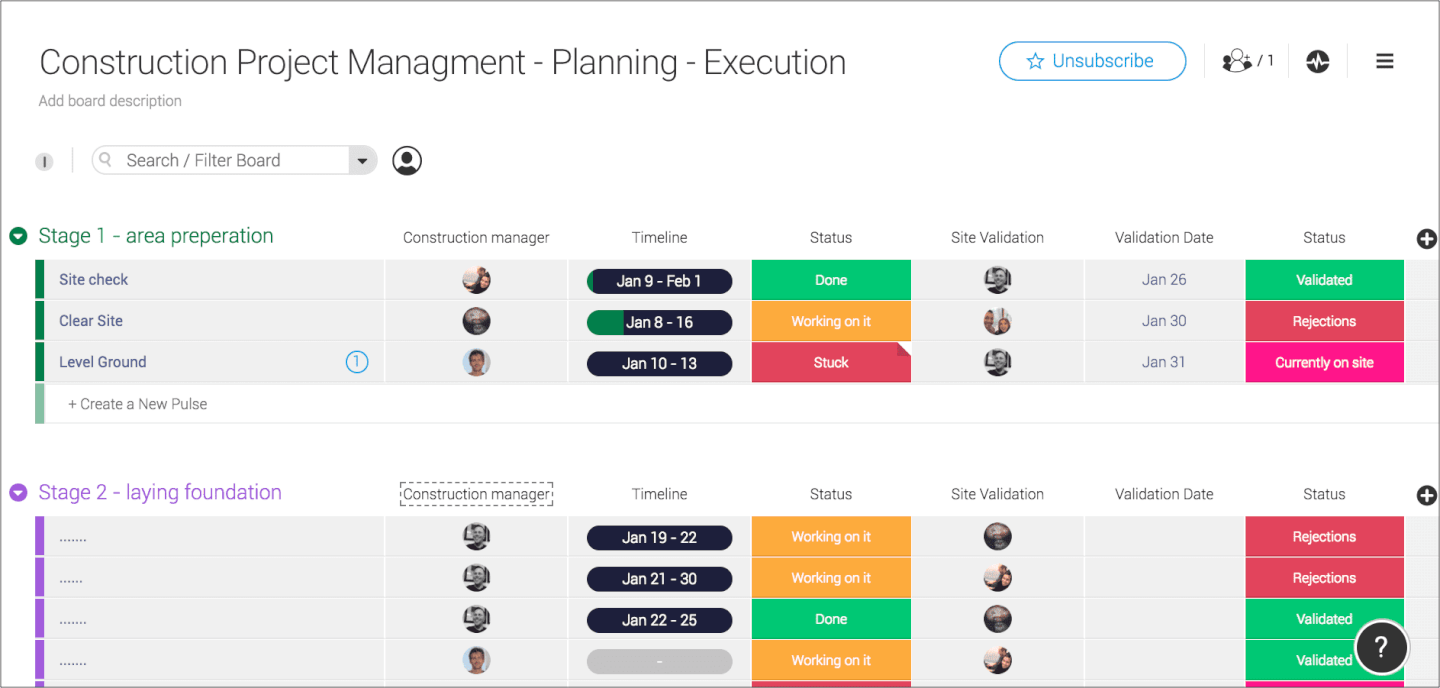
Image source: monday.com
Key takeaways
Monday.com empowers teams with a comprehensive project management platform:
- Visual timeline view: Offers clear, visual presentations of project schedules within single or multiple boards.
- Comprehensive task management: Manages tasks, to-dos, time tracking, and automation.
- High degree of customization: Adapt the platform to fit specific workflows and project requirements.
- App integrations: Connects with leading apps like Slack, HubSpot, Asana, and Zoom.
- Unified platform: Combines collaboration, project management, and CRM tools.
Pricing
- Free plan: Up to 2 seats.
- Basic plan: $9 seat/month (billed annually).
- Standard plan: $12 seat/month (billed annually).
- Pro plan: $19 seat/month (billed annually).
- Enterprise plan: Contact sales.
Monday.com offers a free plan for up to two users, with a two-week free trial available for paid tiers. Paid plans start from $6/user/month, providing access to extended features and capabilities.
5. Wrike: A robust work management platform with timeline capabilities
Wrike is a comprehensive work management platform providing strong timeline functionalities for project planning and execution. It allows for the import of project timelines from Excel and Microsoft Projects, automating the visualization of task durations based on defined start and end dates. Wrike focuses on offering a structured environment for teams to manage project schedules with detailed visual insights, making it suitable for organizations requiring precise control over their project timelines.
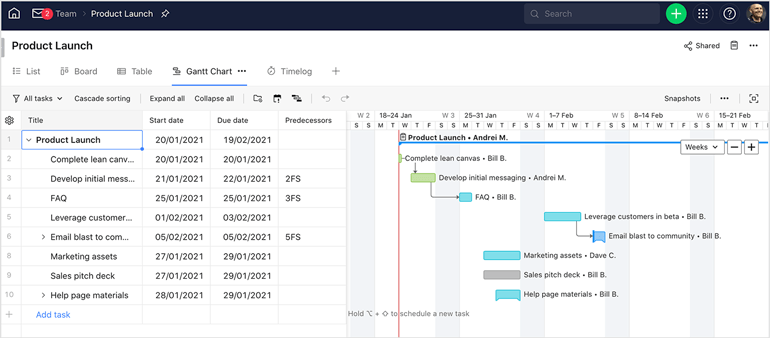
Image source: wrike.com
Key takeaways
Wrike enhances project management with its timeline features:
- Timeline import: Easily bring in timelines, assignees, and dependencies from external tools.
- Automated task drawing: Visualizes task durations once start and end dates are set.
- Critical path: Identifies critical tasks to maintain schedule integrity.
- Baselines ("Snapshots"): Tracks project evolution against original plans.
- Custom fields: Adds custom parameters for tailored tracking.
- Undo functionality: Provides a history and undo function for change tracking.
Pricing
- Free plan: Active task limitations apply.
- Team plan: $10 user/month.
- Business plan: $25 user/month.
- Pinnacle plan: Contact sales.
- Apex plan: Contact sales.
6. Zoho Projects: Comprehensive cloud-based project management
Zoho Projects is a cloud-based project management software for efficient project, task, and timeline management. It empowers managers to plan, track, and collaborate, ensuring deadlines are met. Its robust timeline features allow creating detailed schedules, assigning tasks with start/end dates, and setting dependencies to prevent delays. The integrated Gantt chart provides a clear visual of project progress, helping identify and address issues promptly. Collaboration tools, time tracking, and extensive integrations enhance its utility.
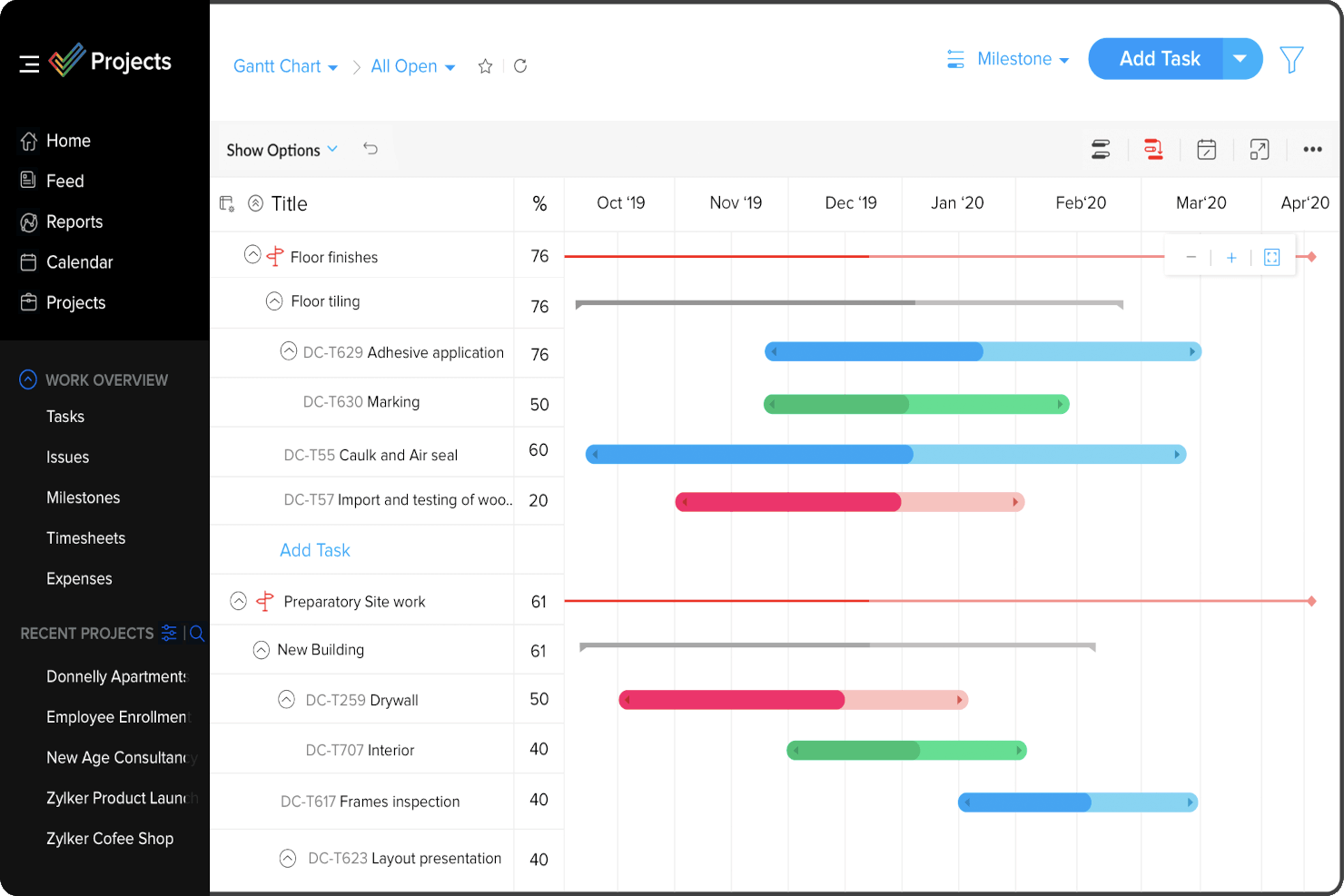
Image source: zoho.com
Key takeaways
Zoho Projects offers essential timeline management features:
- Detailed timelines: Create and manage project schedules with tasks and dates.
- Task dependencies: Set task links to ensure sequential completion.
- Gantt chart view: Visualize project progress graphically.
- Collaboration & tracking: Facilitates team communication and time tracking.
- Integrations: Connects with Zoho apps, Google, Microsoft, and other third-party tools.
Pricing
- Free plan: Up to 5 users.
- Premium plan: $4 user/month (billed annually).
- Enterprise plan: $9 user/month (billed annually).
- Ultimate plan: $14 user/month (billed annually).
7. TeamGantt: Collaborative online Gantt chart for project timelines
TeamGantt offers a clean, collaborative online experience for project timeline management, replacing traditional desktop-based . Its intuitive interface allows users to easily create and manipulate task groups, tasks, and milestones directly on the timeline using click-and-drag. It emphasizes visual project planning and progress tracking with features like color coding and percentage complete fields. TeamGantt is ideal for teams seeking a straightforward, visual, and collaborative tool for managing project timelines effectively.
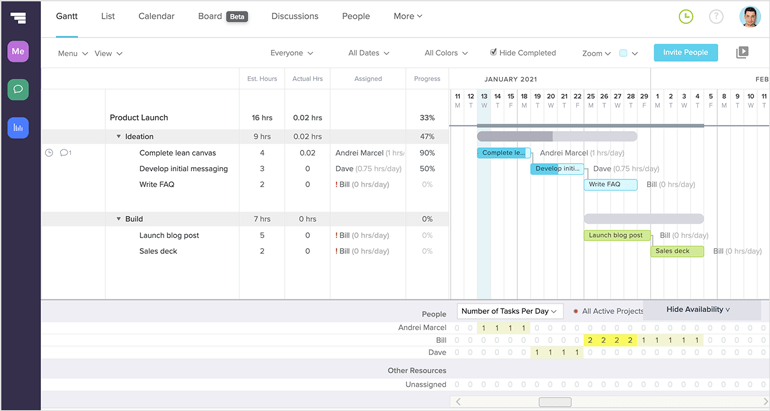
Image source: teamgantt.com
Key takeaways
TeamGantt offers core features for visual timeline management:
- Easy interface: Draw and manipulate tasks, groups, and milestones with click-and-drag.
- Flexible tasks: Convert tasks into groups or milestones to adapt to changing scopes.
- Time tracking: Set estimated hourly budgets and track time against tasks.
- Baselining: Take project snapshots to compare planned versus actual progress.
- Guest access: Share view-only project URLs for external collaboration and comments.
- Export to PDF: Print Gantt charts for offline viewing or sharing.
Pricing
- Free personal plan: With 1 project, and 40 tasks-perfect for personal projects.
- Basic plan: $10/project/mo (2-5 projects).
- Business plan: $19/project/mo (5-20 projects).
- Construction plan: Contact sales.
8. ProjectManager: Agile project management for hybrid teams
ProjectManager is a robust software designed for modern hybrid teams, offering flexible approaches to project management and timeline visualization. It provides a central platform where overall project timelines, often visualized in Gantt charts, align teams toward common goals. Simultaneously, it grants individual teams the flexibility to execute tasks using their preferred methodologies, such as or spreadsheet views. This adaptability ensures that all team members can work effectively within their comfort zones while contributing to a unified project timeline, making ProjectManager a versatile tool for diverse work environments.
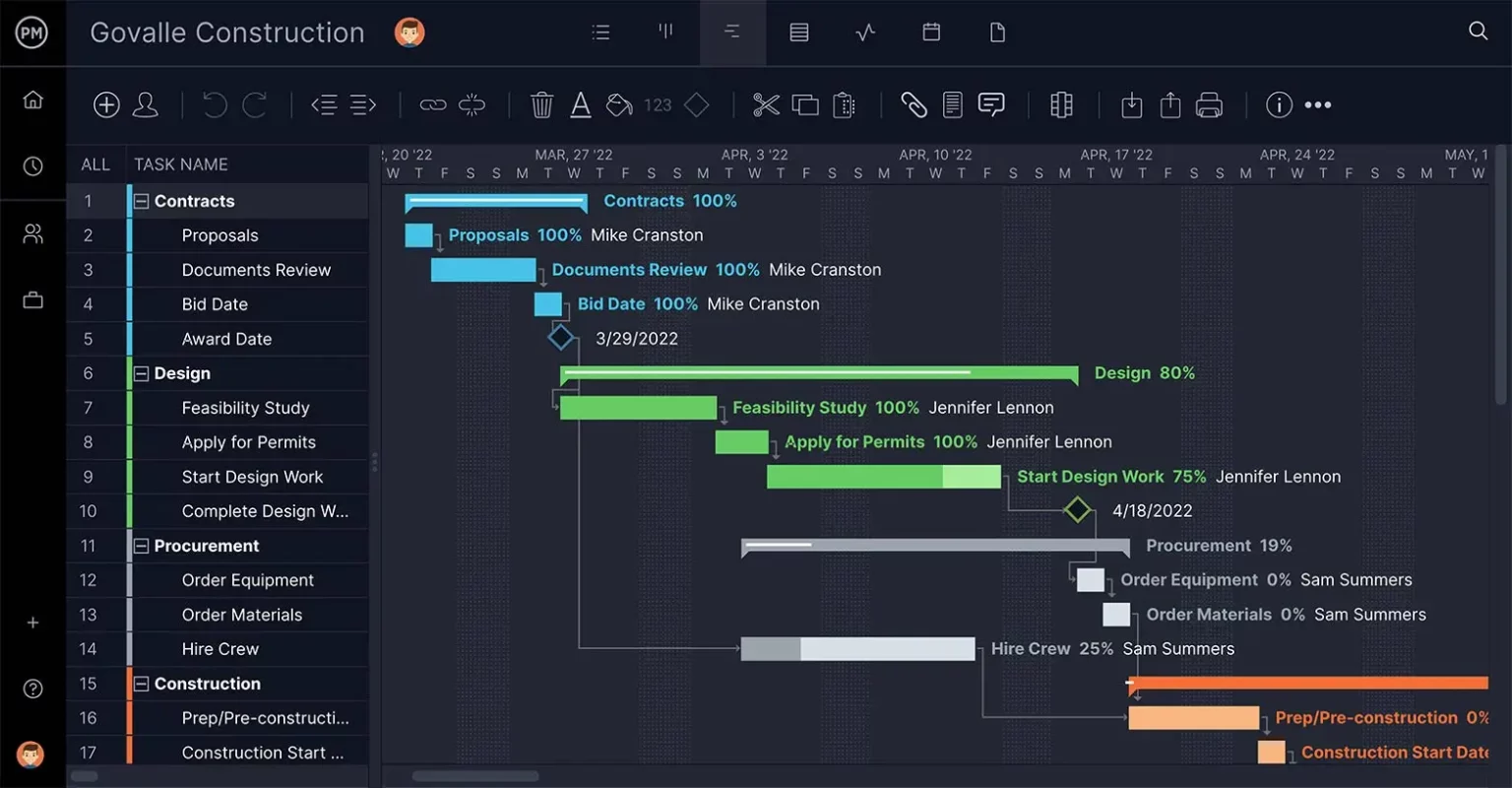
Image source: projectmanager.com
Key takeaways
ProjectManager offers key benefits for hybrid team project timelines:
- Flexible methodologies: Supports Gantt charts for overall timelines while allowing teams to use Kanban or spreadsheet views for execution.
- Unified goals: Aligns hybrid teams around a common project timeline.
- Adaptable workflows: Caters to diverse team preferences and working styles.
- Seamless integration: Connects with popular tools like Slack, Trello, Jira, and Microsoft Teams.
Pricing
ProjectManager offers a free 30-day trial.
- Team plan: $14 per user/month (billed annually).
- Business plan: $26 per user/month (billed annually).
- Enterprise plan: Get a custom quote.
9. Jira: Agile project and issue tracking with powerful timelines
Jira is a leading tool for agile project management, particularly in software development. Its timeline view is crucial for organizing projects, offering clear visualization of issue durations, timing, and dependencies. This feature helps teams maintain alignment, prioritize effectively, and provides end-to-end visibility across development phases. Jira excels in backlog and sprint management, enabling precise task sizing and prioritization for focused delivery within defined sprints. Its robust features and seamless integrations make it an indispensable solution for managing complex workflows and project timelines in fast-paced environments.
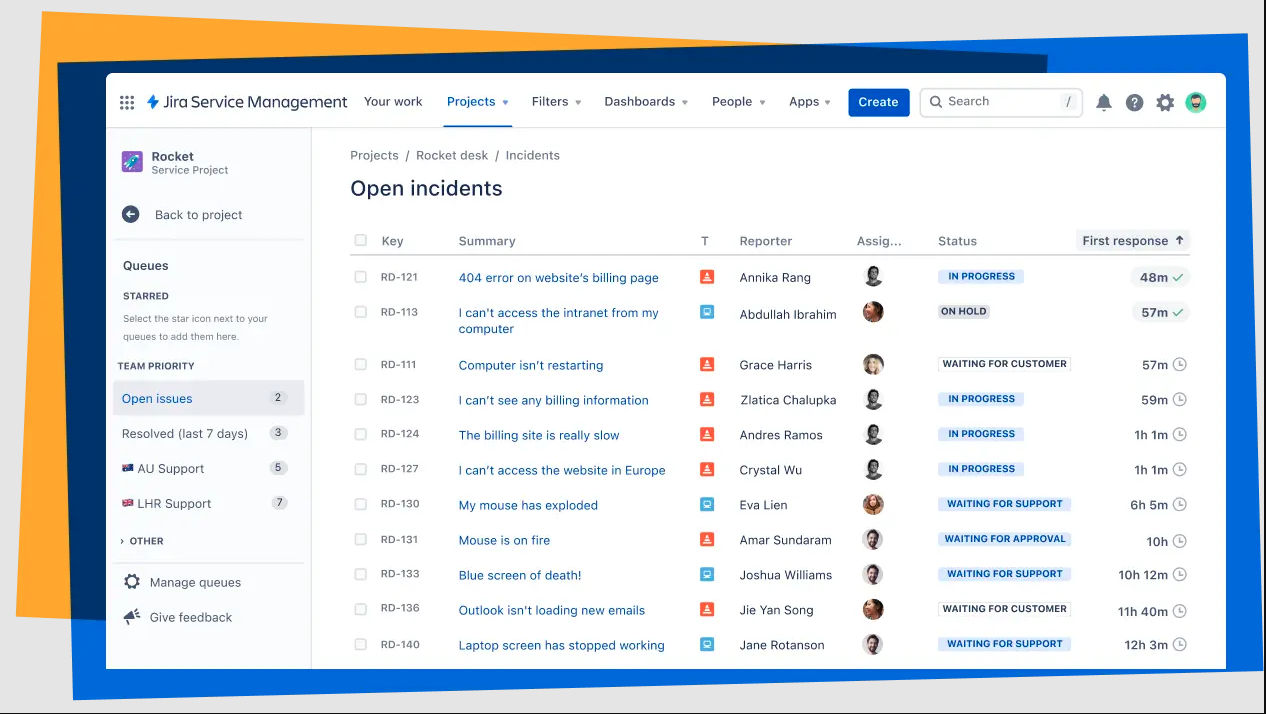
Image source: atlassian.com
Key takeaways
Jira offers critical features for project timeline management:
- Timeline view: Visualizes issue durations, timing, and dependencies for clear project oversight.
- Backlog & sprint management: Facilitates precise task prioritization and focused sprint delivery.
- Advanced : Provides cross-project visibility for complex initiatives.
- Seamless integrations: Connects with powerful third-party applications, including time-tracking tools.
- End-to-end visibility: Clarifies each development phase for all stakeholders.
Pricing
Jira offers a Free plan for up to 10 users.
- Standard: Starts at $7.91 per user/month.
- Premium: Starts at $14.54 per user/month.
- Enterprise: Contact sales for pricing, offering advanced analytics and security.
10. Paymo: Project management with robust Gantt charts for small teams
Paymo is an affordable project management software tailored for small teams, focusing on client work, time tracking, invoicing, and profitability. Its robust Gantt chart module is a central feature. Tasks with start and end dates are automatically projected onto the timeline, simplifying project visualization. Paymo allows users to link tasks with dependencies, account for overlaps or delays, and utilize auto-scheduling. Visual indicators like color-coding for task progress and budget overruns enhance clarity. It also features a critical path function to identify the shortest route to project completion, minimizing risk.
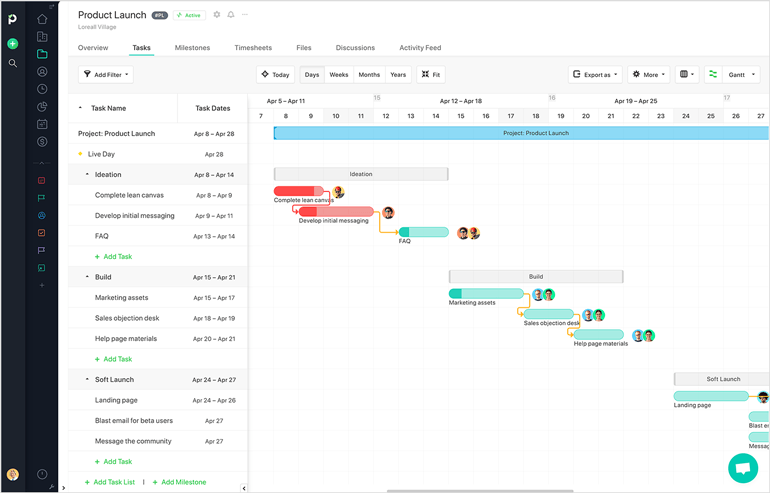
Image source: paymoapp.com
Key takeaways
Paymo offers key features for project timeline management:
- Automated task drawing: Tasks with dates automatically appear on the timeline.
- Dependencies: Link tasks and milestones, accounting for lead and lag times.
- Visual indicators: Color-coding for progress, budget, and overdue items.
- Critical path: Highlights the shortest path to project completion.
- Project templates: Save projects with tasks and dependencies for reuse.
- Portfolio Gantt chart: Visualize multiple project timelines and capacity.
- Export to PDF: Share Gantt charts with clients or team members.
Pricing
Paymo offers:
- Free: No Gantt chart included.
- Starter: $5.9/user/month (no Gantt chart).
- Small office: $10.9/user/month (no Gantt chart).
- Business: $16.9/user/month (includes Gantt chart).
Lark project management timeline templates
Lark offers various project management timeline templates designed to streamline planning and execution across diverse needs. Each template provides a structured approach to visualizing work, tracking progress, and fostering collaboration.
Project timeline template
This template provides a comprehensive structure for mapping tasks, milestones, and dependencies across weeks or months. It helps organize schedules into phases, assign ownership, and allows for quick adjustments, making it suitable for cross-functional teams needing a central coordination tool.
Event planning timeline
Breaks down complex event work into manageable phases, tracking vendors, venues, promotions, and attendee tasks. It clearly maps pre-event, live event, and post-event activities, ensuring and reducing oversight risks for internal and external planners.
Feature roadmap and timeline
Ideal for product managers and development teams, this template outlines release cycles and long-term strategy. It organizes features into stages, prioritizes tasks, tracks dependencies, and aligns contributions from engineering, design, and marketing, guiding product ideas from concept to delivery.
Project management Gantt chart overview
Delivers a detailed view of tasks arranged over time, showcasing sequence, duration, and potential bottlenecks. With fields for dates, owners, and dependencies, it's effective for managing technical or multifaceted projects, helping stakeholders align and adapt schedules quickly.
OKR task subdivision and progress control
Connects with necessary tasks, providing a structured way to monitor progress towards departmental or organizational goals. It breaks down objectives into measurable results, tracks timelines, and uses visual indicators to highlight progress and areas needing attention for strategic alignment.
Project timeline template for software development
Helps software teams plan and manage the full development lifecycle, from requirements gathering to deployment. It organizes tasks by phases with clear dependencies, milestones, and due dates, supporting agile or while connecting documentation and discussions to execution.
Student project timeline
Designed for academic teams and individual learners, this template manages tasks, assignments, group work, and presentation preparation. It helps students break objectives into , set deadlines, track milestones, and delegate responsibilities for collaborative projects.
Project timeline template for movie production
Structures the complex phases of film production—including pre-production, shooting, editing, and post-production—into a visual timeline. It maps scene deadlines, crew assignments, and review cycles, helping producers coordinate departments and manage shifts from concept to final release.
How to choose a project management timeline tool
Selecting the ideal project management timeline tool for your team requires careful consideration of several factors. With numerous options available, focusing on what truly matters to your specific needs will ensure you make the best choice.
- Consider scalability: Will the tool grow with your team and projects? Look for a project management timeline tool that can handle an increasing number of projects and users without compromising performance or usability. This is crucial for long-term effectiveness.
- Integrations are key: Evaluate whether the project timeline tools seamlessly connect with other platforms your team already uses, such as , CRM systems, or accounting software. Good integration capabilities ensure a smoother workflow and prevent data silos.
- Customizability is another important aspect: Opt for a solution that allows you to tailor templates, workflows, and timelines to match your specific project needs. The ability to adapt the tool to your unique processes, rather than forcing your processes to adapt to the tool, is a significant advantage. This flexibility can be particularly beneficial if you're looking for a free project plan that you can adapt to your team's specific requirements.
- Ease of use cannot be overstated: Choose an intuitive platform with a clean interface, drag-and-drop functionality, and a minimal learning curve. A tool that is easy to adopt will encourage team buy-in and maximize productivity. Test out free project planning calendar options or trials to get a feel for the user experience.
- Budget is a practical consideration: Compare pricing plans and ensure they fit within your financial constraints. Look for value-packed solutions with flexible options and transparent pricing. Many providers offer a project timeline management tool free version or free trials, which are excellent for evaluating before committing.
- Consider the breadth and depth of collaboration tools: Look for features like real-time updates, task comments, and file sharing that facilitate seamless teamwork directly within the project management tool timeline. These features are essential for keeping everyone aligned and productive. By carefully evaluating these factors, you can select the best project management timeline tool that empowers your team to deliver projects successfully.
Trends in project management timeline tools
The landscape of project management timeline tools is constantly evolving, driven by advancements in technology and changing work methodologies. Keeping an eye on these emerging trends can help you choose a future-proof solution and stay ahead in project delivery.
- Integration of AI-driven insights: Vendors are increasingly incorporating artificial intelligence to predict potential delays, suggest timeline adjustments, and recommend task prioritization. For instance, some tools can now analyze historical project data to automatically optimize future timelines, offering predictive analytics to enhance the accuracy of your project management tool timeline.
- Rise of collaborative whiteboarding features: Many project timeline tools now include shared digital whiteboards, allowing teams to visually map out timelines, brainstorm ideas, and plan interactively. This is especially beneficial for remote teams, fostering creativity and a shared understanding of the project's direction.
- Demand for industry-specific templates: More vendors are providing pre-built timeline templates tailored to specific sectors like construction, marketing, or IT. These templates save users considerable time by aligning with common workflows and best practices in those fields, offering a more customized experience for any project timeline management tool. These trends collectively point towards more intelligent, collaborative, and adaptable project management timeline tools that cater to the dynamic needs of modern project teams.
Plan projects with tools that support accuracy with Lark
Conclusion
In the fast-paced world of project management, having the right project management timeline tool is no longer a luxury but a necessity. These powerful tools transform complex project schedules into clear, actionable timelines, fostering better organization, enhanced collaboration, and more efficient resource allocation. From visualizing to predicting potential delays with AI-driven insights, a robust project management tool timeline empowers teams to deliver projects on time and within budget.
By understanding the key features, recognizing the myriad benefits, and carefully considering your team's specific needs when choosing a project timeline management tool like Lark, you can significantly improve your project success rates. Ultimately, a well-chosen project management timeline tool will become an invaluable asset, driving productivity and ensuring successful project delivery for years to come.
FAQs
Which project management tool provides a timeline?
Many project management tools offer robust timeline features. Popular options include Lark, GanttPRO, Miro, Monday.com, Wrike, Zoho Projects, TeamGantt, ProjectManager, Jira, and Paymo. These tools typically provide visual timeline representations, such as Gantt charts, to help teams organize, monitor, and manage project schedules effectively from start to finish.
How to make a timeline for project management?
Creating a project management timeline involves leveraging a digital tool to visualize, plan, and track your project's progression. You'll typically start by identifying key milestones, individual tasks, their interdependencies, and target deadlines. Many tools simplify this process with features like drag-and-drop interfaces for task linking, pre-built templates, and visual progress indicators, ensuring clarity and accuracy in your project planning.
What is the best tool for making a timeline?
The ideal tool for creating a project timeline really depends on your team's specific requirements, budget, and the complexity of your projects. There are many excellent choices, each with its own advantages. For instance, some users find Lark appealing for its all-in-one platform and automated timeline generation, while others might prefer GanttPRO for its advanced Gantt chart capabilities. Miro, on the other hand, is often favored for its strong visual collaboration features. It's often best to consider factors like ease of use, integration options, customization, and how well it supports team collaboration when making your decision.
What are the 5 C's of project management?
The 5 C's of project management—Complexity, Criticality, Compliance, Culture, and Compassion—provide a holistic framework for managing projects by balancing technical requirements with human factors.
Related reading































