














Mastering The Art of Action Plan Template for Project Success

Fecilia Clarke
Solutions Marketing Specialist
Sep 18, 2026
Fecilia Clarke
Sep 18, 2026

14 min read


Creating an effective action plan is crucial for achieving project goals and ensuring successful outcomes in any business endeavor. It's more than just a list; it's a strategic roadmap. A well-designed action plan template serves as a powerful tool to guide teams through manageable tasks, set clear deadlines, and monitor progress along the way. It provides structure and clarity, ensuring everyone understands their role in achieving the desired results.
In this comprehensive guide, we will explore how to utilize action plan templates effectively, focusing on how to integrate essential keywords that are crucial for project management, collaboration, and overall success. Whether you're a seasoned project manager or new to the process, understanding these principles will significantly enhance your ability to plan and execute projects successfully.

Understanding the action plan template
An action plan template provides a structured framework for outlining the specific steps necessary to achieve a project goal or business objective. It includes key components that help teams stay organized, assign tasks, and track progress effectively. Additionally, it allows managers to adjust timelines and measure progress regularly, ensuring that all team members are aligned with the project’s vision.
Key components of an action plan template
When creating an action plan, several key components should be included. These components help to ensure that the plan is comprehensive and functional:
- Project goals: Clearly define the overall business goal and objectives that the action plan aims to achieve. This could range from increasing sales to improving team productivity, implementing a new marketing strategy, or launching a new product line.
- Actionable steps: Create a list of specific steps or tasks that need to be completed to reach the project goals. Each actionable step should be clearly outlined to avoid confusion. Using clear and concise language helps in managing expectations and tasks.
- Assign tasks: Allocate responsibilities by assigning tasks to individual team members. Clearly identifying who is responsible for each task promotes accountability and efficiency. This ensures that everyone knows their role and what they need to accomplish.
- Set deadlines: Establish due dates for each task, along with a start and end date for the project. Setting realistic timelines encourages consistent progress and helps keep the team focused. It's important to factor in potential challenges and unforeseen circumstances when setting these dates.
- Resources required: Identify the necessary resources required to complete the tasks effectively. This could include tools, training, or additional personnel, as well as an estimate of the costs involved. Consider technology, software, or physical materials needed.
- Key milestones: Break the plan down into key milestones, which serve as checkpoints to measure progress. Milestones help teams stay organized and allow for adjustments if necessary. These milestones should be strategically placed throughout the project timeline.
- Monitoring and review: Implement key performance indicators (KPIs) to track progress and assess the success of various tasks. Regular review sessions can help identify areas for improvement and ensure alignment with the project goals. It's important to have a system in place for monitoring these KPIs.
Benefits of action plan templates
Using an action plan template offers numerous benefits, especially for project managers who juggle multiple tasks and responsibilities. Here are a few reasons why adopting this approach can lead to greater success:
Enhanced organization
An action plan template helps teams stay organized by providing a clear steps structure for managing tasks. By listing manageable tasks and deadlines, team members can focus on their responsibilities without becoming overwhelmed. This structured approach promotes efficiency and reduces confusion.
Improved collaboration
Action plan outlines encourage collaboration by promoting communication among team members. With a shared document, everyone can contribute to the plan, offer insights, and monitor progress. Tools like Microsoft Word can be particularly effective for creating and sharing action plans, allowing for seamless collaboration. This can foster a sense of team spirit.
Increased accountability
When tasks are assigned clearly, team members know who is responsible for each actionable item. This level of accountability fosters a sense of ownership and encourages individuals to complete their tasks efficiently. By outlining expectations and assigning tasks, teams can focus on accomplishing objectives collaboratively.
Effective progress tracking
Tracking progress is an essential component of project management. Action plan templates allow teams to measure progress against the established benchmarks. By regularly reviewing these metrics, teams can determine if they are on track to meet their deadlines or if adjustments are needed. This ensures that efforts align with the business goal.
Risk management
Identifying potential hazards before they occur is another advantage of creating a detailed action plan. Addressing these issues proactively can prevent delays or other negative outcomes. By identifying and mitigating risk, project managers can ensure projects achieve intended results smoothly.
Better resource allocation
Action plan outlines also allow for more effective resource allocation. Knowing what resources are required at each stage can help managers ensure that time, budget, and personnel are deployed where they are most needed, reducing waste and maximizing efficiency.
Action plan template recommendations
To help you easily get started, here are some recommended pre-bulit templates, each designed for different scenarios. Understanding these can significantly streamline your planning process.
My planner dashboard template
Overview: This template provides a comprehensive dashboard for personal planning, helping individuals organize their tasks, appointments, and goals in one centralized location. It typically includes sections for daily, weekly, and monthly views, as well as spaces for notes and priorities.
Best for: Individuals looking to enhance their personal productivity, manage their daily schedules, and keep track of personal goals. It’s ideal for students, freelancers, or anyone wanting to organize their life more efficiently.
Task management template with automatic reminder
Overview: This template focuses on managing tasks effectively, with the added benefit of automatic reminders to keep team members on track. It includes fields for task descriptions, assigned individuals, deadlines, and automated notifications.
Best for: Project teams that need to manage multiple tasks and ensure timely completion. It’s particularly useful for smaller teams where automated reminders can help reduce the need for constant manual follow-ups.
Work handover template
Overview: This template is designed to facilitate smooth transitions when employees leave a project or company. It includes action planning sections for documenting responsibilities, ongoing tasks, important contacts, and relevant files.
Best for: Ensuring seamless continuity and clear action plans during employee transitions. It is critical for project managers and HR departments looking to maintain efficiency and prevent knowledge loss when team members change.
Event planning template
Overview: This template provides a structured approach to planning events, whether they are small meetings or large conferences. It includes sections for budgeting, vendor management, scheduling, and marketing activities.
Best for: Event planners, marketing teams, or anyone organizing events. It helps manage all aspects of event planning, from initial concept to post-event evaluation.
Production planning and scheduling template
Overview: This template focuses on optimizing production processes through effective planning and scheduling. It includes sections for tracking inventory, managing resources, and scheduling production runs.
Best for: Manufacturing companies or production teams looking to streamline their operations and ensure efficient production schedules. It helps in minimizing downtime and maximizing output.
E-commerce marketing plan template
Overview: This template is designed to help e-commerce businesses plan and execute their marketing strategies. It includes sections for market analysis, campaign planning, budgeting, and performance tracking.
Best for: E-commerce businesses, marketing managers, or digital marketing teams aiming to increase online sales and improve customer engagement. It provides a structured approach to digital marketing.
Social media planner template
Overview: This template helps social media managers plan and organize their content across various platforms. It includes sections for scheduling posts, tracking engagement, and analyzing performance.
Best for: Social media managers, marketing teams, or content creators looking to maintain a consistent and effective social media presence. It helps in planning content calendars and tracking campaign performance.
Action plan template for IT
Overview: This template provides a framework for managing IT support requests, incidents, and service tasks. It includes sections for logging requests, assigning technicians, tracking resolution times, and managing service levels.
Best for: IT departments or service desk teams looking to improve their response times and manage support requests efficiently. It helps in organizing and prioritizing IT-related tasks and incidents.
Creating an action plan template
If you have tailored needs for your action plan, you can create your own. Designing a successful action plan template involves several steps. Here’s how to design one that effectively supports your project goals using Lark's collaborative platform:
Step 1: Define your business goal
Start by determining the specific goal you want to target. Whether it’s launching a new product, improving customer satisfaction, or increasing sales, having a clear vision will guide your action plan. With Lark Docs, you can easily create a document to outline these goals, making it accessible to all team members for real-time collaboration and feedback. Lark's built-in comments and editing features ensure everyone is aligned from the outset.
Step 2: Outline the actionable steps
Next, break down the project into specific steps that will lead you toward your goal. Use bullet points or numbered lists to clearly outline each task. For example, if the goal is to increase sales, actionable steps might include:
- Conducting market research
- Identifying potential customers
- Developing a promotional campaign
Before moving forward with these steps, teams should consider ways to optimise research workflows for better insights so they can gather accurate data, identify opportunities, and make more informed decisions throughout the project.
Lark Tasks allows you to create detailed task lists, assign responsibilities, and set dependencies, ensuring a structured approach to project execution.
Step 3: Assign tasks
Identify team members responsible for each task directly within Lark Base workflows. This helps ensure that everyone knows their role and what is expected of them, which is vital for maintaining productivity and fostering accountability. Lark allows you to assign roles and set permissions, ensuring the right people have access to the right information.
Step 4: Set realistic deadlines
Establish deadlines for each task, and make sure they are achievable. Consider your team’s capacity and workload when determining timelines. Adjust timelines as necessary to ensure tasks are completed without sacrificing quality. With Lark Calendar, deadlines are automatically synced, providing a visual timeline for all team members.
Step 5: Identify resources required
Consider what resources will be needed to complete each task. This could include tools, training materials, or additional personnel. Knowing what is required will help in planning and ensure that the team has everything they need to succeed. Use Lark Wiki to store and share necessary documents, templates, and resources, linking them directly to the relevant tasks.
Step 6: Establish monitoring strategies
Implement strategies for monitoring the progress of the action plan. Decide on key performance indicators (KPIs) that will help you measure success. Regularly review these KPIs throughout the project to stay informed and make adjustments as necessary. Clear dashboards in Lark Base can be used to track various metrics, providing real-time insights into project performance.
Step 7: Review and adjust the plan
Schedule regular review meetings using Lark Meetings to assess progress and discuss potential hazards or areas that may need attention. If certain tasks are falling behind, consider adjusting the timelines or reallocating resources to address those challenges promptly. Lark Meetings allows for easy screen sharing, AI-powered note-taking, and recording for future reference, ensuring efficient and productive review sessions.
How Lark empowers your action planning: A deep dive
Action planning is the backbone of successful project execution. But let's face it: traditional methods can be clunky, inefficient, and prone to miscommunication. That's where Lark steps in, transforming action planning from a chore into a streamlined, collaborative, and even enjoyable process. Here's how Lark empowers your action planning, leveraging its core strengths:
Unleash customizable workflows with Lark Base
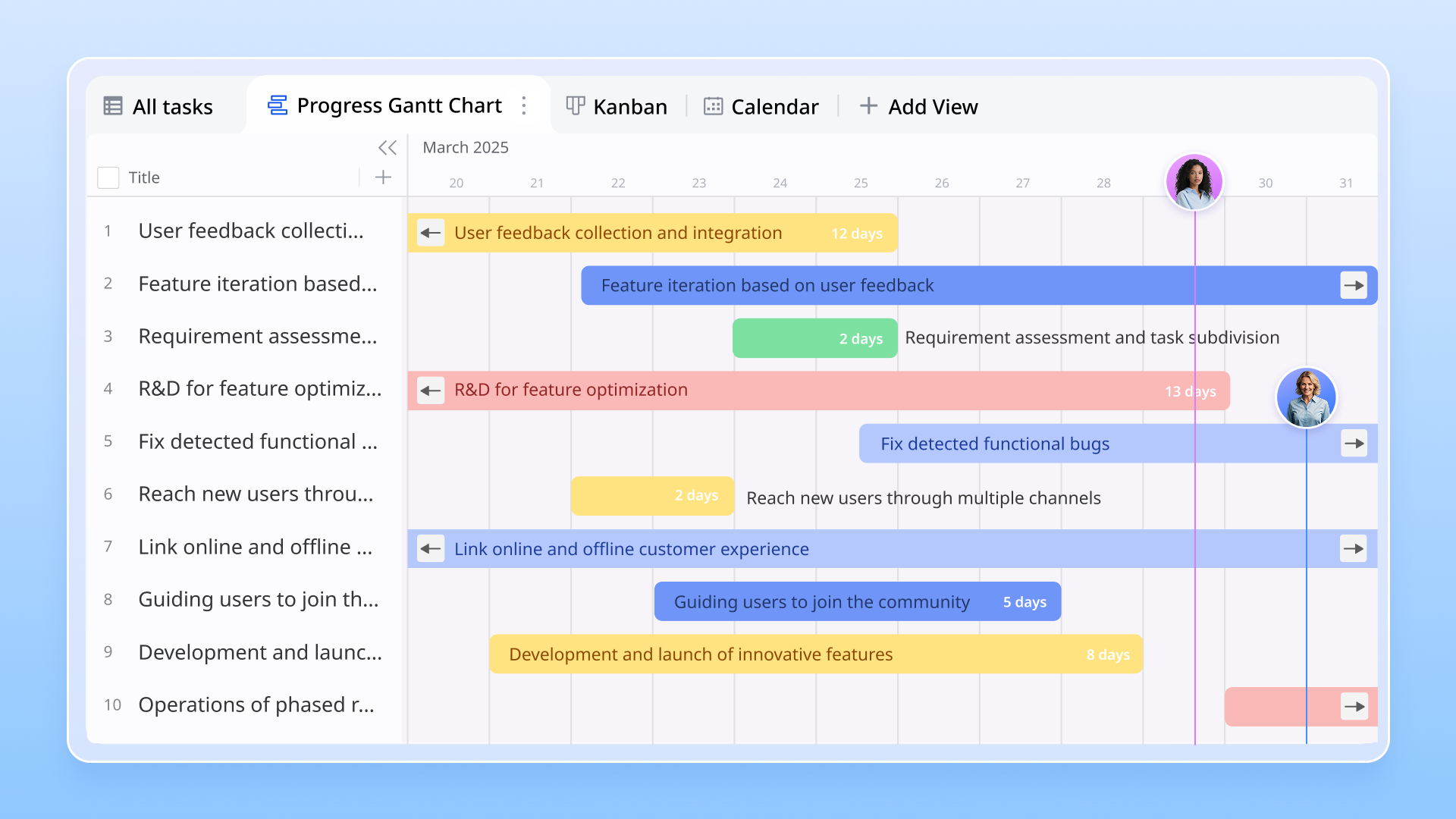
Forget rigid processes that stifle creativity and efficiency. Lark Base empowers you to design customizable workflows that perfectly match your team's unique needs and project requirements. Whether you're managing a complex marketing campaign, a product launch, or a simple team project, Lark Base allows you to:
- Visualize your workflow: Create Kanban boards, Gantt charts, and other visual representations of your action plan to gain a clear overview of tasks, dependencies, and progress.
- Define custom stages: Set up stages that reflect your specific process, from "Ideation" to "In Progress" to "Completed," ensuring tasks move smoothly through each phase.
- Use diverse views: Lark Base offers different views for project managers, making it easy to check the project progress from diverse perspectives.
Supercharge productivity with powerful automations
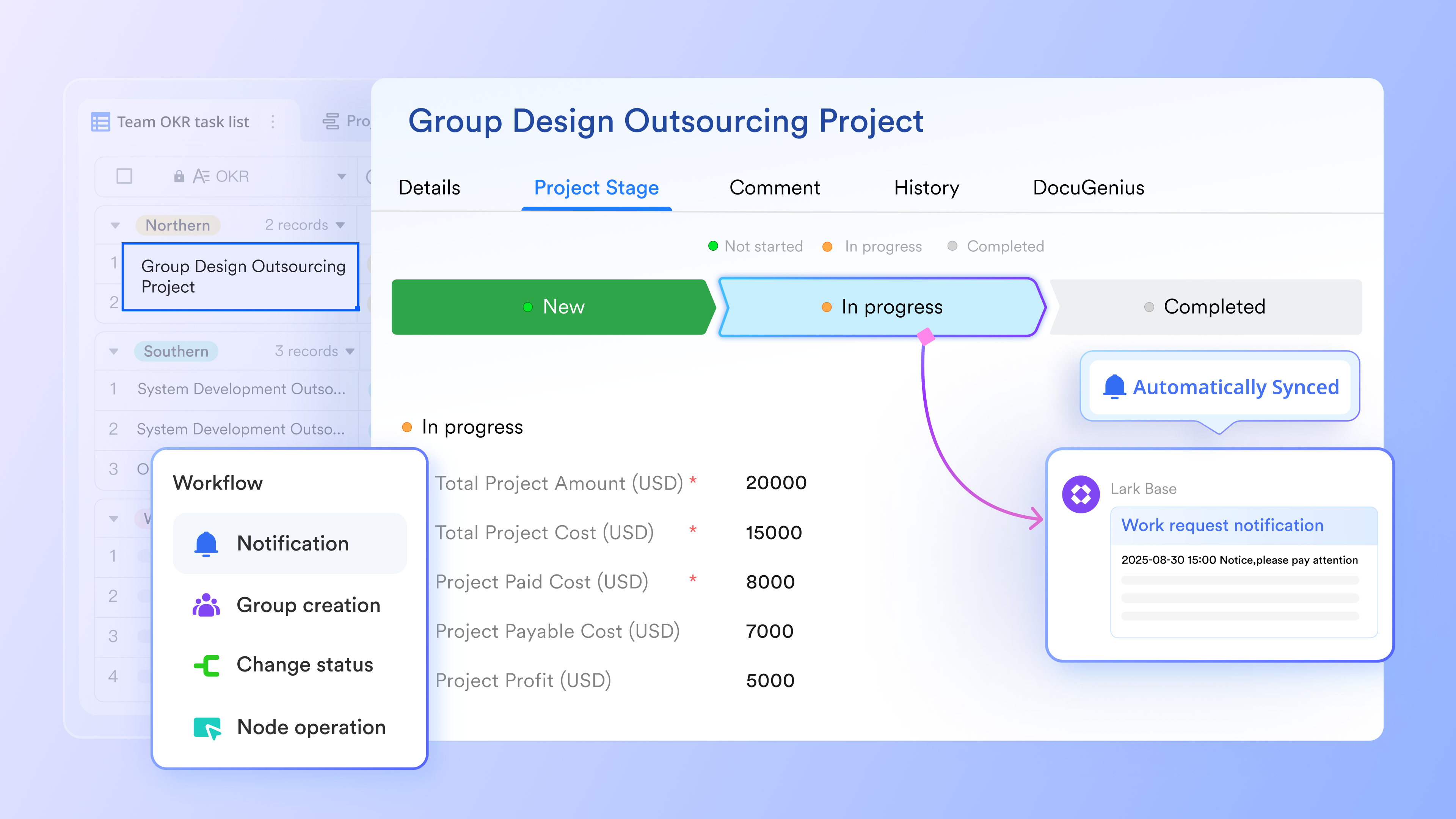
Time is precious, and manual tasks drain productivity. Lark Base's automations free you from repetitive actions, allowing you to focus on what truly matters: strategic thinking and creative problem-solving. With Lark, you can automate:
- Notifications: Send automatic reminders to team members when deadlines are approaching or tasks are overdue.
- Data updates: Automatically update task information based on changes in connected data sources, such as customer databases or project budgets.
Streamline task assignment and collaboration
Clear task assignment is crucial for accountability and efficiency. Lark simplifies this process, ensuring everyone knows their responsibilities and has the tools they need to succeed. With Lark, you can:
- Assign tasks with ease: Assign tasks to individual team members or groups directly.
- Set priorities and deadlines: Clearly define task priorities and deadlines to ensure everyone is focused on the most important work.
Foster seamless collaboration across functions
Action planning often involves team members from different departments or even external partners. Lark simplifies collaboration by providing a unified platform for communication, file sharing, and task management, regardless of location or organizational structure.
- Share files securely: Use Lark Docs to share project documents, templates, and resources with internal and external stakeholders, controlling access permissions to ensure data security.
- Communicate effectively: Use Lark Messenger to communicate with team members, clients, and partners in real-time, using chat, video conferencing, and screen sharing to facilitate collaboration.
- Manage approvals efficiently: Use Lark Approval to streamline approval workflows for tasks, expenses, and other requests, ensuring timely decisions and minimizing delays.
Accelerate planning with rich template resources
Why reinvent the wheel? Lark provides a library of rich template resources designed to accelerate your action planning process. From project management templates to marketing campaign plans to HR onboarding checklists, Lark offers a template for nearly every scenario. These templates are fully customizable, allowing you to adapt them to your specific needs.
Leveraging Lark's template resources saves you time and effort, allowing you to focus on executing your action plan, not building it from scratch.
Monitoring progress effectively
To ensure that the action plan remains on track, it is essential to monitor progress consistently. Here are some strategies to track progress effectively:
- Set up regular check-ins: Schedule regular meetings or check-ins with team members to discuss progress updates. These meetings provide a platform for team members to share their achievements, voice concerns, and collaboratively address any challenges.
- Utilize tracking tools: Leverage project management tools to track progress visually. Many digital platforms offer features that allow teams to visualize their progress on a dashboard, helping everyone stay informed and motivated.
- Measure progress against KPIs: Review the key performance indicators established in the action plan to gauge success. This quantitative approach provides clear information on whether the team is meeting its objectives and where adjustments may be needed.
- Gather feedback: Encourage team members to provide feedback on the action plan’s effectiveness. Open lines of communication allow for the identification of potential areas for improvement or innovation.
Adapting the action plan as needed
Flexibility is crucial in project management, and the ability to adjust your action plan is vital for long-term success. Here are some strategies for adapting your plan:
- Be open to changes: Project dynamics can shift, and unexpected challenges may arise. Be ready to adapt your plan by continuously evaluating the feasibility of tasks and deadlines. This openness can help mitigate risks and keep the project moving forward.
- Reassess priorities: As projects progress, it’s natural for some tasks to become more critical than others. Constantly reassess priorities and adjust task assignments based on changing circumstances or new insights.
- Maintain team engagement: Keep the team engaged and informed throughout the process. Sharing updates on progress and any changes to the plan fosters a sense of collaboration and ensures everyone feels involved in the project's trajectory.
- Document adjustments: As changes occur, make sure to document adjustments made to the action plan. Maintaining records of these alterations will provide valuable context for future projects and help improve planning processes.
Conclusion
In conclusion, action plan templates are powerful tools that facilitate the successful management of projects. By outlining specific steps, assigning responsibilities, and monitoring progress, teams can achieve their business goals with clarity and confidence.
By leveraging the knowledge discussed in this guide and the best planning tools like Lark, project managers can streamline their processes and foster teamwork. With an effective action plan template in hand, your team will be better positioned to tackle challenges, measure progress accurately, and achieve meaningful outcomes. Embrace the power of action plan templates today and watch your projects thrive.
FAQs
How do I write an action plan?
To write an action plan, first define your goal. Then, break down the goal into specific, actionable steps. Assign responsibilities for each step, set realistic deadlines, and identify necessary resources. Finally, establish monitoring strategies and regularly review and adjust the plan as needed.
Does Word have an action plan template?
Yes, Microsoft Word does offer action plan templates. These templates typically include sections for tasks, deadlines, assignees, and status. While convenient, they may lack the collaborative features and customization options found in dedicated project management tools like Lark.
What are the 7 steps of an action plan?
The 7 steps of an action plan are: 1) Define your goal, 2) Outline actionable steps, 3) Assign responsibilities, 4) Set realistic deadlines, 5) Identify required resources, 6) Establish monitoring strategies, and 7) Regularly review and adjust the plan.
What should a plan of action look like?
A plan of action should be clear, concise, and well-organized. It should include specific tasks, assigned owners, realistic deadlines, and measurable outcomes. Visually, it can be a table, a list, or a flowchart, depending on the complexity and preferences of the team.
Related reading
Table of contents
Start using Lark today

Manage all your work in one place
Boost team efficiency by 10x
Save up to 70% on software costs
Table of contents
Start using Lark today
Manage all your work in one place
Boost team efficiency by 10x
Save up to 70% on software costs
Keep reading








2026 Lark Technologies Pte. Ltd.
Headquartered in Singapore with offices worldwide.






Explore: