














Airtable vs Notion: Full Comparison of Features and Pricing

Ryan Tanner
Product Marketing Specialist
Sep 18, 2026
Ryan Tanner
Sep 18, 2026

15 min read


When comparing Airtable vs Notion, teams often look for the balance between structure and flexibility. Airtable brings the power of databases and project tracking, while Notion focuses on documentation and creative organization. Both tools are strong in their domains, but they serve different workflows and priorities.
As more teams transition to connected, digital-first workspaces, the question isn't just which tool is better, but which helps teams communicate, manage, and execute tasks effectively. That's where connected platforms like Lark quietly enter the conversation by combining data, communication, and collaboration into a single environment.

Quick preview: Airtable vs Notion at a glance
The quick overview shows how Airtable and Notion approach productivity differently. Airtable emphasizes structured project execution and automation, while Notion focuses on flexibility and creativity through its content-driven interface.
Airtable: Best for database-driven project management
Airtable bridges the gap between a spreadsheet and a database. It gives teams the ability to structure projects, manage workflows, and analyze data visually. It's especially popular among operations and marketing teams that depend on organized, formula-based tracking systems.

Image source: airtable.com
Key features
- Customizable database structure: Airtable lets users create "bases" to store information in grid, gallery, or Kanban formats. Each base can include custom fields, relationships, and filters to adapt to various use cases.
- Powerful automation tools: Built-in automations help trigger emails, notifications, and updates when certain conditions are met, reducing manual effort.
- Strong external tool support: Airtable connects with tools like Slack, Google Drive, and Zapier, making it adaptable to larger workflows.
- Advanced filtering and views: Teams can group data by owner, status, or deadline, providing clear visibility across multiple projects and departments.
- Collaboration features: Shared views, permission settings, and comments make cross-functional teamwork possible without exporting data elsewhere.
Pros
- Highly flexible for database management and tracking
- Excellent for structured, recurring workflows
- Visual layouts (grid, Kanban, calendar) improve project visibility
- Easy sharing with permissions for different roles
- Ideal for data-heavy teams needing automation
Cons
- Can become expensive for growing teams
- Limited offline functionality affects mobility
- Some users find its formulas complex
Airtable is best suited for structured project managers and teams that rely on data integrity and detailed progress tracking.
Notion: Best for flexible documentation and team knowledge
Notion redefined how teams manage notes, wikis, and knowledge bases. It focuses on simplicity and creativity, allowing users to create pages, link databases, and organize everything from personal tasks to full project documentation.
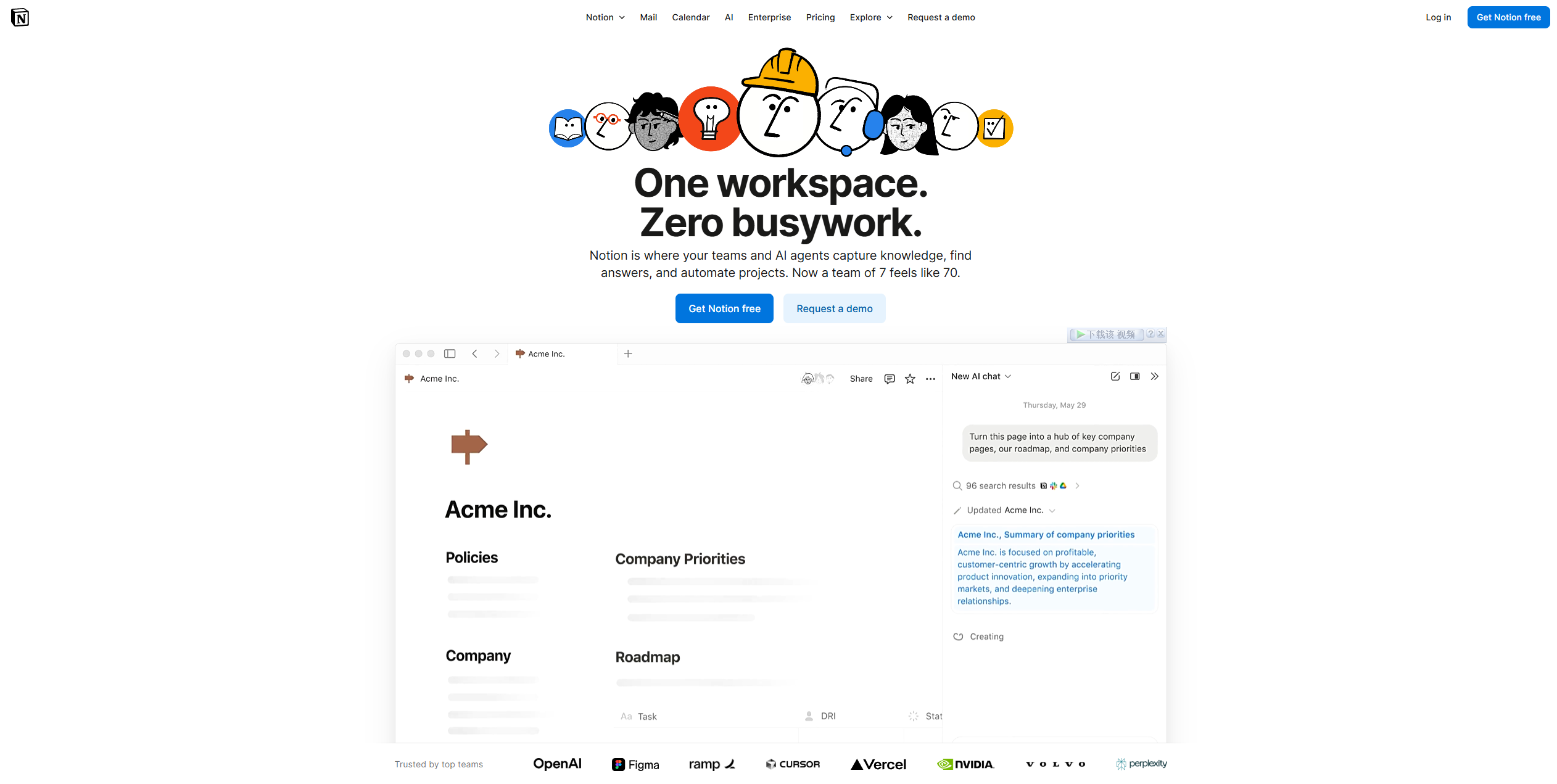
Image source: notion.com
Key features
- Intuitive drag-and-drop editing: Building pages, tables, or boards is easy and visual, which appeals to writers and designers.
- Powerful wiki creation: Teams can maintain internal documentation, onboarding guides, and collaborative knowledge libraries in one place.
- Linked databases: Notion allows lightweight databases that connect across pages for simple tracking and organization.
- Offline access: Desktop and mobile apps ensure users can work without constant internet connection.
- Real-time collaboration: Multiple users can edit documents simultaneously with comments and mentions.
Pros
- Extremely user-friendly and fast to adopt
- Ideal for creative documentation and internal wikis
- Flexible structure for combining text, visuals, and data
- Affordable for startups and small teams
- Strong community templates for various use cases
Cons
- Limited automation and workflow tools
- Not as powerful for data-heavy management
- Can become cluttered without proper structure
Notion shines as a creativity-first platform for individuals and teams that value fluid documentation over rigid processes.
Airtable vs Notion: Detailed feature comparison
Airtable and Notion may appear similar at first, but they are built for very different types of workflows. To understand where each tool performs best, it helps to compare them across core categories that matter to teams choosing between structure and flexibility. The points below break down how both tools differ in usability, collaboration, automation, pricing, and long-term scalability.
- Ease of use: Airtable's structured interface feels familiar to Excel users but can appear overwhelming for beginners. Notion's minimalist layout makes onboarding simpler but managing complex workspaces requires discipline. Teams that prefer visual structure may adapt faster to Airtable, while teams focused on quick note-based workflows often start with Notion more easily.
- Database management: Airtable leads to data control, supporting formulas, linked records, and advanced views for deeper analytics. Notion's databases work well for simple content lists or task management but lack the calculation depth needed for operational or financial workflows. Airtable is better suited for teams managing data at scale, while Notion supports more lightweight tracking needs.
- Documentation and notes: Notion clearly wins this area because it offers rich formatting, embedded media, and intuitive note-taking features that Airtable lacks. Airtable's text fields remain secondary to its data-first design, making long-form writing less practical. Notion's structure supports everything from meeting notes to comprehensive knowledge bases in a single workspace.
- Collaboration: Both tools support real-time teamwork, but in different ways. Airtable enables comments and shared views within structured bases, making collaboration data-centric. Notion encourages open teamwork through shared pages, inline mentions, and flexible layouts. The better choice depends on whether a team prioritizes organizing information or co-editing content.
- Automation: Airtable automations run natively and can trigger actions like email alerts or record updates across workflows. Notion relies on third-party tools like Zapier or Make to achieve similar results, which adds extra setup and dependency. Airtable is stronger for teams that need multi-step automation without external platforms.
- Pricing: Airtable's pricing scales with automation runs and user count, which can increase costs quickly as teams expand. Notion remains more affordable for small or medium teams, especially for documentation-heavy workflows that don't require large data sets. Pricing decisions often depend on whether teams value database power or flexible content creation.
- Scalability: Airtable scales better for large enterprises needing workflow consistency, structured governance, and automation reliability. Notion is easier to deploy for smaller teams or creative units that need a fast setup without a complex structure. As organizations grow, Airtable supports operational maturity, while Notion may require stronger admin controls to prevent workspace clutter.
Airtable vs Notion pricing: Are they worth the costs
In a nutshell, Airtable is better suited for teams managing structured data, workflows, and automations, while Notion excels in flexible documentation, collaboration, and light database use. Airtable’s pricing scales with usage and collaboration, whereas Notion offers a lower entry cost with strong content management features.
Deep insights: What leads companies to choose another solution
Despite their strengths, both Airtable and Notion rely on multiple external tools for communication, scheduling, and approvals. This fragmentation often slows teams down and leads to missed updates or duplicated effort. Common challenges include:
- Fragmented communication: Both tools rely on external messaging apps for collaboration.
- Limited automation: Airtable offers automation only within its databases, while Notion needs external tools for even simple triggers.
- Context switching: Moving between docs, databases, and chats breaks focus and continuity.
As teams scale, maintaining these separate systems becomes inefficient. A truly connected platform is needed-one that brings together data, documents, and communication.
Lark: A unified, smarter alternative to Airtable and Notion
Lark combines the best of both Airtable and Notion, addressing their biggest challenge: disconnected workflows. It unifies the CRM system, document management, team chats, and video meetings in one platform, enabling teams to plan, execute, and communicate without switching tools. From building structured CRM-style bases to collaborating on live documents and tracking progress in shared calendars, Lark ensures every part of the workflow stays connected and visible.
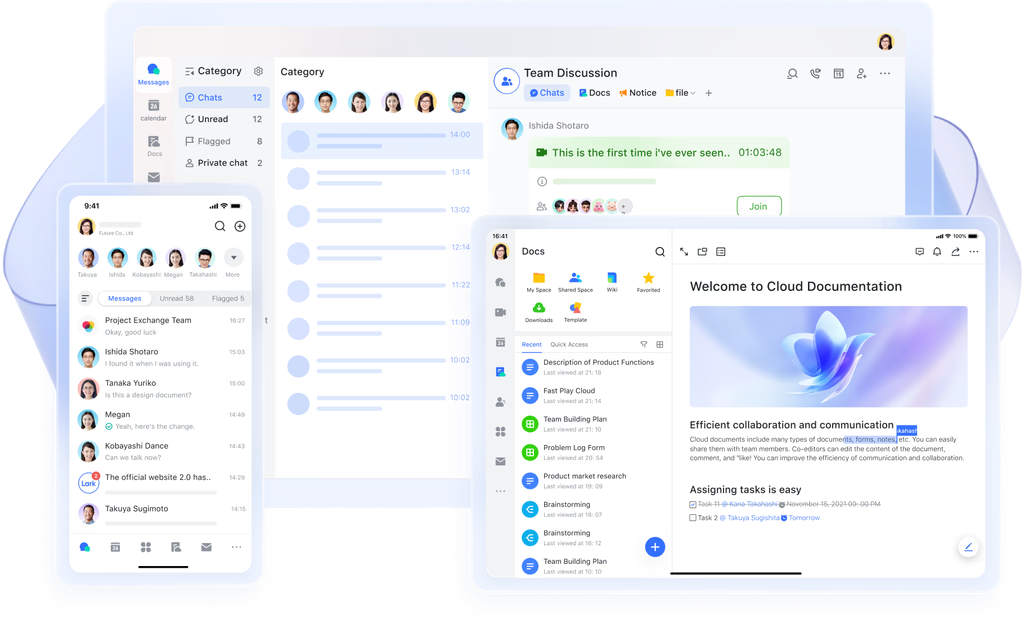
Lark Base: Structure data like Airtable, collaborate like Notion
Lark Base combines Airtable's structured database capabilities with Notion's ease of collaboration - letting teams organize projects, leads, or content in customizable views like grid, Kanban, or gallery. Unlike Airtable, Base connects directly to chat, docs, and tasks, keeping discussions and data in one place. Built-in dashboards and automation runs make tracking and reporting effortless, reducing time spent switching between platforms. This unified approach gives teams both structure and fluid collaboration, bridging what Airtable and Notion handle separately.
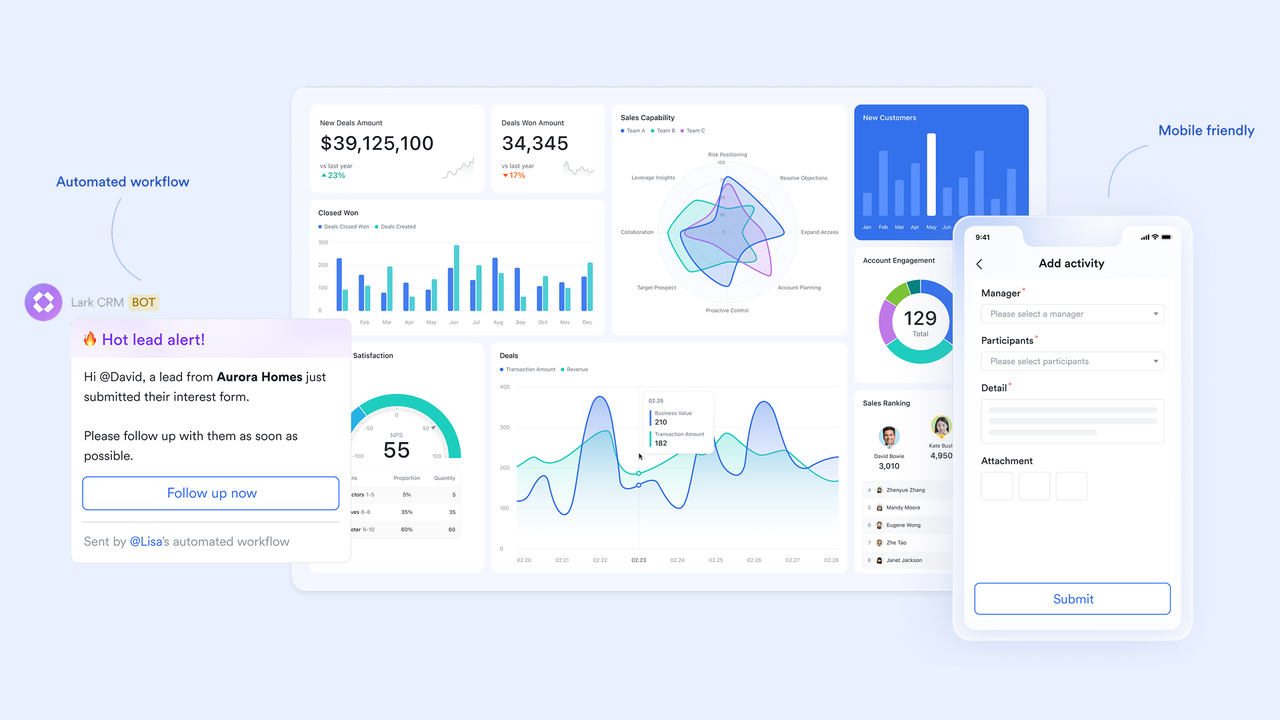
Lark Docs & Lark Wiki: Organize, co-edit, and publish
Where Notion focuses on documentation and Airtable lacks text collaboration, Lark Docs and Lark Wiki bring both together in a live, interactive workspace. Teams can co-edit documents in real time, leave online feedback, and instantly publish finalized content to shared wiki spaces for organization-wide access. Version control ensures nothing gets lost in revisions, and automatic syncing keeps every team updated. Lark turns content creation, storage, and sharing into one continuous flow, no need for external file links or syncing delays.
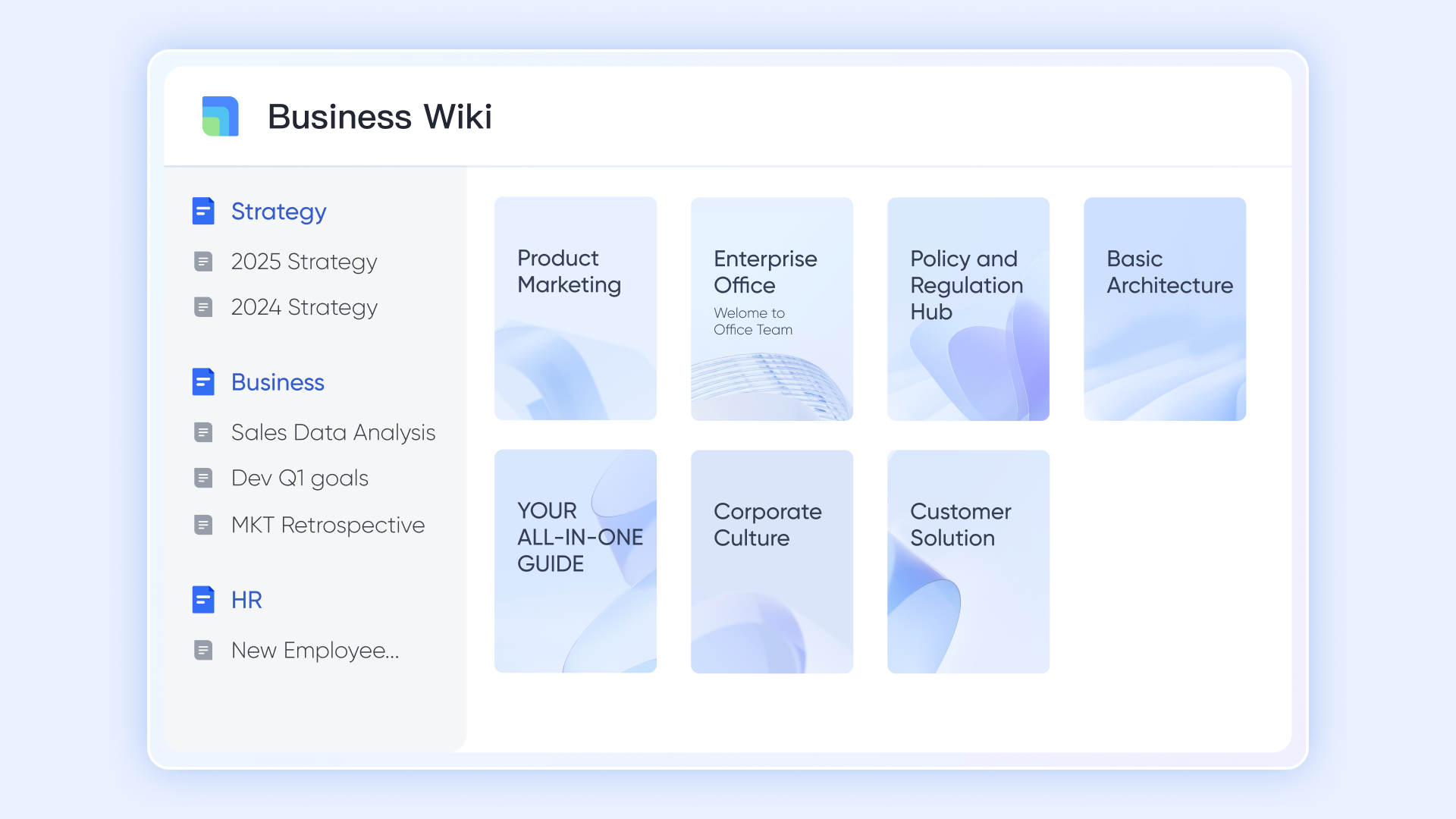
Lark Messenger: Keep communication in context
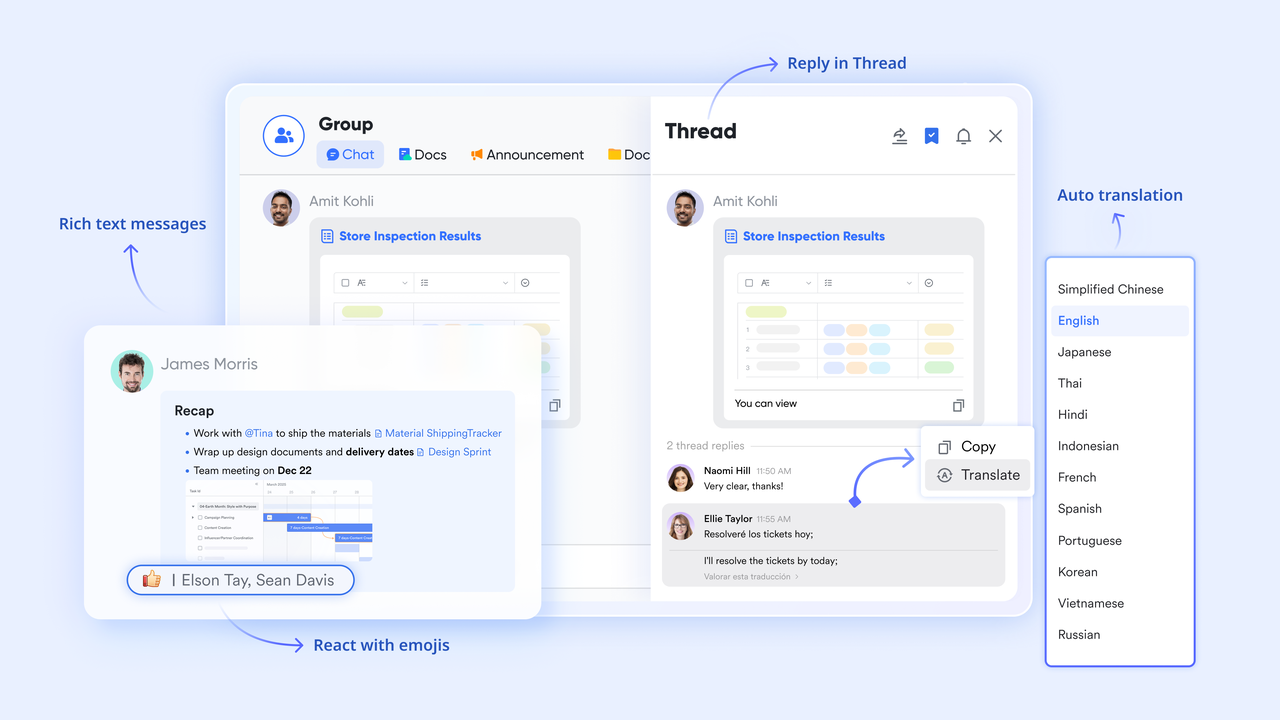
Both Airtable and Notion rely on external chat tools for collaboration - Lark changes that. With Lark Messenger, conversations happen right where work does. Teams can comment on projects, mention colleagues, or attach a Base or Doc directly within a message. This keeps communication contextually linked to the work being discussed, reducing back-and-forth emails and fragmented feedback threads. It's real-time collaboration that lives within the workspace, not outside it.
Lark Tasks: Turn ideas into action with trackers
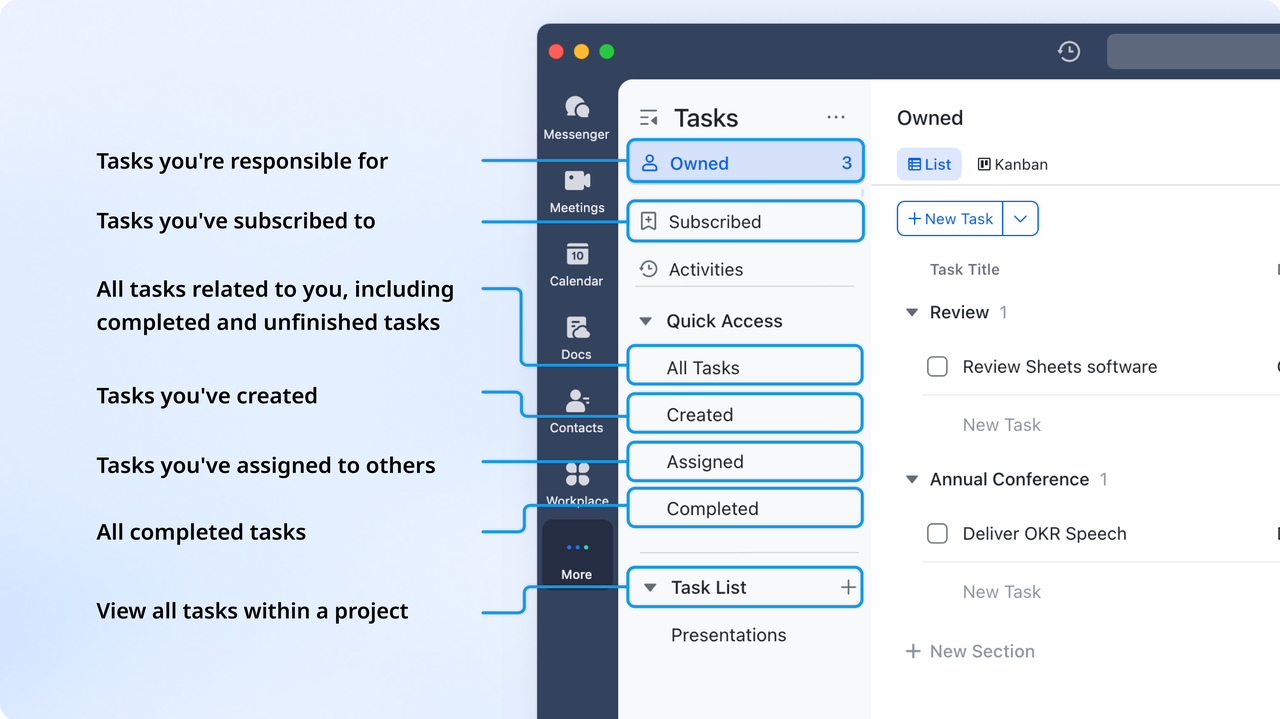
Unlike Airtable's project trackers or Notion's to-do lists, Lark Tasks adds accountability to every stage of collaboration. Tasks can be created directly from chats, docs, or bases, each with owners, deadlines, and progress visibility. Managers gain an overview of project timelines, while team members stay aligned on next steps without using separate task apps. By connecting planning and execution, Lark ensures every idea and deliverable moves forward in sync.
Lark Approval: Streamline requests and approval process
While Airtable automates data and Notion documents workflows, neither manages formal approvals effectively. Lark Approval adds structured, automated approval flows for everything from content reviews to budget sign-offs. Reviewers are notified instantly, decisions are logged transparently, and approval status updates in real time. This feature ensures fast, accountable decision-making, keeping workflows moving without bottlenecks or guesswork.

- Starter plan: Free forever plan that includes 11 powerful tools for up to 20 users. It also comes with 100GB of storage, 1000 automation runs, AI translations, and more.
- Pro plan: $12/user/month (billed annually) for up to 500 users. It includes everything in Starter plus group calling for up to 500 attendees, 15TB of storage, 50,000 automation runs, and more.
- Enterprise plan: Contact sales for custom pricing. Supports unlimited users and includes even more automation runs and advanced security, compliance, and management features.
Final Verdict: Why Lark outperforms Airtable and Notion
Both Airtable and Notion have established strong reputations, with one for its database capabilities and the other for its flexible documentation. But when it comes to bringing structure, teamwork, and execution together, both fall short of what modern teams need. Lark fills that gap with a connected workspace that merges the best of both worlds. To give a quick insight, here is the comparison table:
With everything from project management and document creation to scheduling and chat under one roof, teams spend less time switching tools and more time moving work forward. For organizations seeking a platform that's not just organized but truly connected, Lark stands as the more innovative, more unified alternative to Airtable and Notion.
Conclusion
Airtable and Notion both offer distinct strengths that make them top choices for productivity and collaboration. Airtable delivers structure through data management and automation, while Notion provides creative flexibility for notes and documentation. However, as teams evolve, they need more than just task lists or tables. They need a system that unifies all aspects of work.
Lark addresses those needs by combining organization, communication, and automation in one seamless environment. It enables teams to move fluidly between planning, messaging, and execution without depending on multiple disconnected apps. For businesses that value both structure and creativity, Lark offers a smarter, more connected way to work.
FAQs
Which is better for project management: Airtable or Notion?
Airtable is stronger for structured project tracking with detailed data relationships, while Notion is better for documentation-led planning. Teams that rely on process automation and analytics typically prefer Airtable. Those focusing on content or design workflows often choose Notion.
Can Airtable replace Notion for documentation?
Not entirely. While Airtable supports note fields and attachments, it lacks the text formatting, publishing, and wiki structure that Notion offers. For rich documentation or team wikis, notion remains the better choice.
Is Notion good for database management?
Notion's databases are best suited for lightweight organization and tracking. They don't support advanced formulas or cross-table relationships like Airtable. For teams needing complex data management, Airtable is a stronger option.
Does Lark offer both data tracking and collaboration?
Yes. Lark combines structured databases like Airtable with collaborative editing and communication like Notion. Teams can track projects, write documents, chat, and automate workflows in one environment
Which platform offers more automation features?
Airtable has native automation options, while Notion depends on external tools. Lark, however, offers built-in automation that extends across chat, docs, tasks, and approvals, helping teams streamline multiple workflows seamlessly.
Related reading
Table of contents
Start using Lark today

Manage all your work in one place
Boost team efficiency by 10x
Save up to 70% on software costs
Table of contents
Start using Lark today
Manage all your work in one place
Boost team efficiency by 10x
Save up to 70% on software costs
Keep reading



Lark recognized in 2023 Gartner® Collaborative Content Workspaces and Meeting Solutions reports
Lark, the global superapp for productivity, is delighted to announce it receives recognition in the Gartner's 2023 Innovation Insight for Collaborative Content Workspaces and Market Guide for Meeting Solutions.





2026 Lark Technologies Pte. Ltd.
Headquartered in Singapore with offices worldwide.






Explore: