If you observe a typical office worker's screen, you will likely see a chaotic mosaic of browser tabs and desktop clients. We chat in one app, track projects in another, host video calls in a third, and draft documents in a fourth. This fragmented approach often leads to lost information, frustrated employees, and bloated software budgets. Searching for a better way, many business leaders are evaluating an all in one application to streamline their operations. In this guide, I will walk you through what makes a true unified workspace, how to navigate the security implications, and how to decide if software consolidation is the right move for your team.
What defines a true all in one application for business management?
When people hear the term "all in one", they often picture a loose collection of average tools bundled under a single subscription. However, a modern all in one business management application is built differently. It does not just package tools together; it integrates them at the data layer to create a continuous workflow. All in one applications are developed to integrate core business functions and minimize manual data entry errors among systems.
A comprehensive platform generally includes core features like real-time messaging, video meetings, cloud-native documents, shared calendars, email integration, and workflow automation. But the real defining characteristic is interoperability. Project management tools within an all in one application can include task assignment and progress tracking via Kanban or Gantt charts.
Consider this mini-scenario: You need a manager to approve a project budget.
- The fragmented way: You draft the budget in a spreadsheet app, download it, upload it to a chat app, message your manager, and wait. The manager downloads it, reviews it, and replies in the chat.
- The unified way: You create a cloud-native sheet directly within your team's chat group. You tag your manager in the document. They review it in the same window and click an embedded "Approve" button, triggering an automated workflow.
Centralized data in all in one applications allows for more accurate reporting and analysis across departments, and improves data integrity by reducing manual data entry errors.
The software acts as a singular environment where context is never lost.
A lot of all in one productivity applications are becoming increasingly popular among developers. For example, WeChat is an all in one application that combines messaging, social media, shopping, and payments.
All-in-one vs. Standalone tools: Which is right for your team?
If you spend any time reading tech forums or productivity blogs, you will inevitably encounter the debate between using an all in one application and building a "best-of-breed" software stack. Critics of consolidation often rely on the old adage: a jack of all trades is a master of none. They argue that specialized, single-purpose apps will always outperform the components of a unified suite.
While this might have been true a decade ago, cloud-native architecture has shifted the balance. Today, centralized platforms offer deep functionality that rivals standalone apps. More importantly, the best-of-breed approach carries high hidden costs.
Every time an employee switches between a separate project management tool and a messaging app, they experience a cognitive penalty known as . Over a typical workweek, these micro-interruptions compound, severely degrading focus and output. Furthermore, integrating a dozen specialized tools requires expensive middleware and constant IT maintenance. The idea behind choosing a consolidated workspace versus dedicated tools reflects a fundamental difference in how organizations approach productivity: whether to innovate with a unified solution or rely on specialized, single-purpose apps. Choosing a consolidated workspace is a strategic decision to prioritize workflow continuity and team alignment over having an overly complex assortment of niche features. All in one applications are becoming more popular as developers seek to add more functionality to existing apps, making them increasingly attractive for organizations aiming to streamline their operations and even prompting teams to evaluate .
Addressing the elephant in the room: All in one web application security
When I speak with IT directors about consolidating their software stack, one primary concern always surfaces: the "all eggs in one basket" dilemma. If you move your company's communication, project data, and internal wikis into a single environment, does a potential breach compromise everything? It is a valid question, and addressing all in one web application security is critical before making any transition.
Interestingly, managing a highly fragmented tech stack often presents a greater, less visible risk. When employees use dozens of disconnected apps, they often rely on weak passwords or share sensitive data across unvetted platforms—a phenomenon known as shadow IT.
By contrast, a unified workspace centralizes access control and supports , while integrated scheduling views function similarly to a . The platform functions as an all in one security application, giving your IT administrators a single dashboard to manage user permissions, enforce two-factor authentication, and monitor data sharing policies. If an employee leaves the company, an administrator can revoke access to chat, email, documents, and calendars with a single click, rather than logging into five different vendor portals. When you rely on an all in one security application online, you leverage the vendor's enterprise-grade compliance, encryption, and dedicated security teams to protect your perimeter much more effectively than managing a patchwork of localized apps.
Keeping operations smooth: Reliability and performance
Beyond security, IT teams must also ensure that the tools employees rely on actually stay online and perform well. In a decentralized setup, a failure in one application's API can break automated workflows across three other apps, sending engineers on a wild goose chase to identify which vendor is experiencing an outage.
Moving to a unified platform simplifies this operational overhead, especially when using a that centralizes data and workflows. Vendor-provided dashboards offer a clear view of system health, functioning as an application performance monitoring all in one solution similar to a centralized . Your operations team can track the latency of video calls, the sync speed of cloud-native documents, and the execution times of workflow automations from a single pane of glass, much like monitoring work from a unified .
Because the architecture is integrated at the data layer, diagnostic processes become straightforward. You are no longer responsible for maintaining the fragile bridges between different software providers; the unified vendor ensures that the chat infrastructure communicates flawlessly with the project management modules.
Driving ROI: Cost efficiency and team adoption
The financial argument for moving to a unified platform is often the easiest to make. Take a moment to calculate your current per-user SaaS spending. If you are paying $15 for a messaging app, $20 for project management software, and another $15 for a dedicated video conferencing tool, your monthly software bill compounds quickly. An all in one business management application dramatically reduces these redundant subscription fees while simplifying procurement and billing.
However, buying the software is only half the battle; getting your team to use it requires intention. People naturally resist change, especially when they are comfortable with their current tools. For an organization, new users only need to learn one interface, which can decrease the time required for new hires to become productive by up to 50%, especially in remote collaboration and communication setups. To encourage adoption, avoid ripping out the old systems overnight. Consider this mini-scenario for a smooth rollout: Start with a specific, high-friction workflow. If your team struggles to organize meeting notes, introduce the new platform strictly for weekly team meetings. Have them experience the benefit of taking collaborative, cloud-native notes directly inside the video call window. Once they see the immediate time savings, gradually migrate project tracking and daily chat. Small, visible wins build trust and make the broader transition feel like a natural upgrade rather than a forced mandate.
Supporting remote teams: Mobile accessibility
The shift toward mobile accessibility and remote work has changed what users expect from an all in one tool—dramatically yet naturally. Today, people want freedom to manage their work, home, and personal projects from anywhere, using just one app that brings together the features and services they need. This demand is driving developers to create solutions that are comprehensive yet intuitive, allowing users to access information, manage accounts, and solve problems in different ways—whether they're at home, on the job site, or traveling between meetings.
A true all in one app is more than just a collection of tools; it's a connected system that's powerful yet simple to use, comparable to leading and the wider ecosystem of that unify messaging, meetings, and projects. Users can handle everything from contacting contractors for home repairs to collaborating on business projects, all in one place.
However, as all in one apps become more powerful and central to daily life, it's wise to be optimistic but cautious. Relying on one app for multiple purposes means that data protection and security must be top priorities—important yet achievable goals. Developers are responding by building robust security features into their platforms, and users can feel empowered by taking time to read reviews, check ratings, and understand what measures protect their information.
For remote workers, the benefits of an all in one tool are both immediate and long-lasting. Being able to manage projects, communicate with team members, and access documents from any device—whether phone, tablet, or laptop—means work can happen wherever people are. This flexibility boosts productivity while maintaining work-life balance, allowing teams to stay connected yet independent, aligned but adaptable, regardless of location or time zone.
When choosing an all in one app, it's smart to be thorough yet practical about your unique needs and workflow. Look for features that integrate with other tools, manage different types of data, and adapt as requirements evolve. Take time to read user reviews, compare ratings, and test functionality—this approach is careful but worthwhile, ensuring the app truly solves your problems while fitting your organization's way of working.
In summary, mobile accessibility and remote work are setting exciting yet realistic standards for what an all in one app should offer. By combining multiple services, leveraging AI, and focusing on user experience, these tools help people and organizations manage their work and home lives more efficiently—streamlined yet flexible. As you explore your options, prioritize security, flexibility, and ease of use to find the all in one tool that will keep you productive and confident—wherever you are.
Embrace a consolidated all in one working experience
How Lark delivers a true all in one application experience: A best practice guide
Transitioning to an all in one application requires more than just buying a new license; it demands a platform designed to actively eliminate workflow friction. Lark approaches this challenge by deeply integrating its core tools at the data layer, ensuring that communication and project execution happen in the exact same digital space. Here is how growing teams utilize specific features within Lark to resolve common collaboration pain points and build a highly functional, unified workspace.
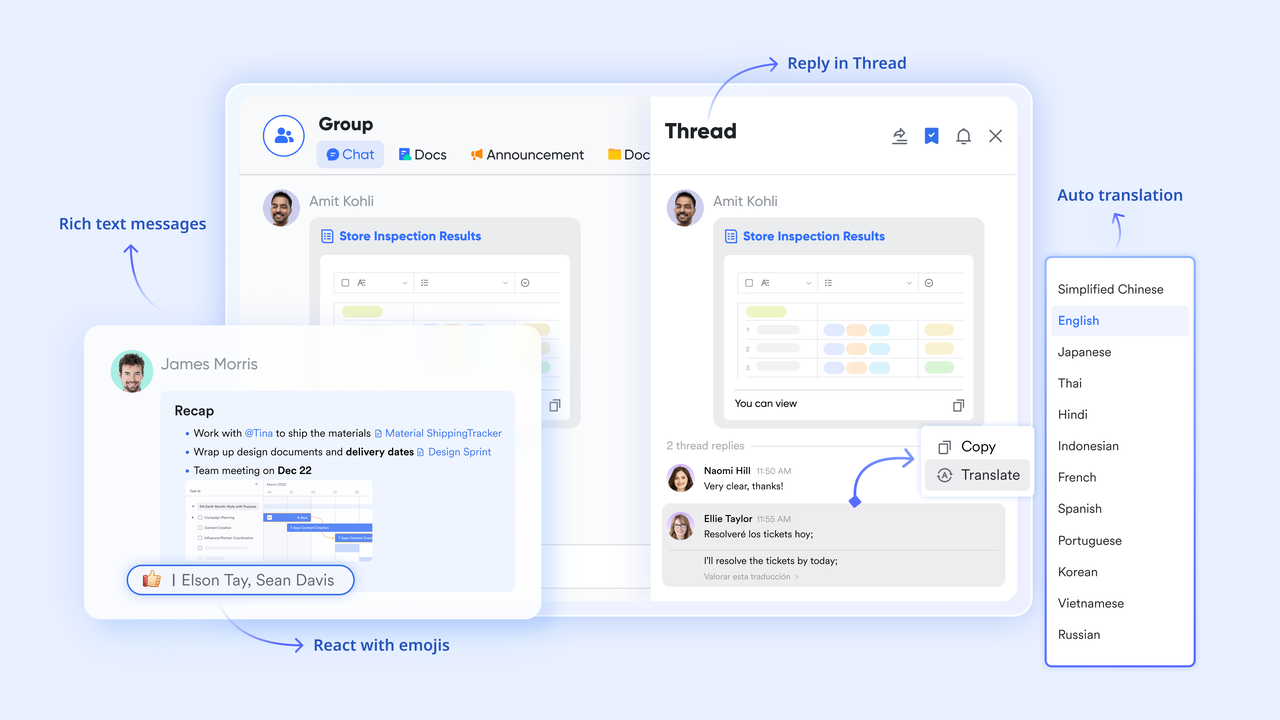
Eliminating context switching with : The constant back-and-forth between chat apps and work documents heavily degrades focus. Lark Messenger anchors your discussions directly alongside your actual work, allowing you to open and edit files in a side panel without ever leaving the chat window. With rich text messaging, threaded replies, and built-in real-time translation, distributed teams can collaborate without friction across different time zones and languages by leveraging advanced chat translation technology and Lark's broader .
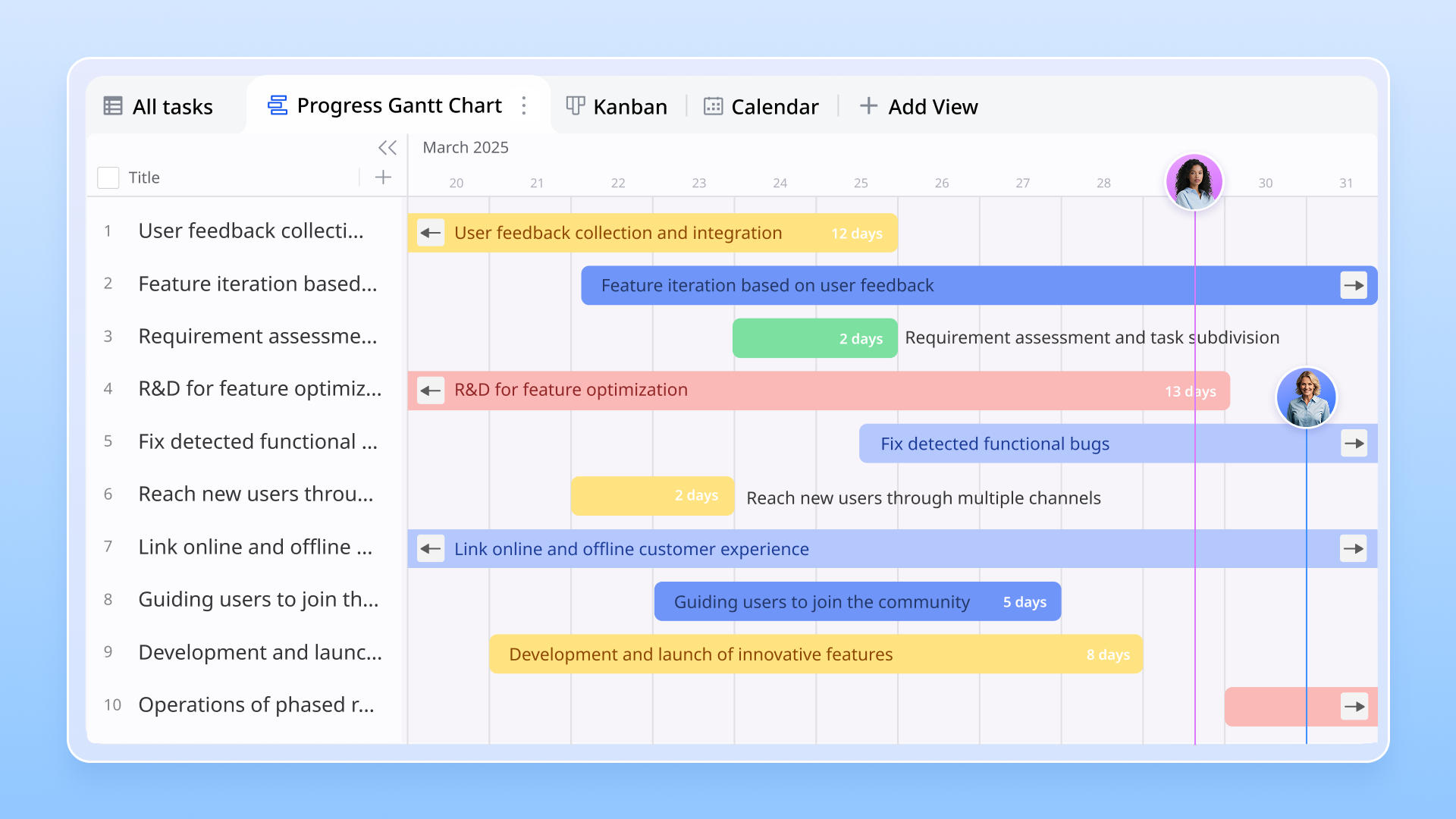
Structuring complex data with : Standard spreadsheets often fall short when managing dynamic project pipelines or client databases. Lark Base is a powerful low-code relational database that lets teams build customized tables with automated triggers to streamline task updates. By utilizing multiple visual layouts—such as Gantt, Kanban, and Gallery views—managers can link different datasets for advanced project tracking without purchasing separate management software.
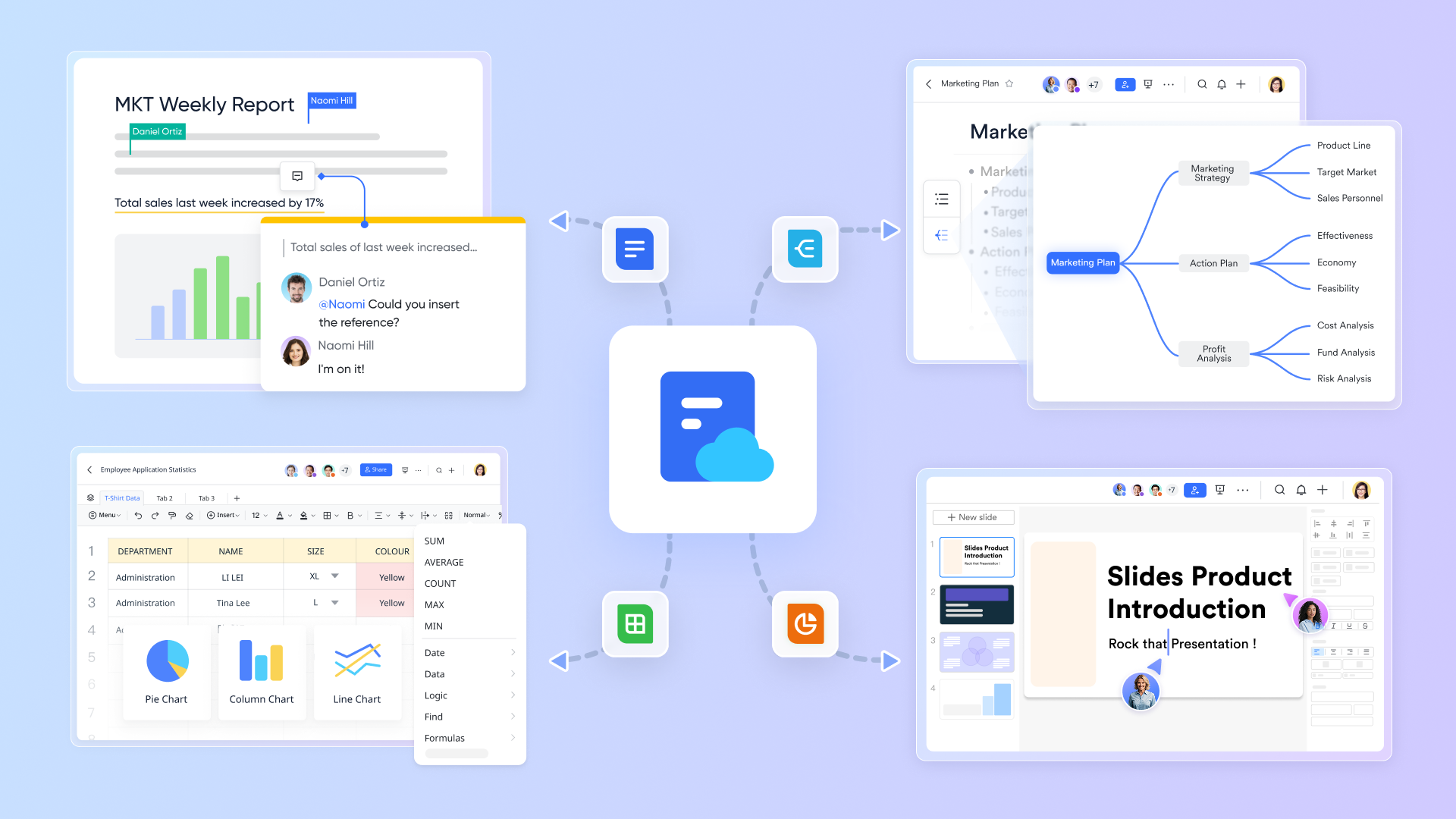
Centralizing project dashboards in : Static text files quickly become outdated data silos. Lark Docs transforms standard pages into interactive, multimedia canvases by allowing users to embed live data directly into the text. Teams can insert interactive widgets like countdown timers, polls, live Base views that update dynamically, and external design files, turning a simple document into a comprehensive accessible from any device.
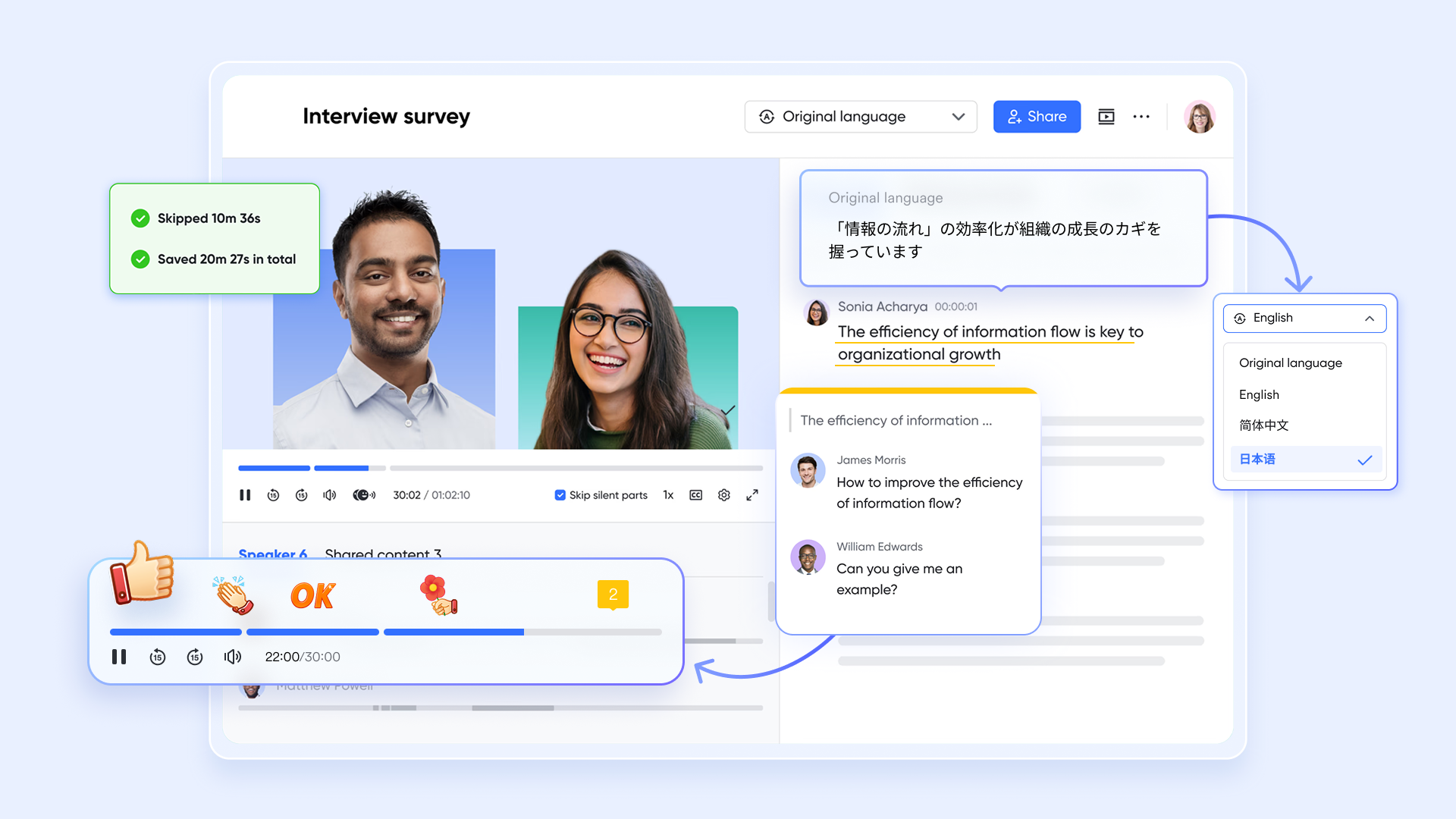
Capturing institutional knowledge via : Valuable insights are frequently lost the moment a video call ends, often forcing companies to pay for third-party transcription add-ons. Lark Minutes automatically records and transcribes video sessions into highly searchable text, complete with precise speaker identification and keyword highlighting. If you need to review a specific decision, simply click any sentence in the transcript, and the video playback instantly jumps to that exact moment.
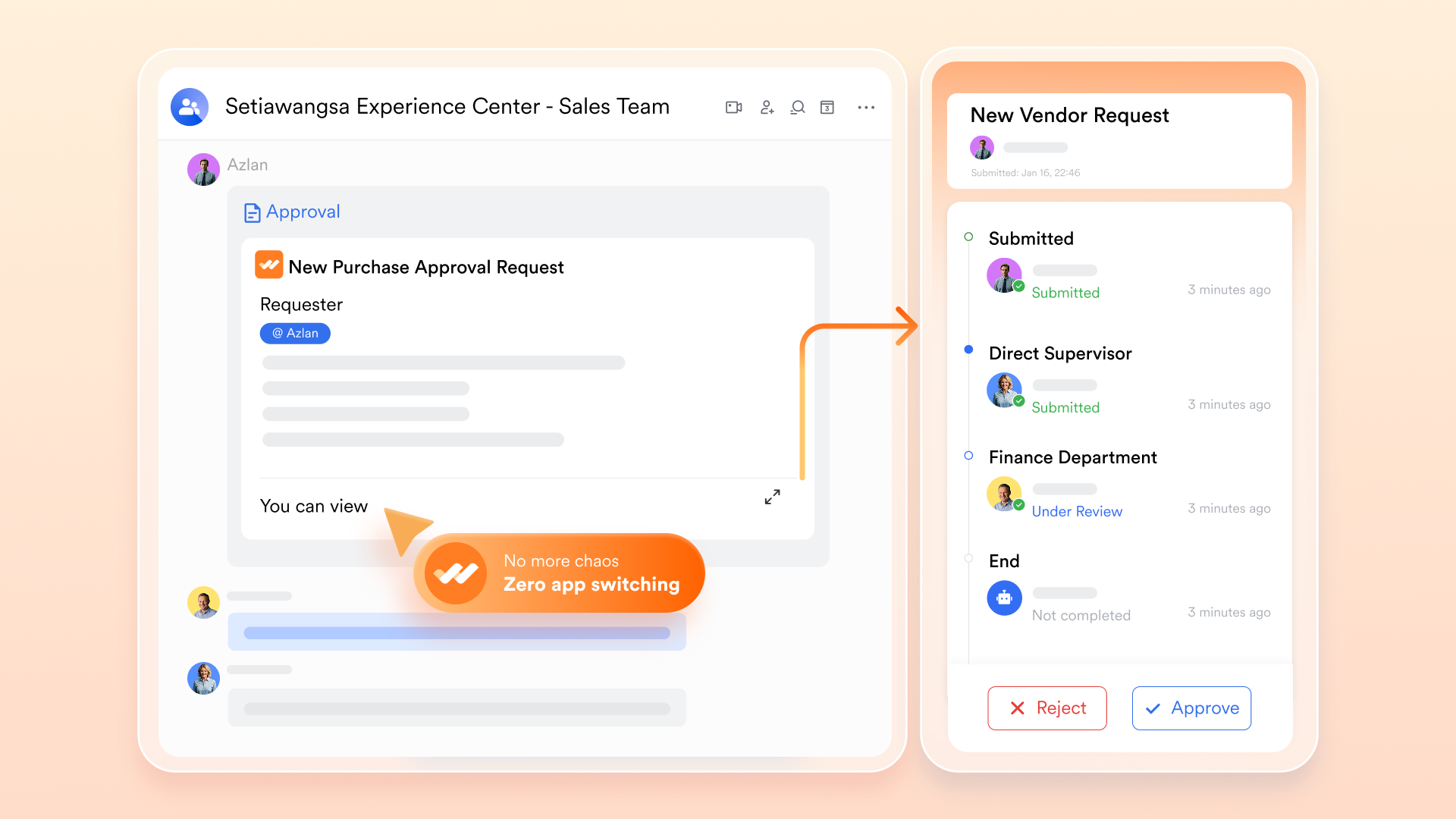
Accelerating operational bureaucracy using : Manual sign-offs and buried email chains create severe bottlenecks in daily operations. Lark Approval digitizes these workflows through custom routing and conditional branching, such as automatically redirecting requests based on specific budget amounts. Stakeholders receive automated reminders and interactive summary cards directly in their chat feed, enabling them to authorize requests with a single click from their mobile or desktop interface.
🌟 Learn more about :
Lark's pricing structure is designed to simplify your operations and eliminate the need to stack multiple separated tools. As a true all-in-one app, each plan provides access to a comprehensive suite of features—from collaboration and communication to workflow automation and AI capabilities. Teams no longer have to juggle extra subscriptions or waste time comparing complex add-on fees. With every tier covering multiple essential business functions, Lark ensures that organizations of any size can scale efficiently without worrying about fragmented systems or confusing pricing models.
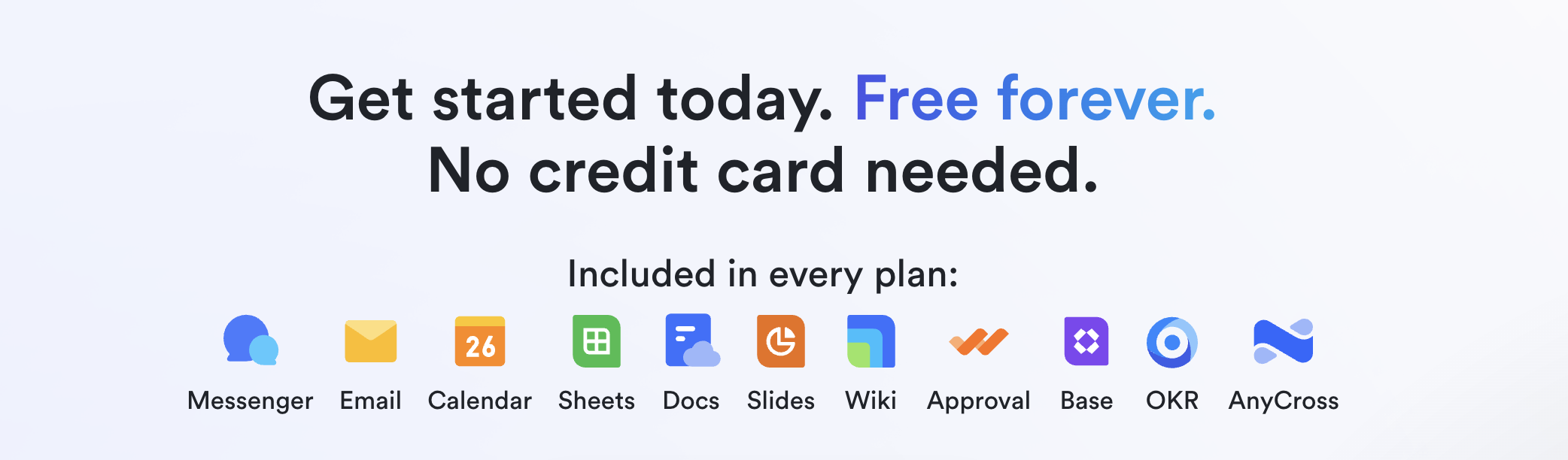
- Starter plan: Free forever plan that includes 11 powerful tools for up to 20 users. It also comes with 100GB of storage, 1000 automation runs, AI translations, and more.
- Pro plan: $12/user/month (billed annually) for up to 500 users. It includes everything in Starter plus group calling for up to 500 attendees, 15TB of storage, 50,000 automation runs, and more.
- Enterprise plan: for custom pricing. Supports unlimited users and includes even more automation runs and advanced security, compliance, and management features.
For small teams with simple communication needs

18 months message history
1000 Base automation runs/month
2000 rows per table in Base
Most POPULAR
For companies with comprehensive collaboration and management needs
Unlimited message history
500-participant video meetings
50k Base automation runs/month
20k rows per table in Base
For large companies with advanced security and organizational management needs
Get a personalized demo and pricing
Unlimited message history
500-participant video meetings
15 TB storage + 30 GB storage/user
500k Base automation runs/month
50k Base automation runs/month
Most POPULAR
For companies with comprehensive collaboration and management needs
Unlimited message history
500-participant video meetings
50k Base automation runs/month
20k rows per table in Base
Key features to prioritize in your selection process
Once you decide to consolidate your software stack, the next step is evaluating the market. Not every platform that claims to be an all in one application offers the same level of utility. To avoid buyer's remorse, focus your evaluation on a few critical capabilities that define a truly functional workspace:
- A cross-functional search engine: Since your data is now centralized, you need a universal search bar that can instantly pull up a specific chat message from last month, a project brief, and a calendar invite simultaneously. If the search function is siloed—forcing you to search the document module separately from the messaging module—navigating the platform will quickly become frustrating.
- Full mobile parity: Many software providers build robust desktop applications but treat their mobile versions as an afterthought with stripped-down features. In a modern, hybrid work environment, your team needs a mobile app that mirrors the desktop experience. Employees should be able to approve a workflow, edit a document, and join a video conference from their phones just as easily as they would from their laptops.
- API extensibility: Even the most comprehensive all-in-one business management application will eventually need to connect with your company's legacy systems, such as a specialized HR portal or an older ERP database. Flexibility for future integrations is essential.
Explore the best all in one tool with Lark
Conclusion
Transitioning to an all in one application is a strategic move to eliminate context switching, strengthen data security, and reduce overlapping subscription costs. While specialized tools serve specific niches, modern unified workspaces offer robust, interoperable features that keep hybrid teams aligned. By centralizing your messaging, project management, and document collaboration, you empower your workforce to focus on actual output rather than managing their software. If you are ready to experience the clarity of a truly unified tech stack, consider a platform built natively for deep integration. Try today to eliminate tool fatigue and bring your team's communication, data, and daily workflows seamlessly under one roof.
Bring your team together with Lark's all in one platform.
FAQs
What is an all in one app?
An all in one app is a comprehensive software platform that bundles multiple essential tools into a single, unified interface. Instead of forcing teams to use separate applications for messaging, video conferencing, document editing, and project management, an all in one app integrates these functions at the data layer. This centralized approach helps businesses reduce overlapping subscription costs, minimize disruptive context switching, and keep all team collaboration within one easily searchable workspace.
How to create mobile apps that make 3,000 a day?
Generating 3,000 a day from a mobile app requires a highly scalable business model, such as a premium B2B SaaS platform, a high-retention subscription service, or a consumer app with strong in-app purchase mechanics. To achieve this revenue level, developers must focus on solving a high-value, recurring problem for a large audience—such as improving workplace productivity or simplifying team communication. Success at this scale also demands rigorous market research, exceptional user experience (UX) design, continuous performance monitoring, and a robust marketing strategy to acquire and retain paying users.
What are two types of applications?
In the context of business software and workplace productivity, applications generally fall into two main types: specialized standalone tools and unified platforms. Standalone tools (often referred to as point solutions or best-of-breed software) are designed to perform one specific function entirely, such as a dedicated graphic design program or an isolated payroll system. In contrast, unified platforms (or all in one applications) combine multiple functionalities—like chat, task tracking, and file storage—into a single interconnected ecosystem to streamline workflows and reduce tool fatigue.
Related reading