














Comprehensive Guide to CRM Evaluation and Selection

Jennifer Taylor
Product Demand Generation Specialist
Sep 18, 2026
Jennifer Taylor
Sep 18, 2026

17 min read


Choosing the right Customer Relationship Management (CRM) tool is a critical decision for organizations looking to streamline processes and enhance customer satisfaction. CRM evaluation plays a key role in this process, helping you navigate the numerous options available. This guide will explore various types of CRMs, essential features, and evaluation criteria, providing a comprehensive framework for your selection journey.

Types of CRM
Understanding the different types of CRM is essential as it shapes the strategy your organization may adopt in managing customer relationships. Broadly, CRMs can be classified into four main categories:
- Operational CRM: This type focuses on automating and improving customer-facing and back-end processes, which include sales automation, marketing automation, and service automation. Your operational CRM should help with lead management, contact management, and customer support capabilities to ensure all personnel can access critical customer data seamlessly.
- Analytical CRM: Analytical CRMs are designed to analyze customer data and provide insights into customer behavior, preferences, and trends. They gather and process data from various sources to enable organizations to implement targeted marketing campaigns and understand customer needs. This data-driven decision-making aids in recognizing opportunities for upselling and cross-selling.
- Collaborative CRM: This type emphasizes communication and collaboration among customer-facing departments such as sales, marketing, and customer service. By sharing information, teams can work together more effectively, enhancing customer experiences and resolving issues promptly. With collaborative CRM, all team members access the same customer data to ensure consistency and accuracy in customer interactions.
- Strategic CRM: Strategic CRM focuses on long-term customer engagement by aligning customer interactions with business goals. It incorporates feedback mechanisms to respond to customer needs, facilitating deeper relationships and brand loyalty. By integrating insights from analytical CRM, companies can develop tailored marketing strategies and improve customer experiences.
Understanding what does CRM stand for—Customer Relationship Management—provides valuable context for these types. A successful CRM strategy should consider the unique needs of your organization and align with your overall business objectives.
8 core CRM features your tool must have
When evaluating potential CRM software systems, it's crucial to assess the core features that will meet your organization's requirements. These key functionalities should include:
- Contact management: A robust CRM tool should allow you to manage customer information efficiently, including details like contact information, social media profiles, and interaction history. Segmentation capabilities enable targeted communication tailored to specific customer groups.
- Sales management: Essential features should support the entire sales process, from lead generation to pipeline management. Look for tools that provide sales forecasting, opportunity tracking, and automation of repetitive processes, which help sales teams close deals more effectively.
- Marketing automation: A quality CRM should include marketing automation features to design, implement, and track campaigns easily. This functionality helps your team engage customers at different touchpoints and measure campaign success.
- Customer service & support: Exceptional support capability is a must-have. Ensure the CRM software system offers tools for creating and managing support tickets, assigning tasks, tracking performance metrics, and integrating customer feedback.
- Reporting and analytics: In your CRM requirements checklist, prioritize reporting and analytics features that provide insights into customer engagement, sales performance, and marketing effectiveness. These features should help your team understand how to measure CRM performance and identify areas for improvement.
- Integration capabilities: Your chosen CRM must integrate smoothly with existing tools and software that your team is already using—like email, marketing platforms, and accounting systems. These integrations help keep your operations streamlined and your data consistent across platforms.
- Mobile accessibility: With teams increasingly working remotely and on-the-go, mobile functionality is essential. Ensure your CRM allows access to customer data and communication tools from mobile devices.
- Customizability: Every organization is unique, so look for CRM systems that offer flexible customization options—from custom fields to personalized dashboards. This adaptability ensures that the tool evolves with your organization.
Including these core features in your evaluation criteria will not only streamline your processes but also enhance your team's ability to deliver high-quality customer interactions.
CRM evaluation criteria
Conducting a thorough CRM evaluation involves evaluating several essential criteria that encompass functionality, practicality, and adaptability. These criteria will help guide your organization in selecting a tool that meets your specific needs and supports meaningful customer engagement. Below are the criteria you should consider:
1. Ease of use and implementation
The CRM system should be intuitive, with a user-friendly interface designed to minimize learning curves and boost productivity. User adoption can often determine the success of implementing a new tool. During your CRM evaluation, assess how quickly your team can adopt the system and whether sufficient training materials are available. A good CRM should offer onboarding resources, including tutorials, videos, and user documentation that empower users to get started quickly. Ideally, the system should be designed with user experience in mind, enabling users to navigate easily and find what they need without excessive training.
Moreover, consider the implementation process itself. A straightforward, well-defined onboarding timeline will ease the transition phase, ensuring that your team can adapt quickly without significant downtime. If the vendor provides support during the implementation phase, this can greatly enhance productivity and minimize the chances of disruption during the rollout.
2. Scalability
As your business evolves, your customer management needs will likely change. It is essential to assess whether the CRM software system can grow with your organization. Scalable solutions can accommodate increasing numbers of users, contacts, and data management needs without performance degradation. During the CRM evaluation process, ensure that your chosen tool can handle growing volumes of customer data, sales activities, and marketing campaigns effectively.
Scalability goes hand-in-hand with flexibility; look for options that allow you to customize features and workflows as your business evolves. Evaluate the vendor's track record of releasing updates and enhancements that keep the software competitive and compatible with emerging technologies. A scalable solution will support your growth ambitions, making the CRM a long-term asset for your organization.
3. Data security and compliance
Protecting customer data is paramount in today's digital landscape. Ensure that your chosen CRM platform adheres to relevant data privacy laws (e.g., GDPR, CCPA) and has strong security measures in place. During your CRM evaluation, verify if the vendor employs data encryption, multi-factor authentication, role-based access controls, and regular security audits. Don't hesitate to request documentation that verifies compliance with industry standards and regulations.
Furthermore, the CRM requirements document should reflect the need for these security features and protocols. Consider your organization's specific compliance obligations and how they might evolve. Selecting a CRM that can effectively manage and secure customer data will alleviate risks associated with data breaches, ensuring that your organization can build and maintain customer trust.
4. Support and customer service
Evaluate the level of support the vendor provides. Is there dedicated customer service, training, and ongoing assistance? Responsive vendor support can significantly impact your overall experience with the CRM system. During the CRM evaluation process, determine the various support channels available, including phone, email, live chat, and self-service resources such as knowledge bases and community forums.
Inquire about the support availability, including response times and the timestamp for potential service outages. Effective communication is crucial, especially during implementation or if issues arise post-launch. Identify what resources the vendor provides for self-help, and assess their willingness to assist your organization if challenges arise. A vendor that demonstrates reliability and provides comprehensive support will contribute to smoother operations after implementing the CRM system.
5. Cost and total cost of ownership (TCO)
Understanding the full cost associated with the CRM system is vital. Beyond the initial investment, be sure to factor in ongoing costs such as maintenance, upgrades, and potential scalability costs. For example, consider subscription fees, additional user licenses, and any costs incurred to integrate the CRM with existing tools.
This is where your business requirement document for CRM can be instrumental; documenting the total cost of ownership clearly maintains transparency during discussions with stakeholders. TCO analysis will provide a more accurate picture of the long-term costs involved, enabling effective budget planning and resource allocation for your CRM.
6. Integration capabilities
Confirm that the CRM system can integrate with key software your business relies on—such as email, social media, and accounting systems. Integration capabilities help unify your tech stack and facilitate data sharing across departments. During your CRM evaluation, explore whether the CRM offers out-of-the-box integrations or requires custom development for key systems.
Seamless data flow between systems ensures your sales, marketing, and customer service teams have access to the most up-to-date customer information, ultimately leading to enhanced customer engagement. Additionally, consider the quality of the integrations—do they sync data accurately and in real-time? Assessing integration capabilities can highlight the potential efficiency gains your organization could achieve through streamlined processes.
7. Customization flexibility
Each business has unique requirements and workflows. During the crm evaluation process, assess how well the system allows customization via fields, layouts, reports, and dashboards to fit your organization's specific processes. Customization capabilities should empower your team to tailor the CRM to their workflows without extensive coding knowledge.
Consider whether the CRM can accommodate unique business models or varying customer scenarios. For instance, if your organization runs specialized campaigns or follows distinct sales methodologies, ensure that the tool can adapt to those needs. A degree of customization enables you to leverage the full potential of your CRM and ensures the system effectively supports your strategic initiatives.
8. Reporting and analytics
Focus on the availability and quality of reporting tools as well as dashboard capabilities. Strong analytics enable your team to make informed data-driven decisions and track performance metrics effectively. During your crm evaluation, investigate whether the CRM can generate customizable reports that align with your organization's KPIs.
Moreover, ensure that the reporting features can handle historical data and provide trends over time. This capability is essential when evaluating the effectiveness of your marketing campaigns, sales performance, and customer service metrics. Tools that consolidate data from across departments can create comprehensive performance dashboards, providing real-time visibility into business performance and customer engagement levels. This is critical for helping your organization answer questions about how to measure CRM performance accurately.
By establishing and prioritizing these evaluation criteria, you can ensure that the tool you choose aligns closely with your CRM requirements checklist and effectively supports meaningful customer engagement. The process of evaluating a CRM does not merely conclude with choosing a tool; it sets the foundation for your organization's customer management strategy.
How to conduct a CRM evaluation
Successfully conducting a CRM evaluation involves several key steps to ensure you select a solution that meets your organization's needs. Here's a step-by-step guide to follow:
- Identify stakeholders: Start by gathering input from all relevant stakeholders, including sales, marketing, customer service, and IT teams. Document their specific needs and concerns to inform your selection process. A well-defined range of perspectives can help ensure that the final choice meets the diverse needs of the organization.
- Create a CRM requirements document: This document should outline all requirements, including essential features, integrations, security specifications, and customizability needs. Use input from stakeholders to ensure all perspectives are represented. This document serves as the foundation for evaluating CRM solutions, ensuring transparency and accountability throughout the process.
- Develop a CRM assessment questionnaire: Craft a structured assessment questionnaire to facilitate discussions and comparisons between potential vendors. Include questions focused on functionality, integrations, support, pricing, and data security. This structured approach allows for apples-to-apples comparisons, ensuring that the evaluation process is thorough and fair.
- Shortlist vendors: Research and identify several CRM vendors that best meet your requirements. Use your assessment questionnaire to narrow the list down to a manageable number based on vendor responses. This ensures that you focus on CRM solutions that align most closely with your organization's specific needs.
- Evaluate demos and trials: Schedule demonstrations with shortlisted vendors to assess functionality and usability. Request trial access to explore the system hands-on, verifying whether it aligns with your established requirements. During the demos, engage with the solution directly and assess how well it addresses the previously documented needs and expectations.
- How to measure CRM performance: Define the metrics you will use to evaluate performance post-implementation. Examples include user adoption rates, sales conversion rates, response times, and pipeline health. Review the evaluation criteria and structure these metrics into your final decision-making discussions. Establishing clear performance indicators will inform ongoing evaluations of the CRM's effectiveness.
- Collaborative scoring process: During your evaluation process, apply a scoring system to compare vendors using a standardized evaluation scorecard. Team members can assign scores based on criteria like ease of use, reporting capabilities, and support. Aggregate the feedback into a collective assessment that fosters transparency and encourages ongoing dialogue about the merits of each solution.
- Finalize decision: After thorough evaluations, discussions, and scoring consolidation, prepare a recommendation to present to your leadership team. Use the findings documented in a PDF format for clarity and easy reference, including legend scores, rationale, and potential ROI insights based on your evaluations. This documentation will facilitate informed decision-making at the executive level.
- Contract negotiation: Once a vendor is selected, begin negotiations leveraging insights obtained during the evaluation process. Discuss terms relating to implementation support, service-level agreements (SLAs), and pricing structure to ensure that the agreement aligns with your organization's needs.
- Implementation and onboarding: Plan for an organized rollout and onboarding process post-decision, ensuring your teams are supported throughout the transition. Use the knowledge gained from the CRM assessment questionnaire to create tailored training and support initiatives targeting various user roles.
- Continuous review and feedback: After implementation, continuously assess the performance and efficiency of your new CRM. Solicit feedback from users to identify any roadblocks that may arise, documenting this information to refine usage over time. Establishing feedback loops ensures that the tool remains aligned with team needs and can adapt to evolving customer expectations.
Following these steps diligently ensures a comprehensive CRM evaluation that thoroughly assesses the capabilities and functionality of potential CRM solutions. It allows for a structured approach that systematically identifies the tool best suited to your organization's needs. By carefully considering each stage of the process, organizations can confidently select a CRM that enhances customer relationships, management processes, and overall business success.
Lark: An effective CRM solution that meets key evaluation criteria
Based on the evaluation framework outlined in this guide, Lark stands out as a collaborative platform that successfully fulfills core CRM requirements. Rather than simply enhancing the evaluation process, Lark itself emerges as a capable CRM solution that aligns with essential criteria for effective customer relationship management.
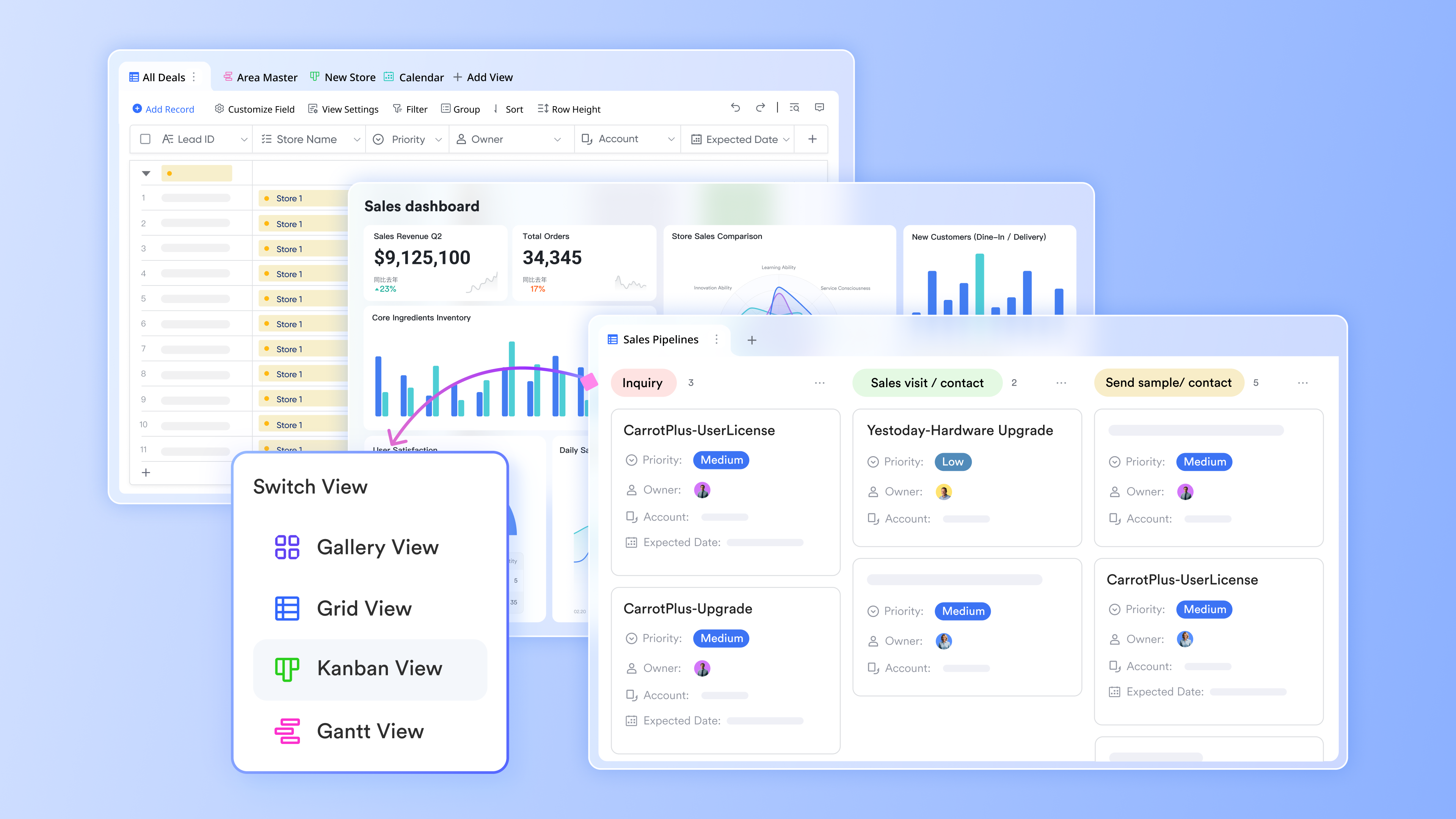
Lark Base provides the centralized foundation necessary for robust CRM operations. Serving as a collaborative hub, it enables teams to consolidate customer data, track interactions, and manage pipelines in one accessible location. The seamless coorsination of various applications ensures that sales, marketing, and customer service teams can efficiently share customer insights and maintain consistent records. This centralized approach directly addresses the CRM evaluation criterion of having a unified customer database that supports coordinated team efforts.
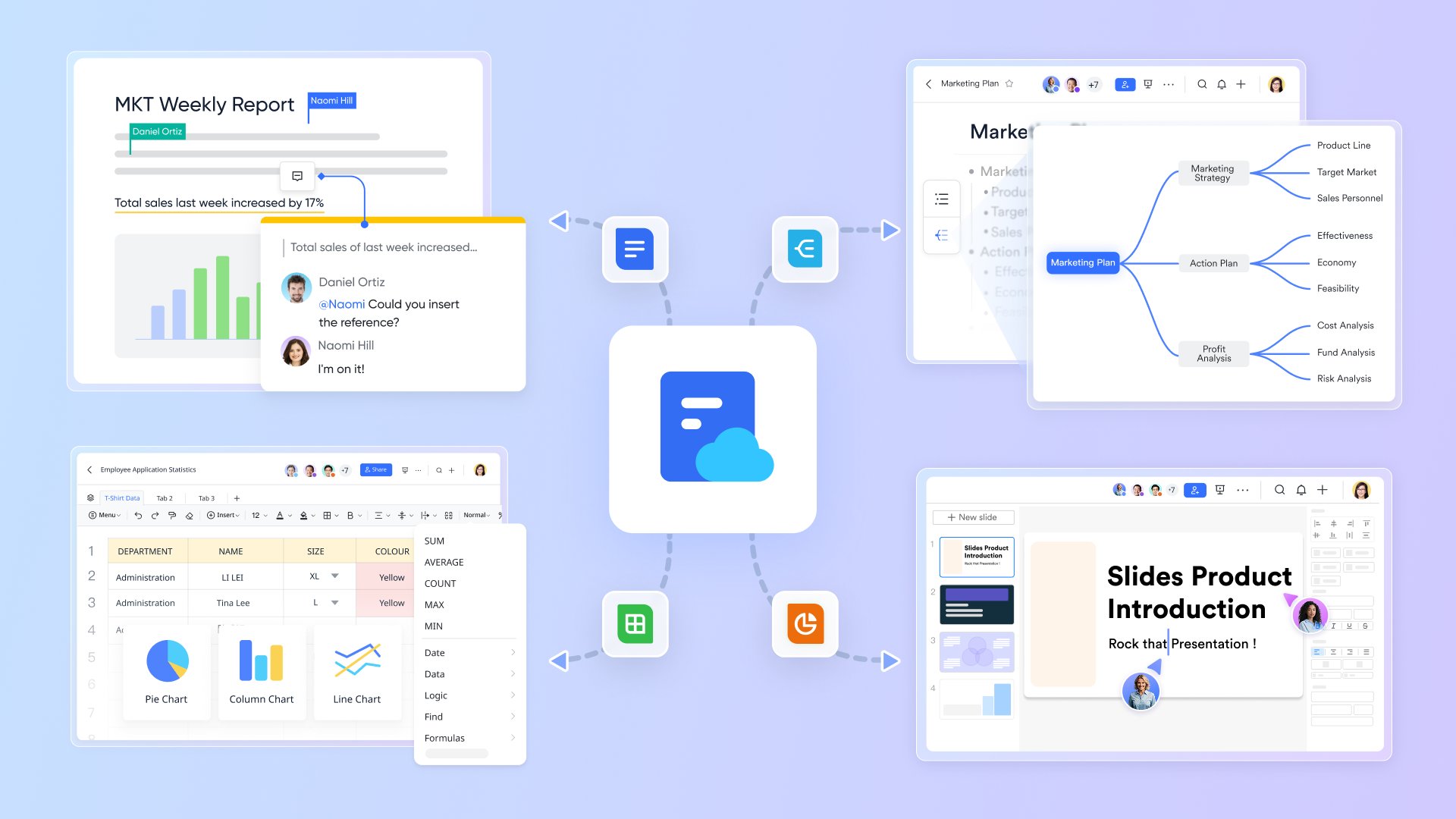
Meeting the documentation requirements for effective CRM, Lark Docs simplifies the creation and management of customer-related materials. Teams can collaboratively develop sales playbooks, customer onboarding guides, and service protocols with real-time updates. This centralized documentation ensures all team members maintain consistent customer interactions and have immediate access to the latest information. The platform's collaborative features support the CRM evaluation standard of maintaining accurate, up-to-date customer records and processes.
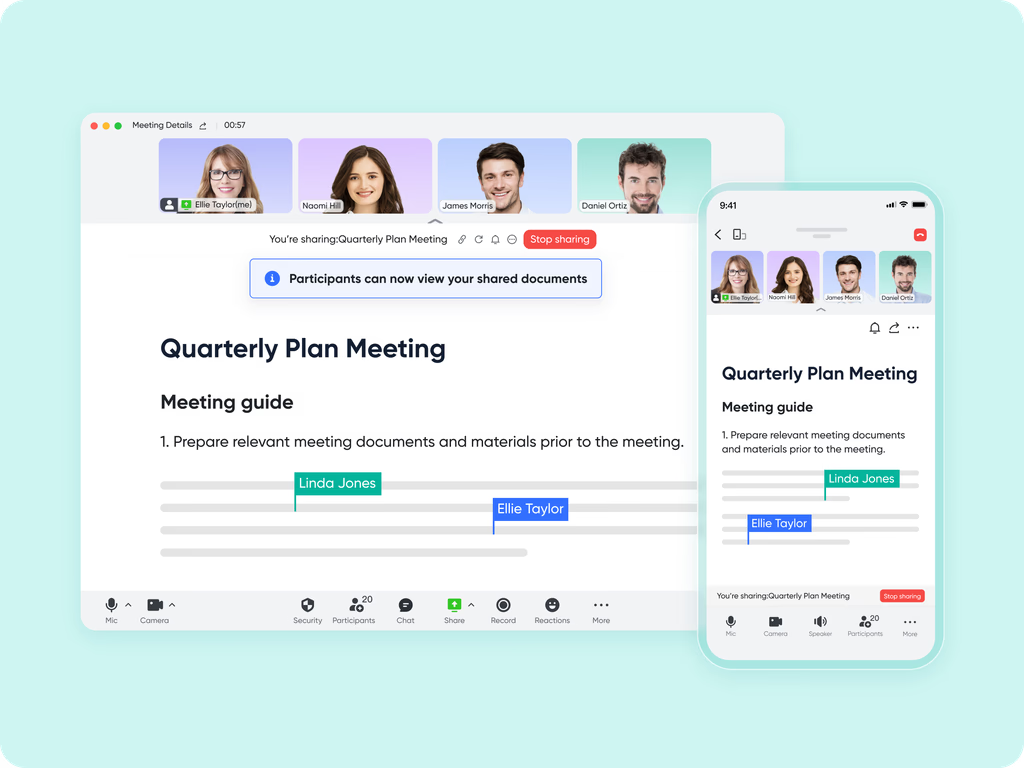
Lark Meetings fulfills the communication integration essential for modern CRM systems. The built-in video conferencing tools enable seamless customer interactions, from sales demonstrations to support sessions, while maintaining connection to the central customer record. Teams can conduct internal strategy discussions and external customer meetings within the same ecosystem, ensuring all customer touchpoints are documented and accessible. This integrated approach meets the CRM evaluation requirement for comprehensive communication tracking and coordination.
Through rigorous evaluation against established CRM criteria, Lark demonstrates strong capabilities as a customer relationship management solution. Its built-in tools provide the centralized data management, streamlined documentation, and effective communication channels necessary for successful customer relationship management, making it a compelling choice for teams seeking a collaborative CRM platform.
- Starter plan: Free forever plan with 11 powerful tools for up to 20 users, 100GB storage, 1,000 automation runs, AI translations, and more. No credit card needed.
- Pro plan: $12/user/month (billed annually) for up to 500 users. Includes everything in Starter plus group calling for up to 500 attendees, 15TB storage, 50,000 automation runs, and more.
- Enterprise plan: Contact sales for custom pricing. Supports unlimited users and includes advanced automation, security, compliance, and management features. Businesses assessing collaboration ecosystems often reference Google Workspace pricing during the evaluation process.
Conclusion
Conducting a thorough CRM evaluation is vital to selecting the right customer relationship management tool for your organization. By understanding the types of CRM solutions available, identifying the core features that must be present, and employing a structured evaluation process, you can confidently choose a CRM that meets your specific needs.
Always remember that the goal of implementing a CRM system is to foster stronger customer relationships, streamline operations, and analyze data effectively. Your efforts to ask critical questions like "What is CRM?" and "What does CRM stand for?" early in the evaluation process will set the tone for a successful implementation. Through careful adherence to your CRM requirements document, rigorous evaluation criteria, and stakeholder engagement, you'll position your business for lasting success in managing customer relationships.
As you embark on this journey, remember that the ultimate goal is to adapt to your customers’ evolving needs. This customer-focused approach not only drives retention and loyalty but also fuels business growth. By following this guide and making informed decisions during the CRM evaluation process, your organization can effectively leverage CRM technology to achieve measurable results. Consider tools like Lark as a robust solution to support your customer management efforts and enhance your overall CRM strategy.
FAQs
How should you evaluate a CRMs potential?
Evaluate a CRM's potential by assessing its user interface, integration capabilities, scalability, support options, and customization features. Conduct hands-on trials and gather stakeholder feedback to ensure it meets your specific business needs. Utilizing a collaborative tool can streamline this evaluation process.
What does CRM stand for?
CRM stands for Customer Relationship Management. It refers to systems and strategies that organizations use to manage interactions with customers, streamline processes, and improve relationships to drive growth and customer satisfaction.
What are the 4 types of CRM?
The four types of CRM are Operational, Analytical, Collaborative, and Strategic. Each type serves different purposes in managing customer relationships, from automating tasks to analyzing data for strategic decision-making.
What are the 4 pillars of CRM?
The four pillars of CRM are Technology, People, Processes, and Data. Each pillar plays a crucial role in creating an effective CRM strategy that enhances customer engagement and experience.
How can collaborative platforms enhance CRM effectiveness?
Collaborative platforms can improve communication and integration across teams, streamline documentation, and foster real-time feedback, ultimately enhancing the overall CRM experience and user adoption. Consider a comprehensive solution for maximum impact.
Related reading
Table of contents
Start using Lark today

Manage all your work in one place
Boost team efficiency by 10x
Save up to 70% on software costs
Table of contents
Start using Lark today
Manage all your work in one place
Boost team efficiency by 10x
Save up to 70% on software costs
Keep reading









2026 Lark Technologies Pte. Ltd.
Headquartered in Singapore with offices worldwide.






Explore: