Defect management is a structured process that helps teams identify, track, and resolve issues before they impact the final product or release cycle. As software systems, digital services, and even construction projects grow more complex, teams need reliable workflows to handle everything from simple UI glitches to high-severity failures. Effective defect management ensures that defects are captured consistently, triaged correctly, and resolved with clear ownership and documentation. Modern teams increasingly rely on dedicated tools—from open-source trackers to unified workspaces—to create transparency across QA, development, and project operations. With the right system, organizations prevent recurring issues and maintain higher delivery quality.
Key takeaways: Top 8 defect management systems
1. Lark: Best end-to-end defect management workspace
2. Jira: Best for agile development workflows
3. Bugzilla: Best open-source enterprise defect tracker
4. GitHub Issues: Best native tracking within code repos
5. MantisBT: Best lightweight open-source defect tool
6. Redmine: Best for issue tracking with project modules
7. ClickUp: Best all-in-one project and defect platform
8. Zoho BugTracker: Best business-focused IT defect tool
Start building more reliable workflows today
Top defect management tools overview snapshot table
Information source: Official vendor sites
Update time: 2025-11-30
Note: Pricing and plan details reflect publicly available data as of the update date and may vary based on region, billing cycle, and number of agents.
What is defect management?
Defect management is the structured process of identifying, documenting, prioritizing, resolving, and validating issues that occur during , product testing, or operational workflows. It ensures that every defect is consistently captured, evaluated for impact, and assigned to the right owner, with clear timelines and accountability. A strong defect management process helps teams reduce rework, maintain product stability, and improve release quality over time.
To support this workflow, teams rely on defect management software that centralizes reporting, offers customizable fields, and provides traceability across discovery, fixing, and verification. A modern defect management system also enables cross-team collaboration, linking defects to tasks, tests, and release cycles. These platforms often integrate automation to reduce manual follow-ups and ensure timely updates. Organizations can choose from a wide range of defect management tools, many of which seamlessly connect with to create a unified workspace for issue tracking, task allocation, and end-to-end workflow governance.
Defect management systems vs traditional bug trackers
Traditional bug trackers are primarily designed to list issues and assign them to individuals, without enforcing structured workflows. They are suitable for small or informal teams but fall short when lifecycle oversight or multi-team coordination is needed. Modern systems introduce structured workflows, where each stage—from triage to verification—is governed with clarity. Teams benefit from using a defect management tool that enforces data completeness, proper routing, and consistent status transitions. These platforms also support linking documentation, evidence, and RCA to prevent unresolved or lost items. This shift reflects the need for traceability rather than merely storing reported issues. - Process governance vs list management: Many older trackers operate as simple lists, meaning defects move based on manual updates and individual discipline. Without governance, teams risk inconsistent classification, poor prioritization, and hidden bottlenecks. Structured systems guide each defect through predefined states with mandatory fields or evidence requirements. This is where dedicated software defect management platforms shine by standardizing how information flows. They ensure every issue receives necessary validation and documentation before advancing. As a result, teams avoid informal handoffs and reduce the chances of defects reappearing or remaining unverified.
- Cross-team accountability: Organizations need clarity over who owns a defect at each stage, especially when multiple stakeholders are involved. Traditional bug trackers often lack mechanisms to enforce visibility or prevent orphaned issues. Modern systems use assignments, workload views, and linked tasks to maintain . This is particularly useful in industries handling physical deliverables, which rely on construction defect management software for multi-party validation. With structured routing and ownership indicators, teams can avoid confusion about responsibilities. This accountability framework reduces delays and keeps defect resolution aligned with delivery needs.
- Audit readiness: Regulated or documentation-heavy teams must maintain clear records of how defects were discovered, triaged, fixed, and validated. Simple bug lists rarely meet audit or compliance expectations because they lack chronological evidence. Systems built for deeper traceability capture metadata, discussions, attachments, and verification logs. A defect management tool supports auditors by keeping every update timestamped and accessible. This improves transparency during compliance checks and ensures organizations can prove controlled handling. Audit-ready workflows help organizations avoid compliance risks and maintain consistent quality standards.
- Release-linked workflows: Defects directly influence release stability, so linking issues to milestones is critical. Traditional trackers rarely connect defects to release schedules or readiness checkpoints. Modern solutions provide release dashboards, freeze periods, and integration with testing cycles. Teams using software defect management platforms gain visibility into how open issues affect deployment commitments. This around whether a release can proceed or must be delayed. Release-linked workflows create a predictable rhythm between development, QA, and deployment teams.
How to set defect management lifecycle
A strong defect management lifecycle ensures that teams follow a consistent, predictable path from issue discovery to final closure. Instead of relying on ad hoc updates or fragmented communication, a lifecycle provides structure for ownership, documentation, and validation. This approach helps teams reduce ambiguity, avoid duplicate work, and ensure defects are resolved with complete visibility. Every stage—from discovery to RCA—adds clarity about what needs to be done and who is responsible for doing it. Whether in , enterprise engineering, or operations, the lifecycle serves as the backbone of quality assurance. With the correct workflow, teams maintain control over complexity and improve release reliability.
Step 1: Defect discovery and capture
This stage begins when QA, developers, users, or automated systems detect an issue. The goal is to record the defect clearly, including environment details, reproduction steps, and expected vs actual results. Capturing information early prevents miscommunication later during triage or fixing. A standardized form or template helps reduce inconsistent reporting. The emphasis here is completeness—poorly captured defects slow the entire cycle.
Step 2: Classification and severity tagging
Once logged in, the defect must be categorized by type, affected module, and impact. Severity tags help distinguish between cosmetic issues and critical blockers, ensuring teams handle the most urgent items first. Precise classification avoids confusion during review meetings and supports data-driven prioritization. Standard severity definitions improve consistency across QA members. Proper tagging directly influences planning and scheduling.
Step 3: Triage and prioritization
During triage, leads evaluate the defect's impact, urgency, and relevance to upcoming releases. Prioritization ensures resources are directed toward the issues that matter most to product stability. The team may merge duplicates, reject invalid defects, or defer low-impact items. Good triage sessions create a healthy backlog that aligns with project goals. This step prevents teams from being overwhelmed by noise.
Step 4: Developer assignment
After prioritization, the defect is assigned to the developer best suited to resolve it, based on expertise or workload. Clear ownership reduces ambiguity and shortens response time. Assignment also ensures accountability—someone is directly responsible for progress and updates. Workload visibility prevents unfair . Strong assignment practices maintain flow across sprints or release cycles.
Step 5: Fix development
The developer investigates root causes, reproduces the defect, and implements the fix. This stage may involve code review, collaboration, or the creation of supporting tests to prevent future regressions. Fix quality depends on understanding the underlying issue rather than applying superficial patches. Documentation created here helps QA verify the patch accurately. Once completed, the fix moves to testing.
Step 6: QA verification
QA verifies that the fix resolves the defect across all relevant scenarios, including edge cases. Verification ensures that no new issues were introduced and that the expected behavior is fully restored. This process may involve rerunning or executing manual test cases. Clear evidence supports final approval or rejection. If the fix fails, the defect returns to development.
Step 7: Release validation
At this stage, teams determine whether the fixed defect aligns with broader release goals and stability requirements. Release validation ensures that resolved defects integrate seamlessly with other changes. This step often includes regression testing, UAT cycles, or pre-deployment checks. It prevents last-minute surprises before launch. Proper validation protects release quality and customer experience.
Step 8: Closure and RCA
Once verified, the defect is officially closed and documented for future reference. RCA (Root Cause Analysis) identifies why the defect occurred and how similar issues can be prevented. Closure ensures all related tasks, notes, and approvals are completed. Teams gain valuable insights that support continuous improvement. A well-documented closure strengthens organizational learning over time.
Key capabilities in modern defect management software
Modern teams need more than simple bug lists—they require structured platforms that guide issues through a complete lifecycle with clarity and accountability. Understanding what defect management is now means recognizing how different capabilities shape quality, governance, and release stability. As software complexity grows, teams rely on tools that automate, provide analytics, and ensure for every issue. A mature defect management system supports collaborative problem-solving, integrates with development workflows, and organizes defects across sprints or releases. These features ensure teams reduce delays, avoid miscommunication, and build predictable quality processes. The following capabilities define what modern defect management software must deliver.
- Custom fields and workflows: Custom fields allow teams to tailor defect forms to their unique technical or project needs. Workflows ensure every defect follows a consistent path from discovery to closure. This structure improves cross-team coordination and reduces confusion over required steps. In Jira defect management environments, custom schemas are often critical for mapping to agile or enterprise processes. Flexible customization ensures no team is forced into a one-size-fits-all model.
- Ownership visibility: Clear ownership ensures every defect has a responsible party and avoids stalled tickets. Visibility into assignees, workloads, and status transitions improves accountability across QA and engineering. This capability is essential in any scalable defect management system, where defects may move across teams or functions. Ownership visibility prevents issues from becoming "lost" or forgotten. It also supports service-level commitments in larger organizations.
- Audit trails: Audit trails record every change, update, or discussion associated with a defect. They provide chronological clarity that supports compliance, security reviews, or internal governance. These trails help teams understand the why and when behind decisions. Such transparency is a cornerstone of modern defect governance. Audit trails also strengthen trust during .
- Evidence attachments: Screenshots, logs, videos, and console outputs help teams reproduce issues accurately without long back-and-forth communication. Attachments reduce triage time and improve clarity during verification. This capability is critical for technical systems where issues depend on environment-specific behavior. Evidence also supports RCA and future debugging. Strong attachment support improves overall defect resolution speed.
- Workflow automation: Automation reduces manual effort by triggering notifications, routing defects, updating fields, or escalating issues. Teams save time and reduce human error, especially when dealing with high-volume defects. run consistently across sprints and release cycles. It also supports predictable delivery timelines. These capabilities help teams keep pace with rapidly changing product environments.
- Reporting & metrics: Reports provide insights into defect trends, resolution times, severity distribution, and sprint health. Metrics allow leaders to evaluate team efficiency, identify bottlenecks, and improve planning. Modern platforms integrate dashboards that automatically update with real-time data. Organizations using GitHub issue management often rely on dashboards to align code-level activity with issue status. Strong reporting supports continuous improvement across releases.
- Traceability: Traceability links defects to tasks, code commits, test cases, and documentation. This helps teams understand the full context behind each issue and its lifecycle impact. Traceability ensures no step or dependency is missed during resolution. It also strengthens regression planning and releases decisions. High traceability is a hallmark of mature, audit-ready defect workflows.
See how these capabilities come together in one platform
8 best defect management tools for software teams
1. Lark: Best end-to-end defect management workspace
When teams need an integrated workspace to manage defects from discovery to closure, offers a unified platform that spans the whole lifecycle. With built-in support for , documentation, task management, and collaboration, it brings together everything needed for effective defect management. Rather than scattering defect reports across chats, spreadsheets, and separate tools, Lark in one workspace. This ensures consistency, transparency, and accountability as defects move through triage, fixing, testing, and release validation. For teams seeking a without tool hopping, Lark provides a comprehensive end-to-end defect management workspace.
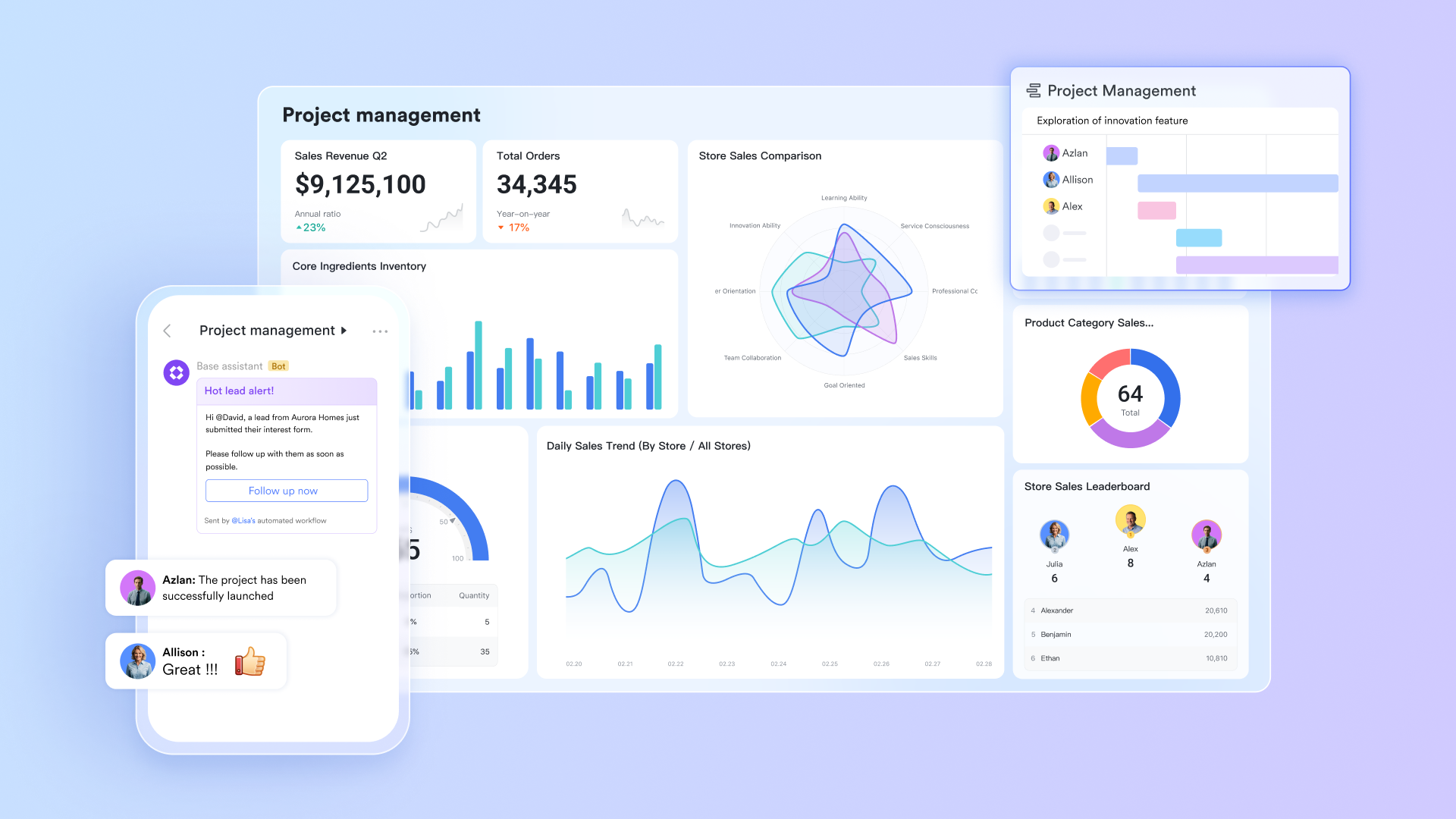
Centralized defect logging and structured tracking
For project managers, every defect must be captured in one reliable system where details such as severity, environment, reproduction steps, and expected fixes are standardized. Lark covers this with , which lets teams build a central defect database with custom fields tailored to their workflow. PMs can ensure each issue follows a required format, preventing incomplete bug reports and inconsistent tracking. With Forms, QA teams or stakeholders can submit defects directly to Base, so nothing is logged informally or lost in chats.
Intelligent triage using grouping and filtering
Team leads need to sort through growing backlogs quickly to identify high-risk defects or sprint blockers. In Lark, Groups and Filters inside Base allow managers to instantly slice the defect list by severity, module, owner, environment, or status. Leads can group issues by sprint or release cycle and filter critical blockers first, enabling faster triage meetings and clearer backlog reviews without manually sorting lists. 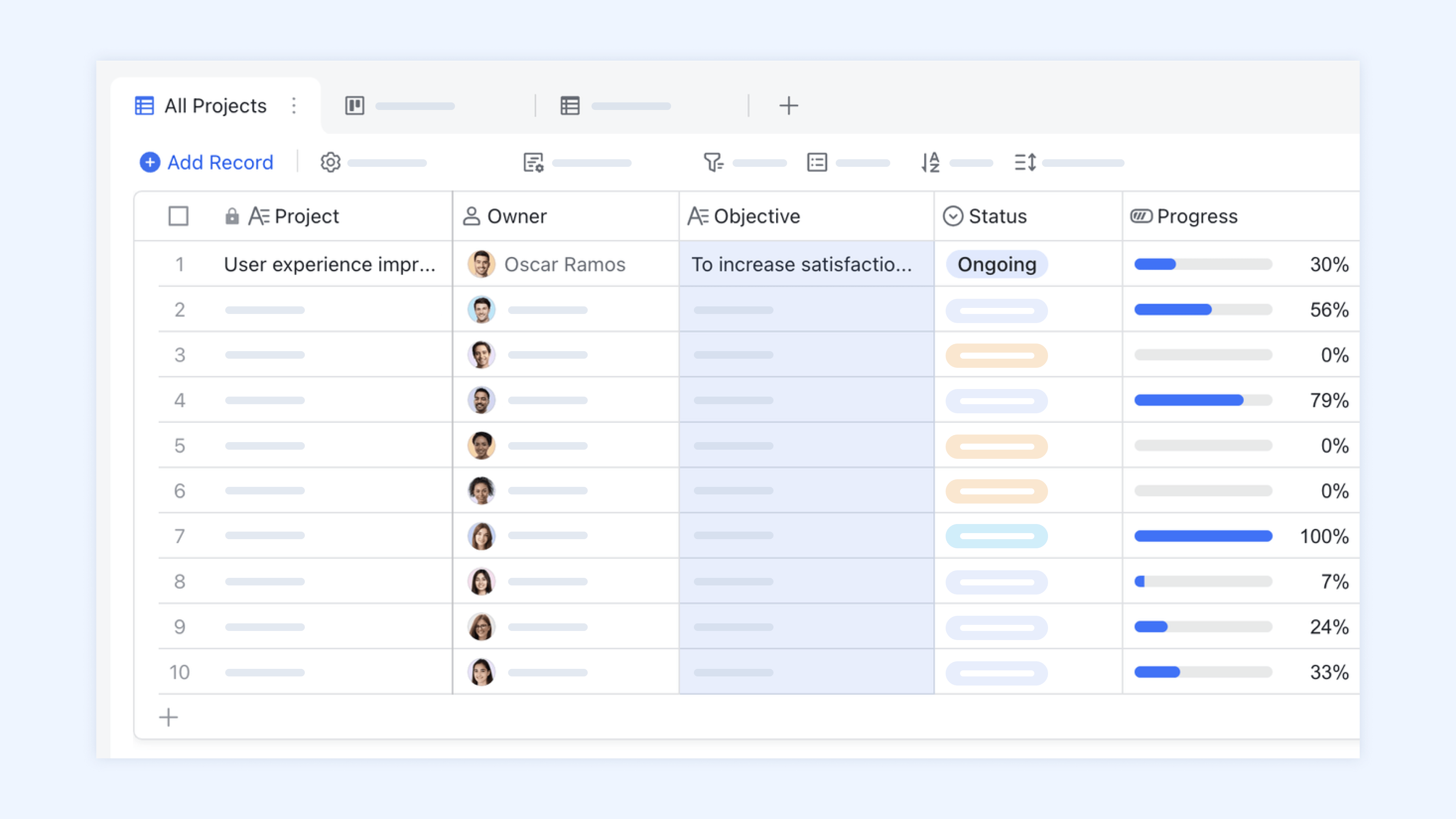
End-to-end traceability between defects, tasks, and documents
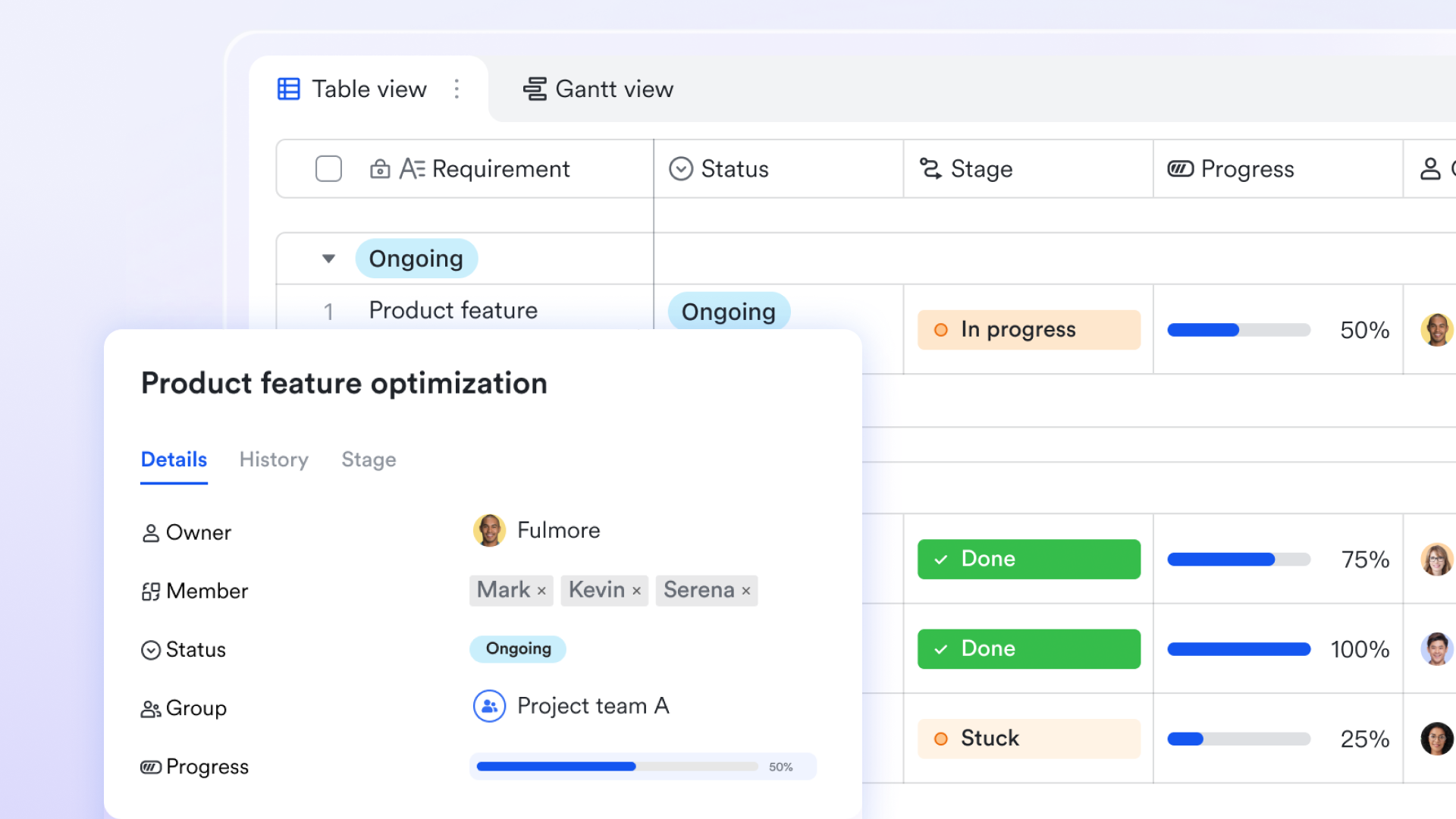
Effective defect management requires tracking not only the bug but also the work needed to resolve it. Lark enables one-way and two-way links between defect records in Base and Tasks for development, Docs for test or RCA documentation, and releases checklists or sprint records. This traceability ensures that PMs can see the entire lifecycle of a defect—from report to fix to verification—and quickly answer questions about ownership or release impact. Clear execution, ownership, and workload visibility
Each defect must have a responsible owner and defined delivery timelines. Lark addresses this with Lark Tasks, which include named assignees, deadlines, subtasks, and progress tracking. Team leads can monitor individual workloads, prevent bottlenecks, and rebalance assignments when necessary. Because tasks remain connected to defect records, execution accountability remains transparent without losing context. 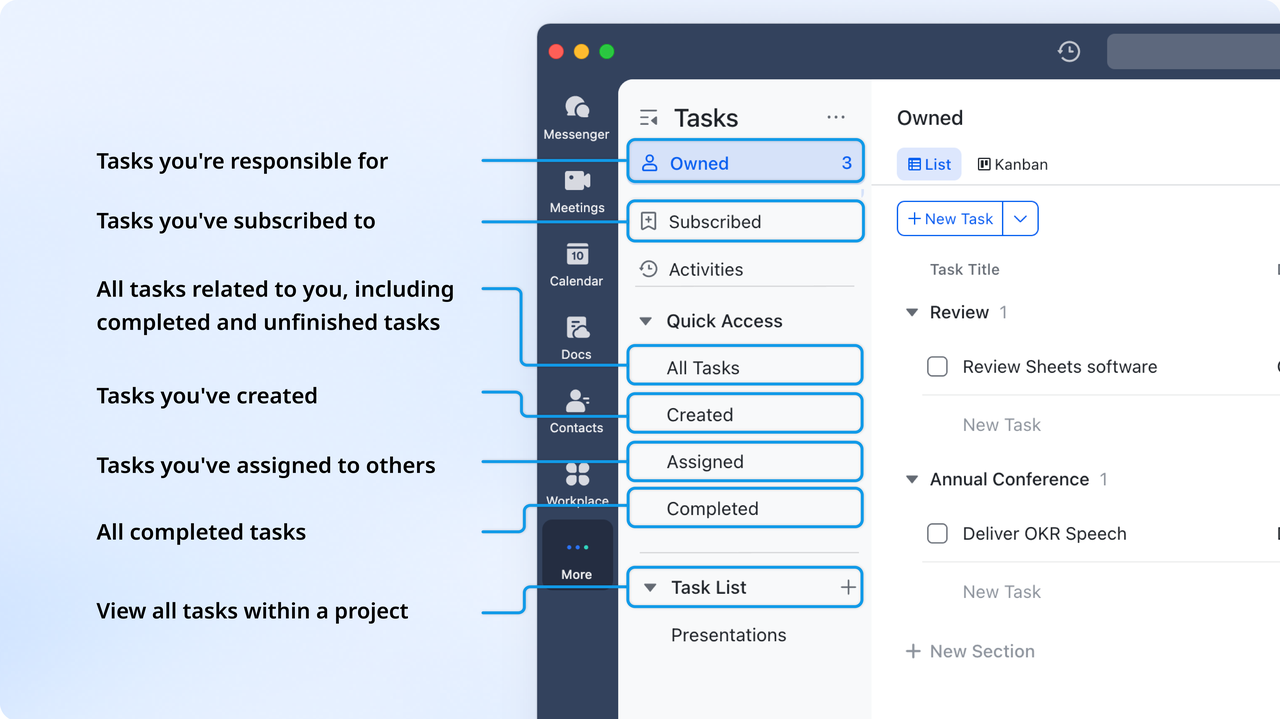
Structured QA verification and signoff workflows
Project leaders need confirmation that fixes have been adequately tested before bugs are marked "closed" or releases proceed. Lark uses the for QA verification, so fixed defects can flow through review steps that require explicit testing sign-off. Managers gain a documented audit trail of who approved fixes and when, reducing release risk and eliminating unclear handoffs between developers and QA teams.

Context-rich discussions around each defect
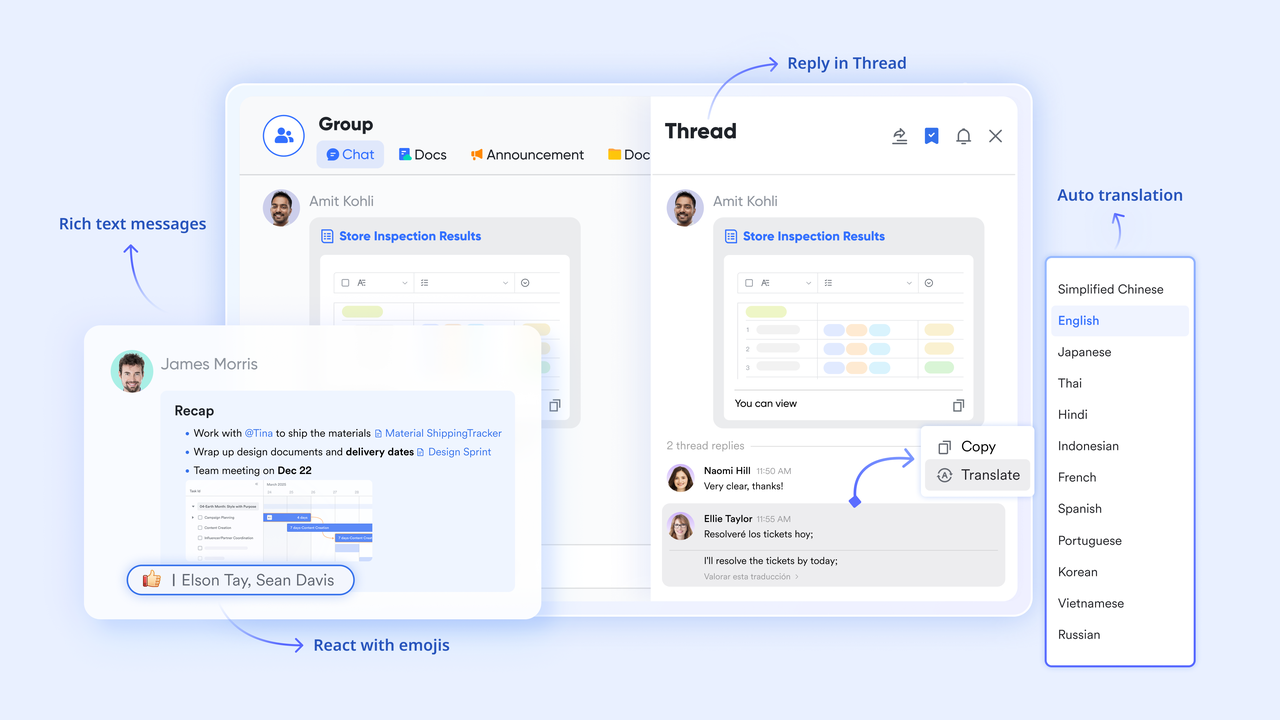
Bug resolution depends heavily on communication among QA engineers, developers, product leads, and project managers. allows discussions to occur directly around defect records by linking Base entries into chat threads. Teams can keep all clarifications, reproduction questions, and debugging conversations tied to each issue. Pins help highlight test evidence or key decisions, preventing critical information from being buried in long chat histories.
Centralized root cause analysis and documentation
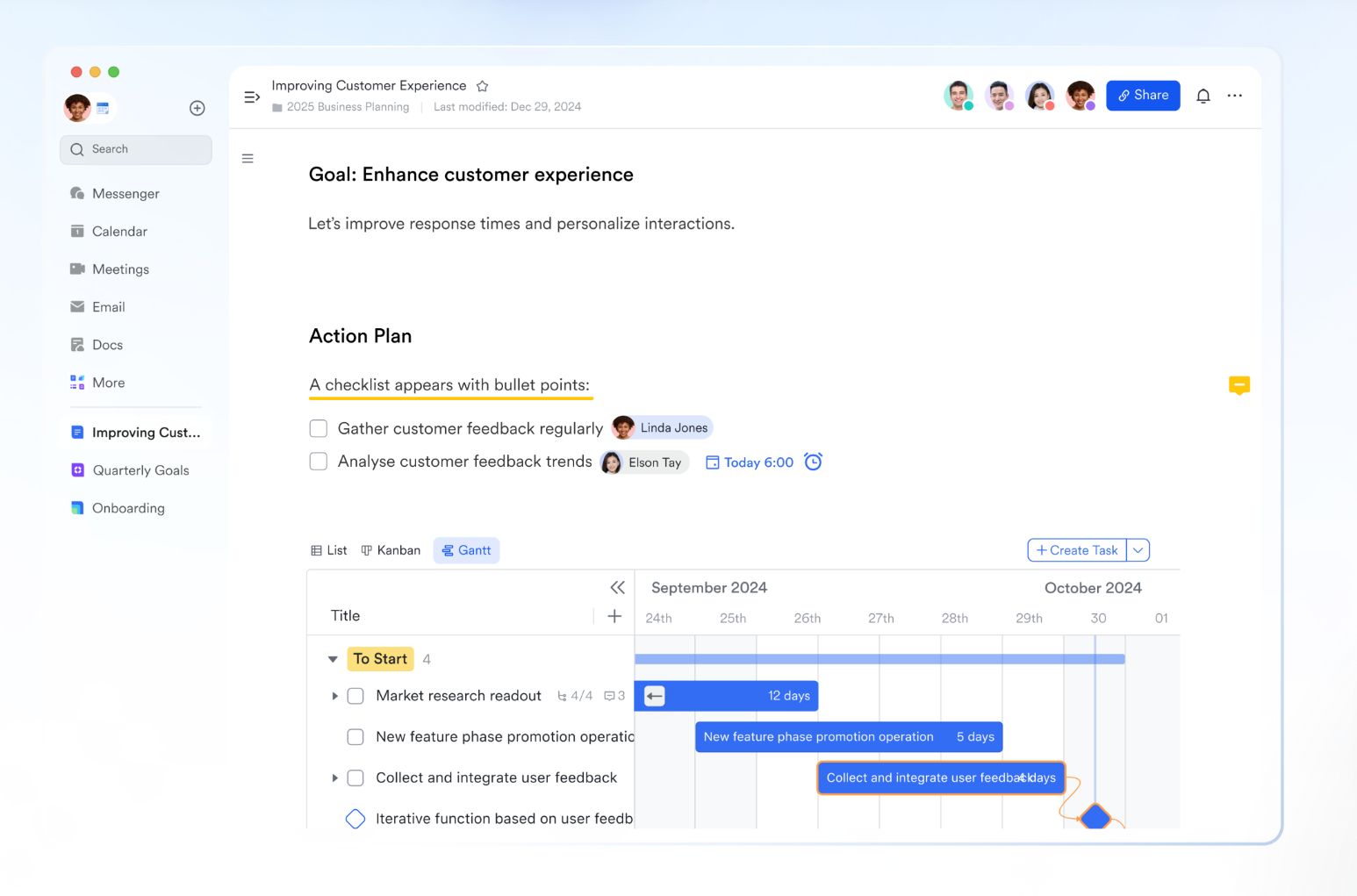
Improvement depends on understanding why defects occur—not just fixing them. enables a shared knowledge base for storing reproduction steps, failure logs, RCA reports, and regression notes. Each document can link back to the original defect record or related tasks, so lessons learned remain visible during sprint retrospectives and in ongoing training. For PMs, this supports continuous quality improvement across releases.
Release planning and checkpoint tracking
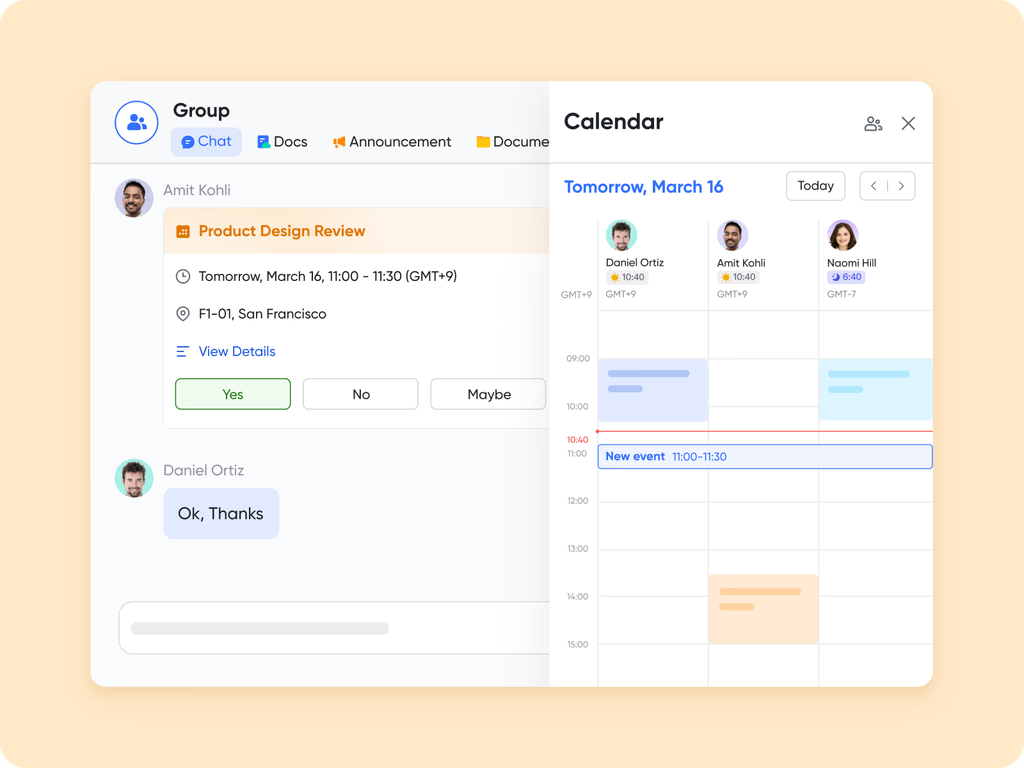
Project leaders must align defect resolution with release schedules to avoid delayed launches or unstable deployments. enables teams to map QA cycles, UAT milestones, code freezes, and release checkpoints—all linked back to open defect records. Leads can see at a glance whether outstanding bugs threaten delivery dates and adjust priorities accordingly.
Automated reminders and escalation rules
Manual follow-ups quickly become inefficient as bug volumes grow. Lark offers automations in Base to trigger reminders for unresolved issues, notify QA when testing is required, escalate stagnant bugs to leads, or automatically update statuses when tasks or approvals move forward. This reduces management overhead and ensures no defect stalls unnoticed. 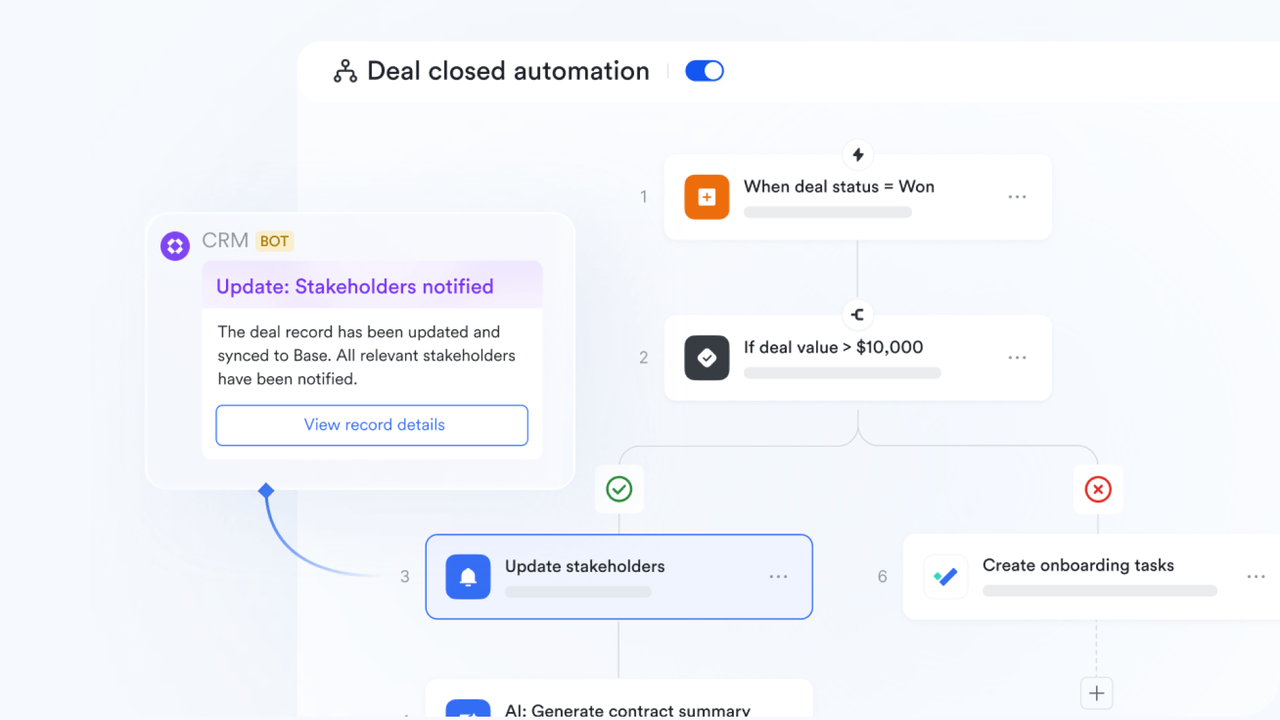
:
- Starter plan: Free forever plan that includes 11 powerful tools for up to 20 users. It also comes with 100GB of storage, 1000 automation runs, AI translations, and more.
- Basic plan: $6/user/month (billed annually) for up to 500 users. It includes everything in Starter plus group calling for up to 500 attendees, 5TB of storage, 1000 automation runs, and more. For more details, please .
- Pro plan: $12/user/month (billed annually) for up to 500 users. It includes everything in Basic plus group calling for up to 500 attendees, 15TB of storage, 50,000 automation runs, and more.
- Enterprise plan: for custom pricing. Supports unlimited users and includes even more automation runs and advanced security, compliance, and management features.
For small teams with simple communication needs

18 months message history
1000 Base automation runs/month
2000 rows per table in Base
Most POPULAR
For companies with comprehensive collaboration and management needs
Unlimited message history
500-participant video meetings
50k Base automation runs/month
20k rows per table in Base
For large companies with advanced security and organizational management needs
Get a personalized demo and pricing
Unlimited message history
500-participant video meetings
15 TB storage + 30 GB storage/user
500k Base automation runs/month
50k Base automation runs/month
Most POPULAR
For companies with comprehensive collaboration and management needs
Unlimited message history
500-participant video meetings
50k Base automation runs/month
20k rows per table in Base
2. Jira: Best for agile development workflows
Jira is widely used by engineering and product teams that rely on agile frameworks such as Scrum and Kanban. Its structured boards, customizable workflows, and development-friendly integrations make it a robust system for managing complex software cycles. Teams can design processes that reflect their internal release stages, approval layers, and collaboration needs. Jira's mature ecosystem also supports extensions for testing, automation, and analytics, giving teams flexibility as they scale. Because it centralizes issues, documentation, and sprint planning, Jira becomes a dependable core for many engineering environments. For teams prioritizing governance and predictability, Jira provides a stable foundation for managing defects and development tasks together.
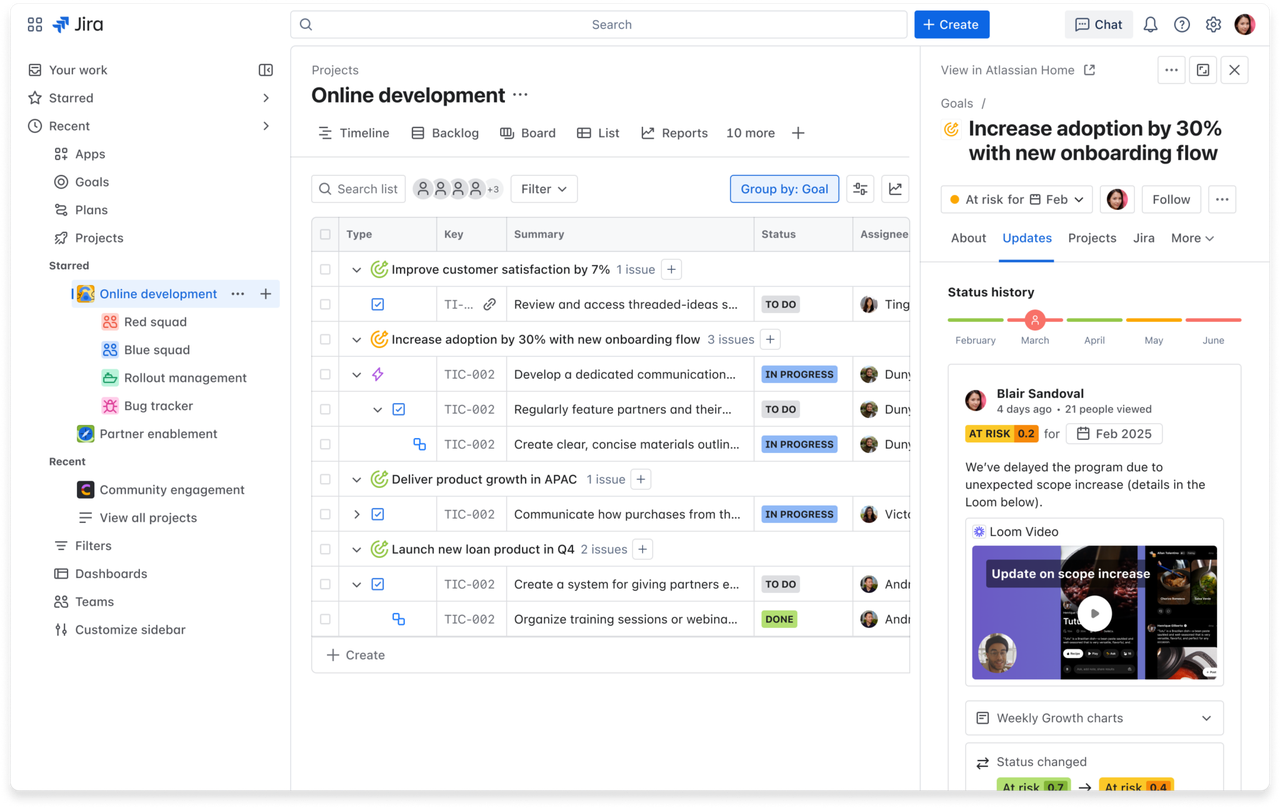
Image source: jira.com
Key features:
- Advanced issue types and workflows that let teams model simple or highly structured development and defect lifecycles with consistent transitions and required fields.
- Sprint and backlog management tools that support planning, estimation, grooming, and burndown tracking to keep agile cycles on track.
- Integrations with CI and CD pipelines that link defects to builds, deployments, branches, and pull requests for end-to-end visibility.
- A powerful rules-based automation engine that reduces manual updates and keeps issue flows synchronized across the workspace.
Pros:
- Customization depth enables enterprises to create unique workflows, field schemes, and validation steps without relying on external systems.
- A rich marketplace of plugins that extends Jira into areas like test management, analytics, and advanced reporting.
- Strong alignment with agile practices through boards, metrics, sprint hygiene tools, and release planning views.
Cons:
- Initial setup complexity can overwhelm teams without dedicated administrators or clear process structures.
- Performance challenges may appear when handling substantial projects, backlogs, or multi-year data.
Pricing:
- Standard plan: $23,500/year (billed annually) for 201-300 users.
- Premium plan: $43,500/year (billed annually) for 201-300 users.
- Enterprise plan: Custom pricing.
3. Bugzilla: Best open-source enterprise defect tracker
Bugzilla is one of the longest-standing open-source defect trackers used by engineering, research, and enterprise teams that prefer complete control over their systems. It provides a highly reliable, stable foundation for organizations that require extensibility without vendor lock-in. Bugzilla's structured approach to issue tracking emphasizes clarity, accuracy, and robust documentation. Since it is self-hosted, teams can customize it at both the UI and database levels to match detailed governance requirements. Although its interface is more traditional, its depth and transparency attract organizations prioritizing precision and audit readiness. For teams that value configurability, data ownership, and predictable long-term support, Bugzilla remains a trusted option.
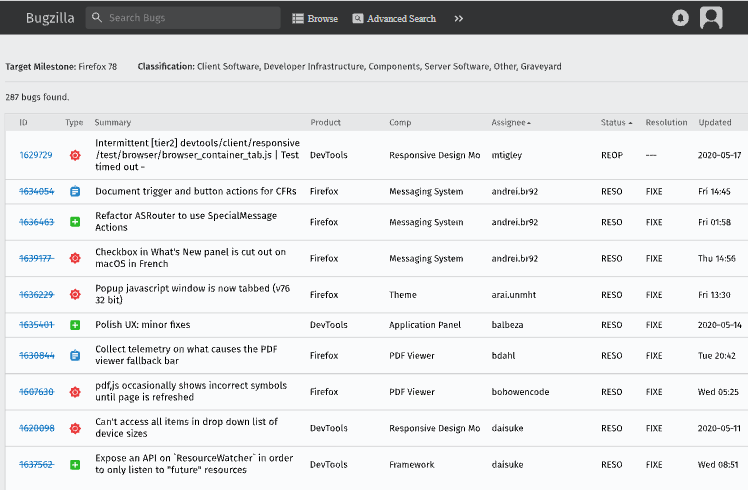
Image source: bugzilla.com
Key features:
- Highly detailed issue tracking forms that help teams capture structured information with accuracy and standardized data entry workflows.
- Advanced querying and search capabilities that allow users to filter, save, and build complex reports for governance and quality control.
- A robust permission and role system that supports fine-grained access control across projects and user groups.
- Strong email-based workflows that notify stakeholders, update statuses, and automate communication through configurable triggers.
Pros:
- Fully open-source and free to use, allowing organizations to scale without subscription costs or licensing restrictions.
- Exceptional stability and reliability thanks to decades of community-driven development and proven industry adoption.
- Strong suitability for teams requiring detailed documentation, audit trails, and long-term record retention.
Cons:
- A dated interface that may feel less intuitive for modern teams accustomed to contemporary UX standards.
- Requires dedicated hosting, maintenance, and system administration support, which may be challenging for smaller teams.
Pricing:
- Bugzilla is entirely free to download, install, and use.
- Costs apply only to hosting, maintenance, and any optional internal infrastructure that internal infrastructure teams choose to support.
4. GitHub Issues: Best native tracking within code repos
GitHub Issues is the preferred defect-tracking option for teams working directly in GitHub repositories and development pipelines. It enables developers to capture bugs, feature requests, and tasks without leaving their coding environment. Since issues, pull requests, and commits live together, teams gain natural visibility into how defects connect to code changes. GitHub Issues also supports collaborative discussion, labels, milestones, and automation that help structure engineering workflows. Its simplicity makes it easy for developers and open-source contributors to contribute to defect resolution. For teams already using GitHub for version control, GitHub Issues provides seamless and unified defect tracking with minimal setup.
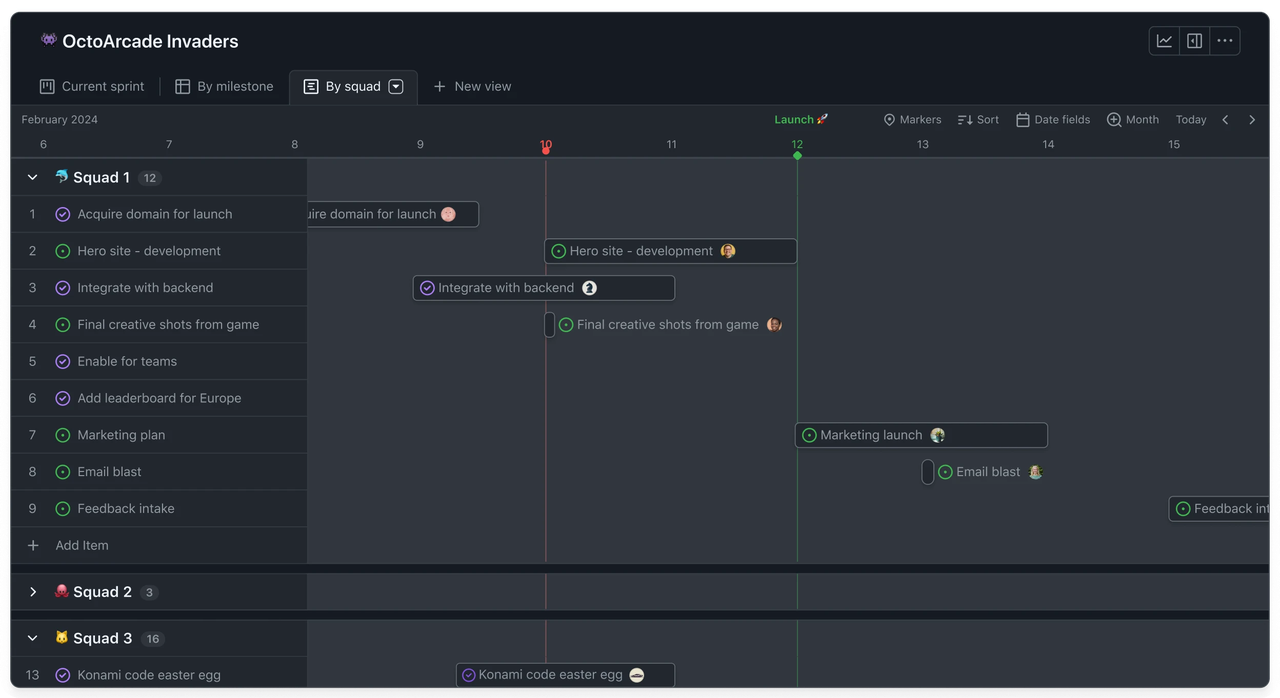
Image source: github.com
Key features:
- Native integration with repositories that link defects to branches, commits, and pull requests for a clear development context.
- Labels, tags, and milestones that help teams categorize issues, plan sprints, and track progress across releases.
- GitHub Actions support automating notifications, issue assignments, triage rules, and workflow triggers.
- A clean and minimal interface that reduces friction for contributors and encourages active participation in defect reporting.
Pros:
- Seamless experience for developers already working in GitHub, removing the need to switch tools during defect analysis and fixing.
- Excellent transparency for teams using pull requests and code reviews as central parts of the development process.
- Strong collaboration features that allow comments, discussions, and references directly within issue threads.
Cons:
- Limited workflow customization compared to dedicated enterprise defect tracking platforms.
- Reporting and metrics are relatively basic unless paired with third-party analytics tools.
Pricing:
- Team plan: $4/user/month (billed annually).
- Enterprise plan: $21/user/month (billed annually).
5. MantisBT: Best lightweight open-source defect tool
MantisBT is a fast, lightweight, and highly accessible defect-tracking tool for teams that want simplicity without sacrificing essential control and structure. It is widely used by small to mid-sized engineering teams, open-source communities, and organizations that need a stable system with minimal overhead. Its straightforward interface reduces onboarding time, making it easy for contributors to report issues and follow updates. Because it is open-source and self-hosted, MantisBT offers flexibility without recurring subscription costs. The tool focuses on clarity, ease of use, and practical workflows rather than heavy customization. For teams seeking a simple, reliable defect tracker, MantisBT offers an efficient, dependable solution.
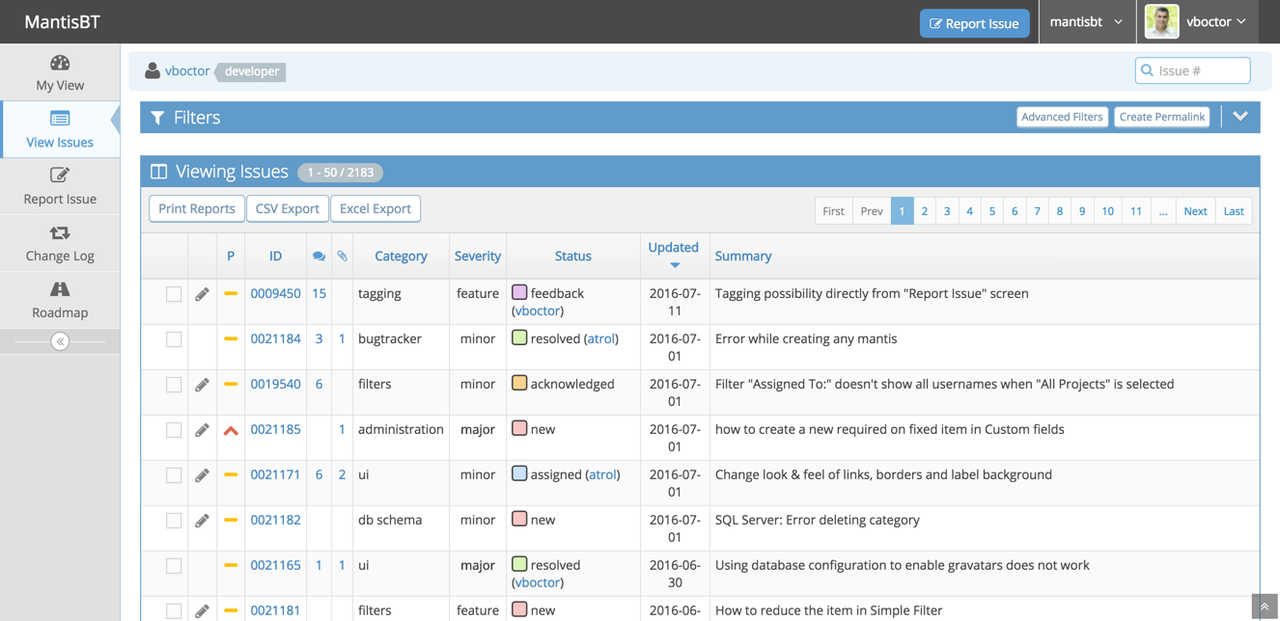
Image source: mantisbt.com
Key features:
- A clean and minimal UI that helps users quickly log, update, and track issues without navigating complex menus or workflows.
- Role-based access controls that allow administrators to manage visibility, permissions, and project-level settings with clarity.
- Built-in email notifications that keep stakeholders updated automatically on issue changes, assignments, and resolutions.
- Plugin support that lets teams extend the tool's features while maintaining its lightweight nature.
Pros:
- Very simple to deploy and maintain, making it ideal for teams without full-time system administrators.
- Fast performance due to its lightweight architecture, even when handling large lists of defects.
- Highly cost-effective because it is open-source with no licensing fees or seat-based pricing.
Cons:
- A basic interface that may not appeal to teams expecting modern UI design or advanced visualizations.
- Fewer native integrations with modern CI, CD, and development tools often require manual configuration.
Pricing:
- MantisBT is entirely free and open-source for all users.
- Any costs depend solely on hosting, maintenance, or optional infrastructure chosen by the organization.
6. Redmine: Best for issue tracking with project modules
Redmine is a versatile open-source project management and defect tracking tool designed for teams that need more than simple issue lists. It combines defect tracking, project planning, wiki documentation, file management, and time tracking into a single modular platform. Because it supports multiple projects within a single installation, organizations can unify teams under a single workspace. Its role-based permissions and flexible configuration make it suitable for engineering groups, IT teams, and operations-focused environments. Redmine's plugin ecosystem adds layers of functionality, from agile boards to advanced reporting. For teams seeking a broader operational system rather than a standalone tracker, Redmine offers a robust open-source foundation.
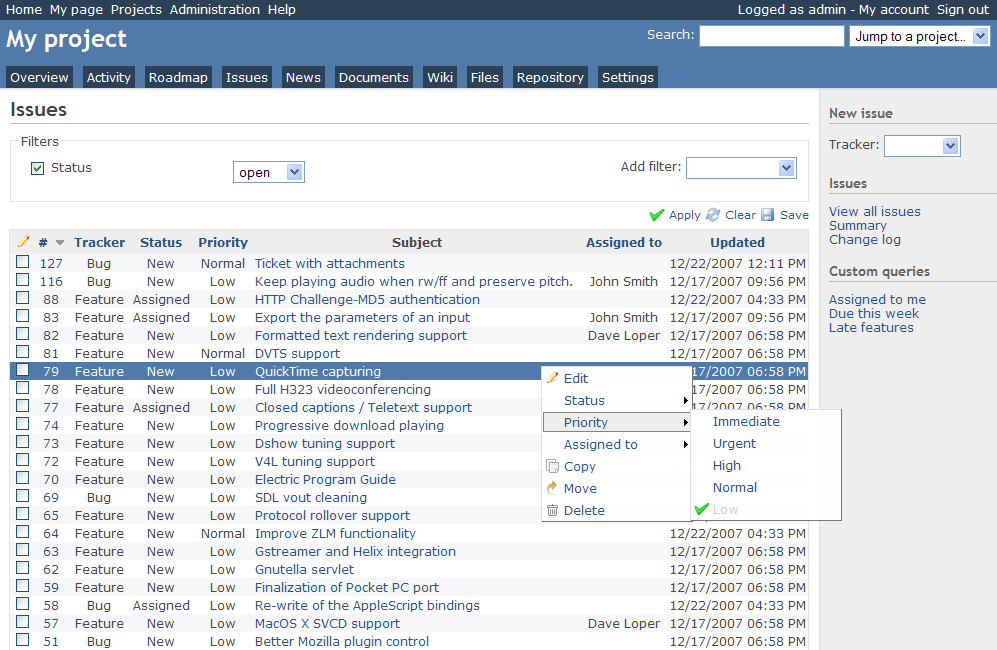
Image source: redmine.com
Key features:
- Multi-project architecture that enables organizations to manage defects, tasks, and workflows across multiple teams in a single central system.
- Built-in modules for wikis, documents, files, and time tracking that help teams consolidate project execution into one platform.
- Customizable issue types, fields, and statuses that give teams control over how defects and tasks flow through their lifecycle.
- A flexible permissions framework that allows granular control over visibility, editing rights, and access to specific modules.
Pros:
- Comprehensive project management capabilities that reduce the need for multiple tools.
- Open-source and self-hosted structure that grants full control over data, workflows, and configurations.
- A well-documented plugin ecosystem that allows teams to expand functionality without abandoning stability.
Cons:
- A dated interface that may not appeal to teams expecting modern UI patterns or higher visual polish.
- Setup and maintenance often require technical expertise, especially when installing plugins or adjusting configurations.
Pricing:
- Free and open-source: Redmine is entirely free to use, with no licensing fees.
- Costs may apply for self-hosting, such as servers, maintenance, security, and optional paid plugins or third-party support.
7. ClickUp: Best all-in-one project and defect platform
ClickUp is a highly flexible work management platform that combines tasks, docs, automation, and dashboards, making it a strong option for teams that want defect tracking integrated with broader project operations. Its adaptable hierarchy lets teams structure work across spaces, projects, and lists while maintaining granular control over how defects are captured and resolved. ClickUp's customization features make it appealing for engineering teams, product managers, and operations groups that require cross-functional alignment. With built-in views like lists, kanban boards, timelines, and workloads, ClickUp provides visibility into both defects and related project work. The platform balances simplicity with power, allowing teams to scale processes as they grow. For organizations seeking a unified platform for project execution and defect tracking, ClickUp offers an all-in-one environment.
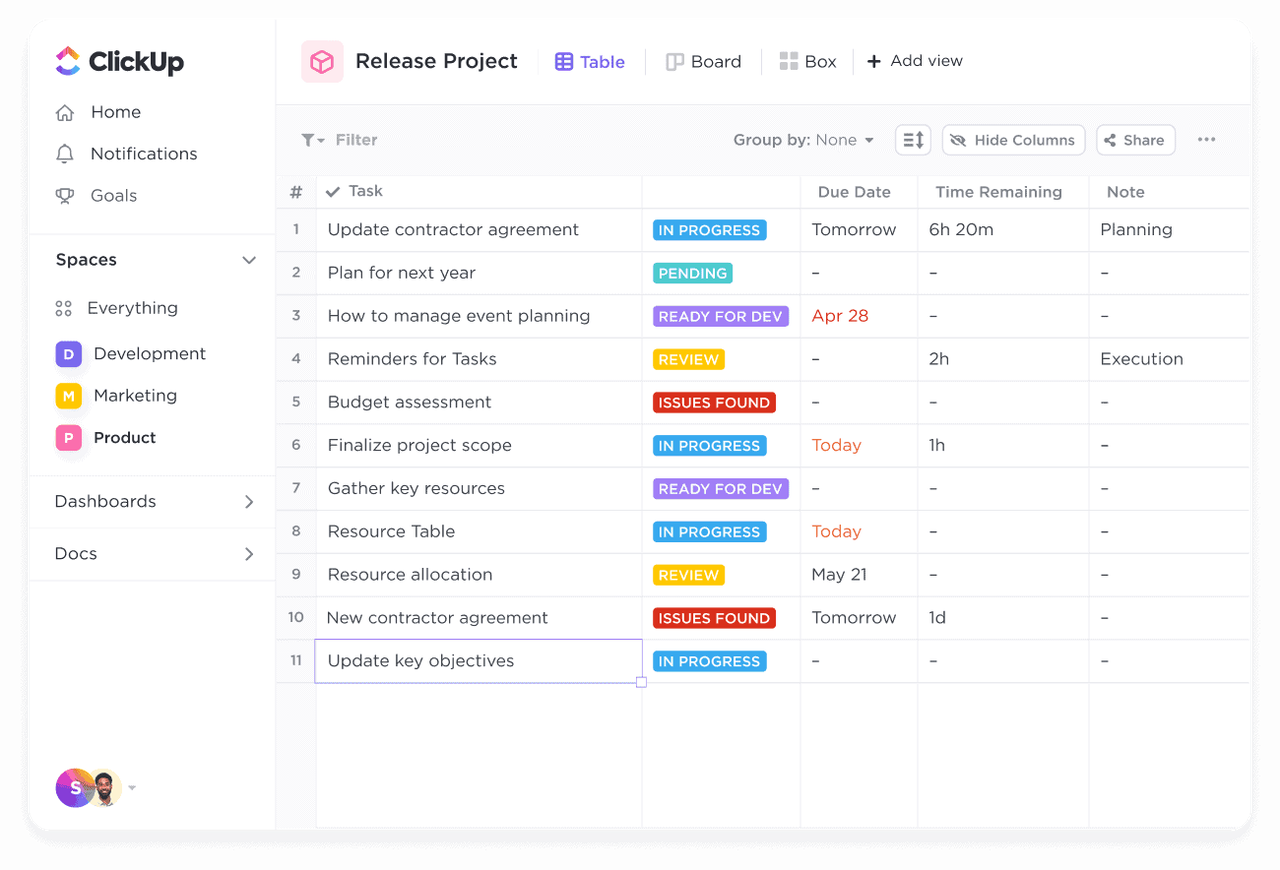
Image source: clickup.com
Key features:
- A flexible hierarchy structure that supports defect tracking across different teams, product areas, or release cycles with clear organization.
- Multiple views, including list, board, timeline, and workload, help teams visualize defects and operational tasks in the format that best suits them.
- Custom fields, statuses, and automation rules that allow teams to shape defect workflows according to internal processes.
- Document creation and linking capabilities that help teams maintain RCA notes, test cases, and validation checklists.
Pros:
- Highly customizable environment that adapts to engineering, QA, design, and cross-functional team needs.
- Consolidates documentation, tasks, discussions, and project tracking in one central platform.
- Suitable for teams wanting to connect defects to larger initiatives, timelines, or product roadmaps.
Cons:
- A broad feature set may overwhelm new users without structured onboarding guidance.
- Scaling to large enterprise environments may require significant workspace organization.
Pricing:
- Unlimited plan: $7/user/month (billed annually).
- Business plan: $12/user/month (billed annually).
- Enterprise plan: Custom pricing.
8. Zoho BugTracker: Best business-focused IT defect tool
Zoho BugTracker is designed for IT teams, support teams, and internal software units that need a structured yet easy-to-use defect tracking system within a broader business ecosystem. As part of the Zoho suite, it integrates smoothly with project management, documentation, communication, and client-facing tools. This makes it particularly useful for organizations that manage both internal work and customer-reported issues. Zoho BugTracker emphasizes clarity through clean dashboards, automated rules, and customizable workflows, making it suitable for mixed technical and non-technical teams. Its simplicity helps ensure consistent reporting while still offering features required for serious defect management. For businesses that prefer a tool aligned with IT service operations, Zoho BugTracker provides a balanced, reliable option.
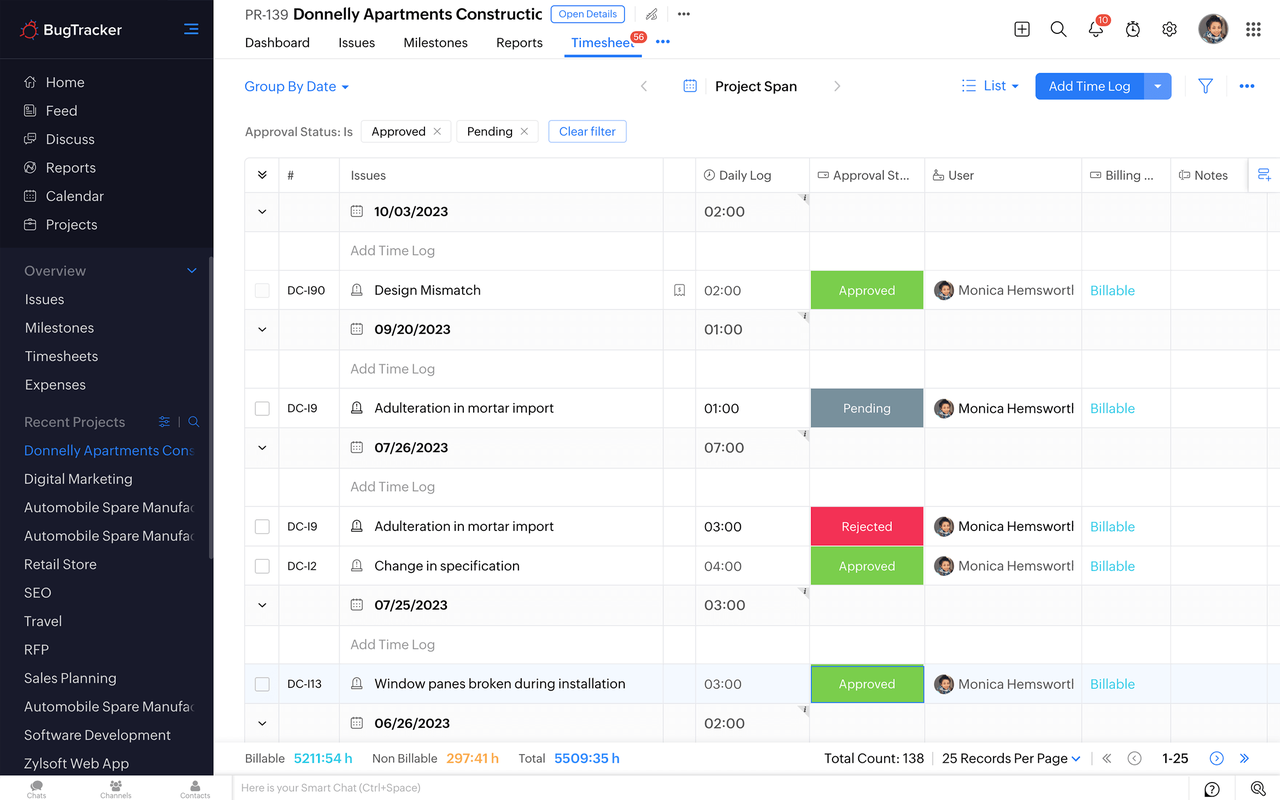
Image source: zoho.com
Key features:
- Customizable issue fields, statuses, and classifications that allow teams to structure defect workflows around IT or internal development processes.
- Time tracking and SLA monitoring that help service-oriented teams measure responsiveness and meet resolution expectations.
- Automated reminders, escalations, and assignments that streamline communication and prevent unattended defects.
- Integration with Zoho Projects and other Zoho apps, giving teams a unified workspace for documentation, tasks, and client updates.
Pros:
- Tight integration with the Zoho ecosystem for projects, communication, and documentation.
- Helpful automation features that improve responsiveness and reduce manual follow-ups.
- Suitable for organizations needing a mix of internal defect tracking and customer issue handling.
Cons:
- Less oriented toward deep development workflows compared to engineering-centric platforms.
- Fewer customization capabilities than open-source or dev-heavy defect trackers.
Pricing:
- Premium plan: $5/user/month (billed annually).
- Enterprise plan: $10/user/month (billed annually).
Choosing the right defect management tool for your team
Selecting the right defect management tool depends heavily on how your team works, how complex your processes are, and what level of documentation or governance you require. Different teams have different expectations, from lightweight reporting to full lifecycle traceability with audit controls. A suitable tool should match your workflow structure, communication habits, and release maturity without adding unnecessary overhead. It should also integrate smoothly with your broader project and development environment, so defects never fall through the cracks. Whether your team is small, scaling, or enterprise-level, the choice should support your pace and your quality standards. Considering the following factors helps teams make confident and future-proof decisions.
- Team size: Smaller teams typically benefit from lightweight platforms that emphasize simplicity and fast setup. As team size increases, the need for standardized workflows, automation, and structured reporting grows significantly. Larger teams also require stronger permission controls and visibility across departments or squads. Enterprise-scale environments often need tools that support multiple projects with shared governance layers. Choosing a tool that scales with team size prevents future disruptions.
- Development methodology: Teams using agile, scrum, or often prefer tools that support iterative development, sprints, and backlog management. More traditional or waterfall environments may emphasize formal documentation, approval steps, and milestone-based defect handling. Hybrid teams need flexible tools that support both structured and fluid processes. Development methodology influences everything from how defects are logged to how they are prioritized. Aligning the tool with your delivery rhythm improves execution quality.
- Need for RCA documentation: Teams that prioritize continuous improvement or operate in regulated environments require firm support for Root Cause Analysis. RCA demands spaces for structured notes, attachments, retrospective insights, and . A suitable tool should allow defects to be linked to RCA documents, corrective actions, or prevention plans. Without proper RCA tracking, teams risk repeating issues and lacking historical understanding. A tool that simplifies RCA contributes to better long-term quality control.
- Compliance requirements: Compliance-heavy industries need tools that provide clear audit trails, evidence attachments, status tracking, and process governance. These teams cannot rely on simple issue lists, as every defect must have a traceable, verifiable lifecycle. Permissions, approval workflows, and chronological logging become essential features. A system with strong compliance support helps teams maintain accountability and meet industry standards. Choosing a tool without these capabilities creates avoidable operational risk.
- IT vs software vs construction use: Different industries require different defect workflows, and the tool must match the nature of the projects. focus on bug tracking, code linkage, and CI/CD alignment. IT teams often require service-oriented features like SLAs, client portals, and ticket routing. Construction teams depend on field-ready tools for site inspections, photos, verification steps, and subcontractor collaboration. Selecting a tool designed for your industry ensures accuracy, clarity, and smoother project execution.
Common defects reporting mistakes teams make
Many teams struggle with defect reporting not because they lack tools, but because their practices create unnecessary confusion, rework, or delays. When defects are poorly logged or inconsistently managed, even the best systems cannot prevent bottlenecks in triage, development, or QA. These mistakes often lead to duplicated work, misaligned expectations, and extended release cycles. Strong defect reporting practices ensure clarity, reproducibility, and structured handoffs at every stage. By recognizing common pitfalls, teams can refine their workflows and reduce noise in their defect queues. Addressing these issues early helps maintain quality and keeps development moving smoothly.
- Logging vague defects: One of the most common problems is reporting defects without sufficient detail. Missing reproduction steps or unclear descriptions force developers and QA to spend extra time gathering information. This slows down triage and increases the likelihood of misclassification. Vague defects also lead to misunderstandings about impact or urgency. Clear, complete reports prevent unnecessary back-and-forth.
- No severity standards: Teams often struggle when there is no shared definition of what constitutes a critical, significant, or minor defect. Without agreed severity levels, prioritization becomes subjective and inconsistent. This results in misplaced urgency and inefficient sprint planning. Establishing clear severity guidelines ensures everyone uses the same criteria. Consistency improves both decision-making and overall workflow stability.
- Fragmented communication: When defect details are scattered across chats, emails, and documents, it becomes difficult to locate important information. Fragmentation causes delays, misalignment, and repeated clarification requests. Teams benefit from keeping defect discussions centralized within the tracking system. This ensures that all stakeholders can access the same context. A unified communication approach reduces confusion and speeds up resolution.
- Orphaned tickets: Defects without assigned owners often stall indefinitely because no one is accountable for advancing them. Orphaned tickets frequently occur when roles are unclear or backlog grooming is inconsistent. ensures every defect has a responsible person at all times. This keeps progress visible and prevents defects from disappearing in the system. Regular reviews help maintain accountability.
- No post-release validation: Some teams close defects after QA testing without verifying behavior in the actual release environment. This can lead to unresolved issues resurfacing after deployment. Post-release checks ensure fixes hold up under real-world conditions. Validating defects after release reduces customer-facing issues and builds confidence in deployment quality. This additional step strengthens long-term reliability.
Conclusion
A strong defect management process is essential for delivering reliable products, maintaining team alignment, and ensuring issues move through a structured lifecycle without delays. From discovery to RCA, every step benefits from clarity, ownership, and . The right defect management system helps teams reduce rework, eliminate confusion, and gain complete visibility across development, QA, and release pipelines. Whether using open-source tools, development-centric platforms, or business-focused solutions, teams must choose a system that matches their size, methodology, compliance needs, and industry context.
For organizations seeking a unified environment that connects defect tracking with documentation, tasks, workflows, and communication, offers an all-in-one workspace that simplifies coordination. By consolidating everything into a single platform, teams can manage defects more efficiently and maintain higher release quality. Ready to streamline your workflow? Try Lark today.
Begin improving your defect processes now
FAQs
What metrics should be used to evaluate defect management effectiveness?
Teams typically track metrics such as defect density, mean time to resolution, reopen rates, backlog health, and severity distribution to gauge overall performance. These indicators show where bottlenecks occur and how effectively the team handles defects throughout the lifecycle. Strong reporting helps identify patterns that influence product stability. Platforms like Lark make these insights easier to visualize by centralizing defect data and workflow activity.
How does defect management differ across software and construction teams?
Software teams focus on bugs tied to code changes, deployments, and CI workflows, while construction teams emphasize field inspections, site evidence, and contractor coordination. Each industry requires different forms of documentation, validation, and . Despite these differences, both rely on structured workflows and clear ownership. Lark supports both contexts by offering flexible databases, attachments, and cross-team communication spaces.
Can defect management systems support audit or compliance reporting?
Modern systems provide audit trails, timestamped updates, approval records, and change histories that help teams meet compliance needs. These capabilities are essential for regulated industries where every action must be traceable. Proper ensures teams can present evidence with confidence during audits or reviews. Lark strengthens this process through built-in approvals, activity logs, and linked records.
How often should unresolved defects be escalated?
Escalation frequency depends on severity, SLA commitments, and release timelines, but teams generally escalate when progress stalls or when unresolved defects risk delivery quality. Clear policies help avoid delays and ensure consistent decision-making. Escalation keeps critical issues from being buried under lower-priority work. Lark helps automate these reminders and escalations through rule-based workflows.
Is open-source defect software secure enough for enterprise use?
Open-source tools can be secure if organizations apply proper patching, hosting, and access-control practices, but they require dedicated oversight. Enterprises must evaluate whether the tool's security model aligns with internal policies and regulatory obligations. Self-hosting gives complete control but also full responsibility. Lark offers an alternative with enterprise-grade security, managed infrastructure, and compliance-ready controls.
Related reading





























