In the ever-evolving landscape of business management, effective inventory control has never been more critical. The Fishbowl inventory system stands out as a powerful tool designed to help businesses streamline their inventory processes. By empowering companies to manage their stock levels efficiently, Fishbowl facilitates smoother operations and fosters a more productive workplace.
Whether you're a small business owner or work within a larger organization, understanding the Fishbowl inventory management system is essential for making informed decisions about your inventory strategies. This article will explore the core features, benefits, and challenges associated with Fishbowl, setting the stage for you to evaluate if it's the right solution for your inventory needs.
What is the Fishbowl inventory system?
The is an inventory management software solution that offers businesses a comprehensive approach to managing their stock, orders, and overall supply chain processes. Designed to cater to various industries, Fishbowl provides an array of features that address different aspects of inventory management.
At its core, the Fishbowl inventory system allows users to track inventory levels in real time, manage purchase orders, and streamline overall workflow. Its user-friendly interface enables companies to have a clearer view of their inventory status, helping avoid common pitfalls such as stockouts and excess stock.
One of the standout aspects of Fishbowl is its ability to seamlessly integrate with other platforms, particularly accounting software like QuickBooks. This integration helps simplify financial tracking alongside inventory management, ensuring a more cohesive business operation.
Overall, the Fishbowl inventory system offers a robust framework that supports informed decision-making and ultimately contributes to enhanced efficiency in .
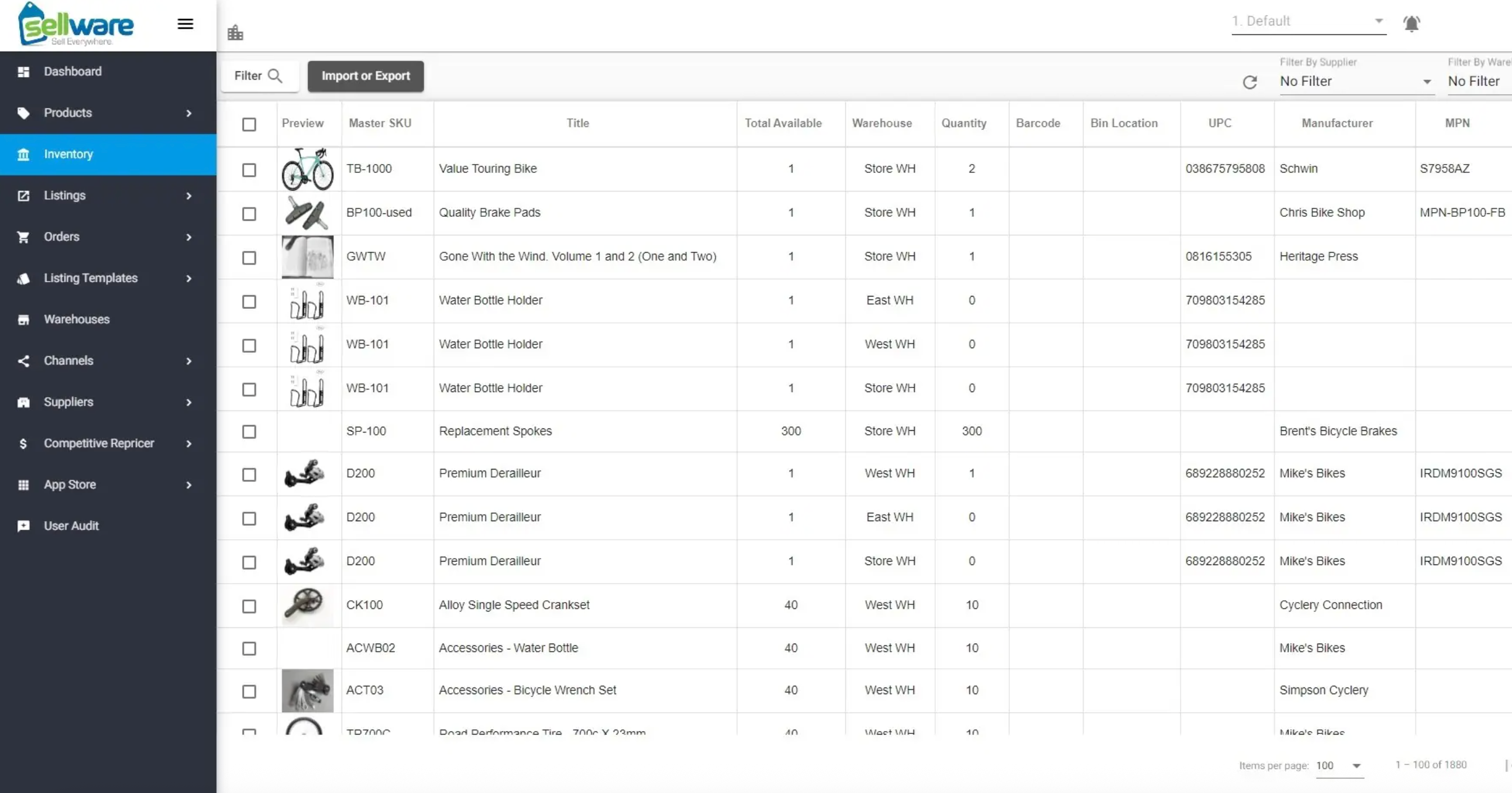
Image source: fishbowlinventory.com
Core features of the Fishbowl inventory system
Understanding the core features of the Fishbowl inventory system can help identify its potential value for your business. Here are some key functionalities that make Fishbowl a popular choice for inventory management:
- Inventory tracking: Fishbowl allows you to levels, product movement, and reorder points in real-time. This ensures that businesses can quickly respond to changes in demand while keeping a close eye on stock levels.
- Order management: The system simplifies the order process by allowing users to generate purchase orders, , and track order status all in one place. This centralization reduces errors and improves efficiency.
- Manufacturing capabilities: Fishbowl isn't just limited to inventory tracking; it also encompasses manufacturing functionalities. Businesses can manage production workflows, track raw materials, and oversee finished goods, making it suitable for industries that require manufacturing processes.
- Barcode scanning: With built-in barcode scanning capabilities, Fishbowl facilitates quick and accurate inventory counts. This feature minimizes human error and speeds up operations, allowing for more efficient stock management.
- Reporting and analytics: Fishbowl offers various reporting options, enabling users to generate insights about their inventory status and business performance. can assist in identifying trends and areas for improvement.
These core features highlight how the Fishbowl inventory management system can support and enhance the inventory practices of businesses across different sectors. Understanding these tools is crucial for maximizing efficiency and effectiveness in your operational processes.
How to use Fishbowl for inventory management
Using the Fishbowl inventory system effectively requires a comprehensive understanding of its features and how they align with your business processes. Here's an expanded step-by-step guide on how to maximize Fishbowl for your inventory management:
Setting up your account
Start by creating an account with Fishbowl. During the setup process, input essential company information, such as your business's name, contact details, and physical location. Make sure to include critical elements like your warehouse locations, suppliers, and any other relevant data to ensure your inventory system aligns with your operational needs.
Importing data
Fishbowl allows you to import your existing inventory data into the system. This feature is particularly helpful if you are transitioning from another . You can upload large quantities of data at once, including product details, supplier information, and customer records. Ensure that your data is clean and well-organized to facilitate a smooth import process.
Organizing inventory
Once your data is in Fishbowl, it's vital to categorize your inventory items effectively. Create product categories that suit your business model—this might include grouping items by type, brand, or department. Organizing your inventory in this way helps streamline searches and enables quick access to products, improving overall efficiency in inventory management.
Assigning barcodes
Utilize Fishbowl's to assign barcodes to your inventory items. This feature speeds up the processes of receiving and shipping products, as each item can be quickly scanned for accurate tracking. Barcodes help minimize human errors associated with manual data entry and ensure you can conduct more rapid inventory counts.
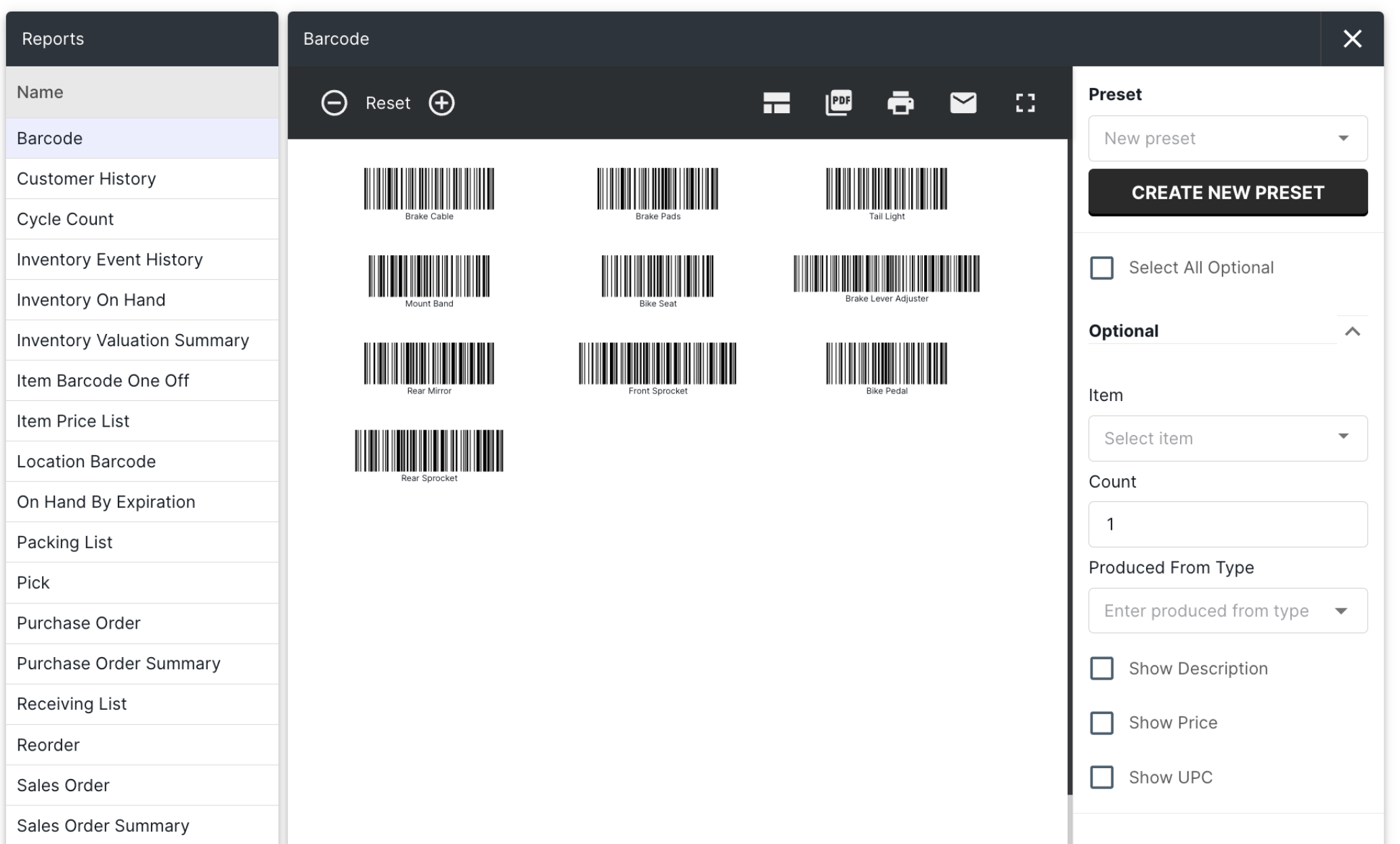
Image source: fishbowlinventory.com
Managing orders
Fishbowl simplifies order management through its intuitive interface. Use the software to create purchase orders when stock levels fall below specified reorder points. Fishbowl can alert you when it's time to reorder, thereby preventing stockouts. Additionally, you can easily, ensuring that your team is aware of order statuses and delivery timelines.
Tracking inventory movements
Regularly update inventory levels as stock moves in and out. When receiving shipments or shipping orders, promptly enter these transactions into Fishbowl. This real-time tracking is crucial for maintaining accurate inventory counts and ensuring your data reflects the current state of your stock.
Running reports
Fishbowl's reporting features allow you to generate insightful reports on inventory status and business performance. Regularly analyze these reports to understand stock trends, identify slow-moving items, and spot areas for improvement. Customizable reports can help you make informed decisions about procurement and inventory holding to reduce costs.
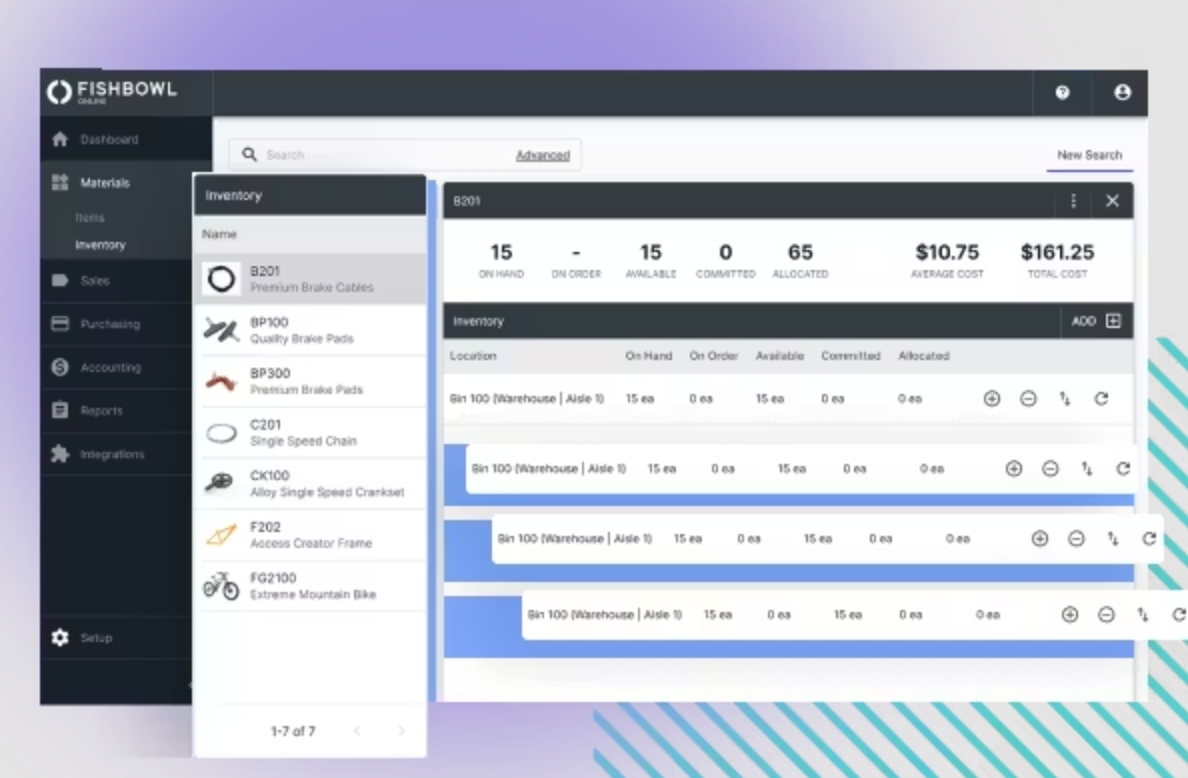
Image source: fishbowlinventory.com
Conducting regular audits
To ensure the accuracy of your inventory records, conduct regular physical audits. Use Fishbowl's tools to facilitate these audits by comparing physical counts with the system's records. Regular checks help maintain the integrity of your inventory data and can help identify discrepancies early.
Setting up user permissions
Depending on your team structure, you may want to set up different user roles and permissions within Fishbowl. This ensures that employees only have access to the information and functionalities they need, improving security and management capabilities.
Regular training and updates
Stay updated on Fishbowl's features by participating in training sessions and utilizing resources available on the Fishbowl website. Regular training ensures that your team is proficient in using the software, enabling them to make the most of its functionalities.
By following these detailed steps, users can harness the full potential of the Fishbowl inventory system. This leads to more organized and efficient practices, ultimately contributing to smoother business operations and improved decision-making.
Pricing plans for the Fishbowl inventory system
The Fishbowl inventory system offers various pricing plans based on the features and support levels that a business requires. Generally, the Fishbowl inventory system follows a subscription model, where businesses pay annually or monthly.
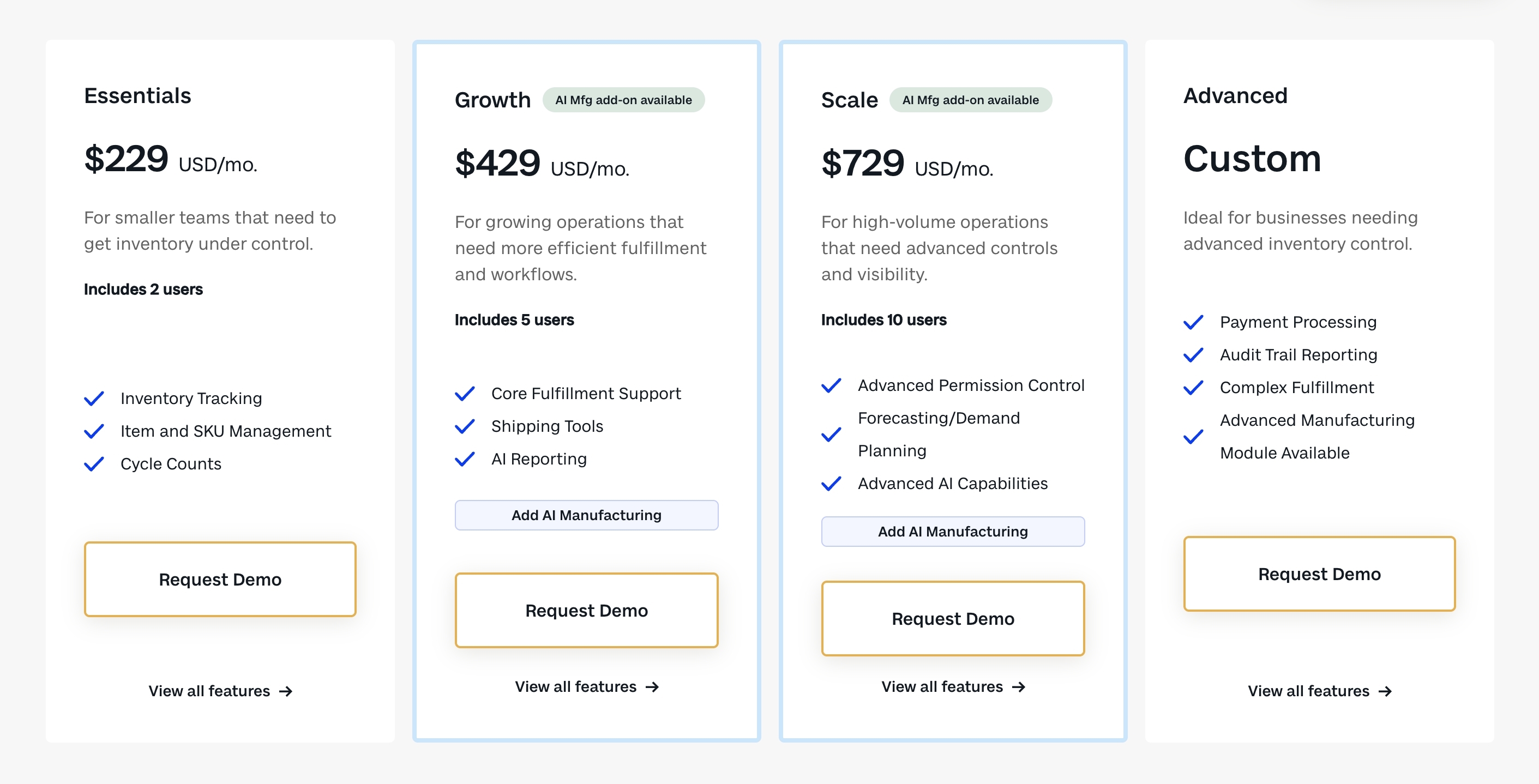
Image source: fishbowlinventory.com
Pricing plans
- Essentials: Targeted at small teams looking to gain basic inventory control, this plan starts at $229 USD/month and includes 2 user seats. It covers core inventory tracking and cycle counting capabilities.
- Growth: Designed for growing businesses needing more efficient order fulfillment, this plan costs $429 USD/month with 5 user seats. It adds AI-powered reporting and shipping tools, and is eligible for optional advanced modules.
- Scale: Built for high-volume operations requiring advanced visibility, this plan is priced at $729 USD/month and includes 10 user seats. It features demand forecasting, advanced permission controls, and enhanced AI functionality.
- Advanced: A fully custom solution for businesses with complex inventory or manufacturing needs. Pricing is not publicly listed and requires direct consultation, with access to specialized features like advanced manufacturing modules.
To know more about Fishbowl pricing 👉
Additional costs
- AI manufacturing add-on: Available for Growth and Scale plans, this optional module unlocks AI-driven manufacturing capabilities and incurs an extra fee (pricing not listed publicly).
- Customization fees: The Advanced plan may involve additional costs for tailored workflows, integrations, or industry-specific features, depending on your business requirements.
- Potential extra user licenses: While each plan includes a set number of users, adding additional team members beyond the included quota will likely require paying for extra user seats (pricing not specified).
Explore these features in one tool
Common challenges when using Fishbowl
While the Fishbowl inventory system offers robust features and capabilities, users may encounter several challenges during implementation and daily operation. Understanding these common hurdles can help businesses better prepare for a smoother experience. Here are some potential challenges when using Fishbowl:
- Complex setup & data migration: Migrating to Fishbowl requires extensive data input and customization, which is time-consuming and risks data inaccuracies if not done properly.
- Limited customization: The system lacks flexibility for , with restrictions on inventory categorization and report tailoring, frustrating users needing bespoke solutions.
- Integration limitations: While it works with QuickBooks, integrating with niche tools can be problematic, causing process delays and data discrepancies.
- Steep learning curve: Training staff to use Fishbowl effectively demands significant time and resources, with slower productivity during onboarding and ongoing challenges with system updates.
- Performance risks: Some users report slow loading, lag during data entry, and delayed report generation when handling large datasets or concurrent users.
- High cost: The pricing may be prohibitive for small businesses or those with tight budgets, requiring careful evaluation of return on investment.
By recognizing these common challenges ahead of time, businesses can develop strategies to mitigate potential issues and enhance their overall experience with the Fishbowl inventory system.
Reduce your costs in inventory management
Consider a more powerful inventory management alternative
When choosing an inventory management system, Fishbowl, as a mature on-premise software, holds traditional advantages in deep integration with QuickBooks and complex warehouse bin management. However, for modern businesses pursuing , real-time data linkage, and low-cost, efficient deployment, a cloud-based integrated platform is becoming a more forward-looking choice. not only provides functions that cover core needs but also solves the common pain points of traditional software in mobility, collaboration efficiency, deployment cost, and business process integration through its unique platform capabilities.
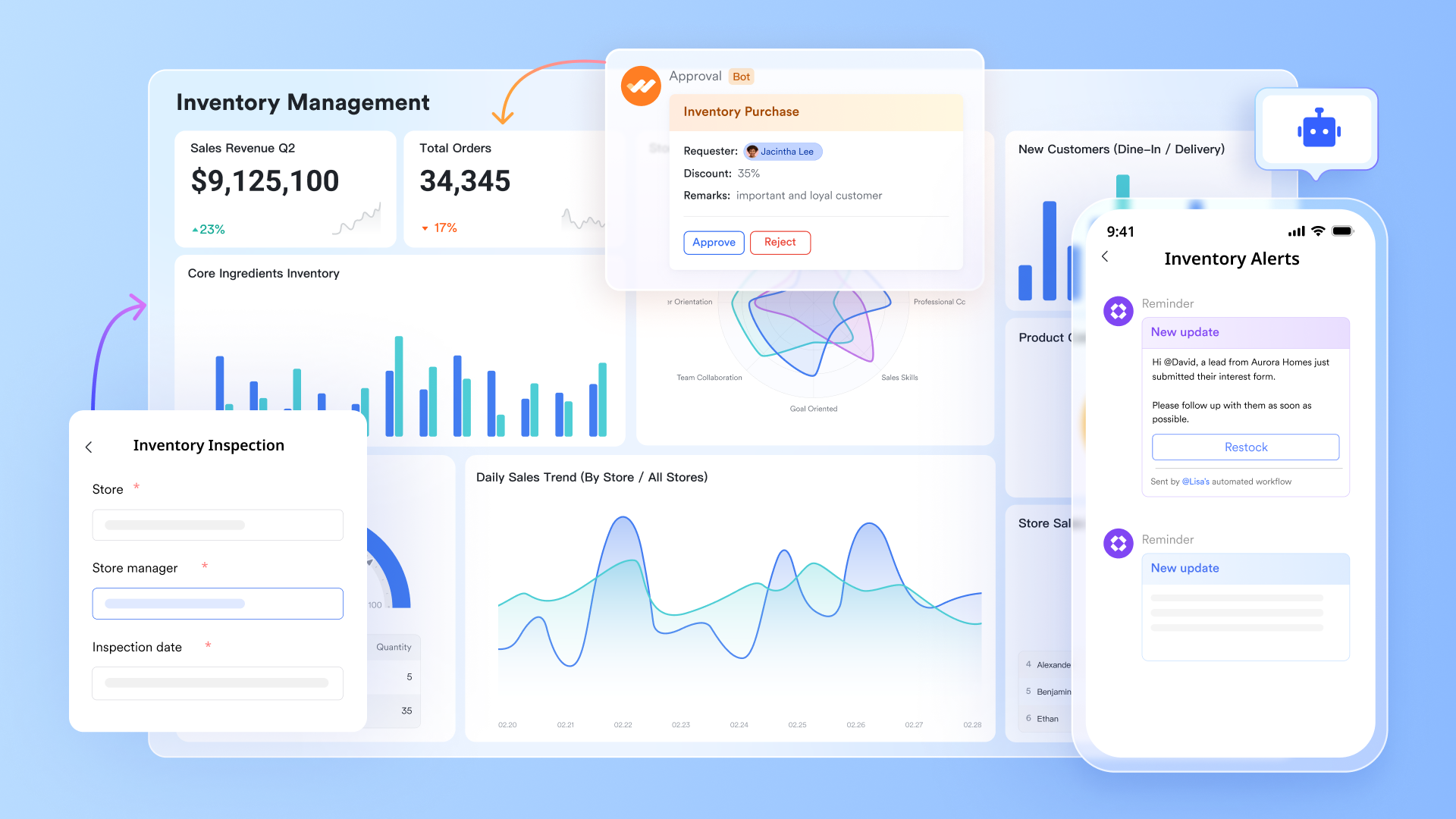
From static data recording to dynamic intelligent collaboration
Traditional inventory systems are primarily databases for recording outcomes, while communication about inventory—such as purchase inquiries, arrival exception notifications, or transfer requests—happens in another set of tools (like email or instant messaging), leading to information silos.
Lark builds a dynamic environment centered on data, where all related collaboration occurs naturally. For example, when the inventory level in a Base hits a preset low threshold via automation rules, the system can automatically send a restock alert. Colleagues can discuss and assign responsible persons directly within the chat. The entire decision-making process revolves around the specific inventory data and is automatically preserved. This means inventory management is no longer an isolated task for the warehouse keeper but an intelligent hub driving collaboration across the supply chain. 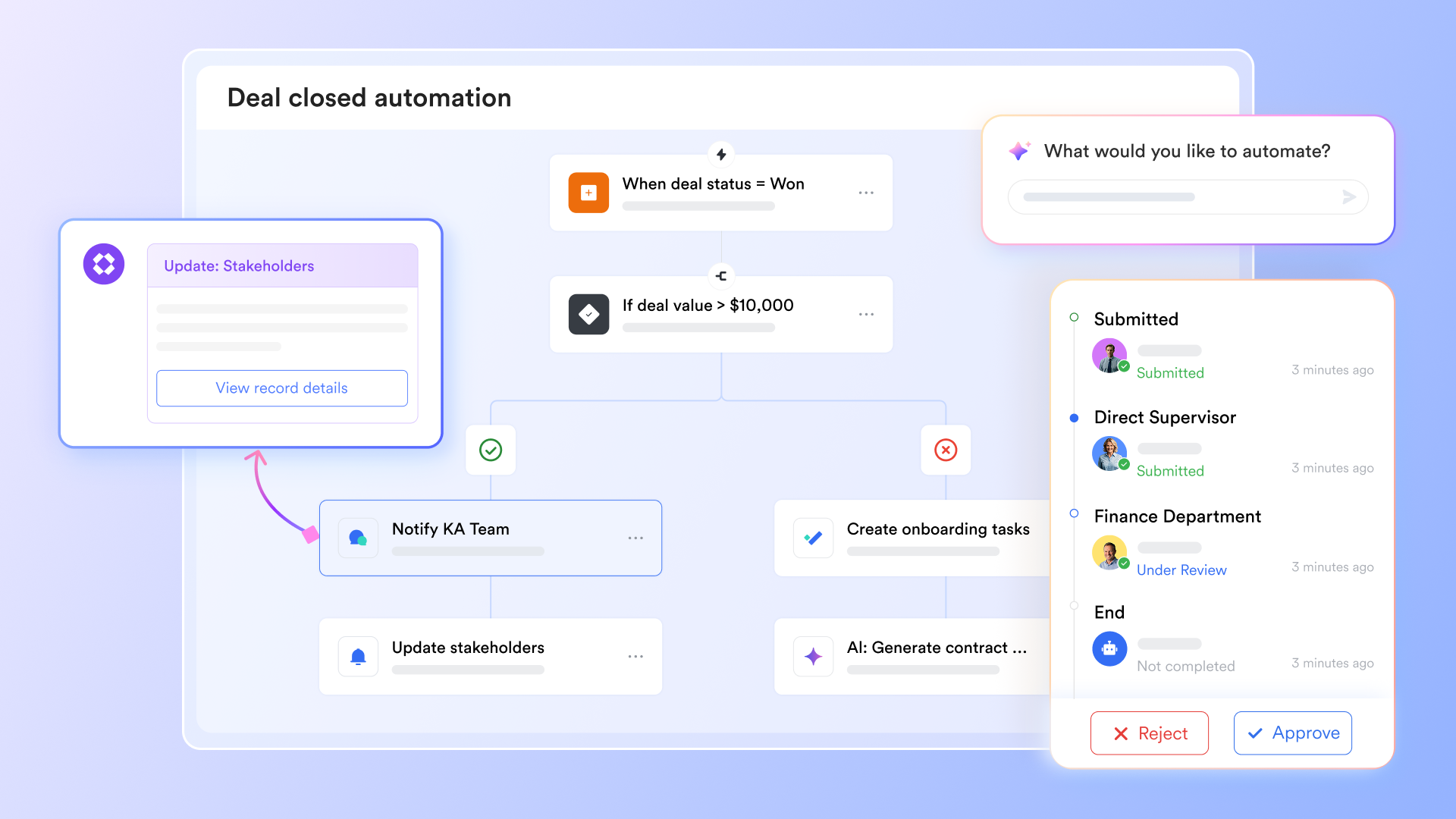
Mobile-first design that transforms inventory management
While Fishbowl offers mobile solutions, its core is a complex system designed around the desktop; the mobile version is often just an extension or a view. The rapid barcode scanning, real-time entry, and on-site checking that frontline warehouse staff need most often feel fragmented in traditional architectures.
Lark's Work Mini Apps changes this completely. You can directly convert a configured inventory management Base into a standalone mobile app with one click. Warehouse staff don't need to log into a complex backend. Opening this mini app on their phones, they are greeted by clear task cards on the homepage—like "To Be Received Today" or "Pending Inventory Count List." They can scan product barcodes, update stock quantities, and transfer status in real-time on the mobile device, and even take photos to report product anomalies. This design, native to mobile scenarios, significantly lowers the training and usage barrier for frontline employees, ensuring the convenience and accuracy of data entry at the source. 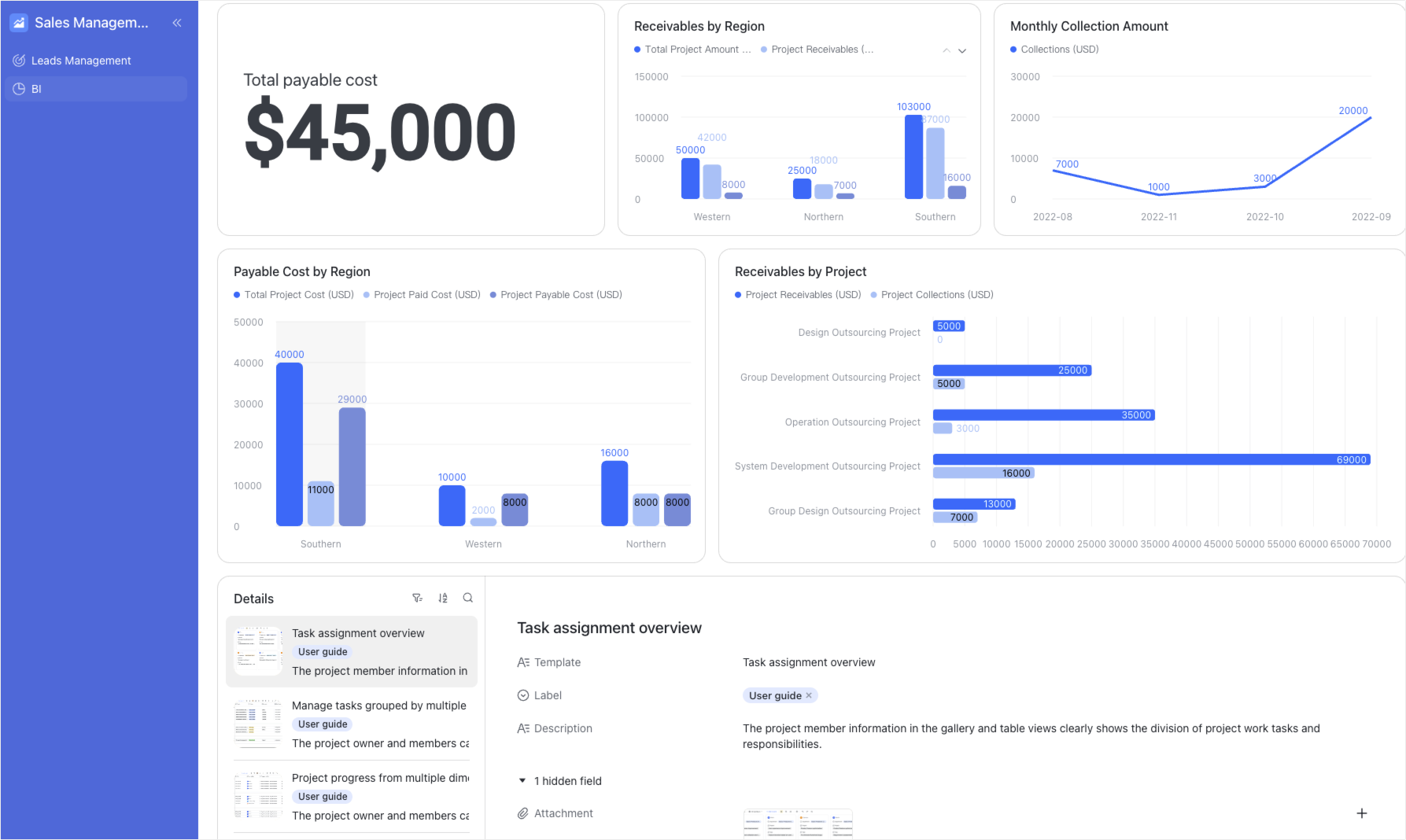
Barrier-free agile deployment and deep customization
Deploying professional software like Fishbowl typically means a long procurement cycle, complex local server setup, or high SaaS customization fees, with limited flexibility for adjustments later.
Lark offers a completely different path: you can immediately use the ready-made "Retail Order & Inventory Management" template to get a complete system in minutes. This system includes product tables, order tables, automated alerts, and Gantt chart views. More importantly, thanks to the powerful no-code capability of , any business user can, like building blocks, add fields, views, or new automated processes to this system at any time. For instance, you could easily add a "Supplier Evaluation" table linked to the product table or create a separate "Expiry Date Tracking" view for perishable goods. This agility allows the system to evolve rapidly alongside business growth, without waiting for lengthy development cycles. Building closed-loop, real-time business processes
Fishbowl excels at handling internal warehouse inventory flow, but connecting inventory status to marketing campaigns, sales order processing, or financial forecasting often requires additional integration development.
In Lark, inventory data is inherently connected to other business areas. When a salesperson creates a new customer order in the "Order Management" table in Base, the quantity of the linked product in the "Inventory Management" table is automatically deducted. After a warehouse keeper completes the shipping scan in the mobile mini app, the order status updates automatically. All processes connect seamlessly within one platform, forming a real-time business closed loop from sales to warehousing to customer service. This eliminates the delays and errors of syncing data between systems and provides managers with a global, real-time business dashboard. :
- Starter plan: Free forever plan that includes 11 powerful tools for up to 20 users. It also comes with 100GB of storage, 1000 automation runs, AI translations, and more.
- Pro plan: $12/user/month (billed annually) for up to 500 users. It includes everything in Starter plus group calling for up to 500 attendees, 15TB of storage, 50,000 automation runs, and more.
- Enterprise plan: for custom pricing. Supports unlimited users and includes even more automation runs and advanced security, compliance, and management features.
For small teams with simple communication needs

18 months message history
1000 Base automation runs/month
2000 rows per table in Base
Most POPULAR
For companies with comprehensive collaboration and management needs
Unlimited message history
500-participant video meetings
50k Base automation runs/month
20k rows per table in Base
For large companies with advanced security and organizational management needs
Get a personalized demo and pricing
Unlimited message history
500-participant video meetings
15 TB storage + 30 GB storage/user
500k Base automation runs/month
50k Base automation runs/month
Most POPULAR
For companies with comprehensive collaboration and management needs
Unlimited message history
500-participant video meetings
50k Base automation runs/month
20k rows per table in Base
How Lark compares to Fishbowl
When evaluating inventory management solutions, it's essential to compare key features and functionalities. and Fishbowl each offer unique advantages, but their approach to inventory management can differ significantly. The following table highlights various dimensions where these two systems can be compared, allowing businesses to assess which solution aligns best with their specific needs.
Choose Lark as your inventory management system
Should you choose Lark or Fishbowl?
Choosing between Lark and Fishbowl ultimately hinges on your business needs and the specific features that matter most to your operations. Both platforms offer valuable inventory management capabilities, but they cater to different user experiences and organizational requirements. Understanding what each solution provides can help you make an informed choice that aligns with your goals.
Choose Lark if...
Opt for if you prioritize user-friendliness and intuitive navigation. The platform's simple interface streamlines onboarding, making it easier for team members to get up to speed quickly. Additionally, Lark's extensive customization options allow you to tailor workflows and processes to fit your unique requirements. If seamless collaboration with various platforms is essential for your operations and you value robust customer support with ample resources, Lark stands out as an excellent choice.
Choose Fishbowl if...
Consider Fishbowl if your organization has specific needs that align with its advanced features, particularly if you require in-depth manufacturing functionalities or sophisticated capabilities. Fishbowl may be beneficial for larger firms or those with established processes that are well-suited to its more complex interface. If your team is already accustomed to using Fishbowl or you find that its core functionalities meet your needs, it could be the right option for your inventory management strategy.
Conclusion
In conclusion, choosing the right inventory management system can profoundly impact your business's operational efficiency and growth. With its user-friendly interface, streamlined data migration, and extensive customization capabilities, presents itself as a powerful alternative to Fishbowl. If your organization is ready to enhance its inventory management processes with a solution that prioritizes user experience while delivering robust functionality, consider making the switch to Lark today! Embrace the potential for improved efficiency and effectiveness in your inventory management practices.
Transform your inventory management to the next level
FAQs
Is Fishbowl inventory an ERP system?
No, Fishbowl Inventory is not a full ERP (Enterprise Resource Planning) system. It primarily focuses on inventory management and order fulfillment, providing tools to track stock levels, manage purchasing, and streamline warehouse operations. For businesses looking for a more comprehensive solution that includes accounting and other business functions, platforms like Lark may be worth considering.
What is Fishbowl inventory software?
Fishbowl Inventory software is a robust solution designed to help businesses manage their inventory and manufacturing processes efficiently. It offers features such as inventory tracking, order management, and reporting, which are crucial for companies dealing with large volumes of stock. While powerful, some users find it has a steeper learning curve compared to more user-friendly alternatives like Lark.
How does Fishbowl Inventory compare to QuickBooks?
Fishbowl Inventory and QuickBooks serve different primary functions, though they can complement each other. Fishbowl specializes in inventory management and warehouse tracking, while QuickBooks focuses on financial management and accounting. Many businesses use Fishbowl as an add-on to QuickBooks to handle their inventory needs more effectively. However, if you're looking for a more integrated solution that combines these functions, Lark may provide a more cohesive experience.
Is Fishbowl inventory easy to learn and use?
Fishbowl Inventory is known for its powerful features, but some users report that it can be challenging to learn and navigate, especially for those new to inventory management systems. The initial setup and user interface can feel complex. In contrast, Lark offers a more intuitive interface and a simplified onboarding process, making it easier for teams to get started without extensive training.
Related reading






























