Delivering exceptional customer support should be seamless. Yet for many growing businesses, it becomes surprisingly complex once multiple channels, agent shifts, automation rules, and global SLAs are involved. Freshdesk pricing often looks straightforward at first, especially for startups seeking a structured ticketing system to replace shared inboxes.
However, as teams expand and support becomes integral to retention and revenue—requiring features like AI agents, skill-based routing, and cross-functional collaboration—pricing tiers and add-on costs start to matter significantly. Leaders increasingly question upgrade triggers, "hidden" AI fees, and long-term scalability when evaluating Freshdesk in 2026. This guide breaks down Freshdesk's plans, real costs, and limitations, and briefly highlights alternatives like Lark for teams needing more than just a help desk.
Understand how support platforms scale with teams
What is Freshdesk?
Freshdesk is a cloud-based customer support software developed by Freshworks, designed to help businesses of all sizes manage customer interactions. It operates primarily as a ticketing system that converts inquiries from email, chat, phone, and social media into trackable tickets.
The platform is divided into two core product lines: Freshdesk Support Desk, which focuses on traditional ticketing, and Freshdesk Omni, which unifies multiple channels (like WhatsApp, SMS, and VoIP) into a single interface. While it is popular for its user-friendly interface, the Freshdesk pricing plans can become complex as teams scale. Advanced capabilities—such as AI automation, skill-based routing, and omnichannel features—are often gated behind higher tiers or require separate add-ons.
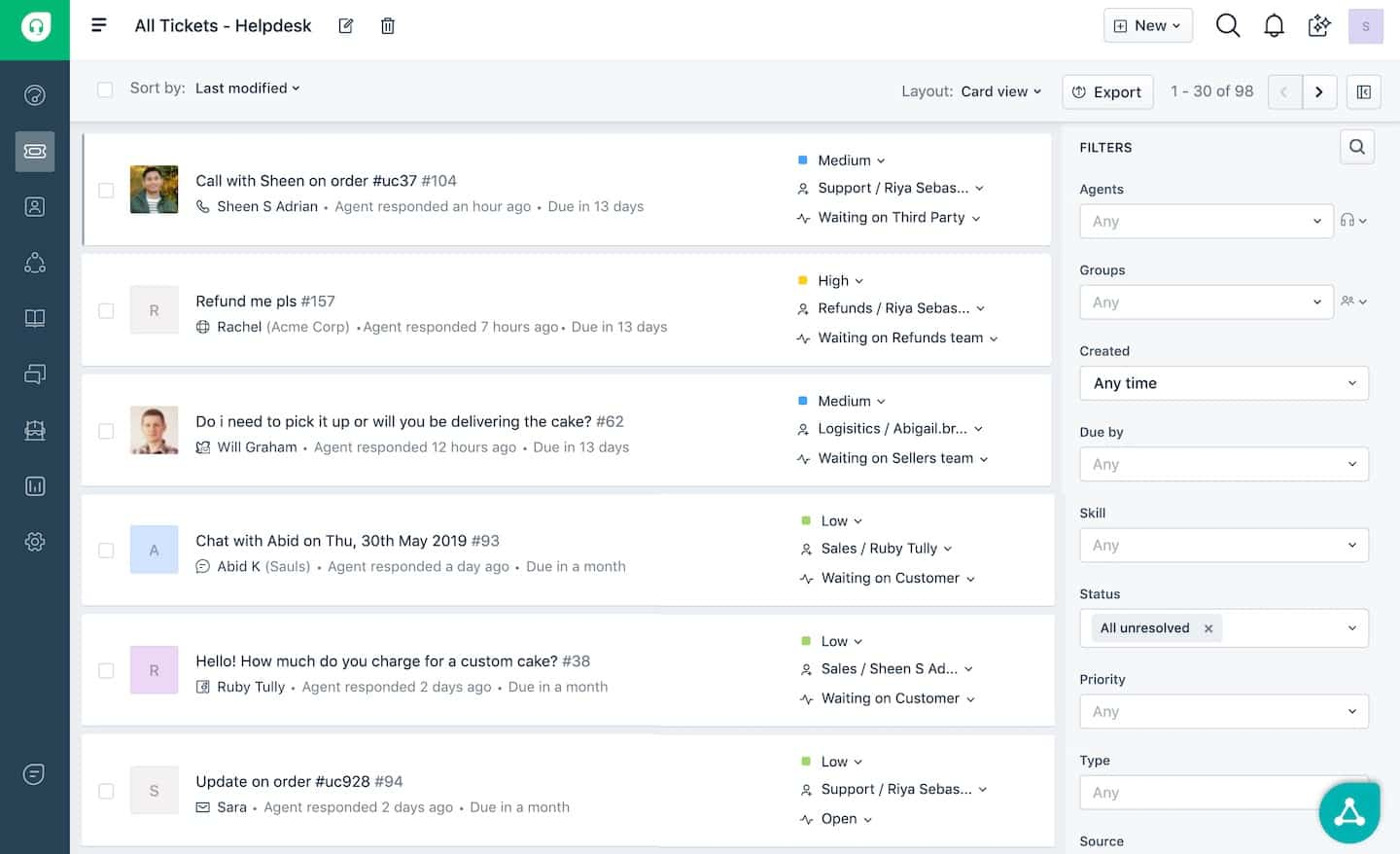
Image source: freshworks.com
Freshdesk suite pricing 2026: What each tier unlocks
Freshdesk pricing plans are structured to support businesses at every stage of growth, from startups needing basic organization to enterprises requiring complex governance. As teams scale, they unlock progressively powerful tools—moving from simple shared inboxes to sophisticated AI automation, omnichannel routing, and custom analytics. Understanding how capabilities like Freddy AI, skill-based assignments, and operational controls expand across tiers is essential for choosing the right plan for your budget and goals. The sections below explain what each tier includes and how the capabilities expand across plans.
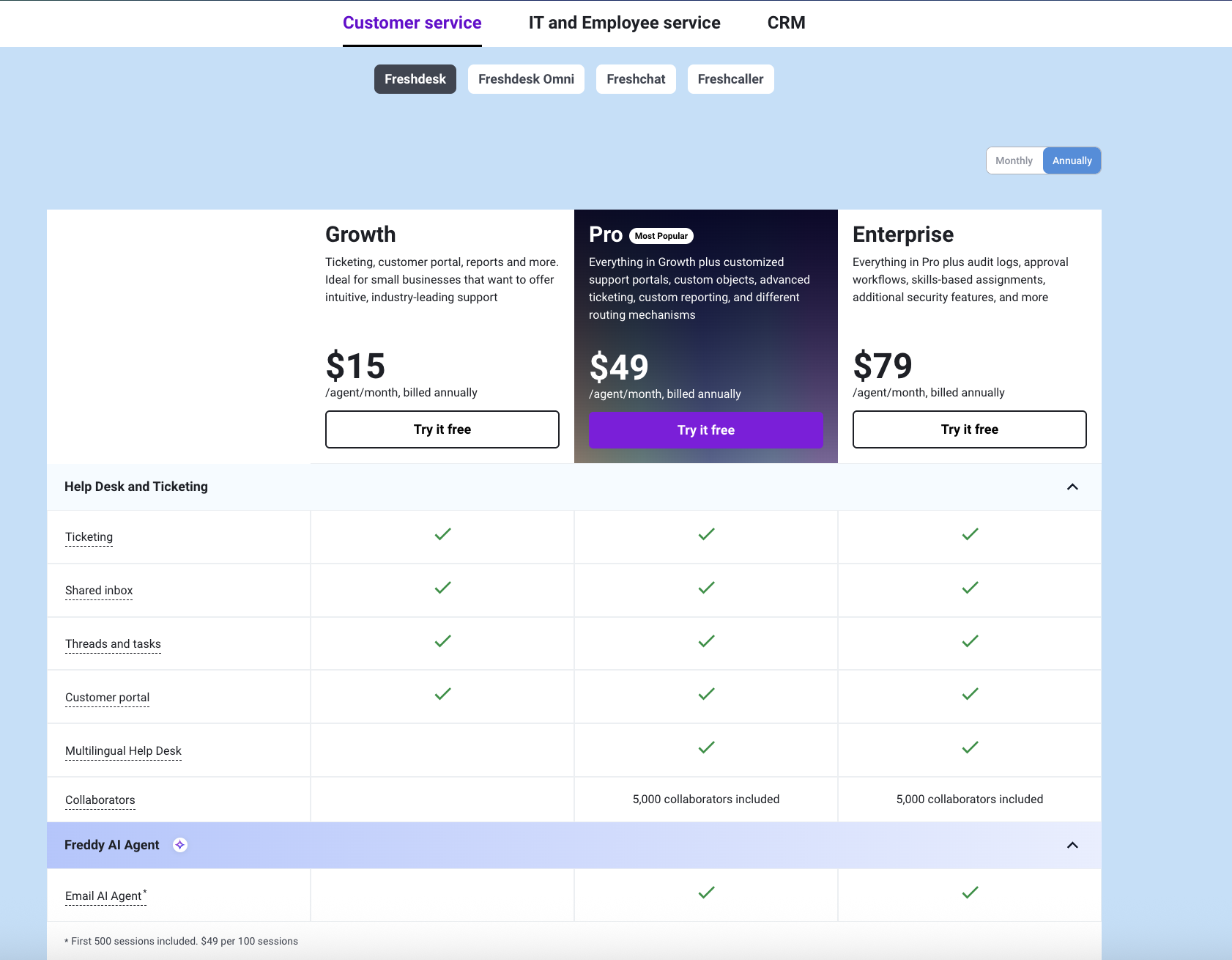
Image source: freshworks.com
Freshdesk pricing for Customer service solution
Information source: freshworks.com
Update time: 2025-12-19
Note: Pricing and plan details reflect publicly available data as of the update date and may vary based on region, billing cycle, and number of agents.
Quick takeaway
- Growth focuses on intuitive ticketing and core reporting for small teams.
- Pro unlocks advanced customization, AI agents, and multilingual support tools.
- Enterprise ensures advanced security, audit trails, and skills-based workflow controls.
Growth (Intuitive ticketing)
The Growth plan targets small businesses that need to move beyond email and establish a structured support system. It focuses on consolidating communication channels into a single interface, offering intuitive tools that help teams organize inquiries and deliver professional support without overwhelming complexity.
Key features:
- Ticketing and shared inbox: Converts incoming support emails into trackable tickets within a unified inbox. Implementing a dedicated ensures no customer request gets lost and allows multiple agents to manage the same queue efficiently.
- Customer portal: Provides a dedicated space where customers can log in to view their ticket status, adding a layer of transparency and professionalism to the support experience.
- Threads and tasks: Helps agents break down complex tickets into manageable tasks and maintain clear conversation threads, keeping internal organization sharp as ticket volumes rise.
Pro (Advanced customization & AI)
The Pro plan is designed for growing teams that require deeper operational control and efficiency tools. It builds on Growth by introducing AI capabilities, global support features, and the ability to bring in a vast number of occasional collaborators. This tier suits businesses optimizing for scale and specific workflow needs.
Key features:
- Freddy AI Agent: Includes the Email AI Agent to automate responses and assist agents. For a deeper dive into how automation transforms service, read about AI in customer support. This leverages generative AI to speed up resolution times and handle repetitive queries.
- Multilingual help desk: Enables support teams to manage tickets and help center content in multiple languages—essential for businesses expanding their reach to global markets.
- Collaborators & custom reporting: Includes 5,000 collaborators, allowing subject matter experts outside the core support team to weigh in on tickets, along with custom objects for tailored data tracking.
Enterprise (Security & governance)
The Enterprise plan prioritizes control, compliance, and precision for mature support organizations. It secures the support environment with advanced governance tools while optimizing agent productivity through intelligent routing. This tier is ideal for large teams where security and structured processes are non-negotiable.
Key features:
- Audit logs & security: Provides a detailed trail of system changes and user activities, critical for maintaining compliance and troubleshooting internal security protocols.
- Skills-based assignments: Ensures tickets are automatically routed to the agent best suited to handle them based on expertise, preventing triage bottlenecks.
- Approval workflows: Formalizes decision-making by requiring specific authorizations within the ticket lifecycle. Leveraging capable prevents unauthorized actions and ensures critical requests follow company policy.
Freshdesk Omni pricing for Customer service solution
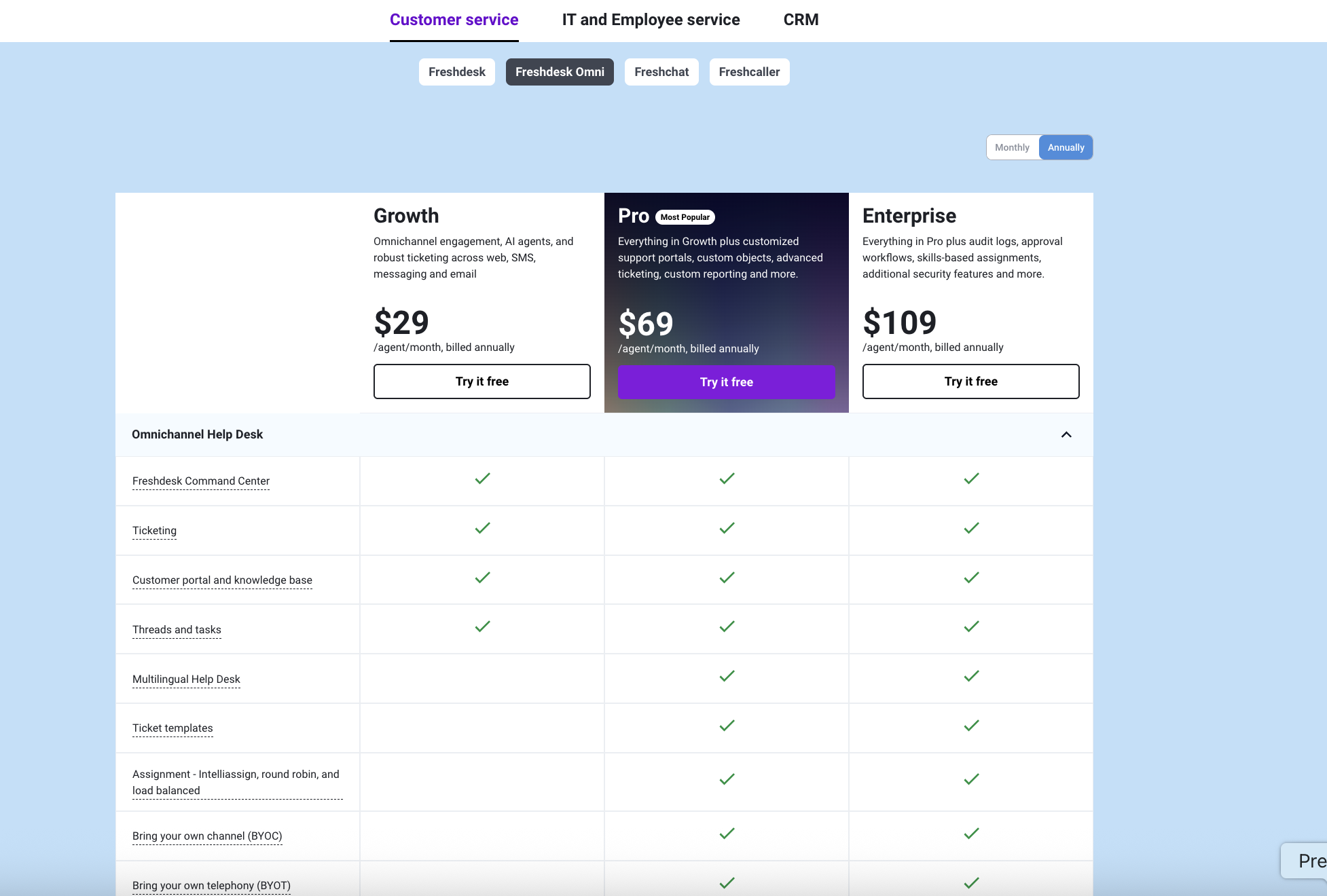
Image source: freshworks.com
Information source: freshworks.com
Update time: 2025-12-19
Note: Pricing and plan details reflect publicly available data as of the update date and may vary based on region, billing cycle, and number of agents.
Quick plan differences at a glance
- Growth focuses on centralized omnichannel engagement and unified ticketing.
- Pro unlocks custom channel integrations, advanced routing strategies, and multilingual support.
- Enterprise ensures rigorous governance with audit logs, approvals, and skills-based assignments.
Growth (Omnichannel engagement) ($29 per agent/month)
The Growth plan is built for teams that need to unify customer conversations across multiple platforms into a single interface. It moves beyond basic email support to include messaging, SMS, and web chat, focusing on centralizing operations so agents don't have to toggle between apps. This tier is best for businesses establishing their presence on multiple channels.
Key features:
- Freshdesk Command Center: Included in all plans, this serves as the central hub for omnichannel operations. It gives agents a real-time view of customer queries across all touchpoints, ensuring nothing slips through the cracks. Centralizing your work streams via dedicated is essential for managing this complexity efficiently.
- Ticketing & shared inbox: Converts messages from any channel—email, chat, or social—into a unified ticket format. This allows teams to prioritize and track issues systematically regardless of where the conversation started.
- Threads and tasks: Enables agents to organize complex queries by splitting them into smaller tasks or maintaining threaded internal discussions. This ensures that even as volume grows, the context of every customer interaction remains clear and manageable.
Pro (Customization & routing) ($69 per agent/month)
The Pro plan is designed for experienced teams that need to tailor their support environment and automate complex logistical challenges. It unlocks the ability to integrate unique communication channels and introduces sophisticated routing logic to handle high ticket volumes efficiently. This tier is best for scaling teams that require operational precision.
Key features:
- Custom channels (BYOC & BYOT): The ability to bring your own channels (BYOC) and telephony (BYOT) is unlocked at this tier, allowing you to integrate niche platforms or existing phone systems directly into the helpdesk. For insights on building a tailored support stack, consider the best practices for .
- Advanced assignment rules: While basic ticketing is in Growth, advanced assignment strategies like round robin and load balancing require the Pro plan. These rules automatically distribute tickets based on agent availability and workload, preventing burnout and ensuring faster response times.
- Multilingual help desk: Allows teams to support customers in their native languages by managing translated help center articles and ticket responses. This creates a localized experience that is crucial for brands operating in international markets.
Enterprise (Security & governance) ($109 per agent/month)
The Enterprise plan prioritizes rigorous control, data security, and compliance for mature organizations. It adds layers of oversight to the support process, ensuring that critical actions are monitored and that the right agents handle the right issues. This tier is best for large-scale operations where governance is a non-negotiable requirement.
Key features:
- Audit logs: Provides a comprehensive record of all system activities, changes, and access events. This visibility is essential for internal security audits and maintaining compliance standards in regulated industries. You can explore similar governance concepts in .
- Approval workflows: Formalizes the decision-making process by requiring sign-offs for specific actions, such as refunds or high-value escalations. This prevents unauthorized changes and ensures that sensitive requests follow company policy.
- Skills-based assignments: Automatically routes tickets to agents based on their specific expertise or technical skills. This ensures that complex issues are immediately handled by the most qualified person, improving first-contact resolution rates.
Freshdesk pricing: add-ons and optional costs
To extend Freshdesk's core capabilities, teams may need to purchase optional add-ons that can increase the total cost. These extra fees cover flexible options like per-day agent passes and usage-based pricing for connector app tasks.
Information source: freshworks.com
Update time: 2025-12-19
Note: Pricing and plan details reflect publicly available data as of the update date and may vary based on region, billing cycle, and number of agents.
- Day passes: Day passes grant temporary full access for occasional agents, allowing them to log in for a single day at a reduced rate. This flexibility is ideal for teams needing to scale their during seasonal spikes without committing to long-term licenses.
- Connector app tasks: Connector app tasks provide the extra capacity needed to run heavy integrations and sync data between Freshdesk and third-party apps. This add-on is essential for businesses building complex that require frequent, automated data exchange across their tech stack.
How add-ons affect total cost
Base plan pricing—such as Growth at $15 or Pro at $49 per agent/month—covers core support functions. However, specific operational needs can quickly increase monthly spending. For example, bringing in occasional agents requires purchasing day passes, while syncing data across heavy via connector apps incurs volume-based fees.
This add-on–driven pricing model often makes it difficult to predict real costs upfront. For teams that want clearer visibility into how seats, automation usage, and collaboration scale together, platforms like Lark offer more transparent, usage-aware pricing designed around end-to-end workflows rather than per-feature surcharges.
Explore a competitive alternative without hidden costs
Which Freshdesk pricing plan fits which type of team
Customer support requirements differ vastly based on company size, communication strategy, and operational maturity. Selecting the right Freshdesk plan ensures that your team has the necessary tools to resolve issues efficiently without overspending on unused features.
- Startups and small support teams: Early-stage businesses focusing on email and basic inquiry management benefit most from entry-level plans. These tiers provide essential organization without the complexity of enterprise tools, making them a practical starting point for teams establishing their first to move away from shared inboxes.
- Mid-sized customer success teams: As ticket volumes grow and channels expand to chat or social media, teams require robust automation and performance tracking. Plans that unlock "IntelliAssign" and custom reports become essential here, helping managers balance workloads and maintain high service levels through effective .
- Large enterprises with complex compliance needs: Mature organizations operating in regulated industries need strict data governance, audit trails, and sandbox environments. At this scale, decision-makers often prioritize platforms that support rigorous to ensure their chosen solution can handle global security standards and intricate routing hierarchies.
Where Freshdesk pricing starts to feel limiting
Even with a comprehensive feature set, growing teams often encounter friction when their operational needs surpass traditional ticketing boundaries. These limitations typically emerge when support workflows need to integrate deeply with the rest of the organization.
- Teams with cross-functional support needs: When resolving a customer issue requires input from engineering or finance, rigid ticket silos can slow down execution. This disconnect is often felt by teams looking for more fluid that connects support tickets directly to product backlogs or bug reports without switching apps.
- Internal collaboration gaps: Support agents often struggle when communication about a ticket happens in external chat tools, leading to fragmented context. This lack of unity contrasts with the seamless flow found in unified platforms, where dedicated is embedded directly alongside the work, preserving the full history of decision-making.
- Reporting and workflow constraints: As businesses seek to understand the "why" behind ticket volume, standard helpdesk reporting may lack the depth to correlate support data with sales or product metrics. Teams needing holistic visibility often find themselves exporting data to external tools, highlighting the need for more integrated that span across departments.
As support operations mature, the focus shifts from simply closing tickets to aligning customer insights with broader business goals. This evolution drives teams to seek platforms that don't just manage queues but actively bridge the gap between customer service and internal execution. It is in this transition that unified workspaces like Lark demonstrate their value, offering a cohesive environment where data, dialogue, and action coexist.
Choose a platform that adapts as teams evolve
New solution: Fuse data, dialogue, and action in one workflow in Lark
As support and service teams grow, many find themselves juggling multiple tools for tickets, , data, and workflows—often at rising cost and complexity. In this context, alternatives that unify communication, work tracking, and knowledge management can offer clearer value. While Freshdesk excels at , its "pay-per-agent" model often isolates support teams from the rest of the business. Below, we introduce where can deliver a unified experience for teams seeking to bridge the gap between support and operations.
Omnichannel conversations tied to customer records
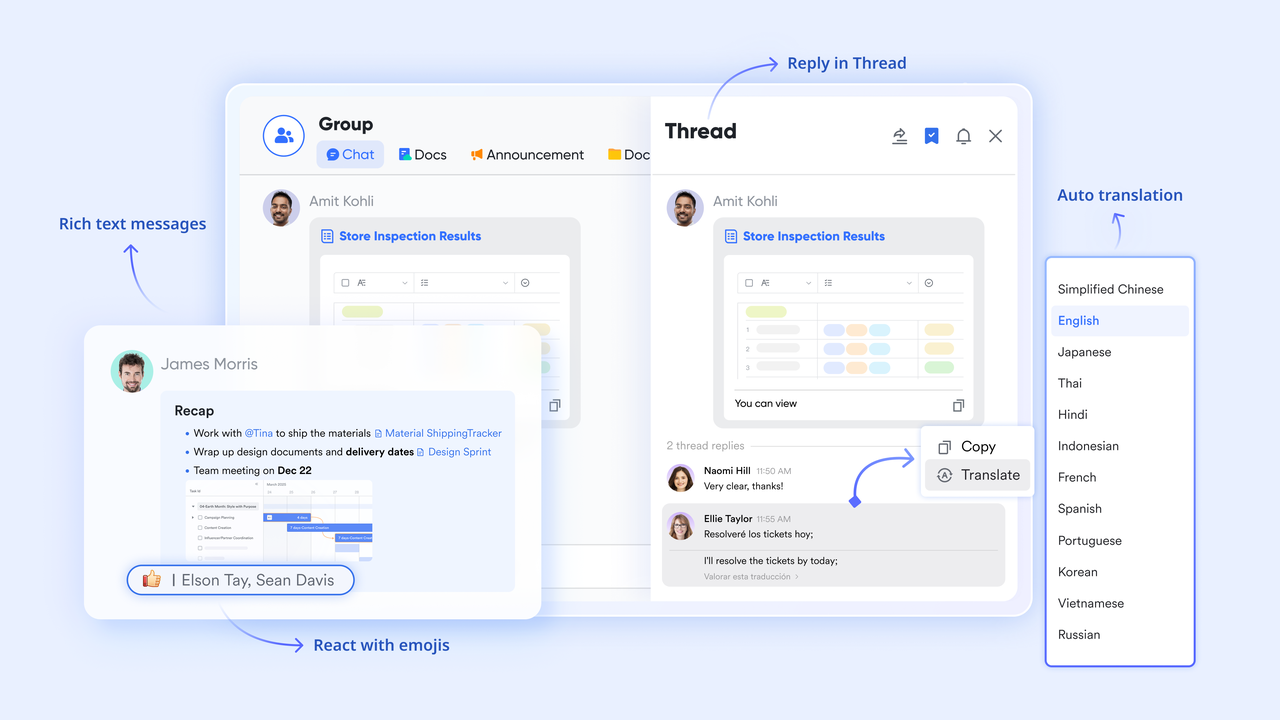
Freshdesk centralizes conversations inside a dedicated agent inbox. Lark approaches omnichannel communication differently by making the primary conversation layer, while Lark Base serves as the system of record. Customer chats, internal discussions, comments, and @mentions happen directly in Messenger, with Base records shared into chats as live context cards. Instead of switching between a help desk and a , teams discuss leads, accounts, or requests inside Messenger, while updates, status changes, and ownership remain synced to the corresponding Base record. This keeps conversations fast and natural, while still ensuring every interaction is traceable across the customer lifecycle—not siloed inside a single support thread.
Request tracking without rigid ticket limitations
Freshdesk converts inquiries into predefined support tickets. Lark manages customer requests as structured records inside Lark Base, where teams define their own fields, statuses, , and ownership rules. Each request record can include customer details, linked conversations, internal notes, and related tasks. This flexibility allows the same system to handle support issues, onboarding requests, renewals, and internal escalations—without forcing everything into a ticket-only model. 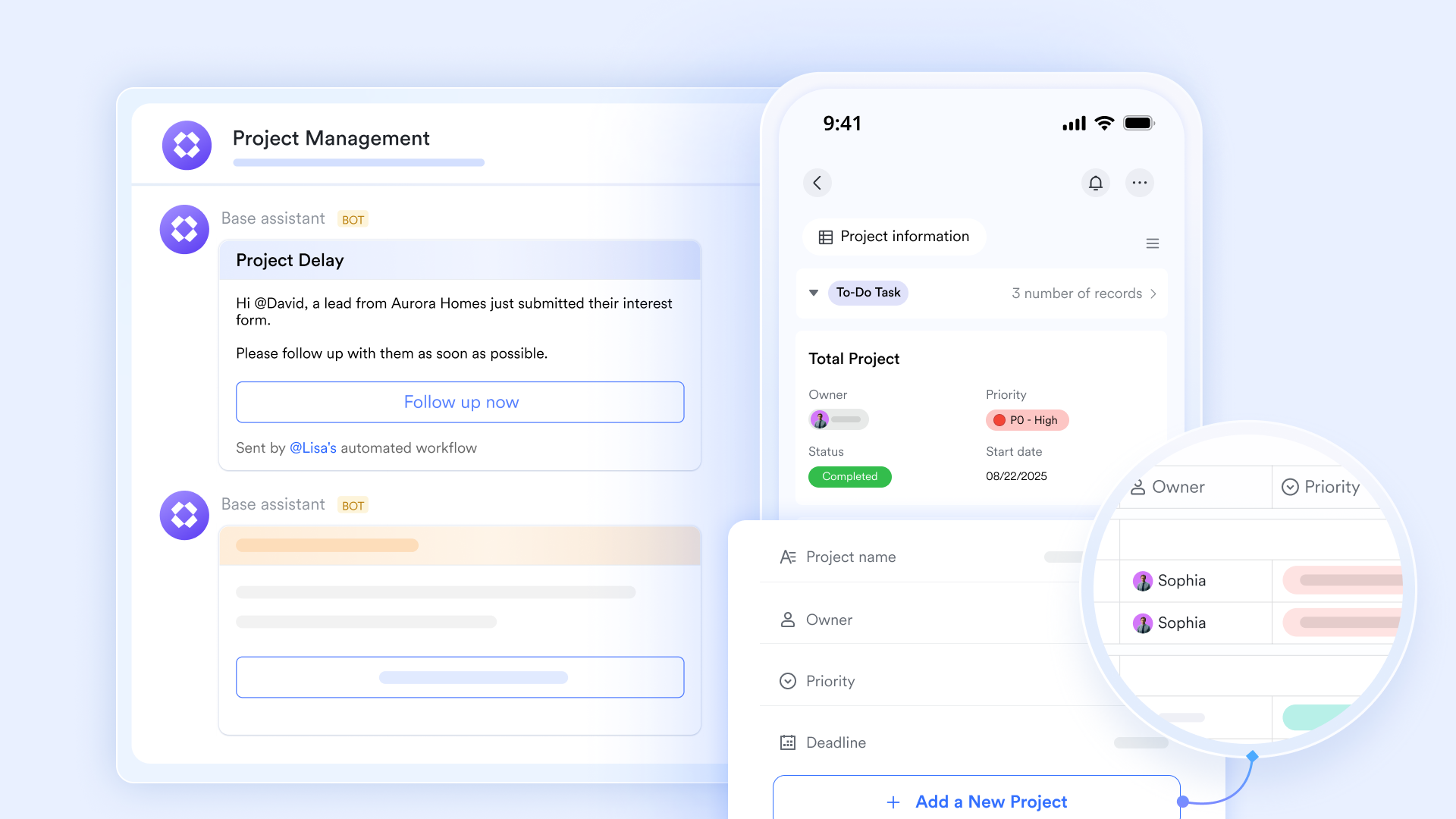
Automated workflow across the full customer journey
Freshdesk automates ticket routing and response suggestions. Lark supports actions triggered by changes in Base records. For example, when a request status updates, Lark can assign owners, notify teams in Messenger, create follow-up tasks, or update related CRM records automatically. This automation spans sales handoffs, support resolution, and post-sale actions, reducing manual coordination across teams. 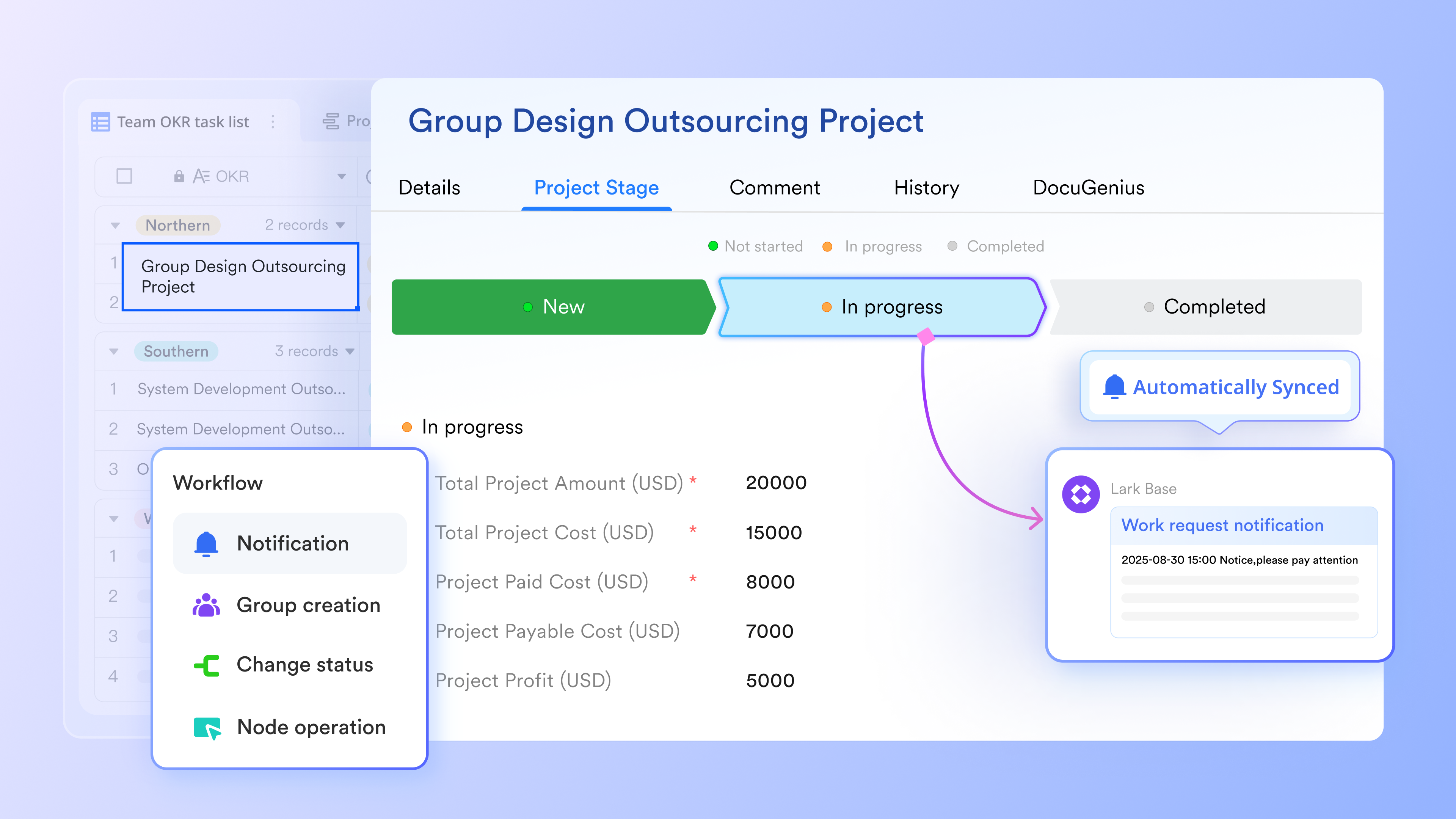
Living knowledge connected to real work
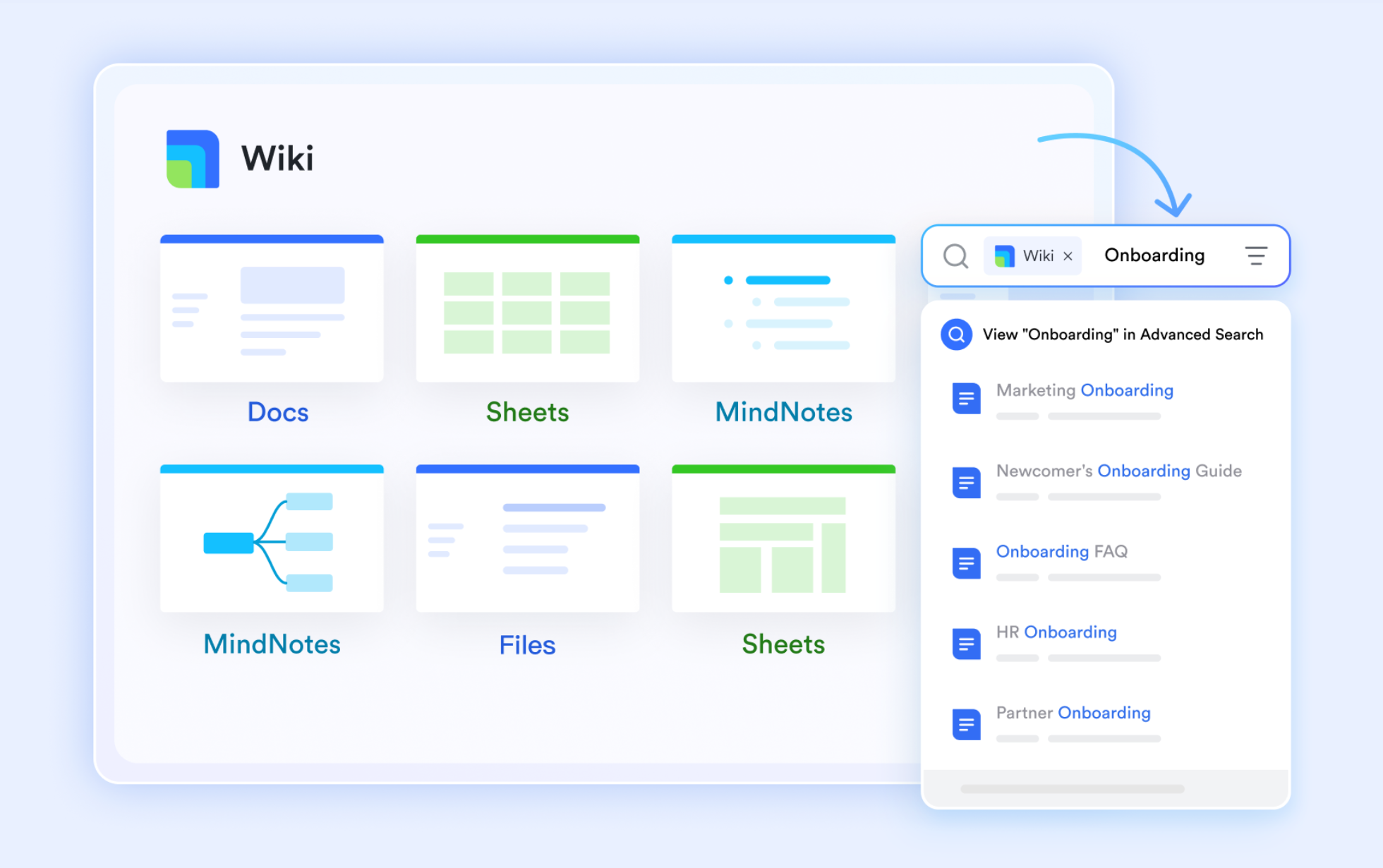
Freshdesk provides a self-service portal with FAQs and help articles. Lark enables teams to build collaborative knowledge bases using and , where content remains editable, versioned, and directly linked to active customer records. Support agents can reference Docs inside Messenger or attach them to Base records, ensuring knowledge is applied in real scenarios rather than existing as static help content.
Cross-team visibility instead of support-only reporting
Freshdesk focuses reporting on support performance and ticket metrics. Lark provides flexible visibility through Base views, filters, and grouped data, allowing teams to analyze customer requests alongside deal stages, task completion, and ownership. Managers can track patterns across departments, identify recurring issues, and understand how support impacts revenue and retention—not just resolution speed. 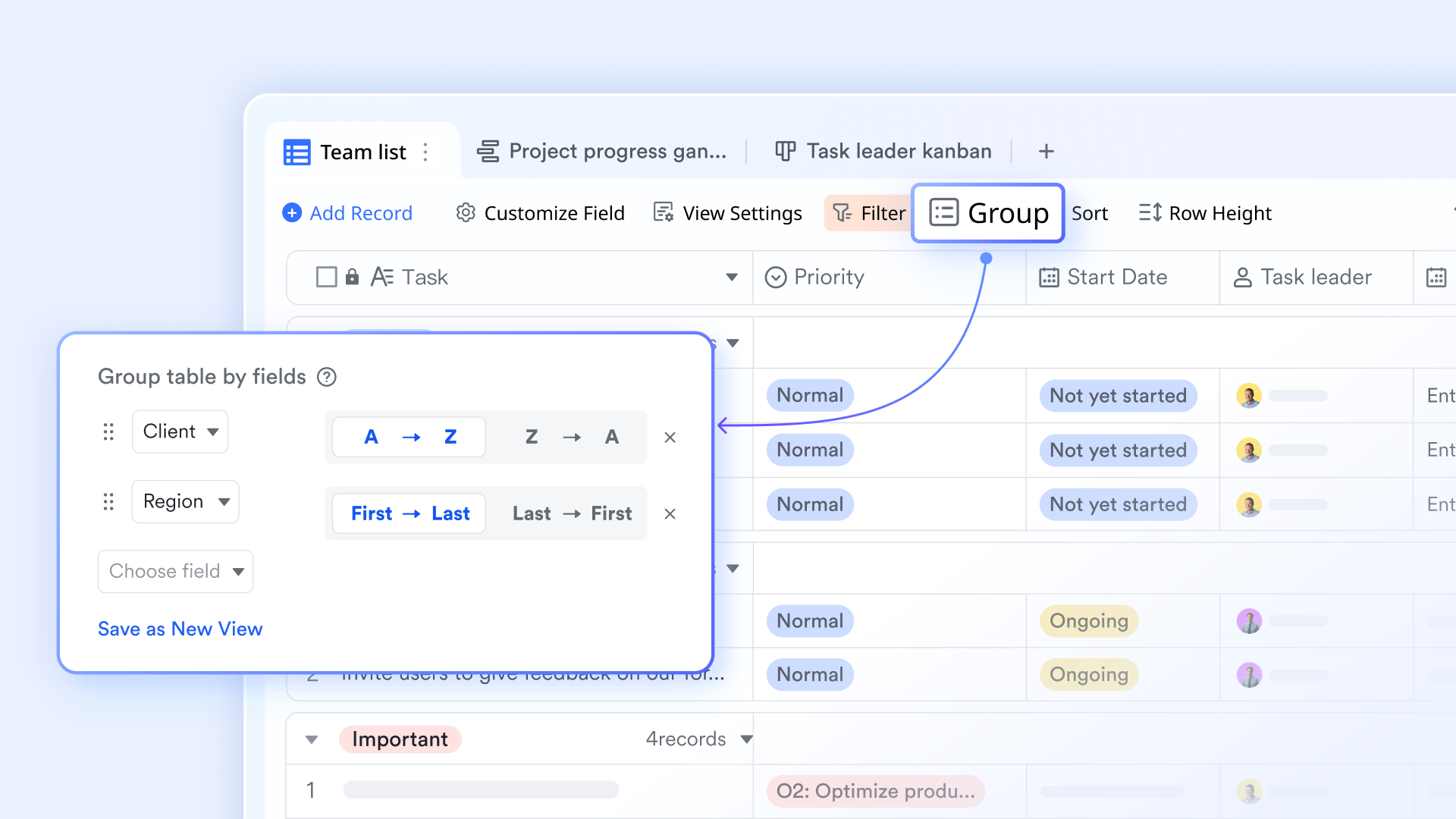
:
- Starter plan: Free forever plan that includes 11 powerful tools for up to 20 users. It also comes with 100GB of storage, 1000 automation runs, AI translations, and more.
- Basic plan: $6/user/month (billed annually) for up to 500 users. It includes everything in Starter plus group calling for up to 500 attendees, 5TB of storage, 1000 automation runs, and more. For more details, please .
- Pro plan: $12/user/month (billed annually) for up to 500 users. It includes everything in Basic plus group calling for up to 500 attendees, 15TB of storage, 50,000 automation runs, and more.
- Enterprise plan: for custom pricing. Supports unlimited users and includes even more automation runs and advanced security, compliance, and management features.
For small teams with simple communication needs

18 months message history
1000 Base automation runs/month
2000 rows per table in Base
Most POPULAR
For companies with comprehensive collaboration and management needs
Unlimited message history
500-participant video meetings
50k Base automation runs/month
20k rows per table in Base
For large companies with advanced security and organizational management needs
Get a personalized demo and pricing
Unlimited message history
500-participant video meetings
15 TB storage + 30 GB storage/user
500k Base automation runs/month
50k Base automation runs/month
Most POPULAR
For companies with comprehensive collaboration and management needs
Unlimited message history
500-participant video meetings
50k Base automation runs/month
20k rows per table in Base
Lark vs Freshdesk: Which is better for your team
Choosing between Freshdesk and Lark depends largely on whether your support function operates as an independent unit or as part of a collaborative loop. Both tools are strong in their own contexts, but they are designed for very different operational models. Clarifying your priorities around specialized ticketing versus organizational alignment helps make the decision clearer.
Choose Freshdesk if:
- You run a high-volume, transactional support center: Freshdesk is optimized for speed in handling thousands of similar requests where agents rarely need to consult with other departments. If your primary metric is "tickets resolved per hour" by a standalone team, its rigid structure is an asset.
- You strictly require traditional helpdesk compliance features: For industries needing specific helpdesk audit trails (like HIPAA-compliant ticket history) out of the box without configuration, Freshdesk's Enterprise tier provides these governance tools pre-packaged.
- Your support team is completely siloed from the rest of the company: If your agents do not need to speak with product managers, engineers, or sales reps to resolve issues, the "pay-per-agent" model works. You won't run into the friction of buying licenses for non-support staff.
- You want a "set it and forget it" ticketing interface: Freshdesk offers a standard, familiar interface for support agents. If you want zero customization and just want to start answering emails immediately using standard SLAs and collision detection, it is a quick setup.
Choose Lark if:
- Your support cases require cross-functional swarming: Lark Messenger allows agents to instantly pull in engineers, product managers, or sales leads into a chat to solve complex issues. This happens without buying extra licenses or moving conversations to a different app.
- You want to manage the full customer lifecycle, not just tickets: With , you can track a customer request from "New Inquiry" to "Engineering Task" to "Feature Launched" in one system. Data flows across teams rather than getting stuck in a closed support ticket.
- You need to reduce tool sprawl and "add-on" fatigue: Instead of paying separately for a chat tool, a knowledge base, an approval app, and a connector tool, Lark bundles these into one. This is ideal for growing teams that want enterprise-grade capabilities without managing five different subscriptions.
- You want knowledge to be active, not static: Lark Wiki allows teams to co-edit troubleshooting guides in real-time and link them directly to support chats. This ensures that the answers agents give are always based on the latest internal information.
Conclusion
Freshdesk pricing remains a viable option for traditional call centers or standalone support teams where the workflow is strictly linear: receive ticket, reply, close. Its per-agent model is predictable for static teams but becomes punitive as you try to involve the rest of the organization in customer success. As needs expand into complex problem-solving and cross-departmental automation, the costs of "Day Passes" and higher tiers can accumulate quickly.
represents a unified philosophy. Its value lies in breaking down the wall between "Support" and "The Business." By bundling communication, database management, and documentation into a single workspace, Lark ensures that customer feedback drives product improvements and that support agents are never fighting fires alone. For teams that view support as a collaborative strategic advantage rather than a cost center, Lark offers a far stronger return on investment.
Plan support systems that grow with your business
FAQs
What is the expected Freshdesk pricing per agent in 2026?
For 2026, Freshdesk Support Desk plans are expected to remain around $15/agent/month for Growth, $49 for Pro, and $79 for Enterprise when billed annually. However, teams should budget extra for the Freshdesk pricing per agent 2026 increases related to AI add-ons, which are often priced separately.
How does the Freshdesk Freddy AI pricing 2026 structure work?
Freshdesk Freddy AI pricing 2026 has shifted toward a consumption and seat-based model. The agent-facing "Copilot" typically costs an additional ~$29 per agent/month, while customer-facing AI agents are billed via "session packs" (e.g., $49 for 100 sessions). This consumption model means costs will fluctuate based on your automation volume.
Is Freshdesk Omni pricing better than buying separate tools?
Freshdesk Omni pricing (starting at $29/agent) bundles ticketing, chat, and telephony. While this is cheaper than buying Freshdesk, Freshchat, and Freshcaller separately, it can still be more expensive than unified collaboration platforms like Lark, which include messaging and video tools in the base user capability without complex tiering.
Does Freshdesk offer a free plan for startups?
Yes, Freshdesk offers a Free plan for up to 10 agents, which includes basic ticketing and a knowledge base. However, this plan lacks automation features, meaning manual work increases significantly as you scale. Growing teams usually graduate to paid Freshdesk pricing plans quickly to access automation.
Are there hidden costs in the Freshdesk pricing plans 2026?
Yes. Beyond the license fee, "hidden" costs include Connector App Tasks (paying for high-volume data syncing), Day Passes for temporary staff, and the cost of Enterprise features like skill-based routing. Additionally, Freshdesk Freddy AI pricing 2026 updates have made AI automation a significant variable cost for high-volume support teams.
Related reading
































