














Freshdesk vs Zendesk: Which Help Desk Fits Your Team

Satvik Saxena
Content Specialist
Nov 3, 2026
Satvik Saxena
Nov 3, 2026

17 min read
Add to preferred sources


Customer support teams today face growing challenges from rising customer expectations and expanding communication channels, to the demand for faster, more personalized service. The right help desk software can make all the difference, improving efficiency, response time, and overall customer satisfaction.
In this guide, we'll compare Freshdesk vs Zendesk, examining their features, pricing, pros, and cons to help you determine the best fit for your business. We'll also touch on how Lark, a modern collaboration platform, supports customer support teams by connecting conversations, documents, and workflows in one workspace. Rather than replacing help desk systems, Lark enhances teamwork and knowledge sharing, making it easier for agents to coordinate, respond, and resolve issues quickly.

Before overview: What is help desk software?
Before we introduce Freshdesk and Zendesk, we need to understand one core notion: Help desk. Help desk software is a centralized platform that helps businesses manage and respond to customer inquiries, issues, and service requests efficiently. It acts as the backbone of customer support, enabling teams to organize communication from multiple channels such as email, chat, phone, or social media into a single, trackable system.
Its key role in customer service is to streamline issue resolution, ensure accountability, and maintain consistent, high-quality customer experiences. Core functions include:
- Ticketing: Ticketing converts every customer query whether from email, chat, or social media, into a structured, trackable ticket. It helps teams prioritize, assign, and monitor issues efficiently, ensuring no request slips through the cracks. This system brings visibility and accountability to every stage of the support process.
- Automation: Automation streamlines repetitive support tasks using predefined rules and triggers. It automatically routes tickets, assigns priorities, and sends updates to both agents and customers. This reduces manual effort, speeds up response times, and allows teams to focus on more complex issues.
- Reporting: Reporting provides valuable insights into how efficiently your team handles customer queries. It tracks key metrics like resolution time, backlog, and satisfaction scores to identify trends and performance gaps. With data-driven visibility, managers can make informed decisions to improve service quality.
- Collaboration: Collaboration features enable support teams to communicate and share context seamlessly. Internal notes, shared workspaces, and knowledge bases allow agents to discuss issues and find solutions faster. This teamwork-driven approach ensures consistent responses and a better customer experience.
Freshdesk overview
Freshdesk is a cloud-based help desk software developed by Freshworks, designed to simplify and streamline customer support operations. It consolidates communication from multiple channels like email, chat, phone, and social media—into one intuitive interface. Freshdesk is ideal for small to mid-sized businesses or startups looking for an easy-to-use, cost-effective customer service platform. It requires minimal technical setup, making it a strong choice for teams that need to get up and run quickly without heavy IT involvement.
Strengths and positioning: Freshdesk stands out for its user-friendly interface, affordable pricing, and strong automation capabilities. It offers built-in tools for ticket management, self-service portals, and AI-powered chatbots. Compared to enterprise-heavy systems, Freshdesk focuses on simplicity, scalability, and value, helping growing businesses deliver professional, multi-channel support without complexity. It's particularly well-suited for teams prioritising speed, usability, and efficient collaboration.
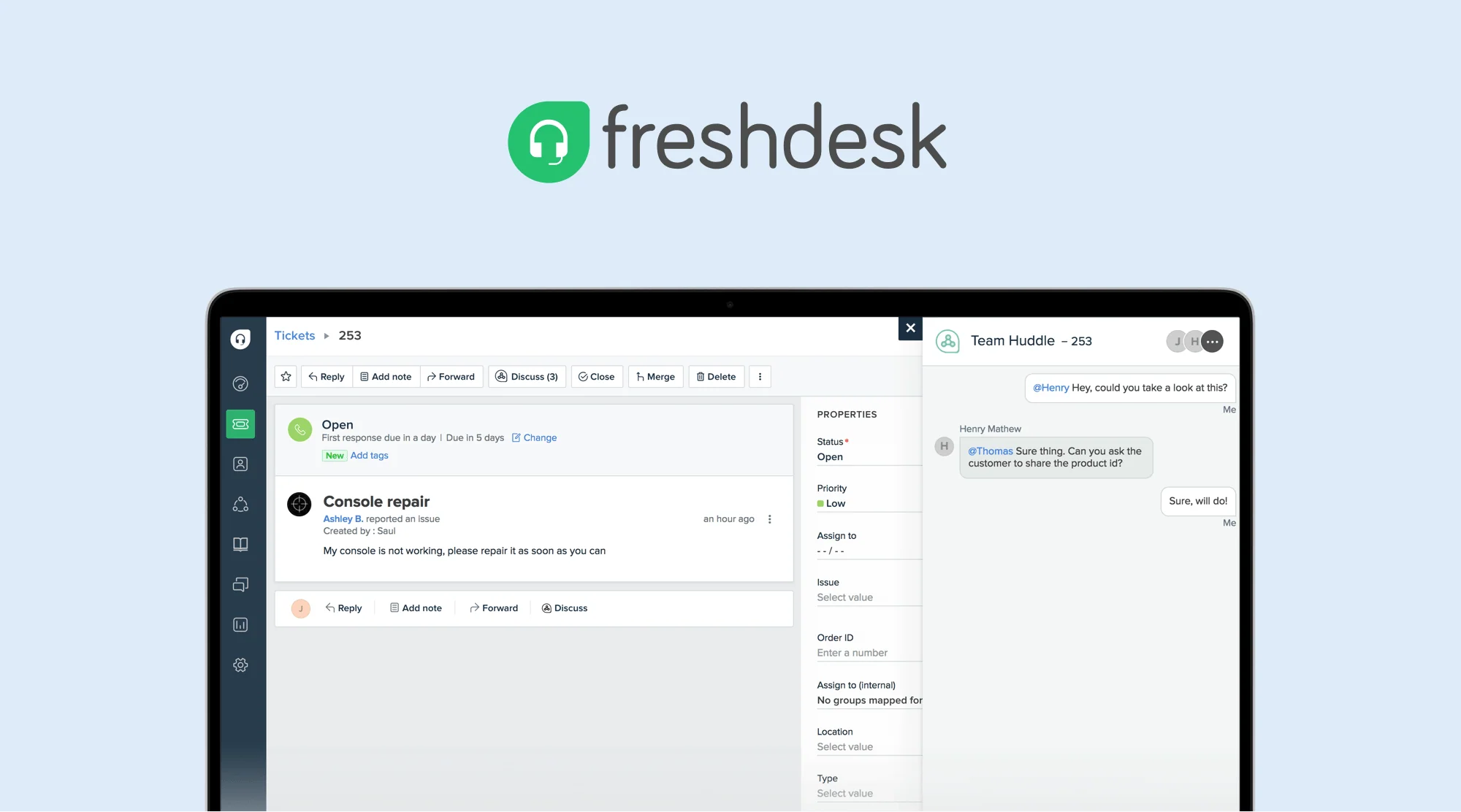
Image source: freshworks.com
Zendesk overview
Freshdesk is a customer support and help desk software created by Freshworks. It helps businesses manage customer queries from multiple channels—like email, chat, phone, and social media in one organized dashboard. The platform converts every inquiry into a ticket, tracks its progress, and ensures nothing slips through the cracks. It's built for small to medium-sized businesses and growing support teams that want an easy-to-use, affordable solution without needing deep technical expertise or complex setup.
Strengths and positioning: Freshdesk is known for its simplicity, automation, and value for money. It offers powerful features like workflow automation, AI-driven ticket assignment, and a self-service knowledge base, all with an intuitive interface. Positioned as a modern, accessible alternative to enterprise-heavy tools, Freshdesk appeals to teams looking for fast implementation, multi-channel support, and strong customer satisfaction capabilities at a reasonable cost.
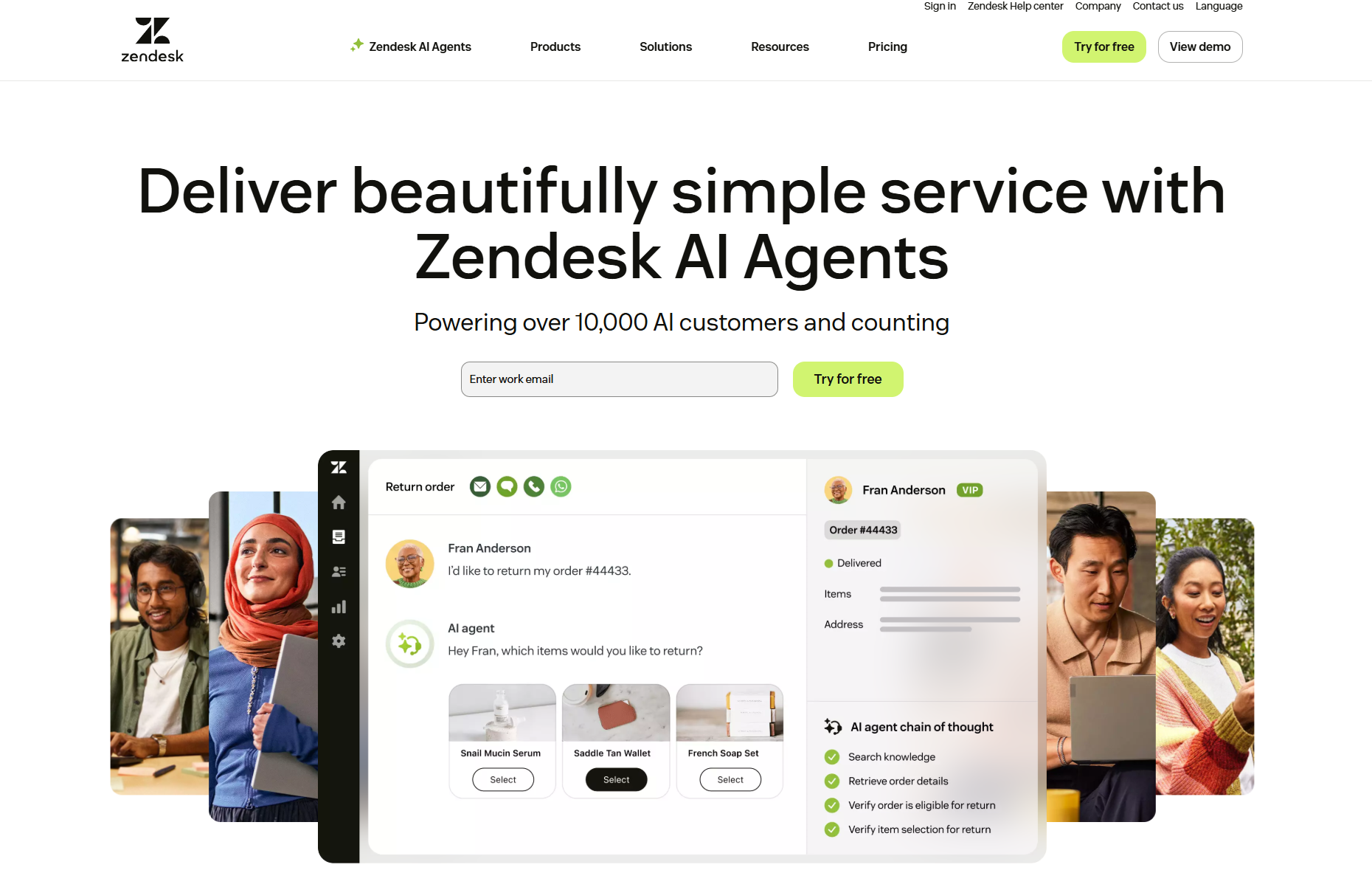
Image source: zendesk.com
Freshdesk vs Zendesk: Feature comparison
Both Freshdesk and Zendesk are leading help desk solutions, but they differ in depth, complexity, and scalability. For businesses comparing multiple platforms before choosing the right fit, exploring Zendesk Alternatives can also help identify tools that offer similar capabilities with different pricing, features, or flexibility. Another option worth considering is Hiver, a customer support platform that helps teams manage shared inboxes, customer conversations, and support workflows directly from Gmail. Below is a breakdown of how they perform across key support features, from ticket handling to reporting and integrations, to help you choose the right fit for your team.
- Ticket management and automation: Freshdesk offers simple, intuitive ticketing with automation for routing, prioritizing, and closing tickets efficiently. It's ideal for smaller teams that value ease of setup. Zendesk, on the other hand, delivers more advanced automation with AI-powered workflows, macros, and triggers. It supports complex routing and escalation for large-scale support operations.
Image source: zaiper.com
- Omnichannel communication: Freshdesk supports email, chat, phone, and social channels in one place but may require higher-tier plans for full omnichannel coverage. Zendesk provides a truly unified workspace for all channels—agents can manage email, chat, calls, and social media without switching tabs.It's better suited for enterprises with high customer interaction volume and multiple communication touchpoints.
- Self-service and knowledge base: Freshdesk includes an easy-to-build knowledge base where customers can find answers or raise tickets directly. It's user-friendly and helps smaller teams reduce incoming requests with minimal setup. Zendesk expands this with community forums, multilingual support, and AI-powered self-service recommendations, making it ideal for larger, global customer bases.
Image source: helpdesk.com
- Reporting and analytics: Freshdesk provides clear, straightforward reports on ticket volumes, resolution times, and agent performance. While effective for tracking basic KPIs, its customization options are somewhat limited. Zendesk offers advanced analytics with real-time dashboards, predictive insights, and performance benchmarking, perfect for data-driven teams aiming to optimize support operations.
- Integrations and customization: Freshdesk integrates with popular tools like Slack, Shopify, and crm softwares, offering an accessible marketplace for small to mid-sized businesses.It focuses on simplicity and ease of setup rather than deep customization. Zendesk supports an extensive app marketplace with hundreds of integrations and advanced API access, allowing enterprises to build tailored workflows and connect multiple business systems seamlessly.
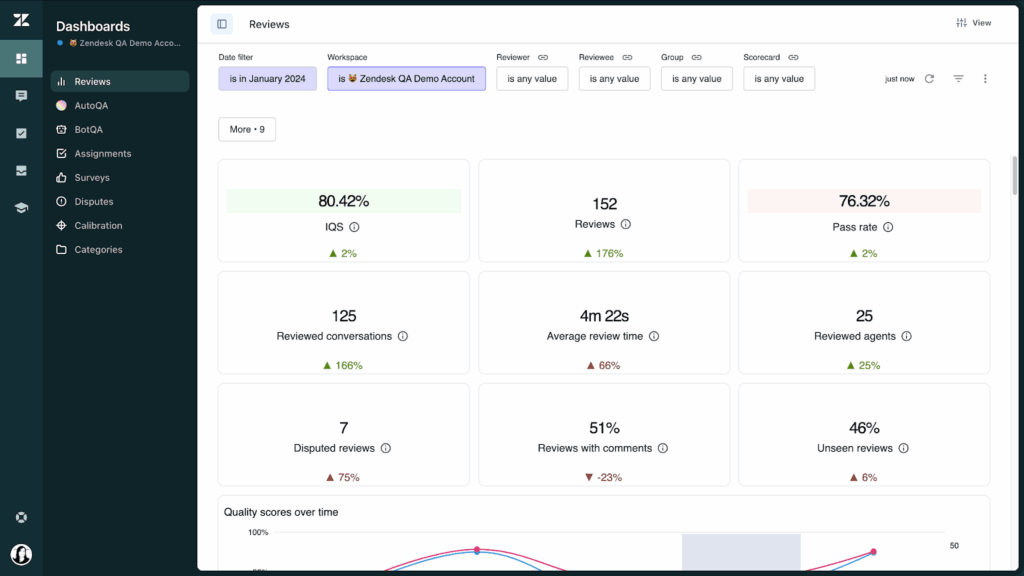 Image source: kustomer.com
Freshdesk vs Zendesk pricing comparison table
Freshdesk vs Zendesk review: Value for money by business size
- Small businesses: For small businesses, Freshdesk's Free or Growth plans offer exceptional value by providing all the essentials—ticketing, automation, and an intuitive setup—without added complexity. These plans enable small teams to manage customer requests efficiently and deliver professional support without the need for advanced technical expertise. It's an ideal entry point for startups or businesses seeking reliable, affordable customer service tools.
- Mid-sized teams: For mid-sized teams, the Freshdesk Pro or Zendesk Suite Team plans offer the best balance between functionality and affordability. They include robust automation, insightful reporting, and multi-channel communication capabilities that support growing ticket volumes and team expansion. These plans help businesses scale operations seamlessly while maintaining cost control and operational efficiency.
- Large enterprises: For large enterprises, Zendesk Suite Professional or Enterprise plans are designed to handle complex workflows, multiple communication channels, and global operations. With advanced automation, AI-driven analytics, and deep customization, these plans enhance productivity and customer insight at scale. Although they come at a higher price point, the investment delivers strong returns in performance, control, and customer satisfaction.
- Overall: Freshdesk stands out as the more budget-friendly option for startups and growing teams seeking simplicity and fast deployment, while Zendesk's higher-tier plans justify their premium cost with enterprise-level features, scalability, and analytical depth. The ideal choice ultimately depends on your organisation's size, complexity, and long-term customer support goals.
Freshdesk vs Zendesk: Key pros, cons, and insights
Both Freshdesk and Zendesk are powerful help desk solutions with unique advantages depending on your team's size, goals, and complexity. Freshdesk excels in simplicity and affordability, while Zendesk dominates in scalability and depth. Below is a concise summary of their top pros and cons to help you decide which fits your customer support strategy best.
Freshdesk: Simple, affordable, and easy to scale
Pros:
- User-friendly interface: Intuitive design makes onboarding and daily use effortless, even for non-technical teams.
- Cost-effective plans: Free and low-cost tiers make it ideal for startups and small teams.
- Strong automation tools: Automates ticket routing, prioritization, and responses to save time.
- Omnichannel support: Combines email, chat, phone, and social interactions in one platform.
- Quick setup: Easy configuration allows teams to get started within hours.
Cons:
- Customization limits: Offers less flexibility for building tailored processes compared to Zendesk.
- Performance issues at scale: May experience slower response times with large data volumes.
Zendesk: Powerful, scalable, and enterprise-ready
Pros:
- Built for large teams: Handles thousands of agents, multi-brand operations, and global support seamlessly.
- Advanced automation and AI: Provides intelligent routing, workflow automation, and predictive insights.
- Comprehensive omnichannel platform: Integrates all communication channels into one unified workspace.
- Robust reporting and analytics: Offers real-time dashboards and deep performance insights for data-driven decisions.
- Extensive integrations: Connects easily with CRMs, marketing tools, and business systems through APIs and app marketplace.
Cons:
- Higher pricing: Premium plans can be costly for small or mid-sized businesses.
- Complex setup: Requires time, technical know-how, and dedicated admin resources.
- Steeper learning curve: Teams may need additional training to fully leverage its advanced capabilities.
While Freshdesk and Zendesk each excel in different areas of customer support, many teams today are seeking a platform that goes beyond ticketing — one that unifies communication, collaboration, and workflow management in a single ecosystem. This is where Lark stands out. By combining messaging, video calls, document collaboration, and task tracking within one connected workspace, Lark helps support teams not only respond to customers efficiently but also work seamlessly behind the scenes. Let's step closer and find more about this magic tool today.
Beyond Help desk: Why Lark has become a popular choice
In a world where customer support depends on fast collaboration, shared context, and automation, Lark goes beyond traditional help-desk tools like Freshdesk and Zendesk. While those platforms focus primarily on ticketing and external support channels, Lark provides a collaborated workspace where marketing, sales, and operations teams can work seamlessly together, reducing silos, improving response times, and keeping knowledge accessible in one place.
Lark brings all essential tools, including Docs, Messenger, Approval, Wiki, and Base, into one connected platform, providing support teams with a single workspace to communicate, track, and enhance customer experiences. Instead of switching between multiple disconnected apps, agents can manage everything from internal discussions and automated approval requests to performance reviews in one place.
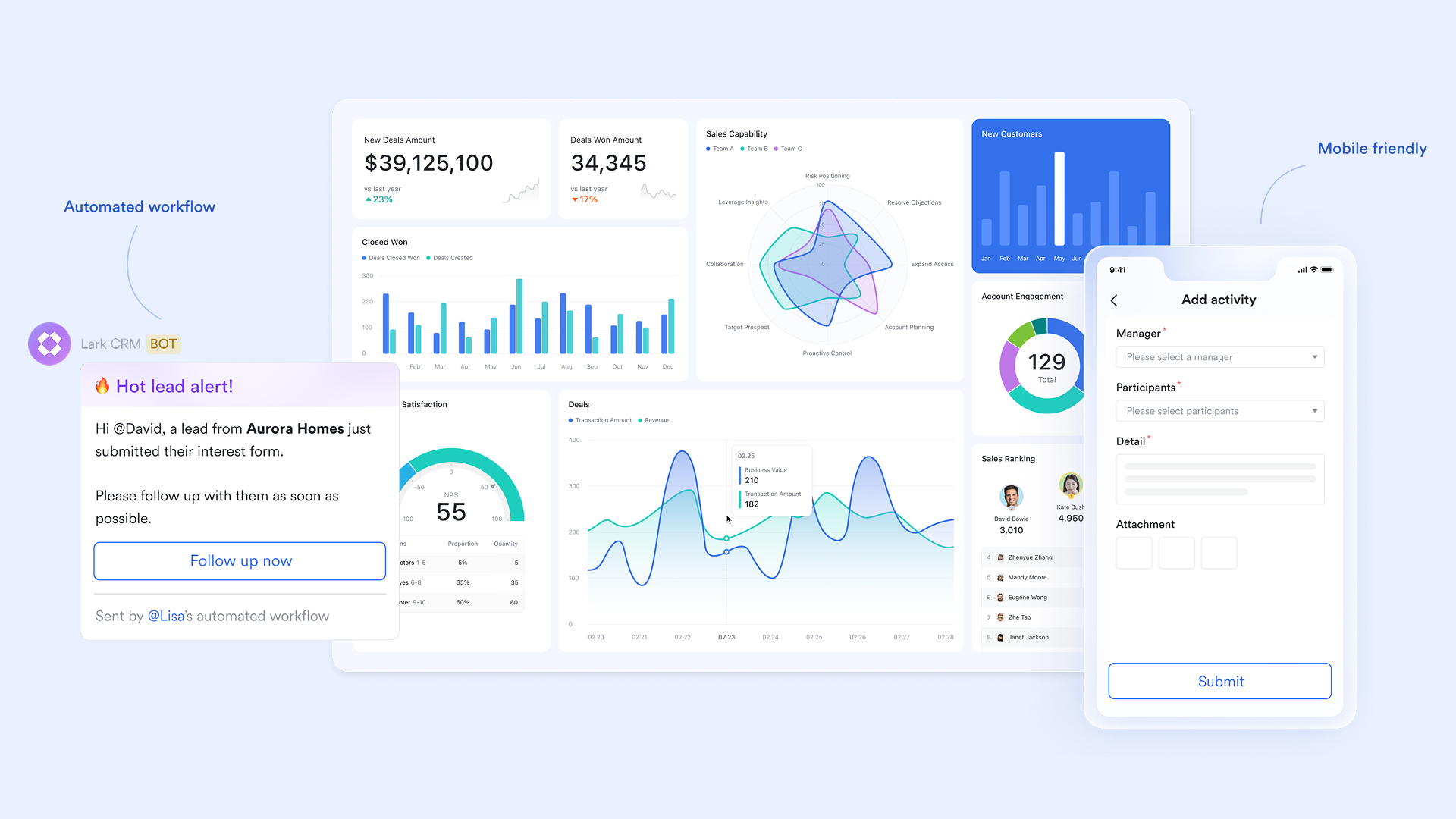
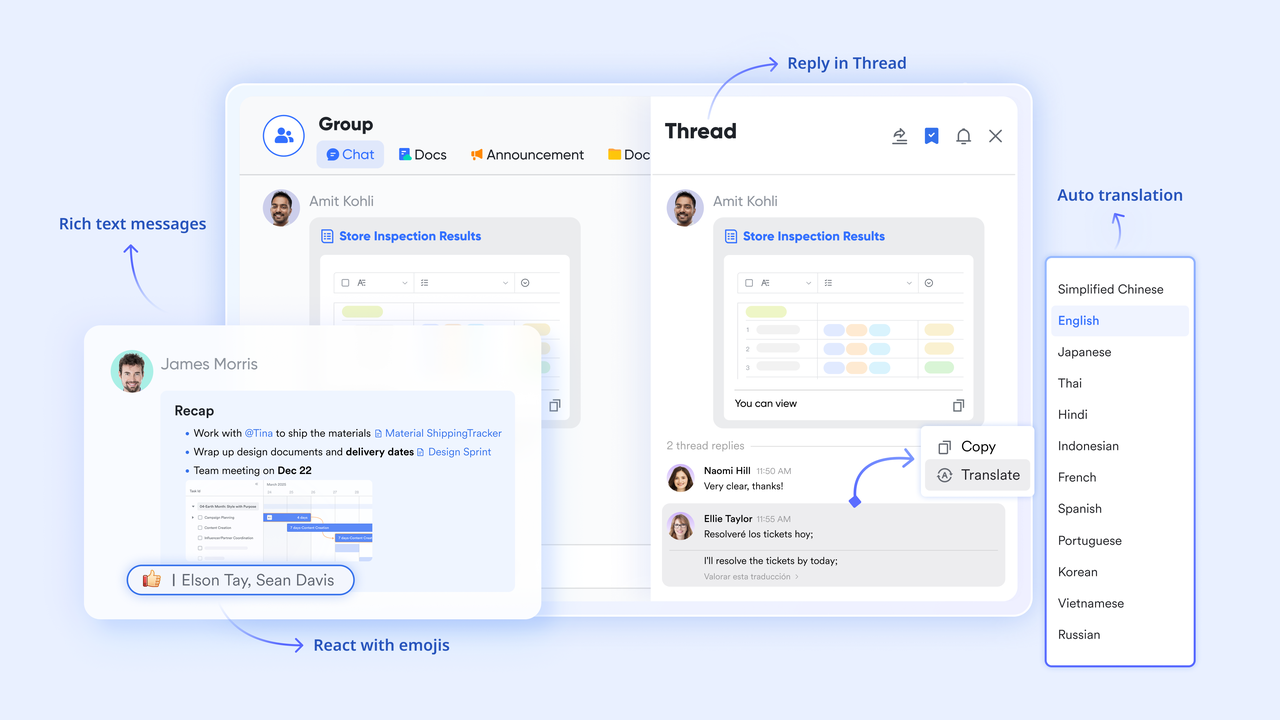
Lark Messenger for real-time teamwork for faster ticket resolution: Lark Messenger enables instant communication between agents, supervisors, and other departments. With message threading, conversations stay organized around specific tickets or topics. Mentions and smart notifications make it easy to bring in the right expert at the right time. Agents can share files, screenshots, and links directly in chat, speeding up troubleshooting and decision-making. With desktop and mobile access, collaboration remains seamless across distributed or hybrid teams.
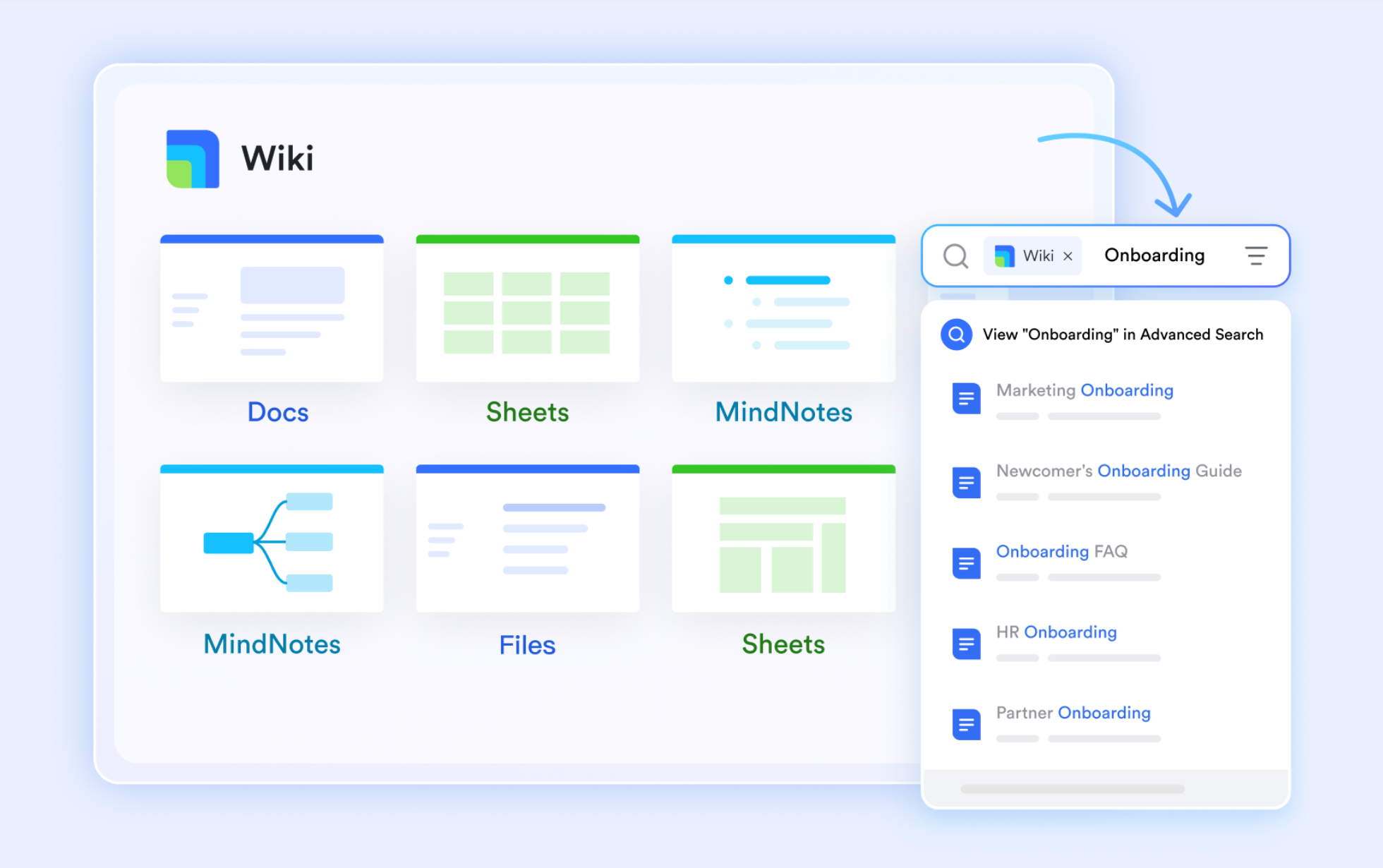
Lark Docs and Lark Wiki for centralized knowledge for consistent support: Lark Docs and Lark Wiki serve as the knowledge backbone for support operations. Teams can co-author support playbooks, FAQs, and escalation workflows in real time, ensuring everyone refers to the same up-to-date information. Lark Wiki provides a structured, searchable library for SOPs, product updates, and internal guides, helping agents find answers quickly. Built-in version control ensures accuracy, while access permissions maintain data security. Together, they keep documentation dynamic and collaboration-ready.
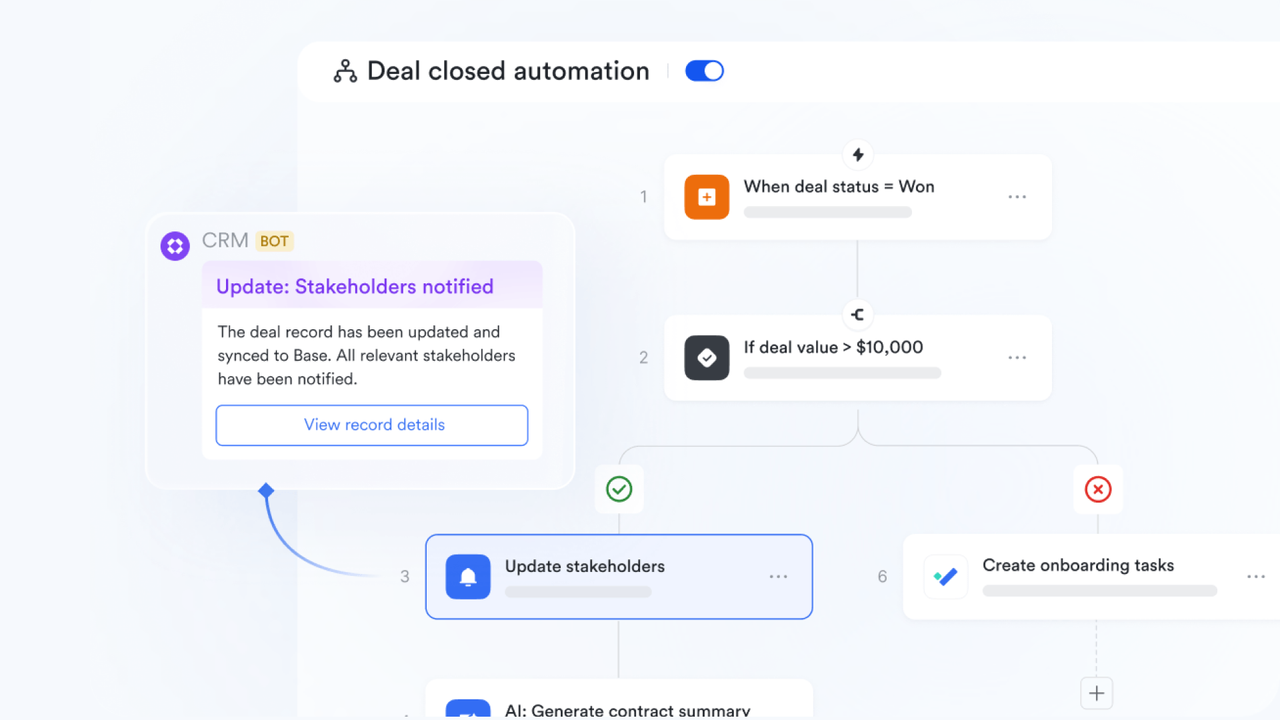
Lark Base for customizable workspace for tracking and automation: Lark Base functions as a flexible database and workflow hub, allowing teams to design their own ticket trackers, issue logs, and escalation workflows. Multiple views—table, Kanban, gallery, or calendar—help visualize workloads and priorities clearly. Teams can automate actions such as assigning agents, sending follow-ups, or tagging urgent cases to improve efficiency. With its no-code customization and cross-linking to other Lark tools, Base becomes the operational heart of a modern support team.
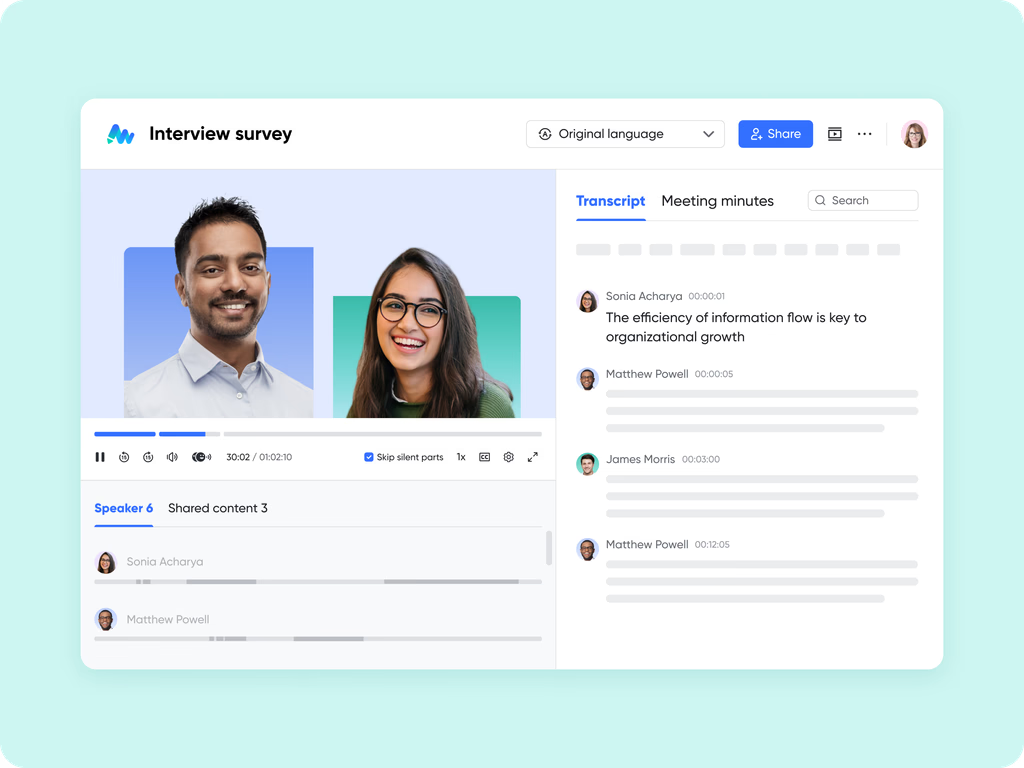
Lark Meetings for data-driven alignment and performance reviews: Lark Meetings and Slides enable smarter discussions based on live data. Teams can host video meetings to analyze weekly performance, review KPIs, or discuss customer feedback directly within the platform. Via Magic Share, multiple participants can collaborate on a co-editable document or Slides. With Lark AI Meeting Notes turned on, recordings, chat notes, and action lists are automatically saved, ensuring nothing gets lost after the meeting. This creates a culture of transparency and continuous improvement.
- Starter plan: Free forever plan that includes 11 powerful tools for up to 20 users. It also comes with 100GB of storage, 1000 automation runs, AI translations, and more.
- Pro plan: $12/user/month (billed annually) for up to 500 users. It includes everything in Starter plus group calling for up to 500 attendees, 15TB of storage, 50,000 automation runs, and more.
- Enterprise plan: Contact sales for custom pricing. Supports unlimited users and includes even more automation runs and advanced security, compliance, and management features.
How Lark complements or replaces parts of your support stack
For many businesses, Lark can replace parts of a traditional help-desk when the support need is primarily internal like IT support, HR queries, or internal issue tracking.
- Use Lark Base as a lightweight ticketing system where employees submit requests through forms and track resolution progress.
- Maintain all discussions in Lark Messenger, linking directly to Base records for full visibility.
- Use Lark Wiki to store troubleshooting guides and FAQs for self-service support.
For external customer support teams already using Freshdesk or Zendesk, Lark acts as the collaboration and communication hub:
- Sync important ticket updates from Freshdesk/Zendesk to Lark Messenger for team visibility.
- Use Docs to draft responses, policy changes, or troubleshooting templates collaboratively.
- Keep cross-department coordination (like between support, product, and engineering) transparent within Lark, speeding up resolution cycles.
Choosing the right solution: Freshdesk, Zendesk, or Lark
Before choosing between Freshdesk, Zendesk, or Lark, it's important to evaluate your team's needs based on these three core factors:
Factors to consider: Scale, budget, workflow complexity
- Scale: Consider the number of support agents you currently have and your plans for future growth. Smaller teams can work efficiently with simple systems, while larger or multi-regional teams often need more complex, customizable tools.
- Budget: Look beyond the subscription cost, including onboarding, training, maintenance, and collaboration expenses. A low-cost plan might seem attractive initially, but it can limit growth if you need premium features later.
- Workflow complexity: If your team requires advanced automation, custom routing, multilingual support, or detailed analytics, a more robust system will be necessary. Simpler workflows benefit from intuitive, ready-to-use platforms.
Best practices for implementation
Successfully adopting a help desk or collaboration platform goes beyond choosing the right tool. It's about setting it up thoughtfully, training your team effectively, and measuring ongoing performance. Following these best practices ensures smooth implementation and long-term success.
- Setup and onboarding: Define clear support processes, ticket categories, and escalation paths before launch to avoid confusion later. Start with a pilot team, configure key workflows, and gradually expand system use as confidence grows.
- Training and adoption tips: Provide hands-on training sessions that use real ticket examples and workflows for better engagement. Encourage feedback during rollout and highlight quick wins to motivate team-wide adoption.
- Metrics to track success: Monitor key performance indicators such as first response time, resolution time, and customer satisfaction.Use analytics to identify trends, measure efficiency gains, and continuously refine your support processes.
Conclusion
Choosing between Freshdesk and Zendesk depends on your team's size, budget, and complexity. Freshdesk offers simplicity, affordability, and quick setup perfect for small to mid-sized businesses seeking efficient customer support. Zendesk, meanwhile, delivers enterprise-grade scalability, advanced automation, and deep analytics suited for larger organizations with complex workflows.
But modern customer support goes beyond ticket resolution, it thrives on seamless collaboration and knowledge sharing. That's where Lark stands out. By bringing messaging, documentation, automation, and analytics into one unified workspace, Lark helps teams bridge gaps between support, product, and operations. Whether used alongside your help desk or for internal service management, it enables faster responses, smarter teamwork, and a more connected customer experience.
FAQs
What's the main difference between Freshdesk and Zendesk?
Freshdesk is built for simplicity, affordability and faster time-to-value, while Zendesk is designed for scale, deep customisation and enterprise-grade support operations.
Which is more affordable for small teams?
Freshdesk offers a free plan and paid plans beginning at lower price points, making it more budget-friendly for small teams than Zendesk.
Can Lark replace a help desk tool?
Lark acts more as a collaborative workspace than a full help-desk solution—while it handles internal workflows, documents and chat very well, it doesn't fully replace dedicated ticketing, SLA-routing or external customer channels typical of help-desk platforms.
How does automation differ between the three?
Freshdesk supports basic automation (routing, triggers) out of the box and more advanced automation in higher tiers. Zendesk delivers deeper automation, skill-based routing and complex workflows for large operations. Lark's automation focuses on internal workflow and collaboration rather than full external ticket flow automation.
Which is better for omnichannel support?
Zendesk is stronger for true omnichannel support email, chat, voice, social, forms in a unified agent interface. Freshdesk supports multiple channels but may require higher-tiers or add-ons for full coverage.
Related reading
Table of contents
Start using Lark today

Manage all your work in one place
Boost team efficiency by 10x
Save up to 70% on software costs
Table of contents
Start using Lark today
Manage all your work in one place
Boost team efficiency by 10x
Save up to 70% on software costs
Keep reading








2026 Lark Technologies Pte. Ltd.
Headquartered in Singapore with offices worldwide.






Explore: