














Cloud Collaboration, Controlled Backbone: How to Build a Team's "Private Backbone"

Cecilia Lane
Go-to-Market Associate
Sep 18, 2026
Cecilia Lane
Sep 18, 2026

11 min read


Most teams don't wake up thinking, "You know what we need? A dedicated server." You pick the tools that help you move faster—chat, docs, meetings, project boards—and you assume the infrastructure part will just… behave.
And it usually does. Until it doesn't.
The breaking point is rarely one dramatic outage. It's the slow accumulation of little headaches: a webhook that drops during peak hours, a customer portal that feels sluggish for your biggest accounts, an integration that suddenly needs static IP allowlisting, or a security review that turns into a month-long scavenger hunt for "where data touches what."
That's when the "cloud apps + private backbone" pattern starts to make sense: keep the collaboration layer in the cloud, but run the parts you own—integrations, connectors, internal services, compliance-heavy workloads—on dedicated infrastructure you can shape and control.

Private backbone: What it is vs. what it isn't
What it is:
- A controlled runtime foundation for critical connection work: Integration hubs, connectors, lightweight internal APIs, and compliance-sensitive workflows
- A place where boundaries are explicit (ownership, access model, logging, patch cadence, networking constraints)
- A way to keep cloud collaboration fast while making the "glue" predictable and explainable
What it isn't:
- A full migration off cloud apps
- A "build everything yourself" strategy
- A one-time big-bang rewrite or infrastructure overhaul
Why does this pattern emerge in growing teams
Most teams begin with a simple, effective strategy: Adopt the best cloud tools for the job. Collaboration platforms for chat, documents, meetings, and project management tools are chosen to accelerate work, with the underlying infrastructure expected to function seamlessly. For a time, it does.
However, as a business scales, the initial simplicity can give way to a series of subtle but persistent operational headaches. The transition is rarely marked by a single catastrophic failure but by the slow, steady accumulation of "little problems" that disrupt workflows, erode customer trust, and consume valuable engineering time.
Common Breaking Points
When teams outgrow a pure cloud-app model, the friction often appears in these areas:
- Integration Failures: A critical webhook from a payment processor drops during peak hours, causing silent data loss.
- Performance Degradation: A customer-facing portal becomes sluggish for your largest and most important accounts, leading to support tickets and complaints.
- Inflexible Networking: A key integration suddenly requires a static IP for security allowlisting, which a multi-tenant cloud service cannot provide.
- Compliance & Security Overhead: A routine security review becomes a prolonged, complicated effort to document data flows across multiple third-party vendors.
It is at this inflection point that the "Cloud Collaboration, Controlled Backbone" pattern becomes a pragmatic solution. The approach is simple: continue leveraging the speed and accessibility of the cloud for team collaboration, but migrate the workloads you own—the integrations, internal services, and compliance-sensitive processes—onto dedicated infrastructure that you can directly shape, monitor, and control.
Symptoms
- Silent failures in "glue code" between systems.
- "Noisy neighbor" issues where shared resources cause unpredictable performance.
- Increasing time spent on vendor security questionnaires.
- Difficulty answering audit questions about data locality and access.
- Reactive, ad-hoc fixes for recurring integration problems.
Implications
- Erodes trust in data and automated workflows.
- Degrades customer experience and partner confidence.
- Slows down sales cycles and partnership integrations.
- Introduces compliance risks and governance gaps.
- Burns out engineering teams on low-value, repetitive support tasks.
Who should be involved (RACI)
One of the primary reasons that discussions about dedicated infrastructure stall is that different stakeholders interpret the project through entirely different lenses. What one group sees as an opportunity, another sees as a liability.
- Business owners often see a "new capability," such as improved customer portals, more robust integrations, or deeper analytics.
- Security and governance (GRC) teams primarily see a "new risk surface" that needs to be assessed, hardened, and monitored.
- IT and platform engineering teams see a "new operational workload" that will require maintenance, on-call support, and lifecycle management.
A lightweight RACI (Responsible, Accountable, Consulted, Informed) matrix is an invaluable tool for grounding these conversations in reality. It clarifies roles and ensures that "shared responsibility" does not devolve into "shared confusion." The goal is not to introduce bureaucracy, but to accelerate decision-making by making ownership explicit from the outset.
By defining these roles early, teams can avoid the friction of renegotiating ownership every time a new integration is proposed or a customer request is made, allowing them to move faster and with greater clarity.
The signal: When "shared responsibility" starts feeling personal
A lot of infrastructure confusion comes from a simple mismatch: teams treat cloud services like a black box, but governance teams treat them like a supply chain.
Cloud providers are clear that security is a shared effort, and the responsibilities shift depending on what you're running (SaaS vs PaaS vs IaaS). If your org has ever failed an audit question because "we thought the vendor covered that," you've felt this firsthand. The point isn't fear—it's clarity. Here's a good primer on the idea from Google Cloud's shared responsibility guidance.
So what does that have to do with a dedicated server?
When you're running a private "backbone" (say, an integration hub, a reporting service, or a lightweight internal API), you get sharper boundaries:
- You decide the OS, patch cadence, access model, and logging approach.
- You can standardize hardening across apps instead of re-litigating it per vendor.
- You can support requirements like fixed IPs, private networking, or tighter data locality.
If your team is already talking about server basics—what it is, where it lives, who maintains it—that's a sign you're ready for a more deliberate model like this.
What actually belongs on the "private backbone."
A dedicated server isn't a trophy. It's a tool. The easiest way to decide if it belongs in your stack is to list the workloads that are boring but critical—the ones that keep revenue, security, or operations from wobbling.
Here are the most common fits:
1. Integration hubs and "glue" services
Think: Webhooks, ETL jobs, iPaaS fallbacks, custom connectors, data sync scripts, signature validation, queue consumers.
These services often fail in ways that don't show up as a clean "down" alert. You just see weirdness: duplicate records, missing updates, timeouts that only happen during a campaign launch.
A dedicated server can give you:
- Predictable CPU/RAM for spikes (instead of "noisy neighbor" issues)
- Consistent outbound IPs for allowlists
- A stable home for queues and retry logic
2. Internal portals and partner-facing dashboards
If you've built a client portal for key accounts (or a partner dashboard that customers use weekly), performance stops being a "nice to have." A slow portal is a trust leak.
Dedicated infrastructure is often simpler than people assume: you don't need to rebuild your whole stack. You can host the portal app + database + observability as a neat, bounded system—and keep collaboration artifacts (docs, approvals, project comms) in cloud tools.
3. Security-sensitive workloads that need standardized hardening
Security teams tend to ask the same questions repeatedly:
- Who can access it?
- How do we log admin actions?
- How do we patch it?
- What's the baseline configuration?
If you're going to own a server, you should follow a recognized baseline for securing it (even if you adapt it). NIST's Guide to General Server Security (SP 800-123) is old, but the fundamentals are still extremely practical: minimize services, control admin access, patch consistently, and monitor aggressively.
4. Compliance-driven workflows where "where data lives" matters
Not every org needs strict controls. But if you're in a regulated space—or you sell to regulated customers—questions about risk management and governance show up fast.
A helpful lens here is the NIST Cybersecurity Framework 2.0: Identify, protect, detect, respond, recover. Even if you're not "doing NIST," those categories make it easier to defend why certain systems deserve tighter controls than others.
Dedicated server vs "more cloud": the decision checklist that doesn't waste your week
Let's be honest: the dedicated vs. cloud debate gets weirdly philosophical. Here's a more useful way to decide—based on what will change for your team next month.
Choose a dedicated server when:
- You need consistent performance under predictable spikes. (Weekly batch jobs, month-end reporting, payroll exports, campaign launches.)
- You need fixed networking constraints. (Static IP allowlists, private VPN tunnels, strict firewalling, predictable egress.)
- Your integration surface is growing. (More apps, more webhooks, more data syncs, more "glue code.")
- You're tired of re-explaining "how we secure this." A single hardened baseline beats 12 one-off vendor questionnaires.
If you want a quick reference for what that looks like in practice, Atlantic.Net dedicated server hosting is a straightforward way to see common configurations and managed options.
Stick with managed cloud services when:
- Your bottleneck is product work, not operations. If nobody on your team wants to own patching or monitoring, don't force it.
- You don't have stable requirements yet. Dedicated servers shine when you know your workload shape.
- You want "elastic by default." Auto-scaling services often win when demand is unpredictable.
A "middle path" that works surprisingly well
Many teams do best with a hybrid approach:
- Keep collaboration, docs, approvals, and day-to-day work in cloud apps.
- Centralize integrations and sensitive connectors on a small, well-managed private backbone.
- Use a repeatable workflow to request new integrations (so you're not inventing ops every time).
If your organization already treats collaboration tools as part of the security surface, it's worth aligning the people/process side too—especially around permissions, sharing, and access hygiene. Lark's roundup of secure collaboration tools is a useful context for how teams evaluate the collaboration layer alongside broader security controls.
Making the private backbone work (without turning your team into "the ops team")
A dedicated server only helps if it reduces chaos. Here are practical ways to set it up so it stays a backbone—not a burden.
1. Treat it like a product: one owner, clear interfaces
Pick an owner (even if it's part-time) and define:
- What services run there (and what never runs there)
- How teams request new integrations
- What "done" means (logging, alerts, backups, access)
If you don't do this, the server becomes the place where random scripts go to live forever.
2. Standardize a minimum hardening baseline
You don't need perfection. You need consistency:
- Disable unnecessary services
- Enforce MFA where possible + key-based SSH
- Log access and privilege changes
- Patch on a schedule (not "when we remember")
- Run a vulnerability scan monthly, at a minimum
(If you want a checklist-shaped baseline, that NIST server security doc is basically built for this. And yes, it will make your security reviewer calmer.)
3. Build "integration reliability" into the design
Integration failures tend to be silent. Fix that with boring-but-effective patterns:
- Queue incoming events (don't process everything synchronously)
- Implement retries with backoff
- Store dead-letter events for later inspection
- Set alerts on error rate, queue depth, and job duration
The result is less "why didn't that sync?" and more "we know exactly what failed and where."
4. Keep collaboration in the cloud—then document the boundary
This is where teams win: the backbone is private, but the workflow is visible.
- Put runbooks, escalation notes, and change logs in a shared doc space.
- Create a simple "integration request" form with required fields (data source, destination, frequency, sensitivity, owner).
- Use a lightweight review cadence so changes don't land as surprises.
If you're building this as a repeatable internal workflow, it helps to think of the backbone as supporting customer processes too—especially around CRM and customer data flows.
The business value, without the hype
Successfully proposing a private backbone project internally requires shifting the conversation from technology to business outcomes. The most challenging aspect is often not the technical implementation, but achieving alignment among stakeholders on why the investment is necessary now and what tangible results to expect. The most effective framing is to position the backbone as a strategic investment in risk mitigation and operational reliability for mission-critical workflows, not merely as a "server upgrade."
This framing allows you to articulate the value in terms that resonate with business, finance, and governance partners. Concrete, hype-free value statements are crucial for building a strong business case:
- Protect revenue and customer trust: By creating a more stable environment for integrations and partner portals, you directly reduce the frequency of missed transactions, data sync errors, and portal slowdowns. This minimizes silent failures that often require costly downstream clean-up and can damage customer relationships.
- Increase predictability of delivery: A stable, controlled environment for the "glue" that connects systems eliminates a significant source of uncertainty. This leads to fewer surprises during product launches, month-end financial processes, data migrations, and other time-sensitive events.
- Reduce recurring compliance drag: Instead of navigating the unique security and compliance configurations of numerous vendors, you can establish a single, hardened baseline for all services running on the backbone. This streamlined approach is significantly easier and faster to audit, document, and defend.
- Clarify ownership and accelerate resolution: When an issue arises, a controlled backbone eliminates ambiguity. It becomes immediately clear which team owns the system and where to find the necessary logs, runbooks, and change history, dramatically reducing mean time to resolution (MTTR).
Minimum definition of "done"
To make the project tangible and legible to all stakeholders, you don't need to define a complex set of new KPIs from the start. A simple checklist defining what "done" looks like for any service deployed on the backbone is often sufficient to demonstrate rigor and clear scope:
- Monitoring: Is the service's health and performance being actively monitored?
- Backups: Are there automated, tested backups in place?
- Access control: Is access to the service and its data restricted and logged?
- Change management: Is there a record of all changes made to the service?
Keep collaboration in the cloud: How Lark supports team management around a private backbone
A private backbone works best when execution is controlled—but the workflow around it is visible, repeatable, and easy to govern across IT, security, and business owners. Lark is a team collaboration tool that solves the problem of "how teams request, approve, document, and run" backbone-related work.
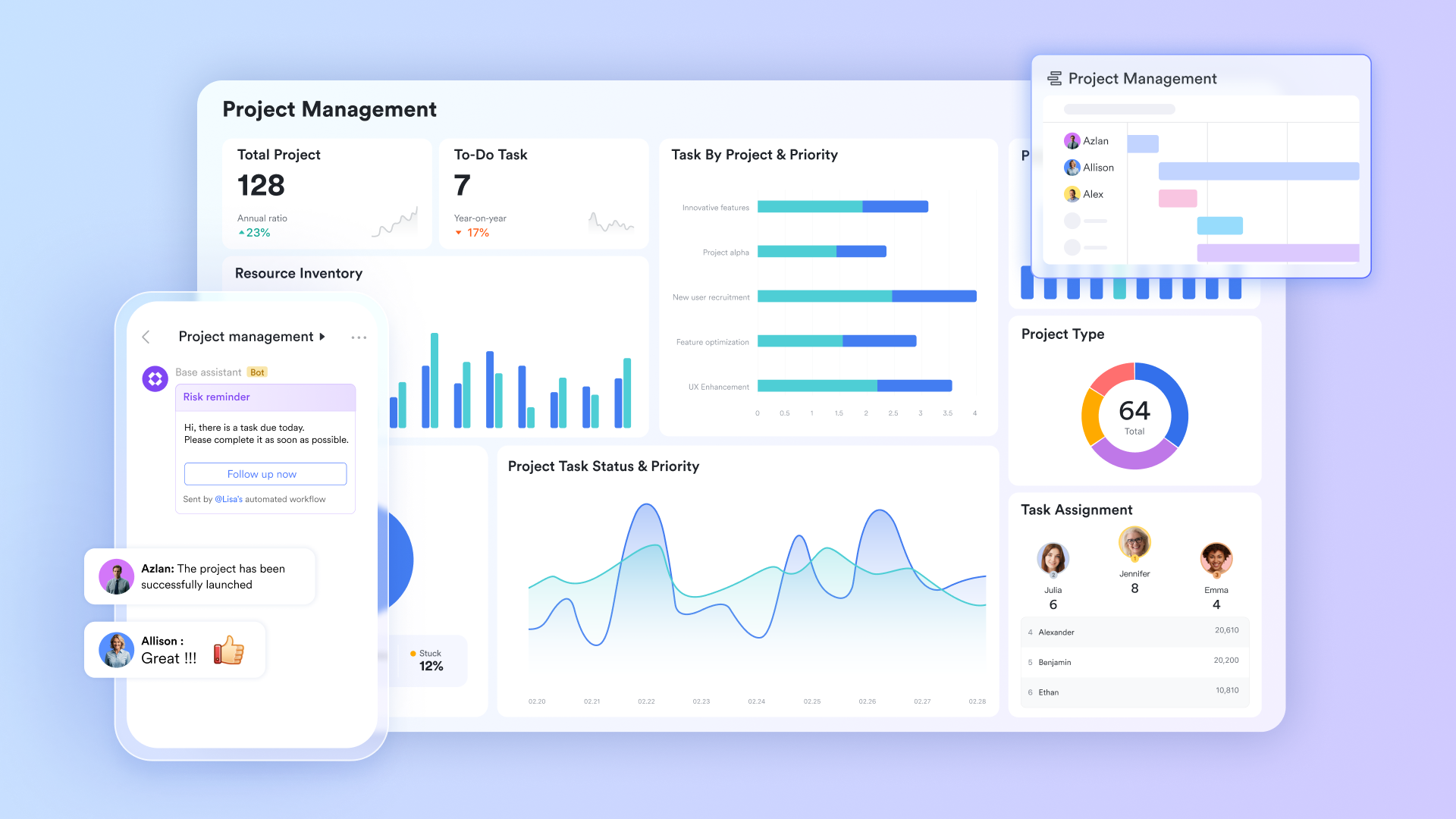
Lark Base allows multiple fields for different types of inputs. Teams can use a single structured system of record for backbone services and integrations—owners, data sensitivity, source/destination, frequency, dependencies, change windows, and current status—so teams can answer "what runs where and who owns it" without digging through chats.
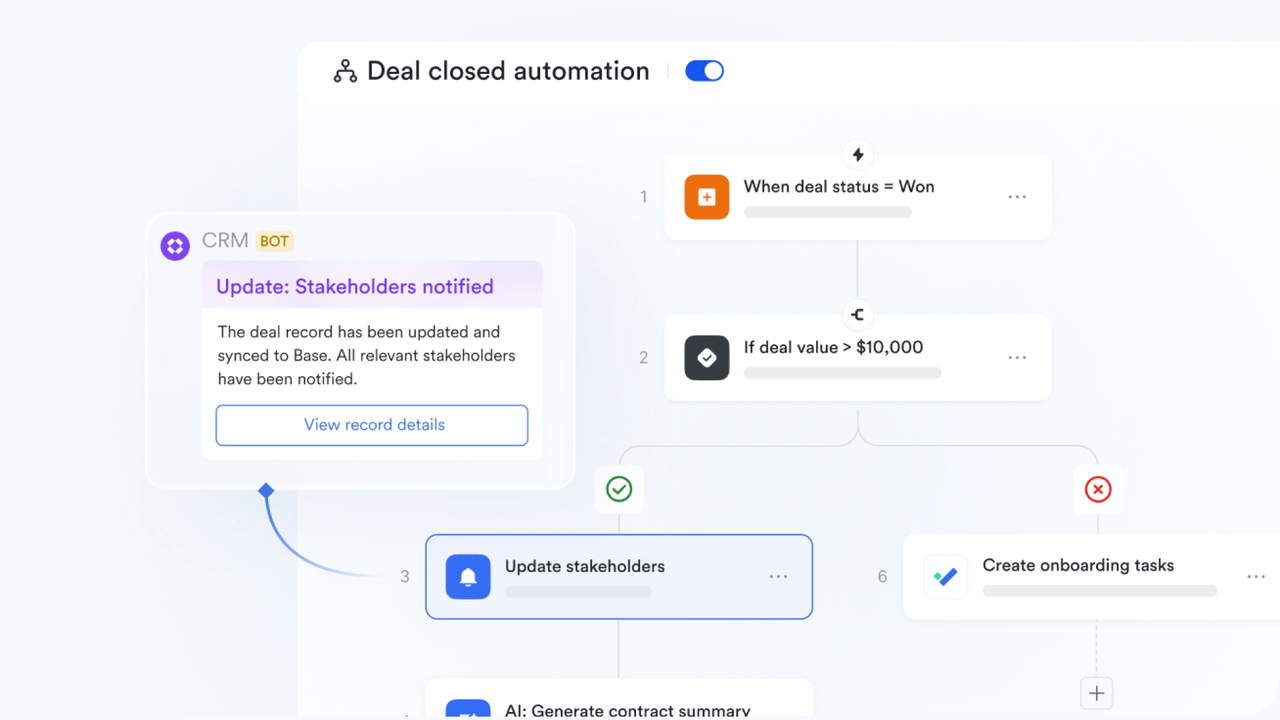
In addition, standardize the request-to-rollout path with a pre-set, customizable automated workflow that routes to the right approvers, enforces required fields, records decisions, and triggers follow-ups (documentation updates, alerts setup, rollback plan) so reliability doesn't depend on memory.
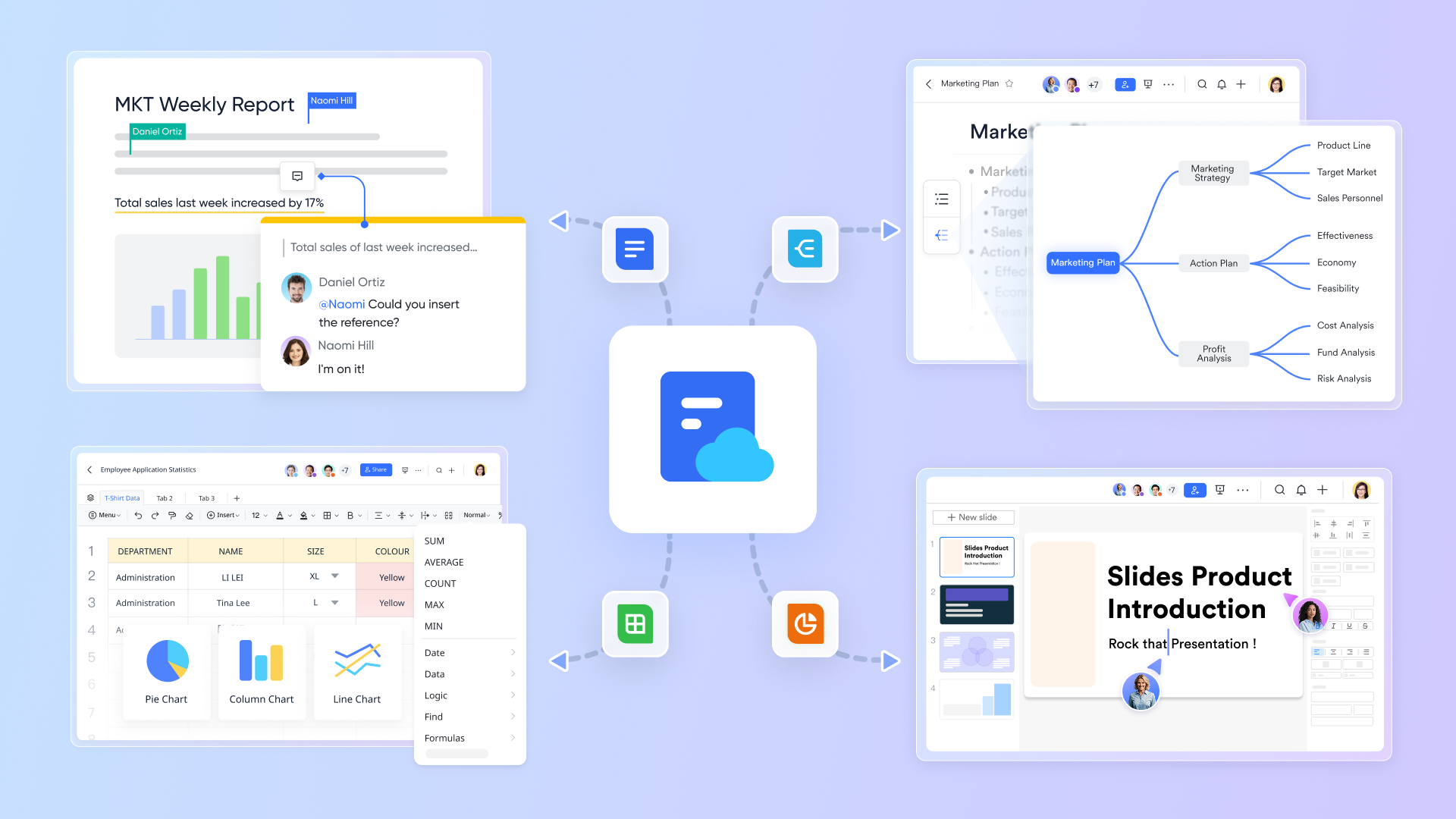
Lark Docs & Wiki keep the backbone legible with living documentation: Architecture boundaries, RACI, hardening baseline, runbooks, escalation paths, postmortems, and audit evidence checklists—organized in a shared wiki so updates are discoverable and versioned.
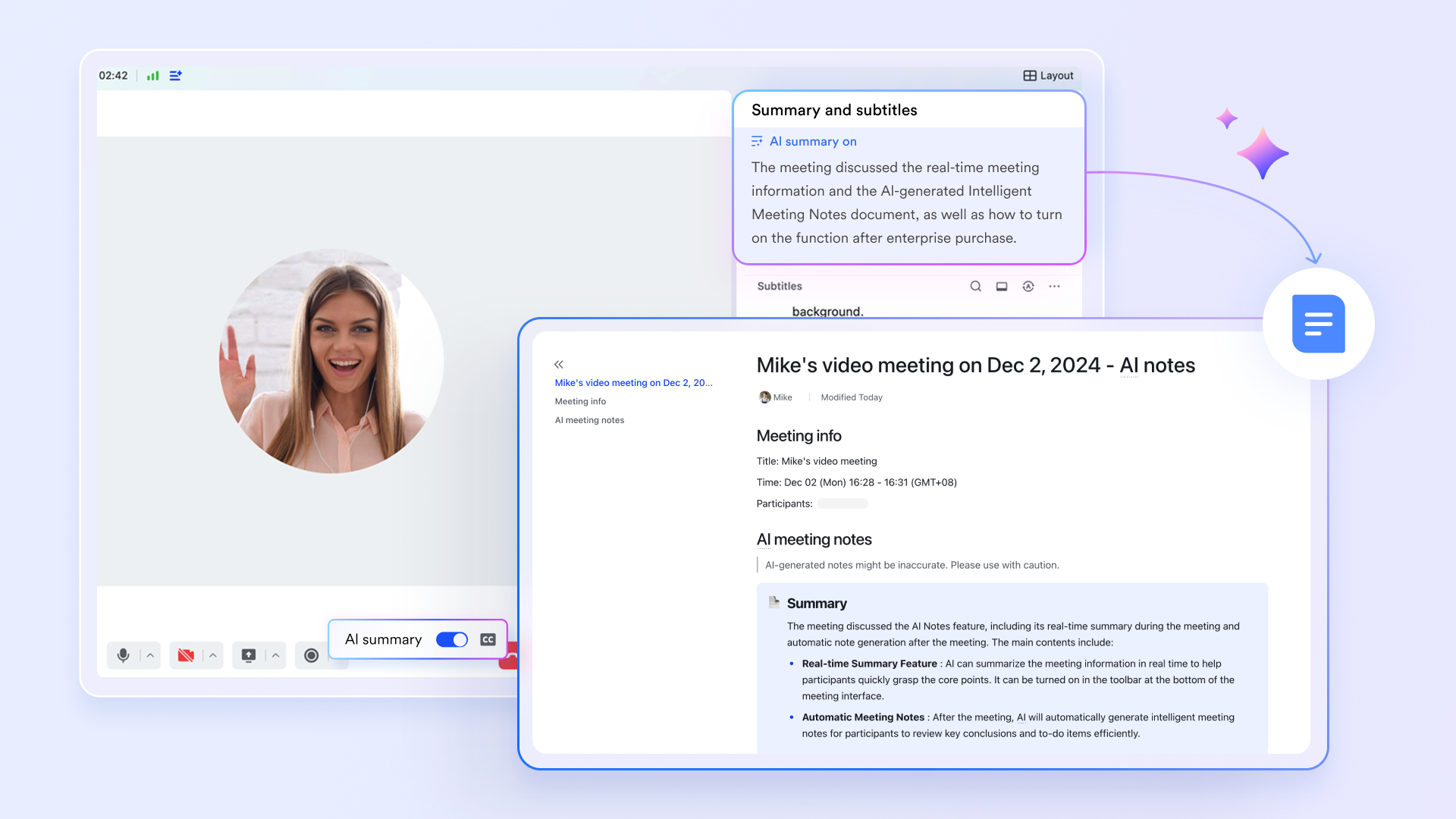
Lark Meetings runs lightweight governance without heavy process: Recurring change reviews, risk/security check-ins, incident reviews, and launch readiness meetings—using consistent agendas and decision notes so approvals and exceptions are traceable later.
Lark Messenger keeps day-to-day execution fast while staying auditable: Use dedicated channels for backbone operations, incident coordination, and change announcements; pin the current runbook and on-call contacts; and summarize key decisions back into Docs/Wiki so critical context doesn’t get lost in real-time threads.
|
Try Lark's savings calculator: Switching to Lark's Pro plan can lead to significant cost savings— for example, a 100-employee company using Slack, Google Workspace, and Airtable could save approximately $25,200 annually by consolidating their tools with Lark.














How many employees work at your company?
By number of people
1
20
500
5000+
1000
Which tools do you use?

Estimates are for reference only, contact us for an official quote

A practical TCO and risk conversation
When leadership asks, "why not just use more cloud services," a compelling answer must address both the total cost of ownership (TCO) and the cost of risk. A purely financial comparison is incomplete. The goal is to create a balanced view that includes direct costs, labor, and the potential impact of operational friction and failures.
Caution: Avoid fake precision
You do not need perfect, multi-year financial models to make a good decision. In fact, overly precise but speculative spreadsheets can undermine your credibility. A directional estimate grounded in known pain points, combined with a clear narrative about "what gets easier," is often more persuasive. Focus on a small pilot to learn and gather real data.
Total cost of ownership (TCO)
- Infrastructure costs: Server hardware/rental, storage, bandwidth, backup services, and monitoring tools.
- People time (Ops Load): Hours spent on patching, incident response, on-call rotations, security reviews, and planned maintenance.
- Delivery friction: Time lost by development teams waiting for allowlisting, completing vendor questionnaires, or debugging unclear data flows.
Cost of risk
- Integration failures: The business impact (revenue, data cleanup) and probability of critical integrations failing silently.
- Audit & compliance findings: The potential cost of failing an audit due to inadequate controls or documentation.
- Customer-facing downtime: The reputational and financial impact of performance degradation or outages for portals and dashboards.
Conclusion
A dedicated server isn't about rejecting cloud tools. It's about admitting that some parts of your stack behave like infrastructure—whether you planned it or not.
When integrations, portals, or security requirements become central to how work gets done, a small private backbone can reduce ambiguity: clearer ownership, clearer controls, and fewer "it depends" answers. Done well, it lets your cloud apps keep doing what they do best—while your critical connective tissue runs on something you can actually tune, secure, and explain.
FAQs
What do you mean by a "private backbone," and how is it different from moving everything on‑prem?
A private backbone is a small, controlled layer where you run the systems you own—integrations, connectors, internal APIs, and compliance-heavy workflows—while keeping collaboration (chat, docs, approvals) in cloud apps. It's not a full-on-prem migration. The goal is clearer boundaries, consistent hardening, predictable networking, and fewer "it depends" answers during audits and incidents.
When should a team seriously consider a dedicated server for this backbone?
Consider it when small failures start to add up: dropped webhooks during peak times, sluggish partner portals for key accounts, static IP allowlisting requirements, or recurring security questionnaires you can't answer cleanly. Dedicated infrastructure helps when demand is predictable, networking constraints are strict, or the integration surface area is growing. If your bottleneck is production speed and nobody can own operations, stay managed.
Who should be involved in the decision, and how do we avoid endless cross-team debates?
Bring three parties in early: business/system owners (value and scope), platform/IT (operations and architecture), and security/GRC (controls and audit needs). Use a lightweight RACI: clarify who approves scope, who owns hardening standards, who manages changes, and who leads incident response and evidence collection. The objective isn't bureaucracy—it's faster delivery by preventing confusion over ownership.
What governance is the minimum needed so the backbone doesn't become a risky "script graveyard"?
Aim for audit-ready basics: track who changed what and when (deploy/config notes), who accessed what and how (admin and privilege logs), and what the approved way to work is (runbooks and escalation). Add a simple intake for new integrations (form + review cadence). Keep execution private, but make workflow documentation visible in shared docs and project spaces.
How do we operate a private backbone without turning into "the ops team"?
Treat the backbone like a product with one clear owner and defined interfaces. Standardize a minimum hardening baseline (limited services, strong admin access, scheduled patching, monitoring). Design for integration reliability: queues, retries with backoff, dead-letter storage, and alerts on error rate and job duration. Keep collaboration in cloud tools and document boundaries so changes stay predictable.
Related reading
Table of contents
Start using Lark today

Manage all your work in one place
Boost team efficiency by 10x
Save up to 70% on software costs
Table of contents
Start using Lark today
Manage all your work in one place
Boost team efficiency by 10x
Save up to 70% on software costs
Keep reading








2026 Lark Technologies Pte. Ltd.
Headquartered in Singapore with offices worldwide.






Explore: