Software teams depend on reliable tools to capture defects, organize development work, and track quality throughout a release cycle. Jira bug tracking software is one of the most widely used systems because it offers structured issue fields, clear workflow states, and strong development tools. Teams that grow around Jira often appreciate its depth, though some companies prefer simpler tools that reduce configuration overhead. Lark appears gradually in this conversation because it focuses on connected collaboration rather than heavy setup. This creates a natural comparison between structured tracking in Jira and lightweight workflows in modern platforms.
Jira bug tracking system overview
The Jira bug tracking system provides a centralized framework for managing defects across software projects. Teams log reported issues into structured records that capture severity, priority, reproduction steps, affected environments, and ownership. The system routes bugs through configurable workflows so QA, developers, and can coordinate on investigation, fixes, testing, and closure while maintaining visibility across active sprints and releases.
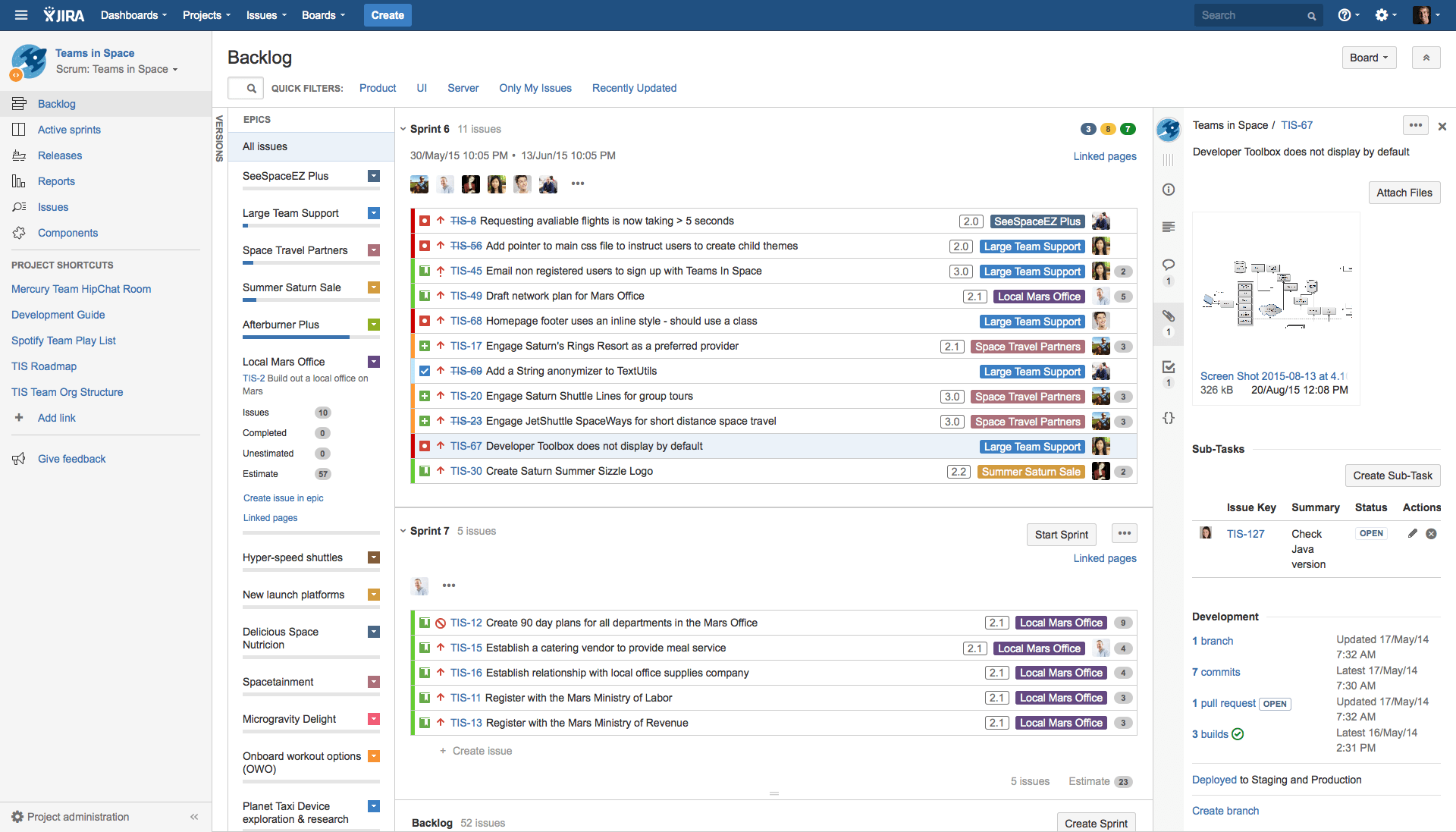
Image source: jira.com
How Jira software bug tracking works in daily QA operations
In daily use, Jira software bug tracking supports continuous quality workflows by aligning defect management with agile practices. Bugs are added directly into sprint backlogs or , where they are prioritized alongside ongoing development tasks. Developers pull assigned defects into active work stages, update remediation progress, and route fixes to QA for validation, while managers use dashboards to monitor defect volume and resolution trends across iterations.
Bug intake and reporting
QA engineers log defects directly from manual testing, automated test failures, or user reports using standardized issue forms in Jira. Each bug includes severity, priority, environment, build version, reproduction steps, screenshots, and logs. New tickets automatically enter the product backlog or active sprint board, ensuring every issue is captured in a structured and traceable format.
Sprint planning and prioritization
During sprint planning and daily stand-ups, product owners, developers, and QA teams review reported bugs alongside feature tasks. Issues are ranked based on business impact, customer severity, release risk, and technical complexity. High-priority defects are scheduled into upcoming sprints or escalated for immediate attention, keeping resolution aligned with delivery goals.
Active remediation tracking
Developers pull assigned defects into the In Progress stage of Scrum or Kanban boards. Progress updates, code commits, and discussions are recorded directly within each issue ticket, maintaining full workflow transparency. Status transitions reflect real-time remediation stages, helping teams coordinate work without manual status reporting.
QA validation and retesting
Once fixes are submitted, bugs move to Ready for QA or In Review. QA engineers retest impacted features across specified environments and test cases. Bugs are either closed after verification or reopened if issues persist, ensuring validation loops remain tightly controlled and quality standards are met before release approval.
Operational dashboards and reporting
Jira dashboards give QA leads and managers real-time visibility into defect volume, severity distribution, aging trends, reopen rates, sprint burn-down, and backlog health. These insights support daily monitoring, release readiness decisions, and continuous process optimization across development cycles.
Why teams move away from tracking bugs in Jira
Jira is powerful, but its extensive capabilities often lead to a high administrative burden. As teams grow and workflows become more complex, the tool shifts from an asset to a liability, creating friction across the organization. The following critical pain points, spanning from technical debt to user frustration, demonstrate why teams ultimately move away from Jira to track their bugs and manage their product lifecycle:
- Customization becomes a technical debt nightmare when using Groovy scripts and proprietary languages, making upgrades risky and slowing down feature delivery.
- Reporting limitations hinder business intelligence because extracting meaningful, real-time data for non-technical leadership often requires exporting to a third-party BI tool or relying on complex JQL queries.
- The user interface (UI) is often perceived as cluttered and non-intuitive, requiring multiple clicks to perform simple actions and leading to a frustrating experience, especially for new or casual users.
- Mobile experience is poor or inconsistent, making it difficult for on-the-go managers or support staff to update tickets, check dashboards, or quickly.
- The licensing model is often complex and non-transparent, with costs rapidly scaling based on tier jumps (e.g., 100 users to 2000 users) rather than a clear per-user fee, making long-term budget planning difficult. (I see you use annual pricing, which makes these licensing tiers a critical annual decision point.)
- Over-reliance on the "Jira ticket" as the single source of truth can lead to critical information being buried in comments or attachments, resulting in loss of context during handoffs.
- Integration with non-Atlassian tools can be brittle, requiring custom development or paid third-party apps that increase the cost and risk of maintenance.
- Poor support for non-software development teams means that features designed for code sprints (like Scrum/Kanban boards) don't naturally fit processes in Marketing, HR, or Legal departments, forcing awkward workarounds.
How should you track bugs in Jira
Bug tracking is a core part of any software development process, and the challenge lies in efficiently identifying, organizing, and resolving issues. The following steps guide you through setting up and utilizing a dedicated Jira Bug Tracking project to streamline and improve response times throughout the entire bug life cycle.
Step 1: Understand the Jira bug tracking system: The process begins on your Jira dashboard, which serves as your main project hub. On the left sidebar of the dashboard, you will find and click the option labeled apps to open the gateway to your Jira's enhanced functionality.
Step 2: Access the template and create a new project: Search for Jira's bug tracking software and sign up for a free account if necessary. Once logged in, navigate to your projects section and click "Create project." Scroll down to select the Bug tracking template under the Jira category.
Step 3: Initiate the bug issue: Once the project is created, navigate to the issue creation area. The issue type is automatically set to Bug. Fill out key fields like a concise "Summary," the full "Description", "Priority," and select an "Assignee" (or assign it to yourself).
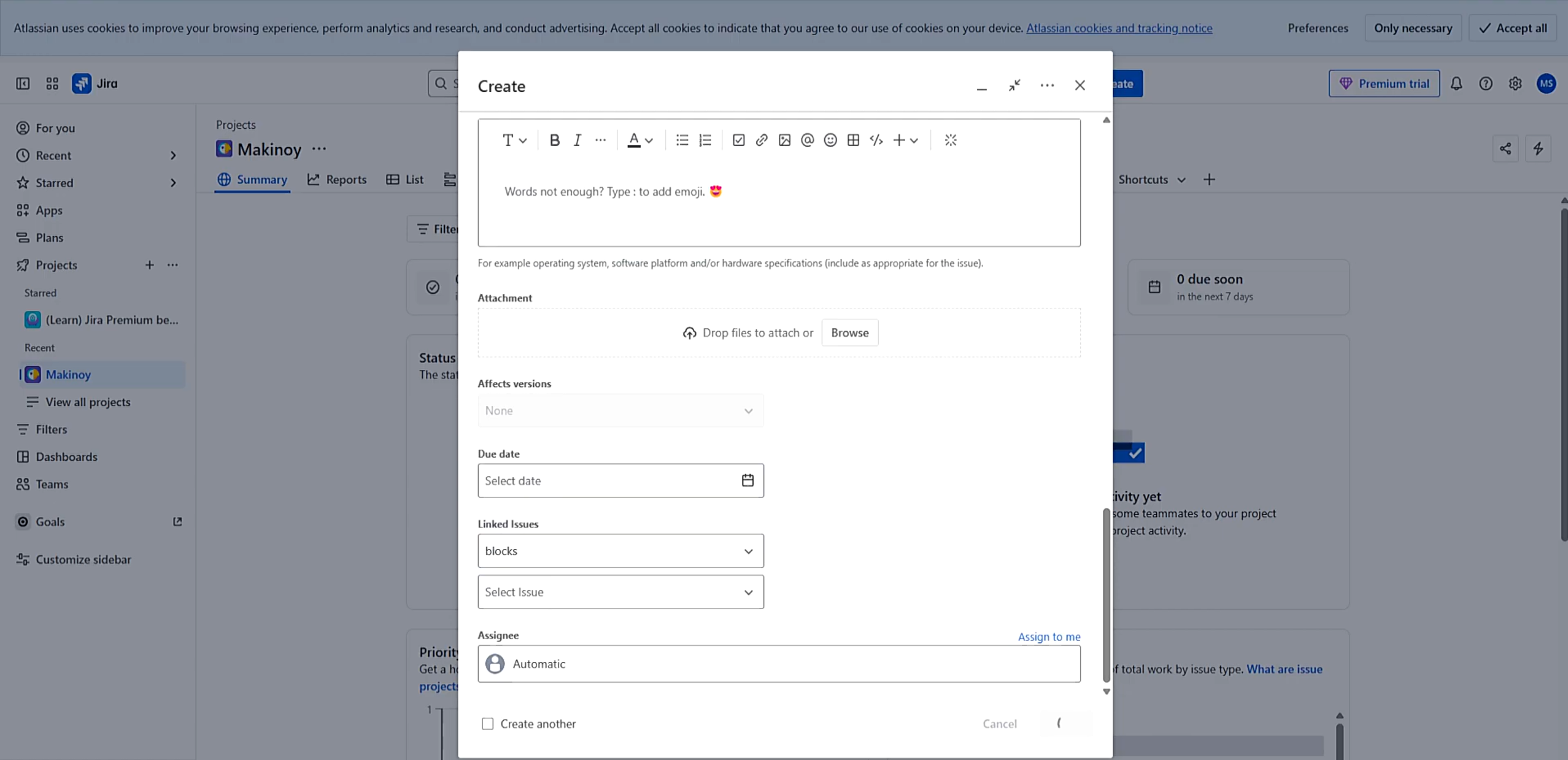
Image source: jira.com
Step 4: Track the bug via the board and list views: The project template provides visual tools like the board (showing status columns like "To Do") and a list view for easy navigation. To view or update a bug's details, click on the issue key to see its full description, environmental details, and current status.
Step 5: Utilize reports and project features: The template automatically generates various reports (e.g., cycle time, deployment frequency, average age) to gather data on your bug resolution efficiency. Other features include sections for "Releases," "Archived issues," and "Pages" for creating related documentation.
Step 6: Assign and manage the bug life cycle: Use the details panel of the bug to assign the issue to a specific team member. As the bug moves through the development life cycle (e.g., from "To Do" to "In Progress" to "Resolved"), the team updates the status, ensuring everyone has real-time visibility and nothing slips through the cracks.
Limitations of Jira bug tracking
Jira is widely recognized as the industry standard for agile development and issue tracking, and it is capable of managing complex bug resolution workflows. However, relying on Jira for defect management alone comes with distinct challenges. While powerful, its comprehensive nature can introduce friction. Before choosing or committing to Jira, it is important to be aware of its limitations in pure bug tracking scenarios:
- Complexity and Setup: Steep learning curve and time-consuming initial setup due to high customizability and extensive features (feature bloat).
- Cost of Scaling: Can become expensive as teams grow, and critical features often require purchasing paid third-party add-ons.
- Performance Issues: Instances can become slow and difficult to manage in large organizations with thousands of issues.
- Administrative Overhead: Requires significant effort and dedicated resources to maintain complex workflows and permissions.
- Less QA-Focused: Can feel less intuitive for testers than specialized tools, often requiring lengthy, manual data entry for bug reports.
- Reporting Difficulty: Generating simple, easy-to-digest reports for non-technical stakeholders can be challenging without complex JQL queries or external tools.
If these limitations significantly impede your Quality Assurance (QA) processes or slow down development cycles, your team may benefit from migrating to a different, more specialized platform. However, moving away from a deeply integrated tool like Jira requires careful planning to ensure a smooth transition and avoid data loss.
What to look for when migrating from Jira
When considering a migration to a new system, you must thoroughly evaluate its capabilities against your existing needs. Here is a list of crucial features and considerations to look for when evaluating alternatives and planning your move away from Jira:
- Data import and export flexibility: Ensure the new system supports so historical bug records, attachments, comments, and statuses move cleanly without losing critical context or traceability.
- Template availability: help teams get operational quickly instead of rebuilding workflows from scratch. Templates reduce setup time and preserve reporting consistency during the transition period.
- Workflow recreation limits: Review whether custom Jira workflows—with multiple statuses, approvals, or handoffs—can be recreated without excessive configuration. Some platforms to improve usability, which may require teams to adapt processes.
- Chat, documentation, and task linkage: Verify that conversations, specifications, and execution tasks can connect directly to bug records. Maintaining these links reduces scattered communication and keeps investigation, fixes, and documentation tightly aligned.
- Automation parity: Evaluate whether key automation features—such as assignments, notifications, escalations, and status updates—can be replicated without complex rule building or reliance on paid add-ons.
When teams prioritize minimizing setup while strengthening collaboration across bugs, tasks, and documentation, platforms like naturally become part of the migration conversation as unified workspaces that support connected workflows without heavy configuration.
See how unified workflows improve defect resolution
Meet Lark: All-in-one platform for full chains of bug management
Teams that want fewer configuration steps often explore tools that combine chat, , tasks, and databases in one system. provides this type of unified experience, allowing teams to track bugs, document findings, and collaborate in a single workspace. It differs from Jira bug tracking software by minimizing setup and maximizing connected workflows. The following sections explain how Lark supports at scale while keeping processes lightweight.
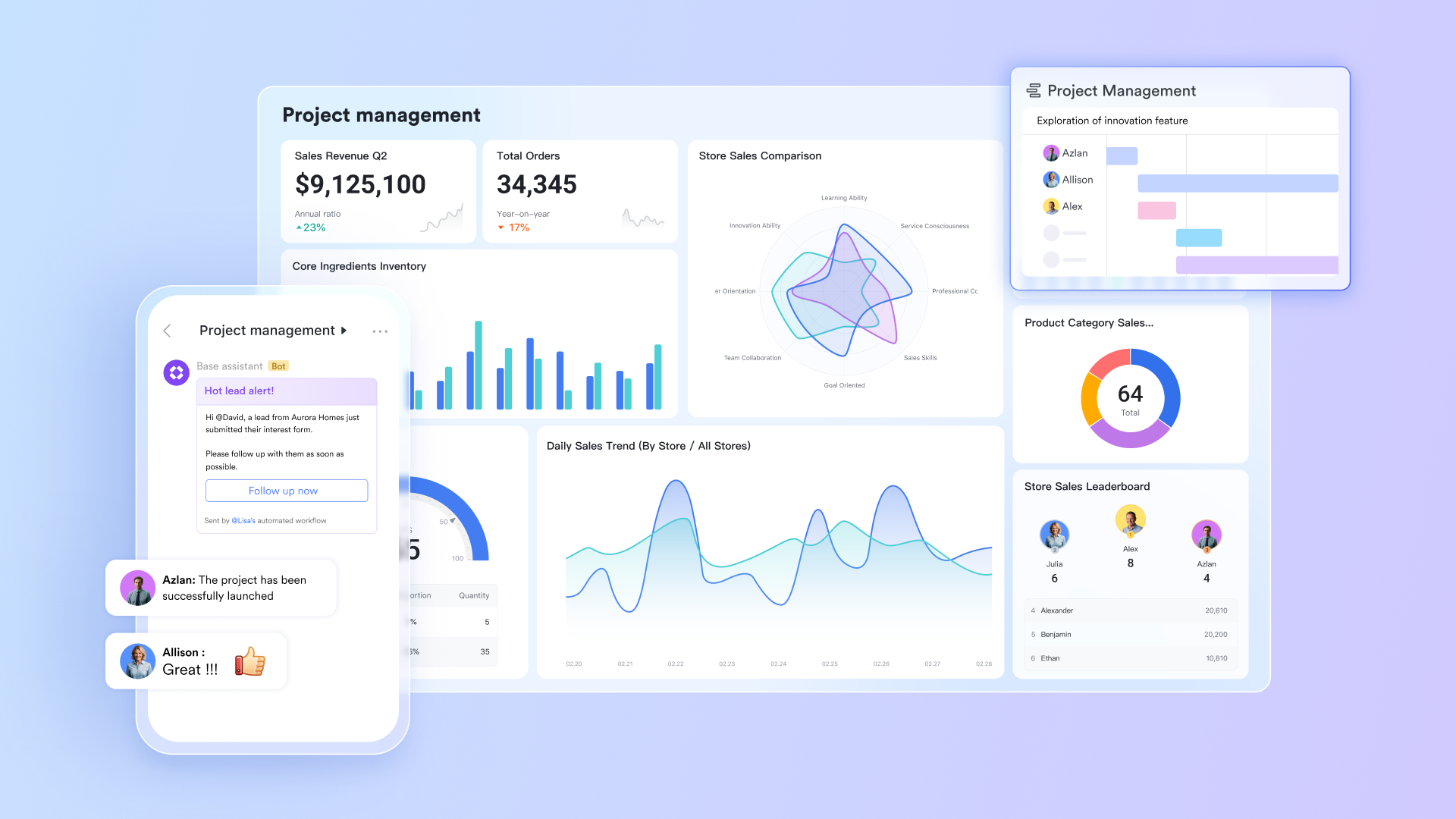
Central bug database in Lark Base with custom fields
gives teams a structured, flexible space to log every defect in one organized system. You can define custom fields for severity, environment, module, reproduction steps, expected behavior, owner, priority, affected version, and more. Each entry becomes a complete, structured bug profile rather than an unformatted text note. Base also supports attachments, reproduction media, and linked records, making it easy to capture everything a developer or QA engineer needs to understand the issue. Because Base acts as a true database, teams get a single authoritative location where all bugs live, no scattered sheets, no disconnected notes.
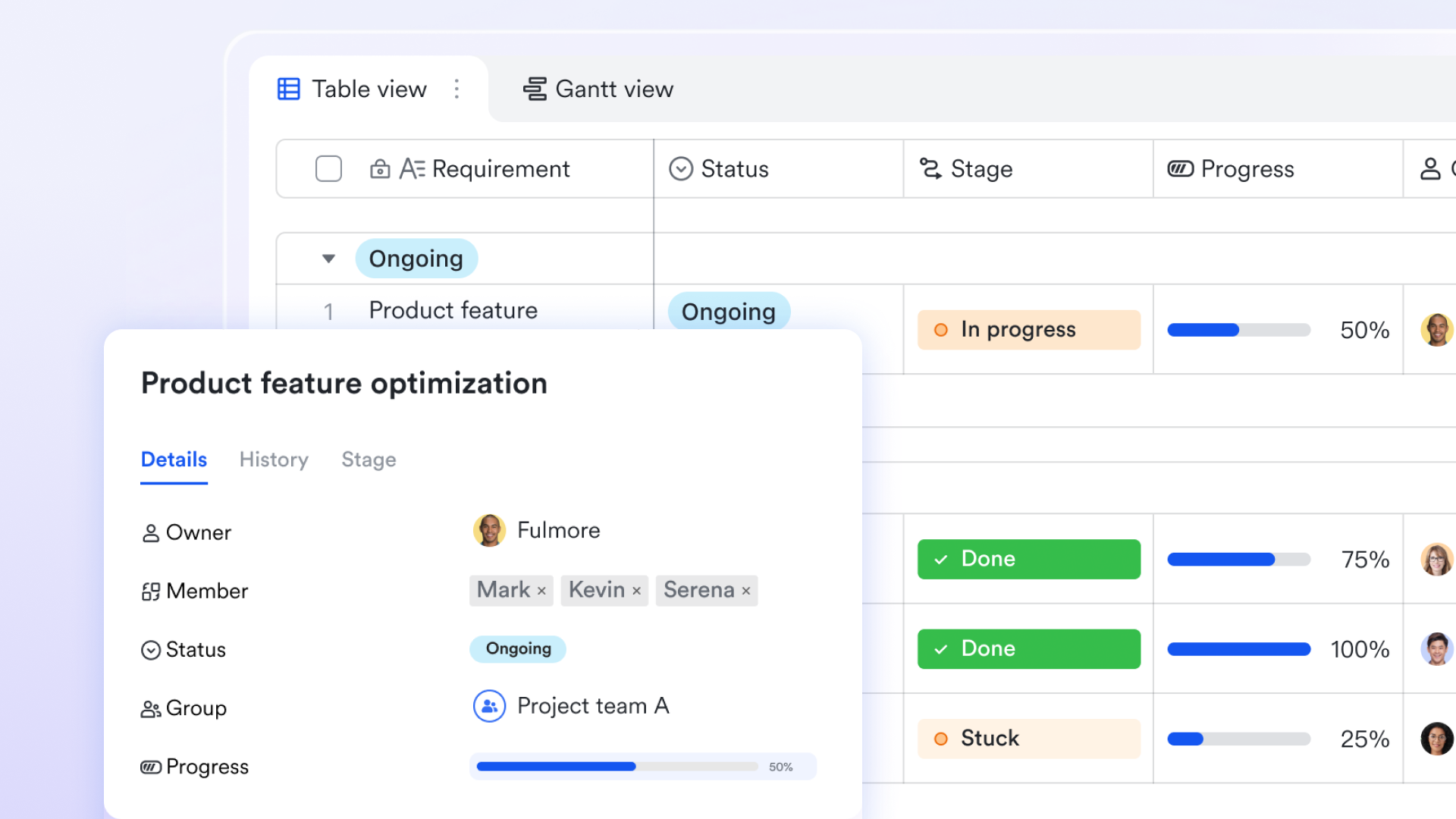
Groups, filters, and sorting for triage and prioritization
During bug triage, teams need to quickly slice information to reveal what matters most. With advanced filters, Base allows you to group bugs by severity, sort them by priority, or filter them by sprint, owner, environment, or status. This makes triage sessions faster and clearer because project leaders and QA managers can instantly see high-impact defects, blockers, or overdue items. These views can be saved and reused by the team, ensuring everyone works from the same organized bug backlog. 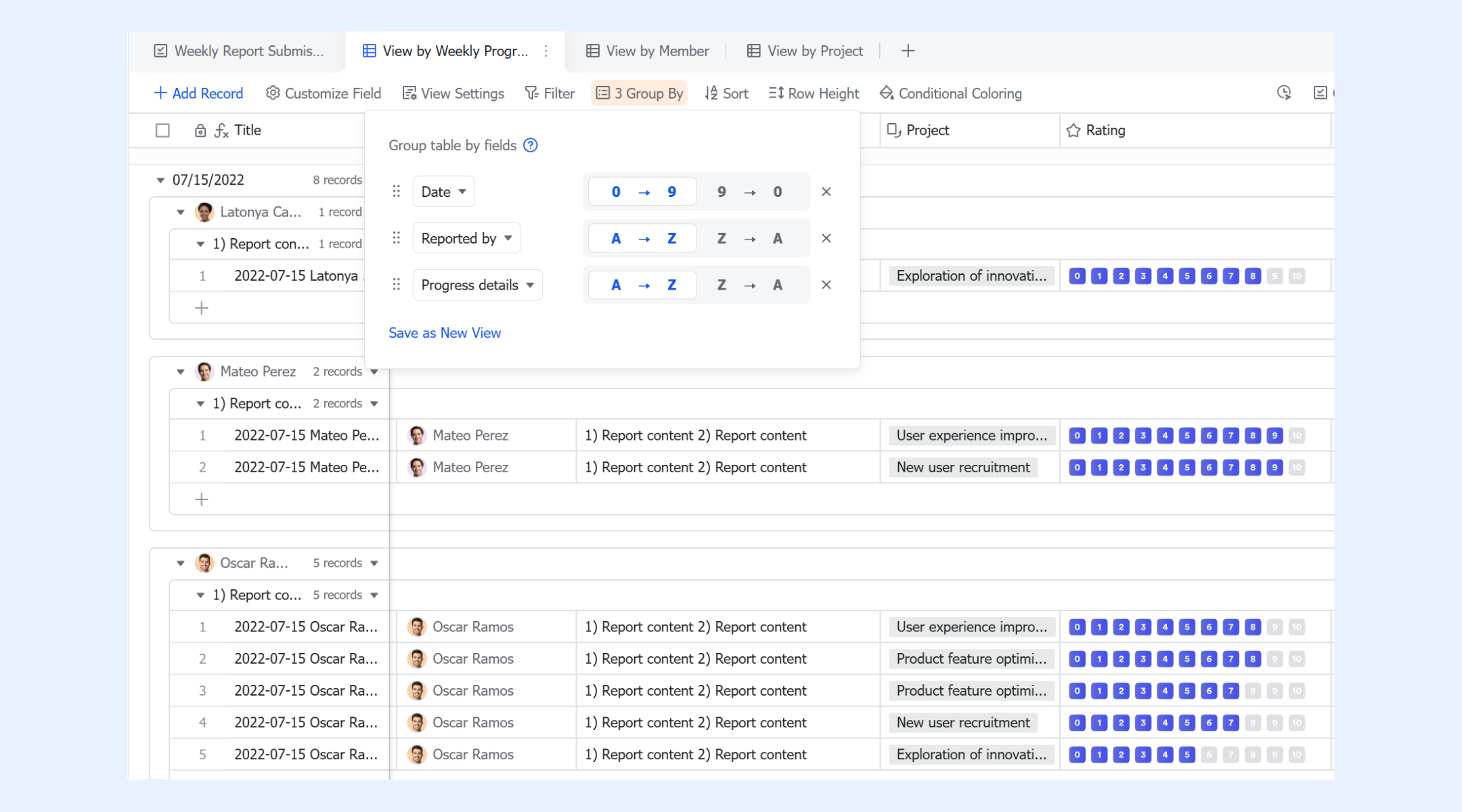
One-way and two-way links to tasks, docs, sprints, and project records
Bug tracking becomes far easier when related work stays connected. Lark enables one-way and two-way links between a base bug record and its related items, such as a developer's task, a sprint record, a technical spec, or a documentation reference. This creates transparent relationships that help teams understand the full context of a bug: what feature it affects, which task fixes it, and what documentation supports it. Since links are visible from both sides, teams avoid misalignment and never lose track of dependencies. 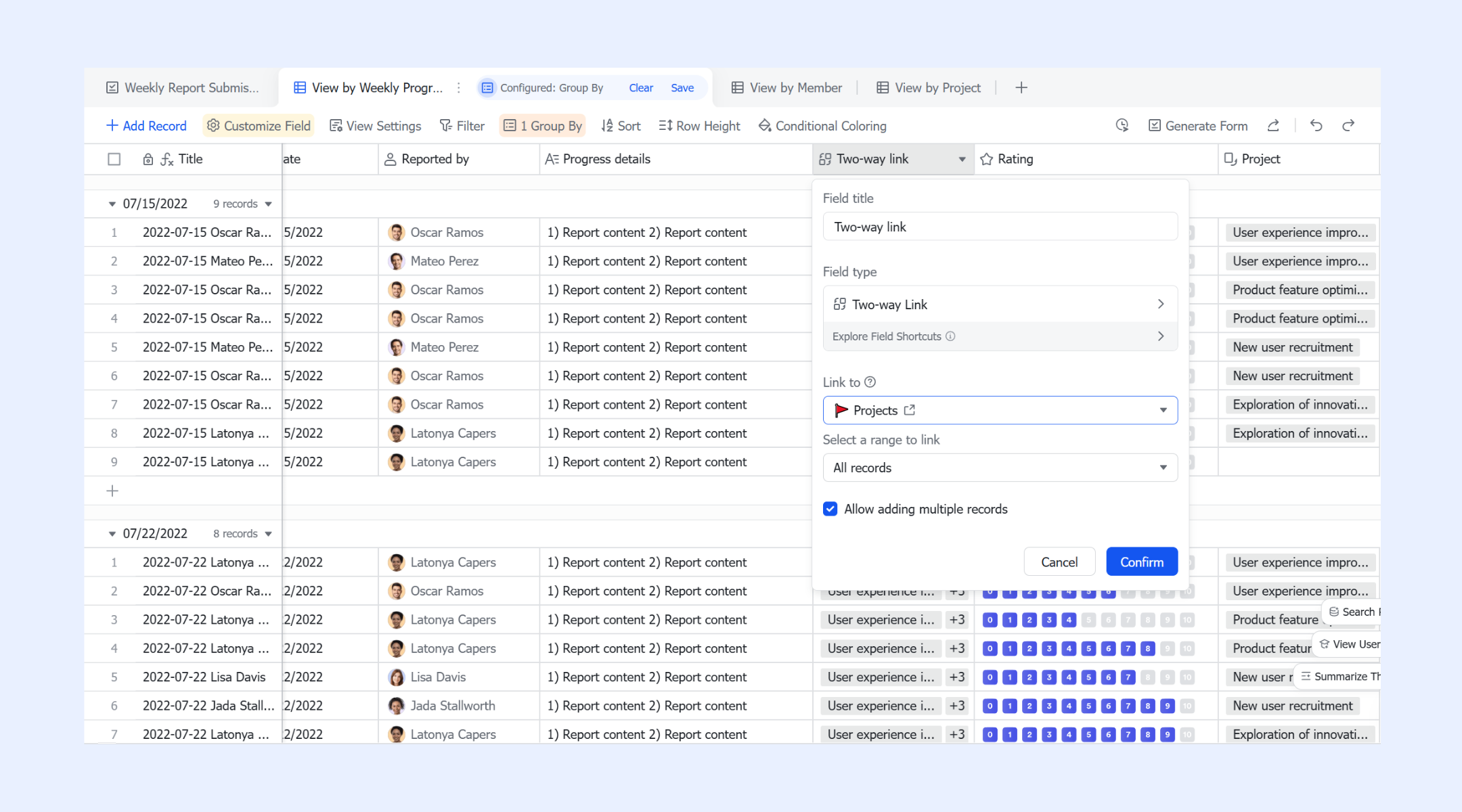
Flow fields to visualize each bug's lifecycle
Flow fields in Base give you a visual, structured representation of bug progression. Instead of guessing where a bug stands, teams can see it move from "Reported" to "In Progress," "Awaiting QA," "Verified," and "Closed." This visual clarity helps project leads identify bottlenecks, see which bugs are stuck, and keep sprints on track. Flow fields also work well in review meetings, offering a real-time view of how many defects remain before release. 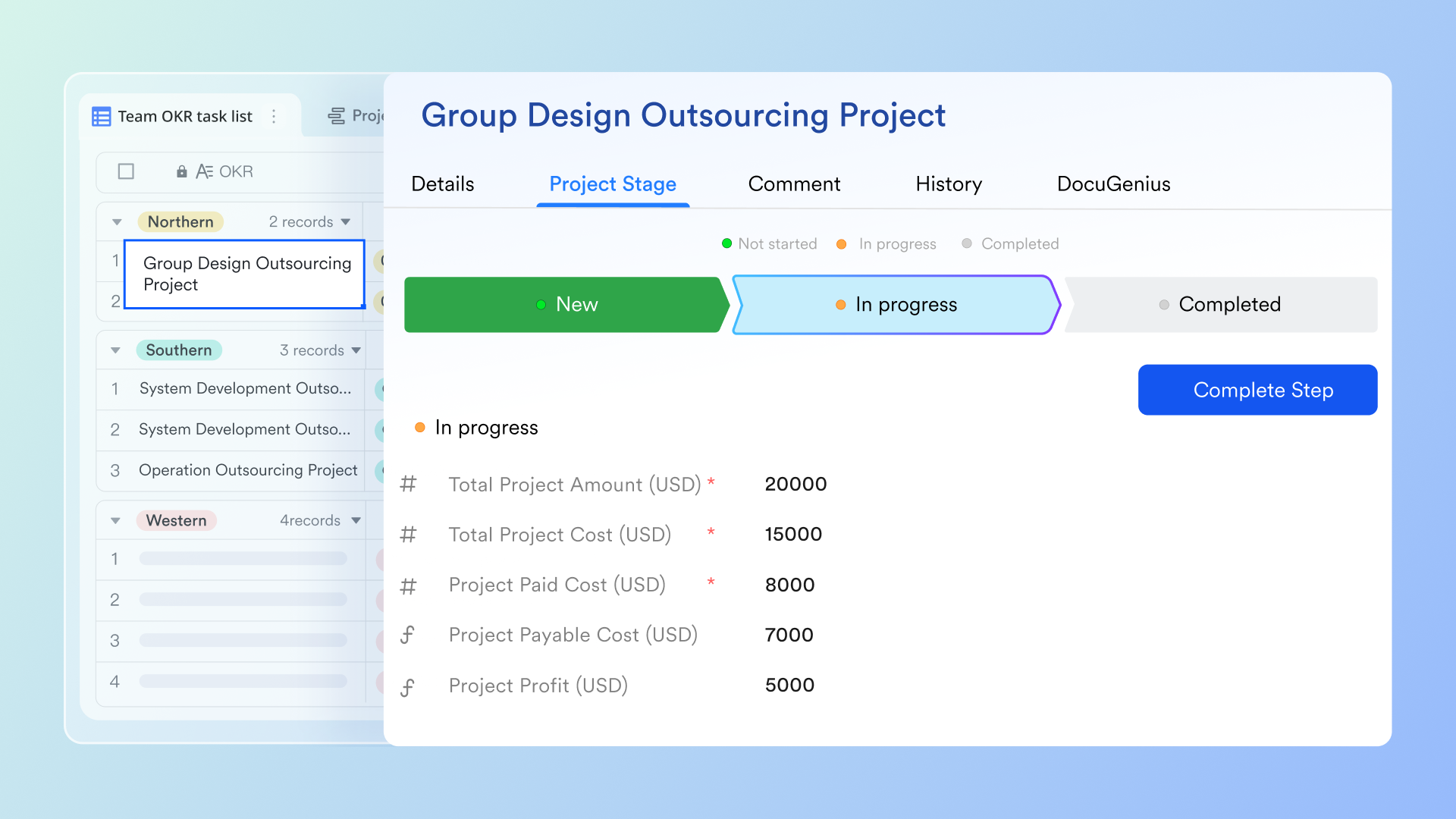
Tasks for ownership, execution clarity, and daily work tracking
Lark Tasks help teams turn bug records into actionable work. Once a bug is assigned, the owner can break the work into subtasks, add checklists, set reminders, add tags for categorization, and follow the task to monitor updates. Tasks bring execution discipline to the bug-fixing process. Developers always know what they need to resolve, QA knows what's waiting for verification, and project leads can see progress, set or subscribed by themselves, without micromanaging. Because tasks can link directly to base entries, the bug database stays in sync with daily execution. 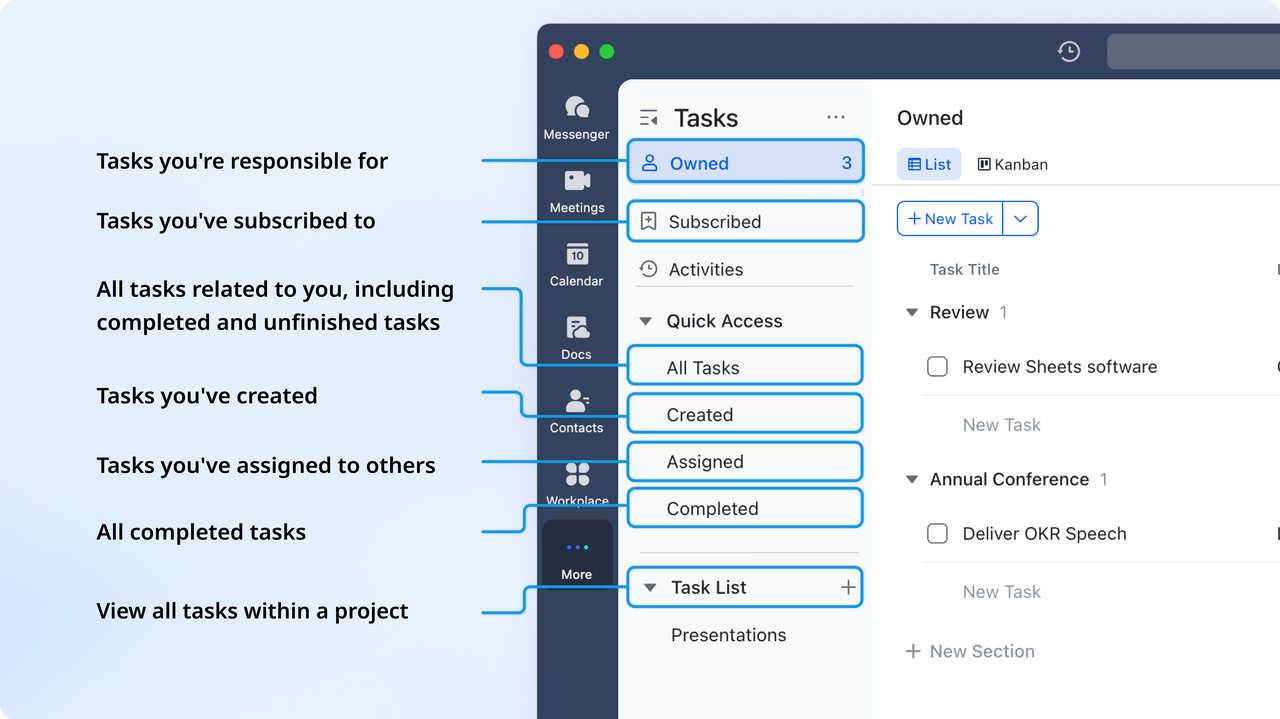
Approval for QA verification and sign-off
helps QA teams verify fixes before closing bugs. After a developer marks a bug as resolved, a verification request can be sent to QA through Approval. Reviewers can leave comments, attach validation results, request changes, or confirm the fix. Approval creates a clean audit trail showing who verified the defect, when it was approved, and what feedback was exchanged, something Jira often handles through custom workflows that require complex setup.
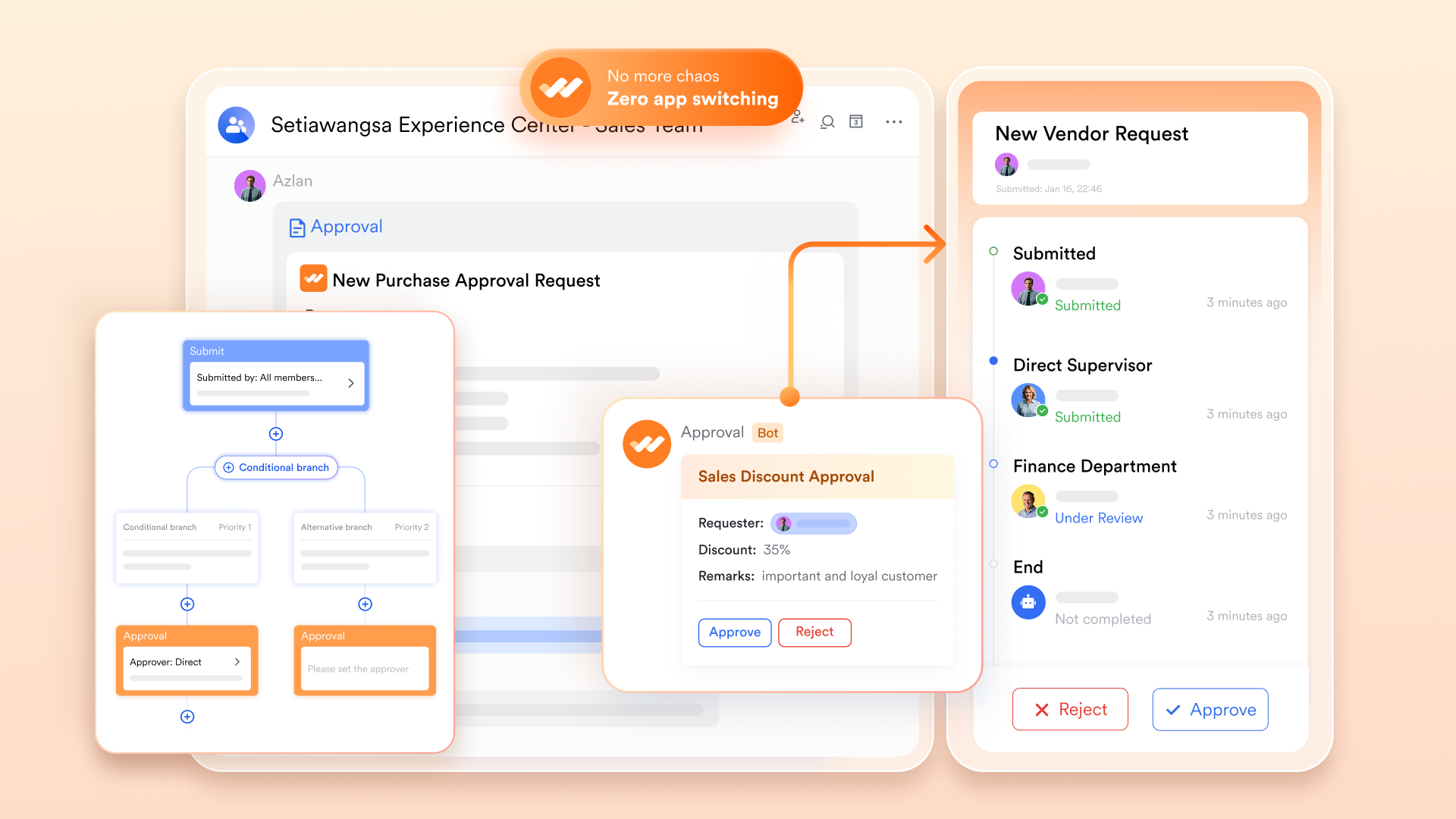
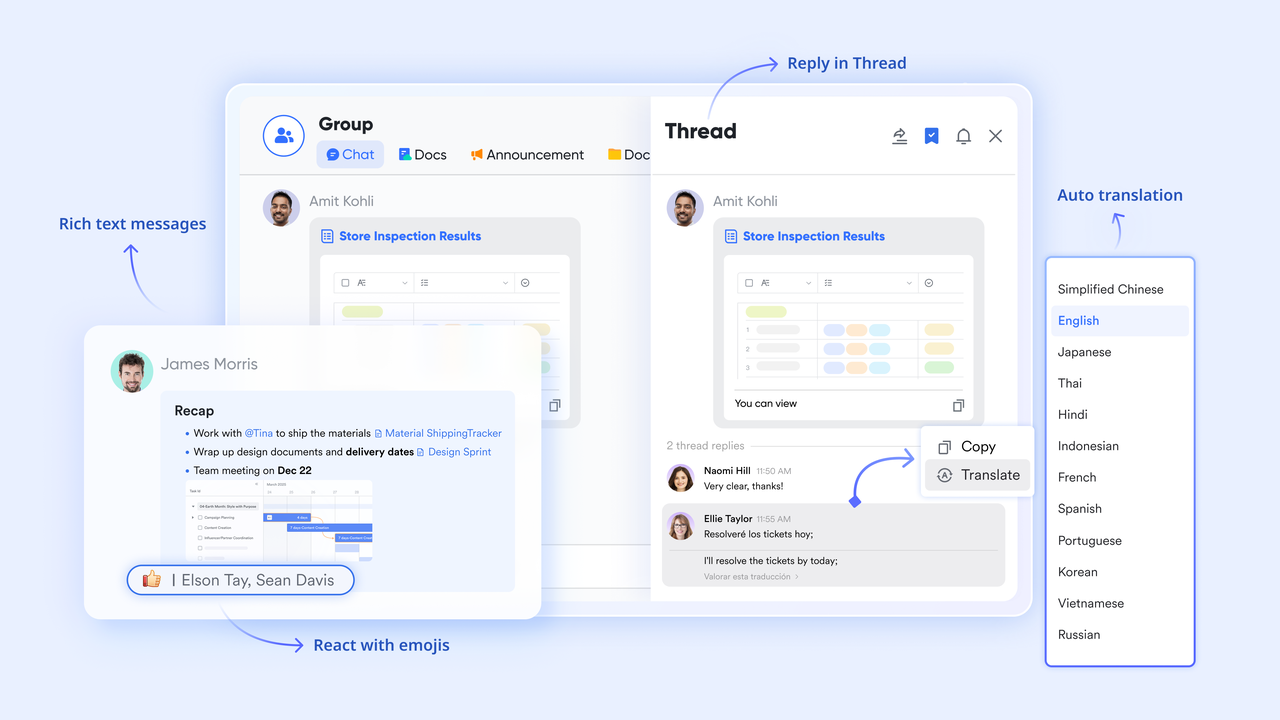
Messenger threads, pins, and shared references for bug discussions
Bug fixing often requires back-and-forth clarification, and keeps these conversations tied directly to work. A team can create a thread linked to a base bug record, discuss logs, pin key reproduction steps, flag messages that need follow-up, and share related tasks or docs right inside the chat. This eliminates scattered messaging across different tools and helps teams solve issues faster, because every conversation stays connected to the specific bug being discussed.
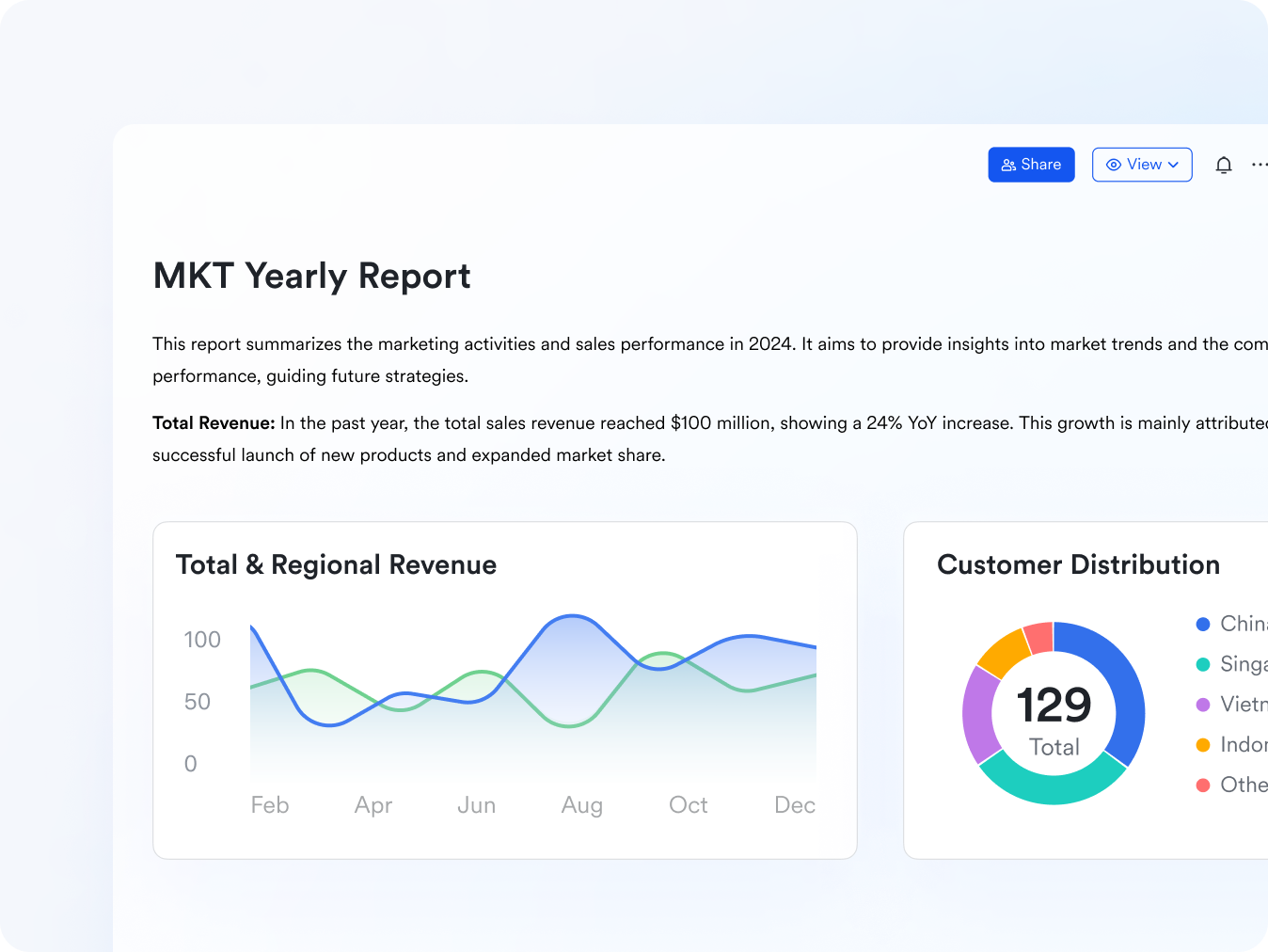
Docs for RCA, reproduction steps, logs, and long-form collaboration
supports deeper analysis and long-form documentation for bugs. Teams can create root-cause analysis documents, store detailed reproduction instructions, paste logs or stack traces, embed screenshots or videos, and capture cross-team notes. Docs can be linked directly to Base bug entries for immediate context. Because Docs supports multi-user editing, QA, developers, and project managers can update the same document without version conflicts, no longer scattered Google Docs or Confluence pages.
:
- Starter plan: Free forever plan that includes 11 powerful tools for up to 20 users. It also comes with 100GB of storage, 1000 automation runs, AI translations, and more.
- Basic plan: $6/user/month (billed annually) for up to 500 users. It includes everything in Starter plus group calling for up to 500 attendees, 5TB of storage, 1000 automation runs, and more.
- Pro plan: $12/user/month (billed annually) for up to 500 users. It includes everything in Starter plus group calling for up to 500 attendees, 15TB of storage, 50,000 automation runs, and more.
- Enterprise plan: for custom pricing. Supports unlimited users and includes even more automation runs and advanced security, compliance, and management features.
For small teams with simple communication needs

18 months message history
1000 Base automation runs/month
2000 rows per table in Base
Most POPULAR
For companies with comprehensive collaboration and management needs
Unlimited message history
500-participant video meetings
50k Base automation runs/month
20k rows per table in Base
For large companies with advanced security and organizational management needs
Get a personalized demo and pricing
Unlimited message history
500-participant video meetings
15 TB storage + 30 GB storage/user
500k Base automation runs/month
50k Base automation runs/month
Most POPULAR
For companies with comprehensive collaboration and management needs
Unlimited message history
500-participant video meetings
50k Base automation runs/month
20k rows per table in Base
When Jira is the right choice vs when Lark is a better fit
Choosing between depends on team size, , and collaboration style. Large engineering organizations often prefer deeper customization, while smaller or multi-department teams prefer simplicity. The comparison below outlines situations where each system becomes a natural match. This helps readers understand which environment suits their daily work.
When Jira is the right choice
- Teams that use advanced workflows benefit from Jira’s detailed configuration capabilities. These controls help large engineering groups design precise issue paths that match complex release structures. It supports predictable handoffs in environments that require strict process alignment.
- Organizations with large engineering groups often need permission controls and state transitions. Jira offers these options so teams can manage who edits issues, moves states, or triggers reviews. This level of structure helps maintain consistency across multiple squads.
- Companies with strict reporting standards prefer Jira dashboards for quality metrics. These dashboards help leaders track defect trends, release readiness, and long term quality indicators. Structured reporting becomes essential when products have high compliance needs.
- Development teams rely on plugins and connections linked to code repositories. Jira’s marketplace ecosystem supports tools for commit tracking, CI pipelines, and code reviews. This creates a familiar workflow for engineers who work closely with source control systems.
- Jira fits long term teams that expect hundreds of issue categories and components. Large product organizations often require deep categorization to manage different modules or features. Jira provides the structure needed to organize complex backlogs cleanly.
When Lark is a better fit
- Teams want to reduce switching between chat, documents, tasks, and bug records. Lark offers a connected workspace that keeps conversations and works in one place. This avoids the friction of jumping across multiple tools during daily collaboration.
- Groups prefer lighter workflows that minimize configuration. Lark allows teams to start quickly without designing complex workflows or issue types. This makes ongoing maintenance easier and reduces setup burdens over time.
- Cross-functional departments find value in connected collaboration. Lark brings QA, engineering, product, and support teams together through shared views, tasks, and threads. This helps people align naturally around each bug or feature.
- Companies appreciate unified workspaces that keep all information together. Bug details, documents, approvals, and tasks remain linked so teams never lose context. This supports faster problem-solving and clearer communication.
- Teams looking for lightweight tracking find Lark more approachable than bug tracking software Jira. Its simpler structure helps new members onboard quickly and reduces confusion during fast moving sprints. This is useful for teams that prioritize speed over heavy configuration.
In a nutshell, Jira excels when your primary need is rigid process control and highly complex, large-scale workflows. However, if your team prioritizes speed, ease of use, and eliminating the friction of switching between separate chat, doc, and task applications, Lark is the definitive choice. For modern, agile teams seeking a unified workspace that accelerates collaboration, Lark simplifies your entire workflow.
Conclusion
Jira bug tracking software remains a strong choice for engineering teams that need structured fields, complex workflows, and deep development tools. Its flexibility supports large codebases, multiple squads, and rigorous release processes. At the same time, many organizations now want tools that reduce complexity, improve communication, and unify collaboration across functions. offers an alternative that brings bug tracking, messaging, documentation, tasks, approvals, and automation into one workspace. This makes it appealing for teams that want simplicity without losing clarity. The best choice depends on whether a company values detailed configuration or . By reviewing both options, teams can decide which environment fits their development rhythm, communication style, and long-term workflow expectations.
Discover faster ways to manage software bugs
FAQs
How do Jira and lightweight bug trackers differ in setup time?
Lightweight tools usually start faster because they rely on simple defaults and fewer configuration steps. Jira bug tracking software needs more setup when teams create workflows, permissions, and dashboards for larger environments. Smaller groups often choose tools that reduce early setup work. Lark appears in these conversations because it offers connected collaboration with minimal configuration. Both options provide value depending on workflow size.
What fields should every bug report include?
Useful fields include severity, priority, environment, owner, expected behavior, actual behavior, and reproduction steps. These details help developers resolve issues without follow-up requests. Many teams use a Jira bug tracking system to customize fields to match their review practices. Clear field structure supports smoother triage and planning. Lark also supports structured bug fields through Base for teams wanting simpler setups.
How do QA teams keep bug backlogs clean and organized?
QA teams maintain clean backlogs through regular triage cycles and scheduled reviews. They close stale issues, merge duplicates, and confirm reproduction steps before prioritization. Dashboards inside Jira software bug tracking systems help monitor aging defects and verification queues. This prevents confusion during sprints and supports higher release quality. Some teams use Lark to coordinate reviews because conversations, tasks, and bug records stay connected.
What metrics matter most in bug tracking?
Important metrics include open bug count, resolution time, defect age, , and reopened issue rate. These values reflect stability and overall engineering efficiency. Jira bug tracking software visualizes these metrics through configurable dashboards that teams monitor during release planning. Tracking clear indicators supports long-term improvement. Lark users also review similar patterns using base views and task progress.
Are open-source bug tracking tools reliable for long-term use?
Open source systems such as , , and are reliable when maintained with regular updates and proper hosting. Many teams choose them for flexibility and control over their environment. These tools fit organizations with the technical capacity to manage infrastructure needs. They provide structured tracking without subscription costs. Some teams consider Lark when they want connected collaboration rather than self-hosted maintenance.
Related reading





























